Docker Tech Talk with Demo
Docker Tech Talk
1
Sandeep Karnawat
Principal S/W Engineer
Sample Agenda
1 Docker Background
2 How to Use Docker
3 Docker Inside
4 Docker Demo
Docker Tech Talk
2
What is docker?
• Docker is:
– An open platform for developers and sysadmins to develop, ship, and run
distributed applications [docker.io]
– An open-source project that automates the deployment of applications
inside software containers by providing an additional layer of abstraction
and automation of operating system-level virtualization on Linux
[Wikipedia]
– A tool that can package an application and its dependencies in a virtual
container that can run on any Linux server [451 Research]
Docker Tech Talk
3
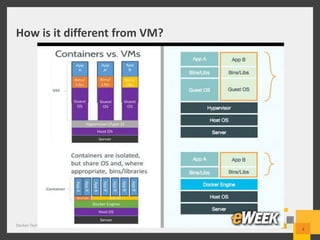
How is it different from VM?
Docker Tech Talk
4
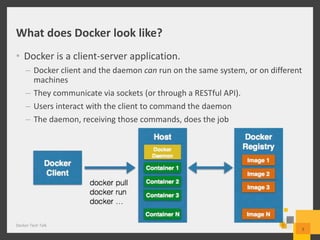
What does Docker look like?
• Docker is a client-server application.
– Docker client and the daemon can run on the same system, or on different
machines
– They communicate via sockets (or through a RESTful API).
– Users interact with the client to command the daemon
– The daemon, receiving those commands, does the job
Docker Tech Talk
5
Sample Agenda
1 Docker Background
2 How to Use Docker
3 Docker Inside
4 Docker Application
Docker Tech Talk
6
How to download a docker image
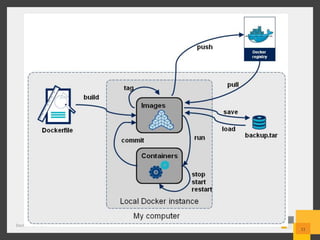
• docker pull <image_name>
– Pull: fetch the image from the Docker Hub Registry
(registry.hub.docker.com)
– Image_name: usually consist of user_name/image_name
– E.g., sudo docker pull skarnawat/mytest_docker
Docker Tech Talk
7
How to launch a docker container
• docker run –it <image_name> [command_name]
– Option –t: allocate pseudo-terminal
– Option –i: interactive mode
– Eg: docker run –it mingwei/mytest_docker bash
– Note: when you run “bash” option -i and –t are both needed
– When you do not need “terminal”; use “–d” instead of “-it”
• Where is my container?
– docker ps
– docker ps –a (all containers you have run)
• How can I name my own container?
– docker run –it –n mycontainer mingwei/mytest_docker bash
Docker Tech Talk
8
How to generate a new image?
• Manually Create Image
– A container is a running instance of an image
– When all processes inside container exit, container is stopped
– One way to create a new image:
• Create a new container using “docker run –it <image> bash”
• Issue commands: “apt-get install <software>”
• Transform your container to an image:
– docker commit <your_container_name> <your_new_image_name>
– What if I didn’t name my container?
• Use the automatically assigned container id instead.
• Container id could be found using “docker ps “
Docker Tech Talk
9
How to generate your own image
• Dockerfile
– Like a makefile, you use it to automate the building of an image:
• docker build –t <your_img_name> .
• Your image is built using the Dockerfile in current directory
• Docker file contains a sequence of commands
– Inside Dockerfile:
• Updates will be applied to new image
• FROM: base image you specify
• RUN: run a command inside container
• ADD: copy files into new image
– Note: tar, gzip bzip2 and etc will be decompressed
• Other Directives:
– http://docs.docker.com/reference/builder/
Docker Tech Talk
10
From ubuntu:14.04
Author: skarnawat
RUN apt-get install binutils
ADD myfile.tar /app
VOLUME [“/yourdata”]
…
Docker Tech Talk
11
Login to Existing Container
• You can’t login to an existing container, if
– The container does not have terminal (launched with –d but not –it)
– E.g., docker run –d skdocker/apache apache2ctl -D FOREGROUND
• Option1: sshd server
– Using a sshd, you could login to existing container
– Issues: manage passwords, keys
• Option2: use docker attach
– Docker attach <container_name>
Docker Tech Talk
12
Docker Tech Talk
13
Docker: Under the Hood
Implementation and Details
Docker Container Implementation
• Namespaces
– Docker takes advantage of a technology called namespaces to provide the
isolated workspace we call the container.
– One container cannot see names in another container’s namespace
– The pid namespace: virtualized process names (PID: Process ID).
– The net namespace: virtualized network interfaces, routing tables, etc.
(NET: Networking).
– The mnt namespace: virtualized file system mount points (MNT: Mount).
Docker Tech Talk
14
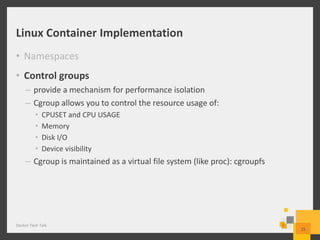
Linux Container Implementation
• Namespaces
• Control groups
– provide a mechanism for performance isolation
– Cgroup allows you to control the resource usage of:
• CPUSET and CPU USAGE
• Memory
• Disk I/O
• Device visibility
– Cgroup is maintained as a virtual file system (like proc): cgroupfs
Docker Tech Talk
15
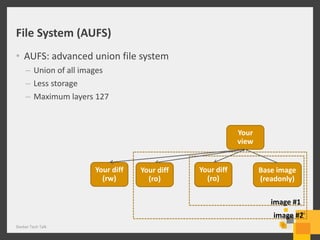
Your diff
(rw)
Your
view
image #1
Base image
(readonly)
File System (AUFS)
• AUFS: advanced union file system
– Union of all images
– Less storage
– Maximum layers 127
Docker Tech Talk
16
image #2
Your diff
(rw)
Your diff
(ro)
Your diff
(rw)
Your diff
(ro)
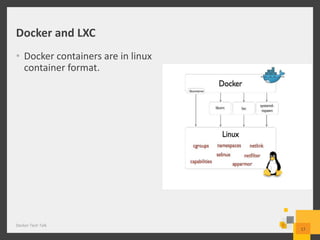
Docker and LXC
• Docker containers are in linux
container format.
Docker Tech Talk
17
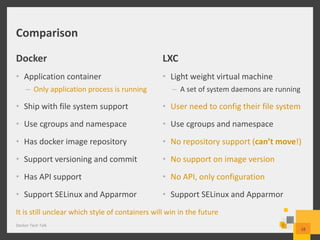
Comparison
Docker
• Application container
– Only application process is running
• Ship with file system support
• Use cgroups and namespace
• Has docker image repository
• Support versioning and commit
• Has API support
• Support SELinux and Apparmor
LXC
• Light weight virtual machine
– A set of system daemons are running
• User need to config their file system
• Use cgroups and namespace
• No repository support (can’t move!)
• No support on image version
• No API, only configuration
• Support SELinux and Apparmor
Docker Tech Talk
18
It is still unclear which style of containers will win in the future
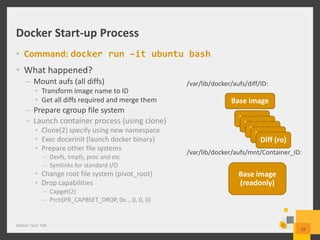
Docker Start-up Process
• Command: docker run –it ubuntu bash
• What happened?
– Mount aufs (all diffs)
• Transform image name to ID
• Get all diffs required and merge them
– Prepare cgroup file system
– Launch container process (using clone)
• Clone(2) specify using new namespace
• Exec docerinit (launch docker binary)
• Prepare other file systems
– Devfs, tmpfs, proc and etc
– Symlinks for standard I/O
• Change root file system (pivot_root)
• Drop capabilities
– Capget(2)
– Prctl(PR_CAPBSET_DROP, 0x.., 0, 0, 0)
Docker Tech Talk
19
Base image
Base image
(readonly)
Diff (ro)
Diff (ro)
Diff (ro)
Diff (ro)
Diff (ro)
/var/lib/docker/aufs/diff/ID:
/var/lib/docker/aufs/mnt/Container_ID:
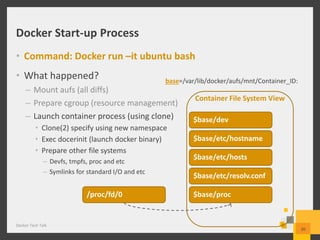
Docker Start-up Process
• Command: Docker run –it ubuntu bash
• What happened?
– Mount aufs (all diffs)
– Prepare cgroup (resource management)
– Launch container process (using clone)
• Clone(2) specify using new namespace
• Exec docerinit (launch docker binary)
• Prepare other file systems
– Devfs, tmpfs, proc and etc
– Symlinks for standard I/O and etc
Docker Tech Talk
20
Container File System View
base=/var/lib/docker/aufs/mnt/Container_ID:
$base/dev
$base/etc/hostname
$base/etc/resolv.conf
$base/etc/hosts
$base/proc/proc/fd/0
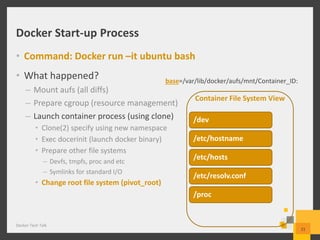
Docker Start-up Process
• Command: Docker run –it ubuntu bash
• What happened?
– Mount aufs (all diffs)
– Prepare cgroup (resource management)
– Launch container process (using clone)
• Clone(2) specify using new namespace
• Exec docerinit (launch docker binary)
• Prepare other file systems
– Devfs, tmpfs, proc and etc
– Symlinks for standard I/O
• Change root file system (pivot_root)
Docker Tech Talk
2121
Container File System View
base=/var/lib/docker/aufs/mnt/Container_ID:
/dev
/etc/hostname
/etc/resolv.conf
/etc/hosts
/proc
Sample Agenda
1 Docker Background
2 How to Use Docker
3 Docker Inside
4 Docker Demo
Docker Tech Talk
22
Thank You!
Docker Tech Talk
23
Karnawat.sk@gamil.com
https://in.linkedin.com/in/sandeepkarnawat

Tech talk on docker with demo

  • 1.
    Docker Tech Talkwith Demo Docker Tech Talk 1 Sandeep Karnawat Principal S/W Engineer
  • 2.
    Sample Agenda 1 DockerBackground 2 How to Use Docker 3 Docker Inside 4 Docker Demo Docker Tech Talk 2
  • 3.
    What is docker? •Docker is: – An open platform for developers and sysadmins to develop, ship, and run distributed applications [docker.io] – An open-source project that automates the deployment of applications inside software containers by providing an additional layer of abstraction and automation of operating system-level virtualization on Linux [Wikipedia] – A tool that can package an application and its dependencies in a virtual container that can run on any Linux server [451 Research] Docker Tech Talk 3
  • 4.
    How is itdifferent from VM? Docker Tech Talk 4
  • 5.
    What does Dockerlook like? • Docker is a client-server application. – Docker client and the daemon can run on the same system, or on different machines – They communicate via sockets (or through a RESTful API). – Users interact with the client to command the daemon – The daemon, receiving those commands, does the job Docker Tech Talk 5
  • 6.
    Sample Agenda 1 DockerBackground 2 How to Use Docker 3 Docker Inside 4 Docker Application Docker Tech Talk 6
  • 7.
    How to downloada docker image • docker pull <image_name> – Pull: fetch the image from the Docker Hub Registry (registry.hub.docker.com) – Image_name: usually consist of user_name/image_name – E.g., sudo docker pull skarnawat/mytest_docker Docker Tech Talk 7
  • 8.
    How to launcha docker container • docker run –it <image_name> [command_name] – Option –t: allocate pseudo-terminal – Option –i: interactive mode – Eg: docker run –it mingwei/mytest_docker bash – Note: when you run “bash” option -i and –t are both needed – When you do not need “terminal”; use “–d” instead of “-it” • Where is my container? – docker ps – docker ps –a (all containers you have run) • How can I name my own container? – docker run –it –n mycontainer mingwei/mytest_docker bash Docker Tech Talk 8
  • 9.
    How to generatea new image? • Manually Create Image – A container is a running instance of an image – When all processes inside container exit, container is stopped – One way to create a new image: • Create a new container using “docker run –it <image> bash” • Issue commands: “apt-get install <software>” • Transform your container to an image: – docker commit <your_container_name> <your_new_image_name> – What if I didn’t name my container? • Use the automatically assigned container id instead. • Container id could be found using “docker ps “ Docker Tech Talk 9
  • 10.
    How to generateyour own image • Dockerfile – Like a makefile, you use it to automate the building of an image: • docker build –t <your_img_name> . • Your image is built using the Dockerfile in current directory • Docker file contains a sequence of commands – Inside Dockerfile: • Updates will be applied to new image • FROM: base image you specify • RUN: run a command inside container • ADD: copy files into new image – Note: tar, gzip bzip2 and etc will be decompressed • Other Directives: – http://docs.docker.com/reference/builder/ Docker Tech Talk 10 From ubuntu:14.04 Author: skarnawat RUN apt-get install binutils ADD myfile.tar /app VOLUME [“/yourdata”] …
  • 11.
  • 12.
    Login to ExistingContainer • You can’t login to an existing container, if – The container does not have terminal (launched with –d but not –it) – E.g., docker run –d skdocker/apache apache2ctl -D FOREGROUND • Option1: sshd server – Using a sshd, you could login to existing container – Issues: manage passwords, keys • Option2: use docker attach – Docker attach <container_name> Docker Tech Talk 12
  • 13.
    Docker Tech Talk 13 Docker:Under the Hood Implementation and Details
  • 14.
    Docker Container Implementation •Namespaces – Docker takes advantage of a technology called namespaces to provide the isolated workspace we call the container. – One container cannot see names in another container’s namespace – The pid namespace: virtualized process names (PID: Process ID). – The net namespace: virtualized network interfaces, routing tables, etc. (NET: Networking). – The mnt namespace: virtualized file system mount points (MNT: Mount). Docker Tech Talk 14
  • 15.
    Linux Container Implementation •Namespaces • Control groups – provide a mechanism for performance isolation – Cgroup allows you to control the resource usage of: • CPUSET and CPU USAGE • Memory • Disk I/O • Device visibility – Cgroup is maintained as a virtual file system (like proc): cgroupfs Docker Tech Talk 15
  • 16.
    Your diff (rw) Your view image #1 Baseimage (readonly) File System (AUFS) • AUFS: advanced union file system – Union of all images – Less storage – Maximum layers 127 Docker Tech Talk 16 image #2 Your diff (rw) Your diff (ro) Your diff (rw) Your diff (ro)
  • 17.
    Docker and LXC •Docker containers are in linux container format. Docker Tech Talk 17
  • 18.
    Comparison Docker • Application container –Only application process is running • Ship with file system support • Use cgroups and namespace • Has docker image repository • Support versioning and commit • Has API support • Support SELinux and Apparmor LXC • Light weight virtual machine – A set of system daemons are running • User need to config their file system • Use cgroups and namespace • No repository support (can’t move!) • No support on image version • No API, only configuration • Support SELinux and Apparmor Docker Tech Talk 18 It is still unclear which style of containers will win in the future
  • 19.
    Docker Start-up Process •Command: docker run –it ubuntu bash • What happened? – Mount aufs (all diffs) • Transform image name to ID • Get all diffs required and merge them – Prepare cgroup file system – Launch container process (using clone) • Clone(2) specify using new namespace • Exec docerinit (launch docker binary) • Prepare other file systems – Devfs, tmpfs, proc and etc – Symlinks for standard I/O • Change root file system (pivot_root) • Drop capabilities – Capget(2) – Prctl(PR_CAPBSET_DROP, 0x.., 0, 0, 0) Docker Tech Talk 19 Base image Base image (readonly) Diff (ro) Diff (ro) Diff (ro) Diff (ro) Diff (ro) /var/lib/docker/aufs/diff/ID: /var/lib/docker/aufs/mnt/Container_ID:
  • 20.
    Docker Start-up Process •Command: Docker run –it ubuntu bash • What happened? – Mount aufs (all diffs) – Prepare cgroup (resource management) – Launch container process (using clone) • Clone(2) specify using new namespace • Exec docerinit (launch docker binary) • Prepare other file systems – Devfs, tmpfs, proc and etc – Symlinks for standard I/O and etc Docker Tech Talk 20 Container File System View base=/var/lib/docker/aufs/mnt/Container_ID: $base/dev $base/etc/hostname $base/etc/resolv.conf $base/etc/hosts $base/proc/proc/fd/0
  • 21.
    Docker Start-up Process •Command: Docker run –it ubuntu bash • What happened? – Mount aufs (all diffs) – Prepare cgroup (resource management) – Launch container process (using clone) • Clone(2) specify using new namespace • Exec docerinit (launch docker binary) • Prepare other file systems – Devfs, tmpfs, proc and etc – Symlinks for standard I/O • Change root file system (pivot_root) Docker Tech Talk 2121 Container File System View base=/var/lib/docker/aufs/mnt/Container_ID: /dev /etc/hostname /etc/resolv.conf /etc/hosts /proc
  • 22.
    Sample Agenda 1 DockerBackground 2 How to Use Docker 3 Docker Inside 4 Docker Demo Docker Tech Talk 22
  • 23.
    Thank You! Docker TechTalk 23 Karnawat.sk@gamil.com https://in.linkedin.com/in/sandeepkarnawat

Editor's Notes

  • #4 Just say “we put different explanation” because it shows different features.
  • #5 Only talks about right hand side
  • #8 Should mention there are lots of images available in docker.io Simple explain on username and image_name
  • #9 We could mention tag Should clarify image_name And command Explicitly say that -d means “daemon” Don’t read those bullets
  • #11 How to script the generation of docker images
  • #12 Hwo the tag system works
  • #13 http://blog.docker.com/author/jerome/ http://blog.docker.com/2014/06/why-you-dont-need-to-run-sshd-in-docker/ Practise this slide. Yes, it is possible but not the docker way of doing this! Go faster for previous 10 slides Explain nsenter
  • #15 https://docs.docker.com/introduction/understanding-docker/ Just talk about: Pid: Net: User namespace (simple explain)
  • #16 https://www.kernel.org/doc/Documentation/cgroups/cgroups.txt It will help you do performance
  • #17 http://www.thegeekstuff.com/2013/05/linux-aufs/ Animation should show diff from “ro” to “rw”
  • #18 Check if docker in windows is still using virtual machine.
  • #19 Say efficient union file system in docker Say the difference and based on the different goals, the following are the differences. Pick up the most interesting point!! Spent less on this paper !!!
  • #20 Make it more clear
  • #22 What is the effect of prctl?