What’s New in
Android
Getting up to
speed with HC/ICS

               Robert Cooper
               Reach Health
               @kebernet / +Robert Cooper
Why are you here?
 You never upgraded your app for Honeycomb

 You think cloning your iOS app to Android is a
  keen idea

 You are completely new to Android
  (most of this will pass you buy, but try and
  osmotically absorb some of it)

 Android is neat

 Your boss said you need to be on this track
Who is this guy?
I wrote this... (not related)
I work here…
I also do this stuff…
So what is new?
 New UI metaphors
   ActionBar
   Onscreen, adaptive menus

 Spec Hardware changes
   No hard buttons

 New look and feel
   Mandatory for ICS across OEMs to render unmodified
So what is new?
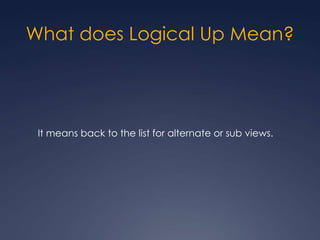
What does Logical Up Mean?


 It means back to the list for alternate or sub views.
New LaF
 Holographic look and feel added

 Make it more TRON-ish…

 … but not too TRON-ish

 Lots of glows, varied depth line markers, 3D
  transitions

 Improved text ops mechanics
New APIs
 Fragments
   Sub-Activities

 ActionBar
   New Menuing and Nav System.

 Enhanced Interaction for Widgets and Notifications

 Drag and Drop

 P2P Networking
   NFC (Android Beam)
   WiFi Direct
Fragments
 Fragments are Sub-Activities that can be
  recomposed based on UI factors (screen
  size, orientation, etc)

 Introduced with 3.0 tablets now global in 4.0

 Available as a build-in backport as far back as
  1.6 with the “Android Compatibility Package”
  (Available in the SDK/AVD Manager)
Mimics Activity Lifecycle

 onCreate()

 onStart()

 onCreateView() (this is new!)

 onPause()

 onStop()
Fragments are Layout parts

<?xml version="1.0" encoding="utf-8"?>
   <LinearLayoutxmlns:android="http://schemas.android.com/apk/
   res/android"
       android:orientation="horizontal"
       android:layout_width="match_parent"
       android:layout_height="match_parent">
       <fragment
   android:name="com.example.news.ArticleListFragment"
                android:id="@+id/list"
                android:layout_weight="1"
                android:layout_width="0dp"
                android:layout_height="match_parent" />
       <fragment
   android:name="com.example.news.ArticleReaderFragment"
                android:id="@+id/viewer"
                android:layout_weight="2"
                android:layout_width="0dp"
                android:layout_height="match_parent" />
   </LinearLayout>
 Fragments are Sub-Activities that can be Each
  Fragment becomes unique in the application

 Can move between Activities with different
  combinations of Fragments by passing Fragment
  model/URI information using the
  FragmentManager API.

 FragmentTransaction can be used to
  manipulate fragment state and “back” behavior
FragmentTransaction
     manipulates the back state

Fragment newFragment = new ExampleFragment();
  FragmentTransaction transaction =
  getFragmentManager().beginTransaction();

 transaction.replace(R.id.fragment_container
 , newFragment);
 transaction.addToBackStack(null);

 transaction.commit();
ActionBar
(Know it. Love it.)
What is it?

 New nav metaphor
   Home
   Logical “UP”
   Activity global tabs

 New menuing system
   Toolbar
   Overflow menuing
How to Use It

 NOT part of the compatibility package
   Check outActionBarSherlock.com for a backport

 You MUST request the Holographic theme
     android:theme="@android:style/Theme.Holo”
     android:theme="@android:style/Theme.Holo.Light”
     setTheme(android.R.style.Theme_Holo);
     setTheme(android.R.style.Theme_Holo_Light);
Menus on the ActionBar

<?xml version="1.0" encoding="utf-8"?>
   <menu
   xmlns:android="http://schemas.android.com/apk/res/android
   ">
       <item android:id="@+id/menu_add"
             android:icon="@drawable/ic_menu_save"
             android:title="@string/menu_save"
             android:showAsAction="ifRoom|withText" />
   </menu>
Custom Views in the ActionBar
<?xml version="1.0" encoding="utf-8"?>
   <menu
   xmlns:android="http://schemas.android.com/apk/res/androi
   d">
       <item android:id="@+id/menu_search"
           android:title="Search"
           android:icon="@drawable/ic_menu_search"
           android:showAsAction="ifRoom”

      android:actionLayout="@layout/searchview"

android:actionViewClass="android.widget.SearchView”
   />
   </menu>
SearchViewsearchView =

(SearchView) menu.findItem(R.id.menu_search)
                    .getActionView();
 Getting the “Home” icon view

View home = a.findViewById(android.R.id.home);

home.setOnClickListener(new OnClickListener() {

      public void onClick(View arg0) {

a.finish();

      }

});

 Adding “Up” marker

ActionBaractionBar = this.getActionBar();
    //or SherlockActivity.getSupportActionBar();

actionBar.setDisplayHomeAsUpEnabled(true);
ActionBar Tabs
final ActionBaractionBar = getActionBar();
   actionBar.setNavigationMode(
   ActionBar.NAVIGATION_MODE_TABS);
  // remove the activity title to make space for tabs
  actionBar.setDisplayShowTitleEnabled(false);
  Fragment artistsFragment = new ArtistsFragment();
  actionBar.addTab(actionBar.newTab()

      .setText(R.string.tab_artists)
      .setTabListener(new TabListener(artistsFragment)));
  Fragment albumsFragment = new AlbumsFragment();
  actionBar.addTab(actionBar.newTab()

      .setText(R.string.tab_albums)
       .setTabListener(new TabListener(albumsFragment)));
Spinner/List/Drop down Nav
ActionBaractionBar = getActionBar();
  actionBar.setNavigationMode(
  ActionBar.NAVIGATION_MODE_LIST);
  actionBar.setListNavigationCallbacks(
       new SpinnerAdapter(){
          public View getDropDownView(int position,
              View convertView, View Group parent){
              // …
          }

     }, new OnNavigationListener(){

         public booleanonNavigationItemSelected(
  intitemPosition, long itemId){
             //…
           }
     });
Notifications
 (They do stuff now)
Notifications can now use RemoteViews to allow
  interaction with the popup notification, rather than just
  launch an intent.

RemoteViews layout = new RemoteViews(
  getPackageName(), R.layout.notification);

  notification.contentView = layout;

  layout.setOnClickPendingIntent(
  R.id.my_button,
  getDialogPendingIntent(
          "You pressed it!"));
PendingIntentgetDialogPendingIntent(
        String dialogText) {
           return PendingIntent.getActivity(
                   this, // send back to the creating Act.
                   dialogText.hashCode(),
                   new Intent(ACTION_DIALOG)
                           .putExtra(Intent.EXTRA_TEXT,
   dialogText)
                           .addFlags(
   Intent.FLAG_ACTIVITY_NEW_TASK),
                   0);
       }
Handling the PendingIntent:


  if (ACTION_DIALOG.equals(intent.getAction())) {
                showDialog(
  intent.getStringExtra(
  Intent.EXTRA_TEXT))
  }


PendingIntent then becomes an invisible call back into
  your Activity.
Drag and Drop
 Any View can now be dragged about the screen.

 To begin a drag action call:
  myView.startDrag( dragData,
  dragShadowBuilder, localData,
    0 /*unused int flags */);

 Can be called from you OnClick/OnLongClick listeners…

 localData is just any Object that will be sent with each
  DragEvent.
 Create the DrawShadowBuilder. This returns
 the view that is dragged about under the
 pointer.
 This class takes a View as an argument and
 looks a lot like the stock View paint lifecycle.
 @Override
 public void onProvideShadowMetrics(Point size,
                                    Point touch)
 @Override
 public void onDrawShadow(Canvas canvas)

 The first method sets the bounds, the second
 paints to the canvas.
 You can use the View’s existing draw()
 method then mutate it (read: opacity)
 DragEvents
   onDragEvent(DragEvent)
    or
   View.OnDragListener on any view (These are really for Drop
    Targets)

 DragEvent.getAction() returns one of the possible event
  action types.
 ACTION_DRAG_STARTED
   Sent to all active Views – check here for drop target validity!

 ACTION_DRAG_ENTERED
   Sent when the touch enters the box of the View

 ACTION_DRAG_LOCATION
   Sent on each move while in the box of the View

 ACTION_DRAG_EXITED
   Sent when the touch leaves the box.

 ACTION_DROP
   Sent on drop event *ONLY* when the View/Listener returned
     “true” from the ACTION_DRAG_STARTED event.
Android Beam
 You App has Data

 People like to share data

 People like to move data between devices

 The Cloud is Magic™

 NFC is complex. Android Beam is Simple
Sending a Beam

 Call NfcAdapter.getDefaultAdapther(ctx)

 Check for null.

 Call .setNdefPushMessage() with your Activity
  and your data

 Profit!
final byte[] langBytes =
   locale.getLanguage().getBytes(Charsets.US_ASCII);


final CharsetutfEncoding = encodeInUtf8 ?
   Charsets.UTF_8 : Charset.forName("UTF-16");

final byte[] textBytes =text.getBytes(utfEncoding);

final intutfBit = encodeInUtf8 ? 0 : (1 << 7);


final char status = (char) (utfBit +
   langBytes.length);

final byte[] data = Bytes.concat(new byte[] {(byte)
   status}, langBytes, textBytes);

new
   NdefRecord(NdefRecord.TNF_WELL_KNOWN, NdefRecord.RT
   D_TEXT, new byte[0], data);
RTD_URI is a lot easier!
final byte[] typeBytes = "image/jpeg”
   .getBytes(Charsets.US_ASCII);

final byte[] data = getData();

new
   NdefRecord(NdefRecord.TNF_MIME_MEDIA, typeBytes,
    new byte[0], data);
Getting a Beam

 Call NfcAdapter.setNdefPushMessageCallback()
  with your activity(ies)

OR

 Handle ACTION_NDEF_DISCOVERED in your
  Manifest for URLs or Mime Types

 Profit!
Too easy NOT to do.
WiFi Direct
(or JINI with Sockets)
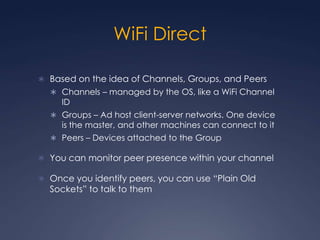
WiFi Direct

 Based on the idea of Channels, Groups, and Peers
   Channels – managed by the OS, like a WiFi Channel
     ID
   Groups – Ad host client-server networks. One device
     is the master, and other machines can connect to it
   Peers – Devices attached to the Group

 You can monitor peer presence within your channel

 Once you identify peers, you can use “Plain Old
  Sockets” to talk to them
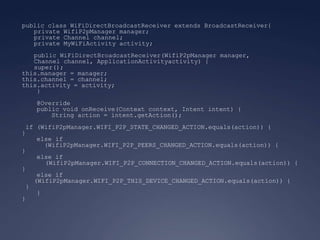
public class WiFiDirectBroadcastReceiver extends BroadcastReceiver{
   private WifiP2pManager manager;
   private Channel channel;
   private MyWiFiActivity activity;
   public WiFiDirectBroadcastReceiver(WifiP2pManager manager,
   Channel channel, ApplicationActivityactivity) {
   super();
this.manager = manager;
this.channel = channel;
this.activity = activity;
    }
   @Override
   public void onReceive(Context context, Intent intent) {
       String action = intent.getAction();
 if (WifiP2pManager.WIFI_P2P_STATE_CHANGED_ACTION.equals(action)) {
}
    else if
      (WifiP2pManager.WIFI_P2P_PEERS_CHANGED_ACTION.equals(action)) {
}
    else if
      (WifiP2pManager.WIFI_P2P_CONNECTION_CHANGED_ACTION.equals(action)) {
}
    else if
   (WifiP2pManager.WIFI_P2P_THIS_DEVICE_CHANGED_ACTION.equals(action)) {
 }
    }
}
manager = (WifiP2pManager)
  getSystemService(Context.WIFI_P2P_SERVICE);
   channel = manager.initialize(this, getMainLooper(), null);
   receiver = new WiFiDirectBroadcastReceiver(manager,
  channel, this);

   // ...

    @Override
    protected void onResume() {
super.onResume();
registerReceiver(receiver, intentFilter);
manager.createGroup(channel, new ActionListener(){
          //...
        }
    }
    @Override
    protected void onPause() {
super.onPause();
unregisterReceiver(receiver);
    }
Talking to Others

 Request a list of peers

 Select a Device from the list of peers

 Connect to the Device – this is Data Link
  connect, not Application connect

 Open your sockets

 Once connected
manager.discoverPeers(channel, new WifiP2pManager.ActionListener() {
    @Override
    public void onSuccess() {
manager.requestPeers( new PeerListListener(){
           public void onPeersAvailable(WiFiP2pDeviceList devices){
               // do stuff here
           }
       }
    }
      @Override
      public void onFailure(intreasonCode) {
      }
});
//…
WifiP2pConfig config = new WifiP2pConfig();
config.deviceAddress = device.deviceAddress;
manager.connect(channel, config, new ActionListener() {
      @Override
      public void onSuccess() {
      }
      @Override
      public void onFailure(int reason) {
      }
});
WifiP2pConfig config = new WifiP2pConfig();
config.deviceAddress = device.deviceAddress;
manager.connect(channel, config, new ActionListener() {

      @Override
      public void onSuccess() {
      }

      @Override
      public void onFailure(int reason) {
      }
});

// from ConnectionInfoListener…

 @Override
    public void onConnectionInfoAvailable(
            WifiP2pInfo info) {
info.groupOwnerAddress.getHostAddress();
Check the Demo App

 http://developer.android.com/resources/sample
  s/WiFiDirectDemo/index.html


 In the SDK samples
What to Remember
 Make your app Androidish
  (but not too Androidish)

 Use Fragments to recompose your app for
  various form factors

 Android Beam support is brain free. Your app
  *should* support it.

 WiFi direct can take the pain out of true on-the-
  go P2P networking.
  (Save your users WAN transfers)
Thanks!


   Robert Cooper
   Reach Health
   @kebernet / +Robert Cooper

What's New in Android

  • 1.
    What’s New in Android Gettingup to speed with HC/ICS Robert Cooper Reach Health @kebernet / +Robert Cooper
  • 2.
  • 3.
     You neverupgraded your app for Honeycomb  You think cloning your iOS app to Android is a keen idea  You are completely new to Android (most of this will pass you buy, but try and osmotically absorb some of it)  Android is neat  Your boss said you need to be on this track
  • 4.
  • 5.
    I wrote this...(not related)
  • 6.
  • 7.
    I also dothis stuff…
  • 8.
  • 9.
     New UImetaphors  ActionBar  Onscreen, adaptive menus  Spec Hardware changes  No hard buttons  New look and feel  Mandatory for ICS across OEMs to render unmodified
  • 10.
  • 13.
    What does LogicalUp Mean? It means back to the list for alternate or sub views.
  • 14.
  • 15.
     Holographic lookand feel added  Make it more TRON-ish…  … but not too TRON-ish  Lots of glows, varied depth line markers, 3D transitions  Improved text ops mechanics
  • 17.
  • 18.
     Fragments  Sub-Activities  ActionBar  New Menuing and Nav System.  Enhanced Interaction for Widgets and Notifications  Drag and Drop  P2P Networking  NFC (Android Beam)  WiFi Direct
  • 19.
  • 20.
     Fragments areSub-Activities that can be recomposed based on UI factors (screen size, orientation, etc)  Introduced with 3.0 tablets now global in 4.0  Available as a build-in backport as far back as 1.6 with the “Android Compatibility Package” (Available in the SDK/AVD Manager)
  • 21.
    Mimics Activity Lifecycle onCreate()  onStart()  onCreateView() (this is new!)  onPause()  onStop()
  • 22.
    Fragments are Layoutparts <?xml version="1.0" encoding="utf-8"?> <LinearLayoutxmlns:android="http://schemas.android.com/apk/ res/android" android:orientation="horizontal" android:layout_width="match_parent" android:layout_height="match_parent"> <fragment android:name="com.example.news.ArticleListFragment" android:id="@+id/list" android:layout_weight="1" android:layout_width="0dp" android:layout_height="match_parent" /> <fragment android:name="com.example.news.ArticleReaderFragment" android:id="@+id/viewer" android:layout_weight="2" android:layout_width="0dp" android:layout_height="match_parent" /> </LinearLayout>
  • 23.
     Fragments areSub-Activities that can be Each Fragment becomes unique in the application  Can move between Activities with different combinations of Fragments by passing Fragment model/URI information using the FragmentManager API.  FragmentTransaction can be used to manipulate fragment state and “back” behavior
  • 24.
    FragmentTransaction manipulates the back state Fragment newFragment = new ExampleFragment(); FragmentTransaction transaction = getFragmentManager().beginTransaction(); transaction.replace(R.id.fragment_container , newFragment); transaction.addToBackStack(null); transaction.commit();
  • 25.
  • 26.
    What is it? New nav metaphor  Home  Logical “UP”  Activity global tabs  New menuing system  Toolbar  Overflow menuing
  • 27.
    How to UseIt  NOT part of the compatibility package  Check outActionBarSherlock.com for a backport  You MUST request the Holographic theme  android:theme="@android:style/Theme.Holo”  android:theme="@android:style/Theme.Holo.Light”  setTheme(android.R.style.Theme_Holo);  setTheme(android.R.style.Theme_Holo_Light);
  • 28.
    Menus on theActionBar <?xml version="1.0" encoding="utf-8"?> <menu xmlns:android="http://schemas.android.com/apk/res/android "> <item android:id="@+id/menu_add" android:icon="@drawable/ic_menu_save" android:title="@string/menu_save" android:showAsAction="ifRoom|withText" /> </menu>
  • 30.
    Custom Views inthe ActionBar <?xml version="1.0" encoding="utf-8"?> <menu xmlns:android="http://schemas.android.com/apk/res/androi d"> <item android:id="@+id/menu_search" android:title="Search" android:icon="@drawable/ic_menu_search" android:showAsAction="ifRoom” android:actionLayout="@layout/searchview" android:actionViewClass="android.widget.SearchView” /> </menu>
  • 31.
  • 32.
     Getting the“Home” icon view View home = a.findViewById(android.R.id.home); home.setOnClickListener(new OnClickListener() { public void onClick(View arg0) { a.finish(); } });  Adding “Up” marker ActionBaractionBar = this.getActionBar(); //or SherlockActivity.getSupportActionBar(); actionBar.setDisplayHomeAsUpEnabled(true);
  • 33.
    ActionBar Tabs final ActionBaractionBar= getActionBar(); actionBar.setNavigationMode( ActionBar.NAVIGATION_MODE_TABS); // remove the activity title to make space for tabs actionBar.setDisplayShowTitleEnabled(false); Fragment artistsFragment = new ArtistsFragment(); actionBar.addTab(actionBar.newTab() .setText(R.string.tab_artists) .setTabListener(new TabListener(artistsFragment))); Fragment albumsFragment = new AlbumsFragment(); actionBar.addTab(actionBar.newTab() .setText(R.string.tab_albums) .setTabListener(new TabListener(albumsFragment)));
  • 35.
    Spinner/List/Drop down Nav ActionBaractionBar= getActionBar(); actionBar.setNavigationMode( ActionBar.NAVIGATION_MODE_LIST); actionBar.setListNavigationCallbacks( new SpinnerAdapter(){ public View getDropDownView(int position, View convertView, View Group parent){ // … } }, new OnNavigationListener(){ public booleanonNavigationItemSelected( intitemPosition, long itemId){ //… } });
  • 37.
  • 38.
    Notifications can nowuse RemoteViews to allow interaction with the popup notification, rather than just launch an intent. RemoteViews layout = new RemoteViews( getPackageName(), R.layout.notification); notification.contentView = layout; layout.setOnClickPendingIntent( R.id.my_button, getDialogPendingIntent( "You pressed it!"));
  • 39.
    PendingIntentgetDialogPendingIntent( String dialogText) { return PendingIntent.getActivity( this, // send back to the creating Act. dialogText.hashCode(), new Intent(ACTION_DIALOG) .putExtra(Intent.EXTRA_TEXT, dialogText) .addFlags( Intent.FLAG_ACTIVITY_NEW_TASK), 0); }
  • 40.
    Handling the PendingIntent: if (ACTION_DIALOG.equals(intent.getAction())) { showDialog( intent.getStringExtra( Intent.EXTRA_TEXT)) } PendingIntent then becomes an invisible call back into your Activity.
  • 41.
  • 42.
     Any Viewcan now be dragged about the screen.  To begin a drag action call: myView.startDrag( dragData, dragShadowBuilder, localData, 0 /*unused int flags */);  Can be called from you OnClick/OnLongClick listeners…  localData is just any Object that will be sent with each DragEvent.
  • 43.
     Create theDrawShadowBuilder. This returns the view that is dragged about under the pointer.  This class takes a View as an argument and looks a lot like the stock View paint lifecycle. @Override public void onProvideShadowMetrics(Point size, Point touch) @Override public void onDrawShadow(Canvas canvas)  The first method sets the bounds, the second paints to the canvas.  You can use the View’s existing draw() method then mutate it (read: opacity)
  • 44.
     DragEvents  onDragEvent(DragEvent) or  View.OnDragListener on any view (These are really for Drop Targets)  DragEvent.getAction() returns one of the possible event action types.
  • 45.
     ACTION_DRAG_STARTED  Sent to all active Views – check here for drop target validity!  ACTION_DRAG_ENTERED  Sent when the touch enters the box of the View  ACTION_DRAG_LOCATION  Sent on each move while in the box of the View  ACTION_DRAG_EXITED  Sent when the touch leaves the box.  ACTION_DROP  Sent on drop event *ONLY* when the View/Listener returned “true” from the ACTION_DRAG_STARTED event.
  • 46.
  • 47.
     You Apphas Data  People like to share data  People like to move data between devices  The Cloud is Magic™  NFC is complex. Android Beam is Simple
  • 48.
    Sending a Beam Call NfcAdapter.getDefaultAdapther(ctx)  Check for null.  Call .setNdefPushMessage() with your Activity and your data  Profit!
  • 49.
    final byte[] langBytes= locale.getLanguage().getBytes(Charsets.US_ASCII); final CharsetutfEncoding = encodeInUtf8 ? Charsets.UTF_8 : Charset.forName("UTF-16"); final byte[] textBytes =text.getBytes(utfEncoding); final intutfBit = encodeInUtf8 ? 0 : (1 << 7); final char status = (char) (utfBit + langBytes.length); final byte[] data = Bytes.concat(new byte[] {(byte) status}, langBytes, textBytes); new NdefRecord(NdefRecord.TNF_WELL_KNOWN, NdefRecord.RT D_TEXT, new byte[0], data);
  • 50.
    RTD_URI is alot easier!
  • 51.
    final byte[] typeBytes= "image/jpeg” .getBytes(Charsets.US_ASCII); final byte[] data = getData(); new NdefRecord(NdefRecord.TNF_MIME_MEDIA, typeBytes, new byte[0], data);
  • 52.
    Getting a Beam Call NfcAdapter.setNdefPushMessageCallback() with your activity(ies) OR  Handle ACTION_NDEF_DISCOVERED in your Manifest for URLs or Mime Types  Profit!
  • 53.
  • 54.
    WiFi Direct (or JINIwith Sockets)
  • 55.
    WiFi Direct  Basedon the idea of Channels, Groups, and Peers  Channels – managed by the OS, like a WiFi Channel ID  Groups – Ad host client-server networks. One device is the master, and other machines can connect to it  Peers – Devices attached to the Group  You can monitor peer presence within your channel  Once you identify peers, you can use “Plain Old Sockets” to talk to them
  • 56.
    public class WiFiDirectBroadcastReceiverextends BroadcastReceiver{ private WifiP2pManager manager; private Channel channel; private MyWiFiActivity activity; public WiFiDirectBroadcastReceiver(WifiP2pManager manager, Channel channel, ApplicationActivityactivity) { super(); this.manager = manager; this.channel = channel; this.activity = activity; } @Override public void onReceive(Context context, Intent intent) { String action = intent.getAction(); if (WifiP2pManager.WIFI_P2P_STATE_CHANGED_ACTION.equals(action)) { } else if (WifiP2pManager.WIFI_P2P_PEERS_CHANGED_ACTION.equals(action)) { } else if (WifiP2pManager.WIFI_P2P_CONNECTION_CHANGED_ACTION.equals(action)) { } else if (WifiP2pManager.WIFI_P2P_THIS_DEVICE_CHANGED_ACTION.equals(action)) { } } }
  • 57.
    manager = (WifiP2pManager) getSystemService(Context.WIFI_P2P_SERVICE); channel = manager.initialize(this, getMainLooper(), null); receiver = new WiFiDirectBroadcastReceiver(manager, channel, this); // ... @Override protected void onResume() { super.onResume(); registerReceiver(receiver, intentFilter); manager.createGroup(channel, new ActionListener(){ //... } } @Override protected void onPause() { super.onPause(); unregisterReceiver(receiver); }
  • 58.
    Talking to Others Request a list of peers  Select a Device from the list of peers  Connect to the Device – this is Data Link connect, not Application connect  Open your sockets  Once connected
  • 59.
    manager.discoverPeers(channel, new WifiP2pManager.ActionListener(){ @Override public void onSuccess() { manager.requestPeers( new PeerListListener(){ public void onPeersAvailable(WiFiP2pDeviceList devices){ // do stuff here } } } @Override public void onFailure(intreasonCode) { } }); //… WifiP2pConfig config = new WifiP2pConfig(); config.deviceAddress = device.deviceAddress; manager.connect(channel, config, new ActionListener() { @Override public void onSuccess() { } @Override public void onFailure(int reason) { } });
  • 60.
    WifiP2pConfig config =new WifiP2pConfig(); config.deviceAddress = device.deviceAddress; manager.connect(channel, config, new ActionListener() { @Override public void onSuccess() { } @Override public void onFailure(int reason) { } }); // from ConnectionInfoListener… @Override public void onConnectionInfoAvailable( WifiP2pInfo info) { info.groupOwnerAddress.getHostAddress();
  • 61.
    Check the DemoApp  http://developer.android.com/resources/sample s/WiFiDirectDemo/index.html  In the SDK samples
  • 62.
  • 63.
     Make yourapp Androidish (but not too Androidish)  Use Fragments to recompose your app for various form factors  Android Beam support is brain free. Your app *should* support it.  WiFi direct can take the pain out of true on-the- go P2P networking. (Save your users WAN transfers)
  • 64.
    Thanks! Robert Cooper Reach Health @kebernet / +Robert Cooper