
“Android”
Application
Development
Presented By:
Rahul Narayan
Roll: 27300313013
Conte
nt• What is Android ?(Brief Introduction)
• History
• Open Handset Alliance (OHA)
• Versions
• Android Architecture
• Android Application Development
• What is Android ?
• One of the most widely used mobile OS these days
is ANDROID. Android is a software bunch comprising not
only operating system but also middleware and key
applications.
• It is a open source software platform and operating
system for mobile device, based on the Linux kernel.
 History
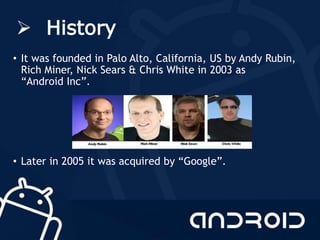
• It was founded in Palo Alto, California, US by Andy Rubin,
Rich Miner, Nick Sears & Chris White in 2003 as
“Android Inc”.
• Later in 2005 it was acquired by “Google”.
 Open Handset Alliance
(OHA)• The OHA was established on 5 November 2007, led
by Google with 34 members including mobile handset
makers, application developers, some mobile carriers
and chip makers
• It is a consortium of 84 firms to develop open
standards for mobile devices.
• Member firms include Google ,Sony, Dell, Qualcomm,
Texas Instruments, Samsung, LG Electronics etc.
 Versions of Android
• The version history of the Android mobile operating
system began with the release of the Android alpha in
November 5, 2007. The first commercial version, Android
1.0, was released in September 2008.
• Android versions have had confectionery-themed code
names. Each is in alphabetical order, with the most recent
major version being Android 7.0 "Nougat", released in
August 2016.
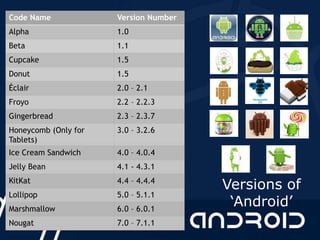
Code Name Version Number
Alpha 1.0
Beta 1.1
Cupcake 1.5
Donut 1.5
Éclair 2.0 – 2.1
Froyo 2.2 – 2.2.3
Gingerbread 2.3 – 2.3.7
Honeycomb (Only for
Tablets)
3.0 – 3.2.6
Ice Cream Sandwich 4.0 – 4.0.4
Jelly Bean 4.1 - 4.3.1
KitKat 4.4 – 4.4.4
Lollipop 5.0 – 5.1.1
Marshmallow 6.0 – 6.0.1
Nougat 7.0 – 7.1.1
Versions of
‘Android’
 Android Architecture
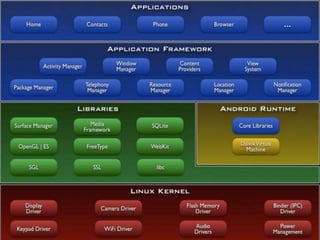
• Android operating system is a stack of software
components which is roughly divided into five sections
namely
• Applications Layer
• Application Framework
• Android Runtime
• Libraries
• Linux Kernel
Architecture…
• Linux Kernel
At the bottom of the layers is Linux - Linux 3.6 with approximately 115
patches. This provides a level of abstraction between the device
hardware and it contains all the essential hardware drivers like camera,
keypad, display etc. Also, the kernel handles all the things that Linux is
really good at such as networking and a vast array of device drivers,
which take the pain out of interfacing to peripheral hardware
• Libraries
On top of Linux kernel there is a set of libraries including open-source
Web browser engine WebKit, well known library libc, SQLite database
which is a useful repository for storage and sharing of application data,
libraries to play and record audio and video, SSL libraries responsible for
Internet security etc.
Architecture….
• Android Runtime
This is the third section of the architecture and available on the second layer
from the bottom. This section provides a key component called Dalvik Virtual
Machine which is a kind of Java Virtual Machine specially designed and
optimized for Android.
• Applications
You will find all the Android application at the top layer. You will write your
application to be installed on this layer only. Examples of such applications
are Contacts Books, Browser, Games etc.
• Application Framework
The Application Framework layer provides many higher-level services to
applications in the form of Java classes. Application developers are allowed
to make use of these services in their applications.
 Application Development
• For developing Android application we used Android Studio IDE
(Integrated Development Environment)
• Android Studio IDE
Android Studio is the official integrated development
environment (IDE) for Android platform development.
Based on JetBrains, IntelliJ IDEA software, Android Studio is
designed specifically for Android development. It
replaced Eclipse Android Development Tools (ADT) as Google's
primary IDE for native Android application development.
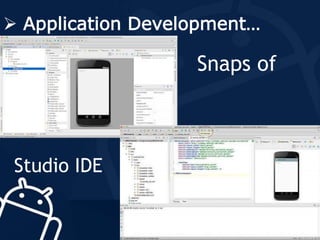
 Application Development…
Snaps of
Studio IDE
 Application Building
Blocks
• Activity
The Activity class is an important part of an application's overall
lifecycle, and the way activities are launched and put together is a
fundamental part of the platform's application model.
• Intent
Android Intent is the message that is passed between components
such as activities, content providers, broadcast receivers, services
etc.
Application Building
Blocks…
• Service
Android service is a component that is used to perform operations on the
background such as playing music, handle network transactions,
interacting content providers etc. It doesn't has any UI (user interface).
The service runs in the background indefinitely even if application is
destroyed.
• Content Provider
Content providers can help an application manage access to data stored
by itself, stored by other apps, and provide a way to share data with
other apps. They encapsulate the data, and provide mechanisms for
defining data security.
 My Project
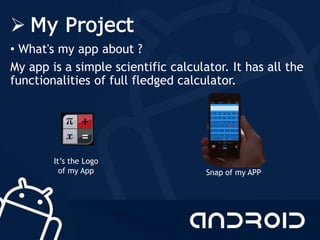
• What's my app about ?
My app is a simple scientific calculator. It has all the
functionalities of full fledged calculator.
It’s the Logo
of my App Snap of my APP
 Bibliography
• HPE Android Application Development
Student Guide
• http://developer.android.com
• http://code.google.com/android
Any Queries ?
Android application development(training) (1)

Android application development(training) (1)

  • 1.
  • 2.
    Conte nt• What isAndroid ?(Brief Introduction) • History • Open Handset Alliance (OHA) • Versions • Android Architecture • Android Application Development
  • 3.
    • What isAndroid ? • One of the most widely used mobile OS these days is ANDROID. Android is a software bunch comprising not only operating system but also middleware and key applications. • It is a open source software platform and operating system for mobile device, based on the Linux kernel.
  • 4.
     History • Itwas founded in Palo Alto, California, US by Andy Rubin, Rich Miner, Nick Sears & Chris White in 2003 as “Android Inc”. • Later in 2005 it was acquired by “Google”.
  • 5.
     Open HandsetAlliance (OHA)• The OHA was established on 5 November 2007, led by Google with 34 members including mobile handset makers, application developers, some mobile carriers and chip makers • It is a consortium of 84 firms to develop open standards for mobile devices. • Member firms include Google ,Sony, Dell, Qualcomm, Texas Instruments, Samsung, LG Electronics etc.
  • 6.
     Versions ofAndroid • The version history of the Android mobile operating system began with the release of the Android alpha in November 5, 2007. The first commercial version, Android 1.0, was released in September 2008. • Android versions have had confectionery-themed code names. Each is in alphabetical order, with the most recent major version being Android 7.0 "Nougat", released in August 2016.
  • 7.
    Code Name VersionNumber Alpha 1.0 Beta 1.1 Cupcake 1.5 Donut 1.5 Éclair 2.0 – 2.1 Froyo 2.2 – 2.2.3 Gingerbread 2.3 – 2.3.7 Honeycomb (Only for Tablets) 3.0 – 3.2.6 Ice Cream Sandwich 4.0 – 4.0.4 Jelly Bean 4.1 - 4.3.1 KitKat 4.4 – 4.4.4 Lollipop 5.0 – 5.1.1 Marshmallow 6.0 – 6.0.1 Nougat 7.0 – 7.1.1 Versions of ‘Android’
  • 8.
     Android Architecture •Android operating system is a stack of software components which is roughly divided into five sections namely • Applications Layer • Application Framework • Android Runtime • Libraries • Linux Kernel
  • 10.
    Architecture… • Linux Kernel Atthe bottom of the layers is Linux - Linux 3.6 with approximately 115 patches. This provides a level of abstraction between the device hardware and it contains all the essential hardware drivers like camera, keypad, display etc. Also, the kernel handles all the things that Linux is really good at such as networking and a vast array of device drivers, which take the pain out of interfacing to peripheral hardware • Libraries On top of Linux kernel there is a set of libraries including open-source Web browser engine WebKit, well known library libc, SQLite database which is a useful repository for storage and sharing of application data, libraries to play and record audio and video, SSL libraries responsible for Internet security etc.
  • 11.
    Architecture…. • Android Runtime Thisis the third section of the architecture and available on the second layer from the bottom. This section provides a key component called Dalvik Virtual Machine which is a kind of Java Virtual Machine specially designed and optimized for Android. • Applications You will find all the Android application at the top layer. You will write your application to be installed on this layer only. Examples of such applications are Contacts Books, Browser, Games etc. • Application Framework The Application Framework layer provides many higher-level services to applications in the form of Java classes. Application developers are allowed to make use of these services in their applications.
  • 12.
     Application Development •For developing Android application we used Android Studio IDE (Integrated Development Environment) • Android Studio IDE Android Studio is the official integrated development environment (IDE) for Android platform development. Based on JetBrains, IntelliJ IDEA software, Android Studio is designed specifically for Android development. It replaced Eclipse Android Development Tools (ADT) as Google's primary IDE for native Android application development.
  • 13.
  • 14.
     Application Building Blocks •Activity The Activity class is an important part of an application's overall lifecycle, and the way activities are launched and put together is a fundamental part of the platform's application model. • Intent Android Intent is the message that is passed between components such as activities, content providers, broadcast receivers, services etc.
  • 15.
    Application Building Blocks… • Service Androidservice is a component that is used to perform operations on the background such as playing music, handle network transactions, interacting content providers etc. It doesn't has any UI (user interface). The service runs in the background indefinitely even if application is destroyed. • Content Provider Content providers can help an application manage access to data stored by itself, stored by other apps, and provide a way to share data with other apps. They encapsulate the data, and provide mechanisms for defining data security.
  • 16.
     My Project •What's my app about ? My app is a simple scientific calculator. It has all the functionalities of full fledged calculator. It’s the Logo of my App Snap of my APP
  • 17.
     Bibliography • HPEAndroid Application Development Student Guide • http://developer.android.com • http://code.google.com/android
  • 18.