Coordinated by:
Sir Vaibhav vyas Presented by:
Surbhi Gautam
Preeta sinha
OUTLINE:-
1. Introduction
2. Android Operating System
3. OHA(Open handset alliance)
4. Architecture and framework
5. Feature of android operating system
6. Timeline of android os
7. Developing app in android
8. Fact and figures
9. Android v/s other os
10. Limitations
11. Future scope and conclusion
12. references
INTRODUCTION
o Mobile operating system is a software platform on
which application programs can run on mobile
devices.
o Different types of mobile operating system.
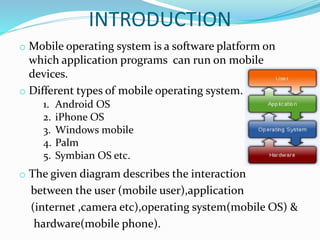
o The given diagram describes the interaction
between the user (mobile user),application
(internet ,camera etc),operating system(mobile OS) &
hardware(mobile phone).
1. Android OS
2. iPhone OS
3. Windows mobile
4. Palm
5. Symbian OS etc.
Android Mobile OS:
Revolution in mobile experience
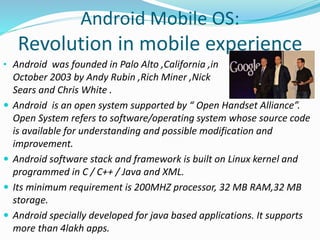
• Android was founded in Palo Alto ,California ,in
October 2003 by Andy Rubin ,Rich Miner ,Nick
Sears and Chris White .
 Android is an open system supported by “ Open Handset Alliance”.
Open System refers to software/operating system whose source code
is available for understanding and possible modification and
improvement.
 Android software stack and framework is built on Linux kernel and
programmed in C / C++ / Java and XML.
 Its minimum requirement is 200MHZ processor, 32 MB RAM,32 MB
storage.
 Android specially developed for java based applications. It supports
more than 4lakh apps.
Open handset alliance(OHA)
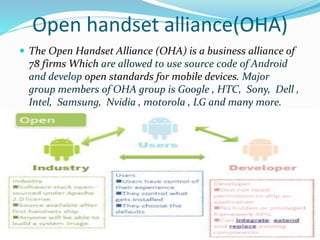
 The Open Handset Alliance (OHA) is a business alliance of
78 firms Which are allowed to use source code of Android
and develop open standards for mobile devices. Major
group members of OHA group is Google , HTC, Sony, Dell ,
Intel, Samsung, Nvidia , motorola , LG and many more.
Architecture & Framework
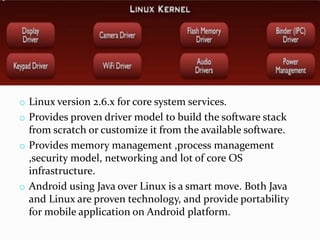
o Linux version 2.6.x for core system services.
o Provides proven driver model to build the software stack
from scratch or customize it from the available software.
o Provides memory management ,process management
,security model, networking and lot of core OS
infrastructure.
o Android using Java over Linux is a smart move. Both Java
and Linux are proven technology, and provide portability
for mobile application on Android platform.
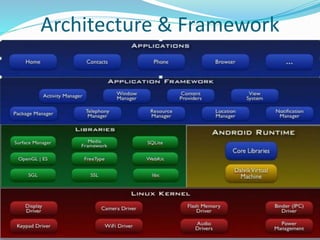
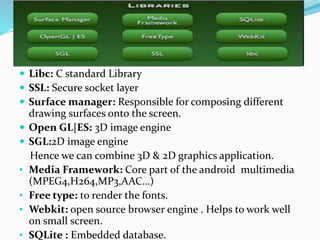
 Libc: C standard Library
 SSL: Secure socket layer
 Surface manager: Responsible for composing different
drawing surfaces onto the screen.
 Open GL|ES: 3D image engine
 SGL:2D image engine
Hence we can combine 3D & 2D graphics application.
• Media Framework: Core part of the android multimedia
(MPEG4,H264,MP3,AAC…)
• Free type: to render the fonts.
• Webkit: open source browser engine . Helps to work well
on small screen.
• SQLite : Embedded database.
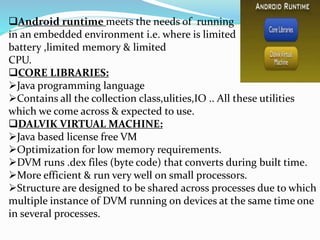
Android runtime meets the needs of running
in an embedded environment i.e. where is limited
battery ,limited memory & limited
CPU.
CORE LIBRARIES:
Java programming language
Contains all the collection class,ulities,IO .. All these utilities
which we come across & expected to use.
DALVIK VIRTUAL MACHINE:
Java based license free VM
Optimization for low memory requirements.
DVM runs .dex files (byte code) that converts during built time.
More efficient & run very well on small processors.
Structure are designed to be shared across processes due to which
multiple instance of DVM running on devices at the same time one
in several processes.
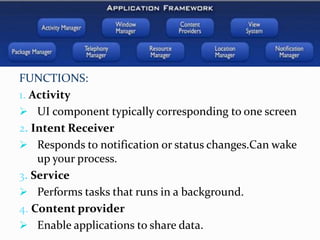
FUNCTIONS:
1. Activity
 UI component typically corresponding to one screen
2. Intent Receiver
 Responds to notification or status changes.Can wake
up your process.
3. Service
 Performs tasks that runs in a background.
4. Content provider
 Enable applications to share data.
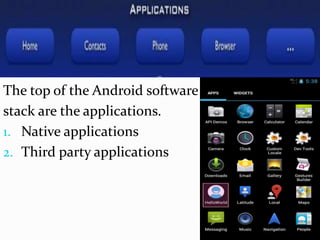
The top of the Android software
stack are the applications.
1. Native applications
2. Third party applications
Feature of android operating
system:
o Open platform
o Has Centralized notification system
o Ease to use
o Network connectivity
o Multitasking
o Security & privacy.
o Memory management
o Power management
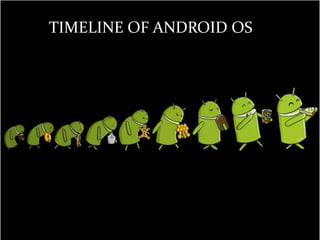
TIMELINE OF ANDROID OS
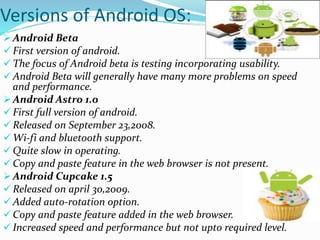
Versions of Android OS:
 Android Beta
 First version of android.
 The focus of Android beta is testing incorporating usability.
 Android Beta will generally have many more problems on speed
and performance.
 Android Astro 1.0
 First full version of android.
 Released on September 23,2008.
 Wi-fi and bluetooth support.
 Quite slow in operating.
 Copy and paste feature in the web browser is not present.
 Android Cupcake 1.5
 Released on april 30,2009.
 Added auto-rotation option.
 Copy and paste feature added in the web browser.
 Increased speed and performance but not upto required level.
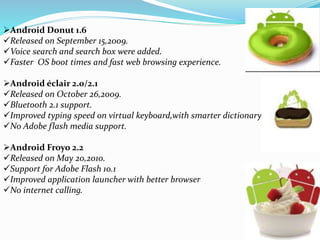
Android Donut 1.6
Released on September 15,2009.
Voice search and search box were added.
Faster OS boot times and fast web browsing experience.
Android éclair 2.0/2.1
Released on October 26,2009.
Bluetooth 2.1 support.
Improved typing speed on virtual keyboard,with smarter dictionary.
No Adobe flash media support.
Android Froyo 2.2
Released on May 20,2010.
Support for Adobe Flash 10.1
Improved application launcher with better browser
No internet calling.
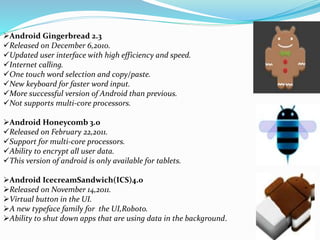
Android Gingerbread 2.3
Released on December 6,2010.
Updated user interface with high efficiency and speed.
Internet calling.
One touch word selection and copy/paste.
New keyboard for faster word input.
More successful version of Android than previous.
Not supports multi-core processors.
Android Honeycomb 3.0
Released on February 22,2011.
Support for multi-core processors.
Ability to encrypt all user data.
This version of android is only available for tablets.
Android IcecreamSandwich(ICS)4.0
Released on November 14,2011.
Virtual button in the UI.
A new typeface family for the UI,Roboto.
Ability to shut down apps that are using data in the background.
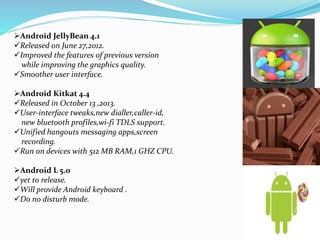
Android JellyBean 4.1
Released on June 27,2012.
Improved the features of previous version
while improving the graphics quality.
Smoother user interface.
Android Kitkat 4.4
Released in October 13 ,2013.
User-interface tweaks,new dialler,caller-id,
new bluetooth profiles,wi-fi TDLS support.
Unified hangouts messaging apps,screen
recording.
Run on devices with 512 MB RAM,1 GHZ CPU.
Android L 5.0
yet to release.
Will provide Android keyboard .
Do no disturb mode.
Developing app in android
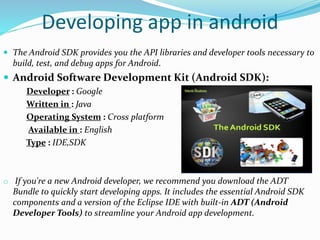
 The Android SDK provides you the API libraries and developer tools necessary to
build, test, and debug apps for Android.
 Android Software Development Kit (Android SDK):
Developer : Google
Written in : Java
Operating System : Cross platform
Available in : English
Type : IDE,SDK
o If you're a new Android developer, we recommend you download the ADT
Bundle to quickly start developing apps. It includes the essential Android SDK
components and a version of the Eclipse IDE with built-in ADT (Android
Developer Tools) to streamline your Android app development.
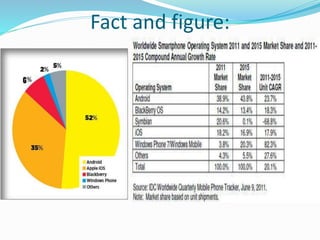
Fact and figure:
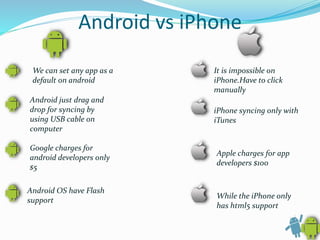
Android vs iPhone
We can set any app as a
default on android
Android just drag and
drop for syncing by
using USB cable on
computer
Google charges for
android developers only
$5
Android OS have Flash
support
It is impossible on
iPhone.Have to click
manually
iPhone syncing only with
iTunes
Apple charges for app
developers $100
While the iPhone only
has html5 support
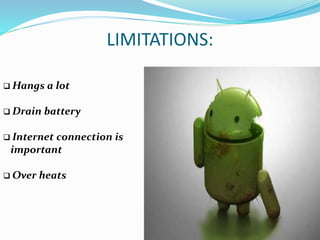
LIMITATIONS:
 Hangs a lot
 Drain battery
 Internet connection is
important
 Over heats
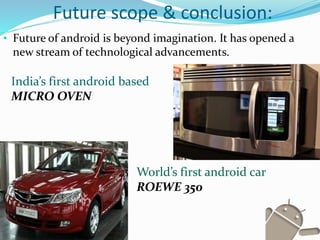
Future scope & conclusion:
• Future of android is beyond imagination. It has opened a
new stream of technological advancements.
India’s first android based
MICRO OVEN
World’s first android car
ROEWE 350
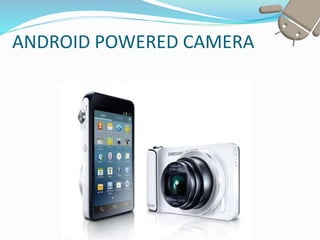
ANDROID POWERED CAMERA
ANDROID
POWERED
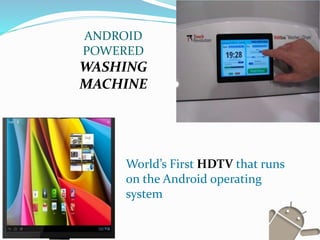
WASHING
MACHINE
World’s First HDTV that runs
on the Android operating
system
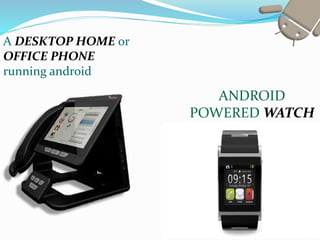
A DESKTOP HOME or
OFFICE PHONE
running android
ANDROID
POWERED WATCH
References:
• http://www.slideshare.net/search/slideshow?searchfrom
=header&q=android+tutorial
• http://readwrite.com/2013/04/08/the-developers-guide-
to-android-history-
infographic#awesm=~ocx3EhN3rqzNc4s
• http://collaboratemeetings.com/2013/04/09/tech-
androids-rise/
• http://androidcompare.com/devices.html
19
ANY QUESTION??

ANDROID MOBILE OPERATING SYSTEM

  • 1.
    Coordinated by: Sir Vaibhavvyas Presented by: Surbhi Gautam Preeta sinha
  • 2.
    OUTLINE:- 1. Introduction 2. AndroidOperating System 3. OHA(Open handset alliance) 4. Architecture and framework 5. Feature of android operating system 6. Timeline of android os 7. Developing app in android 8. Fact and figures 9. Android v/s other os 10. Limitations 11. Future scope and conclusion 12. references
  • 3.
    INTRODUCTION o Mobile operatingsystem is a software platform on which application programs can run on mobile devices. o Different types of mobile operating system. o The given diagram describes the interaction between the user (mobile user),application (internet ,camera etc),operating system(mobile OS) & hardware(mobile phone). 1. Android OS 2. iPhone OS 3. Windows mobile 4. Palm 5. Symbian OS etc.
  • 4.
    Android Mobile OS: Revolutionin mobile experience • Android was founded in Palo Alto ,California ,in October 2003 by Andy Rubin ,Rich Miner ,Nick Sears and Chris White .  Android is an open system supported by “ Open Handset Alliance”. Open System refers to software/operating system whose source code is available for understanding and possible modification and improvement.  Android software stack and framework is built on Linux kernel and programmed in C / C++ / Java and XML.  Its minimum requirement is 200MHZ processor, 32 MB RAM,32 MB storage.  Android specially developed for java based applications. It supports more than 4lakh apps.
  • 5.
    Open handset alliance(OHA) The Open Handset Alliance (OHA) is a business alliance of 78 firms Which are allowed to use source code of Android and develop open standards for mobile devices. Major group members of OHA group is Google , HTC, Sony, Dell , Intel, Samsung, Nvidia , motorola , LG and many more.
  • 6.
  • 7.
    o Linux version2.6.x for core system services. o Provides proven driver model to build the software stack from scratch or customize it from the available software. o Provides memory management ,process management ,security model, networking and lot of core OS infrastructure. o Android using Java over Linux is a smart move. Both Java and Linux are proven technology, and provide portability for mobile application on Android platform.
  • 8.
     Libc: Cstandard Library  SSL: Secure socket layer  Surface manager: Responsible for composing different drawing surfaces onto the screen.  Open GL|ES: 3D image engine  SGL:2D image engine Hence we can combine 3D & 2D graphics application. • Media Framework: Core part of the android multimedia (MPEG4,H264,MP3,AAC…) • Free type: to render the fonts. • Webkit: open source browser engine . Helps to work well on small screen. • SQLite : Embedded database.
  • 9.
    Android runtime meetsthe needs of running in an embedded environment i.e. where is limited battery ,limited memory & limited CPU. CORE LIBRARIES: Java programming language Contains all the collection class,ulities,IO .. All these utilities which we come across & expected to use. DALVIK VIRTUAL MACHINE: Java based license free VM Optimization for low memory requirements. DVM runs .dex files (byte code) that converts during built time. More efficient & run very well on small processors. Structure are designed to be shared across processes due to which multiple instance of DVM running on devices at the same time one in several processes.
  • 10.
    FUNCTIONS: 1. Activity  UIcomponent typically corresponding to one screen 2. Intent Receiver  Responds to notification or status changes.Can wake up your process. 3. Service  Performs tasks that runs in a background. 4. Content provider  Enable applications to share data.
  • 11.
    The top ofthe Android software stack are the applications. 1. Native applications 2. Third party applications
  • 12.
    Feature of androidoperating system: o Open platform o Has Centralized notification system o Ease to use o Network connectivity o Multitasking o Security & privacy. o Memory management o Power management
  • 13.
  • 14.
    Versions of AndroidOS:  Android Beta  First version of android.  The focus of Android beta is testing incorporating usability.  Android Beta will generally have many more problems on speed and performance.  Android Astro 1.0  First full version of android.  Released on September 23,2008.  Wi-fi and bluetooth support.  Quite slow in operating.  Copy and paste feature in the web browser is not present.  Android Cupcake 1.5  Released on april 30,2009.  Added auto-rotation option.  Copy and paste feature added in the web browser.  Increased speed and performance but not upto required level.
  • 15.
    Android Donut 1.6 Releasedon September 15,2009. Voice search and search box were added. Faster OS boot times and fast web browsing experience. Android éclair 2.0/2.1 Released on October 26,2009. Bluetooth 2.1 support. Improved typing speed on virtual keyboard,with smarter dictionary. No Adobe flash media support. Android Froyo 2.2 Released on May 20,2010. Support for Adobe Flash 10.1 Improved application launcher with better browser No internet calling.
  • 16.
    Android Gingerbread 2.3 Releasedon December 6,2010. Updated user interface with high efficiency and speed. Internet calling. One touch word selection and copy/paste. New keyboard for faster word input. More successful version of Android than previous. Not supports multi-core processors. Android Honeycomb 3.0 Released on February 22,2011. Support for multi-core processors. Ability to encrypt all user data. This version of android is only available for tablets. Android IcecreamSandwich(ICS)4.0 Released on November 14,2011. Virtual button in the UI. A new typeface family for the UI,Roboto. Ability to shut down apps that are using data in the background.
  • 17.
    Android JellyBean 4.1 Releasedon June 27,2012. Improved the features of previous version while improving the graphics quality. Smoother user interface. Android Kitkat 4.4 Released in October 13 ,2013. User-interface tweaks,new dialler,caller-id, new bluetooth profiles,wi-fi TDLS support. Unified hangouts messaging apps,screen recording. Run on devices with 512 MB RAM,1 GHZ CPU. Android L 5.0 yet to release. Will provide Android keyboard . Do no disturb mode.
  • 18.
    Developing app inandroid  The Android SDK provides you the API libraries and developer tools necessary to build, test, and debug apps for Android.  Android Software Development Kit (Android SDK): Developer : Google Written in : Java Operating System : Cross platform Available in : English Type : IDE,SDK o If you're a new Android developer, we recommend you download the ADT Bundle to quickly start developing apps. It includes the essential Android SDK components and a version of the Eclipse IDE with built-in ADT (Android Developer Tools) to streamline your Android app development.
  • 19.
  • 20.
    Android vs iPhone Wecan set any app as a default on android Android just drag and drop for syncing by using USB cable on computer Google charges for android developers only $5 Android OS have Flash support It is impossible on iPhone.Have to click manually iPhone syncing only with iTunes Apple charges for app developers $100 While the iPhone only has html5 support
  • 21.
    LIMITATIONS:  Hangs alot  Drain battery  Internet connection is important  Over heats
  • 22.
    Future scope &conclusion: • Future of android is beyond imagination. It has opened a new stream of technological advancements. India’s first android based MICRO OVEN World’s first android car ROEWE 350
  • 23.
  • 24.
    ANDROID POWERED WASHING MACHINE World’s First HDTVthat runs on the Android operating system
  • 25.
    A DESKTOP HOMEor OFFICE PHONE running android ANDROID POWERED WATCH
  • 26.
  • 28.