WLST Bhavya Siddappa May 30, 2008
Topics of Discussion What is WLST? Modes of Operation Features Online and Offline WLST  Advantages of WLST MBean  Create Domain through WLST Demo FAQs
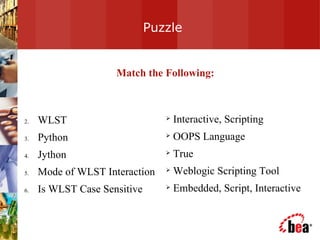
Puzzle WLST Python Jython Mode of WLST Interaction Is WLST Case Sensitive  Interactive, Scripting OOPS Language True Weblogic Scripting Tool Embedded, Script, Interactive Match the Following:
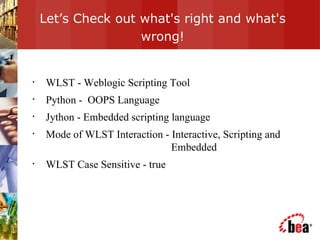
Let’s Check out what's right and what's wrong! WLST - Weblogic Scripting Tool Python -  OOPS Language Jython - Embedded scripting language Mode of WLST Interaction - Interactive, Scripting and    Embedded  WLST Case Sensitive - true
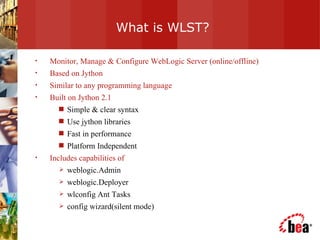
What is WLST? Monitor, Manage & Configure WebLogic Server (online/offline) Based on Jython  Similar to any programming language  Built on Jython 2.1 Simple & clear syntax Use jython libraries Fast in performance Platform Independent Includes capabilities of  weblogic.Admin weblogic.Deployer wlconfig Ant Tasks config wizard(silent mode)
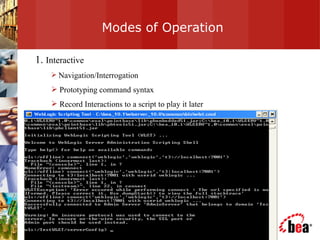
Modes of Operation 1.  Interactive Navigation/Interrogation Prototyping command syntax Record Interactions to a script to play it later
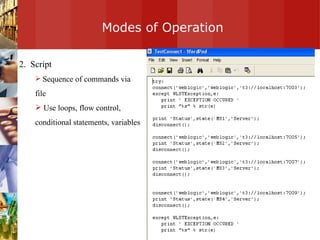
Modes of Operation 2.  Script Sequence of commands via file Use loops, flow control, conditional statements, variables
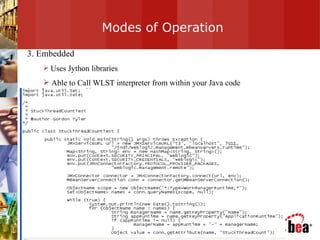
Modes of Operation 3. Embedded Uses Jython libraries Able to Call WLST interpreter from within your Java code
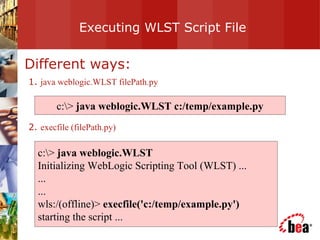
Executing WLST Script File Different ways: 1.  java weblogic.WLST filePath.py 2.  execfile (filePath.py) c:\>  java weblogic.WLST c:/temp/example.py c:\>  java weblogic.WLST Initializing WebLogic Scripting Tool (WLST) ... ... ... wls:/(offline)>  execfile('c:/temp/example.py') starting the script ...
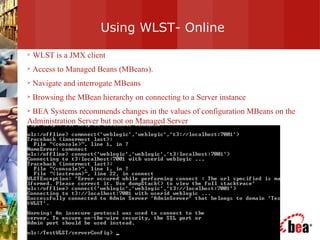
Using WLST- Online WLST is a JMX client  Access to Managed Beans (MBeans).  Navigate and interrogate MBeans Browsing the MBean hierarchy on connecting to a Server instance BEA Systems recommends changes in the values of configuration MBeans on the Administration Server but not on Managed Server
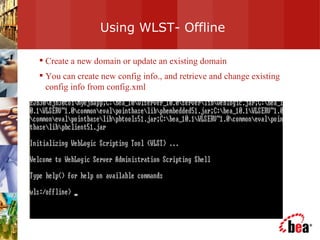
Using WLST- Offline Create a new domain or update an existing domain  You can create new config info., and retrieve and change existing config info from config.xml
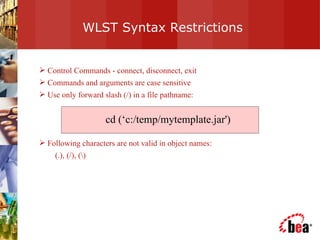
WLST Syntax Restrictions Control Commands - connect, disconnect, exit Commands and arguments are case sensitive Use only forward slash (/) in a file pathname:  Following characters are not valid in object names:  (.), (/), (\) cd (‘c:/temp/mytemplate.jar')
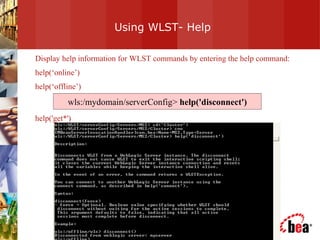
Using WLST- Help Display help information for WLST commands by entering the help command: help(‘online’) help(‘offline’) help('get*')  wls:/mydomain/serverConfig>  help('disconnect')
Features -Advantages Easily move resources from one Domain to another Make reliable changes to config.xml without a running server Use  WLST  in conjunction with any  java utility tools  (e.g. ant, jython scripts) Extend WLST to add any  Custom commands WLST helps in retrieving MBeans names in a similar fashion to navigating hierarchy of files in a file system.
Configuration MBean Hierarchy Configuration MBean Hierarchy Domain MBean (root) |- - - MBean type (LogMBean) |- - - MBean instance (medrec) |- - - MBean attributes & operations  (e.g. FileName) |- - - MBean type (SecurityConfigurationMBean) |- - - MBean type (ServerMBean) |- - - MBean instance (ManagedServer1) |- - - MBean attributes & operations  (e.g.AutoRestart)
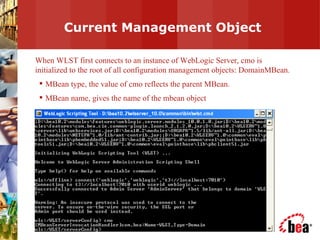
Current Management Object When WLST first connects to an instance of WebLogic Server, cmo is initialized to the root of all configuration management objects: DomainMBean. MBean type, the value of cmo reflects the parent MBean. MBean name, gives the name of the mbean object
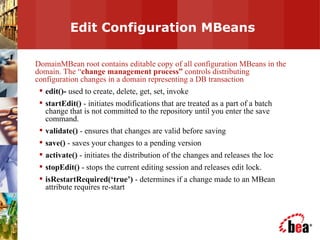
Edit Configuration MBeans DomainMBean root contains editable copy of all configuration MBeans in the domain. The “ change management process”  controls distributing configuration changes in a domain representing a DB transaction edit()-  used to create, delete, get, set, invoke startEdit()  - initiates modifications that are treated as a part of a batch change that is not committed to the repository until you enter the save command. validate()  - ensures that changes are valid before saving save()  - saves your changes to a pending version activate()  - initiates the distribution of the changes and releases the loc stopEdit()  - stops the current editing session and releases edit lock. isRestartRequired(‘true’)  - determines if a change made to an MBean attribute requires re-start
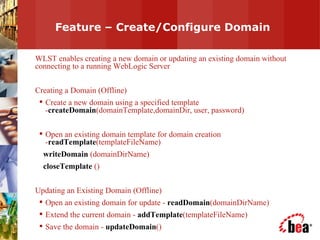
Feature – Create/Configure Domain WLST enables creating a new domain or updating an existing domain without connecting to a running WebLogic Server Creating a Domain (Offline) Create a new domain using a specified template - createDomain (domainTemplate,domainDir, user, password) Open an existing domain template for domain creation - readTemplate (templateFileName)  writeDomain  (domainDirName)  closeTemplate  () Updating an Existing Domain (Offline) Open an existing domain for update -  readDomain (domainDirName) Extend the current domain -  addTemplate (templateFileName) Save the domain -  updateDomain ()
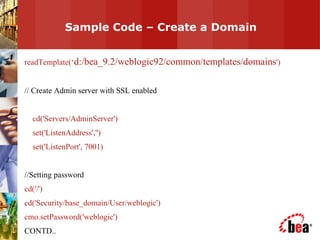
Sample Code – Create a Domain  readTemplate(‘ d:/bea_9.2/weblogic92/common/templates/domains ') // Create Admin server with SSL enabled cd('Servers/AdminServer') set('ListenAddress','') set('ListenPort', 7001) //Setting password cd('/') cd('Security/base_domain/User/weblogic') cmo.setPassword('weblogic') CONTD..
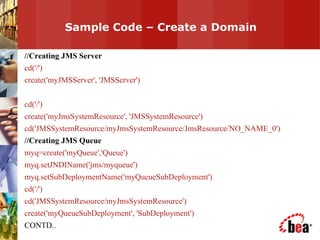
Sample Code – Create a Domain  //Creating JMS Server cd('/') create('myJMSServer', 'JMSServer') cd('/') create('myJmsSystemResource', 'JMSSystemResource') cd('JMSSystemResource/myJmsSystemResource/JmsResource/NO_NAME_0') //Creating JMS Queue myq=create('myQueue','Queue') myq.setJNDIName('jms/myqueue') myq.setSubDeploymentName('myQueueSubDeployment') cd('/') cd('JMSSystemResource/myJmsSystemResource') create('myQueueSubDeployment', 'SubDeployment') CONTD..
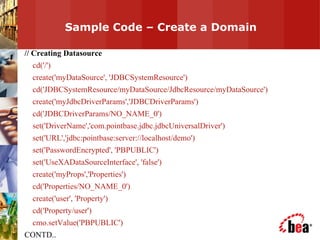
Sample Code – Create a Domain  // Creating Datasource cd('/') create('myDataSource', 'JDBCSystemResource') cd('JDBCSystemResource/myDataSource/JdbcResource/myDataSource') create('myJdbcDriverParams','JDBCDriverParams') cd('JDBCDriverParams/NO_NAME_0') set('DriverName','com.pointbase.jdbc.jdbcUniversalDriver') set('URL','jdbc:pointbase:server://localhost/demo') set('PasswordEncrypted', 'PBPUBLIC') set('UseXADataSourceInterface', 'false') create('myProps','Properties') cd('Properties/NO_NAME_0') create('user', 'Property') cd('Property/user') cmo.setValue('PBPUBLIC') CONTD..
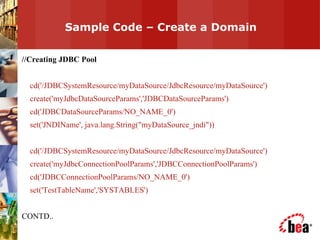
Sample Code – Create a Domain  //Creating JDBC Pool cd('/JDBCSystemResource/myDataSource/JdbcResource/myDataSource') create('myJdbcDataSourceParams','JDBCDataSourceParams') cd('JDBCDataSourceParams/NO_NAME_0') set('JNDIName', java.lang.String("myDataSource_jndi")) cd('/JDBCSystemResource/myDataSource/JdbcResource/myDataSource') create('myJdbcConnectionPoolParams','JDBCConnectionPoolParams') cd('JDBCConnectionPoolParams/NO_NAME_0') set('TestTableName','SYSTABLES') CONTD..
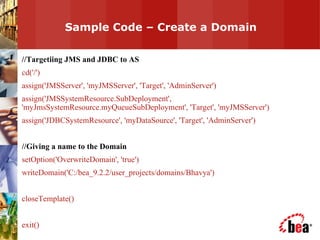
Sample Code – Create a Domain  //Targetiing JMS and JDBC to AS cd('/') assign('JMSServer', 'myJMSServer', 'Target', 'AdminServer') assign('JMSSystemResource.SubDeployment', 'myJmsSystemResource.myQueueSubDeployment', 'Target', 'myJMSServer') assign('JDBCSystemResource', 'myDataSource', 'Target', 'AdminServer') //Giving a name to the Domain setOption('OverwriteDomain', 'true') writeDomain('C:/bea_9.2.2/user_projects/domains/Bhavya') closeTemplate() exit()
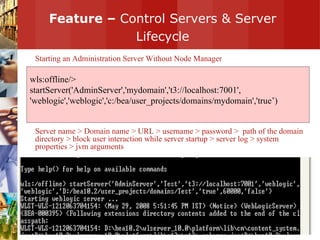
Feature –  Control Servers & Server Lifecycle Starting an Administration Server Without Node Manager Server name > Domain name > URL > username > password >  path of the domain directory > block user interaction while server startup > server log > system properties > jvm arguments wls:offline/>  startServer('AdminServer','mydomain','t3://localhost:7001', 'weblogic','weblogic','c:/bea/user_projects/domains/mydomain','true’)
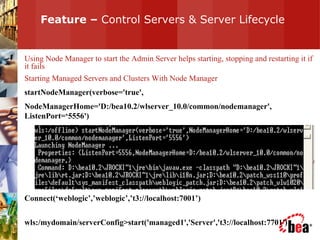
Feature –  Control Servers & Server Lifecycle Using Node Manager to start the Admin Server helps starting, stopping and restarting it if it fails Starting Managed Servers and Clusters With Node Manager startNodeManager(verbose='true', NodeManagerHome='D:/bea10.2/wlserver_10.0/common/nodemanager', ListenPort=‘5556') Connect(‘weblogic’,’weblogic’,’t3://localhost:7001’) wls:/mydomain/serverConfig>start('managed1','Server','t3://localhost:7701')
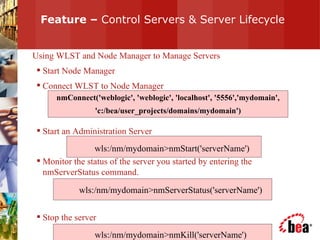
Feature –  Control Servers & Server Lifecycle Using WLST and Node Manager to Manage Servers Start Node Manager Connect WLST to Node Manager  Start an Administration Server Monitor the status of the server you started by entering the nmServerStatus command. Stop the server  nmConnect('weblogic', 'weblogic', 'localhost', '5556','mydomain', 'c:/bea/user_projects/domains/mydomain') wls:/nm/mydomain>nmStart('serverName') wls:/nm/mydomain>nmServerStatus('serverName') wls:/nm/mydomain>nmKill('serverName')
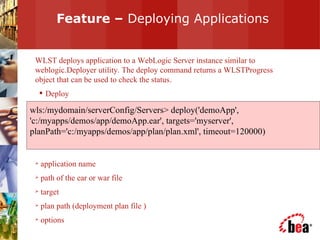
Feature –  Deploying Applications WLST deploys application to a WebLogic Server instance similar to weblogic.Deployer utility. The deploy command returns a WLSTProgress object that can be used to check the status. Deploy application name path of the ear or war file target plan path (deployment plan file ) options wls:/mydomain/serverConfig/Servers> deploy('demoApp', 'c:/myapps/demos/app/demoApp.ear', targets='myserver', planPath='c:/myapps/demos/app/plan/plan.xml', timeout=120000)
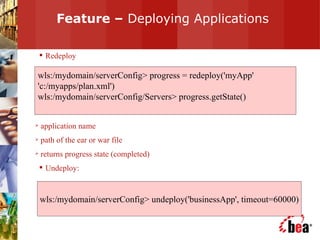
Feature –  Deploying Applications Redeploy application name path of the ear or war file returns progress state (completed) Undeploy: wls:/mydomain/serverConfig> progress = redeploy('myApp' 'c:/myapps/plan.xml') wls:/mydomain/serverConfig/Servers> progress.getState() wls:/mydomain/serverConfig> undeploy('businessApp', timeout=60000)
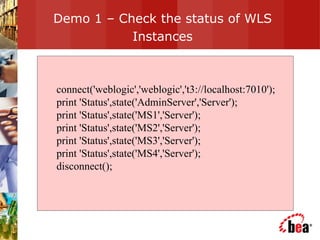
Demo 1 – Check the status of WLS Instances connect('weblogic','weblogic','t3://localhost:7010'); print 'Status',state('AdminServer','Server'); print 'Status',state('MS1','Server'); print 'Status',state('MS2','Server'); print 'Status',state('MS3','Server'); print 'Status',state('MS4','Server'); disconnect();
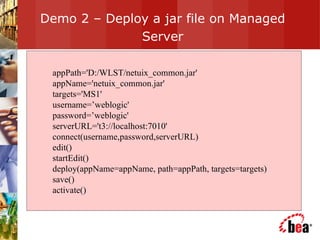
Demo 2 – Deploy a jar file on Managed Server appPath='D:/WLST/netuix_common.jar' appName='netuix_common.jar' targets='MS1' username=’weblogic' password=’weblogic' serverURL='t3://localhost:7010' connect(username,password,serverURL) edit() startEdit() deploy(appName=appName, path=appPath, targets=targets) save() activate()
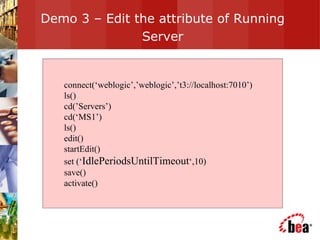
Demo 3 – Edit the attribute of Running Server connect(‘weblogic’,’weblogic’,’t3://localhost:7010’) ls() cd(’Servers’) cd(‘MS1’) ls() edit() startEdit() set (‘ IdlePeriodsUntilTimeout ‘,10) save() activate()
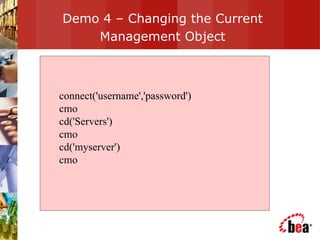
Demo 4 – Changing the Current Management Object connect('username','password')  cmo  cd('Servers')  cmo  cd('myserver')  cmo
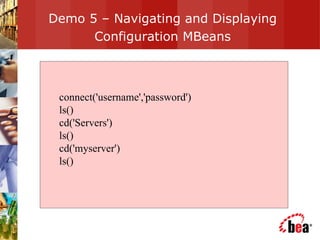
Demo 5 – Navigating and Displaying Configuration MBeans connect('username','password')  ls()  cd('Servers')  ls() cd('myserver')  ls()
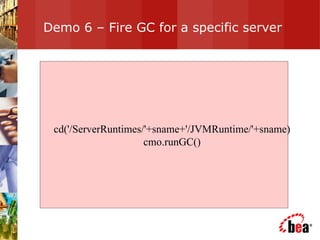
Demo 6 – Fire GC for a specific server cd('/ServerRuntimes/'+sname+'/JVMRuntime/'+sname) cmo.runGC()
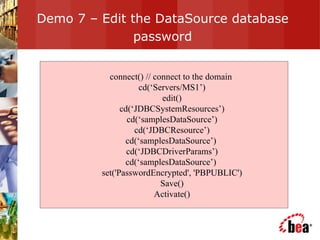
Demo 7 – Edit the DataSource database password connect() // connect to the domain  cd(‘Servers/MS1’) edit() cd(‘JDBCSystemResources’) cd(‘samplesDataSource’) cd(‘JDBCResource’) cd(‘samplesDataSource’)  cd(‘JDBCDriverParams’) cd(‘samplesDataSource’)  set('PasswordEncrypted', 'PBPUBLIC') Save() Activate()
Demo 8 – Script to monitor threads connect() // connect to the domain  domainRuntime() cd('ServerRuntimes/AdminServer/ThreadPoolRuntime/ ThreadPoolRuntime') ls() // it will list all the thread pool information
Demo 9 – Script to get the count of stuck threads Retrieivng the StuckThreadCount using WLST.  Can be retrieved using WLST from the path  connect() // connect to the domain  domainRuntime() cd(' ServerRuntimes/SERVERNAME/WorkManagerRuntimes/ DataRetirementWorkManager/ StuckThreadCount ')
Demo 10 – Start the server startServer('AdminServer', 'mydomain', username='weblogic', password='weblogic', block='true', timeout=300000,  serverLog='./test-right.log', systemProperties='weblogic.ListenPort=14521', jvmArgs='-Xms256m -Xmx512m -XX:MaxPermSize=128m') To summarize, You should specify url in the startServer command OR You should specify weblogic.ListenPort in the systemProperties of  the startServer() command.
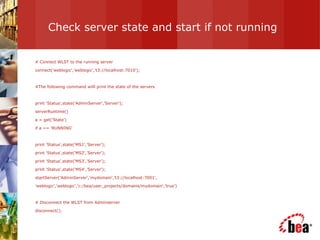
Check server state and start if not running # Connect WLST to the running server connect('weblogic','weblogic','t3://localhost:7010'); #The following command willl print the state of the servers print 'Status',state('AdminServer','Server'); serverRuntime() a = get('State') if a == 'RUNNING' print 'Status',state('MS1','Server'); print 'Status',state('MS2','Server'); print 'Status',state('MS3','Server'); print 'Status',state('MS4','Server'); startServer('AdminServer','mydomain','t3://localhost:7001', 'weblogic','weblogic','c:/bea/user_projects/domains/mydomain','true’) # Disconnect the WLST from Adminserver disconnect();
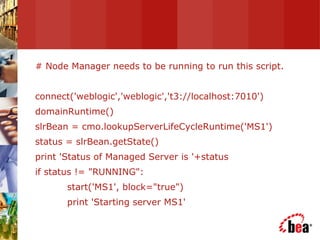
# Node Manager needs to be running to run this script. connect('weblogic','weblogic','t3://localhost:7010') domainRuntime() slrBean = cmo.lookupServerLifeCycleRuntime('MS1') status = slrBean.getState() print 'Status of Managed Server is '+status if status != "RUNNING": start('MS1', block="true") print 'Starting server MS1'
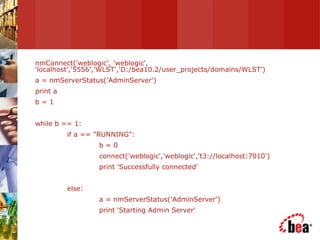
nmConnect('weblogic', 'weblogic', 'localhost','5556','WLST','D:/bea10.2/user_projects/domains/WLST') a = nmServerStatus('AdminServer') print a b = 1 while b == 1: if a == "RUNNING": b = 0 connect('weblogic','weblogic','t3://localhost:7010') print 'Successfully connected' else: a = nmServerStatus('AdminServer') print 'Starting Admin Server'
Reorder Authentication Providers WLST Script  edit() startEdit(-1,-1,'false') cd('/SecurityConfiguration/WLST_Machine/Realms/myrealm') set('AuthenticationProviders',jarray.array([ObjectName('Security:Name=myrealmDefaultIdentityAsserter'), ObjectName('Security:Name=myrealmDefaultAuthenticator')], ObjectName)) save() activate() cd('/Security/ domainname /User/ username ') cmo.setPassword(' password ')
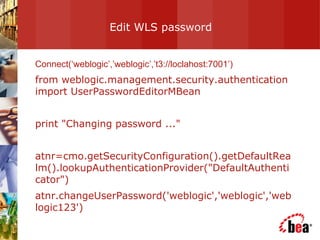
Edit WLS password  Connect(‘weblogic’,’weblogic’,’t3://loclahost:7001’) from weblogic.management.security.authentication import UserPasswordEditorMBean print "Changing password ..." atnr=cmo.getSecurityConfiguration().getDefaultRealm().lookupAuthenticationProvider("DefaultAuthenticator") atnr.changeUserPassword('weblogic','weblogic','weblogic123')
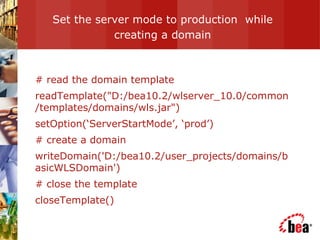
Set the server mode to production  while creating a domain # read the domain template readTemplate("D:/bea10.2/wlserver_10.0/common/templates/domains/wls.jar") setOption(‘ServerStartMode’, ‘prod’) # create a domain writeDomain('D:/bea10.2/user_projects/domains/basicWLSDomain') # close the template closeTemplate()
For More Information … Documentation (for WLS 10.0) at:  http://e-docs.bea.com/wls/docs90/config_scripting/using_WLST.html UseFul Links   http://www.jython.org  – download Jython FQA http://edocs.bea.com/wls/docs92/config_scripting/wlst_faq.html
Thank You Quest Time

WLST

  • 1.
  • 2.
    Topics of DiscussionWhat is WLST? Modes of Operation Features Online and Offline WLST Advantages of WLST MBean Create Domain through WLST Demo FAQs
  • 3.
    Puzzle WLST PythonJython Mode of WLST Interaction Is WLST Case Sensitive Interactive, Scripting OOPS Language True Weblogic Scripting Tool Embedded, Script, Interactive Match the Following:
  • 4.
    Let’s Check outwhat's right and what's wrong! WLST - Weblogic Scripting Tool Python - OOPS Language Jython - Embedded scripting language Mode of WLST Interaction - Interactive, Scripting and Embedded WLST Case Sensitive - true
  • 5.
    What is WLST?Monitor, Manage & Configure WebLogic Server (online/offline) Based on Jython Similar to any programming language Built on Jython 2.1 Simple & clear syntax Use jython libraries Fast in performance Platform Independent Includes capabilities of weblogic.Admin weblogic.Deployer wlconfig Ant Tasks config wizard(silent mode)
  • 6.
    Modes of Operation1. Interactive Navigation/Interrogation Prototyping command syntax Record Interactions to a script to play it later
  • 7.
    Modes of Operation2. Script Sequence of commands via file Use loops, flow control, conditional statements, variables
  • 8.
    Modes of Operation3. Embedded Uses Jython libraries Able to Call WLST interpreter from within your Java code
  • 9.
    Executing WLST ScriptFile Different ways: 1. java weblogic.WLST filePath.py 2. execfile (filePath.py) c:\> java weblogic.WLST c:/temp/example.py c:\> java weblogic.WLST Initializing WebLogic Scripting Tool (WLST) ... ... ... wls:/(offline)> execfile('c:/temp/example.py') starting the script ...
  • 10.
    Using WLST- OnlineWLST is a JMX client Access to Managed Beans (MBeans). Navigate and interrogate MBeans Browsing the MBean hierarchy on connecting to a Server instance BEA Systems recommends changes in the values of configuration MBeans on the Administration Server but not on Managed Server
  • 11.
    Using WLST- OfflineCreate a new domain or update an existing domain You can create new config info., and retrieve and change existing config info from config.xml
  • 12.
    WLST Syntax RestrictionsControl Commands - connect, disconnect, exit Commands and arguments are case sensitive Use only forward slash (/) in a file pathname: Following characters are not valid in object names: (.), (/), (\) cd (‘c:/temp/mytemplate.jar')
  • 13.
    Using WLST- HelpDisplay help information for WLST commands by entering the help command: help(‘online’) help(‘offline’) help('get*') wls:/mydomain/serverConfig> help('disconnect')
  • 14.
    Features -Advantages Easilymove resources from one Domain to another Make reliable changes to config.xml without a running server Use WLST in conjunction with any java utility tools (e.g. ant, jython scripts) Extend WLST to add any Custom commands WLST helps in retrieving MBeans names in a similar fashion to navigating hierarchy of files in a file system.
  • 15.
    Configuration MBean HierarchyConfiguration MBean Hierarchy Domain MBean (root) |- - - MBean type (LogMBean) |- - - MBean instance (medrec) |- - - MBean attributes & operations (e.g. FileName) |- - - MBean type (SecurityConfigurationMBean) |- - - MBean type (ServerMBean) |- - - MBean instance (ManagedServer1) |- - - MBean attributes & operations (e.g.AutoRestart)
  • 16.
    Current Management ObjectWhen WLST first connects to an instance of WebLogic Server, cmo is initialized to the root of all configuration management objects: DomainMBean. MBean type, the value of cmo reflects the parent MBean. MBean name, gives the name of the mbean object
  • 17.
    Edit Configuration MBeansDomainMBean root contains editable copy of all configuration MBeans in the domain. The “ change management process” controls distributing configuration changes in a domain representing a DB transaction edit()- used to create, delete, get, set, invoke startEdit() - initiates modifications that are treated as a part of a batch change that is not committed to the repository until you enter the save command. validate() - ensures that changes are valid before saving save() - saves your changes to a pending version activate() - initiates the distribution of the changes and releases the loc stopEdit() - stops the current editing session and releases edit lock. isRestartRequired(‘true’) - determines if a change made to an MBean attribute requires re-start
  • 18.
    Feature – Create/ConfigureDomain WLST enables creating a new domain or updating an existing domain without connecting to a running WebLogic Server Creating a Domain (Offline) Create a new domain using a specified template - createDomain (domainTemplate,domainDir, user, password) Open an existing domain template for domain creation - readTemplate (templateFileName) writeDomain (domainDirName) closeTemplate () Updating an Existing Domain (Offline) Open an existing domain for update - readDomain (domainDirName) Extend the current domain - addTemplate (templateFileName) Save the domain - updateDomain ()
  • 19.
    Sample Code –Create a Domain readTemplate(‘ d:/bea_9.2/weblogic92/common/templates/domains ') // Create Admin server with SSL enabled cd('Servers/AdminServer') set('ListenAddress','') set('ListenPort', 7001) //Setting password cd('/') cd('Security/base_domain/User/weblogic') cmo.setPassword('weblogic') CONTD..
  • 20.
    Sample Code –Create a Domain //Creating JMS Server cd('/') create('myJMSServer', 'JMSServer') cd('/') create('myJmsSystemResource', 'JMSSystemResource') cd('JMSSystemResource/myJmsSystemResource/JmsResource/NO_NAME_0') //Creating JMS Queue myq=create('myQueue','Queue') myq.setJNDIName('jms/myqueue') myq.setSubDeploymentName('myQueueSubDeployment') cd('/') cd('JMSSystemResource/myJmsSystemResource') create('myQueueSubDeployment', 'SubDeployment') CONTD..
  • 21.
    Sample Code –Create a Domain // Creating Datasource cd('/') create('myDataSource', 'JDBCSystemResource') cd('JDBCSystemResource/myDataSource/JdbcResource/myDataSource') create('myJdbcDriverParams','JDBCDriverParams') cd('JDBCDriverParams/NO_NAME_0') set('DriverName','com.pointbase.jdbc.jdbcUniversalDriver') set('URL','jdbc:pointbase:server://localhost/demo') set('PasswordEncrypted', 'PBPUBLIC') set('UseXADataSourceInterface', 'false') create('myProps','Properties') cd('Properties/NO_NAME_0') create('user', 'Property') cd('Property/user') cmo.setValue('PBPUBLIC') CONTD..
  • 22.
    Sample Code –Create a Domain //Creating JDBC Pool cd('/JDBCSystemResource/myDataSource/JdbcResource/myDataSource') create('myJdbcDataSourceParams','JDBCDataSourceParams') cd('JDBCDataSourceParams/NO_NAME_0') set('JNDIName', java.lang.String("myDataSource_jndi")) cd('/JDBCSystemResource/myDataSource/JdbcResource/myDataSource') create('myJdbcConnectionPoolParams','JDBCConnectionPoolParams') cd('JDBCConnectionPoolParams/NO_NAME_0') set('TestTableName','SYSTABLES') CONTD..
  • 23.
    Sample Code –Create a Domain //Targetiing JMS and JDBC to AS cd('/') assign('JMSServer', 'myJMSServer', 'Target', 'AdminServer') assign('JMSSystemResource.SubDeployment', 'myJmsSystemResource.myQueueSubDeployment', 'Target', 'myJMSServer') assign('JDBCSystemResource', 'myDataSource', 'Target', 'AdminServer') //Giving a name to the Domain setOption('OverwriteDomain', 'true') writeDomain('C:/bea_9.2.2/user_projects/domains/Bhavya') closeTemplate() exit()
  • 24.
    Feature – Control Servers & Server Lifecycle Starting an Administration Server Without Node Manager Server name > Domain name > URL > username > password > path of the domain directory > block user interaction while server startup > server log > system properties > jvm arguments wls:offline/> startServer('AdminServer','mydomain','t3://localhost:7001', 'weblogic','weblogic','c:/bea/user_projects/domains/mydomain','true’)
  • 25.
    Feature – Control Servers & Server Lifecycle Using Node Manager to start the Admin Server helps starting, stopping and restarting it if it fails Starting Managed Servers and Clusters With Node Manager startNodeManager(verbose='true', NodeManagerHome='D:/bea10.2/wlserver_10.0/common/nodemanager', ListenPort=‘5556') Connect(‘weblogic’,’weblogic’,’t3://localhost:7001’) wls:/mydomain/serverConfig>start('managed1','Server','t3://localhost:7701')
  • 26.
    Feature – Control Servers & Server Lifecycle Using WLST and Node Manager to Manage Servers Start Node Manager Connect WLST to Node Manager Start an Administration Server Monitor the status of the server you started by entering the nmServerStatus command. Stop the server nmConnect('weblogic', 'weblogic', 'localhost', '5556','mydomain', 'c:/bea/user_projects/domains/mydomain') wls:/nm/mydomain>nmStart('serverName') wls:/nm/mydomain>nmServerStatus('serverName') wls:/nm/mydomain>nmKill('serverName')
  • 27.
    Feature – Deploying Applications WLST deploys application to a WebLogic Server instance similar to weblogic.Deployer utility. The deploy command returns a WLSTProgress object that can be used to check the status. Deploy application name path of the ear or war file target plan path (deployment plan file ) options wls:/mydomain/serverConfig/Servers> deploy('demoApp', 'c:/myapps/demos/app/demoApp.ear', targets='myserver', planPath='c:/myapps/demos/app/plan/plan.xml', timeout=120000)
  • 28.
    Feature – Deploying Applications Redeploy application name path of the ear or war file returns progress state (completed) Undeploy: wls:/mydomain/serverConfig> progress = redeploy('myApp' 'c:/myapps/plan.xml') wls:/mydomain/serverConfig/Servers> progress.getState() wls:/mydomain/serverConfig> undeploy('businessApp', timeout=60000)
  • 29.
    Demo 1 –Check the status of WLS Instances connect('weblogic','weblogic','t3://localhost:7010'); print 'Status',state('AdminServer','Server'); print 'Status',state('MS1','Server'); print 'Status',state('MS2','Server'); print 'Status',state('MS3','Server'); print 'Status',state('MS4','Server'); disconnect();
  • 30.
    Demo 2 –Deploy a jar file on Managed Server appPath='D:/WLST/netuix_common.jar' appName='netuix_common.jar' targets='MS1' username=’weblogic' password=’weblogic' serverURL='t3://localhost:7010' connect(username,password,serverURL) edit() startEdit() deploy(appName=appName, path=appPath, targets=targets) save() activate()
  • 31.
    Demo 3 –Edit the attribute of Running Server connect(‘weblogic’,’weblogic’,’t3://localhost:7010’) ls() cd(’Servers’) cd(‘MS1’) ls() edit() startEdit() set (‘ IdlePeriodsUntilTimeout ‘,10) save() activate()
  • 32.
    Demo 4 –Changing the Current Management Object connect('username','password') cmo cd('Servers') cmo cd('myserver') cmo
  • 33.
    Demo 5 –Navigating and Displaying Configuration MBeans connect('username','password') ls() cd('Servers') ls() cd('myserver') ls()
  • 34.
    Demo 6 –Fire GC for a specific server cd('/ServerRuntimes/'+sname+'/JVMRuntime/'+sname) cmo.runGC()
  • 35.
    Demo 7 –Edit the DataSource database password connect() // connect to the domain cd(‘Servers/MS1’) edit() cd(‘JDBCSystemResources’) cd(‘samplesDataSource’) cd(‘JDBCResource’) cd(‘samplesDataSource’) cd(‘JDBCDriverParams’) cd(‘samplesDataSource’) set('PasswordEncrypted', 'PBPUBLIC') Save() Activate()
  • 36.
    Demo 8 –Script to monitor threads connect() // connect to the domain domainRuntime() cd('ServerRuntimes/AdminServer/ThreadPoolRuntime/ ThreadPoolRuntime') ls() // it will list all the thread pool information
  • 37.
    Demo 9 –Script to get the count of stuck threads Retrieivng the StuckThreadCount using WLST. Can be retrieved using WLST from the path connect() // connect to the domain domainRuntime() cd(' ServerRuntimes/SERVERNAME/WorkManagerRuntimes/ DataRetirementWorkManager/ StuckThreadCount ')
  • 38.
    Demo 10 –Start the server startServer('AdminServer', 'mydomain', username='weblogic', password='weblogic', block='true', timeout=300000, serverLog='./test-right.log', systemProperties='weblogic.ListenPort=14521', jvmArgs='-Xms256m -Xmx512m -XX:MaxPermSize=128m') To summarize, You should specify url in the startServer command OR You should specify weblogic.ListenPort in the systemProperties of the startServer() command.
  • 39.
    Check server stateand start if not running # Connect WLST to the running server connect('weblogic','weblogic','t3://localhost:7010'); #The following command willl print the state of the servers print 'Status',state('AdminServer','Server'); serverRuntime() a = get('State') if a == 'RUNNING' print 'Status',state('MS1','Server'); print 'Status',state('MS2','Server'); print 'Status',state('MS3','Server'); print 'Status',state('MS4','Server'); startServer('AdminServer','mydomain','t3://localhost:7001', 'weblogic','weblogic','c:/bea/user_projects/domains/mydomain','true’) # Disconnect the WLST from Adminserver disconnect();
  • 40.
    # Node Managerneeds to be running to run this script. connect('weblogic','weblogic','t3://localhost:7010') domainRuntime() slrBean = cmo.lookupServerLifeCycleRuntime('MS1') status = slrBean.getState() print 'Status of Managed Server is '+status if status != "RUNNING": start('MS1', block="true") print 'Starting server MS1'
  • 41.
    nmConnect('weblogic', 'weblogic', 'localhost','5556','WLST','D:/bea10.2/user_projects/domains/WLST')a = nmServerStatus('AdminServer') print a b = 1 while b == 1: if a == "RUNNING": b = 0 connect('weblogic','weblogic','t3://localhost:7010') print 'Successfully connected' else: a = nmServerStatus('AdminServer') print 'Starting Admin Server'
  • 42.
    Reorder Authentication ProvidersWLST Script edit() startEdit(-1,-1,'false') cd('/SecurityConfiguration/WLST_Machine/Realms/myrealm') set('AuthenticationProviders',jarray.array([ObjectName('Security:Name=myrealmDefaultIdentityAsserter'), ObjectName('Security:Name=myrealmDefaultAuthenticator')], ObjectName)) save() activate() cd('/Security/ domainname /User/ username ') cmo.setPassword(' password ')
  • 43.
    Edit WLS password Connect(‘weblogic’,’weblogic’,’t3://loclahost:7001’) from weblogic.management.security.authentication import UserPasswordEditorMBean print "Changing password ..." atnr=cmo.getSecurityConfiguration().getDefaultRealm().lookupAuthenticationProvider("DefaultAuthenticator") atnr.changeUserPassword('weblogic','weblogic','weblogic123')
  • 44.
    Set the servermode to production while creating a domain # read the domain template readTemplate("D:/bea10.2/wlserver_10.0/common/templates/domains/wls.jar") setOption(‘ServerStartMode’, ‘prod’) # create a domain writeDomain('D:/bea10.2/user_projects/domains/basicWLSDomain') # close the template closeTemplate()
  • 45.
    For More Information… Documentation (for WLS 10.0) at: http://e-docs.bea.com/wls/docs90/config_scripting/using_WLST.html UseFul Links http://www.jython.org – download Jython FQA http://edocs.bea.com/wls/docs92/config_scripting/wlst_faq.html
  • 46.