AndesClarity for RISC-V
Vector Processor
Chuan-Hua Chang, Ph.D.
Associate VP, Architecture
Andes Technology
RISC-V Summit, 12/2020
Agenda
Overview of AndesClarity
1
AndesCore™ NX27V Pipeline
2
Program Analysis Example
3
Concluding Remarks
4
AndesClarity
Taking RISC-V® Mainstream 4
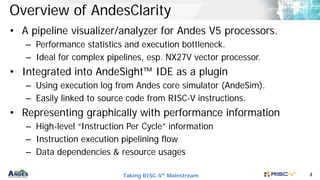
Overview of AndesClarity
• A pipeline visualizer/analyzer for Andes V5 processors.
– Performance statistics and execution bottleneck.
– Ideal for complex pipelines, esp. NX27V vector processor.
• Integrated into AndeSight™ IDE as a plugin
– Using execution log from Andes core simulator (AndeSim).
– Easily linked to source code from RISC-V instructions.
• Representing graphically with performance information
– High-level “Instruction Per Cycle” information
– Instruction execution pipelining flow
– Data dependencies & resource usages
Taking RISC-V® Mainstream 5
Usage scenarios for AndesClarity
• Algorithm tuning:
– Identify bottleneck from pipeline stalls or resource usage.
– Experiment on different enhancements of the same task.
• Compiler enhancement and flag tuning:
– Identify issues of compiler generated code.
– Compare performance with different compiler options.
• Architecture exploration:
– Explore different SoC architecture and processor configurations.
– Discover potential processor micro-architecture improvements.
Taking RISC-V® Mainstream 6
AndesClarity Main Interfaces
• Performance viewer
– IPC (Instruction Per Cycle)
– OPC (Operation Per Cycle), designed for vector instructions.
• Pipeline stage viewer
– Instruction-centric view
– Resource-centric view
Taking RISC-V® Mainstream 7
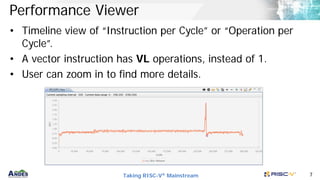
Performance Viewer
• Timeline view of “Instruction per Cycle” or “Operation per
Cycle”.
• A vector instruction has VL operations, instead of 1.
• User can zoom in to find more details.
Taking RISC-V® Mainstream 8
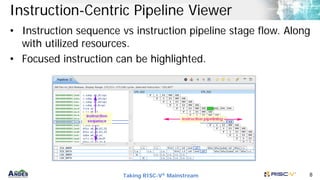
Instruction-Centric Pipeline Viewer
• Instruction sequence vs instruction pipeline stage flow. Along
with utilized resources.
• Focused instruction can be highlighted.
Taking RISC-V® Mainstream 9
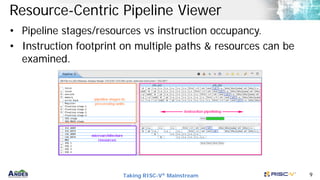
Resource-Centric Pipeline Viewer
• Pipeline stages/resources vs instruction occupancy.
• Instruction footprint on multiple paths & resources can be
examined.
Taking RISC-V® Mainstream 10
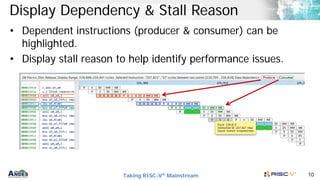
Display Dependency & Stall Reason
• Dependent instructions (producer & consumer) can be
highlighted.
• Display stall reason to help identify performance issues.
Example Vector
Processor Pipeline
Taking RISC-V® Mainstream 12
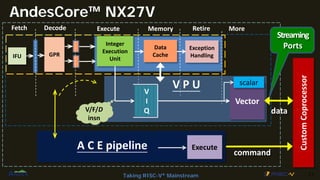
AndesCore™ NX27V
Fetch Decode Execute Memory Retire
Integer
Execution
Unit
Data
Cache
Exception
Handling
IFU GPR
V P U
Vector
scalar
V
I
Q
V/F/D
insn
More
Custom
Coprocessor
command
data
A C E pipeline Execute
Streaming
Ports
Vector Program
Analysis Example
Taking RISC-V® Mainstream 14
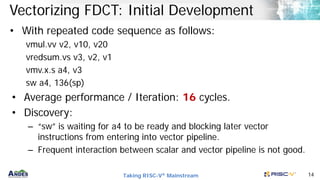
Vectorizing FDCT: Initial Development
• With repeated code sequence as follows:
vmul.vv v2, v10, v20
vredsum.vs v3, v2, v1
vmv.x.s a4, v3
sw a4, 136(sp)
• Average performance / Iteration: 16 cycles.
• Discovery:
– “sw” is waiting for a4 to be ready and blocking later vector
instructions from entering into vector pipeline.
– Frequent interaction between scalar and vector pipeline is not good.
Taking RISC-V® Mainstream 15
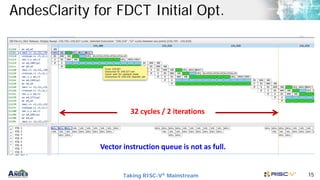
AndesClarity for FDCT Initial Opt.
32 cycles / 2 iterations
Vector instruction queue is not as full.
Taking RISC-V® Mainstream 16
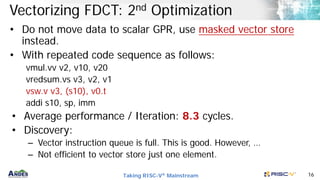
Vectorizing FDCT: 2nd Optimization
• Do not move data to scalar GPR, use masked vector store
instead.
• With repeated code sequence as follows:
vmul.vv v2, v10, v20
vredsum.vs v3, v2, v1
vsw.v v3, (s10), v0.t
addi s10, sp, imm
• Average performance / Iteration: 8.3 cycles.
• Discovery:
– Vector instruction queue is full. This is good. However, …
– Not efficient to vector store just one element.
Taking RISC-V® Mainstream 17
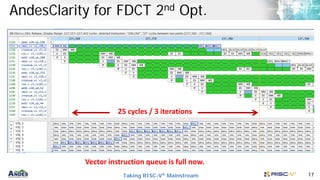
AndesClarity for FDCT 2nd Opt.
25 cycles / 3 iterations
Vector instruction queue is full now.
Taking RISC-V® Mainstream 18
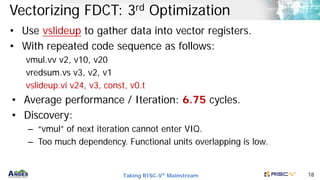
Vectorizing FDCT: 3rd Optimization
• Use vslideup to gather data into vector registers.
• With repeated code sequence as follows:
vmul.vv v2, v10, v20
vredsum.vs v3, v2, v1
vslideup.vi v24, v3, const, v0.t
• Average performance / Iteration: 6.75 cycles.
• Discovery:
– “vmul” of next iteration cannot enter VIQ.
– Too much dependency. Functional units overlapping is low.
Taking RISC-V® Mainstream 19
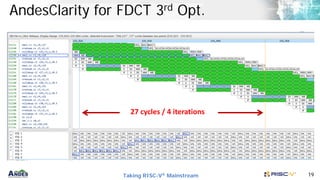
AndesClarity for FDCT 3rd Opt.
27 cycles / 4 iterations
Taking RISC-V® Mainstream 20
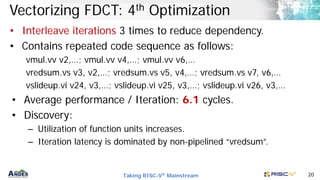
Vectorizing FDCT: 4th Optimization
• Interleave iterations 3 times to reduce dependency.
• Contains repeated code sequence as follows:
vmul.vv v2,…; vmul.vv v4,…; vmul.vv v6,…
vredsum.vs v3, v2,…; vredsum.vs v5, v4,…; vredsum.vs v7, v6,…
vslideup.vi v24, v3,…; vslideup.vi v25, v3,…; vslideup.vi v26, v3,…
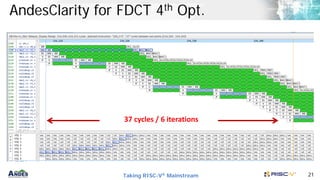
• Average performance / Iteration: 6.1 cycles.
• Discovery:
– Utilization of function units increases.
– Iteration latency is dominated by non-pipelined “vredsum”.
Taking RISC-V® Mainstream 21
AndesClarity for FDCT 4th Opt.
37 cycles / 6 iterations
Taking RISC-V® Mainstream 22
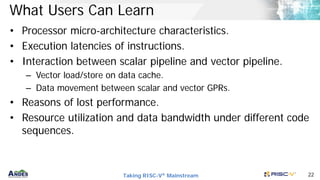
What Users Can Learn
• Processor micro-architecture characteristics.
• Execution latencies of instructions.
• Interaction between scalar pipeline and vector pipeline.
– Vector load/store on data cache.
– Data movement between scalar and vector GPRs.
• Reasons of lost performance.
• Resource utilization and data bandwidth under different code
sequences.
Taking RISC-V® Mainstream 23
Concluding Remarks
• AndesClarity can help a user to quickly
– understand the bottleneck of an application code sequences.
– learn the complex pipeline/micro-architecture characteristics of a
powerful vector processor.
– discover enhancements to improve the application performance.
• AndesClarity is a powerful tool for vector processors, e.g.,
AndesCore™ NX27V Vector processor.
• AndesClarity is integrated in AndeSight™ development
environment as a plugin for easy application profiling and
debugging.
Andes andes clarity for risc-v vector processor

Andes andes clarity for risc-v vector processor

  • 1.
    AndesClarity for RISC-V VectorProcessor Chuan-Hua Chang, Ph.D. Associate VP, Architecture Andes Technology RISC-V Summit, 12/2020
  • 2.
    Agenda Overview of AndesClarity 1 AndesCore™NX27V Pipeline 2 Program Analysis Example 3 Concluding Remarks 4
  • 3.
  • 4.
    Taking RISC-V® Mainstream4 Overview of AndesClarity • A pipeline visualizer/analyzer for Andes V5 processors. – Performance statistics and execution bottleneck. – Ideal for complex pipelines, esp. NX27V vector processor. • Integrated into AndeSight™ IDE as a plugin – Using execution log from Andes core simulator (AndeSim). – Easily linked to source code from RISC-V instructions. • Representing graphically with performance information – High-level “Instruction Per Cycle” information – Instruction execution pipelining flow – Data dependencies & resource usages
  • 5.
    Taking RISC-V® Mainstream5 Usage scenarios for AndesClarity • Algorithm tuning: – Identify bottleneck from pipeline stalls or resource usage. – Experiment on different enhancements of the same task. • Compiler enhancement and flag tuning: – Identify issues of compiler generated code. – Compare performance with different compiler options. • Architecture exploration: – Explore different SoC architecture and processor configurations. – Discover potential processor micro-architecture improvements.
  • 6.
    Taking RISC-V® Mainstream6 AndesClarity Main Interfaces • Performance viewer – IPC (Instruction Per Cycle) – OPC (Operation Per Cycle), designed for vector instructions. • Pipeline stage viewer – Instruction-centric view – Resource-centric view
  • 7.
    Taking RISC-V® Mainstream7 Performance Viewer • Timeline view of “Instruction per Cycle” or “Operation per Cycle”. • A vector instruction has VL operations, instead of 1. • User can zoom in to find more details.
  • 8.
    Taking RISC-V® Mainstream8 Instruction-Centric Pipeline Viewer • Instruction sequence vs instruction pipeline stage flow. Along with utilized resources. • Focused instruction can be highlighted.
  • 9.
    Taking RISC-V® Mainstream9 Resource-Centric Pipeline Viewer • Pipeline stages/resources vs instruction occupancy. • Instruction footprint on multiple paths & resources can be examined.
  • 10.
    Taking RISC-V® Mainstream10 Display Dependency & Stall Reason • Dependent instructions (producer & consumer) can be highlighted. • Display stall reason to help identify performance issues.
  • 11.
  • 12.
    Taking RISC-V® Mainstream12 AndesCore™ NX27V Fetch Decode Execute Memory Retire Integer Execution Unit Data Cache Exception Handling IFU GPR V P U Vector scalar V I Q V/F/D insn More Custom Coprocessor command data A C E pipeline Execute Streaming Ports
  • 13.
  • 14.
    Taking RISC-V® Mainstream14 Vectorizing FDCT: Initial Development • With repeated code sequence as follows: vmul.vv v2, v10, v20 vredsum.vs v3, v2, v1 vmv.x.s a4, v3 sw a4, 136(sp) • Average performance / Iteration: 16 cycles. • Discovery: – “sw” is waiting for a4 to be ready and blocking later vector instructions from entering into vector pipeline. – Frequent interaction between scalar and vector pipeline is not good.
  • 15.
    Taking RISC-V® Mainstream15 AndesClarity for FDCT Initial Opt. 32 cycles / 2 iterations Vector instruction queue is not as full.
  • 16.
    Taking RISC-V® Mainstream16 Vectorizing FDCT: 2nd Optimization • Do not move data to scalar GPR, use masked vector store instead. • With repeated code sequence as follows: vmul.vv v2, v10, v20 vredsum.vs v3, v2, v1 vsw.v v3, (s10), v0.t addi s10, sp, imm • Average performance / Iteration: 8.3 cycles. • Discovery: – Vector instruction queue is full. This is good. However, … – Not efficient to vector store just one element.
  • 17.
    Taking RISC-V® Mainstream17 AndesClarity for FDCT 2nd Opt. 25 cycles / 3 iterations Vector instruction queue is full now.
  • 18.
    Taking RISC-V® Mainstream18 Vectorizing FDCT: 3rd Optimization • Use vslideup to gather data into vector registers. • With repeated code sequence as follows: vmul.vv v2, v10, v20 vredsum.vs v3, v2, v1 vslideup.vi v24, v3, const, v0.t • Average performance / Iteration: 6.75 cycles. • Discovery: – “vmul” of next iteration cannot enter VIQ. – Too much dependency. Functional units overlapping is low.
  • 19.
    Taking RISC-V® Mainstream19 AndesClarity for FDCT 3rd Opt. 27 cycles / 4 iterations
  • 20.
    Taking RISC-V® Mainstream20 Vectorizing FDCT: 4th Optimization • Interleave iterations 3 times to reduce dependency. • Contains repeated code sequence as follows: vmul.vv v2,…; vmul.vv v4,…; vmul.vv v6,… vredsum.vs v3, v2,…; vredsum.vs v5, v4,…; vredsum.vs v7, v6,… vslideup.vi v24, v3,…; vslideup.vi v25, v3,…; vslideup.vi v26, v3,… • Average performance / Iteration: 6.1 cycles. • Discovery: – Utilization of function units increases. – Iteration latency is dominated by non-pipelined “vredsum”.
  • 21.
    Taking RISC-V® Mainstream21 AndesClarity for FDCT 4th Opt. 37 cycles / 6 iterations
  • 22.
    Taking RISC-V® Mainstream22 What Users Can Learn • Processor micro-architecture characteristics. • Execution latencies of instructions. • Interaction between scalar pipeline and vector pipeline. – Vector load/store on data cache. – Data movement between scalar and vector GPRs. • Reasons of lost performance. • Resource utilization and data bandwidth under different code sequences.
  • 23.
    Taking RISC-V® Mainstream23 Concluding Remarks • AndesClarity can help a user to quickly – understand the bottleneck of an application code sequences. – learn the complex pipeline/micro-architecture characteristics of a powerful vector processor. – discover enhancements to improve the application performance. • AndesClarity is a powerful tool for vector processors, e.g., AndesCore™ NX27V Vector processor. • AndesClarity is integrated in AndeSight™ development environment as a plugin for easy application profiling and debugging.