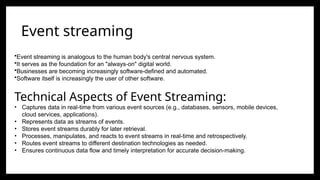
Event streaming
•Event streamingis analogous to the human body's central nervous system.
•It serves as the foundation for an "always-on" digital world.
•Businesses are becoming increasingly software-defined and automated.
•Software itself is increasingly the user of other software.
Technical Aspects of Event Streaming:
• Captures data in real-time from various event sources (e.g., databases, sensors, mobile devices,
cloud services, applications).
• Represents data as streams of events.
• Stores event streams durably for later retrieval.
• Processes, manipulates, and reacts to event streams in real-time and retrospectively.
• Routes event streams to different destination technologies as needed.
• Ensures continuous data flow and timely interpretation for accurate decision-making.
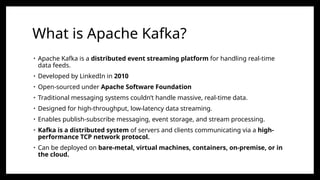
What is ApacheKafka?
• Apache Kafka is a distributed event streaming platform for handling real-time
data feeds.
• Developed by LinkedIn in 2010
• Open-sourced under Apache Software Foundation
• Traditional messaging systems couldn’t handle massive, real-time data.
• Designed for high-throughput, low-latency data streaming.
• Enables publish-subscribe messaging, event storage, and stream processing.
• Kafka is a distributed system of servers and clients communicating via a high-
performance TCP network protocol.
• Can be deployed on bare-metal, virtual machines, containers, on-premise, or in
the cloud.
8.
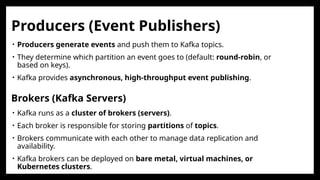
• Kafka runsas a cluster of brokers (servers).
• Each broker is responsible for storing partitions of topics.
• Brokers communicate with each other to manage data replication and
availability.
• Kafka brokers can be deployed on bare metal, virtual machines, or
Kubernetes clusters.
Brokers (Kafka Servers)
Producers (Event Publishers)
• Producers generate events and push them to Kafka topics.
• They determine which partition an event goes to (default: round-robin, or
based on keys).
• Kafka provides asynchronous, high-throughput event publishing.
9.
Topics and Partitions
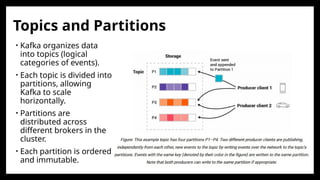
•Kafka organizes data
into topics (logical
categories of events).
• Each topic is divided into
partitions, allowing
Kafka to scale
horizontally.
• Partitions are
distributed across
different brokers in the
cluster.
• Each partition is ordered
and immutable.
10.
Consumers (Event Subscribers)
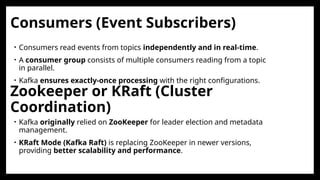
•Consumers read events from topics independently and in real-time.
• A consumer group consists of multiple consumers reading from a topic
in parallel.
• Kafka ensures exactly-once processing with the right configurations.
Zookeeper or KRaft (Cluster
Coordination)
• Kafka originally relied on ZooKeeper for leader election and metadata
management.
• KRaft Mode (Kafka Raft) is replacing ZooKeeper in newer versions,
providing better scalability and performance.
11.
Three Core Capabilitiesof Kafka
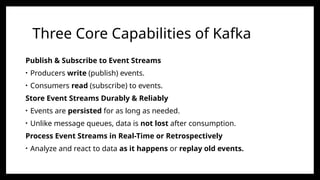
Publish & Subscribe to Event Streams
• Producers write (publish) events.
• Consumers read (subscribe) to events.
Store Event Streams Durably & Reliably
• Events are persisted for as long as needed.
• Unlike message queues, data is not lost after consumption.
Process Event Streams in Real-Time or Retrospectively
• Analyze and react to data as it happens or replay old events.
13.
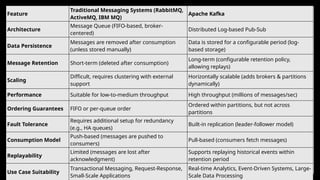
Feature
Traditional Messaging Systems(RabbitMQ,
ActiveMQ, IBM MQ)
Apache Kafka
Architecture
Message Queue (FIFO-based, broker-
centered)
Distributed Log-based Pub-Sub
Data Persistence
Messages are removed after consumption
(unless stored manually)
Data is stored for a configurable period (log-
based storage)
Message Retention Short-term (deleted after consumption)
Long-term (configurable retention policy,
allowing replays)
Scaling
Difficult, requires clustering with external
support
Horizontally scalable (adds brokers & partitions
dynamically)
Performance Suitable for low-to-medium throughput High throughput (millions of messages/sec)
Ordering Guarantees FIFO or per-queue order
Ordered within partitions, but not across
partitions
Fault Tolerance
Requires additional setup for redundancy
(e.g., HA queues)
Built-in replication (leader-follower model)
Consumption Model
Push-based (messages are pushed to
consumers)
Pull-based (consumers fetch messages)
Replayability
Limited (messages are lost after
acknowledgment)
Supports replaying historical events within
retention period
Use Case Suitability
Transactional Messaging, Request-Response,
Small-Scale Applications
Real-time Analytics, Event-Driven Systems, Large-
Scale Data Processing
14.
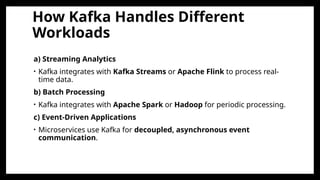
How Kafka HandlesDifferent
Workloads
a) Streaming Analytics
• Kafka integrates with Kafka Streams or Apache Flink to process real-
time data.
b) Batch Processing
• Kafka integrates with Apache Spark or Hadoop for periodic processing.
c) Event-Driven Applications
• Microservices use Kafka for decoupled, asynchronous event
communication.
15.
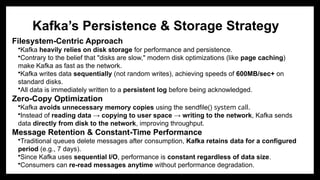
Kafka’s Persistence &Storage Strategy
Filesystem-Centric Approach
•Kafka heavily relies on disk storage for performance and persistence.
•Contrary to the belief that "disks are slow," modern disk optimizations (like page caching)
make Kafka as fast as the network.
•Kafka writes data sequentially (not random writes), achieving speeds of 600MB/sec+ on
standard disks.
•All data is immediately written to a persistent log before being acknowledged.
Zero-Copy Optimization
•Kafka avoids unnecessary memory copies using the sendfile() system call.
•Instead of reading data → copying to user space → writing to the network, Kafka sends
data directly from disk to the network, improving throughput.
Message Retention & Constant-Time Performance
•Traditional queues delete messages after consumption, Kafka retains data for a configured
period (e.g., 7 days).
•Since Kafka uses sequential I/O, performance is constant regardless of data size.
•Consumers can re-read messages anytime without performance degradation.
16.
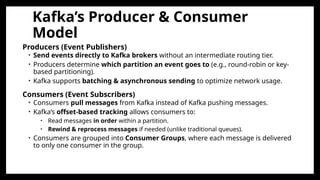
Kafka’s Producer &Consumer
Model
Producers (Event Publishers)
• Send events directly to Kafka brokers without an intermediate routing tier.
• Producers determine which partition an event goes to (e.g., round-robin or key-
based partitioning).
• Kafka supports batching & asynchronous sending to optimize network usage.
Consumers (Event Subscribers)
• Consumers pull messages from Kafka instead of Kafka pushing messages.
• Kafka’s offset-based tracking allows consumers to:
• Read messages in order within a partition.
• Rewind & reprocess messages if needed (unlike traditional queues).
• Consumers are grouped into Consumer Groups, where each message is delivered
to only one consumer in the group.
17.
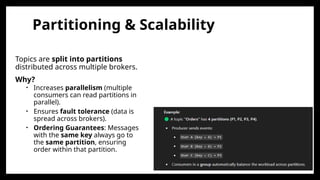
Partitioning & Scalability
Topicsare split into partitions
distributed across multiple brokers.
Why?
• Increases parallelism (multiple
consumers can read partitions in
parallel).
• Ensures fault tolerance (data is
spread across brokers).
• Ordering Guarantees: Messages
with the same key always go to
the same partition, ensuring
order within that partition.
18.
Kafka’s Replication &Fault
Tolerance
Leader-Follower Model
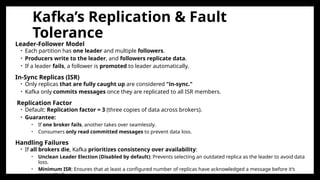
• Each partition has one leader and multiple followers.
• Producers write to the leader, and followers replicate data.
• If a leader fails, a follower is promoted to leader automatically.
In-Sync Replicas (ISR)
• Only replicas that are fully caught up are considered "in-sync."
• Kafka only commits messages once they are replicated to all ISR members.
Replication Factor
• Default: Replication factor = 3 (three copies of data across brokers).
• Guarantee:
• If one broker fails, another takes over seamlessly.
• Consumers only read committed messages to prevent data loss.
Handling Failures
• If all brokers die, Kafka prioritizes consistency over availability:
• Unclean Leader Election (Disabled by default): Prevents selecting an outdated replica as the leader to avoid data
loss.
• Minimum ISR: Ensures that at least a configured number of replicas have acknowledged a message before it’s
committed.
19.
Kafka’s Key APIs
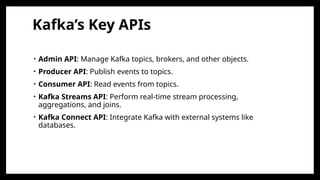
•Admin API: Manage Kafka topics, brokers, and other objects.
• Producer API: Publish events to topics.
• Consumer API: Read events from topics.
• Kafka Streams API: Perform real-time stream processing,
aggregations, and joins.
• Kafka Connect API: Integrate Kafka with external systems like
databases.
Drawbacks of ApacheKafka
1. Complexity in Setup & Maintenance
2. High Resource Consumption
3. Data Loss Risks (Without Proper Configuration)
4. No Message Processing Guarantees
5. Limited Support for Small Messages
6. Dependency on Zookeeper
7. Latency in Real-Time Processing
8. Steep Learning Curve
#2 Think of event streaming like the human body's central nervous system. Just as our nerves continuously receive signals from our senses and instantly respond, event streaming enables businesses to process real-time data efficiently, making them always-on and highly responsive.
In today’s digital world, businesses are becoming more software-defined and automated. Not only do humans interact with software, but software itself interacts with other software seamlessly. For this to happen smoothly, we need real-time, continuous data processing. That’s where event streaming comes in.
"Now, let's break it down into its core technical aspects:
First, event streaming captures data in real-time from multiple sources—this could be anything from databases, IoT sensors, mobile applications, or cloud services.
Second, it represents this data as streams of events—imagine a continuous flow of information rather than isolated data points.
Third, it stores these event streams durably so they can be retrieved later for analysis.
Fourth, it processes and manipulates data instantly or even retrospectively, ensuring meaningful insights are always available.
Finally, it intelligently routes data to the right systems, allowing businesses to make quick, data-driven decisions."
Think of a stock trading platform that monitors live stock prices and triggers an automatic buy or sell decision. Or a ride-sharing app like Uber that tracks drivers and riders in real-time. All of these rely on event streaming to function smoothly
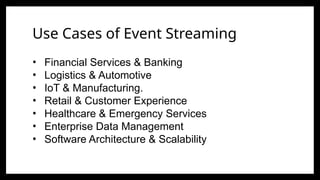
#3 "From financial transactions to IoT devices, event streaming is at the heart of many modern applications. Let’s take a look at some key industries where event streaming is making a massive impact."
1. Financial Services & Banking
"In banking and financial services, every millisecond matters. Event streaming helps process payments and transactions in real time, detect fraudulent activities instantly, and even automate stock trading. Stock exchanges, banks, and insurance companies all leverage event streaming to stay ahead."
(Engagement Question)
"Have you ever received an instant fraud alert from your bank? That’s event streaming in action!"
2. Logistics & Automotive
"Think about ride-sharing services like Uber or GPS tracking systems in logistics. Event streaming helps track and monitor vehicles, shipments, and fleet operations in real-time. This ensures better route optimization, reduced delays, and improved customer service."
3. IoT & Manufacturing
"In the world of IoT and manufacturing, event streaming continuously captures and analyzes data from sensors installed in factories, power plants, or smart cities. This real-time data helps detect malfunctions, predict failures, and improve efficiency. Wind farms and industrial automation systems rely on this for smooth operations."
(Interactive Prompt)
"Imagine a factory with thousands of machines operating simultaneously. How do you think real-time data helps prevent breakdowns?"
4. Retail & Customer Experience
"Every time you receive personalized recommendations while shopping online, event streaming is working behind the scenes. Retailers use real-time customer interactions to offer tailored discounts, track inventory, and enhance user experience in apps and stores."
5. Healthcare & Emergency Services
"In healthcare, every second counts. Hospitals use event streaming to monitor patients’ vital signs in real-time, predict potential emergencies, and ensure timely treatment. Emergency response systems also rely on real-time data for faster coordination and life-saving interventions."
(Engagement Question)
"Can you think of any real-life healthcare applications where real-time monitoring is critical?"
6. Enterprise Data Management
"Big companies deal with massive amounts of data flowing between different departments. Event streaming allows businesses to connect, store, and share data seamlessly across divisions, improving operational efficiency and decision-making."
7. Software Architecture & Scalability
"In modern cloud-based applications, event streaming enables microservices architectures, ensuring scalable, real-time data pipelines. Whether it’s a chat application, a recommendation engine, or a fraud detection system, event-driven architecture powered by event streaming makes everything run smoothly."
(Conclusion & Transition)
"As we can see, event streaming is not limited to one industry—it’s revolutionizing multiple domains. Whether it’s finance, healthcare, or logistics, businesses need real-time data to stay competitive."
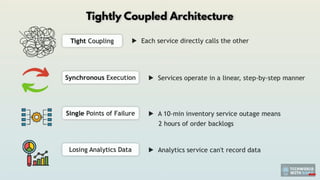
#4 we're building an e-commerce application called stream store and we have some microservices handling payments orders inventory and so on and when something happens in our application like customer places an order it's like dominoes where a chain reaction of updates and events by other services get triggered like stock needs to be updated in the database now that we sold some of it a notification or confirmation email needs to be sent to the customer an invoice needs to be generated with the right sales tax and sent per email to the customer um maybe revenue and sales data needs to be updated on our sales dashboard and so on now we are a small startup so we are starting with the simplest straightforward microservices architecture where the microservices just call each other like the order service would say hey all you guys we just closed an order go update your stuff accordingly and it all worked great
at first but suddenly we become a hit and people are loving our store or we just announced Black Friday sales and our store is getting hundreds of thousands of customers which is amazing but suddenly our application starts crashing everything is slowing down users are sitting in front of loading screens because our architecture cannot handle this load we get in panic because we are losing cells every minute our architecture that looked pretty clean and straightforward on the Whiteboard becomes a nightmare
what's called tight coupling between the services which means when the payment service goes down for example because some API in the background isn't responsive or the service itself just crashes under load and when that happens our entire order process freezes we have synchronous communication so each order feels like a game of dominoes one slow service and everything backs up and as I said during peak times customers are literally staring at loading screens and we also have lots of single points of failure which means a 10-minute inventory service outage meant 2 hours of order backlogs and countless lost sales and we are also losing a lot of analytics data when the analytics service goes down for an hour we're losing important Black Friday sales data after another hectic and chaotic week
#5 introduce a tool that sits in the middle and acts as a broker think of it as post office when you order something online the sellers don't come to your door to deliver package themselves they hand it over to the post office or some middleman to deliver your package.
Kafka is like the mail delivery service or post office which sits in the middle so now the order service goes to Kafka and hands over a package called event that says hey order was made for this customer for these products and here are all the details please make this information available for anyone who needs it
Kafka was originally developed by LinkedIn in 2010 and later open-sourced under the Apache Software Foundation. It was created to address a major challenge: traditional messaging systems simply couldn't keep up with the growing demand for massive, real-time data processing
Kafka isn’t just a messaging system; it’s a complete event streaming platform that allows you to:"
Publish and Subscribe to streams of data, just like a newsfeed.
Store Event Streams durably for later processing.
Process Streams in real-time to derive insights instantly.
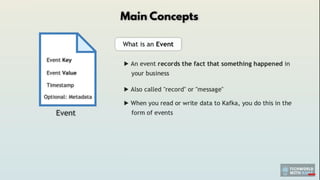
#6 Before we go into its architecture let us see what an event is.
An event in Kafka is simply a record of something that happened. It represents a piece of data that is produced, stored, and processed in real-time.
Each event consists of:
Key – Helps Kafka determine which partition the event should go to.
Value – The actual data (e.g., a message, a log entry, or a transaction).
Timestamp – The time when the event occurred.
Headers (optional) – Metadata associated with the event.
Example of an Event
Imagine an e-commerce website:
A customer places an order → This generates an event with details like the order ID, customer name, and amount.
A payment is processed → Another event is created.
The order is shipped → Yet another event is generated.
Each of these events can be published to Kafka in real-time, where different services (like order management, payment processing, and shipping) consume and process them asynchronously.
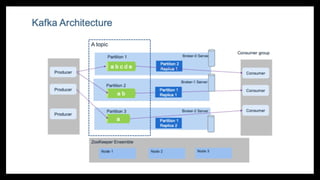
#7 Key Components:**
- **Producers**: Publish data into Kafka topics.
- **Topics & Partitions**: Allow parallelism.
- **Brokers**: Kafka servers managing data distribution.
- **Consumers & Consumer Groups**: Read and process messages.
- **Zookeeper**: Manages metadata and leader election.
1. Producers
Producers are applications that publish (send) events to Kafka topics.
They push data into Kafka in real time.
Events are sent to specific topics and are distributed across partitions.
Examples: A payment service publishing transaction details, an IoT sensor sending temperature data.
2. Topics & Partitions
Topic – A logical category or channel where events are published (like a table in a database).
Partition – Topics are split into partitions to allow parallel processing.
Each partition stores a subset of events, ensuring scalability.
Events within a partition are stored in a strictly ordered manner.
Each event in a partition has a unique offset (position identifier).
Example:
A topic called "orders" can have 3 partitions, and order events will be distributed among them:
Partition 0: Order #101, #104
Partition 1: Order #102, #105
Partition 2: Order #103, #106
3. Brokers
Kafka runs on brokers, which are servers that store and manage event data.
Each broker handles a subset of topic partitions.
Multiple brokers form a Kafka cluster for scalability & fault tolerance.
If a broker fails, other brokers take over (ensuring high availability).
Example:
Broker 1 stores Partition 0
Broker 2 stores Partition 1
Broker 3 stores Partition 2
4. Consumers & Consumer Groups
Consumers are applications that subscribe to topics and consume events.
They pull data at their own pace (unlike traditional message queues that push data).
Multiple consumers can form a Consumer Group to share the workload.
Each partition is assigned to only one consumer within a group, ensuring parallel processing.
Example:
If we have 3 partitions and 3 consumers, each consumer will read from one partition.
5. Zookeeper
Zookeeper is used for Kafka cluster management, leader election, and metadata storage.
It tracks brokers, partitions, and consumer offsets.
With Kafka 2.8+, Zookeeper can be optional, as Kafka has its own KRaft (Kafka Raft) mode for metadata management.
6. Log Storage & Retention
Kafka stores event data durably on disk for a configured period (e.g., 7 days).
Even if a consumer fails, it can reprocess old events using offsets.
Events are not deleted after consumption (unlike traditional queues).
Kafka Workflow in Action
Producer publishes an event → 2. Kafka stores it in partitions on brokers → 3. Consumers pull data from Kafka and process it asynchronously.
#8 Producers
Producers are applications or services that send (publish) data to Kafka. They play a crucial role in the Kafka ecosystem by generating events that are later consumed by other systems.
How Producers Work
Producers write data to topics (logical channels for event storage).
Data is distributed among partitions within a topic for scalability.
Producers do not wait for consumers to consume events; they just publish events asynchronously.
Events can be sent with keys, ensuring that messages with the same key always go to the same partition.
Key Features of Producers
✅ Partitioning Strategy:
Kafka uses a partitioning mechanism to distribute messages across multiple partitions.
Messages with the same key are sent to the same partition (useful for maintaining ordering).
✅ Acknowledgment Mechanism:
acks=0: The producer doesn’t wait for an acknowledgment (fastest, but risky).
acks=1: The producer waits for acknowledgment from the leader broker.
acks=all: The producer waits for acknowledgment from all in-sync replicas (most reliable).
✅ Batching & Compression:
Kafka producers batch multiple messages together for efficiency.
Compression (e.g., Snappy, Gzip, LZ4) reduces data size, improving throughput.
What is a Kafka Broker?
A broker is a server that stores and manages Kafka partitions.
A Kafka cluster consists of multiple brokers to ensure scalability and reliability.
How Brokers Work
When a producer sends a message, the broker stores it in the appropriate partition.
Kafka assigns one broker as the leader for each partition.
Other brokers hold replicas of the partition to ensure fault tolerance.
Consumers fetch messages from brokers.
Key Features of Brokers
✅ Leader-Follower Model:
One broker is the leader for a partition.
Other brokers store replicas (followers).
If a leader fails, another broker is elected as the new leader.
✅ Scalability & Fault Tolerance:
Kafka can have hundreds of brokers working together.
Data is replicated across multiple brokers to prevent data loss.
✅ Log Storage:
Kafka brokers store data on disk for durability.
Data is stored in an append-only log format.
#9 Topics & Partitions
What is a Topic?
A topic is a logical channel where Kafka stores event streams.
It acts like a table in a database, but without a predefined schema.
Producers write events to topics, and consumers read from topics.
What is a Partition?
Each topic is divided into partitions for parallelism and scalability.
A partition is a log file stored on a Kafka broker.
Events in a partition are ordered and assigned a unique offset (position).
Key Features of Partitions
✅ Parallel Processing:
Multiple partitions allow Kafka to process data in parallel.
More partitions → Higher scalability.
✅ Data Retention:
Kafka retains messages for a specified period (e.g., 7 days) regardless of whether they are consumed.
Retention can be configured by time (e.g., 7 days) or storage size (e.g., 10GB per partition).
✅ Message Ordering:
Kafka maintains order within a partition but not across partitions.
Consumers reading from the same partition receive messages in the same sequence.
#10 Consumers & Consumer Groups
What is a Consumer?
Consumers read events from Kafka topics.
They pull data at their own pace (unlike traditional queues that push messages).
A consumer can process data in real-time or batch mode.
What is a Consumer Group?
A consumer group is a set of consumers that share the processing of a topic.
Kafka assigns each partition to only one consumer per group.
This ensures parallel processing while maintaining order within partitions.
Key Features of Consumers
✅ Offset Tracking:
Kafka assigns a unique offset to each event in a partition.
Consumers use offsets to keep track of which events they have already processed.
✅ Fault Tolerance:
If a consumer fails, another consumer in the group takes over its partitions.
✅ Load Balancing:
Kafka automatically balances partitions across consumers.
If a new consumer joins, Kafka redistributes the partitions.
5. Zookeeper
What is Zookeeper?
Zookeeper is a coordination service that manages Kafka’s metadata.
It is used for leader election, broker tracking, and storing consumer offsets.
Key Responsibilities of Zookeeper
✅ Manages Brokers: Tracks which brokers are alive.
✅ Leader Election: Assigns leader brokers for each partition.
✅ Stores Metadata: Keeps track of partitions, offsets, and configurations.
📌 Kafka 2.8+ introduces KRaft (Kafka Raft), which eliminates the need for Zookeeper.
6. Log Storage & Retention
How Kafka Stores Data
Kafka stores events as logs in brokers.
Logs are append-only, meaning new data is added to the end of the file.
Each log entry (event) has a timestamp, key, value, and offset.
Data Retention Policy
Kafka retains messages for a configured period (e.g., 7 days) even after consumers read them.
Retention policies can be based on:
✅ Time (e.g., keep data for 7 days)
✅ Storage size (e.g., keep up to 10GB per topic)
✅ Compaction (keep only the latest record per key)
#11 Publish & Subscribe to Streams of Events
Think of Kafka as a radio station for data—you can broadcast (publish) data, and others can tune in (subscribe) in real-time.
Example: An e-commerce site can track user activity (clicks, searches, purchases) and instantly update recommendations.
💾 2. Store Events Durably & Reliably
Unlike traditional message queues that discard data once consumed, Kafka stores events for as long as needed.
Example: A financial institution can keep a log of transactions for auditing and fraud detection.
⚡ 3. Process Streams of Events in Real-Time or Later
Kafka allows businesses to process and analyze events as they happen—or go back and replay them later.
Example: A bank monitoring fraudulent transactions can flag suspicious activity in real-time
#12 Kafka Streams (Built-in Kafka Library)
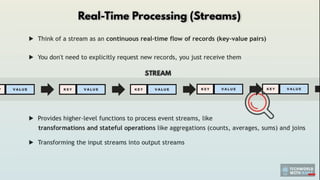
Kafka Streams allows applications to filter, transform, and aggregate events in real time.
It supports windowing operations (e.g., computing stats over 10-minute windows).
Data is processed record-by-record with low latency.
Kafka Streams operates by:
1️⃣ Consuming events from Kafka topics.
2️⃣ Processing data using transformations (map, filter, join, aggregate, etc.).
3️⃣ Storing intermediate results in state stores (if needed).
4️⃣ Producing processed data back to Kafka topics.
#15 How does Kafka handle millions of messages so efficiently?"
🔹 Kafka writes all data to disk—wait, isn’t disk slow?
Actually, disks can be extremely fast if used correctly!
Kafka only performs sequential reads and writes, which can be as fast as RAM on modern SSDs.
Disk Page Caching: The OS automatically caches recent reads in RAM, so Kafka gets memory-speed performance!
🔹 Zero-Copy Optimization
Normally, when sending data from disk to a consumer, it’s copied 4 times!
Kafka avoids this using the sendfile() system call, directly transferring data from disk to the network.
Result? Less CPU usage, lower latency, and higher throughput.
🎯 Let’s put this to the test with a quick thought experiment:
"What if your phone had to re-download a video every time you wanted to watch it?" That would be inefficient, right? Instead, your phone caches it. Kafka does the same with data!
#16 ow does Kafka send data to consumers?"
Traditional queues push messages to consumers, causing overload issues.
Kafka uses a pull model—consumers fetch data when they’re ready.
Ensures high performance and no system overload!
✅ Key Consumer Features:
Consumer Groups: Multiple consumers can work together on the same topic.
Offset Management: Consumers can replay old events if needed.
Exactly-Once Processing: Prevents duplicates or data loss.
#17 Kafka’s Partitioning & Scalability Model
💡 Question for the audience:
"What happens when one server can’t handle all the data?"
📌 Kafka partitions topics into smaller units, called partitions.
Each partition is stored on a separate broker (server).
More partitions = More parallelism = More scalability!
Producers write to partitions in parallel.
Consumers read from partitions in parallel.
🖥 Example:
A topic user_clicks is divided into 4 partitions (P1, P2, P3, P4).
If we have 4 consumers, each one can process a partition independently.
Result? Faster processing, better load distribution.
#18 What if a Kafka broker crashes?"
Kafka is fault-tolerant by design with replication.
Each partition has one leader and multiple followers.
If the leader fails, a follower takes over automatically!
🛡 Replication Factor = 3
Each message has 3 copies across different servers.
Guarantee: If one broker fails, data is still safe.
🎯 Thought Experiment:
"Imagine you save a file on your laptop, but your laptop crashes. You lose everything, right?"
Now, imagine you saved it on Google Drive with auto-backups.
That’s how Kafka’s replication ensures no data loss!
#19 Admin API (Administration & Management)
The Admin API is used to manage and configure Kafka components like topics, partitions, brokers, and ACLs (Access Control Lists).
🔹 Key Capabilities
✅ Create, delete, and list topics.
✅ Modify topic configurations (e.g., partition count).
✅ Manage brokers and cluster metadata.
✅ Set ACLs (access control rules).
Producer API (Publishing Data to Kafka)
The Producer API allows applications to send data (events) to Kafka topics.
🔹 Key Capabilities
✅ Publish messages to Kafka topics.
✅ Define custom partitioning logic.
✅ Control delivery guarantees (at-most-once, at-least-once, exactly-once).
Consumer API (Reading Data from Kafka)
The Consumer API allows applications to read and process events from Kafka topics.
🔹 Key Capabilities
✅ Subscribe to Kafka topics.
✅ Read events in real-time or batch mode.
✅ Auto or manual offset management.
✅ Scale by using consumer groups.
Kafka Streams API (Real-Time Processing)
The Kafka Streams API is used for real-time data transformations, aggregations, and joins.
🔹 Key Capabilities
✅ Stateless transformations (map(), filter()).
✅ Stateful computations (windowing, joins, aggregations).
✅ Real-time analytics (e.g., counting user logins per minute).
✅ Writes results back to Kafka topics.
Kafka Connect API (Integrating with External Systems)
The Kafka Connect API allows you to import/export data between Kafka and external databases, cloud storage, or other systems.
🔹 Key Capabilities
✅ Pre-built connectors for databases, cloud services, etc.
✅ Scales horizontally for high throughput.
✅ Supports source (ingesting data into Kafka) and sink (exporting data from Kafka) connectors.
🔹 Example: Using Kafka Connect to Stream Data from MySQL
1️⃣ Install the MySQL Kafka Connector.
2️⃣ Configure the MySQL Source Connector (mysql-source.json):
Use the Admin API to manage Kafka clusters.
🔹 Use the Producer API to send data into Kafka.
🔹 Use the Consumer API to read and process data.
🔹 Use Kafka Streams API for real-time analytics.
🔹 Use Kafka Connect API to integrate with databases and external systems.
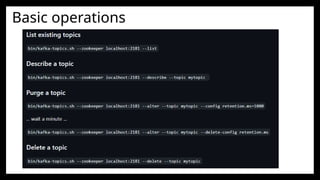
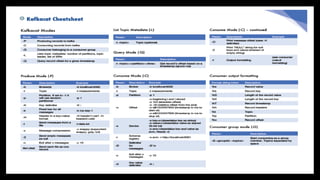
#20 1. Listing and Describing Topics
List existing topics:
bin/kafka-topics.sh --zookeeper localhost:2181 --list
👉 This command connects to Zookeeper and lists all available Kafka topics.
Describe a topic:
bin/kafka-topics.sh --zookeeper localhost:2181 --describe --topic mytopic
👉 Provides metadata about a specific topic, such as partition count, replication factor, and leader details.
2. Purging a Topic (Clearing Messages)
Kafka does not have a direct "purge" option. However, we can set a low retention period to delete messages quickly:
Reduce retention period to 1 second:
bin/kafka-topics.sh --zookeeper localhost:2181 --alter --topic mytopic --config retention.ms=1000
👉 Messages in the topic will be deleted after 1 second.
Restore default retention settings:
bin/kafka-topics.sh --zookeeper localhost:2181 --alter --topic mytopic --delete-config retention.ms
👉 Resets the retention policy to its default value.
3. Deleting a Topic
Delete a Kafka topic:bin/kafka-topics.sh --zookeeper localhost:2181 --delete --topic mytopic
👉 This removes the topic and all associated messages.
⚠ Note: Topic deletion must be enabled in Kafka’s configuration (delete.topic.enable=true).
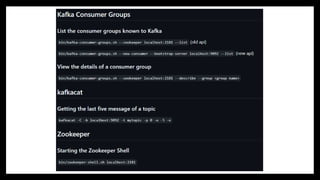
#21 Kafka Consumer Groups
Kafka consumer groups allow multiple consumers to read messages from a topic in a distributed manner.
1. Listing the Consumer Groups
Old API (Zookeeper-based):
bin/kafka-consumer-groups.sh --zookeeper localhost:2181 --list
👉 This lists all consumer groups managed by Zookeeper (legacy approach).
New API (Kafka-based):
bin/kafka-consumer-groups.sh --new-consumer --bootstrap-server localhost:9092 --list
👉 This lists consumer groups using Kafka brokers directly (modern approach).
2. Viewing Details of a Consumer Group
bin/kafka-consumer-groups.sh --zookeeper localhost:2181 --describe --group <group_name>
👉 Provides details like current offsets, lag, and partitions assigned to a consumer group.
Kafkacat
Kafkacat is a lightweight Kafka command-line tool for consuming and producing messages.
3. Getting the Last Five Messages of a Topic
kafkacat -C -b localhost:9092 -t mytopic -p 0 -o -5 -e
-C: Consumer mode
-b localhost:9092: Connects to Kafka broker
-t mytopic: Specifies the topic
-p 0: Reads from partition 0
-o -5: Fetches the last five messages
-e: Exits after consuming the messages
👉 This command retrieves the five most recent messages from a topic.
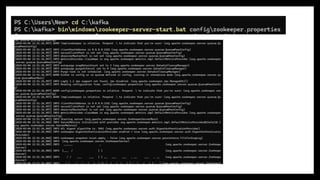
Zookeeper
Zookeeper is a coordination service that Kafka uses to manage brokers and metadata.
4. Starting the Zookeeper Shell
bin/zookeeper-shell.sh localhost:2181
👉 Opens an interactive Zookeeper shell, allowing you to interact with Kafka's metadata storage.
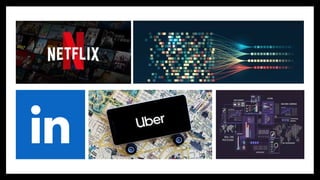
#23 Netflix – Personalized Recommendations & Video Streaming
Netflix uses Kafka to track user activities, such as watch history, clicks, and searches.
This data is streamed in real-time to a recommendation engine, improving content suggestions.
Kafka also helps deliver video streams efficiently by managing different content delivery servers.
Example: When you watch a movie, Netflix immediately updates your "Recommended for You" section.
2. Uber – Real-Time Ride Matching & Pricing
Uber’s system tracks millions of rides and driver locations in real-time.
Kafka enables instant updates when a driver accepts a ride.
Surge pricing is calculated dynamically based on ride demand and supply.
Example: If demand for rides is high, Kafka helps update prices instantly.
3. LinkedIn – Activity Tracking & Messaging
Kafka was originally developed at LinkedIn to handle real-time tracking of user activities.
It processes millions of profile updates, messages, job applications, and notifications per second.
Kafka ensures that messages and notifications reach users without delays.
Example: When someone views your profile, Kafka helps send an instant notification.
4. Banking & Finance – Fraud Detection & Transactions
Banks like JP Morgan, Wells Fargo, and Capital One use Kafka for real-time fraud detection.
Kafka streams transaction data to AI-based fraud detection systems.
If suspicious activity is detected, the system blocks the transaction immediately.
Example: If you make a payment from an unusual location, Kafka helps trigger a fraud alert instantly.
5. Walmart – Real-Time Inventory Management & Pricing
Walmart tracks sales across thousands of stores using Kafka.
Kafka updates inventory levels in real-time, ensuring products are restocked efficiently.
Pricing and promotions are updated instantly across online and offline stores.
Example: If an item goes "Out of Stock" online, Kafka helps sync the status with physical stores.
6. Twitter – Real-Time Analytics & Trends
Kafka powers Twitter’s real-time analytics system.
It helps identify trending hashtags, topics, and viral tweets instantly.
Twitter analyzes millions of tweets per second and categorizes them using Kafka streams.
Example: Kafka enables Twitter to show "Trending Topics" in real-time.
7. IoT & Smart Devices – Smart Homes & Factories
Kafka is widely used in IoT applications to manage millions of connected devices.
Smart homes use Kafka to process data from security cameras, thermostats, and lights.
Factories use Kafka to monitor machine health and prevent failures.
Example: If a smart thermostat detects a temperature drop, Kafka notifies the heating system instantly.
#24 1. Complexity in Setup & Maintenance
Kafka requires multiple components (brokers, Zookeeper, producers, consumers), making setup and configuration complex.
Managing clusters, ensuring high availability, and tuning performance require experienced engineers.
Example: A small company with limited resources may struggle to set up and maintain Kafka efficiently.
2. High Resource Consumption
Kafka is designed for high throughput and requires significant CPU, memory, and disk space.
If not optimized, Kafka can consume more resources than necessary, leading to high operational costs.
Example: A company running Kafka on low-end hardware may face performance issues and slow data processing.
3. Data Loss Risks (Without Proper Configuration)
By default, Kafka does not guarantee message durability unless correctly configured (e.g., replication, acknowledgment settings).
If a broker crashes before replication, messages may be lost.
Example: A banking system using Kafka without proper replication may lose critical transaction logs.
4. No Message Processing Guarantees
Kafka only guarantees message delivery but does not process messages like a traditional message queue.
Users need to implement additional processing logic with Kafka Streams or external consumers.
Example: Unlike RabbitMQ, Kafka does not automatically retry failed messages unless explicitly handled.
5. Limited Support for Small Messages
Kafka is optimized for large-scale event streaming but is inefficient for small messages due to overhead.
Small messages cause increased disk I/O and network traffic.
Example: A chat application sending small text messages may experience unnecessary resource usage with Kafka.
6. Dependency on Zookeeper
Kafka relies on Apache Zookeeper for managing cluster state, leader election, and metadata.
If Zookeeper fails or becomes overloaded, Kafka operations can be affected.
Example: If Zookeeper goes down, Kafka brokers may not function correctly, leading to downtime.
7. Latency in Real-Time Processing
Kafka is designed for high throughput but may introduce slight delays in real-time applications.
Low-latency systems (e.g., stock trading, gaming) may need additional optimizations.
Example: A stock trading platform requiring millisecond-level updates may find Kafka's delay too high.
8. Steep Learning Curve
Kafka has a steep learning curve, requiring knowledge of partitions, offsets, consumers, brokers, and configurations.
Troubleshooting issues requires expertise in distributed systems.
Example: A new developer may find it difficult to understand Kafka’s internals without proper training.





![[DSC Europe 25] Elena Menshikova - AI-Powered Operational Excellence: Revolut...](https://cdn.slidesharecdn.com/ss_thumbnails/es6nholbqy3zaao2c2yd-2-elena-menshikova-data-ai-in-decision-making-260115093812-4fba8b38-thumbnail.jpg?width=640&height=640&fit=bounds)


![[DSC Europe 25] Ivan Lukovic & Marija Djukic - From Data to Value: Why Maturi...](https://cdn.slidesharecdn.com/ss_thumbnails/ahrfps8xr6knowwhacxh-1-ivan-marija-dsc-2025-ld-v1-presentation-260115093812-be21adfc-thumbnail.jpg?width=640&height=640&fit=bounds)
![[DSC Europe 25] Andrzej Kowalczyk - AI - how to start small and grow in the f...](https://cdn.slidesharecdn.com/ss_thumbnails/oy1zmo94qv6vpcqjvno2-andrzej-kowalczyk-ai-how-to-start-small-and-grow-in-the-future-1-260119121559-cf093b23-thumbnail.jpg?width=640&height=640&fit=bounds)


![[DSC Europe 25] Bojan Djuricic - Predictive Design Process.pdf](https://cdn.slidesharecdn.com/ss_thumbnails/5awdrbedqdek3gqu2ezy-4-the-predictive-design-bojan-djuricic-260120105856-6c399e9b-thumbnail.jpg?width=640&height=640&fit=bounds)
