Microsoft Flow
@directorcia
http://about.me/ciaops
#CIAOPS
Agenda
•Landscape
•Automation
•Extensibility
•Versions
•Take aways
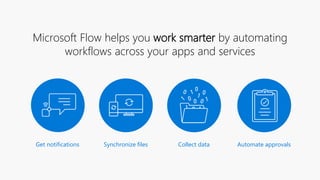
Microsoft Flow helps you work smarter by automating
workflows across your apps and services
Get notifications Synchronize files Collect data Automate approvals
DEMO
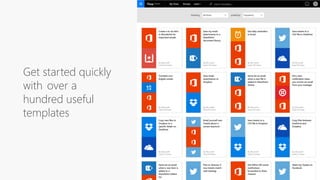
Get started quickly
with over a
hundred useful
templates
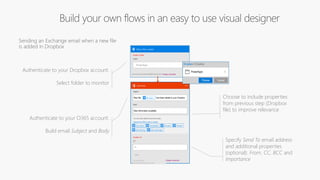
Authenticate to your O365 account.
Build email Subject and Body
Choose to include properties
from previous step (Dropbox
file) to improve relevance
Specify Send To email address
and additional properties
(optional): From, CC, BCC and
ImportanceConnected to
johnsharp@contoso.com
Authenticate to your Dropbox account.
Select folder to monitor
PowerApps
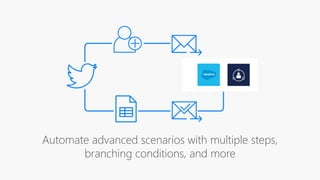
Automate advanced scenarios with multiple steps,
branching conditions, and more
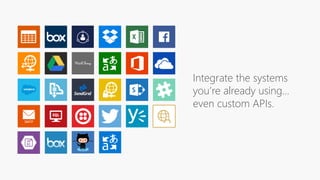
Integrate the systems
you’re already using…
even custom APIs.
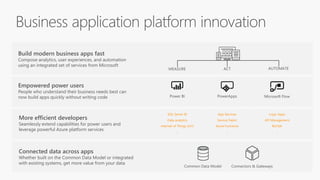
Build modern business apps fast
Compose analytics, user experiences, and automation
using an integrated set of services from Microsoft
More efficient developers
Seamlessly extend capabilities for power users and
leverage powerful Azure platform services
Empowered power users
People who understand their business needs best can
now build apps quickly without writing code
Connected data across apps
Whether built on the Common Data Model or integrated
with existing systems, get more value from your data
App Services
Service Fabric
Azure Functions
…
Logic Apps
API Management
BizTalk
…
SQL Server BI
Data analytics
Internet of Things (IoT)
…
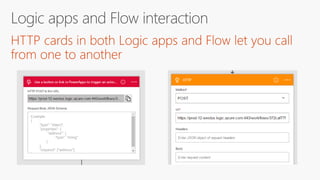
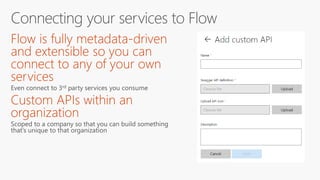
Extensibility
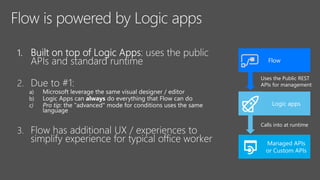
Flow
Logic apps
Managed APIs
or Custom APIs
Uses the Public REST
APIs for management
Calls into at runtime
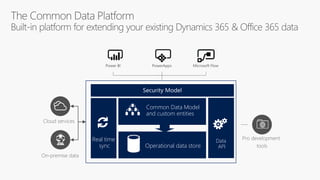
Operational data store
Common Data Model
and custom entities
Real time
sync
Data
API
DEMO
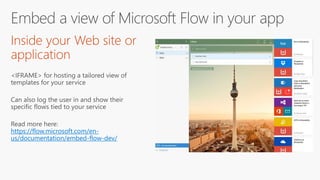
https://flow.microsoft.com/en-
us/documentation/embed-flow-dev/
•
•
•
•
•
•
Future
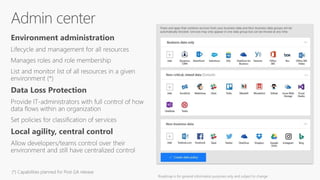
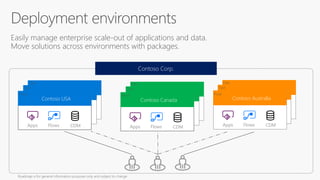
Environment administration
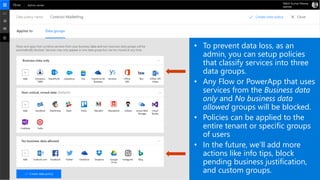
Data Loss Protection
Local agility, central control
b
Contoso Australia
Apps Flows CDM
Easily manage enterprise scale-out of applications and data.
Move solutions across environments with packages.
b
Contoso Canada
Contoso Corp.
b
Contoso Australia
Apps Flows CDM
b
Contoso Australia
Apps Flows CDM
Contoso Australia
Apps Flows CDM
b
Contoso Australia
Apps Flows CDM
Contoso Canada
Apps Flows CDM
b
Contoso Australia
Apps Flows CDM
Contoso Canada
b
Contoso Australia
Apps Flows CDM
Contoso USA
Apps Flows CDM
• To prevent data loss, as an
admin, you can setup policies
that classify services into three
data groups.
• Any Flow or PowerApp that uses
services from the Business data
only and No business data
allowed groups will be blocked.
• Policies can be applied to the
entire tenant or specific groups
of users
• In the future, we’ll add more
actions like info tips, block
pending business justification,
and custom groups.
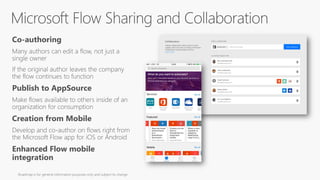
Co-authoring
Publish to AppSource
Creation from Mobile
Enhanced Flow mobile
integration
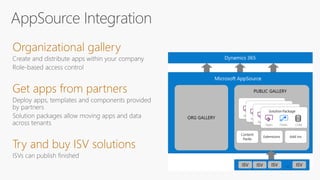
Organizational gallery
Get apps from partners
Try and buy ISV solutions
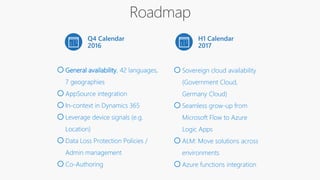
Q4 Calendar
2016
oGeneral availability, 42 languages,
7 geographies
oAppSource integration
oIn-context in Dynamics 365
oLeverage device signals (e.g.
Location)
oData Loss Protection Policies /
Admin management
oCo-Authoring
H1 Calendar
2017
oSovereign cloud availability
(Government Cloud,
Germany Cloud)
oSeamless grow-up from
Microsoft Flow to Azure
Logic Apps
oALM: Move solutions across
environments
oAzure functions integration
Availability
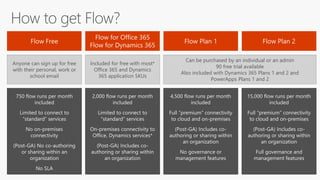
Anyone can sign up for free
with their personal, work or
school email
Included for free with most*
Office 365 and Dynamics
365 application SKUs
Can be purchased by an individual or an admin
90 free trial available
Also included with Dynamics 365 Plans 1 and 2 and
PowerApps Plans 1 and 2
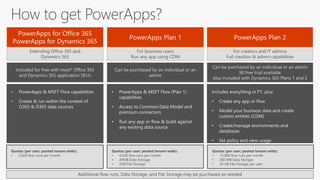
Extending Office 365 and
Dynamics 365
For creators and IT admins
Full creation & admin capabilities
For business users
Run any app using CDM
Included for free with most* Office 365
and Dynamics 365 application SKUs
Can be purchased by an individual or an admin
90 free trial available
Also included with Dynamics 365 Plans 1 and 2
Can be purchased by an individual or an
admin
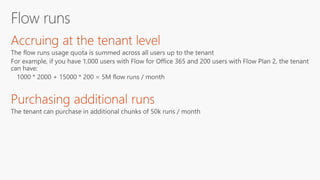
Quotas (per user; pooled tenant-wide):
• 2,000 flow runs per month
Quotas (per user; pooled tenant-wide):
• 4,500 flow runs per month
• 20MB Data Storage
• 2GB File Storage
Quotas (per user; pooled tenant-wide):
• 15,000 flow runs per month
• 200 MB Data Storage
• 20 GB File Storage per user
Additional flow runs, Data Storage, and File Storage may be purchased as needed
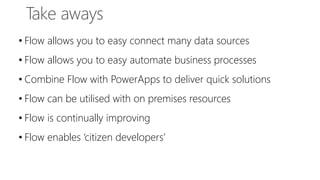
• Flow allows you to easy connect many data sources
• Flow allows you to easy automate business processes
• Combine Flow with PowerApps to deliver quick solutions
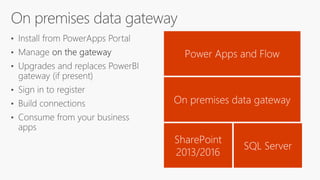
• Flow can be utilised with on premises resources
• Flow is continually improving
• Flow enables ‘citizen developers’
• List of connectors - https://flow.microsoft.com/en-us/services/
• Azure logic apps - https://azure.microsoft.com/en-us/services/logic-apps/
• Microsoft Flow Community - https://powerusers.microsoft.com/t5/Microsoft-Flow-
Community/ct-p/FlowCommunity
• Guided Learning - https://flow.microsoft.com/en-us/guided-learning/
• Templates - https://flow.microsoft.com/en-us/templates/
• Get started with Microsoft Flow - https://flow.microsoft.com/en-
us/documentation/getting-started/
• On premises gateway - https://go.microsoft.com/fwlink/?LinkID=820931
• Video gallery - https://powerusers.microsoft.com/t5/Webinars-and-Video-Gallery/bd-
p/Webinars_Videos_Gallery
Resources
This presentation is at
https://doc.co/6DSLKk
CIAOPS Resources
• Blog – http://blog.ciaops.com
• Free SharePoint Training via email – http://bit.ly/cia-gs-spo
• Free Office 365, Azure Administration newsletter – http://bit.ly/cia-o365-tech
• Free Office 365, Azure video tutorials – http://www.youtube.com/directorciaops
• Free documents, presentations, eBooks – http://docs.com/ciaops
• Office 365, Azure, Cloud podcast – http://ciaops.podbean.com
• Office 365, Azure online training courses – http://www.ciaopsacademy.com
• Office 365, Azure eBooks – http://www.ciaops.com/publications
Twitter
@directorcia
Facebook
https://www.facebook.com/ciaops
Email
director@ciaops.com
Skype for Business
admin@ciaops365.com

An Introduction to Microsoft Flow

  • 1.
  • 2.
  • 6.
    Microsoft Flow helpsyou work smarter by automating workflows across your apps and services Get notifications Synchronize files Collect data Automate approvals
  • 7.
  • 8.
    Get started quickly withover a hundred useful templates
  • 9.
    Authenticate to yourO365 account. Build email Subject and Body Choose to include properties from previous step (Dropbox file) to improve relevance Specify Send To email address and additional properties (optional): From, CC, BCC and ImportanceConnected to johnsharp@contoso.com Authenticate to your Dropbox account. Select folder to monitor PowerApps
  • 10.
    Automate advanced scenarioswith multiple steps, branching conditions, and more
  • 11.
    Integrate the systems you’realready using… even custom APIs.
  • 12.
    Build modern businessapps fast Compose analytics, user experiences, and automation using an integrated set of services from Microsoft More efficient developers Seamlessly extend capabilities for power users and leverage powerful Azure platform services Empowered power users People who understand their business needs best can now build apps quickly without writing code Connected data across apps Whether built on the Common Data Model or integrated with existing systems, get more value from your data App Services Service Fabric Azure Functions … Logic Apps API Management BizTalk … SQL Server BI Data analytics Internet of Things (IoT) …
  • 13.
  • 14.
    Flow Logic apps Managed APIs orCustom APIs Uses the Public REST APIs for management Calls into at runtime
  • 15.
    Operational data store CommonData Model and custom entities Real time sync Data API
  • 18.
  • 21.
  • 22.
  • 23.
  • 24.
    Environment administration Data LossProtection Local agility, central control
  • 25.
    b Contoso Australia Apps FlowsCDM Easily manage enterprise scale-out of applications and data. Move solutions across environments with packages. b Contoso Canada Contoso Corp. b Contoso Australia Apps Flows CDM b Contoso Australia Apps Flows CDM Contoso Australia Apps Flows CDM b Contoso Australia Apps Flows CDM Contoso Canada Apps Flows CDM b Contoso Australia Apps Flows CDM Contoso Canada b Contoso Australia Apps Flows CDM Contoso USA Apps Flows CDM
  • 26.
    • To preventdata loss, as an admin, you can setup policies that classify services into three data groups. • Any Flow or PowerApp that uses services from the Business data only and No business data allowed groups will be blocked. • Policies can be applied to the entire tenant or specific groups of users • In the future, we’ll add more actions like info tips, block pending business justification, and custom groups.
  • 27.
    Co-authoring Publish to AppSource Creationfrom Mobile Enhanced Flow mobile integration
  • 28.
    Organizational gallery Get appsfrom partners Try and buy ISV solutions
  • 29.
    Q4 Calendar 2016 oGeneral availability,42 languages, 7 geographies oAppSource integration oIn-context in Dynamics 365 oLeverage device signals (e.g. Location) oData Loss Protection Policies / Admin management oCo-Authoring H1 Calendar 2017 oSovereign cloud availability (Government Cloud, Germany Cloud) oSeamless grow-up from Microsoft Flow to Azure Logic Apps oALM: Move solutions across environments oAzure functions integration
  • 30.
  • 31.
    Anyone can signup for free with their personal, work or school email Included for free with most* Office 365 and Dynamics 365 application SKUs Can be purchased by an individual or an admin 90 free trial available Also included with Dynamics 365 Plans 1 and 2 and PowerApps Plans 1 and 2
  • 32.
    Extending Office 365and Dynamics 365 For creators and IT admins Full creation & admin capabilities For business users Run any app using CDM Included for free with most* Office 365 and Dynamics 365 application SKUs Can be purchased by an individual or an admin 90 free trial available Also included with Dynamics 365 Plans 1 and 2 Can be purchased by an individual or an admin Quotas (per user; pooled tenant-wide): • 2,000 flow runs per month Quotas (per user; pooled tenant-wide): • 4,500 flow runs per month • 20MB Data Storage • 2GB File Storage Quotas (per user; pooled tenant-wide): • 15,000 flow runs per month • 200 MB Data Storage • 20 GB File Storage per user Additional flow runs, Data Storage, and File Storage may be purchased as needed
  • 34.
    • Flow allowsyou to easy connect many data sources • Flow allows you to easy automate business processes • Combine Flow with PowerApps to deliver quick solutions • Flow can be utilised with on premises resources • Flow is continually improving • Flow enables ‘citizen developers’
  • 35.
    • List ofconnectors - https://flow.microsoft.com/en-us/services/ • Azure logic apps - https://azure.microsoft.com/en-us/services/logic-apps/ • Microsoft Flow Community - https://powerusers.microsoft.com/t5/Microsoft-Flow- Community/ct-p/FlowCommunity • Guided Learning - https://flow.microsoft.com/en-us/guided-learning/ • Templates - https://flow.microsoft.com/en-us/templates/ • Get started with Microsoft Flow - https://flow.microsoft.com/en- us/documentation/getting-started/ • On premises gateway - https://go.microsoft.com/fwlink/?LinkID=820931 • Video gallery - https://powerusers.microsoft.com/t5/Webinars-and-Video-Gallery/bd- p/Webinars_Videos_Gallery Resources
  • 37.
    This presentation isat https://doc.co/6DSLKk
  • 38.
    CIAOPS Resources • Blog– http://blog.ciaops.com • Free SharePoint Training via email – http://bit.ly/cia-gs-spo • Free Office 365, Azure Administration newsletter – http://bit.ly/cia-o365-tech • Free Office 365, Azure video tutorials – http://www.youtube.com/directorciaops • Free documents, presentations, eBooks – http://docs.com/ciaops • Office 365, Azure, Cloud podcast – http://ciaops.podbean.com • Office 365, Azure online training courses – http://www.ciaopsacademy.com • Office 365, Azure eBooks – http://www.ciaops.com/publications Twitter @directorcia Facebook https://www.facebook.com/ciaops Email director@ciaops.com Skype for Business admin@ciaops365.com