Cloud Computing
Introduction
BY PROF. TRUPTI SISODE
What is Cloud Computing?
 It is the use of remote servers on the internet to store, manage and process data rather than
local servers.
 It includes on-demand access to resources like storage, processing power, and
applications. Users can scale resources dynamically, pay for what they use, and access
services from various devices.
 People use cloud computing in various aspects of their daily lives, often without even
realizing it.
 For example;
1. File Storage: Store and access documents, photos, and videos on cloud storage services
like Google Drive or Dropbox.
2. Email: Use cloud-based email services such as Gmail or Outlook for seamless access to
emails and attachments from different devices.
Cloud Computing real life examples:
1. Social Media: Share updates, photos, and videos on platforms like Facebook and Instagram, which leverage
cloud infrastructure.
2. Streaming Content: Enjoy movies, music, and TV shows through cloud-based streaming services like Netflix
and Spotify.
3. Productivity Tools: Collaborate on documents and spreadsheets in real-time using cloud-based productivity
suites like Google Docs, Microsoft Word, and Excel online. This allows users to create, edit, and collaborate
on documents in real-time from different locations.
4. Backup and Sync: Automatically back up and synchronize data, including photos and contacts, using cloud
services like Google Photos.
5. Mobile Apps: Access apps and games on different devices, with cloud storage preserving settings and
progress.
6. Online Shopping: Shop securely on e-commerce platforms like Amazon, benefiting from cloud infrastructure
for seamless transactions.
7. Navigation: Utilize cloud-powered GPS services like Google Maps for real-time navigation and traffic
updates.
Architecture of Cloud Computing
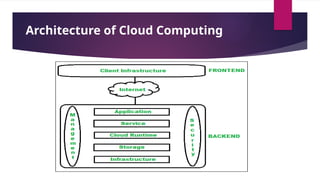
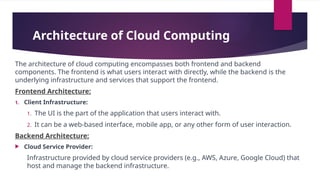
The architecture of cloud computing encompasses both frontend and backend
components. The frontend is what users interact with directly, while the backend is the
underlying infrastructure and services that support the frontend.
Frontend Architecture:
1. Client Infrastructure:
1. The UI is the part of the application that users interact with.
2. It can be a web-based interface, mobile app, or any other form of user interaction.
Backend Architecture:
 Cloud Service Provider:
Infrastructure provided by cloud service providers (e.g., AWS, Azure, Google Cloud) that
host and manage the backend infrastructure.
Architecture of Cloud Computing
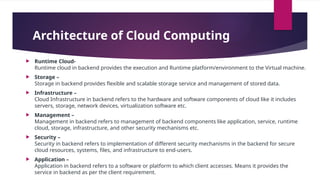
 Runtime Cloud-
Runtime cloud in backend provides the execution and Runtime platform/environment to the Virtual machine.
 Storage –
Storage in backend provides flexible and scalable storage service and management of stored data.
 Infrastructure –
Cloud Infrastructure in backend refers to the hardware and software components of cloud like it includes
servers, storage, network devices, virtualization software etc.
 Management –
Management in backend refers to management of backend components like application, service, runtime
cloud, storage, infrastructure, and other security mechanisms etc.
 Security –
Security in backend refers to implementation of different security mechanisms in the backend for secure
cloud resources, systems, files, and infrastructure to end-users.
 Application –
Application in backend refers to a software or platform to which client accesses. Means it provides the
service in backend as per the client requirement.
Advantages of cloud computing
1.
Cost Efficiency: Cloud computing eliminates the need for upfront capital investment in hardware and
allows businesses to pay for resources based on actual usage, optimizing costs.
2.
Scalability: Cloud services provide the flexibility to scale computing resources up or down, ensuring
that organizations can adapt to changing workloads and demands efficiently.
3.Reliability and High Availability: Cloud providers offer redundant and geographically distributed
infrastructure, reducing the risk of downtime and ensuring continuous availability of services.
4.Security: Reputable cloud providers implement robust security measures, including encryption,
identity management, and compliance certifications, enhancing data protection and privacy.
5.Automatic Updates and Maintenance: Cloud providers handle system updates and maintenance
tasks, ensuring that businesses always have access to the latest features and security patches without
manual intervention.
6.Resource Utilization: Cloud services optimize resource usage by allowing dynamic allocation and
sharing of computing resources, minimizing idle time and improving overall efficiency.
7.Backup and Disaster Recovery: Cloud platforms offer built-in backup and disaster recovery solutions,
ensuring data resilience and providing a reliable mechanism for data backup and restoration.
Disadvantages of cloud
computing
 Downtime :Businesses receive cloud computing services only through the Internet. When
there is an internet outage or weak connectivity, services get interrupted and this increases
downtime. Therefore, one of the major criticisms of cloud computing is its high dependency
on the Internet.
 Security Concerns: Cloud computing raises concerns about data security and
privacy, as sensitive information is stored externally, potentially making it
vulnerable to unauthorized access or breaches.
 Vendor Lock-In: Once an organization adopts a specific cloud provider's
services and technologies, switching to another provider can be complex and
costly, some factors such as data migration challenges, differences in service
offerings, compatibility issues, varying cost structures, and the need for
retraining teams.
Cluster Computing
 Clusters of cooperative computers refer to a group of interconnected
computing devices working together to achieve a common goal. This
collaborative approach enhances processing power, reliability, and
scalability.
 Cluster computing enables faster and more efficient data processing by
distributing tasks across multiple interconnected computers, ensuring
scalability and fault tolerance for demanding computational workloads.
 Cluster computing allows tasks to be divided into smaller sub-tasks that can
be processed simultaneously across multiple nodes. This parallel processing
significantly accelerates the execution of complex computations.
 Companies use cluster computing for several reasons, mainly to address the
challenges associated with large-scale and complex computational tasks.
Cluster Computing examples
1.Online Search Engines:
•Application: Search engines like Google use cluster computing to process search
queries, index web pages, and deliver relevant results rapidly, enhancing the user
search experience.
2.Social Media Platforms:
•Application: Social media platforms leverage cluster computing for managing vast
amounts of user-generated content, facilitating real-time updates, and ensuring
seamless interaction across diverse devices
3.Voice Assistants:
• Application: Voice-activated devices like smart speakers use cluster computing
for natural language processing, voice recognition, and responding to user
commands in real-time.
Advantages of Cluster Computing :
 1. High Performance :
The systems offer better and enhanced performance than that of mainframe computer networks.
 2. Easy to manage :
Cluster Computing is manageable and easy to implement.
 3. Scalable :
Resources can be added to the clusters accordingly.
 4. Expandability :
Computer clusters can be expanded easily by adding additional computers to the network. Cluster
computing is capable of combining several additional resources or the networks to the existing
computer system.
 5. Availability :
The other nodes will be active when one node gets failed and will function as a proxy for the failed
node. This makes sure for enhanced availability.
Disadvantages of Cluster
Computing :
 1. High cost :
It is not so much cost-effective due to its high hardware and its design.
 2. Problem in finding fault :
It is difficult to find which component has a fault.
 3. More space is needed :
Infrastructure may increase as more servers are needed to manage and
monitor.
Distributed Computing
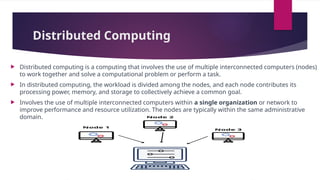
 Distributed computing is a computing that involves the use of multiple interconnected computers (nodes)
to work together and solve a computational problem or perform a task.
 In distributed computing, the workload is divided among the nodes, and each node contributes its
processing power, memory, and storage to collectively achieve a common goal.
 Involves the use of multiple interconnected computers within a single organization or network to
improve performance and resource utilization. The nodes are typically within the same administrative
domain.
Grid Computing
 Grid computing is a form of distributed computing that involves the pooling and sharing of computing
resources from multiple, often diverse, administrative domains to work on a common task or solve a
complex problem.
 Unlike traditional distributed computing, which may involve a more homogeneous set of resources
within a single organization, grid computing extends the idea of resource sharing to a broader scale,
often across institutional or organizational boundaries.
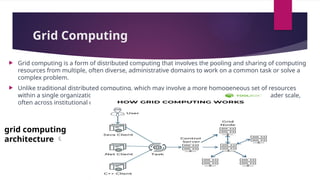
grid computing
architecture 
Grid computing architecture :
 A typical grid computing network consists of three machine types:
• Control node/server: A control node is a server or a group of servers that
administers the entire network and maintains the record for resources in a
network pool.
• Provider/grid node: A provider or grid node is a computer that contributes
its resources to the network resource pool.
• User: A user refers to the computer that uses the resources on the network
to complete the task.
Advantages of Grid Computing:
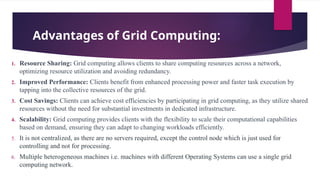
1. Resource Sharing: Grid computing allows clients to share computing resources across a network,
optimizing resource utilization and avoiding redundancy.
2. Improved Performance: Clients benefit from enhanced processing power and faster task execution by
tapping into the collective resources of the grid.
3. Cost Savings: Clients can achieve cost efficiencies by participating in grid computing, as they utilize shared
resources without the need for substantial investments in dedicated infrastructure.
4. Scalability: Grid computing provides clients with the flexibility to scale their computational capabilities
based on demand, ensuring they can adapt to changing workloads efficiently.
5. It is not centralized, as there are no servers required, except the control node which is just used for
controlling and not for processing.
6. Multiple heterogeneous machines i.e. machines with different Operating Systems can use a single grid
computing network.
Disadvantages of Grid Computing:
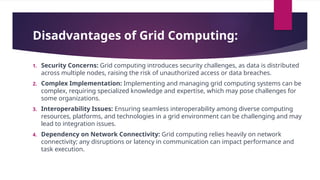
1. Security Concerns: Grid computing introduces security challenges, as data is distributed
across multiple nodes, raising the risk of unauthorized access or data breaches.
2. Complex Implementation: Implementing and managing grid computing systems can be
complex, requiring specialized knowledge and expertise, which may pose challenges for
some organizations.
3. Interoperability Issues: Ensuring seamless interoperability among diverse computing
resources, platforms, and technologies in a grid environment can be challenging and may
lead to integration issues.
4. Dependency on Network Connectivity: Grid computing relies heavily on network
connectivity; any disruptions or latency in communication can impact performance and
task execution.
An Introduction to Cloud Computing: Benefits and Challenges

An Introduction to Cloud Computing: Benefits and Challenges

  • 1.
  • 2.
    What is CloudComputing?  It is the use of remote servers on the internet to store, manage and process data rather than local servers.  It includes on-demand access to resources like storage, processing power, and applications. Users can scale resources dynamically, pay for what they use, and access services from various devices.  People use cloud computing in various aspects of their daily lives, often without even realizing it.  For example; 1. File Storage: Store and access documents, photos, and videos on cloud storage services like Google Drive or Dropbox. 2. Email: Use cloud-based email services such as Gmail or Outlook for seamless access to emails and attachments from different devices.
  • 3.
    Cloud Computing reallife examples: 1. Social Media: Share updates, photos, and videos on platforms like Facebook and Instagram, which leverage cloud infrastructure. 2. Streaming Content: Enjoy movies, music, and TV shows through cloud-based streaming services like Netflix and Spotify. 3. Productivity Tools: Collaborate on documents and spreadsheets in real-time using cloud-based productivity suites like Google Docs, Microsoft Word, and Excel online. This allows users to create, edit, and collaborate on documents in real-time from different locations. 4. Backup and Sync: Automatically back up and synchronize data, including photos and contacts, using cloud services like Google Photos. 5. Mobile Apps: Access apps and games on different devices, with cloud storage preserving settings and progress. 6. Online Shopping: Shop securely on e-commerce platforms like Amazon, benefiting from cloud infrastructure for seamless transactions. 7. Navigation: Utilize cloud-powered GPS services like Google Maps for real-time navigation and traffic updates.
  • 4.
  • 5.
    Architecture of CloudComputing The architecture of cloud computing encompasses both frontend and backend components. The frontend is what users interact with directly, while the backend is the underlying infrastructure and services that support the frontend. Frontend Architecture: 1. Client Infrastructure: 1. The UI is the part of the application that users interact with. 2. It can be a web-based interface, mobile app, or any other form of user interaction. Backend Architecture:  Cloud Service Provider: Infrastructure provided by cloud service providers (e.g., AWS, Azure, Google Cloud) that host and manage the backend infrastructure.
  • 6.
    Architecture of CloudComputing  Runtime Cloud- Runtime cloud in backend provides the execution and Runtime platform/environment to the Virtual machine.  Storage – Storage in backend provides flexible and scalable storage service and management of stored data.  Infrastructure – Cloud Infrastructure in backend refers to the hardware and software components of cloud like it includes servers, storage, network devices, virtualization software etc.  Management – Management in backend refers to management of backend components like application, service, runtime cloud, storage, infrastructure, and other security mechanisms etc.  Security – Security in backend refers to implementation of different security mechanisms in the backend for secure cloud resources, systems, files, and infrastructure to end-users.  Application – Application in backend refers to a software or platform to which client accesses. Means it provides the service in backend as per the client requirement.
  • 7.
    Advantages of cloudcomputing 1. Cost Efficiency: Cloud computing eliminates the need for upfront capital investment in hardware and allows businesses to pay for resources based on actual usage, optimizing costs. 2. Scalability: Cloud services provide the flexibility to scale computing resources up or down, ensuring that organizations can adapt to changing workloads and demands efficiently. 3.Reliability and High Availability: Cloud providers offer redundant and geographically distributed infrastructure, reducing the risk of downtime and ensuring continuous availability of services. 4.Security: Reputable cloud providers implement robust security measures, including encryption, identity management, and compliance certifications, enhancing data protection and privacy. 5.Automatic Updates and Maintenance: Cloud providers handle system updates and maintenance tasks, ensuring that businesses always have access to the latest features and security patches without manual intervention. 6.Resource Utilization: Cloud services optimize resource usage by allowing dynamic allocation and sharing of computing resources, minimizing idle time and improving overall efficiency. 7.Backup and Disaster Recovery: Cloud platforms offer built-in backup and disaster recovery solutions, ensuring data resilience and providing a reliable mechanism for data backup and restoration.
  • 8.
    Disadvantages of cloud computing Downtime :Businesses receive cloud computing services only through the Internet. When there is an internet outage or weak connectivity, services get interrupted and this increases downtime. Therefore, one of the major criticisms of cloud computing is its high dependency on the Internet.  Security Concerns: Cloud computing raises concerns about data security and privacy, as sensitive information is stored externally, potentially making it vulnerable to unauthorized access or breaches.  Vendor Lock-In: Once an organization adopts a specific cloud provider's services and technologies, switching to another provider can be complex and costly, some factors such as data migration challenges, differences in service offerings, compatibility issues, varying cost structures, and the need for retraining teams.
  • 9.
    Cluster Computing  Clustersof cooperative computers refer to a group of interconnected computing devices working together to achieve a common goal. This collaborative approach enhances processing power, reliability, and scalability.  Cluster computing enables faster and more efficient data processing by distributing tasks across multiple interconnected computers, ensuring scalability and fault tolerance for demanding computational workloads.  Cluster computing allows tasks to be divided into smaller sub-tasks that can be processed simultaneously across multiple nodes. This parallel processing significantly accelerates the execution of complex computations.  Companies use cluster computing for several reasons, mainly to address the challenges associated with large-scale and complex computational tasks.
  • 10.
    Cluster Computing examples 1.OnlineSearch Engines: •Application: Search engines like Google use cluster computing to process search queries, index web pages, and deliver relevant results rapidly, enhancing the user search experience. 2.Social Media Platforms: •Application: Social media platforms leverage cluster computing for managing vast amounts of user-generated content, facilitating real-time updates, and ensuring seamless interaction across diverse devices 3.Voice Assistants: • Application: Voice-activated devices like smart speakers use cluster computing for natural language processing, voice recognition, and responding to user commands in real-time.
  • 11.
    Advantages of ClusterComputing :  1. High Performance : The systems offer better and enhanced performance than that of mainframe computer networks.  2. Easy to manage : Cluster Computing is manageable and easy to implement.  3. Scalable : Resources can be added to the clusters accordingly.  4. Expandability : Computer clusters can be expanded easily by adding additional computers to the network. Cluster computing is capable of combining several additional resources or the networks to the existing computer system.  5. Availability : The other nodes will be active when one node gets failed and will function as a proxy for the failed node. This makes sure for enhanced availability.
  • 12.
    Disadvantages of Cluster Computing:  1. High cost : It is not so much cost-effective due to its high hardware and its design.  2. Problem in finding fault : It is difficult to find which component has a fault.  3. More space is needed : Infrastructure may increase as more servers are needed to manage and monitor.
  • 13.
    Distributed Computing  Distributedcomputing is a computing that involves the use of multiple interconnected computers (nodes) to work together and solve a computational problem or perform a task.  In distributed computing, the workload is divided among the nodes, and each node contributes its processing power, memory, and storage to collectively achieve a common goal.  Involves the use of multiple interconnected computers within a single organization or network to improve performance and resource utilization. The nodes are typically within the same administrative domain.
  • 14.
    Grid Computing  Gridcomputing is a form of distributed computing that involves the pooling and sharing of computing resources from multiple, often diverse, administrative domains to work on a common task or solve a complex problem.  Unlike traditional distributed computing, which may involve a more homogeneous set of resources within a single organization, grid computing extends the idea of resource sharing to a broader scale, often across institutional or organizational boundaries. grid computing architecture 
  • 15.
    Grid computing architecture:  A typical grid computing network consists of three machine types: • Control node/server: A control node is a server or a group of servers that administers the entire network and maintains the record for resources in a network pool. • Provider/grid node: A provider or grid node is a computer that contributes its resources to the network resource pool. • User: A user refers to the computer that uses the resources on the network to complete the task.
  • 16.
    Advantages of GridComputing: 1. Resource Sharing: Grid computing allows clients to share computing resources across a network, optimizing resource utilization and avoiding redundancy. 2. Improved Performance: Clients benefit from enhanced processing power and faster task execution by tapping into the collective resources of the grid. 3. Cost Savings: Clients can achieve cost efficiencies by participating in grid computing, as they utilize shared resources without the need for substantial investments in dedicated infrastructure. 4. Scalability: Grid computing provides clients with the flexibility to scale their computational capabilities based on demand, ensuring they can adapt to changing workloads efficiently. 5. It is not centralized, as there are no servers required, except the control node which is just used for controlling and not for processing. 6. Multiple heterogeneous machines i.e. machines with different Operating Systems can use a single grid computing network.
  • 17.
    Disadvantages of GridComputing: 1. Security Concerns: Grid computing introduces security challenges, as data is distributed across multiple nodes, raising the risk of unauthorized access or data breaches. 2. Complex Implementation: Implementing and managing grid computing systems can be complex, requiring specialized knowledge and expertise, which may pose challenges for some organizations. 3. Interoperability Issues: Ensuring seamless interoperability among diverse computing resources, platforms, and technologies in a grid environment can be challenging and may lead to integration issues. 4. Dependency on Network Connectivity: Grid computing relies heavily on network connectivity; any disruptions or latency in communication can impact performance and task execution.