Cloud Computing
SORIDGE TECHNOLOGIES PVT LTD
What is Cloud Computing ?
 Cloud Computing is a general term used to describe a new class of network based
computing that takes place over the Internet,
 basically a step on from Utility Computing
 a collection/group of integrated and networked hardware, software and Internet
infrastructure (called a platform).
 Using the Internet for communication and transport provides hardware, software and
networking services to clients
 These platforms hide the complexity and details of the underlying infrastructure from users
and applications by providing very simple graphical interface or API (Applications
Programming Interface).
 In addition, the platform provides on demand services, that are always on, anywhere, anytime
and any place.
 Pay for use and as needed, elastic
 scale up and down in capacity and functionalities
 The hardware and software services are available to
 general public, enterprises, corporations and businesses markets
Cloud Summary
 Cloud computing is an umbrella term used to refer to Internet
based development and services
 A number of characteristics define cloud data, applications
services and infrastructure:
 Remotely hosted: Services or data are hosted on remote
infrastructure.
 Ubiquitous: Services or data are available from anywhere.
 Commodified:The result is a utility computing model
similar to traditional that of traditional utilities, like gas and
electricity - you pay for what you would want!
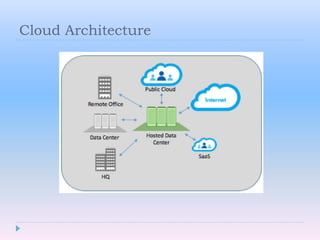
Cloud Architecture
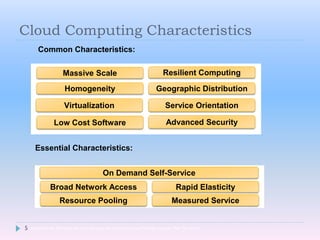
Cloud Computing Characteristics
5
Common Characteristics:
Low Cost Software
Virtualization Service Orientation
Advanced Security
Homogeneity
Massive Scale Resilient Computing
Geographic Distribution
Essential Characteristics:
Resource Pooling
Broad Network Access Rapid Elasticity
Measured Service
On Demand Self-Service
Adopted from: Effectively and Securely Using the Cloud Computing Paradigm by peter Mell, Tim Grance
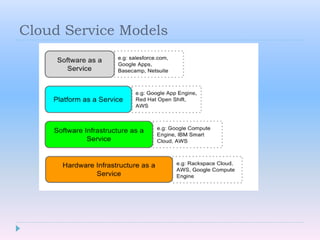
Cloud Service Models
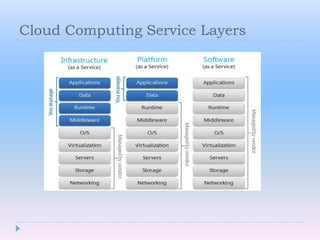
Cloud Computing Service Layers
Basic Cloud Characteristics
 The “no-need-to-know” in terms of the underlying details of infrastructure,
applications interface with the infrastructure via the APIs.
 The “flexibility and elasticity” allows these systems to scale up and down at will
 utilizing the resources of all kinds
 CPU, storage, server capacity, load balancing, and databases
 The “pay as much as used and needed” type of utility computing and the
“always on!, anywhere and any place” type of network-based computing.
 Cloud are transparent to users and applications, they can be built in multiple ways
 branded products, proprietary open source, hardware or software, or just off-
the-shelf PCs.
 In general, they are built on clusters of PC servers and off-the-shelf components
plus Open Source software combined with in-house applications and/or system
software.
Virtualization
 Virtual workspaces:
 An abstraction of an execution environment that can be made dynamically available to
authorized clients by using well-defined protocols,
 Resource quota (e.g. CPU, memory share),
 Software configuration (e.g. O/S, provided services).
 Implement onVirtual Machines (VMs):
 Abstraction of a physical host machine,
 Hypervisor intercepts and emulates instructions fromVMs, and allows management ofVMs,
 VMWare, Xen, etc.
 Provide infrastructure API:
 Plug-ins to hardware/support structures.
 VM technology allows multiple virtual machines to run on a single physical machine.
What is the purpose and benefits?
 Cloud computing enables companies and applications, which are system
infrastructure dependent, to be infrastructure-less.
 By using the Cloud infrastructure on “pay as used and on demand”, all of us
can save in capital and operational investment!
 Clients can:
 Put their data on the platform instead of on their own desktop PCs
and/or on their own servers.
 They can put their applications on the cloud and use the servers within
the cloud to do processing and data manipulations etc.
Cloud-Sourcing
 Why is it becoming a Big Deal:
 Using high-scale/low-cost providers,
 Any time/place access via web browser,
 Rapid scalability; incremental cost and load sharing,
 Can forget need to focus on local IT.
 Concerns:
 Performance, reliability, and SLAs,
 Control of data, and service parameters,
 Application features and choices,
 Interaction between Cloud providers,
 No standard API – mix of SOAP and REST!
 Privacy, security, compliance, trust…
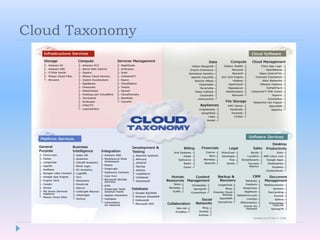
Cloud Taxonomy
Opportunities and Challenges
 The use of the cloud provides a number of opportunities:
 It enables services to be used without any understanding of their infrastructure.
 Cloud computing works using economies of scale:
 It potentially lowers the outlay expense for start up companies, as they would no longer need to buy their own
software or servers.
 Cost would be by on-demand pricing.
 Vendors and Service providers claim costs by establishing an ongoing revenue stream.
 Data and services are stored remotely but accessible from “anywhere”.
 In parallel there has been backlash against cloud computing:
 Use of cloud computing means dependence on others and that could possibly limit flexibility and innovation:
 The others are likely become the bigger Internet companies like Google and IBM, who may monopolise the market.
 Some argue that this use of supercomputers is a return to the time of mainframe computing that the PC was a
reaction against.
 Security could prove to be a big issue:
 It is still unclear how safe out-sourced data is and when using these services ownership of data is not always clear.
 There are also issues relating to policy and access:
 If your data is stored abroad whose policy do you adhere to?
 What happens if the remote server goes down?
 How will you then access files?
 There have been cases of users being locked out of accounts and losing access to data.
Advantages of Cloud Computing
 Lower computer costs:
 You do not need a high-powered and high-priced computer to run cloud
computing web-based applications.
 Since applications run in the cloud, not on the desktop PC, your desktop
PC does not need the processing power or hard disk space demanded
by traditional desktop software.
 When you are using web-based applications,your PC can be less
expensive, with a smaller hard disk, less memory, more efficient
processor...
 In fact, your PC in this scenario does not even need a CD or DVD drive,
as no software programs have to be loaded and no document files need
to be saved
Advantages of Cloud Computing
 Improved performance:
 With few large programs hogging your computer's memory, you will see
better performance from your PC.
 Computers in a cloud computing system boot and run faster because
they have fewer programs and processes loaded into memory…
 Reduced software costs:
 Instead of purchasing expensive software applications, you can get most
of what you need for free-ish!
 most cloud computing applications today, such as the Google Docs
suite.
 better than paying for similar commercial software
 which alone may be justification for switching to cloud applications
Advantages of Cloud Computing
 Instant software updates:
 Another advantage to cloud computing is that you are no longer faced with
choosing between obsolete software and high upgrade costs.
 When the application is web-based, updates happen automatically
 available the next time you log into the cloud.
 When you access a web-based application, you get the latest version
 without needing to pay for or download an upgrade.
 Improved document format compatibility.
 You do not have to worry about the documents you create on your machine
being compatible with other users' applications or OSes
 There are potentially no format incompatibilities when everyone is sharing
documents and applications in the cloud.
Advantages of Cloud Computing
 Unlimited storage capacity:
 Cloud computing offers virtually limitless storage.
 Your computer's current 1 Tbyte hard drive is small compared to the hundreds
of Pbytes available in the cloud.
 Increased data reliability:
 Unlike desktop computing, in which if a hard disk crashes and destroy all your
valuable data, a computer crashing in the cloud should not affect the storage of
your data.
 if your personal computer crashes, all your data is still out there in the cloud,
still accessible
 In a world where few individual desktop PC users back up their data on a
regular basis, cloud computing is a data-safe computing platform!
Advantages of Cloud Computing
 Universal document access:
 That is not a problem with cloud computing,because you do not take
your documents with you.
 Instead, they stay in the cloud, and you can access them whenever you
have a computer and an Internet connection
 Documents are instantly available from wherever you are
 Latest version availability:
 When you edit a document at home, that edited version is what you see
when you access the document at work.
 The cloud always hosts the latest version of your documents
 as long as you are connected, you are not in danger of having an
outdated version
 Easier group collaboration:
 Sharing documents leads directly to better collaboration.
 Many users do this as it is an important advantages of cloud
computing
 multiple users can collaborate easily on documents and projects
 Device independence.
 You are no longer tethered to a single computer or
network.
 Changes to computers, applications and documents follow
you through the cloud.
 Move to a portable device, and your applications and
documents are still available.

Cloud computing and Advantages

  • 1.
  • 2.
    What is CloudComputing ?  Cloud Computing is a general term used to describe a new class of network based computing that takes place over the Internet,  basically a step on from Utility Computing  a collection/group of integrated and networked hardware, software and Internet infrastructure (called a platform).  Using the Internet for communication and transport provides hardware, software and networking services to clients  These platforms hide the complexity and details of the underlying infrastructure from users and applications by providing very simple graphical interface or API (Applications Programming Interface).  In addition, the platform provides on demand services, that are always on, anywhere, anytime and any place.  Pay for use and as needed, elastic  scale up and down in capacity and functionalities  The hardware and software services are available to  general public, enterprises, corporations and businesses markets
  • 3.
    Cloud Summary  Cloudcomputing is an umbrella term used to refer to Internet based development and services  A number of characteristics define cloud data, applications services and infrastructure:  Remotely hosted: Services or data are hosted on remote infrastructure.  Ubiquitous: Services or data are available from anywhere.  Commodified:The result is a utility computing model similar to traditional that of traditional utilities, like gas and electricity - you pay for what you would want!
  • 4.
  • 5.
    Cloud Computing Characteristics 5 CommonCharacteristics: Low Cost Software Virtualization Service Orientation Advanced Security Homogeneity Massive Scale Resilient Computing Geographic Distribution Essential Characteristics: Resource Pooling Broad Network Access Rapid Elasticity Measured Service On Demand Self-Service Adopted from: Effectively and Securely Using the Cloud Computing Paradigm by peter Mell, Tim Grance
  • 6.
  • 7.
  • 8.
    Basic Cloud Characteristics The “no-need-to-know” in terms of the underlying details of infrastructure, applications interface with the infrastructure via the APIs.  The “flexibility and elasticity” allows these systems to scale up and down at will  utilizing the resources of all kinds  CPU, storage, server capacity, load balancing, and databases  The “pay as much as used and needed” type of utility computing and the “always on!, anywhere and any place” type of network-based computing.  Cloud are transparent to users and applications, they can be built in multiple ways  branded products, proprietary open source, hardware or software, or just off- the-shelf PCs.  In general, they are built on clusters of PC servers and off-the-shelf components plus Open Source software combined with in-house applications and/or system software.
  • 9.
    Virtualization  Virtual workspaces: An abstraction of an execution environment that can be made dynamically available to authorized clients by using well-defined protocols,  Resource quota (e.g. CPU, memory share),  Software configuration (e.g. O/S, provided services).  Implement onVirtual Machines (VMs):  Abstraction of a physical host machine,  Hypervisor intercepts and emulates instructions fromVMs, and allows management ofVMs,  VMWare, Xen, etc.  Provide infrastructure API:  Plug-ins to hardware/support structures.  VM technology allows multiple virtual machines to run on a single physical machine.
  • 10.
    What is thepurpose and benefits?  Cloud computing enables companies and applications, which are system infrastructure dependent, to be infrastructure-less.  By using the Cloud infrastructure on “pay as used and on demand”, all of us can save in capital and operational investment!  Clients can:  Put their data on the platform instead of on their own desktop PCs and/or on their own servers.  They can put their applications on the cloud and use the servers within the cloud to do processing and data manipulations etc.
  • 11.
    Cloud-Sourcing  Why isit becoming a Big Deal:  Using high-scale/low-cost providers,  Any time/place access via web browser,  Rapid scalability; incremental cost and load sharing,  Can forget need to focus on local IT.  Concerns:  Performance, reliability, and SLAs,  Control of data, and service parameters,  Application features and choices,  Interaction between Cloud providers,  No standard API – mix of SOAP and REST!  Privacy, security, compliance, trust…
  • 12.
  • 13.
    Opportunities and Challenges The use of the cloud provides a number of opportunities:  It enables services to be used without any understanding of their infrastructure.  Cloud computing works using economies of scale:  It potentially lowers the outlay expense for start up companies, as they would no longer need to buy their own software or servers.  Cost would be by on-demand pricing.  Vendors and Service providers claim costs by establishing an ongoing revenue stream.  Data and services are stored remotely but accessible from “anywhere”.  In parallel there has been backlash against cloud computing:  Use of cloud computing means dependence on others and that could possibly limit flexibility and innovation:  The others are likely become the bigger Internet companies like Google and IBM, who may monopolise the market.  Some argue that this use of supercomputers is a return to the time of mainframe computing that the PC was a reaction against.  Security could prove to be a big issue:  It is still unclear how safe out-sourced data is and when using these services ownership of data is not always clear.  There are also issues relating to policy and access:  If your data is stored abroad whose policy do you adhere to?  What happens if the remote server goes down?  How will you then access files?  There have been cases of users being locked out of accounts and losing access to data.
  • 14.
    Advantages of CloudComputing  Lower computer costs:  You do not need a high-powered and high-priced computer to run cloud computing web-based applications.  Since applications run in the cloud, not on the desktop PC, your desktop PC does not need the processing power or hard disk space demanded by traditional desktop software.  When you are using web-based applications,your PC can be less expensive, with a smaller hard disk, less memory, more efficient processor...  In fact, your PC in this scenario does not even need a CD or DVD drive, as no software programs have to be loaded and no document files need to be saved
  • 15.
    Advantages of CloudComputing  Improved performance:  With few large programs hogging your computer's memory, you will see better performance from your PC.  Computers in a cloud computing system boot and run faster because they have fewer programs and processes loaded into memory…  Reduced software costs:  Instead of purchasing expensive software applications, you can get most of what you need for free-ish!  most cloud computing applications today, such as the Google Docs suite.  better than paying for similar commercial software  which alone may be justification for switching to cloud applications
  • 16.
    Advantages of CloudComputing  Instant software updates:  Another advantage to cloud computing is that you are no longer faced with choosing between obsolete software and high upgrade costs.  When the application is web-based, updates happen automatically  available the next time you log into the cloud.  When you access a web-based application, you get the latest version  without needing to pay for or download an upgrade.  Improved document format compatibility.  You do not have to worry about the documents you create on your machine being compatible with other users' applications or OSes  There are potentially no format incompatibilities when everyone is sharing documents and applications in the cloud.
  • 17.
    Advantages of CloudComputing  Unlimited storage capacity:  Cloud computing offers virtually limitless storage.  Your computer's current 1 Tbyte hard drive is small compared to the hundreds of Pbytes available in the cloud.  Increased data reliability:  Unlike desktop computing, in which if a hard disk crashes and destroy all your valuable data, a computer crashing in the cloud should not affect the storage of your data.  if your personal computer crashes, all your data is still out there in the cloud, still accessible  In a world where few individual desktop PC users back up their data on a regular basis, cloud computing is a data-safe computing platform!
  • 18.
    Advantages of CloudComputing  Universal document access:  That is not a problem with cloud computing,because you do not take your documents with you.  Instead, they stay in the cloud, and you can access them whenever you have a computer and an Internet connection  Documents are instantly available from wherever you are  Latest version availability:  When you edit a document at home, that edited version is what you see when you access the document at work.  The cloud always hosts the latest version of your documents  as long as you are connected, you are not in danger of having an outdated version
  • 19.
     Easier groupcollaboration:  Sharing documents leads directly to better collaboration.  Many users do this as it is an important advantages of cloud computing  multiple users can collaborate easily on documents and projects  Device independence.  You are no longer tethered to a single computer or network.  Changes to computers, applications and documents follow you through the cloud.  Move to a portable device, and your applications and documents are still available.