CLOUD COMPUTING
SUBMITTED BY:
NEHA GAUTAM
CLOUD COMPUTING
 Introduction
 What Is Cloud Computing?
 History of Cloud Computing
 Advantages of Cloud Computing
 Disadvantages of Cloud Computing
 Components of Cloud Computing
 Types of Cloud Computing
 Conclusion Cloud Computing
2
INTRODUCTION
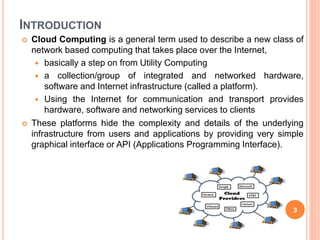
 Cloud Computing is a general term used to describe a new class of
network based computing that takes place over the Internet,
 basically a step on from Utility Computing
 a collection/group of integrated and networked hardware,
software and Internet infrastructure (called a platform).
 Using the Internet for communication and transport provides
hardware, software and networking services to clients
 These platforms hide the complexity and details of the underlying
infrastructure from users and applications by providing very simple
graphical interface or API (Applications Programming Interface).
3
WHAT IS CLOUD COMPUTING?
 In addition, the platform provides on demand services, that are always on,
anywhere, anytime and any place.
 Pay for use and as needed, elastic
 scale up and down in capacity and functionalities
 The hardware and software services are available to
 general public, enterprises, corporations and businesses markets
 Cloud computing is an umbrella term used to refer to Internet based
development and services
 A number of characteristics define cloud data, applications services and
infrastructure:
 Remotely hosted: Services or data are hosted on remote infrastructure.
 Ubiquitous: Services or data are available from anywhere.
 Commodified: The result is a utility computing model similar to
traditional that of traditional utilities, like gas and electricity - you pay for
what you would want! 4
HISTORY
 Concept originated from telecommunication companies
changing to VPN
 1999:Salesforce. com ‐ Delivery of applications via web
 2002: Amazon launches Amazon Web Services (AWS)
 2006: Google Docs, Amazon Elastic Compute Cloud
(EC2)
 2008: Eucalyptus
 2009: Microsoft Azure
5
WHAT IS THE PURPOSE AND BENEFITS?
 Cloud computing enables companies and applications,
which are system infrastructure dependent, to be
infrastructure-less.
 By using the Cloud infrastructure on “pay as used and
on demand”, all of us can save in capital and
operational investment!
 Clients can:
 Put their data on the platform instead of on their own
desktop PCs and/or on their own servers.
 They can put their applications on the cloud and use
the servers within the cloud to do processing and
data manipulations etc.
6
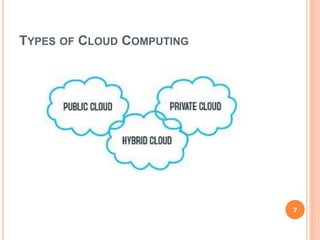
TYPES OF CLOUD COMPUTING
7
PUBLIC CLOUD
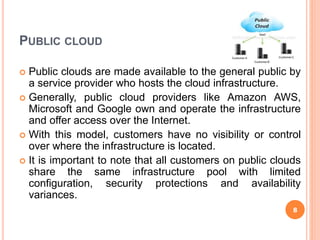
 Public clouds are made available to the general public by
a service provider who hosts the cloud infrastructure.
 Generally, public cloud providers like Amazon AWS,
Microsoft and Google own and operate the infrastructure
and offer access over the Internet.
 With this model, customers have no visibility or control
over where the infrastructure is located.
 It is important to note that all customers on public clouds
share the same infrastructure pool with limited
configuration, security protections and availability
variances.
8
PRIVATE CLOUD
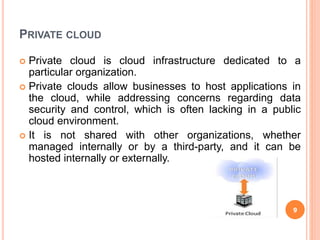
 Private cloud is cloud infrastructure dedicated to a
particular organization.
 Private clouds allow businesses to host applications in
the cloud, while addressing concerns regarding data
security and control, which is often lacking in a public
cloud environment.
 It is not shared with other organizations, whether
managed internally or by a third-party, and it can be
hosted internally or externally.
9
HYBRID CLOUD
 Hybrid Clouds are a composition of two or more clouds
(private, community or public) that remain unique entities
but are bound together offering the advantages of
multiple deployment models.
 In a hybrid cloud, you can leverage third party cloud
providers in either a full or partial manner; increasing the
flexibility of computing.
 Augmenting a traditional private cloud with the resources
of a public cloud can be used to manage any unexpected
surges in workload.
10
COMPONENTS
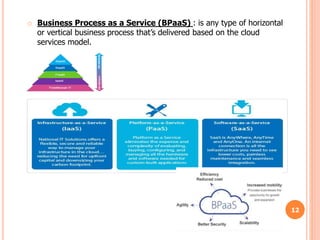
 SaaS (software as a service): SaaS refers to software that’s made available
as a web-based service.
 PaaS: In PaaS the provider delivers more than infrastructure. It is the
evolution of web hosting.
 Utility computing: The predecessor of cloud computing, utility computing
provides the ability to access storage and virtual servers on demand.
 Cloud-based web services: Similar to Saas, web services in the cloud
allow you to offer services online, such as credit card processing services,
employee payroll processing or viewing an interactive map.
 MSP (managed service providers): The grandfather of cloud computing,
an MSP delivers applications to IT instead of end-users.
 IaaS (infrastructure as a service): IaaS refers to computer infrastructure
(e.g., virtualization) that’s delivered as a service.
11
o Business Process as a Service (BPaaS) : is any type of horizontal
or vertical business process that’s delivered based on the cloud
services model.
12
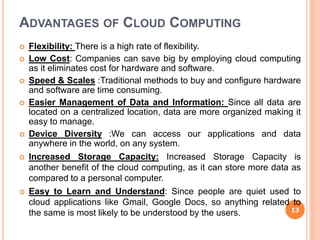
ADVANTAGES OF CLOUD COMPUTING
 Flexibility: There is a high rate of flexibility.
 Low Cost: Companies can save big by employing cloud computing
as it eliminates cost for hardware and software.
 Speed & Scales :Traditional methods to buy and configure hardware
and software are time consuming.
 Easier Management of Data and Information: Since all data are
located on a centralized location, data are more organized making it
easy to manage.
 Device Diversity :We can access our applications and data
anywhere in the world, on any system.
 Increased Storage Capacity: Increased Storage Capacity is
another benefit of the cloud computing, as it can store more data as
compared to a personal computer.
 Easy to Learn and Understand: Since people are quiet used to
cloud applications like Gmail, Google Docs, so anything related to
the same is most likely to be understood by the users. 13
ADVANTAGES OF CLOUD COMPUTING…
 Automatic Updating: It saves companies time and effort to update
multiples server.
 Customize Setting: Cloud computing also allows you to customize
your business applications.
14
DISADVANTAGES OF CLOUD COMPUTING
 Dependency: One major disadvantages of cloud computing is
user’s dependency on the provider.
 Risk: Cloud computing services means taking services from
remote servers.
 Requires a Constant internet connection: The most obvious
disadvantage is that Cloud computing completely relies on network
connections.
 Security: Security and privacy are the biggest concerns about
cloud computing.
 Migration Issue: Migration problem is also a big concern about
cloud computing.
15
The use of the cloud provides a number of opportunities:
 It enables services to be used without any understanding of their
infrastructure.
 Cloud computing works using economies of scale:
 It potentially lowers the outlay expense for start up
companies, as they would no longer need to buy their own
software or servers.
 Cost would be by on-demand pricing.
 Vendors and Service providers claim costs by establishing an
ongoing revenue stream.
 Data and services are stored remotely but accessible from
“anywhere”.
OPPORTUNITIES AND CHALLENGES
16
In parallel there has been backlash against cloud computing:
 Use of cloud computing means dependence on others and that could
possibly limit flexibility and innovation:
 The others are likely become the bigger Internet companies like
Google and IBM, who may monopolise the market.
 Some argue that this use of supercomputers is a return to the time of
mainframe computing that the PC was a reaction against.
 Security could prove to be a big issue:
 It is still unclear how safe out-sourced data is and when using these
services ownership of data is not always clear.
 There are also issues relating to policy and access:
 If your data is stored abroad whose policy do you adhere to?
 What happens if the remote server goes down?
 How will you then access files?
 There have been cases of users being locked out of accounts and
losing access to data.
17
 Many of the activities loosely grouped together
under cloud computing have already been
happening and centralised computing activity is not
a new phenomena
 Grid Computing was the last research-led
centralised approach
 However there are concerns that the mainstream
adoption of cloud computing could cause many
problems for users
 Many new open source systems appearing that you
can install and run on your local cluster
 should be able to run a variety of applications on these
systems
THE FUTURETHE FUTURE
18
CONCLUSION
 So, while cloud computing is really really great and
you’re probably already using it, either for business or
for personal means, here’s what we’ve learned from
taking a look at the pros and cons:
 Cloud computing is a really cheap way for companies
to have all the resources they need in once place.
 It’s a much better way to spread your resources, and it
becomes easier to access things from longer distances.
19
20

Cloud computing

  • 1.
  • 2.
    CLOUD COMPUTING  Introduction What Is Cloud Computing?  History of Cloud Computing  Advantages of Cloud Computing  Disadvantages of Cloud Computing  Components of Cloud Computing  Types of Cloud Computing  Conclusion Cloud Computing 2
  • 3.
    INTRODUCTION  Cloud Computingis a general term used to describe a new class of network based computing that takes place over the Internet,  basically a step on from Utility Computing  a collection/group of integrated and networked hardware, software and Internet infrastructure (called a platform).  Using the Internet for communication and transport provides hardware, software and networking services to clients  These platforms hide the complexity and details of the underlying infrastructure from users and applications by providing very simple graphical interface or API (Applications Programming Interface). 3
  • 4.
    WHAT IS CLOUDCOMPUTING?  In addition, the platform provides on demand services, that are always on, anywhere, anytime and any place.  Pay for use and as needed, elastic  scale up and down in capacity and functionalities  The hardware and software services are available to  general public, enterprises, corporations and businesses markets  Cloud computing is an umbrella term used to refer to Internet based development and services  A number of characteristics define cloud data, applications services and infrastructure:  Remotely hosted: Services or data are hosted on remote infrastructure.  Ubiquitous: Services or data are available from anywhere.  Commodified: The result is a utility computing model similar to traditional that of traditional utilities, like gas and electricity - you pay for what you would want! 4
  • 5.
    HISTORY  Concept originatedfrom telecommunication companies changing to VPN  1999:Salesforce. com ‐ Delivery of applications via web  2002: Amazon launches Amazon Web Services (AWS)  2006: Google Docs, Amazon Elastic Compute Cloud (EC2)  2008: Eucalyptus  2009: Microsoft Azure 5
  • 6.
    WHAT IS THEPURPOSE AND BENEFITS?  Cloud computing enables companies and applications, which are system infrastructure dependent, to be infrastructure-less.  By using the Cloud infrastructure on “pay as used and on demand”, all of us can save in capital and operational investment!  Clients can:  Put their data on the platform instead of on their own desktop PCs and/or on their own servers.  They can put their applications on the cloud and use the servers within the cloud to do processing and data manipulations etc. 6
  • 7.
    TYPES OF CLOUDCOMPUTING 7
  • 8.
    PUBLIC CLOUD  Publicclouds are made available to the general public by a service provider who hosts the cloud infrastructure.  Generally, public cloud providers like Amazon AWS, Microsoft and Google own and operate the infrastructure and offer access over the Internet.  With this model, customers have no visibility or control over where the infrastructure is located.  It is important to note that all customers on public clouds share the same infrastructure pool with limited configuration, security protections and availability variances. 8
  • 9.
    PRIVATE CLOUD  Privatecloud is cloud infrastructure dedicated to a particular organization.  Private clouds allow businesses to host applications in the cloud, while addressing concerns regarding data security and control, which is often lacking in a public cloud environment.  It is not shared with other organizations, whether managed internally or by a third-party, and it can be hosted internally or externally. 9
  • 10.
    HYBRID CLOUD  HybridClouds are a composition of two or more clouds (private, community or public) that remain unique entities but are bound together offering the advantages of multiple deployment models.  In a hybrid cloud, you can leverage third party cloud providers in either a full or partial manner; increasing the flexibility of computing.  Augmenting a traditional private cloud with the resources of a public cloud can be used to manage any unexpected surges in workload. 10
  • 11.
    COMPONENTS  SaaS (softwareas a service): SaaS refers to software that’s made available as a web-based service.  PaaS: In PaaS the provider delivers more than infrastructure. It is the evolution of web hosting.  Utility computing: The predecessor of cloud computing, utility computing provides the ability to access storage and virtual servers on demand.  Cloud-based web services: Similar to Saas, web services in the cloud allow you to offer services online, such as credit card processing services, employee payroll processing or viewing an interactive map.  MSP (managed service providers): The grandfather of cloud computing, an MSP delivers applications to IT instead of end-users.  IaaS (infrastructure as a service): IaaS refers to computer infrastructure (e.g., virtualization) that’s delivered as a service. 11
  • 12.
    o Business Processas a Service (BPaaS) : is any type of horizontal or vertical business process that’s delivered based on the cloud services model. 12
  • 13.
    ADVANTAGES OF CLOUDCOMPUTING  Flexibility: There is a high rate of flexibility.  Low Cost: Companies can save big by employing cloud computing as it eliminates cost for hardware and software.  Speed & Scales :Traditional methods to buy and configure hardware and software are time consuming.  Easier Management of Data and Information: Since all data are located on a centralized location, data are more organized making it easy to manage.  Device Diversity :We can access our applications and data anywhere in the world, on any system.  Increased Storage Capacity: Increased Storage Capacity is another benefit of the cloud computing, as it can store more data as compared to a personal computer.  Easy to Learn and Understand: Since people are quiet used to cloud applications like Gmail, Google Docs, so anything related to the same is most likely to be understood by the users. 13
  • 14.
    ADVANTAGES OF CLOUDCOMPUTING…  Automatic Updating: It saves companies time and effort to update multiples server.  Customize Setting: Cloud computing also allows you to customize your business applications. 14
  • 15.
    DISADVANTAGES OF CLOUDCOMPUTING  Dependency: One major disadvantages of cloud computing is user’s dependency on the provider.  Risk: Cloud computing services means taking services from remote servers.  Requires a Constant internet connection: The most obvious disadvantage is that Cloud computing completely relies on network connections.  Security: Security and privacy are the biggest concerns about cloud computing.  Migration Issue: Migration problem is also a big concern about cloud computing. 15
  • 16.
    The use ofthe cloud provides a number of opportunities:  It enables services to be used without any understanding of their infrastructure.  Cloud computing works using economies of scale:  It potentially lowers the outlay expense for start up companies, as they would no longer need to buy their own software or servers.  Cost would be by on-demand pricing.  Vendors and Service providers claim costs by establishing an ongoing revenue stream.  Data and services are stored remotely but accessible from “anywhere”. OPPORTUNITIES AND CHALLENGES 16
  • 17.
    In parallel therehas been backlash against cloud computing:  Use of cloud computing means dependence on others and that could possibly limit flexibility and innovation:  The others are likely become the bigger Internet companies like Google and IBM, who may monopolise the market.  Some argue that this use of supercomputers is a return to the time of mainframe computing that the PC was a reaction against.  Security could prove to be a big issue:  It is still unclear how safe out-sourced data is and when using these services ownership of data is not always clear.  There are also issues relating to policy and access:  If your data is stored abroad whose policy do you adhere to?  What happens if the remote server goes down?  How will you then access files?  There have been cases of users being locked out of accounts and losing access to data. 17
  • 18.
     Many ofthe activities loosely grouped together under cloud computing have already been happening and centralised computing activity is not a new phenomena  Grid Computing was the last research-led centralised approach  However there are concerns that the mainstream adoption of cloud computing could cause many problems for users  Many new open source systems appearing that you can install and run on your local cluster  should be able to run a variety of applications on these systems THE FUTURETHE FUTURE 18
  • 19.
    CONCLUSION  So, whilecloud computing is really really great and you’re probably already using it, either for business or for personal means, here’s what we’ve learned from taking a look at the pros and cons:  Cloud computing is a really cheap way for companies to have all the resources they need in once place.  It’s a much better way to spread your resources, and it becomes easier to access things from longer distances. 19
  • 20.