AJAX in ASP.NET
James Crowley
Developer Fusion
http://www.developerfusion.co.uk/
Overview
 What is AJAX?
 How does it work?
 Using it in ASP.NET 1.x
 Using it in ASP.NET 2.0
 Pros & Cons
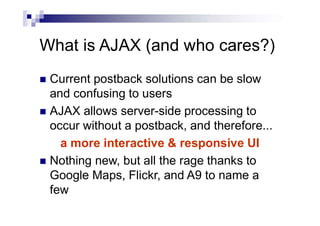
What is AJAX (and who cares?)
 Current postback solutions can be slow
and confusing to users
 AJAX allows server-side processing to
occur without a postback, and therefore...
a more interactive & responsive UI
 Nothing new, but all the rage thanks to
Google Maps, Flickr, and A9 to name a
few
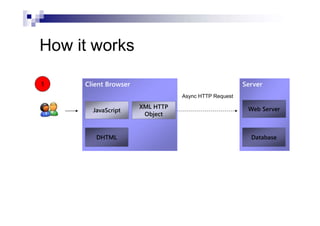
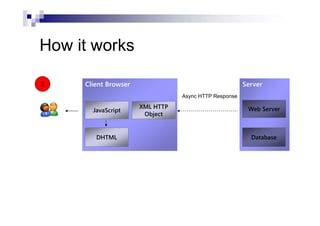
How it works
Server
Web Server
Database
Client Browser
JavaScript
DHTML
XML HTTP
Object
1
Async HTTP Request
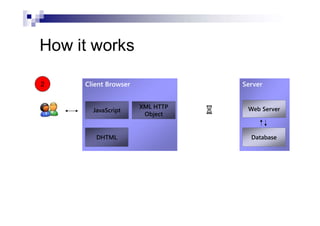
How it works
Server
Web Server
Database
Client Browser
JavaScript
DHTML
XML HTTP
Object
2
How it works
Server
Web Server
Database
Client Browser
JavaScript
DHTML
XML HTTP
Object
3
Async HTTP Response
AJAX in ASP.NET 1.x
 Either we deal with the XML HTTP
request ourselves
 or we can use an existing library, such as
AJAX.NET wrapper
http://ajax.schwarz-interactive.de/
“My AJAX.NET”
http://jason.diamond.name/weblog/
Demo
 “Colourizing” Code
Complex Data Types
 Need to either reproduce (a subset of) the
.NET type system within JavaScript or
vice-versa
 Need to serialize for transfer via HTTP
 Serializable return types dealt with
automatically
 Parameters are harder
Demo
 “Google Suggest”
AJAX in ASP.NET 2.0
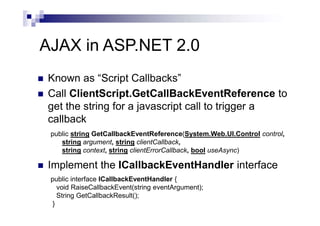
 Known as “Script Callbacks”
 Call ClientScript.GetCallBackEventReference to
get the string for a javascript call to trigger a
callback
 Implement the ICallbackEventHandler interface
public interface ICallbackEventHandler {
void RaiseCallbackEvent(string eventArgument);
String GetCallbackResult();
}
public string GetCallbackEventReference(System.Web.UI.Control control,
string argument, string clientCallback,
string context, string clientErrorCallback, bool useAsync)
ASP.NET 2.0 vs AJAX.NET
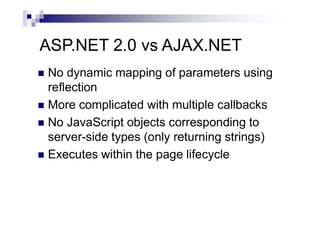
 No dynamic mapping of parameters using
reflection
 More complicated with multiple callbacks
 No JavaScript objects corresponding to
server-side types (only returning strings)
 Executes within the page lifecycle
Things to note
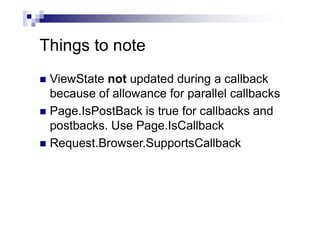
 ViewState not updated during a callback
because of allowance for parallel callbacks
 Page.IsPostBack is true for callbacks and
postbacks. Use Page.IsCallback
 Request.Browser.SupportsCallback
Demo
 AJAX in ASP.NET 2.0
Atlas
 New library from Microsoft to plug-in to
ASP.NET 2.0
 Preview available from http://atlas.asp.net/
 Warning: Not yet even Beta quality!
 But Microsoft wants your feedback…
Atlas
 Cross-browser script libraries
 Callbacks can be triggered in same way as
AJAX.NET library
 Web Services integration
 Declarative data binding
 New AJAX-enabled server controls
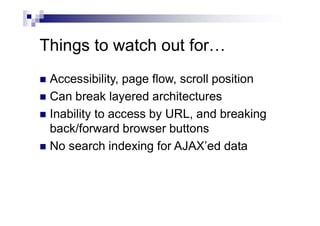
Things to watch out for…
 Debugging is a pain
 Response timeouts and server exceptions
 Non-JavaScript/non-ActiveX scenarios
Things to watch out for…
 Accessibility, page flow, scroll position
 Can break layered architectures
 Inability to access by URL, and breaking
back/forward browser buttons
 No search indexing for AJAX’ed data
Wrapping Up
 More work for us
 But… fast interactive UI for the user
 Any questions?
References
 ASP.NET AJAX Libraries
 http://ajax.schwarz-interactive.de/ (AJAX.NET)
 Tutorial @ http://www.developerfusion.co.uk/show/4704/
 http://jason.diamond.name/weblog/ (My AJAX.NET)
 http://atlas.asp.net/ (Atlas)
 My Contact Details
 Web: http://www.developerfusion.co.uk/
 Email: james@developerfusion.co.uk

AJAX in ASP.NET

  • 1.
    AJAX in ASP.NET JamesCrowley Developer Fusion http://www.developerfusion.co.uk/
  • 2.
    Overview  What isAJAX?  How does it work?  Using it in ASP.NET 1.x  Using it in ASP.NET 2.0  Pros & Cons
  • 3.
    What is AJAX(and who cares?)  Current postback solutions can be slow and confusing to users  AJAX allows server-side processing to occur without a postback, and therefore... a more interactive & responsive UI  Nothing new, but all the rage thanks to Google Maps, Flickr, and A9 to name a few
  • 4.
    How it works Server WebServer Database Client Browser JavaScript DHTML XML HTTP Object 1 Async HTTP Request
  • 5.
    How it works Server WebServer Database Client Browser JavaScript DHTML XML HTTP Object 2
  • 6.
    How it works Server WebServer Database Client Browser JavaScript DHTML XML HTTP Object 3 Async HTTP Response
  • 7.
    AJAX in ASP.NET1.x  Either we deal with the XML HTTP request ourselves  or we can use an existing library, such as AJAX.NET wrapper http://ajax.schwarz-interactive.de/ “My AJAX.NET” http://jason.diamond.name/weblog/
  • 8.
  • 9.
    Complex Data Types Need to either reproduce (a subset of) the .NET type system within JavaScript or vice-versa  Need to serialize for transfer via HTTP  Serializable return types dealt with automatically  Parameters are harder
  • 10.
  • 11.
    AJAX in ASP.NET2.0  Known as “Script Callbacks”  Call ClientScript.GetCallBackEventReference to get the string for a javascript call to trigger a callback  Implement the ICallbackEventHandler interface public interface ICallbackEventHandler { void RaiseCallbackEvent(string eventArgument); String GetCallbackResult(); } public string GetCallbackEventReference(System.Web.UI.Control control, string argument, string clientCallback, string context, string clientErrorCallback, bool useAsync)
  • 12.
    ASP.NET 2.0 vsAJAX.NET  No dynamic mapping of parameters using reflection  More complicated with multiple callbacks  No JavaScript objects corresponding to server-side types (only returning strings)  Executes within the page lifecycle
  • 13.
    Things to note ViewState not updated during a callback because of allowance for parallel callbacks  Page.IsPostBack is true for callbacks and postbacks. Use Page.IsCallback  Request.Browser.SupportsCallback
  • 14.
    Demo  AJAX inASP.NET 2.0
  • 15.
    Atlas  New libraryfrom Microsoft to plug-in to ASP.NET 2.0  Preview available from http://atlas.asp.net/  Warning: Not yet even Beta quality!  But Microsoft wants your feedback…
  • 16.
    Atlas  Cross-browser scriptlibraries  Callbacks can be triggered in same way as AJAX.NET library  Web Services integration  Declarative data binding  New AJAX-enabled server controls
  • 17.
    Things to watchout for…  Debugging is a pain  Response timeouts and server exceptions  Non-JavaScript/non-ActiveX scenarios
  • 18.
    Things to watchout for…  Accessibility, page flow, scroll position  Can break layered architectures  Inability to access by URL, and breaking back/forward browser buttons  No search indexing for AJAX’ed data
  • 19.
    Wrapping Up  Morework for us  But… fast interactive UI for the user  Any questions?
  • 20.
    References  ASP.NET AJAXLibraries  http://ajax.schwarz-interactive.de/ (AJAX.NET)  Tutorial @ http://www.developerfusion.co.uk/show/4704/  http://jason.diamond.name/weblog/ (My AJAX.NET)  http://atlas.asp.net/ (Atlas)  My Contact Details  Web: http://www.developerfusion.co.uk/  Email: james@developerfusion.co.uk