AJAX The basics
WEB
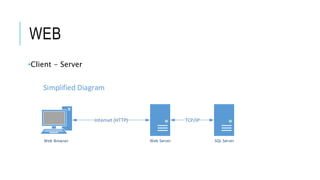
•Client - Server
Web ServerWeb Browser SQL Server
TCP/IPInternet (HTTP)
Simplified Diagram
HTTP
•Stateless protocol (ignore session and viewstate)
•Serves entire state (page?) to browser every time
•Postback ENTIRE PAGE to page form (submit button)
•How can the browser communicate with server without Postback?
AJAX?
•Microsoft invented XMLHttpRequest Objects
•ActiveX object before IE7 ActiveXObject("Msxml2.XMLHTTP")
•XMLHttpRequest Calls should be asynchronous
•Asynchronous Javascript And XML
AJAX
•Requests cannot be cross domain (ignore CORS)
•Browser can make requests without reloading entire page (client side)
•Talks to server through XHR (XMLHttpRequest)
•XHR can pass more than just XML
CHEAT SHEET
•Create XHR Object
•Call xhr.Open pass “calling method”, url, async (true, false),
username, pw
•Check readyState – returned 4 means returned with data
AJAX
•Create wrapper function
function createXMLHttpRequest() {
try {
return new XMLHttpRequest();
} catch(e) {}
try {
return new ActiveXObject("Msxml2.XMLHTTP");
} catch (e) {}
alert("XMLHttpRequest not supported");
return null;
}
AJAX
•Call createXMLHttpRequest
var xhReq = createXMLHttpRequest();
xhReq.open("GET", url, true);
xhReq.onreadystatechange =
function {
if (xhReq.readyState != 4) { return; }
var serverResponse = xhReq.responseText;
//var serverResponse = xhReq.responseXML;
}
xhReq.send(null);
API SUMMARY
•XMLHttpRequest Object Properties
•onreadystatechange: Callback function
•readyState: State of the request cycle
•responseText: Text response from the server
•responseXML: XML response from the server
•status: HTTP response code received from the server
•statusText: HTTP response code description received from the server
API SUMMARY
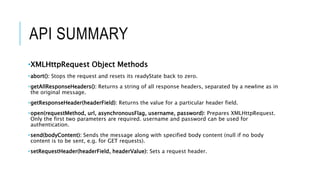
•XMLHttpRequest Object Methods
•abort(): Stops the request and resets its readyState back to zero.
•getAllResponseHeaders(): Returns a string of all response headers, separated by a newline as in
the original message.
•getResponseHeader(headerField): Returns the value for a particular header field.
•open(requestMethod, url, asynchronousFlag, username, password): Prepares XMLHttpRequest.
Only the first two parameters are required. username and password can be used for
authentication.
•send(bodyContent): Sends the message along with specified body content (null if no body
content is to be sent, e.g. for GET requests).
•setRequestHeader(headerField, headerValue): Sets a request header.

AJAX

  • 1.
  • 2.
    WEB •Client - Server WebServerWeb Browser SQL Server TCP/IPInternet (HTTP) Simplified Diagram
  • 3.
    HTTP •Stateless protocol (ignoresession and viewstate) •Serves entire state (page?) to browser every time •Postback ENTIRE PAGE to page form (submit button) •How can the browser communicate with server without Postback?
  • 4.
    AJAX? •Microsoft invented XMLHttpRequestObjects •ActiveX object before IE7 ActiveXObject("Msxml2.XMLHTTP") •XMLHttpRequest Calls should be asynchronous •Asynchronous Javascript And XML
  • 5.
    AJAX •Requests cannot becross domain (ignore CORS) •Browser can make requests without reloading entire page (client side) •Talks to server through XHR (XMLHttpRequest) •XHR can pass more than just XML
  • 6.
    CHEAT SHEET •Create XHRObject •Call xhr.Open pass “calling method”, url, async (true, false), username, pw •Check readyState – returned 4 means returned with data
  • 7.
    AJAX •Create wrapper function functioncreateXMLHttpRequest() { try { return new XMLHttpRequest(); } catch(e) {} try { return new ActiveXObject("Msxml2.XMLHTTP"); } catch (e) {} alert("XMLHttpRequest not supported"); return null; }
  • 8.
    AJAX •Call createXMLHttpRequest var xhReq= createXMLHttpRequest(); xhReq.open("GET", url, true); xhReq.onreadystatechange = function { if (xhReq.readyState != 4) { return; } var serverResponse = xhReq.responseText; //var serverResponse = xhReq.responseXML; } xhReq.send(null);
  • 9.
    API SUMMARY •XMLHttpRequest ObjectProperties •onreadystatechange: Callback function •readyState: State of the request cycle •responseText: Text response from the server •responseXML: XML response from the server •status: HTTP response code received from the server •statusText: HTTP response code description received from the server
  • 10.
    API SUMMARY •XMLHttpRequest ObjectMethods •abort(): Stops the request and resets its readyState back to zero. •getAllResponseHeaders(): Returns a string of all response headers, separated by a newline as in the original message. •getResponseHeader(headerField): Returns the value for a particular header field. •open(requestMethod, url, asynchronousFlag, username, password): Prepares XMLHttpRequest. Only the first two parameters are required. username and password can be used for authentication. •send(bodyContent): Sends the message along with specified body content (null if no body content is to be sent, e.g. for GET requests). •setRequestHeader(headerField, headerValue): Sets a request header.