Database Management System
DATA;
Symbols or signals that are input, stored, and processed by a computer, for output as usable information.
INFORMATION;
Information is a stimulus that has meaning in some context for its receiver. When information is entered into
and stored in a computer, it is generally referred to as data. After processing (such as formatting and printing),
output data can again be perceived as information.
DATA BASE;
A database is a collection of information that is organized so that it can easily be accessed, managed, and
updated. In one view, databases can be classified according to types of content: bibliographic, full-text,
numeric, and images.
METADATA;
is data that describes other data. Meta is a prefix that in most information technology usages means "an
underlying definition or description." Metadata summarizes basic information about data, which can make
finding and working with particular instances of data easier.
i. Top of Form
ii. Bottom of Form
iii. Top of Form
iv. Bottom of Form
DATABASE MANAGEMENT SYSTEMS;
A Database is a collection of records. Database management systems are designed as the means of managing
all the records. Database Management is a software system that uses a standard method and running queries
with some of them designed for the oversight and proper control of databases.
Types of Database Management Systems:
There are four structural types of database management systems:
• Hierarchical databases.
• Network databases.
• Relational databases.
• Object-oriented databases
Hierarchical Databases (DBMS) :
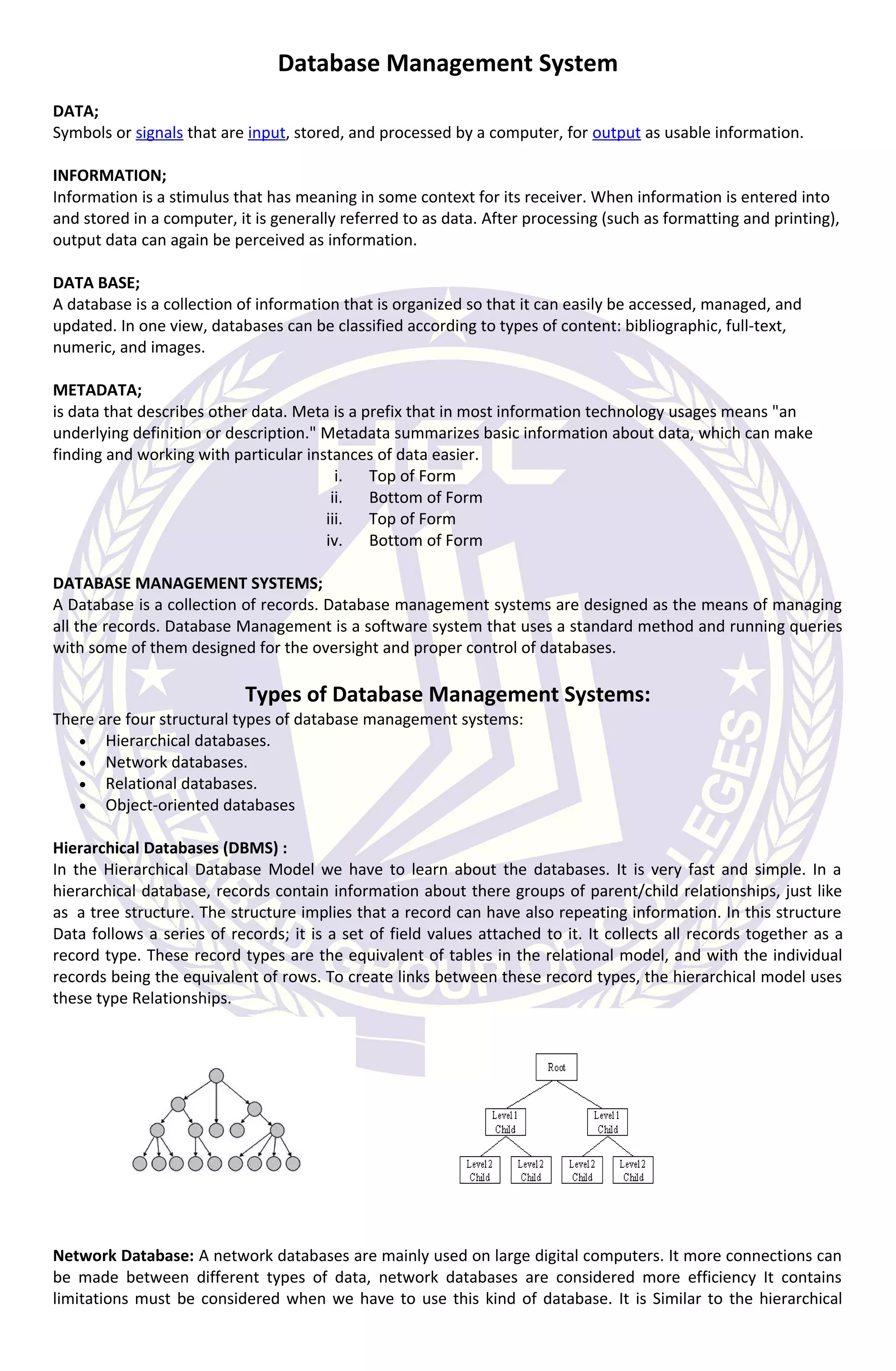
In the Hierarchical Database Model we have to learn about the databases. It is very fast and simple. In a
hierarchical database, records contain information about there groups of parent/child relationships, just like
as a tree structure. The structure implies that a record can have also repeating information. In this structure
Data follows a series of records; it is a set of field values attached to it. It collects all records together as a
record type. These record types are the equivalent of tables in the relational model, and with the individual
records being the equivalent of rows. To create links between these record types, the hierarchical model uses
these type Relationships.
Network Database: A network databases are mainly used on large digital computers. It more connections can
be made between different types of data, network databases are considered more efficiency It contains
limitations must be considered when we have to use this kind of database. It is Similar to the hierarchical
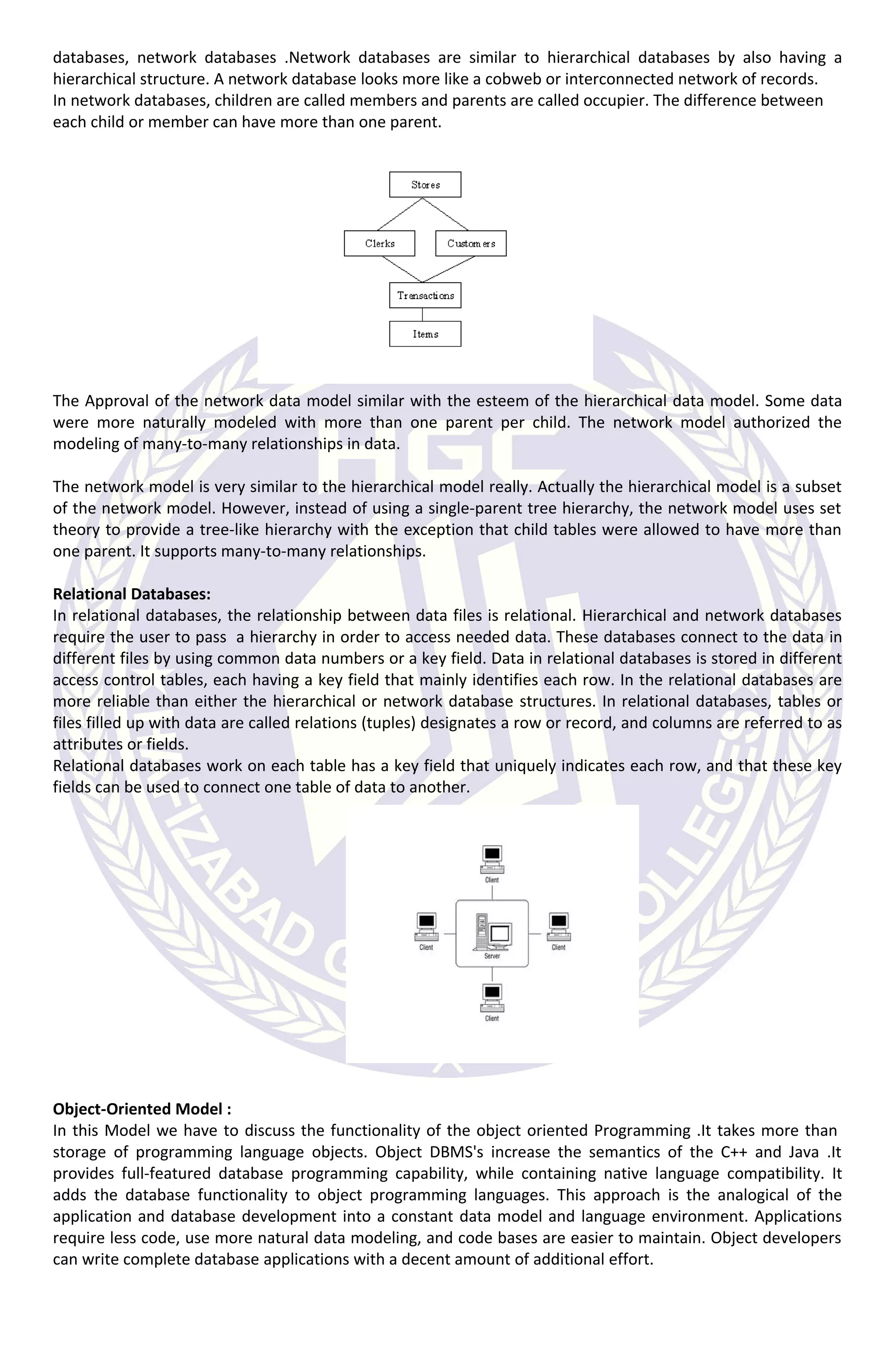
databases, network databases .Network databases are similar to hierarchical databases by also having a
hierarchical structure. A network database looks more like a cobweb or interconnected network of records.
In network databases, children are called members and parents are called occupier. The difference between
each child or member can have more than one parent.
The Approval of the network data model similar with the esteem of the hierarchical data model. Some data
were more naturally modeled with more than one parent per child. The network model authorized the
modeling of many-to-many relationships in data.
The network model is very similar to the hierarchical model really. Actually the hierarchical model is a subset
of the network model. However, instead of using a single-parent tree hierarchy, the network model uses set
theory to provide a tree-like hierarchy with the exception that child tables were allowed to have more than
one parent. It supports many-to-many relationships.
Relational Databases:
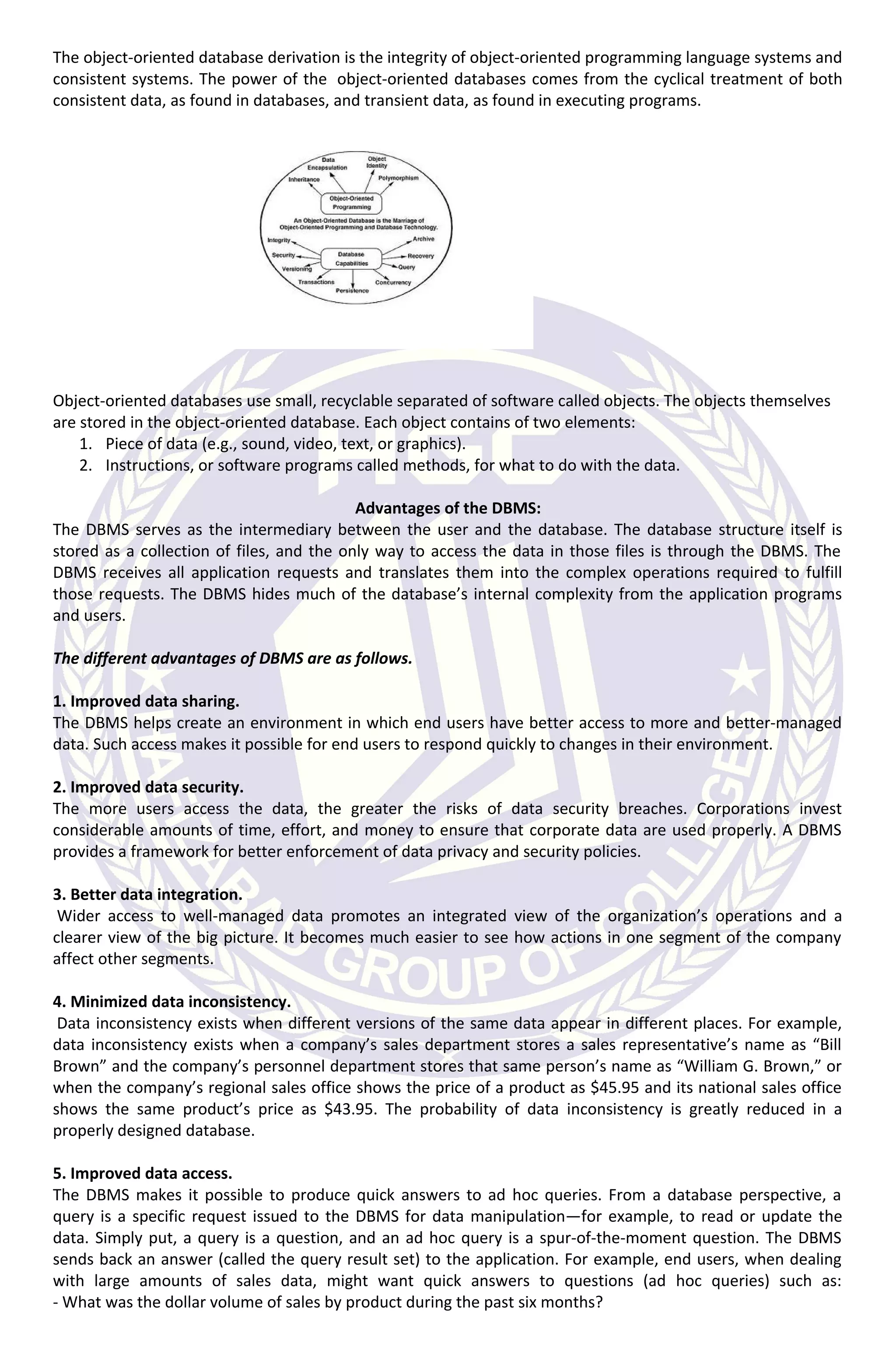
In relational databases, the relationship between data files is relational. Hierarchical and network databases
require the user to pass a hierarchy in order to access needed data. These databases connect to the data in
different files by using common data numbers or a key field. Data in relational databases is stored in different
access control tables, each having a key field that mainly identifies each row. In the relational databases are
more reliable than either the hierarchical or network database structures. In relational databases, tables or
files filled up with data are called relations (tuples) designates a row or record, and columns are referred to as
attributes or fields.
Relational databases work on each table has a key field that uniquely indicates each row, and that these key
fields can be used to connect one table of data to another.
Object-Oriented Model :
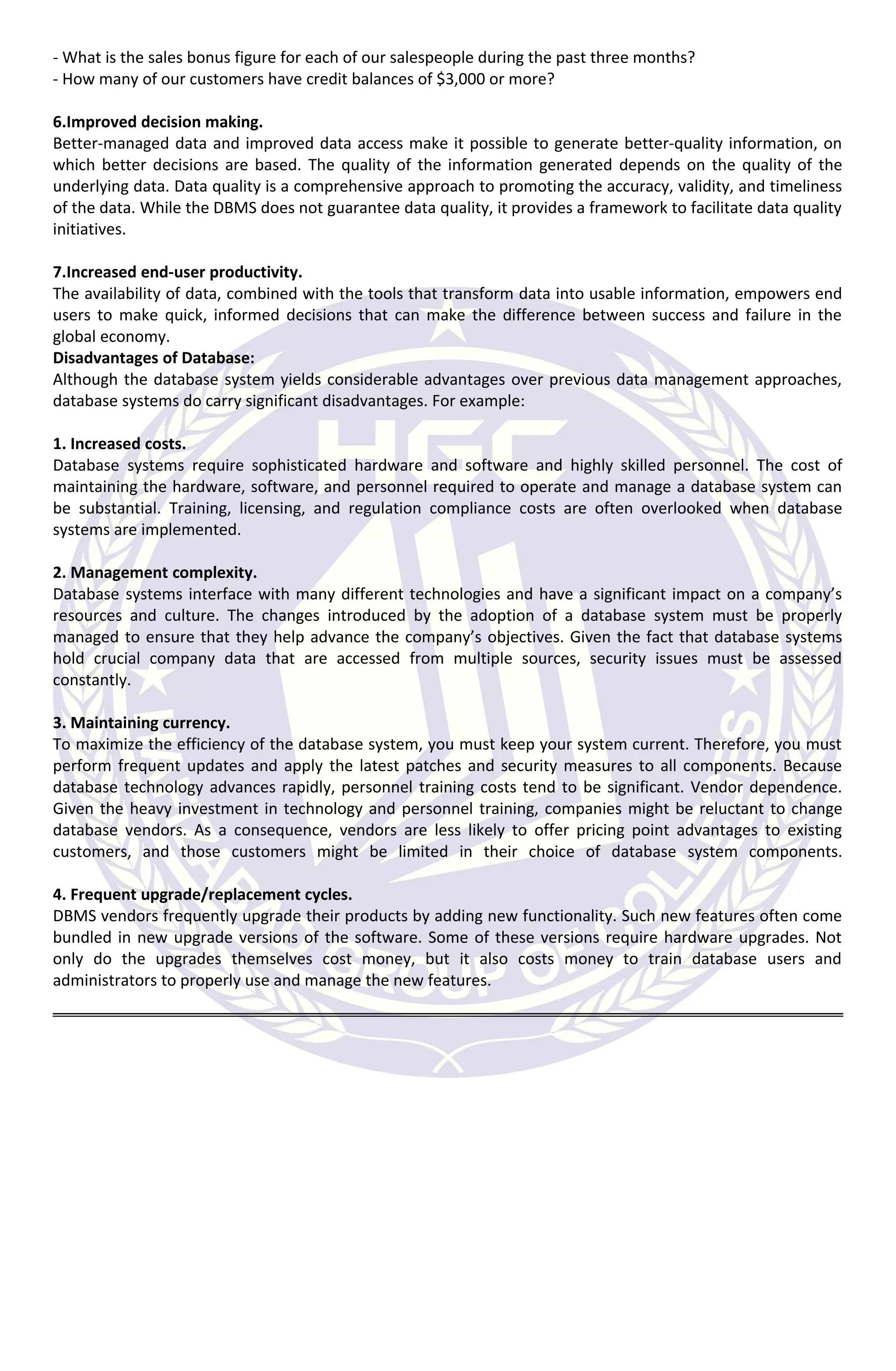
In this Model we have to discuss the functionality of the object oriented Programming .It takes more than
storage of programming language objects. Object DBMS's increase the semantics of the C++ and Java .It
provides full-featured database programming capability, while containing native language compatibility. It
adds the database functionality to object programming languages. This approach is the analogical of the
application and database development into a constant data model and language environment. Applications
require less code, use more natural data modeling, and code bases are easier to maintain. Object developers
can write complete database applications with a decent amount of additional effort.
The object-oriented database derivation is the integrity of object-oriented programming language systems and
consistent systems. The power of the object-oriented databases comes from the cyclical treatment of both
consistent data, as found in databases, and transient data, as found in executing programs.
Object-oriented databases use small, recyclable separated of software called objects. The objects themselves
are stored in the object-oriented database. Each object contains of two elements:
1. Piece of data (e.g., sound, video, text, or graphics).
2. Instructions, or software programs called methods, for what to do with the data.
Advantages of the DBMS:
The DBMS serves as the intermediary between the user and the database. The database structure itself is
stored as a collection of files, and the only way to access the data in those files is through the DBMS. The
DBMS receives all application requests and translates them into the complex operations required to fulfill
those requests. The DBMS hides much of the database’s internal complexity from the application programs
and users.
The different advantages of DBMS are as follows.
1. Improved data sharing.
The DBMS helps create an environment in which end users have better access to more and better-managed
data. Such access makes it possible for end users to respond quickly to changes in their environment.
2. Improved data security.
The more users access the data, the greater the risks of data security breaches. Corporations invest
considerable amounts of time, effort, and money to ensure that corporate data are used properly. A DBMS
provides a framework for better enforcement of data privacy and security policies.
3. Better data integration.
Wider access to well-managed data promotes an integrated view of the organization’s operations and a
clearer view of the big picture. It becomes much easier to see how actions in one segment of the company
affect other segments.
4. Minimized data inconsistency.
Data inconsistency exists when different versions of the same data appear in different places. For example,
data inconsistency exists when a company’s sales department stores a sales representative’s name as “Bill
Brown” and the company’s personnel department stores that same person’s name as “William G. Brown,” or
when the company’s regional sales office shows the price of a product as $45.95 and its national sales office
shows the same product’s price as $43.95. The probability of data inconsistency is greatly reduced in a
properly designed database.
5. Improved data access.
The DBMS makes it possible to produce quick answers to ad hoc queries. From a database perspective, a
query is a specific request issued to the DBMS for data manipulation—for example, to read or update the
data. Simply put, a query is a question, and an ad hoc query is a spur-of-the-moment question. The DBMS
sends back an answer (called the query result set) to the application. For example, end users, when dealing
with large amounts of sales data, might want quick answers to questions (ad hoc queries) such as:
- What was the dollar volume of sales by product during the past six months?
- What is the sales bonus figure for each of our salespeople during the past three months?
- How many of our customers have credit balances of $3,000 or more?
6.Improved decision making.
Better-managed data and improved data access make it possible to generate better-quality information, on
which better decisions are based. The quality of the information generated depends on the quality of the
underlying data. Data quality is a comprehensive approach to promoting the accuracy, validity, and timeliness
of the data. While the DBMS does not guarantee data quality, it provides a framework to facilitate data quality
initiatives.
7.Increased end-user productivity.
The availability of data, combined with the tools that transform data into usable information, empowers end
users to make quick, informed decisions that can make the difference between success and failure in the
global economy.
Disadvantages of Database:
Although the database system yields considerable advantages over previous data management approaches,
database systems do carry significant disadvantages. For example:
1. Increased costs.
Database systems require sophisticated hardware and software and highly skilled personnel. The cost of
maintaining the hardware, software, and personnel required to operate and manage a database system can
be substantial. Training, licensing, and regulation compliance costs are often overlooked when database
systems are implemented.
2. Management complexity.
Database systems interface with many different technologies and have a significant impact on a company’s
resources and culture. The changes introduced by the adoption of a database system must be properly
managed to ensure that they help advance the company’s objectives. Given the fact that database systems
hold crucial company data that are accessed from multiple sources, security issues must be assessed
constantly.
3. Maintaining currency.
To maximize the efficiency of the database system, you must keep your system current. Therefore, you must
perform frequent updates and apply the latest patches and security measures to all components. Because
database technology advances rapidly, personnel training costs tend to be significant. Vendor dependence.
Given the heavy investment in technology and personnel training, companies might be reluctant to change
database vendors. As a consequence, vendors are less likely to offer pricing point advantages to existing
customers, and those customers might be limited in their choice of database system components.
4. Frequent upgrade/replacement cycles.
DBMS vendors frequently upgrade their products by adding new functionality. Such new features often come
bundled in new upgrade versions of the software. Some of these versions require hardware upgrades. Not
only do the upgrades themselves cost money, but it also costs money to train database users and
administrators to properly use and manage the new features.

Database Management System

  • 1.
    Database Management System DATA; Symbolsor signals that are input, stored, and processed by a computer, for output as usable information. INFORMATION; Information is a stimulus that has meaning in some context for its receiver. When information is entered into and stored in a computer, it is generally referred to as data. After processing (such as formatting and printing), output data can again be perceived as information. DATA BASE; A database is a collection of information that is organized so that it can easily be accessed, managed, and updated. In one view, databases can be classified according to types of content: bibliographic, full-text, numeric, and images. METADATA; is data that describes other data. Meta is a prefix that in most information technology usages means "an underlying definition or description." Metadata summarizes basic information about data, which can make finding and working with particular instances of data easier. i. Top of Form ii. Bottom of Form iii. Top of Form iv. Bottom of Form DATABASE MANAGEMENT SYSTEMS; A Database is a collection of records. Database management systems are designed as the means of managing all the records. Database Management is a software system that uses a standard method and running queries with some of them designed for the oversight and proper control of databases. Types of Database Management Systems: There are four structural types of database management systems: • Hierarchical databases. • Network databases. • Relational databases. • Object-oriented databases Hierarchical Databases (DBMS) : In the Hierarchical Database Model we have to learn about the databases. It is very fast and simple. In a hierarchical database, records contain information about there groups of parent/child relationships, just like as a tree structure. The structure implies that a record can have also repeating information. In this structure Data follows a series of records; it is a set of field values attached to it. It collects all records together as a record type. These record types are the equivalent of tables in the relational model, and with the individual records being the equivalent of rows. To create links between these record types, the hierarchical model uses these type Relationships. Network Database: A network databases are mainly used on large digital computers. It more connections can be made between different types of data, network databases are considered more efficiency It contains limitations must be considered when we have to use this kind of database. It is Similar to the hierarchical
  • 2.
    databases, network databases.Network databases are similar to hierarchical databases by also having a hierarchical structure. A network database looks more like a cobweb or interconnected network of records. In network databases, children are called members and parents are called occupier. The difference between each child or member can have more than one parent. The Approval of the network data model similar with the esteem of the hierarchical data model. Some data were more naturally modeled with more than one parent per child. The network model authorized the modeling of many-to-many relationships in data. The network model is very similar to the hierarchical model really. Actually the hierarchical model is a subset of the network model. However, instead of using a single-parent tree hierarchy, the network model uses set theory to provide a tree-like hierarchy with the exception that child tables were allowed to have more than one parent. It supports many-to-many relationships. Relational Databases: In relational databases, the relationship between data files is relational. Hierarchical and network databases require the user to pass a hierarchy in order to access needed data. These databases connect to the data in different files by using common data numbers or a key field. Data in relational databases is stored in different access control tables, each having a key field that mainly identifies each row. In the relational databases are more reliable than either the hierarchical or network database structures. In relational databases, tables or files filled up with data are called relations (tuples) designates a row or record, and columns are referred to as attributes or fields. Relational databases work on each table has a key field that uniquely indicates each row, and that these key fields can be used to connect one table of data to another. Object-Oriented Model : In this Model we have to discuss the functionality of the object oriented Programming .It takes more than storage of programming language objects. Object DBMS's increase the semantics of the C++ and Java .It provides full-featured database programming capability, while containing native language compatibility. It adds the database functionality to object programming languages. This approach is the analogical of the application and database development into a constant data model and language environment. Applications require less code, use more natural data modeling, and code bases are easier to maintain. Object developers can write complete database applications with a decent amount of additional effort.
  • 3.
    The object-oriented databasederivation is the integrity of object-oriented programming language systems and consistent systems. The power of the object-oriented databases comes from the cyclical treatment of both consistent data, as found in databases, and transient data, as found in executing programs. Object-oriented databases use small, recyclable separated of software called objects. The objects themselves are stored in the object-oriented database. Each object contains of two elements: 1. Piece of data (e.g., sound, video, text, or graphics). 2. Instructions, or software programs called methods, for what to do with the data. Advantages of the DBMS: The DBMS serves as the intermediary between the user and the database. The database structure itself is stored as a collection of files, and the only way to access the data in those files is through the DBMS. The DBMS receives all application requests and translates them into the complex operations required to fulfill those requests. The DBMS hides much of the database’s internal complexity from the application programs and users. The different advantages of DBMS are as follows. 1. Improved data sharing. The DBMS helps create an environment in which end users have better access to more and better-managed data. Such access makes it possible for end users to respond quickly to changes in their environment. 2. Improved data security. The more users access the data, the greater the risks of data security breaches. Corporations invest considerable amounts of time, effort, and money to ensure that corporate data are used properly. A DBMS provides a framework for better enforcement of data privacy and security policies. 3. Better data integration. Wider access to well-managed data promotes an integrated view of the organization’s operations and a clearer view of the big picture. It becomes much easier to see how actions in one segment of the company affect other segments. 4. Minimized data inconsistency. Data inconsistency exists when different versions of the same data appear in different places. For example, data inconsistency exists when a company’s sales department stores a sales representative’s name as “Bill Brown” and the company’s personnel department stores that same person’s name as “William G. Brown,” or when the company’s regional sales office shows the price of a product as $45.95 and its national sales office shows the same product’s price as $43.95. The probability of data inconsistency is greatly reduced in a properly designed database. 5. Improved data access. The DBMS makes it possible to produce quick answers to ad hoc queries. From a database perspective, a query is a specific request issued to the DBMS for data manipulation—for example, to read or update the data. Simply put, a query is a question, and an ad hoc query is a spur-of-the-moment question. The DBMS sends back an answer (called the query result set) to the application. For example, end users, when dealing with large amounts of sales data, might want quick answers to questions (ad hoc queries) such as: - What was the dollar volume of sales by product during the past six months?
  • 4.
    - What isthe sales bonus figure for each of our salespeople during the past three months? - How many of our customers have credit balances of $3,000 or more? 6.Improved decision making. Better-managed data and improved data access make it possible to generate better-quality information, on which better decisions are based. The quality of the information generated depends on the quality of the underlying data. Data quality is a comprehensive approach to promoting the accuracy, validity, and timeliness of the data. While the DBMS does not guarantee data quality, it provides a framework to facilitate data quality initiatives. 7.Increased end-user productivity. The availability of data, combined with the tools that transform data into usable information, empowers end users to make quick, informed decisions that can make the difference between success and failure in the global economy. Disadvantages of Database: Although the database system yields considerable advantages over previous data management approaches, database systems do carry significant disadvantages. For example: 1. Increased costs. Database systems require sophisticated hardware and software and highly skilled personnel. The cost of maintaining the hardware, software, and personnel required to operate and manage a database system can be substantial. Training, licensing, and regulation compliance costs are often overlooked when database systems are implemented. 2. Management complexity. Database systems interface with many different technologies and have a significant impact on a company’s resources and culture. The changes introduced by the adoption of a database system must be properly managed to ensure that they help advance the company’s objectives. Given the fact that database systems hold crucial company data that are accessed from multiple sources, security issues must be assessed constantly. 3. Maintaining currency. To maximize the efficiency of the database system, you must keep your system current. Therefore, you must perform frequent updates and apply the latest patches and security measures to all components. Because database technology advances rapidly, personnel training costs tend to be significant. Vendor dependence. Given the heavy investment in technology and personnel training, companies might be reluctant to change database vendors. As a consequence, vendors are less likely to offer pricing point advantages to existing customers, and those customers might be limited in their choice of database system components. 4. Frequent upgrade/replacement cycles. DBMS vendors frequently upgrade their products by adding new functionality. Such new features often come bundled in new upgrade versions of the software. Some of these versions require hardware upgrades. Not only do the upgrades themselves cost money, but it also costs money to train database users and administrators to properly use and manage the new features.