







troduction to Jasper Reports – Seminar 2
Ankur Gupta
About Me
SCJP/OCJP - Oracle Certified Java Programmer
MCP:70-480 - Specialist certification in HTML5
with JavaScript and CSS3 Exam
M101J: MongoDB for Java Developers
Skills : Servoy, Java, JavaScript,
HTML, Jasper Reports , iReport,
MongoDB, JavaFX
Connect Me :
Facebook : https://www.facebook.com/ankur10aug
LinkedIn: http://www.linkedin.com/pub/ankur-gupta/51/895/910
Twitter: https://twitter.com/ankur_aug
Google+ : https://plus.google.com/116451164261752827176
Blog: http://ankurthetechie.blogspot.in, http://community.jaspersoft.com/planet
YouTube video Stream: http://www.youtube.com/user/ankurgupta46/videos
Contact Me :
Email : Ankurg@mindfiresolutions.com
Skype: mfsi_ankurg
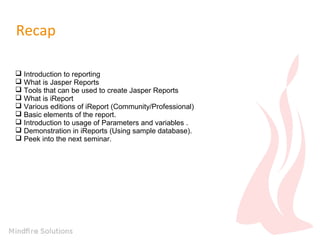
Recap
 Introduction to reporting
 What is Jasper Reports
 Tools that can be used to create Jasper Reports
 What is iReport
 Various editions of iReport (Community/Professional)
 Basic elements of the report.
 Introduction to usage of Parameters and variables .
 Demonstration in iReports (Using sample database).
 Peek into the next seminar.
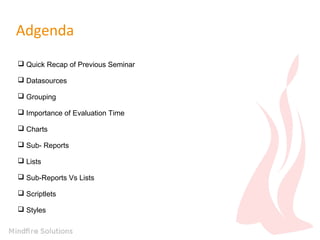
Adgenda
 Quick Recap of Previous Seminar
 Datasources
 Grouping
 Importance of Evaluation Time
 Charts
 Sub- Reports
 Lists
 Sub-Reports Vs Lists
 Scriptlets
 Styles
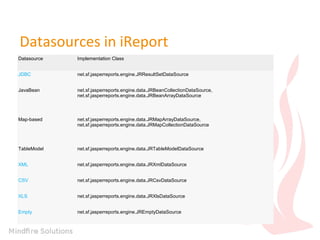
Datasources in iReport
Datasource Implementation Class
JDBC net.sf.jasperreports.engine.JRResultSetDataSource
JavaBean net.sf.jasperreports.engine.data.JRBeanCollectionDataSource,
net.sf.jasperreports.engine.data.JRBeanArrayDataSource
Map-based net.sf.jasperreports.engine.data.JRMapArrayDataSource,
net.sf.jasperreports.engine.data.JRMapCollectionDataSource
TableModel net.sf.jasperreports.engine.data.JRTableModelDataSource
XML net.sf.jasperreports.engine.data.JRXmlDataSource
CSV net.sf.jasperreports.engine.data.JRCsvDataSource
XLS net.sf.jasperreports.engine.data.JRXlsDataSource
Empty net.sf.jasperreports.engine.JREmptyDataSource
Grouping in Reports
Importance of Evaluation Time in Reports
Types of Evaluation Time
1.None
2.Report
3.Group
4.Column
5.Page
6.Now
7.Band
8.Auto
Charts
Tools can be used to create charts in Jasper
Reports
 Inbuilt Chart item in Palette of iReport / JasperSoft Studio
 Custom Charts using JFreeCharts (will be taken up in the next seminar)
Sub-report
Utility of using subreport:
1.Implements Report in Report Structure
2.Provides full structure of the subreport
3.Pass and Return values to provide dynamism to the main report
Lists
Lists Vs Sub Report
Advantages of using List:
1.No Extra resources
2.In Report calculation
Advantages of using Subreport
1.Pass and Return values to provide dynamism to the main report
2.Acts as completely new report with all the features of a individual report, like
having title, header, footer, etc.
Scriptlet
How Scriptlets can be utilized.
 Field Manipulation
 Variable Manipulation
Report Data Manipulation
Integration with Java Foundation Components, such as
SWING etc.
How to achieve customization using
Scriptlets
 User Defined Functions
 Predefined functions
Pre- Defined Functions
 beforeReportInit()
 afterReportInit()
 beforePageInit()
 afterPageInit()
 beforeColumnInit()
 afterColumnInit()
 beforeGroupInit(String)
 afterGroupInit(String groupName)
 beforeDetailEval()
 afterDetailEval()
User Defined Functions
Styles in Jasper Reports
How to include Styles in Jasper Reports
1. Creating Styles in the Report itself (More like local Style sheet)
2. Creating External jrtx File which could be linked with any Report (More
like a global Style)
Demo
Peek into the next seminar.
 Demonstration Of custom Datasource
 Cascading Parameters
 Drill Down Reports
 Collection Parameters
 Scheduling Reports
 Utility of Print When Expession
and much more …
Questions
Thankyou

Advanced Jasper Reports

  • 1.
    troduction to JasperReports – Seminar 2 Ankur Gupta
  • 2.
    About Me SCJP/OCJP -Oracle Certified Java Programmer MCP:70-480 - Specialist certification in HTML5 with JavaScript and CSS3 Exam M101J: MongoDB for Java Developers Skills : Servoy, Java, JavaScript, HTML, Jasper Reports , iReport, MongoDB, JavaFX Connect Me : Facebook : https://www.facebook.com/ankur10aug LinkedIn: http://www.linkedin.com/pub/ankur-gupta/51/895/910 Twitter: https://twitter.com/ankur_aug Google+ : https://plus.google.com/116451164261752827176 Blog: http://ankurthetechie.blogspot.in, http://community.jaspersoft.com/planet YouTube video Stream: http://www.youtube.com/user/ankurgupta46/videos Contact Me : Email : Ankurg@mindfiresolutions.com Skype: mfsi_ankurg
  • 3.
    Recap  Introduction toreporting  What is Jasper Reports  Tools that can be used to create Jasper Reports  What is iReport  Various editions of iReport (Community/Professional)  Basic elements of the report.  Introduction to usage of Parameters and variables .  Demonstration in iReports (Using sample database).  Peek into the next seminar.
  • 4.
    Adgenda  Quick Recapof Previous Seminar  Datasources  Grouping  Importance of Evaluation Time  Charts  Sub- Reports  Lists  Sub-Reports Vs Lists  Scriptlets  Styles
  • 5.
    Datasources in iReport DatasourceImplementation Class JDBC net.sf.jasperreports.engine.JRResultSetDataSource JavaBean net.sf.jasperreports.engine.data.JRBeanCollectionDataSource, net.sf.jasperreports.engine.data.JRBeanArrayDataSource Map-based net.sf.jasperreports.engine.data.JRMapArrayDataSource, net.sf.jasperreports.engine.data.JRMapCollectionDataSource TableModel net.sf.jasperreports.engine.data.JRTableModelDataSource XML net.sf.jasperreports.engine.data.JRXmlDataSource CSV net.sf.jasperreports.engine.data.JRCsvDataSource XLS net.sf.jasperreports.engine.data.JRXlsDataSource Empty net.sf.jasperreports.engine.JREmptyDataSource
  • 6.
  • 7.
    Importance of EvaluationTime in Reports Types of Evaluation Time 1.None 2.Report 3.Group 4.Column 5.Page 6.Now 7.Band 8.Auto
  • 8.
  • 9.
    Tools can beused to create charts in Jasper Reports  Inbuilt Chart item in Palette of iReport / JasperSoft Studio  Custom Charts using JFreeCharts (will be taken up in the next seminar)
  • 10.
    Sub-report Utility of usingsubreport: 1.Implements Report in Report Structure 2.Provides full structure of the subreport 3.Pass and Return values to provide dynamism to the main report
  • 11.
  • 12.
    Lists Vs SubReport Advantages of using List: 1.No Extra resources 2.In Report calculation Advantages of using Subreport 1.Pass and Return values to provide dynamism to the main report 2.Acts as completely new report with all the features of a individual report, like having title, header, footer, etc.
  • 13.
  • 14.
    How Scriptlets canbe utilized.  Field Manipulation  Variable Manipulation Report Data Manipulation Integration with Java Foundation Components, such as SWING etc.
  • 15.
    How to achievecustomization using Scriptlets  User Defined Functions  Predefined functions
  • 16.
    Pre- Defined Functions beforeReportInit()  afterReportInit()  beforePageInit()  afterPageInit()  beforeColumnInit()  afterColumnInit()  beforeGroupInit(String)  afterGroupInit(String groupName)  beforeDetailEval()  afterDetailEval()
  • 17.
  • 18.
  • 19.
    How to includeStyles in Jasper Reports 1. Creating Styles in the Report itself (More like local Style sheet) 2. Creating External jrtx File which could be linked with any Report (More like a global Style)
  • 20.
  • 21.
    Peek into thenext seminar.  Demonstration Of custom Datasource  Cascading Parameters  Drill Down Reports  Collection Parameters  Scheduling Reports  Utility of Print When Expession and much more …
  • 22.
  • 23.