CA Project & Portfolio Management –
Jaspersoft Studio for the Report Developer
Linda Wray
Agile Management
CA Technologies
Services Architect - GD
AMX03E
@CAPPM
#CAWorld
2 © 2015 CA. ALL RIGHTS RESERVED.@CAPPM #CAWORLD
© 2015 CA. All rights reserved. All trademarks referenced herein belong to their respective companies.
The content provided in this CA World 2015 presentation is intended for informational purposes only and does not form any type of
warranty. The information provided by a CA partner and/or CA customer has not been reviewed for accuracy by CA.
For Informational Purposes Only
Terms of this Presentation
3 © 2015 CA. ALL RIGHTS RESERVED.@CAPPM #CAWORLD
Abstract
Jaspersoft Studio is the full-client reporting tool
used to develop complex report deliverables in
the 14.2 and above releases of CA PPM. Content
which cannot be pulled through the use of the
ad-hoc feature in ‘Advanced Reporting’ can be
queried from the database. This session will
empower developers to leverage the robust
functionality of this tool.
Linda Wray
CA Technologies
Software Architect –
Global Delivery
4 © 2015 CA. ALL RIGHTS RESERVED.@CAPPM #CAWORLD
Agenda
INTRODUCTION TO JASPERSOFT STUDIO
JASPERSOFT STUDIO GENERAL CONCEPTS
JASPERSOFT STUDIO ADVANCED TOPICS
REPORT DEPLOYMENT
REPORT SCHEDULING
1
2
3
4
5
JASPERSOFT STUDIO DEMO6
Introduction to Jaspersoft Studio
6 © 2015 CA. ALL RIGHTS RESERVED.@CAPPM #CAWORLD
Introduction to Jaspersoft Studio
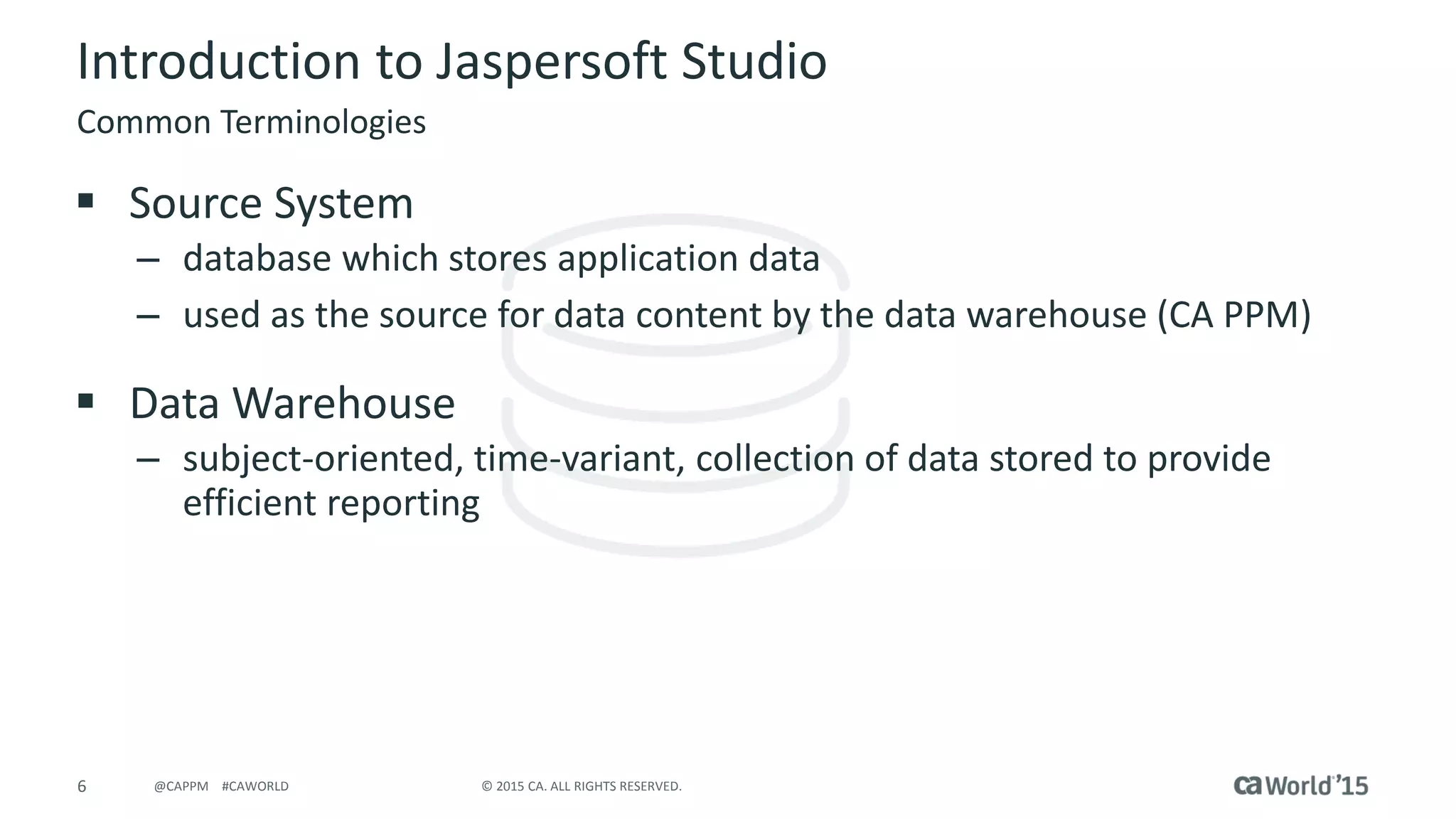
 Source System
– database which stores application data
– used as the source for data content by the data warehouse (CA PPM)
 Data Warehouse
– subject-oriented, time-variant, collection of data stored to provide
efficient reporting
Common Terminologies
7 © 2015 CA. ALL RIGHTS RESERVED.@CAPPM #CAWORLD
Introduction to Jaspersoft Studio
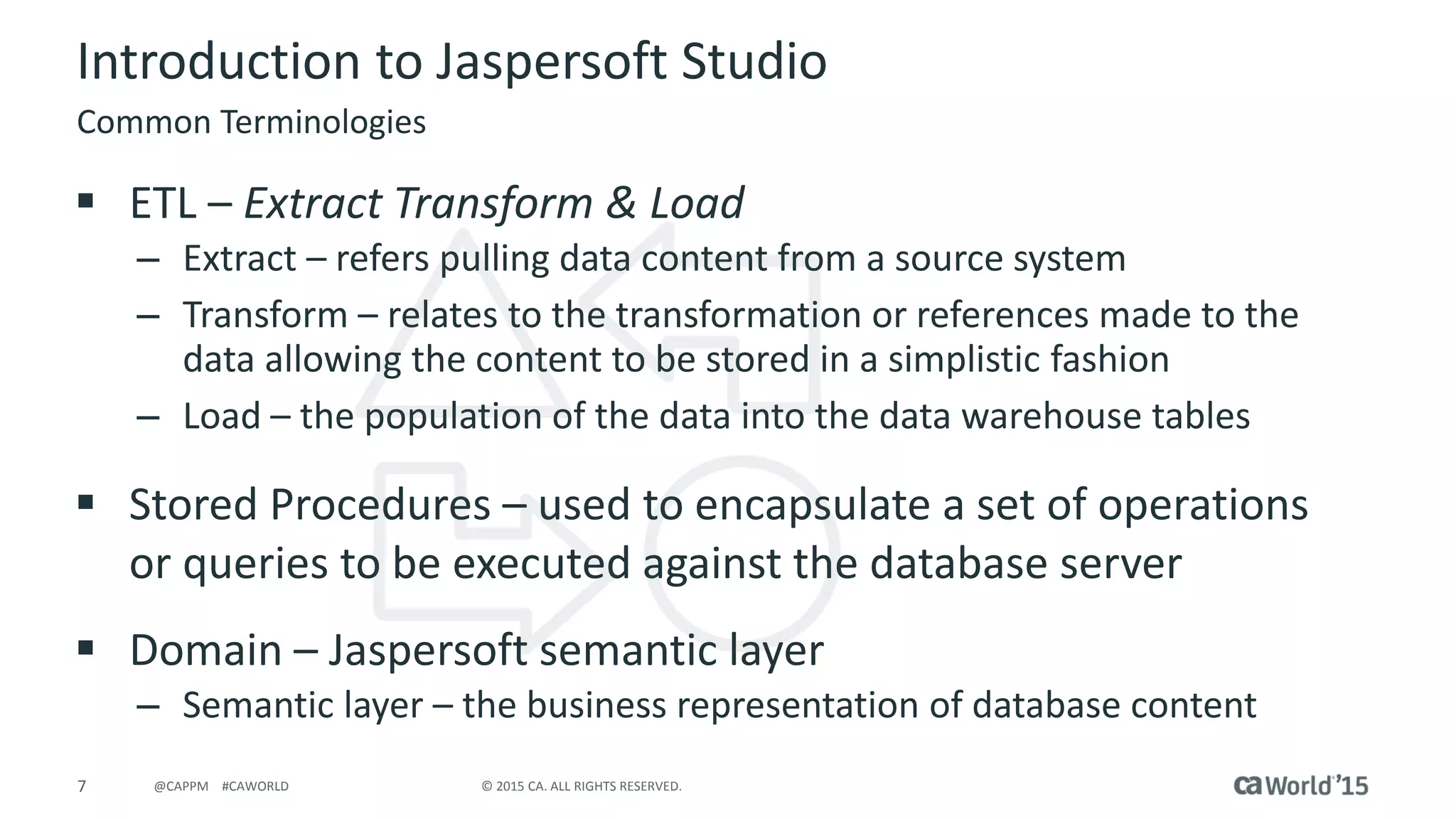
 ETL – Extract Transform & Load
– Extract – refers pulling data content from a source system
– Transform – relates to the transformation or references made to the
data allowing the content to be stored in a simplistic fashion
– Load – the population of the data into the data warehouse tables
 Stored Procedures – used to encapsulate a set of operations
or queries to be executed against the database server
 Domain – Jaspersoft semantic layer
– Semantic layer – the business representation of database content
Common Terminologies
8 © 2015 CA. ALL RIGHTS RESERVED.@CAPPM #CAWORLD
Introduction to Jaspersoft Studio
Common Terminologies
 Data Sources
– Connection to data for reporting tools
 Database JDBC Connection
 Domains – used with ad-hoc reporting
 Stored Procedures
– PLSQL feature must be enabled
 Virtual Data Source
– Newer concept
 Additional components required
 Not SAAS compliant in current release
9 © 2015 CA. ALL RIGHTS RESERVED.@CAPPM #CAWORLD
Introduction to Jaspersoft Studio
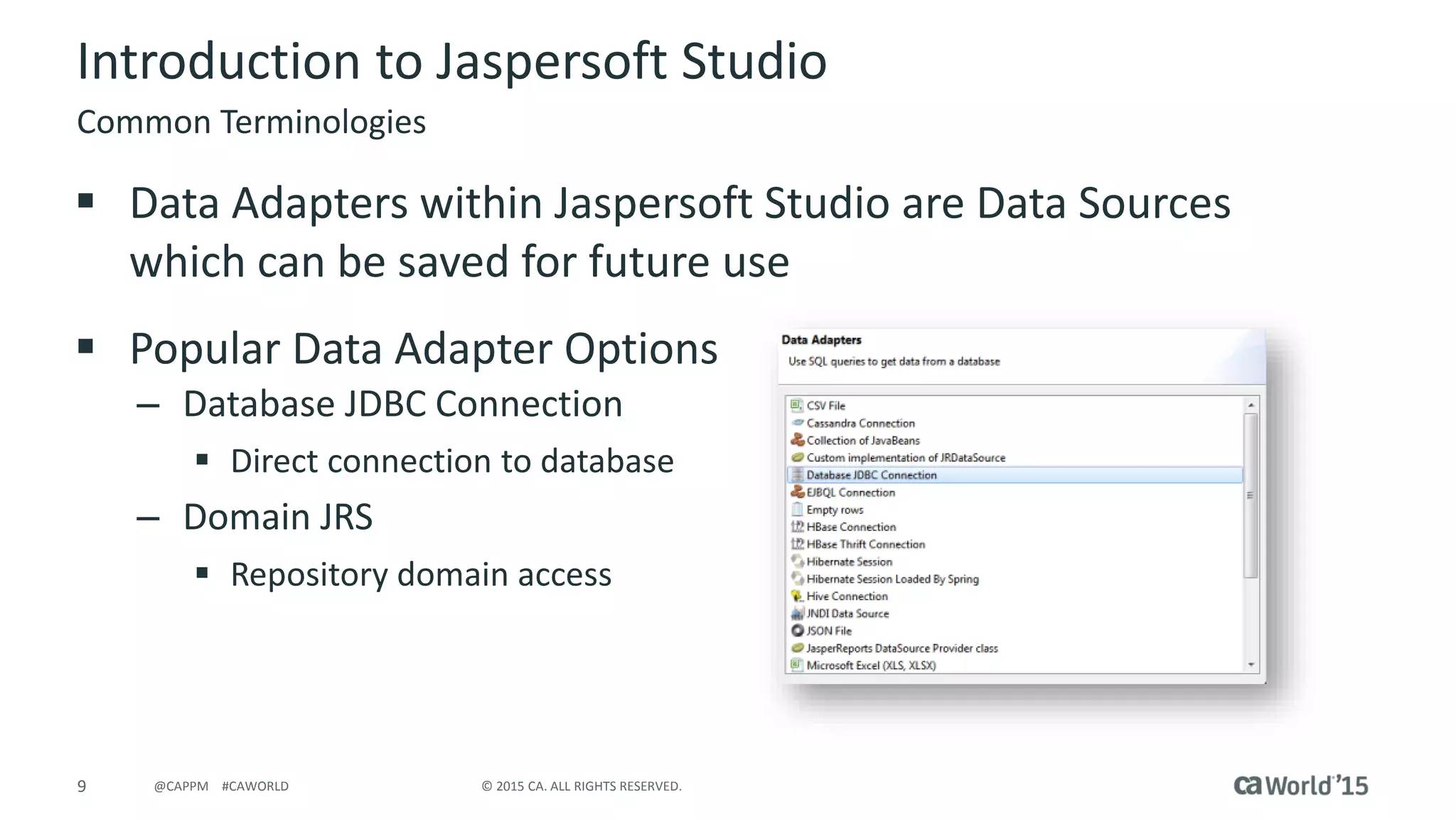
 Data Adapters within Jaspersoft Studio are Data Sources
which can be saved for future use
 Popular Data Adapter Options
– Database JDBC Connection
 Direct connection to database
– Domain JRS
 Repository domain access
Common Terminologies
10 © 2015 CA. ALL RIGHTS RESERVED.@CAPPM #CAWORLD
Introduction to Jaspersoft Studio
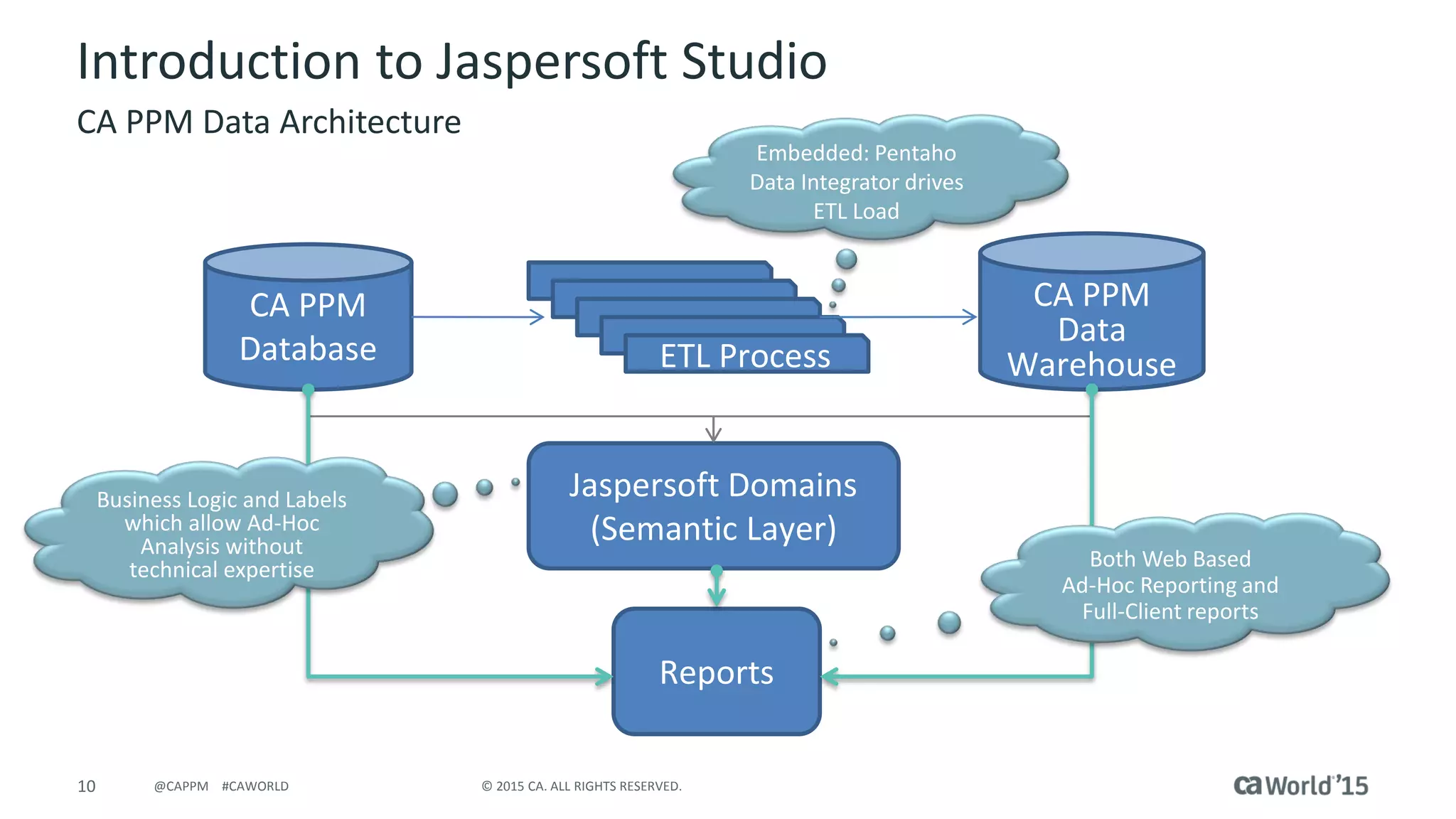
CA PPM Data Architecture
CA PPM
Database ETL Process
CA PPM
Data
Warehouse
Jaspersoft Domains
(Semantic Layer)
Reports
Embedded: Pentaho
Data Integrator drives
ETL Load
Both Web Based
Ad-Hoc Reporting and
Full-Client reports
Business Logic and Labels
which allow Ad-Hoc
Analysis without
technical expertise
11 © 2015 CA. ALL RIGHTS RESERVED.@CAPPM #CAWORLD
Introduction to Jaspersoft Studio
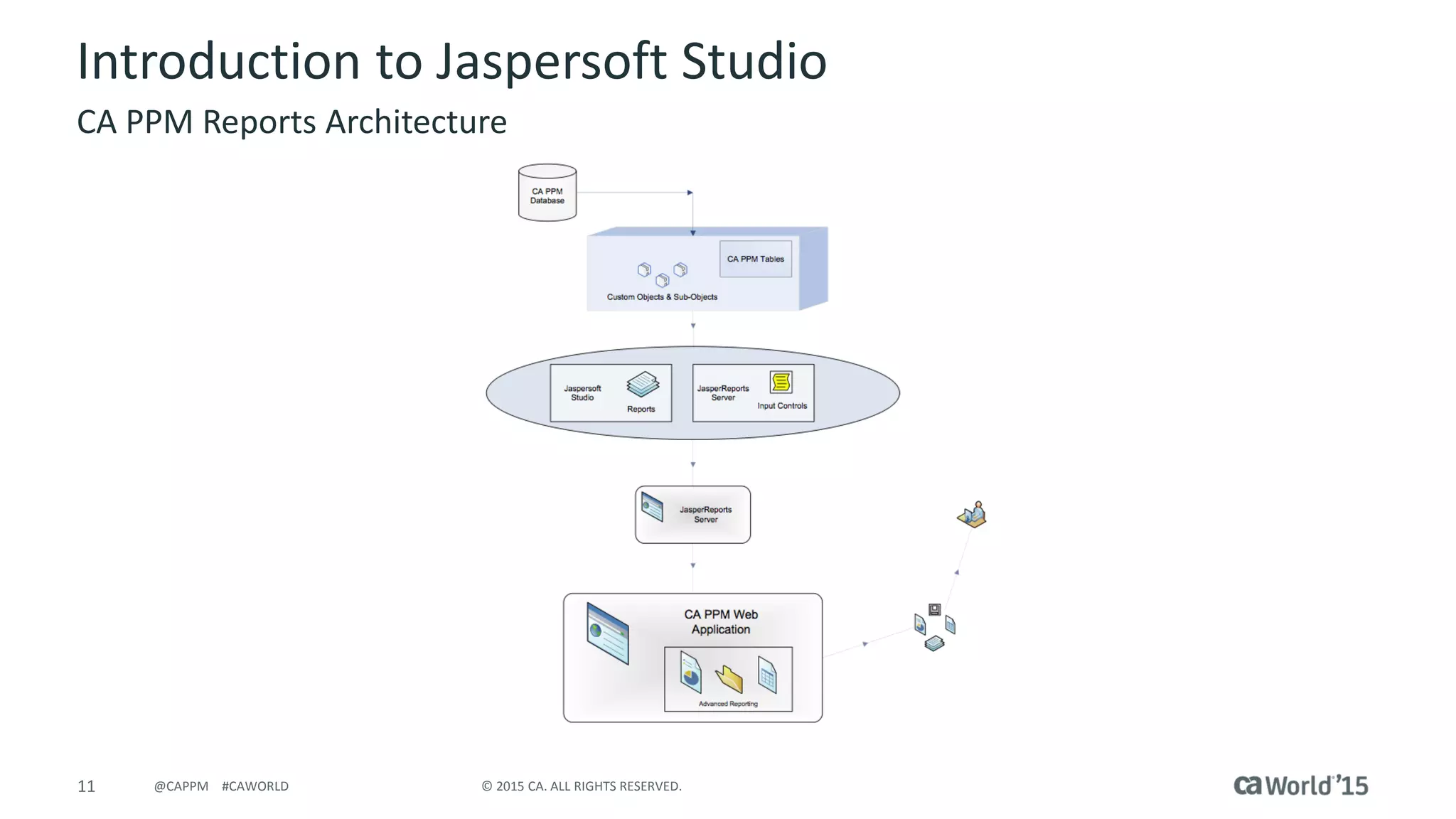
CA PPM Reports Architecture
Jaspersoft Studio General Concepts
13 © 2015 CA. ALL RIGHTS RESERVED.@CAPPM #CAWORLD
Jaspersoft Studio - General Concepts
Report Data Objects
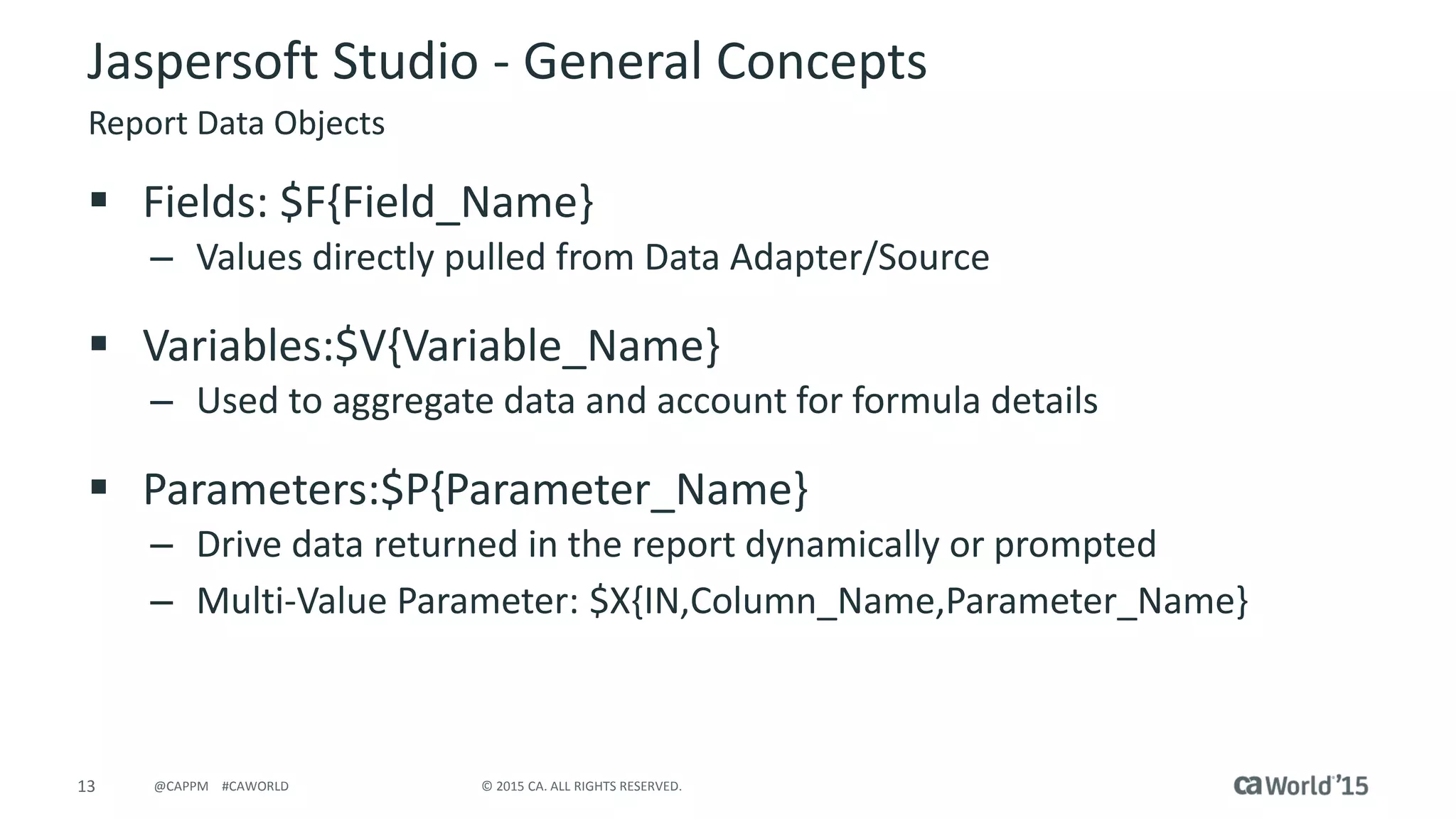
 Fields: $F{Field_Name}
– Values directly pulled from Data Adapter/Source
 Variables:$V{Variable_Name}
– Used to aggregate data and account for formula details
 Parameters:$P{Parameter_Name}
– Drive data returned in the report dynamically or prompted
– Multi-Value Parameter: $X{IN,Column_Name,Parameter_Name}
14 © 2015 CA. ALL RIGHTS RESERVED.@CAPPM #CAWORLD
Jaspersoft Studio - General Concepts
Design Considerations
 Data Types must be consistent between referenced objects
– java.lang.String
– java.lang.Integer
– java.math.BigDecimal
 Requires complex calculation logic
 Main Design Tabs
– Design – tab used to drag and drop objects for report layout
& configuration
– Source – XML source code which can be modified for report design
– Preview – generates report output
15 © 2015 CA. ALL RIGHTS RESERVED.@CAPPM #CAWORLD
Jaspersoft Studio - General Concepts
Input Controls
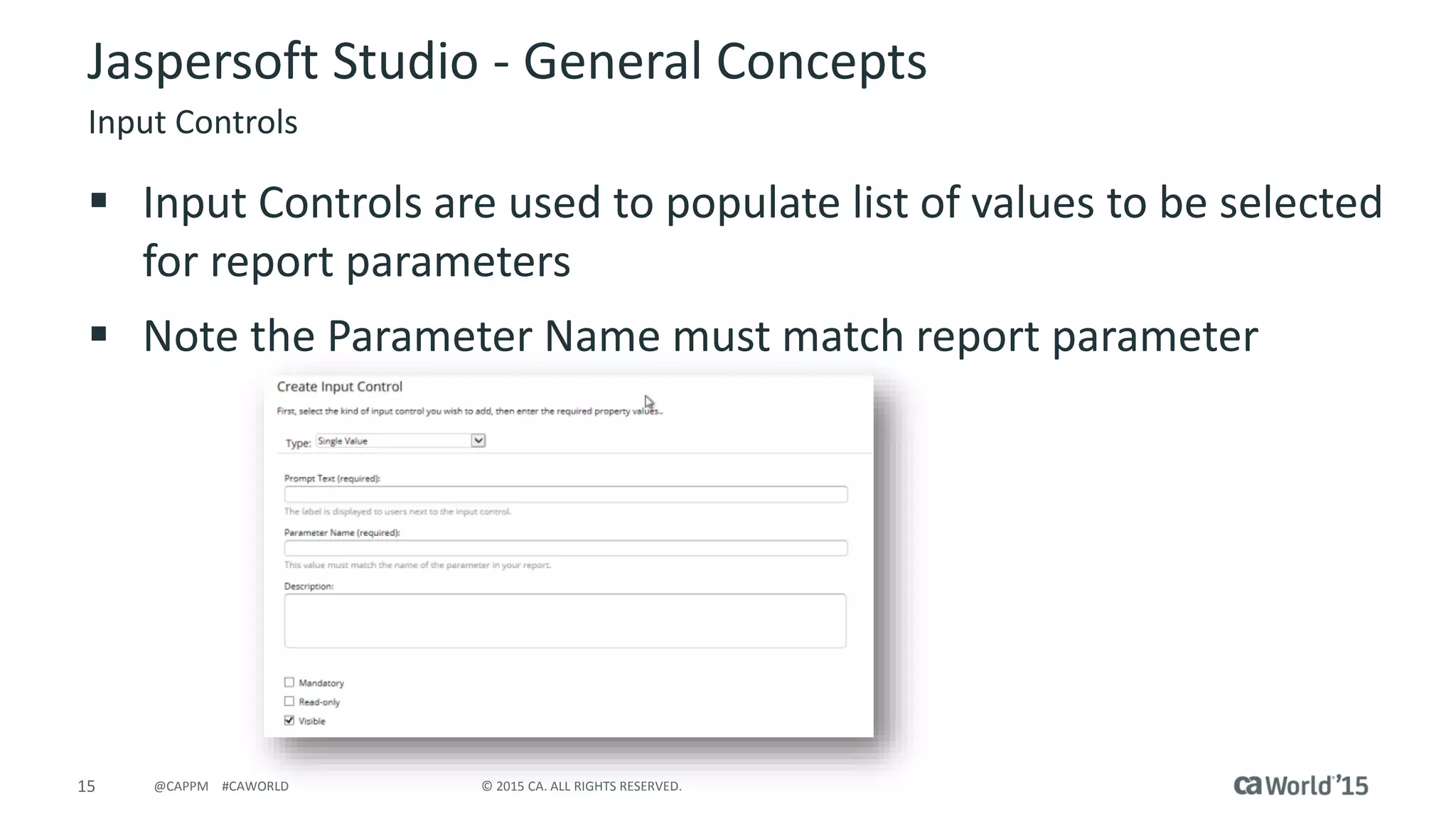
 Input Controls are used to populate list of values to be selected
for report parameters
 Note the Parameter Name must match report parameter
16 © 2015 CA. ALL RIGHTS RESERVED.@CAPPM #CAWORLD
Jaspersoft Studio Advanced Topics
17 © 2015 CA. ALL RIGHTS RESERVED.@CAPPM #CAWORLD
Jaspersoft Studio – Advanced Topics
Styles & Templates
 Styles – provide the option to configure formatting values to
be set to multiple report objects
 Templates – provide formatting to be reused at a general
report level
 Custom report templates can be created and stored in
the repository
 OOTB templates can be leveraged during report development
18 © 2015 CA. ALL RIGHTS RESERVED.@CAPPM #CAWORLD
Jaspersoft Studio – Advanced Topics
OOTB Report Style Templates
 Driven by the UI Theme setting within CA PPM
– Insert above Styles
 <template><![CDATA["repo:/ca_ppm/templates/reportStyleTemplate_" + $P{ppmUserUITheme}]]></template>
– Create
‘LoggedInUserAttribute_ppmUserUITheme’
parameter
– Create ‘ppmUserUITheme’ parameter
19 © 2015 CA. ALL RIGHTS RESERVED.@CAPPM #CAWORLD
Jaspersoft Studio – Advanced Topics
OOTB Localization
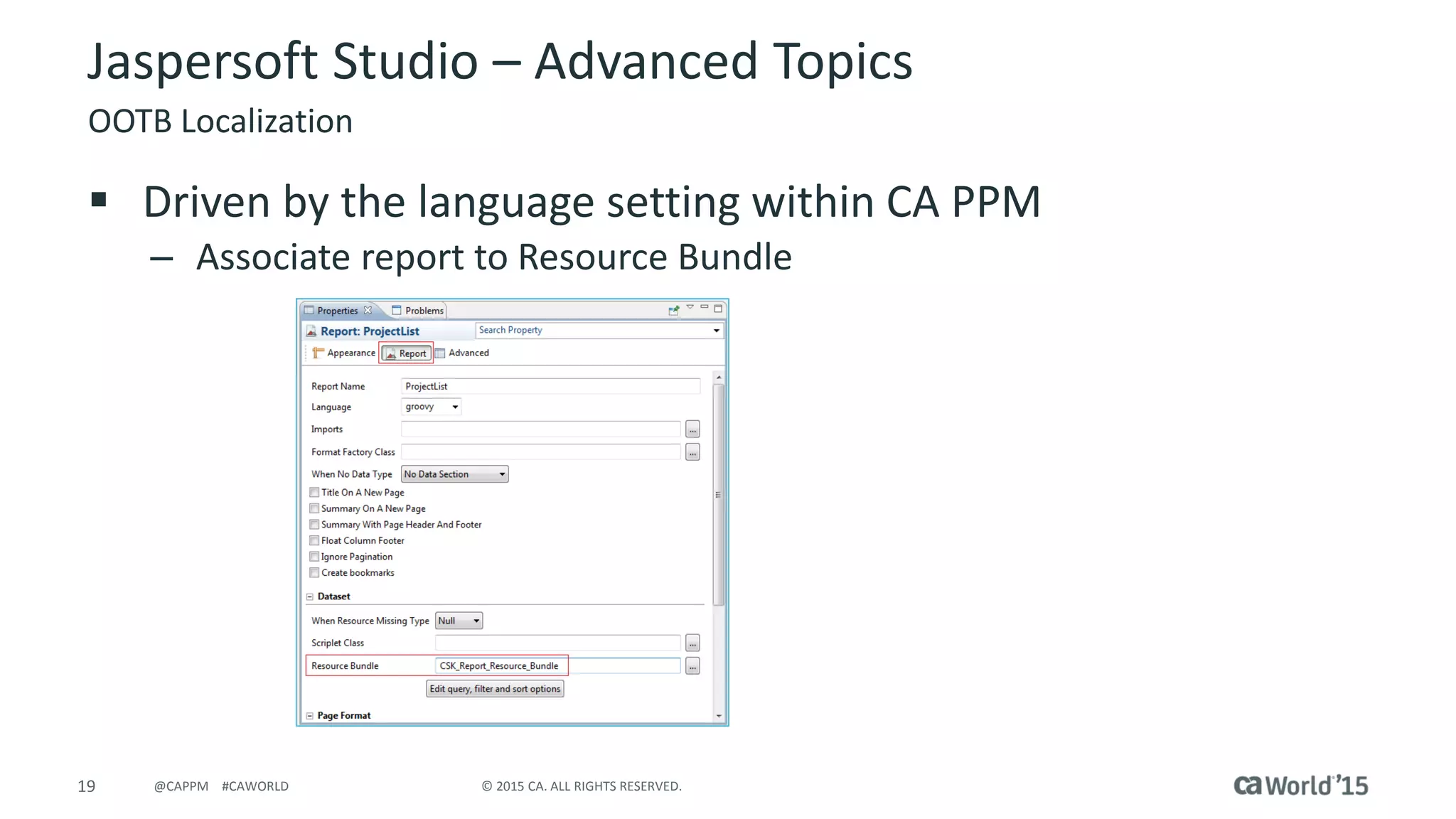
 Driven by the language setting within CA PPM
– Associate report to Resource Bundle
20 © 2015 CA. ALL RIGHTS RESERVED.@CAPPM #CAWORLD
Jaspersoft Studio – Advanced Topics
OOTB Localization
 Replace all report labels with the corresponding key available
in the Report Resource Bundle
(CA PPM/Resources/Localization/Report Resource Bundle).
– <textFieldExpression><![CDATA[$R{ProjectKey}]]></textFieldExpression>
 Note: if a corresponding key is not available in the resource
bundle, you need to add it to the resource bundle.
 Publish the report to the JasperReports server.
21 © 2015 CA. ALL RIGHTS RESERVED.@CAPPM #CAWORLD
Jaspersoft Studio – Advanced Topics
OOTB Localization
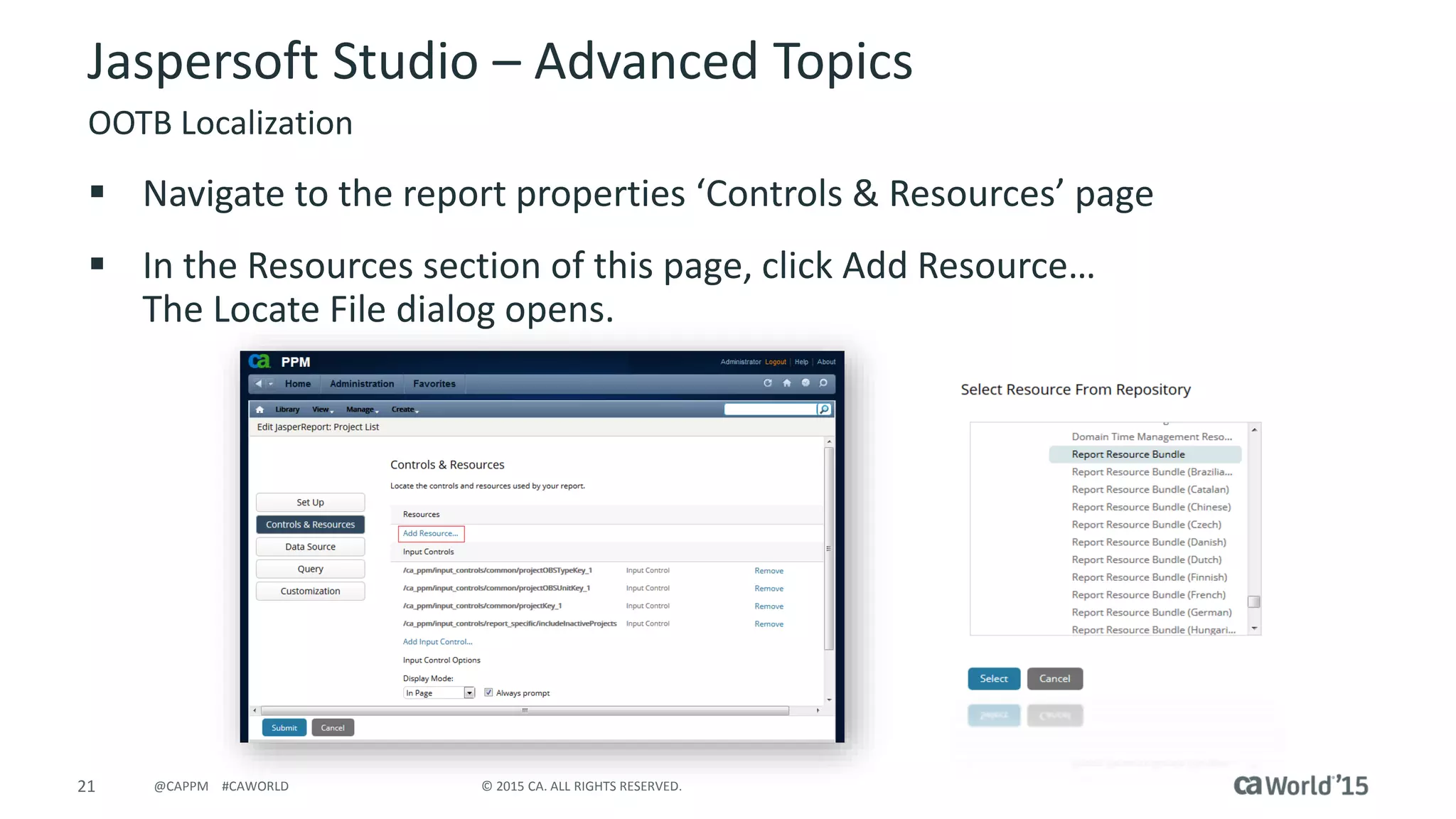
 Navigate to the report properties ‘Controls & Resources’ page
 In the Resources section of this page, click Add Resource…
The Locate File dialog opens.
22 © 2015 CA. ALL RIGHTS RESERVED.@CAPPM #CAWORLD
Jaspersoft Studio – Advanced Topics
OOTB Localization
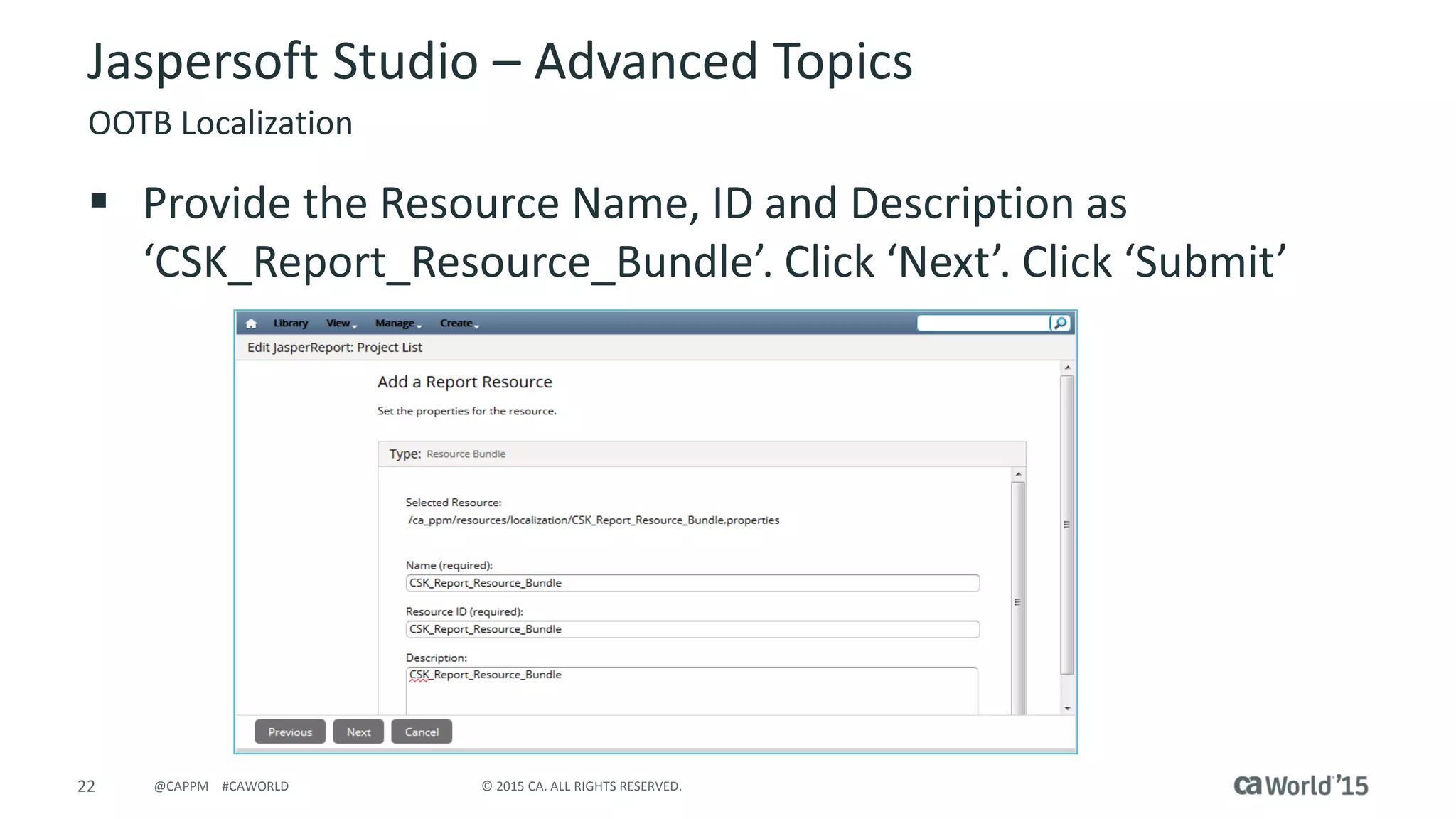
 Provide the Resource Name, ID and Description as
‘CSK_Report_Resource_Bundle’. Click ‘Next’. Click ‘Submit’
23 © 2015 CA. ALL RIGHTS RESERVED.@CAPPM #CAWORLD
Jaspersoft Studio – Advanced Topics
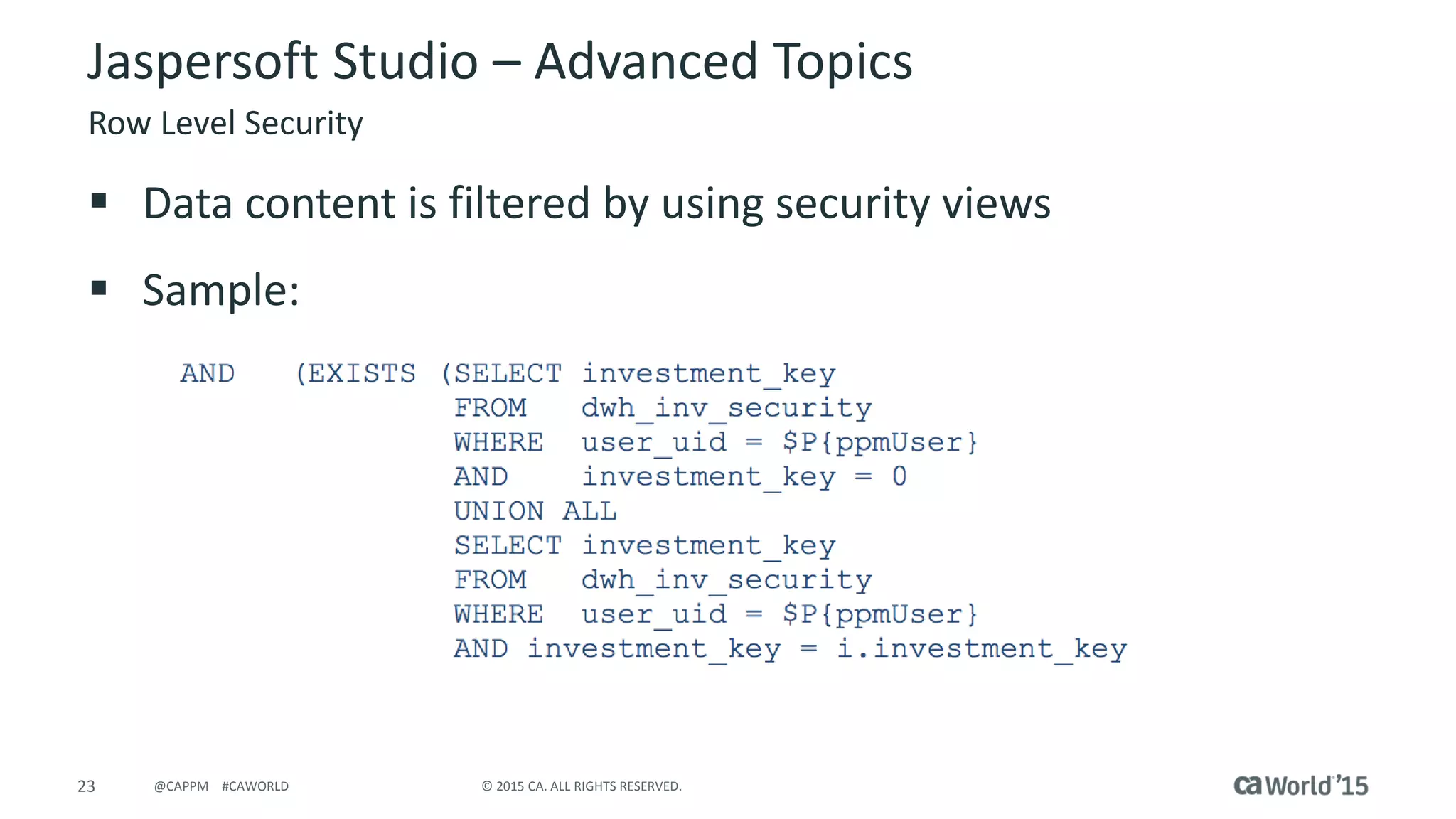
Row Level Security
 Data content is filtered by using security views
 Sample:
24 © 2015 CA. ALL RIGHTS RESERVED.@CAPPM #CAWORLD
Jaspersoft Studio – Advanced Topics
Sub-Reports
 Provide ability to return additional query based content
 Add table style sections to report
 Sub-Reports are joined to the main report using parameters
 Are added as ‘Resources’ when deployed to
JasperReports Server
25 © 2015 CA. ALL RIGHTS RESERVED.@CAPPM #CAWORLD
Jaspersoft Studio – Advanced Topics
Charts
 Element Chart
– Basic chart concepts to be used in reports
 Components Pro Charts
– Provide additional features
– Widgets
– Advanced HTML5 outputs
 Flexible Configuration
 More features and flare
 Note: not all HTML5 content is not supported
– It has been found the html5 GANTT charts do not render
26 © 2015 CA. ALL RIGHTS RESERVED.@CAPPM #CAWORLD
Jaspersoft Studio Report Deployment
27 © 2015 CA. ALL RIGHTS RESERVED.@CAPPM #CAWORLD
 Jaspersoft Studio Wizard
– Ability to deploy reports
– Basic report layouts
 JasperReports Server (Recommended)
– Use the portal to deploy the report and dependencies
– Complex report layouts
– Recommended deployment option
 Combination of technologies can be used to facilitate the
maintenance of deployment
Jaspersoft Studio Report Deployment
Report Deployment Options
28 © 2015 CA. ALL RIGHTS RESERVED.@CAPPM #CAWORLD
Jaspersoft Studio Report Deployment
JasperReports Server Deployment
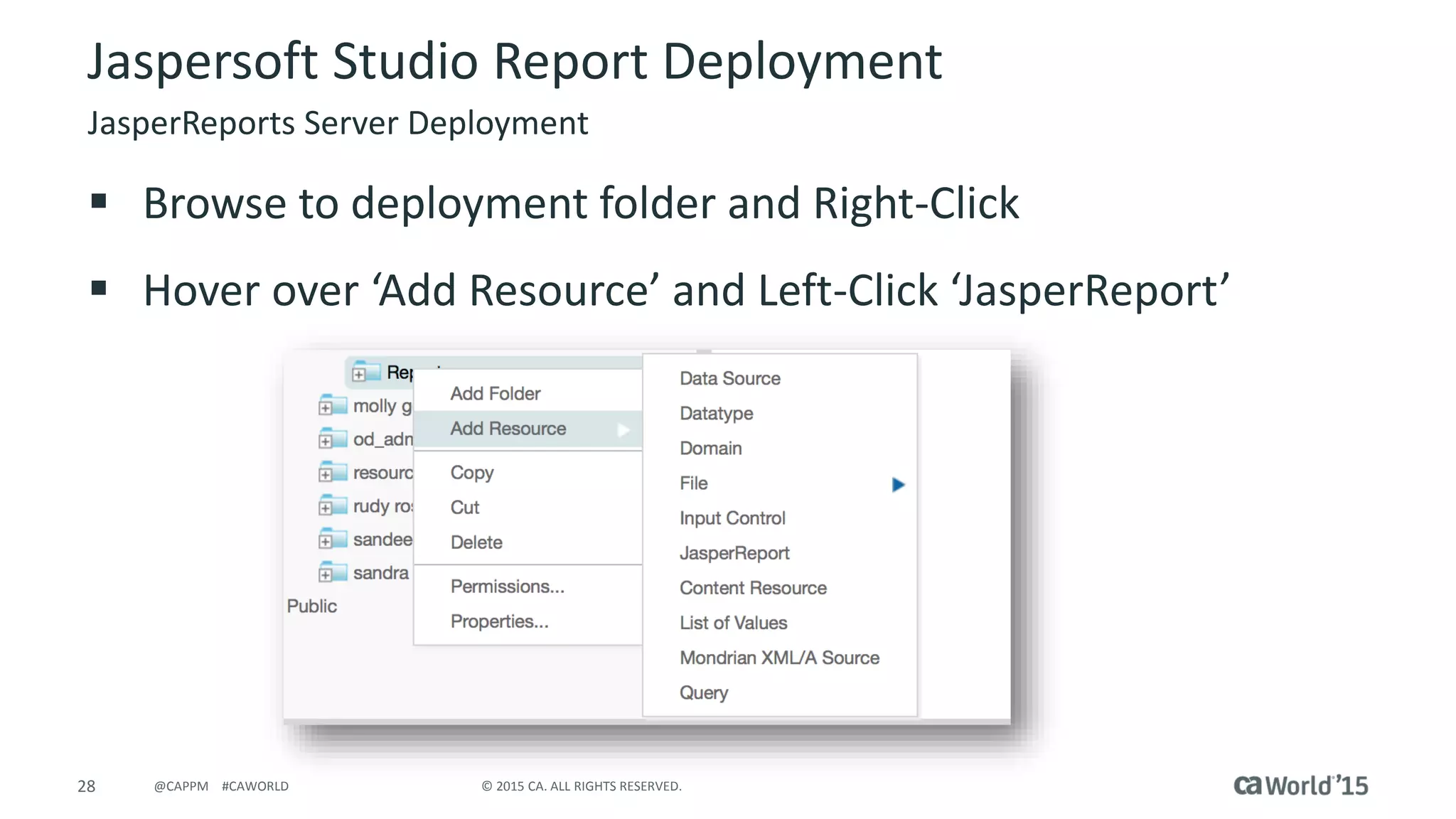
 Browse to deployment folder and Right-Click
 Hover over ‘Add Resource’ and Left-Click ‘JasperReport’
29 © 2015 CA. ALL RIGHTS RESERVED.@CAPPM #CAWORLD
Jaspersoft Studio Report Deployment
JasperReports Server Deployment
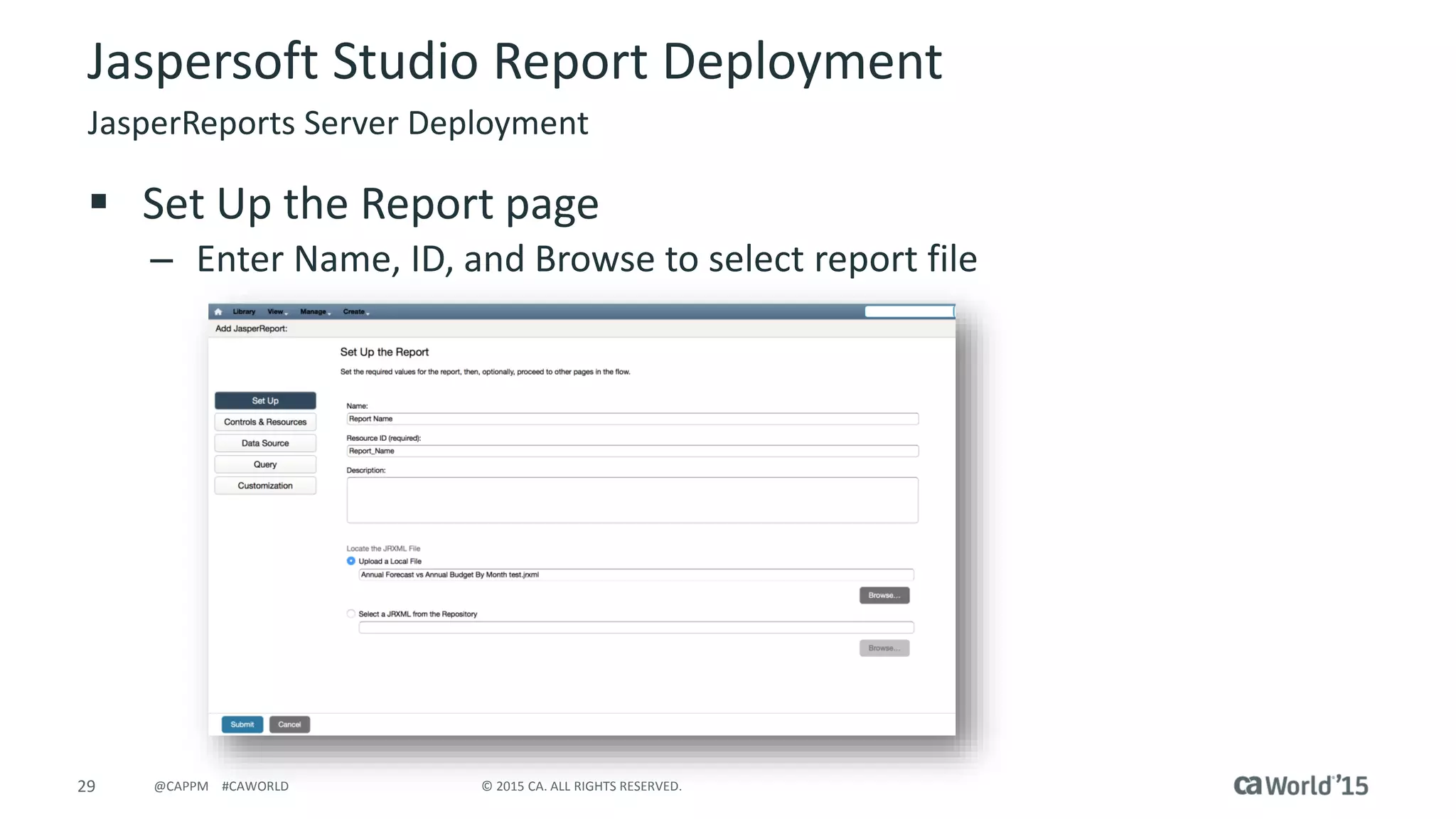
 Set Up the Report page
– Enter Name, ID, and Browse to select report file
30 © 2015 CA. ALL RIGHTS RESERVED.@CAPPM #CAWORLD
Jaspersoft Studio Report Deployment
JasperReports Server Deployment
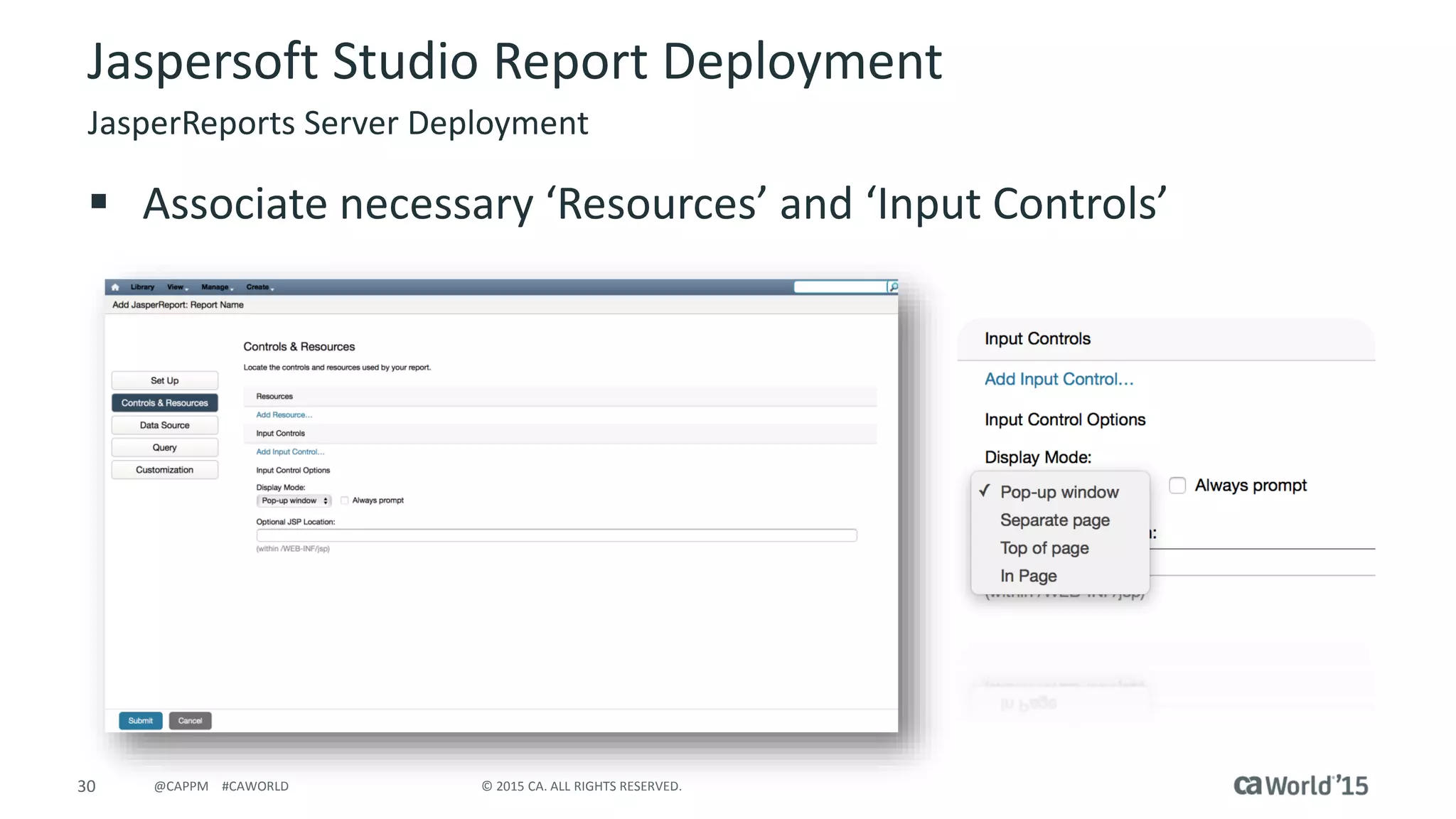
 Associate necessary ‘Resources’ and ‘Input Controls’
31 © 2015 CA. ALL RIGHTS RESERVED.@CAPPM #CAWORLD
Jaspersoft Studio Report Deployment
JasperReports Server Deployment
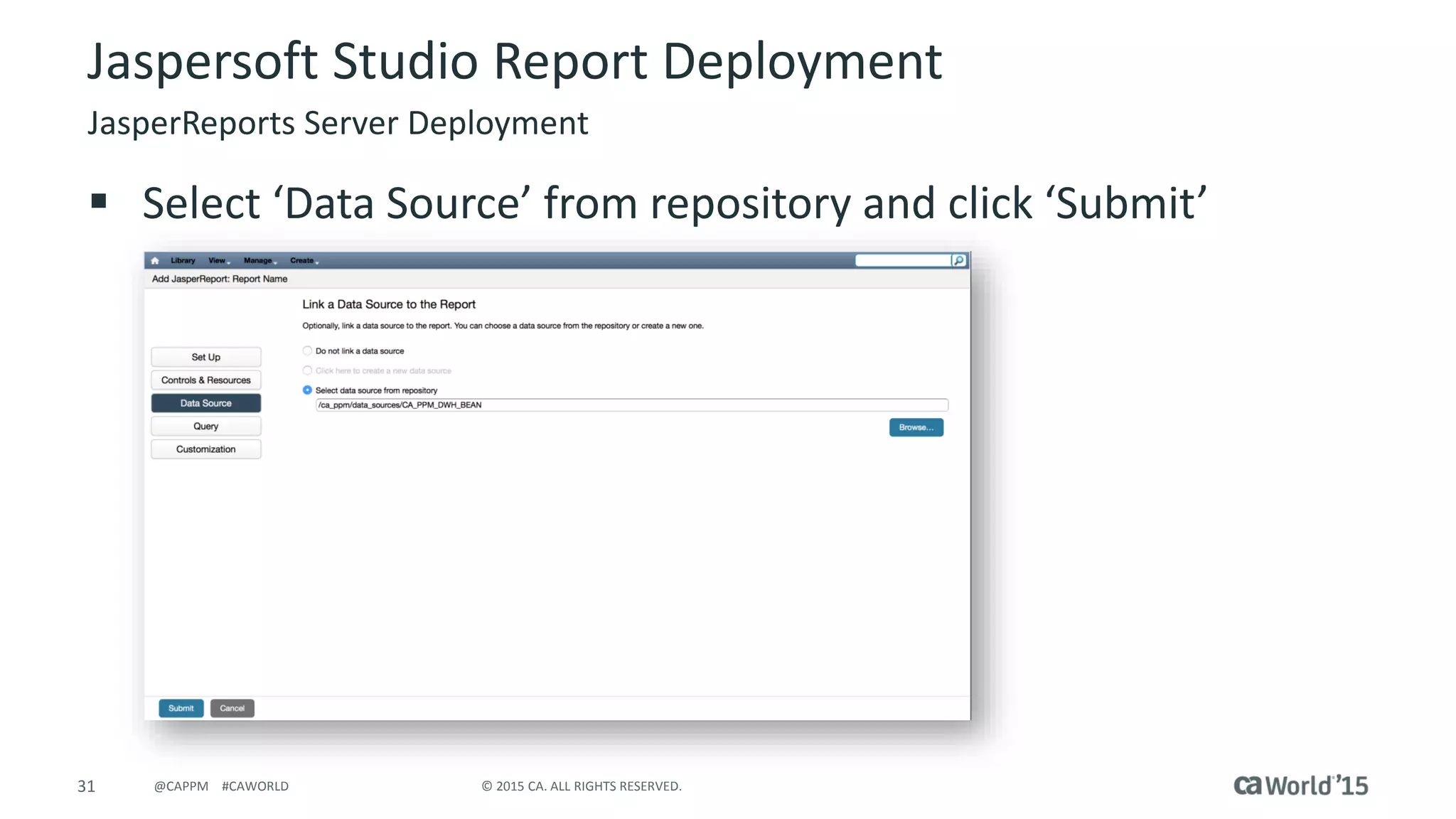
 Select ‘Data Source’ from repository and click ‘Submit’
32 © 2015 CA. ALL RIGHTS RESERVED.@CAPPM #CAWORLD
Jaspersoft Studio Demo
33 © 2015 CA. ALL RIGHTS RESERVED.@CAPPM #CAWORLD
Q & A
34 © 2015 CA. ALL RIGHTS RESERVED.@CAPPM #CAWORLD
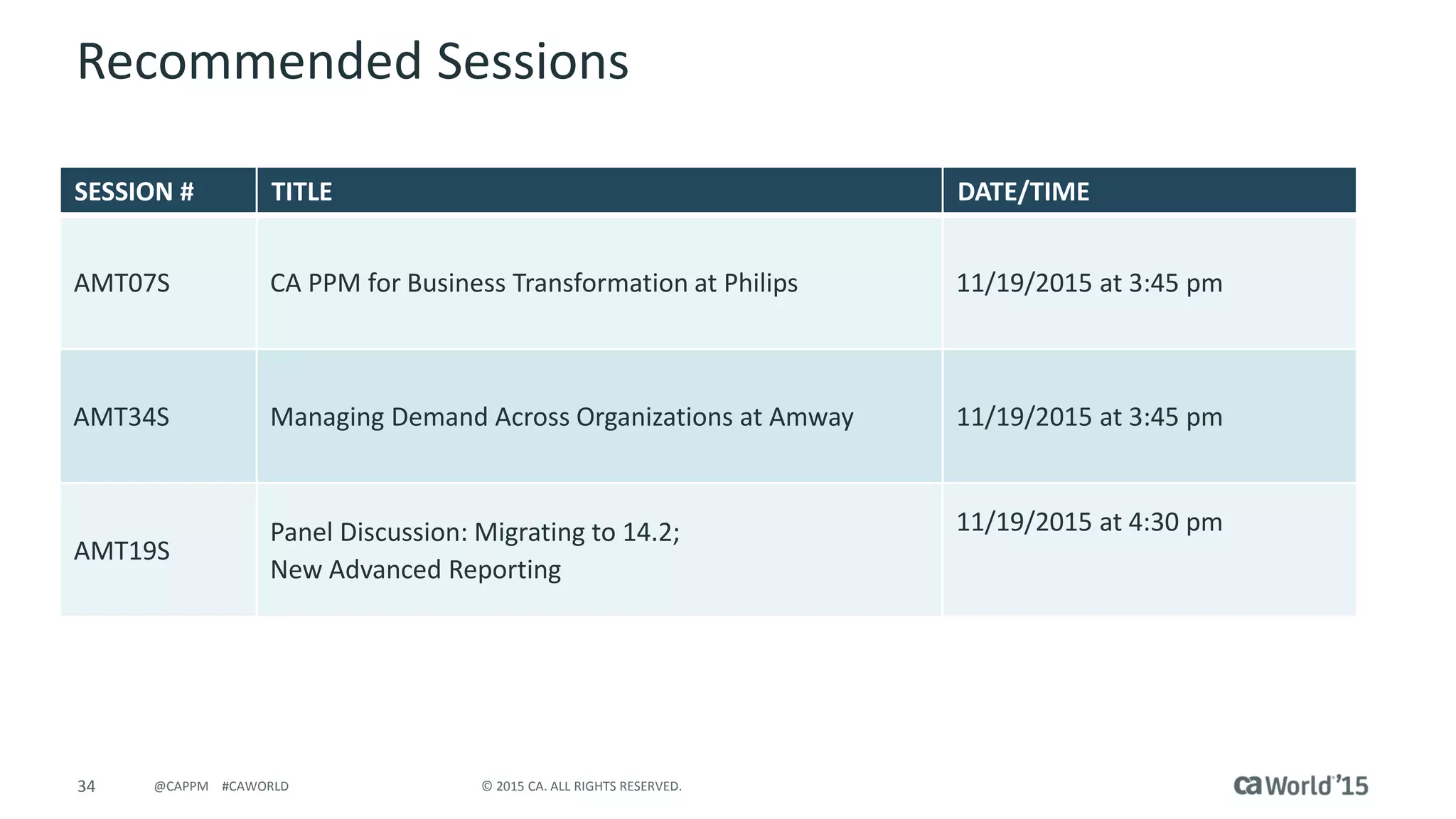
Recommended Sessions
SESSION # TITLE DATE/TIME
AMT07S CA PPM for Business Transformation at Philips 11/19/2015 at 3:45 pm
AMT34S Managing Demand Across Organizations at Amway 11/19/2015 at 3:45 pm
AMT19S
Panel Discussion: Migrating to 14.2;
New Advanced Reporting
11/19/2015 at 4:30 pm
35 © 2015 CA. ALL RIGHTS RESERVED.@CAPPM #CAWORLD
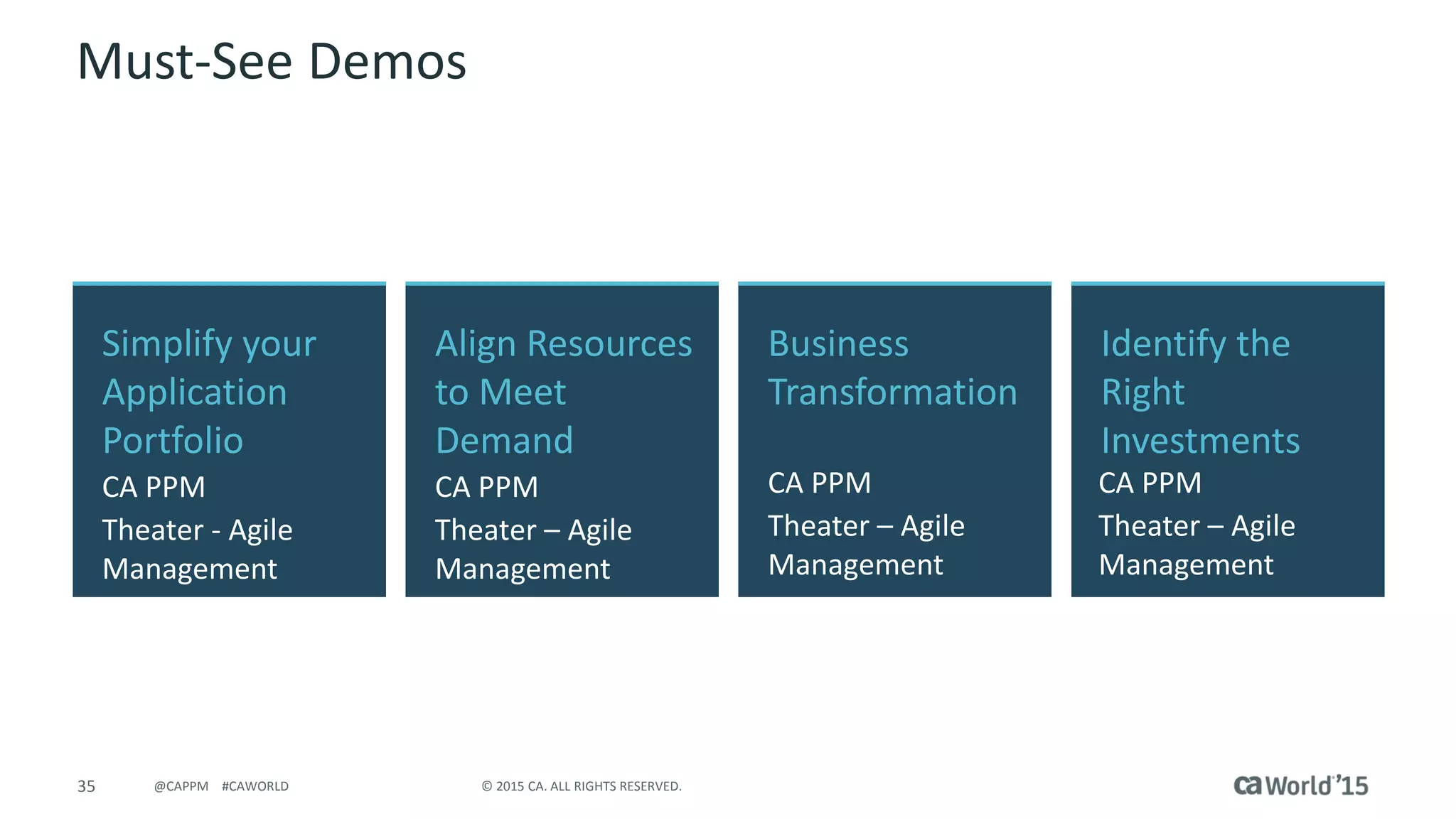
Must-See Demos
Simplify your
Application
Portfolio
CA PPM
Theater - Agile
Management
Identify the
Right
Investments
CA PPM
Theater – Agile
Management
Align Resources
to Meet
Demand
CA PPM
Theater – Agile
Management
Business
Transformation
CA PPM
Theater – Agile
Management
36 © 2015 CA. ALL RIGHTS RESERVED.@CAPPM #CAWORLD
For More Information
To learn more, please visit:
http://cainc.to/Nv2VOe
CA World ’15

CA Project & Portfolio Management—Jaspersoft Studio for the Report Developer

  • 1.
    CA Project &Portfolio Management – Jaspersoft Studio for the Report Developer Linda Wray Agile Management CA Technologies Services Architect - GD AMX03E @CAPPM #CAWorld
  • 2.
    2 © 2015CA. ALL RIGHTS RESERVED.@CAPPM #CAWORLD © 2015 CA. All rights reserved. All trademarks referenced herein belong to their respective companies. The content provided in this CA World 2015 presentation is intended for informational purposes only and does not form any type of warranty. The information provided by a CA partner and/or CA customer has not been reviewed for accuracy by CA. For Informational Purposes Only Terms of this Presentation
  • 3.
    3 © 2015CA. ALL RIGHTS RESERVED.@CAPPM #CAWORLD Abstract Jaspersoft Studio is the full-client reporting tool used to develop complex report deliverables in the 14.2 and above releases of CA PPM. Content which cannot be pulled through the use of the ad-hoc feature in ‘Advanced Reporting’ can be queried from the database. This session will empower developers to leverage the robust functionality of this tool. Linda Wray CA Technologies Software Architect – Global Delivery
  • 4.
    4 © 2015CA. ALL RIGHTS RESERVED.@CAPPM #CAWORLD Agenda INTRODUCTION TO JASPERSOFT STUDIO JASPERSOFT STUDIO GENERAL CONCEPTS JASPERSOFT STUDIO ADVANCED TOPICS REPORT DEPLOYMENT REPORT SCHEDULING 1 2 3 4 5 JASPERSOFT STUDIO DEMO6
  • 5.
  • 6.
    6 © 2015CA. ALL RIGHTS RESERVED.@CAPPM #CAWORLD Introduction to Jaspersoft Studio  Source System – database which stores application data – used as the source for data content by the data warehouse (CA PPM)  Data Warehouse – subject-oriented, time-variant, collection of data stored to provide efficient reporting Common Terminologies
  • 7.
    7 © 2015CA. ALL RIGHTS RESERVED.@CAPPM #CAWORLD Introduction to Jaspersoft Studio  ETL – Extract Transform & Load – Extract – refers pulling data content from a source system – Transform – relates to the transformation or references made to the data allowing the content to be stored in a simplistic fashion – Load – the population of the data into the data warehouse tables  Stored Procedures – used to encapsulate a set of operations or queries to be executed against the database server  Domain – Jaspersoft semantic layer – Semantic layer – the business representation of database content Common Terminologies
  • 8.
    8 © 2015CA. ALL RIGHTS RESERVED.@CAPPM #CAWORLD Introduction to Jaspersoft Studio Common Terminologies  Data Sources – Connection to data for reporting tools  Database JDBC Connection  Domains – used with ad-hoc reporting  Stored Procedures – PLSQL feature must be enabled  Virtual Data Source – Newer concept  Additional components required  Not SAAS compliant in current release
  • 9.
    9 © 2015CA. ALL RIGHTS RESERVED.@CAPPM #CAWORLD Introduction to Jaspersoft Studio  Data Adapters within Jaspersoft Studio are Data Sources which can be saved for future use  Popular Data Adapter Options – Database JDBC Connection  Direct connection to database – Domain JRS  Repository domain access Common Terminologies
  • 10.
    10 © 2015CA. ALL RIGHTS RESERVED.@CAPPM #CAWORLD Introduction to Jaspersoft Studio CA PPM Data Architecture CA PPM Database ETL Process CA PPM Data Warehouse Jaspersoft Domains (Semantic Layer) Reports Embedded: Pentaho Data Integrator drives ETL Load Both Web Based Ad-Hoc Reporting and Full-Client reports Business Logic and Labels which allow Ad-Hoc Analysis without technical expertise
  • 11.
    11 © 2015CA. ALL RIGHTS RESERVED.@CAPPM #CAWORLD Introduction to Jaspersoft Studio CA PPM Reports Architecture
  • 12.
  • 13.
    13 © 2015CA. ALL RIGHTS RESERVED.@CAPPM #CAWORLD Jaspersoft Studio - General Concepts Report Data Objects  Fields: $F{Field_Name} – Values directly pulled from Data Adapter/Source  Variables:$V{Variable_Name} – Used to aggregate data and account for formula details  Parameters:$P{Parameter_Name} – Drive data returned in the report dynamically or prompted – Multi-Value Parameter: $X{IN,Column_Name,Parameter_Name}
  • 14.
    14 © 2015CA. ALL RIGHTS RESERVED.@CAPPM #CAWORLD Jaspersoft Studio - General Concepts Design Considerations  Data Types must be consistent between referenced objects – java.lang.String – java.lang.Integer – java.math.BigDecimal  Requires complex calculation logic  Main Design Tabs – Design – tab used to drag and drop objects for report layout & configuration – Source – XML source code which can be modified for report design – Preview – generates report output
  • 15.
    15 © 2015CA. ALL RIGHTS RESERVED.@CAPPM #CAWORLD Jaspersoft Studio - General Concepts Input Controls  Input Controls are used to populate list of values to be selected for report parameters  Note the Parameter Name must match report parameter
  • 16.
    16 © 2015CA. ALL RIGHTS RESERVED.@CAPPM #CAWORLD Jaspersoft Studio Advanced Topics
  • 17.
    17 © 2015CA. ALL RIGHTS RESERVED.@CAPPM #CAWORLD Jaspersoft Studio – Advanced Topics Styles & Templates  Styles – provide the option to configure formatting values to be set to multiple report objects  Templates – provide formatting to be reused at a general report level  Custom report templates can be created and stored in the repository  OOTB templates can be leveraged during report development
  • 18.
    18 © 2015CA. ALL RIGHTS RESERVED.@CAPPM #CAWORLD Jaspersoft Studio – Advanced Topics OOTB Report Style Templates  Driven by the UI Theme setting within CA PPM – Insert above Styles  <template><![CDATA["repo:/ca_ppm/templates/reportStyleTemplate_" + $P{ppmUserUITheme}]]></template> – Create ‘LoggedInUserAttribute_ppmUserUITheme’ parameter – Create ‘ppmUserUITheme’ parameter
  • 19.
    19 © 2015CA. ALL RIGHTS RESERVED.@CAPPM #CAWORLD Jaspersoft Studio – Advanced Topics OOTB Localization  Driven by the language setting within CA PPM – Associate report to Resource Bundle
  • 20.
    20 © 2015CA. ALL RIGHTS RESERVED.@CAPPM #CAWORLD Jaspersoft Studio – Advanced Topics OOTB Localization  Replace all report labels with the corresponding key available in the Report Resource Bundle (CA PPM/Resources/Localization/Report Resource Bundle). – <textFieldExpression><![CDATA[$R{ProjectKey}]]></textFieldExpression>  Note: if a corresponding key is not available in the resource bundle, you need to add it to the resource bundle.  Publish the report to the JasperReports server.
  • 21.
    21 © 2015CA. ALL RIGHTS RESERVED.@CAPPM #CAWORLD Jaspersoft Studio – Advanced Topics OOTB Localization  Navigate to the report properties ‘Controls & Resources’ page  In the Resources section of this page, click Add Resource… The Locate File dialog opens.
  • 22.
    22 © 2015CA. ALL RIGHTS RESERVED.@CAPPM #CAWORLD Jaspersoft Studio – Advanced Topics OOTB Localization  Provide the Resource Name, ID and Description as ‘CSK_Report_Resource_Bundle’. Click ‘Next’. Click ‘Submit’
  • 23.
    23 © 2015CA. ALL RIGHTS RESERVED.@CAPPM #CAWORLD Jaspersoft Studio – Advanced Topics Row Level Security  Data content is filtered by using security views  Sample:
  • 24.
    24 © 2015CA. ALL RIGHTS RESERVED.@CAPPM #CAWORLD Jaspersoft Studio – Advanced Topics Sub-Reports  Provide ability to return additional query based content  Add table style sections to report  Sub-Reports are joined to the main report using parameters  Are added as ‘Resources’ when deployed to JasperReports Server
  • 25.
    25 © 2015CA. ALL RIGHTS RESERVED.@CAPPM #CAWORLD Jaspersoft Studio – Advanced Topics Charts  Element Chart – Basic chart concepts to be used in reports  Components Pro Charts – Provide additional features – Widgets – Advanced HTML5 outputs  Flexible Configuration  More features and flare  Note: not all HTML5 content is not supported – It has been found the html5 GANTT charts do not render
  • 26.
    26 © 2015CA. ALL RIGHTS RESERVED.@CAPPM #CAWORLD Jaspersoft Studio Report Deployment
  • 27.
    27 © 2015CA. ALL RIGHTS RESERVED.@CAPPM #CAWORLD  Jaspersoft Studio Wizard – Ability to deploy reports – Basic report layouts  JasperReports Server (Recommended) – Use the portal to deploy the report and dependencies – Complex report layouts – Recommended deployment option  Combination of technologies can be used to facilitate the maintenance of deployment Jaspersoft Studio Report Deployment Report Deployment Options
  • 28.
    28 © 2015CA. ALL RIGHTS RESERVED.@CAPPM #CAWORLD Jaspersoft Studio Report Deployment JasperReports Server Deployment  Browse to deployment folder and Right-Click  Hover over ‘Add Resource’ and Left-Click ‘JasperReport’
  • 29.
    29 © 2015CA. ALL RIGHTS RESERVED.@CAPPM #CAWORLD Jaspersoft Studio Report Deployment JasperReports Server Deployment  Set Up the Report page – Enter Name, ID, and Browse to select report file
  • 30.
    30 © 2015CA. ALL RIGHTS RESERVED.@CAPPM #CAWORLD Jaspersoft Studio Report Deployment JasperReports Server Deployment  Associate necessary ‘Resources’ and ‘Input Controls’
  • 31.
    31 © 2015CA. ALL RIGHTS RESERVED.@CAPPM #CAWORLD Jaspersoft Studio Report Deployment JasperReports Server Deployment  Select ‘Data Source’ from repository and click ‘Submit’
  • 32.
    32 © 2015CA. ALL RIGHTS RESERVED.@CAPPM #CAWORLD Jaspersoft Studio Demo
  • 33.
    33 © 2015CA. ALL RIGHTS RESERVED.@CAPPM #CAWORLD Q & A
  • 34.
    34 © 2015CA. ALL RIGHTS RESERVED.@CAPPM #CAWORLD Recommended Sessions SESSION # TITLE DATE/TIME AMT07S CA PPM for Business Transformation at Philips 11/19/2015 at 3:45 pm AMT34S Managing Demand Across Organizations at Amway 11/19/2015 at 3:45 pm AMT19S Panel Discussion: Migrating to 14.2; New Advanced Reporting 11/19/2015 at 4:30 pm
  • 35.
    35 © 2015CA. ALL RIGHTS RESERVED.@CAPPM #CAWORLD Must-See Demos Simplify your Application Portfolio CA PPM Theater - Agile Management Identify the Right Investments CA PPM Theater – Agile Management Align Resources to Meet Demand CA PPM Theater – Agile Management Business Transformation CA PPM Theater – Agile Management
  • 36.
    36 © 2015CA. ALL RIGHTS RESERVED.@CAPPM #CAWORLD For More Information To learn more, please visit: http://cainc.to/Nv2VOe CA World ’15