Introduction to
Redux
Redux
2
● Redux is a state management tool for javascript apps.
● Allows you to share the state between components
Redux
3
Store
Reducers
Actions
State
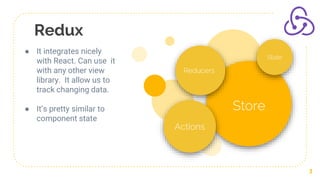
● It integrates nicely
with React. Can use it
with any other view
library. It allow us to
track changing data.
● It’s pretty similar to
component state
Why use redux?
● When we have big complicated data for complex
applications.
● Any component can pull any piece of data from the redux
store.So data needs to be shared between multiple
components
● Helps you write applications that behave consistently.
● Run in different environments (client, server, and native),
and are easy to test
● Provides a great developer experience, such as live code
editing combined with a time traveling debugger.
● Reusing the components because they no longer are
dependent to get the props from their parents, they can all
get their state values as props ,from a single redux store
4
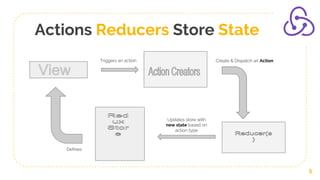
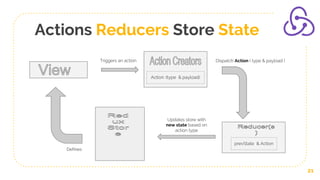
Actions Reducers Store State
5
Triggers an action Create & Dispatch an Action
Updates store with
new state based on
action type
Defines
Actions & Action Creators
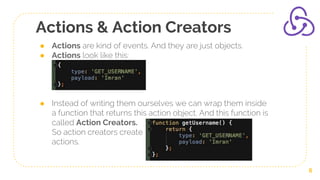
● Actions are kind of events. And they are just objects.
● Actions look like this:
● Instead of writing them ourselves we can wrap them inside
a function that returns this action object. And this function is
called Action Creators.
So action creators create
actions.
6
Action Creators
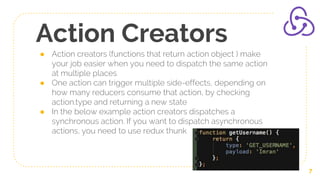
● Action creators (functions that return action object ) make
your job easier when you need to dispatch the same action
at multiple places
● One action can trigger multiple side-effects, depending on
how many reducers consume that action, by checking
action.type and returning a new state
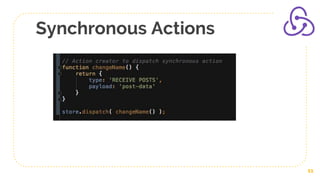
● In the below example action creators dispatches a
synchronous action. If you want to dispatch asynchronous
actions, you need to use redux thunk
7
Middlewares
● A middleware is some code you can put between the
framework receiving a request, and the framework
generating a response
● People use Redux middleware for logging, crash reporting,
talking to an asynchronous API, routing, and more.
Examples redux-thunk, redux-logger etc.
8
Redux Thunk
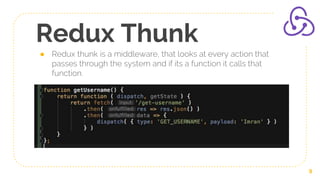
● Redux thunk is a middleware, that looks at every action that
passes through the system and if its a function it calls that
function.
9
Redux Thunk
● With a plain basic Redux store, you can only do simple
synchronous updates by dispatching an action.
● Middleware extend the store's abilities, and let you write
async logic that interacts with the store.
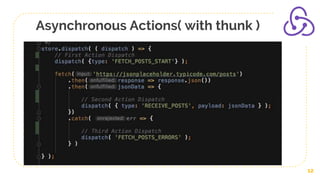
● So with redux-thunk you can handle asynchronous
actions, rather than synchronous actions.
10
Synchronous Actions
11
Asynchronous Actions( with thunk )
12
Redux Logger
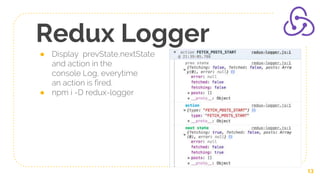
● Display prevState,nextState
and action in the
console Log, everytime
an action is fired.
● npm i -D redux-logger
13
Reducers
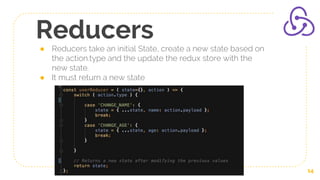
● Reducers take an initial State, create a new state based on
the action.type and the update the redux store with the
new state.
● It must return a new state
14
Redux Store
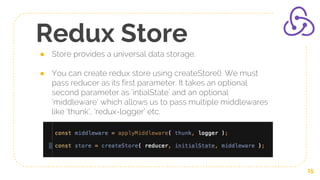
● Store provides a universal data storage.
● You can create redux store using createStore(). We must
pass reducer as its first parameter. It takes an optional
second parameter as ‘intialState’ and an optional
‘middleware’ which allows us to pass multiple middlewares
like ‘thunk’, ‘redux-logger’ etc.
15
Redux Store
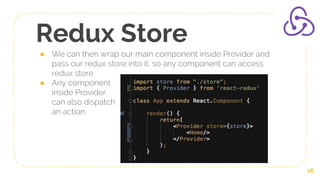
● We can then wrap our main component inside Provider and
pass our redux store into it, so any component can access
redux store.
● Any component
inside Provider
can also dispatch
an action.
16
Connect
● Connect is a higher order component, that can take upto four
parameters. All are optional.
https://react-redux.js.org/api/connect#connect-parameters
connect(mapStateToProps?, mapDispatchToProps?)
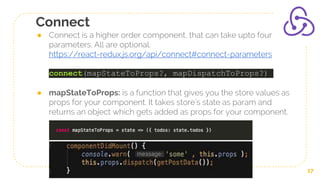
● mapStateToProps: is a function that gives you the store values as
props for your component. It takes store’s state as param and
returns an object which gets added as props for your component.
17
Connect
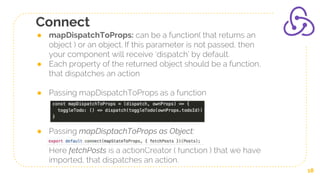
● mapDispatchToProps: can be a function( that returns an
object ) or an object. If this parameter is not passed, then
your component will receive ‘dispatch’ by default.
● Each property of the returned object should be a function,
that dispatches an action
● Passing mapDispatchToProps as a function
● Passing mapDisptachToProps as Object:
Here fetchPosts is a actionCreator ( function ) that we have
imported, that dispatches an action.
18
Connect
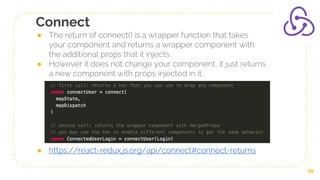
● The return of connect() is a wrapper function that takes
your component and returns a wrapper component with
the additional props that it injects.
● However it does not change your component, it just returns
a new component with props injected in it.
● https://react-redux.js.org/api/connect#connect-returns
19
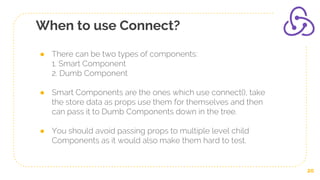
When to use Connect?
● There can be two types of components:
1. Smart Component
2. Dumb Component
● Smart Components are the ones which use connect(), take
the store data as props use them for themselves and then
can pass it to Dumb Components down in the tree.
● You should avoid passing props to multiple level child
Components as it would also make them hard to test.
20
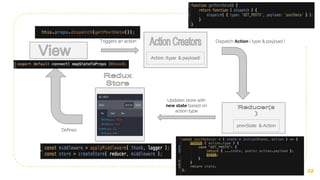
Actions Reducers Store State
21
Triggers an action Dispatch Action ( type & payload )
Updates store with
new state based on
action type
Action: (type & payload)
prevState & Action
Defines
22
Triggers an action Dispatch Action ( type & payload )
Updates store with
new state based on
action type
Action: (type & payload)
prevState & Action
Defines
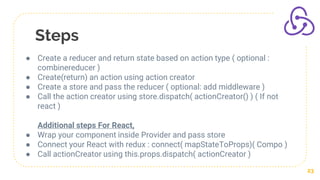
Steps
23
● Create a reducer and return state based on action type ( optional :
combinereducer )
● Create(return) an action using action creator
● Create a store and pass the reducer ( optional: add middleware )
● Call the action creator using store.dispatch( actionCreator() ) ( If not
react )
Additional steps For React,
● Wrap your component inside Provider and pass store
● Connect your React with redux : connect( mapStateToProps)( Compo )
● Call actionCreator using this.props.dispatch( actionCreator )
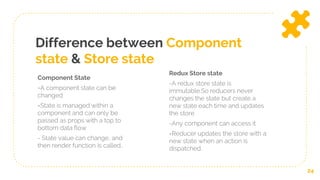
Difference between Component
state & Store state
Component State
=A component state can be
changed
=State is managed within a
component and can only be
passed as props with a top to
bottom data flow
- State value can change, and
then render function is called..
Redux Store state
-A redux store state is
immutable.So reducers never
changes the state but create a
new state each time and updates
the store
-Any component can access it
=Reducer updates the store with a
new state when an action is
dispatched.
24
25
Thanks!
Any questions?
@imranhsayed
@imran_.sayed

Redux workshop

  • 1.
  • 2.
    Redux 2 ● Redux isa state management tool for javascript apps. ● Allows you to share the state between components
  • 3.
    Redux 3 Store Reducers Actions State ● It integratesnicely with React. Can use it with any other view library. It allow us to track changing data. ● It’s pretty similar to component state
  • 4.
    Why use redux? ●When we have big complicated data for complex applications. ● Any component can pull any piece of data from the redux store.So data needs to be shared between multiple components ● Helps you write applications that behave consistently. ● Run in different environments (client, server, and native), and are easy to test ● Provides a great developer experience, such as live code editing combined with a time traveling debugger. ● Reusing the components because they no longer are dependent to get the props from their parents, they can all get their state values as props ,from a single redux store 4
  • 5.
    Actions Reducers StoreState 5 Triggers an action Create & Dispatch an Action Updates store with new state based on action type Defines
  • 6.
    Actions & ActionCreators ● Actions are kind of events. And they are just objects. ● Actions look like this: ● Instead of writing them ourselves we can wrap them inside a function that returns this action object. And this function is called Action Creators. So action creators create actions. 6
  • 7.
    Action Creators ● Actioncreators (functions that return action object ) make your job easier when you need to dispatch the same action at multiple places ● One action can trigger multiple side-effects, depending on how many reducers consume that action, by checking action.type and returning a new state ● In the below example action creators dispatches a synchronous action. If you want to dispatch asynchronous actions, you need to use redux thunk 7
  • 8.
    Middlewares ● A middlewareis some code you can put between the framework receiving a request, and the framework generating a response ● People use Redux middleware for logging, crash reporting, talking to an asynchronous API, routing, and more. Examples redux-thunk, redux-logger etc. 8
  • 9.
    Redux Thunk ● Reduxthunk is a middleware, that looks at every action that passes through the system and if its a function it calls that function. 9
  • 10.
    Redux Thunk ● Witha plain basic Redux store, you can only do simple synchronous updates by dispatching an action. ● Middleware extend the store's abilities, and let you write async logic that interacts with the store. ● So with redux-thunk you can handle asynchronous actions, rather than synchronous actions. 10
  • 11.
  • 12.
  • 13.
    Redux Logger ● DisplayprevState,nextState and action in the console Log, everytime an action is fired. ● npm i -D redux-logger 13
  • 14.
    Reducers ● Reducers takean initial State, create a new state based on the action.type and the update the redux store with the new state. ● It must return a new state 14
  • 15.
    Redux Store ● Storeprovides a universal data storage. ● You can create redux store using createStore(). We must pass reducer as its first parameter. It takes an optional second parameter as ‘intialState’ and an optional ‘middleware’ which allows us to pass multiple middlewares like ‘thunk’, ‘redux-logger’ etc. 15
  • 16.
    Redux Store ● Wecan then wrap our main component inside Provider and pass our redux store into it, so any component can access redux store. ● Any component inside Provider can also dispatch an action. 16
  • 17.
    Connect ● Connect isa higher order component, that can take upto four parameters. All are optional. https://react-redux.js.org/api/connect#connect-parameters connect(mapStateToProps?, mapDispatchToProps?) ● mapStateToProps: is a function that gives you the store values as props for your component. It takes store’s state as param and returns an object which gets added as props for your component. 17
  • 18.
    Connect ● mapDispatchToProps: canbe a function( that returns an object ) or an object. If this parameter is not passed, then your component will receive ‘dispatch’ by default. ● Each property of the returned object should be a function, that dispatches an action ● Passing mapDispatchToProps as a function ● Passing mapDisptachToProps as Object: Here fetchPosts is a actionCreator ( function ) that we have imported, that dispatches an action. 18
  • 19.
    Connect ● The returnof connect() is a wrapper function that takes your component and returns a wrapper component with the additional props that it injects. ● However it does not change your component, it just returns a new component with props injected in it. ● https://react-redux.js.org/api/connect#connect-returns 19
  • 20.
    When to useConnect? ● There can be two types of components: 1. Smart Component 2. Dumb Component ● Smart Components are the ones which use connect(), take the store data as props use them for themselves and then can pass it to Dumb Components down in the tree. ● You should avoid passing props to multiple level child Components as it would also make them hard to test. 20
  • 21.
    Actions Reducers StoreState 21 Triggers an action Dispatch Action ( type & payload ) Updates store with new state based on action type Action: (type & payload) prevState & Action Defines
  • 22.
    22 Triggers an actionDispatch Action ( type & payload ) Updates store with new state based on action type Action: (type & payload) prevState & Action Defines
  • 23.
    Steps 23 ● Create areducer and return state based on action type ( optional : combinereducer ) ● Create(return) an action using action creator ● Create a store and pass the reducer ( optional: add middleware ) ● Call the action creator using store.dispatch( actionCreator() ) ( If not react ) Additional steps For React, ● Wrap your component inside Provider and pass store ● Connect your React with redux : connect( mapStateToProps)( Compo ) ● Call actionCreator using this.props.dispatch( actionCreator )
  • 24.
    Difference between Component state& Store state Component State =A component state can be changed =State is managed within a component and can only be passed as props with a top to bottom data flow - State value can change, and then render function is called.. Redux Store state -A redux store state is immutable.So reducers never changes the state but create a new state each time and updates the store -Any component can access it =Reducer updates the store with a new state when an action is dispatched. 24
  • 25.