1


Albert Guo
2


Agenda
 Introduction
 Prerequisites
 Typical Workflow
 Document Sections (Bands) Overview
 JasperReports Architecture
3


Introduction
 Open source Java reporting library
 Under the Lesser GNU Public License (LGPL)
 Since 2001
 Backed by a company now, JasperSoft
 2007 Duke’s Choice Award Winner
4


Introduction – cont.
 Support multiple data sources
     Database connection
     Embedded SQL statement
     Java Collections (Collection, Array and Map)
     JDBC result set
 Support multiple report formats
   PDF, XLS, CSV, HTML, XML, RTF, ODT, TXT
5


Prerequisites
 Download Sun Java 2 SDK 1.5 or newer
 iReport eats a lot of RAM, and so it is necessary to have at
  least 256MB of memory and about 20MB of free space on
  disk
 Download iReport from http://sourceforge.net/projects/ireport
 Download JasperReports from
  http://sourceforge.net/projects/jasperreports/files/jasperreport
  s/
6


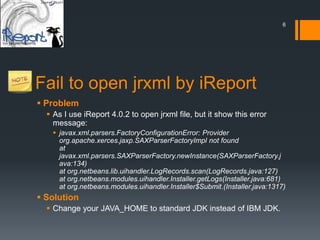
Fail to open jrxml by iReport
 Problem
   As I use iReport 4.0.2 to open jrxml file, but it show this error
    message:
    javax.xml.parsers.FactoryConfigurationError: Provider
     org.apache.xerces.jaxp.SAXParserFactoryImpl not found
     at
     javax.xml.parsers.SAXParserFactory.newInstance(SAXParserFactory.j
     ava:134)
     at org.netbeans.lib.uihandler.LogRecords.scan(LogRecords.java:127)
     at org.netbeans.modules.uihandler.Installer.getLogs(Installer.java:681)
     at org.netbeans.modules.uihandler.Installer$Submit.(Installer.java:1317)
 Solution
   Change your JAVA_HOME to standard JDK instead of IBM JDK.
7


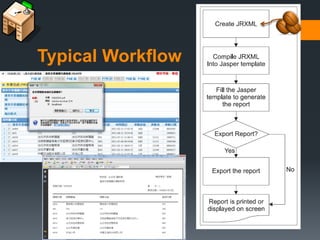
Typical Workflow
8


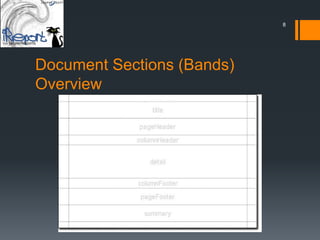
Document Sections (Bands)
Overview
9


         Document Sections (Bands)
         Overview
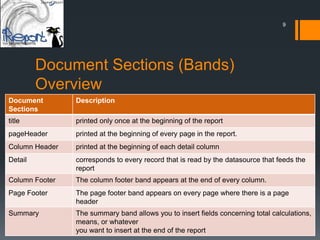
Document        Description
Sections
title           printed only once at the beginning of the report
pageHeader      printed at the beginning of every page in the report.
Column Header   printed at the beginning of each detail column
Detail          corresponds to every record that is read by the datasource that feeds the
                report
Column Footer   The column footer band appears at the end of every column.
Page Footer     The page footer band appears on every page where there is a page
                header
Summary         The summary band allows you to insert fields concerning total calculations,
                means, or whatever
                you want to insert at the end of the report
10


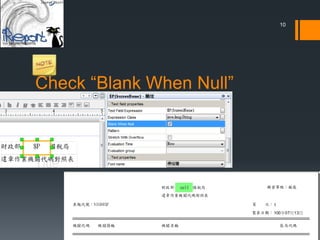
Check “Blank When Null”
11


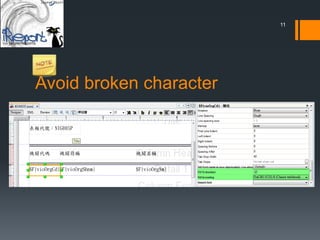
Avoid broken character
12


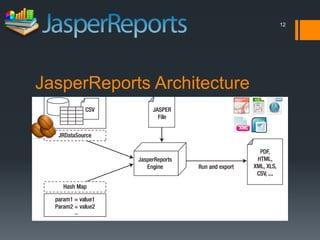
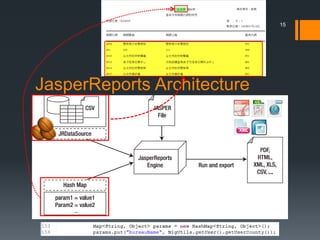
JasperReports Architecture
13


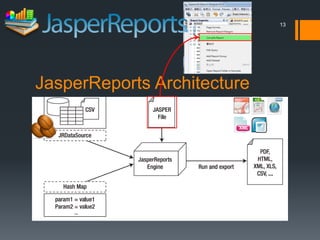
JasperReports Architecture
14


                                       http://0rz.com/RMSbdY


Maven 2 JasperReports Plugin
 This plugin provides the capability to compile Jasper Report
  xml design files.
15


JasperReports Architecture
16


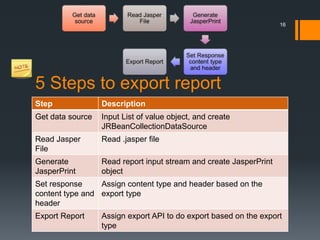
5 Steps to export report
Step              Description
Get data source   Input List of value object, and create
                  JRBeanCollectionDataSource
Read Jasper       Read .jasper file
File
Generate          Read report input stream and create JasperPrint
JasperPrint       object
Set response     Assign content type and header based on the
content type and export type
header
Export Report     Assign export API to do export based on the export
                  type
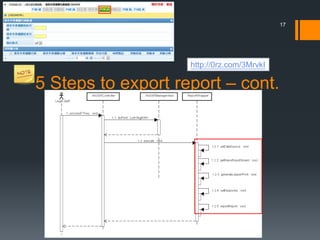
17


                    http://0rz.com/3MrvkI

5 Steps to export report – cont.
18


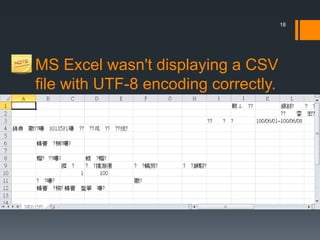
MS Excel wasn't displaying a CSV
file with UTF-8 encoding correctly.
19


MS Excel wasn't displaying a CSV
file with UTF-8 encoding correctly.
 In the absence of any charset identification, Excel must
  guess about a file's content encoding. Therefore, Excel uses
  that default to read and display CSV files.

      //byte-order marker (BOM)
      byte b[] = {(byte)0xEF, (byte)0xBB, (byte)0xBF};
      //insert BOM byte array into outputStream
      outputStream.write(b);


      http://http://0rz.com/QFcaEW

A Short Intorduction to JasperReports

  • 1.
  • 2.
    2 Agenda  Introduction  Prerequisites Typical Workflow  Document Sections (Bands) Overview  JasperReports Architecture
  • 3.
    3 Introduction  Open sourceJava reporting library  Under the Lesser GNU Public License (LGPL)  Since 2001  Backed by a company now, JasperSoft  2007 Duke’s Choice Award Winner
  • 4.
    4 Introduction – cont. Support multiple data sources  Database connection  Embedded SQL statement  Java Collections (Collection, Array and Map)  JDBC result set  Support multiple report formats  PDF, XLS, CSV, HTML, XML, RTF, ODT, TXT
  • 5.
    5 Prerequisites  Download SunJava 2 SDK 1.5 or newer  iReport eats a lot of RAM, and so it is necessary to have at least 256MB of memory and about 20MB of free space on disk  Download iReport from http://sourceforge.net/projects/ireport  Download JasperReports from http://sourceforge.net/projects/jasperreports/files/jasperreport s/
  • 6.
    6 Fail to openjrxml by iReport  Problem  As I use iReport 4.0.2 to open jrxml file, but it show this error message:  javax.xml.parsers.FactoryConfigurationError: Provider org.apache.xerces.jaxp.SAXParserFactoryImpl not found at javax.xml.parsers.SAXParserFactory.newInstance(SAXParserFactory.j ava:134) at org.netbeans.lib.uihandler.LogRecords.scan(LogRecords.java:127) at org.netbeans.modules.uihandler.Installer.getLogs(Installer.java:681) at org.netbeans.modules.uihandler.Installer$Submit.(Installer.java:1317)  Solution  Change your JAVA_HOME to standard JDK instead of IBM JDK.
  • 7.
  • 8.
  • 9.
    9 Document Sections (Bands) Overview Document Description Sections title printed only once at the beginning of the report pageHeader printed at the beginning of every page in the report. Column Header printed at the beginning of each detail column Detail corresponds to every record that is read by the datasource that feeds the report Column Footer The column footer band appears at the end of every column. Page Footer The page footer band appears on every page where there is a page header Summary The summary band allows you to insert fields concerning total calculations, means, or whatever you want to insert at the end of the report
  • 10.
  • 11.
  • 12.
  • 13.
  • 14.
    14 http://0rz.com/RMSbdY Maven 2 JasperReports Plugin  This plugin provides the capability to compile Jasper Report xml design files.
  • 15.
  • 16.
    16 5 Steps toexport report Step Description Get data source Input List of value object, and create JRBeanCollectionDataSource Read Jasper Read .jasper file File Generate Read report input stream and create JasperPrint JasperPrint object Set response Assign content type and header based on the content type and export type header Export Report Assign export API to do export based on the export type
  • 17.
    17 http://0rz.com/3MrvkI 5 Steps to export report – cont.
  • 18.
    18 MS Excel wasn'tdisplaying a CSV file with UTF-8 encoding correctly.
  • 19.
    19 MS Excel wasn'tdisplaying a CSV file with UTF-8 encoding correctly.  In the absence of any charset identification, Excel must guess about a file's content encoding. Therefore, Excel uses that default to read and display CSV files. //byte-order marker (BOM) byte b[] = {(byte)0xEF, (byte)0xBB, (byte)0xBF}; //insert BOM byte array into outputStream outputStream.write(b); http://http://0rz.com/QFcaEW