ِِ‫م‬ْ‫س‬ِ‫ب‬ِِ‫للا‬ِْ‫ح‬َّ‫الر‬ِِ‫ن‬ ٰ‫م‬ِْ‫ي‬ ِ‫ح‬َّ‫الر‬ِِ‫م‬
‫وعلیکم‬ ‫اسالم‬
Muhammad Noman Muhammad Touseef
Muhammad Nadeem Muhammad Aqeel
Our Group
Uzair Saeed
Shazia Ghafar
File System
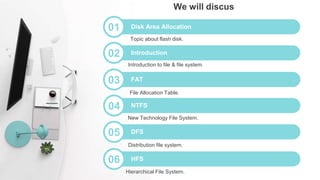
04 NTFS
File Allocation Table.
05 DFS
New Technology File System.
06 HFS
Distribution file system.
01 Disk Area Allocation
Hierarchical File System.
We will discus
03 FAT
Introduction to file & file system.
02 Introduction
Topic about flash disk.
Disk Area
Allocation
A flash disk has a number of
areas. Each area includes
one or more flash sectors.
Each sector has a physical
size of 264 bytes. Of those,
only 256 bytes are used to
store the data. Two last
bytes of each sector store
the checksum. Six remaining
bytes are mostly left unused,
except in the FRT/FAT areas,
where they do serve a useful
function.
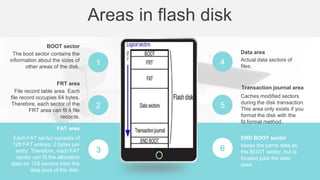
6 keeps the same data as
the BOOT sector, but is
located past the data
area.
END BOOT sector
3
Each FAT sector consists of
128 FAT entries, 2 bytes per
entry. Therefore, each FAT
sector can fit the allocation
data for 128 sectors from the
data area of the disk.
FAT area
2
File record table area. Each
file record occupies 64 bytes.
Therefore, each sector of the
FRT area can fit 4 file
records.
FRT area
1
The boot sector contains the
information about the sizes of
other areas of the disk.
BOOT sector
5
Actual data sectors of
files.
Data area
4
Caches modified sectors
during the disk transaction.
This area only exists if you
format the disk with the
fd.format method.
Transaction journal area
Areas in flash disk
What is file
 An object on a computer.
 Stores data, information, settings or commands.
 Display as icon in GUI such as MS Windows.
 The icon relate to the program that opens the file .
 PDF file shows icon of PDF reader that is installed.
01
03
02
04
A software which manages
files and distribute storage
in computer devices.
What is file system?
 Use in hard disks.
 Flash storage.
 Memory cards.
Usage of file system:
 System interface.
 Software to manage.
 Objects and attributes.
Parts of file system:
 FAT16, FAT 32.
 HTFS.
 DFS.
Types of file system:
File System
INTRODUCTION
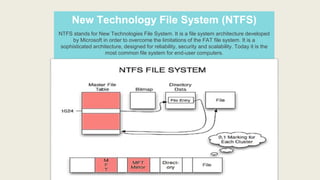
New Technology File System (NTFS)
NTFS stands for New Technologies File System. It is a file system architecture developed
by Microsoft in order to overcome the limitations of the FAT file system. It is a
sophisticated architecture, designed for reliability, security and scalability. Today it is the
most common file system for end-user computers.
The default cluster size is
4KB for disks over 2Gb and
Supports Unicode filenames
up to 255 characters long.
Provides built-in data
encryption and compression
on files, folders, and volumes.
Disk quotas can be set for
individual users or groups of
users.
Provides robust recovery from
data errors. Automatically
repairs errors by keeping a
transaction log.
Windows 2000,
server 2003,
Vista, server
2008, Windows
7, 8 and10 use
NTFS.
More on NTFS
1
2
3
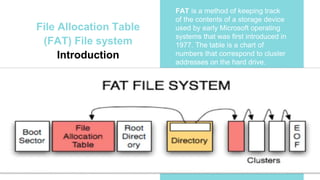
File Allocation Table
(FAT) File system
Introduction
FAT is a method of keeping track
of the contents of a storage device
used by early Microsoft operating
systems that was first introduced in
1977. The table is a chart of
numbers that correspond to cluster
addresses on the hard drive.
FAT12 FAT16 FAT32
The FAT12 file system was
first used on IBM-PC diskettes.
It is still supported by all
versions of MS Windows
and Linux. The cluster size is
only 512 bytes. It is ideal for
storing small files. FAT12
holds fewer than 4087
clusters. Each entry in its file
allocation table is 12 bits long.
The FAT16 file system is the
only available format for hard
drives formatted under MS
DOS. It is supported by all
versions of MS-Windows and
Linux. The volume can hold
between 4087 and 65,526
clusters. There is no built-in
file system security or
individual user permissions.
The FAT32 file system was
introduced with Windows 95,
and was refined under
Windows 98. A volume can
hold between 65,526 and
268,435,456 clusters. Each
entry in the file allocation table
is 32 bits long. A single file can
be as large as 4 GB minus 2
bytes.
Types of FAT
01 02 03
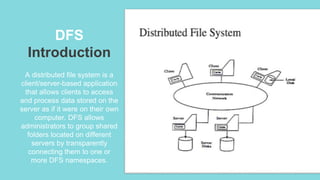
DFS
Introduction
A distributed file system is a
client/server-based application
that allows clients to access
and process data stored on the
server as if it were on their own
computer. DFS allows
administrators to group shared
folders located on different
servers by transparently
connecting them to one or
more DFS namespaces.
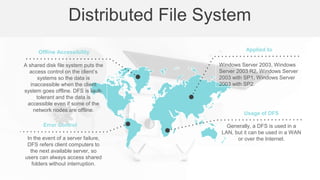
In the event of a server failure,
DFS refers client computers to
the next available server, so
users can always access shared
folders without interruption.
Error Control
Windows Server 2003, Windows
Server 2003 R2, Windows Server
2003 with SP1, Windows Server
2003 with SP2.
Applied to
A shared disk file system puts the
access control on the client’s
systems so the data is
inaccessible when the client
system goes offline. DFS is fault-
tolerant and the data is
accessible even if some of the
network nodes are offline.
Offline Accessibility
Generally, a DFS is used in a
LAN, but it can be used in a WAN
or over the Internet.
Usage of DFS
Distributed File System
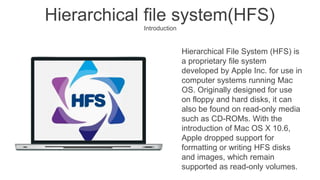
Hierarchical File System (HFS) is
a proprietary file system
developed by Apple Inc. for use in
computer systems running Mac
OS. Originally designed for use
on floppy and hard disks, it can
also be found on read-only media
such as CD-ROMs. With the
introduction of Mac OS X 10.6,
Apple dropped support for
formatting or writing HFS disks
and images, which remain
supported as read-only volumes.
Hierarchical file system(HFS)
Introduction
The design of HFS departed from other file
systems of that day with support for two types
of structures: the "data fork" and "resource
fork." The data fork is like other file system
structures. Data are accessed by an offset
into the file. The resource fork functions like a
mini-database, holding executable code and
program structures such as icons, menus and
sounds.
Each HFS volume contains a volume header
1024 bytes from the start of the volume. The
volume header analogous to the master
directory block (MDB) for HFS contains
information about the volume as a whole,
including the location of other key structures
in the volume.
More on HFS
Thank you

File system

  • 1.
  • 2.
  • 3.
    Muhammad Noman MuhammadTouseef Muhammad Nadeem Muhammad Aqeel Our Group Uzair Saeed Shazia Ghafar
  • 4.
  • 5.
    04 NTFS File AllocationTable. 05 DFS New Technology File System. 06 HFS Distribution file system. 01 Disk Area Allocation Hierarchical File System. We will discus 03 FAT Introduction to file & file system. 02 Introduction Topic about flash disk.
  • 6.
    Disk Area Allocation A flashdisk has a number of areas. Each area includes one or more flash sectors. Each sector has a physical size of 264 bytes. Of those, only 256 bytes are used to store the data. Two last bytes of each sector store the checksum. Six remaining bytes are mostly left unused, except in the FRT/FAT areas, where they do serve a useful function.
  • 7.
    6 keeps thesame data as the BOOT sector, but is located past the data area. END BOOT sector 3 Each FAT sector consists of 128 FAT entries, 2 bytes per entry. Therefore, each FAT sector can fit the allocation data for 128 sectors from the data area of the disk. FAT area 2 File record table area. Each file record occupies 64 bytes. Therefore, each sector of the FRT area can fit 4 file records. FRT area 1 The boot sector contains the information about the sizes of other areas of the disk. BOOT sector 5 Actual data sectors of files. Data area 4 Caches modified sectors during the disk transaction. This area only exists if you format the disk with the fd.format method. Transaction journal area Areas in flash disk
  • 8.
    What is file An object on a computer.  Stores data, information, settings or commands.  Display as icon in GUI such as MS Windows.  The icon relate to the program that opens the file .  PDF file shows icon of PDF reader that is installed.
  • 9.
    01 03 02 04 A software whichmanages files and distribute storage in computer devices. What is file system?  Use in hard disks.  Flash storage.  Memory cards. Usage of file system:  System interface.  Software to manage.  Objects and attributes. Parts of file system:  FAT16, FAT 32.  HTFS.  DFS. Types of file system: File System INTRODUCTION
  • 10.
    New Technology FileSystem (NTFS) NTFS stands for New Technologies File System. It is a file system architecture developed by Microsoft in order to overcome the limitations of the FAT file system. It is a sophisticated architecture, designed for reliability, security and scalability. Today it is the most common file system for end-user computers.
  • 11.
    The default clustersize is 4KB for disks over 2Gb and Supports Unicode filenames up to 255 characters long. Provides built-in data encryption and compression on files, folders, and volumes. Disk quotas can be set for individual users or groups of users. Provides robust recovery from data errors. Automatically repairs errors by keeping a transaction log. Windows 2000, server 2003, Vista, server 2008, Windows 7, 8 and10 use NTFS. More on NTFS 1 2 3
  • 12.
    File Allocation Table (FAT)File system Introduction FAT is a method of keeping track of the contents of a storage device used by early Microsoft operating systems that was first introduced in 1977. The table is a chart of numbers that correspond to cluster addresses on the hard drive.
  • 13.
    FAT12 FAT16 FAT32 TheFAT12 file system was first used on IBM-PC diskettes. It is still supported by all versions of MS Windows and Linux. The cluster size is only 512 bytes. It is ideal for storing small files. FAT12 holds fewer than 4087 clusters. Each entry in its file allocation table is 12 bits long. The FAT16 file system is the only available format for hard drives formatted under MS DOS. It is supported by all versions of MS-Windows and Linux. The volume can hold between 4087 and 65,526 clusters. There is no built-in file system security or individual user permissions. The FAT32 file system was introduced with Windows 95, and was refined under Windows 98. A volume can hold between 65,526 and 268,435,456 clusters. Each entry in the file allocation table is 32 bits long. A single file can be as large as 4 GB minus 2 bytes. Types of FAT 01 02 03
  • 14.
    DFS Introduction A distributed filesystem is a client/server-based application that allows clients to access and process data stored on the server as if it were on their own computer. DFS allows administrators to group shared folders located on different servers by transparently connecting them to one or more DFS namespaces.
  • 15.
    In the eventof a server failure, DFS refers client computers to the next available server, so users can always access shared folders without interruption. Error Control Windows Server 2003, Windows Server 2003 R2, Windows Server 2003 with SP1, Windows Server 2003 with SP2. Applied to A shared disk file system puts the access control on the client’s systems so the data is inaccessible when the client system goes offline. DFS is fault- tolerant and the data is accessible even if some of the network nodes are offline. Offline Accessibility Generally, a DFS is used in a LAN, but it can be used in a WAN or over the Internet. Usage of DFS Distributed File System
  • 16.
    Hierarchical File System(HFS) is a proprietary file system developed by Apple Inc. for use in computer systems running Mac OS. Originally designed for use on floppy and hard disks, it can also be found on read-only media such as CD-ROMs. With the introduction of Mac OS X 10.6, Apple dropped support for formatting or writing HFS disks and images, which remain supported as read-only volumes. Hierarchical file system(HFS) Introduction
  • 17.
    The design ofHFS departed from other file systems of that day with support for two types of structures: the "data fork" and "resource fork." The data fork is like other file system structures. Data are accessed by an offset into the file. The resource fork functions like a mini-database, holding executable code and program structures such as icons, menus and sounds. Each HFS volume contains a volume header 1024 bytes from the start of the volume. The volume header analogous to the master directory block (MDB) for HFS contains information about the volume as a whole, including the location of other key structures in the volume. More on HFS
  • 18.