Kallam Haranadha Reddy Institute
of Technology
Presentation On:
Activity Diagram
KHIT,Dept of CSE & IT
What is UML Diagram…?
 UML stands for “Unified ModelingLanguage”.
 It is a industry-standard graphical language for specifying, visualizing,
constructing and documenting the artifacts of softwaresystem.
 The UML uses mostly graphical notation to express the ‘analysis’and
‘design’ of software projects.
 The UML represent a collection of best engineering practices that arevery
helpful in the modeling o large and complex system.
KHIT,Dept of CSE & IT
Why UML for modeling..?
 It is mostly use for simplifies the complex process of softwaredesign.
 The UML is very important part of developing object oriented softwareand
the software development process.
 The UML helps project teams communicate, explore design and validate
the architectural design of the software.
KHIT,Dept of CSE & IT
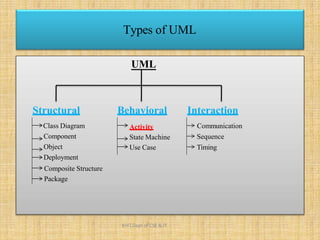
UML
Behavioral
Activity
State Machine
Use Case
Interaction
Communication
Sequence
Timing
Structural
Class Diagram
Component
Object
Deployment
Composite Structure
Package
Types of UML
KHIT,Dept of CSE & IT
Activity Diagram…
 Activity diagrams represent the dynamic (behavioral) view of a system.
 Activity diagrams are typically used for business (transaction) process
modeling and modeling the logic captured by a single use-case or usage
scenario.
 Activity diagram is used to represent the flow across use cases or to
represent flow within a particular use case.
 UML activity diagrams are the object oriented equivalent of flow chart and
data flow diagrams in function-oriented design approach.
 Activity diagram contains activities, transitions between activities, decision
points, synchronization bars, swim lanes and many more…
KHIT,Dept of CSE & IT
 Describes how activities are coordinated.
 Is particularly useful when you know that an operation has to achievea
number of different things, and you want to model what the essential
dependencies between them are, before you decide in what order to do
them.
 Records the dependencies between activities, such as which things can
happen in parallel and what must be finished before something else can
start.
 Represents the workflow of the process.
Activity Diagram…
KHIT,Dept of CSE & IT
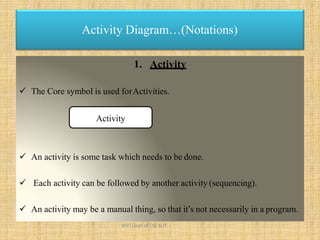
Activity Diagram…(Notations)
1. Activity
 The Core symbol is used forActivities.
Activity
 An activity is some task which needs to be done.
 Each activity can be followed by another activity (sequencing).
 An activity may be a manual thing, so that it’s not necessarily in a program.
KHIT,Dept of CSE & IT
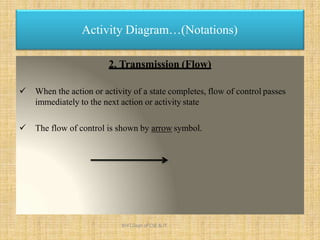
2. Transmission (Flow)
 When the action or activity of a state completes, flow of control passes
immediately to the next action or activity state
 The flow of control is shown by arrow symbol.
Activity Diagram…(Notations)
KHIT,Dept of CSE & IT
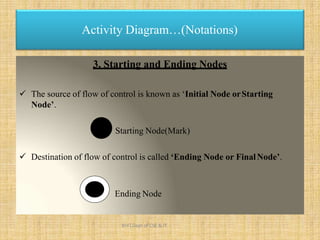
3. Starting and Ending Nodes
 The source of flow of control is known as ‘Initial Node orStarting
Node’.
Starting Node(Mark)
 Destination of flow of control is called ‘Ending Node or FinalNode’.
Ending Node
Activity Diagram…(Notations)
KHIT,Dept of CSE & IT
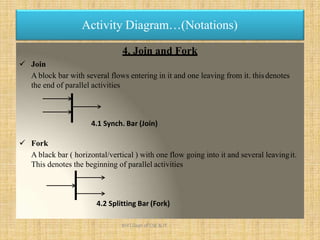
4. Join and Fork
 Join
A block bar with several flows entering in it and one leaving from it. thisdenotes
the end of parallel activities
Activity Diagram…(Notations)
4.1 Synch. Bar (Join)
 Fork
A black bar ( horizontal/vertical ) with one flow going into it and several leavingit.
This denotes the beginning of parallel activities
4.2 Splitting Bar (Fork)
KHIT,Dept of CSE & IT
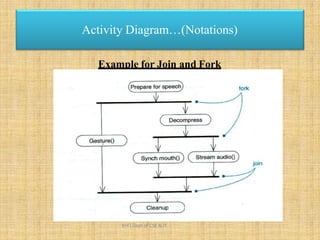
Example for Join and Fork
Activity Diagram…(Notations)
KHIT,Dept of CSE & IT
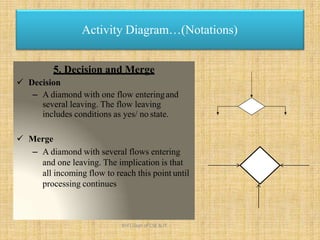
5. Decision and Merge
 Decision
– A diamond with one flow enteringand
several leaving. The flow leaving
includes conditions as yes/ no state.
 Merge
– A diamond with several flows entering
and one leaving. The implication is that
all incoming flow to reach this point until
processing continues
Activity Diagram…(Notations)
KHIT,Dept of CSE & IT
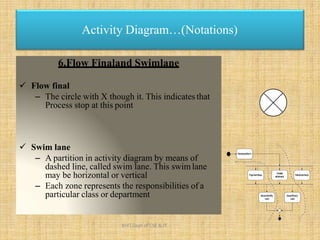
6.Flow Finaland Swimlane
 Flow final
– The circle with X though it. This indicates that
Process stop at this point
 Swim lane
– A partition in activity diagram by means of
dashed line, called swim lane. This swimlane
may be horizontal or vertical
– Each zone represents the responsibilities of a
particular class or department
Activity Diagram…(Notations)
Receivedform
Paymentfees
Hostel
allotment
Issueidentity
card
Medicalcheck
Issuelibrary
card
KHIT,Dept of CSE & IT
Difference between Join and Merge
 A join is different from a merge in that the join synchronizes two inflows
and produces a single outflow. The outflow from a join cannot executeuntil
all inflows have been received
 A merge passes any control flows straight through it. If two or more
inflows are received by a merge symbol, the action pointed to by its
outflow is executed two or more times
Activity Diagram…(Notations)
KHIT,Dept of CSE & IT
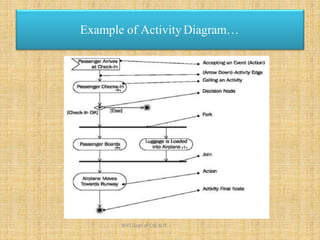
Example of Activity Diagram…
KHIT,Dept of CSE & IT
Example of Activity Diagram…
Fill-in
form
Check
form
[Incorrect]
[Correct]
Displaystudent
screen
Inputstudent
information Searchfor Student
selection list
Verifythe
applications
Regretmessage
Createrecord
Regret
registration
[NoMatch]
[Match]
[NotFound]
[Found]
1
Student
KHIT,Dept of CSE & IT
RegistrarSystem
 Activity diagrams tell you what is happening, but not who doeswhat.
 In domain modelling, this diagram type does not convey which people or
departments are responsible for each activity.
 In programming, it does not convey which class is responsible foreach
activity
Drawback of Activity Diagram…
KHIT,Dept of CSE & IT
 Books:
 Software Engineering, A Practitioner’s Approach, By RogerS.
Pressman..
 System Analysis and Design, By Elias M.Awad.
 Web Source:
 www.google.co.in
 www.tutorialspoint.com
 www.slideshare.com
 www.wikipedia.com
Reference
KHIT,Dept of CSE & IT
Presentation Powered By :
Lokendra Prajapati
KHIT,Dept of CSE & IT

Lecture 19...unit 3.....se

  • 1.
    Kallam Haranadha ReddyInstitute of Technology Presentation On: Activity Diagram KHIT,Dept of CSE & IT
  • 2.
    What is UMLDiagram…?  UML stands for “Unified ModelingLanguage”.  It is a industry-standard graphical language for specifying, visualizing, constructing and documenting the artifacts of softwaresystem.  The UML uses mostly graphical notation to express the ‘analysis’and ‘design’ of software projects.  The UML represent a collection of best engineering practices that arevery helpful in the modeling o large and complex system. KHIT,Dept of CSE & IT
  • 3.
    Why UML formodeling..?  It is mostly use for simplifies the complex process of softwaredesign.  The UML is very important part of developing object oriented softwareand the software development process.  The UML helps project teams communicate, explore design and validate the architectural design of the software. KHIT,Dept of CSE & IT
  • 4.
    UML Behavioral Activity State Machine Use Case Interaction Communication Sequence Timing Structural ClassDiagram Component Object Deployment Composite Structure Package Types of UML KHIT,Dept of CSE & IT
  • 5.
    Activity Diagram…  Activitydiagrams represent the dynamic (behavioral) view of a system.  Activity diagrams are typically used for business (transaction) process modeling and modeling the logic captured by a single use-case or usage scenario.  Activity diagram is used to represent the flow across use cases or to represent flow within a particular use case.  UML activity diagrams are the object oriented equivalent of flow chart and data flow diagrams in function-oriented design approach.  Activity diagram contains activities, transitions between activities, decision points, synchronization bars, swim lanes and many more… KHIT,Dept of CSE & IT
  • 6.
     Describes howactivities are coordinated.  Is particularly useful when you know that an operation has to achievea number of different things, and you want to model what the essential dependencies between them are, before you decide in what order to do them.  Records the dependencies between activities, such as which things can happen in parallel and what must be finished before something else can start.  Represents the workflow of the process. Activity Diagram… KHIT,Dept of CSE & IT
  • 7.
    Activity Diagram…(Notations) 1. Activity The Core symbol is used forActivities. Activity  An activity is some task which needs to be done.  Each activity can be followed by another activity (sequencing).  An activity may be a manual thing, so that it’s not necessarily in a program. KHIT,Dept of CSE & IT
  • 8.
    2. Transmission (Flow) When the action or activity of a state completes, flow of control passes immediately to the next action or activity state  The flow of control is shown by arrow symbol. Activity Diagram…(Notations) KHIT,Dept of CSE & IT
  • 9.
    3. Starting andEnding Nodes  The source of flow of control is known as ‘Initial Node orStarting Node’. Starting Node(Mark)  Destination of flow of control is called ‘Ending Node or FinalNode’. Ending Node Activity Diagram…(Notations) KHIT,Dept of CSE & IT
  • 10.
    4. Join andFork  Join A block bar with several flows entering in it and one leaving from it. thisdenotes the end of parallel activities Activity Diagram…(Notations) 4.1 Synch. Bar (Join)  Fork A black bar ( horizontal/vertical ) with one flow going into it and several leavingit. This denotes the beginning of parallel activities 4.2 Splitting Bar (Fork) KHIT,Dept of CSE & IT
  • 11.
    Example for Joinand Fork Activity Diagram…(Notations) KHIT,Dept of CSE & IT
  • 12.
    5. Decision andMerge  Decision – A diamond with one flow enteringand several leaving. The flow leaving includes conditions as yes/ no state.  Merge – A diamond with several flows entering and one leaving. The implication is that all incoming flow to reach this point until processing continues Activity Diagram…(Notations) KHIT,Dept of CSE & IT
  • 13.
    6.Flow Finaland Swimlane Flow final – The circle with X though it. This indicates that Process stop at this point  Swim lane – A partition in activity diagram by means of dashed line, called swim lane. This swimlane may be horizontal or vertical – Each zone represents the responsibilities of a particular class or department Activity Diagram…(Notations) Receivedform Paymentfees Hostel allotment Issueidentity card Medicalcheck Issuelibrary card KHIT,Dept of CSE & IT
  • 14.
    Difference between Joinand Merge  A join is different from a merge in that the join synchronizes two inflows and produces a single outflow. The outflow from a join cannot executeuntil all inflows have been received  A merge passes any control flows straight through it. If two or more inflows are received by a merge symbol, the action pointed to by its outflow is executed two or more times Activity Diagram…(Notations) KHIT,Dept of CSE & IT
  • 15.
    Example of ActivityDiagram… KHIT,Dept of CSE & IT
  • 16.
    Example of ActivityDiagram… Fill-in form Check form [Incorrect] [Correct] Displaystudent screen Inputstudent information Searchfor Student selection list Verifythe applications Regretmessage Createrecord Regret registration [NoMatch] [Match] [NotFound] [Found] 1 Student KHIT,Dept of CSE & IT RegistrarSystem
  • 17.
     Activity diagramstell you what is happening, but not who doeswhat.  In domain modelling, this diagram type does not convey which people or departments are responsible for each activity.  In programming, it does not convey which class is responsible foreach activity Drawback of Activity Diagram… KHIT,Dept of CSE & IT
  • 18.
     Books:  SoftwareEngineering, A Practitioner’s Approach, By RogerS. Pressman..  System Analysis and Design, By Elias M.Awad.  Web Source:  www.google.co.in  www.tutorialspoint.com  www.slideshare.com  www.wikipedia.com Reference KHIT,Dept of CSE & IT
  • 19.
    Presentation Powered By: Lokendra Prajapati KHIT,Dept of CSE & IT