4ACL Configuration
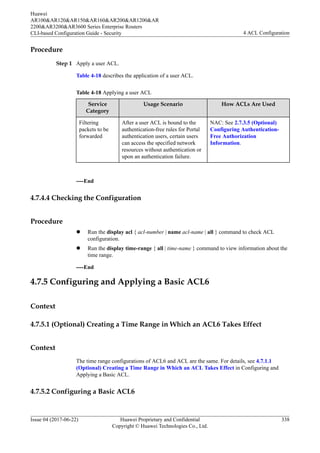
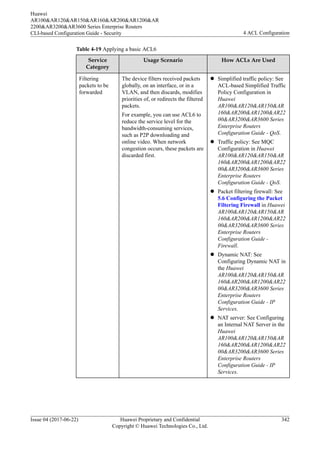
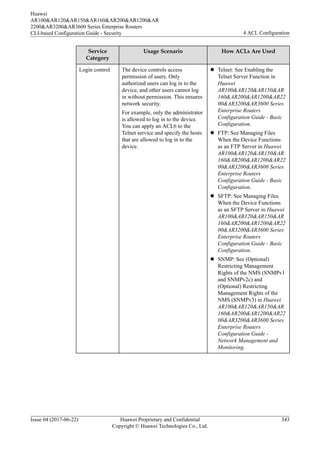
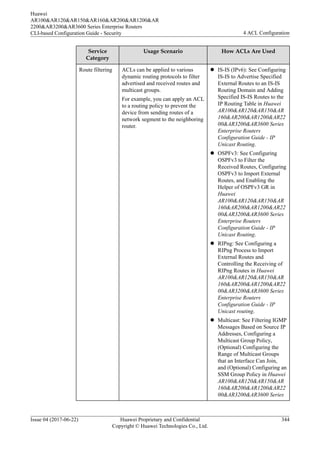
About This Chapter
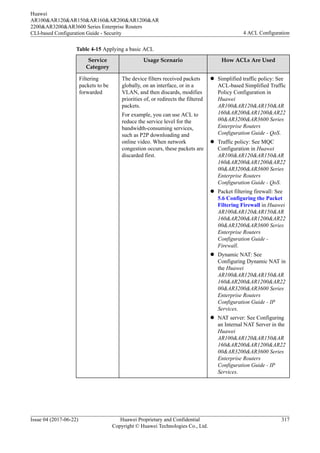
An Access Control List (ACL) is a set of rules that classify packets into different types. This
chapter explains how to configure an ACL on a Router to filter packets.
4.1 Overview
4.2 Principle
4.3 Application Scenarios
4.4 Configuration Notes
4.5 Configuration Task Summary
4.6 Default Configuration
4.7 Configuring ACL
4.8 Maintaining ACLs
4.9 Configuration Examples
4.10 Common Misconfigurations
4.11 FAQ
4.12 References
Huawei
AR100&AR120&AR150&AR160&AR200&AR1200&AR
2200&AR3200&AR3600 Series Enterprise Routers
CLI-based Configuration Guide - Security 4 ACL Configuration
Issue 04 (2017-06-22) Huawei Proprietary and Confidential
Copyright © Huawei Technologies Co., Ltd.
273
4.1 Overview
Definition
An Access Control List (ACL) is a packet filter that filters packets based on rules. One or
more rules describe the packet matching conditions, such as the source address, destination
address, and port number of packets.
For packets that match the ACL rules configured on a device, the device forwards or discards
these packets according to the policies used by the service module to which the ACL is
applied.
NOTE
A configured ACL takes effect only after it is applied to a service module.
An ACL can be applied to various service modules, such as Telnet, FTP, and routing. Usually, an ACL is
applied to a traffic policy or simplified traffic policy so that the device can deliver ACL rules globally, in a
VLAN, or on an interface to filter packets to be forwarded. The service modules use different actions and
mechanisms to process the packets filtered by ACL. For details, see 4.2.7 Default ACL Actions and
Mechanisms of Different Service Modules.
Purpose
The fast growth of network technologies brings challenges to network security and Quality of
Service (QoS). ACL is a security policy that is enforced on networks to prevent the following
problems:
l To prevent information leaks and unauthorized access of resources on key servers of an
enterprise network
l To prevent viruses on the Internet from entering and spreading on the enterprise intranet
l To prevent random services from occupying network bandwidth, thereby guaranteeing
bandwidth for delay-sensitive services such as voice and video
These problems are detrimental to network communication, so network security is critical.
ACL accurately identifies and controls packets on the network to manage network access
behaviors, prevent network attacks, and improve bandwidth use efficiency. In this way, ACL
ensures security and high service quality on networks.
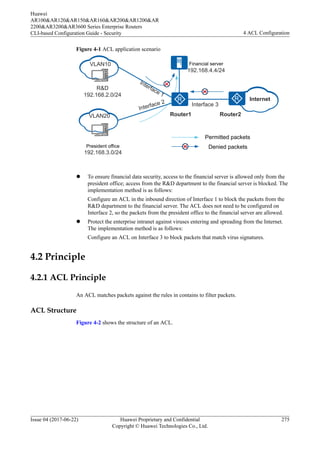
Figure 4-1 shows a typical network with ACL configured.
Huawei
AR100&AR120&AR150&AR160&AR200&AR1200&AR
2200&AR3200&AR3600 Series Enterprise Routers
CLI-based Configuration Guide - Security 4 ACL Configuration
Issue 04 (2017-06-22) Huawei Proprietary and Confidential
Copyright © Huawei Technologies Co., Ltd.
274
Figure 4-1 ACL application scenario
Interface 3
R&D
192.168.2.0/24
Interface 1
President office
192.168.3.0/24
Financial server
192.168.4.4/24
Internet
Router1 Router2
Interface 2
Permitted packets
Denied packets
VLAN10
VLAN20
l To ensure financial data security, access to the financial server is allowed only from the
president office; access from the R&D department to the financial server is blocked. The
implementation method is as follows:
Configure an ACL in the inbound direction of Interface 1 to block the packets from the
R&D department to the financial server. The ACL does not need to be configured on
Interface 2, so the packets from the president office to the financial server are allowed.
l Protect the enterprise intranet against viruses entering and spreading from the Internet.
The implementation method is as follows:
Configure an ACL on Interface 3 to block packets that match virus signatures.
4.2 Principle
4.2.1 ACL Principle
An ACL matches packets against the rules in contains to filter packets.
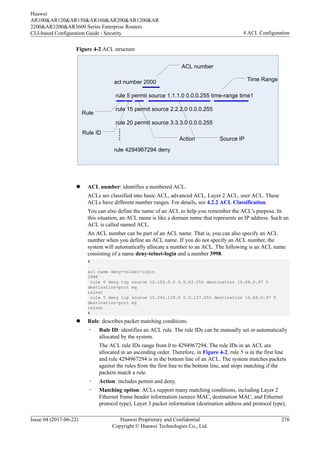
ACL Structure
Figure 4-2 shows the structure of an ACL.
Huawei
AR100&AR120&AR150&AR160&AR200&AR1200&AR
2200&AR3200&AR3600 Series Enterprise Routers
CLI-based Configuration Guide - Security 4 ACL Configuration
Issue 04 (2017-06-22) Huawei Proprietary and Confidential
Copyright © Huawei Technologies Co., Ltd.
275
Figure 4-2 ACL structure
acl number 2000
rule 5 permit source 1.1.1.0 0.0.0.255 time-range time1
rule 15 permit source 2.2.2.0 0.0.0.255
rule 20 permit source 3.3.3.0 0.0.0.255
rule 4294967294 deny
……
ACL number
Rule
Rule ID
Time Range
Action Source IP
l ACL number: identifies a numbered ACL.
ACLs are classified into basic ACL, advanced ACL, Layer 2 ACL, user ACL. These
ACLs have different number ranges. For details, see 4.2.2 ACL Classification.
You can also define the name of an ACL to help you remember the ACL's purpose. In
this situation, an ACL name is like a domain name that represents an IP address. Such an
ACL is called named ACL.
An ACL number can be part of an ACL name. That is, you can also specify an ACL
number when you define an ACL name. If you do not specify an ACL number, the
system will automatically allocate a number to an ACL. The following is an ACL name
consisting of a name deny-telnet-login and a number 3998.
#
acl name deny-telnet-login
3998
rule 0 deny tcp source 10.152.0.0 0.0.63.255 destination 10.64.0.97 0
destination-port eq
telnet
rule 5 deny tcp source 10.242.128.0 0.0.127.255 destination 10.64.0.97 0
destination-port eq
telnet
#
l Rule: describes packet matching conditions.
– Rule ID: identifies an ACL rule. The rule IDs can be manually set or automatically
allocated by the system.
The ACL rule IDs range from 0 to 4294967294. The rule IDs in an ACL are
allocated in an ascending order. Therefore, in Figure 4-2, rule 5 is in the first line
and rule 4294967294 is in the bottom line of an ACL. The system matches packets
against the rules from the first line to the bottom line, and stops matching if the
packets match a rule.
– Action: includes permit and deny.
– Matching option: ACLs support many matching conditions, including Layer 2
Ethernet frame header information (source MAC, destination MAC, and Ethernet
protocol type), Layer 3 packet information (destination address and protocol type),
Huawei
AR100&AR120&AR150&AR160&AR200&AR1200&AR
2200&AR3200&AR3600 Series Enterprise Routers
CLI-based Configuration Guide - Security 4 ACL Configuration
Issue 04 (2017-06-22) Huawei Proprietary and Confidential
Copyright © Huawei Technologies Co., Ltd.
276
and Layer 4 packet information (TCP/UDP port number). For details about ACL
matching conditions, see 4.2.5 Matching Conditions.
NOTE
If the ACL rules with the numbers beyond the acceptable range are set in the configuration file
used for startup, the ACL configuration can be generated when the device starts, but some
configurations do not take effect.
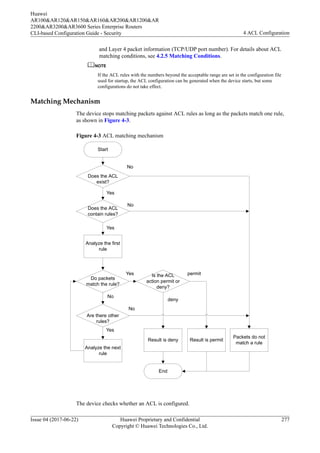
Matching Mechanism
The device stops matching packets against ACL rules as long as the packets match one rule,
as shown in Figure 4-3.
Figure 4-3 ACL matching mechanism
Start
Does the ACL
exist?
Does the ACL
contain rules?
Analyze the first
rule
Do packets
match the rule?
Are there other
rules?
Analyze the next
rule
Result is deny
End
Result is permit
Is the ACL
action permit or
deny?
No
Yes
No
Yes
Yes
No
Yes
No
permit
deny
Packets do not
match a rule
The device checks whether an ACL is configured.
Huawei
AR100&AR120&AR150&AR160&AR200&AR1200&AR
2200&AR3200&AR3600 Series Enterprise Routers
CLI-based Configuration Guide - Security 4 ACL Configuration
Issue 04 (2017-06-22) Huawei Proprietary and Confidential
Copyright © Huawei Technologies Co., Ltd.
277
l If no ACL is configured, the device returns the result "negative match."
l If an ACL is configured, the device checks whether the ACL contains rules.
– If the ACL does not contain rules, the device returns the result "negative match."
– If the ACL contains rules, the device matches the packets against the rules in
ascending order of rule IDs.
n When the packets match a permit rule, the device stops matching and returns
the result "positive match (permit)."
n When the packets match a deny rule, the device stops matching and returns the
result "positive match (deny)."
n If the packets do not match any rule in the ACL, the device returns the result
"negative match."
The ACL matching results include "positive match" and "negative match."
l Positive match: Packets match a rule in an ACL.
The result is "positive match" regardless of whether packets match a permit or deny rule
in an ACL.
l Negative match: No ACL exists, the ACL does not contain rules, or packets do not
match any rule in an ACL.
NOTE
Different service modules process the packets that match and do not match ACL rules in different ways. For
example, the Telnet module forwards the packets matching the permit rules, whereas the traffic policy module
discards the packets matching the permit rule if the action configured in the traffic policy module is deny. For
details about ACL processing in each service module, see 4.2.7 Default ACL Actions and Mechanisms of
Different Service Modules.
4.2.2 ACL Classification
Based on ACL Naming Methods
ACLs are classified into:
l Numbered ACL: This is the traditional naming method. After an ACL is created, a
unique number is specified for the ACL.
l Named ACL: An ACL is identified by a name.
You can specify a number for a created ACL. Different types of ACLs have different number
ranges, as described in Table 4-1. You can also specify a name for the created ACL to help
you remember the ACL's purpose. A named ACL consists of a name and number. That is, you
can specify an ACL number when you define an ACL name. If you do not specify a number
for a numbered ACL, the device automatically allocates a number to it.
NOTE
The name of a named ACL cannot be modified. Deleting an ACL name will delete the ACL.
Repeated ACL names can only be used between basic ACL and basic ACL6, and between advanced ACL
and advanced ACL6.
Based on IP Protocol Versions
ACLs are classified into:
Huawei
AR100&AR120&AR150&AR160&AR200&AR1200&AR
2200&AR3200&AR3600 Series Enterprise Routers
CLI-based Configuration Guide - Security 4 ACL Configuration
Issue 04 (2017-06-22) Huawei Proprietary and Confidential
Copyright © Huawei Technologies Co., Ltd.
278
l ACL4: filters IPv4 packets. It is also called ACL.
l ACL6: filters IPv6 packets. It is also called IPv6 ACL.
In this document, ACL refers to ACL4, ACL6, and the ACL supporting both IPv4 and IPv6
packet filtering. Table 4-1 describes how each type of ACLs support IPv4 and IPv6 packets.
Based on ACL Rule Definition Methods
Table 4-1 describes the ACLs based on rule definition methods.
Table 4-1 ACL classification based on ACL rule definition methods
Category IP Version Rule Definition Description Number Range
Basic ACL IPv4 Defines rules based on source IP
addresses, fragmentation
information, and time ranges.
2000-2999
Advanced
ACL
IPv4 Defines rules based on source
IPv4 addresses, destination IPv4
addresses, IPv4 protocol types,
ICMP types, TCP source/
destination port numbers, UDP
source/destination port numbers,
and time ranges.
3000-3999
Layer 2
ACL
IPv4&IPv6 Defines rules based on
information in Ethernet frame
headers of packets, such as the
source MAC addresses, destination
MAC addresses, and Layer 2
protocol types.
4000-4999
User ACL IPv4 Defines rules based on source
IPv4 addresses/destination IPv4
addresses, IPv4 protocol types,
ICMP types, TCP source/
destination port numbers, and UDP
source/destination port numbers.
6000-6031
Basic
ACL6
IPv6 Defines rules based on source
IPv6 addresses, fragmentation
information, and time ranges.
2000-2999
Advanced
ACL6
IPv6 Defines rules based on source
IPv6 addresses, destination IPv6
addresses, IPv6 protocol types,
ICMPv6 types, TCP source/
destination port numbers, UDP
source/destination ports, and time
ranges.
3000-3999
Huawei
AR100&AR120&AR150&AR160&AR200&AR1200&AR
2200&AR3200&AR3600 Series Enterprise Routers
CLI-based Configuration Guide - Security 4 ACL Configuration
Issue 04 (2017-06-22) Huawei Proprietary and Confidential
Copyright © Huawei Technologies Co., Ltd.
279
4.2.3 Step
What Is a Step
A step is an increment between neighboring rule IDs automatically allocated by the system.
If a rule is added to an empty ACL without a rule ID manually specified, the system allocates
the step value as the ID to this rule. If an ACL contains rules with manually configured IDs
and a new rule is added without an ID manually configured, the system allocates to this new
rule the minimum multiple of the step value which is greater than the largest rule ID in the
ACL. Rule IDs must be integers. For example, an ACL (basic ACL, advanced ACL, Layer 2
ACL, user ACL) contains rule 5 and rule 12, and the default step is 5. When a new rule is
added to the ACL, the system allocates ID 15 to this new rule (15 is greater than 12 and is the
minimum multiple of 5).
NOTE
Basic ACL6 and advanced ACL6 do not support step configuration, and use a step of 1.
[Huawei-acl-basic-2001] display this
#
acl number 2001 //Empty
ACL
#
return
[Huawei-acl-basic-2001] rule deny source 10.1.1.0 0.0.0.255 //Configure the first
rule without specifying an ID.
[Huawei-acl-basic-2001] display
this
#
acl number 2001
rule 5 deny source 10.1.1.0 0.0.0.255
#
return
[Huawei-acl-basic-2001] rule 12 deny source 10.2.2.0 0.0.0.255 //Configure a rule
with ID 12.
[Huawei-acl-basic-2001] display this
#
acl number 2001
rule 5 deny source 10.1.1.0 0.0.0.255
rule 12 deny source 10.2.2.0 0.0.0.255
#
return
[Huawei-acl-basic-2001] rule deny source 10.3.3.0 0.0.0.255 //Configure another
rule without specifying an ID.
[Huawei-acl-basic-2001] display this
#
acl number 2001
rule 5 deny source 10.1.1.0 0.0.0.255
rule 12 deny source 10.2.2.0 0.0.0.255
rule 15 deny source 10.3.3.0 0.0.0.255
#
return
If the step value of an ACL is changed, the system reallocates IDs to rules in the ACL. For
example, when the step value is changed to 2, the system allocates 2, 4, 6... to rules. After the
step is restored to the default value, the system reallocates IDs to the rules using the default
step, that is, 5, 10, 15....
[Huawei-acl-basic-2001] display acl 2001
Basic ACL 2001, 3 rules
Acl's step is 5
rule 5 deny source 10.1.1.0 0.0.0.255
rule 12 deny source 10.2.2.0 0.0.0.255
Huawei
AR100&AR120&AR150&AR160&AR200&AR1200&AR
2200&AR3200&AR3600 Series Enterprise Routers
CLI-based Configuration Guide - Security 4 ACL Configuration
Issue 04 (2017-06-22) Huawei Proprietary and Confidential
Copyright © Huawei Technologies Co., Ltd.
280
rule 15 deny source 10.3.3.0 0.0.0.255
[Huawei-acl-basic-2001] step 2 //Set the step to 2
[Huawei-acl-basic-2001] display acl 2001
Basic ACL 2001, 3 rules
Acl's step is 2
rule 2 deny source 10.1.1.0 0.0.0.255
rule 4 deny source 10.2.2.0 0.0.0.255
rule 6 deny source 10.3.3.0 0.0.0.255
[Huawei-acl-basic-2001] undo step //Restore the default step.
[Huawei-acl-basic-2001] display acl 2001
Basic ACL 2001, 3 rules
Acl's step is 5
rule 5 deny source 10.1.1.0 0.0.0.255
rule 10 deny source 10.2.2.0 0.0.0.255
rule 15 deny source 10.3.3.0
0.0.0.255
How a Step Functions
Setting a step facilitates rule insertion between existing rules of an ACL.
For example, an ACL contains rule 5, rule 10, and rule 15. The network administrator wants
to add a rule that denies the packets from source IP address 10.1.1.3. The rules are as follows:
rule 5 deny source 10.1.1.1 0 //Reject the packets from source IP address
10.1.1.1.
rule 10 deny source 10.1.1.2 0 //Reject the packets from source IP address
10.1.1.2.
rule 15 permit source 10.1.1.0 0.0.0.255 //Reject the packets from source IP
address segment 10.1.1.0/24.
The system stops matching packets once the packets matching a rule. Therefore, the packets
from source addresses 10.1.1.1 and 10.1.1.2 match rule 5 and rule 10, and are discarded; the
packets from source address 10.1.1.3 match rule 15, and are forwarded. To deny the packets
from source IP address 10.1.1.3, add a new deny rule. You can add rule 11 before rule 15 so
that the packets from source IP address 10.1.1.3 match rule 11 and are discarded. Rule 11
does not affect existing rule IDs in the ACL. The rule IDs are 5, 10, 11, and 15.
rule 5 deny source 10.1.1.1 0 //Reject the packets from source IP address
10.1.1.1.
rule 10 deny source 10.1.1.2 0 //Reject the packets from source IP address
10.1.1.2.
rule 11 deny source 10.1.1.3 0 //Reject the packets from source IP address
10.1.1.3.
rule 15 permit source 10.1.1.0 0.0.0.255 //Reject the packets from source IP
address segment 10.1.1.0.
To add a rule to an ACL with the step value of 1 (rule 1, rule 2, rule 3...), you must delete
existing rules, add the new rule, and then reconfigure the deleted rules.
A step resolves the preceding issue and facilitates rule insertion.
4.2.4 Matching Order
An ACL consists of multiple deny | permit clauses, each of which describes a rule. These
rules may repeat or conflict. For example, an ACL contains two rules:
rule deny ip destination 10.1.0.0 0.0.255.255 //Reject the packets destined for
network segment 10.1.0.0/16.
rule permit ip destination 10.1.1.0 0.0.0.255 //Permit the packets destined for
network segment 10.1.1.0/24, which has a smaller range than 10.1.0.0/16.
Huawei
AR100&AR120&AR150&AR160&AR200&AR1200&AR
2200&AR3200&AR3600 Series Enterprise Routers
CLI-based Configuration Guide - Security 4 ACL Configuration
Issue 04 (2017-06-22) Huawei Proprietary and Confidential
Copyright © Huawei Technologies Co., Ltd.
281
The permit and deny rules conflict. If the system first matches a packet destined for 10.1.1.1
against the deny rule, the packet is discarded. However, if the system matches the packet
against the permit rule first, the packet is forwarded.
Therefore, if ACL rules repeat or conflict, the matching order decides the matching result.
The device supports two matching orders: the configuration order (config) and the automatic
order (auto). The default order is config.
Config Order
The system matches packets against ACL rules in ascending order of rule IDs. That is, the
rule with the smallest ID is processed first.
l If a smaller rule ID is manually specified for a rule, the rule is inserted in one of the front
lines of an ACL, and the rule is processed earlier.
l If no ID is manually specified for a rule, the system allocates an ID to the rule. The rule
ID is greater than the largest rule ID in the ACL and is the minimum multiple of the step;
therefore, this rule is processed last.
Auto Order
The system arranges rules according to the precision degree of the rules (depth first principle),
and matches packets against the rules in descending order of precision. A rule with the highest
precision defines strictest conditions, and has the highest priority. The system matches packets
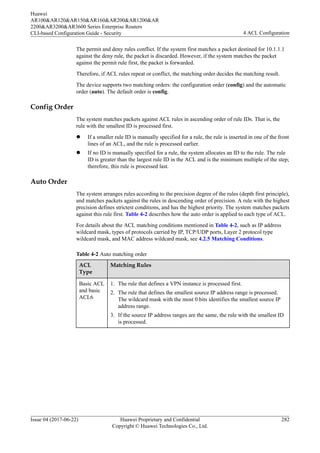
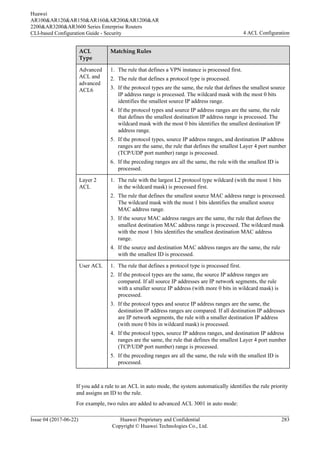
against this rule first. Table 4-2 describes how the auto order is applied to each type of ACL.
For details about the ACL matching conditions mentioned in Table 4-2, such as IP address
wildcard mask, types of protocols carried by IP, TCP/UDP ports, Layer 2 protocol type
wildcard mask, and MAC address wildcard mask, see 4.2.5 Matching Conditions.
Table 4-2 Auto matching order
ACL
Type
Matching Rules
Basic ACL
and basic
ACL6
1. The rule that defines a VPN instance is processed first.
2. The rule that defines the smallest source IP address range is processed.
The wildcard mask with the most 0 bits identifies the smallest source IP
address range.
3. If the source IP address ranges are the same, the rule with the smallest ID
is processed.
Huawei
AR100&AR120&AR150&AR160&AR200&AR1200&AR
2200&AR3200&AR3600 Series Enterprise Routers
CLI-based Configuration Guide - Security 4 ACL Configuration
Issue 04 (2017-06-22) Huawei Proprietary and Confidential
Copyright © Huawei Technologies Co., Ltd.
282
ACL
Type
Matching Rules
Advanced
ACL and
advanced
ACL6
1. The rule that defines a VPN instance is processed first.
2. The rule that defines a protocol type is processed.
3. If the protocol types are the same, the rule that defines the smallest source
IP address range is processed. The wildcard mask with the most 0 bits
identifies the smallest source IP address range.
4. If the protocol types and source IP address ranges are the same, the rule
that defines the smallest destination IP address range is processed. The
wildcard mask with the most 0 bits identifies the smallest destination IP
address range.
5. If the protocol types, source IP address ranges, and destination IP address
ranges are the same, the rule that defines the smallest Layer 4 port number
(TCP/UDP port number) range is processed.
6. If the preceding ranges are all the same, the rule with the smallest ID is
processed.
Layer 2
ACL
1. The rule with the largest L2 protocol type wildcard (with the most 1 bits
in the wildcard mask) is processed first.
2. The rule that defines the smallest source MAC address range is processed.
The wildcard mask with the most 1 bits identifies the smallest source
MAC address range.
3. If the source MAC address ranges are the same, the rule that defines the
smallest destination MAC address range is processed. The wildcard mask
with the most 1 bits identifies the smallest destination MAC address
range.
4. If the source and destination MAC address ranges are the same, the rule
with the smallest ID is processed.
User ACL 1. The rule that defines a protocol type is processed first.
2. If the protocol types are the same, the source IP address ranges are
compared. If all source IP addresses are IP network segments, the rule
with a smaller source IP address (with more 0 bits in wildcard mask) is
processed.
3. If the protocol types and source IP address ranges are the same, the
destination IP address ranges are compared. If all destination IP addresses
are IP network segments, the rule with a smaller destination IP address
(with more 0 bits in wildcard mask) is processed.
4. If the protocol types, source IP address ranges, and destination IP address
ranges are the same, the rule that defines the smallest Layer 4 port number
(TCP/UDP port number) range is processed.
5. If the preceding ranges are all the same, the rule with the smallest ID is
processed.
If you add a rule to an ACL in auto mode, the system automatically identifies the rule priority
and assigns an ID to the rule.
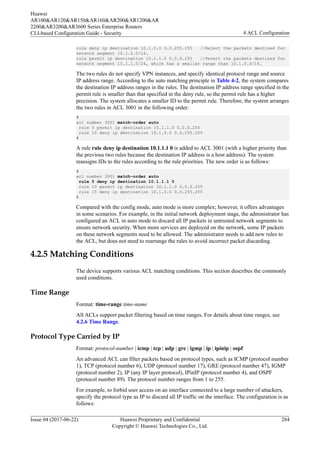
For example, two rules are added to advanced ACL 3001 in auto mode:
Huawei
AR100&AR120&AR150&AR160&AR200&AR1200&AR
2200&AR3200&AR3600 Series Enterprise Routers
CLI-based Configuration Guide - Security 4 ACL Configuration
Issue 04 (2017-06-22) Huawei Proprietary and Confidential
Copyright © Huawei Technologies Co., Ltd.
283
rule deny ip destination 10.1.0.0 0.0.255.255 //Reject the packets destined for
network segment 10.1.0.0/16.
rule permit ip destination 10.1.1.0 0.0.0.255 //Permit the packets destined for
network segment 10.1.1.0/24, which has a smaller range than 10.1.0.0/16.
The two rules do not specify VPN instances, and specify identical protocol range and source
IP address range. According to the auto matching principle in Table 4-2, the system compares
the destination IP address ranges in the rules. The destination IP address range specified in the
permit rule is smaller than that specified in the deny rule, so the permit rule has a higher
precision. The system allocates a smaller ID to the permit rule. Therefore, the system arranges
the two rules in ACL 3001 in the following order:
#
acl number 3001 match-order auto
rule 5 permit ip destination 10.1.1.0 0.0.0.255
rule 10 deny ip destination 10.1.0.0 0.0.255.255
#
A rule rule deny ip destination 10.1.1.1 0 is added to ACL 3001 (with a higher priority than
the previous two rules because the destination IP address is a host address). The system
reassigns IDs to the rules according to the rule priorities. The new order is as follows:
#
acl number 3001 match-order auto
rule 5 deny ip destination 10.1.1.1 0
rule 10 permit ip destination 10.1.1.0 0.0.0.255
rule 15 deny ip destination 10.1.0.0 0.0.255.255
#
Compared with the config mode, auto mode is more complex; however, it offers advantages
in some scenarios. For example, in the initial network deployment stage, the administrator has
configured an ACL in auto mode to discard all IP packets in untrusted network segments to
ensure network security. When more services are deployed on the network, some IP packets
on these network segments need to be allowed. The administrator needs to add new rules to
the ACL, but does not need to rearrange the rules to avoid incorrect packet discarding.
4.2.5 Matching Conditions
The device supports various ACL matching conditions. This section describes the commonly
used conditions.
Time Range
Format: time-range time-name
All ACLs support packet filtering based on time ranges. For details about time ranges, see
4.2.6 Time Range.
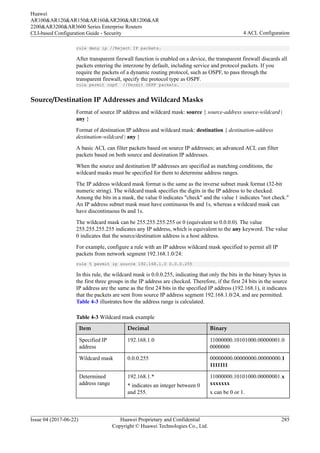
Protocol Type Carried by IP
Format: protocol-number | icmp | tcp | udp | gre | igmp | ip | ipinip | ospf
An advanced ACL can filter packets based on protocol types, such as ICMP (protocol number
1), TCP (protocol number 6), UDP (protocol number 17), GRE (protocol number 47), IGMP
(protocol number 2), IP (any IP layer protocol), IPinIP (protocol number 4), and OSPF
(protocol number 89). The protocol number ranges from 1 to 255.
For example, to forbid user access on an interface connected to a large number of attackers,
specify the protocol type as IP to discard all IP traffic on the interface. The configuration is as
follows:
Huawei
AR100&AR120&AR150&AR160&AR200&AR1200&AR
2200&AR3200&AR3600 Series Enterprise Routers
CLI-based Configuration Guide - Security 4 ACL Configuration
Issue 04 (2017-06-22) Huawei Proprietary and Confidential
Copyright © Huawei Technologies Co., Ltd.
284
rule deny ip //Reject IP packets.
After transparent firewall function is enabled on a device, the transparent firewall discards all
packets entering the interzone by default, including service and protocol packets. If you
require the packets of a dynamic routing protocol, such as OSPF, to pass through the
transparent firewall, specify the protocol type as OSPF.
rule permit ospf //Permit OSPF packets.
Source/Destination IP Addresses and Wildcard Masks
Format of source IP address and wildcard mask: source { source-address source-wildcard |
any }
Format of destination IP address and wildcard mask: destination { destination-address
destination-wildcard | any }
A basic ACL can filter packets based on source IP addresses; an advanced ACL can filter
packets based on both source and destination IP addresses.
When the source and destination IP addresses are specified as matching conditions, the
wildcard masks must be specified for them to determine address ranges.
The IP address wildcard mask format is the same as the inverse subnet mask format (32-bit
numeric string). The wildcard mask specifies the digits in the IP address to be checked.
Among the bits in a mask, the value 0 indicates "check" and the value 1 indicates "not check."
An IP address subnet mask must have continuous 0s and 1s, whereas a wildcard mask can
have discontinuous 0s and 1s.
The wildcard mask can be 255.255.255.255 or 0 (equivalent to 0.0.0.0). The value
255.255.255.255 indicates any IP address, which is equivalent to the any keyword. The value
0 indicates that the source/destination address is a host address.
For example, configure a rule with an IP address wildcard mask specified to permit all IP
packets from network segment 192.168.1.0/24:
rule 5 permit ip source 192.168.1.0 0.0.0.255
In this rule, the wildcard mask is 0.0.0.255, indicating that only the bits in the binary bytes in
the first three groups in the IP address are checked. Therefore, if the first 24 bits in the source
IP address are the same as the first 24 bits in the specified IP address (192.168.1), it indicates
that the packets are sent from source IP address segment 192.168.1.0/24, and are permitted.
Table 4-3 illustrates how the address range is calculated.
Table 4-3 Wildcard mask example
Item Decimal Binary
Specified IP
address
192.168.1.0 11000000.10101000.00000001.0
0000000
Wildcard mask 0.0.0.255 00000000.00000000.00000000.1
1111111
Determined
address range
192.168.1.*
* indicates an integer between 0
and 255.
11000000.10101000.00000001.x
xxxxxxx
x can be 0 or 1.
Huawei
AR100&AR120&AR150&AR160&AR200&AR1200&AR
2200&AR3200&AR3600 Series Enterprise Routers
CLI-based Configuration Guide - Security 4 ACL Configuration
Issue 04 (2017-06-22) Huawei Proprietary and Confidential
Copyright © Huawei Technologies Co., Ltd.
285
For more examples of determining an address range by IP address and wildcard mask, see
Table 4-4.
Table 4-4 Determining address ranges by IP addresses and wildcard masks
IP Address IP Address Wildcard Mask Determined Address Range
0.0.0.0 255.255.255.255 Any IP address
172.18.0.0 0.0.255.255 IP addresses on network segment
172.18.0.0/16
172.18.5.2 0.0.0.0 Only host address 172.18.5.2
172.18.8.0 0.0.0.7 IP addresses on network segment
172.18.8.0/29
172.18.8.8 0.0.0.7 IP addresses on network segment
172.18.8.8/29
10.1.2.0 0.0.254.255 (discontinuous 1s
and 0s in wildcard mask)
IP addresses that are in the range
of 10.1.0.0/24 and 10.1.254.0/24
and have an even number in the
third byte, for example,
10.1.0.0/24, 10.1.2.0/24,
10.1.4.0/24, and 10.1.6.0/24
Source/Destination MAC Addresses and Wildcard Masks
Format of source MAC address and wildcard mask: source-mac source-mac-address
[ source-mac-mask ]
Format of destination MAC address and wildcard mask: destination-mac dest-mac-address
[ dest-mac-mask ]
Only the Layer 2 ACL can filter packets based on source and destination MAC addresses.
When the source and destination MAC addresses are specified as matching conditions, the
wildcard masks can be specified for them to determine address ranges.
The formats of a MAC address wildcard mask and a MAC address are the same. Both of them
are in hexadecimal format. A MAC address wildcard mask consists of six bytes (48 bits) to
indicate the bits in a MAC address to be checked. Different from those in an IP address
wildcard mask, the value 1 in the MAC address wildcard mask indicates "check" and the
value 0 indicates "not check." If the wildcard mask is not specified, the default mask ffff-ffff-
ffff is used, indicating that every bit in a MAC address is checked.
Table 4-5 illustrates how a MAC address and a wildcard mask determine an address range.
Huawei
AR100&AR120&AR150&AR160&AR200&AR1200&AR
2200&AR3200&AR3600 Series Enterprise Routers
CLI-based Configuration Guide - Security 4 ACL Configuration
Issue 04 (2017-06-22) Huawei Proprietary and Confidential
Copyright © Huawei Technologies Co., Ltd.
286
Table 4-5 Determining address ranges by MAC addresses and wildcard masks
MAC Address MAC Address Wildcard
Mask
Determined Address Range
00e0-fc01-0101 0000-0000-0000 Any MAC address
00e0-fc01-0101 ffff-ffff-ffff Only 00e0-fc01-0101
00e0-fc01-0101 ffff-ffff-0000 00e0-fc01-0000 to 00e0-fc01-ffff
VLAN ID and Mask
Format of outer VLAN ID and mask: vlan-id vlan-id [ vlan-id-mask ]
Format of inner VLAN ID and mask: cvlan-id cvlan-id [ cvlan-id-mask ]
A Layer 2 ACL can filter packets based on outer and inner VLAN IDs.
When the VLAN IDs are configured as matching conditions, the VLAN mask can be
specified behind the VLAN IDs to determine a VLAN range.
A VLAN mask is in the hexadecimal format, ranging from 0x0 to 0xFFF. If the VLAN mask
is not specified, the default mask 0xFFF is used, indicating that every bit in the VLAN ID is
checked.
Table 4-6 illustrates how a VLAN ID and a mask determine a VLAN range.
Table 4-6 Determining VLAN ranges by VLAN IDs and masks
VLAN ID VLAN Mask Determined VLAN Range
10 0x000 Any VLAN
10 0xFFF Only VLAN 10
10 0xFF0 VLAN 1 to VLAN 10
TCP/UDP Port Number
Format of source port number: source-port { eq port | gt port | lt port | range port-start port-
end }
Format of destination port number: destination-port { eq port | gt port | lt port | range port-
start port-end }
When the protocol type of an advanced ACL is specified as TCP or UDP, the device can filter
packets based on TCP or UDP source/destination port numbers.
The operators of specifying TCP/UDP port numbers are as follows:
l eq port: equivalent to the source/destination port number.
l gt port: greater than the destination/source port number.
l lt port: less than the source/destination port number.
Huawei
AR100&AR120&AR150&AR160&AR200&AR1200&AR
2200&AR3200&AR3600 Series Enterprise Routers
CLI-based Configuration Guide - Security 4 ACL Configuration
Issue 04 (2017-06-22) Huawei Proprietary and Confidential
Copyright © Huawei Technologies Co., Ltd.
287
l range port-start port-end: source/destination port number range. port-start indicates the
start port number, and port-end indicates the end port number.
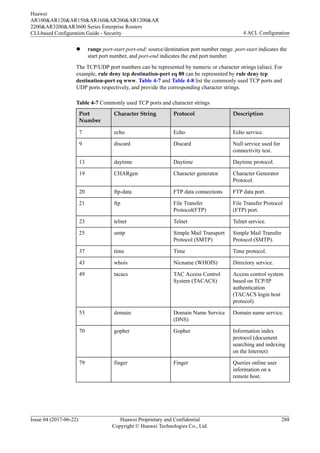
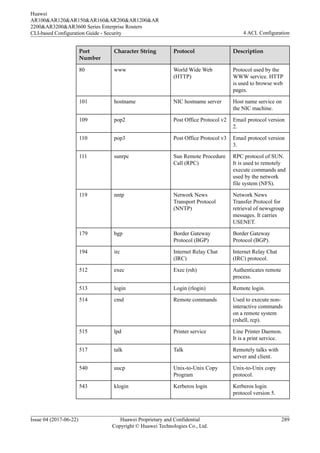
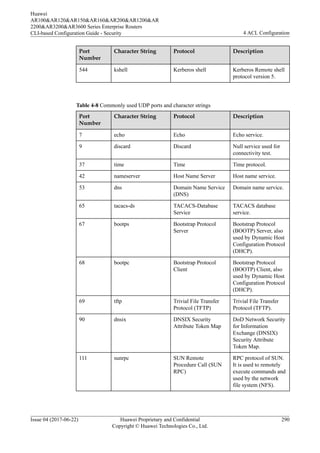
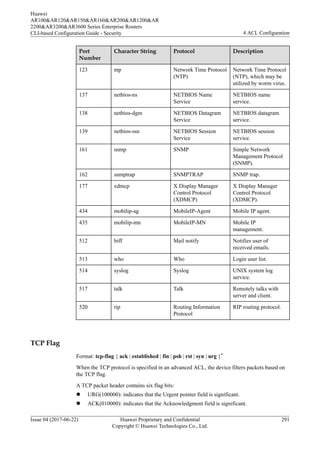
The TCP/UDP port numbers can be represented by numeric or character strings (alias). For
example, rule deny tcp destination-port eq 80 can be represented by rule deny tcp
destination-port eq www. Table 4-7 and Table 4-8 list the commonly used TCP ports and
UDP ports respectively, and provide the corresponding character strings.
Table 4-7 Commonly used TCP ports and character strings
Port
Number
Character String Protocol Description
7 echo Echo Echo service.
9 discard Discard Null service used for
connectivity test.
13 daytime Daytime Daytime protocol.
19 CHARgen Character generator Character Generator
Protocol.
20 ftp-data FTP data connections FTP data port.
21 ftp File Transfer
Protocol(FTP)
File Transfer Protocol
(FTP) port.
23 telnet Telnet Telnet service.
25 smtp Simple Mail Transport
Protocol (SMTP)
Simple Mail Transfer
Protocol (SMTP).
37 time Time Time protocol.
43 whois Nicname (WHOIS) Directory service.
49 tacacs TAC Access Control
System (TACACS)
Access control system
based on TCP/IP
authentication
(TACACS login host
protocol)
53 domain Domain Name Service
(DNS)
Domain name service.
70 gopher Gopher Information index
protocol (document
searching and indexing
on the Internet)
79 finger Finger Queries online user
information on a
remote host.
Huawei
AR100&AR120&AR150&AR160&AR200&AR1200&AR
2200&AR3200&AR3600 Series Enterprise Routers
CLI-based Configuration Guide - Security 4 ACL Configuration
Issue 04 (2017-06-22) Huawei Proprietary and Confidential
Copyright © Huawei Technologies Co., Ltd.
288
Port
Number
Character String Protocol Description
80 www World Wide Web
(HTTP)
Protocol used by the
WWW service. HTTP
is used to browse web
pages.
101 hostname NIC hostname server Host name service on
the NIC machine.
109 pop2 Post Office Protocol v2 Email protocol version
2.
110 pop3 Post Office Protocol v3 Email protocol version
3.
111 sunrpc Sun Remote Procedure
Call (RPC)
RPC protocol of SUN.
It is used to remotely
execute commands and
used by the network
file system (NFS).
119 nntp Network News
Transport Protocol
(NNTP)
Network News
Transfer Protocol for
retrieval of newsgroup
messages. It carries
USENET.
179 bgp Border Gateway
Protocol (BGP)
Border Gateway
Protocol (BGP).
194 irc Internet Relay Chat
(IRC)
Internet Relay Chat
(IRC) protocol.
512 exec Exec (rsh) Authenticates remote
process.
513 login Login (rlogin) Remote login.
514 cmd Remote commands Used to execute non-
interactive commands
on a remote system
(rshell, rcp).
515 lpd Printer service Line Printer Daemon.
It is a print service.
517 talk Talk Remotely talks with
server and client.
540 uucp Unix-to-Unix Copy
Program
Unix-to-Unix copy
protocol.
543 klogin Kerberos login Kerberos login
protocol version 5.
Huawei
AR100&AR120&AR150&AR160&AR200&AR1200&AR
2200&AR3200&AR3600 Series Enterprise Routers
CLI-based Configuration Guide - Security 4 ACL Configuration
Issue 04 (2017-06-22) Huawei Proprietary and Confidential
Copyright © Huawei Technologies Co., Ltd.
289
Port
Number
Character String Protocol Description
544 kshell Kerberos shell Kerberos Remote shell
protocol version 5.
Table 4-8 Commonly used UDP ports and character strings
Port
Number
Character String Protocol Description
7 echo Echo Echo service.
9 discard Discard Null service used for
connectivity test.
37 time Time Time protocol.
42 nameserver Host Name Server Host name service.
53 dns Domain Name Service
(DNS)
Domain name service.
65 tacacs-ds TACACS-Database
Service
TACACS database
service.
67 bootps Bootstrap Protocol
Server
Bootstrap Protocol
(BOOTP) Server, also
used by Dynamic Host
Configuration Protocol
(DHCP).
68 bootpc Bootstrap Protocol
Client
Bootstrap Protocol
(BOOTP) Client, also
used by Dynamic Host
Configuration Protocol
(DHCP).
69 tftp Trivial File Transfer
Protocol (TFTP)
Trivial File Transfer
Protocol (TFTP).
90 dnsix DNSIX Security
Attribute Token Map
DoD Network Security
for Information
Exchange (DNSIX)
Security Attribute
Token Map.
111 sunrpc SUN Remote
Procedure Call (SUN
RPC)
RPC protocol of SUN.
It is used to remotely
execute commands and
used by the network
file system (NFS).
Huawei
AR100&AR120&AR150&AR160&AR200&AR1200&AR
2200&AR3200&AR3600 Series Enterprise Routers
CLI-based Configuration Guide - Security 4 ACL Configuration
Issue 04 (2017-06-22) Huawei Proprietary and Confidential
Copyright © Huawei Technologies Co., Ltd.
290
Port
Number
Character String Protocol Description
123 ntp Network Time Protocol
(NTP)
Network Time Protocol
(NTP), which may be
utilized by worm virus.
137 netbios-ns NETBIOS Name
Service
NETBIOS name
service.
138 netbios-dgm NETBIOS Datagram
Service
NETBIOS datagram
service.
139 netbios-ssn NETBIOS Session
Service
NETBIOS session
service.
161 snmp SNMP Simple Network
Management Protocol
(SNMP).
162 snmptrap SNMPTRAP SNMP trap.
177 xdmcp X Display Manager
Control Protocol
(XDMCP)
X Display Manager
Control Protocol
(XDMCP).
434 mobilip-ag MobileIP-Agent Mobile IP agent.
435 mobilip-mn MobileIP-MN Mobile IP
management.
512 biff Mail notify Notifies user of
received emails.
513 who Who Login user list.
514 syslog Syslog UNIX system log
service.
517 talk Talk Remotely talks with
server and client.
520 rip Routing Information
Protocol
RIP routing protocol.
TCP Flag
Format: tcp-flag { ack | established | fin | psh | rst | syn | urg }*
When the TCP protocol is specified in an advanced ACL, the device filters packets based on
the TCP flag.
A TCP packet header contains six flag bits:
l URG(100000): indicates that the Urgent pointer field is significant.
l ACK(010000): indicates that the Acknowledgment field is significant.
Huawei
AR100&AR120&AR150&AR160&AR200&AR1200&AR
2200&AR3200&AR3600 Series Enterprise Routers
CLI-based Configuration Guide - Security 4 ACL Configuration
Issue 04 (2017-06-22) Huawei Proprietary and Confidential
Copyright © Huawei Technologies Co., Ltd.
291
l PSH(001000): push function. Asks to push the buffered data to the receiving application.
l RST(000100): resets the connection.
l SYN(000010): synchronizes sequence numbers to initiate a connection.
l FIN(000001): no more data from sender.
The established field in TCP flags indicates that the flag bit is ACK(010000) or
RST(000100).
The ACL rule with the tcp-flag keyword specified can implement unidirectional access
control. For example, it is required that users on network segment 192.168.1.0/24 can access
network segment 192.168.2.0/24, but users on network segment 192.168.2.0/24 cannot access
network segment 192.168.1.0/24. To meet this requirement, you can apply an ACL rule to the
inbound direction of the interface connecting to network segment 192.168.2.0/24.
From TCP connection setup to teardown only the packets used for TCP connection
establishment can have the ACK value of 1 and RST value of 1. According to the packet
characteristics, configure the following rules to permit the packets used for establishing TCP
connections and reject other TCP packets. In this way, you can block the TCP connection
requests from network segment 192.168.2.0/24.
l Rule 1: Configure an ACL rule with the ack and rst keywords specified.
rule 5 permit tcp source 192.168.2.0 0.0.0.255 tcp-flag ack //Permit the TCP
packets with the ACK value of 1.
rule 10 permit tcp source 192.168.2.0 0.0.0.255 tcp-flag rst //Permit the
TCP packets with the RST value of 1.
rule 15 deny tcp source 192.168.2.0 0.0.0.255 //Reject other TCP packets.
l Rule 2: Configure an ACL rule with the established keyword specified.
rule permit tcp source 192.168.2.0 0.0.0.255 tcp-flag established //
established indicates that ACK is 1 or RST is 1. The packets exchanged during
TCP connection established are permitted.
rule deny tcp source 192.168.2.0 0.0.0.255 //Reject other TCP packets.
IP Fragmentation
Format: none-first-fragment
A basic ACL and an advanced ACL can filter packets based on IP fragmentation information.
The fragments of an IP packet include the initial fragment and non-initial fragments. Only the
initial fragment contains Layer 4 information, such as TCP and UDP port numbers. A
network device checks whether a received fragment is the last fragment. If the fragment is not
the last, the device allocates memory space for it, and reassembles the fragments after the last
fragment is received. However, an exploit exists whereby an attacker may send fragments to a
device without sending the last fragment. Because the device cannot release memory until the
last fragment is received and all fragments are reassembled, if a large enough number of
fragments are sent in a short period, the device cannot process other services due to
insufficient memory resources. To mitigate such an attack, the device starts a reassembling
timer. If reassembly cannot be finished before the timer expires, the device returns an ICMP
Error packet to the sender; if reassembly cannot be finished after the timer expires, the device
discards the fragments stored in memory.
To prevent fragment packet attacks, you can specify the none-first-fragment keyword in an
ACL rule to block non-initial fragments.
Table 4-9 describes how the ACLs process non-fragment packets, initial fragments, and non-
initial fragments.
Huawei
AR100&AR120&AR150&AR160&AR200&AR1200&AR
2200&AR3200&AR3600 Series Enterprise Routers
CLI-based Configuration Guide - Security 4 ACL Configuration
Issue 04 (2017-06-22) Huawei Proprietary and Confidential
Copyright © Huawei Technologies Co., Ltd.
292
Table 4-9 IP packet processing methods
Matching
Conditions
Non-fragment
Packets
Initial Fragments Non-initial
Fragments
Layer 3
information
(such as
source/
destination
IP
addresses)
When packets match
Layer 3 information,
the matching result
(permit or deny) is
returned; otherwise, the
next rule is processed.
When packets match
Layer 3 information,
the matching result
(permit or deny) is
returned; otherwise, the
next rule is processed.
When packets match
Layer 3 information,
the matching result
(permit or deny) is
returned; otherwise, the
next rule is processed.
Layer 3
information
and Layer 4
information
(such as
TCP and
UDP port
numbers)
When packets match
both Layer 3 and Layer
4 information, the
matching result (permit
or deny) is returned;
otherwise, the next rule
is processed.
When packets match
both Layer 3 and Layer
4 information, the
matching result (permit
or deny) is returned;
otherwise, the next rule
is processed.
The packets do not
match the rule, so the
next rule is processed.
Layer 3
information
and none-
first-
fragment
The packets do not
match the rule, so the
next rule is processed.
The packets do not
match the rule, so the
next rule is processed.
When packets match
Layer 3 information,
the matching result
(permit or deny) is
returned; otherwise, the
next rule is processed.
For example, ACL 3012 contains the following rules:
#
acl number 3012
rule 5 deny tcp destination 192.168.2.2 0 none-first-fragment
rule 10 permit tcp destination 192.168.2.2 0 destination-port eq www
rule 15 deny ip
#
l This packet is a non-fragment packet or initial fragment: If the destination port number is
80 (WWW), this packet matches rule 10 and is permitted; otherwise, the packet matches
rule 15 and is discarded.
l The packet is a non-initial fragment: The packet matches rule 5 and is discarded.
4.2.6 Time Range
Background
An ACL contains various matching conditions to filter most packets. However, networks
continue to evolve and requirements change. For example, an enterprise allows employees to
access only the specified websites during work hours, and to access other websites in off-
hours and weekends. Here is another example. The P2P and downloading services affect other
data services during the peak hours of 20:00-22:00; therefore, the network administrator is
required to lower the bandwidth for the P2P and downloading services in this period.
Huawei
AR100&AR120&AR150&AR160&AR200&AR1200&AR
2200&AR3200&AR3600 Series Enterprise Routers
CLI-based Configuration Guide - Security 4 ACL Configuration
Issue 04 (2017-06-22) Huawei Proprietary and Confidential
Copyright © Huawei Technologies Co., Ltd.
293
Time-based ACL can meet the preceding requirements. The network administrators can create
one or multiple time ranges according to users' network access behaviors and network
congestion condition, and associate the time ranges with ACL rules. In this way,
administrators can configure different policies in different time ranges to optimize networks.
Time Range Mode
You can associate a time range with ACL rules in either of the following ways:
l Mode 1 - Periodic time range: defines a time range based on weeks. The associated ACL
rules take effect at an interval of one week. For example, if the time range of ACL rules
is 8:00-12:00 on Monday, the ACL rules take effect at 8:00-12:00 on every Monday.
Format: time-range time-name start-time to end-time { days } &<1-7>
– time-name: indicates the name of a time range. It is a string starting with a letter.
– start-time to end-time: indicates the start and end time of the time range. The format
is [hour:minute] to [hour:minute].
– days: includes the following values:
n One of Mon, Tue, Wed, Thu, Fri, Sat, and Sun or a combination of them.
The value can also be numeric. For example, 0 indicates Sunday, 1 indicates
Monday..., and 6 indicates Saturday.
n working-day: from Monday to Friday.
n daily: from Monday to Sunday.
n off-day: Saturday and Sunday.
l Mode 2 - Absolute time range: defines a time range from YYYY/MM/DD hh:mm to
YYYY/MM/DD hh:mm. The associated ACL rules take effect only in this period.
Format: time-range time-name from time1 date1 [ to time2 date2 ]
– time-name: indicates the name of a time range. It is a string starting with a letter.
– time1/time2: The format is [hour:minute].
– date1/date2: The format is [YYYY/MM/DD], indicating year/month/date.
You can specify multiple time ranges in the same time-name parameter. The device obtains
the intersection of the configured periodic or absolute time ranges.
For example, ACL 2001 is associated with time range test, which contains three sub-ranges:
#
time-range test 8:00 to 18:00 working-day
time-range test 14:00 to 18:00 off-day
time-range test from 00:00 2014/01/01 to 23:59 2014/12/31
#
acl number 2001
rule 5 permit time-range test
l Sub-range 1: 8:00-18:00 from Monday to Friday (periodic time range)
l Sub-range 2: 14:00-18:00 on Saturday and Sunday (periodic time range)
l Sub-range 3: from 2014-1-1 00:00 to 2014-12-31 23:59 (absolute time range)
The time range test is: 8:00-18:00 on Monday to Friday and 14:00-18:00 every Saturday and
Sunday in 2014.
4.2.7 Default ACL Actions and Mechanisms of Different Service
Modules
Huawei
AR100&AR120&AR150&AR160&AR200&AR1200&AR
2200&AR3200&AR3600 Series Enterprise Routers
CLI-based Configuration Guide - Security 4 ACL Configuration
Issue 04 (2017-06-22) Huawei Proprietary and Confidential
Copyright © Huawei Technologies Co., Ltd.
294
Applying ACL to Service Modules
After an ACL is configured, it must be applied to a service module so that the ACL rules can
be delivered and take effect.
Usually, an ACL is applied to a traffic policy or simplified traffic policy so that the device can
deliver ACL rules globally, in a VLAN, or on an interface to filter packets to be forwarded. In
addition, an ACL can be applied to the service modules such as Telnet, FTP, and routing.
Table 4-10 describes how the service modules process ACLs.
Table 4-10 Applying ACLs to service modules
Service
Category
Usage Scenario Service Modules
Filtering
packets to be
forwarded
The device filters received packets
globally, on an interface, or in a
VLAN, and then discards, modifies
priorities of, or redirects the filtered
packets.
For example, you can use ACL to
reduce the service level for the
bandwidth-consuming services,
such as P2P downloading and
online video. When network
congestion occurs, these packets are
discarded first.
Traffic policy, simplified traffic
policy
Filtering
packets to be
sent to the CPU
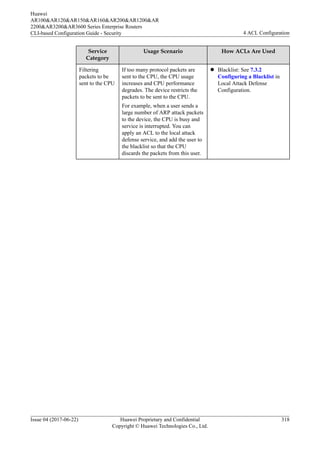
If too many protocol packets are
sent to the CPU, the CPU usage
increases and CPU performance
degrades. The device restricts the
packets to be sent to the CPU.
For example, when a user sends a
large number of ARP attack packets
to the device, the CPU is busy and
service is interrupted. You can
apply an ACL to the local attack
defense service, and add the user to
the blacklist so that the CPU
discards the packets from this user.
Blacklist
Huawei
AR100&AR120&AR150&AR160&AR200&AR1200&AR
2200&AR3200&AR3600 Series Enterprise Routers
CLI-based Configuration Guide - Security 4 ACL Configuration
Issue 04 (2017-06-22) Huawei Proprietary and Confidential
Copyright © Huawei Technologies Co., Ltd.
295
Service
Category
Usage Scenario Service Modules
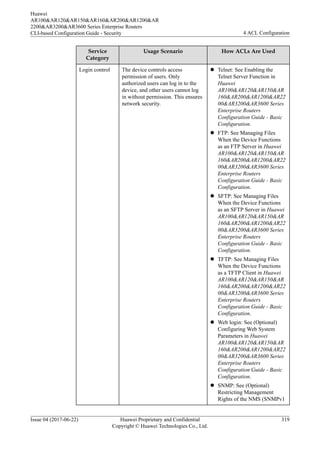
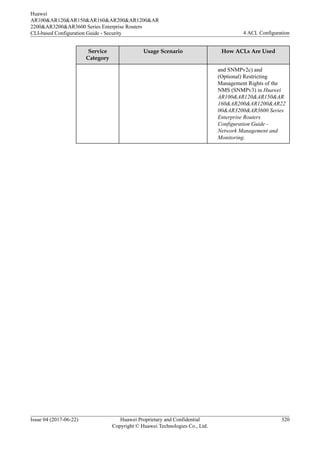
Login control The device controls access
permission of users. Only
authorized users can log in to the
device, and other users cannot log
in without permission. This ensures
network security.
For example, only the administrator
is allowed to log in to the device.
You can apply an ACL to the Telnet
service and specify the hosts that
can log in to the device or the hosts
that cannot log in.
Telnet, STelnet, FTP, SFTP,
HTTP, SNMP
Route filtering ACLs can be applied to various
dynamic routing protocols to filter
advertised and received routes and
multicast groups.
For example, you can apply an ACL
to a routing policy to prevent the
device from sending routes of a
network segment to the neighboring
router.
BGP, IS-IS, OSPF, OSPFv3, RIP,
RIPng, multicast protocol
Default ACL Actions and Mechanisms
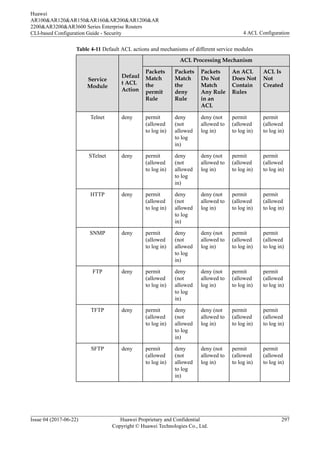
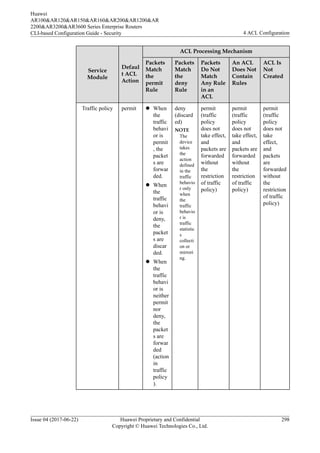
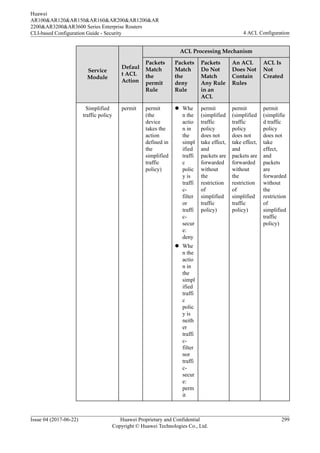
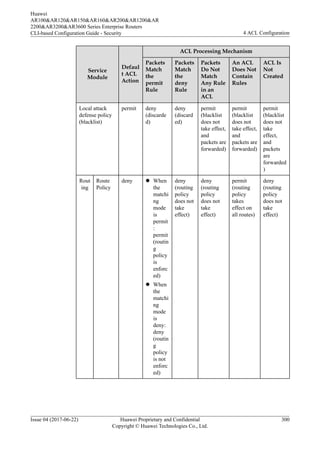
When an ACL is applied to service modules, the modules take different actions on the packets
matching or not matching ACL rules.
For example, the default action of a traffic policy is permit and an ACL containing rules is
applied to the traffic policy. If a packet does not match any ACL rules, the packet is permitted.
The default action of the Telnet module is deny and an ACL containing rules is applied to the
Telnet module. If a packet does not match any ACL rules, the packet is rejected.
The blacklist module processes ACL in a different way. After an ACL is applied to a blacklist,
the packets matching any ACL rule are discarded no matter whether they match the permit or
deny rule.
Table 4-11 provides the default ACL actions and mechanisms taken by each service module.
Huawei
AR100&AR120&AR150&AR160&AR200&AR1200&AR
2200&AR3200&AR3600 Series Enterprise Routers
CLI-based Configuration Guide - Security 4 ACL Configuration
Issue 04 (2017-06-22) Huawei Proprietary and Confidential
Copyright © Huawei Technologies Co., Ltd.
296
Table 4-11 Default ACL actions and mechanisms of different service modules
Service
Module
Defaul
t ACL
Action
ACL Processing Mechanism
Packets
Match
the
permit
Rule
Packets
Match
the
deny
Rule
Packets
Do Not
Match
Any Rule
in an
ACL
An ACL
Does Not
Contain
Rules
ACL Is
Not
Created
Telnet deny permit
(allowed
to log in)
deny
(not
allowed
to log
in)
deny (not
allowed to
log in)
permit
(allowed
to log in)
permit
(allowed
to log in)
STelnet deny permit
(allowed
to log in)
deny
(not
allowed
to log
in)
deny (not
allowed to
log in)
permit
(allowed
to log in)
permit
(allowed
to log in)
HTTP deny permit
(allowed
to log in)
deny
(not
allowed
to log
in)
deny (not
allowed to
log in)
permit
(allowed
to log in)
permit
(allowed
to log in)
SNMP deny permit
(allowed
to log in)
deny
(not
allowed
to log
in)
deny (not
allowed to
log in)
permit
(allowed
to log in)
permit
(allowed
to log in)
FTP deny permit
(allowed
to log in)
deny
(not
allowed
to log
in)
deny (not
allowed to
log in)
permit
(allowed
to log in)
permit
(allowed
to log in)
TFTP deny permit
(allowed
to log in)
deny
(not
allowed
to log
in)
deny (not
allowed to
log in)
permit
(allowed
to log in)
permit
(allowed
to log in)
SFTP deny permit
(allowed
to log in)
deny
(not
allowed
to log
in)
deny (not
allowed to
log in)
permit
(allowed
to log in)
permit
(allowed
to log in)
Huawei
AR100&AR120&AR150&AR160&AR200&AR1200&AR
2200&AR3200&AR3600 Series Enterprise Routers
CLI-based Configuration Guide - Security 4 ACL Configuration
Issue 04 (2017-06-22) Huawei Proprietary and Confidential
Copyright © Huawei Technologies Co., Ltd.
297
Service
Module
Defaul
t ACL
Action
ACL Processing Mechanism
Packets
Match
the
permit
Rule
Packets
Match
the
deny
Rule
Packets
Do Not
Match
Any Rule
in an
ACL
An ACL
Does Not
Contain
Rules
ACL Is
Not
Created
Traffic policy permit l When
the
traffic
behavi
or is
permit
, the
packet
s are
forwar
ded.
l When
the
traffic
behavi
or is
deny,
the
packet
s are
discar
ded.
l When
the
traffic
behavi
or is
neither
permit
nor
deny,
the
packet
s are
forwar
ded
(action
in
traffic
policy
).
deny
(discard
ed)
NOTE
The
device
takes
the
action
defined
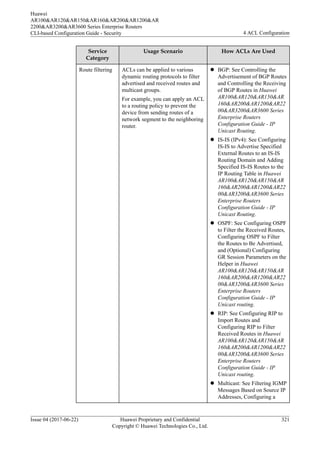
in the
traffic
behavio
r only
when
the
traffic
behavio
r is
traffic
statistic
s
collecti
on or
mirrori
ng.
permit
(traffic
policy
does not
take effect,
and
packets are
forwarded
without
the
restriction
of traffic
policy)
permit
(traffic
policy
does not
take effect,
and
packets are
forwarded
without
the
restriction
of traffic
policy)
permit
(traffic
policy
does not
take
effect,
and
packets
are
forwarded
without
the
restriction
of traffic
policy)
Huawei
AR100&AR120&AR150&AR160&AR200&AR1200&AR
2200&AR3200&AR3600 Series Enterprise Routers
CLI-based Configuration Guide - Security 4 ACL Configuration
Issue 04 (2017-06-22) Huawei Proprietary and Confidential
Copyright © Huawei Technologies Co., Ltd.
298
Service
Module
Defaul
t ACL
Action
ACL Processing Mechanism
Packets
Match
the
permit
Rule
Packets
Match
the
deny
Rule
Packets
Do Not
Match
Any Rule
in an
ACL
An ACL
Does Not
Contain
Rules
ACL Is
Not
Created
Simplified
traffic policy
permit permit
(the
device
takes the
action
defined in
the
simplified
traffic
policy)
l Whe
n the
actio
n in
the
simpl
ified
traffi
c
polic
y is
traffi
c-
filter
or
traffi
c-
secur
e:
deny
l Whe
n the
actio
n in
the
simpl
ified
traffi
c
polic
y is
neith
er
traffi
c-
filter
nor
traffi
c-
secur
e:
perm
it
permit
(simplified
traffic
policy
does not
take effect,
and
packets are
forwarded
without
the
restriction
of
simplified
traffic
policy)
permit
(simplified
traffic
policy
does not
take effect,
and
packets are
forwarded
without
the
restriction
of
simplified
traffic
policy)
permit
(simplifie
d traffic
policy
does not
take
effect,
and
packets
are
forwarded
without
the
restriction
of
simplified
traffic
policy)
Huawei
AR100&AR120&AR150&AR160&AR200&AR1200&AR
2200&AR3200&AR3600 Series Enterprise Routers
CLI-based Configuration Guide - Security 4 ACL Configuration
Issue 04 (2017-06-22) Huawei Proprietary and Confidential
Copyright © Huawei Technologies Co., Ltd.
299
Service
Module
Defaul
t ACL
Action
ACL Processing Mechanism
Packets
Match
the
permit
Rule
Packets
Match
the
deny
Rule
Packets
Do Not
Match
Any Rule
in an
ACL
An ACL
Does Not
Contain
Rules
ACL Is
Not
Created
Local attack
defense policy
(blacklist)
permit deny
(discarde
d)
deny
(discard
ed)
permit
(blacklist
does not
take effect,
and
packets are
forwarded)
permit
(blacklist
does not
take effect,
and
packets are
forwarded)
permit
(blacklist
does not
take
effect,
and
packets
are
forwarded
)
Rout
ing
Route
Policy
deny l When
the
matchi
ng
mode
is
permit
:
permit
(routin
g
policy
is
enforc
ed)
l When
the
matchi
ng
mode
is
deny:
deny
(routin
g
policy
is not
enforc
ed)
deny
(routing
policy
does not
take
effect)
deny
(routing
policy
does not
take
effect)
permit
(routing
policy
takes
effect on
all routes)
deny
(routing
policy
does not
take
effect)
Huawei
AR100&AR120&AR150&AR160&AR200&AR1200&AR
2200&AR3200&AR3600 Series Enterprise Routers
CLI-based Configuration Guide - Security 4 ACL Configuration
Issue 04 (2017-06-22) Huawei Proprietary and Confidential
Copyright © Huawei Technologies Co., Ltd.
300
Service
Module
Defaul
t ACL
Action
ACL Processing Mechanism
Packets
Match
the
permit
Rule
Packets
Match
the
deny
Rule
Packets
Do Not
Match
Any Rule
in an
ACL
An ACL
Does Not
Contain
Rules
ACL Is
Not
Created
Filter
Policy
deny permit
(route
advertise
ment or
reception
is
allowed)
deny
(route
advertis
ement or
receptio
n is not
allowed)
deny
(route
advertisem
ent or
reception
is not
allowed)
deny
(route
advertisem
ent or
reception
is not
allowed)
permit
(route
advertise
ment or
reception
is
allowed)
Mult
icast
igmp-
snoopin
g ssm-
policy
deny permit
(added to
SSM
group
address
range)
deny
(not
added to
SSM
group
address
range)
deny (not
added to
SSM
group
address
range)
deny (not
added to
SSM
group
address
range, and
no group
is in the
SSM
group
address
range)
deny (not
added to
SSM
group
address
range,
and only
the
temporary
group
addresses
232.0.0.0-
232.255.2
55.255
are in the
SSM
group
address
range)
igmp-
snoopin
g group-
policy
permit permit
(added to
multicast
group)
deny
(not
added to
multicas
t group)
permit
(added to
multicast
group)
permit
(added to
multicast
group)
permit
(added to
multicast
group)
4.2.8 ACL Configuration Principles
When configuring ACL rules, follow these principles:
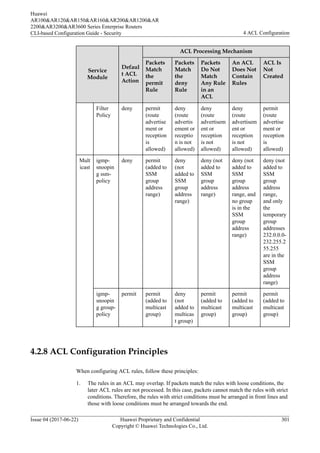
1. The rules in an ACL may overlap. If packets match the rules with loose conditions, the
later ACL rules are not processed. In this case, packets cannot match the rules with strict
conditions. Therefore, the rules with strict conditions must be arranged in front lines and
those with loose conditions must be arranged towards the end.
Huawei
AR100&AR120&AR150&AR160&AR200&AR1200&AR
2200&AR3200&AR3600 Series Enterprise Routers
CLI-based Configuration Guide - Security 4 ACL Configuration
Issue 04 (2017-06-22) Huawei Proprietary and Confidential
Copyright © Huawei Technologies Co., Ltd.
301
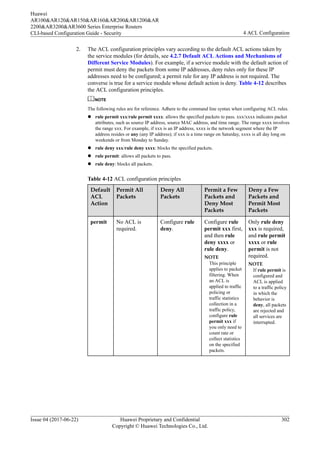
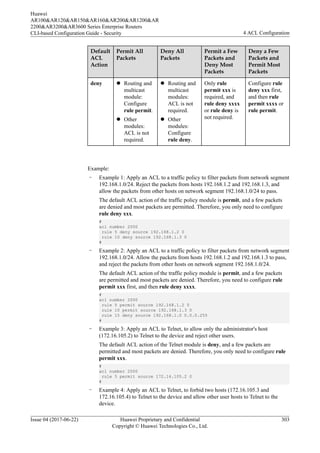
2. The ACL configuration principles vary according to the default ACL actions taken by
the service modules (for details, see 4.2.7 Default ACL Actions and Mechanisms of
Different Service Modules). For example, if a service module with the default action of
permit must deny the packets from some IP addresses, deny rules only for these IP
addresses need to be configured; a permit rule for any IP address is not required. The
converse is true for a service module whose default action is deny. Table 4-12 describes
the ACL configuration principles.
NOTE
The following rules are for reference. Adhere to the command line syntax when configuring ACL rules.
l rule permit xxx/rule permit xxxx: allows the specified packets to pass. xxx/xxxx indicates packet
attributes, such as source IP address, source MAC address, and time range. The range xxxx involves
the range xxx. For example, if xxx is an IP address, xxxx is the network segment where the IP
address resides or any (any IP address); if xxx is a time range on Saturday, xxxx is all day long on
weekends or from Monday to Sunday.
l rule deny xxx/rule deny xxxx: blocks the specified packets.
l rule permit: allows all packets to pass.
l rule deny: blocks all packets.
Table 4-12 ACL configuration principles
Default
ACL
Action
Permit All
Packets
Deny All
Packets
Permit a Few
Packets and
Deny Most
Packets
Deny a Few
Packets and
Permit Most
Packets
permit No ACL is
required.
Configure rule
deny.
Configure rule
permit xxx first,
and then rule
deny xxxx or
rule deny.
NOTE
This principle
applies to packet
filtering. When
an ACL is
applied to traffic
policing or
traffic statistics
collection in a
traffic policy,
configure rule
permit xxx if
you only need to
count rate or
collect statistics
on the specified
packets.
Only rule deny
xxx is required,
and rule permit
xxxx or rule
permit is not
required.
NOTE
If rule permit is
configured and
ACL is applied
to a traffic policy
in which the
behavior is
deny, all packets
are rejected and
all services are
interrupted.
Huawei
AR100&AR120&AR150&AR160&AR200&AR1200&AR
2200&AR3200&AR3600 Series Enterprise Routers
CLI-based Configuration Guide - Security 4 ACL Configuration
Issue 04 (2017-06-22) Huawei Proprietary and Confidential
Copyright © Huawei Technologies Co., Ltd.
302
Default
ACL
Action
Permit All
Packets
Deny All
Packets
Permit a Few
Packets and
Deny Most
Packets
Deny a Few
Packets and
Permit Most
Packets
deny l Routing and
multicast
module:
Configure
rule permit.
l Other
modules:
ACL is not
required.
l Routing and
multicast
modules:
ACL is not
required.
l Other
modules:
Configure
rule deny.
Only rule
permit xxx is
required, and
rule deny xxxx
or rule deny is
not required.
Configure rule
deny xxx first,
and then rule
permit xxxx or
rule permit.
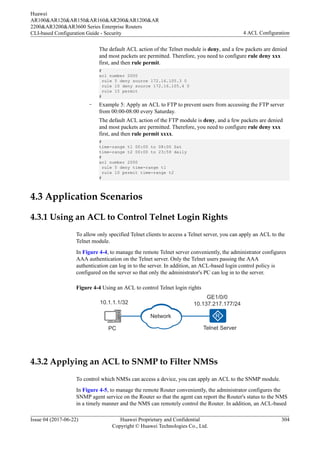
Example:
– Example 1: Apply an ACL to a traffic policy to filter packets from network segment
192.168.1.0/24. Reject the packets from hosts 192.168.1.2 and 192.168.1.3, and
allow the packets from other hosts on network segment 192.168.1.0/24 to pass.
The default ACL action of the traffic policy module is permit, and a few packets
are denied and most packets are permitted. Therefore, you only need to configure
rule deny xxx.
#
acl number 2000
rule 5 deny source 192.168.1.2 0
rule 10 deny source 192.168.1.3 0
#
– Example 2: Apply an ACL to a traffic policy to filter packets from network segment
192.168.1.0/24. Allow the packets from hosts 192.168.1.2 and 192.168.1.3 to pass,
and reject the packets from other hosts on network segment 192.168.1.0/24.
The default ACL action of the traffic policy module is permit, and a few packets
are permitted and most packets are denied. Therefore, you need to configure rule
permit xxx first, and then rule deny xxxx.
#
acl number 2000
rule 5 permit source 192.168.1.2 0
rule 10 permit source 192.168.1.3 0
rule 15 deny source 192.168.1.0 0.0.0.255
#
– Example 3: Apply an ACL to Telnet, to allow only the administrator's host
(172.16.105.2) to Telnet to the device and reject other users.
The default ACL action of the Telnet module is deny, and a few packets are
permitted and most packets are denied. Therefore, you only need to configure rule
permit xxx.
#
acl number 2000
rule 5 permit source 172.16.105.2 0
#
– Example 4: Apply an ACL to Telnet, to forbid two hosts (172.16.105.3 and
172.16.105.4) to Telnet to the device and allow other user hosts to Telnet to the
device.
Huawei
AR100&AR120&AR150&AR160&AR200&AR1200&AR
2200&AR3200&AR3600 Series Enterprise Routers
CLI-based Configuration Guide - Security 4 ACL Configuration
Issue 04 (2017-06-22) Huawei Proprietary and Confidential
Copyright © Huawei Technologies Co., Ltd.
303
The default ACL action of the Telnet module is deny, and a few packets are denied
and most packets are permitted. Therefore, you need to configure rule deny xxx
first, and then rule permit.
#
acl number 2000
rule 5 deny source 172.16.105.3 0
rule 10 deny source 172.16.105.4 0
rule 15 permit
#
– Example 5: Apply an ACL to FTP to prevent users from accessing the FTP server
from 00:00-08:00 every Saturday.
The default ACL action of the FTP module is deny, and a few packets are denied
and most packets are permitted. Therefore, you need to configure rule deny xxx
first, and then rule permit xxxx.
#
time-range t1 00:00 to 08:00 Sat
time-range t2 00:00 to 23:59 daily
#
acl number 2000
rule 5 deny time-range t1
rule 10 permit time-range t2
#
4.3 Application Scenarios
4.3.1 Using an ACL to Control Telnet Login Rights
To allow only specified Telnet clients to access a Telnet server, you can apply an ACL to the
Telnet module.
In Figure 4-4, to manage the remote Telnet server conveniently, the administrator configures
AAA authentication on the Telnet server. Only the Telnet users passing the AAA
authentication can log in to the server. In addition, an ACL-based login control policy is
configured on the server so that only the administrator's PC can log in to the server.
Figure 4-4 Using an ACL to control Telnet login rights
PC Telnet Server
GE1/0/0
10.137.217.177/24
10.1.1.1/32
Network
4.3.2 Applying an ACL to SNMP to Filter NMSs
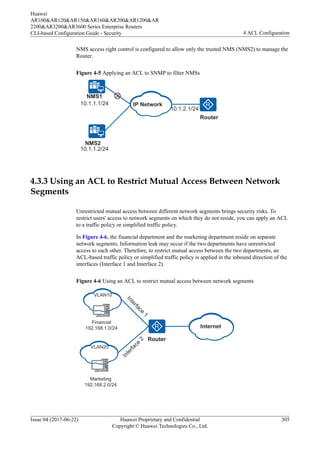
To control which NMSs can access a device, you can apply an ACL to the SNMP module.
In Figure 4-5, to manage the remote Router conveniently, the administrator configures the
SNMP agent service on the Router so that the agent can report the Router's status to the NMS
in a timely manner and the NMS can remotely control the Router. In addition, an ACL-based
Huawei
AR100&AR120&AR150&AR160&AR200&AR1200&AR
2200&AR3200&AR3600 Series Enterprise Routers
CLI-based Configuration Guide - Security 4 ACL Configuration
Issue 04 (2017-06-22) Huawei Proprietary and Confidential
Copyright © Huawei Technologies Co., Ltd.
304
NMS access right control is configured to allow only the trusted NMS (NMS2) to manage the
Router.
Figure 4-5 Applying an ACL to SNMP to filter NMSs
10.1.2.1/24
Router
10.1.1.1/24
10.1.1.2/24
NMS2
NMS1
IP Network
4.3.3 Using an ACL to Restrict Mutual Access Between Network
Segments
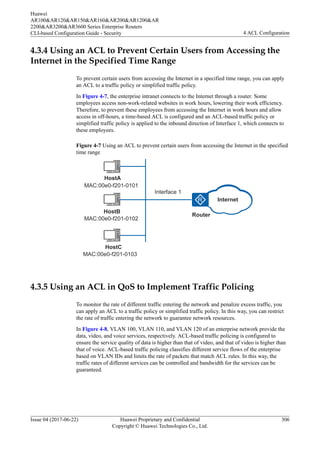
Unrestricted mutual access between different network segments brings security risks. To
restrict users' access to network segments on which they do not reside, you can apply an ACL
to a traffic policy or simplified traffic policy.
In Figure 4-6, the financial department and the marketing department reside on separate
network segments. Information leak may occur if the two departments have unrestricted
access to each other. Therefore, to restrict mutual access between the two departments, an
ACL-based traffic policy or simplified traffic policy is applied in the inbound direction of the
interfaces (Interface 1 and Interface 2).
Figure 4-6 Using an ACL to restrict mutual access between network segments
Financial
192.168.1.0/24
I
n
t
e
r
f
a
c
e
1
Marketing
192.168.2.0/24
Internet
Router
I
n
t
e
r
f
a
c
e
2
VLAN10
VLAN20
Huawei
AR100&AR120&AR150&AR160&AR200&AR1200&AR
2200&AR3200&AR3600 Series Enterprise Routers
CLI-based Configuration Guide - Security 4 ACL Configuration
Issue 04 (2017-06-22) Huawei Proprietary and Confidential
Copyright © Huawei Technologies Co., Ltd.
305
4.3.4 Using an ACL to Prevent Certain Users from Accessing the
Internet in the Specified Time Range
To prevent certain users from accessing the Internet in a specified time range, you can apply
an ACL to a traffic policy or simplified traffic policy.
In Figure 4-7, the enterprise intranet connects to the Internet through a router. Some
employees access non-work-related websites in work hours, lowering their work efficiency.
Therefore, to prevent these employees from accessing the Internet in work hours and allow
access in off-hours, a time-based ACL is configured and an ACL-based traffic policy or
simplified traffic policy is applied to the inbound direction of Interface 1, which connects to
these employees.
Figure 4-7 Using an ACL to prevent certain users from accessing the Internet in the specified
time range
HostB
Router
Interface 1
HostC
HostA
MAC:00e0-f201-0101
MAC:00e0-f201-0102
MAC:00e0-f201-0103
Internet
4.3.5 Using an ACL in QoS to Implement Traffic Policing
To monitor the rate of different traffic entering the network and penalize excess traffic, you
can apply an ACL to a traffic policy or simplified traffic policy. In this way, you can restrict
the rate of traffic entering the network to guarantee network resources.
In Figure 4-8, VLAN 100, VLAN 110, and VLAN 120 of an enterprise network provide the
data, video, and voice services, respectively. ACL-based traffic policing is configured to
ensure the service quality of data is higher than that of video, and that of video is higher than
that of voice. ACL-based traffic policing classifies different service flows of the enterprise
based on VLAN IDs and limits the rate of packets that match ACL rules. In this way, the
traffic rates of different services can be controlled and bandwidth for the services can be
guaranteed.
Huawei
AR100&AR120&AR150&AR160&AR200&AR1200&AR
2200&AR3200&AR3600 Series Enterprise Routers
CLI-based Configuration Guide - Security 4 ACL Configuration
Issue 04 (2017-06-22) Huawei Proprietary and Confidential
Copyright © Huawei Technologies Co., Ltd.
306
Figure 4-8 Using an ACL in QoS to implement traffic policing
VLAN 120
Phone
TV
PC
VLAN 100
VLAN 110
Enterprise
internal
network
Traffic
direction
Router
Internet
4.3.6 Using an ACL to Filter OSPF Routes
An ACL can be applied to various dynamic routing protocols to filter advertised and received
routes.
In Figure 4-9, the network runs the Open Shortest Path First (OSPF) protocol. RouterA
receives routes from the Internet and advertises the routes to the OSPF network. The OSPF
network is allowed to access only three network segments: 172.16.17.0/24, 172.16.18.0/24,
and 172.16.19.0/24. The network connected to RouterC is allowed to access only the network
segment 172.16.18.0/24.
To meet the preceding requirements, an ACL and a routing policy are configured on RouterA.
This routing policy permits RouterA to advertise only the routes on network segments
172.16.17.0/24, 172.16.18.0/24, and 172.16.19.0/24 to RouterB, so that the OSPF network
can access only these three network segments. An ACL and a routing policy are also
configured on RouterC. The routing policy permits RouterC to receive only the route
172.16.18.0/24, so that the network connected to RouterC can access only the network
segment 172.16.18.0/24.
Figure 4-9 Using an ACL to filter OSPF routes
Interface 3
Interface 2
Interface 1
RouterC RouterB RouterA
OSPF
172.16.16.0/24
172.16.17.0/24
172.16.18.0/24
172.16.19.0/24
172.16.20.0/24
Interface 4
Huawei
AR100&AR120&AR150&AR160&AR200&AR1200&AR
2200&AR3200&AR3600 Series Enterprise Routers
CLI-based Configuration Guide - Security 4 ACL Configuration
Issue 04 (2017-06-22) Huawei Proprietary and Confidential
Copyright © Huawei Technologies Co., Ltd.
307
4.3.7 Using ACL in NAT to Filter Traffic
After an ACL is applied to NAT, the NAT device filters the traffic from the external network
to the internal network.
A NAT device filters the traffic from external network to internal network. There are three
NAT modes:
l Endpoint-independent filtering
l Address-dependent filtering
l Address and port-dependent filtering
In Figure 4-10, PC-1 on the private network communicates with PC-2 and PC-3 on the
external network through a NAT device. Datagram 1 is sent from PC-1 to PC-2. The source
port number of the datagram is 1111 and the destination port number is 2222. The NAT device
translates the source IP address to 202.169.10.1.
After PC-1 sends an access request to a PC on the external network, the PC on the external
network transmits traffic to PC-1. The NAT device filters the traffic to PC-1. Datagram 2',
datagram 3', and datagram 4' are sent in three scenarios.
l Datagram 2' is sent from PC-3 to PC-1. The destination address of datagram 2' is
different from that of datagram 1, and the destination port number is 1111. The datagram
can pass the NAT device only when the endpoint-independent filtering mode is used.
l Datagram 3' is sent from PC-2 to PC-1. The destination address of datagram 3' is the
same as that of datagram 1, and the destination port number is 1111. The source port
number of datagram 3' is 3333, which is different from that of datagram 1. The datagram
can pass the NAT device only when the Address-dependent filtering or endpoint-
independent filtering mode is used.
l Datagram 4' is sent from PC-2 to PC-1. The destination address of datagram 4' is the
same as that of datagram 1, and the destination port number is 1111. The source port
number of datagram 4' is 2222, which is the same as that of datagram 1. The datagram
can pass the NAT device when the address and port-dependent filtering mode is used.
This is the default mode, so datagram 4' is always allowed to pass.
Huawei
AR100&AR120&AR150&AR160&AR200&AR1200&AR
2200&AR3200&AR3600 Series Enterprise Routers
CLI-based Configuration Guide - Security 4 ACL Configuration
Issue 04 (2017-06-22) Huawei Proprietary and Confidential
Copyright © Huawei Technologies Co., Ltd.
308
Figure 4-10 Using ACL in NAT to filter traffic
PC-3: 202.1.20.1
PC-2: 202.1.10.1
Data packet 1
Source IP: 10.1.1.1
Source port: 1111
Destination IP: 202.1.10.1
Destination port: 2222
Data packet 1'
Source IP: 202.169.10.1
Source port: 1111
Destination IP: 202.1.10.1
Destination port: 2222
Data packet 2
Source IP: 202.1.20.1
Source port: 4444
Destination IP: 10.1.1.1
Destination port: 1111
Data packet 2'
Source IP: 202.1.20.1
Source port: 4444
Destination IP: 202.169.10.1
Destination port: 1111
Data packet 3
Source IP: 202.1.10.1
Source port: 3333
Destination IP: 10.1.1.1
Destination port: 1111
Data packet 3'
Source IP: 202.1.10.1
Source port: 3333
Destination IP: 202.169.10.1
Destination port: 1111
Data packet 4
Source IP: 202.1.10.1
Source port: 2222
Destination IP: 10.1.1.1
Destination port: 1111
Data packet 4'
Source IP: 202.1.10.1
Source port: 2222
Destination IP: 202.169.10.1
Destination port: 1111
PC-1
4.3.8 Applying ACLs to the Firewall
The firewall is deployed between the internal and external networks to prevent the external
network from attacking the internal network and protect the mainframes and key resources
such as data on internal networks.
Figure 4-11 Applying ACLs to the firewall
External
network
Internal
network
Router
Data center
Allowed access
Rejected access
PC A
PC B
Huawei
AR100&AR120&AR150&AR160&AR200&AR1200&AR
2200&AR3200&AR3600 Series Enterprise Routers
CLI-based Configuration Guide - Security 4 ACL Configuration
Issue 04 (2017-06-22) Huawei Proprietary and Confidential
Copyright © Huawei Technologies Co., Ltd.
309
As shown in Figure 4-11, only PC A is allowed to access the data center on the internal
network. You can deploy an ACL and configure the firewall on Router to meet the
requirement.
4.4 Configuration Notes
The 4GE-2S, 4ES2G-S, 4ES2GP-S, and 9ES2 board do not support ACL.
4.5 Configuration Task Summary
The device supports the following types of ACLs: basic ACL, advanced ACL, Layer 2 ACL,
user ACL, basic ACL6 and advanced ACL6.
Table 4-13 lists ACL configuration tasks. The configuration tasks can be performed in any
sequence. You need to select at least one of them.
Table 4-13 ACL configuration tasks
Scenario Description Task
Configure and apply a basic
ACL.
A basic ACL defines rules
to filter IPv4 packets based
on information such as
source IP addresses,
fragment information, and
time ranges.
If you only need to filter
packets based on source IP
addresses, you can configure
a basic ACL.
4.7.1 Configuring and
Applying a Basic ACL
Configure and apply an
advanced ACL.
An advanced ACL defines
rules to filter IPv4 packets
based on source IP
addresses, destination IP
addresses, IP protocol types,
TCP source/destination port
numbers, UDP source/
destination port numbers,
fragment information, and
time ranges.
Compared with a basic
ACL, an advanced ACL is
more accurate, flexible, and
provides more functions.
For example, if you want to
filter packets based on
source and destination IP
addresses, configure an
advanced ACL.
4.7.2 Configuring and
Applying an Advanced
ACL
Huawei
AR100&AR120&AR150&AR160&AR200&AR1200&AR
2200&AR3200&AR3600 Series Enterprise Routers
CLI-based Configuration Guide - Security 4 ACL Configuration
Issue 04 (2017-06-22) Huawei Proprietary and Confidential
Copyright © Huawei Technologies Co., Ltd.
310
Scenario Description Task
Configure and apply a Layer
2 ACL.
A Layer 2 ACL defines
rules to filter IPv4 and IPv6
packets based on Ethernet
frame information, such as
source Media Access
Control (MAC) addresses,
destination MAC addresses,
VLANs, and Layer 2
protocol types.
If you only need to filter
packets based on Layer 2
information, configure a
Layer 2 ACL.
4.7.3 Configuring and
Applying a Layer 2 ACL
Configure and apply a user
ACL.
A user ACL defines rules to
filter IPv4 packets based on
the source IP addresses,
destination IP addresses, IP
protocol types, ICMP types,
TCP source/destination port
numbers, UDP source/
destination port numbers,
and time ranges.
To configure authentication-
free rules for Portal users,
configure a user ACL.
4.7.4 Configuring and
Applying a User ACL
Configure and apply a basic
ACL6.
A basic ACL6 defines rules
to filter IPv6 packets based
on information such as
source IPv6 addresses,
fragment information, and
time ranges.
If you only need to filter
packets based on source
IPv6 addresses, you can
configure a basic ACL6.
4.7.5 Configuring and
Applying a Basic ACL6
Huawei
AR100&AR120&AR150&AR160&AR200&AR1200&AR
2200&AR3200&AR3600 Series Enterprise Routers
CLI-based Configuration Guide - Security 4 ACL Configuration
Issue 04 (2017-06-22) Huawei Proprietary and Confidential
Copyright © Huawei Technologies Co., Ltd.
311
Scenario Description Task
Configure and apply an
advanced ACL6.
An advanced ACL6 defines
rules to filter IPv6 packets
based on source IPv6
addresses, destination IPv6
addresses, IPv6 protocol
types, TCP source/
destination port numbers,
UDP source/destination port
numbers, fragment
information, and time
ranges.
Compared with a basic
ACL6, an advanced ACL6
is more accurate, flexible,
and provides more
functions. For example, if
you want to filter packets
based on source and
destination IPv6 addresses,
configure an advanced
ACL6.
4.7.6 Configuring and
Applying an Advanced
ACL6
4.6 Default Configuration
Table 4-14 describes default configurations of the ACL.
Table 4-14 Default ACL configuration
Parameter Default Value
Step 5
Matching order Configuration order
4.7 Configuring ACL
4.7.1 Configuring and Applying a Basic ACL
4.7.1.1 (Optional) Creating a Time Range in Which an ACL Takes Effect
Context
By default, an ACL takes effect immediately after it is applied to a service module. If you
want the ACL rules to take effect only in a certain period so that you can use time-based
Huawei
AR100&AR120&AR150&AR160&AR200&AR1200&AR
2200&AR3200&AR3600 Series Enterprise Routers
CLI-based Configuration Guide - Security 4 ACL Configuration
Issue 04 (2017-06-22) Huawei Proprietary and Confidential
Copyright © Huawei Technologies Co., Ltd.
312
ACL to control services, you can define a time range and associate the time range with the
ACL rules. By using a time-based ACL, an enterprise can forbid employees to access the
Internet in work hours and restrict bandwidth for the bandwidth-consuming services such as
P2P and downloading services in peak hours to avoid network congestion.
You can associate a time range with ACL rules in either of the following modes:
l Mode 1 - Periodic time range: defines a time range based on weeks. The associated ACL
rules take effect at an interval of one week. For example, if the time range of ACL rules
is 8:00-12:00 on Monday, the ACL rules take effect at 8:00-12:00 on every Monday.
l Mode 2 - Absolute time range: defines a time range from YYYY/MM/DD hh:mm to
YYYY/MM/DD hh:mm. The associated ACL rules take effect only in this period.
NOTE
If the system time of a device is not synchronized with the network, the ACL rules cannot take effect in the
associated time range. Therefore, it is recommended that you configure the Network Time Protocol (NTP)
protocol on the device to synchronize system time. NTP ensures clock consistency on all devices on a
network. For the NTP configuration, see Configuring Basic NTP Functions in the Huawei
AR100&AR120&AR150&AR160&AR200&AR1200&AR2200&AR3200&AR3600 Series Enterprise Routers
Configuration Guide - Device Management.
Procedure
Step 1 Run:
system-view
The system view is displayed.
Step 2 Run:
time-range time-name { start-time to end-time { days } &<1-7> | from time1 date1
[ to time2 date2 ] }
A time range is created.
By default, no time range is configured on a device.
You can specify multiple time ranges in the same time-name parameter. The device obtains
the intersection of the configured periodic or absolute time ranges.
To delete a time range, see Deleting a time range.
----End
Follow-up Procedure
After a time range is created, you need to create an ACL and configure the ACL rules to be
associated with the time range. For the configuration of a basic ACL, see 4.7.1.2 Configuring
a Basic ACL.
Configuration Tips
Deleting a time range
Before deleting a time range, you must delete the ACL rules associated with the time range or
delete the ACL to which the ACL rules belong.
For example, ACL 2001 contains rule 5 and is associated with time range time1.
#
time-range time1 from 00:00 2014/1/1 to 23:59 2014/12/31
Huawei
AR100&AR120&AR150&AR160&AR200&AR1200&AR
2200&AR3200&AR3600 Series Enterprise Routers
CLI-based Configuration Guide - Security 4 ACL Configuration
Issue 04 (2017-06-22) Huawei Proprietary and Confidential
Copyright © Huawei Technologies Co., Ltd.
313
#
acl number 2001
rule 5 permit time-range time1
#
Before deleting time1, delete rule 5 or ACL 2001.
l Delete rule 5, and then time1.
<Huawei> system-view
[Huawei] acl 2001
[Huawei-acl-basic-2001] undo rule 5
[Huawei-acl-basic-2001] quit
[Huawei] undo time-range time1
l Delete ACL 2001, and then time1.
<Huawei> system-view
[Huawei] undo acl 2001
[Huawei] undo time-range time1
4.7.1.2 Configuring a Basic ACL
Prerequisites
If you need to configure a time-based ACL, create a time range and associate the time range
with the ACL rules. For details, see 4.7.1.1 (Optional) Creating a Time Range in Which an
ACL Takes Effect.
Context
A basic ACL defines rules to filter IPv4 packets based on information such as source IP
addresses, fragment information, and time ranges.
If you only need to filter packets based on source IP addresses, you can configure a basic
ACL.
Procedure
Step 1 Run:
system-view
The system view is displayed.
Step 2 Create a basic ACL. You can create a numbered or named ACL.
l Run the acl [ number ] acl-number [ match-order { auto | config } ] command to
create a numbered basic ACL (2000-2999) and enter the basic ACL view.
l Run the acl name acl-name { basic | acl-number } [ match-order { auto | config } ]
command to create a named basic ACL and enter the basic ACL view.
By default, no ACL exists on the device.
For details about the numbered and named ACLs, see 4.2.2 ACL Classification.
If the match-order parameter is not specified when you create an ACL, the default match
order config is used. For details about ACL match order, see 4.2.4 Matching Order.
The default step of a created ACL is 5. If the default step cannot meet your ACL
configuration requirements, you can change the step value. For details about the step, see
4.2.3 Step; for configuration of the step, see 4.8.1 Adjusting the Step of ACL Rules.
Huawei
AR100&AR120&AR150&AR160&AR200&AR1200&AR
2200&AR3200&AR3600 Series Enterprise Routers
CLI-based Configuration Guide - Security 4 ACL Configuration
Issue 04 (2017-06-22) Huawei Proprietary and Confidential
Copyright © Huawei Technologies Co., Ltd.
314
To delete an ACL that has taken effect, see Deleting an ACL.
Step 3 (Optional) Run:
description text
A description is configured for the ACL.
By default, an ACL does not have a description.
The ACL description helps you understand and remember the functions or purpose of an
ACL.
Step 4 Run:
rule [ rule-id ] { deny | permit } [ source { source-address source-wildcard |
any } | vpn-instance vpn-instance-name | [ fragment | none-first-fragment ] |
logging | time-range time-name ] *
Rules are configured in the basic ACL.
In this example, only one permit or deny rule is configured. In actual configuration, you can
configure multiple rules and decide the match order of the rules according to service
requirements.
For details about the time range, source IP address and its wildcard mask, and IP fragment
information, see 4.2.5 Matching Conditions. Configuring rules for a basic ACL provides a
rule configuration example.
Step 5 (Optional) Run:
rule rule-id description description
A description is configured for the ACL rules.
By default, an ACL rule does not have a description.
The ACL rule description helps you understand and remember the functions or purpose of an
ACL rule.
You can configure descriptions for only the rules existing on the device. That is, you cannot
configure a description for a rule before creating the rule.
----End
Configuration Tips
Deleting an ACL
To delete an ACL, run the undo acl { [ number ] acl-number | all } or undo acl name acl-
name command in the system view. This command can delete an ACL no matter whether the
ACL is applied to a service module; however, if a specified rule in an ACL is used in a
simplified traffic policy, the ACL cannot be deleted using this command. Before using this
command to delete an ACL, you do not need to delete the service configurations.
Configuring rules for a basic ACL
l Configuring a packet filtering rule based on the source IP address (host address)
To allow the packets from a host to pass, add a rule to an ACL. For example, to allow
packets from host 192.168.1.3 to pass, create the following rule in ACL 2001.
<Huawei> system-view
[Huawei] acl 2001
[Huawei-acl-basic-2001] rule permit source 192.168.1.3 0
Huawei
AR100&AR120&AR150&AR160&AR200&AR1200&AR
2200&AR3200&AR3600 Series Enterprise Routers
CLI-based Configuration Guide - Security 4 ACL Configuration
Issue 04 (2017-06-22) Huawei Proprietary and Confidential
Copyright © Huawei Technologies Co., Ltd.
315
l Configuring a packet filtering rule based on the source IP address segment
To allow the packets from a host to pass and reject the packets from other hosts on the
same network segment, configure rules in an ACL. For example, to allow the packets
from host 192.168.1.3 to pass and reject the packets from other hosts on network
segment 192.168.1.0/24, configure the following rules in ACL 2001 and set the
description of ACL 2001 to Permit only 192.168.1.3 through.
<Huawei> system-view
[Huawei] acl 2001
[Huawei-acl-basic-2001] rule permit source 192.168.1.3 0
[Huawei-acl-basic-2001] rule deny source 192.168.1.0 0.0.0.255
[Huawei-acl-basic-2001] description Permit only 192.168.1.3 through
l Configuring a time-based ACL rule
Create a time range working-time (for example, 8:00-18:00 on Monday through Friday)
and configure a rule in ACL work-acl. The rule rejects the packets from network
segment 192.168.1.0/24 within the set working-time.
<Huawei> system-view
[Huawei] time-range working-time 8:00 to 18:00 working-day
[Huawei] acl name work-acl basic
[Huawei-acl-basic-work-acl] rule deny source 192.168.1.0 0.0.0.255 time-range
working-time
l Configuring a packet filtering rule based on the IP fragment information and
source IP address segment
To reject the non-initial fragments from a network segment, configure a rule in an ACL.
For example, to reject the non-initial fragments from network segment 192.168.1.0/24,
configure the following rule in ACL 2001.
<Huawei> system-view
[Huawei] acl 2001
[Huawei-acl-basic-2001] rule deny source 192.168.1.0 0.0.0.255 none-first-
fragment
4.7.1.3 Applying a Basic ACL
Context
After an ACL is configured, it must be applied to a service module so that the ACL rules can
be delivered and take effect.
Usually, an ACL is applied to a traffic policy or simplified traffic policy so that the device can
deliver ACL rules globally, in a VLAN, or on an interface to filter packets to be forwarded. In
addition, an ACL can be applied to the service modules such as Telnet, FTP, and routing.
Procedure
Step 1 Apply a basic ACL
Table 4-15 describes the application of a basic ACL.
Huawei
AR100&AR120&AR150&AR160&AR200&AR1200&AR
2200&AR3200&AR3600 Series Enterprise Routers
CLI-based Configuration Guide - Security 4 ACL Configuration
Issue 04 (2017-06-22) Huawei Proprietary and Confidential
Copyright © Huawei Technologies Co., Ltd.
316
Table 4-15 Applying a basic ACL
Service
Category
Usage Scenario How ACLs Are Used
Filtering
packets to be
forwarded
The device filters received packets
globally, on an interface, or in a
VLAN, and then discards, modifies
priorities of, or redirects the filtered
packets.
For example, you can use ACL to
reduce the service level for the
bandwidth-consuming services,
such as P2P downloading and
online video. When network
congestion occurs, these packets are
discarded first.
l Simplified traffic policy: See
ACL-based Simplified Traffic
Policy Configuration in
Huawei
AR100&AR120&AR150&AR
160&AR200&AR1200&AR22
00&AR3200&AR3600 Series
Enterprise Routers
Configuration Guide - QoS.
l Traffic policy: See MQC
Configuration in Huawei
AR100&AR120&AR150&AR
160&AR200&AR1200&AR22
00&AR3200&AR3600 Series
Enterprise Routers
Configuration Guide - QoS.
l Packet filtering firewall: See
5.6 Configuring the Packet
Filtering Firewall in Huawei
AR100&AR120&AR150&AR
160&AR200&AR1200&AR22
00&AR3200&AR3600 Series
Enterprise Routers
Configuration Guide -
Firewall.
l Dynamic NAT: See
Configuring Dynamic NAT in
the Huawei
AR100&AR120&AR150&AR
160&AR200&AR1200&AR22
00&AR3200&AR3600 Series
Enterprise Routers
Configuration Guide - IP
Services.
l NAT server: See Configuring
an Internal NAT Server in the
Huawei
AR100&AR120&AR150&AR
160&AR200&AR1200&AR22
00&AR3200&AR3600 Series
Enterprise Routers
Configuration Guide - IP
Services.
Huawei
AR100&AR120&AR150&AR160&AR200&AR1200&AR
2200&AR3200&AR3600 Series Enterprise Routers
CLI-based Configuration Guide - Security 4 ACL Configuration
Issue 04 (2017-06-22) Huawei Proprietary and Confidential
Copyright © Huawei Technologies Co., Ltd.
317
Service
Category
Usage Scenario How ACLs Are Used
Filtering
packets to be
sent to the CPU
If too many protocol packets are
sent to the CPU, the CPU usage
increases and CPU performance
degrades. The device restricts the
packets to be sent to the CPU.
For example, when a user sends a
large number of ARP attack packets
to the device, the CPU is busy and
service is interrupted. You can
apply an ACL to the local attack
defense service, and add the user to
the blacklist so that the CPU
discards the packets from this user.
l Blacklist: See 7.3.2
Configuring a Blacklist in
Local Attack Defense
Configuration.
Huawei
AR100&AR120&AR150&AR160&AR200&AR1200&AR
2200&AR3200&AR3600 Series Enterprise Routers
CLI-based Configuration Guide - Security 4 ACL Configuration
Issue 04 (2017-06-22) Huawei Proprietary and Confidential
Copyright © Huawei Technologies Co., Ltd.
318
Service
Category
Usage Scenario How ACLs Are Used
Login control The device controls access
permission of users. Only
authorized users can log in to the
device, and other users cannot log
in without permission. This ensures
network security.
l Telnet: See Enabling the
Telnet Server Function in
Huawei
AR100&AR120&AR150&AR
160&AR200&AR1200&AR22
00&AR3200&AR3600 Series
Enterprise Routers
Configuration Guide - Basic
Configuration.
l FTP: See Managing Files
When the Device Functions
as an FTP Server in Huawei
AR100&AR120&AR150&AR
160&AR200&AR1200&AR22
00&AR3200&AR3600 Series
Enterprise Routers
Configuration Guide - Basic
Configuration.
l SFTP: See Managing Files
When the Device Functions
as an SFTP Server in Huawei
AR100&AR120&AR150&AR
160&AR200&AR1200&AR22
00&AR3200&AR3600 Series
Enterprise Routers
Configuration Guide - Basic
Configuration.
l TFTP: See Managing Files
When the Device Functions
as a TFTP Client in Huawei
AR100&AR120&AR150&AR
160&AR200&AR1200&AR22
00&AR3200&AR3600 Series
Enterprise Routers
Configuration Guide - Basic
Configuration.
l Web login: See (Optional)
Configuring Web System
Parameters in Huawei
AR100&AR120&AR150&AR
160&AR200&AR1200&AR22
00&AR3200&AR3600 Series
Enterprise Routers
Configuration Guide - Basic
Configuration.
l SNMP: See (Optional)
Restricting Management
Rights of the NMS (SNMPv1
Huawei
AR100&AR120&AR150&AR160&AR200&AR1200&AR
2200&AR3200&AR3600 Series Enterprise Routers
CLI-based Configuration Guide - Security 4 ACL Configuration
Issue 04 (2017-06-22) Huawei Proprietary and Confidential
Copyright © Huawei Technologies Co., Ltd.
319
Service
Category
Usage Scenario How ACLs Are Used
and SNMPv2c) and
(Optional) Restricting
Management Rights of the
NMS (SNMPv3) in Huawei
AR100&AR120&AR150&AR
160&AR200&AR1200&AR22
00&AR3200&AR3600 Series
Enterprise Routers
Configuration Guide -
Network Management and
Monitoring.
Huawei
AR100&AR120&AR150&AR160&AR200&AR1200&AR
2200&AR3200&AR3600 Series Enterprise Routers
CLI-based Configuration Guide - Security 4 ACL Configuration
Issue 04 (2017-06-22) Huawei Proprietary and Confidential
Copyright © Huawei Technologies Co., Ltd.
320
Service
Category
Usage Scenario How ACLs Are Used
Route filtering ACLs can be applied to various
dynamic routing protocols to filter
advertised and received routes and
multicast groups.
For example, you can apply an ACL
to a routing policy to prevent the
device from sending routes of a
network segment to the neighboring
router.
l BGP: See Controlling the
Advertisement of BGP Routes
and Controlling the Receiving
of BGP Routes in Huawei
AR100&AR120&AR150&AR
160&AR200&AR1200&AR22
00&AR3200&AR3600 Series
Enterprise Routers
Configuration Guide - IP
Unicast Routing.
l IS-IS (IPv4): See Configuring
IS-IS to Advertise Specified
External Routes to an IS-IS
Routing Domain and Adding
Specified IS-IS Routes to the
IP Routing Table in Huawei
AR100&AR120&AR150&AR
160&AR200&AR1200&AR22
00&AR3200&AR3600 Series
Enterprise Routers
Configuration Guide - IP
Unicast Routing.
l OSPF: See Configuring OSPF
to Filter the Received Routes,
Configuring OSPF to Filter
the Routes to Be Advertised,
and (Optional) Configuring
GR Session Parameters on the
Helper in Huawei
AR100&AR120&AR150&AR
160&AR200&AR1200&AR22
00&AR3200&AR3600 Series
Enterprise Routers
Configuration Guide - IP
Unicast routing.
l RIP: See Configuring RIP to
Import Routes and
Configuring RIP to Filter
Received Routes in Huawei
AR100&AR120&AR150&AR
160&AR200&AR1200&AR22
00&AR3200&AR3600 Series
Enterprise Routers
Configuration Guide - IP
Unicast routing.
l Multicast: See Filtering IGMP
Messages Based on Source IP
Addresses, Configuring a
Huawei
AR100&AR120&AR150&AR160&AR200&AR1200&AR
2200&AR3200&AR3600 Series Enterprise Routers
CLI-based Configuration Guide - Security 4 ACL Configuration
Issue 04 (2017-06-22) Huawei Proprietary and Confidential
Copyright © Huawei Technologies Co., Ltd.
321
Service
Category
Usage Scenario How ACLs Are Used
Multicast Group Policy, ,
(Optional) Configuring the
Range of Multicast Groups
that an Interface Can Join and
(Optional) Configuring an
SSM Group Policy in Huawei
AR100&AR120&AR150&AR
160&AR200&AR1200&AR22
00&AR3200&AR3600 Series
Enterprise Routers
Configuration Guide - IP
Multicast.
----End
4.7.1.4 Checking the Configuration
Procedure
l Run the display acl { acl-number | name acl-name | all } command to check ACL
configuration.
l Run the display time-range { all | time-name } command to view information about the
time range.
----End
4.7.2 Configuring and Applying an Advanced ACL
4.7.2.1 (Optional) Creating a Time Range in Which an ACL Takes Effect
Context
For details, see 4.7.1.1 (Optional) Creating a Time Range in Which an ACL Takes Effect
in Configuring and Applying a Basic ACL.
4.7.2.2 (Optional) Configuring the Port Set
Context
When configuring an advanced ACL with TCP or UDP protocol specified, you can bind a
port set to the ACL to match the source and destination port numbers of packets. Specifying
the source and destination port numbers in an advanced ACL is complex. You can specify the
port-set port-set-name parameter in the rule (advanced ACL view) command to bind a port
set to the ACL. This method is easier than specifying the eq port, gt port, lt port, or range
Huawei
AR100&AR120&AR150&AR160&AR200&AR1200&AR
2200&AR3200&AR3600 Series Enterprise Routers
CLI-based Configuration Guide - Security 4 ACL Configuration
Issue 04 (2017-06-22) Huawei Proprietary and Confidential
Copyright © Huawei Technologies Co., Ltd.
322
port-start port-end parameter in the rule (advanced ACL view) command. In addition, you
can use this method to specify the same port set for different ACL rules.
NOTE
Only V200R008C50 and later versions support this configuration.
Procedure
Step 1 Run:
system-view
The system view is displayed.
Step 2 Run:
ip port-set port-set-name protocol { tcp | udp }
A port set is created and the port set view is displayed.
By default, no port set is created.
Step 3 Run:
port [ port-rule-id ] { eq port | gt port | lt port | range port-start port-end }
Port rules are configured for the port set.
By default, no port rule is configured.
----End
Follow-up Procedure
After a port set is configured, you need to create an advanced ACL and configure the ACL
rules associated with the port set. For details about the advanced ACL configuration, see
4.7.2.3 Configuring an Advanced ACL.
4.7.2.3 Configuring an Advanced ACL
Prerequisites
l If you need to configure a time-based ACL, create a time range and associate the time
range with the ACL rules. For details, see 4.7.1.1 (Optional) Creating a Time Range in
Which an ACL Takes Effect.
l To apply an advanced ACL to a port set, create a port set and configure port rules for the
port set first. For details, see 4.7.2.2 (Optional) Configuring the Port Set.
Context
An advanced ACL defines rules to filter IPv4 packets based on source IP addresses,
destination IP addresses, IP protocol types, TCP source/destination port numbers, UDP
source/destination port numbers, fragment information, and time ranges.
Compared with a basic ACL, an advanced ACL is more accurate, flexible, and provides more
functions. For example, if you want to filter packets based on source and destination IP
addresses, configure an advanced ACL.
Huawei
AR100&AR120&AR150&AR160&AR200&AR1200&AR
2200&AR3200&AR3600 Series Enterprise Routers
CLI-based Configuration Guide - Security 4 ACL Configuration
Issue 04 (2017-06-22) Huawei Proprietary and Confidential
Copyright © Huawei Technologies Co., Ltd.
323
Procedure
Step 1 Run:
system-view
The system view is displayed.
Step 2 Create an advanced ACL. You can create a numbered or named ACL.
l Run the acl [ number ] acl-number [ match-order { auto | config } ] command to
create a numbered advanced ACL (3000-3999) and enter the advanced ACL view.
l Run the acl name acl-name { advance | acl-number } [ match-order { auto | config } ]
command to create a named advanced ACL and enter the advanced ACL view.
By default, no ACL exists on the device.
For details about the numbered and named ACLs, see 4.2.2 ACL Classification.
If the match-order parameter is not specified when you create an ACL, the default match
order config is used. For details about ACL match order, see 4.2.4 Matching Order.
The default step of a created ACL is 5. If the default step cannot meet your ACL
configuration requirements, you can change the step value. For details about the step, see
4.2.3 Step; for configuration of the step, see 4.8.1 Adjusting the Step of ACL Rules.
To delete an ACL that has taken effect, see Deleting an ACL in Configuring a Basic ACL.
Step 3 (Optional) Run:
description text
A description is configured for the ACL.
By default, an ACL does not have a description.
The ACL description helps you understand and remember the functions or purpose of an
ACL.
Step 4 Configure rules for the advanced ACL.
You can configure advanced ACL rules according to the protocols carried by IP. The
parameters vary according to the protocol type.
l When the ICMP protocol is used, run:
rule [ rule-id ] { deny | permit } { protocol-number | icmp } [ destination
{ destination-address destination-wildcard | any } | icmp-type { icmp-name | icmp-type
icmp-code } | source { source-address source-wildcard | any } | logging | time-range
time-name | vpn-instance vpn-instance-name | [ dscp dscp | [ tos tos | precedence
precedence ] * ] | [ fragment | none-first-fragment ] | vni vni-id ] *
l When the TCP protocol is used, run:
rule [ rule-id ] { deny | permit } { protocol-number | tcp } [ destination { destination-
address destination-wildcard | any } | destination-port { eq port | gt port | lt port |
range port-start port-end | port-set port-set-name } | source { source-address source-
wildcard | any } | source-port { eq port | gt port | lt port | range port-start port-end |
port-set port-set-name } | tcp-flag { ack | fin | psh | rst | syn | urg | established } * |
logging | time-range time-name | vpn-instance vpn-instance-name | [ dscp dscp | [ tos
tos | precedence precedence ] * ] | [ fragment | none-first-fragment ] | vni vni-id ] *
l When the UDP protocol is used, run:
Huawei
AR100&AR120&AR150&AR160&AR200&AR1200&AR
2200&AR3200&AR3600 Series Enterprise Routers
CLI-based Configuration Guide - Security 4 ACL Configuration
Issue 04 (2017-06-22) Huawei Proprietary and Confidential
Copyright © Huawei Technologies Co., Ltd.
324
rule [ rule-id ] { deny | permit } { protocol-number | udp } [ destination { destination-
address destination-wildcard | any } | destination-port { eq port | gt port | lt port |
range port-start port-end | port-set port-set-name } | source { source-address source-
wildcard | any } | source-port { eq port | gt port | lt port | range port-start port-end |
port-set port-set-name } | logging | time-range time-name | vpn-instance vpn-instance-
name | [ dscp dscp | [ tos tos | precedence precedence ] * ] | [ fragment | none-first-
fragment ] | vni vni-id ] *
l When GRE, IGMP, IPinIP, or OSPF is used, run:
rule [ rule-id ] { deny | permit } { protocol-number | gre | igmp | ipinip | ospf }
[ destination { destination-address destination-wildcard | any } | source { source-
address source-wildcard | any } | logging | time-range time-name | vpn-instance vpn-
instance-name | [ dscp dscp | [ tos tos | precedence precedence ] * ] | [ fragment | none-
first-fragment ] | vni vni-id ] *
NOTE
To configure both the precedence precedence and tos tos parameters, set the two parameters
consecutively in the command.
The dscp dscp and precedence precedence parameters cannot be set simultaneously for the same rule.
The dscp dscp and tos tos parameters cannot be set simultaneously for the same rule.
This parameter vni vni-id is valid only in the VXLAN scenario.
After the first rule is configured in an ACL, the device uses the step value as the number of this rule if
the rule-id parameter is not specified. If the rule-id parameter is not specified for the later rules, the
device uses the multiples of the next step of the last rule ID to number the rules. For example, if an ACL
includes rule 5 and rule 7 and the step is 5, the system assigns 10 to a new rule without rule-id specified.
When you specify the time-range parameter to reference a validity time range to the ACL, if the
specified time-name does not exit, the ACL does not take effect.
Step 5 (Optional) Run:
rule rule-id description description
A description is configured for the ACL rules.
By default, an ACL rule does not have a description.
The ACL rule description helps you understand and remember the functions or purpose of an
ACL rule.
You can configure descriptions for only the rules existing on the device. That is, you cannot
configure a description for a rule before creating the rule.
----End
Configuration Tips
Configuring rules for an advanced ACL
l Configuring a packet filtering rule for ICMP protocol packets based on the source
IP address (host address) and destination IP address segment
To allow the ICMP packets from a host that are destined for a network segment to pass,
configure a rule in an ACL. For example, to allow the ICMP packets from host
192.168.1.3 that are destined for network segment 192.168.2.0/24 to pass, configure the
following rule in ACL 3001.
<Huawei> system-view
[Huawei] acl 3001
[Huawei-acl-adv-3001] rule permit icmp source 192.168.1.3 0 destination
192.168.2.0 0.0.0.255
Huawei
AR100&AR120&AR150&AR160&AR200&AR1200&AR
2200&AR3200&AR3600 Series Enterprise Routers
CLI-based Configuration Guide - Security 4 ACL Configuration
Issue 04 (2017-06-22) Huawei Proprietary and Confidential
Copyright © Huawei Technologies Co., Ltd.
325
l Configuring a packet filtering rule for TCP protocol packets based on the TCP
destination port number, source IP address (host address), and destination IP
address segment
To prohibit Telnet connections between the specified host and the hosts on a network
segment, configure a rule in an advanced ACL. For example, to prohibit Telnet
connections between host 192.168.1.3 and hosts on network segment 192.168.2.0/24,
configure the following rule in the advanced ACL deny-telnet.
<Huawei> system-view
[Huawei] acl name deny-telnet
[Huawei-acl-adv-deny-telnet] rule deny tcp destination-port eq telnet source
192.168.1.3 0 destination 192.168.2.0 0.0.0.255
To prohibit the specified hosts from accessing web pages (HTTP is used to access web
pages, and TCP port number is 80), configure rules in an advanced ACL. For example,
to prohibit hosts 192.168.1.3 and 192.168.1.4 from accessing web pages, configure the
following rules in ACL no-web and set the description for the ACL to Web access
restrictions.
<Huawei> system-view
[Huawei] acl name no-web
[Huawei-acl-adv-no-web] description Web access restrictions
[Huawei-acl-adv-no-web] rule deny tcp destination-port eq 80 source
192.168.1.3 0
[Huawei-acl-adv-no-web] rule deny tcp destination-port eq 80 source
192.168.1.4 0
l Configuring a packet filtering rule for TCP packets based on the source IP address
segment and TCP flags
To implement unidirectional access control on a network segment, configure rules in an
ACL. For example, to implement unidirectional access control on network segment
192.168.2.0/24, configure the following rules in ACL 3002. In the following rules, the
hosts on 192.168.2.0/24 can only respond to TCP handshake packets, but cannot send
TCP handshake packets. Set the descriptions of the ACL rules to Allow the ACK TCP
packets through, Allow the RST TCP packets through, and Do not Allow the other TCP
packet through.
To meet the preceding requirement, configure two permit rules to allow the packets with
the ACK or RST field being 1 from 192.168.2.0/24 to pass, and then configure a deny
rule to reject other TCP packets from this network segment.
<Huawei> system-view
[Huawei] acl 3002
[Huawei-acl-adv-3002] rule permit tcp source 192.168.2.0 0.0.0.255 tcp-flag
ack
[Huawei-acl-adv-3002] display this // If you do not specify an ID for a
created rule, you can view the rule ID allocated by the system, and configure
a description for the rule by specifying the rule ID.
#
acl number
3002
rule 5 permit tcp source 192.168.2.0 0.0.0.255 tcp-flag ack // The
rule ID allocated by the system is 5.
#
return
[Huawei-acl-adv-3002] rule 5 description Allow the ACK TCP packets through
[Huawei-acl-adv-3002] rule permit tcp source 192.168.2.0 0.0.0.255 tcp-flag
rst
[Huawei-acl-adv-3002] display this
#
acl number
3002
rule 5 permit tcp source 192.168.2.0 0.0.0.255 tcp-flag ack
Huawei
AR100&AR120&AR150&AR160&AR200&AR1200&AR
2200&AR3200&AR3600 Series Enterprise Routers
CLI-based Configuration Guide - Security 4 ACL Configuration
Issue 04 (2017-06-22) Huawei Proprietary and Confidential
Copyright © Huawei Technologies Co., Ltd.
326
syn
rule 5 description Allow the ACK TCP packets through
rule 10 deny tcp source 192.168.2.0 0.0.0.255 tcp-flag rst // The rule
ID allocated by the system is 10.
#
return
[Huawei-acl-adv-3002] rule 10 description Allow the RST TCP packets through
[Huawei-acl-adv-3002] rule deny tcp source 192.168.2.0 0.0.0.255
[Huawei-acl-adv-3002] display this
#
acl number
3002
rule 5 permit tcp source 192.168.2.0 0.0.0.255 tcp-flag ack
syn
rule 5 description Allow the ACK TCP packets through
rule 10 deny tcp source 192.168.2.0 0.0.0.255 tcp-flag rst
rule 10 description Allow the RST TCP packets through
rule 15 deny tcp source 192.168.2.0 0.0.0.255 // The rule ID
allocated by the system is 15.
#
return
[Huawei-acl-adv-3002] rule 15 description Do not Allow the other TCP packet
through
l Configuring a time-based ACL rule
For details, see Configuring a time-based ACL rule in Configuring a Basic ACL.
l Configuring a packet filtering rule based on the IP fragment information and
source IP address segment
For details, see Configuring a packet filtering rule based on the IP fragment
information and source IP address segment in Configuring a Basic ACL.
4.7.2.4 Applying an Advanced ACL
Context
After an ACL is configured, it must be applied to a service module so that the ACL rules can
be delivered and take effect.
Usually, an ACL is applied to a traffic policy or simplified traffic policy so that the device can
deliver ACL rules globally, in a VLAN, or on an interface to filter packets to be forwarded. In
addition, an ACL can be applied to the service modules such as FTP and multicast.
Procedure
Step 1 Apply an advanced ACL
Table 4-16 describes the application of an advanced ACL.
Huawei
AR100&AR120&AR150&AR160&AR200&AR1200&AR
2200&AR3200&AR3600 Series Enterprise Routers
CLI-based Configuration Guide - Security 4 ACL Configuration
Issue 04 (2017-06-22) Huawei Proprietary and Confidential
Copyright © Huawei Technologies Co., Ltd.
327
Table 4-16 Applying an advanced ACL
Service
Category
Usage Scenario How ACLs Are Used
Filtering
packets to be
forwarded
The device filters received packets
globally, on an interface, or in a
VLAN, and then discards, modifies
priorities of, or redirects the filtered
packets.
For example, you can use ACL to
reduce the service level for the
bandwidth-consuming services,
such as P2P downloading and
online video. When network
congestion occurs, these packets are
discarded first.
l Simplified traffic policy: See
ACL-based Simplified Traffic
Policy Configuration in
Huawei
AR100&AR120&AR150&AR
160&AR200&AR1200&AR22
00&AR3200&AR3600 Series
Enterprise Routers
Configuration Guide - QoS.
l Traffic policy: See MQC
Configuration in Huawei
AR100&AR120&AR150&AR
160&AR200&AR1200&AR22
00&AR3200&AR3600 Series
Enterprise Routers
Configuration Guide - QoS.
l Packet filtering firewall: See
5.6 Configuring the Packet
Filtering Firewall in Huawei
AR100&AR120&AR150&AR
160&AR200&AR1200&AR22
00&AR3200&AR3600 Series
Enterprise Routers
Configuration Guide -
Firewall.
l Dynamic NAT: See
Configuring Dynamic NAT in
the Huawei
AR100&AR120&AR150&AR
160&AR200&AR1200&AR22
00&AR3200&AR3600 Series
Enterprise Routers
Configuration Guide - IP
Services.
l NAT server: See Configuring
an Internal NAT Server in the
Huawei
AR100&AR120&AR150&AR
160&AR200&AR1200&AR22
00&AR3200&AR3600 Series
Enterprise Routers
Configuration Guide - IP
Services.
Huawei
AR100&AR120&AR150&AR160&AR200&AR1200&AR
2200&AR3200&AR3600 Series Enterprise Routers
CLI-based Configuration Guide - Security 4 ACL Configuration
Issue 04 (2017-06-22) Huawei Proprietary and Confidential
Copyright © Huawei Technologies Co., Ltd.
328
Service
Category
Usage Scenario How ACLs Are Used
Filtering
packets to be
sent to the CPU
If too many protocol packets are
sent to the CPU, the CPU usage
increases and CPU performance
degrades. The device restricts the
packets to be sent to the CPU.
For example, when a user sends a
large number of ARP attack packets
to the device, the CPU is busy and
service is interrupted. You can
apply an ACL to the local attack
defense service, and add the user to
the blacklist so that the CPU
discards the packets from this user.
Blacklist: See 7.3.2 Configuring
a Blacklist in Local Attack
Defense Configuration.
Login control The device controls access
permission of users. Only
authorized users can log in to the
device, and other users cannot log
in without permission. This ensures
network security.
l Telnet: See Enabling the
Telnet Server Function in
Huawei
AR100&AR120&AR150&AR
160&AR200&AR1200&AR22
00&AR3200&AR3600 Series
Enterprise Routers
Configuration Guide - Basic
Configuration.
l FTP: See Managing Files
When the Device Functions
as an FTP Server in Huawei
AR100&AR120&AR150&AR
160&AR200&AR1200&AR22
00&AR3200&AR3600 Series
Enterprise Routers
Configuration Guide - Basic
Configuration.
l SFTP: See Managing Files
When the Device Functions
as an SFTP Server in Huawei
AR100&AR120&AR150&AR
160&AR200&AR1200&AR22
00&AR3200&AR3600 Series
Enterprise Routers
Configuration Guide - Basic
Configuration.
Huawei
AR100&AR120&AR150&AR160&AR200&AR1200&AR
2200&AR3200&AR3600 Series Enterprise Routers
CLI-based Configuration Guide - Security 4 ACL Configuration
Issue 04 (2017-06-22) Huawei Proprietary and Confidential
Copyright © Huawei Technologies Co., Ltd.
329
Service
Category
Usage Scenario How ACLs Are Used
Route filtering An ACL can be applied to the
multicast protocol to filter multicast
groups.
For example, the ACL and IGMP
snooping functions can be used
together to prevent hosts in a VLAN
from joining a multicast group.
Multicast: See Filtering IGMP
Messages Based on Source IP
Addresses, Configuring a
Multicast Group Policy. and
(Optional) Configuring the
Range of Multicast Groups that
an Interface Can Join in Huawei
AR100&AR120&AR150&AR160
&AR200&AR1200&AR2200&AR
3200&AR3600 Series Enterprise
Routers Configuration Guide - IP
Multicast.
----End
4.7.2.5 Checking the Configuration
Procedure
l Run the display acl { acl-number | name acl-name | all } command to check ACL
configuration.
l Run the display time-range { all | time-name } command to view information about the
time range.
----End
4.7.3 Configuring and Applying a Layer 2 ACL
4.7.3.1 (Optional) Creating a Time Range in Which an ACL Takes Effect
Context
For details, see 4.7.1.1 (Optional) Creating a Time Range in Which an ACL Takes Effect
in Configuring and Applying a Basic ACL.
4.7.3.2 Configuring a Layer 2 ACL
Prerequisites
If you need to configure a time-based ACL, create a time range and associate the time range
with the ACL rules. For details, see 4.7.1.1 (Optional) Creating a Time Range in Which an
ACL Takes Effect.
Huawei
AR100&AR120&AR150&AR160&AR200&AR1200&AR
2200&AR3200&AR3600 Series Enterprise Routers
CLI-based Configuration Guide - Security 4 ACL Configuration
Issue 04 (2017-06-22) Huawei Proprietary and Confidential
Copyright © Huawei Technologies Co., Ltd.
330
Context
A Layer 2 ACL defines rules to filter IPv4 and IPv6 packets based on Ethernet frame
information, such as source Media Access Control (MAC) addresses, destination MAC
addresses, VLANs, and Layer 2 protocol types.
If you only need to filter packets based on Layer 2 information, configure a Layer 2 ACL.
Procedure
Step 1 Run:
system-view
The system view is displayed.
Step 2 Create a Layer 2 ACL. You can create a numbered or named ACL.
l Run the acl [ number ] acl-number [ match-order { auto | config } ] command to
create a numbered Layer 2 ACL (4000-4999) and enter the Layer 2 ACL view.
l Run the acl name acl-name { link | acl-number } [ match-order { auto | config } ]
command to create a named Layer 2 ACL and enter the Layer 2 ACL view.
By default, no ACL exists on the device.
For details about the numbered and named ACLs, see 4.2.2 ACL Classification.
If the match-order parameter is not specified when you create an ACL, the default match
order config is used. For details about ACL match order, see 4.2.4 Matching Order.
The default step of a created ACL is 5. If the default step cannot meet your ACL
configuration requirements, you can change the step value. For details about the step, see
4.2.3 Step; for configuration of the step, see 4.8.1 Adjusting the Step of ACL Rules.
To delete an ACL that has taken effect, see Deleting an ACL in Configuring a Basic ACL.
Step 3 (Optional) Run:
description text
A description is configured for the ACL.
By default, an ACL does not have a description.
The ACL description helps you understand and remember the functions or purpose of an
ACL.
Step 4 Run:
rule [ rule-id ] { permit | deny } [ l2-protocol type-value [ type-mask ] |
destination-mac dest-mac-address [ dest-mac-mask ] | source-mac source-mac-
address [ source-mac-mask ] | vlan-id vlan-id [ vlan-id-mask ] | 8021p 802.1p-
value | time-range time-name ] *
Rules are configured in the Layer 2 ACL.
In this example, only one permit or deny rule is configured. In actual configuration, you can
configure multiple rules and decide the match order of the rules according to service
requirements.
For details about the time range, source/destination MAC addresses and their wildcard masks,
VLAN IDs and their masks, see 4.2.5 Matching Conditions. Configuring rules for a Layer
2 ACL provides a rule configuration example.
Huawei
AR100&AR120&AR150&AR160&AR200&AR1200&AR
2200&AR3200&AR3600 Series Enterprise Routers
CLI-based Configuration Guide - Security 4 ACL Configuration
Issue 04 (2017-06-22) Huawei Proprietary and Confidential
Copyright © Huawei Technologies Co., Ltd.
331
Step 5 (Optional) Run:
rule rule-id description description
A description is configured for the ACL rules.
By default, an ACL rule does not have a description.
The ACL rule description helps you understand and remember the functions or purpose of an
ACL rule.
You can configure descriptions for only the rules existing on the device. That is, you cannot
configure a description for a rule before creating the rule.
----End
Configuration Tips
Configuring rules for a Layer 2 ACL
l Configuring packet filtering rules based on the source MAC address, destination
MAC address, and Layer 2 protocol types
To allow the ARP packets with the specified destination and source MAC addresses and
Layer 2 protocol type to pass, configure a rule in a Layer 2 ACL. For example, to allow
the ARP packets with destination MAC address 0000-0000-0001, source MAC address
0000-0000-0002, and Layer 2 protocol type 0x0806 to pass, configure the following rule
in ACL 4001.
<Huawei> system-view
[Huawei] acl 4001
[Huawei-acl-L2-4001] rule permit destination-mac 0000-0000-0001 source-mac
0000-0000-0002 l2-protocol 0x0806
To reject the PPPoE packets with the specified Layer 2 protocol type, configure a rule in
a Layer 2 ACL. To reject the PPPoE packets with Layer 2 protocol type 0x8863,
configure the following rule in ACL 4001.
<Huawei> system-view
[Huawei] acl 4001
[Huawei-acl-L2-4001] rule deny l2-protocol 0x8863
l Configuring a packet filtering rule based on the source MAC address segment and
inner VLAN IDs
To reject the packets from the specified MAC address segments in a VLAN, configure a
rule in a Layer 2 ACL. For example, to reject the packets from source MAC address
segment 00e0-fc01-0000 to 00e0-fc01-ffff in VLAN 10, configure the following rule in
Layer 2 ACL deny-vlan10-mac.
<Huawei> system-view
[Huawei] acl name deny-vlan10-mac link
[Huawei-acl-L2-deny-vlan10-mac] rule deny vlan-id 10 source-mac 00e0-
fc01-0000 ffff-ffff-0000
l Configuring a time-based ACL rule
For details, see Configuring a time-based ACL rule in Configuring a Basic ACL.
4.7.3.3 Applying a Layer 2 ACL
Context
After an ACL is configured, it must be applied to a service module so that the ACL rules can
be delivered and take effect.
Huawei
AR100&AR120&AR150&AR160&AR200&AR1200&AR
2200&AR3200&AR3600 Series Enterprise Routers
CLI-based Configuration Guide - Security 4 ACL Configuration
Issue 04 (2017-06-22) Huawei Proprietary and Confidential
Copyright © Huawei Technologies Co., Ltd.
332
Usually, an ACL is applied to a traffic policy or simplified traffic policy so that the device can
deliver ACL rules globally, in a VLAN, or on an interface to filter packets to be forwarded. In
addition, an ACL can be applied to the service modules such as local attack defense.
Procedure
Step 1 Apply a Layer 2 ACL.
Table 4-17 describes the application of a Layer 2 ACL.
Huawei
AR100&AR120&AR150&AR160&AR200&AR1200&AR
2200&AR3200&AR3600 Series Enterprise Routers
CLI-based Configuration Guide - Security 4 ACL Configuration
Issue 04 (2017-06-22) Huawei Proprietary and Confidential
Copyright © Huawei Technologies Co., Ltd.
333
Table 4-17 Applying a Layer 2 ACL
Service
Category
Usage Scenario How ACLs Are Used
Filtering
packets to be
forwarded
The device filters received packets
globally, on an interface, or in a
VLAN, and then discards, modifies
priorities of, or redirects the filtered
packets.
For example, you can use ACL to
reduce the service level for the
bandwidth-consuming services,
such as P2P downloading and
online video. When network
congestion occurs, these packets are
discarded first.
l Simplified traffic policy: See
ACL-based Simplified Traffic
Policy Configuration in
Huawei
AR100&AR120&AR150&AR
160&AR200&AR1200&AR22
00&AR3200&AR3600 Series
Enterprise Routers
Configuration Guide - QoS.
l Traffic policy: See MQC
Configuration in Huawei
AR100&AR120&AR150&AR
160&AR200&AR1200&AR22
00&AR3200&AR3600 Series
Enterprise Routers
Configuration Guide - QoS.
l Packet filtering firewall: See
5.6 Configuring the Packet
Filtering Firewall in Huawei
AR100&AR120&AR150&AR
160&AR200&AR1200&AR22
00&AR3200&AR3600 Series
Enterprise Routers
Configuration Guide -
Firewall.
l Dynamic NAT: See
Configuring Dynamic NAT in
the Huawei
AR100&AR120&AR150&AR
160&AR200&AR1200&AR22
00&AR3200&AR3600 Series
Enterprise Routers
Configuration Guide - IP
Services.
l NAT server: See Configuring
an Internal NAT Server in the
Huawei
AR100&AR120&AR150&AR
160&AR200&AR1200&AR22
00&AR3200&AR3600 Series
Enterprise Routers
Configuration Guide - IP
Services.
Huawei
AR100&AR120&AR150&AR160&AR200&AR1200&AR
2200&AR3200&AR3600 Series Enterprise Routers
CLI-based Configuration Guide - Security 4 ACL Configuration
Issue 04 (2017-06-22) Huawei Proprietary and Confidential
Copyright © Huawei Technologies Co., Ltd.
334
Service
Category
Usage Scenario How ACLs Are Used
Filtering
packets to be
sent to the CPU
If too many protocol packets are
sent to the CPU, the CPU usage
increases and CPU performance
degrades. The device restricts the
packets to be sent to the CPU.
For example, when a user sends a
large number of ARP attack packets
to the device, the CPU is busy and
service is interrupted. You can
apply an ACL to the local attack
defense service, and add the user to
the blacklist so that the CPU
discards the packets from this user.
Blacklist: See 7.3.2 Configuring
a Blacklist in Local Attack
Defense Configuration.
----End
4.7.3.4 Checking the Configuration
Procedure
l Run the display acl { acl-number | name acl-name | all } command to check ACL
configuration.
l Run the display time-range { all | time-name } command to view information about the
time range.
----End
4.7.4 Configuring and Applying a User ACL
4.7.4.1 (Optional) Creating a Time Range in Which an ACL Takes Effect
Context
For details, see 4.7.1.1 (Optional) Creating a Time Range in Which an ACL Takes Effect
in Configuring and Applying a Basic ACL.
4.7.4.2 Configuring a User ACL
Context
A user ACL defines rules to filter IPv4 packets based on the source IP addresses, destination
IP addresses, IP protocol types, ICMP types, TCP source/destination port numbers, UDP
source/destination port numbers, and time ranges.
To configure authentication-free rules for Portal users, configure a user ACL.
Huawei
AR100&AR120&AR150&AR160&AR200&AR1200&AR
2200&AR3200&AR3600 Series Enterprise Routers
CLI-based Configuration Guide - Security 4 ACL Configuration
Issue 04 (2017-06-22) Huawei Proprietary and Confidential
Copyright © Huawei Technologies Co., Ltd.
335
Procedure
Step 1 Run:
system-view
The system view is displayed.
Step 2 Create a user ACL.Only numbered ACL is supported.
l Run the acl [ number ] acl-number [ match-order { auto | config } ] command to
create a numbered user ACL (6000-6031) and enter the user ACL view.
By default, no ACL exists on the device.
For details about the numbered and named ACLs, see 4.2.2 ACL Classification.
If the match-order parameter is not specified when you create an ACL, the default match
order config is used. For details about ACL match order, see 4.2.4 Matching Order.
The default step of a created ACL is 5. If the default step cannot meet your ACL
configuration requirements, you can change the step value. For details about the step, see
4.2.3 Step; for configuration of the step, see 4.8.1 Adjusting the Step of ACL Rules.
To delete an ACL that has taken effect, see Deleting an ACL in Configuring a Basic ACL.
Step 3 (Optional) Run:
description text
A description is configured for the ACL.
By default, an ACL does not have a description.
The ACL description helps you understand and remember the functions or purpose of an
ACL.
Step 4 Configure user ACL rules.
You can configure the user ACL rules according to the protocol types of IP packets. The
parameters vary according to the protocol types.
l When the protocol is ICMP, run:
rule [ rule-id ] { deny | permit } { protocol-number | icmp } [ destination
{ destination-address destination-wildcard | any | passthrough-domain domain-
string } | icmp-type { icmp-name | icmp-type icmp-code } | source { source-
address source-wildcard | any } | time-range time-name | [ dscp dscp | [ tos
tos | precedence precedence ] * ] | fragment ] *
l When the protocol is TCP, run:
rule [ rule-id ] { deny | permit } { protocol-number | tcp } [ destination
{ destination-address destination-wildcard | any | passthrough-domain domain-
string } | destination-port { eq port | gt port | lt port | range port-start
port-end } | source { source-address source-wildcard | any } | source-port
{ eq port | gt port | lt port | range port-start port-end } | tcp-flag { ack
| fin | psh | rst | syn | urg } * | time-range time-name | [ dscp dscp |
[ tos tos | precedence precedence ] * ] | fragment ] *
l When the protocol is UDP, run:
rule [ rule-id ] { deny | permit } { protocol-number | udp } [ destination
{ destination-address destination-wildcard | any | passthrough-domain domain-
string } | destination-port { eq port | gt port | lt port | range port-start
port-end } | source { source-address source-wildcard | any } | source-port
{ eq port | gt port | lt port | range port-start port-end } | time-range time-
name | [ dscp dscp | [ tos tos | precedence precedence ] * ] | fragment ] *
Huawei
AR100&AR120&AR150&AR160&AR200&AR1200&AR
2200&AR3200&AR3600 Series Enterprise Routers
CLI-based Configuration Guide - Security 4 ACL Configuration
Issue 04 (2017-06-22) Huawei Proprietary and Confidential
Copyright © Huawei Technologies Co., Ltd.
336
l When the protocol is GRE, IGMP, IP, IPINIP, or OSPF, run:
rule [ rule-id ]
{ deny | permit } { protocol-number | gre | igmp | ip | ipinip | ospf }
[ destination { destination-address destination-wildcard | any | passthrough-
domain domain-string } | source { source-address
source-wildcard | any } | time-range time-name | [ dscp dscp | [ tos tos |
precedence precedence ] * ] | fragment ] *
In this example, only one permit or deny rule is configured. In actual configuration, you can
configure multiple rules and decide the match order of the rules according to service
requirements.
A rule configuration example is provided in Configuring user ACL rules.
Step 5 (Optional) Run:
rule rule-id description description
A description is configured for the ACL rules.
By default, an ACL rule does not have a description.
The ACL rule description helps you understand and remember the functions or purpose of an
ACL rule.
You can configure descriptions for only the rules existing on the device. That is, you cannot
configure a description for a rule before creating the rule.
----End
Configuration Tips
Configuring user ACL rules
l Configuring a packet filtering rule based on the destination IP address
Configure a rule in ACL 6000 to allow all Portal users to access network segment
10.1.1.1/24 without authentication.
<Huawei> system-view
[Huawei] acl 6000
[Huawei-acl-ucl-6000] rule permit ip destination 10.1.1.1 255.255.255.0
l Configuring a time-based ACL rule
For details, see Configuring a time-based ACL rule in Configuring a Basic ACL.
4.7.4.3 Applying a User ACL
Context
After an ACL is configured, it must be applied to a service module so that the ACL rules can
be delivered and take effect.
The user ACL can only be applied to the Portal authentication in NAC. After Portal
authentication is configured and authentication-free rules are configured for the Portal
authentication users, certain users can access the specified network resources without
authentication or upon an authentication failure.
Huawei
AR100&AR120&AR150&AR160&AR200&AR1200&AR
2200&AR3200&AR3600 Series Enterprise Routers
CLI-based Configuration Guide - Security 4 ACL Configuration
Issue 04 (2017-06-22) Huawei Proprietary and Confidential
Copyright © Huawei Technologies Co., Ltd.
337
Procedure
Step 1 Apply a user ACL.
Table 4-18 describes the application of a user ACL.
Table 4-18 Applying a user ACL
Service
Category
Usage Scenario How ACLs Are Used
Filtering
packets to be
forwarded
After a user ACL is bound to the
authentication-free rules for Portal
authentication users, certain users
can access the specified network
resources without authentication or
upon an authentication failure.
NAC: See 2.7.3.5 (Optional)
Configuring Authentication-
Free Authorization
Information.
----End
4.7.4.4 Checking the Configuration
Procedure
l Run the display acl { acl-number | name acl-name | all } command to check ACL
configuration.
l Run the display time-range { all | time-name } command to view information about the
time range.
----End
4.7.5 Configuring and Applying a Basic ACL6
Context
4.7.5.1 (Optional) Creating a Time Range in Which an ACL6 Takes Effect
Context
The time range configurations of ACL6 and ACL are the same. For details, see 4.7.1.1
(Optional) Creating a Time Range in Which an ACL Takes Effect in Configuring and
Applying a Basic ACL.
4.7.5.2 Configuring a Basic ACL6
Huawei
AR100&AR120&AR150&AR160&AR200&AR1200&AR
2200&AR3200&AR3600 Series Enterprise Routers
CLI-based Configuration Guide - Security 4 ACL Configuration
Issue 04 (2017-06-22) Huawei Proprietary and Confidential
Copyright © Huawei Technologies Co., Ltd.
338
Prerequisites
If you need to configure a time-based ACL6, create a time range and associate the time range
with the ACL6 rules. For details, see 4.7.5.1 (Optional) Creating a Time Range in Which
an ACL6 Takes Effect.
Context
A basic ACL6 defines rules to filter IPv6 packets based on information such as source IPv6
addresses, fragment information, and time ranges.
If you only need to filter packets based on source IPv6 addresses, you can configure a basic
ACL6.
Procedure
Step 1 Run:
system-view
The system view is displayed.
Step 2 Create a basic ACL6. You can create a numbered or named ACL.
l Run the acl ipv6 [ number ] acl6-number [ match-order { auto | config } ] command
to create a numbered basic ACL6 (2000-2999) and enter the basic ACL6 view.
l Run the acl ipv6 name acl6-name { basic | acl6-number } [ match-order { auto |
config } ] command to create a named basic ACL6 and enter the basic ACL6 view.
By default, no ACL6 exists on the device.
The functions of numbered and named ACL6 are the same as the functions of numbered and
named ACL. For details, see 4.2.2 ACL Classification.
If the match-order parameter is not specified when you create an ACL6, the default match
order config is used. The match order of ACL6 is the same as that of ACL. For details, see
4.2.4 Matching Order.
To delete an ACL6 that has taken effect, see Deleting ACL6.
Step 3 Run:
rule [ rule-id ] { deny | permit } [ [ fragment | none-first-fragment ] | source
{ source-ipv6-address prefix-length | source-ipv6-address/prefix-length | any } |
logging | time-range time-name ] *
Rules are configured in the basic ACL6.
In this example, only one permit or deny rule is configured. In actual configuration, you can
configure multiple rules and decide the match order of the rules according to service
requirements.
Configuring rules for the basic ACL6 provides a rule configuration example.
Step 4 (Optional) Run:
rule rule-id description description
A description is configured for the ACL rules.
By default, an ACL rule does not have a description.
Huawei
AR100&AR120&AR150&AR160&AR200&AR1200&AR
2200&AR3200&AR3600 Series Enterprise Routers
CLI-based Configuration Guide - Security 4 ACL Configuration
Issue 04 (2017-06-22) Huawei Proprietary and Confidential
Copyright © Huawei Technologies Co., Ltd.
339
The ACL rule description helps you understand and remember the functions or purpose of an
ACL rule.
You can configure descriptions for only the rules existing on the device. That is, you cannot
configure a description for a rule before creating the rule.
----End
Configuration Tips
Deleting ACL6
Run the undo acl ipv6 { all | [ number ] acl6-number } or undo acl ipv6 name acl6-name
command in the system view to delete an ACL6. This command can delete an ACL6 no
matter whether the ACL6 is applied to a service module. That is, before using this command
to delete an ACL6, you do not need to delete the service configurations. However, if a
specified rule in an ACL6 is used in a simplified traffic policy, the ACL6 cannot be deleted
using this command.
Configuring rules for the basic ACL6
l Configuring a packet filtering rule based on the source IPv6 address (host address)
Configure a rule in ACL6 2001 to allow the packets from host fc00:1::1/128 to pass.
<Huawei> system-view
[Huawei] acl ipv6 2001
[Huawei-acl6-basic-2001] rule permit source fc00:1::1 128
l Configuring a packet filtering rule based on the source IPv6 address segment
Configure a rule in ACL6 2001 to allow the packets from host fc00:1::1/128 to pass and
reject the packets from other hosts on network segment fc00:1::/64.
<Huawei> system-view
[Huawei] acl ipv6 2001
[Huawei-acl6-basic-2001] rule permit source fc00:1::1 128
[Huawei-acl6-basic-2001] rule deny source fc00:1:: 64
l Configuring a time-based ACL6 rule
For details, see Configuring a time-based ACL rule in Configuring a Basic ACL.
l Configuring a packet filtering rule based on the IP fragment information and
source IP address segment
For details, see Configuring a packet filtering rule based on the IP fragment
information and source IP address segment in Configuring a Basic ACL.
4.7.5.3 Applying a Basic ACL6
Context
After an ACL6 is configured, it must be applied to a service module so that the ACL6 rules
can be delivered and take effect.
Usually, an ACL6 is applied to a traffic policy or simplified traffic policy so that the device
can deliver ACL rules globally, in a VLAN, or on an interface to filter packets to be
forwarded. In addition, an ACL6 can be applied to the service modules such as Telnet, FTP,
and routing.
Huawei
AR100&AR120&AR150&AR160&AR200&AR1200&AR
2200&AR3200&AR3600 Series Enterprise Routers
CLI-based Configuration Guide - Security 4 ACL Configuration
Issue 04 (2017-06-22) Huawei Proprietary and Confidential
Copyright © Huawei Technologies Co., Ltd.
340
Procedure
Step 1 Apply a basic ACL6.
Table 4-19 describes the application of a basic ACL6.
Huawei
AR100&AR120&AR150&AR160&AR200&AR1200&AR
2200&AR3200&AR3600 Series Enterprise Routers
CLI-based Configuration Guide - Security 4 ACL Configuration
Issue 04 (2017-06-22) Huawei Proprietary and Confidential
Copyright © Huawei Technologies Co., Ltd.
341
Table 4-19 Applying a basic ACL6
Service
Category
Usage Scenario How ACLs Are Used
Filtering
packets to be
forwarded
The device filters received packets
globally, on an interface, or in a
VLAN, and then discards, modifies
priorities of, or redirects the filtered
packets.
For example, you can use ACL6 to
reduce the service level for the
bandwidth-consuming services,
such as P2P downloading and
online video. When network
congestion occurs, these packets are
discarded first.
l Simplified traffic policy: See
ACL-based Simplified Traffic
Policy Configuration in
Huawei
AR100&AR120&AR150&AR
160&AR200&AR1200&AR22
00&AR3200&AR3600 Series
Enterprise Routers
Configuration Guide - QoS.
l Traffic policy: See MQC
Configuration in Huawei
AR100&AR120&AR150&AR
160&AR200&AR1200&AR22
00&AR3200&AR3600 Series
Enterprise Routers
Configuration Guide - QoS.
l Packet filtering firewall: See
5.6 Configuring the Packet
Filtering Firewall in Huawei
AR100&AR120&AR150&AR
160&AR200&AR1200&AR22
00&AR3200&AR3600 Series
Enterprise Routers
Configuration Guide -
Firewall.
l Dynamic NAT: See
Configuring Dynamic NAT in
the Huawei
AR100&AR120&AR150&AR
160&AR200&AR1200&AR22
00&AR3200&AR3600 Series
Enterprise Routers
Configuration Guide - IP
Services.
l NAT server: See Configuring
an Internal NAT Server in the
Huawei
AR100&AR120&AR150&AR
160&AR200&AR1200&AR22
00&AR3200&AR3600 Series
Enterprise Routers
Configuration Guide - IP
Services.
Huawei
AR100&AR120&AR150&AR160&AR200&AR1200&AR
2200&AR3200&AR3600 Series Enterprise Routers
CLI-based Configuration Guide - Security 4 ACL Configuration
Issue 04 (2017-06-22) Huawei Proprietary and Confidential
Copyright © Huawei Technologies Co., Ltd.
342
Service
Category
Usage Scenario How ACLs Are Used
Login control The device controls access
permission of users. Only
authorized users can log in to the
device, and other users cannot log
in without permission. This ensures
network security.
For example, only the administrator
is allowed to log in to the device.
You can apply an ACL6 to the
Telnet service and specify the hosts
that are allowed to log in to the
device.
l Telnet: See Enabling the
Telnet Server Function in
Huawei
AR100&AR120&AR150&AR
160&AR200&AR1200&AR22
00&AR3200&AR3600 Series
Enterprise Routers
Configuration Guide - Basic
Configuration.
l FTP: See Managing Files
When the Device Functions
as an FTP Server in Huawei
AR100&AR120&AR150&AR
160&AR200&AR1200&AR22
00&AR3200&AR3600 Series
Enterprise Routers
Configuration Guide - Basic
Configuration.
l SFTP: See Managing Files
When the Device Functions
as an SFTP Server in Huawei
AR100&AR120&AR150&AR
160&AR200&AR1200&AR22
00&AR3200&AR3600 Series
Enterprise Routers
Configuration Guide - Basic
Configuration.
l SNMP: See (Optional)
Restricting Management
Rights of the NMS (SNMPv1
and SNMPv2c) and
(Optional) Restricting
Management Rights of the
NMS (SNMPv3) in Huawei
AR100&AR120&AR150&AR
160&AR200&AR1200&AR22
00&AR3200&AR3600 Series
Enterprise Routers
Configuration Guide -
Network Management and
Monitoring.
Huawei
AR100&AR120&AR150&AR160&AR200&AR1200&AR
2200&AR3200&AR3600 Series Enterprise Routers
CLI-based Configuration Guide - Security 4 ACL Configuration
Issue 04 (2017-06-22) Huawei Proprietary and Confidential
Copyright © Huawei Technologies Co., Ltd.
343
Service
Category
Usage Scenario How ACLs Are Used
Route filtering ACLs can be applied to various
dynamic routing protocols to filter
advertised and received routes and
multicast groups.
For example, you can apply an ACL
to a routing policy to prevent the
device from sending routes of a
network segment to the neighboring
router.
l IS-IS (IPv6): See Configuring
IS-IS to Advertise Specified
External Routes to an IS-IS
Routing Domain and Adding
Specified IS-IS Routes to the
IP Routing Table in Huawei
AR100&AR120&AR150&AR
160&AR200&AR1200&AR22
00&AR3200&AR3600 Series
Enterprise Routers
Configuration Guide - IP
Unicast Routing.
l OSPFv3: See Configuring
OSPFv3 to Filter the
Received Routes, Configuring
OSPFv3 to Import External
Routes, and Enabling the
Helper of OSPFv3 GR in
Huawei
AR100&AR120&AR150&AR
160&AR200&AR1200&AR22
00&AR3200&AR3600 Series
Enterprise Routers
Configuration Guide - IP
Unicast Routing.
l RIPng: See Configuring a
RIPng Process to Import
External Routes and
Controlling the Receiving of
RIPng Routes in Huawei
AR100&AR120&AR150&AR
160&AR200&AR1200&AR22
00&AR3200&AR3600 Series
Enterprise Routers
Configuration Guide - IP
Unicast routing.
l Multicast: See Filtering IGMP
Messages Based on Source IP
Addresses, Configuring a
Multicast Group Policy,
(Optional) Configuring the
Range of Multicast Groups
that an Interface Can Join,
and (Optional) Configuring an
SSM Group Policy in Huawei
AR100&AR120&AR150&AR
160&AR200&AR1200&AR22
00&AR3200&AR3600 Series
Huawei
AR100&AR120&AR150&AR160&AR200&AR1200&AR
2200&AR3200&AR3600 Series Enterprise Routers
CLI-based Configuration Guide - Security 4 ACL Configuration
Issue 04 (2017-06-22) Huawei Proprietary and Confidential
Copyright © Huawei Technologies Co., Ltd.
344
Service
Category
Usage Scenario How ACLs Are Used
Enterprise Routers
Configuration Guide - IP
Multicast.
----End
4.7.5.4 Checking the Configuration
Procedure
l Run the display acl ipv6 { acl6-number | name acl6-name | all } command to check
ACL6 configuration.
l Run the display time-range { all | time-name } command to view information about the
time range.
----End
4.7.6 Configuring and Applying an Advanced ACL6
Context
4.7.6.1 (Optional) Creating a Time Range in Which an ACL6 Takes Effect
Context
The time range configurations of ACL6 and ACL are the same. For details, see 4.7.1.1
(Optional) Creating a Time Range in Which an ACL Takes Effect in Configuring and
Applying a Basic ACL.
4.7.6.2 Configuring an Advanced ACL6
Prerequisites
If you need to configure a time-based ACL6, create a time range and associate the time range
with the ACL6 rules. For details, see 4.7.5.1 (Optional) Creating a Time Range in Which
an ACL6 Takes Effect.
Context
An advanced ACL6 defines rules to filter IPv6 packets based on source IPv6 addresses,
destination IPv6 addresses, IPv6 protocol types, TCP source/destination port numbers, UDP
source/destination port numbers, fragment information, and time ranges.
Huawei
AR100&AR120&AR150&AR160&AR200&AR1200&AR
2200&AR3200&AR3600 Series Enterprise Routers
CLI-based Configuration Guide - Security 4 ACL Configuration
Issue 04 (2017-06-22) Huawei Proprietary and Confidential
Copyright © Huawei Technologies Co., Ltd.
345
Compared with a basic ACL6, an advanced ACL6 is more accurate, flexible, and provides
more functions. For example, if you want to filter packets based on source and destination
IPv6 addresses, configure an advanced ACL6.
Procedure
Step 1 Run:
system-view
The system view is displayed.
Step 2 Create an advanced ACL6. You can create a numbered or named ACL.
l Run the acl ipv6 [ number ] acl6-number [ match-order { auto | config } ] command
to create a numbered advanced ACL6 (3000-3999) and enter the advanced ACL6 view.
l Run the acl ipv6 name acl6-name { advance | acl6-number } [ match-order { auto |
config } ] command to create a named advanced ACL6 and enter the advanced ACL6
view.
By default, no ACL exists on the device.
The functions of numbered and named ACL6 are the same as the functions of numbered and
named ACL. For details, see 4.2.2 ACL Classification.
If the match-order parameter is not specified when you create an ACL6, the default match
order config is used. The match order of ACL6 is the same as that of ACL. For details, see
4.2.4 Matching Order.
To delete an ACL that has taken effect, see Deleting an ACL in Configuring a Basic ACL6.
Step 3 Configure rules for the advanced ACL6.
You can configure advanced ACL6 rules according to the protocols carried by IP. The
parameters vary according to the protocol types.
l When the TCP protocol is used, run:
rule [ rule-id ] { deny | permit } { protocol-number | tcp } [ destination { destination-
ipv6-address prefix-length | destination-ipv6-address/prefix-length | any } | destination-
port { eq port | gt port | lt port | range port-start port-end } | dscp dscp | precedence
precedence | source { source-ipv6-address prefix-length | source-ipv6-address/prefix-
length | any } | source-port { eq port | gt port | lt port | range port-start port-end } | tcp-
flag { ack | fin | psh | rst | syn | urg | established } * | logging | time-range time-name |
tos tos ] *
l When the UDP protocol is used, run:
rule [ rule-id ] { deny | permit } { protocol-number | udp } [ destination { destination-
ipv6-address prefix-length | destination-ipv6-address/prefix-length | any } | destination-
port { eq port | gt port | lt port | range port-start port-end } | dscp dscp | precedence
precedence | source { source-ipv6-address prefix-length | source-ipv6-address/prefix-
length | any } | source-port { eq port | gt port | lt port | range port-start port-end } |
logging | time-range time-name | tos tos ] *
l When the ICMPv6 protocol is used, run:
rule [ rule-id ] { deny | permit } { protocol-number | icmpv6 } [ destination
{ destination-ipv6-address prefix-length | destination-ipv6-address/prefix-length | any } |
dscp dscp | icmp6-type { icmp6-type-name | icmp6-type icmp6-code } | precedence
Huawei
AR100&AR120&AR150&AR160&AR200&AR1200&AR
2200&AR3200&AR3600 Series Enterprise Routers
CLI-based Configuration Guide - Security 4 ACL Configuration
Issue 04 (2017-06-22) Huawei Proprietary and Confidential
Copyright © Huawei Technologies Co., Ltd.
346
precedence | source { source-ipv6-address prefix-length | source-ipv6-address/prefix-
length | any } | logging | time-range time-name | tos tos ] *
l When the IPv6 protocol is used, run:
rule [ rule-id ] { deny | permit } { protocol-number | ipv6 } [ destination { destination-
ipv6-address prefix-length | destination-ipv6-address/prefix-length | any } | dscp dscp |
[ fragment | none-first-fragment ] | precedence precedence | source { source-ipv6-
address prefix-length | source-ipv6-address/prefix-length | any } | logging | time-range
time-name | tos tos ] *
l When other protocols are used, run:
rule [ rule-id ] { deny | permit } { protocol-number | gre | ospf } [ destination
{ destination-ipv6-address prefix-length | destination-ipv6-address/prefix-length | any } |
dscp dscp | precedence precedence | source { source-ipv6-address prefix-length |
source-ipv6-address/prefix-length | any } | logging | time-range time-name | tos tos ] *
In this example, only one permit or deny rule is configured. In actual configuration, you can
configure multiple rules and decide the match order of the rules according to service
requirements.
Configuring rules for the advanced ACL6 provides a rule configuration example.
Step 4 (Optional) Run:
rule rule-id description description
A description is configured for the ACL rules.
By default, an ACL rule does not have a description.
The ACL rule description helps you understand and remember the functions or purpose of an
ACL rule.
You can configure descriptions for only the rules existing on the device. That is, you cannot
configure a description for a rule before creating the rule.
----End
Configuration Tips
Configuring rules for the advanced ACL6
l Configuring a packet filtering rule for ICMPv6 protocol packets based on source
IPv6 address (host address) and destination IPv6 address segment
Configure a rule in ACL6 3001 to allow the ICMPv6 packets from fc00:1::1 and
destined for network segment fc00:2::/64 to pass.
<Huawei> system-view
[Huawei] acl ipv6 3001
[Huawei-acl6-adv-3001] rule permit icmpv6 source fc00:1::1 128 destination
fc00:2:: 64
l Configuring a packet filtering rule for TCP protocol packets based on the TCP
destination port number, source IPv6 address (host address), and destination IPv6
address segment
Configure a rule in the advanced ACL6 deny-telnet to forbid Telnet connections between
the host fc00:1::3 and hosts on network segment fc00:2::/64.
<Huawei> system-view
[Huawei] acl ipv6 name deny-telnet
[Huawei-acl6-adv-deny-telnet] rule deny tcp destination-port eq telnet source
fc00:1::3 128 destination fc00:2:: 64
Huawei
AR100&AR120&AR150&AR160&AR200&AR1200&AR
2200&AR3200&AR3600 Series Enterprise Routers
CLI-based Configuration Guide - Security 4 ACL Configuration
Issue 04 (2017-06-22) Huawei Proprietary and Confidential
Copyright © Huawei Technologies Co., Ltd.
347
Configure a rule in the advanced ACL6 no-web to forbid hosts fc00:1::3 and fc00:1::4
from accessing web pages (HTTP is used to access web pages, and TCP port number is
80).
<Huawei> system-view
[Huawei] acl ipv6 name no-web
[Huawei-acl6-adv-no-web] rule deny tcp destination-port eq 80 source
fc00:1::3 128
[Huawei-acl6-adv-no-web] rule deny tcp destination-port eq 80 source
fc00:1::4 128
l Configuring a time-based ACL6 rule
For details, see Configuring a time-based ACL rule in Configuring a Basic ACL.
l Configuring a packet filtering rule based on the IP fragment information and
source IP address segment
For details, see Configuring a packet filtering rule based on the IP fragment
information and source IP address segment in Configuring a Basic ACL.
4.7.6.3 Applying an Advanced ACL6
Context
After an ACL6 is configured, it must be applied to a service module so that the ACL6 rules
can be delivered and take effect.
Usually, an ACL6 is applied to a traffic policy or simplified traffic policy so that the device
can deliver ACL rules globally, in a VLAN, or on an interface to filter packets to be
forwarded. In addition, an ACL6 can be applied to the service modules such as FTP and
multicast.
Procedure
Step 1 Apply an advanced ACL6.
Table 4-20 describes the application of an advanced ACL6.
Huawei
AR100&AR120&AR150&AR160&AR200&AR1200&AR
2200&AR3200&AR3600 Series Enterprise Routers
CLI-based Configuration Guide - Security 4 ACL Configuration
Issue 04 (2017-06-22) Huawei Proprietary and Confidential
Copyright © Huawei Technologies Co., Ltd.
348
Table 4-20 Applying an advanced ACL6
Service
Category
Usage Scenario How ACLs Are Used
Filtering
packets to be
forwarded
The device filters received packets
globally, on an interface, or in a
VLAN, and then discards, modifies
priorities of, or redirects the filtered
packets.
For example, you can use ACL6 to
reduce the service level for the
bandwidth-consuming services,
such as P2P downloading and
online video. When network
congestion occurs, these packets are
discarded first.
l Simplified traffic policy: See
ACL-based Simplified Traffic
Policy Configuration in
Huawei
AR100&AR120&AR150&AR
160&AR200&AR1200&AR22
00&AR3200&AR3600 Series
Enterprise Routers
Configuration Guide - QoS.
l Traffic policy: See MQC
Configuration in Huawei
AR100&AR120&AR150&AR
160&AR200&AR1200&AR22
00&AR3200&AR3600 Series
Enterprise Routers
Configuration Guide - QoS.
l Packet filtering firewall: See
5.6 Configuring the Packet
Filtering Firewall in Huawei
AR100&AR120&AR150&AR
160&AR200&AR1200&AR22
00&AR3200&AR3600 Series
Enterprise Routers
Configuration Guide -
Firewall.
l Dynamic NAT: See
Configuring Dynamic NAT in
the Huawei
AR100&AR120&AR150&AR
160&AR200&AR1200&AR22
00&AR3200&AR3600 Series
Enterprise Routers
Configuration Guide - IP
Services.
l NAT server: See Configuring
an Internal NAT Server in the
Huawei
AR100&AR120&AR150&AR
160&AR200&AR1200&AR22
00&AR3200&AR3600 Series
Enterprise Routers
Configuration Guide - IP
Services.
Huawei
AR100&AR120&AR150&AR160&AR200&AR1200&AR
2200&AR3200&AR3600 Series Enterprise Routers
CLI-based Configuration Guide - Security 4 ACL Configuration
Issue 04 (2017-06-22) Huawei Proprietary and Confidential
Copyright © Huawei Technologies Co., Ltd.
349
Service
Category
Usage Scenario How ACLs Are Used
Login control The device controls access
permission of users. Only
authorized users can log in to the
device, and other users cannot log
in without permission. This ensures
network security.
For example, only the administrator
is allowed to log in to the device.
You can apply an ACL6 to the
Telnet service and specify the hosts
that are allowed to log in to the
device.
l Telnet: See Enabling the
Telnet Server Function in
Huawei
AR100&AR120&AR150&AR
160&AR200&AR1200&AR22
00&AR3200&AR3600 Series
Enterprise Routers
Configuration Guide - Basic
Configuration.
l FTP: See Managing Files
When the Device Functions
as an FTP Server in Huawei
AR100&AR120&AR150&AR
160&AR200&AR1200&AR22
00&AR3200&AR3600 Series
Enterprise Routers
Configuration Guide - Basic
Configuration.
l SFTP: See Managing Files
When the Device Functions
as an SFTP Server in Huawei
AR100&AR120&AR150&AR
160&AR200&AR1200&AR22
00&AR3200&AR3600 Series
Enterprise Routers
Configuration Guide - Basic
Configuration.
Route filtering An ACL6 can be applied to the
multicast protocol to filter multicast
groups.
For example, the ACL6 and MLD
snooping functions can be used
together to prevent hosts in a VLAN
from joining a multicast group.
Multicast: See Configuring a
Multicast Group Policy in
Configuring the MLD Snooping
Policy, Configuring a Multicast
Group Policy in Configuring the
IGMP Snooping Policy, Filtering
IGMP Messages Based on
Source IP Addresses and
(Optional) Configuring the
Range of Multicast Groups that
an Interface Can Join in Huawei
AR100&AR120&AR150&AR160
&AR200&AR1200&AR2200&AR
3200&AR3600 Series Enterprise
Routers Configuration Guide - IP
Multicast.
----End
4.7.6.4 Checking the Configuration
Huawei
AR100&AR120&AR150&AR160&AR200&AR1200&AR
2200&AR3200&AR3600 Series Enterprise Routers
CLI-based Configuration Guide - Security 4 ACL Configuration
Issue 04 (2017-06-22) Huawei Proprietary and Confidential
Copyright © Huawei Technologies Co., Ltd.
350
Procedure
l Run the display acl ipv6 { acl6-number | name acl6-name | all } command to check
ACL6 configuration.
l Run the display time-range { all | time-name } command to view information about the
time range.
----End
4.8 Maintaining ACLs
4.8.1 Adjusting the Step of ACL Rules
Context
During routine maintenance, you may need to add rules to an ACL to meet new service
requirements. If the default step 5 is used (the system allocates 5, 10, 15... as rule IDs), you
can insert only four rules (rules 6, 7, 8, and 9) between neighboring rules. If you need to insert
more than 4 rules between neighboring rules, increase the step to a value greater than 6. Then
the system reallocates IDs (6, 12, 18...) to the rules, and you can insert more than four rules
(rules 7, 8, 9, 10, and 11) between neighboring rules.
For details about the step, see 4.2.3 Step.
NOTE
Basic ACL6 and advanced ACL6 do not support step configuration, and use a step of 1.
Procedure
Step 1 Run:
system-view
The system view is displayed.
Step 2 You can create a numbered or named ACL.
l Run the acl [ number ] acl-number [ match-order { auto | config } ] command to
create a numbered ACL (2000-4999 or 6000-6031) and enter the ACL view.
l Run the acl name acl-name [ advance | basic | link | acl-number ] [ match-order { auto
| config } ] command to create a named ACL and enter the ACL view.
By default, no ACL exists on the device.
For details about the numbered and named ACLs, see 4.2.2 ACL Classification.
Step 3 Run:
step step
The step is set.
The default step is 5.
----End
Huawei
AR100&AR120&AR150&AR160&AR200&AR1200&AR
2200&AR3200&AR3600 Series Enterprise Routers
CLI-based Configuration Guide - Security 4 ACL Configuration
Issue 04 (2017-06-22) Huawei Proprietary and Confidential
Copyright © Huawei Technologies Co., Ltd.
351
4.8.2 Displaying ACL Resources
Context
If the device prompts that an ACL fails to be applied, the available ACL resources in the
system may be insufficient.
You can view ACL resource usage in the system to check whether the ACL resources have
been used up.
Procedure
l Run the display acl resource [ slot slot-id ] command in any view to check information
about ACL resources.
If the values of is not 0, idle ACL resources exist on the device.
----End
4.8.3 Optimizing ACL Resources
If the system prompts that ACL resources are insufficient when you configure a service that
occupies ACL resources, the use of ACL resources on the device needs to be optimized. In
addition to deleting unneeded services to release ACL resources, you can adjust the ACL
application range or combine ACL rules for the services. The traffic policy service is used as
an example here (For the ACL resource calculation method for traffic policy, see MQC
Configuration - Configuration Notes in Huawei
AR100&AR120&AR150&AR160&AR200&AR1200&AR2200&AR3200&AR3600 Series
Enterprise Routers Configuration Guide - QoS.)
For example, you have run the if-match acl { acl-number | acl-name } command to configure
1K rules and applied the traffic policy associated with the ACL to the outbound direction of
8 interfaces. This configuration requires 8K ACL resources, which exceed the maximum
outbound ACL resources (7K) supported by the device; therefore, the configuration fails. You
can use either of the following methods to optimize ACL resources:
l Method 1: Adjust ACL application range.
If the interfaces to which the traffic policy is applied belong to the same VLAN or some
of the interfaces belong to the same VLAN (the interfaces without traffic policy
configured are not in this VLAN), you can apply the ACL to the VLANs (for example,
VLAN 10 and VLAN 20) to which the interfaces belong. After the ACL application
range is adjusted, the number of occupied ACL resources is 2K (1K rules x 2 VLANs).
l Method 2: Combine ACL rules.
Find out the common matching conditions in the ACL rules and relationships between
the rules.
For example, the following content is included in 1K ACL rules:
#
acl number
3009
rule 1 permit ip source 10.1.1.1 0 destination 10.10.1.1
0
rule 2 permit ip source 10.1.1.2 0 destination 10.10.1.1 0
rule 3 permit ip source 10.1.1.3 0 destination 10.10.1.1 0
rule 4 permit ip source 10.1.1.4 0 destination 10.10.1.1 0
Huawei
AR100&AR120&AR150&AR160&AR200&AR1200&AR
2200&AR3200&AR3600 Series Enterprise Routers
CLI-based Configuration Guide - Security 4 ACL Configuration
Issue 04 (2017-06-22) Huawei Proprietary and Confidential
Copyright © Huawei Technologies Co., Ltd.
352
...
rule 255 permit ip source 10.1.1.255 0 destination 10.10.1.1 0
rule 256 permit ip source 10.1.2.1 0 destination 10.10.1.1 0
...
rule 510 permit ip source 10.1.2.255 0 destination 10.10.1.1 0
...
rule 801 deny tcp destination-port eq www //Port
80
rule 802 deny tcp destination-port eq 81
rule 803 deny tcp destination-port eq 82
...
rule 830 deny tcp destination-port eq pop2 //Port 109
rule 831 deny tcp destination-port eq pop3 //Port 110
...
rule 1000 xxx
#
Rules 1 through 510 use source and destination IP addresses as matching conditions.
Source IP addresses are all IP addresses on network segments 10.1.1.0/24 and
10.1.2.0/24. Therefore, rules 1 through 510 can be combined into the following two rules
by using the IP address wildcard mask.
#
acl number
3009
rule 1 permit ip source 10.1.1.0 0.0.0.255 destination 10.10.1.1 0
rule 2 permit ip source 10.1.2.0 0.0.0.255 destination 10.10.1.1 0
...
#
After combination, rules 1 through 510 are reduced to 492 rules. The number of
occupied ACL resources is reduced to 3936 (492 rules x 8 interfaces), which is lower
than the upper limit of ACL resources.
In addition, rules 801 through 831 use TCP destination ports 80-110 as the matching
conditions. Therefore, you can specify the range keyword to combine rules 801 through
831 into the following rule:
#
acl number 3009
...
rule 801 deny tcp destination-port range 80 110
...
#
After combination, rules 801 through 831 are reduced to 462 rules. The number of
occupied ACL resources is reduced to 3696 (462 rules x 8 interfaces), which is lower
than the upper limit of ACL resources.
4.8.4 Clearing ACL Statistics
Context
NOTICE
The deleted ACL statistics cannot be restored. Exercise caution when you run the command.
Huawei
AR100&AR120&AR150&AR160&AR200&AR1200&AR
2200&AR3200&AR3600 Series Enterprise Routers
CLI-based Configuration Guide - Security 4 ACL Configuration
Issue 04 (2017-06-22) Huawei Proprietary and Confidential
Copyright © Huawei Technologies Co., Ltd.
353
Procedure
l Run the reset acl counter { name acl-name | acl-number | all } command in the user
view to clear ACL statistics.
l Run the reset acl ipv6 counter { name acl6-name | acl6-number | all } command in the
user view to clear ACL6 statistics.
----End
4.9 Configuration Examples
4.9.1 Example for Using Basic ACLs to Restrict FTP Access Rights
Networking Requirements
As shown in Figure 4-12, the Router functions as an FTP server. The requirements are as
follows:
l All the users on subnet 1 (172.16.105.0/24) are allowed to access the FTP server
anytime.
l All the users on subnet 2 (172.16.107.0/24) are allowed to access the FTP server only at
the specified period of time.
l Other users are not allowed to access the FTP server.
The routes between the Router and subnets are reachable. You need to configure the Router to
limit user access to the FTP server.
Figure 4-12 Using basic ACLs to restrict FTP access rights
Router
FTP Server
172.16.104.110/24
PC1
PC2
PC3
172.16.105.111/24
172.16.107.111/24
10.10.10.1/24
Network
Configuration Roadmap
The following configurations are performed on the Router. The configuration roadmap is as
follows:
1. Configure time ranges and ACLs so that the device can filter user packets to control FTP
access rights of different users.
Huawei
AR100&AR120&AR150&AR160&AR200&AR1200&AR
2200&AR3200&AR3600 Series Enterprise Routers
CLI-based Configuration Guide - Security 4 ACL Configuration
Issue 04 (2017-06-22) Huawei Proprietary and Confidential
Copyright © Huawei Technologies Co., Ltd.
354
2. Configure basic FTP functions.
3. Apply the ACL to the FTP module to make the ACL take effect.
Procedure
Step 1 Configure time ranges.
<Huawei> system-view
[Huawei] sysname Router
[Router] time-range ftp-access from 0:0 2014/1/1 to 23:59 2014/12/31
[Router] time-range ftp-access 14:00 to 18:00 off-day
Step 2 Configure a basic ACL.
[Router] acl number 2001
[Router-acl-basic-2001] rule permit source 172.16.105.0 0.0.0.255
[Router-acl-basic-2001] rule permit source 172.16.107.0 0.0.0.255 time-range ftp-
access
[Router-acl-basic-2001] rule deny source any
[Router-acl-basic-2001] quit
Step 3 Configure basic FTP functions.
[Router] ftp server enable
[Router] aaa
[Router-aaa] local-user huawei password irreversible-cipher SetUesrPasswd@123
[Router-aaa] local-user huawei privilege level 15
[Router-aaa] local-user huawei service-type ftp
[Router-aaa] local-user huawei ftp-directory flash:
[Router-aaa] quit
Step 4 Configure access permissions on the FTP server.
[Router] ftp acl 2001
Step 5 Verify the configuration.
Run the ftp 172.16.104.110 command on PC1 (172.16.105.111/24) in subnet 1. PC1 can
connect to the FTP server.
Run the ftp 172.16.104.110 command on PC2 (172.16.107.111/24) in subnet 2 on Monday in
2014. PC2 cannot connect to the FTP server. Run the ftp 172.16.104.110 command on PC2
(172.16.107.111/24) in subnet 2 at 15:00 on Saturday in 2014. PC2 can connect to the FTP
server.
Run the ftp 172.16.104.110 command on PC3 (10.10.10.1/24). PC3 cannot connect to the
FTP server.
----End
Configuration Files
Router configuration file
#
sysname Router
#
time-range ftp-access 14:00 to 18:00 off-day
time-range ftp-access from 00:00 2014/1/1 to 23:59 2014/12/31
#
acl number 2001
rule 5 permit source 172.16.105.0 0.0.0.255
rule 10 permit source 172.16.107.0 0.0.0.255 time-range ftp-access
rule 15 deny
#
aaa
Huawei
AR100&AR120&AR150&AR160&AR200&AR1200&AR
2200&AR3200&AR3600 Series Enterprise Routers
CLI-based Configuration Guide - Security 4 ACL Configuration
Issue 04 (2017-06-22) Huawei Proprietary and Confidential
Copyright © Huawei Technologies Co., Ltd.
355
local-user huawei password irreversible-cipher %^%#a/sUWg/.p1*))=~SWzIRS0N",`&aS
%'7X).m=o[PkQcv"!!TTQOI~Z)C'1<9%^%#
local-user huawei privilege level 15
local-user huawei ftp-directory flash:
local-user huawei service-type ftp
#
ftp server enable
ftp acl 2001
#
return
4.9.2 Example for Using Basic ACLs to Control Telnet Login
Rights
Networking Requirements
As shown in Figure 4-13, the PC and the server (Huawei device) are reachable to each other.
To implement easy remote configuration and management of the device, configure AAA
authentication for Telnet users on the server and configure an ACL security policy that allows
only users in compliance with the security policy to log in to the device.
Figure 4-13 Networking diagram for Configuring a Security Policy to Limit Telnet Login
PC Telnet Server
GE1/0/0
10.137.217.177/24
10.1.1.1/32
Network
NOTE
The Telnet protocol poses a security risk, and therefore the STelnet V2 protocol is recommended.
Configuration Roadmap
The following configurations are performed on the Router. The configuration roadmap is as
follows:
1. Configure the Telnet login mode to implement remote network device maintenance.
2. Configure an ACL security policy to ensure that only users in compliance with the
security policy can log in to the device.
3. Configure the administrator's user name and password and the AAA authentication mode
to ensure that only users passing the authentication can log in to the device.
Procedure
Step 1 Set the server listening port number and enable the server function.
<Huawei> system-view
[Huawei] sysname Telnet Server
[Telnet Server] telnet server enable
[Telnet Server] telnet server port 1025
Huawei
AR100&AR120&AR150&AR160&AR200&AR1200&AR
2200&AR3200&AR3600 Series Enterprise Routers
CLI-based Configuration Guide - Security 4 ACL Configuration
Issue 04 (2017-06-22) Huawei Proprietary and Confidential
Copyright © Huawei Technologies Co., Ltd.
356
Step 2 Set the VTY user interface parameters.
# Set the maximum number of VTY user interfaces.
[Telnet Server] user-interface maximum-vty 8
# Set the IP address of the device to which the user is allowed to log in.
[Telnet Server] acl 2001
[Telnet Server-acl-basic-2001] rule permit source 10.1.1.1 0
[Telnet Server-acl-basic-2001] quit
[Telnet Server] user-interface vty 0 7
[Telnet Server-ui-vty0-7] acl 2001 inbound
# Configure the terminal attributes of the VTY user interface.
[Telnet Server-ui-vty0-7] shell
[Telnet Server-ui-vty0-7] idle-timeout 20
[Telnet Server-ui-vty0-7] screen-length 30
[Telnet Server-ui-vty0-7] history-command max-size 20
# Configure the user authentication mode of the VTY user interface.
[Telnet Server-ui-vty0-7] authentication-mode aaa
[Telnet Server-ui-vty0-7] quit
Step 3 Configure the login user information.
# Configure the login authentication mode.
[Telnet Server] aaa
[Telnet Server-aaa] local-user admin1234 password irreversible-cipher
Helloworld@6789
[Telnet Server-aaa] local-user admin1234 service-type telnet
[Telnet Server-aaa] local-user admin1234 privilege level 3
[Telnet Server-aaa] quit
Step 4 Configure the client login.
Enter commands at the command line prompt to log in to the device through Telnet.
C:Documents and SettingsAdministrator> telnet 10.137.217.177 1025
Press Enter, and enter the user name and password in the login window. If the authentication
is successful, the command line prompt of the user view is displayed. The user view
configuration environment is displayed.
Login authentication
Username:admin1234
Password:
<Telnet Server>
----End
Configuration Files
Telnet server configuration file
#
sysname Telnet Server
#
acl number 2001
rule 5 permit source 10.1.1.1 0
#
aaa
local-user admin1234 password irreversible-cipher %^%#*~Br";[g6Pv5Zf>$~{hY+N!
Huawei
AR100&AR120&AR150&AR160&AR200&AR1200&AR
2200&AR3200&AR3600 Series Enterprise Routers
CLI-based Configuration Guide - Security 4 ACL Configuration
Issue 04 (2017-06-22) Huawei Proprietary and Confidential
Copyright © Huawei Technologies Co., Ltd.
357
`{$<[Y{;l02P)B,EBz1FN!c+%^%#
local-user admin1234 privilege level 3
local-user admin1234 service-type telnet
#
telnet server enable
telnet server port 1025
#
user-interface maximum-vty 8
user-interface vty 0 7
acl 2001 inbound
authentication-mode aaa
history-command max-size 20
idle-timeout 20 0
screen-length 30
#
return
4.9.3 Example for Applying Basic ACLs to SNMP to Filter NMSs
Networking Requirements
As shown in Figure 4-14, two NMSs are available on the network to monitor network
devices. The network size is small and the network has a high security level. Therefore, the
administrator requires that only the trusted NMS (NMS2) manage network devices and the
Router use SNMPv1 to communicate with the NMS. Invalid NMSs cannot manage the
Router. According to service requirements, the administrator allows the NMS to manage only
the objects DNS, and the administrator should be able to locate and rectify faults quickly
through the NMS.
Figure 4-14 Applying basic ACLs to SNMP to filter NMSs
10.1.2.1/24
GE1/0/0
Router
10.1.1.1/24
10.1.1.2/24
NMS2
NMS1
IP Network
Configuration Roadmap
The following configurations are performed on the Router. The configuration roadmap is as
follows:
1. Configure SNMPv1 on the router.
2. Configure ACLs, MIB view, and community name to control the access rights of NMSs.
The NMS2 can only manage the objects on Router except RMON, and NMS1 cannot
manage the Router.
Huawei
AR100&AR120&AR150&AR160&AR200&AR1200&AR
2200&AR3200&AR3600 Series Enterprise Routers
CLI-based Configuration Guide - Security 4 ACL Configuration
Issue 04 (2017-06-22) Huawei Proprietary and Confidential
Copyright © Huawei Technologies Co., Ltd.
358
3. Configure the trap function on the router to send alarms generated on the router to
NMS2. Only modules that are enabled by default can send alarms, which helps locate
alarms and prevent unwanted alarms.
4. Configure contact information about the router administrator to quickly troubleshoot
faults when the router fails.
5. Configure the NM station (only NMS2).
Procedure
Step 1 Configure the IP address and route on the router and ensure the route between the device and
the NMS is reachable.
<Huawei> system-view
[Huawei] sysname Router
[Router] interface gigabitethernet 1/0/0
[Router-GigabitEthernet1/0/0] ip address 10.1.2.1 24
[Router-GigabitEthernet1/0/0] quit
[Router] ospf
[Router-ospf-1] area 0
[Router-ospf-1-area-0.0.0.0] network 10.1.2.0 0.0.0.255
[Router-ospf-1-area-0.0.0.0] quit
[Router-ospf-1] quit
Step 2 Enable the SNMP agent.
[Router] snmp-agent
Step 3 Configure SNMPv1 on the Router.
[Router] snmp-agent sys-info version v1
Step 4 Configure access rights of the NM station.
# Configure ACLs, enable NMS2 to manage the Router, and disable NMS1 from managing
the Router.
[Router] acl 2001
[Router-acl-basic-2001] rule 5 permit source 10.1.1.2 0.0.0.0
[Router-acl-basic-2001] rule 6 deny source 10.1.1.1 0.0.0.0
[Router-acl-basic-2001] quit
# Configure a MIB view.
[Router] snmp-agent mib-view dnsmib include 1.3.6.1.4.1.2011.5.25.194
# Configure an SNMP community name and reference the configured ACLs and the MIB
view.
[Router] snmp-agent community write adminnms2 mib-view dnsmib acl 2001
Step 5 Configure the trap function.
[Router] snmp-agent target-host trap-paramsname trapnms2 v1 securityname adminnms2
[Router] snmp-agent target-host trap-hostname nms2 address 10.1.1.2 trap-
paramsname trapnms2
[Router] snmp-agent trap queue-size 200
[Router] snmp-agent trap life 60
[Router] snmp-agent trap enable
Step 6 Configure contact information about the device administrator.
[Router] snmp-agent sys-info contact call Operator at 010-12345678
Step 7 Configure the NM station (NMS2).
Set read and write community names on the NMS that uses SNMPv1. For configurations of
the NMS, refer to related configuration guides.
Huawei
AR100&AR120&AR150&AR160&AR200&AR1200&AR
2200&AR3200&AR3600 Series Enterprise Routers
CLI-based Configuration Guide - Security 4 ACL Configuration
Issue 04 (2017-06-22) Huawei Proprietary and Confidential
Copyright © Huawei Technologies Co., Ltd.
359
NOTE
Authentication parameter configuration of the NMS must be the same as that of the device. If the
authentication parameter configuration of the NMS is different from that of the device, the NMS cannot
manage the device. If only the write community name is configured on the device, the read and write
community names on the NMS must be the same as the write community name configured on the
device.
Step 8 Verify the configuration.
After the configuration is complete, run the following commands to verify that the
configurations have taken effect.
# Check the configured SNMP version.
<Router> display snmp-agent sys-info version
SNMP version running in the system:
SNMPv1
# View the community names.
<Router> display snmp-agent community write
Community name: %^%#$X!5#d+t+OJOXL1[{O2!&Fe&0UZv'@a;R/`Y+kK$4BUGFe)&2YLuM/kMF!
HPG5Mzz3DXe2&F%^%#
Storage type: nonVolatile
View name: dnsmib
Acl: 2001
Total number is 1
# Check the configuration of ACLs.
<Router> display acl 2001
Basic ACL 2001, 2 rules
Acl's step is 5
rule 5 permit source 10.1.1.2 0
rule 6 deny source 10.1.1.1 0
# Display the MIB view.
<Router> display snmp-agent mib-view dnsmib
View name: dnsmib
MIB subtree: hwDnsMIB
Subtree mask:
Storage type: nonVolatile
View type: included
View status: active
# Check the target host for alarms.
<Router> display snmp-agent target-host
Traphost list:
Target host name: nms2
Traphost address: 10.1.1.2
Traphost portnumber: 162
Target host parameter: trapnms2
Total number is 1
Parameter list trap target host:
Parameter name of the target host: trapnms2
Message mode of the target host: SNMPV1
Trap version of the target host: v1
Security name of the target host: %^%#_=XqAFC_94uCS,3'<gYC*ZU6%^%#
Total number is 1
# Check contact information about the device administrator.
Huawei
AR100&AR120&AR150&AR160&AR200&AR1200&AR
2200&AR3200&AR3600 Series Enterprise Routers
CLI-based Configuration Guide - Security 4 ACL Configuration
Issue 04 (2017-06-22) Huawei Proprietary and Confidential
Copyright © Huawei Technologies Co., Ltd.
360
<Router> display snmp-agent sys-info contact
The contact person for this managed node:
call Operator at 010-12345678
----End
Configuration Files
Configuration file of the Router
#
sysname Router
#
acl number 2001
rule 5 permit source 10.1.1.2 0
rule 6 deny source 10.1.1.1 0
#
interface GigabitEthernet1/0/0
ip address 10.1.2.1 255.255.255.0
#
ospf 1
area 0.0.0.0
network 10.1.2.0 0.0.0.255
#
snmp-agent local-engineid 800007DB03548998F3A458
snmp-agent community write %^%#$X!5#d+t+OJOXL1[{O2!&Fe&0UZv'@a;R/`Y+kK
$4BUGFe)&2YLuM/kMF!HPG5Mzz3DXe2&F%^%# mib-view dnsmib acl 2001
snmp-agent sys-info contact call Operator at 010-12345678
snmp-agent sys-info version v1
snmp-agent target-host trap-hostname nms2 address 10.1.1.2 udp-port 162 trap-
paramsname trapnms2
snmp-agent target-host trap-paramsname trapnms2 v1 securityname %^
%#_=XqAFC_94uCS,3'<gYC*ZU6%^%#
snmp-agent mib-view dnsmib include hwDnsMIB
snmp-agent trap enable
snmp-agent trap queue-size 200
snmp-agent trap life 60
snmp-agent
#
return
4.9.4 Example for Using Basic ACLs to Filter OSPF Routes
Networking Requirements
Figure 4-15 shows how on an OSPF network, RouterA receives routes from the Internet and
provides these routes for the OSPF network. A user wants devices on the OSPF network to
access only the network segments 172.1.17.0/24, 172.1.18.0/24, and 172.1.19.0/24, and
RouterC to access only the network segment 172.1.18.0/24.
Huawei
AR100&AR120&AR150&AR160&AR200&AR1200&AR
2200&AR3200&AR3600 Series Enterprise Routers
CLI-based Configuration Guide - Security 4 ACL Configuration
Issue 04 (2017-06-22) Huawei Proprietary and Confidential
Copyright © Huawei Technologies Co., Ltd.
361
Figure 4-15 Networking diagram for filtering received and advertised routes
172.1.16.0/24
172.1.17.0/24
172.1.18.0/24
172.1.19.0/24
172.1.20.0/24
GE1/0/0
192.168.1.2/24
GE2/0/0
192.168.3.1/24
GE3/0/0
192.168.2.1/24
GE1/0/0
192.168.2.2/24
GE1/0/0
192.168.3.2/24
RouterC
RouterD
RouterB
RouterA
OSPF
GE1/0/0
192.168.1.1/24
Configuration Roadmap
The following configurations are performed on the Router. The configuration roadmap is as
follows:
1. Configure an ACL on RouterA so that RouterA advertises only the 172.1.17.0/24,
172.1.18.0/24, and 172.1.19.0/24 routes to RouterB. In this situation, the OSPF network
can access only 172.1.17.0/24, 172.1.18.0/24, and 172.1.19.0/24.
2. Configure an ACL on RouterC so that RouterC receives only the 172.1.18.0/24 routes. In
this situation, the network connected to RouterC can access only the network segments
172.1.18.0/24.
Procedure
Step 1 Assign an IP address to each interface.
# Configure IP addresses for all interfaces of RouterA.
<Huawei> system-view
[Huawei] sysname RouterA
[RouterA] interface gigabitethernet 1/0/0
[RouterA-GigabitEthernet1/0/0] ip address 192.168.1.1 255.255.255.0
[RouterA-GigabitEthernet1/0/0] quit
The configurations of RouterB, RouterC and RouterD are similar to the configuration of
RouterA, and are not mentioned here.
Step 2 Configure basic OSPF functions.
# Configure RouterA.
[RouterA] ospf
[RouterA-ospf-1] area 0
[RouterA-ospf-1-area-0.0.0.0] network 192.168.1.0 0.0.0.255
[RouterA-ospf-1-area-0.0.0.0] quit
[RouterA-ospf-1] quit
# Configure RouterB.
[RouterB] ospf
[RouterB-ospf-1] area 0
[RouterB-ospf-1-area-0.0.0.0] network 192.168.1.0 0.0.0.255
Huawei
AR100&AR120&AR150&AR160&AR200&AR1200&AR
2200&AR3200&AR3600 Series Enterprise Routers
CLI-based Configuration Guide - Security 4 ACL Configuration
Issue 04 (2017-06-22) Huawei Proprietary and Confidential
Copyright © Huawei Technologies Co., Ltd.
362
[RouterB-ospf-1-area-0.0.0.0] network 192.168.2.0 0.0.0.255
[RouterB-ospf-1-area-0.0.0.0] network 192.168.3.0 0.0.0.255
[RouterB-ospf-1-area-0.0.0.0] quit
# Configure RouterC.
[RouterC] ospf
[RouterC-ospf-1] area 0
[RouterC-ospf-1-area-0.0.0.0] network 192.168.2.0 0.0.0.255
[RouterC-ospf-1-area-0.0.0.0] quit
[RouterC-ospf-1] quit
# Configure RouterD.
[RouterD] ospf
[RouterD-ospf-1] area 0
[RouterD-ospf-1-area-0.0.0.0] network 192.168.3.0 0.0.0.255
[RouterD-ospf-1-area-0.0.0.0] quit
Step 3 Configure five static routes on RouterA and import these routes into OSPF.
[RouterA] ip route-static 172.1.16.0 24 NULL 0
[RouterA] ip route-static 172.1.17.0 24 NULL 0
[RouterA] ip route-static 172.1.18.0 24 NULL 0
[RouterA] ip route-static 172.1.19.0 24 NULL 0
[RouterA] ip route-static 172.1.20.0 24 NULL 0
[RouterA] ospf
[RouterA-ospf-1] import-route static
[RouterA-ospf-1] quit
# Check the IP routing table on RouterB. You can see that the five static routes are imported
into OSPF.
[RouterB] display ip routing-table
Route Flags: R - relay, D - download to fib
------------------------------------------------------------------------------
Routing Tables: Public
Destinations : 18 Routes : 18
Destination/Mask Proto Pre Cost Flags NextHop Interface
127.0.0.0/8 Direct 0 0 D 127.0.0.1 InLoopBack0
127.0.0.1/32 Direct 0 0 D 127.0.0.1 InLoopBack0
127.255.255.255/32 Direct 0 0 D 127.0.0.1 InLoopBack0
172.1.16.0/24 O_ASE 150 1 D 192.168.1.1
GigabitEthernet1/0/0
172.1.17.0/24 O_ASE 150 1 D 192.168.1.1
GigabitEthernet1/0/0
172.1.18.0/24 O_ASE 150 1 D 192.168.1.1
GigabitEthernet1/0/0
172.1.19.0/24 O_ASE 150 1 D 192.168.1.1
GigabitEthernet1/0/0
172.1.20.0/24 O_ASE 150 1 D 192.168.1.1
GigabitEthernet1/0/0
192.168.1.0/24 Direct 0 0 D 192.168.1.2
GigabitEthernet1/0/0
192.168.1.2/32 Direct 0 0 D 127.0.0.1
GigabitEthernet1/0/0
192.168.1.255/32 Direct 0 0 D 127.0.0.1
GigabitEthernet1/0/0
192.168.2.0/24 Direct 0 0 D 192.168.2.1
GigabitEthernet3/0/0
192.168.2.1/32 Direct 0 0 D 127.0.0.1
GigabitEthernet3/0/0
192.168.2.255/32 Direct 0 0 D 127.0.0.1
GigabitEthernet3/0/0
192.168.3.0/24 Direct 0 0 D 192.168.3.1
GigabitEthernet2/0/0
192.168.3.1/32 Direct 0 0 D 127.0.0.1
GigabitEthernet2/0/0
Huawei
AR100&AR120&AR150&AR160&AR200&AR1200&AR
2200&AR3200&AR3600 Series Enterprise Routers
CLI-based Configuration Guide - Security 4 ACL Configuration
Issue 04 (2017-06-22) Huawei Proprietary and Confidential
Copyright © Huawei Technologies Co., Ltd.
363
192.168.3.255/32 Direct 0 0 D 127.0.0.1
GigabitEthernet2/0/0
255.255.255.255/32 Direct 0 0 D 127.0.0.1 InLoopBack0
Step 4 Configure a route advertisement policy.
# Configure ACL 2002 on RouterA to allow only 172.1.17.0/24, 172.1.18.0/24, and
172.1.19.0/24 to pass.
[RouterA] acl number 2002
[RouterA-acl-basic-2002] rule permit source 172.1.17.0 0.0.0.255
[RouterA-acl-basic-2002] rule permit source 172.1.18.0 0.0.0.255
[RouterA-acl-basic-2002] rule permit source 172.1.19.0 0.0.0.255
[RouterA-acl-basic-2002] quit
# Configure a route advertisement policy on RouterA and associate ACL 2002 with the policy
to filter routes.
[RouterA] ospf
[RouterA-ospf-1] filter-policy 2002 export static
[RouterA-ospf-1] quit
# View the IP routing table on RouterB. RouterB has received only the three routes defined in
ACL 2002.
[RouterB] display ip routing-table
Route Flags: R - relay, D - download to fib
------------------------------------------------------------------------------
Routing Tables: Public
Destinations : 16 Routes : 16
Destination/Mask Proto Pre Cost Flags NextHop Interface
127.0.0.0/8 Direct 0 0 D 127.0.0.1 InLoopBack0
127.0.0.1/32 Direct 0 0 D 127.0.0.1 InLoopBack0
127.255.255.255/32 Direct 0 0 D 127.0.0.1 InLoopBack0
172.1.17.0/24 O_ASE 150 1 D 192.168.1.1
GigabitEthernet1/0/0
172.1.18.0/24 O_ASE 150 1 D 192.168.1.1
GigabitEthernet1/0/0
172.1.19.0/24 O_ASE 150 1 D 192.168.1.1
GigabitEthernet1/0/0
192.168.1.0/24 Direct 0 0 D 192.168.1.2
GigabitEthernet1/0/0
192.168.1.2/32 Direct 0 0 D 127.0.0.1
GigabitEthernet1/0/0
192.168.1.255/32 Direct 0 0 D 127.0.0.1
GigabitEthernet1/0/0
192.168.2.0/24 Direct 0 0 D 192.168.2.1
GigabitEthernet3/0/0
192.168.2.1/32 Direct 0 0 D 127.0.0.1
GigabitEthernet3/0/0
192.168.2.255/32 Direct 0 0 D 127.0.0.1
GigabitEthernet3/0/0
192.168.3.0/24 Direct 0 0 D 192.168.3.1
GigabitEthernet2/0/0
192.168.3.1/32 Direct 0 0 D 127.0.0.1
GigabitEthernet2/0/0
192.168.3.255/32 Direct 0 0 D 127.0.0.1
GigabitEthernet2/0/0
255.255.255.255/32 Direct 0 0 D 127.0.0.1 InLoopBack0
Step 5 Configure a route receiving policy.
# Configure ACL 2003 on RouterC to allow only 172.1.18.0/24 to pass.
[RouterC] acl number 2003
[RouterC-acl-basic-2003] rule permit source 172.1.18.0 0.0.0.255
[RouterC-acl-basic-2003] quit
Huawei
AR100&AR120&AR150&AR160&AR200&AR1200&AR
2200&AR3200&AR3600 Series Enterprise Routers
CLI-based Configuration Guide - Security 4 ACL Configuration
Issue 04 (2017-06-22) Huawei Proprietary and Confidential
Copyright © Huawei Technologies Co., Ltd.
364
# Configure a route receiving policy on RouterC and associate ACL 2003 with the policy to
filter routes.
[RouterC] ospf
[RouterC-ospf-1] filter-policy 2003 import
[RouterC-ospf-1] quit
# View the IP routing table on RouterC. RouterC has received only the route defined in ACL
2003.
[RouterC] display ip routing-table
Route Flags: R - relay, D - download to fib
------------------------------------------------------------------------------
Routing Tables: Public
Destinations : 8 Routes : 8
Destination/Mask Proto Pre Cost Flags NextHop Interface
127.0.0.0/8 Direct 0 0 D 127.0.0.1 InLoopBack0
127.0.0.1/32 Direct 0 0 D 127.0.0.1 InLoopBack0
127.255.255.255/32 Direct 0 0 D 127.0.0.1 InLoopBack0
172.1.18.0/24 O_ASE 150 1 D 192.168.2.1
GigabitEthernet1/0/0
192.168.2.0/24 Direct 0 0 D 192.168.2.2
GigabitEthernet1/0/0
192.168.2.2/32 Direct 0 0 D 127.0.0.1
GigabitEthernet1/0/0
192.168.2.255/32 Direct 0 0 D 127.0.0.1
GigabitEthernet1/0/0
255.255.255.255/32 Direct 0 0 D 127.0.0.1 InLoopBack0
----End
Configuration Files
l RouterA configuration file
#
sysname RouterA
#
acl number
2002
rule 5 permit source 172.1.17.0
0.0.0.255
rule 10 permit source 172.1.18.0
0.0.0.255
rule 15 permit source 172.1.19.0
0.0.0.255
#
interface
GigabitEthernet1/0/0
ip address 192.168.1.1 255.255.255.0
#
ospf 1
filter-policy 2002 export static
import-route static
area 0.0.0.0
network 192.168.1.0 0.0.0.255
#
ip route-static 172.1.16.0 255.255.255.0 NULL0
ip route-static 172.1.17.0 255.255.255.0 NULL0
ip route-static 172.1.18.0 255.255.255.0 NULL0
ip route-static 172.1.19.0 255.255.255.0 NULL0
ip route-static 172.1.20.0 255.255.255.0 NULL0
#
return
Huawei
AR100&AR120&AR150&AR160&AR200&AR1200&AR
2200&AR3200&AR3600 Series Enterprise Routers
CLI-based Configuration Guide - Security 4 ACL Configuration
Issue 04 (2017-06-22) Huawei Proprietary and Confidential
Copyright © Huawei Technologies Co., Ltd.
365
l RouterB configuration file
#
sysname RouterB
#
interface GigabitEthernet1/0/0
ip address 192.168.1.2 255.255.255.0
#
interface GigabitEthernet2/0/0
ip address 192.168.3.1 255.255.255.0
#
interface GigabitEthernet3/0/0
ip address 192.168.2.1 255.255.255.0
#
ospf 1
area 0.0.0.0
network 192.168.1.0 0.0.0.255
network 192.168.2.0 0.0.0.255
network 192.168.3.0 0.0.0.255
#
return
l RouterC configuration file
#
sysname RouterC
#
acl number 2003
rule 5 permit source 172.1.18.0 0.0.0.255
#
interface GigabitEthernet1/0/0
ip address 192.168.2.2 255.255.255.0
#
ospf 1
filter-policy 2003 import
area 0.0.0.0
network 192.168.2.0 0.0.0.255
#
ip ip-prefix in index 10 permit 172.1.18.0 24
#
return
l RouterD configuration file
#
sysname RouterD
#
interface GigabitEthernet1/0/0
ip address 192.168.3.2 255.255.255.0
#
ospf 1
area 0.0.0.0
network 192.168.3.0 0.0.0.255
#
return
4.9.5 Example for Configuring a Basic ACL in URPF to Prevent
Source IP Address Spoofing Attacks
Networking Requirements
In Figure 4-16, Eth1/0/1 of the Router is connected to PC1 and PC2, and Eth2/0/1 is
connected to the upstream router. To prevent source address spoofing attacks, the
administrator configures URPF in strict mode on Eth1/0/1 and Eth2/0/1. In addition, the
administrator expects the Router to perform URPF checks on only the packets from PC2
(10.0.0.3).
Huawei
AR100&AR120&AR150&AR160&AR200&AR1200&AR
2200&AR3200&AR3600 Series Enterprise Routers
CLI-based Configuration Guide - Security 4 ACL Configuration
Issue 04 (2017-06-22) Huawei Proprietary and Confidential
Copyright © Huawei Technologies Co., Ltd.
366
Figure 4-16 Using basic ACLs to exclude valid packets from URPF check
Router
PC1
IP:10.0.0.2/24
Eth1/0/1
10.0.0.1/24
PC2
Internet
RouterB
Eth2/0/1
10.0.1.1/24
IP:10.0.0.3/24
RouterA
Configuration Roadmap
The following configurations are performed on the Router. The configuration roadmap is as
follows:
1. Configure ACL-based URPF on Eth1/0/1 to perform URPF check on only the packets
from PC2.
2. Configure URPF check mode on Eth2/0/1 to prevent source address spoofing attacks.
Procedure
Step 1 Configure ACL-based URPF on Eth1/0/1 to perform URPF check on only the packets from
PC2.
<Huawei> system-view
[Huawei] sysname Router
[Router] interface ethernet 1/0/1
[Router-Ethernet1/0/1] ip address 10.0.0.1 24
[Router-Ethernet1/0/1] urpf strict acl 2001
[Router-Ethernet1/0/1] quit
[Router] acl number 2001
[Router-acl-basic-2001] rule permit source 10.0.0.3 0.0.0.255
[Router-acl-basic-2001] quit
Step 2 Configure URPF check on Eth2/0/1.
[Router] interface ethernet 2/0/1
[Router-Ethernet2/0/1] ip address 10.0.1.1 24
[Router-Ethernet2/0/1] urpf strict
[Router-Ethernet2/0/1] quit
Step 3 Verify the configuration.
# Check the configuration of ACL rules.
[Router] display acl 2001
Basic ACL 2001, 1 rule
Acl's step is 5
rule 5 permit source 10.0.0.0 0.0.0.255
# Check URPF configuration on Eth1/0/1.
Huawei
AR100&AR120&AR150&AR160&AR200&AR1200&AR
2200&AR3200&AR3600 Series Enterprise Routers
CLI-based Configuration Guide - Security 4 ACL Configuration
Issue 04 (2017-06-22) Huawei Proprietary and Confidential
Copyright © Huawei Technologies Co., Ltd.
367
[Router] interface ethernet 1/0/1
[Router-Ethernet1/0/1] display this
#
interface Ethernet1/0/1
ip address 10.0.0.1 255.255.255.0
urpf strict acl 2001
#
return
# Check URPF configuration on Eth2/0/1.
[Router] interface ethernet 2/0/1
[Router-Ethernet2/0/1] display this
#
interface Ethernet2/0/1
ip address 10.0.1.1 255.255.255.0
urpf strict
#
return
----End
Configuration Files
Router configuration file
#
sysname Router
#
acl number 2001
rule 5 permit source 10.0.0.0 0.0.0.255
#
interface Ethernet1/0/1
ip address 10.0.0.1 255.255.255.0
urpf strict acl 2001
#
interface Ethernet2/0/1
ip address 10.0.1.1 255.255.255.0
urpf strict
#
return
4.9.6 Example for Using Advanced ACLs to Restrict Mutual
Access Between Network Segments
Networking Requirements
As shown in Figure 4-17, the departments of an enterprise are connected through the Router.
To facilitate network management, the administrator allocates the IP addresses on two
network segments to the R&D and marketing departments respectively. In addition, the
administrator adds the two departments to different VLANs for broadcast domain isolation.
The Router needs to restrict mutual access between two network segments to ensure
information security.
Huawei
AR100&AR120&AR150&AR160&AR200&AR1200&AR
2200&AR3200&AR3600 Series Enterprise Routers
CLI-based Configuration Guide - Security 4 ACL Configuration
Issue 04 (2017-06-22) Huawei Proprietary and Confidential
Copyright © Huawei Technologies Co., Ltd.
368
Figure 4-17 Using advanced ACLs to restrict mutual access between network segments
R&D
10.1.1.0/24
Router
VLAN10
Marketing
10.1.2.0/24
GE1/0/1
VLANIF 10
10.1.1.1/24
GE1/0/2
VLANIF 20
10.1.2.1/24
VLAN20
Internet
Internet
Configuration Roadmap
The following configurations are performed on the Router. The configuration roadmap is as
follows:
1. Configure an advanced ACL and ACL-based traffic classifier to filter the packets
exchanged between R&D and marketing departments.
2. Configure a traffic behavior to discard the packets matching the ACL rules.
3. Configure and apply a traffic policy to make the ACL and traffic behavior take effect.
Procedure
Step 1 Configure VLANs and IP addresses for interfaces to ensure network connections.
# Create VLAN 10 and VLAN 20.
<Huawei> system-view
[Huawei] sysname Router
[Router] vlan batch 10 20
# Configure GE1/0/1 and GE1/0/2 on the Router as trunk interfaces and add the interfaces to
VLAN 10 and VLAN 20 respectively.
[Router] interface gigabitethernet 1/0/1
[Router-GigabitEthernet1/0/1] port link-type trunk
[Router-GigabitEthernet1/0/1] port trunk allow-pass vlan 10
[Router-GigabitEthernet1/0/1] quit
[Router] interface gigabitethernet 1/0/2
[Router-GigabitEthernet1/0/2] port link-type trunk
[Router-GigabitEthernet1/0/2] port trunk allow-pass vlan 20
[Router-GigabitEthernet1/0/2] quit
# Create VLANIF 10 and VLANIF 20 and assign IP addresses to them.
[Router] interface vlanif 10
[Router-Vlanif10] ip address 10.1.1.1 24
[Router-Vlanif10] quit
[Router] interface vlanif 20
Huawei
AR100&AR120&AR150&AR160&AR200&AR1200&AR
2200&AR3200&AR3600 Series Enterprise Routers
CLI-based Configuration Guide - Security 4 ACL Configuration
Issue 04 (2017-06-22) Huawei Proprietary and Confidential
Copyright © Huawei Technologies Co., Ltd.
369
[Router-Vlanif20] ip address 10.1.2.1 24
[Router-Vlanif20] quit
Step 2 Configure the ACL.
# Create advanced ACL 3001 and configure rules for the ACL to block the packets from the
R&D department to the marketing department.
[Router] acl 3001
[Router-acl-adv-3001] rule deny ip source 10.1.1.0 0.0.0.255 destination 10.1.2.0
0.0.0.255
[Router-acl-adv-3001] quit
# Create advanced ACL 3002 and configure rules for the ACL to block the packets from the
marketing department to the R&D department.
[Router] acl 3002
[Router-acl-adv-3002] rule deny ip source 10.1.2.0 0.0.0.255 destination 10.1.1.0
0.0.0.255
[Router-acl-adv-3002] quit
Step 3 Configure an advanced ACL-based traffic classifier.
# Configure the traffic classifier tc1 to classify packets that match ACL 3001 and ACL 3002.
[Router] traffic classifier tc1
[Router-classifier-tc1] if-match acl 3001
[Router-classifier-tc1] if-match acl 3002
[Router-classifier-tc1] quit
Step 4 Configure a traffic behavior.
# Configure the traffic behavior tb1 to reject packets.
[Router] traffic behavior tb1
[Router-behavior-tb1] deny
[Router-behavior-tb1] quit
Step 5 Configure a traffic policy.
# Define the traffic policy and associate the traffic classifier and traffic behavior with the
traffic policy.
[Router] traffic policy tp1
[Router-trafficpolicy-tp1] classifier tc1 behavior tb1
[Router-trafficpolicy-tp1] quit
Step 6 Apply the traffic policy to interfaces.
# Packets from the R&D department are received by GE1/0/1 and packets from the marketing
department are received by GE1/0/2; therefore, apply the traffic policy to the inbound
direction of GE1/0/1 and GE1/0/2.
[Router] interface gigabitethernet 1/0/1
[Router-GigabitEthernet1/0/1] traffic-policy tp1 inbound
[Router-GigabitEthernet1/0/1] quit
[Router] interface gigabitethernet 1/0/2
[Router-GigabitEthernet1/0/2] traffic-policy tp1 inbound
[Router-GigabitEthernet1/0/2] quit
Step 7 Verify the configuration.
# Check the configuration of ACL rules.
[Router] display acl 3001
Advanced ACL 3001, 1 rule
Acl's step is 5
rule 5 deny ip source 10.1.1.0 0.0.0.255 destination 10.1.2.0 0.0.0.255
Huawei
AR100&AR120&AR150&AR160&AR200&AR1200&AR
2200&AR3200&AR3600 Series Enterprise Routers
CLI-based Configuration Guide - Security 4 ACL Configuration
Issue 04 (2017-06-22) Huawei Proprietary and Confidential
Copyright © Huawei Technologies Co., Ltd.
370
[Router] display acl 3002
Advanced ACL 3002, 1 rule
Acl's step is 5
rule 5 deny ip source 10.1.2.0 0.0.0.255 destination 10.1.1.0 0.0.0.255
# Check the configuration of the traffic classifier.
[Router] display traffic classifier user-defined
User Defined Classifier Information:
Classifier: class1
Operator: OR
Rule(s) : -none-
Classifier: tc1
Operator: OR
Rule(s) :
if-match acl 3001
if-match acl 3002
# Check the configuration of the traffic policy.
[Router] display traffic policy user-defined tp1
User Defined Traffic Policy Information:
Policy: tp1
Classifier: tc1
Operator: OR
Behavior: tb1
Deny
# The two network segments where the R&D and marketing departments reside cannot access
each other.
----End
Configuration Files
Router configuration file
#
sysname Router
#
vlan batch 10 20
#
acl number 3001
rule 5 deny ip source 10.1.1.0 0.0.0.255 destination 10.1.2.0 0.0.0.255
acl number 3002
rule 5 deny ip source 10.1.2.0 0.0.0.255 destination 10.1.1.0 0.0.0.255
#
traffic classifier tc1 operator or
if-match acl 3001
if-match acl 3002
#
traffic behavior tb1
deny
#
traffic policy tp1
classifier tc1 behavior tb1
#
interface Vlanif10
ip address 10.1.1.1 255.255.255.0
#
interface Vlanif20
ip address 10.1.2.1 255.255.255.0
#
interface GigabitEthernet1/0/1
port link-type trunk
port trunk allow-pass vlan 10
traffic-policy tp1 inbound
Huawei
AR100&AR120&AR150&AR160&AR200&AR1200&AR
2200&AR3200&AR3600 Series Enterprise Routers
CLI-based Configuration Guide - Security 4 ACL Configuration
Issue 04 (2017-06-22) Huawei Proprietary and Confidential
Copyright © Huawei Technologies Co., Ltd.
371
#
interface GigabitEthernet1/0/2
port link-type trunk
port trunk allow-pass vlan 20
traffic-policy tp1 inbound
#
return
4.9.7 Example for Using Advanced ACLs to Control Access to the
Specified Server in the Specified Time Range
Networking Requirements
As shown in Figure 4-18, the departments of an enterprise are connected through the Router.
The R&D and marketing departments cannot access the salary query server at 10.164.9.9 in
work hours (08:00 to 17:30), whereas the president office can access the server at anytime.
Figure 4-18 Using advanced ACLs to control access to the specified server in the specified
time range
Salary query server
10.164.9.9
Marketing department
10.164.2.0/24
President's office
10.164.1.0/24
R&D department
10.164.3.0/24
Eth2/0/3
Eth2/0/0
Eth2/0/2
Eth2/0/1
Router
Configuration Roadmap
The following configurations are performed on the Router. The configuration roadmap is as
follows:
1. Configure the time range, advanced ACL, and ACL-based traffic classifier to filter
packets from users to the server in the specified time range. In this way, you can restrict
the access of different users to the server in the specified time range.
2. Configure a traffic behavior to discard the packets matching the ACL.
3. Configure and apply a traffic policy to make the ACL and traffic behavior take effect.
Huawei
AR100&AR120&AR150&AR160&AR200&AR1200&AR
2200&AR3200&AR3600 Series Enterprise Routers
CLI-based Configuration Guide - Security 4 ACL Configuration
Issue 04 (2017-06-22) Huawei Proprietary and Confidential
Copyright © Huawei Technologies Co., Ltd.
372
Procedure
Step 1 Add interfaces to VLANs and assign IP addresses to the VLANIF interfaces.
# Add Eth2/0/0 - Eth2/0/2 to VLANs 10, 20, and 30 respectively, add Eth2/0/3 to VLAN 100,
and assign IP addresses to the VLANIF interfaces. The configurations on Eth2/0/0 and
VLANIF 10 are used as an example here. The configurations on Eth2/0/1, Eth2/0/2, and
Eth2/0/3 are similar to those on Eth2/0/0, and the configurations on VLANIF 20, VLANIF
30, and VLANIF 100 are similar to the configurations on VLANIF 10.
<Huawei> system-view
[Huawei] sysname Router
[Router] vlan batch 10 20 30 100
[Router] interface ethernet 2/0/0
[Router-Ethernet2/0/0] port link-type trunk
[Router-Ethernet2/0/0] port trunk allow-pass vlan 10
[Router-Ethernet2/0/0] quit
[Router] interface vlanif 10
[Router-Vlanif10] ip address 10.164.1.1 255.255.255.0
[Router-Vlanif10] quit
Step 2 Configure a time range.
# Configure the time range from 08:00 to 17:30.
[Router] time-range satime 8:00 to 17:30 working-day
Step 3 Configure ACLs.
# Configure an ACL for the marketing department to access the salary query server.
[Router] acl 3002
[Router-acl-3002] rule deny ip source 10.164.2.0 0.0.0.255 destination 10.164.9.9
0.0.0.0 time-range satime
[Router-acl-3002] quit
# Configure an ACL for the R&D department to access the salary query server.
[Router] acl 3003
[Router-acl-3003] rule deny ip source 10.164.3.0 0.0.0.255 destination 10.164.9.9
0.0.0.0 time-range satime
[Router-acl-3003] quit
Step 4 Configure ACL-based traffic classifiers.
# Configure the traffic classifier c_market to classify the packets that match ACL 3002.
[Router] traffic classifier c_market
[Router-classifier-c_market] if-match acl 3002
[Router-classifier-c_market] quit
# Configure the traffic classifier c_rd to classify the packets that match ACL 3003.
[Router] traffic classifier c_rd
[Router-classifier-c_rd] if-match acl 3003
[Router-classifier-c_rd] quit
Step 5 Configure traffic behaviors.
# Configure the traffic behavior b_market to reject packets.
[Router] traffic behavior b_market
[Router-behavior-b_market] deny
[Router-behavior-b_market] quit
# Configure the traffic behavior b_rd to reject packets.
Huawei
AR100&AR120&AR150&AR160&AR200&AR1200&AR
2200&AR3200&AR3600 Series Enterprise Routers
CLI-based Configuration Guide - Security 4 ACL Configuration
Issue 04 (2017-06-22) Huawei Proprietary and Confidential
Copyright © Huawei Technologies Co., Ltd.
373
[Router] traffic behavior b_rd
[Router-behavior-b_rd] deny
[Router-behavior-b_rd] quit
Step 6 Configure traffic policies.
# Configure the traffic policy p_market and associate the traffic classifier c_market and the
traffic behavior b_market with the traffic policy.
[Router] traffic policy p_market
[Router-trafficpolicy-p_market] classifier c_market behavior b_market
[Router-trafficpolicy-p_market] quit
# Configure the traffic policy p_rd and associate the traffic classifier c_rd and the traffic
behavior b_rd with the traffic policy.
[Router] traffic policy p_rd
[Router-trafficpolicy-p_rd] classifier c_rd behavior b_rd
[Router-trafficpolicy-p_rd] quit
Step 7 Apply the traffic policy.
# Packets from the marketing department are received by Eth2/0/1, so apply the traffic policy
p_market to the inbound direction of Eth2/0/1.
[Router] interface ethernet2/0/1
[Router-Ethernet2/0/1] traffic-policy p_market inbound
[Router-Ethernet2/0/1] quit
# Packets from the R&D department are received by Eth2/0/2, so apply the traffic policy p_rd
to the inbound direction of Eth2/0/2.
[Router] interface ethernet2/0/2
[Router-Ethernet2/0/2] traffic-policy p_rd inbound
[Router-Ethernet2/0/2] quit
Step 8 Verify the configuration.
# Check the configuration of ACL rules.
[Router] display acl all
Total quantity of nonempty ACL number is 2
Advanced ACL 3002, 1 rule
Acl's step is 5
rule 5 deny ip source 10.164.2.0 0.0.0.255 destination 10.164.9.9 0 time-range
satime(Active)
Advanced ACL 3003, 1 rule
Acl's step is 5
rule 5 deny ip source 10.164.3.0 0.0.0.255 destination 10.164.9.9 0 time-range
satime(Active)
# Check the configuration of traffic classifiers.
[Router] display traffic classifier user-defined
User Defined Classifier Information:
Classifier: c_market
Operator: OR
Rule(s) :
if-match acl 3002
Classifier: c_rd
Operator: OR
Rule(s) :
if-match acl 3003
# Check the configuration of traffic policies.
Huawei
AR100&AR120&AR150&AR160&AR200&AR1200&AR
2200&AR3200&AR3600 Series Enterprise Routers
CLI-based Configuration Guide - Security 4 ACL Configuration
Issue 04 (2017-06-22) Huawei Proprietary and Confidential
Copyright © Huawei Technologies Co., Ltd.
374
[Router] display traffic policy user-defined
User Defined Traffic Policy Information:
Policy: p_market
Classifier: c_market
Operator: OR
Behavior: b_market
Deny
Policy: p_rd
Classifier: c_rd
Operator: OR
Behavior: b_rd
Deny
# Check the traffic policy use records.
[Router] display traffic-policy applied-record
-------------------------------------------------
Policy Name: p_market
Policy Index: 6
Classifier:c_market Behavior:b_market
-------------------------------------------------
*interface Ethernet2/0/1
traffic-policy p_market inbound
slot 0 : success
-------------------------------------------------
Policy Name: p_rd
Policy Index: 7
Classifier:c_rd Behavior:b_rd
-------------------------------------------------
*interface Ethernet2/0/2
traffic-policy p_rd inbound
slot 0 : success
-------------------------------------------------
# The R&D and marketing departments cannot access the salary query server in work hours
(08:00 to 17:30).
----End
Configuration Files
Router configuration file
#
sysname Router
#
time-range satime 08:00 to 17:30 working-day
#
vlan batch 10 20 30 100
#
acl number 3002
rule 5 deny ip source 10.164.2.0 0.0.0.255 destination 10.164.9.9 0 time-range
satime
acl number 3003
rule 5 deny ip source 10.164.3.0 0.0.0.255 destination 10.164.9.9 0 time-range
satime
#
traffic classifier c_market operator or
if-match acl 3002
traffic classifier c_rd operator or
if-match acl 3003
#
traffic behavior b_market
deny
traffic behavior b_rd
Huawei
AR100&AR120&AR150&AR160&AR200&AR1200&AR
2200&AR3200&AR3600 Series Enterprise Routers
CLI-based Configuration Guide - Security 4 ACL Configuration
Issue 04 (2017-06-22) Huawei Proprietary and Confidential
Copyright © Huawei Technologies Co., Ltd.
375
deny
#
traffic policy p_market
classifier c_market behavior b_market
traffic policy p_rd
classifier c_rd behavior b_rd
#
interface Vlanif10
ip address 10.164.1.1 255.255.255.0
#
interface Vlanif20
ip address 10.164.2.1 255.255.255.0
#
interface Vlanif30
ip address 10.164.3.1 255.255.255.0
#
interface Vlanif100
ip address 10.164.9.9 255.255.255.0
#
interface Ethernet2/0/0
port link-type trunk
port trunk allow-pass vlan 10
#
interface Ethernet2/0/1
port link-type trunk
port trunk allow-pass vlan 20
traffic-policy p_market inbound
#
interface Ethernet2/0/2
port link-type trunk
port trunk allow-pass vlan 30
traffic-policy p_rd inbound
#
interface Ethernet2/0/3
port link-type trunk
port trunk allow-pass vlan 100
#
return
4.9.8 Example for Using an Advanced ACL to Configure the
Firewall Function
Networking Requirements
As shown in Figure 4-19, an enterprise network running the Web, FTP, and Telnet services
accesses an external network through GE1/0/0 and joins a VLAN through Eth2/0/0.
The enterprise network segment is 202.169.10.0/24 and the IP addresses of the Web server,
FTP server, and Telnet server are 202.169.10.5/24, 202.169.10.6/24, and 202.169.10.7/24.
To ensure security, the Router provides the firewall function. Only specified users are allowed
to access internal servers of the enterprise and only internal servers of the enterprise are
allowed to access the external network.
Huawei
AR100&AR120&AR150&AR160&AR200&AR1200&AR
2200&AR3200&AR3600 Series Enterprise Routers
CLI-based Configuration Guide - Security 4 ACL Configuration
Issue 04 (2017-06-22) Huawei Proprietary and Confidential
Copyright © Huawei Technologies Co., Ltd.
376
Figure 4-19 Using advanced an ACL to configure the firewall function
202.169.10.6
Telnet server
FTP server
202.169.10.5
202.39.2.3
WWW server
Internal
network
Router
202.169.10.7
GE1/0/0
Eth2/0/0
Internet
Configuration Roadmap
The following configurations are performed on the Router. The configuration roadmap is as
follows:
1. Configure zones on the internal and external networks.
2. Configure an interzone and enable the firewall function in the interzone.
3. Configure advanced ACLs to restrict the rights to access the internal servers and external
network.
4. Configure ACL-based packet filtering in the interzone.
Procedure
Step 1 Configure zones.
# Configure a zone on the internal network.
<Huawei> system-view
[Huawei] sysname Router
[Router] firewall zone company
[Router-zone-company] priority 12
[Router-zone-company] quit
# Add interfaces to VLANs and assign IP addresses to the VLANIF interfaces. Add VLANIF
100 to the zone company.
[Router] vlan batch 100
[Router] interface ethernet 2/0/0
[Router-Ethernet2/0/0] port link-type access
[Router-Ethernet2/0/0] port default vlan 100
[Router-Ethernet2/0/0] quit
[Router] interface vlanif 100
[Router-Vlanif100] ip address 202.169.10.1 255.255.255.0
[Router-Vlanif100] zone company
[Router-Vlanif100] quit
# Configure a zone on the external network.
[Router] firewall zone external
[Router-zone-external] priority 5
[Router-zone-external] quit
Huawei
AR100&AR120&AR150&AR160&AR200&AR1200&AR
2200&AR3200&AR3600 Series Enterprise Routers
CLI-based Configuration Guide - Security 4 ACL Configuration
Issue 04 (2017-06-22) Huawei Proprietary and Confidential
Copyright © Huawei Technologies Co., Ltd.
377
# Add GigabitEthernet 1/0/0 to the zone external.
[Router] interface gigabitethernet 1/0/0
[Router-gigabitethernet1/0/0] ip address 129.39.10.8 255.255.255.0
[Router-gigabitethernet1/0/0] zone external
[Router-gigabitethernet1/0/0] quit
Step 2 Configure an interzone.
[Router] firewall interzone company external
[Router-interzone-company-external] firewall enable
[Router-interzone-company-external] quit
Step 3 Configure ACL 3001.
# Create ACL 3001.
[Router] acl 3001
# Configure a rule in ACL 3001 to allow specified users to access internal servers.
[Router-acl-adv-3001] rule permit tcp source 202.39.2.3 0.0.0.0 destination
202.169.10.5 0.0.0.0
[Router-acl-adv-3001] rule permit tcp source 202.39.2.3 0.0.0.0 destination
202.169.10.6 0.0.0.0
[Router-acl-adv-3001] rule permit tcp source 202.39.2.3 0.0.0.0 destination
202.169.10.7 0.0.0.0
# Configure a rule in ACL 3001 to prevent other users from accessing any host of the
enterprise.
[Router-acl-adv-3001] rule deny ip
[Router-acl-adv-3001] quit
Step 4 Configure ACL 3002.
# Create ACL 3002.
[Router] acl 3002
# Configure a rule in ACL 3002 to allow internal servers to access the external network.
[Router-acl-adv-3002] rule permit ip source 202.169.10.5 0.0.0.0
[Router-acl-adv-3002] rule permit ip source 202.169.10.6 0.0.0.0
[Router-acl-adv-3002] rule permit ip source 202.169.10.7 0.0.0.0
# Configure a rule in ACL 3002 to prevent other users of the enterprise from accessing the
external network.
[Router-acl-adv-3002] rule deny ip
[Router-acl-adv-3002] quit
Step 5 Configure ACL-based packet filtering in the interzone.
[Router] firewall interzone company external
[Router-interzone-company-external] packet-filter 3001 inbound
[Router-interzone-company-external] packet-filter 3002 outbound
[Router-interzone-company-external] quit
Step 6 Verify the configuration.
# After the configuration is complete, only the host at 202.39.2.3 can access internal servers
and only internal servers can access the external network.
# Run the display firewall interzone [ zone-name1 zone-name2 ] command on the Router.
The result is as follows:
[Router] display firewall interzone company external
interzone company external
Huawei
AR100&AR120&AR150&AR160&AR200&AR1200&AR
2200&AR3200&AR3600 Series Enterprise Routers
CLI-based Configuration Guide - Security 4 ACL Configuration
Issue 04 (2017-06-22) Huawei Proprietary and Confidential
Copyright © Huawei Technologies Co., Ltd.
378
firewall enable
packet-filter default deny inbound
packet-filter default permit outbound
packet-filter 3001 inbound
packet-filter 3002 outbound
----End
Configuration Files
Configuration file of the Router
#
sysname Router
#
vlan batch 100
#
acl number 3001
rule 5 permit tcp source 202.39.2.3 0 destination 202.169.10.5 0
rule 10 permit tcp source 202.39.2.3 0 destination 202.169.10.6 0
rule 15 permit tcp source 202.39.2.3 0 destination 202.169.10.7 0
rule 20 deny ip
acl number 3002
rule 5 permit ip source 202.169.10.5 0
rule 10 permit ip source 202.169.10.6 0
rule 15 permit ip source 202.169.10.7 0
rule 20 deny ip
#
interface Vlanif100
ip address 202.169.10.1 255.255.255.0
zone company
#
firewall zone company
priority 12
#
firewall zone external
priority 5
#
firewall interzone company
external
firewall enable
packet-filter 3001 inbound
packet-filter 3002 outbound
#
interface Ethernet2/0/0
port link-type access
port default vlan 100
#
interface GigabitEthernet1/0/0
ip address 129.39.10.8 255.255.255.0
zone external
#
return
4.9.9 Example for Using Layer 2 ACLs to Block Network Access of
the Specified Users
Networking Requirements
As shown in Figure 4-20, the Router that functions as the gateway is connected to the users'
PCs. The administrator wants to block network access of PC1 after detecting that PC1 (00e0-
f201-0101) is an unauthorized user.
Huawei
AR100&AR120&AR150&AR160&AR200&AR1200&AR
2200&AR3200&AR3600 Series Enterprise Routers
CLI-based Configuration Guide - Security 4 ACL Configuration
Issue 04 (2017-06-22) Huawei Proprietary and Confidential
Copyright © Huawei Technologies Co., Ltd.
379
Figure 4-20 Using Layer 2 ACLs to block network access of the specified users
GE1/0/0
GE2/0/0
00e0-f201-0102
Router
PC2
PC1
00e0-f201-0101
IP network
Configuration Roadmap
The following configurations are performed on the Router. The configuration roadmap is as
follows:
1. Configure a Layer 2 ACL and ACL-based traffic classifier to discard packets from MAC
address 00e0-f201-0101 (preventing the user with this MAC address from accessing the
network).
2. Configure a traffic behavior to discard the packets matching the ACL.
3. Configure and apply a traffic policy to make the ACL and traffic behavior take effect.
Procedure
Step 1 Configure an ACL.
# Configure a Layer 2 ACL to meet the preceding requirement.
<Huawei> system-view
[Huawei] sysname Router
[Router] acl 4000
[Router-acl-L2-4000] rule deny source-mac 00e0-f201-0101 ffff-ffff-ffff
[Router-acl-L2-4000] quit
Step 2 Configure an ACL-based traffic classifier.
# Configure the traffic classifier tc1 to classify packets that match ACL 4000.
[Router] traffic classifier tc1
[Router-classifier-tc1] if-match acl 4000
[Router-classifier-tc1] quit
Step 3 Configure a traffic behavior.
# Configure the traffic behavior tb1 to reject packets.
[Router] traffic behavior tb1
[Router-behavior-tb1] deny
[Router-behavior-tb1] quit
Step 4 Configure a traffic policy.
# Configure the traffic policy tp1 and associate tc1 and tb1 with the traffic policy.
[Router] traffic policy tp1
[Router-trafficpolicy-tp1] classifier tc1 behavior tb1
[Router-trafficpolicy-tp1] quit
Huawei
AR100&AR120&AR150&AR160&AR200&AR1200&AR
2200&AR3200&AR3600 Series Enterprise Routers
CLI-based Configuration Guide - Security 4 ACL Configuration
Issue 04 (2017-06-22) Huawei Proprietary and Confidential
Copyright © Huawei Technologies Co., Ltd.
380
Step 5 Apply the traffic policy.
# Packets from PC1 to the Internet are received by GE2/0/0, so apply the traffic policy tp1 to
the inbound direction of GE2/0/0.
[Router] interface gigabitethernet 2/0/0
[Router-GigabitEthernet2/0/0] traffic-policy tp1 inbound
[Router-GigabitEthernet2/0/0] quit
Step 6 Verify the configuration.
# Check the configuration of the ACL rule.
[Router] display acl 4000
L2 ACL 4000, 1 rule
Acl's step is 5
rule 5 deny source-mac 00e0-f201-0101
# Check the configuration of the traffic classifier.
[Router] display traffic classifier user-
defined
User Defined Classifier Information:
Classifier: tc1
Operator: OR
Rule(s) :
if-match acl 4000
# Check the configuration of the traffic policy.
[Router] display traffic policy user-defined tp1
User Defined Traffic Policy Information:
Policy: tp1
Classifier: tc1
Operator: OR
Behavior: tb1
Deny
# The user with MAC address 00e0-f201-0101 cannot access the Internet.
----End
Configuration Files
Router configuration file
#
sysname Router
#
acl number 4000
rule 5 deny source-mac 00e0-f201-0101
#
traffic classifier tc1 operator or
if-match acl 4000
#
traffic behavior tb1
deny
#
traffic policy tp1
classifier tc1 behavior tb1
#
interface GigabitEthernet2/0/0
traffic-policy tp1 inbound
#
return
Huawei
AR100&AR120&AR150&AR160&AR200&AR1200&AR
2200&AR3200&AR3600 Series Enterprise Routers
CLI-based Configuration Guide - Security 4 ACL Configuration
Issue 04 (2017-06-22) Huawei Proprietary and Confidential
Copyright © Huawei Technologies Co., Ltd.
381
4.9.10 Example for Using Layer 2 ACLs in QoS to Implement
Traffic Policing
Networking Requirements
As shown in Figure 4-21, voice, video, and data services on the LAN of the enterprise belong
to VLAN10, VLAN20, and VLAN30 respectively. The services are transmitted to Eth2/0/0 of
RouterA through the switch, and are then transmitted to the WAN through GE3/0/0 of
RouterA.
Flow-based traffic policing needs to be performed for different service packets on RouterA to
limit the rate of each service flow within a proper range, so that bandwidth can be ensured for
each service. Interface-based traffic policing needs to be performed for all incoming traffic on
Eth2/0/0 so that the total traffic rate of the enterprise is limited within a proper range.
Figure 4-21 Networking diagram of traffic policing
WAN
RouterA
Switch
VLAN 10
VLAN 30
VLAN 20
Eth2/0/0
LAN GE3/0/0
RouterB
Voice
Video
Data
Configuration Roadmap
The following configurations are performed on the Router. The configuration roadmap is as
follows:
1. Create VLANs and VLANIF interfaces on RouterA and configure physical interfaces to
ensure that enterprise users can access the WAN through RouterA.
2. Configure traffic classifiers on RouterA to classify packets based on VLAN IDs.
3. Configure traffic behaviors on RouterA to perform traffic policing for different service
flows from the enterprise.
Huawei
AR100&AR120&AR150&AR160&AR200&AR1200&AR
2200&AR3200&AR3600 Series Enterprise Routers
CLI-based Configuration Guide - Security 4 ACL Configuration
Issue 04 (2017-06-22) Huawei Proprietary and Confidential
Copyright © Huawei Technologies Co., Ltd.
382
4. Configure a traffic policy on RouterA, associate the traffic behaviors with traffic
classifiers in the traffic policy, and apply the traffic policy to the inbound direction of the
interface on RouterA connected to the switch.
5. Configure interface-based traffic policing in the inbound direction of the interface on
RouterA connected to the switch to limit the rate of all the packets.
Procedure
Step 1 Configure VLANs and interfaces.
# Create VLAN10, VLAN20, and VLAN30 on RouterA.
<Huawei> system-view
[Huawei] sysname RouterA
[RouterA] vlan batch 10 20 30
# Configure Eth2/0/0 as a trunk interface and allow packets from VLAN10, VLAN20, and
VLAN30 to pass through.
[RouterA] interface ethernet 2/0/0
[RouterA-Ethernet2/0/0] port link-type trunk
[RouterA-Ethernet2/0/0] port trunk allow-pass vlan 10 20 30
[RouterA-Ethernet2/0/0] quit
NOTE
Configure the interface on the switch connected to RouterA as a trunk interface and allow packets from
VLAN 10, VLAN 20, and VLAN 30 to pass through.
# Create VLANIF10, VLANIF20, and VLANIF30, and assign IP addresses 192.168.1.1/24,
192.168.2.1/24, and 192.168.3.1/24 to VLANIF 10, VLANIF20, and VLANIF30 respectively.
[RouterA] interface vlanif 10
[RouterA-Vlanif10] ip address 192.168.1.1 24
[RouterA-Vlanif10] quit
[RouterA] interface vlanif 20
[RouterA-Vlanif20] ip address 192.168.2.1 24
[RouterA-Vlanif20] quit
[RouterA] interface vlanif 30
[RouterA-Vlanif30] ip address 192.168.3.1 24
[RouterA-Vlanif30] quit
# Set the IP address of GE3/0/0 to 192.168.4.1/24.
[RouterA] interface gigabitethernet 3/0/0
[RouterA-GigabitEthernet3/0/0] ip address 192.168.4.1 24
[RouterA-GigabitEthernet3/0/0] quit
# Configure RouterB and ensure that there are reachable routes between RouterB and
RouterA.
Step 2 Configure traffic classifiers.
# Configure traffic classifiers c1, c2, and c3 on RouterA to match different service flows from
the enterprise based on VLAN IDs.
[RouterA] traffic classifier c1
[RouterA-classifier-c1] if-match vlan-id 10
[RouterA-classifier-c1] quit
[RouterA] traffic classifier c2
[RouterA-classifier-c2] if-match vlan-id 20
[RouterA-classifier-c2] quit
[RouterA] traffic classifier c3
[RouterA-classifier-c3] if-match vlan-id 30
[RouterA-classifier-c3] quit
Huawei
AR100&AR120&AR150&AR160&AR200&AR1200&AR
2200&AR3200&AR3600 Series Enterprise Routers
CLI-based Configuration Guide - Security 4 ACL Configuration
Issue 04 (2017-06-22) Huawei Proprietary and Confidential
Copyright © Huawei Technologies Co., Ltd.
383
Step 3 Configure traffic behaviors.
# Create traffic behaviors b1, b2, and b3 on RouterA to perform traffic policing for different
service flows from the enterprise.
[RouterA] traffic behavior b1
[RouterA-behavior-b1] car cir 256
[RouterA-behavior-b1] statistic enable
[RouterA-behavior-b1] quit
[RouterA] traffic behavior b2
[RouterA-behavior-b2] car cir 4000
[RouterA-behavior-b2] statistic enable
[RouterA-behavior-b2] quit
[RouterA] traffic behavior b3
[RouterA-behavior-b3] car cir 2000
[RouterA-behavior-b3] statistic enable
[RouterA-behavior-b3] quit
Step 4 Configure a traffic policy and apply the traffic policy to Eth2/0/0.
# Create a traffic policy p1 on RouterA, associate the traffic behaviors with traffic classifiers
in the traffic policy, and apply the traffic policy to Eth2/0/0 in the inbound direction.
[RouterA] traffic policy p1
[RouterA-trafficpolicy-p1] classifier c1 behavior b1
[RouterA-trafficpolicy-p1] classifier c2 behavior b2
[RouterA-trafficpolicy-p1] classifier c3 behavior b3
[RouterA-trafficpolicy-p1] quit
[RouterA] interface ethernet 2/0/0
[RouterA-Ethernet2/0/0] traffic-policy p1 inbound
Step 5 Configure interface-based traffic policing.
# Configure interface-based traffic policing in the inbound direction of Eth2/0/0 on RouterA
to limit the total traffic rate of the enterprise within a proper range.
[RouterA-Ethernet2/0/0] qos car inbound cir 10000
[RouterA-Ethernet2/0/0] quit
Step 6 Verify the configuration.
# View the traffic classifier configuration.
[RouterA] display traffic classifier user-defined
User Defined Classifier Information:
Classifier: c2
Operator: OR
Rule(s) :
if-match vlan-id 20
Classifier: c3
Operator: OR
Rule(s) :
if-match vlan-id 30
Classifier: c1
Operator: OR
Rule(s) :
if-match vlan-id 10
# View the traffic policy configuration.
[RouterA] display traffic policy user-defined
User Defined Traffic Policy Information:
Policy: p1
Classifier: c1
Operator: OR
Behavior: b1
Committed Access Rate:
CIR 256 (Kbps), PIR 0 (Kbps), CBS 48128 (byte), PBS 80128 (byte)
Huawei
AR100&AR120&AR150&AR160&AR200&AR1200&AR
2200&AR3200&AR3600 Series Enterprise Routers
CLI-based Configuration Guide - Security 4 ACL Configuration
Issue 04 (2017-06-22) Huawei Proprietary and Confidential
Copyright © Huawei Technologies Co., Ltd.
384
Color Mode: color Blind
Conform Action: pass
Yellow Action: pass
Exceed Action: discard
statistic: enable
Classifier: c2
Operator: OR
Behavior: b2
Committed Access Rate:
CIR 4000 (Kbps), PIR 0 (Kbps), CBS 752000 (byte), PBS 1252000 (byte)
Color Mode: color Blind
Conform Action: pass
Yellow Action: pass
Exceed Action: discard
statistic: enable
Classifier: c3
Operator: OR
Behavior: b3
Committed Access Rate:
CIR 2000 (Kbps), PIR 0 (Kbps), CBS 376000 (byte), PBS 626000 (byte)
Color Mode: color Blind
Conform Action: pass
Yellow Action: pass
Exceed Action: discard
statistic: enable
# View the traffic policy configuration on Eth2/0/0.
[RouterA] display traffic policy statistics interface ethernet 2/0/0 inbound
Interface: Ethernet2/0/0
Traffic policy inbound: p1
Rule number: 3
Current status: OK!
Item Sum(Packets/Bytes) Rate(pps/bps)
-------------------------------------------------------------------------------
Matched 0/0 0/0
Passed 0/0 0/0
Dropped 0/0 0/0
Filter 0/0 0/0
CAR 0/0 0/0
Queue Matched 0/0 0/0
Enqueued 0/0 0/0
Discarded 0/0 0/0
CAR 0/0 0/0
Green packets 0/0 0/0
Yellow packets 0/0 0/0
Red packets 0/0 0/0
----End
Configuration Files
l RouterA configuration file
#
sysname RouterA
#
vlan batch 10 20 30
#
traffic classifier c1 operator or
if-match vlan-id 10
traffic classifier c2 operator or
if-match vlan-id 20
traffic classifier c3 operator or
Huawei
AR100&AR120&AR150&AR160&AR200&AR1200&AR
2200&AR3200&AR3600 Series Enterprise Routers
CLI-based Configuration Guide - Security 4 ACL Configuration
Issue 04 (2017-06-22) Huawei Proprietary and Confidential
Copyright © Huawei Technologies Co., Ltd.
385
if-match vlan-id 30
#
traffic behavior b1
car cir 256 cbs 48128 pbs 80128 green pass yellow pass red discard
statistic enable
traffic behavior b2
car cir 4000 cbs 752000 pbs 1252000 green pass yellow pass red discard
statistic enable
traffic behavior b3
car cir 2000 cbs 376000 pbs 626000 green pass yellow pass red discard
statistic enable
#
traffic policy p1
classifier c1 behavior b1
classifier c2 behavior b2
classifier c3 behavior b3
#
interface Vlanif10
ip address 192.168.1.1 255.255.255.0
#
interface Vlanif20
ip address 192.168.2.1 255.255.255.0
#
interface Vlanif30
ip address 192.168.3.1 255.255.255.0
#
interface Ethernet2/0/0
port link-type trunk
port trunk allow-pass vlan 10 20 30
qos car inbound cir 10000
traffic-policy p1 inbound
#
interface GigabitEthernet3/0/0
ip address 192.168.4.1 255.255.255.0
#
return
4.9.11 Example for Using Advanced ACL6s to Filter Certain Types
of IPv6 Packets
Networking Requirements
As shown in Figure 4-22, users are connected to the Router through Eth0/0/1. The Router
needs to block the certain types of IPv6 packets from users in which the source IPv6 address
is host address fc01::2/128 and destination IPv6 address is fc01::1/64.
Huawei
AR100&AR120&AR150&AR160&AR200&AR1200&AR
2200&AR3200&AR3600 Series Enterprise Routers
CLI-based Configuration Guide - Security 4 ACL Configuration
Issue 04 (2017-06-22) Huawei Proprietary and Confidential
Copyright © Huawei Technologies Co., Ltd.
386
Figure 4-22 Using advanced ACL6s to filter certain types of IPv6 packets
VLANIF 10
fc01::1/64
Eth0/0/1 Internet
RouterA
Eth0/0/2
PC1
fc01::2/128
VLAN 10
VLAN10
LAN Switch Router
Configuration Roadmap
The following configurations are performed on the Router. The configuration roadmap is as
follows:
1. Configure an advanced ACL6 and ACL6-based traffic classifier to filter the IPv6 packets
in which the source IPv6 address is host address fc01::2/128 and destination IPv6
address is fc01::1/64.
2. Configure a traffic behavior to discard the packets matching the ACL6.
3. Configure and apply a traffic policy to make the ACL6 and traffic behavior take effect.
Procedure
Step 1 Enable the IPv6 forwarding capability, add an interface to a VLAN, and assign an IPv6
address to the VLANIF interface.
<Huawei> system-view
[Huawei] sysname Router
[Router] ipv6
[Router] vlan batch 10
[Router] interface ethernet 0/0/1
[Router-Ethernet0/0/1] port link-type trunk
[Router-Ethernet0/0/1] port trunk allow-pass vlan 10
[Router-Ethernet0/0/1] quit
[Router] interface vlanif 10
[Router-Vlanif10] ipv6 enable
[Router-Vlanif10] ipv6 address fc01::1 64
[Router-Vlanif10] quit
Step 2 Configure an advanced ACL6 and ACL6-based traffic classifier. Configure a traffic behavior
and traffic policy, and apply the traffic policy to the inbound direction of Eth0/0/1 to reject the
IPv6 packets with source IPv6 address fc01::2/128 and destination IPv6 address fc01::1/64.
[Router] acl ipv6 number 3001
[Router-acl6-adv-3001] rule deny ipv6 source fc01::2/128 destination fc01::1/64
[Router-acl6-adv-3001] quit
[Router] traffic classifier class1
[Router-classifier-class1] if-match ipv6 acl 3001
[Router-classifier-class1] quit
[Router] traffic behavior behav1
[Router-behavior-behav1] deny
[Router-behavior-behav1] quit
[Router] traffic policy policy1
[Router-trafficpolicy-policy1] classifier class1 behavior behav1
[Router-trafficpolicy-policy1] quit
[Router] interface ethernet 0/0/1
Huawei
AR100&AR120&AR150&AR160&AR200&AR1200&AR
2200&AR3200&AR3600 Series Enterprise Routers
CLI-based Configuration Guide - Security 4 ACL Configuration
Issue 04 (2017-06-22) Huawei Proprietary and Confidential
Copyright © Huawei Technologies Co., Ltd.
387
[Router-Ethernet0/0/1] traffic-policy policy1 inbound
[Router-Ethernet0/0/1] quit
Step 3 Verify the configuration.
# Check the ACL6 configuration.
[Router] display acl ipv6 3001
Advanced IPv6 ACL 3001, 1 rule
Acl's step is 5
rule 5 deny ipv6 source FC01::2/128 destination FC01::1/64
# Check the configuration of the traffic classifier.
[Router] display traffic classifier user-defined
User Defined Classifier Information:
Classifier: class1
Operator: OR
Rule(s) :
if-match ipv6 acl 3001
# Check the configuration of the traffic policy.
[Router] display traffic policy user-defined
User Defined Traffic Policy Information:
Policy: policy1
Classifier: class1
Operator: OR
Behavior: behav1
Deny
----End
Configuration Files
Router configuration file
#
sysname Router
#
acl ipv6 number 3001
rule 5 deny ipv6 source FC01::2/128 destination FC01::1/64
#
ipv6
#
vlan batch 10
#
traffic classifier class1 operator or
if-match ipv6 acl 3001
#
traffic behavior behav1
deny
#
traffic policy policy1
classifier class1 behavior behav1
#
interface Vlanif10
ipv6 enable
ipv6 address FC01::1/64
#
interface Ethernet0/0/1
port link-type trunk
port trunk allow-pass vlan 10
traffic-policy policy1 inbound
#
return
Huawei
AR100&AR120&AR150&AR160&AR200&AR1200&AR
2200&AR3200&AR3600 Series Enterprise Routers
CLI-based Configuration Guide - Security 4 ACL Configuration
Issue 04 (2017-06-22) Huawei Proprietary and Confidential
Copyright © Huawei Technologies Co., Ltd.
388
4.10 Common Misconfigurations
4.10.1 Services Are Interrupted Due to Incorrect IP Address
Wildcard Mask
Fault Description
A traffic policy has been configured on a device to redirect packets. To redirect the packets
from a certain IP address, the administrator adds a rule to the ACL used by the traffic policy
following the ACL configuration principle. The new rule uses this source IP address as the
matching condition. However, the IP address wildcard mask in the rule is incorrectly
configured. As a result, BGP packets cannot be sent to the CPU and most services are
interrupted.
Procedure
Step 1 Run the display this command in the ACL view to check the new rule.
The new rule is as follows:
rule 100 permit ip source 10.1.1.3 255.255.255.255
The IP address wildcard mask is 255.255.255.255, which is not an inverse mask. This rule is
equivalent to "rule 100 permit ip" and "rule 100 permit ip source any", meaning that packets
from any IP address are matched.
The traffic policy using this ACL has been applied to a large number of interfaces, so all BGP
packets received by these interfaces are redirected to other interfaces, but not sent to the CPU.
The device times out to process protocol packets and most services are interrupted.
Step 2 Run the rule (advanced ACL view) command in the ACL view to modify the IP address
wildcard mask in the new rule.
The modified rule is as follows:
rule 100 permit ip source 10.1.1.3 0.0.0.0 //indicates the IP address of a single
host only when the IP address wildcard mask is 0.0.0.0.
Services are recovered, and packets from source IP address 10.1.1.3 are redirected correctly.
----End
4.10.2 Users Cannot Access the Internet Because the DNS Server
Address Is Blocked
Fault Description
An ACL is configured on the device to restrict the destination addresses that can be accessed
by users; however, the DNS server address is blocked in the ACL. As a result, the query
packets sent from users to the DNS server are discarded. The domain names cannot be
resolved, so users cannot access the Internet.
Huawei
AR100&AR120&AR150&AR160&AR200&AR1200&AR
2200&AR3200&AR3600 Series Enterprise Routers
CLI-based Configuration Guide - Security 4 ACL Configuration
Issue 04 (2017-06-22) Huawei Proprietary and Confidential
Copyright © Huawei Technologies Co., Ltd.
389
Procedure
Step 1 Run the display acl command in the system view to check ACL rules.
The following rule is included:
rule 100 deny ip destination 10.102.192.0 0.0.0.255 //Reject the packets from
network segment 10.102.192.0/24.
The DNS server address configured on user PCs is 10.102.192.68, which belongs to network
segment 10.102.192.0/24. Therefore, packets sent from users to the DNS server are discarded.
The domain names cannot be resolved, so users cannot access the Internet.
Step 2 Run the rule (advanced ACL view) command in the ACL view to add a rule to permit the
DNS server address.
rule 99 permit ip destination 10.102.192.68 0 //Permit the packets destined for
the DNS server.
rule 100 deny ip destination 10.102.192.0 0.0.0.255 //Reject the packets
destined for network segment 10.102.192.0/24.
After rule 99 is added, the packets sent from users to the DNS server match rule 99 and pass.
The domain names can be resolved, and users can access the Internet.
----End
4.10.3 Time Range-based ACL Does Not Take Effect Due to
Incorrect System Time
Fault Description
The system time on the device is incorrect, so the time range-based ACL does not take effect.
Procedure
Step 1 Run the display acl command in the system view to check ACL rules.
A rule based on time range is included:
rule 10 deny ip source 10.1.1.1 0 time-range time1 //Reject the packets from
10.1.1.1 in the time range time1.
Step 2 Run the display time-range { all | time-name } command in the system view to check the
configuration of time range time1.
The following information is displayed:
Current time is 14:53:17 8-16-2013 Friday
Time-range: time1 ( Inactive )
from 00:00 2014/1/1 to 23:59 2014/12/31
Total time-range number is 1
The time range time1 starts at 00:00 on January 1, 2014 and ends at 23:59 on December 31,
2014, while the system time is 14:53:17 on August 16, 2013. The actual date is August 16,
2014. The system time on the device is not within the time range time1. Therefore, the ACL
associating with time1 does not take effect, and packets from 10.1.1.1 are not discarded.
Step 3 Change the system date and time.
Huawei
AR100&AR120&AR150&AR160&AR200&AR1200&AR
2200&AR3200&AR3600 Series Enterprise Routers
CLI-based Configuration Guide - Security 4 ACL Configuration
Issue 04 (2017-06-22) Huawei Proprietary and Confidential
Copyright © Huawei Technologies Co., Ltd.
390
l Correct the system date and time.
Run the clock datetime command in the user view.
clock datetime 14:53:17 2014-08-16 //Set the date to 2014-08-16.
l Configure NTP to enable automatic clock synchronization on the device so that the
device can synchronize clock with a trusted device (which has been synchronized clock
with an authoritative clock through network).
a. On the trusted device, configure the NTP master clock and clock stratum.
Run the ntp-service refclock-master command in the system view.
ntp-service refclock-master 2 //A small stratum value indicates a high
precision.
b. On the device that needs to synchronize clock with the trusted device, set the NTP
working mode. For details, see Configuring NTP Operating Modes.
----End
4.11 FAQ
4.11.1 In Which Methods Can ACLs Be Delivered?
After an ACL is configured, it must be applied to a service module so that the ACL rules can
be delivered and take effect.
Usually, an ACL is applied to a traffic policy or simplified traffic policy so that the device can
deliver ACL rules globally, in a VLAN, or on an interface to filter packets to be forwarded. In
addition, an ACL can be applied to the service modules such as Telnet, FTP, and routing.
Table 4-21 describes the common ACL delivery methods.
Huawei
AR100&AR120&AR150&AR160&AR200&AR1200&AR
2200&AR3200&AR3600 Series Enterprise Routers
CLI-based Configuration Guide - Security 4 ACL Configuration
Issue 04 (2017-06-22) Huawei Proprietary and Confidential
Copyright © Huawei Technologies Co., Ltd.
391
Table 4-21 ACL delivery methods
Service
Category
Usage Scenario How ACLs Are Used
Filtering
packets to be
forwarded
The device filters received packets
globally, on an interface, or in a
VLAN, and then discards, modifies
priorities of, or redirects the filtered
packets.
For example, you can use ACL to
reduce the service level for the
bandwidth-consuming services,
such as P2P downloading and
online video. When network
congestion occurs, these packets are
discarded first.
l Simplified traffic policy: See
ACL-based Simplified Traffic
Policy Configuration in
Huawei
AR100&AR120&AR150&AR
160&AR200&AR1200&AR22
00&AR3200&AR3600 Series
Enterprise Routers
Configuration Guide - QoS.
l Traffic policy: See MQC
Configuration in Huawei
AR100&AR120&AR150&AR
160&AR200&AR1200&AR22
00&AR3200&AR3600 Series
Enterprise Routers
Configuration Guide - QoS.
l Packet filtering firewall: See
5.6 Configuring the Packet
Filtering Firewall in Huawei
AR100&AR120&AR150&AR
160&AR200&AR1200&AR22
00&AR3200&AR3600 Series
Enterprise Routers
Configuration Guide -
Firewall.
l Dynamic NAT: See
Configuring Dynamic NAT in
the Huawei
AR100&AR120&AR150&AR
160&AR200&AR1200&AR22
00&AR3200&AR3600 Series
Enterprise Routers
Configuration Guide - IP
Services.
l NAT server: See Configuring
an Internal NAT Server in the
Huawei
AR100&AR120&AR150&AR
160&AR200&AR1200&AR22
00&AR3200&AR3600 Series
Enterprise Routers
Configuration Guide - IP
Services.
Huawei
AR100&AR120&AR150&AR160&AR200&AR1200&AR
2200&AR3200&AR3600 Series Enterprise Routers
CLI-based Configuration Guide - Security 4 ACL Configuration
Issue 04 (2017-06-22) Huawei Proprietary and Confidential
Copyright © Huawei Technologies Co., Ltd.
392
Service
Category
Usage Scenario How ACLs Are Used
Filtering
packets to be
sent to the CPU
If too many protocol packets are
sent to the CPU, the CPU usage
increases and CPU performance
degrades. The device restricts the
packets to be sent to the CPU.
For example, when a user sends a
large number of ARP attack packets
to the device, the CPU is busy and
service is interrupted. You can
apply an ACL to the local attack
defense service, and add the user to
the blacklist so that the CPU
discards the packets from this user.
Blacklist: See 7.3.2 Configuring
a Blacklist in Local Attack
Defense Configuration.
Huawei
AR100&AR120&AR150&AR160&AR200&AR1200&AR
2200&AR3200&AR3600 Series Enterprise Routers
CLI-based Configuration Guide - Security 4 ACL Configuration
Issue 04 (2017-06-22) Huawei Proprietary and Confidential
Copyright © Huawei Technologies Co., Ltd.
393
Service
Category
Usage Scenario How ACLs Are Used
Login control The device controls access
permission of users. Only
authorized users can log in to the
device, and other users cannot log
in without permission. This ensures
network security.
l Telnet: See Enabling the
Telnet Server Function in
Huawei
AR100&AR120&AR150&AR
160&AR200&AR1200&AR22
00&AR3200&AR3600 Series
Enterprise Routers
Configuration Guide - Basic
Configuration.
l FTP: See Managing Files
When the Device Functions
as an FTP Server in Huawei
AR100&AR120&AR150&AR
160&AR200&AR1200&AR22
00&AR3200&AR3600 Series
Enterprise Routers
Configuration Guide - Basic
Configuration.
l SFTP: See Managing Files
When the Device Functions
as an SFTP Server in Huawei
AR100&AR120&AR150&AR
160&AR200&AR1200&AR22
00&AR3200&AR3600 Series
Enterprise Routers
Configuration Guide - Basic
Configuration.
l TFTP: See Managing Files
When the Device Functions
as a TFTP Client in Huawei
AR100&AR120&AR150&AR
160&AR200&AR1200&AR22
00&AR3200&AR3600 Series
Enterprise Routers
Configuration Guide - Basic
Configuration.
l Web login: See (Optional)
Configuring Web System
Parameters in Huawei
AR100&AR120&AR150&AR
160&AR200&AR1200&AR22
00&AR3200&AR3600 Series
Enterprise Routers
Configuration Guide - Basic
Configuration.
l SNMP: See (Optional)
Restricting Management
Rights of the NMS (SNMPv1
Huawei
AR100&AR120&AR150&AR160&AR200&AR1200&AR
2200&AR3200&AR3600 Series Enterprise Routers
CLI-based Configuration Guide - Security 4 ACL Configuration
Issue 04 (2017-06-22) Huawei Proprietary and Confidential
Copyright © Huawei Technologies Co., Ltd.
394
Service
Category
Usage Scenario How ACLs Are Used
and SNMPv2c) and
(Optional) Restricting
Management Rights of the
NMS (SNMPv3) in Huawei
AR100&AR120&AR150&AR
160&AR200&AR1200&AR22
00&AR3200&AR3600 Series
Enterprise Routers
Configuration Guide -
Network Management and
Monitoring.
Huawei
AR100&AR120&AR150&AR160&AR200&AR1200&AR
2200&AR3200&AR3600 Series Enterprise Routers
CLI-based Configuration Guide - Security 4 ACL Configuration
Issue 04 (2017-06-22) Huawei Proprietary and Confidential
Copyright © Huawei Technologies Co., Ltd.
395
Service
Category
Usage Scenario How ACLs Are Used
Route filtering ACLs can be applied to various
dynamic routing protocols to filter
advertised and received routes and
multicast groups.
For example, you can apply an ACL
to a routing policy to prevent the
device from sending routes of a
network segment to the neighboring
router.
l BGP: See Controlling the
Advertisement of BGP Routes
and Controlling the Receiving
of BGP Routes in Huawei
AR100&AR120&AR150&AR
160&AR200&AR1200&AR22
00&AR3200&AR3600 Series
Enterprise Routers
Configuration Guide - IP
Unicast Routing.
l IS-IS (IPv4): See Configuring
IS-IS to Advertise Specified
External Routes to an IS-IS
Routing Domain and Adding
Specified IS-IS Routes to the
IP Routing Table in Huawei
AR100&AR120&AR150&AR
160&AR200&AR1200&AR22
00&AR3200&AR3600 Series
Enterprise Routers
Configuration Guide - IP
Unicast Routing.
l OSPF: See Configuring OSPF
to Filter the Received Routes,
Configuring OSPF to Filter
the Routes to Be Advertised,
and (Optional) Configuring
GR Session Parameters on the
Helper in Huawei
AR100&AR120&AR150&AR
160&AR200&AR1200&AR22
00&AR3200&AR3600 Series
Enterprise Routers
Configuration Guide - IP
Unicast routing.
l RIP: See Configuring RIP to
Import Routes and
Configuring RIP to Filter
Received Routes in Huawei
AR100&AR120&AR150&AR
160&AR200&AR1200&AR22
00&AR3200&AR3600 Series
Enterprise Routers
Configuration Guide - IP
Unicast routing.
l Multicast: See Filtering IGMP
Messages Based on Source IP
Addresses, Configuring a
Huawei
AR100&AR120&AR150&AR160&AR200&AR1200&AR
2200&AR3200&AR3600 Series Enterprise Routers
CLI-based Configuration Guide - Security 4 ACL Configuration
Issue 04 (2017-06-22) Huawei Proprietary and Confidential
Copyright © Huawei Technologies Co., Ltd.
396
Service
Category
Usage Scenario How ACLs Are Used
Multicast Group Policy, ,
(Optional) Configuring the
Range of Multicast Groups
that an Interface Can Join and
(Optional) Configuring an
SSM Group Policy in Huawei
AR100&AR120&AR150&AR
160&AR200&AR1200&AR22
00&AR3200&AR3600 Series
Enterprise Routers
Configuration Guide - IP
Multicast.
4.11.2 What Is the Relationship Between the permit/deny Rules in
an ACL and Those in the Behavior of a Traffic Policy?
An ACL is usually used with a traffic policy. A traffic policy includes the traffic classifier that
meets the requirement of an ACL and a traffic behavior, such as permit/deny.
The permit/deny rules in an ACL and a behavior in the traffic policy are used as follows.
Table 4-22 Usage of permit/deny rules in an ACL and in a behavior
ACL Behavior in a Traffic
Policy
Action Taken for
Matching Packets
permit permit permit
permit deny deny
deny permit deny
deny deny deny
NOTE
The traffic policy module permits packets by default. If you just want to block mutual access between
network segments, you only need to define the characteristics of the packets to be denied in the ACL. If
you add rule permit at the bottom of the ACL, the packets that do not match previous rules will match
the last rule. In addition, if the traffic behavior is set to deny, the device discards all packets matching
rule permit. As a result, all services are interrupted.
4.11.3 How Can I Apply an ACL to a VLAN?
Apply the simplified traffic policy with the specified VLAN ID globally. Bind the ACL to a
service module (traffic policy or simplified traffic policy module), and apply the ACL to the
VLAN.
Huawei
AR100&AR120&AR150&AR160&AR200&AR1200&AR
2200&AR3200&AR3600 Series Enterprise Routers
CLI-based Configuration Guide - Security 4 ACL Configuration
Issue 04 (2017-06-22) Huawei Proprietary and Confidential
Copyright © Huawei Technologies Co., Ltd.
397
NOTE
The following commands are only for you reference. Comply with the command line syntax of the version
running on your device.
Run the following commands in the system view:
l ACL-based packet filtering
– traffic-filter vlan vlan-id inbound acl xxx
– traffic-filter vlan vlan-id outbound acl xxx
– traffic-secure vlan vlan-id inbound acl xxx
l ACL-based traffic policing
– traffic-limit vlan vlan-id inbound acl xxx
– traffic-limit vlan vlan-id outbound acl xxx
l ACL-based redirection
traffic-redirect vlan vlan-id inbound acl xxx
l ACL-based remarking
– traffic-remark vlan vlan-id inbound acl xxx
– traffic-remark vlan vlan-id outbound acl xxx
l ACL-based traffic statistics collection
– traffic-statistic vlan vlan-id inbound acl xxx
– traffic-statistic vlan vlan-id outbound acl xxx
l ACL-based traffic mirroring
traffic-mirror vlan vlan-id inbound acl xxx
4.11.4 How Can I Apply an ACL to an Interface?
An ACL cannot be directly applied to an interface. You can use either of the following
methods to associate an ACL with a service module (traffic policy or simplified traffic
policy), and apply the ACL to an interface:
NOTE
The following commands are only for you reference. You should comply with the command line syntax of the
version running on your device.
ACLs cannot be applied to VLANIF interfaces.
l Method 1: Apply a traffic policy to an interface.
a. Configure a traffic classifier.
i. Run the traffic classifier classifier-name [ operator { and | or } ]
[ precedence precedence-value ] command in the system view to enter the
traffic classifier view.
ii. Run the if-match acl { acl-number | acl-name } command to apply an ACL to
the traffic classifier.
b. Configure a traffic behavior.
Run the traffic behavior behavior-name command in the system view to create a
traffic behavior and enter the traffic behavior view.
c. Configure a traffic action.
Huawei
AR100&AR120&AR150&AR160&AR200&AR1200&AR
2200&AR3200&AR3600 Series Enterprise Routers
CLI-based Configuration Guide - Security 4 ACL Configuration
Issue 04 (2017-06-22) Huawei Proprietary and Confidential
Copyright © Huawei Technologies Co., Ltd.
398
There are two actions for packet filtering: deny and permit. For other traffic
actions, see Huawei
AR100&AR120&AR150&AR160&AR200&AR1200&AR2200&AR3200&AR3600
Series Enterprise Routers Configuration Guide - QoS.
d. Configure a traffic policy.
i. Run the traffic policy policy-name command in the system view to create a
traffic policy and enter the traffic policy view.
ii. Run the classifier classifier-name behavior behavior-name command to
configure a traffic behavior for the specified traffic classifier in the traffic
policy. That is, bind the traffic behavior to the classifier.
e. Apply the traffic policy.
Run the traffic-policy policy-name { inbound | outbound } command in the
interface view to apply the traffic policy.
l Method 2: Apply a simplified traffic policy to an interface.
Run the following commands in the interface view:
– Packet filtering based on ACL
n traffic-filter inbound acl xxx
n traffic-filter outbound acl xxx
n traffic-secure inbound acl xxx
– Traffic policing based on ACL
n traffic-limit inbound acl xxx
n traffic-limit outbound acl xxx
– Redirection based on ACL
traffic-redirect inbound acl xxx
– Re-mark based on ACL
n traffic-remark inbound acl xxx
n traffic-remark outbound acl xxx
– Traffic statistics collection based on ACL
n traffic-statistic inbound acl xxx
n traffic-statistic outbound acl xxx
– Traffic mirroring based on ACL
traffic-mirror inbound acl xxx
4.11.5 How Can I Check the Order in Which ACL Rules Take
Effect?
Run the display acl { acl-number | name acl-name | all } or display acl ipv6 { acl6-number |
name acl6-name | all } command in any view or the display this command in the ACL view
to check the order in which ACL rules take effect, as shown in Table 4-23.
Huawei
AR100&AR120&AR150&AR160&AR200&AR1200&AR
2200&AR3200&AR3600 Series Enterprise Routers
CLI-based Configuration Guide - Security 4 ACL Configuration
Issue 04 (2017-06-22) Huawei Proprietary and Confidential
Copyright © Huawei Technologies Co., Ltd.
399
Table 4-23 ACL matching order
ACL Type Order
ACL in config mode The rules with smaller IDs take effect
earlier than the rules with larger IDs.
ACL in auto mode The rules with smaller IDs take effect
earlier than the rules with larger IDs.
ACL6 in config mode The rules with smaller IDs take effect
earlier than the rules with larger IDs.
ACL6 in auto mode The rules in front lines take effect earlier
than the rules in latter lines. The rules may
not be arranged in the ascending order of
rule IDs.
NOTE
When multiple traffic policies using ACLs are applied to a device, if a packet matches the ACL rules in
different traffic policies, the matching order of the ACL rules depends on the processing mechanism of the
traffic policy module. For details, see Huawei
AR100&AR120&AR150&AR160&AR200&AR1200&AR2200&AR3200&AR3600 Series Enterprise Routers
Configuration Guide - QoS.
4.11.6 How Can Unidirectional Access Control Be Implemented?
You can use one of the following methods to implement unidirectional access control.
NOTE
The following commands are only for you reference. You should comply with the command line syntax of the
version running on your device.
l Method 1: Traffic policy
a. Configure an advanced ACL.
Run the acl [ number ] acl-number [ match-order { auto | config } ] command in
the system view to create an advanced ACL (3000-3999) and enter the advanced
ACL view or run the acl name acl-name { advance | acl-number } [ match-order
{ auto | config } ] command to create a named advanced ACL and enter the
advanced ACL view.
b. Configure rules for the advanced ACL.
Run the rule command to configure a rule with the tcp-flag parameter specified.
For example, it is required that users on network segment 192.168.1.0/24 can access
network segment 192.168.2.0/24, but users on network segment 192.168.2.0/24
cannot access network segment 192.168.1.0/24.
From TCP connection setup to teardown only the packets used for TCP connection
establishment can have the ACK value of 1 and RST value of 1. According to the
packet characteristics, configure the following rules to permit the packets used for
establishing TCP connections and reject other TCP packets. In this way, you can
block the TCP connection requests from network segment 192.168.2.0/24.
Huawei
AR100&AR120&AR150&AR160&AR200&AR1200&AR
2200&AR3200&AR3600 Series Enterprise Routers
CLI-based Configuration Guide - Security 4 ACL Configuration
Issue 04 (2017-06-22) Huawei Proprietary and Confidential
Copyright © Huawei Technologies Co., Ltd.
400
n Rule 1: Configure an ACL rule with the ack and rst keywords specified.
rule 5 permit tcp source 192.168.2.0 0.0.0.255 tcp-flag ack //
Permit the TCP packets with the ACK value of 1.
rule 10 permit tcp source 192.168.2.0 0.0.0.255 tcp-flag rst //
Permit the TCP packets with the RST value of 1.
rule 15 deny tcp source 192.168.2.0 0.0.0.255 //Reject other TCP
packets.
n Rule 2: Configure an ACL rule with the established keyword specified.
rule permit tcp source 192.168.2.0 0.0.0.255 tcp-flag established //
established indicates that ACK is 1 or RST is 1. The packets
exchanged during TCP connection established are permitted.
rule deny tcp source 192.168.2.0 0.0.0.255 //Reject other TCP
packets.
c. Configure a traffic classifier.
i. Run the traffic classifier classifier-name [ operator { and | or } ]
[ precedence precedence-value ] command in the system view to enter the
traffic classifier view.
ii. Run the if-match acl { acl-number | acl-name } command to configure an
ACL-based matching rule.
d. Configure a traffic behavior.
Run the traffic behavior behavior-name command in the system view to create a
traffic behavior and enter the traffic behavior view.
e. Configure a traffic action.
There are two actions for packet filtering: deny and permit. For other traffic
actions, see Huawei
AR100&AR120&AR150&AR160&AR200&AR1200&AR2200&AR3200&AR3600
Series Enterprise Routers Configuration Guide - QoS.
f. Configure a traffic policy.
i. Run the traffic policy policy-name command in the system view to create a
traffic policy and enter the traffic policy view.
ii. Run the classifier classifier-name behavior behavior-name command to
configure a traffic behavior for the specified traffic classifier in the traffic
policy. That is, bind the traffic behavior to the classifier.
g. Apply the traffic policy.
Run the traffic-policy policy-name { inbound | outbound } command in the
interface view to apply the traffic policy.
In this example, apply the traffic policy to the inbound direction of the interface
connected to network segment 192.168.2.0/24.
l Method 2: Simplified traffic policy
a. Configure an advanced ACL and rules. The configurations are the same as those in
traffic policy.
b. Apply the simplified traffic policy.
Run the traffic-filter { inbound | outbound } acl xxx command in the interface
view to apply the simplified traffic policy (ACL-based packet filtering).
In this example, apply the simplified traffic policy to the inbound direction of the
interface connected to network segment 192.168.2.0/24.
Huawei
AR100&AR120&AR150&AR160&AR200&AR1200&AR
2200&AR3200&AR3600 Series Enterprise Routers
CLI-based Configuration Guide - Security 4 ACL Configuration
Issue 04 (2017-06-22) Huawei Proprietary and Confidential
Copyright © Huawei Technologies Co., Ltd.
401
4.11.7 Which Packets Cannot Be Filtered by the ACL Used by a
Traffic Policy?
The ACL used by a traffic policy cannot filter the protocol packets to be sent to the CPU.
l VRRP protocol packets use multicast address 224.0.0.18 as the destination address. The
VRRP protocol packets are sent to the CPU for processing; therefore, the ACL in a
traffic policy does not take effect on these packets. Member routers in a VRRP group
negotiate the master switch using the VRRP protocol packets.
l DHCP clients exchange DHCP packets with the DHCP server to obtain valid IP
addresses. The DHCP packets are sent to the CPU for processing; therefore, the ACL in
a traffic policy does not take effect on these packets. The device cannot use ACLs to
prevent users connected to interfaces from obtaining IP addresses through DHCP.
l When a host pings a device, the ICMP packet is sent to the CPU of the device for
processing; therefore, the ACL in a traffic policy does not take effect on the ICMP
packet. The device cannot use ACLs to block ping packets from hosts.
To filter the protocol packets to be sent to the CPU, you can apply an ACL to the blacklist
configured in the local attack defense policy. The configuration procedure is as follows:
1. Run the cpu-defend policy policy-name command in the system view to create an attack
defense policy.
2. Run the blacklist blacklist-id acl acl-number command to create a blacklist.
3. Run the cpu-defend-policy policy-name [ global | slot slot-id ] to apply the attack
defense policy.
4.11.8 How Are deny and permit Actions in ACL Rules Used in
Different Services?
The deny and permit actions in ACL rules have different functions in different services.
l Traffic policy
a. When permit is used in the ACL rule, the system executes the specified traffic
behavior only when traffic matches the ACL rule. When the traffic behavior is
deny, the system discards traffic matching the rule. When the traffic behavior is
permit, the system forwards traffic matching the rule.
b. When deny is used in the ACL rule, the system discards packets when traffic
matches the ACL rule, and the action in the traffic behavior does not take effect
(except traffic statistics collection and traffic mirroring actions).
c. If an ACL does not contain rules, the traffic policy referencing the ACL does not
take effect.
l Simplified traffic policy
a. When permit is used in the ACL rule, the system executes the behavior in the
simplified traffic policy, for example, allowing the matching packets to pass and
limiting the rate of matching packets.
b. When deny is used in the ACL rule and the ACL is applied to simplified traffic
policy, the system discards the packets matching the ACL rule.
c. If an ACL does not contain rules, the simplified traffic policy using the ACL does
not take effect.
Huawei
AR100&AR120&AR150&AR160&AR200&AR1200&AR
2200&AR3200&AR3600 Series Enterprise Routers
CLI-based Configuration Guide - Security 4 ACL Configuration
Issue 04 (2017-06-22) Huawei Proprietary and Confidential
Copyright © Huawei Technologies Co., Ltd.
402
l IPSec
a. When permit is used in the ACL rule, the system uses IPSec policies to protect
traffic matching the ACL rule, and then forwards the traffic.
b. When deny is used in the ACL rule, the system discards the packets matching the
ACL rule.
c. When the ACL does not contain rules, the IPSec policy referencing the ACL does
not take effect. That is, the system forwards the packets passing the interface
without performing any other operation.
l Firewall
a. When permit is used in the ACL rule:
n When the ACL is applied to the inbound traffic, the system forwards the
packets matching the ACL rule sent from the low-priority zone to the high-
priority zone.
n When the ACL is applied to the outbound traffic, the system forwards the
packets matching the ACL rule sent from the high-priority zone to the low-
priority zone.
b. When deny is used in the ACL rule:
n When the ACL is applied to the inbound traffic, the system discards the
packets matching the ACL rule sent from the low-priority zone to the high-
priority zone.
n When the ACL is applied to the outbound traffic, the system discards the
packets matching the ACL rule sent from the high-priority zone to the low-
priority zone.
c. When the ACL does not contain rules:
n When the ACL is applied to the inbound traffic, the ACL does not take effect,
and the system discards all packets sent from the low-priority zone to the high-
priority zone.
n When the ACL is applied to the outbound traffic, the ACL does not take
effect, and the system allows all packets sent from the high-priority zone to the
low-priority zone.
l NAT
a. When permit is used in the ACL rule, the system uses the address pool to translate
addresses for the packets of which the source IP address is specified in the ACL
rule.
b. When deny is used in the ACL rule or the ACL does not contain rules, the NAT
policy referencing the ACL does not take effect. That is, the system searches routes
for packets, but does not translate addresses.
l Telnet
a. When permit is used in the ACL rule:
n When the ACL is applied to the inbound traffic, only the devices matching the
ACL rule can access the local device.
n When the ACL is applied to the outbound traffic, the local device can access
other devices matching the ACL rule.
b. When deny is used in the ACL rule:
n When the ACL is applied to the inbound traffic, the devices matching the
ACL rule cannot access the local device.
Huawei
AR100&AR120&AR150&AR160&AR200&AR1200&AR
2200&AR3200&AR3600 Series Enterprise Routers
CLI-based Configuration Guide - Security 4 ACL Configuration
Issue 04 (2017-06-22) Huawei Proprietary and Confidential
Copyright © Huawei Technologies Co., Ltd.
403
n When the ACL is applied to the outbound traffic, the local device cannot
access the devices matching the ACL rule.
c. When the ACL contains rules but the packets from other devices do not match the
ACL rules:
n When the ACL is applied to the inbound traffic, other devices cannot access
the local device.
n When the ACL is applied to the outbound traffic, the local device cannot
access other devices.
d. When the ACL does not contain rules:
n When the ACL is applied to the inbound traffic, any device can access the
local device.
n When the ACL is applied to the outbound traffic, the local device can access
any device.
l HTTP
a. When permit is used in the ACL rule, another device with the specified source IP
address can set up an HTTP connection with the local device.
b. When deny is used in the ACL rule, other devices cannot set up HTTP connections
with the local device.
c. When the ACL contains rules but the packets from other devices do not match the
ACL rules, other devices cannot set up HTTP connections with the local device.
d. When the ACL does not contain rules, any device can set up an HTTP connection
with the local device.
l FTP
a. When permit is used in the ACL rule, another device with the specified source IP
address can set up an FTP connection with the local device.
b. When deny is used in the ACL rule, other devices cannot set up FTP connections
with the local device.
c. When the ACL contains rules but the packets from other devices do not match the
ACL rules, other devices cannot set up FTP connections with the local device.
d. When the ACL does not contain rules, any device can set up an FTP connection
with the local device.
l TFTP
a. When permit is used in the ACL rule, the local device can set up a TFTP
connection with the device with the specified source IP address.
b. When deny is used in the ACL rule, the local device cannot set up a TFTP
connection with any device.
c. When the ACL contains rules but the packets from other devices do not match the
ACL rules, other devices cannot set up TFTP connections with the local device.
d. When the ACL does not contain rules, the local device can set up TFTP connections
with any devices.
l SNMP
a. When permit is used in the ACL rule, the NMS with the specified source IP
address can access the local device.
b. When deny is used in the ACL rule, no NMS can access the local device.
Huawei
AR100&AR120&AR150&AR160&AR200&AR1200&AR
2200&AR3200&AR3600 Series Enterprise Routers
CLI-based Configuration Guide - Security 4 ACL Configuration
Issue 04 (2017-06-22) Huawei Proprietary and Confidential
Copyright © Huawei Technologies Co., Ltd.
404
c. When the ACL does not contain rules, any NMS can access the local device.
l NTP
a. When permit is used in the ACL rule, the access control right configured in ntp-
service access takes effect.
b. When deny is used in the ACL rule, the access control right configured in ntp-
service access does not take effect.
c. When the ACL does not contain rules, the access control right configured in ntp-
service access does not take effect.
4.12 References
The following table lists the references of this document.
Document Description Remarks
RFC 4314 Defines several new access
control rights and clarifies which
rights are required for different
IMAP (Internet Message Access
Protocol) commands.
-
Huawei
AR100&AR120&AR150&AR160&AR200&AR1200&AR
2200&AR3200&AR3600 Series Enterprise Routers
CLI-based Configuration Guide - Security 4 ACL Configuration
Issue 04 (2017-06-22) Huawei Proprietary and Confidential
Copyright © Huawei Technologies Co., Ltd.
405

acl configuration

  • 1.
    4ACL Configuration About ThisChapter An Access Control List (ACL) is a set of rules that classify packets into different types. This chapter explains how to configure an ACL on a Router to filter packets. 4.1 Overview 4.2 Principle 4.3 Application Scenarios 4.4 Configuration Notes 4.5 Configuration Task Summary 4.6 Default Configuration 4.7 Configuring ACL 4.8 Maintaining ACLs 4.9 Configuration Examples 4.10 Common Misconfigurations 4.11 FAQ 4.12 References Huawei AR100&AR120&AR150&AR160&AR200&AR1200&AR 2200&AR3200&AR3600 Series Enterprise Routers CLI-based Configuration Guide - Security 4 ACL Configuration Issue 04 (2017-06-22) Huawei Proprietary and Confidential Copyright © Huawei Technologies Co., Ltd. 273
  • 2.
    4.1 Overview Definition An AccessControl List (ACL) is a packet filter that filters packets based on rules. One or more rules describe the packet matching conditions, such as the source address, destination address, and port number of packets. For packets that match the ACL rules configured on a device, the device forwards or discards these packets according to the policies used by the service module to which the ACL is applied. NOTE A configured ACL takes effect only after it is applied to a service module. An ACL can be applied to various service modules, such as Telnet, FTP, and routing. Usually, an ACL is applied to a traffic policy or simplified traffic policy so that the device can deliver ACL rules globally, in a VLAN, or on an interface to filter packets to be forwarded. The service modules use different actions and mechanisms to process the packets filtered by ACL. For details, see 4.2.7 Default ACL Actions and Mechanisms of Different Service Modules. Purpose The fast growth of network technologies brings challenges to network security and Quality of Service (QoS). ACL is a security policy that is enforced on networks to prevent the following problems: l To prevent information leaks and unauthorized access of resources on key servers of an enterprise network l To prevent viruses on the Internet from entering and spreading on the enterprise intranet l To prevent random services from occupying network bandwidth, thereby guaranteeing bandwidth for delay-sensitive services such as voice and video These problems are detrimental to network communication, so network security is critical. ACL accurately identifies and controls packets on the network to manage network access behaviors, prevent network attacks, and improve bandwidth use efficiency. In this way, ACL ensures security and high service quality on networks. Figure 4-1 shows a typical network with ACL configured. Huawei AR100&AR120&AR150&AR160&AR200&AR1200&AR 2200&AR3200&AR3600 Series Enterprise Routers CLI-based Configuration Guide - Security 4 ACL Configuration Issue 04 (2017-06-22) Huawei Proprietary and Confidential Copyright © Huawei Technologies Co., Ltd. 274
  • 3.
    Figure 4-1 ACLapplication scenario Interface 3 R&D 192.168.2.0/24 Interface 1 President office 192.168.3.0/24 Financial server 192.168.4.4/24 Internet Router1 Router2 Interface 2 Permitted packets Denied packets VLAN10 VLAN20 l To ensure financial data security, access to the financial server is allowed only from the president office; access from the R&D department to the financial server is blocked. The implementation method is as follows: Configure an ACL in the inbound direction of Interface 1 to block the packets from the R&D department to the financial server. The ACL does not need to be configured on Interface 2, so the packets from the president office to the financial server are allowed. l Protect the enterprise intranet against viruses entering and spreading from the Internet. The implementation method is as follows: Configure an ACL on Interface 3 to block packets that match virus signatures. 4.2 Principle 4.2.1 ACL Principle An ACL matches packets against the rules in contains to filter packets. ACL Structure Figure 4-2 shows the structure of an ACL. Huawei AR100&AR120&AR150&AR160&AR200&AR1200&AR 2200&AR3200&AR3600 Series Enterprise Routers CLI-based Configuration Guide - Security 4 ACL Configuration Issue 04 (2017-06-22) Huawei Proprietary and Confidential Copyright © Huawei Technologies Co., Ltd. 275
  • 4.
    Figure 4-2 ACLstructure acl number 2000 rule 5 permit source 1.1.1.0 0.0.0.255 time-range time1 rule 15 permit source 2.2.2.0 0.0.0.255 rule 20 permit source 3.3.3.0 0.0.0.255 rule 4294967294 deny …… ACL number Rule Rule ID Time Range Action Source IP l ACL number: identifies a numbered ACL. ACLs are classified into basic ACL, advanced ACL, Layer 2 ACL, user ACL. These ACLs have different number ranges. For details, see 4.2.2 ACL Classification. You can also define the name of an ACL to help you remember the ACL's purpose. In this situation, an ACL name is like a domain name that represents an IP address. Such an ACL is called named ACL. An ACL number can be part of an ACL name. That is, you can also specify an ACL number when you define an ACL name. If you do not specify an ACL number, the system will automatically allocate a number to an ACL. The following is an ACL name consisting of a name deny-telnet-login and a number 3998. # acl name deny-telnet-login 3998 rule 0 deny tcp source 10.152.0.0 0.0.63.255 destination 10.64.0.97 0 destination-port eq telnet rule 5 deny tcp source 10.242.128.0 0.0.127.255 destination 10.64.0.97 0 destination-port eq telnet # l Rule: describes packet matching conditions. – Rule ID: identifies an ACL rule. The rule IDs can be manually set or automatically allocated by the system. The ACL rule IDs range from 0 to 4294967294. The rule IDs in an ACL are allocated in an ascending order. Therefore, in Figure 4-2, rule 5 is in the first line and rule 4294967294 is in the bottom line of an ACL. The system matches packets against the rules from the first line to the bottom line, and stops matching if the packets match a rule. – Action: includes permit and deny. – Matching option: ACLs support many matching conditions, including Layer 2 Ethernet frame header information (source MAC, destination MAC, and Ethernet protocol type), Layer 3 packet information (destination address and protocol type), Huawei AR100&AR120&AR150&AR160&AR200&AR1200&AR 2200&AR3200&AR3600 Series Enterprise Routers CLI-based Configuration Guide - Security 4 ACL Configuration Issue 04 (2017-06-22) Huawei Proprietary and Confidential Copyright © Huawei Technologies Co., Ltd. 276
  • 5.
    and Layer 4packet information (TCP/UDP port number). For details about ACL matching conditions, see 4.2.5 Matching Conditions. NOTE If the ACL rules with the numbers beyond the acceptable range are set in the configuration file used for startup, the ACL configuration can be generated when the device starts, but some configurations do not take effect. Matching Mechanism The device stops matching packets against ACL rules as long as the packets match one rule, as shown in Figure 4-3. Figure 4-3 ACL matching mechanism Start Does the ACL exist? Does the ACL contain rules? Analyze the first rule Do packets match the rule? Are there other rules? Analyze the next rule Result is deny End Result is permit Is the ACL action permit or deny? No Yes No Yes Yes No Yes No permit deny Packets do not match a rule The device checks whether an ACL is configured. Huawei AR100&AR120&AR150&AR160&AR200&AR1200&AR 2200&AR3200&AR3600 Series Enterprise Routers CLI-based Configuration Guide - Security 4 ACL Configuration Issue 04 (2017-06-22) Huawei Proprietary and Confidential Copyright © Huawei Technologies Co., Ltd. 277
  • 6.
    l If noACL is configured, the device returns the result "negative match." l If an ACL is configured, the device checks whether the ACL contains rules. – If the ACL does not contain rules, the device returns the result "negative match." – If the ACL contains rules, the device matches the packets against the rules in ascending order of rule IDs. n When the packets match a permit rule, the device stops matching and returns the result "positive match (permit)." n When the packets match a deny rule, the device stops matching and returns the result "positive match (deny)." n If the packets do not match any rule in the ACL, the device returns the result "negative match." The ACL matching results include "positive match" and "negative match." l Positive match: Packets match a rule in an ACL. The result is "positive match" regardless of whether packets match a permit or deny rule in an ACL. l Negative match: No ACL exists, the ACL does not contain rules, or packets do not match any rule in an ACL. NOTE Different service modules process the packets that match and do not match ACL rules in different ways. For example, the Telnet module forwards the packets matching the permit rules, whereas the traffic policy module discards the packets matching the permit rule if the action configured in the traffic policy module is deny. For details about ACL processing in each service module, see 4.2.7 Default ACL Actions and Mechanisms of Different Service Modules. 4.2.2 ACL Classification Based on ACL Naming Methods ACLs are classified into: l Numbered ACL: This is the traditional naming method. After an ACL is created, a unique number is specified for the ACL. l Named ACL: An ACL is identified by a name. You can specify a number for a created ACL. Different types of ACLs have different number ranges, as described in Table 4-1. You can also specify a name for the created ACL to help you remember the ACL's purpose. A named ACL consists of a name and number. That is, you can specify an ACL number when you define an ACL name. If you do not specify a number for a numbered ACL, the device automatically allocates a number to it. NOTE The name of a named ACL cannot be modified. Deleting an ACL name will delete the ACL. Repeated ACL names can only be used between basic ACL and basic ACL6, and between advanced ACL and advanced ACL6. Based on IP Protocol Versions ACLs are classified into: Huawei AR100&AR120&AR150&AR160&AR200&AR1200&AR 2200&AR3200&AR3600 Series Enterprise Routers CLI-based Configuration Guide - Security 4 ACL Configuration Issue 04 (2017-06-22) Huawei Proprietary and Confidential Copyright © Huawei Technologies Co., Ltd. 278
  • 7.
    l ACL4: filtersIPv4 packets. It is also called ACL. l ACL6: filters IPv6 packets. It is also called IPv6 ACL. In this document, ACL refers to ACL4, ACL6, and the ACL supporting both IPv4 and IPv6 packet filtering. Table 4-1 describes how each type of ACLs support IPv4 and IPv6 packets. Based on ACL Rule Definition Methods Table 4-1 describes the ACLs based on rule definition methods. Table 4-1 ACL classification based on ACL rule definition methods Category IP Version Rule Definition Description Number Range Basic ACL IPv4 Defines rules based on source IP addresses, fragmentation information, and time ranges. 2000-2999 Advanced ACL IPv4 Defines rules based on source IPv4 addresses, destination IPv4 addresses, IPv4 protocol types, ICMP types, TCP source/ destination port numbers, UDP source/destination port numbers, and time ranges. 3000-3999 Layer 2 ACL IPv4&IPv6 Defines rules based on information in Ethernet frame headers of packets, such as the source MAC addresses, destination MAC addresses, and Layer 2 protocol types. 4000-4999 User ACL IPv4 Defines rules based on source IPv4 addresses/destination IPv4 addresses, IPv4 protocol types, ICMP types, TCP source/ destination port numbers, and UDP source/destination port numbers. 6000-6031 Basic ACL6 IPv6 Defines rules based on source IPv6 addresses, fragmentation information, and time ranges. 2000-2999 Advanced ACL6 IPv6 Defines rules based on source IPv6 addresses, destination IPv6 addresses, IPv6 protocol types, ICMPv6 types, TCP source/ destination port numbers, UDP source/destination ports, and time ranges. 3000-3999 Huawei AR100&AR120&AR150&AR160&AR200&AR1200&AR 2200&AR3200&AR3600 Series Enterprise Routers CLI-based Configuration Guide - Security 4 ACL Configuration Issue 04 (2017-06-22) Huawei Proprietary and Confidential Copyright © Huawei Technologies Co., Ltd. 279
  • 8.
    4.2.3 Step What Isa Step A step is an increment between neighboring rule IDs automatically allocated by the system. If a rule is added to an empty ACL without a rule ID manually specified, the system allocates the step value as the ID to this rule. If an ACL contains rules with manually configured IDs and a new rule is added without an ID manually configured, the system allocates to this new rule the minimum multiple of the step value which is greater than the largest rule ID in the ACL. Rule IDs must be integers. For example, an ACL (basic ACL, advanced ACL, Layer 2 ACL, user ACL) contains rule 5 and rule 12, and the default step is 5. When a new rule is added to the ACL, the system allocates ID 15 to this new rule (15 is greater than 12 and is the minimum multiple of 5). NOTE Basic ACL6 and advanced ACL6 do not support step configuration, and use a step of 1. [Huawei-acl-basic-2001] display this # acl number 2001 //Empty ACL # return [Huawei-acl-basic-2001] rule deny source 10.1.1.0 0.0.0.255 //Configure the first rule without specifying an ID. [Huawei-acl-basic-2001] display this # acl number 2001 rule 5 deny source 10.1.1.0 0.0.0.255 # return [Huawei-acl-basic-2001] rule 12 deny source 10.2.2.0 0.0.0.255 //Configure a rule with ID 12. [Huawei-acl-basic-2001] display this # acl number 2001 rule 5 deny source 10.1.1.0 0.0.0.255 rule 12 deny source 10.2.2.0 0.0.0.255 # return [Huawei-acl-basic-2001] rule deny source 10.3.3.0 0.0.0.255 //Configure another rule without specifying an ID. [Huawei-acl-basic-2001] display this # acl number 2001 rule 5 deny source 10.1.1.0 0.0.0.255 rule 12 deny source 10.2.2.0 0.0.0.255 rule 15 deny source 10.3.3.0 0.0.0.255 # return If the step value of an ACL is changed, the system reallocates IDs to rules in the ACL. For example, when the step value is changed to 2, the system allocates 2, 4, 6... to rules. After the step is restored to the default value, the system reallocates IDs to the rules using the default step, that is, 5, 10, 15.... [Huawei-acl-basic-2001] display acl 2001 Basic ACL 2001, 3 rules Acl's step is 5 rule 5 deny source 10.1.1.0 0.0.0.255 rule 12 deny source 10.2.2.0 0.0.0.255 Huawei AR100&AR120&AR150&AR160&AR200&AR1200&AR 2200&AR3200&AR3600 Series Enterprise Routers CLI-based Configuration Guide - Security 4 ACL Configuration Issue 04 (2017-06-22) Huawei Proprietary and Confidential Copyright © Huawei Technologies Co., Ltd. 280
  • 9.
    rule 15 denysource 10.3.3.0 0.0.0.255 [Huawei-acl-basic-2001] step 2 //Set the step to 2 [Huawei-acl-basic-2001] display acl 2001 Basic ACL 2001, 3 rules Acl's step is 2 rule 2 deny source 10.1.1.0 0.0.0.255 rule 4 deny source 10.2.2.0 0.0.0.255 rule 6 deny source 10.3.3.0 0.0.0.255 [Huawei-acl-basic-2001] undo step //Restore the default step. [Huawei-acl-basic-2001] display acl 2001 Basic ACL 2001, 3 rules Acl's step is 5 rule 5 deny source 10.1.1.0 0.0.0.255 rule 10 deny source 10.2.2.0 0.0.0.255 rule 15 deny source 10.3.3.0 0.0.0.255 How a Step Functions Setting a step facilitates rule insertion between existing rules of an ACL. For example, an ACL contains rule 5, rule 10, and rule 15. The network administrator wants to add a rule that denies the packets from source IP address 10.1.1.3. The rules are as follows: rule 5 deny source 10.1.1.1 0 //Reject the packets from source IP address 10.1.1.1. rule 10 deny source 10.1.1.2 0 //Reject the packets from source IP address 10.1.1.2. rule 15 permit source 10.1.1.0 0.0.0.255 //Reject the packets from source IP address segment 10.1.1.0/24. The system stops matching packets once the packets matching a rule. Therefore, the packets from source addresses 10.1.1.1 and 10.1.1.2 match rule 5 and rule 10, and are discarded; the packets from source address 10.1.1.3 match rule 15, and are forwarded. To deny the packets from source IP address 10.1.1.3, add a new deny rule. You can add rule 11 before rule 15 so that the packets from source IP address 10.1.1.3 match rule 11 and are discarded. Rule 11 does not affect existing rule IDs in the ACL. The rule IDs are 5, 10, 11, and 15. rule 5 deny source 10.1.1.1 0 //Reject the packets from source IP address 10.1.1.1. rule 10 deny source 10.1.1.2 0 //Reject the packets from source IP address 10.1.1.2. rule 11 deny source 10.1.1.3 0 //Reject the packets from source IP address 10.1.1.3. rule 15 permit source 10.1.1.0 0.0.0.255 //Reject the packets from source IP address segment 10.1.1.0. To add a rule to an ACL with the step value of 1 (rule 1, rule 2, rule 3...), you must delete existing rules, add the new rule, and then reconfigure the deleted rules. A step resolves the preceding issue and facilitates rule insertion. 4.2.4 Matching Order An ACL consists of multiple deny | permit clauses, each of which describes a rule. These rules may repeat or conflict. For example, an ACL contains two rules: rule deny ip destination 10.1.0.0 0.0.255.255 //Reject the packets destined for network segment 10.1.0.0/16. rule permit ip destination 10.1.1.0 0.0.0.255 //Permit the packets destined for network segment 10.1.1.0/24, which has a smaller range than 10.1.0.0/16. Huawei AR100&AR120&AR150&AR160&AR200&AR1200&AR 2200&AR3200&AR3600 Series Enterprise Routers CLI-based Configuration Guide - Security 4 ACL Configuration Issue 04 (2017-06-22) Huawei Proprietary and Confidential Copyright © Huawei Technologies Co., Ltd. 281
  • 10.
    The permit anddeny rules conflict. If the system first matches a packet destined for 10.1.1.1 against the deny rule, the packet is discarded. However, if the system matches the packet against the permit rule first, the packet is forwarded. Therefore, if ACL rules repeat or conflict, the matching order decides the matching result. The device supports two matching orders: the configuration order (config) and the automatic order (auto). The default order is config. Config Order The system matches packets against ACL rules in ascending order of rule IDs. That is, the rule with the smallest ID is processed first. l If a smaller rule ID is manually specified for a rule, the rule is inserted in one of the front lines of an ACL, and the rule is processed earlier. l If no ID is manually specified for a rule, the system allocates an ID to the rule. The rule ID is greater than the largest rule ID in the ACL and is the minimum multiple of the step; therefore, this rule is processed last. Auto Order The system arranges rules according to the precision degree of the rules (depth first principle), and matches packets against the rules in descending order of precision. A rule with the highest precision defines strictest conditions, and has the highest priority. The system matches packets against this rule first. Table 4-2 describes how the auto order is applied to each type of ACL. For details about the ACL matching conditions mentioned in Table 4-2, such as IP address wildcard mask, types of protocols carried by IP, TCP/UDP ports, Layer 2 protocol type wildcard mask, and MAC address wildcard mask, see 4.2.5 Matching Conditions. Table 4-2 Auto matching order ACL Type Matching Rules Basic ACL and basic ACL6 1. The rule that defines a VPN instance is processed first. 2. The rule that defines the smallest source IP address range is processed. The wildcard mask with the most 0 bits identifies the smallest source IP address range. 3. If the source IP address ranges are the same, the rule with the smallest ID is processed. Huawei AR100&AR120&AR150&AR160&AR200&AR1200&AR 2200&AR3200&AR3600 Series Enterprise Routers CLI-based Configuration Guide - Security 4 ACL Configuration Issue 04 (2017-06-22) Huawei Proprietary and Confidential Copyright © Huawei Technologies Co., Ltd. 282
  • 11.
    ACL Type Matching Rules Advanced ACL and advanced ACL6 1.The rule that defines a VPN instance is processed first. 2. The rule that defines a protocol type is processed. 3. If the protocol types are the same, the rule that defines the smallest source IP address range is processed. The wildcard mask with the most 0 bits identifies the smallest source IP address range. 4. If the protocol types and source IP address ranges are the same, the rule that defines the smallest destination IP address range is processed. The wildcard mask with the most 0 bits identifies the smallest destination IP address range. 5. If the protocol types, source IP address ranges, and destination IP address ranges are the same, the rule that defines the smallest Layer 4 port number (TCP/UDP port number) range is processed. 6. If the preceding ranges are all the same, the rule with the smallest ID is processed. Layer 2 ACL 1. The rule with the largest L2 protocol type wildcard (with the most 1 bits in the wildcard mask) is processed first. 2. The rule that defines the smallest source MAC address range is processed. The wildcard mask with the most 1 bits identifies the smallest source MAC address range. 3. If the source MAC address ranges are the same, the rule that defines the smallest destination MAC address range is processed. The wildcard mask with the most 1 bits identifies the smallest destination MAC address range. 4. If the source and destination MAC address ranges are the same, the rule with the smallest ID is processed. User ACL 1. The rule that defines a protocol type is processed first. 2. If the protocol types are the same, the source IP address ranges are compared. If all source IP addresses are IP network segments, the rule with a smaller source IP address (with more 0 bits in wildcard mask) is processed. 3. If the protocol types and source IP address ranges are the same, the destination IP address ranges are compared. If all destination IP addresses are IP network segments, the rule with a smaller destination IP address (with more 0 bits in wildcard mask) is processed. 4. If the protocol types, source IP address ranges, and destination IP address ranges are the same, the rule that defines the smallest Layer 4 port number (TCP/UDP port number) range is processed. 5. If the preceding ranges are all the same, the rule with the smallest ID is processed. If you add a rule to an ACL in auto mode, the system automatically identifies the rule priority and assigns an ID to the rule. For example, two rules are added to advanced ACL 3001 in auto mode: Huawei AR100&AR120&AR150&AR160&AR200&AR1200&AR 2200&AR3200&AR3600 Series Enterprise Routers CLI-based Configuration Guide - Security 4 ACL Configuration Issue 04 (2017-06-22) Huawei Proprietary and Confidential Copyright © Huawei Technologies Co., Ltd. 283
  • 12.
    rule deny ipdestination 10.1.0.0 0.0.255.255 //Reject the packets destined for network segment 10.1.0.0/16. rule permit ip destination 10.1.1.0 0.0.0.255 //Permit the packets destined for network segment 10.1.1.0/24, which has a smaller range than 10.1.0.0/16. The two rules do not specify VPN instances, and specify identical protocol range and source IP address range. According to the auto matching principle in Table 4-2, the system compares the destination IP address ranges in the rules. The destination IP address range specified in the permit rule is smaller than that specified in the deny rule, so the permit rule has a higher precision. The system allocates a smaller ID to the permit rule. Therefore, the system arranges the two rules in ACL 3001 in the following order: # acl number 3001 match-order auto rule 5 permit ip destination 10.1.1.0 0.0.0.255 rule 10 deny ip destination 10.1.0.0 0.0.255.255 # A rule rule deny ip destination 10.1.1.1 0 is added to ACL 3001 (with a higher priority than the previous two rules because the destination IP address is a host address). The system reassigns IDs to the rules according to the rule priorities. The new order is as follows: # acl number 3001 match-order auto rule 5 deny ip destination 10.1.1.1 0 rule 10 permit ip destination 10.1.1.0 0.0.0.255 rule 15 deny ip destination 10.1.0.0 0.0.255.255 # Compared with the config mode, auto mode is more complex; however, it offers advantages in some scenarios. For example, in the initial network deployment stage, the administrator has configured an ACL in auto mode to discard all IP packets in untrusted network segments to ensure network security. When more services are deployed on the network, some IP packets on these network segments need to be allowed. The administrator needs to add new rules to the ACL, but does not need to rearrange the rules to avoid incorrect packet discarding. 4.2.5 Matching Conditions The device supports various ACL matching conditions. This section describes the commonly used conditions. Time Range Format: time-range time-name All ACLs support packet filtering based on time ranges. For details about time ranges, see 4.2.6 Time Range. Protocol Type Carried by IP Format: protocol-number | icmp | tcp | udp | gre | igmp | ip | ipinip | ospf An advanced ACL can filter packets based on protocol types, such as ICMP (protocol number 1), TCP (protocol number 6), UDP (protocol number 17), GRE (protocol number 47), IGMP (protocol number 2), IP (any IP layer protocol), IPinIP (protocol number 4), and OSPF (protocol number 89). The protocol number ranges from 1 to 255. For example, to forbid user access on an interface connected to a large number of attackers, specify the protocol type as IP to discard all IP traffic on the interface. The configuration is as follows: Huawei AR100&AR120&AR150&AR160&AR200&AR1200&AR 2200&AR3200&AR3600 Series Enterprise Routers CLI-based Configuration Guide - Security 4 ACL Configuration Issue 04 (2017-06-22) Huawei Proprietary and Confidential Copyright © Huawei Technologies Co., Ltd. 284
  • 13.
    rule deny ip//Reject IP packets. After transparent firewall function is enabled on a device, the transparent firewall discards all packets entering the interzone by default, including service and protocol packets. If you require the packets of a dynamic routing protocol, such as OSPF, to pass through the transparent firewall, specify the protocol type as OSPF. rule permit ospf //Permit OSPF packets. Source/Destination IP Addresses and Wildcard Masks Format of source IP address and wildcard mask: source { source-address source-wildcard | any } Format of destination IP address and wildcard mask: destination { destination-address destination-wildcard | any } A basic ACL can filter packets based on source IP addresses; an advanced ACL can filter packets based on both source and destination IP addresses. When the source and destination IP addresses are specified as matching conditions, the wildcard masks must be specified for them to determine address ranges. The IP address wildcard mask format is the same as the inverse subnet mask format (32-bit numeric string). The wildcard mask specifies the digits in the IP address to be checked. Among the bits in a mask, the value 0 indicates "check" and the value 1 indicates "not check." An IP address subnet mask must have continuous 0s and 1s, whereas a wildcard mask can have discontinuous 0s and 1s. The wildcard mask can be 255.255.255.255 or 0 (equivalent to 0.0.0.0). The value 255.255.255.255 indicates any IP address, which is equivalent to the any keyword. The value 0 indicates that the source/destination address is a host address. For example, configure a rule with an IP address wildcard mask specified to permit all IP packets from network segment 192.168.1.0/24: rule 5 permit ip source 192.168.1.0 0.0.0.255 In this rule, the wildcard mask is 0.0.0.255, indicating that only the bits in the binary bytes in the first three groups in the IP address are checked. Therefore, if the first 24 bits in the source IP address are the same as the first 24 bits in the specified IP address (192.168.1), it indicates that the packets are sent from source IP address segment 192.168.1.0/24, and are permitted. Table 4-3 illustrates how the address range is calculated. Table 4-3 Wildcard mask example Item Decimal Binary Specified IP address 192.168.1.0 11000000.10101000.00000001.0 0000000 Wildcard mask 0.0.0.255 00000000.00000000.00000000.1 1111111 Determined address range 192.168.1.* * indicates an integer between 0 and 255. 11000000.10101000.00000001.x xxxxxxx x can be 0 or 1. Huawei AR100&AR120&AR150&AR160&AR200&AR1200&AR 2200&AR3200&AR3600 Series Enterprise Routers CLI-based Configuration Guide - Security 4 ACL Configuration Issue 04 (2017-06-22) Huawei Proprietary and Confidential Copyright © Huawei Technologies Co., Ltd. 285
  • 14.
    For more examplesof determining an address range by IP address and wildcard mask, see Table 4-4. Table 4-4 Determining address ranges by IP addresses and wildcard masks IP Address IP Address Wildcard Mask Determined Address Range 0.0.0.0 255.255.255.255 Any IP address 172.18.0.0 0.0.255.255 IP addresses on network segment 172.18.0.0/16 172.18.5.2 0.0.0.0 Only host address 172.18.5.2 172.18.8.0 0.0.0.7 IP addresses on network segment 172.18.8.0/29 172.18.8.8 0.0.0.7 IP addresses on network segment 172.18.8.8/29 10.1.2.0 0.0.254.255 (discontinuous 1s and 0s in wildcard mask) IP addresses that are in the range of 10.1.0.0/24 and 10.1.254.0/24 and have an even number in the third byte, for example, 10.1.0.0/24, 10.1.2.0/24, 10.1.4.0/24, and 10.1.6.0/24 Source/Destination MAC Addresses and Wildcard Masks Format of source MAC address and wildcard mask: source-mac source-mac-address [ source-mac-mask ] Format of destination MAC address and wildcard mask: destination-mac dest-mac-address [ dest-mac-mask ] Only the Layer 2 ACL can filter packets based on source and destination MAC addresses. When the source and destination MAC addresses are specified as matching conditions, the wildcard masks can be specified for them to determine address ranges. The formats of a MAC address wildcard mask and a MAC address are the same. Both of them are in hexadecimal format. A MAC address wildcard mask consists of six bytes (48 bits) to indicate the bits in a MAC address to be checked. Different from those in an IP address wildcard mask, the value 1 in the MAC address wildcard mask indicates "check" and the value 0 indicates "not check." If the wildcard mask is not specified, the default mask ffff-ffff- ffff is used, indicating that every bit in a MAC address is checked. Table 4-5 illustrates how a MAC address and a wildcard mask determine an address range. Huawei AR100&AR120&AR150&AR160&AR200&AR1200&AR 2200&AR3200&AR3600 Series Enterprise Routers CLI-based Configuration Guide - Security 4 ACL Configuration Issue 04 (2017-06-22) Huawei Proprietary and Confidential Copyright © Huawei Technologies Co., Ltd. 286
  • 15.
    Table 4-5 Determiningaddress ranges by MAC addresses and wildcard masks MAC Address MAC Address Wildcard Mask Determined Address Range 00e0-fc01-0101 0000-0000-0000 Any MAC address 00e0-fc01-0101 ffff-ffff-ffff Only 00e0-fc01-0101 00e0-fc01-0101 ffff-ffff-0000 00e0-fc01-0000 to 00e0-fc01-ffff VLAN ID and Mask Format of outer VLAN ID and mask: vlan-id vlan-id [ vlan-id-mask ] Format of inner VLAN ID and mask: cvlan-id cvlan-id [ cvlan-id-mask ] A Layer 2 ACL can filter packets based on outer and inner VLAN IDs. When the VLAN IDs are configured as matching conditions, the VLAN mask can be specified behind the VLAN IDs to determine a VLAN range. A VLAN mask is in the hexadecimal format, ranging from 0x0 to 0xFFF. If the VLAN mask is not specified, the default mask 0xFFF is used, indicating that every bit in the VLAN ID is checked. Table 4-6 illustrates how a VLAN ID and a mask determine a VLAN range. Table 4-6 Determining VLAN ranges by VLAN IDs and masks VLAN ID VLAN Mask Determined VLAN Range 10 0x000 Any VLAN 10 0xFFF Only VLAN 10 10 0xFF0 VLAN 1 to VLAN 10 TCP/UDP Port Number Format of source port number: source-port { eq port | gt port | lt port | range port-start port- end } Format of destination port number: destination-port { eq port | gt port | lt port | range port- start port-end } When the protocol type of an advanced ACL is specified as TCP or UDP, the device can filter packets based on TCP or UDP source/destination port numbers. The operators of specifying TCP/UDP port numbers are as follows: l eq port: equivalent to the source/destination port number. l gt port: greater than the destination/source port number. l lt port: less than the source/destination port number. Huawei AR100&AR120&AR150&AR160&AR200&AR1200&AR 2200&AR3200&AR3600 Series Enterprise Routers CLI-based Configuration Guide - Security 4 ACL Configuration Issue 04 (2017-06-22) Huawei Proprietary and Confidential Copyright © Huawei Technologies Co., Ltd. 287
  • 16.
    l range port-startport-end: source/destination port number range. port-start indicates the start port number, and port-end indicates the end port number. The TCP/UDP port numbers can be represented by numeric or character strings (alias). For example, rule deny tcp destination-port eq 80 can be represented by rule deny tcp destination-port eq www. Table 4-7 and Table 4-8 list the commonly used TCP ports and UDP ports respectively, and provide the corresponding character strings. Table 4-7 Commonly used TCP ports and character strings Port Number Character String Protocol Description 7 echo Echo Echo service. 9 discard Discard Null service used for connectivity test. 13 daytime Daytime Daytime protocol. 19 CHARgen Character generator Character Generator Protocol. 20 ftp-data FTP data connections FTP data port. 21 ftp File Transfer Protocol(FTP) File Transfer Protocol (FTP) port. 23 telnet Telnet Telnet service. 25 smtp Simple Mail Transport Protocol (SMTP) Simple Mail Transfer Protocol (SMTP). 37 time Time Time protocol. 43 whois Nicname (WHOIS) Directory service. 49 tacacs TAC Access Control System (TACACS) Access control system based on TCP/IP authentication (TACACS login host protocol) 53 domain Domain Name Service (DNS) Domain name service. 70 gopher Gopher Information index protocol (document searching and indexing on the Internet) 79 finger Finger Queries online user information on a remote host. Huawei AR100&AR120&AR150&AR160&AR200&AR1200&AR 2200&AR3200&AR3600 Series Enterprise Routers CLI-based Configuration Guide - Security 4 ACL Configuration Issue 04 (2017-06-22) Huawei Proprietary and Confidential Copyright © Huawei Technologies Co., Ltd. 288
  • 17.
    Port Number Character String ProtocolDescription 80 www World Wide Web (HTTP) Protocol used by the WWW service. HTTP is used to browse web pages. 101 hostname NIC hostname server Host name service on the NIC machine. 109 pop2 Post Office Protocol v2 Email protocol version 2. 110 pop3 Post Office Protocol v3 Email protocol version 3. 111 sunrpc Sun Remote Procedure Call (RPC) RPC protocol of SUN. It is used to remotely execute commands and used by the network file system (NFS). 119 nntp Network News Transport Protocol (NNTP) Network News Transfer Protocol for retrieval of newsgroup messages. It carries USENET. 179 bgp Border Gateway Protocol (BGP) Border Gateway Protocol (BGP). 194 irc Internet Relay Chat (IRC) Internet Relay Chat (IRC) protocol. 512 exec Exec (rsh) Authenticates remote process. 513 login Login (rlogin) Remote login. 514 cmd Remote commands Used to execute non- interactive commands on a remote system (rshell, rcp). 515 lpd Printer service Line Printer Daemon. It is a print service. 517 talk Talk Remotely talks with server and client. 540 uucp Unix-to-Unix Copy Program Unix-to-Unix copy protocol. 543 klogin Kerberos login Kerberos login protocol version 5. Huawei AR100&AR120&AR150&AR160&AR200&AR1200&AR 2200&AR3200&AR3600 Series Enterprise Routers CLI-based Configuration Guide - Security 4 ACL Configuration Issue 04 (2017-06-22) Huawei Proprietary and Confidential Copyright © Huawei Technologies Co., Ltd. 289
  • 18.
    Port Number Character String ProtocolDescription 544 kshell Kerberos shell Kerberos Remote shell protocol version 5. Table 4-8 Commonly used UDP ports and character strings Port Number Character String Protocol Description 7 echo Echo Echo service. 9 discard Discard Null service used for connectivity test. 37 time Time Time protocol. 42 nameserver Host Name Server Host name service. 53 dns Domain Name Service (DNS) Domain name service. 65 tacacs-ds TACACS-Database Service TACACS database service. 67 bootps Bootstrap Protocol Server Bootstrap Protocol (BOOTP) Server, also used by Dynamic Host Configuration Protocol (DHCP). 68 bootpc Bootstrap Protocol Client Bootstrap Protocol (BOOTP) Client, also used by Dynamic Host Configuration Protocol (DHCP). 69 tftp Trivial File Transfer Protocol (TFTP) Trivial File Transfer Protocol (TFTP). 90 dnsix DNSIX Security Attribute Token Map DoD Network Security for Information Exchange (DNSIX) Security Attribute Token Map. 111 sunrpc SUN Remote Procedure Call (SUN RPC) RPC protocol of SUN. It is used to remotely execute commands and used by the network file system (NFS). Huawei AR100&AR120&AR150&AR160&AR200&AR1200&AR 2200&AR3200&AR3600 Series Enterprise Routers CLI-based Configuration Guide - Security 4 ACL Configuration Issue 04 (2017-06-22) Huawei Proprietary and Confidential Copyright © Huawei Technologies Co., Ltd. 290
  • 19.
    Port Number Character String ProtocolDescription 123 ntp Network Time Protocol (NTP) Network Time Protocol (NTP), which may be utilized by worm virus. 137 netbios-ns NETBIOS Name Service NETBIOS name service. 138 netbios-dgm NETBIOS Datagram Service NETBIOS datagram service. 139 netbios-ssn NETBIOS Session Service NETBIOS session service. 161 snmp SNMP Simple Network Management Protocol (SNMP). 162 snmptrap SNMPTRAP SNMP trap. 177 xdmcp X Display Manager Control Protocol (XDMCP) X Display Manager Control Protocol (XDMCP). 434 mobilip-ag MobileIP-Agent Mobile IP agent. 435 mobilip-mn MobileIP-MN Mobile IP management. 512 biff Mail notify Notifies user of received emails. 513 who Who Login user list. 514 syslog Syslog UNIX system log service. 517 talk Talk Remotely talks with server and client. 520 rip Routing Information Protocol RIP routing protocol. TCP Flag Format: tcp-flag { ack | established | fin | psh | rst | syn | urg }* When the TCP protocol is specified in an advanced ACL, the device filters packets based on the TCP flag. A TCP packet header contains six flag bits: l URG(100000): indicates that the Urgent pointer field is significant. l ACK(010000): indicates that the Acknowledgment field is significant. Huawei AR100&AR120&AR150&AR160&AR200&AR1200&AR 2200&AR3200&AR3600 Series Enterprise Routers CLI-based Configuration Guide - Security 4 ACL Configuration Issue 04 (2017-06-22) Huawei Proprietary and Confidential Copyright © Huawei Technologies Co., Ltd. 291
  • 20.
    l PSH(001000): pushfunction. Asks to push the buffered data to the receiving application. l RST(000100): resets the connection. l SYN(000010): synchronizes sequence numbers to initiate a connection. l FIN(000001): no more data from sender. The established field in TCP flags indicates that the flag bit is ACK(010000) or RST(000100). The ACL rule with the tcp-flag keyword specified can implement unidirectional access control. For example, it is required that users on network segment 192.168.1.0/24 can access network segment 192.168.2.0/24, but users on network segment 192.168.2.0/24 cannot access network segment 192.168.1.0/24. To meet this requirement, you can apply an ACL rule to the inbound direction of the interface connecting to network segment 192.168.2.0/24. From TCP connection setup to teardown only the packets used for TCP connection establishment can have the ACK value of 1 and RST value of 1. According to the packet characteristics, configure the following rules to permit the packets used for establishing TCP connections and reject other TCP packets. In this way, you can block the TCP connection requests from network segment 192.168.2.0/24. l Rule 1: Configure an ACL rule with the ack and rst keywords specified. rule 5 permit tcp source 192.168.2.0 0.0.0.255 tcp-flag ack //Permit the TCP packets with the ACK value of 1. rule 10 permit tcp source 192.168.2.0 0.0.0.255 tcp-flag rst //Permit the TCP packets with the RST value of 1. rule 15 deny tcp source 192.168.2.0 0.0.0.255 //Reject other TCP packets. l Rule 2: Configure an ACL rule with the established keyword specified. rule permit tcp source 192.168.2.0 0.0.0.255 tcp-flag established // established indicates that ACK is 1 or RST is 1. The packets exchanged during TCP connection established are permitted. rule deny tcp source 192.168.2.0 0.0.0.255 //Reject other TCP packets. IP Fragmentation Format: none-first-fragment A basic ACL and an advanced ACL can filter packets based on IP fragmentation information. The fragments of an IP packet include the initial fragment and non-initial fragments. Only the initial fragment contains Layer 4 information, such as TCP and UDP port numbers. A network device checks whether a received fragment is the last fragment. If the fragment is not the last, the device allocates memory space for it, and reassembles the fragments after the last fragment is received. However, an exploit exists whereby an attacker may send fragments to a device without sending the last fragment. Because the device cannot release memory until the last fragment is received and all fragments are reassembled, if a large enough number of fragments are sent in a short period, the device cannot process other services due to insufficient memory resources. To mitigate such an attack, the device starts a reassembling timer. If reassembly cannot be finished before the timer expires, the device returns an ICMP Error packet to the sender; if reassembly cannot be finished after the timer expires, the device discards the fragments stored in memory. To prevent fragment packet attacks, you can specify the none-first-fragment keyword in an ACL rule to block non-initial fragments. Table 4-9 describes how the ACLs process non-fragment packets, initial fragments, and non- initial fragments. Huawei AR100&AR120&AR150&AR160&AR200&AR1200&AR 2200&AR3200&AR3600 Series Enterprise Routers CLI-based Configuration Guide - Security 4 ACL Configuration Issue 04 (2017-06-22) Huawei Proprietary and Confidential Copyright © Huawei Technologies Co., Ltd. 292
  • 21.
    Table 4-9 IPpacket processing methods Matching Conditions Non-fragment Packets Initial Fragments Non-initial Fragments Layer 3 information (such as source/ destination IP addresses) When packets match Layer 3 information, the matching result (permit or deny) is returned; otherwise, the next rule is processed. When packets match Layer 3 information, the matching result (permit or deny) is returned; otherwise, the next rule is processed. When packets match Layer 3 information, the matching result (permit or deny) is returned; otherwise, the next rule is processed. Layer 3 information and Layer 4 information (such as TCP and UDP port numbers) When packets match both Layer 3 and Layer 4 information, the matching result (permit or deny) is returned; otherwise, the next rule is processed. When packets match both Layer 3 and Layer 4 information, the matching result (permit or deny) is returned; otherwise, the next rule is processed. The packets do not match the rule, so the next rule is processed. Layer 3 information and none- first- fragment The packets do not match the rule, so the next rule is processed. The packets do not match the rule, so the next rule is processed. When packets match Layer 3 information, the matching result (permit or deny) is returned; otherwise, the next rule is processed. For example, ACL 3012 contains the following rules: # acl number 3012 rule 5 deny tcp destination 192.168.2.2 0 none-first-fragment rule 10 permit tcp destination 192.168.2.2 0 destination-port eq www rule 15 deny ip # l This packet is a non-fragment packet or initial fragment: If the destination port number is 80 (WWW), this packet matches rule 10 and is permitted; otherwise, the packet matches rule 15 and is discarded. l The packet is a non-initial fragment: The packet matches rule 5 and is discarded. 4.2.6 Time Range Background An ACL contains various matching conditions to filter most packets. However, networks continue to evolve and requirements change. For example, an enterprise allows employees to access only the specified websites during work hours, and to access other websites in off- hours and weekends. Here is another example. The P2P and downloading services affect other data services during the peak hours of 20:00-22:00; therefore, the network administrator is required to lower the bandwidth for the P2P and downloading services in this period. Huawei AR100&AR120&AR150&AR160&AR200&AR1200&AR 2200&AR3200&AR3600 Series Enterprise Routers CLI-based Configuration Guide - Security 4 ACL Configuration Issue 04 (2017-06-22) Huawei Proprietary and Confidential Copyright © Huawei Technologies Co., Ltd. 293
  • 22.
    Time-based ACL canmeet the preceding requirements. The network administrators can create one or multiple time ranges according to users' network access behaviors and network congestion condition, and associate the time ranges with ACL rules. In this way, administrators can configure different policies in different time ranges to optimize networks. Time Range Mode You can associate a time range with ACL rules in either of the following ways: l Mode 1 - Periodic time range: defines a time range based on weeks. The associated ACL rules take effect at an interval of one week. For example, if the time range of ACL rules is 8:00-12:00 on Monday, the ACL rules take effect at 8:00-12:00 on every Monday. Format: time-range time-name start-time to end-time { days } &<1-7> – time-name: indicates the name of a time range. It is a string starting with a letter. – start-time to end-time: indicates the start and end time of the time range. The format is [hour:minute] to [hour:minute]. – days: includes the following values: n One of Mon, Tue, Wed, Thu, Fri, Sat, and Sun or a combination of them. The value can also be numeric. For example, 0 indicates Sunday, 1 indicates Monday..., and 6 indicates Saturday. n working-day: from Monday to Friday. n daily: from Monday to Sunday. n off-day: Saturday and Sunday. l Mode 2 - Absolute time range: defines a time range from YYYY/MM/DD hh:mm to YYYY/MM/DD hh:mm. The associated ACL rules take effect only in this period. Format: time-range time-name from time1 date1 [ to time2 date2 ] – time-name: indicates the name of a time range. It is a string starting with a letter. – time1/time2: The format is [hour:minute]. – date1/date2: The format is [YYYY/MM/DD], indicating year/month/date. You can specify multiple time ranges in the same time-name parameter. The device obtains the intersection of the configured periodic or absolute time ranges. For example, ACL 2001 is associated with time range test, which contains three sub-ranges: # time-range test 8:00 to 18:00 working-day time-range test 14:00 to 18:00 off-day time-range test from 00:00 2014/01/01 to 23:59 2014/12/31 # acl number 2001 rule 5 permit time-range test l Sub-range 1: 8:00-18:00 from Monday to Friday (periodic time range) l Sub-range 2: 14:00-18:00 on Saturday and Sunday (periodic time range) l Sub-range 3: from 2014-1-1 00:00 to 2014-12-31 23:59 (absolute time range) The time range test is: 8:00-18:00 on Monday to Friday and 14:00-18:00 every Saturday and Sunday in 2014. 4.2.7 Default ACL Actions and Mechanisms of Different Service Modules Huawei AR100&AR120&AR150&AR160&AR200&AR1200&AR 2200&AR3200&AR3600 Series Enterprise Routers CLI-based Configuration Guide - Security 4 ACL Configuration Issue 04 (2017-06-22) Huawei Proprietary and Confidential Copyright © Huawei Technologies Co., Ltd. 294
  • 23.
    Applying ACL toService Modules After an ACL is configured, it must be applied to a service module so that the ACL rules can be delivered and take effect. Usually, an ACL is applied to a traffic policy or simplified traffic policy so that the device can deliver ACL rules globally, in a VLAN, or on an interface to filter packets to be forwarded. In addition, an ACL can be applied to the service modules such as Telnet, FTP, and routing. Table 4-10 describes how the service modules process ACLs. Table 4-10 Applying ACLs to service modules Service Category Usage Scenario Service Modules Filtering packets to be forwarded The device filters received packets globally, on an interface, or in a VLAN, and then discards, modifies priorities of, or redirects the filtered packets. For example, you can use ACL to reduce the service level for the bandwidth-consuming services, such as P2P downloading and online video. When network congestion occurs, these packets are discarded first. Traffic policy, simplified traffic policy Filtering packets to be sent to the CPU If too many protocol packets are sent to the CPU, the CPU usage increases and CPU performance degrades. The device restricts the packets to be sent to the CPU. For example, when a user sends a large number of ARP attack packets to the device, the CPU is busy and service is interrupted. You can apply an ACL to the local attack defense service, and add the user to the blacklist so that the CPU discards the packets from this user. Blacklist Huawei AR100&AR120&AR150&AR160&AR200&AR1200&AR 2200&AR3200&AR3600 Series Enterprise Routers CLI-based Configuration Guide - Security 4 ACL Configuration Issue 04 (2017-06-22) Huawei Proprietary and Confidential Copyright © Huawei Technologies Co., Ltd. 295
  • 24.
    Service Category Usage Scenario ServiceModules Login control The device controls access permission of users. Only authorized users can log in to the device, and other users cannot log in without permission. This ensures network security. For example, only the administrator is allowed to log in to the device. You can apply an ACL to the Telnet service and specify the hosts that can log in to the device or the hosts that cannot log in. Telnet, STelnet, FTP, SFTP, HTTP, SNMP Route filtering ACLs can be applied to various dynamic routing protocols to filter advertised and received routes and multicast groups. For example, you can apply an ACL to a routing policy to prevent the device from sending routes of a network segment to the neighboring router. BGP, IS-IS, OSPF, OSPFv3, RIP, RIPng, multicast protocol Default ACL Actions and Mechanisms When an ACL is applied to service modules, the modules take different actions on the packets matching or not matching ACL rules. For example, the default action of a traffic policy is permit and an ACL containing rules is applied to the traffic policy. If a packet does not match any ACL rules, the packet is permitted. The default action of the Telnet module is deny and an ACL containing rules is applied to the Telnet module. If a packet does not match any ACL rules, the packet is rejected. The blacklist module processes ACL in a different way. After an ACL is applied to a blacklist, the packets matching any ACL rule are discarded no matter whether they match the permit or deny rule. Table 4-11 provides the default ACL actions and mechanisms taken by each service module. Huawei AR100&AR120&AR150&AR160&AR200&AR1200&AR 2200&AR3200&AR3600 Series Enterprise Routers CLI-based Configuration Guide - Security 4 ACL Configuration Issue 04 (2017-06-22) Huawei Proprietary and Confidential Copyright © Huawei Technologies Co., Ltd. 296
  • 25.
    Table 4-11 DefaultACL actions and mechanisms of different service modules Service Module Defaul t ACL Action ACL Processing Mechanism Packets Match the permit Rule Packets Match the deny Rule Packets Do Not Match Any Rule in an ACL An ACL Does Not Contain Rules ACL Is Not Created Telnet deny permit (allowed to log in) deny (not allowed to log in) deny (not allowed to log in) permit (allowed to log in) permit (allowed to log in) STelnet deny permit (allowed to log in) deny (not allowed to log in) deny (not allowed to log in) permit (allowed to log in) permit (allowed to log in) HTTP deny permit (allowed to log in) deny (not allowed to log in) deny (not allowed to log in) permit (allowed to log in) permit (allowed to log in) SNMP deny permit (allowed to log in) deny (not allowed to log in) deny (not allowed to log in) permit (allowed to log in) permit (allowed to log in) FTP deny permit (allowed to log in) deny (not allowed to log in) deny (not allowed to log in) permit (allowed to log in) permit (allowed to log in) TFTP deny permit (allowed to log in) deny (not allowed to log in) deny (not allowed to log in) permit (allowed to log in) permit (allowed to log in) SFTP deny permit (allowed to log in) deny (not allowed to log in) deny (not allowed to log in) permit (allowed to log in) permit (allowed to log in) Huawei AR100&AR120&AR150&AR160&AR200&AR1200&AR 2200&AR3200&AR3600 Series Enterprise Routers CLI-based Configuration Guide - Security 4 ACL Configuration Issue 04 (2017-06-22) Huawei Proprietary and Confidential Copyright © Huawei Technologies Co., Ltd. 297
  • 26.
    Service Module Defaul t ACL Action ACL ProcessingMechanism Packets Match the permit Rule Packets Match the deny Rule Packets Do Not Match Any Rule in an ACL An ACL Does Not Contain Rules ACL Is Not Created Traffic policy permit l When the traffic behavi or is permit , the packet s are forwar ded. l When the traffic behavi or is deny, the packet s are discar ded. l When the traffic behavi or is neither permit nor deny, the packet s are forwar ded (action in traffic policy ). deny (discard ed) NOTE The device takes the action defined in the traffic behavio r only when the traffic behavio r is traffic statistic s collecti on or mirrori ng. permit (traffic policy does not take effect, and packets are forwarded without the restriction of traffic policy) permit (traffic policy does not take effect, and packets are forwarded without the restriction of traffic policy) permit (traffic policy does not take effect, and packets are forwarded without the restriction of traffic policy) Huawei AR100&AR120&AR150&AR160&AR200&AR1200&AR 2200&AR3200&AR3600 Series Enterprise Routers CLI-based Configuration Guide - Security 4 ACL Configuration Issue 04 (2017-06-22) Huawei Proprietary and Confidential Copyright © Huawei Technologies Co., Ltd. 298
  • 27.
    Service Module Defaul t ACL Action ACL ProcessingMechanism Packets Match the permit Rule Packets Match the deny Rule Packets Do Not Match Any Rule in an ACL An ACL Does Not Contain Rules ACL Is Not Created Simplified traffic policy permit permit (the device takes the action defined in the simplified traffic policy) l Whe n the actio n in the simpl ified traffi c polic y is traffi c- filter or traffi c- secur e: deny l Whe n the actio n in the simpl ified traffi c polic y is neith er traffi c- filter nor traffi c- secur e: perm it permit (simplified traffic policy does not take effect, and packets are forwarded without the restriction of simplified traffic policy) permit (simplified traffic policy does not take effect, and packets are forwarded without the restriction of simplified traffic policy) permit (simplifie d traffic policy does not take effect, and packets are forwarded without the restriction of simplified traffic policy) Huawei AR100&AR120&AR150&AR160&AR200&AR1200&AR 2200&AR3200&AR3600 Series Enterprise Routers CLI-based Configuration Guide - Security 4 ACL Configuration Issue 04 (2017-06-22) Huawei Proprietary and Confidential Copyright © Huawei Technologies Co., Ltd. 299
  • 28.
    Service Module Defaul t ACL Action ACL ProcessingMechanism Packets Match the permit Rule Packets Match the deny Rule Packets Do Not Match Any Rule in an ACL An ACL Does Not Contain Rules ACL Is Not Created Local attack defense policy (blacklist) permit deny (discarde d) deny (discard ed) permit (blacklist does not take effect, and packets are forwarded) permit (blacklist does not take effect, and packets are forwarded) permit (blacklist does not take effect, and packets are forwarded ) Rout ing Route Policy deny l When the matchi ng mode is permit : permit (routin g policy is enforc ed) l When the matchi ng mode is deny: deny (routin g policy is not enforc ed) deny (routing policy does not take effect) deny (routing policy does not take effect) permit (routing policy takes effect on all routes) deny (routing policy does not take effect) Huawei AR100&AR120&AR150&AR160&AR200&AR1200&AR 2200&AR3200&AR3600 Series Enterprise Routers CLI-based Configuration Guide - Security 4 ACL Configuration Issue 04 (2017-06-22) Huawei Proprietary and Confidential Copyright © Huawei Technologies Co., Ltd. 300
  • 29.
    Service Module Defaul t ACL Action ACL ProcessingMechanism Packets Match the permit Rule Packets Match the deny Rule Packets Do Not Match Any Rule in an ACL An ACL Does Not Contain Rules ACL Is Not Created Filter Policy deny permit (route advertise ment or reception is allowed) deny (route advertis ement or receptio n is not allowed) deny (route advertisem ent or reception is not allowed) deny (route advertisem ent or reception is not allowed) permit (route advertise ment or reception is allowed) Mult icast igmp- snoopin g ssm- policy deny permit (added to SSM group address range) deny (not added to SSM group address range) deny (not added to SSM group address range) deny (not added to SSM group address range, and no group is in the SSM group address range) deny (not added to SSM group address range, and only the temporary group addresses 232.0.0.0- 232.255.2 55.255 are in the SSM group address range) igmp- snoopin g group- policy permit permit (added to multicast group) deny (not added to multicas t group) permit (added to multicast group) permit (added to multicast group) permit (added to multicast group) 4.2.8 ACL Configuration Principles When configuring ACL rules, follow these principles: 1. The rules in an ACL may overlap. If packets match the rules with loose conditions, the later ACL rules are not processed. In this case, packets cannot match the rules with strict conditions. Therefore, the rules with strict conditions must be arranged in front lines and those with loose conditions must be arranged towards the end. Huawei AR100&AR120&AR150&AR160&AR200&AR1200&AR 2200&AR3200&AR3600 Series Enterprise Routers CLI-based Configuration Guide - Security 4 ACL Configuration Issue 04 (2017-06-22) Huawei Proprietary and Confidential Copyright © Huawei Technologies Co., Ltd. 301
  • 30.
    2. The ACLconfiguration principles vary according to the default ACL actions taken by the service modules (for details, see 4.2.7 Default ACL Actions and Mechanisms of Different Service Modules). For example, if a service module with the default action of permit must deny the packets from some IP addresses, deny rules only for these IP addresses need to be configured; a permit rule for any IP address is not required. The converse is true for a service module whose default action is deny. Table 4-12 describes the ACL configuration principles. NOTE The following rules are for reference. Adhere to the command line syntax when configuring ACL rules. l rule permit xxx/rule permit xxxx: allows the specified packets to pass. xxx/xxxx indicates packet attributes, such as source IP address, source MAC address, and time range. The range xxxx involves the range xxx. For example, if xxx is an IP address, xxxx is the network segment where the IP address resides or any (any IP address); if xxx is a time range on Saturday, xxxx is all day long on weekends or from Monday to Sunday. l rule deny xxx/rule deny xxxx: blocks the specified packets. l rule permit: allows all packets to pass. l rule deny: blocks all packets. Table 4-12 ACL configuration principles Default ACL Action Permit All Packets Deny All Packets Permit a Few Packets and Deny Most Packets Deny a Few Packets and Permit Most Packets permit No ACL is required. Configure rule deny. Configure rule permit xxx first, and then rule deny xxxx or rule deny. NOTE This principle applies to packet filtering. When an ACL is applied to traffic policing or traffic statistics collection in a traffic policy, configure rule permit xxx if you only need to count rate or collect statistics on the specified packets. Only rule deny xxx is required, and rule permit xxxx or rule permit is not required. NOTE If rule permit is configured and ACL is applied to a traffic policy in which the behavior is deny, all packets are rejected and all services are interrupted. Huawei AR100&AR120&AR150&AR160&AR200&AR1200&AR 2200&AR3200&AR3600 Series Enterprise Routers CLI-based Configuration Guide - Security 4 ACL Configuration Issue 04 (2017-06-22) Huawei Proprietary and Confidential Copyright © Huawei Technologies Co., Ltd. 302
  • 31.
    Default ACL Action Permit All Packets Deny All Packets Permita Few Packets and Deny Most Packets Deny a Few Packets and Permit Most Packets deny l Routing and multicast module: Configure rule permit. l Other modules: ACL is not required. l Routing and multicast modules: ACL is not required. l Other modules: Configure rule deny. Only rule permit xxx is required, and rule deny xxxx or rule deny is not required. Configure rule deny xxx first, and then rule permit xxxx or rule permit. Example: – Example 1: Apply an ACL to a traffic policy to filter packets from network segment 192.168.1.0/24. Reject the packets from hosts 192.168.1.2 and 192.168.1.3, and allow the packets from other hosts on network segment 192.168.1.0/24 to pass. The default ACL action of the traffic policy module is permit, and a few packets are denied and most packets are permitted. Therefore, you only need to configure rule deny xxx. # acl number 2000 rule 5 deny source 192.168.1.2 0 rule 10 deny source 192.168.1.3 0 # – Example 2: Apply an ACL to a traffic policy to filter packets from network segment 192.168.1.0/24. Allow the packets from hosts 192.168.1.2 and 192.168.1.3 to pass, and reject the packets from other hosts on network segment 192.168.1.0/24. The default ACL action of the traffic policy module is permit, and a few packets are permitted and most packets are denied. Therefore, you need to configure rule permit xxx first, and then rule deny xxxx. # acl number 2000 rule 5 permit source 192.168.1.2 0 rule 10 permit source 192.168.1.3 0 rule 15 deny source 192.168.1.0 0.0.0.255 # – Example 3: Apply an ACL to Telnet, to allow only the administrator's host (172.16.105.2) to Telnet to the device and reject other users. The default ACL action of the Telnet module is deny, and a few packets are permitted and most packets are denied. Therefore, you only need to configure rule permit xxx. # acl number 2000 rule 5 permit source 172.16.105.2 0 # – Example 4: Apply an ACL to Telnet, to forbid two hosts (172.16.105.3 and 172.16.105.4) to Telnet to the device and allow other user hosts to Telnet to the device. Huawei AR100&AR120&AR150&AR160&AR200&AR1200&AR 2200&AR3200&AR3600 Series Enterprise Routers CLI-based Configuration Guide - Security 4 ACL Configuration Issue 04 (2017-06-22) Huawei Proprietary and Confidential Copyright © Huawei Technologies Co., Ltd. 303
  • 32.
    The default ACLaction of the Telnet module is deny, and a few packets are denied and most packets are permitted. Therefore, you need to configure rule deny xxx first, and then rule permit. # acl number 2000 rule 5 deny source 172.16.105.3 0 rule 10 deny source 172.16.105.4 0 rule 15 permit # – Example 5: Apply an ACL to FTP to prevent users from accessing the FTP server from 00:00-08:00 every Saturday. The default ACL action of the FTP module is deny, and a few packets are denied and most packets are permitted. Therefore, you need to configure rule deny xxx first, and then rule permit xxxx. # time-range t1 00:00 to 08:00 Sat time-range t2 00:00 to 23:59 daily # acl number 2000 rule 5 deny time-range t1 rule 10 permit time-range t2 # 4.3 Application Scenarios 4.3.1 Using an ACL to Control Telnet Login Rights To allow only specified Telnet clients to access a Telnet server, you can apply an ACL to the Telnet module. In Figure 4-4, to manage the remote Telnet server conveniently, the administrator configures AAA authentication on the Telnet server. Only the Telnet users passing the AAA authentication can log in to the server. In addition, an ACL-based login control policy is configured on the server so that only the administrator's PC can log in to the server. Figure 4-4 Using an ACL to control Telnet login rights PC Telnet Server GE1/0/0 10.137.217.177/24 10.1.1.1/32 Network 4.3.2 Applying an ACL to SNMP to Filter NMSs To control which NMSs can access a device, you can apply an ACL to the SNMP module. In Figure 4-5, to manage the remote Router conveniently, the administrator configures the SNMP agent service on the Router so that the agent can report the Router's status to the NMS in a timely manner and the NMS can remotely control the Router. In addition, an ACL-based Huawei AR100&AR120&AR150&AR160&AR200&AR1200&AR 2200&AR3200&AR3600 Series Enterprise Routers CLI-based Configuration Guide - Security 4 ACL Configuration Issue 04 (2017-06-22) Huawei Proprietary and Confidential Copyright © Huawei Technologies Co., Ltd. 304
  • 33.
    NMS access rightcontrol is configured to allow only the trusted NMS (NMS2) to manage the Router. Figure 4-5 Applying an ACL to SNMP to filter NMSs 10.1.2.1/24 Router 10.1.1.1/24 10.1.1.2/24 NMS2 NMS1 IP Network 4.3.3 Using an ACL to Restrict Mutual Access Between Network Segments Unrestricted mutual access between different network segments brings security risks. To restrict users' access to network segments on which they do not reside, you can apply an ACL to a traffic policy or simplified traffic policy. In Figure 4-6, the financial department and the marketing department reside on separate network segments. Information leak may occur if the two departments have unrestricted access to each other. Therefore, to restrict mutual access between the two departments, an ACL-based traffic policy or simplified traffic policy is applied in the inbound direction of the interfaces (Interface 1 and Interface 2). Figure 4-6 Using an ACL to restrict mutual access between network segments Financial 192.168.1.0/24 I n t e r f a c e 1 Marketing 192.168.2.0/24 Internet Router I n t e r f a c e 2 VLAN10 VLAN20 Huawei AR100&AR120&AR150&AR160&AR200&AR1200&AR 2200&AR3200&AR3600 Series Enterprise Routers CLI-based Configuration Guide - Security 4 ACL Configuration Issue 04 (2017-06-22) Huawei Proprietary and Confidential Copyright © Huawei Technologies Co., Ltd. 305
  • 34.
    4.3.4 Using anACL to Prevent Certain Users from Accessing the Internet in the Specified Time Range To prevent certain users from accessing the Internet in a specified time range, you can apply an ACL to a traffic policy or simplified traffic policy. In Figure 4-7, the enterprise intranet connects to the Internet through a router. Some employees access non-work-related websites in work hours, lowering their work efficiency. Therefore, to prevent these employees from accessing the Internet in work hours and allow access in off-hours, a time-based ACL is configured and an ACL-based traffic policy or simplified traffic policy is applied to the inbound direction of Interface 1, which connects to these employees. Figure 4-7 Using an ACL to prevent certain users from accessing the Internet in the specified time range HostB Router Interface 1 HostC HostA MAC:00e0-f201-0101 MAC:00e0-f201-0102 MAC:00e0-f201-0103 Internet 4.3.5 Using an ACL in QoS to Implement Traffic Policing To monitor the rate of different traffic entering the network and penalize excess traffic, you can apply an ACL to a traffic policy or simplified traffic policy. In this way, you can restrict the rate of traffic entering the network to guarantee network resources. In Figure 4-8, VLAN 100, VLAN 110, and VLAN 120 of an enterprise network provide the data, video, and voice services, respectively. ACL-based traffic policing is configured to ensure the service quality of data is higher than that of video, and that of video is higher than that of voice. ACL-based traffic policing classifies different service flows of the enterprise based on VLAN IDs and limits the rate of packets that match ACL rules. In this way, the traffic rates of different services can be controlled and bandwidth for the services can be guaranteed. Huawei AR100&AR120&AR150&AR160&AR200&AR1200&AR 2200&AR3200&AR3600 Series Enterprise Routers CLI-based Configuration Guide - Security 4 ACL Configuration Issue 04 (2017-06-22) Huawei Proprietary and Confidential Copyright © Huawei Technologies Co., Ltd. 306
  • 35.
    Figure 4-8 Usingan ACL in QoS to implement traffic policing VLAN 120 Phone TV PC VLAN 100 VLAN 110 Enterprise internal network Traffic direction Router Internet 4.3.6 Using an ACL to Filter OSPF Routes An ACL can be applied to various dynamic routing protocols to filter advertised and received routes. In Figure 4-9, the network runs the Open Shortest Path First (OSPF) protocol. RouterA receives routes from the Internet and advertises the routes to the OSPF network. The OSPF network is allowed to access only three network segments: 172.16.17.0/24, 172.16.18.0/24, and 172.16.19.0/24. The network connected to RouterC is allowed to access only the network segment 172.16.18.0/24. To meet the preceding requirements, an ACL and a routing policy are configured on RouterA. This routing policy permits RouterA to advertise only the routes on network segments 172.16.17.0/24, 172.16.18.0/24, and 172.16.19.0/24 to RouterB, so that the OSPF network can access only these three network segments. An ACL and a routing policy are also configured on RouterC. The routing policy permits RouterC to receive only the route 172.16.18.0/24, so that the network connected to RouterC can access only the network segment 172.16.18.0/24. Figure 4-9 Using an ACL to filter OSPF routes Interface 3 Interface 2 Interface 1 RouterC RouterB RouterA OSPF 172.16.16.0/24 172.16.17.0/24 172.16.18.0/24 172.16.19.0/24 172.16.20.0/24 Interface 4 Huawei AR100&AR120&AR150&AR160&AR200&AR1200&AR 2200&AR3200&AR3600 Series Enterprise Routers CLI-based Configuration Guide - Security 4 ACL Configuration Issue 04 (2017-06-22) Huawei Proprietary and Confidential Copyright © Huawei Technologies Co., Ltd. 307
  • 36.
    4.3.7 Using ACLin NAT to Filter Traffic After an ACL is applied to NAT, the NAT device filters the traffic from the external network to the internal network. A NAT device filters the traffic from external network to internal network. There are three NAT modes: l Endpoint-independent filtering l Address-dependent filtering l Address and port-dependent filtering In Figure 4-10, PC-1 on the private network communicates with PC-2 and PC-3 on the external network through a NAT device. Datagram 1 is sent from PC-1 to PC-2. The source port number of the datagram is 1111 and the destination port number is 2222. The NAT device translates the source IP address to 202.169.10.1. After PC-1 sends an access request to a PC on the external network, the PC on the external network transmits traffic to PC-1. The NAT device filters the traffic to PC-1. Datagram 2', datagram 3', and datagram 4' are sent in three scenarios. l Datagram 2' is sent from PC-3 to PC-1. The destination address of datagram 2' is different from that of datagram 1, and the destination port number is 1111. The datagram can pass the NAT device only when the endpoint-independent filtering mode is used. l Datagram 3' is sent from PC-2 to PC-1. The destination address of datagram 3' is the same as that of datagram 1, and the destination port number is 1111. The source port number of datagram 3' is 3333, which is different from that of datagram 1. The datagram can pass the NAT device only when the Address-dependent filtering or endpoint- independent filtering mode is used. l Datagram 4' is sent from PC-2 to PC-1. The destination address of datagram 4' is the same as that of datagram 1, and the destination port number is 1111. The source port number of datagram 4' is 2222, which is the same as that of datagram 1. The datagram can pass the NAT device when the address and port-dependent filtering mode is used. This is the default mode, so datagram 4' is always allowed to pass. Huawei AR100&AR120&AR150&AR160&AR200&AR1200&AR 2200&AR3200&AR3600 Series Enterprise Routers CLI-based Configuration Guide - Security 4 ACL Configuration Issue 04 (2017-06-22) Huawei Proprietary and Confidential Copyright © Huawei Technologies Co., Ltd. 308
  • 37.
    Figure 4-10 UsingACL in NAT to filter traffic PC-3: 202.1.20.1 PC-2: 202.1.10.1 Data packet 1 Source IP: 10.1.1.1 Source port: 1111 Destination IP: 202.1.10.1 Destination port: 2222 Data packet 1' Source IP: 202.169.10.1 Source port: 1111 Destination IP: 202.1.10.1 Destination port: 2222 Data packet 2 Source IP: 202.1.20.1 Source port: 4444 Destination IP: 10.1.1.1 Destination port: 1111 Data packet 2' Source IP: 202.1.20.1 Source port: 4444 Destination IP: 202.169.10.1 Destination port: 1111 Data packet 3 Source IP: 202.1.10.1 Source port: 3333 Destination IP: 10.1.1.1 Destination port: 1111 Data packet 3' Source IP: 202.1.10.1 Source port: 3333 Destination IP: 202.169.10.1 Destination port: 1111 Data packet 4 Source IP: 202.1.10.1 Source port: 2222 Destination IP: 10.1.1.1 Destination port: 1111 Data packet 4' Source IP: 202.1.10.1 Source port: 2222 Destination IP: 202.169.10.1 Destination port: 1111 PC-1 4.3.8 Applying ACLs to the Firewall The firewall is deployed between the internal and external networks to prevent the external network from attacking the internal network and protect the mainframes and key resources such as data on internal networks. Figure 4-11 Applying ACLs to the firewall External network Internal network Router Data center Allowed access Rejected access PC A PC B Huawei AR100&AR120&AR150&AR160&AR200&AR1200&AR 2200&AR3200&AR3600 Series Enterprise Routers CLI-based Configuration Guide - Security 4 ACL Configuration Issue 04 (2017-06-22) Huawei Proprietary and Confidential Copyright © Huawei Technologies Co., Ltd. 309
  • 38.
    As shown inFigure 4-11, only PC A is allowed to access the data center on the internal network. You can deploy an ACL and configure the firewall on Router to meet the requirement. 4.4 Configuration Notes The 4GE-2S, 4ES2G-S, 4ES2GP-S, and 9ES2 board do not support ACL. 4.5 Configuration Task Summary The device supports the following types of ACLs: basic ACL, advanced ACL, Layer 2 ACL, user ACL, basic ACL6 and advanced ACL6. Table 4-13 lists ACL configuration tasks. The configuration tasks can be performed in any sequence. You need to select at least one of them. Table 4-13 ACL configuration tasks Scenario Description Task Configure and apply a basic ACL. A basic ACL defines rules to filter IPv4 packets based on information such as source IP addresses, fragment information, and time ranges. If you only need to filter packets based on source IP addresses, you can configure a basic ACL. 4.7.1 Configuring and Applying a Basic ACL Configure and apply an advanced ACL. An advanced ACL defines rules to filter IPv4 packets based on source IP addresses, destination IP addresses, IP protocol types, TCP source/destination port numbers, UDP source/ destination port numbers, fragment information, and time ranges. Compared with a basic ACL, an advanced ACL is more accurate, flexible, and provides more functions. For example, if you want to filter packets based on source and destination IP addresses, configure an advanced ACL. 4.7.2 Configuring and Applying an Advanced ACL Huawei AR100&AR120&AR150&AR160&AR200&AR1200&AR 2200&AR3200&AR3600 Series Enterprise Routers CLI-based Configuration Guide - Security 4 ACL Configuration Issue 04 (2017-06-22) Huawei Proprietary and Confidential Copyright © Huawei Technologies Co., Ltd. 310
  • 39.
    Scenario Description Task Configureand apply a Layer 2 ACL. A Layer 2 ACL defines rules to filter IPv4 and IPv6 packets based on Ethernet frame information, such as source Media Access Control (MAC) addresses, destination MAC addresses, VLANs, and Layer 2 protocol types. If you only need to filter packets based on Layer 2 information, configure a Layer 2 ACL. 4.7.3 Configuring and Applying a Layer 2 ACL Configure and apply a user ACL. A user ACL defines rules to filter IPv4 packets based on the source IP addresses, destination IP addresses, IP protocol types, ICMP types, TCP source/destination port numbers, UDP source/ destination port numbers, and time ranges. To configure authentication- free rules for Portal users, configure a user ACL. 4.7.4 Configuring and Applying a User ACL Configure and apply a basic ACL6. A basic ACL6 defines rules to filter IPv6 packets based on information such as source IPv6 addresses, fragment information, and time ranges. If you only need to filter packets based on source IPv6 addresses, you can configure a basic ACL6. 4.7.5 Configuring and Applying a Basic ACL6 Huawei AR100&AR120&AR150&AR160&AR200&AR1200&AR 2200&AR3200&AR3600 Series Enterprise Routers CLI-based Configuration Guide - Security 4 ACL Configuration Issue 04 (2017-06-22) Huawei Proprietary and Confidential Copyright © Huawei Technologies Co., Ltd. 311
  • 40.
    Scenario Description Task Configureand apply an advanced ACL6. An advanced ACL6 defines rules to filter IPv6 packets based on source IPv6 addresses, destination IPv6 addresses, IPv6 protocol types, TCP source/ destination port numbers, UDP source/destination port numbers, fragment information, and time ranges. Compared with a basic ACL6, an advanced ACL6 is more accurate, flexible, and provides more functions. For example, if you want to filter packets based on source and destination IPv6 addresses, configure an advanced ACL6. 4.7.6 Configuring and Applying an Advanced ACL6 4.6 Default Configuration Table 4-14 describes default configurations of the ACL. Table 4-14 Default ACL configuration Parameter Default Value Step 5 Matching order Configuration order 4.7 Configuring ACL 4.7.1 Configuring and Applying a Basic ACL 4.7.1.1 (Optional) Creating a Time Range in Which an ACL Takes Effect Context By default, an ACL takes effect immediately after it is applied to a service module. If you want the ACL rules to take effect only in a certain period so that you can use time-based Huawei AR100&AR120&AR150&AR160&AR200&AR1200&AR 2200&AR3200&AR3600 Series Enterprise Routers CLI-based Configuration Guide - Security 4 ACL Configuration Issue 04 (2017-06-22) Huawei Proprietary and Confidential Copyright © Huawei Technologies Co., Ltd. 312
  • 41.
    ACL to controlservices, you can define a time range and associate the time range with the ACL rules. By using a time-based ACL, an enterprise can forbid employees to access the Internet in work hours and restrict bandwidth for the bandwidth-consuming services such as P2P and downloading services in peak hours to avoid network congestion. You can associate a time range with ACL rules in either of the following modes: l Mode 1 - Periodic time range: defines a time range based on weeks. The associated ACL rules take effect at an interval of one week. For example, if the time range of ACL rules is 8:00-12:00 on Monday, the ACL rules take effect at 8:00-12:00 on every Monday. l Mode 2 - Absolute time range: defines a time range from YYYY/MM/DD hh:mm to YYYY/MM/DD hh:mm. The associated ACL rules take effect only in this period. NOTE If the system time of a device is not synchronized with the network, the ACL rules cannot take effect in the associated time range. Therefore, it is recommended that you configure the Network Time Protocol (NTP) protocol on the device to synchronize system time. NTP ensures clock consistency on all devices on a network. For the NTP configuration, see Configuring Basic NTP Functions in the Huawei AR100&AR120&AR150&AR160&AR200&AR1200&AR2200&AR3200&AR3600 Series Enterprise Routers Configuration Guide - Device Management. Procedure Step 1 Run: system-view The system view is displayed. Step 2 Run: time-range time-name { start-time to end-time { days } &<1-7> | from time1 date1 [ to time2 date2 ] } A time range is created. By default, no time range is configured on a device. You can specify multiple time ranges in the same time-name parameter. The device obtains the intersection of the configured periodic or absolute time ranges. To delete a time range, see Deleting a time range. ----End Follow-up Procedure After a time range is created, you need to create an ACL and configure the ACL rules to be associated with the time range. For the configuration of a basic ACL, see 4.7.1.2 Configuring a Basic ACL. Configuration Tips Deleting a time range Before deleting a time range, you must delete the ACL rules associated with the time range or delete the ACL to which the ACL rules belong. For example, ACL 2001 contains rule 5 and is associated with time range time1. # time-range time1 from 00:00 2014/1/1 to 23:59 2014/12/31 Huawei AR100&AR120&AR150&AR160&AR200&AR1200&AR 2200&AR3200&AR3600 Series Enterprise Routers CLI-based Configuration Guide - Security 4 ACL Configuration Issue 04 (2017-06-22) Huawei Proprietary and Confidential Copyright © Huawei Technologies Co., Ltd. 313
  • 42.
    # acl number 2001 rule5 permit time-range time1 # Before deleting time1, delete rule 5 or ACL 2001. l Delete rule 5, and then time1. <Huawei> system-view [Huawei] acl 2001 [Huawei-acl-basic-2001] undo rule 5 [Huawei-acl-basic-2001] quit [Huawei] undo time-range time1 l Delete ACL 2001, and then time1. <Huawei> system-view [Huawei] undo acl 2001 [Huawei] undo time-range time1 4.7.1.2 Configuring a Basic ACL Prerequisites If you need to configure a time-based ACL, create a time range and associate the time range with the ACL rules. For details, see 4.7.1.1 (Optional) Creating a Time Range in Which an ACL Takes Effect. Context A basic ACL defines rules to filter IPv4 packets based on information such as source IP addresses, fragment information, and time ranges. If you only need to filter packets based on source IP addresses, you can configure a basic ACL. Procedure Step 1 Run: system-view The system view is displayed. Step 2 Create a basic ACL. You can create a numbered or named ACL. l Run the acl [ number ] acl-number [ match-order { auto | config } ] command to create a numbered basic ACL (2000-2999) and enter the basic ACL view. l Run the acl name acl-name { basic | acl-number } [ match-order { auto | config } ] command to create a named basic ACL and enter the basic ACL view. By default, no ACL exists on the device. For details about the numbered and named ACLs, see 4.2.2 ACL Classification. If the match-order parameter is not specified when you create an ACL, the default match order config is used. For details about ACL match order, see 4.2.4 Matching Order. The default step of a created ACL is 5. If the default step cannot meet your ACL configuration requirements, you can change the step value. For details about the step, see 4.2.3 Step; for configuration of the step, see 4.8.1 Adjusting the Step of ACL Rules. Huawei AR100&AR120&AR150&AR160&AR200&AR1200&AR 2200&AR3200&AR3600 Series Enterprise Routers CLI-based Configuration Guide - Security 4 ACL Configuration Issue 04 (2017-06-22) Huawei Proprietary and Confidential Copyright © Huawei Technologies Co., Ltd. 314
  • 43.
    To delete anACL that has taken effect, see Deleting an ACL. Step 3 (Optional) Run: description text A description is configured for the ACL. By default, an ACL does not have a description. The ACL description helps you understand and remember the functions or purpose of an ACL. Step 4 Run: rule [ rule-id ] { deny | permit } [ source { source-address source-wildcard | any } | vpn-instance vpn-instance-name | [ fragment | none-first-fragment ] | logging | time-range time-name ] * Rules are configured in the basic ACL. In this example, only one permit or deny rule is configured. In actual configuration, you can configure multiple rules and decide the match order of the rules according to service requirements. For details about the time range, source IP address and its wildcard mask, and IP fragment information, see 4.2.5 Matching Conditions. Configuring rules for a basic ACL provides a rule configuration example. Step 5 (Optional) Run: rule rule-id description description A description is configured for the ACL rules. By default, an ACL rule does not have a description. The ACL rule description helps you understand and remember the functions or purpose of an ACL rule. You can configure descriptions for only the rules existing on the device. That is, you cannot configure a description for a rule before creating the rule. ----End Configuration Tips Deleting an ACL To delete an ACL, run the undo acl { [ number ] acl-number | all } or undo acl name acl- name command in the system view. This command can delete an ACL no matter whether the ACL is applied to a service module; however, if a specified rule in an ACL is used in a simplified traffic policy, the ACL cannot be deleted using this command. Before using this command to delete an ACL, you do not need to delete the service configurations. Configuring rules for a basic ACL l Configuring a packet filtering rule based on the source IP address (host address) To allow the packets from a host to pass, add a rule to an ACL. For example, to allow packets from host 192.168.1.3 to pass, create the following rule in ACL 2001. <Huawei> system-view [Huawei] acl 2001 [Huawei-acl-basic-2001] rule permit source 192.168.1.3 0 Huawei AR100&AR120&AR150&AR160&AR200&AR1200&AR 2200&AR3200&AR3600 Series Enterprise Routers CLI-based Configuration Guide - Security 4 ACL Configuration Issue 04 (2017-06-22) Huawei Proprietary and Confidential Copyright © Huawei Technologies Co., Ltd. 315
  • 44.
    l Configuring apacket filtering rule based on the source IP address segment To allow the packets from a host to pass and reject the packets from other hosts on the same network segment, configure rules in an ACL. For example, to allow the packets from host 192.168.1.3 to pass and reject the packets from other hosts on network segment 192.168.1.0/24, configure the following rules in ACL 2001 and set the description of ACL 2001 to Permit only 192.168.1.3 through. <Huawei> system-view [Huawei] acl 2001 [Huawei-acl-basic-2001] rule permit source 192.168.1.3 0 [Huawei-acl-basic-2001] rule deny source 192.168.1.0 0.0.0.255 [Huawei-acl-basic-2001] description Permit only 192.168.1.3 through l Configuring a time-based ACL rule Create a time range working-time (for example, 8:00-18:00 on Monday through Friday) and configure a rule in ACL work-acl. The rule rejects the packets from network segment 192.168.1.0/24 within the set working-time. <Huawei> system-view [Huawei] time-range working-time 8:00 to 18:00 working-day [Huawei] acl name work-acl basic [Huawei-acl-basic-work-acl] rule deny source 192.168.1.0 0.0.0.255 time-range working-time l Configuring a packet filtering rule based on the IP fragment information and source IP address segment To reject the non-initial fragments from a network segment, configure a rule in an ACL. For example, to reject the non-initial fragments from network segment 192.168.1.0/24, configure the following rule in ACL 2001. <Huawei> system-view [Huawei] acl 2001 [Huawei-acl-basic-2001] rule deny source 192.168.1.0 0.0.0.255 none-first- fragment 4.7.1.3 Applying a Basic ACL Context After an ACL is configured, it must be applied to a service module so that the ACL rules can be delivered and take effect. Usually, an ACL is applied to a traffic policy or simplified traffic policy so that the device can deliver ACL rules globally, in a VLAN, or on an interface to filter packets to be forwarded. In addition, an ACL can be applied to the service modules such as Telnet, FTP, and routing. Procedure Step 1 Apply a basic ACL Table 4-15 describes the application of a basic ACL. Huawei AR100&AR120&AR150&AR160&AR200&AR1200&AR 2200&AR3200&AR3600 Series Enterprise Routers CLI-based Configuration Guide - Security 4 ACL Configuration Issue 04 (2017-06-22) Huawei Proprietary and Confidential Copyright © Huawei Technologies Co., Ltd. 316
  • 45.
    Table 4-15 Applyinga basic ACL Service Category Usage Scenario How ACLs Are Used Filtering packets to be forwarded The device filters received packets globally, on an interface, or in a VLAN, and then discards, modifies priorities of, or redirects the filtered packets. For example, you can use ACL to reduce the service level for the bandwidth-consuming services, such as P2P downloading and online video. When network congestion occurs, these packets are discarded first. l Simplified traffic policy: See ACL-based Simplified Traffic Policy Configuration in Huawei AR100&AR120&AR150&AR 160&AR200&AR1200&AR22 00&AR3200&AR3600 Series Enterprise Routers Configuration Guide - QoS. l Traffic policy: See MQC Configuration in Huawei AR100&AR120&AR150&AR 160&AR200&AR1200&AR22 00&AR3200&AR3600 Series Enterprise Routers Configuration Guide - QoS. l Packet filtering firewall: See 5.6 Configuring the Packet Filtering Firewall in Huawei AR100&AR120&AR150&AR 160&AR200&AR1200&AR22 00&AR3200&AR3600 Series Enterprise Routers Configuration Guide - Firewall. l Dynamic NAT: See Configuring Dynamic NAT in the Huawei AR100&AR120&AR150&AR 160&AR200&AR1200&AR22 00&AR3200&AR3600 Series Enterprise Routers Configuration Guide - IP Services. l NAT server: See Configuring an Internal NAT Server in the Huawei AR100&AR120&AR150&AR 160&AR200&AR1200&AR22 00&AR3200&AR3600 Series Enterprise Routers Configuration Guide - IP Services. Huawei AR100&AR120&AR150&AR160&AR200&AR1200&AR 2200&AR3200&AR3600 Series Enterprise Routers CLI-based Configuration Guide - Security 4 ACL Configuration Issue 04 (2017-06-22) Huawei Proprietary and Confidential Copyright © Huawei Technologies Co., Ltd. 317
  • 46.
    Service Category Usage Scenario HowACLs Are Used Filtering packets to be sent to the CPU If too many protocol packets are sent to the CPU, the CPU usage increases and CPU performance degrades. The device restricts the packets to be sent to the CPU. For example, when a user sends a large number of ARP attack packets to the device, the CPU is busy and service is interrupted. You can apply an ACL to the local attack defense service, and add the user to the blacklist so that the CPU discards the packets from this user. l Blacklist: See 7.3.2 Configuring a Blacklist in Local Attack Defense Configuration. Huawei AR100&AR120&AR150&AR160&AR200&AR1200&AR 2200&AR3200&AR3600 Series Enterprise Routers CLI-based Configuration Guide - Security 4 ACL Configuration Issue 04 (2017-06-22) Huawei Proprietary and Confidential Copyright © Huawei Technologies Co., Ltd. 318
  • 47.
    Service Category Usage Scenario HowACLs Are Used Login control The device controls access permission of users. Only authorized users can log in to the device, and other users cannot log in without permission. This ensures network security. l Telnet: See Enabling the Telnet Server Function in Huawei AR100&AR120&AR150&AR 160&AR200&AR1200&AR22 00&AR3200&AR3600 Series Enterprise Routers Configuration Guide - Basic Configuration. l FTP: See Managing Files When the Device Functions as an FTP Server in Huawei AR100&AR120&AR150&AR 160&AR200&AR1200&AR22 00&AR3200&AR3600 Series Enterprise Routers Configuration Guide - Basic Configuration. l SFTP: See Managing Files When the Device Functions as an SFTP Server in Huawei AR100&AR120&AR150&AR 160&AR200&AR1200&AR22 00&AR3200&AR3600 Series Enterprise Routers Configuration Guide - Basic Configuration. l TFTP: See Managing Files When the Device Functions as a TFTP Client in Huawei AR100&AR120&AR150&AR 160&AR200&AR1200&AR22 00&AR3200&AR3600 Series Enterprise Routers Configuration Guide - Basic Configuration. l Web login: See (Optional) Configuring Web System Parameters in Huawei AR100&AR120&AR150&AR 160&AR200&AR1200&AR22 00&AR3200&AR3600 Series Enterprise Routers Configuration Guide - Basic Configuration. l SNMP: See (Optional) Restricting Management Rights of the NMS (SNMPv1 Huawei AR100&AR120&AR150&AR160&AR200&AR1200&AR 2200&AR3200&AR3600 Series Enterprise Routers CLI-based Configuration Guide - Security 4 ACL Configuration Issue 04 (2017-06-22) Huawei Proprietary and Confidential Copyright © Huawei Technologies Co., Ltd. 319
  • 48.
    Service Category Usage Scenario HowACLs Are Used and SNMPv2c) and (Optional) Restricting Management Rights of the NMS (SNMPv3) in Huawei AR100&AR120&AR150&AR 160&AR200&AR1200&AR22 00&AR3200&AR3600 Series Enterprise Routers Configuration Guide - Network Management and Monitoring. Huawei AR100&AR120&AR150&AR160&AR200&AR1200&AR 2200&AR3200&AR3600 Series Enterprise Routers CLI-based Configuration Guide - Security 4 ACL Configuration Issue 04 (2017-06-22) Huawei Proprietary and Confidential Copyright © Huawei Technologies Co., Ltd. 320
  • 49.
    Service Category Usage Scenario HowACLs Are Used Route filtering ACLs can be applied to various dynamic routing protocols to filter advertised and received routes and multicast groups. For example, you can apply an ACL to a routing policy to prevent the device from sending routes of a network segment to the neighboring router. l BGP: See Controlling the Advertisement of BGP Routes and Controlling the Receiving of BGP Routes in Huawei AR100&AR120&AR150&AR 160&AR200&AR1200&AR22 00&AR3200&AR3600 Series Enterprise Routers Configuration Guide - IP Unicast Routing. l IS-IS (IPv4): See Configuring IS-IS to Advertise Specified External Routes to an IS-IS Routing Domain and Adding Specified IS-IS Routes to the IP Routing Table in Huawei AR100&AR120&AR150&AR 160&AR200&AR1200&AR22 00&AR3200&AR3600 Series Enterprise Routers Configuration Guide - IP Unicast Routing. l OSPF: See Configuring OSPF to Filter the Received Routes, Configuring OSPF to Filter the Routes to Be Advertised, and (Optional) Configuring GR Session Parameters on the Helper in Huawei AR100&AR120&AR150&AR 160&AR200&AR1200&AR22 00&AR3200&AR3600 Series Enterprise Routers Configuration Guide - IP Unicast routing. l RIP: See Configuring RIP to Import Routes and Configuring RIP to Filter Received Routes in Huawei AR100&AR120&AR150&AR 160&AR200&AR1200&AR22 00&AR3200&AR3600 Series Enterprise Routers Configuration Guide - IP Unicast routing. l Multicast: See Filtering IGMP Messages Based on Source IP Addresses, Configuring a Huawei AR100&AR120&AR150&AR160&AR200&AR1200&AR 2200&AR3200&AR3600 Series Enterprise Routers CLI-based Configuration Guide - Security 4 ACL Configuration Issue 04 (2017-06-22) Huawei Proprietary and Confidential Copyright © Huawei Technologies Co., Ltd. 321
  • 50.
    Service Category Usage Scenario HowACLs Are Used Multicast Group Policy, , (Optional) Configuring the Range of Multicast Groups that an Interface Can Join and (Optional) Configuring an SSM Group Policy in Huawei AR100&AR120&AR150&AR 160&AR200&AR1200&AR22 00&AR3200&AR3600 Series Enterprise Routers Configuration Guide - IP Multicast. ----End 4.7.1.4 Checking the Configuration Procedure l Run the display acl { acl-number | name acl-name | all } command to check ACL configuration. l Run the display time-range { all | time-name } command to view information about the time range. ----End 4.7.2 Configuring and Applying an Advanced ACL 4.7.2.1 (Optional) Creating a Time Range in Which an ACL Takes Effect Context For details, see 4.7.1.1 (Optional) Creating a Time Range in Which an ACL Takes Effect in Configuring and Applying a Basic ACL. 4.7.2.2 (Optional) Configuring the Port Set Context When configuring an advanced ACL with TCP or UDP protocol specified, you can bind a port set to the ACL to match the source and destination port numbers of packets. Specifying the source and destination port numbers in an advanced ACL is complex. You can specify the port-set port-set-name parameter in the rule (advanced ACL view) command to bind a port set to the ACL. This method is easier than specifying the eq port, gt port, lt port, or range Huawei AR100&AR120&AR150&AR160&AR200&AR1200&AR 2200&AR3200&AR3600 Series Enterprise Routers CLI-based Configuration Guide - Security 4 ACL Configuration Issue 04 (2017-06-22) Huawei Proprietary and Confidential Copyright © Huawei Technologies Co., Ltd. 322
  • 51.
    port-start port-end parameterin the rule (advanced ACL view) command. In addition, you can use this method to specify the same port set for different ACL rules. NOTE Only V200R008C50 and later versions support this configuration. Procedure Step 1 Run: system-view The system view is displayed. Step 2 Run: ip port-set port-set-name protocol { tcp | udp } A port set is created and the port set view is displayed. By default, no port set is created. Step 3 Run: port [ port-rule-id ] { eq port | gt port | lt port | range port-start port-end } Port rules are configured for the port set. By default, no port rule is configured. ----End Follow-up Procedure After a port set is configured, you need to create an advanced ACL and configure the ACL rules associated with the port set. For details about the advanced ACL configuration, see 4.7.2.3 Configuring an Advanced ACL. 4.7.2.3 Configuring an Advanced ACL Prerequisites l If you need to configure a time-based ACL, create a time range and associate the time range with the ACL rules. For details, see 4.7.1.1 (Optional) Creating a Time Range in Which an ACL Takes Effect. l To apply an advanced ACL to a port set, create a port set and configure port rules for the port set first. For details, see 4.7.2.2 (Optional) Configuring the Port Set. Context An advanced ACL defines rules to filter IPv4 packets based on source IP addresses, destination IP addresses, IP protocol types, TCP source/destination port numbers, UDP source/destination port numbers, fragment information, and time ranges. Compared with a basic ACL, an advanced ACL is more accurate, flexible, and provides more functions. For example, if you want to filter packets based on source and destination IP addresses, configure an advanced ACL. Huawei AR100&AR120&AR150&AR160&AR200&AR1200&AR 2200&AR3200&AR3600 Series Enterprise Routers CLI-based Configuration Guide - Security 4 ACL Configuration Issue 04 (2017-06-22) Huawei Proprietary and Confidential Copyright © Huawei Technologies Co., Ltd. 323
  • 52.
    Procedure Step 1 Run: system-view Thesystem view is displayed. Step 2 Create an advanced ACL. You can create a numbered or named ACL. l Run the acl [ number ] acl-number [ match-order { auto | config } ] command to create a numbered advanced ACL (3000-3999) and enter the advanced ACL view. l Run the acl name acl-name { advance | acl-number } [ match-order { auto | config } ] command to create a named advanced ACL and enter the advanced ACL view. By default, no ACL exists on the device. For details about the numbered and named ACLs, see 4.2.2 ACL Classification. If the match-order parameter is not specified when you create an ACL, the default match order config is used. For details about ACL match order, see 4.2.4 Matching Order. The default step of a created ACL is 5. If the default step cannot meet your ACL configuration requirements, you can change the step value. For details about the step, see 4.2.3 Step; for configuration of the step, see 4.8.1 Adjusting the Step of ACL Rules. To delete an ACL that has taken effect, see Deleting an ACL in Configuring a Basic ACL. Step 3 (Optional) Run: description text A description is configured for the ACL. By default, an ACL does not have a description. The ACL description helps you understand and remember the functions or purpose of an ACL. Step 4 Configure rules for the advanced ACL. You can configure advanced ACL rules according to the protocols carried by IP. The parameters vary according to the protocol type. l When the ICMP protocol is used, run: rule [ rule-id ] { deny | permit } { protocol-number | icmp } [ destination { destination-address destination-wildcard | any } | icmp-type { icmp-name | icmp-type icmp-code } | source { source-address source-wildcard | any } | logging | time-range time-name | vpn-instance vpn-instance-name | [ dscp dscp | [ tos tos | precedence precedence ] * ] | [ fragment | none-first-fragment ] | vni vni-id ] * l When the TCP protocol is used, run: rule [ rule-id ] { deny | permit } { protocol-number | tcp } [ destination { destination- address destination-wildcard | any } | destination-port { eq port | gt port | lt port | range port-start port-end | port-set port-set-name } | source { source-address source- wildcard | any } | source-port { eq port | gt port | lt port | range port-start port-end | port-set port-set-name } | tcp-flag { ack | fin | psh | rst | syn | urg | established } * | logging | time-range time-name | vpn-instance vpn-instance-name | [ dscp dscp | [ tos tos | precedence precedence ] * ] | [ fragment | none-first-fragment ] | vni vni-id ] * l When the UDP protocol is used, run: Huawei AR100&AR120&AR150&AR160&AR200&AR1200&AR 2200&AR3200&AR3600 Series Enterprise Routers CLI-based Configuration Guide - Security 4 ACL Configuration Issue 04 (2017-06-22) Huawei Proprietary and Confidential Copyright © Huawei Technologies Co., Ltd. 324
  • 53.
    rule [ rule-id] { deny | permit } { protocol-number | udp } [ destination { destination- address destination-wildcard | any } | destination-port { eq port | gt port | lt port | range port-start port-end | port-set port-set-name } | source { source-address source- wildcard | any } | source-port { eq port | gt port | lt port | range port-start port-end | port-set port-set-name } | logging | time-range time-name | vpn-instance vpn-instance- name | [ dscp dscp | [ tos tos | precedence precedence ] * ] | [ fragment | none-first- fragment ] | vni vni-id ] * l When GRE, IGMP, IPinIP, or OSPF is used, run: rule [ rule-id ] { deny | permit } { protocol-number | gre | igmp | ipinip | ospf } [ destination { destination-address destination-wildcard | any } | source { source- address source-wildcard | any } | logging | time-range time-name | vpn-instance vpn- instance-name | [ dscp dscp | [ tos tos | precedence precedence ] * ] | [ fragment | none- first-fragment ] | vni vni-id ] * NOTE To configure both the precedence precedence and tos tos parameters, set the two parameters consecutively in the command. The dscp dscp and precedence precedence parameters cannot be set simultaneously for the same rule. The dscp dscp and tos tos parameters cannot be set simultaneously for the same rule. This parameter vni vni-id is valid only in the VXLAN scenario. After the first rule is configured in an ACL, the device uses the step value as the number of this rule if the rule-id parameter is not specified. If the rule-id parameter is not specified for the later rules, the device uses the multiples of the next step of the last rule ID to number the rules. For example, if an ACL includes rule 5 and rule 7 and the step is 5, the system assigns 10 to a new rule without rule-id specified. When you specify the time-range parameter to reference a validity time range to the ACL, if the specified time-name does not exit, the ACL does not take effect. Step 5 (Optional) Run: rule rule-id description description A description is configured for the ACL rules. By default, an ACL rule does not have a description. The ACL rule description helps you understand and remember the functions or purpose of an ACL rule. You can configure descriptions for only the rules existing on the device. That is, you cannot configure a description for a rule before creating the rule. ----End Configuration Tips Configuring rules for an advanced ACL l Configuring a packet filtering rule for ICMP protocol packets based on the source IP address (host address) and destination IP address segment To allow the ICMP packets from a host that are destined for a network segment to pass, configure a rule in an ACL. For example, to allow the ICMP packets from host 192.168.1.3 that are destined for network segment 192.168.2.0/24 to pass, configure the following rule in ACL 3001. <Huawei> system-view [Huawei] acl 3001 [Huawei-acl-adv-3001] rule permit icmp source 192.168.1.3 0 destination 192.168.2.0 0.0.0.255 Huawei AR100&AR120&AR150&AR160&AR200&AR1200&AR 2200&AR3200&AR3600 Series Enterprise Routers CLI-based Configuration Guide - Security 4 ACL Configuration Issue 04 (2017-06-22) Huawei Proprietary and Confidential Copyright © Huawei Technologies Co., Ltd. 325
  • 54.
    l Configuring apacket filtering rule for TCP protocol packets based on the TCP destination port number, source IP address (host address), and destination IP address segment To prohibit Telnet connections between the specified host and the hosts on a network segment, configure a rule in an advanced ACL. For example, to prohibit Telnet connections between host 192.168.1.3 and hosts on network segment 192.168.2.0/24, configure the following rule in the advanced ACL deny-telnet. <Huawei> system-view [Huawei] acl name deny-telnet [Huawei-acl-adv-deny-telnet] rule deny tcp destination-port eq telnet source 192.168.1.3 0 destination 192.168.2.0 0.0.0.255 To prohibit the specified hosts from accessing web pages (HTTP is used to access web pages, and TCP port number is 80), configure rules in an advanced ACL. For example, to prohibit hosts 192.168.1.3 and 192.168.1.4 from accessing web pages, configure the following rules in ACL no-web and set the description for the ACL to Web access restrictions. <Huawei> system-view [Huawei] acl name no-web [Huawei-acl-adv-no-web] description Web access restrictions [Huawei-acl-adv-no-web] rule deny tcp destination-port eq 80 source 192.168.1.3 0 [Huawei-acl-adv-no-web] rule deny tcp destination-port eq 80 source 192.168.1.4 0 l Configuring a packet filtering rule for TCP packets based on the source IP address segment and TCP flags To implement unidirectional access control on a network segment, configure rules in an ACL. For example, to implement unidirectional access control on network segment 192.168.2.0/24, configure the following rules in ACL 3002. In the following rules, the hosts on 192.168.2.0/24 can only respond to TCP handshake packets, but cannot send TCP handshake packets. Set the descriptions of the ACL rules to Allow the ACK TCP packets through, Allow the RST TCP packets through, and Do not Allow the other TCP packet through. To meet the preceding requirement, configure two permit rules to allow the packets with the ACK or RST field being 1 from 192.168.2.0/24 to pass, and then configure a deny rule to reject other TCP packets from this network segment. <Huawei> system-view [Huawei] acl 3002 [Huawei-acl-adv-3002] rule permit tcp source 192.168.2.0 0.0.0.255 tcp-flag ack [Huawei-acl-adv-3002] display this // If you do not specify an ID for a created rule, you can view the rule ID allocated by the system, and configure a description for the rule by specifying the rule ID. # acl number 3002 rule 5 permit tcp source 192.168.2.0 0.0.0.255 tcp-flag ack // The rule ID allocated by the system is 5. # return [Huawei-acl-adv-3002] rule 5 description Allow the ACK TCP packets through [Huawei-acl-adv-3002] rule permit tcp source 192.168.2.0 0.0.0.255 tcp-flag rst [Huawei-acl-adv-3002] display this # acl number 3002 rule 5 permit tcp source 192.168.2.0 0.0.0.255 tcp-flag ack Huawei AR100&AR120&AR150&AR160&AR200&AR1200&AR 2200&AR3200&AR3600 Series Enterprise Routers CLI-based Configuration Guide - Security 4 ACL Configuration Issue 04 (2017-06-22) Huawei Proprietary and Confidential Copyright © Huawei Technologies Co., Ltd. 326
  • 55.
    syn rule 5 descriptionAllow the ACK TCP packets through rule 10 deny tcp source 192.168.2.0 0.0.0.255 tcp-flag rst // The rule ID allocated by the system is 10. # return [Huawei-acl-adv-3002] rule 10 description Allow the RST TCP packets through [Huawei-acl-adv-3002] rule deny tcp source 192.168.2.0 0.0.0.255 [Huawei-acl-adv-3002] display this # acl number 3002 rule 5 permit tcp source 192.168.2.0 0.0.0.255 tcp-flag ack syn rule 5 description Allow the ACK TCP packets through rule 10 deny tcp source 192.168.2.0 0.0.0.255 tcp-flag rst rule 10 description Allow the RST TCP packets through rule 15 deny tcp source 192.168.2.0 0.0.0.255 // The rule ID allocated by the system is 15. # return [Huawei-acl-adv-3002] rule 15 description Do not Allow the other TCP packet through l Configuring a time-based ACL rule For details, see Configuring a time-based ACL rule in Configuring a Basic ACL. l Configuring a packet filtering rule based on the IP fragment information and source IP address segment For details, see Configuring a packet filtering rule based on the IP fragment information and source IP address segment in Configuring a Basic ACL. 4.7.2.4 Applying an Advanced ACL Context After an ACL is configured, it must be applied to a service module so that the ACL rules can be delivered and take effect. Usually, an ACL is applied to a traffic policy or simplified traffic policy so that the device can deliver ACL rules globally, in a VLAN, or on an interface to filter packets to be forwarded. In addition, an ACL can be applied to the service modules such as FTP and multicast. Procedure Step 1 Apply an advanced ACL Table 4-16 describes the application of an advanced ACL. Huawei AR100&AR120&AR150&AR160&AR200&AR1200&AR 2200&AR3200&AR3600 Series Enterprise Routers CLI-based Configuration Guide - Security 4 ACL Configuration Issue 04 (2017-06-22) Huawei Proprietary and Confidential Copyright © Huawei Technologies Co., Ltd. 327
  • 56.
    Table 4-16 Applyingan advanced ACL Service Category Usage Scenario How ACLs Are Used Filtering packets to be forwarded The device filters received packets globally, on an interface, or in a VLAN, and then discards, modifies priorities of, or redirects the filtered packets. For example, you can use ACL to reduce the service level for the bandwidth-consuming services, such as P2P downloading and online video. When network congestion occurs, these packets are discarded first. l Simplified traffic policy: See ACL-based Simplified Traffic Policy Configuration in Huawei AR100&AR120&AR150&AR 160&AR200&AR1200&AR22 00&AR3200&AR3600 Series Enterprise Routers Configuration Guide - QoS. l Traffic policy: See MQC Configuration in Huawei AR100&AR120&AR150&AR 160&AR200&AR1200&AR22 00&AR3200&AR3600 Series Enterprise Routers Configuration Guide - QoS. l Packet filtering firewall: See 5.6 Configuring the Packet Filtering Firewall in Huawei AR100&AR120&AR150&AR 160&AR200&AR1200&AR22 00&AR3200&AR3600 Series Enterprise Routers Configuration Guide - Firewall. l Dynamic NAT: See Configuring Dynamic NAT in the Huawei AR100&AR120&AR150&AR 160&AR200&AR1200&AR22 00&AR3200&AR3600 Series Enterprise Routers Configuration Guide - IP Services. l NAT server: See Configuring an Internal NAT Server in the Huawei AR100&AR120&AR150&AR 160&AR200&AR1200&AR22 00&AR3200&AR3600 Series Enterprise Routers Configuration Guide - IP Services. Huawei AR100&AR120&AR150&AR160&AR200&AR1200&AR 2200&AR3200&AR3600 Series Enterprise Routers CLI-based Configuration Guide - Security 4 ACL Configuration Issue 04 (2017-06-22) Huawei Proprietary and Confidential Copyright © Huawei Technologies Co., Ltd. 328
  • 57.
    Service Category Usage Scenario HowACLs Are Used Filtering packets to be sent to the CPU If too many protocol packets are sent to the CPU, the CPU usage increases and CPU performance degrades. The device restricts the packets to be sent to the CPU. For example, when a user sends a large number of ARP attack packets to the device, the CPU is busy and service is interrupted. You can apply an ACL to the local attack defense service, and add the user to the blacklist so that the CPU discards the packets from this user. Blacklist: See 7.3.2 Configuring a Blacklist in Local Attack Defense Configuration. Login control The device controls access permission of users. Only authorized users can log in to the device, and other users cannot log in without permission. This ensures network security. l Telnet: See Enabling the Telnet Server Function in Huawei AR100&AR120&AR150&AR 160&AR200&AR1200&AR22 00&AR3200&AR3600 Series Enterprise Routers Configuration Guide - Basic Configuration. l FTP: See Managing Files When the Device Functions as an FTP Server in Huawei AR100&AR120&AR150&AR 160&AR200&AR1200&AR22 00&AR3200&AR3600 Series Enterprise Routers Configuration Guide - Basic Configuration. l SFTP: See Managing Files When the Device Functions as an SFTP Server in Huawei AR100&AR120&AR150&AR 160&AR200&AR1200&AR22 00&AR3200&AR3600 Series Enterprise Routers Configuration Guide - Basic Configuration. Huawei AR100&AR120&AR150&AR160&AR200&AR1200&AR 2200&AR3200&AR3600 Series Enterprise Routers CLI-based Configuration Guide - Security 4 ACL Configuration Issue 04 (2017-06-22) Huawei Proprietary and Confidential Copyright © Huawei Technologies Co., Ltd. 329
  • 58.
    Service Category Usage Scenario HowACLs Are Used Route filtering An ACL can be applied to the multicast protocol to filter multicast groups. For example, the ACL and IGMP snooping functions can be used together to prevent hosts in a VLAN from joining a multicast group. Multicast: See Filtering IGMP Messages Based on Source IP Addresses, Configuring a Multicast Group Policy. and (Optional) Configuring the Range of Multicast Groups that an Interface Can Join in Huawei AR100&AR120&AR150&AR160 &AR200&AR1200&AR2200&AR 3200&AR3600 Series Enterprise Routers Configuration Guide - IP Multicast. ----End 4.7.2.5 Checking the Configuration Procedure l Run the display acl { acl-number | name acl-name | all } command to check ACL configuration. l Run the display time-range { all | time-name } command to view information about the time range. ----End 4.7.3 Configuring and Applying a Layer 2 ACL 4.7.3.1 (Optional) Creating a Time Range in Which an ACL Takes Effect Context For details, see 4.7.1.1 (Optional) Creating a Time Range in Which an ACL Takes Effect in Configuring and Applying a Basic ACL. 4.7.3.2 Configuring a Layer 2 ACL Prerequisites If you need to configure a time-based ACL, create a time range and associate the time range with the ACL rules. For details, see 4.7.1.1 (Optional) Creating a Time Range in Which an ACL Takes Effect. Huawei AR100&AR120&AR150&AR160&AR200&AR1200&AR 2200&AR3200&AR3600 Series Enterprise Routers CLI-based Configuration Guide - Security 4 ACL Configuration Issue 04 (2017-06-22) Huawei Proprietary and Confidential Copyright © Huawei Technologies Co., Ltd. 330
  • 59.
    Context A Layer 2ACL defines rules to filter IPv4 and IPv6 packets based on Ethernet frame information, such as source Media Access Control (MAC) addresses, destination MAC addresses, VLANs, and Layer 2 protocol types. If you only need to filter packets based on Layer 2 information, configure a Layer 2 ACL. Procedure Step 1 Run: system-view The system view is displayed. Step 2 Create a Layer 2 ACL. You can create a numbered or named ACL. l Run the acl [ number ] acl-number [ match-order { auto | config } ] command to create a numbered Layer 2 ACL (4000-4999) and enter the Layer 2 ACL view. l Run the acl name acl-name { link | acl-number } [ match-order { auto | config } ] command to create a named Layer 2 ACL and enter the Layer 2 ACL view. By default, no ACL exists on the device. For details about the numbered and named ACLs, see 4.2.2 ACL Classification. If the match-order parameter is not specified when you create an ACL, the default match order config is used. For details about ACL match order, see 4.2.4 Matching Order. The default step of a created ACL is 5. If the default step cannot meet your ACL configuration requirements, you can change the step value. For details about the step, see 4.2.3 Step; for configuration of the step, see 4.8.1 Adjusting the Step of ACL Rules. To delete an ACL that has taken effect, see Deleting an ACL in Configuring a Basic ACL. Step 3 (Optional) Run: description text A description is configured for the ACL. By default, an ACL does not have a description. The ACL description helps you understand and remember the functions or purpose of an ACL. Step 4 Run: rule [ rule-id ] { permit | deny } [ l2-protocol type-value [ type-mask ] | destination-mac dest-mac-address [ dest-mac-mask ] | source-mac source-mac- address [ source-mac-mask ] | vlan-id vlan-id [ vlan-id-mask ] | 8021p 802.1p- value | time-range time-name ] * Rules are configured in the Layer 2 ACL. In this example, only one permit or deny rule is configured. In actual configuration, you can configure multiple rules and decide the match order of the rules according to service requirements. For details about the time range, source/destination MAC addresses and their wildcard masks, VLAN IDs and their masks, see 4.2.5 Matching Conditions. Configuring rules for a Layer 2 ACL provides a rule configuration example. Huawei AR100&AR120&AR150&AR160&AR200&AR1200&AR 2200&AR3200&AR3600 Series Enterprise Routers CLI-based Configuration Guide - Security 4 ACL Configuration Issue 04 (2017-06-22) Huawei Proprietary and Confidential Copyright © Huawei Technologies Co., Ltd. 331
  • 60.
    Step 5 (Optional)Run: rule rule-id description description A description is configured for the ACL rules. By default, an ACL rule does not have a description. The ACL rule description helps you understand and remember the functions or purpose of an ACL rule. You can configure descriptions for only the rules existing on the device. That is, you cannot configure a description for a rule before creating the rule. ----End Configuration Tips Configuring rules for a Layer 2 ACL l Configuring packet filtering rules based on the source MAC address, destination MAC address, and Layer 2 protocol types To allow the ARP packets with the specified destination and source MAC addresses and Layer 2 protocol type to pass, configure a rule in a Layer 2 ACL. For example, to allow the ARP packets with destination MAC address 0000-0000-0001, source MAC address 0000-0000-0002, and Layer 2 protocol type 0x0806 to pass, configure the following rule in ACL 4001. <Huawei> system-view [Huawei] acl 4001 [Huawei-acl-L2-4001] rule permit destination-mac 0000-0000-0001 source-mac 0000-0000-0002 l2-protocol 0x0806 To reject the PPPoE packets with the specified Layer 2 protocol type, configure a rule in a Layer 2 ACL. To reject the PPPoE packets with Layer 2 protocol type 0x8863, configure the following rule in ACL 4001. <Huawei> system-view [Huawei] acl 4001 [Huawei-acl-L2-4001] rule deny l2-protocol 0x8863 l Configuring a packet filtering rule based on the source MAC address segment and inner VLAN IDs To reject the packets from the specified MAC address segments in a VLAN, configure a rule in a Layer 2 ACL. For example, to reject the packets from source MAC address segment 00e0-fc01-0000 to 00e0-fc01-ffff in VLAN 10, configure the following rule in Layer 2 ACL deny-vlan10-mac. <Huawei> system-view [Huawei] acl name deny-vlan10-mac link [Huawei-acl-L2-deny-vlan10-mac] rule deny vlan-id 10 source-mac 00e0- fc01-0000 ffff-ffff-0000 l Configuring a time-based ACL rule For details, see Configuring a time-based ACL rule in Configuring a Basic ACL. 4.7.3.3 Applying a Layer 2 ACL Context After an ACL is configured, it must be applied to a service module so that the ACL rules can be delivered and take effect. Huawei AR100&AR120&AR150&AR160&AR200&AR1200&AR 2200&AR3200&AR3600 Series Enterprise Routers CLI-based Configuration Guide - Security 4 ACL Configuration Issue 04 (2017-06-22) Huawei Proprietary and Confidential Copyright © Huawei Technologies Co., Ltd. 332
  • 61.
    Usually, an ACLis applied to a traffic policy or simplified traffic policy so that the device can deliver ACL rules globally, in a VLAN, or on an interface to filter packets to be forwarded. In addition, an ACL can be applied to the service modules such as local attack defense. Procedure Step 1 Apply a Layer 2 ACL. Table 4-17 describes the application of a Layer 2 ACL. Huawei AR100&AR120&AR150&AR160&AR200&AR1200&AR 2200&AR3200&AR3600 Series Enterprise Routers CLI-based Configuration Guide - Security 4 ACL Configuration Issue 04 (2017-06-22) Huawei Proprietary and Confidential Copyright © Huawei Technologies Co., Ltd. 333
  • 62.
    Table 4-17 Applyinga Layer 2 ACL Service Category Usage Scenario How ACLs Are Used Filtering packets to be forwarded The device filters received packets globally, on an interface, or in a VLAN, and then discards, modifies priorities of, or redirects the filtered packets. For example, you can use ACL to reduce the service level for the bandwidth-consuming services, such as P2P downloading and online video. When network congestion occurs, these packets are discarded first. l Simplified traffic policy: See ACL-based Simplified Traffic Policy Configuration in Huawei AR100&AR120&AR150&AR 160&AR200&AR1200&AR22 00&AR3200&AR3600 Series Enterprise Routers Configuration Guide - QoS. l Traffic policy: See MQC Configuration in Huawei AR100&AR120&AR150&AR 160&AR200&AR1200&AR22 00&AR3200&AR3600 Series Enterprise Routers Configuration Guide - QoS. l Packet filtering firewall: See 5.6 Configuring the Packet Filtering Firewall in Huawei AR100&AR120&AR150&AR 160&AR200&AR1200&AR22 00&AR3200&AR3600 Series Enterprise Routers Configuration Guide - Firewall. l Dynamic NAT: See Configuring Dynamic NAT in the Huawei AR100&AR120&AR150&AR 160&AR200&AR1200&AR22 00&AR3200&AR3600 Series Enterprise Routers Configuration Guide - IP Services. l NAT server: See Configuring an Internal NAT Server in the Huawei AR100&AR120&AR150&AR 160&AR200&AR1200&AR22 00&AR3200&AR3600 Series Enterprise Routers Configuration Guide - IP Services. Huawei AR100&AR120&AR150&AR160&AR200&AR1200&AR 2200&AR3200&AR3600 Series Enterprise Routers CLI-based Configuration Guide - Security 4 ACL Configuration Issue 04 (2017-06-22) Huawei Proprietary and Confidential Copyright © Huawei Technologies Co., Ltd. 334
  • 63.
    Service Category Usage Scenario HowACLs Are Used Filtering packets to be sent to the CPU If too many protocol packets are sent to the CPU, the CPU usage increases and CPU performance degrades. The device restricts the packets to be sent to the CPU. For example, when a user sends a large number of ARP attack packets to the device, the CPU is busy and service is interrupted. You can apply an ACL to the local attack defense service, and add the user to the blacklist so that the CPU discards the packets from this user. Blacklist: See 7.3.2 Configuring a Blacklist in Local Attack Defense Configuration. ----End 4.7.3.4 Checking the Configuration Procedure l Run the display acl { acl-number | name acl-name | all } command to check ACL configuration. l Run the display time-range { all | time-name } command to view information about the time range. ----End 4.7.4 Configuring and Applying a User ACL 4.7.4.1 (Optional) Creating a Time Range in Which an ACL Takes Effect Context For details, see 4.7.1.1 (Optional) Creating a Time Range in Which an ACL Takes Effect in Configuring and Applying a Basic ACL. 4.7.4.2 Configuring a User ACL Context A user ACL defines rules to filter IPv4 packets based on the source IP addresses, destination IP addresses, IP protocol types, ICMP types, TCP source/destination port numbers, UDP source/destination port numbers, and time ranges. To configure authentication-free rules for Portal users, configure a user ACL. Huawei AR100&AR120&AR150&AR160&AR200&AR1200&AR 2200&AR3200&AR3600 Series Enterprise Routers CLI-based Configuration Guide - Security 4 ACL Configuration Issue 04 (2017-06-22) Huawei Proprietary and Confidential Copyright © Huawei Technologies Co., Ltd. 335
  • 64.
    Procedure Step 1 Run: system-view Thesystem view is displayed. Step 2 Create a user ACL.Only numbered ACL is supported. l Run the acl [ number ] acl-number [ match-order { auto | config } ] command to create a numbered user ACL (6000-6031) and enter the user ACL view. By default, no ACL exists on the device. For details about the numbered and named ACLs, see 4.2.2 ACL Classification. If the match-order parameter is not specified when you create an ACL, the default match order config is used. For details about ACL match order, see 4.2.4 Matching Order. The default step of a created ACL is 5. If the default step cannot meet your ACL configuration requirements, you can change the step value. For details about the step, see 4.2.3 Step; for configuration of the step, see 4.8.1 Adjusting the Step of ACL Rules. To delete an ACL that has taken effect, see Deleting an ACL in Configuring a Basic ACL. Step 3 (Optional) Run: description text A description is configured for the ACL. By default, an ACL does not have a description. The ACL description helps you understand and remember the functions or purpose of an ACL. Step 4 Configure user ACL rules. You can configure the user ACL rules according to the protocol types of IP packets. The parameters vary according to the protocol types. l When the protocol is ICMP, run: rule [ rule-id ] { deny | permit } { protocol-number | icmp } [ destination { destination-address destination-wildcard | any | passthrough-domain domain- string } | icmp-type { icmp-name | icmp-type icmp-code } | source { source- address source-wildcard | any } | time-range time-name | [ dscp dscp | [ tos tos | precedence precedence ] * ] | fragment ] * l When the protocol is TCP, run: rule [ rule-id ] { deny | permit } { protocol-number | tcp } [ destination { destination-address destination-wildcard | any | passthrough-domain domain- string } | destination-port { eq port | gt port | lt port | range port-start port-end } | source { source-address source-wildcard | any } | source-port { eq port | gt port | lt port | range port-start port-end } | tcp-flag { ack | fin | psh | rst | syn | urg } * | time-range time-name | [ dscp dscp | [ tos tos | precedence precedence ] * ] | fragment ] * l When the protocol is UDP, run: rule [ rule-id ] { deny | permit } { protocol-number | udp } [ destination { destination-address destination-wildcard | any | passthrough-domain domain- string } | destination-port { eq port | gt port | lt port | range port-start port-end } | source { source-address source-wildcard | any } | source-port { eq port | gt port | lt port | range port-start port-end } | time-range time- name | [ dscp dscp | [ tos tos | precedence precedence ] * ] | fragment ] * Huawei AR100&AR120&AR150&AR160&AR200&AR1200&AR 2200&AR3200&AR3600 Series Enterprise Routers CLI-based Configuration Guide - Security 4 ACL Configuration Issue 04 (2017-06-22) Huawei Proprietary and Confidential Copyright © Huawei Technologies Co., Ltd. 336
  • 65.
    l When theprotocol is GRE, IGMP, IP, IPINIP, or OSPF, run: rule [ rule-id ] { deny | permit } { protocol-number | gre | igmp | ip | ipinip | ospf } [ destination { destination-address destination-wildcard | any | passthrough- domain domain-string } | source { source-address source-wildcard | any } | time-range time-name | [ dscp dscp | [ tos tos | precedence precedence ] * ] | fragment ] * In this example, only one permit or deny rule is configured. In actual configuration, you can configure multiple rules and decide the match order of the rules according to service requirements. A rule configuration example is provided in Configuring user ACL rules. Step 5 (Optional) Run: rule rule-id description description A description is configured for the ACL rules. By default, an ACL rule does not have a description. The ACL rule description helps you understand and remember the functions or purpose of an ACL rule. You can configure descriptions for only the rules existing on the device. That is, you cannot configure a description for a rule before creating the rule. ----End Configuration Tips Configuring user ACL rules l Configuring a packet filtering rule based on the destination IP address Configure a rule in ACL 6000 to allow all Portal users to access network segment 10.1.1.1/24 without authentication. <Huawei> system-view [Huawei] acl 6000 [Huawei-acl-ucl-6000] rule permit ip destination 10.1.1.1 255.255.255.0 l Configuring a time-based ACL rule For details, see Configuring a time-based ACL rule in Configuring a Basic ACL. 4.7.4.3 Applying a User ACL Context After an ACL is configured, it must be applied to a service module so that the ACL rules can be delivered and take effect. The user ACL can only be applied to the Portal authentication in NAC. After Portal authentication is configured and authentication-free rules are configured for the Portal authentication users, certain users can access the specified network resources without authentication or upon an authentication failure. Huawei AR100&AR120&AR150&AR160&AR200&AR1200&AR 2200&AR3200&AR3600 Series Enterprise Routers CLI-based Configuration Guide - Security 4 ACL Configuration Issue 04 (2017-06-22) Huawei Proprietary and Confidential Copyright © Huawei Technologies Co., Ltd. 337
  • 66.
    Procedure Step 1 Applya user ACL. Table 4-18 describes the application of a user ACL. Table 4-18 Applying a user ACL Service Category Usage Scenario How ACLs Are Used Filtering packets to be forwarded After a user ACL is bound to the authentication-free rules for Portal authentication users, certain users can access the specified network resources without authentication or upon an authentication failure. NAC: See 2.7.3.5 (Optional) Configuring Authentication- Free Authorization Information. ----End 4.7.4.4 Checking the Configuration Procedure l Run the display acl { acl-number | name acl-name | all } command to check ACL configuration. l Run the display time-range { all | time-name } command to view information about the time range. ----End 4.7.5 Configuring and Applying a Basic ACL6 Context 4.7.5.1 (Optional) Creating a Time Range in Which an ACL6 Takes Effect Context The time range configurations of ACL6 and ACL are the same. For details, see 4.7.1.1 (Optional) Creating a Time Range in Which an ACL Takes Effect in Configuring and Applying a Basic ACL. 4.7.5.2 Configuring a Basic ACL6 Huawei AR100&AR120&AR150&AR160&AR200&AR1200&AR 2200&AR3200&AR3600 Series Enterprise Routers CLI-based Configuration Guide - Security 4 ACL Configuration Issue 04 (2017-06-22) Huawei Proprietary and Confidential Copyright © Huawei Technologies Co., Ltd. 338
  • 67.
    Prerequisites If you needto configure a time-based ACL6, create a time range and associate the time range with the ACL6 rules. For details, see 4.7.5.1 (Optional) Creating a Time Range in Which an ACL6 Takes Effect. Context A basic ACL6 defines rules to filter IPv6 packets based on information such as source IPv6 addresses, fragment information, and time ranges. If you only need to filter packets based on source IPv6 addresses, you can configure a basic ACL6. Procedure Step 1 Run: system-view The system view is displayed. Step 2 Create a basic ACL6. You can create a numbered or named ACL. l Run the acl ipv6 [ number ] acl6-number [ match-order { auto | config } ] command to create a numbered basic ACL6 (2000-2999) and enter the basic ACL6 view. l Run the acl ipv6 name acl6-name { basic | acl6-number } [ match-order { auto | config } ] command to create a named basic ACL6 and enter the basic ACL6 view. By default, no ACL6 exists on the device. The functions of numbered and named ACL6 are the same as the functions of numbered and named ACL. For details, see 4.2.2 ACL Classification. If the match-order parameter is not specified when you create an ACL6, the default match order config is used. The match order of ACL6 is the same as that of ACL. For details, see 4.2.4 Matching Order. To delete an ACL6 that has taken effect, see Deleting ACL6. Step 3 Run: rule [ rule-id ] { deny | permit } [ [ fragment | none-first-fragment ] | source { source-ipv6-address prefix-length | source-ipv6-address/prefix-length | any } | logging | time-range time-name ] * Rules are configured in the basic ACL6. In this example, only one permit or deny rule is configured. In actual configuration, you can configure multiple rules and decide the match order of the rules according to service requirements. Configuring rules for the basic ACL6 provides a rule configuration example. Step 4 (Optional) Run: rule rule-id description description A description is configured for the ACL rules. By default, an ACL rule does not have a description. Huawei AR100&AR120&AR150&AR160&AR200&AR1200&AR 2200&AR3200&AR3600 Series Enterprise Routers CLI-based Configuration Guide - Security 4 ACL Configuration Issue 04 (2017-06-22) Huawei Proprietary and Confidential Copyright © Huawei Technologies Co., Ltd. 339
  • 68.
    The ACL ruledescription helps you understand and remember the functions or purpose of an ACL rule. You can configure descriptions for only the rules existing on the device. That is, you cannot configure a description for a rule before creating the rule. ----End Configuration Tips Deleting ACL6 Run the undo acl ipv6 { all | [ number ] acl6-number } or undo acl ipv6 name acl6-name command in the system view to delete an ACL6. This command can delete an ACL6 no matter whether the ACL6 is applied to a service module. That is, before using this command to delete an ACL6, you do not need to delete the service configurations. However, if a specified rule in an ACL6 is used in a simplified traffic policy, the ACL6 cannot be deleted using this command. Configuring rules for the basic ACL6 l Configuring a packet filtering rule based on the source IPv6 address (host address) Configure a rule in ACL6 2001 to allow the packets from host fc00:1::1/128 to pass. <Huawei> system-view [Huawei] acl ipv6 2001 [Huawei-acl6-basic-2001] rule permit source fc00:1::1 128 l Configuring a packet filtering rule based on the source IPv6 address segment Configure a rule in ACL6 2001 to allow the packets from host fc00:1::1/128 to pass and reject the packets from other hosts on network segment fc00:1::/64. <Huawei> system-view [Huawei] acl ipv6 2001 [Huawei-acl6-basic-2001] rule permit source fc00:1::1 128 [Huawei-acl6-basic-2001] rule deny source fc00:1:: 64 l Configuring a time-based ACL6 rule For details, see Configuring a time-based ACL rule in Configuring a Basic ACL. l Configuring a packet filtering rule based on the IP fragment information and source IP address segment For details, see Configuring a packet filtering rule based on the IP fragment information and source IP address segment in Configuring a Basic ACL. 4.7.5.3 Applying a Basic ACL6 Context After an ACL6 is configured, it must be applied to a service module so that the ACL6 rules can be delivered and take effect. Usually, an ACL6 is applied to a traffic policy or simplified traffic policy so that the device can deliver ACL rules globally, in a VLAN, or on an interface to filter packets to be forwarded. In addition, an ACL6 can be applied to the service modules such as Telnet, FTP, and routing. Huawei AR100&AR120&AR150&AR160&AR200&AR1200&AR 2200&AR3200&AR3600 Series Enterprise Routers CLI-based Configuration Guide - Security 4 ACL Configuration Issue 04 (2017-06-22) Huawei Proprietary and Confidential Copyright © Huawei Technologies Co., Ltd. 340
  • 69.
    Procedure Step 1 Applya basic ACL6. Table 4-19 describes the application of a basic ACL6. Huawei AR100&AR120&AR150&AR160&AR200&AR1200&AR 2200&AR3200&AR3600 Series Enterprise Routers CLI-based Configuration Guide - Security 4 ACL Configuration Issue 04 (2017-06-22) Huawei Proprietary and Confidential Copyright © Huawei Technologies Co., Ltd. 341
  • 70.
    Table 4-19 Applyinga basic ACL6 Service Category Usage Scenario How ACLs Are Used Filtering packets to be forwarded The device filters received packets globally, on an interface, or in a VLAN, and then discards, modifies priorities of, or redirects the filtered packets. For example, you can use ACL6 to reduce the service level for the bandwidth-consuming services, such as P2P downloading and online video. When network congestion occurs, these packets are discarded first. l Simplified traffic policy: See ACL-based Simplified Traffic Policy Configuration in Huawei AR100&AR120&AR150&AR 160&AR200&AR1200&AR22 00&AR3200&AR3600 Series Enterprise Routers Configuration Guide - QoS. l Traffic policy: See MQC Configuration in Huawei AR100&AR120&AR150&AR 160&AR200&AR1200&AR22 00&AR3200&AR3600 Series Enterprise Routers Configuration Guide - QoS. l Packet filtering firewall: See 5.6 Configuring the Packet Filtering Firewall in Huawei AR100&AR120&AR150&AR 160&AR200&AR1200&AR22 00&AR3200&AR3600 Series Enterprise Routers Configuration Guide - Firewall. l Dynamic NAT: See Configuring Dynamic NAT in the Huawei AR100&AR120&AR150&AR 160&AR200&AR1200&AR22 00&AR3200&AR3600 Series Enterprise Routers Configuration Guide - IP Services. l NAT server: See Configuring an Internal NAT Server in the Huawei AR100&AR120&AR150&AR 160&AR200&AR1200&AR22 00&AR3200&AR3600 Series Enterprise Routers Configuration Guide - IP Services. Huawei AR100&AR120&AR150&AR160&AR200&AR1200&AR 2200&AR3200&AR3600 Series Enterprise Routers CLI-based Configuration Guide - Security 4 ACL Configuration Issue 04 (2017-06-22) Huawei Proprietary and Confidential Copyright © Huawei Technologies Co., Ltd. 342
  • 71.
    Service Category Usage Scenario HowACLs Are Used Login control The device controls access permission of users. Only authorized users can log in to the device, and other users cannot log in without permission. This ensures network security. For example, only the administrator is allowed to log in to the device. You can apply an ACL6 to the Telnet service and specify the hosts that are allowed to log in to the device. l Telnet: See Enabling the Telnet Server Function in Huawei AR100&AR120&AR150&AR 160&AR200&AR1200&AR22 00&AR3200&AR3600 Series Enterprise Routers Configuration Guide - Basic Configuration. l FTP: See Managing Files When the Device Functions as an FTP Server in Huawei AR100&AR120&AR150&AR 160&AR200&AR1200&AR22 00&AR3200&AR3600 Series Enterprise Routers Configuration Guide - Basic Configuration. l SFTP: See Managing Files When the Device Functions as an SFTP Server in Huawei AR100&AR120&AR150&AR 160&AR200&AR1200&AR22 00&AR3200&AR3600 Series Enterprise Routers Configuration Guide - Basic Configuration. l SNMP: See (Optional) Restricting Management Rights of the NMS (SNMPv1 and SNMPv2c) and (Optional) Restricting Management Rights of the NMS (SNMPv3) in Huawei AR100&AR120&AR150&AR 160&AR200&AR1200&AR22 00&AR3200&AR3600 Series Enterprise Routers Configuration Guide - Network Management and Monitoring. Huawei AR100&AR120&AR150&AR160&AR200&AR1200&AR 2200&AR3200&AR3600 Series Enterprise Routers CLI-based Configuration Guide - Security 4 ACL Configuration Issue 04 (2017-06-22) Huawei Proprietary and Confidential Copyright © Huawei Technologies Co., Ltd. 343
  • 72.
    Service Category Usage Scenario HowACLs Are Used Route filtering ACLs can be applied to various dynamic routing protocols to filter advertised and received routes and multicast groups. For example, you can apply an ACL to a routing policy to prevent the device from sending routes of a network segment to the neighboring router. l IS-IS (IPv6): See Configuring IS-IS to Advertise Specified External Routes to an IS-IS Routing Domain and Adding Specified IS-IS Routes to the IP Routing Table in Huawei AR100&AR120&AR150&AR 160&AR200&AR1200&AR22 00&AR3200&AR3600 Series Enterprise Routers Configuration Guide - IP Unicast Routing. l OSPFv3: See Configuring OSPFv3 to Filter the Received Routes, Configuring OSPFv3 to Import External Routes, and Enabling the Helper of OSPFv3 GR in Huawei AR100&AR120&AR150&AR 160&AR200&AR1200&AR22 00&AR3200&AR3600 Series Enterprise Routers Configuration Guide - IP Unicast Routing. l RIPng: See Configuring a RIPng Process to Import External Routes and Controlling the Receiving of RIPng Routes in Huawei AR100&AR120&AR150&AR 160&AR200&AR1200&AR22 00&AR3200&AR3600 Series Enterprise Routers Configuration Guide - IP Unicast routing. l Multicast: See Filtering IGMP Messages Based on Source IP Addresses, Configuring a Multicast Group Policy, (Optional) Configuring the Range of Multicast Groups that an Interface Can Join, and (Optional) Configuring an SSM Group Policy in Huawei AR100&AR120&AR150&AR 160&AR200&AR1200&AR22 00&AR3200&AR3600 Series Huawei AR100&AR120&AR150&AR160&AR200&AR1200&AR 2200&AR3200&AR3600 Series Enterprise Routers CLI-based Configuration Guide - Security 4 ACL Configuration Issue 04 (2017-06-22) Huawei Proprietary and Confidential Copyright © Huawei Technologies Co., Ltd. 344
  • 73.
    Service Category Usage Scenario HowACLs Are Used Enterprise Routers Configuration Guide - IP Multicast. ----End 4.7.5.4 Checking the Configuration Procedure l Run the display acl ipv6 { acl6-number | name acl6-name | all } command to check ACL6 configuration. l Run the display time-range { all | time-name } command to view information about the time range. ----End 4.7.6 Configuring and Applying an Advanced ACL6 Context 4.7.6.1 (Optional) Creating a Time Range in Which an ACL6 Takes Effect Context The time range configurations of ACL6 and ACL are the same. For details, see 4.7.1.1 (Optional) Creating a Time Range in Which an ACL Takes Effect in Configuring and Applying a Basic ACL. 4.7.6.2 Configuring an Advanced ACL6 Prerequisites If you need to configure a time-based ACL6, create a time range and associate the time range with the ACL6 rules. For details, see 4.7.5.1 (Optional) Creating a Time Range in Which an ACL6 Takes Effect. Context An advanced ACL6 defines rules to filter IPv6 packets based on source IPv6 addresses, destination IPv6 addresses, IPv6 protocol types, TCP source/destination port numbers, UDP source/destination port numbers, fragment information, and time ranges. Huawei AR100&AR120&AR150&AR160&AR200&AR1200&AR 2200&AR3200&AR3600 Series Enterprise Routers CLI-based Configuration Guide - Security 4 ACL Configuration Issue 04 (2017-06-22) Huawei Proprietary and Confidential Copyright © Huawei Technologies Co., Ltd. 345
  • 74.
    Compared with abasic ACL6, an advanced ACL6 is more accurate, flexible, and provides more functions. For example, if you want to filter packets based on source and destination IPv6 addresses, configure an advanced ACL6. Procedure Step 1 Run: system-view The system view is displayed. Step 2 Create an advanced ACL6. You can create a numbered or named ACL. l Run the acl ipv6 [ number ] acl6-number [ match-order { auto | config } ] command to create a numbered advanced ACL6 (3000-3999) and enter the advanced ACL6 view. l Run the acl ipv6 name acl6-name { advance | acl6-number } [ match-order { auto | config } ] command to create a named advanced ACL6 and enter the advanced ACL6 view. By default, no ACL exists on the device. The functions of numbered and named ACL6 are the same as the functions of numbered and named ACL. For details, see 4.2.2 ACL Classification. If the match-order parameter is not specified when you create an ACL6, the default match order config is used. The match order of ACL6 is the same as that of ACL. For details, see 4.2.4 Matching Order. To delete an ACL that has taken effect, see Deleting an ACL in Configuring a Basic ACL6. Step 3 Configure rules for the advanced ACL6. You can configure advanced ACL6 rules according to the protocols carried by IP. The parameters vary according to the protocol types. l When the TCP protocol is used, run: rule [ rule-id ] { deny | permit } { protocol-number | tcp } [ destination { destination- ipv6-address prefix-length | destination-ipv6-address/prefix-length | any } | destination- port { eq port | gt port | lt port | range port-start port-end } | dscp dscp | precedence precedence | source { source-ipv6-address prefix-length | source-ipv6-address/prefix- length | any } | source-port { eq port | gt port | lt port | range port-start port-end } | tcp- flag { ack | fin | psh | rst | syn | urg | established } * | logging | time-range time-name | tos tos ] * l When the UDP protocol is used, run: rule [ rule-id ] { deny | permit } { protocol-number | udp } [ destination { destination- ipv6-address prefix-length | destination-ipv6-address/prefix-length | any } | destination- port { eq port | gt port | lt port | range port-start port-end } | dscp dscp | precedence precedence | source { source-ipv6-address prefix-length | source-ipv6-address/prefix- length | any } | source-port { eq port | gt port | lt port | range port-start port-end } | logging | time-range time-name | tos tos ] * l When the ICMPv6 protocol is used, run: rule [ rule-id ] { deny | permit } { protocol-number | icmpv6 } [ destination { destination-ipv6-address prefix-length | destination-ipv6-address/prefix-length | any } | dscp dscp | icmp6-type { icmp6-type-name | icmp6-type icmp6-code } | precedence Huawei AR100&AR120&AR150&AR160&AR200&AR1200&AR 2200&AR3200&AR3600 Series Enterprise Routers CLI-based Configuration Guide - Security 4 ACL Configuration Issue 04 (2017-06-22) Huawei Proprietary and Confidential Copyright © Huawei Technologies Co., Ltd. 346
  • 75.
    precedence | source{ source-ipv6-address prefix-length | source-ipv6-address/prefix- length | any } | logging | time-range time-name | tos tos ] * l When the IPv6 protocol is used, run: rule [ rule-id ] { deny | permit } { protocol-number | ipv6 } [ destination { destination- ipv6-address prefix-length | destination-ipv6-address/prefix-length | any } | dscp dscp | [ fragment | none-first-fragment ] | precedence precedence | source { source-ipv6- address prefix-length | source-ipv6-address/prefix-length | any } | logging | time-range time-name | tos tos ] * l When other protocols are used, run: rule [ rule-id ] { deny | permit } { protocol-number | gre | ospf } [ destination { destination-ipv6-address prefix-length | destination-ipv6-address/prefix-length | any } | dscp dscp | precedence precedence | source { source-ipv6-address prefix-length | source-ipv6-address/prefix-length | any } | logging | time-range time-name | tos tos ] * In this example, only one permit or deny rule is configured. In actual configuration, you can configure multiple rules and decide the match order of the rules according to service requirements. Configuring rules for the advanced ACL6 provides a rule configuration example. Step 4 (Optional) Run: rule rule-id description description A description is configured for the ACL rules. By default, an ACL rule does not have a description. The ACL rule description helps you understand and remember the functions or purpose of an ACL rule. You can configure descriptions for only the rules existing on the device. That is, you cannot configure a description for a rule before creating the rule. ----End Configuration Tips Configuring rules for the advanced ACL6 l Configuring a packet filtering rule for ICMPv6 protocol packets based on source IPv6 address (host address) and destination IPv6 address segment Configure a rule in ACL6 3001 to allow the ICMPv6 packets from fc00:1::1 and destined for network segment fc00:2::/64 to pass. <Huawei> system-view [Huawei] acl ipv6 3001 [Huawei-acl6-adv-3001] rule permit icmpv6 source fc00:1::1 128 destination fc00:2:: 64 l Configuring a packet filtering rule for TCP protocol packets based on the TCP destination port number, source IPv6 address (host address), and destination IPv6 address segment Configure a rule in the advanced ACL6 deny-telnet to forbid Telnet connections between the host fc00:1::3 and hosts on network segment fc00:2::/64. <Huawei> system-view [Huawei] acl ipv6 name deny-telnet [Huawei-acl6-adv-deny-telnet] rule deny tcp destination-port eq telnet source fc00:1::3 128 destination fc00:2:: 64 Huawei AR100&AR120&AR150&AR160&AR200&AR1200&AR 2200&AR3200&AR3600 Series Enterprise Routers CLI-based Configuration Guide - Security 4 ACL Configuration Issue 04 (2017-06-22) Huawei Proprietary and Confidential Copyright © Huawei Technologies Co., Ltd. 347
  • 76.
    Configure a rulein the advanced ACL6 no-web to forbid hosts fc00:1::3 and fc00:1::4 from accessing web pages (HTTP is used to access web pages, and TCP port number is 80). <Huawei> system-view [Huawei] acl ipv6 name no-web [Huawei-acl6-adv-no-web] rule deny tcp destination-port eq 80 source fc00:1::3 128 [Huawei-acl6-adv-no-web] rule deny tcp destination-port eq 80 source fc00:1::4 128 l Configuring a time-based ACL6 rule For details, see Configuring a time-based ACL rule in Configuring a Basic ACL. l Configuring a packet filtering rule based on the IP fragment information and source IP address segment For details, see Configuring a packet filtering rule based on the IP fragment information and source IP address segment in Configuring a Basic ACL. 4.7.6.3 Applying an Advanced ACL6 Context After an ACL6 is configured, it must be applied to a service module so that the ACL6 rules can be delivered and take effect. Usually, an ACL6 is applied to a traffic policy or simplified traffic policy so that the device can deliver ACL rules globally, in a VLAN, or on an interface to filter packets to be forwarded. In addition, an ACL6 can be applied to the service modules such as FTP and multicast. Procedure Step 1 Apply an advanced ACL6. Table 4-20 describes the application of an advanced ACL6. Huawei AR100&AR120&AR150&AR160&AR200&AR1200&AR 2200&AR3200&AR3600 Series Enterprise Routers CLI-based Configuration Guide - Security 4 ACL Configuration Issue 04 (2017-06-22) Huawei Proprietary and Confidential Copyright © Huawei Technologies Co., Ltd. 348
  • 77.
    Table 4-20 Applyingan advanced ACL6 Service Category Usage Scenario How ACLs Are Used Filtering packets to be forwarded The device filters received packets globally, on an interface, or in a VLAN, and then discards, modifies priorities of, or redirects the filtered packets. For example, you can use ACL6 to reduce the service level for the bandwidth-consuming services, such as P2P downloading and online video. When network congestion occurs, these packets are discarded first. l Simplified traffic policy: See ACL-based Simplified Traffic Policy Configuration in Huawei AR100&AR120&AR150&AR 160&AR200&AR1200&AR22 00&AR3200&AR3600 Series Enterprise Routers Configuration Guide - QoS. l Traffic policy: See MQC Configuration in Huawei AR100&AR120&AR150&AR 160&AR200&AR1200&AR22 00&AR3200&AR3600 Series Enterprise Routers Configuration Guide - QoS. l Packet filtering firewall: See 5.6 Configuring the Packet Filtering Firewall in Huawei AR100&AR120&AR150&AR 160&AR200&AR1200&AR22 00&AR3200&AR3600 Series Enterprise Routers Configuration Guide - Firewall. l Dynamic NAT: See Configuring Dynamic NAT in the Huawei AR100&AR120&AR150&AR 160&AR200&AR1200&AR22 00&AR3200&AR3600 Series Enterprise Routers Configuration Guide - IP Services. l NAT server: See Configuring an Internal NAT Server in the Huawei AR100&AR120&AR150&AR 160&AR200&AR1200&AR22 00&AR3200&AR3600 Series Enterprise Routers Configuration Guide - IP Services. Huawei AR100&AR120&AR150&AR160&AR200&AR1200&AR 2200&AR3200&AR3600 Series Enterprise Routers CLI-based Configuration Guide - Security 4 ACL Configuration Issue 04 (2017-06-22) Huawei Proprietary and Confidential Copyright © Huawei Technologies Co., Ltd. 349
  • 78.
    Service Category Usage Scenario HowACLs Are Used Login control The device controls access permission of users. Only authorized users can log in to the device, and other users cannot log in without permission. This ensures network security. For example, only the administrator is allowed to log in to the device. You can apply an ACL6 to the Telnet service and specify the hosts that are allowed to log in to the device. l Telnet: See Enabling the Telnet Server Function in Huawei AR100&AR120&AR150&AR 160&AR200&AR1200&AR22 00&AR3200&AR3600 Series Enterprise Routers Configuration Guide - Basic Configuration. l FTP: See Managing Files When the Device Functions as an FTP Server in Huawei AR100&AR120&AR150&AR 160&AR200&AR1200&AR22 00&AR3200&AR3600 Series Enterprise Routers Configuration Guide - Basic Configuration. l SFTP: See Managing Files When the Device Functions as an SFTP Server in Huawei AR100&AR120&AR150&AR 160&AR200&AR1200&AR22 00&AR3200&AR3600 Series Enterprise Routers Configuration Guide - Basic Configuration. Route filtering An ACL6 can be applied to the multicast protocol to filter multicast groups. For example, the ACL6 and MLD snooping functions can be used together to prevent hosts in a VLAN from joining a multicast group. Multicast: See Configuring a Multicast Group Policy in Configuring the MLD Snooping Policy, Configuring a Multicast Group Policy in Configuring the IGMP Snooping Policy, Filtering IGMP Messages Based on Source IP Addresses and (Optional) Configuring the Range of Multicast Groups that an Interface Can Join in Huawei AR100&AR120&AR150&AR160 &AR200&AR1200&AR2200&AR 3200&AR3600 Series Enterprise Routers Configuration Guide - IP Multicast. ----End 4.7.6.4 Checking the Configuration Huawei AR100&AR120&AR150&AR160&AR200&AR1200&AR 2200&AR3200&AR3600 Series Enterprise Routers CLI-based Configuration Guide - Security 4 ACL Configuration Issue 04 (2017-06-22) Huawei Proprietary and Confidential Copyright © Huawei Technologies Co., Ltd. 350
  • 79.
    Procedure l Run thedisplay acl ipv6 { acl6-number | name acl6-name | all } command to check ACL6 configuration. l Run the display time-range { all | time-name } command to view information about the time range. ----End 4.8 Maintaining ACLs 4.8.1 Adjusting the Step of ACL Rules Context During routine maintenance, you may need to add rules to an ACL to meet new service requirements. If the default step 5 is used (the system allocates 5, 10, 15... as rule IDs), you can insert only four rules (rules 6, 7, 8, and 9) between neighboring rules. If you need to insert more than 4 rules between neighboring rules, increase the step to a value greater than 6. Then the system reallocates IDs (6, 12, 18...) to the rules, and you can insert more than four rules (rules 7, 8, 9, 10, and 11) between neighboring rules. For details about the step, see 4.2.3 Step. NOTE Basic ACL6 and advanced ACL6 do not support step configuration, and use a step of 1. Procedure Step 1 Run: system-view The system view is displayed. Step 2 You can create a numbered or named ACL. l Run the acl [ number ] acl-number [ match-order { auto | config } ] command to create a numbered ACL (2000-4999 or 6000-6031) and enter the ACL view. l Run the acl name acl-name [ advance | basic | link | acl-number ] [ match-order { auto | config } ] command to create a named ACL and enter the ACL view. By default, no ACL exists on the device. For details about the numbered and named ACLs, see 4.2.2 ACL Classification. Step 3 Run: step step The step is set. The default step is 5. ----End Huawei AR100&AR120&AR150&AR160&AR200&AR1200&AR 2200&AR3200&AR3600 Series Enterprise Routers CLI-based Configuration Guide - Security 4 ACL Configuration Issue 04 (2017-06-22) Huawei Proprietary and Confidential Copyright © Huawei Technologies Co., Ltd. 351
  • 80.
    4.8.2 Displaying ACLResources Context If the device prompts that an ACL fails to be applied, the available ACL resources in the system may be insufficient. You can view ACL resource usage in the system to check whether the ACL resources have been used up. Procedure l Run the display acl resource [ slot slot-id ] command in any view to check information about ACL resources. If the values of is not 0, idle ACL resources exist on the device. ----End 4.8.3 Optimizing ACL Resources If the system prompts that ACL resources are insufficient when you configure a service that occupies ACL resources, the use of ACL resources on the device needs to be optimized. In addition to deleting unneeded services to release ACL resources, you can adjust the ACL application range or combine ACL rules for the services. The traffic policy service is used as an example here (For the ACL resource calculation method for traffic policy, see MQC Configuration - Configuration Notes in Huawei AR100&AR120&AR150&AR160&AR200&AR1200&AR2200&AR3200&AR3600 Series Enterprise Routers Configuration Guide - QoS.) For example, you have run the if-match acl { acl-number | acl-name } command to configure 1K rules and applied the traffic policy associated with the ACL to the outbound direction of 8 interfaces. This configuration requires 8K ACL resources, which exceed the maximum outbound ACL resources (7K) supported by the device; therefore, the configuration fails. You can use either of the following methods to optimize ACL resources: l Method 1: Adjust ACL application range. If the interfaces to which the traffic policy is applied belong to the same VLAN or some of the interfaces belong to the same VLAN (the interfaces without traffic policy configured are not in this VLAN), you can apply the ACL to the VLANs (for example, VLAN 10 and VLAN 20) to which the interfaces belong. After the ACL application range is adjusted, the number of occupied ACL resources is 2K (1K rules x 2 VLANs). l Method 2: Combine ACL rules. Find out the common matching conditions in the ACL rules and relationships between the rules. For example, the following content is included in 1K ACL rules: # acl number 3009 rule 1 permit ip source 10.1.1.1 0 destination 10.10.1.1 0 rule 2 permit ip source 10.1.1.2 0 destination 10.10.1.1 0 rule 3 permit ip source 10.1.1.3 0 destination 10.10.1.1 0 rule 4 permit ip source 10.1.1.4 0 destination 10.10.1.1 0 Huawei AR100&AR120&AR150&AR160&AR200&AR1200&AR 2200&AR3200&AR3600 Series Enterprise Routers CLI-based Configuration Guide - Security 4 ACL Configuration Issue 04 (2017-06-22) Huawei Proprietary and Confidential Copyright © Huawei Technologies Co., Ltd. 352
  • 81.
    ... rule 255 permitip source 10.1.1.255 0 destination 10.10.1.1 0 rule 256 permit ip source 10.1.2.1 0 destination 10.10.1.1 0 ... rule 510 permit ip source 10.1.2.255 0 destination 10.10.1.1 0 ... rule 801 deny tcp destination-port eq www //Port 80 rule 802 deny tcp destination-port eq 81 rule 803 deny tcp destination-port eq 82 ... rule 830 deny tcp destination-port eq pop2 //Port 109 rule 831 deny tcp destination-port eq pop3 //Port 110 ... rule 1000 xxx # Rules 1 through 510 use source and destination IP addresses as matching conditions. Source IP addresses are all IP addresses on network segments 10.1.1.0/24 and 10.1.2.0/24. Therefore, rules 1 through 510 can be combined into the following two rules by using the IP address wildcard mask. # acl number 3009 rule 1 permit ip source 10.1.1.0 0.0.0.255 destination 10.10.1.1 0 rule 2 permit ip source 10.1.2.0 0.0.0.255 destination 10.10.1.1 0 ... # After combination, rules 1 through 510 are reduced to 492 rules. The number of occupied ACL resources is reduced to 3936 (492 rules x 8 interfaces), which is lower than the upper limit of ACL resources. In addition, rules 801 through 831 use TCP destination ports 80-110 as the matching conditions. Therefore, you can specify the range keyword to combine rules 801 through 831 into the following rule: # acl number 3009 ... rule 801 deny tcp destination-port range 80 110 ... # After combination, rules 801 through 831 are reduced to 462 rules. The number of occupied ACL resources is reduced to 3696 (462 rules x 8 interfaces), which is lower than the upper limit of ACL resources. 4.8.4 Clearing ACL Statistics Context NOTICE The deleted ACL statistics cannot be restored. Exercise caution when you run the command. Huawei AR100&AR120&AR150&AR160&AR200&AR1200&AR 2200&AR3200&AR3600 Series Enterprise Routers CLI-based Configuration Guide - Security 4 ACL Configuration Issue 04 (2017-06-22) Huawei Proprietary and Confidential Copyright © Huawei Technologies Co., Ltd. 353
  • 82.
    Procedure l Run thereset acl counter { name acl-name | acl-number | all } command in the user view to clear ACL statistics. l Run the reset acl ipv6 counter { name acl6-name | acl6-number | all } command in the user view to clear ACL6 statistics. ----End 4.9 Configuration Examples 4.9.1 Example for Using Basic ACLs to Restrict FTP Access Rights Networking Requirements As shown in Figure 4-12, the Router functions as an FTP server. The requirements are as follows: l All the users on subnet 1 (172.16.105.0/24) are allowed to access the FTP server anytime. l All the users on subnet 2 (172.16.107.0/24) are allowed to access the FTP server only at the specified period of time. l Other users are not allowed to access the FTP server. The routes between the Router and subnets are reachable. You need to configure the Router to limit user access to the FTP server. Figure 4-12 Using basic ACLs to restrict FTP access rights Router FTP Server 172.16.104.110/24 PC1 PC2 PC3 172.16.105.111/24 172.16.107.111/24 10.10.10.1/24 Network Configuration Roadmap The following configurations are performed on the Router. The configuration roadmap is as follows: 1. Configure time ranges and ACLs so that the device can filter user packets to control FTP access rights of different users. Huawei AR100&AR120&AR150&AR160&AR200&AR1200&AR 2200&AR3200&AR3600 Series Enterprise Routers CLI-based Configuration Guide - Security 4 ACL Configuration Issue 04 (2017-06-22) Huawei Proprietary and Confidential Copyright © Huawei Technologies Co., Ltd. 354
  • 83.
    2. Configure basicFTP functions. 3. Apply the ACL to the FTP module to make the ACL take effect. Procedure Step 1 Configure time ranges. <Huawei> system-view [Huawei] sysname Router [Router] time-range ftp-access from 0:0 2014/1/1 to 23:59 2014/12/31 [Router] time-range ftp-access 14:00 to 18:00 off-day Step 2 Configure a basic ACL. [Router] acl number 2001 [Router-acl-basic-2001] rule permit source 172.16.105.0 0.0.0.255 [Router-acl-basic-2001] rule permit source 172.16.107.0 0.0.0.255 time-range ftp- access [Router-acl-basic-2001] rule deny source any [Router-acl-basic-2001] quit Step 3 Configure basic FTP functions. [Router] ftp server enable [Router] aaa [Router-aaa] local-user huawei password irreversible-cipher SetUesrPasswd@123 [Router-aaa] local-user huawei privilege level 15 [Router-aaa] local-user huawei service-type ftp [Router-aaa] local-user huawei ftp-directory flash: [Router-aaa] quit Step 4 Configure access permissions on the FTP server. [Router] ftp acl 2001 Step 5 Verify the configuration. Run the ftp 172.16.104.110 command on PC1 (172.16.105.111/24) in subnet 1. PC1 can connect to the FTP server. Run the ftp 172.16.104.110 command on PC2 (172.16.107.111/24) in subnet 2 on Monday in 2014. PC2 cannot connect to the FTP server. Run the ftp 172.16.104.110 command on PC2 (172.16.107.111/24) in subnet 2 at 15:00 on Saturday in 2014. PC2 can connect to the FTP server. Run the ftp 172.16.104.110 command on PC3 (10.10.10.1/24). PC3 cannot connect to the FTP server. ----End Configuration Files Router configuration file # sysname Router # time-range ftp-access 14:00 to 18:00 off-day time-range ftp-access from 00:00 2014/1/1 to 23:59 2014/12/31 # acl number 2001 rule 5 permit source 172.16.105.0 0.0.0.255 rule 10 permit source 172.16.107.0 0.0.0.255 time-range ftp-access rule 15 deny # aaa Huawei AR100&AR120&AR150&AR160&AR200&AR1200&AR 2200&AR3200&AR3600 Series Enterprise Routers CLI-based Configuration Guide - Security 4 ACL Configuration Issue 04 (2017-06-22) Huawei Proprietary and Confidential Copyright © Huawei Technologies Co., Ltd. 355
  • 84.
    local-user huawei passwordirreversible-cipher %^%#a/sUWg/.p1*))=~SWzIRS0N",`&aS %'7X).m=o[PkQcv"!!TTQOI~Z)C'1<9%^%# local-user huawei privilege level 15 local-user huawei ftp-directory flash: local-user huawei service-type ftp # ftp server enable ftp acl 2001 # return 4.9.2 Example for Using Basic ACLs to Control Telnet Login Rights Networking Requirements As shown in Figure 4-13, the PC and the server (Huawei device) are reachable to each other. To implement easy remote configuration and management of the device, configure AAA authentication for Telnet users on the server and configure an ACL security policy that allows only users in compliance with the security policy to log in to the device. Figure 4-13 Networking diagram for Configuring a Security Policy to Limit Telnet Login PC Telnet Server GE1/0/0 10.137.217.177/24 10.1.1.1/32 Network NOTE The Telnet protocol poses a security risk, and therefore the STelnet V2 protocol is recommended. Configuration Roadmap The following configurations are performed on the Router. The configuration roadmap is as follows: 1. Configure the Telnet login mode to implement remote network device maintenance. 2. Configure an ACL security policy to ensure that only users in compliance with the security policy can log in to the device. 3. Configure the administrator's user name and password and the AAA authentication mode to ensure that only users passing the authentication can log in to the device. Procedure Step 1 Set the server listening port number and enable the server function. <Huawei> system-view [Huawei] sysname Telnet Server [Telnet Server] telnet server enable [Telnet Server] telnet server port 1025 Huawei AR100&AR120&AR150&AR160&AR200&AR1200&AR 2200&AR3200&AR3600 Series Enterprise Routers CLI-based Configuration Guide - Security 4 ACL Configuration Issue 04 (2017-06-22) Huawei Proprietary and Confidential Copyright © Huawei Technologies Co., Ltd. 356
  • 85.
    Step 2 Setthe VTY user interface parameters. # Set the maximum number of VTY user interfaces. [Telnet Server] user-interface maximum-vty 8 # Set the IP address of the device to which the user is allowed to log in. [Telnet Server] acl 2001 [Telnet Server-acl-basic-2001] rule permit source 10.1.1.1 0 [Telnet Server-acl-basic-2001] quit [Telnet Server] user-interface vty 0 7 [Telnet Server-ui-vty0-7] acl 2001 inbound # Configure the terminal attributes of the VTY user interface. [Telnet Server-ui-vty0-7] shell [Telnet Server-ui-vty0-7] idle-timeout 20 [Telnet Server-ui-vty0-7] screen-length 30 [Telnet Server-ui-vty0-7] history-command max-size 20 # Configure the user authentication mode of the VTY user interface. [Telnet Server-ui-vty0-7] authentication-mode aaa [Telnet Server-ui-vty0-7] quit Step 3 Configure the login user information. # Configure the login authentication mode. [Telnet Server] aaa [Telnet Server-aaa] local-user admin1234 password irreversible-cipher Helloworld@6789 [Telnet Server-aaa] local-user admin1234 service-type telnet [Telnet Server-aaa] local-user admin1234 privilege level 3 [Telnet Server-aaa] quit Step 4 Configure the client login. Enter commands at the command line prompt to log in to the device through Telnet. C:Documents and SettingsAdministrator> telnet 10.137.217.177 1025 Press Enter, and enter the user name and password in the login window. If the authentication is successful, the command line prompt of the user view is displayed. The user view configuration environment is displayed. Login authentication Username:admin1234 Password: <Telnet Server> ----End Configuration Files Telnet server configuration file # sysname Telnet Server # acl number 2001 rule 5 permit source 10.1.1.1 0 # aaa local-user admin1234 password irreversible-cipher %^%#*~Br";[g6Pv5Zf>$~{hY+N! Huawei AR100&AR120&AR150&AR160&AR200&AR1200&AR 2200&AR3200&AR3600 Series Enterprise Routers CLI-based Configuration Guide - Security 4 ACL Configuration Issue 04 (2017-06-22) Huawei Proprietary and Confidential Copyright © Huawei Technologies Co., Ltd. 357
  • 86.
    `{$<[Y{;l02P)B,EBz1FN!c+%^%# local-user admin1234 privilegelevel 3 local-user admin1234 service-type telnet # telnet server enable telnet server port 1025 # user-interface maximum-vty 8 user-interface vty 0 7 acl 2001 inbound authentication-mode aaa history-command max-size 20 idle-timeout 20 0 screen-length 30 # return 4.9.3 Example for Applying Basic ACLs to SNMP to Filter NMSs Networking Requirements As shown in Figure 4-14, two NMSs are available on the network to monitor network devices. The network size is small and the network has a high security level. Therefore, the administrator requires that only the trusted NMS (NMS2) manage network devices and the Router use SNMPv1 to communicate with the NMS. Invalid NMSs cannot manage the Router. According to service requirements, the administrator allows the NMS to manage only the objects DNS, and the administrator should be able to locate and rectify faults quickly through the NMS. Figure 4-14 Applying basic ACLs to SNMP to filter NMSs 10.1.2.1/24 GE1/0/0 Router 10.1.1.1/24 10.1.1.2/24 NMS2 NMS1 IP Network Configuration Roadmap The following configurations are performed on the Router. The configuration roadmap is as follows: 1. Configure SNMPv1 on the router. 2. Configure ACLs, MIB view, and community name to control the access rights of NMSs. The NMS2 can only manage the objects on Router except RMON, and NMS1 cannot manage the Router. Huawei AR100&AR120&AR150&AR160&AR200&AR1200&AR 2200&AR3200&AR3600 Series Enterprise Routers CLI-based Configuration Guide - Security 4 ACL Configuration Issue 04 (2017-06-22) Huawei Proprietary and Confidential Copyright © Huawei Technologies Co., Ltd. 358
  • 87.
    3. Configure thetrap function on the router to send alarms generated on the router to NMS2. Only modules that are enabled by default can send alarms, which helps locate alarms and prevent unwanted alarms. 4. Configure contact information about the router administrator to quickly troubleshoot faults when the router fails. 5. Configure the NM station (only NMS2). Procedure Step 1 Configure the IP address and route on the router and ensure the route between the device and the NMS is reachable. <Huawei> system-view [Huawei] sysname Router [Router] interface gigabitethernet 1/0/0 [Router-GigabitEthernet1/0/0] ip address 10.1.2.1 24 [Router-GigabitEthernet1/0/0] quit [Router] ospf [Router-ospf-1] area 0 [Router-ospf-1-area-0.0.0.0] network 10.1.2.0 0.0.0.255 [Router-ospf-1-area-0.0.0.0] quit [Router-ospf-1] quit Step 2 Enable the SNMP agent. [Router] snmp-agent Step 3 Configure SNMPv1 on the Router. [Router] snmp-agent sys-info version v1 Step 4 Configure access rights of the NM station. # Configure ACLs, enable NMS2 to manage the Router, and disable NMS1 from managing the Router. [Router] acl 2001 [Router-acl-basic-2001] rule 5 permit source 10.1.1.2 0.0.0.0 [Router-acl-basic-2001] rule 6 deny source 10.1.1.1 0.0.0.0 [Router-acl-basic-2001] quit # Configure a MIB view. [Router] snmp-agent mib-view dnsmib include 1.3.6.1.4.1.2011.5.25.194 # Configure an SNMP community name and reference the configured ACLs and the MIB view. [Router] snmp-agent community write adminnms2 mib-view dnsmib acl 2001 Step 5 Configure the trap function. [Router] snmp-agent target-host trap-paramsname trapnms2 v1 securityname adminnms2 [Router] snmp-agent target-host trap-hostname nms2 address 10.1.1.2 trap- paramsname trapnms2 [Router] snmp-agent trap queue-size 200 [Router] snmp-agent trap life 60 [Router] snmp-agent trap enable Step 6 Configure contact information about the device administrator. [Router] snmp-agent sys-info contact call Operator at 010-12345678 Step 7 Configure the NM station (NMS2). Set read and write community names on the NMS that uses SNMPv1. For configurations of the NMS, refer to related configuration guides. Huawei AR100&AR120&AR150&AR160&AR200&AR1200&AR 2200&AR3200&AR3600 Series Enterprise Routers CLI-based Configuration Guide - Security 4 ACL Configuration Issue 04 (2017-06-22) Huawei Proprietary and Confidential Copyright © Huawei Technologies Co., Ltd. 359
  • 88.
    NOTE Authentication parameter configurationof the NMS must be the same as that of the device. If the authentication parameter configuration of the NMS is different from that of the device, the NMS cannot manage the device. If only the write community name is configured on the device, the read and write community names on the NMS must be the same as the write community name configured on the device. Step 8 Verify the configuration. After the configuration is complete, run the following commands to verify that the configurations have taken effect. # Check the configured SNMP version. <Router> display snmp-agent sys-info version SNMP version running in the system: SNMPv1 # View the community names. <Router> display snmp-agent community write Community name: %^%#$X!5#d+t+OJOXL1[{O2!&Fe&0UZv'@a;R/`Y+kK$4BUGFe)&2YLuM/kMF! HPG5Mzz3DXe2&F%^%# Storage type: nonVolatile View name: dnsmib Acl: 2001 Total number is 1 # Check the configuration of ACLs. <Router> display acl 2001 Basic ACL 2001, 2 rules Acl's step is 5 rule 5 permit source 10.1.1.2 0 rule 6 deny source 10.1.1.1 0 # Display the MIB view. <Router> display snmp-agent mib-view dnsmib View name: dnsmib MIB subtree: hwDnsMIB Subtree mask: Storage type: nonVolatile View type: included View status: active # Check the target host for alarms. <Router> display snmp-agent target-host Traphost list: Target host name: nms2 Traphost address: 10.1.1.2 Traphost portnumber: 162 Target host parameter: trapnms2 Total number is 1 Parameter list trap target host: Parameter name of the target host: trapnms2 Message mode of the target host: SNMPV1 Trap version of the target host: v1 Security name of the target host: %^%#_=XqAFC_94uCS,3'<gYC*ZU6%^%# Total number is 1 # Check contact information about the device administrator. Huawei AR100&AR120&AR150&AR160&AR200&AR1200&AR 2200&AR3200&AR3600 Series Enterprise Routers CLI-based Configuration Guide - Security 4 ACL Configuration Issue 04 (2017-06-22) Huawei Proprietary and Confidential Copyright © Huawei Technologies Co., Ltd. 360
  • 89.
    <Router> display snmp-agentsys-info contact The contact person for this managed node: call Operator at 010-12345678 ----End Configuration Files Configuration file of the Router # sysname Router # acl number 2001 rule 5 permit source 10.1.1.2 0 rule 6 deny source 10.1.1.1 0 # interface GigabitEthernet1/0/0 ip address 10.1.2.1 255.255.255.0 # ospf 1 area 0.0.0.0 network 10.1.2.0 0.0.0.255 # snmp-agent local-engineid 800007DB03548998F3A458 snmp-agent community write %^%#$X!5#d+t+OJOXL1[{O2!&Fe&0UZv'@a;R/`Y+kK $4BUGFe)&2YLuM/kMF!HPG5Mzz3DXe2&F%^%# mib-view dnsmib acl 2001 snmp-agent sys-info contact call Operator at 010-12345678 snmp-agent sys-info version v1 snmp-agent target-host trap-hostname nms2 address 10.1.1.2 udp-port 162 trap- paramsname trapnms2 snmp-agent target-host trap-paramsname trapnms2 v1 securityname %^ %#_=XqAFC_94uCS,3'<gYC*ZU6%^%# snmp-agent mib-view dnsmib include hwDnsMIB snmp-agent trap enable snmp-agent trap queue-size 200 snmp-agent trap life 60 snmp-agent # return 4.9.4 Example for Using Basic ACLs to Filter OSPF Routes Networking Requirements Figure 4-15 shows how on an OSPF network, RouterA receives routes from the Internet and provides these routes for the OSPF network. A user wants devices on the OSPF network to access only the network segments 172.1.17.0/24, 172.1.18.0/24, and 172.1.19.0/24, and RouterC to access only the network segment 172.1.18.0/24. Huawei AR100&AR120&AR150&AR160&AR200&AR1200&AR 2200&AR3200&AR3600 Series Enterprise Routers CLI-based Configuration Guide - Security 4 ACL Configuration Issue 04 (2017-06-22) Huawei Proprietary and Confidential Copyright © Huawei Technologies Co., Ltd. 361
  • 90.
    Figure 4-15 Networkingdiagram for filtering received and advertised routes 172.1.16.0/24 172.1.17.0/24 172.1.18.0/24 172.1.19.0/24 172.1.20.0/24 GE1/0/0 192.168.1.2/24 GE2/0/0 192.168.3.1/24 GE3/0/0 192.168.2.1/24 GE1/0/0 192.168.2.2/24 GE1/0/0 192.168.3.2/24 RouterC RouterD RouterB RouterA OSPF GE1/0/0 192.168.1.1/24 Configuration Roadmap The following configurations are performed on the Router. The configuration roadmap is as follows: 1. Configure an ACL on RouterA so that RouterA advertises only the 172.1.17.0/24, 172.1.18.0/24, and 172.1.19.0/24 routes to RouterB. In this situation, the OSPF network can access only 172.1.17.0/24, 172.1.18.0/24, and 172.1.19.0/24. 2. Configure an ACL on RouterC so that RouterC receives only the 172.1.18.0/24 routes. In this situation, the network connected to RouterC can access only the network segments 172.1.18.0/24. Procedure Step 1 Assign an IP address to each interface. # Configure IP addresses for all interfaces of RouterA. <Huawei> system-view [Huawei] sysname RouterA [RouterA] interface gigabitethernet 1/0/0 [RouterA-GigabitEthernet1/0/0] ip address 192.168.1.1 255.255.255.0 [RouterA-GigabitEthernet1/0/0] quit The configurations of RouterB, RouterC and RouterD are similar to the configuration of RouterA, and are not mentioned here. Step 2 Configure basic OSPF functions. # Configure RouterA. [RouterA] ospf [RouterA-ospf-1] area 0 [RouterA-ospf-1-area-0.0.0.0] network 192.168.1.0 0.0.0.255 [RouterA-ospf-1-area-0.0.0.0] quit [RouterA-ospf-1] quit # Configure RouterB. [RouterB] ospf [RouterB-ospf-1] area 0 [RouterB-ospf-1-area-0.0.0.0] network 192.168.1.0 0.0.0.255 Huawei AR100&AR120&AR150&AR160&AR200&AR1200&AR 2200&AR3200&AR3600 Series Enterprise Routers CLI-based Configuration Guide - Security 4 ACL Configuration Issue 04 (2017-06-22) Huawei Proprietary and Confidential Copyright © Huawei Technologies Co., Ltd. 362
  • 91.
    [RouterB-ospf-1-area-0.0.0.0] network 192.168.2.00.0.0.255 [RouterB-ospf-1-area-0.0.0.0] network 192.168.3.0 0.0.0.255 [RouterB-ospf-1-area-0.0.0.0] quit # Configure RouterC. [RouterC] ospf [RouterC-ospf-1] area 0 [RouterC-ospf-1-area-0.0.0.0] network 192.168.2.0 0.0.0.255 [RouterC-ospf-1-area-0.0.0.0] quit [RouterC-ospf-1] quit # Configure RouterD. [RouterD] ospf [RouterD-ospf-1] area 0 [RouterD-ospf-1-area-0.0.0.0] network 192.168.3.0 0.0.0.255 [RouterD-ospf-1-area-0.0.0.0] quit Step 3 Configure five static routes on RouterA and import these routes into OSPF. [RouterA] ip route-static 172.1.16.0 24 NULL 0 [RouterA] ip route-static 172.1.17.0 24 NULL 0 [RouterA] ip route-static 172.1.18.0 24 NULL 0 [RouterA] ip route-static 172.1.19.0 24 NULL 0 [RouterA] ip route-static 172.1.20.0 24 NULL 0 [RouterA] ospf [RouterA-ospf-1] import-route static [RouterA-ospf-1] quit # Check the IP routing table on RouterB. You can see that the five static routes are imported into OSPF. [RouterB] display ip routing-table Route Flags: R - relay, D - download to fib ------------------------------------------------------------------------------ Routing Tables: Public Destinations : 18 Routes : 18 Destination/Mask Proto Pre Cost Flags NextHop Interface 127.0.0.0/8 Direct 0 0 D 127.0.0.1 InLoopBack0 127.0.0.1/32 Direct 0 0 D 127.0.0.1 InLoopBack0 127.255.255.255/32 Direct 0 0 D 127.0.0.1 InLoopBack0 172.1.16.0/24 O_ASE 150 1 D 192.168.1.1 GigabitEthernet1/0/0 172.1.17.0/24 O_ASE 150 1 D 192.168.1.1 GigabitEthernet1/0/0 172.1.18.0/24 O_ASE 150 1 D 192.168.1.1 GigabitEthernet1/0/0 172.1.19.0/24 O_ASE 150 1 D 192.168.1.1 GigabitEthernet1/0/0 172.1.20.0/24 O_ASE 150 1 D 192.168.1.1 GigabitEthernet1/0/0 192.168.1.0/24 Direct 0 0 D 192.168.1.2 GigabitEthernet1/0/0 192.168.1.2/32 Direct 0 0 D 127.0.0.1 GigabitEthernet1/0/0 192.168.1.255/32 Direct 0 0 D 127.0.0.1 GigabitEthernet1/0/0 192.168.2.0/24 Direct 0 0 D 192.168.2.1 GigabitEthernet3/0/0 192.168.2.1/32 Direct 0 0 D 127.0.0.1 GigabitEthernet3/0/0 192.168.2.255/32 Direct 0 0 D 127.0.0.1 GigabitEthernet3/0/0 192.168.3.0/24 Direct 0 0 D 192.168.3.1 GigabitEthernet2/0/0 192.168.3.1/32 Direct 0 0 D 127.0.0.1 GigabitEthernet2/0/0 Huawei AR100&AR120&AR150&AR160&AR200&AR1200&AR 2200&AR3200&AR3600 Series Enterprise Routers CLI-based Configuration Guide - Security 4 ACL Configuration Issue 04 (2017-06-22) Huawei Proprietary and Confidential Copyright © Huawei Technologies Co., Ltd. 363
  • 92.
    192.168.3.255/32 Direct 00 D 127.0.0.1 GigabitEthernet2/0/0 255.255.255.255/32 Direct 0 0 D 127.0.0.1 InLoopBack0 Step 4 Configure a route advertisement policy. # Configure ACL 2002 on RouterA to allow only 172.1.17.0/24, 172.1.18.0/24, and 172.1.19.0/24 to pass. [RouterA] acl number 2002 [RouterA-acl-basic-2002] rule permit source 172.1.17.0 0.0.0.255 [RouterA-acl-basic-2002] rule permit source 172.1.18.0 0.0.0.255 [RouterA-acl-basic-2002] rule permit source 172.1.19.0 0.0.0.255 [RouterA-acl-basic-2002] quit # Configure a route advertisement policy on RouterA and associate ACL 2002 with the policy to filter routes. [RouterA] ospf [RouterA-ospf-1] filter-policy 2002 export static [RouterA-ospf-1] quit # View the IP routing table on RouterB. RouterB has received only the three routes defined in ACL 2002. [RouterB] display ip routing-table Route Flags: R - relay, D - download to fib ------------------------------------------------------------------------------ Routing Tables: Public Destinations : 16 Routes : 16 Destination/Mask Proto Pre Cost Flags NextHop Interface 127.0.0.0/8 Direct 0 0 D 127.0.0.1 InLoopBack0 127.0.0.1/32 Direct 0 0 D 127.0.0.1 InLoopBack0 127.255.255.255/32 Direct 0 0 D 127.0.0.1 InLoopBack0 172.1.17.0/24 O_ASE 150 1 D 192.168.1.1 GigabitEthernet1/0/0 172.1.18.0/24 O_ASE 150 1 D 192.168.1.1 GigabitEthernet1/0/0 172.1.19.0/24 O_ASE 150 1 D 192.168.1.1 GigabitEthernet1/0/0 192.168.1.0/24 Direct 0 0 D 192.168.1.2 GigabitEthernet1/0/0 192.168.1.2/32 Direct 0 0 D 127.0.0.1 GigabitEthernet1/0/0 192.168.1.255/32 Direct 0 0 D 127.0.0.1 GigabitEthernet1/0/0 192.168.2.0/24 Direct 0 0 D 192.168.2.1 GigabitEthernet3/0/0 192.168.2.1/32 Direct 0 0 D 127.0.0.1 GigabitEthernet3/0/0 192.168.2.255/32 Direct 0 0 D 127.0.0.1 GigabitEthernet3/0/0 192.168.3.0/24 Direct 0 0 D 192.168.3.1 GigabitEthernet2/0/0 192.168.3.1/32 Direct 0 0 D 127.0.0.1 GigabitEthernet2/0/0 192.168.3.255/32 Direct 0 0 D 127.0.0.1 GigabitEthernet2/0/0 255.255.255.255/32 Direct 0 0 D 127.0.0.1 InLoopBack0 Step 5 Configure a route receiving policy. # Configure ACL 2003 on RouterC to allow only 172.1.18.0/24 to pass. [RouterC] acl number 2003 [RouterC-acl-basic-2003] rule permit source 172.1.18.0 0.0.0.255 [RouterC-acl-basic-2003] quit Huawei AR100&AR120&AR150&AR160&AR200&AR1200&AR 2200&AR3200&AR3600 Series Enterprise Routers CLI-based Configuration Guide - Security 4 ACL Configuration Issue 04 (2017-06-22) Huawei Proprietary and Confidential Copyright © Huawei Technologies Co., Ltd. 364
  • 93.
    # Configure aroute receiving policy on RouterC and associate ACL 2003 with the policy to filter routes. [RouterC] ospf [RouterC-ospf-1] filter-policy 2003 import [RouterC-ospf-1] quit # View the IP routing table on RouterC. RouterC has received only the route defined in ACL 2003. [RouterC] display ip routing-table Route Flags: R - relay, D - download to fib ------------------------------------------------------------------------------ Routing Tables: Public Destinations : 8 Routes : 8 Destination/Mask Proto Pre Cost Flags NextHop Interface 127.0.0.0/8 Direct 0 0 D 127.0.0.1 InLoopBack0 127.0.0.1/32 Direct 0 0 D 127.0.0.1 InLoopBack0 127.255.255.255/32 Direct 0 0 D 127.0.0.1 InLoopBack0 172.1.18.0/24 O_ASE 150 1 D 192.168.2.1 GigabitEthernet1/0/0 192.168.2.0/24 Direct 0 0 D 192.168.2.2 GigabitEthernet1/0/0 192.168.2.2/32 Direct 0 0 D 127.0.0.1 GigabitEthernet1/0/0 192.168.2.255/32 Direct 0 0 D 127.0.0.1 GigabitEthernet1/0/0 255.255.255.255/32 Direct 0 0 D 127.0.0.1 InLoopBack0 ----End Configuration Files l RouterA configuration file # sysname RouterA # acl number 2002 rule 5 permit source 172.1.17.0 0.0.0.255 rule 10 permit source 172.1.18.0 0.0.0.255 rule 15 permit source 172.1.19.0 0.0.0.255 # interface GigabitEthernet1/0/0 ip address 192.168.1.1 255.255.255.0 # ospf 1 filter-policy 2002 export static import-route static area 0.0.0.0 network 192.168.1.0 0.0.0.255 # ip route-static 172.1.16.0 255.255.255.0 NULL0 ip route-static 172.1.17.0 255.255.255.0 NULL0 ip route-static 172.1.18.0 255.255.255.0 NULL0 ip route-static 172.1.19.0 255.255.255.0 NULL0 ip route-static 172.1.20.0 255.255.255.0 NULL0 # return Huawei AR100&AR120&AR150&AR160&AR200&AR1200&AR 2200&AR3200&AR3600 Series Enterprise Routers CLI-based Configuration Guide - Security 4 ACL Configuration Issue 04 (2017-06-22) Huawei Proprietary and Confidential Copyright © Huawei Technologies Co., Ltd. 365
  • 94.
    l RouterB configurationfile # sysname RouterB # interface GigabitEthernet1/0/0 ip address 192.168.1.2 255.255.255.0 # interface GigabitEthernet2/0/0 ip address 192.168.3.1 255.255.255.0 # interface GigabitEthernet3/0/0 ip address 192.168.2.1 255.255.255.0 # ospf 1 area 0.0.0.0 network 192.168.1.0 0.0.0.255 network 192.168.2.0 0.0.0.255 network 192.168.3.0 0.0.0.255 # return l RouterC configuration file # sysname RouterC # acl number 2003 rule 5 permit source 172.1.18.0 0.0.0.255 # interface GigabitEthernet1/0/0 ip address 192.168.2.2 255.255.255.0 # ospf 1 filter-policy 2003 import area 0.0.0.0 network 192.168.2.0 0.0.0.255 # ip ip-prefix in index 10 permit 172.1.18.0 24 # return l RouterD configuration file # sysname RouterD # interface GigabitEthernet1/0/0 ip address 192.168.3.2 255.255.255.0 # ospf 1 area 0.0.0.0 network 192.168.3.0 0.0.0.255 # return 4.9.5 Example for Configuring a Basic ACL in URPF to Prevent Source IP Address Spoofing Attacks Networking Requirements In Figure 4-16, Eth1/0/1 of the Router is connected to PC1 and PC2, and Eth2/0/1 is connected to the upstream router. To prevent source address spoofing attacks, the administrator configures URPF in strict mode on Eth1/0/1 and Eth2/0/1. In addition, the administrator expects the Router to perform URPF checks on only the packets from PC2 (10.0.0.3). Huawei AR100&AR120&AR150&AR160&AR200&AR1200&AR 2200&AR3200&AR3600 Series Enterprise Routers CLI-based Configuration Guide - Security 4 ACL Configuration Issue 04 (2017-06-22) Huawei Proprietary and Confidential Copyright © Huawei Technologies Co., Ltd. 366
  • 95.
    Figure 4-16 Usingbasic ACLs to exclude valid packets from URPF check Router PC1 IP:10.0.0.2/24 Eth1/0/1 10.0.0.1/24 PC2 Internet RouterB Eth2/0/1 10.0.1.1/24 IP:10.0.0.3/24 RouterA Configuration Roadmap The following configurations are performed on the Router. The configuration roadmap is as follows: 1. Configure ACL-based URPF on Eth1/0/1 to perform URPF check on only the packets from PC2. 2. Configure URPF check mode on Eth2/0/1 to prevent source address spoofing attacks. Procedure Step 1 Configure ACL-based URPF on Eth1/0/1 to perform URPF check on only the packets from PC2. <Huawei> system-view [Huawei] sysname Router [Router] interface ethernet 1/0/1 [Router-Ethernet1/0/1] ip address 10.0.0.1 24 [Router-Ethernet1/0/1] urpf strict acl 2001 [Router-Ethernet1/0/1] quit [Router] acl number 2001 [Router-acl-basic-2001] rule permit source 10.0.0.3 0.0.0.255 [Router-acl-basic-2001] quit Step 2 Configure URPF check on Eth2/0/1. [Router] interface ethernet 2/0/1 [Router-Ethernet2/0/1] ip address 10.0.1.1 24 [Router-Ethernet2/0/1] urpf strict [Router-Ethernet2/0/1] quit Step 3 Verify the configuration. # Check the configuration of ACL rules. [Router] display acl 2001 Basic ACL 2001, 1 rule Acl's step is 5 rule 5 permit source 10.0.0.0 0.0.0.255 # Check URPF configuration on Eth1/0/1. Huawei AR100&AR120&AR150&AR160&AR200&AR1200&AR 2200&AR3200&AR3600 Series Enterprise Routers CLI-based Configuration Guide - Security 4 ACL Configuration Issue 04 (2017-06-22) Huawei Proprietary and Confidential Copyright © Huawei Technologies Co., Ltd. 367
  • 96.
    [Router] interface ethernet1/0/1 [Router-Ethernet1/0/1] display this # interface Ethernet1/0/1 ip address 10.0.0.1 255.255.255.0 urpf strict acl 2001 # return # Check URPF configuration on Eth2/0/1. [Router] interface ethernet 2/0/1 [Router-Ethernet2/0/1] display this # interface Ethernet2/0/1 ip address 10.0.1.1 255.255.255.0 urpf strict # return ----End Configuration Files Router configuration file # sysname Router # acl number 2001 rule 5 permit source 10.0.0.0 0.0.0.255 # interface Ethernet1/0/1 ip address 10.0.0.1 255.255.255.0 urpf strict acl 2001 # interface Ethernet2/0/1 ip address 10.0.1.1 255.255.255.0 urpf strict # return 4.9.6 Example for Using Advanced ACLs to Restrict Mutual Access Between Network Segments Networking Requirements As shown in Figure 4-17, the departments of an enterprise are connected through the Router. To facilitate network management, the administrator allocates the IP addresses on two network segments to the R&D and marketing departments respectively. In addition, the administrator adds the two departments to different VLANs for broadcast domain isolation. The Router needs to restrict mutual access between two network segments to ensure information security. Huawei AR100&AR120&AR150&AR160&AR200&AR1200&AR 2200&AR3200&AR3600 Series Enterprise Routers CLI-based Configuration Guide - Security 4 ACL Configuration Issue 04 (2017-06-22) Huawei Proprietary and Confidential Copyright © Huawei Technologies Co., Ltd. 368
  • 97.
    Figure 4-17 Usingadvanced ACLs to restrict mutual access between network segments R&D 10.1.1.0/24 Router VLAN10 Marketing 10.1.2.0/24 GE1/0/1 VLANIF 10 10.1.1.1/24 GE1/0/2 VLANIF 20 10.1.2.1/24 VLAN20 Internet Internet Configuration Roadmap The following configurations are performed on the Router. The configuration roadmap is as follows: 1. Configure an advanced ACL and ACL-based traffic classifier to filter the packets exchanged between R&D and marketing departments. 2. Configure a traffic behavior to discard the packets matching the ACL rules. 3. Configure and apply a traffic policy to make the ACL and traffic behavior take effect. Procedure Step 1 Configure VLANs and IP addresses for interfaces to ensure network connections. # Create VLAN 10 and VLAN 20. <Huawei> system-view [Huawei] sysname Router [Router] vlan batch 10 20 # Configure GE1/0/1 and GE1/0/2 on the Router as trunk interfaces and add the interfaces to VLAN 10 and VLAN 20 respectively. [Router] interface gigabitethernet 1/0/1 [Router-GigabitEthernet1/0/1] port link-type trunk [Router-GigabitEthernet1/0/1] port trunk allow-pass vlan 10 [Router-GigabitEthernet1/0/1] quit [Router] interface gigabitethernet 1/0/2 [Router-GigabitEthernet1/0/2] port link-type trunk [Router-GigabitEthernet1/0/2] port trunk allow-pass vlan 20 [Router-GigabitEthernet1/0/2] quit # Create VLANIF 10 and VLANIF 20 and assign IP addresses to them. [Router] interface vlanif 10 [Router-Vlanif10] ip address 10.1.1.1 24 [Router-Vlanif10] quit [Router] interface vlanif 20 Huawei AR100&AR120&AR150&AR160&AR200&AR1200&AR 2200&AR3200&AR3600 Series Enterprise Routers CLI-based Configuration Guide - Security 4 ACL Configuration Issue 04 (2017-06-22) Huawei Proprietary and Confidential Copyright © Huawei Technologies Co., Ltd. 369
  • 98.
    [Router-Vlanif20] ip address10.1.2.1 24 [Router-Vlanif20] quit Step 2 Configure the ACL. # Create advanced ACL 3001 and configure rules for the ACL to block the packets from the R&D department to the marketing department. [Router] acl 3001 [Router-acl-adv-3001] rule deny ip source 10.1.1.0 0.0.0.255 destination 10.1.2.0 0.0.0.255 [Router-acl-adv-3001] quit # Create advanced ACL 3002 and configure rules for the ACL to block the packets from the marketing department to the R&D department. [Router] acl 3002 [Router-acl-adv-3002] rule deny ip source 10.1.2.0 0.0.0.255 destination 10.1.1.0 0.0.0.255 [Router-acl-adv-3002] quit Step 3 Configure an advanced ACL-based traffic classifier. # Configure the traffic classifier tc1 to classify packets that match ACL 3001 and ACL 3002. [Router] traffic classifier tc1 [Router-classifier-tc1] if-match acl 3001 [Router-classifier-tc1] if-match acl 3002 [Router-classifier-tc1] quit Step 4 Configure a traffic behavior. # Configure the traffic behavior tb1 to reject packets. [Router] traffic behavior tb1 [Router-behavior-tb1] deny [Router-behavior-tb1] quit Step 5 Configure a traffic policy. # Define the traffic policy and associate the traffic classifier and traffic behavior with the traffic policy. [Router] traffic policy tp1 [Router-trafficpolicy-tp1] classifier tc1 behavior tb1 [Router-trafficpolicy-tp1] quit Step 6 Apply the traffic policy to interfaces. # Packets from the R&D department are received by GE1/0/1 and packets from the marketing department are received by GE1/0/2; therefore, apply the traffic policy to the inbound direction of GE1/0/1 and GE1/0/2. [Router] interface gigabitethernet 1/0/1 [Router-GigabitEthernet1/0/1] traffic-policy tp1 inbound [Router-GigabitEthernet1/0/1] quit [Router] interface gigabitethernet 1/0/2 [Router-GigabitEthernet1/0/2] traffic-policy tp1 inbound [Router-GigabitEthernet1/0/2] quit Step 7 Verify the configuration. # Check the configuration of ACL rules. [Router] display acl 3001 Advanced ACL 3001, 1 rule Acl's step is 5 rule 5 deny ip source 10.1.1.0 0.0.0.255 destination 10.1.2.0 0.0.0.255 Huawei AR100&AR120&AR150&AR160&AR200&AR1200&AR 2200&AR3200&AR3600 Series Enterprise Routers CLI-based Configuration Guide - Security 4 ACL Configuration Issue 04 (2017-06-22) Huawei Proprietary and Confidential Copyright © Huawei Technologies Co., Ltd. 370
  • 99.
    [Router] display acl3002 Advanced ACL 3002, 1 rule Acl's step is 5 rule 5 deny ip source 10.1.2.0 0.0.0.255 destination 10.1.1.0 0.0.0.255 # Check the configuration of the traffic classifier. [Router] display traffic classifier user-defined User Defined Classifier Information: Classifier: class1 Operator: OR Rule(s) : -none- Classifier: tc1 Operator: OR Rule(s) : if-match acl 3001 if-match acl 3002 # Check the configuration of the traffic policy. [Router] display traffic policy user-defined tp1 User Defined Traffic Policy Information: Policy: tp1 Classifier: tc1 Operator: OR Behavior: tb1 Deny # The two network segments where the R&D and marketing departments reside cannot access each other. ----End Configuration Files Router configuration file # sysname Router # vlan batch 10 20 # acl number 3001 rule 5 deny ip source 10.1.1.0 0.0.0.255 destination 10.1.2.0 0.0.0.255 acl number 3002 rule 5 deny ip source 10.1.2.0 0.0.0.255 destination 10.1.1.0 0.0.0.255 # traffic classifier tc1 operator or if-match acl 3001 if-match acl 3002 # traffic behavior tb1 deny # traffic policy tp1 classifier tc1 behavior tb1 # interface Vlanif10 ip address 10.1.1.1 255.255.255.0 # interface Vlanif20 ip address 10.1.2.1 255.255.255.0 # interface GigabitEthernet1/0/1 port link-type trunk port trunk allow-pass vlan 10 traffic-policy tp1 inbound Huawei AR100&AR120&AR150&AR160&AR200&AR1200&AR 2200&AR3200&AR3600 Series Enterprise Routers CLI-based Configuration Guide - Security 4 ACL Configuration Issue 04 (2017-06-22) Huawei Proprietary and Confidential Copyright © Huawei Technologies Co., Ltd. 371
  • 100.
    # interface GigabitEthernet1/0/2 port link-typetrunk port trunk allow-pass vlan 20 traffic-policy tp1 inbound # return 4.9.7 Example for Using Advanced ACLs to Control Access to the Specified Server in the Specified Time Range Networking Requirements As shown in Figure 4-18, the departments of an enterprise are connected through the Router. The R&D and marketing departments cannot access the salary query server at 10.164.9.9 in work hours (08:00 to 17:30), whereas the president office can access the server at anytime. Figure 4-18 Using advanced ACLs to control access to the specified server in the specified time range Salary query server 10.164.9.9 Marketing department 10.164.2.0/24 President's office 10.164.1.0/24 R&D department 10.164.3.0/24 Eth2/0/3 Eth2/0/0 Eth2/0/2 Eth2/0/1 Router Configuration Roadmap The following configurations are performed on the Router. The configuration roadmap is as follows: 1. Configure the time range, advanced ACL, and ACL-based traffic classifier to filter packets from users to the server in the specified time range. In this way, you can restrict the access of different users to the server in the specified time range. 2. Configure a traffic behavior to discard the packets matching the ACL. 3. Configure and apply a traffic policy to make the ACL and traffic behavior take effect. Huawei AR100&AR120&AR150&AR160&AR200&AR1200&AR 2200&AR3200&AR3600 Series Enterprise Routers CLI-based Configuration Guide - Security 4 ACL Configuration Issue 04 (2017-06-22) Huawei Proprietary and Confidential Copyright © Huawei Technologies Co., Ltd. 372
  • 101.
    Procedure Step 1 Addinterfaces to VLANs and assign IP addresses to the VLANIF interfaces. # Add Eth2/0/0 - Eth2/0/2 to VLANs 10, 20, and 30 respectively, add Eth2/0/3 to VLAN 100, and assign IP addresses to the VLANIF interfaces. The configurations on Eth2/0/0 and VLANIF 10 are used as an example here. The configurations on Eth2/0/1, Eth2/0/2, and Eth2/0/3 are similar to those on Eth2/0/0, and the configurations on VLANIF 20, VLANIF 30, and VLANIF 100 are similar to the configurations on VLANIF 10. <Huawei> system-view [Huawei] sysname Router [Router] vlan batch 10 20 30 100 [Router] interface ethernet 2/0/0 [Router-Ethernet2/0/0] port link-type trunk [Router-Ethernet2/0/0] port trunk allow-pass vlan 10 [Router-Ethernet2/0/0] quit [Router] interface vlanif 10 [Router-Vlanif10] ip address 10.164.1.1 255.255.255.0 [Router-Vlanif10] quit Step 2 Configure a time range. # Configure the time range from 08:00 to 17:30. [Router] time-range satime 8:00 to 17:30 working-day Step 3 Configure ACLs. # Configure an ACL for the marketing department to access the salary query server. [Router] acl 3002 [Router-acl-3002] rule deny ip source 10.164.2.0 0.0.0.255 destination 10.164.9.9 0.0.0.0 time-range satime [Router-acl-3002] quit # Configure an ACL for the R&D department to access the salary query server. [Router] acl 3003 [Router-acl-3003] rule deny ip source 10.164.3.0 0.0.0.255 destination 10.164.9.9 0.0.0.0 time-range satime [Router-acl-3003] quit Step 4 Configure ACL-based traffic classifiers. # Configure the traffic classifier c_market to classify the packets that match ACL 3002. [Router] traffic classifier c_market [Router-classifier-c_market] if-match acl 3002 [Router-classifier-c_market] quit # Configure the traffic classifier c_rd to classify the packets that match ACL 3003. [Router] traffic classifier c_rd [Router-classifier-c_rd] if-match acl 3003 [Router-classifier-c_rd] quit Step 5 Configure traffic behaviors. # Configure the traffic behavior b_market to reject packets. [Router] traffic behavior b_market [Router-behavior-b_market] deny [Router-behavior-b_market] quit # Configure the traffic behavior b_rd to reject packets. Huawei AR100&AR120&AR150&AR160&AR200&AR1200&AR 2200&AR3200&AR3600 Series Enterprise Routers CLI-based Configuration Guide - Security 4 ACL Configuration Issue 04 (2017-06-22) Huawei Proprietary and Confidential Copyright © Huawei Technologies Co., Ltd. 373
  • 102.
    [Router] traffic behaviorb_rd [Router-behavior-b_rd] deny [Router-behavior-b_rd] quit Step 6 Configure traffic policies. # Configure the traffic policy p_market and associate the traffic classifier c_market and the traffic behavior b_market with the traffic policy. [Router] traffic policy p_market [Router-trafficpolicy-p_market] classifier c_market behavior b_market [Router-trafficpolicy-p_market] quit # Configure the traffic policy p_rd and associate the traffic classifier c_rd and the traffic behavior b_rd with the traffic policy. [Router] traffic policy p_rd [Router-trafficpolicy-p_rd] classifier c_rd behavior b_rd [Router-trafficpolicy-p_rd] quit Step 7 Apply the traffic policy. # Packets from the marketing department are received by Eth2/0/1, so apply the traffic policy p_market to the inbound direction of Eth2/0/1. [Router] interface ethernet2/0/1 [Router-Ethernet2/0/1] traffic-policy p_market inbound [Router-Ethernet2/0/1] quit # Packets from the R&D department are received by Eth2/0/2, so apply the traffic policy p_rd to the inbound direction of Eth2/0/2. [Router] interface ethernet2/0/2 [Router-Ethernet2/0/2] traffic-policy p_rd inbound [Router-Ethernet2/0/2] quit Step 8 Verify the configuration. # Check the configuration of ACL rules. [Router] display acl all Total quantity of nonempty ACL number is 2 Advanced ACL 3002, 1 rule Acl's step is 5 rule 5 deny ip source 10.164.2.0 0.0.0.255 destination 10.164.9.9 0 time-range satime(Active) Advanced ACL 3003, 1 rule Acl's step is 5 rule 5 deny ip source 10.164.3.0 0.0.0.255 destination 10.164.9.9 0 time-range satime(Active) # Check the configuration of traffic classifiers. [Router] display traffic classifier user-defined User Defined Classifier Information: Classifier: c_market Operator: OR Rule(s) : if-match acl 3002 Classifier: c_rd Operator: OR Rule(s) : if-match acl 3003 # Check the configuration of traffic policies. Huawei AR100&AR120&AR150&AR160&AR200&AR1200&AR 2200&AR3200&AR3600 Series Enterprise Routers CLI-based Configuration Guide - Security 4 ACL Configuration Issue 04 (2017-06-22) Huawei Proprietary and Confidential Copyright © Huawei Technologies Co., Ltd. 374
  • 103.
    [Router] display trafficpolicy user-defined User Defined Traffic Policy Information: Policy: p_market Classifier: c_market Operator: OR Behavior: b_market Deny Policy: p_rd Classifier: c_rd Operator: OR Behavior: b_rd Deny # Check the traffic policy use records. [Router] display traffic-policy applied-record ------------------------------------------------- Policy Name: p_market Policy Index: 6 Classifier:c_market Behavior:b_market ------------------------------------------------- *interface Ethernet2/0/1 traffic-policy p_market inbound slot 0 : success ------------------------------------------------- Policy Name: p_rd Policy Index: 7 Classifier:c_rd Behavior:b_rd ------------------------------------------------- *interface Ethernet2/0/2 traffic-policy p_rd inbound slot 0 : success ------------------------------------------------- # The R&D and marketing departments cannot access the salary query server in work hours (08:00 to 17:30). ----End Configuration Files Router configuration file # sysname Router # time-range satime 08:00 to 17:30 working-day # vlan batch 10 20 30 100 # acl number 3002 rule 5 deny ip source 10.164.2.0 0.0.0.255 destination 10.164.9.9 0 time-range satime acl number 3003 rule 5 deny ip source 10.164.3.0 0.0.0.255 destination 10.164.9.9 0 time-range satime # traffic classifier c_market operator or if-match acl 3002 traffic classifier c_rd operator or if-match acl 3003 # traffic behavior b_market deny traffic behavior b_rd Huawei AR100&AR120&AR150&AR160&AR200&AR1200&AR 2200&AR3200&AR3600 Series Enterprise Routers CLI-based Configuration Guide - Security 4 ACL Configuration Issue 04 (2017-06-22) Huawei Proprietary and Confidential Copyright © Huawei Technologies Co., Ltd. 375
  • 104.
    deny # traffic policy p_market classifierc_market behavior b_market traffic policy p_rd classifier c_rd behavior b_rd # interface Vlanif10 ip address 10.164.1.1 255.255.255.0 # interface Vlanif20 ip address 10.164.2.1 255.255.255.0 # interface Vlanif30 ip address 10.164.3.1 255.255.255.0 # interface Vlanif100 ip address 10.164.9.9 255.255.255.0 # interface Ethernet2/0/0 port link-type trunk port trunk allow-pass vlan 10 # interface Ethernet2/0/1 port link-type trunk port trunk allow-pass vlan 20 traffic-policy p_market inbound # interface Ethernet2/0/2 port link-type trunk port trunk allow-pass vlan 30 traffic-policy p_rd inbound # interface Ethernet2/0/3 port link-type trunk port trunk allow-pass vlan 100 # return 4.9.8 Example for Using an Advanced ACL to Configure the Firewall Function Networking Requirements As shown in Figure 4-19, an enterprise network running the Web, FTP, and Telnet services accesses an external network through GE1/0/0 and joins a VLAN through Eth2/0/0. The enterprise network segment is 202.169.10.0/24 and the IP addresses of the Web server, FTP server, and Telnet server are 202.169.10.5/24, 202.169.10.6/24, and 202.169.10.7/24. To ensure security, the Router provides the firewall function. Only specified users are allowed to access internal servers of the enterprise and only internal servers of the enterprise are allowed to access the external network. Huawei AR100&AR120&AR150&AR160&AR200&AR1200&AR 2200&AR3200&AR3600 Series Enterprise Routers CLI-based Configuration Guide - Security 4 ACL Configuration Issue 04 (2017-06-22) Huawei Proprietary and Confidential Copyright © Huawei Technologies Co., Ltd. 376
  • 105.
    Figure 4-19 Usingadvanced an ACL to configure the firewall function 202.169.10.6 Telnet server FTP server 202.169.10.5 202.39.2.3 WWW server Internal network Router 202.169.10.7 GE1/0/0 Eth2/0/0 Internet Configuration Roadmap The following configurations are performed on the Router. The configuration roadmap is as follows: 1. Configure zones on the internal and external networks. 2. Configure an interzone and enable the firewall function in the interzone. 3. Configure advanced ACLs to restrict the rights to access the internal servers and external network. 4. Configure ACL-based packet filtering in the interzone. Procedure Step 1 Configure zones. # Configure a zone on the internal network. <Huawei> system-view [Huawei] sysname Router [Router] firewall zone company [Router-zone-company] priority 12 [Router-zone-company] quit # Add interfaces to VLANs and assign IP addresses to the VLANIF interfaces. Add VLANIF 100 to the zone company. [Router] vlan batch 100 [Router] interface ethernet 2/0/0 [Router-Ethernet2/0/0] port link-type access [Router-Ethernet2/0/0] port default vlan 100 [Router-Ethernet2/0/0] quit [Router] interface vlanif 100 [Router-Vlanif100] ip address 202.169.10.1 255.255.255.0 [Router-Vlanif100] zone company [Router-Vlanif100] quit # Configure a zone on the external network. [Router] firewall zone external [Router-zone-external] priority 5 [Router-zone-external] quit Huawei AR100&AR120&AR150&AR160&AR200&AR1200&AR 2200&AR3200&AR3600 Series Enterprise Routers CLI-based Configuration Guide - Security 4 ACL Configuration Issue 04 (2017-06-22) Huawei Proprietary and Confidential Copyright © Huawei Technologies Co., Ltd. 377
  • 106.
    # Add GigabitEthernet1/0/0 to the zone external. [Router] interface gigabitethernet 1/0/0 [Router-gigabitethernet1/0/0] ip address 129.39.10.8 255.255.255.0 [Router-gigabitethernet1/0/0] zone external [Router-gigabitethernet1/0/0] quit Step 2 Configure an interzone. [Router] firewall interzone company external [Router-interzone-company-external] firewall enable [Router-interzone-company-external] quit Step 3 Configure ACL 3001. # Create ACL 3001. [Router] acl 3001 # Configure a rule in ACL 3001 to allow specified users to access internal servers. [Router-acl-adv-3001] rule permit tcp source 202.39.2.3 0.0.0.0 destination 202.169.10.5 0.0.0.0 [Router-acl-adv-3001] rule permit tcp source 202.39.2.3 0.0.0.0 destination 202.169.10.6 0.0.0.0 [Router-acl-adv-3001] rule permit tcp source 202.39.2.3 0.0.0.0 destination 202.169.10.7 0.0.0.0 # Configure a rule in ACL 3001 to prevent other users from accessing any host of the enterprise. [Router-acl-adv-3001] rule deny ip [Router-acl-adv-3001] quit Step 4 Configure ACL 3002. # Create ACL 3002. [Router] acl 3002 # Configure a rule in ACL 3002 to allow internal servers to access the external network. [Router-acl-adv-3002] rule permit ip source 202.169.10.5 0.0.0.0 [Router-acl-adv-3002] rule permit ip source 202.169.10.6 0.0.0.0 [Router-acl-adv-3002] rule permit ip source 202.169.10.7 0.0.0.0 # Configure a rule in ACL 3002 to prevent other users of the enterprise from accessing the external network. [Router-acl-adv-3002] rule deny ip [Router-acl-adv-3002] quit Step 5 Configure ACL-based packet filtering in the interzone. [Router] firewall interzone company external [Router-interzone-company-external] packet-filter 3001 inbound [Router-interzone-company-external] packet-filter 3002 outbound [Router-interzone-company-external] quit Step 6 Verify the configuration. # After the configuration is complete, only the host at 202.39.2.3 can access internal servers and only internal servers can access the external network. # Run the display firewall interzone [ zone-name1 zone-name2 ] command on the Router. The result is as follows: [Router] display firewall interzone company external interzone company external Huawei AR100&AR120&AR150&AR160&AR200&AR1200&AR 2200&AR3200&AR3600 Series Enterprise Routers CLI-based Configuration Guide - Security 4 ACL Configuration Issue 04 (2017-06-22) Huawei Proprietary and Confidential Copyright © Huawei Technologies Co., Ltd. 378
  • 107.
    firewall enable packet-filter defaultdeny inbound packet-filter default permit outbound packet-filter 3001 inbound packet-filter 3002 outbound ----End Configuration Files Configuration file of the Router # sysname Router # vlan batch 100 # acl number 3001 rule 5 permit tcp source 202.39.2.3 0 destination 202.169.10.5 0 rule 10 permit tcp source 202.39.2.3 0 destination 202.169.10.6 0 rule 15 permit tcp source 202.39.2.3 0 destination 202.169.10.7 0 rule 20 deny ip acl number 3002 rule 5 permit ip source 202.169.10.5 0 rule 10 permit ip source 202.169.10.6 0 rule 15 permit ip source 202.169.10.7 0 rule 20 deny ip # interface Vlanif100 ip address 202.169.10.1 255.255.255.0 zone company # firewall zone company priority 12 # firewall zone external priority 5 # firewall interzone company external firewall enable packet-filter 3001 inbound packet-filter 3002 outbound # interface Ethernet2/0/0 port link-type access port default vlan 100 # interface GigabitEthernet1/0/0 ip address 129.39.10.8 255.255.255.0 zone external # return 4.9.9 Example for Using Layer 2 ACLs to Block Network Access of the Specified Users Networking Requirements As shown in Figure 4-20, the Router that functions as the gateway is connected to the users' PCs. The administrator wants to block network access of PC1 after detecting that PC1 (00e0- f201-0101) is an unauthorized user. Huawei AR100&AR120&AR150&AR160&AR200&AR1200&AR 2200&AR3200&AR3600 Series Enterprise Routers CLI-based Configuration Guide - Security 4 ACL Configuration Issue 04 (2017-06-22) Huawei Proprietary and Confidential Copyright © Huawei Technologies Co., Ltd. 379
  • 108.
    Figure 4-20 UsingLayer 2 ACLs to block network access of the specified users GE1/0/0 GE2/0/0 00e0-f201-0102 Router PC2 PC1 00e0-f201-0101 IP network Configuration Roadmap The following configurations are performed on the Router. The configuration roadmap is as follows: 1. Configure a Layer 2 ACL and ACL-based traffic classifier to discard packets from MAC address 00e0-f201-0101 (preventing the user with this MAC address from accessing the network). 2. Configure a traffic behavior to discard the packets matching the ACL. 3. Configure and apply a traffic policy to make the ACL and traffic behavior take effect. Procedure Step 1 Configure an ACL. # Configure a Layer 2 ACL to meet the preceding requirement. <Huawei> system-view [Huawei] sysname Router [Router] acl 4000 [Router-acl-L2-4000] rule deny source-mac 00e0-f201-0101 ffff-ffff-ffff [Router-acl-L2-4000] quit Step 2 Configure an ACL-based traffic classifier. # Configure the traffic classifier tc1 to classify packets that match ACL 4000. [Router] traffic classifier tc1 [Router-classifier-tc1] if-match acl 4000 [Router-classifier-tc1] quit Step 3 Configure a traffic behavior. # Configure the traffic behavior tb1 to reject packets. [Router] traffic behavior tb1 [Router-behavior-tb1] deny [Router-behavior-tb1] quit Step 4 Configure a traffic policy. # Configure the traffic policy tp1 and associate tc1 and tb1 with the traffic policy. [Router] traffic policy tp1 [Router-trafficpolicy-tp1] classifier tc1 behavior tb1 [Router-trafficpolicy-tp1] quit Huawei AR100&AR120&AR150&AR160&AR200&AR1200&AR 2200&AR3200&AR3600 Series Enterprise Routers CLI-based Configuration Guide - Security 4 ACL Configuration Issue 04 (2017-06-22) Huawei Proprietary and Confidential Copyright © Huawei Technologies Co., Ltd. 380
  • 109.
    Step 5 Applythe traffic policy. # Packets from PC1 to the Internet are received by GE2/0/0, so apply the traffic policy tp1 to the inbound direction of GE2/0/0. [Router] interface gigabitethernet 2/0/0 [Router-GigabitEthernet2/0/0] traffic-policy tp1 inbound [Router-GigabitEthernet2/0/0] quit Step 6 Verify the configuration. # Check the configuration of the ACL rule. [Router] display acl 4000 L2 ACL 4000, 1 rule Acl's step is 5 rule 5 deny source-mac 00e0-f201-0101 # Check the configuration of the traffic classifier. [Router] display traffic classifier user- defined User Defined Classifier Information: Classifier: tc1 Operator: OR Rule(s) : if-match acl 4000 # Check the configuration of the traffic policy. [Router] display traffic policy user-defined tp1 User Defined Traffic Policy Information: Policy: tp1 Classifier: tc1 Operator: OR Behavior: tb1 Deny # The user with MAC address 00e0-f201-0101 cannot access the Internet. ----End Configuration Files Router configuration file # sysname Router # acl number 4000 rule 5 deny source-mac 00e0-f201-0101 # traffic classifier tc1 operator or if-match acl 4000 # traffic behavior tb1 deny # traffic policy tp1 classifier tc1 behavior tb1 # interface GigabitEthernet2/0/0 traffic-policy tp1 inbound # return Huawei AR100&AR120&AR150&AR160&AR200&AR1200&AR 2200&AR3200&AR3600 Series Enterprise Routers CLI-based Configuration Guide - Security 4 ACL Configuration Issue 04 (2017-06-22) Huawei Proprietary and Confidential Copyright © Huawei Technologies Co., Ltd. 381
  • 110.
    4.9.10 Example forUsing Layer 2 ACLs in QoS to Implement Traffic Policing Networking Requirements As shown in Figure 4-21, voice, video, and data services on the LAN of the enterprise belong to VLAN10, VLAN20, and VLAN30 respectively. The services are transmitted to Eth2/0/0 of RouterA through the switch, and are then transmitted to the WAN through GE3/0/0 of RouterA. Flow-based traffic policing needs to be performed for different service packets on RouterA to limit the rate of each service flow within a proper range, so that bandwidth can be ensured for each service. Interface-based traffic policing needs to be performed for all incoming traffic on Eth2/0/0 so that the total traffic rate of the enterprise is limited within a proper range. Figure 4-21 Networking diagram of traffic policing WAN RouterA Switch VLAN 10 VLAN 30 VLAN 20 Eth2/0/0 LAN GE3/0/0 RouterB Voice Video Data Configuration Roadmap The following configurations are performed on the Router. The configuration roadmap is as follows: 1. Create VLANs and VLANIF interfaces on RouterA and configure physical interfaces to ensure that enterprise users can access the WAN through RouterA. 2. Configure traffic classifiers on RouterA to classify packets based on VLAN IDs. 3. Configure traffic behaviors on RouterA to perform traffic policing for different service flows from the enterprise. Huawei AR100&AR120&AR150&AR160&AR200&AR1200&AR 2200&AR3200&AR3600 Series Enterprise Routers CLI-based Configuration Guide - Security 4 ACL Configuration Issue 04 (2017-06-22) Huawei Proprietary and Confidential Copyright © Huawei Technologies Co., Ltd. 382
  • 111.
    4. Configure atraffic policy on RouterA, associate the traffic behaviors with traffic classifiers in the traffic policy, and apply the traffic policy to the inbound direction of the interface on RouterA connected to the switch. 5. Configure interface-based traffic policing in the inbound direction of the interface on RouterA connected to the switch to limit the rate of all the packets. Procedure Step 1 Configure VLANs and interfaces. # Create VLAN10, VLAN20, and VLAN30 on RouterA. <Huawei> system-view [Huawei] sysname RouterA [RouterA] vlan batch 10 20 30 # Configure Eth2/0/0 as a trunk interface and allow packets from VLAN10, VLAN20, and VLAN30 to pass through. [RouterA] interface ethernet 2/0/0 [RouterA-Ethernet2/0/0] port link-type trunk [RouterA-Ethernet2/0/0] port trunk allow-pass vlan 10 20 30 [RouterA-Ethernet2/0/0] quit NOTE Configure the interface on the switch connected to RouterA as a trunk interface and allow packets from VLAN 10, VLAN 20, and VLAN 30 to pass through. # Create VLANIF10, VLANIF20, and VLANIF30, and assign IP addresses 192.168.1.1/24, 192.168.2.1/24, and 192.168.3.1/24 to VLANIF 10, VLANIF20, and VLANIF30 respectively. [RouterA] interface vlanif 10 [RouterA-Vlanif10] ip address 192.168.1.1 24 [RouterA-Vlanif10] quit [RouterA] interface vlanif 20 [RouterA-Vlanif20] ip address 192.168.2.1 24 [RouterA-Vlanif20] quit [RouterA] interface vlanif 30 [RouterA-Vlanif30] ip address 192.168.3.1 24 [RouterA-Vlanif30] quit # Set the IP address of GE3/0/0 to 192.168.4.1/24. [RouterA] interface gigabitethernet 3/0/0 [RouterA-GigabitEthernet3/0/0] ip address 192.168.4.1 24 [RouterA-GigabitEthernet3/0/0] quit # Configure RouterB and ensure that there are reachable routes between RouterB and RouterA. Step 2 Configure traffic classifiers. # Configure traffic classifiers c1, c2, and c3 on RouterA to match different service flows from the enterprise based on VLAN IDs. [RouterA] traffic classifier c1 [RouterA-classifier-c1] if-match vlan-id 10 [RouterA-classifier-c1] quit [RouterA] traffic classifier c2 [RouterA-classifier-c2] if-match vlan-id 20 [RouterA-classifier-c2] quit [RouterA] traffic classifier c3 [RouterA-classifier-c3] if-match vlan-id 30 [RouterA-classifier-c3] quit Huawei AR100&AR120&AR150&AR160&AR200&AR1200&AR 2200&AR3200&AR3600 Series Enterprise Routers CLI-based Configuration Guide - Security 4 ACL Configuration Issue 04 (2017-06-22) Huawei Proprietary and Confidential Copyright © Huawei Technologies Co., Ltd. 383
  • 112.
    Step 3 Configuretraffic behaviors. # Create traffic behaviors b1, b2, and b3 on RouterA to perform traffic policing for different service flows from the enterprise. [RouterA] traffic behavior b1 [RouterA-behavior-b1] car cir 256 [RouterA-behavior-b1] statistic enable [RouterA-behavior-b1] quit [RouterA] traffic behavior b2 [RouterA-behavior-b2] car cir 4000 [RouterA-behavior-b2] statistic enable [RouterA-behavior-b2] quit [RouterA] traffic behavior b3 [RouterA-behavior-b3] car cir 2000 [RouterA-behavior-b3] statistic enable [RouterA-behavior-b3] quit Step 4 Configure a traffic policy and apply the traffic policy to Eth2/0/0. # Create a traffic policy p1 on RouterA, associate the traffic behaviors with traffic classifiers in the traffic policy, and apply the traffic policy to Eth2/0/0 in the inbound direction. [RouterA] traffic policy p1 [RouterA-trafficpolicy-p1] classifier c1 behavior b1 [RouterA-trafficpolicy-p1] classifier c2 behavior b2 [RouterA-trafficpolicy-p1] classifier c3 behavior b3 [RouterA-trafficpolicy-p1] quit [RouterA] interface ethernet 2/0/0 [RouterA-Ethernet2/0/0] traffic-policy p1 inbound Step 5 Configure interface-based traffic policing. # Configure interface-based traffic policing in the inbound direction of Eth2/0/0 on RouterA to limit the total traffic rate of the enterprise within a proper range. [RouterA-Ethernet2/0/0] qos car inbound cir 10000 [RouterA-Ethernet2/0/0] quit Step 6 Verify the configuration. # View the traffic classifier configuration. [RouterA] display traffic classifier user-defined User Defined Classifier Information: Classifier: c2 Operator: OR Rule(s) : if-match vlan-id 20 Classifier: c3 Operator: OR Rule(s) : if-match vlan-id 30 Classifier: c1 Operator: OR Rule(s) : if-match vlan-id 10 # View the traffic policy configuration. [RouterA] display traffic policy user-defined User Defined Traffic Policy Information: Policy: p1 Classifier: c1 Operator: OR Behavior: b1 Committed Access Rate: CIR 256 (Kbps), PIR 0 (Kbps), CBS 48128 (byte), PBS 80128 (byte) Huawei AR100&AR120&AR150&AR160&AR200&AR1200&AR 2200&AR3200&AR3600 Series Enterprise Routers CLI-based Configuration Guide - Security 4 ACL Configuration Issue 04 (2017-06-22) Huawei Proprietary and Confidential Copyright © Huawei Technologies Co., Ltd. 384
  • 113.
    Color Mode: colorBlind Conform Action: pass Yellow Action: pass Exceed Action: discard statistic: enable Classifier: c2 Operator: OR Behavior: b2 Committed Access Rate: CIR 4000 (Kbps), PIR 0 (Kbps), CBS 752000 (byte), PBS 1252000 (byte) Color Mode: color Blind Conform Action: pass Yellow Action: pass Exceed Action: discard statistic: enable Classifier: c3 Operator: OR Behavior: b3 Committed Access Rate: CIR 2000 (Kbps), PIR 0 (Kbps), CBS 376000 (byte), PBS 626000 (byte) Color Mode: color Blind Conform Action: pass Yellow Action: pass Exceed Action: discard statistic: enable # View the traffic policy configuration on Eth2/0/0. [RouterA] display traffic policy statistics interface ethernet 2/0/0 inbound Interface: Ethernet2/0/0 Traffic policy inbound: p1 Rule number: 3 Current status: OK! Item Sum(Packets/Bytes) Rate(pps/bps) ------------------------------------------------------------------------------- Matched 0/0 0/0 Passed 0/0 0/0 Dropped 0/0 0/0 Filter 0/0 0/0 CAR 0/0 0/0 Queue Matched 0/0 0/0 Enqueued 0/0 0/0 Discarded 0/0 0/0 CAR 0/0 0/0 Green packets 0/0 0/0 Yellow packets 0/0 0/0 Red packets 0/0 0/0 ----End Configuration Files l RouterA configuration file # sysname RouterA # vlan batch 10 20 30 # traffic classifier c1 operator or if-match vlan-id 10 traffic classifier c2 operator or if-match vlan-id 20 traffic classifier c3 operator or Huawei AR100&AR120&AR150&AR160&AR200&AR1200&AR 2200&AR3200&AR3600 Series Enterprise Routers CLI-based Configuration Guide - Security 4 ACL Configuration Issue 04 (2017-06-22) Huawei Proprietary and Confidential Copyright © Huawei Technologies Co., Ltd. 385
  • 114.
    if-match vlan-id 30 # trafficbehavior b1 car cir 256 cbs 48128 pbs 80128 green pass yellow pass red discard statistic enable traffic behavior b2 car cir 4000 cbs 752000 pbs 1252000 green pass yellow pass red discard statistic enable traffic behavior b3 car cir 2000 cbs 376000 pbs 626000 green pass yellow pass red discard statistic enable # traffic policy p1 classifier c1 behavior b1 classifier c2 behavior b2 classifier c3 behavior b3 # interface Vlanif10 ip address 192.168.1.1 255.255.255.0 # interface Vlanif20 ip address 192.168.2.1 255.255.255.0 # interface Vlanif30 ip address 192.168.3.1 255.255.255.0 # interface Ethernet2/0/0 port link-type trunk port trunk allow-pass vlan 10 20 30 qos car inbound cir 10000 traffic-policy p1 inbound # interface GigabitEthernet3/0/0 ip address 192.168.4.1 255.255.255.0 # return 4.9.11 Example for Using Advanced ACL6s to Filter Certain Types of IPv6 Packets Networking Requirements As shown in Figure 4-22, users are connected to the Router through Eth0/0/1. The Router needs to block the certain types of IPv6 packets from users in which the source IPv6 address is host address fc01::2/128 and destination IPv6 address is fc01::1/64. Huawei AR100&AR120&AR150&AR160&AR200&AR1200&AR 2200&AR3200&AR3600 Series Enterprise Routers CLI-based Configuration Guide - Security 4 ACL Configuration Issue 04 (2017-06-22) Huawei Proprietary and Confidential Copyright © Huawei Technologies Co., Ltd. 386
  • 115.
    Figure 4-22 Usingadvanced ACL6s to filter certain types of IPv6 packets VLANIF 10 fc01::1/64 Eth0/0/1 Internet RouterA Eth0/0/2 PC1 fc01::2/128 VLAN 10 VLAN10 LAN Switch Router Configuration Roadmap The following configurations are performed on the Router. The configuration roadmap is as follows: 1. Configure an advanced ACL6 and ACL6-based traffic classifier to filter the IPv6 packets in which the source IPv6 address is host address fc01::2/128 and destination IPv6 address is fc01::1/64. 2. Configure a traffic behavior to discard the packets matching the ACL6. 3. Configure and apply a traffic policy to make the ACL6 and traffic behavior take effect. Procedure Step 1 Enable the IPv6 forwarding capability, add an interface to a VLAN, and assign an IPv6 address to the VLANIF interface. <Huawei> system-view [Huawei] sysname Router [Router] ipv6 [Router] vlan batch 10 [Router] interface ethernet 0/0/1 [Router-Ethernet0/0/1] port link-type trunk [Router-Ethernet0/0/1] port trunk allow-pass vlan 10 [Router-Ethernet0/0/1] quit [Router] interface vlanif 10 [Router-Vlanif10] ipv6 enable [Router-Vlanif10] ipv6 address fc01::1 64 [Router-Vlanif10] quit Step 2 Configure an advanced ACL6 and ACL6-based traffic classifier. Configure a traffic behavior and traffic policy, and apply the traffic policy to the inbound direction of Eth0/0/1 to reject the IPv6 packets with source IPv6 address fc01::2/128 and destination IPv6 address fc01::1/64. [Router] acl ipv6 number 3001 [Router-acl6-adv-3001] rule deny ipv6 source fc01::2/128 destination fc01::1/64 [Router-acl6-adv-3001] quit [Router] traffic classifier class1 [Router-classifier-class1] if-match ipv6 acl 3001 [Router-classifier-class1] quit [Router] traffic behavior behav1 [Router-behavior-behav1] deny [Router-behavior-behav1] quit [Router] traffic policy policy1 [Router-trafficpolicy-policy1] classifier class1 behavior behav1 [Router-trafficpolicy-policy1] quit [Router] interface ethernet 0/0/1 Huawei AR100&AR120&AR150&AR160&AR200&AR1200&AR 2200&AR3200&AR3600 Series Enterprise Routers CLI-based Configuration Guide - Security 4 ACL Configuration Issue 04 (2017-06-22) Huawei Proprietary and Confidential Copyright © Huawei Technologies Co., Ltd. 387
  • 116.
    [Router-Ethernet0/0/1] traffic-policy policy1inbound [Router-Ethernet0/0/1] quit Step 3 Verify the configuration. # Check the ACL6 configuration. [Router] display acl ipv6 3001 Advanced IPv6 ACL 3001, 1 rule Acl's step is 5 rule 5 deny ipv6 source FC01::2/128 destination FC01::1/64 # Check the configuration of the traffic classifier. [Router] display traffic classifier user-defined User Defined Classifier Information: Classifier: class1 Operator: OR Rule(s) : if-match ipv6 acl 3001 # Check the configuration of the traffic policy. [Router] display traffic policy user-defined User Defined Traffic Policy Information: Policy: policy1 Classifier: class1 Operator: OR Behavior: behav1 Deny ----End Configuration Files Router configuration file # sysname Router # acl ipv6 number 3001 rule 5 deny ipv6 source FC01::2/128 destination FC01::1/64 # ipv6 # vlan batch 10 # traffic classifier class1 operator or if-match ipv6 acl 3001 # traffic behavior behav1 deny # traffic policy policy1 classifier class1 behavior behav1 # interface Vlanif10 ipv6 enable ipv6 address FC01::1/64 # interface Ethernet0/0/1 port link-type trunk port trunk allow-pass vlan 10 traffic-policy policy1 inbound # return Huawei AR100&AR120&AR150&AR160&AR200&AR1200&AR 2200&AR3200&AR3600 Series Enterprise Routers CLI-based Configuration Guide - Security 4 ACL Configuration Issue 04 (2017-06-22) Huawei Proprietary and Confidential Copyright © Huawei Technologies Co., Ltd. 388
  • 117.
    4.10 Common Misconfigurations 4.10.1Services Are Interrupted Due to Incorrect IP Address Wildcard Mask Fault Description A traffic policy has been configured on a device to redirect packets. To redirect the packets from a certain IP address, the administrator adds a rule to the ACL used by the traffic policy following the ACL configuration principle. The new rule uses this source IP address as the matching condition. However, the IP address wildcard mask in the rule is incorrectly configured. As a result, BGP packets cannot be sent to the CPU and most services are interrupted. Procedure Step 1 Run the display this command in the ACL view to check the new rule. The new rule is as follows: rule 100 permit ip source 10.1.1.3 255.255.255.255 The IP address wildcard mask is 255.255.255.255, which is not an inverse mask. This rule is equivalent to "rule 100 permit ip" and "rule 100 permit ip source any", meaning that packets from any IP address are matched. The traffic policy using this ACL has been applied to a large number of interfaces, so all BGP packets received by these interfaces are redirected to other interfaces, but not sent to the CPU. The device times out to process protocol packets and most services are interrupted. Step 2 Run the rule (advanced ACL view) command in the ACL view to modify the IP address wildcard mask in the new rule. The modified rule is as follows: rule 100 permit ip source 10.1.1.3 0.0.0.0 //indicates the IP address of a single host only when the IP address wildcard mask is 0.0.0.0. Services are recovered, and packets from source IP address 10.1.1.3 are redirected correctly. ----End 4.10.2 Users Cannot Access the Internet Because the DNS Server Address Is Blocked Fault Description An ACL is configured on the device to restrict the destination addresses that can be accessed by users; however, the DNS server address is blocked in the ACL. As a result, the query packets sent from users to the DNS server are discarded. The domain names cannot be resolved, so users cannot access the Internet. Huawei AR100&AR120&AR150&AR160&AR200&AR1200&AR 2200&AR3200&AR3600 Series Enterprise Routers CLI-based Configuration Guide - Security 4 ACL Configuration Issue 04 (2017-06-22) Huawei Proprietary and Confidential Copyright © Huawei Technologies Co., Ltd. 389
  • 118.
    Procedure Step 1 Runthe display acl command in the system view to check ACL rules. The following rule is included: rule 100 deny ip destination 10.102.192.0 0.0.0.255 //Reject the packets from network segment 10.102.192.0/24. The DNS server address configured on user PCs is 10.102.192.68, which belongs to network segment 10.102.192.0/24. Therefore, packets sent from users to the DNS server are discarded. The domain names cannot be resolved, so users cannot access the Internet. Step 2 Run the rule (advanced ACL view) command in the ACL view to add a rule to permit the DNS server address. rule 99 permit ip destination 10.102.192.68 0 //Permit the packets destined for the DNS server. rule 100 deny ip destination 10.102.192.0 0.0.0.255 //Reject the packets destined for network segment 10.102.192.0/24. After rule 99 is added, the packets sent from users to the DNS server match rule 99 and pass. The domain names can be resolved, and users can access the Internet. ----End 4.10.3 Time Range-based ACL Does Not Take Effect Due to Incorrect System Time Fault Description The system time on the device is incorrect, so the time range-based ACL does not take effect. Procedure Step 1 Run the display acl command in the system view to check ACL rules. A rule based on time range is included: rule 10 deny ip source 10.1.1.1 0 time-range time1 //Reject the packets from 10.1.1.1 in the time range time1. Step 2 Run the display time-range { all | time-name } command in the system view to check the configuration of time range time1. The following information is displayed: Current time is 14:53:17 8-16-2013 Friday Time-range: time1 ( Inactive ) from 00:00 2014/1/1 to 23:59 2014/12/31 Total time-range number is 1 The time range time1 starts at 00:00 on January 1, 2014 and ends at 23:59 on December 31, 2014, while the system time is 14:53:17 on August 16, 2013. The actual date is August 16, 2014. The system time on the device is not within the time range time1. Therefore, the ACL associating with time1 does not take effect, and packets from 10.1.1.1 are not discarded. Step 3 Change the system date and time. Huawei AR100&AR120&AR150&AR160&AR200&AR1200&AR 2200&AR3200&AR3600 Series Enterprise Routers CLI-based Configuration Guide - Security 4 ACL Configuration Issue 04 (2017-06-22) Huawei Proprietary and Confidential Copyright © Huawei Technologies Co., Ltd. 390
  • 119.
    l Correct thesystem date and time. Run the clock datetime command in the user view. clock datetime 14:53:17 2014-08-16 //Set the date to 2014-08-16. l Configure NTP to enable automatic clock synchronization on the device so that the device can synchronize clock with a trusted device (which has been synchronized clock with an authoritative clock through network). a. On the trusted device, configure the NTP master clock and clock stratum. Run the ntp-service refclock-master command in the system view. ntp-service refclock-master 2 //A small stratum value indicates a high precision. b. On the device that needs to synchronize clock with the trusted device, set the NTP working mode. For details, see Configuring NTP Operating Modes. ----End 4.11 FAQ 4.11.1 In Which Methods Can ACLs Be Delivered? After an ACL is configured, it must be applied to a service module so that the ACL rules can be delivered and take effect. Usually, an ACL is applied to a traffic policy or simplified traffic policy so that the device can deliver ACL rules globally, in a VLAN, or on an interface to filter packets to be forwarded. In addition, an ACL can be applied to the service modules such as Telnet, FTP, and routing. Table 4-21 describes the common ACL delivery methods. Huawei AR100&AR120&AR150&AR160&AR200&AR1200&AR 2200&AR3200&AR3600 Series Enterprise Routers CLI-based Configuration Guide - Security 4 ACL Configuration Issue 04 (2017-06-22) Huawei Proprietary and Confidential Copyright © Huawei Technologies Co., Ltd. 391
  • 120.
    Table 4-21 ACLdelivery methods Service Category Usage Scenario How ACLs Are Used Filtering packets to be forwarded The device filters received packets globally, on an interface, or in a VLAN, and then discards, modifies priorities of, or redirects the filtered packets. For example, you can use ACL to reduce the service level for the bandwidth-consuming services, such as P2P downloading and online video. When network congestion occurs, these packets are discarded first. l Simplified traffic policy: See ACL-based Simplified Traffic Policy Configuration in Huawei AR100&AR120&AR150&AR 160&AR200&AR1200&AR22 00&AR3200&AR3600 Series Enterprise Routers Configuration Guide - QoS. l Traffic policy: See MQC Configuration in Huawei AR100&AR120&AR150&AR 160&AR200&AR1200&AR22 00&AR3200&AR3600 Series Enterprise Routers Configuration Guide - QoS. l Packet filtering firewall: See 5.6 Configuring the Packet Filtering Firewall in Huawei AR100&AR120&AR150&AR 160&AR200&AR1200&AR22 00&AR3200&AR3600 Series Enterprise Routers Configuration Guide - Firewall. l Dynamic NAT: See Configuring Dynamic NAT in the Huawei AR100&AR120&AR150&AR 160&AR200&AR1200&AR22 00&AR3200&AR3600 Series Enterprise Routers Configuration Guide - IP Services. l NAT server: See Configuring an Internal NAT Server in the Huawei AR100&AR120&AR150&AR 160&AR200&AR1200&AR22 00&AR3200&AR3600 Series Enterprise Routers Configuration Guide - IP Services. Huawei AR100&AR120&AR150&AR160&AR200&AR1200&AR 2200&AR3200&AR3600 Series Enterprise Routers CLI-based Configuration Guide - Security 4 ACL Configuration Issue 04 (2017-06-22) Huawei Proprietary and Confidential Copyright © Huawei Technologies Co., Ltd. 392
  • 121.
    Service Category Usage Scenario HowACLs Are Used Filtering packets to be sent to the CPU If too many protocol packets are sent to the CPU, the CPU usage increases and CPU performance degrades. The device restricts the packets to be sent to the CPU. For example, when a user sends a large number of ARP attack packets to the device, the CPU is busy and service is interrupted. You can apply an ACL to the local attack defense service, and add the user to the blacklist so that the CPU discards the packets from this user. Blacklist: See 7.3.2 Configuring a Blacklist in Local Attack Defense Configuration. Huawei AR100&AR120&AR150&AR160&AR200&AR1200&AR 2200&AR3200&AR3600 Series Enterprise Routers CLI-based Configuration Guide - Security 4 ACL Configuration Issue 04 (2017-06-22) Huawei Proprietary and Confidential Copyright © Huawei Technologies Co., Ltd. 393
  • 122.
    Service Category Usage Scenario HowACLs Are Used Login control The device controls access permission of users. Only authorized users can log in to the device, and other users cannot log in without permission. This ensures network security. l Telnet: See Enabling the Telnet Server Function in Huawei AR100&AR120&AR150&AR 160&AR200&AR1200&AR22 00&AR3200&AR3600 Series Enterprise Routers Configuration Guide - Basic Configuration. l FTP: See Managing Files When the Device Functions as an FTP Server in Huawei AR100&AR120&AR150&AR 160&AR200&AR1200&AR22 00&AR3200&AR3600 Series Enterprise Routers Configuration Guide - Basic Configuration. l SFTP: See Managing Files When the Device Functions as an SFTP Server in Huawei AR100&AR120&AR150&AR 160&AR200&AR1200&AR22 00&AR3200&AR3600 Series Enterprise Routers Configuration Guide - Basic Configuration. l TFTP: See Managing Files When the Device Functions as a TFTP Client in Huawei AR100&AR120&AR150&AR 160&AR200&AR1200&AR22 00&AR3200&AR3600 Series Enterprise Routers Configuration Guide - Basic Configuration. l Web login: See (Optional) Configuring Web System Parameters in Huawei AR100&AR120&AR150&AR 160&AR200&AR1200&AR22 00&AR3200&AR3600 Series Enterprise Routers Configuration Guide - Basic Configuration. l SNMP: See (Optional) Restricting Management Rights of the NMS (SNMPv1 Huawei AR100&AR120&AR150&AR160&AR200&AR1200&AR 2200&AR3200&AR3600 Series Enterprise Routers CLI-based Configuration Guide - Security 4 ACL Configuration Issue 04 (2017-06-22) Huawei Proprietary and Confidential Copyright © Huawei Technologies Co., Ltd. 394
  • 123.
    Service Category Usage Scenario HowACLs Are Used and SNMPv2c) and (Optional) Restricting Management Rights of the NMS (SNMPv3) in Huawei AR100&AR120&AR150&AR 160&AR200&AR1200&AR22 00&AR3200&AR3600 Series Enterprise Routers Configuration Guide - Network Management and Monitoring. Huawei AR100&AR120&AR150&AR160&AR200&AR1200&AR 2200&AR3200&AR3600 Series Enterprise Routers CLI-based Configuration Guide - Security 4 ACL Configuration Issue 04 (2017-06-22) Huawei Proprietary and Confidential Copyright © Huawei Technologies Co., Ltd. 395
  • 124.
    Service Category Usage Scenario HowACLs Are Used Route filtering ACLs can be applied to various dynamic routing protocols to filter advertised and received routes and multicast groups. For example, you can apply an ACL to a routing policy to prevent the device from sending routes of a network segment to the neighboring router. l BGP: See Controlling the Advertisement of BGP Routes and Controlling the Receiving of BGP Routes in Huawei AR100&AR120&AR150&AR 160&AR200&AR1200&AR22 00&AR3200&AR3600 Series Enterprise Routers Configuration Guide - IP Unicast Routing. l IS-IS (IPv4): See Configuring IS-IS to Advertise Specified External Routes to an IS-IS Routing Domain and Adding Specified IS-IS Routes to the IP Routing Table in Huawei AR100&AR120&AR150&AR 160&AR200&AR1200&AR22 00&AR3200&AR3600 Series Enterprise Routers Configuration Guide - IP Unicast Routing. l OSPF: See Configuring OSPF to Filter the Received Routes, Configuring OSPF to Filter the Routes to Be Advertised, and (Optional) Configuring GR Session Parameters on the Helper in Huawei AR100&AR120&AR150&AR 160&AR200&AR1200&AR22 00&AR3200&AR3600 Series Enterprise Routers Configuration Guide - IP Unicast routing. l RIP: See Configuring RIP to Import Routes and Configuring RIP to Filter Received Routes in Huawei AR100&AR120&AR150&AR 160&AR200&AR1200&AR22 00&AR3200&AR3600 Series Enterprise Routers Configuration Guide - IP Unicast routing. l Multicast: See Filtering IGMP Messages Based on Source IP Addresses, Configuring a Huawei AR100&AR120&AR150&AR160&AR200&AR1200&AR 2200&AR3200&AR3600 Series Enterprise Routers CLI-based Configuration Guide - Security 4 ACL Configuration Issue 04 (2017-06-22) Huawei Proprietary and Confidential Copyright © Huawei Technologies Co., Ltd. 396
  • 125.
    Service Category Usage Scenario HowACLs Are Used Multicast Group Policy, , (Optional) Configuring the Range of Multicast Groups that an Interface Can Join and (Optional) Configuring an SSM Group Policy in Huawei AR100&AR120&AR150&AR 160&AR200&AR1200&AR22 00&AR3200&AR3600 Series Enterprise Routers Configuration Guide - IP Multicast. 4.11.2 What Is the Relationship Between the permit/deny Rules in an ACL and Those in the Behavior of a Traffic Policy? An ACL is usually used with a traffic policy. A traffic policy includes the traffic classifier that meets the requirement of an ACL and a traffic behavior, such as permit/deny. The permit/deny rules in an ACL and a behavior in the traffic policy are used as follows. Table 4-22 Usage of permit/deny rules in an ACL and in a behavior ACL Behavior in a Traffic Policy Action Taken for Matching Packets permit permit permit permit deny deny deny permit deny deny deny deny NOTE The traffic policy module permits packets by default. If you just want to block mutual access between network segments, you only need to define the characteristics of the packets to be denied in the ACL. If you add rule permit at the bottom of the ACL, the packets that do not match previous rules will match the last rule. In addition, if the traffic behavior is set to deny, the device discards all packets matching rule permit. As a result, all services are interrupted. 4.11.3 How Can I Apply an ACL to a VLAN? Apply the simplified traffic policy with the specified VLAN ID globally. Bind the ACL to a service module (traffic policy or simplified traffic policy module), and apply the ACL to the VLAN. Huawei AR100&AR120&AR150&AR160&AR200&AR1200&AR 2200&AR3200&AR3600 Series Enterprise Routers CLI-based Configuration Guide - Security 4 ACL Configuration Issue 04 (2017-06-22) Huawei Proprietary and Confidential Copyright © Huawei Technologies Co., Ltd. 397
  • 126.
    NOTE The following commandsare only for you reference. Comply with the command line syntax of the version running on your device. Run the following commands in the system view: l ACL-based packet filtering – traffic-filter vlan vlan-id inbound acl xxx – traffic-filter vlan vlan-id outbound acl xxx – traffic-secure vlan vlan-id inbound acl xxx l ACL-based traffic policing – traffic-limit vlan vlan-id inbound acl xxx – traffic-limit vlan vlan-id outbound acl xxx l ACL-based redirection traffic-redirect vlan vlan-id inbound acl xxx l ACL-based remarking – traffic-remark vlan vlan-id inbound acl xxx – traffic-remark vlan vlan-id outbound acl xxx l ACL-based traffic statistics collection – traffic-statistic vlan vlan-id inbound acl xxx – traffic-statistic vlan vlan-id outbound acl xxx l ACL-based traffic mirroring traffic-mirror vlan vlan-id inbound acl xxx 4.11.4 How Can I Apply an ACL to an Interface? An ACL cannot be directly applied to an interface. You can use either of the following methods to associate an ACL with a service module (traffic policy or simplified traffic policy), and apply the ACL to an interface: NOTE The following commands are only for you reference. You should comply with the command line syntax of the version running on your device. ACLs cannot be applied to VLANIF interfaces. l Method 1: Apply a traffic policy to an interface. a. Configure a traffic classifier. i. Run the traffic classifier classifier-name [ operator { and | or } ] [ precedence precedence-value ] command in the system view to enter the traffic classifier view. ii. Run the if-match acl { acl-number | acl-name } command to apply an ACL to the traffic classifier. b. Configure a traffic behavior. Run the traffic behavior behavior-name command in the system view to create a traffic behavior and enter the traffic behavior view. c. Configure a traffic action. Huawei AR100&AR120&AR150&AR160&AR200&AR1200&AR 2200&AR3200&AR3600 Series Enterprise Routers CLI-based Configuration Guide - Security 4 ACL Configuration Issue 04 (2017-06-22) Huawei Proprietary and Confidential Copyright © Huawei Technologies Co., Ltd. 398
  • 127.
    There are twoactions for packet filtering: deny and permit. For other traffic actions, see Huawei AR100&AR120&AR150&AR160&AR200&AR1200&AR2200&AR3200&AR3600 Series Enterprise Routers Configuration Guide - QoS. d. Configure a traffic policy. i. Run the traffic policy policy-name command in the system view to create a traffic policy and enter the traffic policy view. ii. Run the classifier classifier-name behavior behavior-name command to configure a traffic behavior for the specified traffic classifier in the traffic policy. That is, bind the traffic behavior to the classifier. e. Apply the traffic policy. Run the traffic-policy policy-name { inbound | outbound } command in the interface view to apply the traffic policy. l Method 2: Apply a simplified traffic policy to an interface. Run the following commands in the interface view: – Packet filtering based on ACL n traffic-filter inbound acl xxx n traffic-filter outbound acl xxx n traffic-secure inbound acl xxx – Traffic policing based on ACL n traffic-limit inbound acl xxx n traffic-limit outbound acl xxx – Redirection based on ACL traffic-redirect inbound acl xxx – Re-mark based on ACL n traffic-remark inbound acl xxx n traffic-remark outbound acl xxx – Traffic statistics collection based on ACL n traffic-statistic inbound acl xxx n traffic-statistic outbound acl xxx – Traffic mirroring based on ACL traffic-mirror inbound acl xxx 4.11.5 How Can I Check the Order in Which ACL Rules Take Effect? Run the display acl { acl-number | name acl-name | all } or display acl ipv6 { acl6-number | name acl6-name | all } command in any view or the display this command in the ACL view to check the order in which ACL rules take effect, as shown in Table 4-23. Huawei AR100&AR120&AR150&AR160&AR200&AR1200&AR 2200&AR3200&AR3600 Series Enterprise Routers CLI-based Configuration Guide - Security 4 ACL Configuration Issue 04 (2017-06-22) Huawei Proprietary and Confidential Copyright © Huawei Technologies Co., Ltd. 399
  • 128.
    Table 4-23 ACLmatching order ACL Type Order ACL in config mode The rules with smaller IDs take effect earlier than the rules with larger IDs. ACL in auto mode The rules with smaller IDs take effect earlier than the rules with larger IDs. ACL6 in config mode The rules with smaller IDs take effect earlier than the rules with larger IDs. ACL6 in auto mode The rules in front lines take effect earlier than the rules in latter lines. The rules may not be arranged in the ascending order of rule IDs. NOTE When multiple traffic policies using ACLs are applied to a device, if a packet matches the ACL rules in different traffic policies, the matching order of the ACL rules depends on the processing mechanism of the traffic policy module. For details, see Huawei AR100&AR120&AR150&AR160&AR200&AR1200&AR2200&AR3200&AR3600 Series Enterprise Routers Configuration Guide - QoS. 4.11.6 How Can Unidirectional Access Control Be Implemented? You can use one of the following methods to implement unidirectional access control. NOTE The following commands are only for you reference. You should comply with the command line syntax of the version running on your device. l Method 1: Traffic policy a. Configure an advanced ACL. Run the acl [ number ] acl-number [ match-order { auto | config } ] command in the system view to create an advanced ACL (3000-3999) and enter the advanced ACL view or run the acl name acl-name { advance | acl-number } [ match-order { auto | config } ] command to create a named advanced ACL and enter the advanced ACL view. b. Configure rules for the advanced ACL. Run the rule command to configure a rule with the tcp-flag parameter specified. For example, it is required that users on network segment 192.168.1.0/24 can access network segment 192.168.2.0/24, but users on network segment 192.168.2.0/24 cannot access network segment 192.168.1.0/24. From TCP connection setup to teardown only the packets used for TCP connection establishment can have the ACK value of 1 and RST value of 1. According to the packet characteristics, configure the following rules to permit the packets used for establishing TCP connections and reject other TCP packets. In this way, you can block the TCP connection requests from network segment 192.168.2.0/24. Huawei AR100&AR120&AR150&AR160&AR200&AR1200&AR 2200&AR3200&AR3600 Series Enterprise Routers CLI-based Configuration Guide - Security 4 ACL Configuration Issue 04 (2017-06-22) Huawei Proprietary and Confidential Copyright © Huawei Technologies Co., Ltd. 400
  • 129.
    n Rule 1:Configure an ACL rule with the ack and rst keywords specified. rule 5 permit tcp source 192.168.2.0 0.0.0.255 tcp-flag ack // Permit the TCP packets with the ACK value of 1. rule 10 permit tcp source 192.168.2.0 0.0.0.255 tcp-flag rst // Permit the TCP packets with the RST value of 1. rule 15 deny tcp source 192.168.2.0 0.0.0.255 //Reject other TCP packets. n Rule 2: Configure an ACL rule with the established keyword specified. rule permit tcp source 192.168.2.0 0.0.0.255 tcp-flag established // established indicates that ACK is 1 or RST is 1. The packets exchanged during TCP connection established are permitted. rule deny tcp source 192.168.2.0 0.0.0.255 //Reject other TCP packets. c. Configure a traffic classifier. i. Run the traffic classifier classifier-name [ operator { and | or } ] [ precedence precedence-value ] command in the system view to enter the traffic classifier view. ii. Run the if-match acl { acl-number | acl-name } command to configure an ACL-based matching rule. d. Configure a traffic behavior. Run the traffic behavior behavior-name command in the system view to create a traffic behavior and enter the traffic behavior view. e. Configure a traffic action. There are two actions for packet filtering: deny and permit. For other traffic actions, see Huawei AR100&AR120&AR150&AR160&AR200&AR1200&AR2200&AR3200&AR3600 Series Enterprise Routers Configuration Guide - QoS. f. Configure a traffic policy. i. Run the traffic policy policy-name command in the system view to create a traffic policy and enter the traffic policy view. ii. Run the classifier classifier-name behavior behavior-name command to configure a traffic behavior for the specified traffic classifier in the traffic policy. That is, bind the traffic behavior to the classifier. g. Apply the traffic policy. Run the traffic-policy policy-name { inbound | outbound } command in the interface view to apply the traffic policy. In this example, apply the traffic policy to the inbound direction of the interface connected to network segment 192.168.2.0/24. l Method 2: Simplified traffic policy a. Configure an advanced ACL and rules. The configurations are the same as those in traffic policy. b. Apply the simplified traffic policy. Run the traffic-filter { inbound | outbound } acl xxx command in the interface view to apply the simplified traffic policy (ACL-based packet filtering). In this example, apply the simplified traffic policy to the inbound direction of the interface connected to network segment 192.168.2.0/24. Huawei AR100&AR120&AR150&AR160&AR200&AR1200&AR 2200&AR3200&AR3600 Series Enterprise Routers CLI-based Configuration Guide - Security 4 ACL Configuration Issue 04 (2017-06-22) Huawei Proprietary and Confidential Copyright © Huawei Technologies Co., Ltd. 401
  • 130.
    4.11.7 Which PacketsCannot Be Filtered by the ACL Used by a Traffic Policy? The ACL used by a traffic policy cannot filter the protocol packets to be sent to the CPU. l VRRP protocol packets use multicast address 224.0.0.18 as the destination address. The VRRP protocol packets are sent to the CPU for processing; therefore, the ACL in a traffic policy does not take effect on these packets. Member routers in a VRRP group negotiate the master switch using the VRRP protocol packets. l DHCP clients exchange DHCP packets with the DHCP server to obtain valid IP addresses. The DHCP packets are sent to the CPU for processing; therefore, the ACL in a traffic policy does not take effect on these packets. The device cannot use ACLs to prevent users connected to interfaces from obtaining IP addresses through DHCP. l When a host pings a device, the ICMP packet is sent to the CPU of the device for processing; therefore, the ACL in a traffic policy does not take effect on the ICMP packet. The device cannot use ACLs to block ping packets from hosts. To filter the protocol packets to be sent to the CPU, you can apply an ACL to the blacklist configured in the local attack defense policy. The configuration procedure is as follows: 1. Run the cpu-defend policy policy-name command in the system view to create an attack defense policy. 2. Run the blacklist blacklist-id acl acl-number command to create a blacklist. 3. Run the cpu-defend-policy policy-name [ global | slot slot-id ] to apply the attack defense policy. 4.11.8 How Are deny and permit Actions in ACL Rules Used in Different Services? The deny and permit actions in ACL rules have different functions in different services. l Traffic policy a. When permit is used in the ACL rule, the system executes the specified traffic behavior only when traffic matches the ACL rule. When the traffic behavior is deny, the system discards traffic matching the rule. When the traffic behavior is permit, the system forwards traffic matching the rule. b. When deny is used in the ACL rule, the system discards packets when traffic matches the ACL rule, and the action in the traffic behavior does not take effect (except traffic statistics collection and traffic mirroring actions). c. If an ACL does not contain rules, the traffic policy referencing the ACL does not take effect. l Simplified traffic policy a. When permit is used in the ACL rule, the system executes the behavior in the simplified traffic policy, for example, allowing the matching packets to pass and limiting the rate of matching packets. b. When deny is used in the ACL rule and the ACL is applied to simplified traffic policy, the system discards the packets matching the ACL rule. c. If an ACL does not contain rules, the simplified traffic policy using the ACL does not take effect. Huawei AR100&AR120&AR150&AR160&AR200&AR1200&AR 2200&AR3200&AR3600 Series Enterprise Routers CLI-based Configuration Guide - Security 4 ACL Configuration Issue 04 (2017-06-22) Huawei Proprietary and Confidential Copyright © Huawei Technologies Co., Ltd. 402
  • 131.
    l IPSec a. Whenpermit is used in the ACL rule, the system uses IPSec policies to protect traffic matching the ACL rule, and then forwards the traffic. b. When deny is used in the ACL rule, the system discards the packets matching the ACL rule. c. When the ACL does not contain rules, the IPSec policy referencing the ACL does not take effect. That is, the system forwards the packets passing the interface without performing any other operation. l Firewall a. When permit is used in the ACL rule: n When the ACL is applied to the inbound traffic, the system forwards the packets matching the ACL rule sent from the low-priority zone to the high- priority zone. n When the ACL is applied to the outbound traffic, the system forwards the packets matching the ACL rule sent from the high-priority zone to the low- priority zone. b. When deny is used in the ACL rule: n When the ACL is applied to the inbound traffic, the system discards the packets matching the ACL rule sent from the low-priority zone to the high- priority zone. n When the ACL is applied to the outbound traffic, the system discards the packets matching the ACL rule sent from the high-priority zone to the low- priority zone. c. When the ACL does not contain rules: n When the ACL is applied to the inbound traffic, the ACL does not take effect, and the system discards all packets sent from the low-priority zone to the high- priority zone. n When the ACL is applied to the outbound traffic, the ACL does not take effect, and the system allows all packets sent from the high-priority zone to the low-priority zone. l NAT a. When permit is used in the ACL rule, the system uses the address pool to translate addresses for the packets of which the source IP address is specified in the ACL rule. b. When deny is used in the ACL rule or the ACL does not contain rules, the NAT policy referencing the ACL does not take effect. That is, the system searches routes for packets, but does not translate addresses. l Telnet a. When permit is used in the ACL rule: n When the ACL is applied to the inbound traffic, only the devices matching the ACL rule can access the local device. n When the ACL is applied to the outbound traffic, the local device can access other devices matching the ACL rule. b. When deny is used in the ACL rule: n When the ACL is applied to the inbound traffic, the devices matching the ACL rule cannot access the local device. Huawei AR100&AR120&AR150&AR160&AR200&AR1200&AR 2200&AR3200&AR3600 Series Enterprise Routers CLI-based Configuration Guide - Security 4 ACL Configuration Issue 04 (2017-06-22) Huawei Proprietary and Confidential Copyright © Huawei Technologies Co., Ltd. 403
  • 132.
    n When theACL is applied to the outbound traffic, the local device cannot access the devices matching the ACL rule. c. When the ACL contains rules but the packets from other devices do not match the ACL rules: n When the ACL is applied to the inbound traffic, other devices cannot access the local device. n When the ACL is applied to the outbound traffic, the local device cannot access other devices. d. When the ACL does not contain rules: n When the ACL is applied to the inbound traffic, any device can access the local device. n When the ACL is applied to the outbound traffic, the local device can access any device. l HTTP a. When permit is used in the ACL rule, another device with the specified source IP address can set up an HTTP connection with the local device. b. When deny is used in the ACL rule, other devices cannot set up HTTP connections with the local device. c. When the ACL contains rules but the packets from other devices do not match the ACL rules, other devices cannot set up HTTP connections with the local device. d. When the ACL does not contain rules, any device can set up an HTTP connection with the local device. l FTP a. When permit is used in the ACL rule, another device with the specified source IP address can set up an FTP connection with the local device. b. When deny is used in the ACL rule, other devices cannot set up FTP connections with the local device. c. When the ACL contains rules but the packets from other devices do not match the ACL rules, other devices cannot set up FTP connections with the local device. d. When the ACL does not contain rules, any device can set up an FTP connection with the local device. l TFTP a. When permit is used in the ACL rule, the local device can set up a TFTP connection with the device with the specified source IP address. b. When deny is used in the ACL rule, the local device cannot set up a TFTP connection with any device. c. When the ACL contains rules but the packets from other devices do not match the ACL rules, other devices cannot set up TFTP connections with the local device. d. When the ACL does not contain rules, the local device can set up TFTP connections with any devices. l SNMP a. When permit is used in the ACL rule, the NMS with the specified source IP address can access the local device. b. When deny is used in the ACL rule, no NMS can access the local device. Huawei AR100&AR120&AR150&AR160&AR200&AR1200&AR 2200&AR3200&AR3600 Series Enterprise Routers CLI-based Configuration Guide - Security 4 ACL Configuration Issue 04 (2017-06-22) Huawei Proprietary and Confidential Copyright © Huawei Technologies Co., Ltd. 404
  • 133.
    c. When theACL does not contain rules, any NMS can access the local device. l NTP a. When permit is used in the ACL rule, the access control right configured in ntp- service access takes effect. b. When deny is used in the ACL rule, the access control right configured in ntp- service access does not take effect. c. When the ACL does not contain rules, the access control right configured in ntp- service access does not take effect. 4.12 References The following table lists the references of this document. Document Description Remarks RFC 4314 Defines several new access control rights and clarifies which rights are required for different IMAP (Internet Message Access Protocol) commands. - Huawei AR100&AR120&AR150&AR160&AR200&AR1200&AR 2200&AR3200&AR3600 Series Enterprise Routers CLI-based Configuration Guide - Security 4 ACL Configuration Issue 04 (2017-06-22) Huawei Proprietary and Confidential Copyright © Huawei Technologies Co., Ltd. 405