MAITREY PATEL | GROUP LEADER | @MAITREY684
AHMEDABAD
DECEMBER – 2021 Meetup
Data Center v/s Cloud
Free trainings provided by Atlassian
Migrating server/DC to cloud
Agenda
• Atlassian Data Center
• Atlassian Cloud
• When to use DC
• When to use Cloud
• Features
Atlassian Data Center
• You host Atlassian’s products on your own
infrastructure or through cloud providers like AWS
and Azure.
• This allows you to keep your data within your
network, if you’re mandated to do so. Hosting on
your own infrastructure requires necessary
internal resources and technical expertise to
effectively implement, run, and maintain Atlassian
software yourself.
Data Center - Advantages
• Robust admin controls to help you maintain high
performance, security, and compliance in a self-
managed environment.
• Can be deployed as a single node or clustered,
on your own physical hardware or IaaS.
• Cleanup features to help you optimize the data
you want to bring to Cloud in the future.
• Fully customizable by email templates,
environment like Apache, Java, etc.
Atlassian Cloud
• Atlassian offers products as always-on,
continuously updated, highly secure services,
doing the heavy lifting so you can focus on your
business priorities.
• Atlassian SaaS products are built on best-in-class
cloud technologies, providing you with a scalable,
secure, reliable, and performant offering.
• With one underlying Cloud platform, you’ll also
have more connected experiences across
Atlassian products and leading third-party SaaS
Cloud - Advantages
• Built-in security, privacy, compliance, and
reliability
• Reduced operational, IT maintenance, and
hardware costs
• Better collaboration and innovation from the latest
features and functionality
• Flexible pricing plans to meet your teams' size
and budget cycles, from Free to Enterprise
• Vast majority of Atlassian’s R&D investment
• Less administrative overhead.
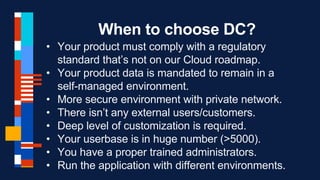
When to choose DC?
• Your product must comply with a regulatory
standard that’s not on our Cloud roadmap.
• Your product data is mandated to remain in a
self-managed environment.
• More secure environment with private network.
• There isn’t any external users/customers.
• Deep level of customization is required.
• Your userbase is in huge number (>5000).
• You have a proper trained administrators.
• Run the application with different environments.
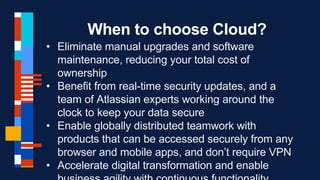
When to choose Cloud?
• Eliminate manual upgrades and software
maintenance, reducing your total cost of
ownership
• Benefit from real-time security updates, and a
team of Atlassian experts working around the
clock to keep your data secure
• Enable globally distributed teamwork with
products that can be accessed securely from any
browser and mobile apps, and don’t require VPN
• Accelerate digital transformation and enable
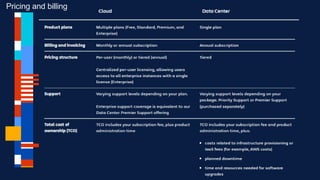
Difference - Price
Pricing and billing
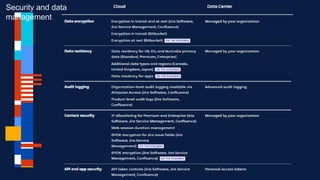
Security and data
management
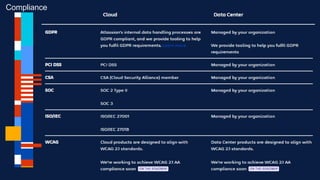
Difference - Price
Compliance
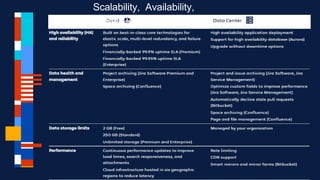
Difference - Price
Scalability, Availability,
Performance
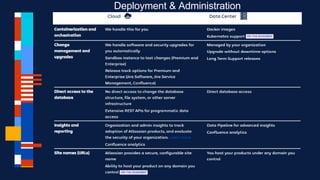
Difference - Price
Deployment & Administration
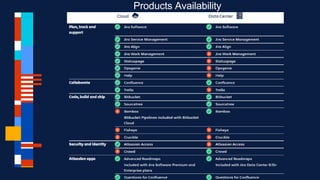
Difference - Price
Products Availability
Migration Path
Cloud to Data Center
• Cloud to Data Center migration is relatively easy
and manageable.
• Most of all add-ons are available and compatible
to DC from Cloud.
• It’s as simple as zipping the content from DC and
import to the Data Center.
• NextGen Jira projects are not compatible with DC
version so you might need to convert or delete
them.
• Basic configurations like access, users need to
be created manually.
Data Center to Cloud
• It’s a painful stuff and pain would be as bigger as
your instance size.
• Add-ons like ScriptRunner, Service Rocket are
not much compatible and there is not a direct
workaround.
• There is a migration assistant add-on that helps
to migrate data but it’s evolving and not a final
product.
• More customization you have done will be more
difficult.
• Atlassian migration team is working hard to make
MAITREY PATEL | GROUP LEADER | @MAITREY684

ACE Dec Ahmedabad 2021

  • 1.
    MAITREY PATEL |GROUP LEADER | @MAITREY684 AHMEDABAD DECEMBER – 2021 Meetup
  • 2.
    Data Center v/sCloud Free trainings provided by Atlassian Migrating server/DC to cloud
  • 3.
    Agenda • Atlassian DataCenter • Atlassian Cloud • When to use DC • When to use Cloud • Features
  • 4.
    Atlassian Data Center •You host Atlassian’s products on your own infrastructure or through cloud providers like AWS and Azure. • This allows you to keep your data within your network, if you’re mandated to do so. Hosting on your own infrastructure requires necessary internal resources and technical expertise to effectively implement, run, and maintain Atlassian software yourself.
  • 5.
    Data Center -Advantages • Robust admin controls to help you maintain high performance, security, and compliance in a self- managed environment. • Can be deployed as a single node or clustered, on your own physical hardware or IaaS. • Cleanup features to help you optimize the data you want to bring to Cloud in the future. • Fully customizable by email templates, environment like Apache, Java, etc.
  • 6.
    Atlassian Cloud • Atlassianoffers products as always-on, continuously updated, highly secure services, doing the heavy lifting so you can focus on your business priorities. • Atlassian SaaS products are built on best-in-class cloud technologies, providing you with a scalable, secure, reliable, and performant offering. • With one underlying Cloud platform, you’ll also have more connected experiences across Atlassian products and leading third-party SaaS
  • 7.
    Cloud - Advantages •Built-in security, privacy, compliance, and reliability • Reduced operational, IT maintenance, and hardware costs • Better collaboration and innovation from the latest features and functionality • Flexible pricing plans to meet your teams' size and budget cycles, from Free to Enterprise • Vast majority of Atlassian’s R&D investment • Less administrative overhead.
  • 8.
    When to chooseDC? • Your product must comply with a regulatory standard that’s not on our Cloud roadmap. • Your product data is mandated to remain in a self-managed environment. • More secure environment with private network. • There isn’t any external users/customers. • Deep level of customization is required. • Your userbase is in huge number (>5000). • You have a proper trained administrators. • Run the application with different environments.
  • 9.
    When to chooseCloud? • Eliminate manual upgrades and software maintenance, reducing your total cost of ownership • Benefit from real-time security updates, and a team of Atlassian experts working around the clock to keep your data secure • Enable globally distributed teamwork with products that can be accessed securely from any browser and mobile apps, and don’t require VPN • Accelerate digital transformation and enable
  • 10.
  • 11.
  • 12.
  • 13.
    Difference - Price Scalability,Availability, Performance
  • 14.
  • 15.
  • 16.
  • 17.
    Cloud to DataCenter • Cloud to Data Center migration is relatively easy and manageable. • Most of all add-ons are available and compatible to DC from Cloud. • It’s as simple as zipping the content from DC and import to the Data Center. • NextGen Jira projects are not compatible with DC version so you might need to convert or delete them. • Basic configurations like access, users need to be created manually.
  • 18.
    Data Center toCloud • It’s a painful stuff and pain would be as bigger as your instance size. • Add-ons like ScriptRunner, Service Rocket are not much compatible and there is not a direct workaround. • There is a migration assistant add-on that helps to migrate data but it’s evolving and not a final product. • More customization you have done will be more difficult. • Atlassian migration team is working hard to make
  • 19.
    MAITREY PATEL |GROUP LEADER | @MAITREY684

Editor's Notes

  • #5 https://training.atlassian.com/free-training-catalog
  • #6 https://training.atlassian.com/free-training-catalog
  • #7 https://training.atlassian.com/free-training-catalog
  • #8 https://training.atlassian.com/free-training-catalog
  • #9 https://training.atlassian.com/free-training-catalog
  • #10 https://training.atlassian.com/free-training-catalog
  • #11 https://training.atlassian.com/free-training-catalog
  • #12 https://training.atlassian.com/free-training-catalog
  • #13 https://training.atlassian.com/free-training-catalog
  • #14 https://training.atlassian.com/free-training-catalog
  • #15 https://training.atlassian.com/free-training-catalog
  • #16 https://training.atlassian.com/free-training-catalog
  • #18 https://training.atlassian.com/free-training-catalog
  • #19 https://training.atlassian.com/free-training-catalog