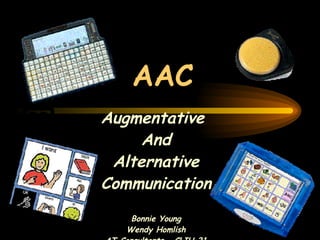
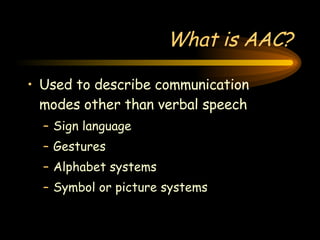
AAC Augmentative  And Alternative Communication Bonnie Young Wendy Homlish AT Consultants – CLIU 21
What is AAC? Used to describe communication modes other than verbal speech Sign language Gestures Alphabet systems Symbol or picture systems
AAC is… Aided or unaided communication modes used as a supplement to or as an alternative to oral language, including gestures, sign language, picture symbols, the alphabet, and computers with synthetic speech.
Augmentative Communication Any approach designed to enhance an individual’s already existing speaking skills.  Not designed to replace existing communication abilities, but rather to support them.
Alternative Communication Those communication approaches that are an individual’s primary means of communication.  Utilized when an individual possesses no oral communication abilities.
AAC System An integrated group of components, including the symbols, aids, strategies, and techniques used by individuals to enhance communication
Candidates for AAC Congenital disabilities CP Autism Mental retardation Developmental apraxia Sensory impairments Acquired neurogenic disorders Progressive disabilities Temporary structural changes
Symbol Methods used for visual, auditory, and/or tactile representation of conventional concepts Can be gestures, photographs, manual sign sets/systems, printed words, objects, spoken words, Braille
Aid A physical object or device used to transmit or receive messages Can include communication book, board, chart, mechanical or electronic device, computer
Strategy Specific way of using AAC aids, symbols, and/or techniques more effectively for enhanced communication.  A plan that can facilitate one’s performance
Technique A method of transmitting messages Linear scanning, encoding, signing, natural gesturing, direct selection
 
 
Output The information AAC users transmit to communication partners Synthesized speech (computerized) Digitized speech (recorded) Hard copy print Computer screen messages
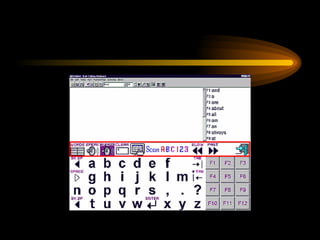
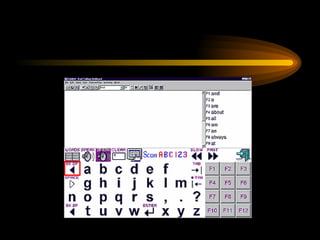
Array An organized display of symbols, pictures, letters, or other information on an AT device; often in a row-column matrix
Selection Techniques Direct Selection Touching, pointing, headsticks, eye gaze Scanning Circular, linear, group-item
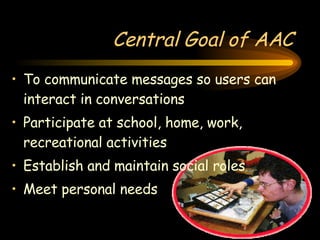
Central Goal of AAC To communicate messages so users can interact in conversations Participate at school, home, work, recreational activities Establish and maintain social roles Meet personal needs
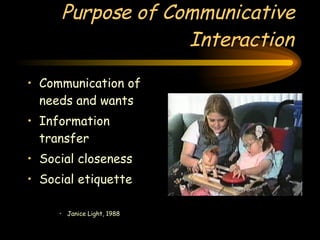
Purpose of Communicative Interaction Communication of needs and wants Information transfer Social closeness Social etiquette Janice Light, 1988
Message Selection Learning to Communicate vs. Communicating to Learn Factors to be considered Environments Gender Age Cognitive/linguistic levels Activities/involvement level Cultural issues
Messages Should Be… Age appropriate Fun and motivating Purposeful and meaningful Natural and useful to the activity Promote active and natural participation in the activity Generic and reusable
Messages… Promote communication – not activity sequencing skills Have high frequency of occurrence Driven by the individual Continually updated and revised
Participation Model Academic Participation Competitive Active Involved None
How do we know which is best? Feature match Team involvement SETT Framework
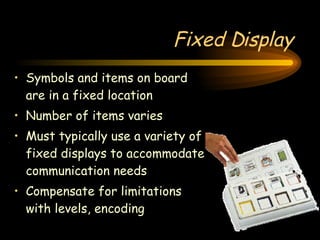
Fixed Display Symbols and items on board are in a fixed location Number of items varies Must typically use a variety of fixed displays to accommodate communication needs Compensate for limitations with levels, encoding
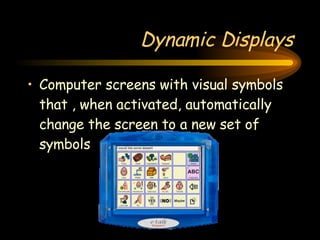
Dynamic Displays Computer screens with visual symbols that , when activated, automatically change the screen to a new set of symbols
Including the Student Who Uses AAC Structure the environment to support communication Proper positioning Access to AAC Access to partners Involvement in motivating activities Respond to the individual’s communication attempts Confirm the intended message
Including the Student… Ensure shared focus of attention Provide opportunities for communication Wait and provide enough time to communicate Model appropriate use of AAC
No Tech Solutions (Unaided) Gestures Body language Eye gaze Manual signing
Low Tech Solutions Manual communication board/book Single message vocal output communication devices PECS vs. PCS
Mid-Tech Solutions Multiple message vocal output communication systems, including: TechTalk Message Mate Speak Easy
High Tech Solutions Dynavox products (DV4, MT4, MightyMo) Dynamic display Categorical Dynasyms vs. PCS Pathfinder/Vanguard/ Vantage Fixed/Dynamic Display Semantic Compaction - MinSpeak
Remember: “ Incidental teaching episodes are brief, positive, and oriented towards  COMMUNICATION rather than language-teaching, per se.”
Partner Characteristics Communication Interaction Style Adults Tend to dominate the interactions Preempt the student’s or young child’s turn Don’t give students or young children time to formulate messages Often fail to respond to student’s or young child’s initiations Often anticipate the student’s or young child’s needs and thoughts, making it unnecessary for them to communicate
Solutions Understand how partners can facilitate the effective use of communication through the use of: environmentally-based cues a  unique, least-to-most prompt hierarchy  the use of appropriate descriptive feedback
The Prompt Hierarchy 1.  Pause 2.  Open Question 3a. Partial Prompt 3b. Request for Communication    (Mand) 4.  Full Model *  Descriptive Feedback
“ Communicative competence is about people.  It is  not  about computer technology, or AAC systems.  Technology is just the  tool , it is the people and the interactions between them that must be our main focus.” Janice Light

AAC

  • 1.
    AAC Augmentative And Alternative Communication Bonnie Young Wendy Homlish AT Consultants – CLIU 21
  • 2.
    What is AAC?Used to describe communication modes other than verbal speech Sign language Gestures Alphabet systems Symbol or picture systems
  • 3.
    AAC is… Aidedor unaided communication modes used as a supplement to or as an alternative to oral language, including gestures, sign language, picture symbols, the alphabet, and computers with synthetic speech.
  • 4.
    Augmentative Communication Anyapproach designed to enhance an individual’s already existing speaking skills. Not designed to replace existing communication abilities, but rather to support them.
  • 5.
    Alternative Communication Thosecommunication approaches that are an individual’s primary means of communication. Utilized when an individual possesses no oral communication abilities.
  • 6.
    AAC System Anintegrated group of components, including the symbols, aids, strategies, and techniques used by individuals to enhance communication
  • 7.
    Candidates for AACCongenital disabilities CP Autism Mental retardation Developmental apraxia Sensory impairments Acquired neurogenic disorders Progressive disabilities Temporary structural changes
  • 8.
    Symbol Methods usedfor visual, auditory, and/or tactile representation of conventional concepts Can be gestures, photographs, manual sign sets/systems, printed words, objects, spoken words, Braille
  • 9.
    Aid A physicalobject or device used to transmit or receive messages Can include communication book, board, chart, mechanical or electronic device, computer
  • 10.
    Strategy Specific wayof using AAC aids, symbols, and/or techniques more effectively for enhanced communication. A plan that can facilitate one’s performance
  • 11.
    Technique A methodof transmitting messages Linear scanning, encoding, signing, natural gesturing, direct selection
  • 12.
  • 13.
  • 14.
    Output The informationAAC users transmit to communication partners Synthesized speech (computerized) Digitized speech (recorded) Hard copy print Computer screen messages
  • 15.
    Array An organizeddisplay of symbols, pictures, letters, or other information on an AT device; often in a row-column matrix
  • 16.
    Selection Techniques DirectSelection Touching, pointing, headsticks, eye gaze Scanning Circular, linear, group-item
  • 17.
    Central Goal ofAAC To communicate messages so users can interact in conversations Participate at school, home, work, recreational activities Establish and maintain social roles Meet personal needs
  • 18.
    Purpose of CommunicativeInteraction Communication of needs and wants Information transfer Social closeness Social etiquette Janice Light, 1988
  • 19.
    Message Selection Learningto Communicate vs. Communicating to Learn Factors to be considered Environments Gender Age Cognitive/linguistic levels Activities/involvement level Cultural issues
  • 20.
    Messages Should Be…Age appropriate Fun and motivating Purposeful and meaningful Natural and useful to the activity Promote active and natural participation in the activity Generic and reusable
  • 21.
    Messages… Promote communication– not activity sequencing skills Have high frequency of occurrence Driven by the individual Continually updated and revised
  • 22.
    Participation Model AcademicParticipation Competitive Active Involved None
  • 23.
    How do weknow which is best? Feature match Team involvement SETT Framework
  • 24.
    Fixed Display Symbolsand items on board are in a fixed location Number of items varies Must typically use a variety of fixed displays to accommodate communication needs Compensate for limitations with levels, encoding
  • 25.
    Dynamic Displays Computerscreens with visual symbols that , when activated, automatically change the screen to a new set of symbols
  • 26.
    Including the StudentWho Uses AAC Structure the environment to support communication Proper positioning Access to AAC Access to partners Involvement in motivating activities Respond to the individual’s communication attempts Confirm the intended message
  • 27.
    Including the Student…Ensure shared focus of attention Provide opportunities for communication Wait and provide enough time to communicate Model appropriate use of AAC
  • 28.
    No Tech Solutions(Unaided) Gestures Body language Eye gaze Manual signing
  • 29.
    Low Tech SolutionsManual communication board/book Single message vocal output communication devices PECS vs. PCS
  • 30.
    Mid-Tech Solutions Multiplemessage vocal output communication systems, including: TechTalk Message Mate Speak Easy
  • 31.
    High Tech SolutionsDynavox products (DV4, MT4, MightyMo) Dynamic display Categorical Dynasyms vs. PCS Pathfinder/Vanguard/ Vantage Fixed/Dynamic Display Semantic Compaction - MinSpeak
  • 32.
    Remember: “ Incidentalteaching episodes are brief, positive, and oriented towards COMMUNICATION rather than language-teaching, per se.”
  • 33.
    Partner Characteristics CommunicationInteraction Style Adults Tend to dominate the interactions Preempt the student’s or young child’s turn Don’t give students or young children time to formulate messages Often fail to respond to student’s or young child’s initiations Often anticipate the student’s or young child’s needs and thoughts, making it unnecessary for them to communicate
  • 34.
    Solutions Understand howpartners can facilitate the effective use of communication through the use of: environmentally-based cues a unique, least-to-most prompt hierarchy the use of appropriate descriptive feedback
  • 35.
    The Prompt Hierarchy1. Pause 2. Open Question 3a. Partial Prompt 3b. Request for Communication (Mand) 4. Full Model * Descriptive Feedback
  • 36.
    “ Communicative competenceis about people. It is not about computer technology, or AAC systems. Technology is just the tool , it is the people and the interactions between them that must be our main focus.” Janice Light