

www.webstackacademy.com
Type Conversion & Regular Expressions
JavaScript
www.webstackacademy.com
 Type Conversion
 Regular Expression
Table of Content
www.webstackacademy.com ‹#›www.webstackacademy.com
Type Conversion
(JavaScript)
www.webstackacademy.com
Type Conversion
JavaScript variables can be converted to a new variable and
another data type:
 By the use of a JavaScript function
 Automatically by JavaScript itself
www.webstackacademy.com
Converting Number to String
 The String() and toString() can convert number to strings
String(234); //234
var n=45;
var x=n.toString(); // Result x is 45
www.webstackacademy.com
Converting Booleans to String
The String() and toString() can convert boolean to string.
String(false); // return false
false.toString(); // return false
www.webstackacademy.com
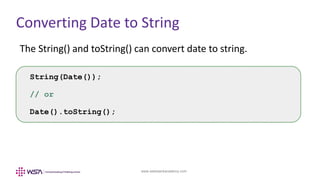
Converting Date to String
The String() and toString() can convert date to string.
String(Date());
// or
Date().toString();
www.webstackacademy.com
Converting String to Numbers
Option Description
Number() Convert Strings to numbers
parseFloat() Parses a string and returns a floating point number
parseInt() Parses a string and returns an Integer
www.webstackacademy.com
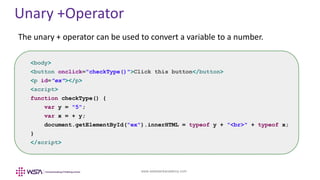
Unary +Operator
The unary + operator can be used to convert a variable to a number.
<body>
<button onclick="checkType()">Click this button</button>
<p id="ex"></p>
<script>
function checkType() {
var y = "5";
var x = + y;
document.getElementById("ex").innerHTML = typeof y + "<br>" + typeof x;
}
</script>
www.webstackacademy.com
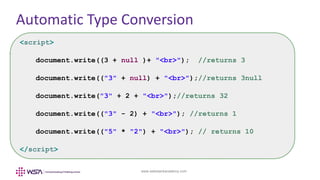
Automatic Type Conversion
<script>
document.write((3 + null )+ "<br>"); //returns 3
document.write(("3" + null) + "<br>");//returns 3null
document.write("3" + 2 + "<br>");//returns 32
document.write(("3" - 2) + "<br>"); //returns 1
document.write(("5" * "2") + "<br>"); // returns 10
</script>
www.webstackacademy.com
Exercise
 Revisit the rectangle program (area & perimeter). Check the output
with and without converting the input values.
 Write a JavaScript program to convert current date into string.
www.webstackacademy.com ‹#›www.webstackacademy.com
Regular Expression
(RegEx)
(JavaScript)
www.webstackacademy.com
Regular Expression
 Regular expressions are used for defining String patterns that can be used
for searching, manipulating and editing a text.
 A regular expression, regex or regexp, in theoretical computer science.
 The process of searching text to identify matches—strings that match a
regex's pattern—is pattern matching.
 In JavaScript, regular expressions are also objects.
 Regular expressions can be used to perform text search and text replace
operations.
www.webstackacademy.com
Regular Expression
 Pattern:
 Pattern specifications consist of a series of characters
 These characters have a special meaning
 They are also known as meta characters
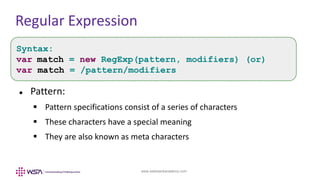
Syntax:
var match = new RegExp(pattern, modifiers) (or)
var match = /pattern/modifiers
www.webstackacademy.com
Regular Expression
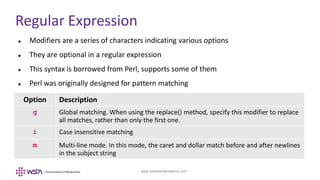
 Modifiers are a series of characters indicating various options
 They are optional in a regular expression
 This syntax is borrowed from Perl, supports some of them
 Perl was originally designed for pattern matching
Option Description
g Global matching. When using the replace() method, specify this modifier to replace
all matches, rather than only the first one.
i Case insensitive matching
m Multi-line mode. In this mode, the caret and dollar match before and after newlines
in the subject string
www.webstackacademy.com
Regular Expression
var pattern = /Fruit/i;
Option Description
/Fruit/i Regular Expression
Fruit Search pattern
i The search should be case insensitive
www.webstackacademy.com
Regular Expression patterns
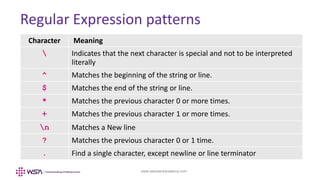
Character Meaning
 Indicates that the next character is special and not to be interpreted
literally
^ Matches the beginning of the string or line.
$ Matches the end of the string or line.
* Matches the previous character 0 or more times.
+ Matches the previous character 1 or more times.
n Matches a New line
? Matches the previous character 0 or 1 time.
. Find a single character, except newline or line terminator
www.webstackacademy.com
Regular Expression Pattern
Brackets are used to find range of characters.
Expression Description
[abc] Find any of the characters between the bracket
[^abc] Find any character NOT between the brackets
[0-9] Find any of the digits between the brackets
[^0-9] Find any character NOT between the brackets (any non-digit)
(x|y) Find any of the alternatives separated with |
www.webstackacademy.com
Regular Expression Example
<script>
function upper_case(str)
{
var regexp = /^[A-Z]/;
if (regexp.test(str))
{
console.log("String's first character is uppercase");
}
else
{
console.log("String's first character is not uppercase");
}
}
upper_case('Webstack Academy');
upper_case('webstack academy');
</script>
www.webstackacademy.com
Metacharacters
Meta character Description
d Find a digit
D Find a non digit character
w Find a word character
W Find a non word character
s Find a whitespace character
S Find a non-whitespace character
b Find a match at the beginning or end of the word
B Find a match not at the beginning or end of the word
0 Find a Null character
uxxxx Find a uni-code character specified by the hexadecimal number xxxx
www.webstackacademy.com
Examples
var pattern =/^abc/;
var pattern = /xy{3,5}z/;
var pattern =/[a-z]/;
var pattern = /abc.d/;
Matches only those string beginning with abc.
Matches a single “x” followed by y characters between three and five and then the
letter z
Matches any lowercase alphabetic character
Matches any character except a newline
www.webstackacademy.com
Exercise
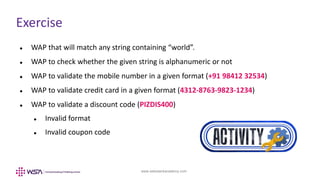
 WAP that will match any string containing “world”.
 WAP to check whether the given string is alphanumeric or not
 WAP to validate the mobile number in a given format (+91 98412 32534)
 WAP to validate credit card in a given format (4312-8763-9823-1234)
 WAP to validate a discount code (PIZDIS400)
 Invalid format
 Invalid coupon code
www.webstackacademy.com ‹#›www.webstackacademy.com
Regular Expression
Methods
(JavaScript)
www.webstackacademy.com
The Exec() Method
The exec() method of the RegExp object is used to execute the search for a
match in a specified string.
Example:
/c/.exec("In JavaScript, regular expressions are also objects.");
Syntax:
Regexp.exec(str);
www.webstackacademy.com
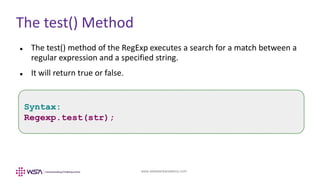
The test() Method
 The test() method of the RegExp executes a search for a match between a
regular expression and a specified string.
 It will return true or false.
Syntax:
Regexp.test(str);
www.webstackacademy.com
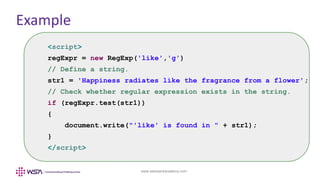
Example
<script>
regExpr = new RegExp('like','g')
// Define a string.
str1 = 'Happiness radiates like the fragrance from a flower';
// Check whether regular expression exists in the string.
if (regExpr.test(str1))
{
document.write("'like' is found in " + str1);
}
</script>
www.webstackacademy.com ‹#›www.webstackacademy.com
String Methods for
Regular Expression
(JavaScript)
www.webstackacademy.com
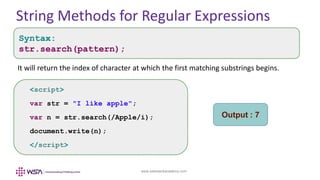
String Methods for Regular Expressions
It will return the index of character at which the first matching substrings begins.
<script>
var str = "I like apple";
var n = str.search(/Apple/i);
document.write(n);
</script>
Output : 7
Syntax:
str.search(pattern);
www.webstackacademy.com
The split()
• The split() method splits a string into sub strings and return them in an array
• Separator is used to split the string
• Limit specifies the number of splits
Syntax:
str.split(separator,limit);
<script>
var str = “10/3/5/6/5";
var split = str.split(/[/]+/);
document.write(split);
</script>
www.webstackacademy.com
The replace()
var str = "Hello.How are You?";
// Replace first dot with exclamation mark (!)
var res = str.replace(/./, "!");
alert(res);
Syntax:
str.search(searchvalue,newvalue);
• The search() method searches for the given String / RegExp, replaces new value
• In case of RegExp the first match is replaced. For all replacements use ‘g’ modifier
www.webstackacademy.com
WebStack Academy
#83, Farah Towers,
1st Floor, MG Road,
Bangalore – 560001
M: +91-809 555 7332
E: training@webstackacademy.com
WSA in Social Media:

JavaScript - Chapter 9 - TypeConversion and Regular Expressions