Performance Testing Using
Presented by QA Team
Friday, March 11, 2016
Focus of Performance Testing
11 March 2016
 Performance testing measures the quality attributes of the system, such
as scalability, reliability and resource usage.
The focus of Performance testing:
 Speed/Response Time - Determines whether the application responds
quickly.
 Scalability - Determines maximum user load the software application
can handle.
 Stability - Determines if the application is stable under varying loads
Why Performance Testing is Needed?
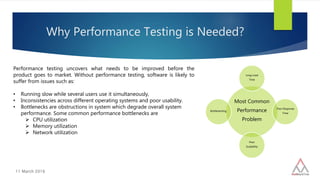
Most Common
Performance
Problem
Long Load
Time
Poor Response
Time
Poor
Scalability
Bottlenecking
11 March 2016
Performance testing uncovers what needs to be improved before the
product goes to market. Without performance testing, software is likely to
suffer from issues such as:
• Running slow while several users use it simultaneously,
• Inconsistencies across different operating systems and poor usability.
• Bottlenecks are obstructions in system which degrade overall system
performance. Some common performance bottlenecks are
 CPU utilization
 Memory utilization
 Network utilization
Types of Performance Testing
11 March 2016
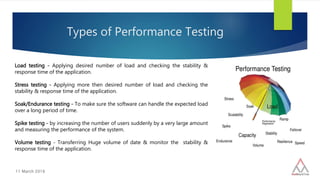
Load testing - Applying desired number of load and checking the stability &
response time of the application.
Stress testing - Applying more then desired number of load and checking the
stability & response time of the application.
Soak/Endurance testing - To make sure the software can handle the expected load
over a long period of time.
Spike testing - by increasing the number of users suddenly by a very large amount
and measuring the performance of the system.
Volume testing - Transferring Huge volume of date & monitor the stability &
response time of the application.
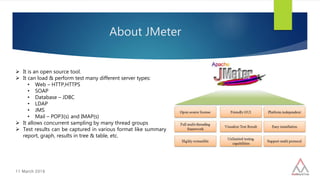
About JMeter
11 March 2016
 It is an open source tool.
 It can load & perform test many different server types:
• Web – HTTP,HTTPS
• SOAP
• Database – JDBC
• LDAP
• JMS
• Mail – POP3(s) and IMAP(s)
 It allows concurrent sampling by many thread groups
 Test results can be captured in various format like summary
report, graph, results in tree & table, etc.
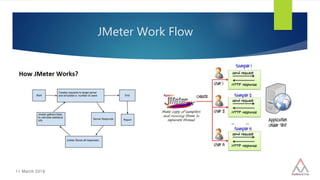
JMeter Work Flow
11 March 2016
11 March 2016
Concepts in JMeter
 How to prepare Test script in Jmeter
 How to put load & analyze performance metrics
 Importance of HTTP Cookie Manager
 Assertions
 Controllers
 Timers
 Correlation
 Data Drive Testing in Jmeter
 HTML link Parser usage in jmeter scripting
Elements in Test Plan
11 March 2016
A Test Plan describe a series of steps jmeter will execute when run. A
complete test plan will consist of one or more Thread group, logic
controller, listener, timers, assertions and config elements.
Thread Group
- Setup number of threads
- Setup ramp up period
- No. of times test execute
Controllers
- Sampler(Send request to server)
- Logical controller (customize logic to send request)
Listener
- Graph Result
- View results tree and many more.
Timers
- Delay next request certain amount of time
Elements in Test Plan
11 March 2016
Assertions
- Allow you to assert fact about response received
from HTTP request
Configuration Elements
- Allow you configure settings
Pre Processor
- Execute prior to sampler request
Post Processer
- Execute some action after sample request
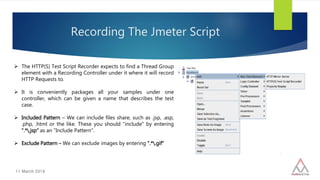
Recording The Jmeter Script
11 March 2016
 The HTTP(S) Test Script Recorder expects to find a Thread Group
element with a Recording Controller under it where it will record
HTTP Requests to.
 It is conveniently packages all your samples under one
controller, which can be given a name that describes the test
case.
 Included Pattern – We can include files share, such as .jsp, .asp,
.php, .html or the like. These you should "include" by entering
".*.jsp“ as an "Include Pattern".
 Exclude Pattern – We can exclude images by entering ".*.gif"
HTTP Cookie Manager Importance
11 March 2016
 The Cookie Manager element has two functions:
1. Tt stores and sends cookies just like a web browser. If you have an
HTTP Request and the response contains a cookie, the Cookie
Manager automatically stores that cookie and will use it for all future
requests to that particular web site.
2. You can manually add a cookie to the Cookie Manager. However, if
you do this, the cookie will be shared by all JMeter
How to put load & analyze performance
metrics
11 March 2016
Thread Group(user)
The thread group element controls the number of threads JMeter will
use to execute your test. The controls for a thread group allow you to:
 Set the number of threads
 Set the ramp-up period
 Set the number of times to execute the test
Listeners
A listener is a component that shows the results of the samples. The
results can be shown in a tree, tables, graphs or simply written to a log file.
Assertions
10 March 2016
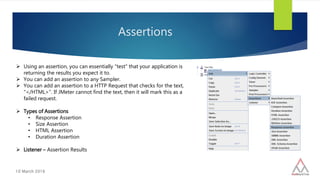
 Using an assertion, you can essentially "test" that your application is
returning the results you expect it to.
 You can add an assertion to any Sampler.
 You can add an assertion to a HTTP Request that checks for the text,
"</HTML>". If JMeter cannot find the text, then it will mark this as a
failed request.
 Types of Assertions
• Response Assertion
• Size Assertion
• HTML Assertion
• Duration Assertion
 Listener – Assertion Results
Controllers
11 March 2016
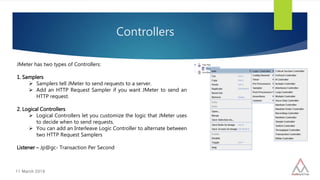
JMeter has two types of Controllers:
1. Samplers
 Samplers tell JMeter to send requests to a server.
 Add an HTTP Request Sampler if you want JMeter to send an
HTTP request.
2. Logical Controllers
 Logical Controllers let you customize the logic that JMeter uses
to decide when to send requests.
 You can add an Interleave Logic Controller to alternate between
two HTTP Request Samplers
Listener – Jp@gc- Transaction Per Second
Timers
11 March 2016
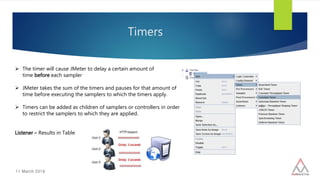
 The timer will cause JMeter to delay a certain amount of
time before each sampler
 JMeter takes the sum of the timers and pauses for that amount of
time before executing the samplers to which the timers apply.
 Timers can be added as children of samplers or controllers in order
to restrict the samplers to which they are applied.
Listener – Results in Table
Correlation
11 March 2016
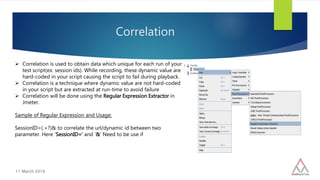
 Correlation is used to obtain data which unique for each run of your
test script(ex: session ids). While recording, these dynamic value are
hard-coded in your script causing the script to fail during playback.
 Correlation is a technique where dynamic value are not hard-coded
in your script but are extracted at run-time to avoid failure
 Correlation will be done using the Regular Expression Extractor in
Jmeter.
Sample of Regular Expression and Usage:
SessionID=(.+?)& to correlate the url/dynamic id between two
parameter. Here ‘SessionID=‘ and ‘&’ Need to be use if
HTML link Parser
11 March 2016
 This modifier parses HTML response from the server and extracts
links and forms. A URL test sample that passes through this
modifier will be examined to see if it "matches" any of the links or
forms extracted from the immediately previous response
Data Drive Testing in JMeter
11 March 2016
CSV Data Set Configuration is used to read lines from a file, and split them
into variables.
Conclusion
11 March 2016
JMeter can be a very valuable tool for determining how your web application server setup should be improved, to
reduce bottlenecks and increase performance.
Following these guidelines will assist in creating a real and continuous load −
 Use multiple instances of JMeter in case, the number of threads are more.
 Check the Scoping Rules and design accordingly.
 Use naming conventions always for all elements.
 Check the default browser Connectivity settings, before executing scripts.
 Add Listeners appropriately.
11 March 2016
You Have Questions ? We Have Answers !!!

Performance testing with Apache JMeter

  • 1.
    Performance Testing Using Presentedby QA Team Friday, March 11, 2016
  • 2.
    Focus of PerformanceTesting 11 March 2016  Performance testing measures the quality attributes of the system, such as scalability, reliability and resource usage. The focus of Performance testing:  Speed/Response Time - Determines whether the application responds quickly.  Scalability - Determines maximum user load the software application can handle.  Stability - Determines if the application is stable under varying loads
  • 3.
    Why Performance Testingis Needed? Most Common Performance Problem Long Load Time Poor Response Time Poor Scalability Bottlenecking 11 March 2016 Performance testing uncovers what needs to be improved before the product goes to market. Without performance testing, software is likely to suffer from issues such as: • Running slow while several users use it simultaneously, • Inconsistencies across different operating systems and poor usability. • Bottlenecks are obstructions in system which degrade overall system performance. Some common performance bottlenecks are  CPU utilization  Memory utilization  Network utilization
  • 4.
    Types of PerformanceTesting 11 March 2016 Load testing - Applying desired number of load and checking the stability & response time of the application. Stress testing - Applying more then desired number of load and checking the stability & response time of the application. Soak/Endurance testing - To make sure the software can handle the expected load over a long period of time. Spike testing - by increasing the number of users suddenly by a very large amount and measuring the performance of the system. Volume testing - Transferring Huge volume of date & monitor the stability & response time of the application.
  • 5.
    About JMeter 11 March2016  It is an open source tool.  It can load & perform test many different server types: • Web – HTTP,HTTPS • SOAP • Database – JDBC • LDAP • JMS • Mail – POP3(s) and IMAP(s)  It allows concurrent sampling by many thread groups  Test results can be captured in various format like summary report, graph, results in tree & table, etc.
  • 6.
  • 7.
    11 March 2016 Conceptsin JMeter  How to prepare Test script in Jmeter  How to put load & analyze performance metrics  Importance of HTTP Cookie Manager  Assertions  Controllers  Timers  Correlation  Data Drive Testing in Jmeter  HTML link Parser usage in jmeter scripting
  • 8.
    Elements in TestPlan 11 March 2016 A Test Plan describe a series of steps jmeter will execute when run. A complete test plan will consist of one or more Thread group, logic controller, listener, timers, assertions and config elements. Thread Group - Setup number of threads - Setup ramp up period - No. of times test execute Controllers - Sampler(Send request to server) - Logical controller (customize logic to send request) Listener - Graph Result - View results tree and many more. Timers - Delay next request certain amount of time
  • 9.
    Elements in TestPlan 11 March 2016 Assertions - Allow you to assert fact about response received from HTTP request Configuration Elements - Allow you configure settings Pre Processor - Execute prior to sampler request Post Processer - Execute some action after sample request
  • 10.
    Recording The JmeterScript 11 March 2016  The HTTP(S) Test Script Recorder expects to find a Thread Group element with a Recording Controller under it where it will record HTTP Requests to.  It is conveniently packages all your samples under one controller, which can be given a name that describes the test case.  Included Pattern – We can include files share, such as .jsp, .asp, .php, .html or the like. These you should "include" by entering ".*.jsp“ as an "Include Pattern".  Exclude Pattern – We can exclude images by entering ".*.gif"
  • 11.
    HTTP Cookie ManagerImportance 11 March 2016  The Cookie Manager element has two functions: 1. Tt stores and sends cookies just like a web browser. If you have an HTTP Request and the response contains a cookie, the Cookie Manager automatically stores that cookie and will use it for all future requests to that particular web site. 2. You can manually add a cookie to the Cookie Manager. However, if you do this, the cookie will be shared by all JMeter
  • 12.
    How to putload & analyze performance metrics 11 March 2016 Thread Group(user) The thread group element controls the number of threads JMeter will use to execute your test. The controls for a thread group allow you to:  Set the number of threads  Set the ramp-up period  Set the number of times to execute the test Listeners A listener is a component that shows the results of the samples. The results can be shown in a tree, tables, graphs or simply written to a log file.
  • 13.
    Assertions 10 March 2016 Using an assertion, you can essentially "test" that your application is returning the results you expect it to.  You can add an assertion to any Sampler.  You can add an assertion to a HTTP Request that checks for the text, "</HTML>". If JMeter cannot find the text, then it will mark this as a failed request.  Types of Assertions • Response Assertion • Size Assertion • HTML Assertion • Duration Assertion  Listener – Assertion Results
  • 14.
    Controllers 11 March 2016 JMeterhas two types of Controllers: 1. Samplers  Samplers tell JMeter to send requests to a server.  Add an HTTP Request Sampler if you want JMeter to send an HTTP request. 2. Logical Controllers  Logical Controllers let you customize the logic that JMeter uses to decide when to send requests.  You can add an Interleave Logic Controller to alternate between two HTTP Request Samplers Listener – Jp@gc- Transaction Per Second
  • 15.
    Timers 11 March 2016 The timer will cause JMeter to delay a certain amount of time before each sampler  JMeter takes the sum of the timers and pauses for that amount of time before executing the samplers to which the timers apply.  Timers can be added as children of samplers or controllers in order to restrict the samplers to which they are applied. Listener – Results in Table
  • 16.
    Correlation 11 March 2016 Correlation is used to obtain data which unique for each run of your test script(ex: session ids). While recording, these dynamic value are hard-coded in your script causing the script to fail during playback.  Correlation is a technique where dynamic value are not hard-coded in your script but are extracted at run-time to avoid failure  Correlation will be done using the Regular Expression Extractor in Jmeter. Sample of Regular Expression and Usage: SessionID=(.+?)& to correlate the url/dynamic id between two parameter. Here ‘SessionID=‘ and ‘&’ Need to be use if
  • 17.
    HTML link Parser 11March 2016  This modifier parses HTML response from the server and extracts links and forms. A URL test sample that passes through this modifier will be examined to see if it "matches" any of the links or forms extracted from the immediately previous response
  • 18.
    Data Drive Testingin JMeter 11 March 2016 CSV Data Set Configuration is used to read lines from a file, and split them into variables.
  • 19.
    Conclusion 11 March 2016 JMetercan be a very valuable tool for determining how your web application server setup should be improved, to reduce bottlenecks and increase performance. Following these guidelines will assist in creating a real and continuous load −  Use multiple instances of JMeter in case, the number of threads are more.  Check the Scoping Rules and design accordingly.  Use naming conventions always for all elements.  Check the default browser Connectivity settings, before executing scripts.  Add Listeners appropriately.
  • 20.
    11 March 2016 YouHave Questions ? We Have Answers !!!