5 Things Your
Spreadsheets
Can’t Do
5
Data analysis becomes more important
every moment of every day. For many,
Excel is the go-to analysis tool of choice.
But as useful as it can be, it just can’t do it
all. With pressure mounting to glean more
insight from your data, spreadsheets don’t
always have the capabilities to deliver the
insight you seek. The good news?
There are plenty more tools in the box.
Here are five ways
to go beyond
spreadsheets and
unlock more value
from your data.
Great Hammer,
Lousy Screwdriver
Regardless of the size of your organization, chances are,
you’ve got data everywhere, and a lot of it. It’s not just
living in spreadsheets anymore, but it’s also stored in the
cloud, and in on-premise data warehouses. It’s called big
data for a reason. Social media data, transactional data,
customer records, and web analytics are just a few
examples of mushrooming information that can’t be
properly analyzed in a spreadsheet. Excel and Google users
often find themselves forced to use subsets of data for ad
hoc analysis—which will only yield a glimpse of the
answers they seek. The reality is, with just a spreadsheet,
at a million rows, you’re going to hit a brick wall.
Integrate All of Your Data
Whether you’re filling your spreadsheet to its breaking
point or working with smaller data sets, running
sophisticated macros and calculations in a spreadsheet
can often bring a program to its knees—leaving you
waiting and miserable. You are too busy to spend cycles
sorting out which set of data you can live without or
budgeting time to refresh your calculations.
“Now all of the data is integrated in a secure
database, but the visualizations and reports are
available—not just for that one user who has
the Excel spreadsheet, but for anyone to whom
we've granted access,”
Roberto Bertolini, CIO, Granja Regina
For the most accurate data
insights, it’s important to
have the capability to use as
much data as is necessary to
paint the whole picture.
Connect to and analyze
all of your data,
no matter what the size,
or where it lives—and
make sure the process
is fast.
Integrate All of Your Data
Data Blending and Cleaning
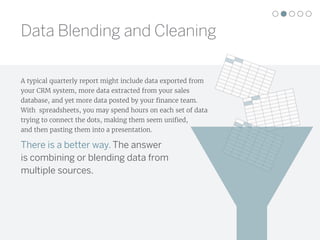
A typical quarterly report might include data exported from
your CRM system, more data extracted from your sales
database, and yet more data posted by your finance team.
With spreadsheets, you may spend hours on each set of data
trying to connect the dots, making them seem unified,
and then pasting them into a presentation.
There is a better way. The answer
is combining or blending data from
multiple sources.
Regardless of data type,
blending your data on
common field will elevate
understanding and
decision-making.
Learn how to do it in
this quick tutorial.
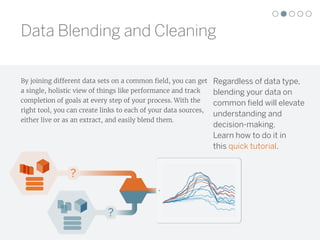
By joining different data sets on a common field, you can get
a single, holistic view of things like performance and track
completion of goals at every step of your process. With the
right tool, you can create links to each of your data sources,
either live or as an extract, and easily blend them.
?
?
Data Blending and Cleaning
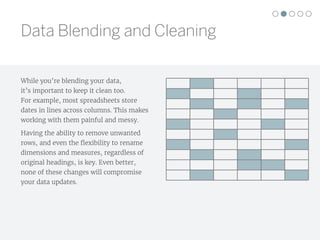
While you’re blending your data,
it’s important to keep it clean too.
For example, most spreadsheets store
dates in lines across columns. This makes
working with them painful and messy.
Having the ability to remove unwanted
rows, and even the flexibility to rename
dimensions and measures, regardless of
original headings, is key. Even better,
none of these changes will compromise
your data updates.
Data Blending and Cleaning
Data visualizations are meant to be easy and fast to read.
Number-based tables and spreadsheets are often the
opposite. This is a use case where a picture really is worth
a thousand words.
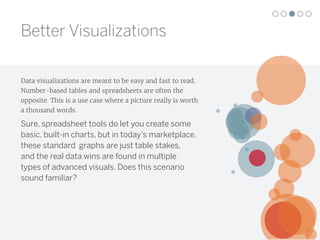
Sure, spreadsheet tools do let you create some
basic, built-in charts, but in today’s marketplace,
these standard graphs are just table stakes,
and the real data wins are found in multiple
types of advanced visuals. Does this scenario
sound familiar?
Better Visualizations
Say goodbye to this
situation and hello
to better data
visualizations.
You finish your analysis, confident you know just the
chart to show in an upcoming presentation. You take the
time and click through a whole series of steps and make
the chart. You think it looks pretty good. All the while
you’re hoping nothing changes before your meeting.
You get to the meeting and there are questions that the
chart doesn’t give answers right away. People ask to
see a different visualization to answer their new
questions. And now you have to start over and schedule
another meeting.
"A well-crafted, thoughtful visualization makes
the light bulb go off. You just don't get that with
a spreadsheet.”
Dana Zuber, Wells Fargo
Better Visualizations
Website Traffic Trends
Country
All
Week of Date
To Null
Nov 17 Nov 22 Nov 27 Dec 2 Dec 7 Dec 12 Dec 17 Dec 22 Dec 27 Jan 1
0K
10K
20K
30K
Visits
Visits
13
20,000
40,000
60,000
80,000
≥ 100,000
424K
Visits
Section
Blog
Community
Examples
Register
Search
Training
User-generated
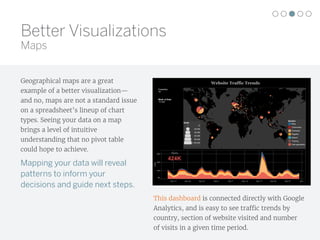
Geographical maps are a great
example of a better visualization—
and no, maps are not a standard issue
on a spreadsheet’s lineup of chart
types. Seeing your data on a map
brings a level of intuitive
understanding that no pivot table
could hope to achieve.
Mapping your data will reveal
patterns to inform your
decisions and guide next steps.
This dashboard is connected directly with Google
Analytics, and is easy to see traffic trends by
country, section of website visited and number
of visits in a given time period.
Better Visualizations
Maps
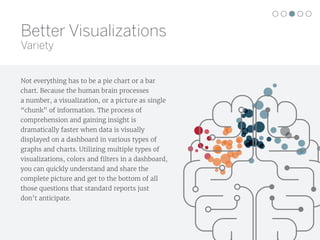
Not everything has to be a pie chart or a bar
chart. Because the human brain processes
a number, a visualization, or a picture as single
“chunk” of information. The process of
comprehension and gaining insight is
dramatically faster when data is visually
displayed on a dashboard in various types of
graphs and charts. Utilizing multiple types of
visualizations, colors and filters in a dashboard,
you can quickly understand and share the
complete picture and get to the bottom of all
those questions that standard reports just
don’t anticipate.
Better Visualizations
Variety
123456
Average Position
0.5
1.0
1.5
2.0
2.5
3.0
3.5
4.0
4.5
5.0
AverageCPC($)
4.000
Cost vs Position over Time
0.0% 2.0% 4.0%
CTR
Banks Bank{KeyWord:Credit less
than perfect?}We Have a
MaestroCard for Nearly
Banks Bank{KeyWord:Banks
Bank MaestroCard}Rebuild Credit
with Our MaestroCard
Bankity{KeyWord:Bankity Bank
MaestroCard®}Rebuild Credit
with Our MaestroCard.
Establish{KeyWord:Bankity Bank
MaestroCard®}Build Credit with
Our MaestroCard.
Creative/Adgroup
Week26
Week27
Week28
Week29
Week30
Week31
Week32
0%
10%
20%
30%
CTR
Creative/Adgroup Analysis
Adwords Creative Analysis
Select week and year:
2006, Week 28
Show History
Target CPC $
4
Target CTR %
3
Clicks
1
2,000
4,000
6,000
8,000
≥ 10,000
0.0% 9.9%
CTR
CTR On Target?
True
False
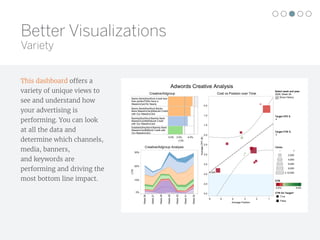
This dashboard offers a
variety of unique views to
see and understand how
your advertising is
performing. You can look
at all the data and
determine which channels,
media, banners,
and keywords are
performing and driving the
most bottom line impact.
Better Visualizations
Variety
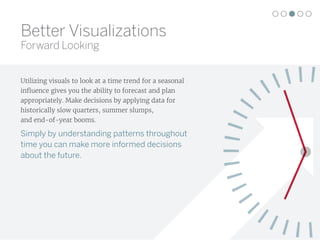
Utilizing visuals to look at a time trend for a seasonal
influence gives you the ability to forecast and plan
appropriately. Make decisions by applying data for
historically slow quarters, summer slumps,
and end-of-year booms.
Simply by understanding patterns throughout
time you can make more informed decisions
about the future.
Better Visualizations
Forward Looking
GE Stock Trend Analysis
Jun 1, 10 Aug 1, 10 Oct 1, 10 Dec 1, 10 Feb 1, 11 Apr 1, 11 Jun 1, 11
Date
$0.00
$5.00
$10.00
$15.00
$20.00
AdjClose
0M
50M
100M
150M
200M
Volume
Select date range to update trend line:
6/18/2010 to 6/27/2011
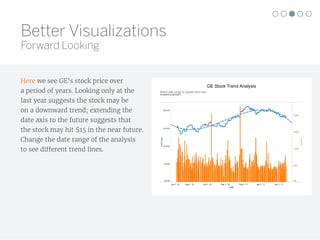
Here we see GE’s stock price over
a period of years. Looking only at the
last year suggests the stock may be
on a downward trend; extending the
date axis to the future suggests that
the stock may hit $15 in the near future.
Change the date range of the analysis
to see different trend lines.
Better Visualizations
Forward Looking
“People have rekindled their
interest in asking questions.”
Rishi Kumar, Director of
Analytics, Unilever
It’s never fun not to know the answer—especially in
a meeting where you’re trying to solve a problem.
Set yourself up to answer questions on the fly,
by using interactive visualizations.
Interactive dashboards with a current data feed can
enable important analytical tasks, such as filtering views,
adjusting parameters, performing quick calculations,
and drilling down to examine underlying data.
Answer the unanticipated questions immediately with
a few mouse clicks.
Data can be from this quarter, this week, this hour,
or thirty seconds ago—there’s no doubt about it,
a current data feed, or a feed within the right timeline
for your organization, will elevate your problem solving
and your daily operations.
Better Visualizations
Current and Interactive
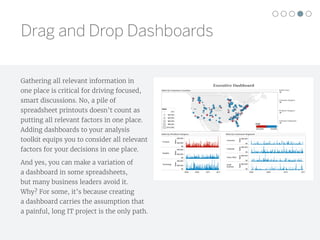
Gathering all relevant information in
one place is critical for driving focused,
smart discussions. No, a pile of
spreadsheet printouts doesn’t count as
putting all relevant factors in one place.
Adding dashboards to your analysis
toolkit equips you to consider all relevant
factors for your decisions in one place.
And yes, you can make a variation of
a dashboard in some spreadsheets,
but many business leaders avoid it.
Why? For some, it’s because creating
a dashboard carries the assumption that
a painful, long IT project is the only path.
Executive Dashboard
Sales by Customer Location
Customer Region:
All
Customer Segment:
All
Product Category:
All
Select Year:
All
2008 2009 2010 2011
Furniture
Supplies
Technology
$0
$20,000
$40,000
Sales
$0
$20,000
$40,000
Sales
$0
$20,000
$40,000
Sales
Sales by Product Category
2008 2009 2010 2011
Consumer
Corporate
Home Office
Small
Business
$0
$40,000
Sales
$0
$40,000
Sales
$0
$40,000
Sales
$0
$40,000
Sales
Sales by Customer Segment
Sales
$12
$20,000
$40,000
$60,000
$80,000
$103,506
($19,925) $19,925
Profit
Drag and Drop Dashboards
“I'm finding it's a lot faster to get analysis done, and
more enjoyable. I'm freed up from manipulating the
data into certain formats and just being able to drag
and drop to see trends easily is a great benefit.”
Adam Yeoman Senior Analyst, Supply Chain
Development, Tesco
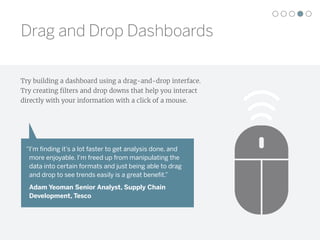
Try building a dashboard using a drag-and-drop interface.
Try creating filters and drop downs that help you interact
directly with your information with a click of a mouse.
Drag and Drop Dashboards
Your spreadsheet is only good until your next data
extract or update. What if you created your
dashboard once and it stayed up-to-date every time
you opened it?
Putting even a basic dashboard together in a
spreadsheet can take hours. Often you get to what
you think is the end, and an email arrives with new
data attached. With the right analysis tool, your
dashboards can be linked to your data sources and
automatically update every time they are opened.
If you have team members who don’t always have an
Internet connection, you can use extracts and set
them to update on a schedule. This kind of flexibility
makes building dashboards faster, and more reliable.
Automatic Updates
Begin a free trial today
tableau.com/trial.
You don’t have to ditch your spreadsheets all together;
but integrating them into your analysis with better data
visualization is easier than you think.
Tableau Software helps people see and understand data
no matter how big, or where it is stored. Quickly connect,
blend, clean, visualize and share your dashboards with a
seamless experience from the PC to the iPad. Create and
publish dashboards with automatic data updates,
and share them with colleagues, partners or
customers—no programming skills required.
Automatic Updates

5thingsyourspreadsheetcantdo eng

  • 1.
  • 2.
    5 Data analysis becomesmore important every moment of every day. For many, Excel is the go-to analysis tool of choice. But as useful as it can be, it just can’t do it all. With pressure mounting to glean more insight from your data, spreadsheets don’t always have the capabilities to deliver the insight you seek. The good news? There are plenty more tools in the box. Here are five ways to go beyond spreadsheets and unlock more value from your data. Great Hammer, Lousy Screwdriver
  • 3.
    Regardless of thesize of your organization, chances are, you’ve got data everywhere, and a lot of it. It’s not just living in spreadsheets anymore, but it’s also stored in the cloud, and in on-premise data warehouses. It’s called big data for a reason. Social media data, transactional data, customer records, and web analytics are just a few examples of mushrooming information that can’t be properly analyzed in a spreadsheet. Excel and Google users often find themselves forced to use subsets of data for ad hoc analysis—which will only yield a glimpse of the answers they seek. The reality is, with just a spreadsheet, at a million rows, you’re going to hit a brick wall. Integrate All of Your Data
  • 4.
    Whether you’re fillingyour spreadsheet to its breaking point or working with smaller data sets, running sophisticated macros and calculations in a spreadsheet can often bring a program to its knees—leaving you waiting and miserable. You are too busy to spend cycles sorting out which set of data you can live without or budgeting time to refresh your calculations. “Now all of the data is integrated in a secure database, but the visualizations and reports are available—not just for that one user who has the Excel spreadsheet, but for anyone to whom we've granted access,” Roberto Bertolini, CIO, Granja Regina For the most accurate data insights, it’s important to have the capability to use as much data as is necessary to paint the whole picture. Connect to and analyze all of your data, no matter what the size, or where it lives—and make sure the process is fast. Integrate All of Your Data
  • 5.
    Data Blending andCleaning A typical quarterly report might include data exported from your CRM system, more data extracted from your sales database, and yet more data posted by your finance team. With spreadsheets, you may spend hours on each set of data trying to connect the dots, making them seem unified, and then pasting them into a presentation. There is a better way. The answer is combining or blending data from multiple sources.
  • 6.
    Regardless of datatype, blending your data on common field will elevate understanding and decision-making. Learn how to do it in this quick tutorial. By joining different data sets on a common field, you can get a single, holistic view of things like performance and track completion of goals at every step of your process. With the right tool, you can create links to each of your data sources, either live or as an extract, and easily blend them. ? ? Data Blending and Cleaning
  • 7.
    While you’re blendingyour data, it’s important to keep it clean too. For example, most spreadsheets store dates in lines across columns. This makes working with them painful and messy. Having the ability to remove unwanted rows, and even the flexibility to rename dimensions and measures, regardless of original headings, is key. Even better, none of these changes will compromise your data updates. Data Blending and Cleaning
  • 8.
    Data visualizations aremeant to be easy and fast to read. Number-based tables and spreadsheets are often the opposite. This is a use case where a picture really is worth a thousand words. Sure, spreadsheet tools do let you create some basic, built-in charts, but in today’s marketplace, these standard graphs are just table stakes, and the real data wins are found in multiple types of advanced visuals. Does this scenario sound familiar? Better Visualizations
  • 9.
    Say goodbye tothis situation and hello to better data visualizations. You finish your analysis, confident you know just the chart to show in an upcoming presentation. You take the time and click through a whole series of steps and make the chart. You think it looks pretty good. All the while you’re hoping nothing changes before your meeting. You get to the meeting and there are questions that the chart doesn’t give answers right away. People ask to see a different visualization to answer their new questions. And now you have to start over and schedule another meeting. "A well-crafted, thoughtful visualization makes the light bulb go off. You just don't get that with a spreadsheet.” Dana Zuber, Wells Fargo Better Visualizations
  • 10.
    Website Traffic Trends Country All Weekof Date To Null Nov 17 Nov 22 Nov 27 Dec 2 Dec 7 Dec 12 Dec 17 Dec 22 Dec 27 Jan 1 0K 10K 20K 30K Visits Visits 13 20,000 40,000 60,000 80,000 ≥ 100,000 424K Visits Section Blog Community Examples Register Search Training User-generated Geographical maps are a great example of a better visualization— and no, maps are not a standard issue on a spreadsheet’s lineup of chart types. Seeing your data on a map brings a level of intuitive understanding that no pivot table could hope to achieve. Mapping your data will reveal patterns to inform your decisions and guide next steps. This dashboard is connected directly with Google Analytics, and is easy to see traffic trends by country, section of website visited and number of visits in a given time period. Better Visualizations Maps
  • 11.
    Not everything hasto be a pie chart or a bar chart. Because the human brain processes a number, a visualization, or a picture as single “chunk” of information. The process of comprehension and gaining insight is dramatically faster when data is visually displayed on a dashboard in various types of graphs and charts. Utilizing multiple types of visualizations, colors and filters in a dashboard, you can quickly understand and share the complete picture and get to the bottom of all those questions that standard reports just don’t anticipate. Better Visualizations Variety
  • 12.
    123456 Average Position 0.5 1.0 1.5 2.0 2.5 3.0 3.5 4.0 4.5 5.0 AverageCPC($) 4.000 Cost vsPosition over Time 0.0% 2.0% 4.0% CTR Banks Bank{KeyWord:Credit less than perfect?}We Have a MaestroCard for Nearly Banks Bank{KeyWord:Banks Bank MaestroCard}Rebuild Credit with Our MaestroCard Bankity{KeyWord:Bankity Bank MaestroCard®}Rebuild Credit with Our MaestroCard. Establish{KeyWord:Bankity Bank MaestroCard®}Build Credit with Our MaestroCard. Creative/Adgroup Week26 Week27 Week28 Week29 Week30 Week31 Week32 0% 10% 20% 30% CTR Creative/Adgroup Analysis Adwords Creative Analysis Select week and year: 2006, Week 28 Show History Target CPC $ 4 Target CTR % 3 Clicks 1 2,000 4,000 6,000 8,000 ≥ 10,000 0.0% 9.9% CTR CTR On Target? True False This dashboard offers a variety of unique views to see and understand how your advertising is performing. You can look at all the data and determine which channels, media, banners, and keywords are performing and driving the most bottom line impact. Better Visualizations Variety
  • 13.
    Utilizing visuals tolook at a time trend for a seasonal influence gives you the ability to forecast and plan appropriately. Make decisions by applying data for historically slow quarters, summer slumps, and end-of-year booms. Simply by understanding patterns throughout time you can make more informed decisions about the future. Better Visualizations Forward Looking
  • 14.
    GE Stock TrendAnalysis Jun 1, 10 Aug 1, 10 Oct 1, 10 Dec 1, 10 Feb 1, 11 Apr 1, 11 Jun 1, 11 Date $0.00 $5.00 $10.00 $15.00 $20.00 AdjClose 0M 50M 100M 150M 200M Volume Select date range to update trend line: 6/18/2010 to 6/27/2011 Here we see GE’s stock price over a period of years. Looking only at the last year suggests the stock may be on a downward trend; extending the date axis to the future suggests that the stock may hit $15 in the near future. Change the date range of the analysis to see different trend lines. Better Visualizations Forward Looking
  • 15.
    “People have rekindledtheir interest in asking questions.” Rishi Kumar, Director of Analytics, Unilever It’s never fun not to know the answer—especially in a meeting where you’re trying to solve a problem. Set yourself up to answer questions on the fly, by using interactive visualizations. Interactive dashboards with a current data feed can enable important analytical tasks, such as filtering views, adjusting parameters, performing quick calculations, and drilling down to examine underlying data. Answer the unanticipated questions immediately with a few mouse clicks. Data can be from this quarter, this week, this hour, or thirty seconds ago—there’s no doubt about it, a current data feed, or a feed within the right timeline for your organization, will elevate your problem solving and your daily operations. Better Visualizations Current and Interactive
  • 16.
    Gathering all relevantinformation in one place is critical for driving focused, smart discussions. No, a pile of spreadsheet printouts doesn’t count as putting all relevant factors in one place. Adding dashboards to your analysis toolkit equips you to consider all relevant factors for your decisions in one place. And yes, you can make a variation of a dashboard in some spreadsheets, but many business leaders avoid it. Why? For some, it’s because creating a dashboard carries the assumption that a painful, long IT project is the only path. Executive Dashboard Sales by Customer Location Customer Region: All Customer Segment: All Product Category: All Select Year: All 2008 2009 2010 2011 Furniture Supplies Technology $0 $20,000 $40,000 Sales $0 $20,000 $40,000 Sales $0 $20,000 $40,000 Sales Sales by Product Category 2008 2009 2010 2011 Consumer Corporate Home Office Small Business $0 $40,000 Sales $0 $40,000 Sales $0 $40,000 Sales $0 $40,000 Sales Sales by Customer Segment Sales $12 $20,000 $40,000 $60,000 $80,000 $103,506 ($19,925) $19,925 Profit Drag and Drop Dashboards
  • 17.
    “I'm finding it'sa lot faster to get analysis done, and more enjoyable. I'm freed up from manipulating the data into certain formats and just being able to drag and drop to see trends easily is a great benefit.” Adam Yeoman Senior Analyst, Supply Chain Development, Tesco Try building a dashboard using a drag-and-drop interface. Try creating filters and drop downs that help you interact directly with your information with a click of a mouse. Drag and Drop Dashboards
  • 18.
    Your spreadsheet isonly good until your next data extract or update. What if you created your dashboard once and it stayed up-to-date every time you opened it? Putting even a basic dashboard together in a spreadsheet can take hours. Often you get to what you think is the end, and an email arrives with new data attached. With the right analysis tool, your dashboards can be linked to your data sources and automatically update every time they are opened. If you have team members who don’t always have an Internet connection, you can use extracts and set them to update on a schedule. This kind of flexibility makes building dashboards faster, and more reliable. Automatic Updates
  • 19.
    Begin a freetrial today tableau.com/trial. You don’t have to ditch your spreadsheets all together; but integrating them into your analysis with better data visualization is easier than you think. Tableau Software helps people see and understand data no matter how big, or where it is stored. Quickly connect, blend, clean, visualize and share your dashboards with a seamless experience from the PC to the iPad. Create and publish dashboards with automatic data updates, and share them with colleagues, partners or customers—no programming skills required. Automatic Updates