ADO.NET & Data Persistence
Frameworks
Overview
Serialization
ADO.NET
Data Tier Approaches
Persistence Frameworks
Serialization
Overview
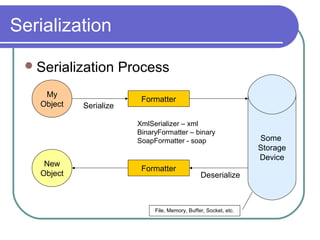
Serialization Process
MBV vs MBR
Serialization
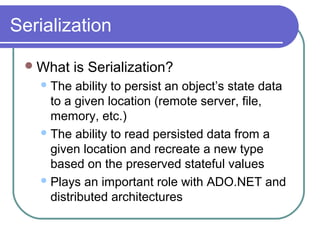
What is Serialization?
The ability to persist an object’s state data
to a given location (remote server, file,
memory, etc.)
The ability to read persisted data from a
given location and recreate a new type
based on the preserved stateful values
Plays an important role with ADO.NET and
distributed architectures
Serialization
Serialization Process
My
Object
Some
Storage
Device
New
Object
Formatter
Formatter
File, Memory, Buffer, Socket, etc.
Serialize
Deserialize
XmlSerializer – xml
BinaryFormatter – binary
SoapFormatter - soap
Serialization
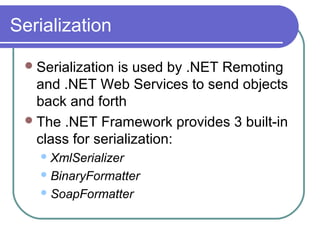
Serialization is used by .NET Remoting
and .NET Web Services to send objects
back and forth
The .NET Framework provides 3 built-in
class for serialization:
XmlSerializer
BinaryFormatter
SoapFormatter
Serialization
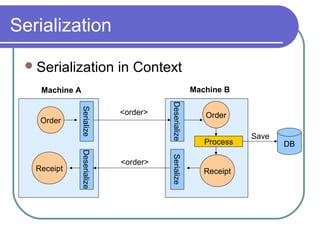
Serialization in Context
Order
Serialize
Deserialize
Order
Serialize
Deserialize
Process
ReceiptReceipt
Machine A Machine B
<order>
<order>
DB
Save
Serialization
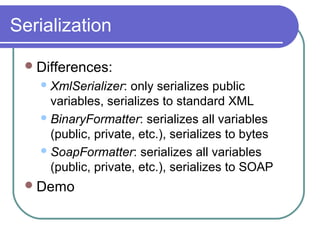
Differences:
XmlSerializer: only serializes public
variables, serializes to standard XML
BinaryFormatter: serializes all variables
(public, private, etc.), serializes to bytes
SoapFormatter: serializes all variables
(public, private, etc.), serializes to SOAP
Demo
Serialization
 Implications:
 BinaryFormatter is the fastest
 XmlSerializer is normally second fastest (depends
on the amount of non-public variables)
 SoapSerializer is normally the slowest
 XmlSerializer should be used for multi-
platform/language clients (used by Web Services)
 BinaryFormatter / SoapFormatter is targeted for
.NET environments
Serialization
How objects are passed
MBV – Marshal by Value
 The caller receives a full copy of the object in its
own application domain
 Object code is executed in the local application
 MBV objects are declared by using the
[Serializable] attribute, or by inheriting from the
ISerializable interface
 [Serializable]
public class MBVClass{…}
OR
public class MBVClass: ISerializable
Serialization
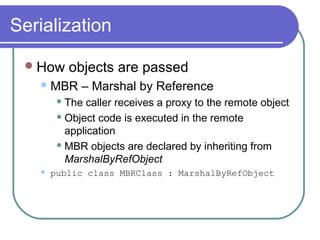
How objects are passed
MBR – Marshal by Reference
 The caller receives a proxy to the remote object
 Object code is executed in the remote
application
 MBR objects are declared by inheriting from
MarshalByRefObject
 public class MBRClass : MarshalByRefObject
Serialization
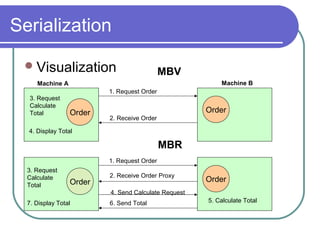
Visualization
Order Order
1. Request Order
2. Receive Order
Order Order
1. Request Order
2. Receive Order Proxy
3. Request
Calculate
Total
3. Request
Calculate
Total
4. Display Total
5. Calculate Total
4. Send Calculate Request
6. Send Total7. Display Total
MBV
MBR
Machine A Machine B
Serialization
MBV vs MBR demo
ADO.NET
Overview
ADO.NET Classes
XMLDataDocuments
What are the pros and cons of each?
Issues with ADO.NET
ADO.NET
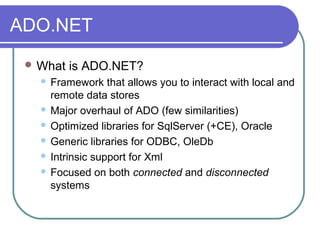
 What is ADO.NET?
 Framework that allows you to interact with local and
remote data stores
 Major overhaul of ADO (few similarities)
 Optimized libraries for SqlServer (+CE), Oracle
 Generic libraries for ODBC, OleDb
 Intrinsic support for Xml
 Focused on both connected and disconnected
systems
ADO.NET
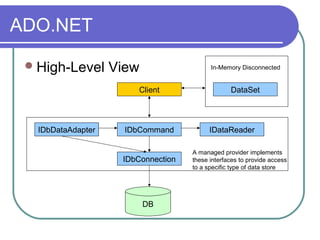
High-Level View
IDbDataAdapter IDbCommand IDataReader
IDbConnection
DB
Client
A managed provider implements
these interfaces to provide access
to a specific type of data store
DataSet
In-Memory Disconnected
ADO.NET
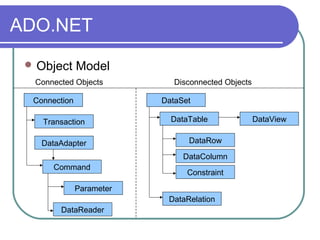
 Object Model
Connection
Transaction
DataAdapter
Command
Parameter
DataReader
DataSet
DataTable
DataRow
DataColumn
Constraint
DataRelation
DataView
Connected Objects Disconnected Objects
ADO.NET
 IDbConnection
 Represents a network connection to a relational
database
 Resource intensive, so connections should be kept
open as little as possible (pass through if possible)
 Connection Pooling is automatically enabled for
.NET IDbConnection implementations
 a connection pool is created based on an exact matching
algorithm that associates the pool with the connection
string
ADO.NET
 IDbCommand
 Represents a SQL statement that is
executed while connected to a data source
 Provides 3 primary means of submitting a
SQL statement:
1. ExecuteNonQuery – nothing returned
2. ExecuteScalar – 1 field returned
3. ExecuteReader – returns IDataReader
implementation
ADO.NET
IDbCommand cont.
Used for standard SQL text and/or stored
procedures
Allows for parameters to be passed in via
an IDataParameter implementation
ADO.NET
IDataReader (Forest Gump)
Provides a means of reading one or more
forward-only streams of result sets
DEMO
ADO.NET
IDbDataAdapter
Acts as a bridge between your database
and the disconnected objects in ADO.NET
Object’s Fill method provides an efficient
way to fetch the results of a query and place
them into a DataSet or DataTable (which
can then be used offline)
Reads cached changes from a DataSet or
DataTable and submits them to the
database
ADO.NET
DataTable
One of the central objects in ADO.NET
Used by DataSet, DataView, etc.
Represents one table of data in-memory
Allows you to:
 Fetch data from a DB and store it in a DataTable
 Disconnect from the DB and work with the
DataTable offline
 Reconnect and synchronize changes
ADO.NET
DataTable cont.
DataTable structure is similar to DB Table
structure:
 DataTable is composed of DataRows
 DataRows are composed of DataColumns
 Constraints can be set on a DataTable
DataTables can also be created and
populated in code (they do note require a
corresponding DB Table)
ADO.NET
DataTable cont.
Can be remoted (allows for both MBV and
MBR)
ADO.NET
DataView
Represents a customized view of a
DataTable
Allows for:
 Sorting
 Filtering
 Editing
 Searching
ADO.NET
DataView cont.
Allows multiple controls to bind to the same
DataTable, but show different data
ADO.NET
DataSet (La Femme Nikita)
Major component of the ADO.NET
architecture
Collection of DataTables
Allows for relationships between tables to
be created via DataRelation
Allows constraints to be set on data
ADO.NET
DataSet cont.
Can read and write data and schema as
XML documents
Can be remoted (allows for both MBV and
MBR)
Strongly-typed DataSets can be generated
 Can access tables and columns by name,
instead of using collection-based methods
 Allows for VS.NET Intellisense
ADO.NET
DataSet cont.
Ability to merge multiple DataSets
Ability to copy DataSets
Uses DiffGram (XML) to load and persist
changes
DEMO
ADO.NET
CommandBuilder
Automatically generates single-table
commands
DEMO
ADO.NET
XmlDataDocument
Solves problem of unsychronized access to
relational / XML data
Example:
 DataSet (relational) writes out XML file
 XmlDocument reads in and manipulates XML
 Two objects dealing with same data in
unsynchronized manner
 Result is a disconnect
ADO.NET
XmlDataDocument cont.
Synchronizes data between XmlDocument
and DataSet
Allows both objects to work on the same set
of data
Allows a single app, using a single set of
data, to harness the power of:
 DataSets (remoting, databinding, DataViews...)
 Xml (XPath, XSL, XSLT…)
ADO.NET
Pros and Cons
Best Practices
ADO.NET
 IDbConnection Best Practices
 Pass through whenever possible
 Use constant connectionstrings
 Use multiple accounts (1 for read access, 1 for
read/write access, etc.)
 Use Windows Authentication
 If stored in config file, encrypt
 Avoid displaying error sensitive error information
 Avoid using OleDbConnection.State
 Use the “using” statement in C#
ADO.NET
IDbCommand Best Practices
Use parameters when possible to avoid
SQL injections
ADO.NET
IDataReader Pros and Cons
Extremely fast performance (better than
DataSet)
Forward-only, read-only
Can only operate in connected mode
Must explicitly close both the IDataReader
and the IDbConnection
Not remotable
ADO.NET
 IDataReader Best Practices
 Use CommandBehavior.CloseConnection and
CommandBehavior.SequentialAccess when
possible
 Use IDataReader.Get[Type]() whenever possible
(performance boost)
 Call IDataReader.Cancel() if you’re done w/ a
DataSet but still have pending data
 Keep connection time to a minimum
 Use for large volumes of data to avoid memory
footprint
ADO.NET
 DataTable / DataSet Pros and Cons
 Both MBV and MBR behavior
 Ability to work with data offline
 Ability to represent the same data in multiple ways
via DataView
 Data bindable
 Decreased performance in comparison w/
IDataReader
 Consumes machine memory
 Developers must be careful when posting changes
in a distributed environment
ADO.NET
 DataSet Best Practices
 Strongly-type when possible
 Use for modifiable data and or data that will be
navigated
 Use for caching of frequently searched items
 Use DataSet.GetChanges() prior to sending across
the wire
 Avoid the use of the DataAdapter.Fill overload that
takes startRecord and maxRecords parameters
 Use MBR behaviour sparingly
ADO.NET
 CommandBuilder Pros / Cons
 Removes the need to manually write code
 Decreased performance, due to the need to hit a
database twice to retrieve schema information
 Decreased performance due to very verbose SQL
statements
 Better to use VS.NET’s built-in code generation
 MS: Use of the CommandBuilder should be limited
to design time or ad-hoc scenarios
ADO.NET
 Performance Matrix
1. IDataReader w/ Get[Type]
2. IDataReader w/ GetOrdinal
3. IDataReader by column name
4. Strongly-Typed DataSet w/ custom code
5. DataSet w/ custom code
6. Strongly-Typed DataSet w/
CommandBuilder
7. DataSet w/ CommandBuilder
ADO.NET
 Issues w/ ADO.NET
 No bulk SQL execution (DataSet batch submissions
aren’t done in bulk)
 No asynchronous calls
 Can’t write to interfaces…must use providers
directly
 Inability to get full SQL from
IDbCommand.CommandText when using params
 No object-relational mapping
 No SQL API
Data Tier Approaches
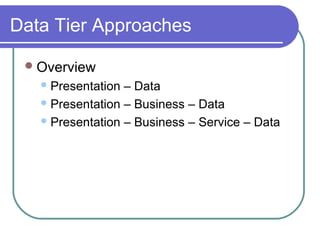
Overview
Presentation – Data
Presentation – Business – Data
Presentation – Business – Service – Data
Data Tier Approaches
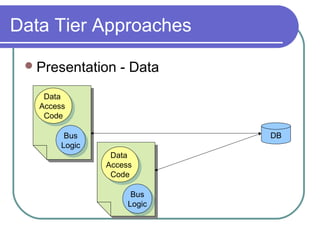
Presentation - Data
Data
Access
Code
Data
Access
Code
DBBus
Logic
Bus
Logic
Data
Access
Code
Data
Access
Code
Bus
Logic
Bus
Logic
Data Tier Approaches
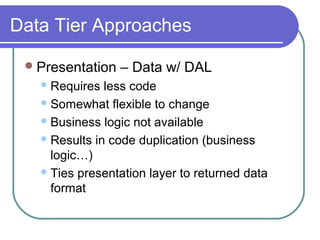
 Presentation – Data
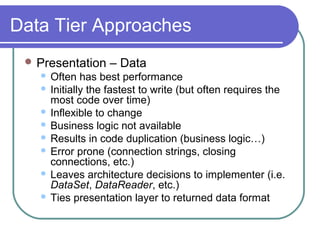
 Often has best performance
 Initially the fastest to write (but often requires the
most code over time)
 Inflexible to change
 Business logic not available
 Results in code duplication (business logic…)
 Error prone (connection strings, closing
connections, etc.)
 Leaves architecture decisions to implementer (i.e.
DataSet, DataReader, etc.)
 Ties presentation layer to returned data format
Data Tier Approaches
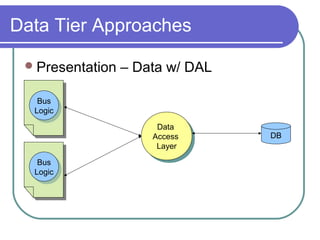
Presentation – Data w/ DAL
Data
Access
Layer
Data
Access
Layer
DB
Bus
Logic
Bus
Logic
Bus
Logic
Bus
Logic
Data Tier Approaches
Presentation – Data w/ DAL
Requires less code
Somewhat flexible to change
Business logic not available
Results in code duplication (business
logic…)
Ties presentation layer to returned data
format
Data Tier Approaches
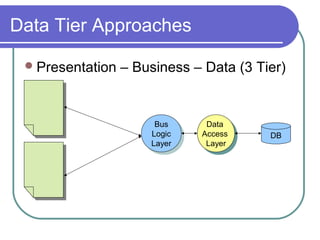
Presentation – Business – Data (3 Tier)
Data
Access
Layer
Data
Access
Layer
DB
Bus
Logic
Layer
Bus
Logic
Layer
Data Tier Approaches
 Presentation – Business – Data
 Much more flexible to change
 Business logic is centralized
 Does not tie presentation layer to returned data
format
 More complex to design and build
 Implicit changes may need to be cascaded through
all layers
 Does not clearly address remoting issues
 Business Logic must still be aware of DA classes
Data Tier Approaches
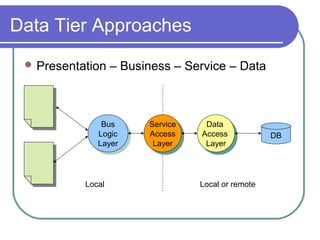
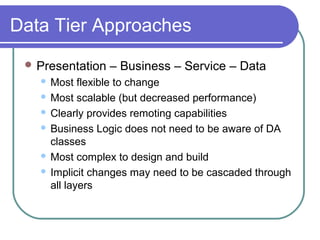
 Presentation – Business – Service – Data
Data
Access
Layer
Data
Access
Layer
DB
Bus
Logic
Layer
Bus
Logic
Layer
Service
Access
Layer
Service
Access
Layer
Local Local or remote
Data Tier Approaches
 Presentation – Business – Service – Data
 Most flexible to change
 Most scalable (but decreased performance)
 Clearly provides remoting capabilities
 Business Logic does not need to be aware of DA
classes
 Most complex to design and build
 Implicit changes may need to be cascaded through
all layers
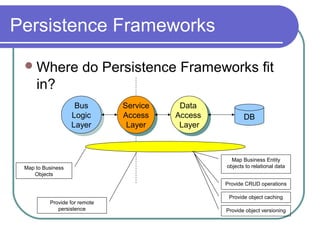
Persistence Frameworks
Where do Persistence Frameworks fit
in?
Data
Access
Layer
Data
Access
Layer
DB
Bus
Logic
Layer
Bus
Logic
Layer
Service
Access
Layer
Service
Access
Layer
Map Business Entity
objects to relational data
Provide CRUD operations
Provide object caching
Provide object versioning
Provide for remote
persistence
Map to Business
Objects
Persistence Frameworks
Overview
Persistence Frameworks in Context
Desired Attributes
Sample Architecture
Sample Frameworks
Other Approaches
Questions?
Persistence Frameworks
What is an Object Persistence
Framework?
A persistence layer encapsulates the
behavior needed to make objects persistent,
in other words to read, write, and delete
objects to/from permanent storage
Simplifies life for developers by removing
the need for repetitive coding
Focus is on persistence at the Object level
vs. the Data level
Persistence Frameworks
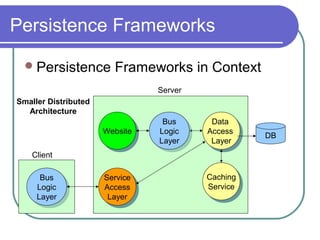
Persistence Frameworks in Context
Data
Access
Layer
Data
Access
Layer
Service
Access
Layer
Service
Access
Layer
DBWebsiteWebsite
Caching
Service
Caching
Service
Bus
Logic
Layer
Bus
Logic
Layer
Bus
Logic
Layer
Bus
Logic
Layer
Smaller Distributed
Architecture
Client
Server
Persistence Frameworks
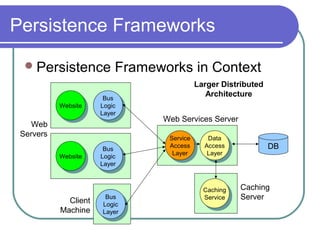
Persistence Frameworks in Context
DB
WebsiteWebsite
Larger Distributed
Architecture
Caching
Server
Bus
Logic
Layer
Bus
Logic
Layer
Service
Access
Layer
Service
Access
Layer
Data
Access
Layer
Data
Access
Layer
Caching
Service
Caching
Service
WebsiteWebsite
Bus
Logic
Layer
Bus
Logic
Layer
Bus
Logic
Layer
Bus
Logic
Layer
Web Services Server
Client
Machine
Web
Servers
Persistence Frameworks
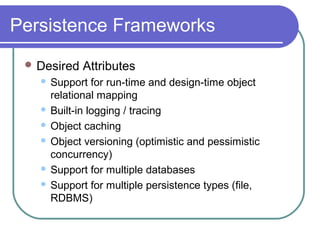
 Desired Attributes
 Support for run-time and design-time object
relational mapping
 Built-in logging / tracing
 Object caching
 Object versioning (optimistic and pessimistic
concurrency)
 Support for multiple databases
 Support for multiple persistence types (file,
RDBMS)
Persistence Frameworks
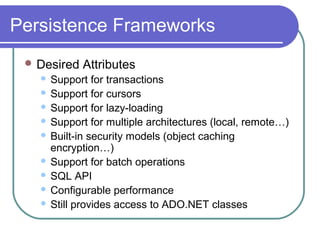
 Desired Attributes
 Support for transactions
 Support for cursors
 Support for lazy-loading
 Support for multiple architectures (local, remote…)
 Built-in security models (object caching
encryption…)
 Support for batch operations
 SQL API
 Configurable performance
 Still provides access to ADO.NET classes
Persistence Frameworks
Sample Architecture
Persistence Frameworks
Current .NET Persistence Frameworks
Open Source
 Sisyphus
 Gentle.NET (DEMO)
 Wilson ORMapper (DEMO)
 Bamboo.Prevelance (DEMO)
 LLBLGen (DEMO)
 Atoms
 OJB.NET
 ObjectSpaces*
Persistence Frameworks
Current .NET Persistence Frameworks
Commercial
 EntityBroker
 DataObjects.NET
 LLBLGen Pro
 .NET N-Tier Generator
 Tier Developer
 ORM.NET
 Objectz.NET
Persistence Frameworks
Other Approaches
Poly Model (.NET Patterns)
Business Object JumpStart (Developing
.NET Enterprise Applications)
Serialize object to DB
Persistence Frameworks
 Caching Considerations
 Allow for both local and remote caching
 Local: Hashtable, MMF, etc.
 Support both serialized and non-serialized
 Remote: .NET Remoting, SQL Server, etc.
 Provide Scavengers (LRU, LILO, Expiration…)
 Provide object encryption
 Provide size maximums
 Provide caching stats (Hits/Misses/Duration)
 Allow for multiple cache instances
Persistence Frameworks
Concurrency Approaches
Optimistic/Pessimistic concurrency
 In code – error prone upon reboot
 VersionManager (Timestamp, GUID, etc.)
 In DB – resource intensive
 Timestamp, GUID, etc.
Summary
Serialization
ADO.NET
Data Tier Approaches
Persistence Frameworks
Resources
 Microsoft Patterns & Practices website
 MS: Designing Data Tier Components and Passing
Data Through Tiers
 MS: .NET Data Access Architecture Guide
 MS: ADO.NET Best Practices
 Martin Fowler: Patterns of Enterprise Application
Architecture
 David Sceppa: ADO.NET
 Clifton Nock: Data Access Patterns
 Sun: Core J2EE Patterns
 Andrew Tobias: C# and the .NET Platform

Ado.net &amp; data persistence frameworks

  • 1.
    ADO.NET & DataPersistence Frameworks
  • 2.
  • 3.
  • 4.
    Serialization What is Serialization? Theability to persist an object’s state data to a given location (remote server, file, memory, etc.) The ability to read persisted data from a given location and recreate a new type based on the preserved stateful values Plays an important role with ADO.NET and distributed architectures
  • 5.
    Serialization Serialization Process My Object Some Storage Device New Object Formatter Formatter File, Memory,Buffer, Socket, etc. Serialize Deserialize XmlSerializer – xml BinaryFormatter – binary SoapFormatter - soap
  • 6.
    Serialization Serialization is usedby .NET Remoting and .NET Web Services to send objects back and forth The .NET Framework provides 3 built-in class for serialization: XmlSerializer BinaryFormatter SoapFormatter
  • 7.
  • 8.
    Serialization Differences: XmlSerializer: only serializespublic variables, serializes to standard XML BinaryFormatter: serializes all variables (public, private, etc.), serializes to bytes SoapFormatter: serializes all variables (public, private, etc.), serializes to SOAP Demo
  • 9.
    Serialization  Implications:  BinaryFormatteris the fastest  XmlSerializer is normally second fastest (depends on the amount of non-public variables)  SoapSerializer is normally the slowest  XmlSerializer should be used for multi- platform/language clients (used by Web Services)  BinaryFormatter / SoapFormatter is targeted for .NET environments
  • 10.
    Serialization How objects arepassed MBV – Marshal by Value  The caller receives a full copy of the object in its own application domain  Object code is executed in the local application  MBV objects are declared by using the [Serializable] attribute, or by inheriting from the ISerializable interface  [Serializable] public class MBVClass{…} OR public class MBVClass: ISerializable
  • 11.
    Serialization How objects arepassed MBR – Marshal by Reference  The caller receives a proxy to the remote object  Object code is executed in the remote application  MBR objects are declared by inheriting from MarshalByRefObject  public class MBRClass : MarshalByRefObject
  • 12.
    Serialization Visualization Order Order 1. RequestOrder 2. Receive Order Order Order 1. Request Order 2. Receive Order Proxy 3. Request Calculate Total 3. Request Calculate Total 4. Display Total 5. Calculate Total 4. Send Calculate Request 6. Send Total7. Display Total MBV MBR Machine A Machine B
  • 13.
  • 14.
    ADO.NET Overview ADO.NET Classes XMLDataDocuments What arethe pros and cons of each? Issues with ADO.NET
  • 15.
    ADO.NET  What isADO.NET?  Framework that allows you to interact with local and remote data stores  Major overhaul of ADO (few similarities)  Optimized libraries for SqlServer (+CE), Oracle  Generic libraries for ODBC, OleDb  Intrinsic support for Xml  Focused on both connected and disconnected systems
  • 16.
    ADO.NET High-Level View IDbDataAdapter IDbCommandIDataReader IDbConnection DB Client A managed provider implements these interfaces to provide access to a specific type of data store DataSet In-Memory Disconnected
  • 17.
  • 18.
    ADO.NET  IDbConnection  Representsa network connection to a relational database  Resource intensive, so connections should be kept open as little as possible (pass through if possible)  Connection Pooling is automatically enabled for .NET IDbConnection implementations  a connection pool is created based on an exact matching algorithm that associates the pool with the connection string
  • 19.
    ADO.NET  IDbCommand  Representsa SQL statement that is executed while connected to a data source  Provides 3 primary means of submitting a SQL statement: 1. ExecuteNonQuery – nothing returned 2. ExecuteScalar – 1 field returned 3. ExecuteReader – returns IDataReader implementation
  • 20.
    ADO.NET IDbCommand cont. Used forstandard SQL text and/or stored procedures Allows for parameters to be passed in via an IDataParameter implementation
  • 21.
    ADO.NET IDataReader (Forest Gump) Providesa means of reading one or more forward-only streams of result sets DEMO
  • 22.
    ADO.NET IDbDataAdapter Acts as abridge between your database and the disconnected objects in ADO.NET Object’s Fill method provides an efficient way to fetch the results of a query and place them into a DataSet or DataTable (which can then be used offline) Reads cached changes from a DataSet or DataTable and submits them to the database
  • 23.
    ADO.NET DataTable One of thecentral objects in ADO.NET Used by DataSet, DataView, etc. Represents one table of data in-memory Allows you to:  Fetch data from a DB and store it in a DataTable  Disconnect from the DB and work with the DataTable offline  Reconnect and synchronize changes
  • 24.
    ADO.NET DataTable cont. DataTable structureis similar to DB Table structure:  DataTable is composed of DataRows  DataRows are composed of DataColumns  Constraints can be set on a DataTable DataTables can also be created and populated in code (they do note require a corresponding DB Table)
  • 25.
    ADO.NET DataTable cont. Can beremoted (allows for both MBV and MBR)
  • 26.
    ADO.NET DataView Represents a customizedview of a DataTable Allows for:  Sorting  Filtering  Editing  Searching
  • 27.
    ADO.NET DataView cont. Allows multiplecontrols to bind to the same DataTable, but show different data
  • 28.
    ADO.NET DataSet (La FemmeNikita) Major component of the ADO.NET architecture Collection of DataTables Allows for relationships between tables to be created via DataRelation Allows constraints to be set on data
  • 29.
    ADO.NET DataSet cont. Can readand write data and schema as XML documents Can be remoted (allows for both MBV and MBR) Strongly-typed DataSets can be generated  Can access tables and columns by name, instead of using collection-based methods  Allows for VS.NET Intellisense
  • 30.
    ADO.NET DataSet cont. Ability tomerge multiple DataSets Ability to copy DataSets Uses DiffGram (XML) to load and persist changes DEMO
  • 31.
  • 32.
    ADO.NET XmlDataDocument Solves problem ofunsychronized access to relational / XML data Example:  DataSet (relational) writes out XML file  XmlDocument reads in and manipulates XML  Two objects dealing with same data in unsynchronized manner  Result is a disconnect
  • 33.
    ADO.NET XmlDataDocument cont. Synchronizes databetween XmlDocument and DataSet Allows both objects to work on the same set of data Allows a single app, using a single set of data, to harness the power of:  DataSets (remoting, databinding, DataViews...)  Xml (XPath, XSL, XSLT…)
  • 34.
  • 35.
    ADO.NET  IDbConnection BestPractices  Pass through whenever possible  Use constant connectionstrings  Use multiple accounts (1 for read access, 1 for read/write access, etc.)  Use Windows Authentication  If stored in config file, encrypt  Avoid displaying error sensitive error information  Avoid using OleDbConnection.State  Use the “using” statement in C#
  • 36.
    ADO.NET IDbCommand Best Practices Useparameters when possible to avoid SQL injections
  • 37.
    ADO.NET IDataReader Pros andCons Extremely fast performance (better than DataSet) Forward-only, read-only Can only operate in connected mode Must explicitly close both the IDataReader and the IDbConnection Not remotable
  • 38.
    ADO.NET  IDataReader BestPractices  Use CommandBehavior.CloseConnection and CommandBehavior.SequentialAccess when possible  Use IDataReader.Get[Type]() whenever possible (performance boost)  Call IDataReader.Cancel() if you’re done w/ a DataSet but still have pending data  Keep connection time to a minimum  Use for large volumes of data to avoid memory footprint
  • 39.
    ADO.NET  DataTable /DataSet Pros and Cons  Both MBV and MBR behavior  Ability to work with data offline  Ability to represent the same data in multiple ways via DataView  Data bindable  Decreased performance in comparison w/ IDataReader  Consumes machine memory  Developers must be careful when posting changes in a distributed environment
  • 40.
    ADO.NET  DataSet BestPractices  Strongly-type when possible  Use for modifiable data and or data that will be navigated  Use for caching of frequently searched items  Use DataSet.GetChanges() prior to sending across the wire  Avoid the use of the DataAdapter.Fill overload that takes startRecord and maxRecords parameters  Use MBR behaviour sparingly
  • 41.
    ADO.NET  CommandBuilder Pros/ Cons  Removes the need to manually write code  Decreased performance, due to the need to hit a database twice to retrieve schema information  Decreased performance due to very verbose SQL statements  Better to use VS.NET’s built-in code generation  MS: Use of the CommandBuilder should be limited to design time or ad-hoc scenarios
  • 42.
    ADO.NET  Performance Matrix 1.IDataReader w/ Get[Type] 2. IDataReader w/ GetOrdinal 3. IDataReader by column name 4. Strongly-Typed DataSet w/ custom code 5. DataSet w/ custom code 6. Strongly-Typed DataSet w/ CommandBuilder 7. DataSet w/ CommandBuilder
  • 43.
    ADO.NET  Issues w/ADO.NET  No bulk SQL execution (DataSet batch submissions aren’t done in bulk)  No asynchronous calls  Can’t write to interfaces…must use providers directly  Inability to get full SQL from IDbCommand.CommandText when using params  No object-relational mapping  No SQL API
  • 44.
    Data Tier Approaches Overview Presentation– Data Presentation – Business – Data Presentation – Business – Service – Data
  • 45.
    Data Tier Approaches Presentation- Data Data Access Code Data Access Code DBBus Logic Bus Logic Data Access Code Data Access Code Bus Logic Bus Logic
  • 46.
    Data Tier Approaches Presentation – Data  Often has best performance  Initially the fastest to write (but often requires the most code over time)  Inflexible to change  Business logic not available  Results in code duplication (business logic…)  Error prone (connection strings, closing connections, etc.)  Leaves architecture decisions to implementer (i.e. DataSet, DataReader, etc.)  Ties presentation layer to returned data format
  • 47.
    Data Tier Approaches Presentation– Data w/ DAL Data Access Layer Data Access Layer DB Bus Logic Bus Logic Bus Logic Bus Logic
  • 48.
    Data Tier Approaches Presentation– Data w/ DAL Requires less code Somewhat flexible to change Business logic not available Results in code duplication (business logic…) Ties presentation layer to returned data format
  • 49.
    Data Tier Approaches Presentation– Business – Data (3 Tier) Data Access Layer Data Access Layer DB Bus Logic Layer Bus Logic Layer
  • 50.
    Data Tier Approaches Presentation – Business – Data  Much more flexible to change  Business logic is centralized  Does not tie presentation layer to returned data format  More complex to design and build  Implicit changes may need to be cascaded through all layers  Does not clearly address remoting issues  Business Logic must still be aware of DA classes
  • 51.
    Data Tier Approaches Presentation – Business – Service – Data Data Access Layer Data Access Layer DB Bus Logic Layer Bus Logic Layer Service Access Layer Service Access Layer Local Local or remote
  • 52.
    Data Tier Approaches Presentation – Business – Service – Data  Most flexible to change  Most scalable (but decreased performance)  Clearly provides remoting capabilities  Business Logic does not need to be aware of DA classes  Most complex to design and build  Implicit changes may need to be cascaded through all layers
  • 53.
    Persistence Frameworks Where doPersistence Frameworks fit in? Data Access Layer Data Access Layer DB Bus Logic Layer Bus Logic Layer Service Access Layer Service Access Layer Map Business Entity objects to relational data Provide CRUD operations Provide object caching Provide object versioning Provide for remote persistence Map to Business Objects
  • 54.
    Persistence Frameworks Overview Persistence Frameworksin Context Desired Attributes Sample Architecture Sample Frameworks Other Approaches Questions?
  • 55.
    Persistence Frameworks What isan Object Persistence Framework? A persistence layer encapsulates the behavior needed to make objects persistent, in other words to read, write, and delete objects to/from permanent storage Simplifies life for developers by removing the need for repetitive coding Focus is on persistence at the Object level vs. the Data level
  • 56.
    Persistence Frameworks Persistence Frameworksin Context Data Access Layer Data Access Layer Service Access Layer Service Access Layer DBWebsiteWebsite Caching Service Caching Service Bus Logic Layer Bus Logic Layer Bus Logic Layer Bus Logic Layer Smaller Distributed Architecture Client Server
  • 57.
    Persistence Frameworks Persistence Frameworksin Context DB WebsiteWebsite Larger Distributed Architecture Caching Server Bus Logic Layer Bus Logic Layer Service Access Layer Service Access Layer Data Access Layer Data Access Layer Caching Service Caching Service WebsiteWebsite Bus Logic Layer Bus Logic Layer Bus Logic Layer Bus Logic Layer Web Services Server Client Machine Web Servers
  • 58.
    Persistence Frameworks  DesiredAttributes  Support for run-time and design-time object relational mapping  Built-in logging / tracing  Object caching  Object versioning (optimistic and pessimistic concurrency)  Support for multiple databases  Support for multiple persistence types (file, RDBMS)
  • 59.
    Persistence Frameworks  DesiredAttributes  Support for transactions  Support for cursors  Support for lazy-loading  Support for multiple architectures (local, remote…)  Built-in security models (object caching encryption…)  Support for batch operations  SQL API  Configurable performance  Still provides access to ADO.NET classes
  • 60.
  • 61.
    Persistence Frameworks Current .NETPersistence Frameworks Open Source  Sisyphus  Gentle.NET (DEMO)  Wilson ORMapper (DEMO)  Bamboo.Prevelance (DEMO)  LLBLGen (DEMO)  Atoms  OJB.NET  ObjectSpaces*
  • 62.
    Persistence Frameworks Current .NETPersistence Frameworks Commercial  EntityBroker  DataObjects.NET  LLBLGen Pro  .NET N-Tier Generator  Tier Developer  ORM.NET  Objectz.NET
  • 63.
    Persistence Frameworks Other Approaches PolyModel (.NET Patterns) Business Object JumpStart (Developing .NET Enterprise Applications) Serialize object to DB
  • 64.
    Persistence Frameworks  CachingConsiderations  Allow for both local and remote caching  Local: Hashtable, MMF, etc.  Support both serialized and non-serialized  Remote: .NET Remoting, SQL Server, etc.  Provide Scavengers (LRU, LILO, Expiration…)  Provide object encryption  Provide size maximums  Provide caching stats (Hits/Misses/Duration)  Allow for multiple cache instances
  • 65.
    Persistence Frameworks Concurrency Approaches Optimistic/Pessimisticconcurrency  In code – error prone upon reboot  VersionManager (Timestamp, GUID, etc.)  In DB – resource intensive  Timestamp, GUID, etc.
  • 66.
  • 67.
    Resources  Microsoft Patterns& Practices website  MS: Designing Data Tier Components and Passing Data Through Tiers  MS: .NET Data Access Architecture Guide  MS: ADO.NET Best Practices  Martin Fowler: Patterns of Enterprise Application Architecture  David Sceppa: ADO.NET  Clifton Nock: Data Access Patterns  Sun: Core J2EE Patterns  Andrew Tobias: C# and the .NET Platform