Object Innovations Courses 4120 and 4121
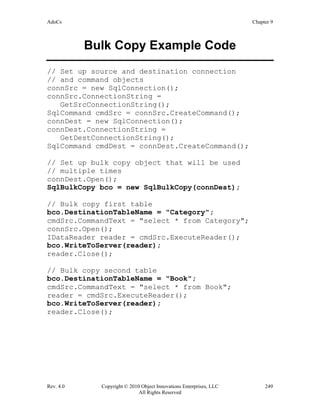
Student Guide
Revision 4.0
ADO.NET Using C#
Rev. 4.0 Copyright ©2010 Object Innovations Enterprises, LLC ii
All Rights Reserved
ADO.NET Using C#
ADO.NET for Web Applications Using C#
Rev. 4.0
This student guide is for these two Object Innovations courses:
4120 ADO.NET Using C#
4121 ADO.NET for Web Applications Using C#
There is a separate lab manual for each course.
Student Guide
Information in this document is subject to change without notice. Companies, names and data used
in examples herein are fictitious unless otherwise noted. No part of this document may be
reproduced or transmitted in any form or by any means, electronic or mechanical, for any purpose,
without the express written permission of Object Innovations.
Product and company names mentioned herein are the trademarks or registered trademarks of their
respective owners.
® is a registered trademark of Object Innovations.
Author: Robert J. Oberg
Copyright ©2010 Object Innovations Enterprises, LLC All rights reserved.
Object Innovations
877-558-7246
www.objectinnovations.com
Published in the United States of America.
Rev. 4.0 Copyright ©2010 Object Innovations Enterprises, LLC iii
All Rights Reserved
Table of Contents (Overview)
Chapter 1 Introduction to ADO.NET
Chapter 2 ADO.NET Connections
Chapter 3 ADO.NET Commands
Chapter 4 DataReaders and Connected Access
Chapter 5 DataSets and Disconnected Access
Chapter 6 More about DataSets
Chapter 7 XML and ADO.NET
Chapter 8 Concurrency and Transactions
Chapter 9 Additional Features
Chapter 10 LINQ and Entity Framework
Appendix A Acme Computer Case Study
Appendix B Learning Resources
Rev. 4.0 Copyright ©2010 Object Innovations Enterprises, LLC iv
All Rights Reserved
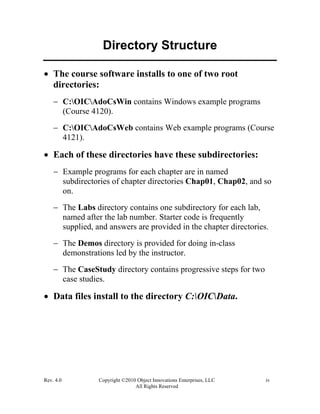
Directory Structure
• The course software installs to one of two root
directories:
− C:OICAdoCsWin contains Windows example programs
(Course 4120).
− C:OICAdoCsWeb contains Web example programs (Course
4121).
• Each of these directories have these subdirectories:
− Example programs for each chapter are in named
subdirectories of chapter directories Chap01, Chap02, and so
on.
− The Labs directory contains one subdirectory for each lab,
named after the lab number. Starter code is frequently
supplied, and answers are provided in the chapter directories.
− The Demos directory is provided for doing in-class
demonstrations led by the instructor.
− The CaseStudy directory contains progressive steps for two
case studies.
• Data files install to the directory C:OICData.
Rev. 4.0 Copyright ©2010 Object Innovations Enterprises, LLC v
All Rights Reserved
Table of Contents (Detailed)
Chapter 1 Introduction to ADO.NET ....................................................................... 1
Microsoft Data Access Technologies ................................................................................. 3
ODBC ................................................................................................................................. 4
OLE DB .............................................................................................................................. 5
ActiveX Data Objects (ADO)............................................................................................. 6
Accessing SQL Server before ADO.NET .......................................................................... 7
ADO.NET........................................................................................................................... 8
ADO.NET Architecture...................................................................................................... 9
.NET Data Providers......................................................................................................... 11
Programming with ADO.NET Interfaces ......................................................................... 12
.NET Namespaces............................................................................................................. 13
Connected Data Access .................................................................................................... 14
Sample Database............................................................................................................... 15
Example: Connecting to SQL Server................................................................................ 16
ADO.NET Class Libraries................................................................................................ 17
Connecting to an OLE DB Data Provider ........................................................................ 18
Using Commands.............................................................................................................. 19
Creating a Command Object............................................................................................. 20
ExecuteNonQuery............................................................................................................. 21
Using a Data Reader ......................................................................................................... 22
Data Reader: Code Example............................................................................................. 23
Disconnected Datasets ...................................................................................................... 24
Data Adapters ................................................................................................................... 25
Acme Computer Case Study............................................................................................. 26
Buy Computer................................................................................................................... 27
Model................................................................................................................................ 28
Component........................................................................................................................ 29
Part.................................................................................................................................... 30
PartConfiguration.............................................................................................................. 31
System............................................................................................................................... 32
SystemId as Identity Column............................................................................................ 33
SystemDetails ................................................................................................................... 35
StatusCode ........................................................................................................................ 36
Relationships..................................................................................................................... 37
Stored Procedure............................................................................................................... 38
Lab 1 ................................................................................................................................. 39
Summary........................................................................................................................... 40
Chapter 2 ADO.NET Connections .......................................................................... 41
ADO.NET Block Diagram................................................................................................ 43
.NET Data Providers......................................................................................................... 44
Rev. 4.0 Copyright ©2010 Object Innovations Enterprises, LLC vi
All Rights Reserved
Namespaces for .NET Data Providers .............................................................................. 45
Basic Connection Programming ....................................................................................... 46
Using Interfaces ................................................................................................................ 47
IDbConnection Properties................................................................................................. 48
Connection String ............................................................................................................. 49
SQL Server Connection String ......................................................................................... 50
OLE DB Connection String.............................................................................................. 51
SQL Server Security ......................................................................................................... 52
IDbConnection Methods................................................................................................... 53
BasicConnect (Version 2)................................................................................................. 54
Connection Life Cycle...................................................................................................... 55
BasicConnect (Version 3)................................................................................................. 56
Database Application Front-ends...................................................................................... 57
Lab 2A .............................................................................................................................. 58
ChangeDatabase................................................................................................................ 59
Connection Pooling........................................................................................................... 60
Pool Settings for SQL Server............................................................................................ 61
Connection Demo Program............................................................................................... 62
Connection Events ............................................................................................................ 63
Connection Event Demo................................................................................................... 64
ADO.NET Exception Handling........................................................................................ 65
Lab 2B............................................................................................................................... 66
Summary........................................................................................................................... 67
Chapter 3 ADO.NET Commands............................................................................ 69
Command Objects............................................................................................................. 71
Creating Commands.......................................................................................................... 72
Executing Commands ....................................................................................................... 73
Sample Program................................................................................................................ 74
Dynamic Queries .............................................................................................................. 76
Parameterized Queries ...................................................................................................... 77
Parameterized Query Example ......................................................................................... 78
Command Types ............................................................................................................... 79
Stored Procedures ............................................................................................................. 80
Stored Procedure Example................................................................................................ 81
Testing the Stored Procedure............................................................................................ 82
Stored Procedures in ADO.NET....................................................................................... 83
Batch Queries.................................................................................................................... 85
Transactions...................................................................................................................... 86
Lab 3 ................................................................................................................................. 87
Summary........................................................................................................................... 88
Chapter 4 DataReaders and Connected Access ..................................................... 89
DataReader........................................................................................................................ 91
Using a DataReader .......................................................................................................... 92
Closing a DataReader ....................................................................................................... 93
Rev. 4.0 Copyright ©2010 Object Innovations Enterprises, LLC vii
All Rights Reserved
IDataRecord...................................................................................................................... 94
Type-Safe Accessors......................................................................................................... 95
Type-Safe Access Sample Program.................................................................................. 97
GetOrdinal()...................................................................................................................... 99
Null Data......................................................................................................................... 100
Testing for Null............................................................................................................... 101
ExecuteReader Options................................................................................................... 102
Returning Multiple Result Sets....................................................................................... 103
DataReader Multiple Results Sets .................................................................................. 104
Obtaining Schema Information....................................................................................... 105
Output from Sample Program......................................................................................... 107
Lab 4 ............................................................................................................................... 108
Summary......................................................................................................................... 109
Chapter 5 DataSets and Disconnected Access...................................................... 111
DataSet............................................................................................................................ 113
DataSet Architecture....................................................................................................... 114
Why DataSet? ................................................................................................................. 115
DataSet Components....................................................................................................... 116
DataAdapter.................................................................................................................... 117
DataSet Example Program.............................................................................................. 118
Data Access Class........................................................................................................... 119
Retrieving the Data ......................................................................................................... 120
Filling a DataSet ............................................................................................................. 121
Accessing a DataSet........................................................................................................ 122
Updating a DataSet Scenario .......................................................................................... 123
Example – ModelDataSet ............................................................................................... 124
Disconnected DataSet Example...................................................................................... 125
Adding a New Row......................................................................................................... 126
Searching and Updating a Row ...................................................................................... 127
Deleting a Row ............................................................................................................... 128
Row Versions.................................................................................................................. 129
Row State........................................................................................................................ 130
BeginEdit and CancelEdit............................................................................................... 131
DataTable Events............................................................................................................ 132
Updating a Database ....................................................................................................... 133
Insert Command.............................................................................................................. 134
Update Command ........................................................................................................... 135
Delete Command ............................................................................................................ 136
Exception Handling ........................................................................................................ 137
Command Builders ......................................................................................................... 138
Lab 5 ............................................................................................................................... 139
Summary......................................................................................................................... 140
Chapter 6 More about DataSets ............................................................................ 141
Filtering DataSets ........................................................................................................... 143
Rev. 4.0 Copyright ©2010 Object Innovations Enterprises, LLC viii
All Rights Reserved
Example of Filtering ....................................................................................................... 144
PartFinder Example Code (DB.cs) ................................................................................. 145
Using a Single DataTable ............................................................................................... 147
Multiple Tables............................................................................................................... 148
DataSet Architecture....................................................................................................... 149
Multiple Table Example ................................................................................................. 150
Schema in the DataSet .................................................................................................... 153
Relations ......................................................................................................................... 154
Navigating a DataSet ...................................................................................................... 155
Using Parent/Child Relation........................................................................................... 156
Inferring Schema............................................................................................................. 157
AddWithKey................................................................................................................... 158
Adding a Primary Key .................................................................................................... 159
TableMappings ............................................................................................................... 160
Identity Columns............................................................................................................. 161
Part Updater Example..................................................................................................... 162
Creating a Dataset Manually........................................................................................... 163
Manual DataSet Code ..................................................................................................... 164
Lab 6 ............................................................................................................................... 166
Summary......................................................................................................................... 167
Chapter 7 XML and ADO.NET............................................................................. 169
ADO.NET and XML ...................................................................................................... 171
Rendering XML from a DataSet..................................................................................... 172
XmlWriteMode............................................................................................................... 173
Demo: Writing XML Data.............................................................................................. 174
Reading XML into a DataSet.......................................................................................... 177
Demo: Reading XML Data............................................................................................. 178
DataSets and XML Schema............................................................................................ 180
Demo: Writing XML Schema......................................................................................... 181
ModelSchema.xsd........................................................................................................... 182
Reading XML Schema.................................................................................................... 183
XmlReadMode................................................................................................................ 184
Demo: Reading XML Schema........................................................................................ 185
Writing Data as Attributes .............................................................................................. 187
XML Data in DataTables................................................................................................ 189
Typed DataSets............................................................................................................... 190
Table Adapter ................................................................................................................. 191
Demo: Creating a Typed DataSet Using Visual Studio.................................................. 192
Demo: Creating a Typed DataSet ................................................................................... 195
Using a Typed DataSet ................................................................................................... 197
Synchronizing DataSets and XML ................................................................................. 198
Using XmlDataDocument............................................................................................... 199
Windows Client Code..................................................................................................... 201
Web Client Code............................................................................................................. 202
XML Serialization .......................................................................................................... 204
Rev. 4.0 Copyright ©2010 Object Innovations Enterprises, LLC ix
All Rights Reserved
XML Serialization Code Example.................................................................................. 205
Default Constructor......................................................................................................... 206
Lab 7 ............................................................................................................................... 207
Summary......................................................................................................................... 208
Chapter 8 Concurrency and Transactions ........................................................... 209
DataSets and Concurrency.............................................................................................. 211
Demo – Destructive Concurrency................................................................................... 212
Demo – Optimistic Concurrency .................................................................................... 214
Handling Concurrency Violations .................................................................................. 216
Pessimistic Concurrency................................................................................................. 217
Transactions.................................................................................................................... 218
Demo – ADO.NET Transactions.................................................................................... 219
Programming ADO.NET Transactions........................................................................... 221
ADO.NET Transaction Code.......................................................................................... 222
Using ADO.NET Transactions....................................................................................... 223
DataBase Transactions.................................................................................................... 224
Transaction in Stored Procedure..................................................................................... 225
Testing the Stored Procedure.......................................................................................... 226
ADO.NET Client Example ............................................................................................. 227
SQL Server Error............................................................................................................ 231
Summary......................................................................................................................... 232
Chapter 9 Additional Features .............................................................................. 233
AcmePub Database......................................................................................................... 235
Connected Database Access ........................................................................................... 236
Long Database Operations.............................................................................................. 238
Asynchronous Operations............................................................................................... 240
Async Example Code...................................................................................................... 242
Multiple Active Result Sets............................................................................................ 245
MARS Example Program ............................................................................................... 246
Bulk Copy....................................................................................................................... 247
Bulk Copy Example........................................................................................................ 248
Bulk Copy Example Code .............................................................................................. 249
Lab 9 ............................................................................................................................... 250
Summary......................................................................................................................... 251
Chapter 10 LINQ and Entity Framework.............................................................. 253
Language Integrated Query (LINQ) ............................................................................... 255
LINQ to ADO.NET ........................................................................................................ 256
Bridging Objects and Data.............................................................................................. 257
LINQ Demo .................................................................................................................... 258
Object Relational Designer............................................................................................. 259
IntelliSense...................................................................................................................... 261
Basic LINQ Query Operators ......................................................................................... 262
Obtaining a Data Source................................................................................................. 263
LINQ Query Example..................................................................................................... 264
Rev. 4.0 Copyright ©2010 Object Innovations Enterprises, LLC x
All Rights Reserved
Filtering........................................................................................................................... 265
Ordering.......................................................................................................................... 266
Aggregation .................................................................................................................... 267
Obtaining Lists and Arrays............................................................................................. 268
Deferred Execution......................................................................................................... 269
Modifying a Data Source................................................................................................ 270
Performing Inserts via LINQ to SQL.............................................................................. 271
Performing Deletes via LINQ to SQL ............................................................................ 272
Performing Updates via LINQ to SQL........................................................................... 273
LINQ to DataSet ............................................................................................................. 274
LINQ to DataSet Demo .................................................................................................. 275
Using the Typed DataSet ................................................................................................ 277
Full-Blown LINQ to DataSet Example........................................................................... 278
ADO.NET Entity Framework......................................................................................... 279
Exploring the EDM......................................................................................................... 280
EDM Example ................................................................................................................ 281
AcmePub Tables............................................................................................................. 282
AcmePub Entity Data Model.......................................................................................... 283
XML Representation of Model....................................................................................... 284
Entity Data Model Concepts........................................................................................... 285
Conceptual Model........................................................................................................... 286
Storage Model................................................................................................................. 287
Mappings ........................................................................................................................ 288
Querying the EDM.......................................................................................................... 289
Class Diagram................................................................................................................. 290
Context Class .................................................................................................................. 291
List of Categories............................................................................................................ 292
List of Books................................................................................................................... 293
LINQ to Entities Query Example ................................................................................... 294
LINQ to Entities Update Example.................................................................................. 295
Entity Framework in a Class Library.............................................................................. 296
Data Access Class Library.............................................................................................. 297
Client Code ..................................................................................................................... 298
Lab 10 ............................................................................................................................. 299
Summary......................................................................................................................... 300
Appendix A Acme Computer Case Study................................................................ 301
Appendix B Learning Resources .............................................................................. 309
AdoCs Chapter 1
Rev. 4.0 Copyright © 2010 Object Innovations Enterprises, LLC 1
All Rights Reserved
Chapter 1
Introduction to ADO.NET
AdoCs Chapter 1
Rev. 4.0 Copyright © 2010 Object Innovations Enterprises, LLC 2
All Rights Reserved
Introduction to ADO.NET
Objectives
After completing this unit you will be able to:
• Explain where ADO.NET fits in Microsoft data
access technologies.
• Understand the key concepts in the ADO.NET data
access programming model.
• Work with a Visual Studio testbed for building
database applications.
• Outline the Acme Computer case study database and
perform simple queries against it.
AdoCs Chapter 1
Rev. 4.0 Copyright © 2010 Object Innovations Enterprises, LLC 3
All Rights Reserved
Microsoft Data Access Technologies
• Over the years Microsoft has introduced an alphabet
soup of database access technologies.
− They have acronyms such as ODBC, OLE DB, RDO, DAO,
ADO, DOA,... (actually, not the last one, just kidding!).
• The overall goal is to provide a consistent set of
programming interfaces that can be used by a wide
variety of clients to talk to a wide variety of data
sources, including both relational and non-relational
data.
− Recently XML has become a very important kind of data
source.
• In this section we survey some of the most important
ones, with a view to providing an orientation to where
ADO.NET fits in the scheme of things, which we will
begin discussing in the next section.
• Later in the course we’ll introduce the newest data
access technologies from Microsoft, Language
Integrated Query or LINQ and ADO.NET Entity
Framework.
AdoCs Chapter 1
Rev. 4.0 Copyright © 2010 Object Innovations Enterprises, LLC 4
All Rights Reserved
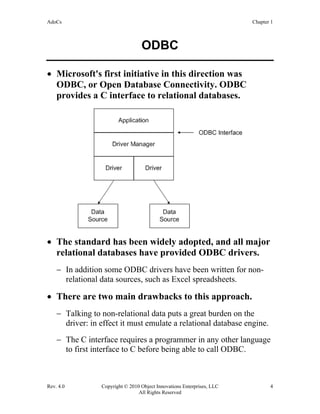
ODBC
• Microsoft's first initiative in this direction was
ODBC, or Open Database Connectivity. ODBC
provides a C interface to relational databases.
• The standard has been widely adopted, and all major
relational databases have provided ODBC drivers.
− In addition some ODBC drivers have been written for non-
relational data sources, such as Excel spreadsheets.
• There are two main drawbacks to this approach.
− Talking to non-relational data puts a great burden on the
driver: in effect it must emulate a relational database engine.
− The C interface requires a programmer in any other language
to first interface to C before being able to call ODBC.
AdoCs Chapter 1
Rev. 4.0 Copyright © 2010 Object Innovations Enterprises, LLC 5
All Rights Reserved
OLE DB
• Microsoft's improved strategy is based upon the
Component Object Model (COM), which provides a
language independent interface, based upon a binary
standard.
− Thus any solution based upon COM will improve the
flexibility from the standpoint of the client program.
− Microsoft's set of COM database interfaces is referred to as
“OLE DB,” the original name when OLE was the all-
embracing technology, and this name has stuck.
• OLE DB is not specific to relational databases.
− Any data source that wishes to expose itself to clients
through OLE DB must implement an OLE DB provider.
− OLE DB itself provides much database functionality,
including a cursor engine and a relational query engine. This
code does not have to be replicated across many providers,
unlike the case with ODBC drivers.
− Clients of OLE DB are referred to as consumers.
• The first OLE DB provider was for ODBC.
• A number of native OLE DB providers have been
implemented, including ones for SQL Server and
Oracle. There is also a native provider for Microsoft's
Jet database engine, which provides efficient access to
desktop databases such as Access and dBase.
AdoCs Chapter 1
Rev. 4.0 Copyright © 2010 Object Innovations Enterprises, LLC 6
All Rights Reserved
ActiveX Data Objects (ADO)
• Although COM is based on a binary standard, all
languages are not created equal with respect to COM.
− In its heart, COM “likes” C++. It is based on the C++ vtable
interface mechanism, and C++ deals effortlessly with
structures and pointers.
− Not so with many other languages, such as Visual Basic. If
you provide a dual interface, which restricts itself to
Automation compatible data types, your components are
much easier to access from Visual Basic.
− OLE DB was architected for maximum efficiency for C++
programs.
• To provide an easy to use interface for Visual Basic
Microsoft created ActiveX Data Objects or ADO.
− The look and feel of ADO is somewhat similar to the popular
Data Access Objects (DAO) that provides an easy to use
object model for accessing Jet.
− The ADO model has two advantages: (1) It is somewhat
flattened and thus easier to use, without so much traversing
down an object hierarchy. (2) ADO is based on OLE DB and
thus gives programmers a very broad reach in terms of data
sources.
AdoCs Chapter 1
Rev. 4.0 Copyright © 2010 Object Innovations Enterprises, LLC 7
All Rights Reserved
Accessing SQL Server before
ADO.NET
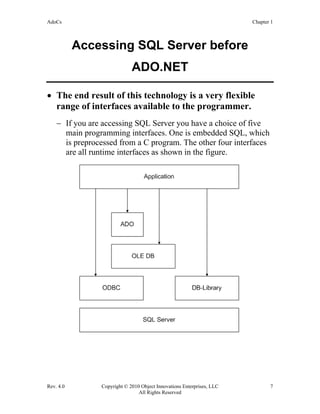
• The end result of this technology is a very flexible
range of interfaces available to the programmer.
− If you are accessing SQL Server you have a choice of five
main programming interfaces. One is embedded SQL, which
is preprocessed from a C program. The other four interfaces
are all runtime interfaces as shown in the figure.
AdoCs Chapter 1
Rev. 4.0 Copyright © 2010 Object Innovations Enterprises, LLC 8
All Rights Reserved
ADO.NET
• The .NET Framework has introduced a new set of
database classes designed for loosely coupled,
distributed architectures.
− These classes are referred to as ADO.NET.
• ADO.NET uses the same access mechanisms for local,
client-server, and Internet database access.
− It can be used to examine data as relational data or as
hierarchical (XML) data.
• ADO.NET can pass data to any component using
XML and does not require a continuous connection
to the database.
• A more traditional connected access model is also
available.
AdoCs Chapter 1
Rev. 4.0 Copyright © 2010 Object Innovations Enterprises, LLC 9
All Rights Reserved
ADO.NET Architecture
• The DataSet class is the central component of the
disconnected architecture.
− A dataset can be populated from either a database or from an
XML stream.
− From the perspective of the user of the dataset, the original
source of the data is immaterial.
− A consistent programming model is used for all application
interaction with the dataset.
• The second key component of ADO.NET architecture
is the .NET Data Provider, which provides access to a
database, and can be used to populate a dataset.
− A data provider can also be used directly by an application to
support a connected mode of database access.
AdoCs Chapter 1
Rev. 4.0 Copyright © 2010 Object Innovations Enterprises, LLC 10
All Rights Reserved
ADO.NET Architecture (Cont’d)
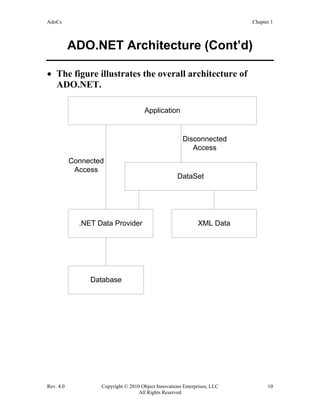
• The figure illustrates the overall architecture of
ADO.NET.
Application
DataSet
XML Data.NET Data Provider
Database
Connected
Access
Disconnected
Access
AdoCs Chapter 1
Rev. 4.0 Copyright © 2010 Object Innovations Enterprises, LLC 11
All Rights Reserved
.NET Data Providers
• A .NET data provider is used for connecting to a
database.
− It provides classes that can be used to execute commands and
to retrieve results.
− The results are either used directly by the application, or else
they are placed in a dataset.
• A .NET data provider implements four key
interfaces:
− IDbConnection is used to establish a connection to a specific
data source.
− IDbCommand is used to execute a command at a data
source.
− IDataReader provides an efficient way to read a stream of
data from a data source. The data access provided by a data
reader is forward-only and read-only.
− IDbDataAdapter is used to populate a dataset from a data
source.
• The ADO.NET architecture specifies these interfaces,
and different implementations can be created to
facilitate working with different data sources.
− A .NET data provider is analogous to an OLE DB provider,
but the two should not be confused. An OLE DB provider
implements COM interfaces, and a .NET data provider
implements .NET interfaces.
AdoCs Chapter 1
Rev. 4.0 Copyright © 2010 Object Innovations Enterprises, LLC 12
All Rights Reserved
Programming with ADO.NET
Interfaces
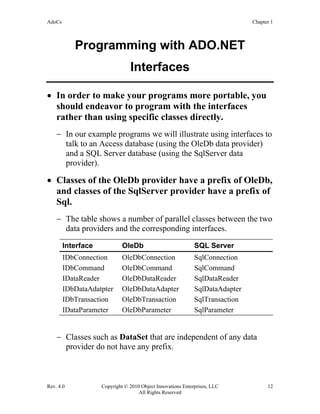
• In order to make your programs more portable, you
should endeavor to program with the interfaces
rather than using specific classes directly.
− In our example programs we will illustrate using interfaces to
talk to an Access database (using the OleDb data provider)
and a SQL Server database (using the SqlServer data
provider).
• Classes of the OleDb provider have a prefix of OleDb,
and classes of the SqlServer provider have a prefix of
Sql.
− The table shows a number of parallel classes between the two
data providers and the corresponding interfaces.
Interface OleDb SQL Server
IDbConnection OleDbConnection SqlConnection
IDbCommand OleDbCommand SqlCommand
IDataReader OleDbDataReader SqlDataReader
IDbDataAdatpter OleDbDataAdapter SqlDataAdapter
IDbTransaction OleDbTransaction SqlTransaction
IDataParameter OleDbParameter SqlParameter
− Classes such as DataSet that are independent of any data
provider do not have any prefix.
AdoCs Chapter 1
Rev. 4.0 Copyright © 2010 Object Innovations Enterprises, LLC 13
All Rights Reserved
.NET Namespaces
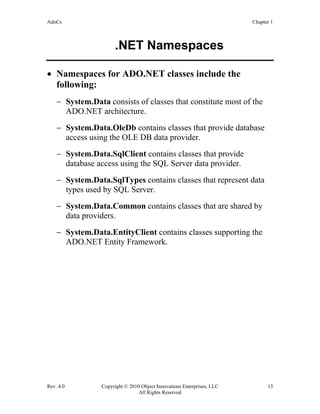
• Namespaces for ADO.NET classes include the
following:
− System.Data consists of classes that constitute most of the
ADO.NET architecture.
− System.Data.OleDb contains classes that provide database
access using the OLE DB data provider.
− System.Data.SqlClient contains classes that provide
database access using the SQL Server data provider.
− System.Data.SqlTypes contains classes that represent data
types used by SQL Server.
− System.Data.Common contains classes that are shared by
data providers.
− System.Data.EntityClient contains classes supporting the
ADO.NET Entity Framework.
AdoCs Chapter 1
Rev. 4.0 Copyright © 2010 Object Innovations Enterprises, LLC 14
All Rights Reserved
Connected Data Access
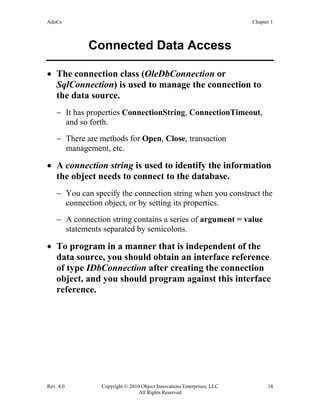
• The connection class (OleDbConnection or
SqlConnection) is used to manage the connection to
the data source.
− It has properties ConnectionString, ConnectionTimeout,
and so forth.
− There are methods for Open, Close, transaction
management, etc.
• A connection string is used to identify the information
the object needs to connect to the database.
− You can specify the connection string when you construct the
connection object, or by setting its properties.
− A connection string contains a series of argument = value
statements separated by semicolons.
• To program in a manner that is independent of the
data source, you should obtain an interface reference
of type IDbConnection after creating the connection
object, and you should program against this interface
reference.
AdoCs Chapter 1
Rev. 4.0 Copyright © 2010 Object Innovations Enterprises, LLC 15
All Rights Reserved
Sample Database
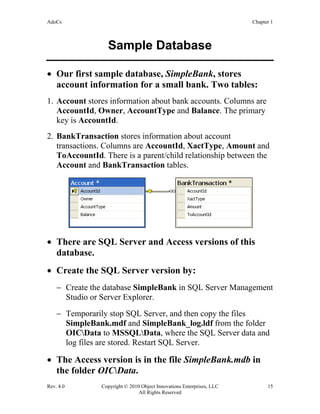
• Our first sample database, SimpleBank, stores
account information for a small bank. Two tables:
1. Account stores information about bank accounts. Columns are
AccountId, Owner, AccountType and Balance. The primary
key is AccountId.
2. BankTransaction stores information about account
transactions. Columns are AccountId, XactType, Amount and
ToAccountId. There is a parent/child relationship between the
Account and BankTransaction tables.
• There are SQL Server and Access versions of this
database.
• Create the SQL Server version by:
− Create the database SimpleBank in SQL Server Management
Studio or Server Explorer.
− Temporarily stop SQL Server, and then copy the files
SimpleBank.mdf and SimpleBank_log.ldf from the folder
OICData to MSSQLData, where the SQL Server data and
log files are stored. Restart SQL Server.
• The Access version is in the file SimpleBank.mdb in
the folder OICData.
AdoCs Chapter 1
Rev. 4.0 Copyright © 2010 Object Innovations Enterprises, LLC 16
All Rights Reserved
Example: Connecting to SQL Server
− See SqlConnectOnly.
// SqlConnectOnly.cs
using System;
using System.Data.SqlClient;
class Class1
{
static void Main(string[] args)
{
string connStr = @"Data Source=.SQLEXPRESS;"
+ "integrated security=true;database=SimpleBank";
SqlConnection conn = new SqlConnection();
conn.ConnectionString = connStr;
Console.WriteLine(
"Using SQL Server to access SimpleBank");
Console.WriteLine("Database state: " +
conn.State.ToString());
conn.Open();
Console.WriteLine("Database state: " +
conn.State.ToString());
}
}
Output:
Using SQL Server to access SimpleBank
Database state: Closed
Database state: Open
AdoCs Chapter 1
Rev. 4.0 Copyright © 2010 Object Innovations Enterprises, LLC 17
All Rights Reserved
ADO.NET Class Libraries
• To run a program that uses the ADO.NET classes,
you must be sure to set references to the appropriate
class libraries. The following libraries should usually
be included:
− System.dll
− System.Data.dll
− System.Xml.dll (needed when working with datasets)
• References to these libraries are set up automatically
when you create a Windows or console project in
Visual Studio.
− If you create an empty project, you will need to specifically
add these references.
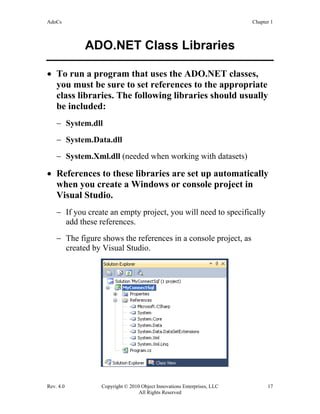
− The figure shows the references in a console project, as
created by Visual Studio.
AdoCs Chapter 1
Rev. 4.0 Copyright © 2010 Object Innovations Enterprises, LLC 18
All Rights Reserved
Connecting to an OLE DB Data
Provider
• To connect to an OLE DB data provider instead, you
need to change the namespace you are importing and
instantiate an object of the OleDbConnection class.
− You must provide a connection string appropriate to your
OLE DB provider.
− We are going to use the Jet OLE DB provider, which can be
used for connecting to an Access database.
− The program JetConnectOnly illustrates connecting to the
Access database SimpleBank.mdb
using System;
using System.Data.OleDb;
class Class1 {
static void Main(string[] args)
{
string connStr =
"Provider=Microsoft.Jet.OLEDB.4.0;Data Source =" +
"C:OICDataSimpleBank.mdb";
OleDbConnection conn =
new OleDbConnection();
conn.ConnectionString = connStr;
Console.WriteLine(
"Using Access DB SimpleBank.mdb");
Console.WriteLine("Database state: " +
conn.State.ToString());
conn.Open();
Console.WriteLine("Database state: " +
conn.State.ToString());
}
}
AdoCs Chapter 1
Rev. 4.0 Copyright © 2010 Object Innovations Enterprises, LLC 19
All Rights Reserved
Using Commands
• After we have opened a connection to a data source,
we can create a command object, which will execute a
query against a data source.
− Depending on our data source, we will create either a
SqlCommand object or an OleDbCommand object.
− In either case, we will initialize an interface reference of type
IDbCommand, which will be used in the rest of our code,
again promoting relative independence from the data source.
• The table summarizes some of the principle
properties and methods of IDbCommand.
Property or
Method
Description
CommandText Text of command to run against the data
source
CommandTimeout Wait time before terminating command
attempt
CommandType How CommandText is interpreted (e.g. Text,
StoredProcedure)
Connection The IDbConnection used by the command
Parameters The parameters collection
Cancel Cancel the execution of an IDbCommand
ExecuteReader Obtain an IDataReader for retrieving data
(SELECT)
ExecuteNonQuery Execute a SQL command such as INSERT,
DELETE, etc.
AdoCs Chapter 1
Rev. 4.0 Copyright © 2010 Object Innovations Enterprises, LLC 20
All Rights Reserved
Creating a Command Object
• The code fragments shown below are from the
ConnectedSql program, which illustrates performing
various database operations on the SimpleBank
database.
− For an Access version, see ConnectedJet.
• The following code illustrates creating a command
object and returning an IDbCommand interface
reference.
private static IDbCommand CreateCommand(
string query)
{
return new SqlCommand(query, sqlConn);
}
• Note that we return an interface reference, not an
object reference.
− Using the generic interface IDbCommand makes the rest of
our program independent of a particular database.
AdoCs Chapter 1
Rev. 4.0 Copyright © 2010 Object Innovations Enterprises, LLC 21
All Rights Reserved
ExecuteNonQuery
• The following code illustrates executing a SQL
DELETE statement using a command object.
− We create a query string for the command, and obtain a
command object for this command.
− The call to ExecuteNonQuery returns the number of rows
that were updated.
private static void RemoveAccount(int id)
{
string query =
"delete from Account where AccountId = " + id;
IDbCommand command = CreateCommand(query);
int numrow = command.ExecuteNonQuery();
Console.WriteLine("{0} rows updated", numrow);
}
AdoCs Chapter 1
Rev. 4.0 Copyright © 2010 Object Innovations Enterprises, LLC 22
All Rights Reserved
Using a Data Reader
• After we have created a command object, we can call
the ExecuteReader method to return an IDataReader.
− With the data reader we can obtain a read-only, forward-only
stream of data.
− This method is suitable for reading large amounts of data,
because only one row at a time is stored in memory.
− When you are done with the data reader, you should
explicitly close it. Any output parameters or return values of
the command object will not be available until after the data
reader has been closed.
• Data readers have an Item property that can be used
for accessing the current record.
− The Item property accepts either an integer (representing a
column number) or a string (representing a column name).
− The Item property is the default property and can be omitted
if desired.
• The Read method is used to advance the data reader
to the next row.
− When it is created, a data reader is positioned before the first
row.
− You must call Read before accessing any data. Read returns
true if there are more rows, and otherwise false.
AdoCs Chapter 1
Rev. 4.0 Copyright © 2010 Object Innovations Enterprises, LLC 23
All Rights Reserved
Data Reader: Code Example
• The code illustrates using a data reader to display
results of a SELECT query.
− Sample program is still in ConnectedSql.
private static void ShowList()
{
string query = "select * from Account";
IDbCommand command = CreateCommand(query);
IDataReader reader = command.ExecuteReader();
while (reader.Read())
{
Console.WriteLine("{0} {1,-10} {2:C} {3}",
reader["AccountId"], reader["Owner"],
reader["Balance"], reader["AccountType"]);
}
reader.Close();
}
AdoCs Chapter 1
Rev. 4.0 Copyright © 2010 Object Innovations Enterprises, LLC 24
All Rights Reserved
Disconnected Datasets
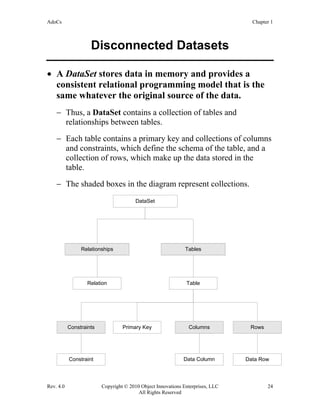
• A DataSet stores data in memory and provides a
consistent relational programming model that is the
same whatever the original source of the data.
− Thus, a DataSet contains a collection of tables and
relationships between tables.
− Each table contains a primary key and collections of columns
and constraints, which define the schema of the table, and a
collection of rows, which make up the data stored in the
table.
− The shaded boxes in the diagram represent collections.
DataSet
Relationships Tables
TableRelation
Rows
Data Row
Constraints
Constraint
Primary Key Columns
Data Column
AdoCs Chapter 1
Rev. 4.0 Copyright © 2010 Object Innovations Enterprises, LLC 25
All Rights Reserved
Data Adapters
• A data adapter provides a bridge between a
disconnected data set and its data source.
− Each .NET data provider provides its own implementation of
the interface IDbDataAdapter.
− The OLE DB data provider has the class
OleDbDataAdapter, and the SQL data provider has the class
SqlDataAdapter.
• A data adapter has properties for SelectCommand,
InsertCommand, UpdateCommand, and
DeleteCommand.
− These properties identify the SQL needed to retrieve data,
add data, change data, or remove data from the data source.
• A data adapter has the Fill method to place data into
a data set. It has the Update command to update the
data source using data from the data set.
AdoCs Chapter 1
Rev. 4.0 Copyright © 2010 Object Innovations Enterprises, LLC 26
All Rights Reserved
Acme Computer Case Study
• We used the Simple Bank database for our initial
orientation to ADO.NET.
− We’ll also provide some additional point illustrations using
this database as we go along.
• To gain a more practical and in-depth understanding
of ADO.NET, we will use a more complicated
database for many of our illustrations.
• Acme Computer manufactures and sells computers,
taking orders both over the Web and by phone.
− The Order Entry System supports ordering custom-built
systems, parts, and refurbished systems.
− A Windows Forms front-end provides a rich client user
interface. This system is used internally by employees of
Acme, who take orders over the phone.
− Additional interfaces can be provided, such as a Web
interface for retail customers and a Web services
programmatic interface for wholesale customers.
• The heart of the system is a relational database,
whose schema is described below.
− The Order Entry System is responsible for gathering
information from the customer, updating the database tables
to reflect fulfilling the order, and reporting the results of the
order to the customer.
− More details are provided in Appendix A.
AdoCs Chapter 1
Rev. 4.0 Copyright © 2010 Object Innovations Enterprises, LLC 27
All Rights Reserved
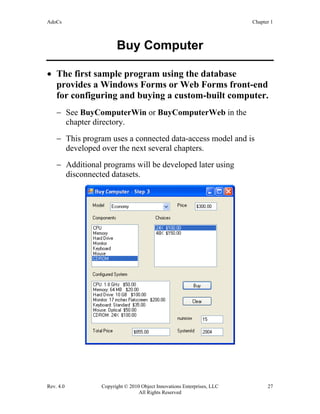
Buy Computer
• The first sample program using the database
provides a Windows Forms or Web Forms front-end
for configuring and buying a custom-built computer.
− See BuyComputerWin or BuyComputerWeb in the
chapter directory.
− This program uses a connected data-access model and is
developed over the next several chapters.
− Additional programs will be developed later using
disconnected datasets.
AdoCs Chapter 1
Rev. 4.0 Copyright © 2010 Object Innovations Enterprises, LLC 28
All Rights Reserved
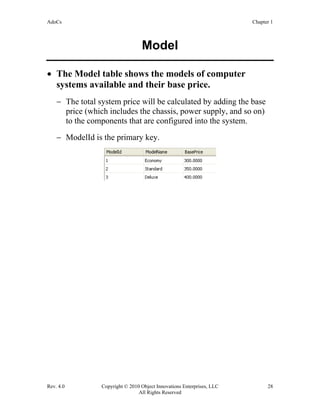
Model
• The Model table shows the models of computer
systems available and their base price.
− The total system price will be calculated by adding the base
price (which includes the chassis, power supply, and so on)
to the components that are configured into the system.
− ModelId is the primary key.
AdoCs Chapter 1
Rev. 4.0 Copyright © 2010 Object Innovations Enterprises, LLC 29
All Rights Reserved
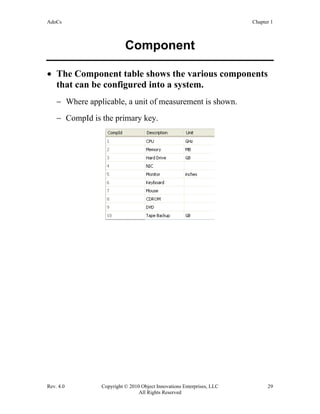
Component
• The Component table shows the various components
that can be configured into a system.
− Where applicable, a unit of measurement is shown.
− CompId is the primary key.
AdoCs Chapter 1
Rev. 4.0 Copyright © 2010 Object Innovations Enterprises, LLC 30
All Rights Reserved
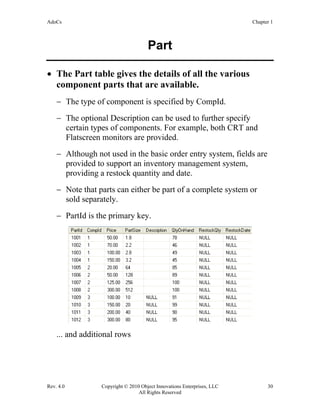
Part
• The Part table gives the details of all the various
component parts that are available.
− The type of component is specified by CompId.
− The optional Description can be used to further specify
certain types of components. For example, both CRT and
Flatscreen monitors are provided.
− Although not used in the basic order entry system, fields are
provided to support an inventory management system,
providing a restock quantity and date.
− Note that parts can either be part of a complete system or
sold separately.
− PartId is the primary key.
... and additional rows
AdoCs Chapter 1
Rev. 4.0 Copyright © 2010 Object Innovations Enterprises, LLC 31
All Rights Reserved
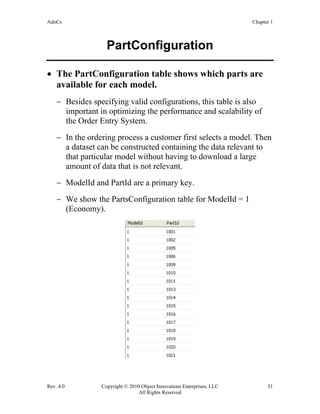
PartConfiguration
• The PartConfiguration table shows which parts are
available for each model.
− Besides specifying valid configurations, this table is also
important in optimizing the performance and scalability of
the Order Entry System.
− In the ordering process a customer first selects a model. Then
a dataset can be constructed containing the data relevant to
that particular model without having to download a large
amount of data that is not relevant.
− ModelId and PartId are a primary key.
− We show the PartsConfiguration table for ModelId = 1
(Economy).
AdoCs Chapter 1
Rev. 4.0 Copyright © 2010 Object Innovations Enterprises, LLC 32
All Rights Reserved
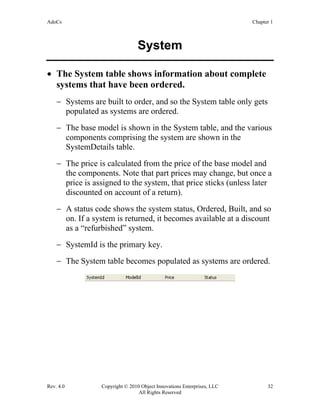
System
• The System table shows information about complete
systems that have been ordered.
− Systems are built to order, and so the System table only gets
populated as systems are ordered.
− The base model is shown in the System table, and the various
components comprising the system are shown in the
SystemDetails table.
− The price is calculated from the price of the base model and
the components. Note that part prices may change, but once a
price is assigned to the system, that price sticks (unless later
discounted on account of a return).
− A status code shows the system status, Ordered, Built, and so
on. If a system is returned, it becomes available at a discount
as a “refurbished” system.
− SystemId is the primary key.
− The System table becomes populated as systems are ordered.
AdoCs Chapter 1
Rev. 4.0 Copyright © 2010 Object Innovations Enterprises, LLC 33
All Rights Reserved
SystemId as Identity Column
• SQL server supports the capability of declaring
identity columns.
− SQL server automatically assigns a sequenced number to this
column when you insert a row.
− The starting value is the seed, and the amount by which the
value increases or decreases with each row is called the
increment.
• Several of the primary keys in the tables of the
AcmeComputer database are identity columns.
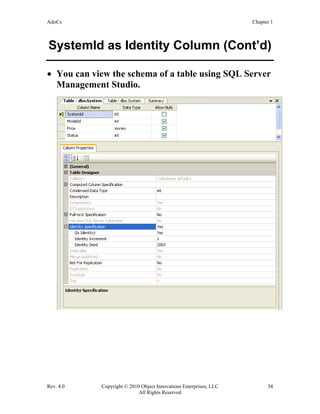
− SystemId is an identity column, used for generating an ID
for newly ordered systems.
AdoCs Chapter 1
Rev. 4.0 Copyright © 2010 Object Innovations Enterprises, LLC 34
All Rights Reserved
SystemId as Identity Column (Cont’d)
• You can view the schema of a table using SQL Server
Management Studio.
AdoCs Chapter 1
Rev. 4.0 Copyright © 2010 Object Innovations Enterprises, LLC 35
All Rights Reserved
SystemDetails
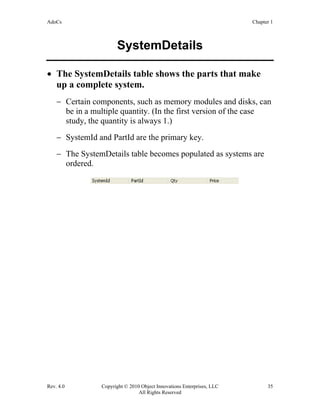
• The SystemDetails table shows the parts that make
up a complete system.
− Certain components, such as memory modules and disks, can
be in a multiple quantity. (In the first version of the case
study, the quantity is always 1.)
− SystemId and PartId are the primary key.
− The SystemDetails table becomes populated as systems are
ordered.
AdoCs Chapter 1
Rev. 4.0 Copyright © 2010 Object Innovations Enterprises, LLC 36
All Rights Reserved
StatusCode
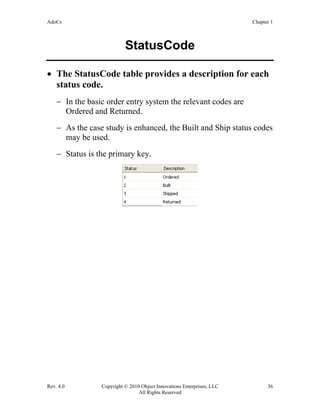
• The StatusCode table provides a description for each
status code.
− In the basic order entry system the relevant codes are
Ordered and Returned.
− As the case study is enhanced, the Built and Ship status codes
may be used.
− Status is the primary key.
AdoCs Chapter 1
Rev. 4.0 Copyright © 2010 Object Innovations Enterprises, LLC 37
All Rights Reserved
Relationships
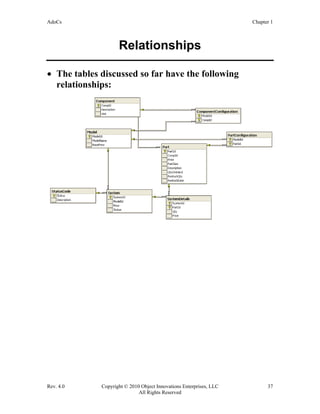
• The tables discussed so far have the following
relationships:
AdoCs Chapter 1
Rev. 4.0 Copyright © 2010 Object Innovations Enterprises, LLC 38
All Rights Reserved
Stored Procedure
• A stored procedure spInsertSystem is provided for
inserting a new system into the System table.
− This procedure returns as an output parameter the system ID
that is generated as an identity column.
CREATE PROCEDURE spInsertSystem
@ModelId int,
@Price money,
@Status int,
@SystemId int OUTPUT
AS
insert System(ModelId, Price, Status)
values(@ModelId, @Price, @Status)
select @SystemId = @@identity
return
GO
AdoCs Chapter 1
Rev. 4.0 Copyright © 2010 Object Innovations Enterprises, LLC 39
All Rights Reserved
Lab 1
Querying the AcmeComputer Database
In this lab, you will setup the AcmeComputer database on your
system. You will also perform a number of queries against the
database. Doing these queries will both help to familiarize you
with the database and serve as a review of SQL.
Detailed instructions are contained in the Lab 1 write-up in the Lab
Manual.
Suggested time: 45 minutes
AdoCs Chapter 1
Rev. 4.0 Copyright © 2010 Object Innovations Enterprises, LLC 40
All Rights Reserved
Summary
• ADO.NET is the culmination of a series of data access
technologies from Microsoft.
• ADO.NET provides a set of classes that can be used
to interact with data providers.
• You can access data sources in either a connected or
disconnected mode.
• The DataReader can be used to build interact with a
data source in a connected mode.
• The DataSet can be used to interact with data from a
data source without maintaining a constant
connection to the data source.
• The DataSet can be populated from a database using
a DataAdapter.
AdoCs Chapter 9
Rev. 4.0 Copyright © 2010 Object Innovations Enterprises, LLC 233
All Rights Reserved
Chapter 9
Additional Features
AdoCs Chapter 9
Rev. 4.0 Copyright © 2010 Object Innovations Enterprises, LLC 234
All Rights Reserved
Additional Features
Objectives
After completing this unit you will be able to:
• Perform asynchronous operations in ADO.NET for
commands that take a long time to execute.
• Use Multiple Active Result Sets (MARS), which
permits the execution of multiple batches of
commands on a single connection.
• Use bulk copy to transfer a large amount of data into
a SQL Server table.
AdoCs Chapter 9
Rev. 4.0 Copyright © 2010 Object Innovations Enterprises, LLC 235
All Rights Reserved
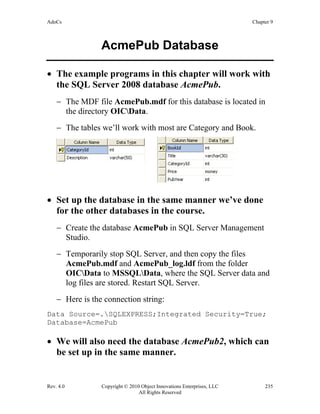
AcmePub Database
• The example programs in this chapter will work with
the SQL Server 2008 database AcmePub.
− The MDF file AcmePub.mdf for this database is located in
the directory OICData.
− The tables we’ll work with most are Category and Book.
• Set up the database in the same manner we’ve done
for the other databases in the course.
− Create the database AcmePub in SQL Server Management
Studio.
− Temporarily stop SQL Server, and then copy the files
AcmePub.mdf and AcmePub_log.ldf from the folder
OICData to MSSQLData, where the SQL Server data and
log files are stored. Restart SQL Server.
− Here is the connection string:
Data Source=.SQLEXPRESS;Integrated Security=True;
Database=AcmePub
• We will also need the database AcmePub2, which can
be set up in the same manner.
AdoCs Chapter 9
Rev. 4.0 Copyright © 2010 Object Innovations Enterprises, LLC 236
All Rights Reserved
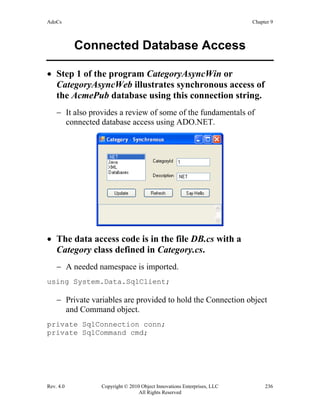
Connected Database Access
• Step 1 of the program CategoryAsyncWin or
CategoryAsyncWeb illustrates synchronous access of
the AcmePub database using this connection string.
− It also provides a review of some of the fundamentals of
connected database access using ADO.NET.
• The data access code is in the file DB.cs with a
Category class defined in Category.cs.
− A needed namespace is imported.
using System.Data.SqlClient;
− Private variables are provided to hold the Connection object
and Command object.
private SqlConnection conn;
private SqlCommand cmd;
AdoCs Chapter 9
Rev. 4.0 Copyright © 2010 Object Innovations Enterprises, LLC 237
All Rights Reserved
Connected Database Access (Cont’d)
• The constructor initializes the private variables.
public DBAcme()
{
conn = new SqlConnection();
conn.ConnectionString = connStr;
cmd = conn.CreateCommand();
}
• A list of categories is obtained by using a DataReader.
SqlDataReader reader;
cmd.CommandText = "select * from Category";
try
{
conn.Open();
reader = cmd.ExecuteReader();
List<Category> cats = new List<Category>();
while (reader.Read())
{
Category c =
new Category((int)reader["CategoryId"],
(string)reader["Description"]);
cats.Add(c);
}
reader.Close();
return cats;
}
catch (Exception ex)
{
msg = ex.Message;
return null;
}
finally
{
conn.Close();
}
AdoCs Chapter 9
Rev. 4.0 Copyright © 2010 Object Innovations Enterprises, LLC 238
All Rights Reserved
Long Database Operations
• Database operations can take a long time to complete.
− This can result in the user interface hanging while waiting for
the database operation to complete.
• As an example, consider our example program.
− To simulate a long operation, we have placed a 5 second
delay in the update operation.
public string Update(int id, string desc)
{
cmd.CommandText = "waitfor delay '0:0:05';"
+ "update Category set Description = '"
+ desc + "' where CategoryId = " + id;
string msg;
try
{
conn.Open();
int numrow = cmd.ExecuteNonQuery();
msg = numrow + " row(s) updated";
return msg;
}
catch (Exception ex)
{
msg = ex.Message;
return msg;
}
finally
{
conn.Close();
}
}
AdoCs Chapter 9
Rev. 4.0 Copyright © 2010 Object Innovations Enterprises, LLC 239
All Rights Reserved
Long Database Operations (Cont’d)
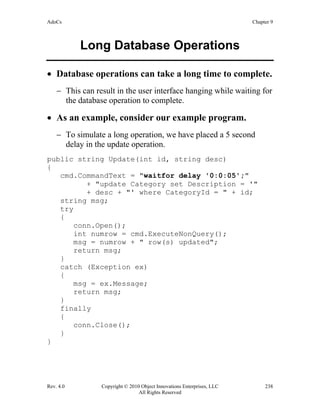
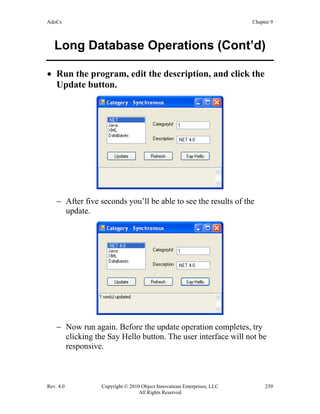
• Run the program, edit the description, and click the
Update button.
− After five seconds you’ll be able to see the results of the
update.
− Now run again. Before the update operation completes, try
clicking the Say Hello button. The user interface will not be
responsive.
AdoCs Chapter 9
Rev. 4.0 Copyright © 2010 Object Innovations Enterprises, LLC 240
All Rights Reserved
Asynchronous Operations
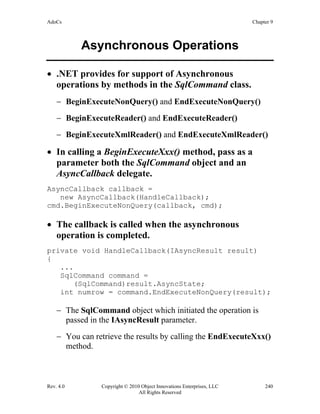
• .NET provides for support of Asynchronous
operations by methods in the SqlCommand class.
− BeginExecuteNonQuery() and EndExecuteNonQuery()
− BeginExecuteReader() and EndExecuteReader()
− BeginExecuteXmlReader() and EndExecuteXmlReader()
• In calling a BeginExecuteXxx() method, pass as a
parameter both the SqlCommand object and an
AsyncCallback delegate.
AsyncCallback callback =
new AsyncCallback(HandleCallback);
cmd.BeginExecuteNonQuery(callback, cmd);
• The callback is called when the asynchronous
operation is completed.
private void HandleCallback(IAsyncResult result)
{
...
SqlCommand command =
(SqlCommand)result.AsyncState;
int numrow = command.EndExecuteNonQuery(result);
− The SqlCommand object which initiated the operation is
passed in the IAsyncResult parameter.
− You can retrieve the results by calling the EndExecuteXxx()
method.
AdoCs Chapter 9
Rev. 4.0 Copyright © 2010 Object Innovations Enterprises, LLC 241
All Rights Reserved
Asynchronous Example
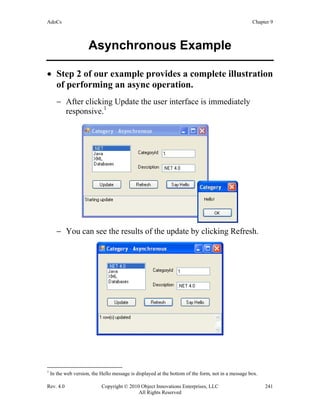
• Step 2 of our example provides a complete illustration
of performing an async operation.
− After clicking Update the user interface is immediately
responsive.1
− You can see the results of the update by clicking Refresh.
1
In the web version, the Hello message is displayed at the bottom of the form, not in a message box.
AdoCs Chapter 9
Rev. 4.0 Copyright © 2010 Object Innovations Enterprises, LLC 242
All Rights Reserved
Async Example Code
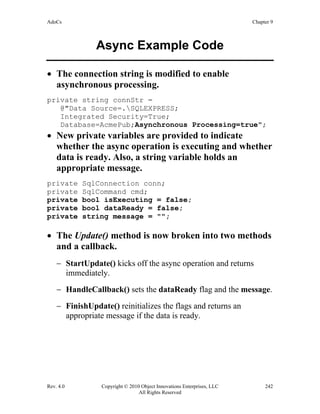
• The connection string is modified to enable
asynchronous processing.
private string connStr =
@"Data Source=.SQLEXPRESS;
Integrated Security=True;
Database=AcmePub;Asynchronous Processing=true";
• New private variables are provided to indicate
whether the async operation is executing and whether
data is ready. Also, a string variable holds an
appropriate message.
private SqlConnection conn;
private SqlCommand cmd;
private bool isExecuting = false;
private bool dataReady = false;
private string message = "";
• The Update() method is now broken into two methods
and a callback.
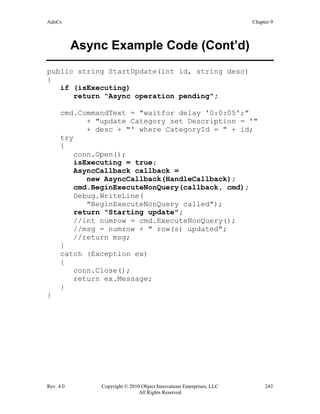
− StartUpdate() kicks off the async operation and returns
immediately.
− HandleCallback() sets the dataReady flag and the message.
− FinishUpdate() reinitializes the flags and returns an
appropriate message if the data is ready.
AdoCs Chapter 9
Rev. 4.0 Copyright © 2010 Object Innovations Enterprises, LLC 243
All Rights Reserved
Async Example Code (Cont’d)
public string StartUpdate(int id, string desc)
{
if (isExecuting)
return "Async operation pending";
cmd.CommandText = "waitfor delay '0:0:05';"
+ "update Category set Description = '"
+ desc + "' where CategoryId = " + id;
try
{
conn.Open();
isExecuting = true;
AsyncCallback callback =
new AsyncCallback(HandleCallback);
cmd.BeginExecuteNonQuery(callback, cmd);
Debug.WriteLine(
"BeginExecuteNonQuery called");
return "Starting update";
//int numrow = cmd.ExecuteNonQuery();
//msg = numrow + " row(s) updated";
//return msg;
}
catch (Exception ex)
{
conn.Close();
return ex.Message;
}
}
AdoCs Chapter 9
Rev. 4.0 Copyright © 2010 Object Innovations Enterprises, LLC 244
All Rights Reserved
Async Example Code (Cont’d)
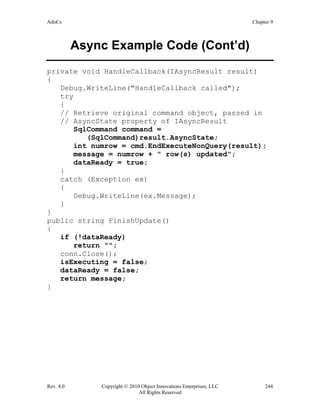
private void HandleCallback(IAsyncResult result)
{
Debug.WriteLine("HandleCallback called");
try
{
// Retrieve original command object, passed in
// AsyncState property of IAsyncResult
SqlCommand command =
(SqlCommand)result.AsyncState;
int numrow = cmd.EndExecuteNonQuery(result);
message = numrow + " row(s) updated";
dataReady = true;
}
catch (Exception ex)
{
Debug.WriteLine(ex.Message);
}
}
public string FinishUpdate()
{
if (!dataReady)
return "";
conn.Close();
isExecuting = false;
dataReady = false;
return message;
}
AdoCs Chapter 9
Rev. 4.0 Copyright © 2010 Object Innovations Enterprises, LLC 245
All Rights Reserved
Multiple Active Result Sets
• Prior to .NET 2.0 only one DataReader at a time
could be open on a single connection.
• .NET 2.0 introduced, for SQL Server, the feature of
Multiple Active Result Sets or MARS, which enables
the execution of multiple batches on a single
connection.
− Multiple SqlCommand objects are used, with each
command adding another session to the connection.
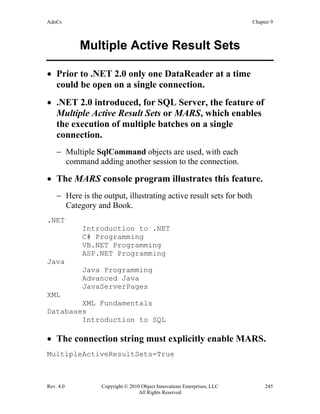
• The MARS console program illustrates this feature.
− Here is the output, illustrating active result sets for both
Category and Book.
.NET
Introduction to .NET
C# Programming
VB.NET Programming
ASP.NET Programming
Java
Java Programming
Advanced Java
JavaServerPages
XML
XML Fundamentals
Databases
Introduction to SQL
• The connection string must explicitly enable MARS.
MultipleActiveResultSets=True
AdoCs Chapter 9
Rev. 4.0 Copyright © 2010 Object Innovations Enterprises, LLC 246
All Rights Reserved
MARS Example Program
SqlConnection conn = new SqlConnection();
conn.ConnectionString =
@"Data Source=.SQLEXPRESS;
Integrated Security=True;
Database=AcmePub;MultipleActiveResultSets=True";
SqlCommand cmd = conn.CreateCommand();
string TAB = "t";
// Outer loop to read categories
cmd.CommandText = "select * from Category";
conn.Open();
SqlDataReader reader = cmd.ExecuteReader();
while (reader.Read())
{
int catId = (int)reader["CategoryId"];
string desc = (string)reader["Description"];
Console.WriteLine(desc);
// Inner loop: use second reader to read the books
// in this category. Requires MARS.
SqlCommand cmd2 = conn.CreateCommand();
cmd2.CommandText =
"select Title from Book where "
+ "CategoryId = " + catId;
SqlDataReader reader2 = cmd2.ExecuteReader();
while (reader2.Read())
{
string title = (string)reader2["Title"];
Console.WriteLine(TAB + title);
}
reader2.Close();
}
reader.Close();
conn.Close();
AdoCs Chapter 9
Rev. 4.0 Copyright © 2010 Object Innovations Enterprises, LLC 247
All Rights Reserved
Bulk Copy
• The SQL Server database provides a bulk copy
feature that allows you to efficiently transfer a large
amount of data into a table or view.
• The .NET Provider for SQL Server provides a bulk
copy capability in ADO.NET through the new
SqlBulkCopyOperation class.
− You can copy data to a SQL Server database from a
DataTable or from a DataReader.
• Performing a bulk copy involves the following steps:
− Connect to the source server or other data source and read the
data into a DataTable or DataReader.
− Connect to the destination SQL Server.
− Instantiate a SqlBulkCopyOperation object, and set any
properties that are needed.
− Call WriteToServer(). This may be done several times on a
single SqlBulkCopyOperation object, with the properties
set before each call.
− Call Close() on the SqlBulkCopyOperation object or
dispose it.
AdoCs Chapter 9
Rev. 4.0 Copyright © 2010 Object Innovations Enterprises, LLC 248
All Rights Reserved
Bulk Copy Example
• The console program BulkCopy illustrates this bulk
copy feature.
− It copies tables from AcmePub to AcmePub2, which is an
empty database with the same schema.
− Here is the output:
Bulk copy succeeded
.NET
Introduction to .NET
C# Programming
VB.NET Programming
ASP.NET Programming
Java
Java Programming
Advanced Java
JavaServerPages
XML
XML Fundamentals
Databases
Introduction to SQL
AdoCs Chapter 9
Rev. 4.0 Copyright © 2010 Object Innovations Enterprises, LLC 249
All Rights Reserved
Bulk Copy Example Code
// Set up source and destination connection
// and command objects
connSrc = new SqlConnection();
connSrc.ConnectionString =
GetSrcConnectionString();
SqlCommand cmdSrc = connSrc.CreateCommand();
connDest = new SqlConnection();
connDest.ConnectionString =
GetDestConnectionString();
SqlCommand cmdDest = connDest.CreateCommand();
// Set up bulk copy object that will be used
// multiple times
connDest.Open();
SqlBulkCopy bco = new SqlBulkCopy(connDest);
// Bulk copy first table
bco.DestinationTableName = "Category";
cmdSrc.CommandText = "select * from Category";
connSrc.Open();
IDataReader reader = cmdSrc.ExecuteReader();
bco.WriteToServer(reader);
reader.Close();
// Bulk copy second table
bco.DestinationTableName = "Book";
cmdSrc.CommandText = "select * from Book";
reader = cmdSrc.ExecuteReader();
bco.WriteToServer(reader);
reader.Close();
AdoCs Chapter 9
Rev. 4.0 Copyright © 2010 Object Innovations Enterprises, LLC 250
All Rights Reserved
Lab 9
Retrieving Data Asynchronously
In this lab, you will use the asynchronous capability in ADO.NET
to obtain a list of books from the AcmePub database. To simulate a
large set of books, you will provide for a delay in the T-SQL code
for retrieving the data. A button Read Poem is provided to enable
you to test that you can do a concurrent operation while the read
operation is being performed.
Detailed instructions are contained in the Lab 9 write-up in the Lab
Manual.
Suggested time: 60 minutes
AdoCs Chapter 9
Rev. 4.0 Copyright © 2010 Object Innovations Enterprises, LLC 251
All Rights Reserved
Summary
• You can perform asynchronous operations in
ADO.NET for commands that take a long time to
execute.
• Multiple Active Result Sets (MARS) permit the
execution of multiple batches of commands on a
single connection.
• ADO.NET now supports bulk copy to transfer a large
amount of data into a SQL Server table.
AdoCs Chapter 9
Rev. 4.0 Copyright © 2010 Object Innovations Enterprises, LLC 252
All Rights Reserved

Ado.net

  • 1.
    Object Innovations Courses4120 and 4121 Student Guide Revision 4.0 ADO.NET Using C#
  • 2.
    Rev. 4.0 Copyright©2010 Object Innovations Enterprises, LLC ii All Rights Reserved ADO.NET Using C# ADO.NET for Web Applications Using C# Rev. 4.0 This student guide is for these two Object Innovations courses: 4120 ADO.NET Using C# 4121 ADO.NET for Web Applications Using C# There is a separate lab manual for each course. Student Guide Information in this document is subject to change without notice. Companies, names and data used in examples herein are fictitious unless otherwise noted. No part of this document may be reproduced or transmitted in any form or by any means, electronic or mechanical, for any purpose, without the express written permission of Object Innovations. Product and company names mentioned herein are the trademarks or registered trademarks of their respective owners. ® is a registered trademark of Object Innovations. Author: Robert J. Oberg Copyright ©2010 Object Innovations Enterprises, LLC All rights reserved. Object Innovations 877-558-7246 www.objectinnovations.com Published in the United States of America.
  • 3.
    Rev. 4.0 Copyright©2010 Object Innovations Enterprises, LLC iii All Rights Reserved Table of Contents (Overview) Chapter 1 Introduction to ADO.NET Chapter 2 ADO.NET Connections Chapter 3 ADO.NET Commands Chapter 4 DataReaders and Connected Access Chapter 5 DataSets and Disconnected Access Chapter 6 More about DataSets Chapter 7 XML and ADO.NET Chapter 8 Concurrency and Transactions Chapter 9 Additional Features Chapter 10 LINQ and Entity Framework Appendix A Acme Computer Case Study Appendix B Learning Resources
  • 4.
    Rev. 4.0 Copyright©2010 Object Innovations Enterprises, LLC iv All Rights Reserved Directory Structure • The course software installs to one of two root directories: − C:OICAdoCsWin contains Windows example programs (Course 4120). − C:OICAdoCsWeb contains Web example programs (Course 4121). • Each of these directories have these subdirectories: − Example programs for each chapter are in named subdirectories of chapter directories Chap01, Chap02, and so on. − The Labs directory contains one subdirectory for each lab, named after the lab number. Starter code is frequently supplied, and answers are provided in the chapter directories. − The Demos directory is provided for doing in-class demonstrations led by the instructor. − The CaseStudy directory contains progressive steps for two case studies. • Data files install to the directory C:OICData.
  • 5.
    Rev. 4.0 Copyright©2010 Object Innovations Enterprises, LLC v All Rights Reserved Table of Contents (Detailed) Chapter 1 Introduction to ADO.NET ....................................................................... 1 Microsoft Data Access Technologies ................................................................................. 3 ODBC ................................................................................................................................. 4 OLE DB .............................................................................................................................. 5 ActiveX Data Objects (ADO)............................................................................................. 6 Accessing SQL Server before ADO.NET .......................................................................... 7 ADO.NET........................................................................................................................... 8 ADO.NET Architecture...................................................................................................... 9 .NET Data Providers......................................................................................................... 11 Programming with ADO.NET Interfaces ......................................................................... 12 .NET Namespaces............................................................................................................. 13 Connected Data Access .................................................................................................... 14 Sample Database............................................................................................................... 15 Example: Connecting to SQL Server................................................................................ 16 ADO.NET Class Libraries................................................................................................ 17 Connecting to an OLE DB Data Provider ........................................................................ 18 Using Commands.............................................................................................................. 19 Creating a Command Object............................................................................................. 20 ExecuteNonQuery............................................................................................................. 21 Using a Data Reader ......................................................................................................... 22 Data Reader: Code Example............................................................................................. 23 Disconnected Datasets ...................................................................................................... 24 Data Adapters ................................................................................................................... 25 Acme Computer Case Study............................................................................................. 26 Buy Computer................................................................................................................... 27 Model................................................................................................................................ 28 Component........................................................................................................................ 29 Part.................................................................................................................................... 30 PartConfiguration.............................................................................................................. 31 System............................................................................................................................... 32 SystemId as Identity Column............................................................................................ 33 SystemDetails ................................................................................................................... 35 StatusCode ........................................................................................................................ 36 Relationships..................................................................................................................... 37 Stored Procedure............................................................................................................... 38 Lab 1 ................................................................................................................................. 39 Summary........................................................................................................................... 40 Chapter 2 ADO.NET Connections .......................................................................... 41 ADO.NET Block Diagram................................................................................................ 43 .NET Data Providers......................................................................................................... 44
  • 6.
    Rev. 4.0 Copyright©2010 Object Innovations Enterprises, LLC vi All Rights Reserved Namespaces for .NET Data Providers .............................................................................. 45 Basic Connection Programming ....................................................................................... 46 Using Interfaces ................................................................................................................ 47 IDbConnection Properties................................................................................................. 48 Connection String ............................................................................................................. 49 SQL Server Connection String ......................................................................................... 50 OLE DB Connection String.............................................................................................. 51 SQL Server Security ......................................................................................................... 52 IDbConnection Methods................................................................................................... 53 BasicConnect (Version 2)................................................................................................. 54 Connection Life Cycle...................................................................................................... 55 BasicConnect (Version 3)................................................................................................. 56 Database Application Front-ends...................................................................................... 57 Lab 2A .............................................................................................................................. 58 ChangeDatabase................................................................................................................ 59 Connection Pooling........................................................................................................... 60 Pool Settings for SQL Server............................................................................................ 61 Connection Demo Program............................................................................................... 62 Connection Events ............................................................................................................ 63 Connection Event Demo................................................................................................... 64 ADO.NET Exception Handling........................................................................................ 65 Lab 2B............................................................................................................................... 66 Summary........................................................................................................................... 67 Chapter 3 ADO.NET Commands............................................................................ 69 Command Objects............................................................................................................. 71 Creating Commands.......................................................................................................... 72 Executing Commands ....................................................................................................... 73 Sample Program................................................................................................................ 74 Dynamic Queries .............................................................................................................. 76 Parameterized Queries ...................................................................................................... 77 Parameterized Query Example ......................................................................................... 78 Command Types ............................................................................................................... 79 Stored Procedures ............................................................................................................. 80 Stored Procedure Example................................................................................................ 81 Testing the Stored Procedure............................................................................................ 82 Stored Procedures in ADO.NET....................................................................................... 83 Batch Queries.................................................................................................................... 85 Transactions...................................................................................................................... 86 Lab 3 ................................................................................................................................. 87 Summary........................................................................................................................... 88 Chapter 4 DataReaders and Connected Access ..................................................... 89 DataReader........................................................................................................................ 91 Using a DataReader .......................................................................................................... 92 Closing a DataReader ....................................................................................................... 93
  • 7.
    Rev. 4.0 Copyright©2010 Object Innovations Enterprises, LLC vii All Rights Reserved IDataRecord...................................................................................................................... 94 Type-Safe Accessors......................................................................................................... 95 Type-Safe Access Sample Program.................................................................................. 97 GetOrdinal()...................................................................................................................... 99 Null Data......................................................................................................................... 100 Testing for Null............................................................................................................... 101 ExecuteReader Options................................................................................................... 102 Returning Multiple Result Sets....................................................................................... 103 DataReader Multiple Results Sets .................................................................................. 104 Obtaining Schema Information....................................................................................... 105 Output from Sample Program......................................................................................... 107 Lab 4 ............................................................................................................................... 108 Summary......................................................................................................................... 109 Chapter 5 DataSets and Disconnected Access...................................................... 111 DataSet............................................................................................................................ 113 DataSet Architecture....................................................................................................... 114 Why DataSet? ................................................................................................................. 115 DataSet Components....................................................................................................... 116 DataAdapter.................................................................................................................... 117 DataSet Example Program.............................................................................................. 118 Data Access Class........................................................................................................... 119 Retrieving the Data ......................................................................................................... 120 Filling a DataSet ............................................................................................................. 121 Accessing a DataSet........................................................................................................ 122 Updating a DataSet Scenario .......................................................................................... 123 Example – ModelDataSet ............................................................................................... 124 Disconnected DataSet Example...................................................................................... 125 Adding a New Row......................................................................................................... 126 Searching and Updating a Row ...................................................................................... 127 Deleting a Row ............................................................................................................... 128 Row Versions.................................................................................................................. 129 Row State........................................................................................................................ 130 BeginEdit and CancelEdit............................................................................................... 131 DataTable Events............................................................................................................ 132 Updating a Database ....................................................................................................... 133 Insert Command.............................................................................................................. 134 Update Command ........................................................................................................... 135 Delete Command ............................................................................................................ 136 Exception Handling ........................................................................................................ 137 Command Builders ......................................................................................................... 138 Lab 5 ............................................................................................................................... 139 Summary......................................................................................................................... 140 Chapter 6 More about DataSets ............................................................................ 141 Filtering DataSets ........................................................................................................... 143
  • 8.
    Rev. 4.0 Copyright©2010 Object Innovations Enterprises, LLC viii All Rights Reserved Example of Filtering ....................................................................................................... 144 PartFinder Example Code (DB.cs) ................................................................................. 145 Using a Single DataTable ............................................................................................... 147 Multiple Tables............................................................................................................... 148 DataSet Architecture....................................................................................................... 149 Multiple Table Example ................................................................................................. 150 Schema in the DataSet .................................................................................................... 153 Relations ......................................................................................................................... 154 Navigating a DataSet ...................................................................................................... 155 Using Parent/Child Relation........................................................................................... 156 Inferring Schema............................................................................................................. 157 AddWithKey................................................................................................................... 158 Adding a Primary Key .................................................................................................... 159 TableMappings ............................................................................................................... 160 Identity Columns............................................................................................................. 161 Part Updater Example..................................................................................................... 162 Creating a Dataset Manually........................................................................................... 163 Manual DataSet Code ..................................................................................................... 164 Lab 6 ............................................................................................................................... 166 Summary......................................................................................................................... 167 Chapter 7 XML and ADO.NET............................................................................. 169 ADO.NET and XML ...................................................................................................... 171 Rendering XML from a DataSet..................................................................................... 172 XmlWriteMode............................................................................................................... 173 Demo: Writing XML Data.............................................................................................. 174 Reading XML into a DataSet.......................................................................................... 177 Demo: Reading XML Data............................................................................................. 178 DataSets and XML Schema............................................................................................ 180 Demo: Writing XML Schema......................................................................................... 181 ModelSchema.xsd........................................................................................................... 182 Reading XML Schema.................................................................................................... 183 XmlReadMode................................................................................................................ 184 Demo: Reading XML Schema........................................................................................ 185 Writing Data as Attributes .............................................................................................. 187 XML Data in DataTables................................................................................................ 189 Typed DataSets............................................................................................................... 190 Table Adapter ................................................................................................................. 191 Demo: Creating a Typed DataSet Using Visual Studio.................................................. 192 Demo: Creating a Typed DataSet ................................................................................... 195 Using a Typed DataSet ................................................................................................... 197 Synchronizing DataSets and XML ................................................................................. 198 Using XmlDataDocument............................................................................................... 199 Windows Client Code..................................................................................................... 201 Web Client Code............................................................................................................. 202 XML Serialization .......................................................................................................... 204
  • 9.
    Rev. 4.0 Copyright©2010 Object Innovations Enterprises, LLC ix All Rights Reserved XML Serialization Code Example.................................................................................. 205 Default Constructor......................................................................................................... 206 Lab 7 ............................................................................................................................... 207 Summary......................................................................................................................... 208 Chapter 8 Concurrency and Transactions ........................................................... 209 DataSets and Concurrency.............................................................................................. 211 Demo – Destructive Concurrency................................................................................... 212 Demo – Optimistic Concurrency .................................................................................... 214 Handling Concurrency Violations .................................................................................. 216 Pessimistic Concurrency................................................................................................. 217 Transactions.................................................................................................................... 218 Demo – ADO.NET Transactions.................................................................................... 219 Programming ADO.NET Transactions........................................................................... 221 ADO.NET Transaction Code.......................................................................................... 222 Using ADO.NET Transactions....................................................................................... 223 DataBase Transactions.................................................................................................... 224 Transaction in Stored Procedure..................................................................................... 225 Testing the Stored Procedure.......................................................................................... 226 ADO.NET Client Example ............................................................................................. 227 SQL Server Error............................................................................................................ 231 Summary......................................................................................................................... 232 Chapter 9 Additional Features .............................................................................. 233 AcmePub Database......................................................................................................... 235 Connected Database Access ........................................................................................... 236 Long Database Operations.............................................................................................. 238 Asynchronous Operations............................................................................................... 240 Async Example Code...................................................................................................... 242 Multiple Active Result Sets............................................................................................ 245 MARS Example Program ............................................................................................... 246 Bulk Copy....................................................................................................................... 247 Bulk Copy Example........................................................................................................ 248 Bulk Copy Example Code .............................................................................................. 249 Lab 9 ............................................................................................................................... 250 Summary......................................................................................................................... 251 Chapter 10 LINQ and Entity Framework.............................................................. 253 Language Integrated Query (LINQ) ............................................................................... 255 LINQ to ADO.NET ........................................................................................................ 256 Bridging Objects and Data.............................................................................................. 257 LINQ Demo .................................................................................................................... 258 Object Relational Designer............................................................................................. 259 IntelliSense...................................................................................................................... 261 Basic LINQ Query Operators ......................................................................................... 262 Obtaining a Data Source................................................................................................. 263 LINQ Query Example..................................................................................................... 264
  • 10.
    Rev. 4.0 Copyright©2010 Object Innovations Enterprises, LLC x All Rights Reserved Filtering........................................................................................................................... 265 Ordering.......................................................................................................................... 266 Aggregation .................................................................................................................... 267 Obtaining Lists and Arrays............................................................................................. 268 Deferred Execution......................................................................................................... 269 Modifying a Data Source................................................................................................ 270 Performing Inserts via LINQ to SQL.............................................................................. 271 Performing Deletes via LINQ to SQL ............................................................................ 272 Performing Updates via LINQ to SQL........................................................................... 273 LINQ to DataSet ............................................................................................................. 274 LINQ to DataSet Demo .................................................................................................. 275 Using the Typed DataSet ................................................................................................ 277 Full-Blown LINQ to DataSet Example........................................................................... 278 ADO.NET Entity Framework......................................................................................... 279 Exploring the EDM......................................................................................................... 280 EDM Example ................................................................................................................ 281 AcmePub Tables............................................................................................................. 282 AcmePub Entity Data Model.......................................................................................... 283 XML Representation of Model....................................................................................... 284 Entity Data Model Concepts........................................................................................... 285 Conceptual Model........................................................................................................... 286 Storage Model................................................................................................................. 287 Mappings ........................................................................................................................ 288 Querying the EDM.......................................................................................................... 289 Class Diagram................................................................................................................. 290 Context Class .................................................................................................................. 291 List of Categories............................................................................................................ 292 List of Books................................................................................................................... 293 LINQ to Entities Query Example ................................................................................... 294 LINQ to Entities Update Example.................................................................................. 295 Entity Framework in a Class Library.............................................................................. 296 Data Access Class Library.............................................................................................. 297 Client Code ..................................................................................................................... 298 Lab 10 ............................................................................................................................. 299 Summary......................................................................................................................... 300 Appendix A Acme Computer Case Study................................................................ 301 Appendix B Learning Resources .............................................................................. 309
  • 11.
    AdoCs Chapter 1 Rev.4.0 Copyright © 2010 Object Innovations Enterprises, LLC 1 All Rights Reserved Chapter 1 Introduction to ADO.NET
  • 12.
    AdoCs Chapter 1 Rev.4.0 Copyright © 2010 Object Innovations Enterprises, LLC 2 All Rights Reserved Introduction to ADO.NET Objectives After completing this unit you will be able to: • Explain where ADO.NET fits in Microsoft data access technologies. • Understand the key concepts in the ADO.NET data access programming model. • Work with a Visual Studio testbed for building database applications. • Outline the Acme Computer case study database and perform simple queries against it.
  • 13.
    AdoCs Chapter 1 Rev.4.0 Copyright © 2010 Object Innovations Enterprises, LLC 3 All Rights Reserved Microsoft Data Access Technologies • Over the years Microsoft has introduced an alphabet soup of database access technologies. − They have acronyms such as ODBC, OLE DB, RDO, DAO, ADO, DOA,... (actually, not the last one, just kidding!). • The overall goal is to provide a consistent set of programming interfaces that can be used by a wide variety of clients to talk to a wide variety of data sources, including both relational and non-relational data. − Recently XML has become a very important kind of data source. • In this section we survey some of the most important ones, with a view to providing an orientation to where ADO.NET fits in the scheme of things, which we will begin discussing in the next section. • Later in the course we’ll introduce the newest data access technologies from Microsoft, Language Integrated Query or LINQ and ADO.NET Entity Framework.
  • 14.
    AdoCs Chapter 1 Rev.4.0 Copyright © 2010 Object Innovations Enterprises, LLC 4 All Rights Reserved ODBC • Microsoft's first initiative in this direction was ODBC, or Open Database Connectivity. ODBC provides a C interface to relational databases. • The standard has been widely adopted, and all major relational databases have provided ODBC drivers. − In addition some ODBC drivers have been written for non- relational data sources, such as Excel spreadsheets. • There are two main drawbacks to this approach. − Talking to non-relational data puts a great burden on the driver: in effect it must emulate a relational database engine. − The C interface requires a programmer in any other language to first interface to C before being able to call ODBC.
  • 15.
    AdoCs Chapter 1 Rev.4.0 Copyright © 2010 Object Innovations Enterprises, LLC 5 All Rights Reserved OLE DB • Microsoft's improved strategy is based upon the Component Object Model (COM), which provides a language independent interface, based upon a binary standard. − Thus any solution based upon COM will improve the flexibility from the standpoint of the client program. − Microsoft's set of COM database interfaces is referred to as “OLE DB,” the original name when OLE was the all- embracing technology, and this name has stuck. • OLE DB is not specific to relational databases. − Any data source that wishes to expose itself to clients through OLE DB must implement an OLE DB provider. − OLE DB itself provides much database functionality, including a cursor engine and a relational query engine. This code does not have to be replicated across many providers, unlike the case with ODBC drivers. − Clients of OLE DB are referred to as consumers. • The first OLE DB provider was for ODBC. • A number of native OLE DB providers have been implemented, including ones for SQL Server and Oracle. There is also a native provider for Microsoft's Jet database engine, which provides efficient access to desktop databases such as Access and dBase.
  • 16.
    AdoCs Chapter 1 Rev.4.0 Copyright © 2010 Object Innovations Enterprises, LLC 6 All Rights Reserved ActiveX Data Objects (ADO) • Although COM is based on a binary standard, all languages are not created equal with respect to COM. − In its heart, COM “likes” C++. It is based on the C++ vtable interface mechanism, and C++ deals effortlessly with structures and pointers. − Not so with many other languages, such as Visual Basic. If you provide a dual interface, which restricts itself to Automation compatible data types, your components are much easier to access from Visual Basic. − OLE DB was architected for maximum efficiency for C++ programs. • To provide an easy to use interface for Visual Basic Microsoft created ActiveX Data Objects or ADO. − The look and feel of ADO is somewhat similar to the popular Data Access Objects (DAO) that provides an easy to use object model for accessing Jet. − The ADO model has two advantages: (1) It is somewhat flattened and thus easier to use, without so much traversing down an object hierarchy. (2) ADO is based on OLE DB and thus gives programmers a very broad reach in terms of data sources.
  • 17.
    AdoCs Chapter 1 Rev.4.0 Copyright © 2010 Object Innovations Enterprises, LLC 7 All Rights Reserved Accessing SQL Server before ADO.NET • The end result of this technology is a very flexible range of interfaces available to the programmer. − If you are accessing SQL Server you have a choice of five main programming interfaces. One is embedded SQL, which is preprocessed from a C program. The other four interfaces are all runtime interfaces as shown in the figure.
  • 18.
    AdoCs Chapter 1 Rev.4.0 Copyright © 2010 Object Innovations Enterprises, LLC 8 All Rights Reserved ADO.NET • The .NET Framework has introduced a new set of database classes designed for loosely coupled, distributed architectures. − These classes are referred to as ADO.NET. • ADO.NET uses the same access mechanisms for local, client-server, and Internet database access. − It can be used to examine data as relational data or as hierarchical (XML) data. • ADO.NET can pass data to any component using XML and does not require a continuous connection to the database. • A more traditional connected access model is also available.
  • 19.
    AdoCs Chapter 1 Rev.4.0 Copyright © 2010 Object Innovations Enterprises, LLC 9 All Rights Reserved ADO.NET Architecture • The DataSet class is the central component of the disconnected architecture. − A dataset can be populated from either a database or from an XML stream. − From the perspective of the user of the dataset, the original source of the data is immaterial. − A consistent programming model is used for all application interaction with the dataset. • The second key component of ADO.NET architecture is the .NET Data Provider, which provides access to a database, and can be used to populate a dataset. − A data provider can also be used directly by an application to support a connected mode of database access.
  • 20.
    AdoCs Chapter 1 Rev.4.0 Copyright © 2010 Object Innovations Enterprises, LLC 10 All Rights Reserved ADO.NET Architecture (Cont’d) • The figure illustrates the overall architecture of ADO.NET. Application DataSet XML Data.NET Data Provider Database Connected Access Disconnected Access
  • 21.
    AdoCs Chapter 1 Rev.4.0 Copyright © 2010 Object Innovations Enterprises, LLC 11 All Rights Reserved .NET Data Providers • A .NET data provider is used for connecting to a database. − It provides classes that can be used to execute commands and to retrieve results. − The results are either used directly by the application, or else they are placed in a dataset. • A .NET data provider implements four key interfaces: − IDbConnection is used to establish a connection to a specific data source. − IDbCommand is used to execute a command at a data source. − IDataReader provides an efficient way to read a stream of data from a data source. The data access provided by a data reader is forward-only and read-only. − IDbDataAdapter is used to populate a dataset from a data source. • The ADO.NET architecture specifies these interfaces, and different implementations can be created to facilitate working with different data sources. − A .NET data provider is analogous to an OLE DB provider, but the two should not be confused. An OLE DB provider implements COM interfaces, and a .NET data provider implements .NET interfaces.
  • 22.
    AdoCs Chapter 1 Rev.4.0 Copyright © 2010 Object Innovations Enterprises, LLC 12 All Rights Reserved Programming with ADO.NET Interfaces • In order to make your programs more portable, you should endeavor to program with the interfaces rather than using specific classes directly. − In our example programs we will illustrate using interfaces to talk to an Access database (using the OleDb data provider) and a SQL Server database (using the SqlServer data provider). • Classes of the OleDb provider have a prefix of OleDb, and classes of the SqlServer provider have a prefix of Sql. − The table shows a number of parallel classes between the two data providers and the corresponding interfaces. Interface OleDb SQL Server IDbConnection OleDbConnection SqlConnection IDbCommand OleDbCommand SqlCommand IDataReader OleDbDataReader SqlDataReader IDbDataAdatpter OleDbDataAdapter SqlDataAdapter IDbTransaction OleDbTransaction SqlTransaction IDataParameter OleDbParameter SqlParameter − Classes such as DataSet that are independent of any data provider do not have any prefix.
  • 23.
    AdoCs Chapter 1 Rev.4.0 Copyright © 2010 Object Innovations Enterprises, LLC 13 All Rights Reserved .NET Namespaces • Namespaces for ADO.NET classes include the following: − System.Data consists of classes that constitute most of the ADO.NET architecture. − System.Data.OleDb contains classes that provide database access using the OLE DB data provider. − System.Data.SqlClient contains classes that provide database access using the SQL Server data provider. − System.Data.SqlTypes contains classes that represent data types used by SQL Server. − System.Data.Common contains classes that are shared by data providers. − System.Data.EntityClient contains classes supporting the ADO.NET Entity Framework.
  • 24.
    AdoCs Chapter 1 Rev.4.0 Copyright © 2010 Object Innovations Enterprises, LLC 14 All Rights Reserved Connected Data Access • The connection class (OleDbConnection or SqlConnection) is used to manage the connection to the data source. − It has properties ConnectionString, ConnectionTimeout, and so forth. − There are methods for Open, Close, transaction management, etc. • A connection string is used to identify the information the object needs to connect to the database. − You can specify the connection string when you construct the connection object, or by setting its properties. − A connection string contains a series of argument = value statements separated by semicolons. • To program in a manner that is independent of the data source, you should obtain an interface reference of type IDbConnection after creating the connection object, and you should program against this interface reference.
  • 25.
    AdoCs Chapter 1 Rev.4.0 Copyright © 2010 Object Innovations Enterprises, LLC 15 All Rights Reserved Sample Database • Our first sample database, SimpleBank, stores account information for a small bank. Two tables: 1. Account stores information about bank accounts. Columns are AccountId, Owner, AccountType and Balance. The primary key is AccountId. 2. BankTransaction stores information about account transactions. Columns are AccountId, XactType, Amount and ToAccountId. There is a parent/child relationship between the Account and BankTransaction tables. • There are SQL Server and Access versions of this database. • Create the SQL Server version by: − Create the database SimpleBank in SQL Server Management Studio or Server Explorer. − Temporarily stop SQL Server, and then copy the files SimpleBank.mdf and SimpleBank_log.ldf from the folder OICData to MSSQLData, where the SQL Server data and log files are stored. Restart SQL Server. • The Access version is in the file SimpleBank.mdb in the folder OICData.
  • 26.
    AdoCs Chapter 1 Rev.4.0 Copyright © 2010 Object Innovations Enterprises, LLC 16 All Rights Reserved Example: Connecting to SQL Server − See SqlConnectOnly. // SqlConnectOnly.cs using System; using System.Data.SqlClient; class Class1 { static void Main(string[] args) { string connStr = @"Data Source=.SQLEXPRESS;" + "integrated security=true;database=SimpleBank"; SqlConnection conn = new SqlConnection(); conn.ConnectionString = connStr; Console.WriteLine( "Using SQL Server to access SimpleBank"); Console.WriteLine("Database state: " + conn.State.ToString()); conn.Open(); Console.WriteLine("Database state: " + conn.State.ToString()); } } Output: Using SQL Server to access SimpleBank Database state: Closed Database state: Open
  • 27.
    AdoCs Chapter 1 Rev.4.0 Copyright © 2010 Object Innovations Enterprises, LLC 17 All Rights Reserved ADO.NET Class Libraries • To run a program that uses the ADO.NET classes, you must be sure to set references to the appropriate class libraries. The following libraries should usually be included: − System.dll − System.Data.dll − System.Xml.dll (needed when working with datasets) • References to these libraries are set up automatically when you create a Windows or console project in Visual Studio. − If you create an empty project, you will need to specifically add these references. − The figure shows the references in a console project, as created by Visual Studio.
  • 28.
    AdoCs Chapter 1 Rev.4.0 Copyright © 2010 Object Innovations Enterprises, LLC 18 All Rights Reserved Connecting to an OLE DB Data Provider • To connect to an OLE DB data provider instead, you need to change the namespace you are importing and instantiate an object of the OleDbConnection class. − You must provide a connection string appropriate to your OLE DB provider. − We are going to use the Jet OLE DB provider, which can be used for connecting to an Access database. − The program JetConnectOnly illustrates connecting to the Access database SimpleBank.mdb using System; using System.Data.OleDb; class Class1 { static void Main(string[] args) { string connStr = "Provider=Microsoft.Jet.OLEDB.4.0;Data Source =" + "C:OICDataSimpleBank.mdb"; OleDbConnection conn = new OleDbConnection(); conn.ConnectionString = connStr; Console.WriteLine( "Using Access DB SimpleBank.mdb"); Console.WriteLine("Database state: " + conn.State.ToString()); conn.Open(); Console.WriteLine("Database state: " + conn.State.ToString()); } }
  • 29.
    AdoCs Chapter 1 Rev.4.0 Copyright © 2010 Object Innovations Enterprises, LLC 19 All Rights Reserved Using Commands • After we have opened a connection to a data source, we can create a command object, which will execute a query against a data source. − Depending on our data source, we will create either a SqlCommand object or an OleDbCommand object. − In either case, we will initialize an interface reference of type IDbCommand, which will be used in the rest of our code, again promoting relative independence from the data source. • The table summarizes some of the principle properties and methods of IDbCommand. Property or Method Description CommandText Text of command to run against the data source CommandTimeout Wait time before terminating command attempt CommandType How CommandText is interpreted (e.g. Text, StoredProcedure) Connection The IDbConnection used by the command Parameters The parameters collection Cancel Cancel the execution of an IDbCommand ExecuteReader Obtain an IDataReader for retrieving data (SELECT) ExecuteNonQuery Execute a SQL command such as INSERT, DELETE, etc.
  • 30.
    AdoCs Chapter 1 Rev.4.0 Copyright © 2010 Object Innovations Enterprises, LLC 20 All Rights Reserved Creating a Command Object • The code fragments shown below are from the ConnectedSql program, which illustrates performing various database operations on the SimpleBank database. − For an Access version, see ConnectedJet. • The following code illustrates creating a command object and returning an IDbCommand interface reference. private static IDbCommand CreateCommand( string query) { return new SqlCommand(query, sqlConn); } • Note that we return an interface reference, not an object reference. − Using the generic interface IDbCommand makes the rest of our program independent of a particular database.
  • 31.
    AdoCs Chapter 1 Rev.4.0 Copyright © 2010 Object Innovations Enterprises, LLC 21 All Rights Reserved ExecuteNonQuery • The following code illustrates executing a SQL DELETE statement using a command object. − We create a query string for the command, and obtain a command object for this command. − The call to ExecuteNonQuery returns the number of rows that were updated. private static void RemoveAccount(int id) { string query = "delete from Account where AccountId = " + id; IDbCommand command = CreateCommand(query); int numrow = command.ExecuteNonQuery(); Console.WriteLine("{0} rows updated", numrow); }
  • 32.
    AdoCs Chapter 1 Rev.4.0 Copyright © 2010 Object Innovations Enterprises, LLC 22 All Rights Reserved Using a Data Reader • After we have created a command object, we can call the ExecuteReader method to return an IDataReader. − With the data reader we can obtain a read-only, forward-only stream of data. − This method is suitable for reading large amounts of data, because only one row at a time is stored in memory. − When you are done with the data reader, you should explicitly close it. Any output parameters or return values of the command object will not be available until after the data reader has been closed. • Data readers have an Item property that can be used for accessing the current record. − The Item property accepts either an integer (representing a column number) or a string (representing a column name). − The Item property is the default property and can be omitted if desired. • The Read method is used to advance the data reader to the next row. − When it is created, a data reader is positioned before the first row. − You must call Read before accessing any data. Read returns true if there are more rows, and otherwise false.
  • 33.
    AdoCs Chapter 1 Rev.4.0 Copyright © 2010 Object Innovations Enterprises, LLC 23 All Rights Reserved Data Reader: Code Example • The code illustrates using a data reader to display results of a SELECT query. − Sample program is still in ConnectedSql. private static void ShowList() { string query = "select * from Account"; IDbCommand command = CreateCommand(query); IDataReader reader = command.ExecuteReader(); while (reader.Read()) { Console.WriteLine("{0} {1,-10} {2:C} {3}", reader["AccountId"], reader["Owner"], reader["Balance"], reader["AccountType"]); } reader.Close(); }
  • 34.
    AdoCs Chapter 1 Rev.4.0 Copyright © 2010 Object Innovations Enterprises, LLC 24 All Rights Reserved Disconnected Datasets • A DataSet stores data in memory and provides a consistent relational programming model that is the same whatever the original source of the data. − Thus, a DataSet contains a collection of tables and relationships between tables. − Each table contains a primary key and collections of columns and constraints, which define the schema of the table, and a collection of rows, which make up the data stored in the table. − The shaded boxes in the diagram represent collections. DataSet Relationships Tables TableRelation Rows Data Row Constraints Constraint Primary Key Columns Data Column
  • 35.
    AdoCs Chapter 1 Rev.4.0 Copyright © 2010 Object Innovations Enterprises, LLC 25 All Rights Reserved Data Adapters • A data adapter provides a bridge between a disconnected data set and its data source. − Each .NET data provider provides its own implementation of the interface IDbDataAdapter. − The OLE DB data provider has the class OleDbDataAdapter, and the SQL data provider has the class SqlDataAdapter. • A data adapter has properties for SelectCommand, InsertCommand, UpdateCommand, and DeleteCommand. − These properties identify the SQL needed to retrieve data, add data, change data, or remove data from the data source. • A data adapter has the Fill method to place data into a data set. It has the Update command to update the data source using data from the data set.
  • 36.
    AdoCs Chapter 1 Rev.4.0 Copyright © 2010 Object Innovations Enterprises, LLC 26 All Rights Reserved Acme Computer Case Study • We used the Simple Bank database for our initial orientation to ADO.NET. − We’ll also provide some additional point illustrations using this database as we go along. • To gain a more practical and in-depth understanding of ADO.NET, we will use a more complicated database for many of our illustrations. • Acme Computer manufactures and sells computers, taking orders both over the Web and by phone. − The Order Entry System supports ordering custom-built systems, parts, and refurbished systems. − A Windows Forms front-end provides a rich client user interface. This system is used internally by employees of Acme, who take orders over the phone. − Additional interfaces can be provided, such as a Web interface for retail customers and a Web services programmatic interface for wholesale customers. • The heart of the system is a relational database, whose schema is described below. − The Order Entry System is responsible for gathering information from the customer, updating the database tables to reflect fulfilling the order, and reporting the results of the order to the customer. − More details are provided in Appendix A.
  • 37.
    AdoCs Chapter 1 Rev.4.0 Copyright © 2010 Object Innovations Enterprises, LLC 27 All Rights Reserved Buy Computer • The first sample program using the database provides a Windows Forms or Web Forms front-end for configuring and buying a custom-built computer. − See BuyComputerWin or BuyComputerWeb in the chapter directory. − This program uses a connected data-access model and is developed over the next several chapters. − Additional programs will be developed later using disconnected datasets.
  • 38.
    AdoCs Chapter 1 Rev.4.0 Copyright © 2010 Object Innovations Enterprises, LLC 28 All Rights Reserved Model • The Model table shows the models of computer systems available and their base price. − The total system price will be calculated by adding the base price (which includes the chassis, power supply, and so on) to the components that are configured into the system. − ModelId is the primary key.
  • 39.
    AdoCs Chapter 1 Rev.4.0 Copyright © 2010 Object Innovations Enterprises, LLC 29 All Rights Reserved Component • The Component table shows the various components that can be configured into a system. − Where applicable, a unit of measurement is shown. − CompId is the primary key.
  • 40.
    AdoCs Chapter 1 Rev.4.0 Copyright © 2010 Object Innovations Enterprises, LLC 30 All Rights Reserved Part • The Part table gives the details of all the various component parts that are available. − The type of component is specified by CompId. − The optional Description can be used to further specify certain types of components. For example, both CRT and Flatscreen monitors are provided. − Although not used in the basic order entry system, fields are provided to support an inventory management system, providing a restock quantity and date. − Note that parts can either be part of a complete system or sold separately. − PartId is the primary key. ... and additional rows
  • 41.
    AdoCs Chapter 1 Rev.4.0 Copyright © 2010 Object Innovations Enterprises, LLC 31 All Rights Reserved PartConfiguration • The PartConfiguration table shows which parts are available for each model. − Besides specifying valid configurations, this table is also important in optimizing the performance and scalability of the Order Entry System. − In the ordering process a customer first selects a model. Then a dataset can be constructed containing the data relevant to that particular model without having to download a large amount of data that is not relevant. − ModelId and PartId are a primary key. − We show the PartsConfiguration table for ModelId = 1 (Economy).
  • 42.
    AdoCs Chapter 1 Rev.4.0 Copyright © 2010 Object Innovations Enterprises, LLC 32 All Rights Reserved System • The System table shows information about complete systems that have been ordered. − Systems are built to order, and so the System table only gets populated as systems are ordered. − The base model is shown in the System table, and the various components comprising the system are shown in the SystemDetails table. − The price is calculated from the price of the base model and the components. Note that part prices may change, but once a price is assigned to the system, that price sticks (unless later discounted on account of a return). − A status code shows the system status, Ordered, Built, and so on. If a system is returned, it becomes available at a discount as a “refurbished” system. − SystemId is the primary key. − The System table becomes populated as systems are ordered.
  • 43.
    AdoCs Chapter 1 Rev.4.0 Copyright © 2010 Object Innovations Enterprises, LLC 33 All Rights Reserved SystemId as Identity Column • SQL server supports the capability of declaring identity columns. − SQL server automatically assigns a sequenced number to this column when you insert a row. − The starting value is the seed, and the amount by which the value increases or decreases with each row is called the increment. • Several of the primary keys in the tables of the AcmeComputer database are identity columns. − SystemId is an identity column, used for generating an ID for newly ordered systems.
  • 44.
    AdoCs Chapter 1 Rev.4.0 Copyright © 2010 Object Innovations Enterprises, LLC 34 All Rights Reserved SystemId as Identity Column (Cont’d) • You can view the schema of a table using SQL Server Management Studio.
  • 45.
    AdoCs Chapter 1 Rev.4.0 Copyright © 2010 Object Innovations Enterprises, LLC 35 All Rights Reserved SystemDetails • The SystemDetails table shows the parts that make up a complete system. − Certain components, such as memory modules and disks, can be in a multiple quantity. (In the first version of the case study, the quantity is always 1.) − SystemId and PartId are the primary key. − The SystemDetails table becomes populated as systems are ordered.
  • 46.
    AdoCs Chapter 1 Rev.4.0 Copyright © 2010 Object Innovations Enterprises, LLC 36 All Rights Reserved StatusCode • The StatusCode table provides a description for each status code. − In the basic order entry system the relevant codes are Ordered and Returned. − As the case study is enhanced, the Built and Ship status codes may be used. − Status is the primary key.
  • 47.
    AdoCs Chapter 1 Rev.4.0 Copyright © 2010 Object Innovations Enterprises, LLC 37 All Rights Reserved Relationships • The tables discussed so far have the following relationships:
  • 48.
    AdoCs Chapter 1 Rev.4.0 Copyright © 2010 Object Innovations Enterprises, LLC 38 All Rights Reserved Stored Procedure • A stored procedure spInsertSystem is provided for inserting a new system into the System table. − This procedure returns as an output parameter the system ID that is generated as an identity column. CREATE PROCEDURE spInsertSystem @ModelId int, @Price money, @Status int, @SystemId int OUTPUT AS insert System(ModelId, Price, Status) values(@ModelId, @Price, @Status) select @SystemId = @@identity return GO
  • 49.
    AdoCs Chapter 1 Rev.4.0 Copyright © 2010 Object Innovations Enterprises, LLC 39 All Rights Reserved Lab 1 Querying the AcmeComputer Database In this lab, you will setup the AcmeComputer database on your system. You will also perform a number of queries against the database. Doing these queries will both help to familiarize you with the database and serve as a review of SQL. Detailed instructions are contained in the Lab 1 write-up in the Lab Manual. Suggested time: 45 minutes
  • 50.
    AdoCs Chapter 1 Rev.4.0 Copyright © 2010 Object Innovations Enterprises, LLC 40 All Rights Reserved Summary • ADO.NET is the culmination of a series of data access technologies from Microsoft. • ADO.NET provides a set of classes that can be used to interact with data providers. • You can access data sources in either a connected or disconnected mode. • The DataReader can be used to build interact with a data source in a connected mode. • The DataSet can be used to interact with data from a data source without maintaining a constant connection to the data source. • The DataSet can be populated from a database using a DataAdapter.
  • 51.
    AdoCs Chapter 9 Rev.4.0 Copyright © 2010 Object Innovations Enterprises, LLC 233 All Rights Reserved Chapter 9 Additional Features
  • 52.
    AdoCs Chapter 9 Rev.4.0 Copyright © 2010 Object Innovations Enterprises, LLC 234 All Rights Reserved Additional Features Objectives After completing this unit you will be able to: • Perform asynchronous operations in ADO.NET for commands that take a long time to execute. • Use Multiple Active Result Sets (MARS), which permits the execution of multiple batches of commands on a single connection. • Use bulk copy to transfer a large amount of data into a SQL Server table.
  • 53.
    AdoCs Chapter 9 Rev.4.0 Copyright © 2010 Object Innovations Enterprises, LLC 235 All Rights Reserved AcmePub Database • The example programs in this chapter will work with the SQL Server 2008 database AcmePub. − The MDF file AcmePub.mdf for this database is located in the directory OICData. − The tables we’ll work with most are Category and Book. • Set up the database in the same manner we’ve done for the other databases in the course. − Create the database AcmePub in SQL Server Management Studio. − Temporarily stop SQL Server, and then copy the files AcmePub.mdf and AcmePub_log.ldf from the folder OICData to MSSQLData, where the SQL Server data and log files are stored. Restart SQL Server. − Here is the connection string: Data Source=.SQLEXPRESS;Integrated Security=True; Database=AcmePub • We will also need the database AcmePub2, which can be set up in the same manner.
  • 54.
    AdoCs Chapter 9 Rev.4.0 Copyright © 2010 Object Innovations Enterprises, LLC 236 All Rights Reserved Connected Database Access • Step 1 of the program CategoryAsyncWin or CategoryAsyncWeb illustrates synchronous access of the AcmePub database using this connection string. − It also provides a review of some of the fundamentals of connected database access using ADO.NET. • The data access code is in the file DB.cs with a Category class defined in Category.cs. − A needed namespace is imported. using System.Data.SqlClient; − Private variables are provided to hold the Connection object and Command object. private SqlConnection conn; private SqlCommand cmd;
  • 55.
    AdoCs Chapter 9 Rev.4.0 Copyright © 2010 Object Innovations Enterprises, LLC 237 All Rights Reserved Connected Database Access (Cont’d) • The constructor initializes the private variables. public DBAcme() { conn = new SqlConnection(); conn.ConnectionString = connStr; cmd = conn.CreateCommand(); } • A list of categories is obtained by using a DataReader. SqlDataReader reader; cmd.CommandText = "select * from Category"; try { conn.Open(); reader = cmd.ExecuteReader(); List<Category> cats = new List<Category>(); while (reader.Read()) { Category c = new Category((int)reader["CategoryId"], (string)reader["Description"]); cats.Add(c); } reader.Close(); return cats; } catch (Exception ex) { msg = ex.Message; return null; } finally { conn.Close(); }
  • 56.
    AdoCs Chapter 9 Rev.4.0 Copyright © 2010 Object Innovations Enterprises, LLC 238 All Rights Reserved Long Database Operations • Database operations can take a long time to complete. − This can result in the user interface hanging while waiting for the database operation to complete. • As an example, consider our example program. − To simulate a long operation, we have placed a 5 second delay in the update operation. public string Update(int id, string desc) { cmd.CommandText = "waitfor delay '0:0:05';" + "update Category set Description = '" + desc + "' where CategoryId = " + id; string msg; try { conn.Open(); int numrow = cmd.ExecuteNonQuery(); msg = numrow + " row(s) updated"; return msg; } catch (Exception ex) { msg = ex.Message; return msg; } finally { conn.Close(); } }
  • 57.
    AdoCs Chapter 9 Rev.4.0 Copyright © 2010 Object Innovations Enterprises, LLC 239 All Rights Reserved Long Database Operations (Cont’d) • Run the program, edit the description, and click the Update button. − After five seconds you’ll be able to see the results of the update. − Now run again. Before the update operation completes, try clicking the Say Hello button. The user interface will not be responsive.
  • 58.
    AdoCs Chapter 9 Rev.4.0 Copyright © 2010 Object Innovations Enterprises, LLC 240 All Rights Reserved Asynchronous Operations • .NET provides for support of Asynchronous operations by methods in the SqlCommand class. − BeginExecuteNonQuery() and EndExecuteNonQuery() − BeginExecuteReader() and EndExecuteReader() − BeginExecuteXmlReader() and EndExecuteXmlReader() • In calling a BeginExecuteXxx() method, pass as a parameter both the SqlCommand object and an AsyncCallback delegate. AsyncCallback callback = new AsyncCallback(HandleCallback); cmd.BeginExecuteNonQuery(callback, cmd); • The callback is called when the asynchronous operation is completed. private void HandleCallback(IAsyncResult result) { ... SqlCommand command = (SqlCommand)result.AsyncState; int numrow = command.EndExecuteNonQuery(result); − The SqlCommand object which initiated the operation is passed in the IAsyncResult parameter. − You can retrieve the results by calling the EndExecuteXxx() method.
  • 59.
    AdoCs Chapter 9 Rev.4.0 Copyright © 2010 Object Innovations Enterprises, LLC 241 All Rights Reserved Asynchronous Example • Step 2 of our example provides a complete illustration of performing an async operation. − After clicking Update the user interface is immediately responsive.1 − You can see the results of the update by clicking Refresh. 1 In the web version, the Hello message is displayed at the bottom of the form, not in a message box.
  • 60.
    AdoCs Chapter 9 Rev.4.0 Copyright © 2010 Object Innovations Enterprises, LLC 242 All Rights Reserved Async Example Code • The connection string is modified to enable asynchronous processing. private string connStr = @"Data Source=.SQLEXPRESS; Integrated Security=True; Database=AcmePub;Asynchronous Processing=true"; • New private variables are provided to indicate whether the async operation is executing and whether data is ready. Also, a string variable holds an appropriate message. private SqlConnection conn; private SqlCommand cmd; private bool isExecuting = false; private bool dataReady = false; private string message = ""; • The Update() method is now broken into two methods and a callback. − StartUpdate() kicks off the async operation and returns immediately. − HandleCallback() sets the dataReady flag and the message. − FinishUpdate() reinitializes the flags and returns an appropriate message if the data is ready.
  • 61.
    AdoCs Chapter 9 Rev.4.0 Copyright © 2010 Object Innovations Enterprises, LLC 243 All Rights Reserved Async Example Code (Cont’d) public string StartUpdate(int id, string desc) { if (isExecuting) return "Async operation pending"; cmd.CommandText = "waitfor delay '0:0:05';" + "update Category set Description = '" + desc + "' where CategoryId = " + id; try { conn.Open(); isExecuting = true; AsyncCallback callback = new AsyncCallback(HandleCallback); cmd.BeginExecuteNonQuery(callback, cmd); Debug.WriteLine( "BeginExecuteNonQuery called"); return "Starting update"; //int numrow = cmd.ExecuteNonQuery(); //msg = numrow + " row(s) updated"; //return msg; } catch (Exception ex) { conn.Close(); return ex.Message; } }
  • 62.
    AdoCs Chapter 9 Rev.4.0 Copyright © 2010 Object Innovations Enterprises, LLC 244 All Rights Reserved Async Example Code (Cont’d) private void HandleCallback(IAsyncResult result) { Debug.WriteLine("HandleCallback called"); try { // Retrieve original command object, passed in // AsyncState property of IAsyncResult SqlCommand command = (SqlCommand)result.AsyncState; int numrow = cmd.EndExecuteNonQuery(result); message = numrow + " row(s) updated"; dataReady = true; } catch (Exception ex) { Debug.WriteLine(ex.Message); } } public string FinishUpdate() { if (!dataReady) return ""; conn.Close(); isExecuting = false; dataReady = false; return message; }
  • 63.
    AdoCs Chapter 9 Rev.4.0 Copyright © 2010 Object Innovations Enterprises, LLC 245 All Rights Reserved Multiple Active Result Sets • Prior to .NET 2.0 only one DataReader at a time could be open on a single connection. • .NET 2.0 introduced, for SQL Server, the feature of Multiple Active Result Sets or MARS, which enables the execution of multiple batches on a single connection. − Multiple SqlCommand objects are used, with each command adding another session to the connection. • The MARS console program illustrates this feature. − Here is the output, illustrating active result sets for both Category and Book. .NET Introduction to .NET C# Programming VB.NET Programming ASP.NET Programming Java Java Programming Advanced Java JavaServerPages XML XML Fundamentals Databases Introduction to SQL • The connection string must explicitly enable MARS. MultipleActiveResultSets=True
  • 64.
    AdoCs Chapter 9 Rev.4.0 Copyright © 2010 Object Innovations Enterprises, LLC 246 All Rights Reserved MARS Example Program SqlConnection conn = new SqlConnection(); conn.ConnectionString = @"Data Source=.SQLEXPRESS; Integrated Security=True; Database=AcmePub;MultipleActiveResultSets=True"; SqlCommand cmd = conn.CreateCommand(); string TAB = "t"; // Outer loop to read categories cmd.CommandText = "select * from Category"; conn.Open(); SqlDataReader reader = cmd.ExecuteReader(); while (reader.Read()) { int catId = (int)reader["CategoryId"]; string desc = (string)reader["Description"]; Console.WriteLine(desc); // Inner loop: use second reader to read the books // in this category. Requires MARS. SqlCommand cmd2 = conn.CreateCommand(); cmd2.CommandText = "select Title from Book where " + "CategoryId = " + catId; SqlDataReader reader2 = cmd2.ExecuteReader(); while (reader2.Read()) { string title = (string)reader2["Title"]; Console.WriteLine(TAB + title); } reader2.Close(); } reader.Close(); conn.Close();
  • 65.
    AdoCs Chapter 9 Rev.4.0 Copyright © 2010 Object Innovations Enterprises, LLC 247 All Rights Reserved Bulk Copy • The SQL Server database provides a bulk copy feature that allows you to efficiently transfer a large amount of data into a table or view. • The .NET Provider for SQL Server provides a bulk copy capability in ADO.NET through the new SqlBulkCopyOperation class. − You can copy data to a SQL Server database from a DataTable or from a DataReader. • Performing a bulk copy involves the following steps: − Connect to the source server or other data source and read the data into a DataTable or DataReader. − Connect to the destination SQL Server. − Instantiate a SqlBulkCopyOperation object, and set any properties that are needed. − Call WriteToServer(). This may be done several times on a single SqlBulkCopyOperation object, with the properties set before each call. − Call Close() on the SqlBulkCopyOperation object or dispose it.
  • 66.
    AdoCs Chapter 9 Rev.4.0 Copyright © 2010 Object Innovations Enterprises, LLC 248 All Rights Reserved Bulk Copy Example • The console program BulkCopy illustrates this bulk copy feature. − It copies tables from AcmePub to AcmePub2, which is an empty database with the same schema. − Here is the output: Bulk copy succeeded .NET Introduction to .NET C# Programming VB.NET Programming ASP.NET Programming Java Java Programming Advanced Java JavaServerPages XML XML Fundamentals Databases Introduction to SQL
  • 67.
    AdoCs Chapter 9 Rev.4.0 Copyright © 2010 Object Innovations Enterprises, LLC 249 All Rights Reserved Bulk Copy Example Code // Set up source and destination connection // and command objects connSrc = new SqlConnection(); connSrc.ConnectionString = GetSrcConnectionString(); SqlCommand cmdSrc = connSrc.CreateCommand(); connDest = new SqlConnection(); connDest.ConnectionString = GetDestConnectionString(); SqlCommand cmdDest = connDest.CreateCommand(); // Set up bulk copy object that will be used // multiple times connDest.Open(); SqlBulkCopy bco = new SqlBulkCopy(connDest); // Bulk copy first table bco.DestinationTableName = "Category"; cmdSrc.CommandText = "select * from Category"; connSrc.Open(); IDataReader reader = cmdSrc.ExecuteReader(); bco.WriteToServer(reader); reader.Close(); // Bulk copy second table bco.DestinationTableName = "Book"; cmdSrc.CommandText = "select * from Book"; reader = cmdSrc.ExecuteReader(); bco.WriteToServer(reader); reader.Close();
  • 68.
    AdoCs Chapter 9 Rev.4.0 Copyright © 2010 Object Innovations Enterprises, LLC 250 All Rights Reserved Lab 9 Retrieving Data Asynchronously In this lab, you will use the asynchronous capability in ADO.NET to obtain a list of books from the AcmePub database. To simulate a large set of books, you will provide for a delay in the T-SQL code for retrieving the data. A button Read Poem is provided to enable you to test that you can do a concurrent operation while the read operation is being performed. Detailed instructions are contained in the Lab 9 write-up in the Lab Manual. Suggested time: 60 minutes
  • 69.
    AdoCs Chapter 9 Rev.4.0 Copyright © 2010 Object Innovations Enterprises, LLC 251 All Rights Reserved Summary • You can perform asynchronous operations in ADO.NET for commands that take a long time to execute. • Multiple Active Result Sets (MARS) permit the execution of multiple batches of commands on a single connection. • ADO.NET now supports bulk copy to transfer a large amount of data into a SQL Server table.
  • 70.
    AdoCs Chapter 9 Rev.4.0 Copyright © 2010 Object Innovations Enterprises, LLC 252 All Rights Reserved