Information Security
Chapter 2
Toolbox: Authentication, Access
Control, and Cryptography
Charles P. Pfleeger
Information Security
Chapter 2:
Access Control
Charles P. Pfleeger
Access Control
• Definition of access control:
It is a collection of methods and components that
supports confidentiality and integrity.
• Goal: allow only authorized subjects to access permitted
objects.
Subject: The entity that requests access to a resource.
Object: The resource a subject attempts to access.
• Controls organized into different categories, A
common categories are:
Administrative: enforce security rules through policies.
Logical: implement object access restrictions.
Physical: limit physical access to hardware.
Access Control
• How to protect general objects, such as;
 files, tables, access to hardware devices, or
 network connections, and other resources.
• We want techniques that are:
 robust, easy to use, and Efficient.
• One goal of access control is restricting;
 which subjects have access to an object, and
 what they can do to that object,
 Read versus write access can be controlled rather
readily by most operating systems,
 but more complex control is not so easy to achieve.
• We start with the basic access control paradigm;
 A subject is permitted to access an object in a
particular mode, and
 only such authorized accesses are allowed.
Access Control
• the details of basic access control paradigm;
 Subjects are human users,
 often represented by surrogate programs running on
behalf of the users.
 Objects are things on which an action can be performed,
for examples:
 Files, tables, programs, memory objects, hardware (HW)
devices, strings, data fields, network connections, and
processors.
 So too are users, or rather programs or processes
representing users, because;
− the operating system (representing the system
administrator) can act on a user, for example,
− allowing a user to execute a program, halting a user, or
assigning privileges to a user.
 Access modes are any controllable actions of subjects
on objects, including, but not limited to;
 read, write, modify, delete, execute, create, destroy,
copy, export, import, and so forth.
Access Control
• Access controls are ways to allow all and only
authorized accesses, where it is include;
 Access Policies,
 Effective Policy Implementation,
 Tracking,
 Granularity,
 Access Log,
 Limited Privilege,
 Implementing Access Control,
 Reference Monitor,
 models of how access rights can be maintained and
implemented by the reference monitor;
 Access Control Directory,
 Access Control Matrix and its substructures;
 Access Control List,
 Privilege List, and
 Capability.
 Procedure-Oriented Access Control,
 Role-Based Access Control.
Access Policies;
• Access control is a mechanical process, easily
implemented by a table and computer process;
 A given subject either can or cannot access a
particular object in a specified way;
 Underlying the straightforward decision is a complex
and nuanced decision of which accesses should be
allowed,
 these decisions are based on a formal or informal
security policy.
 A policy also simplifies establishing access control
rules, because Access control rules are;
 just reflect the existing policy.
 For this reason, an organization needs to take the
time to develop a higher-level security policy;
 which will then drive all the access control rules.
Effective Policy Implementation
• Protecting objects involves several
complementary goals:
 Check every access;
 Enforce least privilege: The principle of least privilege
states that:
 a subject should have access to the smallest number of
objects necessary to perform some task.
 the subject should not have that additional access, For ex;
− a program should not have access to the absolute memory
address to which a page number reference translates.
 Verify acceptable usage;
 Ability to access is a yes-or-no decision,
 But equally important is checking that the activity to be
performed on an object is appropriate, For example;
− a data structure such as a stack has certain acceptable
operations, including push, pop, clear, and so on,
− We may want not only to control who or what has access to
the stack but also to be assured that all accesses performed
are legitimate stack accesses.
Tracking
• Sometimes administrators need to revisit the
access policy to determine whether it is working
as it should;
 Has someone been around for a long time and so has
acquired a large number of no-longer-needed rights?
 Do so many users have access to one object that it no
longer needs to be controlled? Or;
 should it be split into several objects so that individuals
can be allowed access to only the pieces they need?
• Administrators need to consider these kinds of
questions on occasion;
 to determine whether the policy and implementation
are doing what they should;
• For management side of defining security
policies, See Chapter 10;
Granularity
• By granularity we mean the fineness or specificity of
access control;
 At one end you can control access to;
 each individual bit or byte, each word in a document; each
number on a spreadsheet, each photograph in a collection;
 That level of specificity is generally excessive and
cumbersome to implement.
 The finer the granularity;
 the larger number of access control decisions that must be
made, so there is a performance penalty.
 At the other extreme you simply say:
 Adam has complete access to computer C1,
 if computer C1 is shared??
 Typically a file, a program, or a data space is the
smallest unit to which access is controlled;
 So, note that applications can implement their own access
control, for example;
 A database management system (DBMS) can have access
to a complete DB, but it then,
 carves the DB into smaller units and parcels out access.
Access Log
• After making an access decision;
 the system acts to allow that access, and
 leaves the user and the object to complete the
transaction.
 Systems also record which accesses have been
permitted;
−A system creating what is called an audit log;
 This log is created and maintained by the
system, and it is preserved for later analysis.
 Several reasons for logging access include the
following:
 Records of accesses can help plan for new or
upgraded equipment, by;
− showing which items have had heavy use.
 If the system fails, these records can show:
− what accesses were in progress and perhaps help
identify the cause of failure.
Access Log
 If a user misuses objects,
− the access log shows exactly which objects the
user did access.
 In the event of an external compromise,
−the audit log may help identify how the
attacker gained access and which data items
were accessed,
 These data for after-the-fact forensic
analysis have been extremely helpful in
handling major incidents.
Limited Privilege
• Limited privilege is the act of restraining
users and processes so that any harm they
can do is not catastrophic;
 is a way to constrain that exposure,
 we seek a midpoint that balances the need for some
access against the risk of harmful, inappropriate
access.
• Limited privilege is a management concept,
not a technical control;
 The process of analyzing users and determining
the privileges they require is a necessary first
step to authorizing within those limits;
 After establishing the limits;
we turn to access control technology to enforce
those limits.
Data Ownership;
Policies for Vulnerability Handling;
• Different layers of responsibility for ensuring
security of organization’s information;
o Data owner:
 Bears ultimate responsibility, sets classification levels.
o Data custodian:
 Enforces security policies, often a member of IT
department.
o Data user:
 Accesses data on a day-to-day basis,
 responsible for following the organization’s security.
• Policies for Vulnerability Handling:
 Log all data – login, transaction,
 Analyze data in real time,
 Set security alerts based on data analysis,
 Develop scenarios for system shut off,
 Disseminate policies related to vulnerability handling.
Access Control Models [security-cissp]:
• An access control model is a framework that
dictates how subjects access objects;
 It uses access control technologies and security
mechanisms to enforce the rules and objectives of
the model.
• Access control designs define rules for users
accessing files or devices;
• There are three main types of access control
models:
 Discretionary Access Control (DAC),
 Mandatory Access Control (MAC), and
 Role Based Access Control (RBAC).
• Each model type uses different methods to:
 control how subjects access objects, and
 each has its own merits and limitations.
Access Control Models
security-cissp-all-in-one-exam-guide-6th-edition.pdf
• An access control models are:
 Provide conceptual view of security policies,
 Map goals and directives to specific system events,
 Provide a formal definition and specification of required
security controls,
 Many different models and combinations of models are used.
• These models are built into the core or the kernel
of the different operating systems (OSs) and
possibly their supporting applications:
 Every operating system (OS) has a security kernel that
enforces a reference monitor concept;
− OSs security kernel differs, depending upon the type of
access control model embedded into the system.
 For every access attempt, before a subject can
communicate with an object,
− the security kernel reviews the rules of the access
control model to determine whether the request is
allowed.
Discretionary Access Control (DAC):
• A system that uses DAC:
Enables the owner of the resource to specify which
subjects can access specific resources;
−This model is called discretionary because the control of
access is based on the discretion of the owner,
−Data owners decide who has access to resources, and
−ACLs are used to enforce these access decisions.
Many times the managers of department or business unit:
−are the data owners within their specific department,
−they can specify who should have access and who should not.
−access is restricted based on authorization granted to users.
−If an organization is using a DAC model;
 the network administrator can allow resource owners
to control who has access to their files.
The most common implementation of DAC is through ACLs;
DAC make a user’s ability to access information dynamic;
Most OSs are based on DAC models, such as:
−all Winds, Linux, Macintosh systems, and most flavors of Unix.
Mandatory Access Control (MAC):
• In a MAC model:
 users do not have the discretion of determining who
can access objects as in a DAC model;
 MAC OSs enforce the system’s security policy through
the use of security labels;
−Users are given a security clearance (secret, top secret, etc).
 An OS that is based upon a MAC model greatly reduces
the amount of rights, permissions, and functionality a
user has for security purposes;
 In most systems based upon the MAC model;
−a user cannot install software (including malware),
change file permissions, add new users, etc.
 These systems are usually very specialized and are in
place to protected highly classified data.
 Most people have never interacted with a MAC-based
system because;
−they are used by government-oriented agencies that
maintain top secret information.
• In a MAC model,
 This type of model is used in environments where
information classification and confidentiality is of
utmost importance, such as;
− military institutions, government agencies, and
government contract companies.
 Special types of Unix systems are developed based on the
MAC model;
− A publicly released MAC system is SE Linux, developed by
the NSA and Secure Computing.
− Trusted Solaris is a product based on the MAC model that
most people are familiar with.
 While MAC systems enforce strict access control;
− also provide a wide range of security, particularly dealing
with malware.
 Malware is the bane of DAC systems;
 Viruses, worms, and rootkits can be installed and run as
applications on DAC systems.
− MAC systems might seem an answer to all our security
prayers, they have.
Mandatory Access Control (MAC):
• MAC model:
 very limited user functionality;
− require a lot of administrative overhead,
− are very expensive, and are not user-friendly;
 DAC systems are general-purpose computers, while;
 MAC systems serve a very specific purpose.
 Different types of guards can be used to carry out:
− filtering, processing requests, data blocking, and data sanitization.
 Uses the guard:
− A software (SW) guard;
 is really just a front-end product that allows interconnectivity
between systems working at different security levels.
− A hardware (HW) guard;
 can be implemented, which is a system with two network interface
cards (NICs) connecting the two systems that need to
communicate with one another.
− Guards can be used to:
 connect different MAC systems working in different security modes,
 and they can be used to connect different networks working at
different security levels.
 e-mail messages can send from the less trusted system to the
more trusted system and can only receive acknowledgments back
Mandatory Access Control (MAC):
Implementing Access Control
• Access control is often performed by the
operating system(OS);
 Only the OS can:
 access primitive objects, such as files, to exercise
control over them,
 creates and terminates the programs that represent
users (subjects).
 However, current HW design does not always
support the OS in implementing well-
differentiated or fine-grained access control,
 OS does not usually see inside files or data objects,
− for example, OS cannot perform row- or element-
level access control within a database.
 Thus, current HW design limits some OS designs.
Implementing Access Control
Reference Monitor;
• Reference monitor: access control that is always
invoked, tamperproof, and verifiable;
• In Anderson’s formulation for computers;
 access control depends on a combination of HW and
SW that is;
− always invoked: validates every access attempt,
− immune from tampering,
− assuredly correct.
 Anderson called this construct a reference monitor,
Where;
− A reference monitor is a notion, not a tool you
can buy to plug into a port;
 It could be embedded in an application to control
the application’s objects,
 part of the OS for system-managed objects, or
 part of an appliance.
Access Control Techniques
• Access control techniques that are used to
support the access control models [CISSP]:
 Access control matrix; Table of subjects and objects
that outlines their access relationships.
 Access control list; Bound to an object and indicates
what subjects can access it and what operations they can
carry out.
 Capability table; Bound to a subject and indicates what
objects that subject can access and what operations it can
carry out.
 Content-based access: Bases access decisions on the
sensitivity of the data, not solely on subject identity.
 Context-based access;
−Bases access decisions on the state of the situation, not
solely on identity or content sensitivity.
 Restricted interface; Limits the user’s environment
within the system, thus limiting access to objects.
 Rule-based access; Restricts subjects’ access
attempts by predefined rules.
Implementing Access Control
Reference Monitor
• There are several models of how access
rights can be maintained and implemented
by the reference monitor;
 Access Control Directory,
 Access Control Matrix and its substructures;
 Access Control List,
 Privilege List,
 Capability,
 Procedure-Oriented Access Control,
 Role-Based Access Control.
The basis of access
control systems
implemented
today.
• Quite apart from the mechanical
implementation of the access
control matrix or its substructures.
• related more specifically to the
objective of access control:
 relating access to subject’s role or
 the context of the access.
Access Control Directory (ACD)
• One simple way to protect an object is
to use a mechanism that works like a
file directory;
 Every file has a unique owner who;
possesses "control" access rights,
(including the rights to declare who has
what access) and;
revoke access to any person at any time.
 Each user has a file directory,
― which lists all the files to which that user has
access.
 No user can be allowed to write in the file
directory because;
 that would be a way to forge access
to a file.
• The OS must maintain all
file directories, under
commands from the owners
of files;
• The obvious rights to files
are the common;
 read, write, and execute
− familiar on many shared
systems.
 Another rights, is possessed
by the owner,
− permitting that user to grant
and revoke access rights.
• Figure 2-9 shows an
example of a file directory;
Figure 2-9: Directory Access Rights
Access Control Directory (ACD)
• This approach is easy to implement
because;
 it uses one list per user,
 naming all the objects that user is allowed to
access.
• However, several difficulties can arise;
 First, the list becomes too large if many
shared objects, such as;
─ libraries of subprograms or
─ a common table of users, are accessible to all
users,
─ The directory of each user must have one entry for
each such shared object,
 even if the user has no intention of accessing
the object.
─ Deletion must be reflected in all directories.
Access Control Directory (ACD)
• A second difficulty is revocation of access,
 If owner A has passed to user B the right to read file F,
an entry for F is made in the directory for B;
─ This granting of access implies a level of trust
between A and B,
─ If A later questions that trust, A may want to revoke
the access right of B;
o The OS can respond easily;
o if A wants to remove the rights of everyone to access F,
o OS must search each individual directory for the entry F,
 an activity that can be time consuming on a
large system.
─ B may have passed the access right for F to another
user, so A may not know that F's access exists and
should be revoked,
o This problem is particularly serious in a network. Ex:
 large timesharing systems, or
 networks of smaller systems.
Access Control Directory (ACD)
• A third difficulty involves pseudonyms;
 Owners A and B may have two different files
named F, and they may both want to allow
access by S;
─ Clearly, the directory for S cannot contain two
entries under the same name for different files,
─ S has to be able to uniquely identify the F for A or B;
o One approach is to include the original owner's
designation as if it were part of the file name, with a
notation such as A:F (or B:F).
− Another approach is to allow S to name F with
any name unique to the directory of S;
 F from A could be called Q to S.
 This action opens up the possibility that one
subject, S, may have two distinct sets of
access rights to F,
 Lead to a problem of revoke access.
Access Control Directory (ACD)
 leads to multiple permissions that are not necessarily
consistent;
• Thus, the directory approach is probably too simple for most
object protection situations.
• Figure 2-10 illustrates an ambiguous access rights in
the access control directory;
Figure 2-10: Ambiguous Access Rights
Access Control Matrix (ACM)
• As an alternative, we can use an access
control matrix, where a table in which;
 each row represents a subject,
 each column represents an object,
 each entry is the set of access rights
for that subject to that object.
• In general;
 the access control matrix is sparse,
― Most subjects don’t have access rights to most
objects.
 The access matrix can be represented as a list
of triples, <subject, object, rights>,
 Searching a large number of these triples is
inefficient enough that this implementation is
seldom used.
• An access control matrix, shown in Figure 2-11;
Access Control Matrix (ACM)
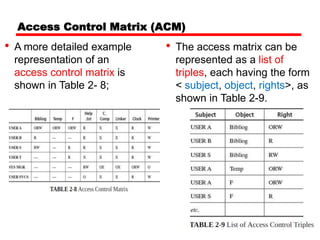
• A more detailed example
representation of an
access control matrix is
shown in Table 2- 8;
• The access matrix can be
represented as a list of
triples, each having the form
< subject, object, rights>, as
shown in Table 2-9.
Access Control List (ACL)
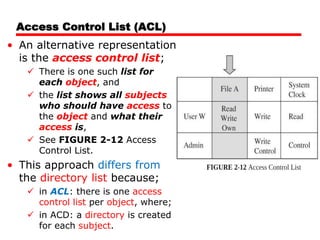
• An alternative representation
is the access control list;
 There is one such list for
each object, and
 the list shows all subjects
who should have access to
the object and what their
access is,
 See FIGURE 2-12 Access
Control List.
• This approach differs from
the directory list because;
 in ACL: there is one access
control list per object, where;
 in ACD: a directory is created
for each subject.
Access Control List (ACL)
• consider subjects A and S, both of whom
have access to object F;
 The OS will maintain just one access list for F,
showing the access rights for A and S, as shown
in figure 2-13;
Figure 2-13: Access Control List with Two Subjects
Access Control List (ACL)
• The Multics OS used a form of ACL in which
each user belonged to three protection
classes:
 a user;
― The user designation identified a specific subject.
 a group;
― the group designation brought together subjects who
had a common interest, such as coworkers on a
project.
 a compartment;
― The compartment confined an untrusted object;
o a program executing in one compartment could
not access objects in another compartment
without specific permission.
― The compartment was also a way to collect objects
that were related, such as all files for a single project.
Access Control List (ACL)
• If Adams logs in as user Adams in group
Decl and compartment Art2;
 only objects having Adams-Decl-Art2 in the
access control list are accessible in the
session.
• this kind of mechanism would be too
restrictive to be usable;
 The solution is the use of wild cards,
meaning placeholders (e.g. *) that designate;
 any user or
 any group or
 any compartment.
• Unix uses a similar approach with user–
group–world permissions;
 Every user belongs to
 a group of related users—students in a common
class, workers on a shared project, or;
 members of the same department.
 The access permissions for each object are a
triple (u,g,w) in which;
 u is for the access rights of the user,
 g is for other members of the group, and
 w is for all other users in the world.
Access Control List (ACL)
Privilege List
 One advantage of a privilege list is ease of revocation:
− If a user is removed from the system;
 the privilege list shows all objects to which the user has
access, so that:
 those rights can be removed from the object.
• A privilege list, sometimes called a directory;
 is a row of the access matrix, showing all those
privileges or access rights for a given subject,
 shown in Figure 2-14.
Capability
• A Capability Definition;
 is a token, ticket, or key that gives the possessor
permission to access an entity or object in a
computer system,
 a capability is an unforgeable token that gives the
possessor certain rights to an object.
 is essentially a list of cells for each row in the access
control matrix, compressed to remove any empty cells.
• In capability, there are two approaches;
 One approach, Operating System (OS) Task;
 We have examined protection schemes in which the OS
must keep track of all the protection objects and rights;
 Other approaches, put some of the burden on the user,
For example;
 a user may be required to have a ticket or pass that
enables access,
− much like a ticket or identification card that cannot
be duplicated.
Capability
• Capability: Single-or multi-use ticket to
access an object or service;
 A capability as a ticket giving permission to a subject
to have a certain type of access to an object.
• From figure, a capability is just one access
control triple of a subject, object, and right.
• The following figure illustrates a capability;
Capability
• In theory, a subject can create new
objects and can specify the operations
allowed on those objects, For example;
 users can create objects, such as;
files, data segments, or subprocesses, and
specify the acceptable kinds of operations, such as
read, write, and execute.
 But a user can also create completely new
objects; such as,
new data structures, and
can define types of accesses previously
unknown to system.
Capability
• For the capability to offer solid protection,
the ticket must be unforgeable;
 One way to make it unforgeable is to not give the
ticket directly to the user;
 the OS holds all tickets on behalf of the users,
 The OS returns to the user a pointer to an OS data
structure, which also links to the user.
 A capability can be created only by a specific request
from a user to the OS;
− Each capability also identifies the allowable accesses.
 Alternatively, capabilities can be encrypted under a
key available only to the access control mechanism;
−If the encrypted capability contains the identity of its
rightful owner,
 user A cannot copy the capability and give it to user B.
Capability
• As a process executes, it operates in a domain
or local name space;
 The domain is the collection of objects to which the
process has access;
 A domain for a user at a given time might include;
 some programs, files, data segments, and I/O devices
such as a printer and a terminal.
• The following figure
illustrates an example of
domain;
Capability
 The OS then creates new
capabilities for the
subprocedure, as shown in
Figure 2-17;
 For example, a procedure
might pass to a subprocedure
the right to read but not to
modify a particular data value.
• As execution continues;
 the process may call a subprocedure, passing some of
the objects to which it has access as arguments to the
subprocedure;
 The domain of the subprocedure is not necessarily the same
as that of its calling procedure,
 In fact, a calling procedure may pass only some of its
objects to the subprocedure, and
 the subprocedure may have access rights to other objects
not accessible to the calling procedure.
Capability Table versus ACL [CISSP]
Procedure-Oriented Access Control
• By procedure-oriented protection;
 we imply the existence of a procedure that controls
access to objects, for example;
 by performing its own user authentication to strengthen
the basic protection provided by the basic OS,
 the procedure forms a capsule around the object,
 permitting only certain specified accesses.
• Procedures can ensure that accesses to an object
be made through a trusted interface;
 Ex; neither users nor general OS routines might be
allowed direct access to the table of valid users;
 Instead, the only accesses allowed might be through
three procedures:
 one to add a user,
 one to delete a user, and
 one to check whether a particular name corresponds
to a valid user.
Procedure-Oriented Access Control
• Procedure-oriented protection implements
the principle of information hiding;
 implementing an object are known only to the
object's control procedure;
 This degree of protection carries a penalty of
inefficiency,
 there can be no simple, fast access, even if the
object is frequently used.
Role-Based Access Control (RBAC)
• We have not yet distinguished among kinds of
users, but we want;
 some users (as administrators) to have significant
privileges,
 others (as regular users or guests) to have lower privileges.
• In companies and educational institutions;
 this can get complicated when an ordinary user becomes an
administrator.
• RBAC lets us associate privileges with groups, such as;
 all administrators can do this, or;
 candlestick makers are forbidden to do this.
• In RBAC;
 Independent of the specific data structure that represents
access control rights,
− which can be used with any of the previous structures.
 In RBAC, administrators define:
roles and then specify access control rights for these
roles, rather than for subjects directly.
Role-Based Access Control
• Administering security is easier if we can
control access by job demands, not by person;
 Access control keeps up with a person who
changes responsibilities, and
 the system administrator does not have to choose
the appropriate access control settings for
someone.
• In an RBAC model;
 a role is defined in terms of the operations and tasks the
role will carry out.
 Access decisions are based on each subject’s role and/or
functional position.
 RBAC model is the best system for a company that has
high employee turnover;
 Users, roles, permissions, operations, and sessions are
defined and mapped according to the security policy.
Role-based Access Control
• Access control by role recognizes common needs of
all members of a set of subjects.
• Define roles and then specify access control rights
for these roles, rather than for subjects directly;
Department
Member
Administrativ
e Personnel
Accountant Secretary
Administrative
Manager
Faculty
Lab
Technician
Lab
Manager
Student
Undergraduate
Student
Graduate
Student
Department
Chair
Technical
Personnel
Backup
Agent
System
Administrator
Undergraduate
TA
Graduate
TA
Example of hierarchy of roles for a computer science department
Access Control Models
security-cissp-all-in-one-exam-guide-6th-edition.pdf
• RBAC can be managed in the following ways:
 Non-RBAC;
− Users are mapped directly to applications and no roles
are used.
 Limited RBAC;
− Users are mapped to multiple roles and mapped directly
to other types of applications that do not have role-
based access functionality.
 Hybrid RBAC;
− Users are mapped to multiapplication roles with only
selected rights assigned to those roles.
 Full RBAC;
− Users are mapped to enterprise roles.
Assignments
• Controls List Examples:
 Controls List by Security Categories, Controls List by
Information Security Layer, Controls List by Security
Architecture Layer, Controls List by IT Organization,
Controls List Using ISO.
 Controls List Mapping ISO 17799 and CobiT.
• Risk Management;
• Risk Assessment Process;
• Quantitative versus Qualitative Risk
Assessment;
• COBIT,
• FAIR (Factor Analysis of Information Risk),
• CCTA Risk Assessment and Management
Methodology (CRAMM),
Assignments
• ISAMM (Information Security Assessment and
Monitoring Method),
• Microsoft’s Security Risk Management Guide
• Facilitated Risk Analysis and Assessment
Process (FRAAP);
• MAGERIT (Metodologia de Analisis y Gestion de
Riesgos de los Sistemas de Informacion)
(Methodology for Information Systems Risk
Analysis and Management)
• Business Impact Analysis (BIA);
• Physical Security in ISO/IEC 27004:2016;

4_5949547032388570388.ppt

  • 1.
    Information Security Chapter 2 Toolbox:Authentication, Access Control, and Cryptography Charles P. Pfleeger
  • 2.
    Information Security Chapter 2: AccessControl Charles P. Pfleeger
  • 3.
    Access Control • Definitionof access control: It is a collection of methods and components that supports confidentiality and integrity. • Goal: allow only authorized subjects to access permitted objects. Subject: The entity that requests access to a resource. Object: The resource a subject attempts to access. • Controls organized into different categories, A common categories are: Administrative: enforce security rules through policies. Logical: implement object access restrictions. Physical: limit physical access to hardware.
  • 4.
    Access Control • Howto protect general objects, such as;  files, tables, access to hardware devices, or  network connections, and other resources. • We want techniques that are:  robust, easy to use, and Efficient. • One goal of access control is restricting;  which subjects have access to an object, and  what they can do to that object,  Read versus write access can be controlled rather readily by most operating systems,  but more complex control is not so easy to achieve. • We start with the basic access control paradigm;  A subject is permitted to access an object in a particular mode, and  only such authorized accesses are allowed.
  • 5.
    Access Control • thedetails of basic access control paradigm;  Subjects are human users,  often represented by surrogate programs running on behalf of the users.  Objects are things on which an action can be performed, for examples:  Files, tables, programs, memory objects, hardware (HW) devices, strings, data fields, network connections, and processors.  So too are users, or rather programs or processes representing users, because; − the operating system (representing the system administrator) can act on a user, for example, − allowing a user to execute a program, halting a user, or assigning privileges to a user.  Access modes are any controllable actions of subjects on objects, including, but not limited to;  read, write, modify, delete, execute, create, destroy, copy, export, import, and so forth.
  • 6.
    Access Control • Accesscontrols are ways to allow all and only authorized accesses, where it is include;  Access Policies,  Effective Policy Implementation,  Tracking,  Granularity,  Access Log,  Limited Privilege,  Implementing Access Control,  Reference Monitor,  models of how access rights can be maintained and implemented by the reference monitor;  Access Control Directory,  Access Control Matrix and its substructures;  Access Control List,  Privilege List, and  Capability.  Procedure-Oriented Access Control,  Role-Based Access Control.
  • 7.
    Access Policies; • Accesscontrol is a mechanical process, easily implemented by a table and computer process;  A given subject either can or cannot access a particular object in a specified way;  Underlying the straightforward decision is a complex and nuanced decision of which accesses should be allowed,  these decisions are based on a formal or informal security policy.  A policy also simplifies establishing access control rules, because Access control rules are;  just reflect the existing policy.  For this reason, an organization needs to take the time to develop a higher-level security policy;  which will then drive all the access control rules.
  • 8.
    Effective Policy Implementation •Protecting objects involves several complementary goals:  Check every access;  Enforce least privilege: The principle of least privilege states that:  a subject should have access to the smallest number of objects necessary to perform some task.  the subject should not have that additional access, For ex; − a program should not have access to the absolute memory address to which a page number reference translates.  Verify acceptable usage;  Ability to access is a yes-or-no decision,  But equally important is checking that the activity to be performed on an object is appropriate, For example; − a data structure such as a stack has certain acceptable operations, including push, pop, clear, and so on, − We may want not only to control who or what has access to the stack but also to be assured that all accesses performed are legitimate stack accesses.
  • 9.
    Tracking • Sometimes administratorsneed to revisit the access policy to determine whether it is working as it should;  Has someone been around for a long time and so has acquired a large number of no-longer-needed rights?  Do so many users have access to one object that it no longer needs to be controlled? Or;  should it be split into several objects so that individuals can be allowed access to only the pieces they need? • Administrators need to consider these kinds of questions on occasion;  to determine whether the policy and implementation are doing what they should; • For management side of defining security policies, See Chapter 10;
  • 10.
    Granularity • By granularitywe mean the fineness or specificity of access control;  At one end you can control access to;  each individual bit or byte, each word in a document; each number on a spreadsheet, each photograph in a collection;  That level of specificity is generally excessive and cumbersome to implement.  The finer the granularity;  the larger number of access control decisions that must be made, so there is a performance penalty.  At the other extreme you simply say:  Adam has complete access to computer C1,  if computer C1 is shared??  Typically a file, a program, or a data space is the smallest unit to which access is controlled;  So, note that applications can implement their own access control, for example;  A database management system (DBMS) can have access to a complete DB, but it then,  carves the DB into smaller units and parcels out access.
  • 11.
    Access Log • Aftermaking an access decision;  the system acts to allow that access, and  leaves the user and the object to complete the transaction.  Systems also record which accesses have been permitted; −A system creating what is called an audit log;  This log is created and maintained by the system, and it is preserved for later analysis.  Several reasons for logging access include the following:  Records of accesses can help plan for new or upgraded equipment, by; − showing which items have had heavy use.  If the system fails, these records can show: − what accesses were in progress and perhaps help identify the cause of failure.
  • 12.
    Access Log  Ifa user misuses objects, − the access log shows exactly which objects the user did access.  In the event of an external compromise, −the audit log may help identify how the attacker gained access and which data items were accessed,  These data for after-the-fact forensic analysis have been extremely helpful in handling major incidents.
  • 13.
    Limited Privilege • Limitedprivilege is the act of restraining users and processes so that any harm they can do is not catastrophic;  is a way to constrain that exposure,  we seek a midpoint that balances the need for some access against the risk of harmful, inappropriate access. • Limited privilege is a management concept, not a technical control;  The process of analyzing users and determining the privileges they require is a necessary first step to authorizing within those limits;  After establishing the limits; we turn to access control technology to enforce those limits.
  • 14.
    Data Ownership; Policies forVulnerability Handling; • Different layers of responsibility for ensuring security of organization’s information; o Data owner:  Bears ultimate responsibility, sets classification levels. o Data custodian:  Enforces security policies, often a member of IT department. o Data user:  Accesses data on a day-to-day basis,  responsible for following the organization’s security. • Policies for Vulnerability Handling:  Log all data – login, transaction,  Analyze data in real time,  Set security alerts based on data analysis,  Develop scenarios for system shut off,  Disseminate policies related to vulnerability handling.
  • 15.
    Access Control Models[security-cissp]: • An access control model is a framework that dictates how subjects access objects;  It uses access control technologies and security mechanisms to enforce the rules and objectives of the model. • Access control designs define rules for users accessing files or devices; • There are three main types of access control models:  Discretionary Access Control (DAC),  Mandatory Access Control (MAC), and  Role Based Access Control (RBAC). • Each model type uses different methods to:  control how subjects access objects, and  each has its own merits and limitations.
  • 16.
    Access Control Models security-cissp-all-in-one-exam-guide-6th-edition.pdf •An access control models are:  Provide conceptual view of security policies,  Map goals and directives to specific system events,  Provide a formal definition and specification of required security controls,  Many different models and combinations of models are used. • These models are built into the core or the kernel of the different operating systems (OSs) and possibly their supporting applications:  Every operating system (OS) has a security kernel that enforces a reference monitor concept; − OSs security kernel differs, depending upon the type of access control model embedded into the system.  For every access attempt, before a subject can communicate with an object, − the security kernel reviews the rules of the access control model to determine whether the request is allowed.
  • 17.
    Discretionary Access Control(DAC): • A system that uses DAC: Enables the owner of the resource to specify which subjects can access specific resources; −This model is called discretionary because the control of access is based on the discretion of the owner, −Data owners decide who has access to resources, and −ACLs are used to enforce these access decisions. Many times the managers of department or business unit: −are the data owners within their specific department, −they can specify who should have access and who should not. −access is restricted based on authorization granted to users. −If an organization is using a DAC model;  the network administrator can allow resource owners to control who has access to their files. The most common implementation of DAC is through ACLs; DAC make a user’s ability to access information dynamic; Most OSs are based on DAC models, such as: −all Winds, Linux, Macintosh systems, and most flavors of Unix.
  • 18.
    Mandatory Access Control(MAC): • In a MAC model:  users do not have the discretion of determining who can access objects as in a DAC model;  MAC OSs enforce the system’s security policy through the use of security labels; −Users are given a security clearance (secret, top secret, etc).  An OS that is based upon a MAC model greatly reduces the amount of rights, permissions, and functionality a user has for security purposes;  In most systems based upon the MAC model; −a user cannot install software (including malware), change file permissions, add new users, etc.  These systems are usually very specialized and are in place to protected highly classified data.  Most people have never interacted with a MAC-based system because; −they are used by government-oriented agencies that maintain top secret information.
  • 19.
    • In aMAC model,  This type of model is used in environments where information classification and confidentiality is of utmost importance, such as; − military institutions, government agencies, and government contract companies.  Special types of Unix systems are developed based on the MAC model; − A publicly released MAC system is SE Linux, developed by the NSA and Secure Computing. − Trusted Solaris is a product based on the MAC model that most people are familiar with.  While MAC systems enforce strict access control; − also provide a wide range of security, particularly dealing with malware.  Malware is the bane of DAC systems;  Viruses, worms, and rootkits can be installed and run as applications on DAC systems. − MAC systems might seem an answer to all our security prayers, they have. Mandatory Access Control (MAC):
  • 20.
    • MAC model: very limited user functionality; − require a lot of administrative overhead, − are very expensive, and are not user-friendly;  DAC systems are general-purpose computers, while;  MAC systems serve a very specific purpose.  Different types of guards can be used to carry out: − filtering, processing requests, data blocking, and data sanitization.  Uses the guard: − A software (SW) guard;  is really just a front-end product that allows interconnectivity between systems working at different security levels. − A hardware (HW) guard;  can be implemented, which is a system with two network interface cards (NICs) connecting the two systems that need to communicate with one another. − Guards can be used to:  connect different MAC systems working in different security modes,  and they can be used to connect different networks working at different security levels.  e-mail messages can send from the less trusted system to the more trusted system and can only receive acknowledgments back Mandatory Access Control (MAC):
  • 21.
    Implementing Access Control •Access control is often performed by the operating system(OS);  Only the OS can:  access primitive objects, such as files, to exercise control over them,  creates and terminates the programs that represent users (subjects).  However, current HW design does not always support the OS in implementing well- differentiated or fine-grained access control,  OS does not usually see inside files or data objects, − for example, OS cannot perform row- or element- level access control within a database.  Thus, current HW design limits some OS designs.
  • 22.
    Implementing Access Control ReferenceMonitor; • Reference monitor: access control that is always invoked, tamperproof, and verifiable; • In Anderson’s formulation for computers;  access control depends on a combination of HW and SW that is; − always invoked: validates every access attempt, − immune from tampering, − assuredly correct.  Anderson called this construct a reference monitor, Where; − A reference monitor is a notion, not a tool you can buy to plug into a port;  It could be embedded in an application to control the application’s objects,  part of the OS for system-managed objects, or  part of an appliance.
  • 23.
    Access Control Techniques •Access control techniques that are used to support the access control models [CISSP]:  Access control matrix; Table of subjects and objects that outlines their access relationships.  Access control list; Bound to an object and indicates what subjects can access it and what operations they can carry out.  Capability table; Bound to a subject and indicates what objects that subject can access and what operations it can carry out.  Content-based access: Bases access decisions on the sensitivity of the data, not solely on subject identity.  Context-based access; −Bases access decisions on the state of the situation, not solely on identity or content sensitivity.  Restricted interface; Limits the user’s environment within the system, thus limiting access to objects.  Rule-based access; Restricts subjects’ access attempts by predefined rules.
  • 24.
    Implementing Access Control ReferenceMonitor • There are several models of how access rights can be maintained and implemented by the reference monitor;  Access Control Directory,  Access Control Matrix and its substructures;  Access Control List,  Privilege List,  Capability,  Procedure-Oriented Access Control,  Role-Based Access Control. The basis of access control systems implemented today. • Quite apart from the mechanical implementation of the access control matrix or its substructures. • related more specifically to the objective of access control:  relating access to subject’s role or  the context of the access.
  • 25.
    Access Control Directory(ACD) • One simple way to protect an object is to use a mechanism that works like a file directory;  Every file has a unique owner who; possesses "control" access rights, (including the rights to declare who has what access) and; revoke access to any person at any time.  Each user has a file directory, ― which lists all the files to which that user has access.  No user can be allowed to write in the file directory because;  that would be a way to forge access to a file.
  • 26.
    • The OSmust maintain all file directories, under commands from the owners of files; • The obvious rights to files are the common;  read, write, and execute − familiar on many shared systems.  Another rights, is possessed by the owner, − permitting that user to grant and revoke access rights. • Figure 2-9 shows an example of a file directory; Figure 2-9: Directory Access Rights Access Control Directory (ACD)
  • 27.
    • This approachis easy to implement because;  it uses one list per user,  naming all the objects that user is allowed to access. • However, several difficulties can arise;  First, the list becomes too large if many shared objects, such as; ─ libraries of subprograms or ─ a common table of users, are accessible to all users, ─ The directory of each user must have one entry for each such shared object,  even if the user has no intention of accessing the object. ─ Deletion must be reflected in all directories. Access Control Directory (ACD)
  • 28.
    Access Control Directory(ACD) • A second difficulty is revocation of access,  If owner A has passed to user B the right to read file F, an entry for F is made in the directory for B; ─ This granting of access implies a level of trust between A and B, ─ If A later questions that trust, A may want to revoke the access right of B; o The OS can respond easily; o if A wants to remove the rights of everyone to access F, o OS must search each individual directory for the entry F,  an activity that can be time consuming on a large system. ─ B may have passed the access right for F to another user, so A may not know that F's access exists and should be revoked, o This problem is particularly serious in a network. Ex:  large timesharing systems, or  networks of smaller systems.
  • 29.
    Access Control Directory(ACD) • A third difficulty involves pseudonyms;  Owners A and B may have two different files named F, and they may both want to allow access by S; ─ Clearly, the directory for S cannot contain two entries under the same name for different files, ─ S has to be able to uniquely identify the F for A or B; o One approach is to include the original owner's designation as if it were part of the file name, with a notation such as A:F (or B:F). − Another approach is to allow S to name F with any name unique to the directory of S;  F from A could be called Q to S.  This action opens up the possibility that one subject, S, may have two distinct sets of access rights to F,  Lead to a problem of revoke access.
  • 30.
    Access Control Directory(ACD)  leads to multiple permissions that are not necessarily consistent; • Thus, the directory approach is probably too simple for most object protection situations. • Figure 2-10 illustrates an ambiguous access rights in the access control directory; Figure 2-10: Ambiguous Access Rights
  • 31.
    Access Control Matrix(ACM) • As an alternative, we can use an access control matrix, where a table in which;  each row represents a subject,  each column represents an object,  each entry is the set of access rights for that subject to that object. • In general;  the access control matrix is sparse, ― Most subjects don’t have access rights to most objects.  The access matrix can be represented as a list of triples, <subject, object, rights>,  Searching a large number of these triples is inefficient enough that this implementation is seldom used. • An access control matrix, shown in Figure 2-11;
  • 32.
    Access Control Matrix(ACM) • A more detailed example representation of an access control matrix is shown in Table 2- 8; • The access matrix can be represented as a list of triples, each having the form < subject, object, rights>, as shown in Table 2-9.
  • 33.
    Access Control List(ACL) • An alternative representation is the access control list;  There is one such list for each object, and  the list shows all subjects who should have access to the object and what their access is,  See FIGURE 2-12 Access Control List. • This approach differs from the directory list because;  in ACL: there is one access control list per object, where;  in ACD: a directory is created for each subject.
  • 34.
    Access Control List(ACL) • consider subjects A and S, both of whom have access to object F;  The OS will maintain just one access list for F, showing the access rights for A and S, as shown in figure 2-13; Figure 2-13: Access Control List with Two Subjects
  • 35.
    Access Control List(ACL) • The Multics OS used a form of ACL in which each user belonged to three protection classes:  a user; ― The user designation identified a specific subject.  a group; ― the group designation brought together subjects who had a common interest, such as coworkers on a project.  a compartment; ― The compartment confined an untrusted object; o a program executing in one compartment could not access objects in another compartment without specific permission. ― The compartment was also a way to collect objects that were related, such as all files for a single project.
  • 36.
    Access Control List(ACL) • If Adams logs in as user Adams in group Decl and compartment Art2;  only objects having Adams-Decl-Art2 in the access control list are accessible in the session. • this kind of mechanism would be too restrictive to be usable;  The solution is the use of wild cards, meaning placeholders (e.g. *) that designate;  any user or  any group or  any compartment.
  • 37.
    • Unix usesa similar approach with user– group–world permissions;  Every user belongs to  a group of related users—students in a common class, workers on a shared project, or;  members of the same department.  The access permissions for each object are a triple (u,g,w) in which;  u is for the access rights of the user,  g is for other members of the group, and  w is for all other users in the world. Access Control List (ACL)
  • 38.
    Privilege List  Oneadvantage of a privilege list is ease of revocation: − If a user is removed from the system;  the privilege list shows all objects to which the user has access, so that:  those rights can be removed from the object. • A privilege list, sometimes called a directory;  is a row of the access matrix, showing all those privileges or access rights for a given subject,  shown in Figure 2-14.
  • 39.
    Capability • A CapabilityDefinition;  is a token, ticket, or key that gives the possessor permission to access an entity or object in a computer system,  a capability is an unforgeable token that gives the possessor certain rights to an object.  is essentially a list of cells for each row in the access control matrix, compressed to remove any empty cells. • In capability, there are two approaches;  One approach, Operating System (OS) Task;  We have examined protection schemes in which the OS must keep track of all the protection objects and rights;  Other approaches, put some of the burden on the user, For example;  a user may be required to have a ticket or pass that enables access, − much like a ticket or identification card that cannot be duplicated.
  • 40.
    Capability • Capability: Single-ormulti-use ticket to access an object or service;  A capability as a ticket giving permission to a subject to have a certain type of access to an object. • From figure, a capability is just one access control triple of a subject, object, and right. • The following figure illustrates a capability;
  • 41.
    Capability • In theory,a subject can create new objects and can specify the operations allowed on those objects, For example;  users can create objects, such as; files, data segments, or subprocesses, and specify the acceptable kinds of operations, such as read, write, and execute.  But a user can also create completely new objects; such as, new data structures, and can define types of accesses previously unknown to system.
  • 42.
    Capability • For thecapability to offer solid protection, the ticket must be unforgeable;  One way to make it unforgeable is to not give the ticket directly to the user;  the OS holds all tickets on behalf of the users,  The OS returns to the user a pointer to an OS data structure, which also links to the user.  A capability can be created only by a specific request from a user to the OS; − Each capability also identifies the allowable accesses.  Alternatively, capabilities can be encrypted under a key available only to the access control mechanism; −If the encrypted capability contains the identity of its rightful owner,  user A cannot copy the capability and give it to user B.
  • 43.
    Capability • As aprocess executes, it operates in a domain or local name space;  The domain is the collection of objects to which the process has access;  A domain for a user at a given time might include;  some programs, files, data segments, and I/O devices such as a printer and a terminal. • The following figure illustrates an example of domain;
  • 44.
    Capability  The OSthen creates new capabilities for the subprocedure, as shown in Figure 2-17;  For example, a procedure might pass to a subprocedure the right to read but not to modify a particular data value. • As execution continues;  the process may call a subprocedure, passing some of the objects to which it has access as arguments to the subprocedure;  The domain of the subprocedure is not necessarily the same as that of its calling procedure,  In fact, a calling procedure may pass only some of its objects to the subprocedure, and  the subprocedure may have access rights to other objects not accessible to the calling procedure.
  • 45.
  • 46.
    Procedure-Oriented Access Control •By procedure-oriented protection;  we imply the existence of a procedure that controls access to objects, for example;  by performing its own user authentication to strengthen the basic protection provided by the basic OS,  the procedure forms a capsule around the object,  permitting only certain specified accesses. • Procedures can ensure that accesses to an object be made through a trusted interface;  Ex; neither users nor general OS routines might be allowed direct access to the table of valid users;  Instead, the only accesses allowed might be through three procedures:  one to add a user,  one to delete a user, and  one to check whether a particular name corresponds to a valid user.
  • 47.
    Procedure-Oriented Access Control •Procedure-oriented protection implements the principle of information hiding;  implementing an object are known only to the object's control procedure;  This degree of protection carries a penalty of inefficiency,  there can be no simple, fast access, even if the object is frequently used.
  • 48.
    Role-Based Access Control(RBAC) • We have not yet distinguished among kinds of users, but we want;  some users (as administrators) to have significant privileges,  others (as regular users or guests) to have lower privileges. • In companies and educational institutions;  this can get complicated when an ordinary user becomes an administrator. • RBAC lets us associate privileges with groups, such as;  all administrators can do this, or;  candlestick makers are forbidden to do this. • In RBAC;  Independent of the specific data structure that represents access control rights, − which can be used with any of the previous structures.  In RBAC, administrators define: roles and then specify access control rights for these roles, rather than for subjects directly.
  • 49.
    Role-Based Access Control •Administering security is easier if we can control access by job demands, not by person;  Access control keeps up with a person who changes responsibilities, and  the system administrator does not have to choose the appropriate access control settings for someone. • In an RBAC model;  a role is defined in terms of the operations and tasks the role will carry out.  Access decisions are based on each subject’s role and/or functional position.  RBAC model is the best system for a company that has high employee turnover;  Users, roles, permissions, operations, and sessions are defined and mapped according to the security policy.
  • 50.
    Role-based Access Control •Access control by role recognizes common needs of all members of a set of subjects. • Define roles and then specify access control rights for these roles, rather than for subjects directly; Department Member Administrativ e Personnel Accountant Secretary Administrative Manager Faculty Lab Technician Lab Manager Student Undergraduate Student Graduate Student Department Chair Technical Personnel Backup Agent System Administrator Undergraduate TA Graduate TA Example of hierarchy of roles for a computer science department
  • 51.
    Access Control Models security-cissp-all-in-one-exam-guide-6th-edition.pdf •RBAC can be managed in the following ways:  Non-RBAC; − Users are mapped directly to applications and no roles are used.  Limited RBAC; − Users are mapped to multiple roles and mapped directly to other types of applications that do not have role- based access functionality.  Hybrid RBAC; − Users are mapped to multiapplication roles with only selected rights assigned to those roles.  Full RBAC; − Users are mapped to enterprise roles.
  • 52.
    Assignments • Controls ListExamples:  Controls List by Security Categories, Controls List by Information Security Layer, Controls List by Security Architecture Layer, Controls List by IT Organization, Controls List Using ISO.  Controls List Mapping ISO 17799 and CobiT. • Risk Management; • Risk Assessment Process; • Quantitative versus Qualitative Risk Assessment; • COBIT, • FAIR (Factor Analysis of Information Risk), • CCTA Risk Assessment and Management Methodology (CRAMM),
  • 53.
    Assignments • ISAMM (InformationSecurity Assessment and Monitoring Method), • Microsoft’s Security Risk Management Guide • Facilitated Risk Analysis and Assessment Process (FRAAP); • MAGERIT (Metodologia de Analisis y Gestion de Riesgos de los Sistemas de Informacion) (Methodology for Information Systems Risk Analysis and Management) • Business Impact Analysis (BIA); • Physical Security in ISO/IEC 27004:2016;