



Big Mistakes
professionals make
when presenting
financial or operational
data to executives
My name is Dave Paradi of
ThinkOutsideTheSlide.com, and
over the last 14 years of working
with presenters, I see
professionals make three big
mistakes when they present
numbers to executives.
Let’s start with Mistake #3.
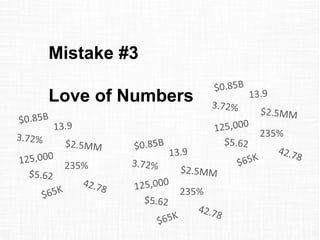
Mistake #3
Love of Numbers
235%
235%
235%
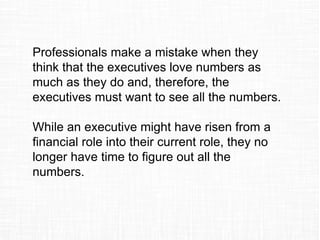
Professionals make a mistake when they
think that the executives love numbers as
much as they do and, therefore, the
executives must want to see all the numbers.
While an executive might have risen from a
financial role into their current role, they no
longer have time to figure out all the
numbers.
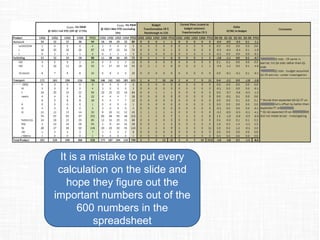
It is a mistake to put every
calculation on the slide and
hope they figure out the
important numbers out of the
600 numbers in the
spreadsheet
Network
Costs
Costs
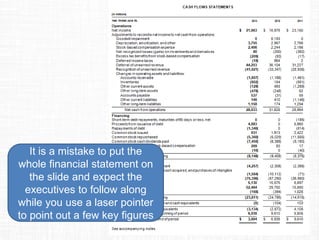
It is a mistake to put the
whole financial statement on
the slide and expect the
executives to follow along
while you use a laser pointer
to point out a few key figures
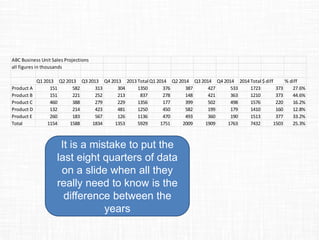
ABC Business Unit Sales Projections
all figures in thousands
Q1 2013 Q2 2013 Q3 2013 Q4 2013 2013 Total Q1 2014 Q2 2014 Q3 2014 Q4 2014 2014 Total $ diff % diff
Product A 151 582 313 304 1350 376 387 427 533 1723 373 27.6%
Product B 151 221 252 213 837 278 148 421 363 1210 373 44.6%
Product C 460 388 279 229 1356 177 399 502 498 1576 220 16.2%
Product D 132 214 423 481 1250 450 582 199 179 1410 160 12.8%
Product E 260 183 567 126 1136 470 493 360 190 1513 377 33.2%
Total 1154 1588 1834 1353 5929 1751 2009 1909 1763 7432 1503 25.3%
It is a mistake to put the
last eight quarters of data
on a slide when all they
really need to know is the
difference between the
years
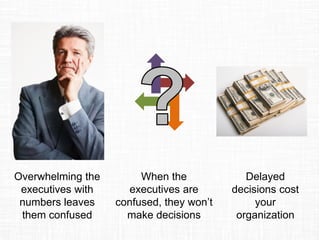
When the
executives are
confused, they won’t
make decisions
Overwhelming the
executives with
numbers leaves
them confused
Delayed
decisions cost
your
organization
How can you fix this mistake?
Focus on the insights, not the data or
information.
Data is anything we measure.
And we measure more today
than ever before. But data is
only a number. It doesn’t have
meaning on its own.
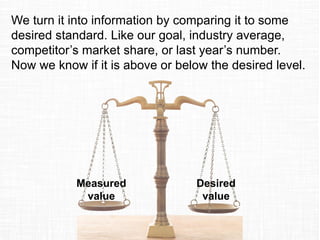
Measured
value
Desired
value
We turn it into information by comparing it to some
desired standard. Like our goal, industry average,
competitor’s market share, or last year’s number.
Now we know if it is above or below the desired level.
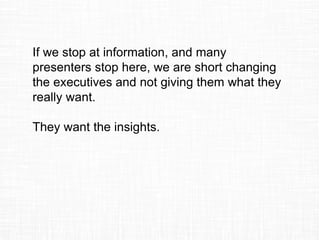
If we stop at information, and many
presenters stop here, we are short changing
the executives and not giving them what they
really want.
They want the insights.
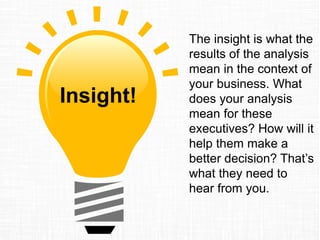
The insight is what the
results of the analysis
mean in the context of
your business. What
does your analysis
mean for these
executives? How will it
help them make a
better decision? That’s
what they need to
hear from you.
Insight!
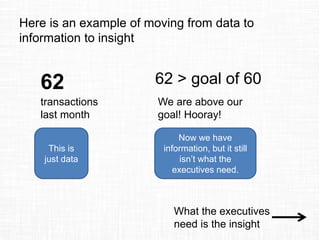
Here is an example of moving from data to
information to insight
62
transactions
last month
This is
just data
62 > goal of 60
We are above our
goal! Hooray!
Now we have
information, but it still
isn’t what the
executives need.
What the executives
need is the insight
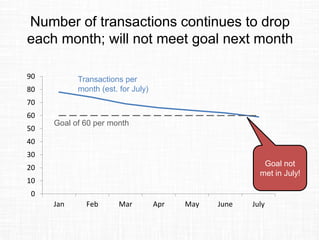
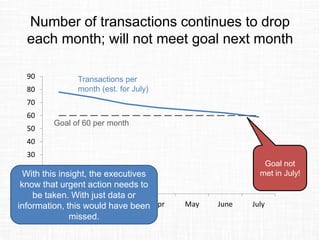
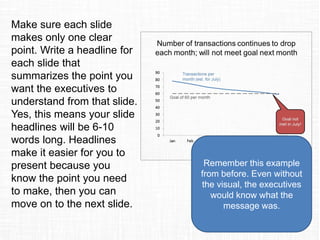
Number of transactions continues to drop
each month; will not meet goal next month
0
10
20
30
40
50
60
70
80
90
Jan Feb Mar Apr May June July
Transactions per
month (est. for July)
Goal of 60 per month
Goal not
met in July!
Number of transactions continues to drop
each month; will not meet goal next month
0
10
20
30
40
50
60
70
80
90
Jan Feb Mar Apr May June July
Transactions per
month (est. for July)
Goal of 60 per month
Goal not
met in July!With this insight, the executives
know that urgent action needs to
be taken. With just data or
information, this would have been
missed.
To fix the mistake of Love of Numbers, focus
on the insights the executives need to know.
What do the numbers mean to your
business? After all, that is what they are
paying you to determine from your analysis.
Mistake #2
No Clear Messages
Professionals make a mistake when they
think that the executives will be able to follow
a presentation that has no clear path or
conclusion.
Don’t expect the executives to put together
your randomly assembled facts into a
coherent message. They won’t do it.
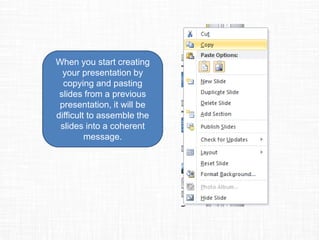
When you start creating
your presentation by
copying and pasting
slides from a previous
presentation, it will be
difficult to assemble the
slides into a coherent
message.
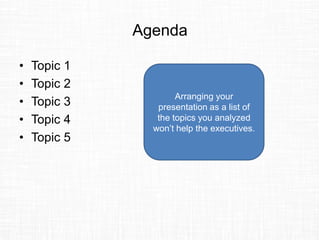
Agenda
• Topic 1
• Topic 2
• Topic 3
• Topic 4
• Topic 5
Arranging your
presentation as a list of
the topics you analyzed
won’t help the executives.
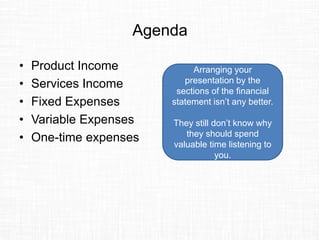
Agenda
• Product Income
• Services Income
• Fixed Expenses
• Variable Expenses
• One-time expenses
Arranging your
presentation by the
sections of the financial
statement isn’t any better.
They still don’t know why
they should spend
valuable time listening to
you.
So they ask you to
go back and do
more analysis (in
the hope that next
time they will get
something useful)
The executives
don’t know what to
do with all the
information
The executives
get frustrated.
Which doesn’t
help your career
potential.
How can you fix this mistake?
Create a clear plan to take the executives
from where they are to where you want them
to be at the end of the presentation. Your
presentation needs to be well structured.
Start with the goal of
your presentation by
completing this
sentence: At the end
of the presentation,
the executives will
_____. What will they
do, agree on, approve,
etc. Be clear on what
the outcome of your
work on this
presentation will be.
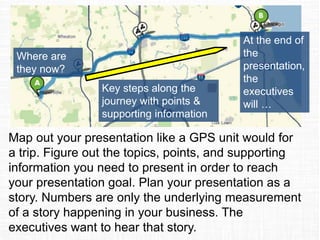
At the end of
the
presentation,
the
executives
will …
Where are
they now?
Key steps along the
journey with points &
supporting information
Map out your presentation like a GPS unit would for
a trip. Figure out the topics, points, and supporting
information you need to present in order to reach
your presentation goal. Numbers are only the
underlying measurement of a story happening in your
business. The executives want to hear that story.
Read more about the GPS approach.
Make sure each slide
makes only one clear
point. Write a headline for
each slide that
summarizes the point you
want the executives to
understand from that slide.
Yes, this means your slide
headlines will be 6-10
words long. Headlines
make it easier for you to
present because you
know the point you need
to make, then you can
move on to the next slide.
Remember this example
from before. Even without
the visual, the executives
would know what the
message was.
To fix the mistake of No Clear Messages,
plan the content of your presentation before
you ever create a single slide. Don’t just copy
and paste slides from another presentation.
Define the goal of the presentation. Decide
on the topics, points, and supporting
information you will need. Write a headline for
each slide that summarizes the message.
A well structured presentation is easier for
you to present and easier for the executives
to act on.
Mistake #1
Spreadsheets on Slides
November November YTD
USD Million
@ B09 rate
2008
Actual
2009
Budget
2009
Base
case
2009
Actual
2009 vs.
2008
2009 vs.
Budget
2009 vs.
Base
case
2008
Actual
2009
Budget
2009
Base
case
2009
Actual
2009 vs.
2008
2009 vs.
Budget
2009 vs.
Base
case
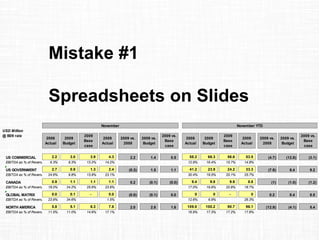
a US COMMERCIAL 2.2 3.0 3.9 4.3 2.2 1.4 0.5 58.2 66.3 56.6 53.5 (4.7) (12.8) (3.1)
EBITDA as % of Revenues 6.3% 9.3% 13.2% 14.2% 12.9% 16.4% 15.7% 14.8%
a US GOVERNMENT 2.7 0.9 1.3 2.4 (0.3) 1.5 1.1 41.2 23.9 24.2 33.3 (7.9) 9.4 9.2
EBITDA as % of Revenues 24.6% 9.8% 13.8% 23.1% 30.4% 19.5% 20.1% 25.7%
a CANADA 0.9 1.1 1.1 1.1 0.2 (0.1) (0.0) 9.4 9.8 9.9 8.8 (1) (1.0) (1.2)
EBITDA as % of Revenues 18.0% 24.2% 25.6% 23.6% 17.0% 19.6% 20.9% 18.7%
a GLOBAL MATRIX 0.0 0.1 - 0.0 (0.0) (0.1) 0.0 0 0 - 0 0.2 0.4 0.5
EBITDA as % of Revenues 23.9% 34.6% 1.5% 12.6% 6.9% 26.3%
NORTH AMERICA 5.8 5.1 6.3 7.8 2.0 2.8 1.6 109.0 100.2 90.7 96.1 (12.9) (4.1) 5.4
EBITDA as % of Revenues 11.5% 11.0% 14.6% 17.1% 16.9% 17.3% 17.2% 17.8%
Professionals make a mistake when they use
a spreadsheet on a slide instead of an
effective visual.
Spreadsheets are for calculation, not
communication.
November November YTD
USD Million
@ B09 rate
2008
Actual
2009
Budget
2009
Base
case
2009
Actual
2009 vs.
2008
2009 vs.
Budget
2009 vs.
Base
case
2008
Actual
2009
Budget
2009
Base
case
2009
Actual
2009 vs.
2008
2009 vs.
Budget
2009 vs.
Base
case
a US COMMERCIAL 2.2 3.0 3.9 4.3 2.2 1.4 0.5 58.2 66.3 56.6 53.5 (4.7) (12.8) (3.1)
EBITDA as % of Revenues 6.3% 9.3% 13.2% 14.2% 12.9% 16.4% 15.7% 14.8%
a US GOVERNMENT 2.7 0.9 1.3 2.4 (0.3) 1.5 1.1 41.2 23.9 24.2 33.3 (7.9) 9.4 9.2
EBITDA as % of Revenues 24.6% 9.8% 13.8% 23.1% 30.4% 19.5% 20.1% 25.7%
a CANADA 0.9 1.1 1.1 1.1 0.2 (0.1) (0.0) 9.4 9.8 9.9 8.8 (1) (1.0) (1.2)
EBITDA as % of Revenues 18.0% 24.2% 25.6% 23.6% 17.0% 19.6% 20.9% 18.7%
a GLOBAL MATRIX 0.0 0.1 - 0.0 (0.0) (0.1) 0.0 0 0 - 0 0.2 0.4 0.5
EBITDA as % of Revenues 23.9% 34.6% 1.5% 12.6% 6.9% 26.3%
NORTH AMERICA 5.8 5.1 6.3 7.8 2.0 2.8 1.6 109.0 100.2 90.7 96.1 (12.9) (4.1) 5.4
EBITDA as % of Revenues 11.5% 11.0% 14.6% 17.1% 16.9% 17.3% 17.2% 17.8%
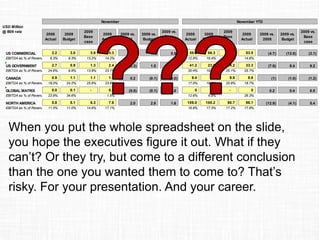
When you put the whole spreadsheet on the slide,
you hope the executives figure it out. What if they
can’t? Or they try, but come to a different conclusion
than the one you wanted them to come to? That’s
risky. For your presentation. And your career.
Why do so many professionals use
spreadsheets instead of effective visuals?
They tell me two reasons above all others:
1) They were never taught how to translate
numbers into visuals in school, grad
school, or their professional designation
2) They think they need to be a graphic artist
to create the visuals they see in print
publications
I believe almost any professional can create
effective visuals instead of using
spreadsheets. I am proof. I have a Chemical
Engineering undergrad degree and an MBA.
No design background or experience. I’ve
spent 14 years figuring out how to create
effective visuals when you don’t have a
background in graphics. Here’s what I have
discovered.
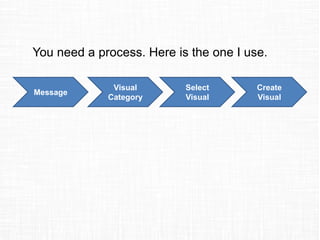
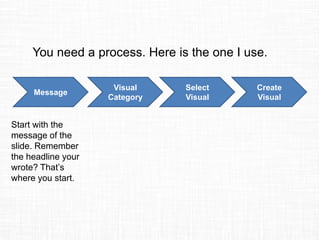
You need a process. Here is the one I use.
Message
Visual
Category
Select
Visual
Create
Visual
You need a process. Here is the one I use.
Message
Visual
Category
Select
Visual
Create
Visual
Start with the
message of the
slide. Remember
the headline your
wrote? That’s
where you start.
You need a process. Here is the one I use.
Message
Visual
Category
Select
Visual
Create
Visual
Start with the
message of the
slide. Remember
the headline your
wrote? That’s
where you start.
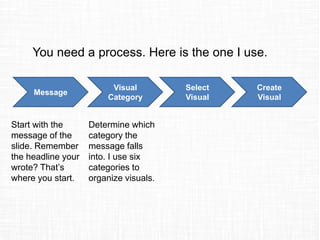
Determine which
category the
message falls
into. I use six
categories to
organize visuals.
You need a process. Here is the one I use.
Message
Visual
Category
Select
Visual
Create
Visual
Start with the
message of the
slide. Remember
the headline your
wrote? That’s
where you start.
Determine which
category the
message falls
into. I use six
categories to
organize visuals.
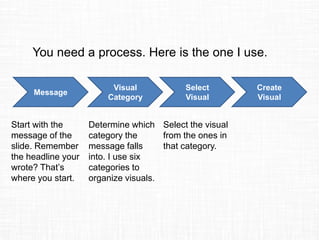
Select the visual
from the ones in
that category.
You need a process. Here is the one I use.
Message
Visual
Category
Select
Visual
Create
Visual
Start with the
message of the
slide. Remember
the headline your
wrote? That’s
where you start.
Determine which
category the
message falls
into. I use six
categories to
organize visuals.
Select the visual
from the ones in
that category.
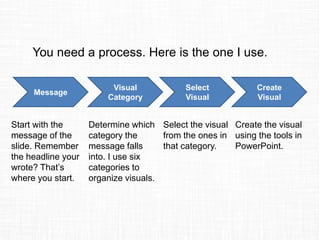
Create the visual
using the tools in
PowerPoint.
When I share this process, many
professionals say there are two roadblocks to
them using the process:
1) They don’t have a categorized library of
effective visuals to choose from
2) They don’t have the skills in PowerPoint to
create effective visuals
Let me address these two issues.
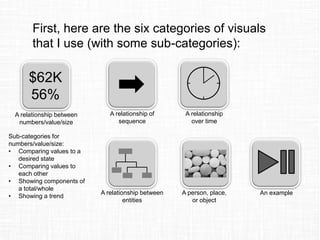
Numbers Sequence Time Entities Object Example6 categories
30 groups &
sub-groups
66 visuals
Comparing
numbers/
value/size
Relationship
of sequence
Relationship
over time
Relationship
between
entities
A person,
place, or
object
An example or
demonstration
In my book Select Effective Visuals, I
organize 66 visuals business presenters
should use into six categories, then break
those down into 30 groups and sub-groups
Once you have selected a visual,
how do you learn the skills to
create it? I have over 30
PowerPoint video tutorials on my
website at
ThinkOutsideTheSlide.com that
will get you started. I’ve also
published my Implementation
Guides that give step-by-step
instructions with screen shots
(this is the handout my
customized workshop
participants get).
To fix the mistake of Spreadsheets on Slides,
use a process to identify an effective visual
for your message and create that visual in
PowerPoint. You don’t need a graphics
background, you can learn the skills you
need.
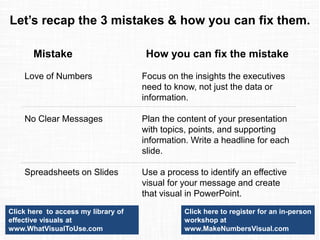
Let’s recap the 3 mistakes & how you can fix them.
Mistake
Love of Numbers
No Clear Messages
Spreadsheets on Slides
How you can fix the mistake
Focus on the insights the executives
need to know, not just the data or
information.
Plan the content of your presentation
with topics, points, and supporting
information. Write a headline for each
slide.
Use a process to identify an effective
visual for your message and create
that visual in PowerPoint.
If you would like me to help
your team create presentations
that have a clear message with
focused content and effective
visuals, get in touch:
P: 905-510-4911
E: Dave@ThinkOutsideTheSlide.com
W: www.ThinkOutsideTheSlide.com

3 big mistakes professionals make when presenting financial or operational data to executives

  • 1.
    Big Mistakes professionals make whenpresenting financial or operational data to executives
  • 2.
    My name isDave Paradi of ThinkOutsideTheSlide.com, and over the last 14 years of working with presenters, I see professionals make three big mistakes when they present numbers to executives. Let’s start with Mistake #3.
  • 3.
    Mistake #3 Love ofNumbers 235% 235% 235%
  • 4.
    Professionals make amistake when they think that the executives love numbers as much as they do and, therefore, the executives must want to see all the numbers. While an executive might have risen from a financial role into their current role, they no longer have time to figure out all the numbers.
  • 5.
    It is amistake to put every calculation on the slide and hope they figure out the important numbers out of the 600 numbers in the spreadsheet Network Costs Costs
  • 6.
    It is amistake to put the whole financial statement on the slide and expect the executives to follow along while you use a laser pointer to point out a few key figures
  • 7.
    ABC Business UnitSales Projections all figures in thousands Q1 2013 Q2 2013 Q3 2013 Q4 2013 2013 Total Q1 2014 Q2 2014 Q3 2014 Q4 2014 2014 Total $ diff % diff Product A 151 582 313 304 1350 376 387 427 533 1723 373 27.6% Product B 151 221 252 213 837 278 148 421 363 1210 373 44.6% Product C 460 388 279 229 1356 177 399 502 498 1576 220 16.2% Product D 132 214 423 481 1250 450 582 199 179 1410 160 12.8% Product E 260 183 567 126 1136 470 493 360 190 1513 377 33.2% Total 1154 1588 1834 1353 5929 1751 2009 1909 1763 7432 1503 25.3% It is a mistake to put the last eight quarters of data on a slide when all they really need to know is the difference between the years
  • 8.
    When the executives are confused,they won’t make decisions Overwhelming the executives with numbers leaves them confused Delayed decisions cost your organization
  • 9.
    How can youfix this mistake? Focus on the insights, not the data or information.
  • 10.
    Data is anythingwe measure. And we measure more today than ever before. But data is only a number. It doesn’t have meaning on its own.
  • 11.
    Measured value Desired value We turn itinto information by comparing it to some desired standard. Like our goal, industry average, competitor’s market share, or last year’s number. Now we know if it is above or below the desired level.
  • 12.
    If we stopat information, and many presenters stop here, we are short changing the executives and not giving them what they really want. They want the insights.
  • 13.
    The insight iswhat the results of the analysis mean in the context of your business. What does your analysis mean for these executives? How will it help them make a better decision? That’s what they need to hear from you. Insight!
  • 14.
    Here is anexample of moving from data to information to insight 62 transactions last month This is just data 62 > goal of 60 We are above our goal! Hooray! Now we have information, but it still isn’t what the executives need. What the executives need is the insight
  • 15.
    Number of transactionscontinues to drop each month; will not meet goal next month 0 10 20 30 40 50 60 70 80 90 Jan Feb Mar Apr May June July Transactions per month (est. for July) Goal of 60 per month Goal not met in July!
  • 16.
    Number of transactionscontinues to drop each month; will not meet goal next month 0 10 20 30 40 50 60 70 80 90 Jan Feb Mar Apr May June July Transactions per month (est. for July) Goal of 60 per month Goal not met in July!With this insight, the executives know that urgent action needs to be taken. With just data or information, this would have been missed.
  • 17.
    To fix themistake of Love of Numbers, focus on the insights the executives need to know. What do the numbers mean to your business? After all, that is what they are paying you to determine from your analysis.
  • 18.
  • 19.
    Professionals make amistake when they think that the executives will be able to follow a presentation that has no clear path or conclusion. Don’t expect the executives to put together your randomly assembled facts into a coherent message. They won’t do it.
  • 20.
    When you startcreating your presentation by copying and pasting slides from a previous presentation, it will be difficult to assemble the slides into a coherent message.
  • 21.
    Agenda • Topic 1 •Topic 2 • Topic 3 • Topic 4 • Topic 5 Arranging your presentation as a list of the topics you analyzed won’t help the executives.
  • 22.
    Agenda • Product Income •Services Income • Fixed Expenses • Variable Expenses • One-time expenses Arranging your presentation by the sections of the financial statement isn’t any better. They still don’t know why they should spend valuable time listening to you.
  • 23.
    So they askyou to go back and do more analysis (in the hope that next time they will get something useful) The executives don’t know what to do with all the information The executives get frustrated. Which doesn’t help your career potential.
  • 24.
    How can youfix this mistake? Create a clear plan to take the executives from where they are to where you want them to be at the end of the presentation. Your presentation needs to be well structured.
  • 25.
    Start with thegoal of your presentation by completing this sentence: At the end of the presentation, the executives will _____. What will they do, agree on, approve, etc. Be clear on what the outcome of your work on this presentation will be.
  • 26.
    At the endof the presentation, the executives will … Where are they now? Key steps along the journey with points & supporting information Map out your presentation like a GPS unit would for a trip. Figure out the topics, points, and supporting information you need to present in order to reach your presentation goal. Numbers are only the underlying measurement of a story happening in your business. The executives want to hear that story. Read more about the GPS approach.
  • 27.
    Make sure eachslide makes only one clear point. Write a headline for each slide that summarizes the point you want the executives to understand from that slide. Yes, this means your slide headlines will be 6-10 words long. Headlines make it easier for you to present because you know the point you need to make, then you can move on to the next slide. Remember this example from before. Even without the visual, the executives would know what the message was.
  • 28.
    To fix themistake of No Clear Messages, plan the content of your presentation before you ever create a single slide. Don’t just copy and paste slides from another presentation. Define the goal of the presentation. Decide on the topics, points, and supporting information you will need. Write a headline for each slide that summarizes the message. A well structured presentation is easier for you to present and easier for the executives to act on.
  • 29.
    Mistake #1 Spreadsheets onSlides November November YTD USD Million @ B09 rate 2008 Actual 2009 Budget 2009 Base case 2009 Actual 2009 vs. 2008 2009 vs. Budget 2009 vs. Base case 2008 Actual 2009 Budget 2009 Base case 2009 Actual 2009 vs. 2008 2009 vs. Budget 2009 vs. Base case a US COMMERCIAL 2.2 3.0 3.9 4.3 2.2 1.4 0.5 58.2 66.3 56.6 53.5 (4.7) (12.8) (3.1) EBITDA as % of Revenues 6.3% 9.3% 13.2% 14.2% 12.9% 16.4% 15.7% 14.8% a US GOVERNMENT 2.7 0.9 1.3 2.4 (0.3) 1.5 1.1 41.2 23.9 24.2 33.3 (7.9) 9.4 9.2 EBITDA as % of Revenues 24.6% 9.8% 13.8% 23.1% 30.4% 19.5% 20.1% 25.7% a CANADA 0.9 1.1 1.1 1.1 0.2 (0.1) (0.0) 9.4 9.8 9.9 8.8 (1) (1.0) (1.2) EBITDA as % of Revenues 18.0% 24.2% 25.6% 23.6% 17.0% 19.6% 20.9% 18.7% a GLOBAL MATRIX 0.0 0.1 - 0.0 (0.0) (0.1) 0.0 0 0 - 0 0.2 0.4 0.5 EBITDA as % of Revenues 23.9% 34.6% 1.5% 12.6% 6.9% 26.3% NORTH AMERICA 5.8 5.1 6.3 7.8 2.0 2.8 1.6 109.0 100.2 90.7 96.1 (12.9) (4.1) 5.4 EBITDA as % of Revenues 11.5% 11.0% 14.6% 17.1% 16.9% 17.3% 17.2% 17.8%
  • 30.
    Professionals make amistake when they use a spreadsheet on a slide instead of an effective visual. Spreadsheets are for calculation, not communication.
  • 31.
    November November YTD USDMillion @ B09 rate 2008 Actual 2009 Budget 2009 Base case 2009 Actual 2009 vs. 2008 2009 vs. Budget 2009 vs. Base case 2008 Actual 2009 Budget 2009 Base case 2009 Actual 2009 vs. 2008 2009 vs. Budget 2009 vs. Base case a US COMMERCIAL 2.2 3.0 3.9 4.3 2.2 1.4 0.5 58.2 66.3 56.6 53.5 (4.7) (12.8) (3.1) EBITDA as % of Revenues 6.3% 9.3% 13.2% 14.2% 12.9% 16.4% 15.7% 14.8% a US GOVERNMENT 2.7 0.9 1.3 2.4 (0.3) 1.5 1.1 41.2 23.9 24.2 33.3 (7.9) 9.4 9.2 EBITDA as % of Revenues 24.6% 9.8% 13.8% 23.1% 30.4% 19.5% 20.1% 25.7% a CANADA 0.9 1.1 1.1 1.1 0.2 (0.1) (0.0) 9.4 9.8 9.9 8.8 (1) (1.0) (1.2) EBITDA as % of Revenues 18.0% 24.2% 25.6% 23.6% 17.0% 19.6% 20.9% 18.7% a GLOBAL MATRIX 0.0 0.1 - 0.0 (0.0) (0.1) 0.0 0 0 - 0 0.2 0.4 0.5 EBITDA as % of Revenues 23.9% 34.6% 1.5% 12.6% 6.9% 26.3% NORTH AMERICA 5.8 5.1 6.3 7.8 2.0 2.8 1.6 109.0 100.2 90.7 96.1 (12.9) (4.1) 5.4 EBITDA as % of Revenues 11.5% 11.0% 14.6% 17.1% 16.9% 17.3% 17.2% 17.8% When you put the whole spreadsheet on the slide, you hope the executives figure it out. What if they can’t? Or they try, but come to a different conclusion than the one you wanted them to come to? That’s risky. For your presentation. And your career.
  • 32.
    Why do somany professionals use spreadsheets instead of effective visuals? They tell me two reasons above all others: 1) They were never taught how to translate numbers into visuals in school, grad school, or their professional designation 2) They think they need to be a graphic artist to create the visuals they see in print publications
  • 33.
    I believe almostany professional can create effective visuals instead of using spreadsheets. I am proof. I have a Chemical Engineering undergrad degree and an MBA. No design background or experience. I’ve spent 14 years figuring out how to create effective visuals when you don’t have a background in graphics. Here’s what I have discovered.
  • 34.
    You need aprocess. Here is the one I use. Message Visual Category Select Visual Create Visual
  • 35.
    You need aprocess. Here is the one I use. Message Visual Category Select Visual Create Visual Start with the message of the slide. Remember the headline your wrote? That’s where you start.
  • 36.
    You need aprocess. Here is the one I use. Message Visual Category Select Visual Create Visual Start with the message of the slide. Remember the headline your wrote? That’s where you start. Determine which category the message falls into. I use six categories to organize visuals.
  • 37.
    You need aprocess. Here is the one I use. Message Visual Category Select Visual Create Visual Start with the message of the slide. Remember the headline your wrote? That’s where you start. Determine which category the message falls into. I use six categories to organize visuals. Select the visual from the ones in that category.
  • 38.
    You need aprocess. Here is the one I use. Message Visual Category Select Visual Create Visual Start with the message of the slide. Remember the headline your wrote? That’s where you start. Determine which category the message falls into. I use six categories to organize visuals. Select the visual from the ones in that category. Create the visual using the tools in PowerPoint.
  • 39.
    When I sharethis process, many professionals say there are two roadblocks to them using the process: 1) They don’t have a categorized library of effective visuals to choose from 2) They don’t have the skills in PowerPoint to create effective visuals Let me address these two issues.
  • 40.
    Numbers Sequence TimeEntities Object Example6 categories 30 groups & sub-groups 66 visuals Comparing numbers/ value/size Relationship of sequence Relationship over time Relationship between entities A person, place, or object An example or demonstration In my book Select Effective Visuals, I organize 66 visuals business presenters should use into six categories, then break those down into 30 groups and sub-groups
  • 41.
    Once you haveselected a visual, how do you learn the skills to create it? I have over 30 PowerPoint video tutorials on my website at ThinkOutsideTheSlide.com that will get you started. I’ve also published my Implementation Guides that give step-by-step instructions with screen shots (this is the handout my customized workshop participants get).
  • 42.
    To fix themistake of Spreadsheets on Slides, use a process to identify an effective visual for your message and create that visual in PowerPoint. You don’t need a graphics background, you can learn the skills you need.
  • 43.
    Let’s recap the3 mistakes & how you can fix them. Mistake Love of Numbers No Clear Messages Spreadsheets on Slides How you can fix the mistake Focus on the insights the executives need to know, not just the data or information. Plan the content of your presentation with topics, points, and supporting information. Write a headline for each slide. Use a process to identify an effective visual for your message and create that visual in PowerPoint.
  • 44.
    If you wouldlike me to help your team create presentations that have a clear message with focused content and effective visuals, get in touch: P: 905-510-4911 E: Dave@ThinkOutsideTheSlide.com W: www.ThinkOutsideTheSlide.com