Prog_2 course- 2014 
2 bytes team 
Kinan keshkeh 
IT Engineering-Damascus University 
3rd year
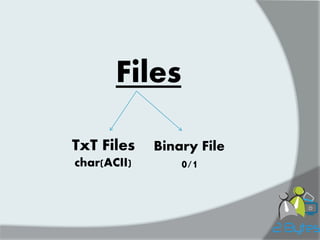
Files 
TxT Files 
char(ACII) 
Binary File 
0/1
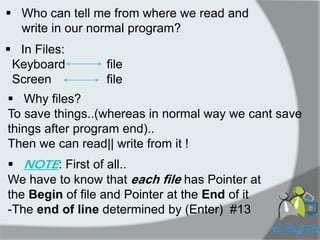
Who can tell me from where we read and write in our normal program? 
In Files: Keyboard file Screen file 
Why files? To save things..(whereas in normal way we cant save things after program end).. Then we can read|| write from it ! 
NOTE: First of all.. We have to know that each file has Pointer at the Begin of file and Pointer at the End of it -The end of line determined by (Enter) #13
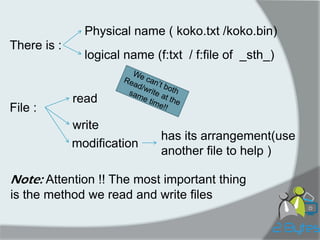
There is : 
Physical name ( koko.txt /koko.bin) 
logical name (f:txt / f:file of _sth_) 
File : 
read 
write 
Note: Attention !! The most important thing is the method we read and write files 
modification 
has its arrangement(use another file to help )
TXT FILES
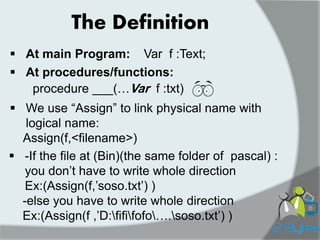
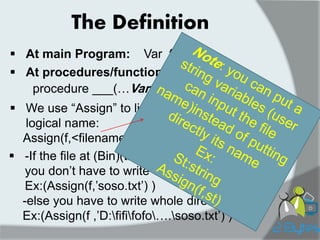
The Definition 
At main Program: 
Var f :Text; 
At procedures/functions: 
procedure ___(…Var f :txt) 
We use “Assign” to link physical name with logical name: Assign(f,<filename>) 
-If the file at (Bin)(the same folder of pascal) : you don‟t have to write whole direction Ex:(Assign(f,‟soso.txt‟) ) -else you have to write whole direction Ex:(Assign(f ,‟D:fififofo….soso.txt‟) )
The Definition 
At main Program: 
Var f :TXT; 
At procedures/functions: 
procedure ___(…Var f :txt) 
We use “Assign” to link physical name with logical name: Assign(f,<filename>) 
-If the file at (Bin)(the same folder of pascal) : you don‟t have to write whole direction Ex:(Assign(f,‟soso.txt‟) ) -else you have to write whole direction Ex:(Assign(f ,‟D:fififofo….soso.txt‟) )
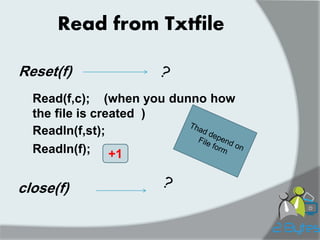
Read from Txtfile 
Reset(f) 
Read(f,c); (when you dunno how the file is created ) 
Readln(f,st); 
Readln(f); 
+1 
close(f)
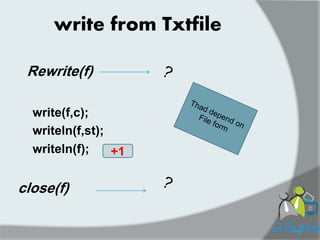
write from Txtfile 
Rewrite(f) 
write(f,c); 
writeln(f,st); 
writeln(f); 
+1 
close(f)
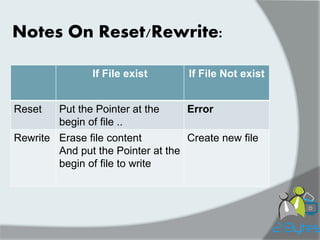
Notes On Reset/Rewrite: 
If File exist 
If File Not exist 
Reset 
Put the Pointer at the begin of file .. 
Error 
Rewrite 
Erase file content 
And put the Pointer at the begin of file to write 
Create new file
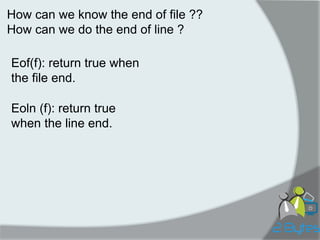
How can we know the end of file ?? How can we do the end of line ? 
Eof(f): return true when the file end. 
Eoln (f): return true when the line end.
Lets make it real :D !!
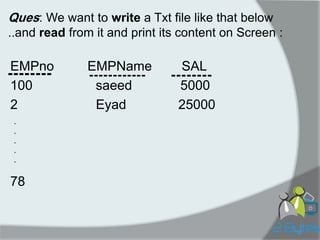
-------- 
EMPno EMPName SAL 
100 saeed 5000 
2 Eyad 25000 
78 
-------- 
------------ 
. 
. 
. 
. 
. 
Ques: We want to write a Txt file like that below ..and read from it and print its content on Screen :
Write on file: 
Program Soso; 
Var filename:string[20]; 
f:txt; i:integer; c:char; st:string[100]; 
Eno:integer; Ename:string[40]; Esal:real; 
Begin 
readln(filename); Assign(f, filename); 
Rewrite(f); 
writeln(f, „EMPno‟:15,‟EMPName‟:15,‟ SAL‟:20); 
writeln(f,‟----------‟,‟ -----------------‟,‟-----------‟); 
for i:=1 to 100 do 
begin 
readln(Eno,Ename,Esal); 
writeln(f,Eno,Ename,Esal); 
end; 
close(f); 
End.
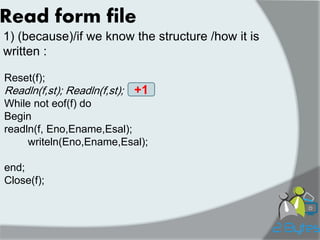
Read form file 
1) (because)/if we know the structure /how it is written : 
Reset(f); 
Readln(f,st); Readln(f,st); 
While not eof(f) do 
Begin 
readln(f, Eno,Ename,Esal); 
writeln(Eno,Ename,Esal); 
end; 
Close(f); 
+1
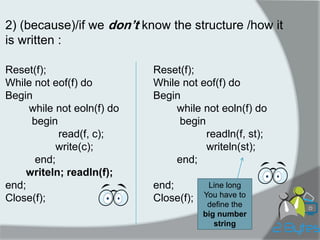
2) (because)/if we don’t know the structure /how it is written : 
Reset(f); 
While not eof(f) do 
Begin 
while not eoln(f) do 
begin 
read(f, c); 
write(c); 
end; 
writeln; readln(f); 
end; 
Close(f); 
Reset(f); 
While not eof(f) do 
Begin 
while not eoln(f) do 
begin 
readln(f, st); 
writeln(st); 
end; 
end; 
Close(f); 
Line long 
You have to define the big number string
Important Example 
PC Computer 
We have Txtfile In English( of course :p ) 
-Each word ends at its line. 
-Between words there is Only one Space „ ‟. 
There are in this file words “Computer” .. We want replace them by ”PC”.. 
You have to Keep your eyes with me all..
Program ComputerToPC; 
VAR 
f, new: text; 
ch: Char; 
s: string[8]; 
i: integer; 
flag: boolean; 
Begin 
assign(f,'mo.txt'); 
reset(f); 
assign(new,'new.txt'); 
rewrite(new);
while not eof(f) do 
begin 
flag := true; 
while not eoln(f) do 
begin 
if flag then 
read(f, s) 
else 
begin 
read(f, ch); 
s[8] := ch; 
end; 
if s = 'computer' then 
begin 
write(new, 'PC'); 
flag := true; 
end 
else 
begin 
flag := false; 
if eoln(f) then 
write(new, s) 
else 
write(new, s[1]); 
for i := 1 to 7 do 
s[i] := s[i+1]; 
end; 
end; 
readln(f); 
writeln(new); 
end; 
close(new); 
readln; 
End.{program}
When we want to open an existing text file for writing at the end of it , without removing its original contents using the procedure Append 
Appending to a text file: 
Program Soso; 
Var filename:string[20]; 
f:txt; st:string[10]; 
Begin 
readln(filename); Assign(f, filename); 
Append(f); 
writeln(„put what do you want at the End of file : ‟); 
readln(st); 
writeln(f,st); 
close(f); 
End.
Homework: you have a TXTfile it contains Student name/student number/prog_1 mark/prog_2 mark/ 1)put the sum of the two subjects to this file , then ensure of that. 2)print the sum of the two subjects on screen 
+10 points 
+7 
+3
Group : group link 
Mobile phone- Kinan : 0994385748 
Facebook account : kinan’s account 
2 bytes team

2Bytesprog2 course_2014_c3_txtfiles

  • 1.
    Prog_2 course- 2014 2 bytes team Kinan keshkeh IT Engineering-Damascus University 3rd year
  • 2.
    Files TxT Files char(ACII) Binary File 0/1
  • 3.
    Who can tellme from where we read and write in our normal program? In Files: Keyboard file Screen file Why files? To save things..(whereas in normal way we cant save things after program end).. Then we can read|| write from it ! NOTE: First of all.. We have to know that each file has Pointer at the Begin of file and Pointer at the End of it -The end of line determined by (Enter) #13
  • 4.
    There is : Physical name ( koko.txt /koko.bin) logical name (f:txt / f:file of _sth_) File : read write Note: Attention !! The most important thing is the method we read and write files modification has its arrangement(use another file to help )
  • 5.
  • 6.
    The Definition Atmain Program: Var f :Text; At procedures/functions: procedure ___(…Var f :txt) We use “Assign” to link physical name with logical name: Assign(f,<filename>) -If the file at (Bin)(the same folder of pascal) : you don‟t have to write whole direction Ex:(Assign(f,‟soso.txt‟) ) -else you have to write whole direction Ex:(Assign(f ,‟D:fififofo….soso.txt‟) )
  • 7.
    The Definition Atmain Program: Var f :TXT; At procedures/functions: procedure ___(…Var f :txt) We use “Assign” to link physical name with logical name: Assign(f,<filename>) -If the file at (Bin)(the same folder of pascal) : you don‟t have to write whole direction Ex:(Assign(f,‟soso.txt‟) ) -else you have to write whole direction Ex:(Assign(f ,‟D:fififofo….soso.txt‟) )
  • 8.
    Read from Txtfile Reset(f) Read(f,c); (when you dunno how the file is created ) Readln(f,st); Readln(f); +1 close(f)
  • 9.
    write from Txtfile Rewrite(f) write(f,c); writeln(f,st); writeln(f); +1 close(f)
  • 10.
    Notes On Reset/Rewrite: If File exist If File Not exist Reset Put the Pointer at the begin of file .. Error Rewrite Erase file content And put the Pointer at the begin of file to write Create new file
  • 11.
    How can weknow the end of file ?? How can we do the end of line ? Eof(f): return true when the file end. Eoln (f): return true when the line end.
  • 12.
    Lets make itreal :D !!
  • 13.
    -------- EMPno EMPNameSAL 100 saeed 5000 2 Eyad 25000 78 -------- ------------ . . . . . Ques: We want to write a Txt file like that below ..and read from it and print its content on Screen :
  • 14.
    Write on file: Program Soso; Var filename:string[20]; f:txt; i:integer; c:char; st:string[100]; Eno:integer; Ename:string[40]; Esal:real; Begin readln(filename); Assign(f, filename); Rewrite(f); writeln(f, „EMPno‟:15,‟EMPName‟:15,‟ SAL‟:20); writeln(f,‟----------‟,‟ -----------------‟,‟-----------‟); for i:=1 to 100 do begin readln(Eno,Ename,Esal); writeln(f,Eno,Ename,Esal); end; close(f); End.
  • 15.
    Read form file 1) (because)/if we know the structure /how it is written : Reset(f); Readln(f,st); Readln(f,st); While not eof(f) do Begin readln(f, Eno,Ename,Esal); writeln(Eno,Ename,Esal); end; Close(f); +1
  • 16.
    2) (because)/if wedon’t know the structure /how it is written : Reset(f); While not eof(f) do Begin while not eoln(f) do begin read(f, c); write(c); end; writeln; readln(f); end; Close(f); Reset(f); While not eof(f) do Begin while not eoln(f) do begin readln(f, st); writeln(st); end; end; Close(f); Line long You have to define the big number string
  • 17.
    Important Example PCComputer We have Txtfile In English( of course :p ) -Each word ends at its line. -Between words there is Only one Space „ ‟. There are in this file words “Computer” .. We want replace them by ”PC”.. You have to Keep your eyes with me all..
  • 18.
    Program ComputerToPC; VAR f, new: text; ch: Char; s: string[8]; i: integer; flag: boolean; Begin assign(f,'mo.txt'); reset(f); assign(new,'new.txt'); rewrite(new);
  • 19.
    while not eof(f)do begin flag := true; while not eoln(f) do begin if flag then read(f, s) else begin read(f, ch); s[8] := ch; end; if s = 'computer' then begin write(new, 'PC'); flag := true; end else begin flag := false; if eoln(f) then write(new, s) else write(new, s[1]); for i := 1 to 7 do s[i] := s[i+1]; end; end; readln(f); writeln(new); end; close(new); readln; End.{program}
  • 20.
    When we wantto open an existing text file for writing at the end of it , without removing its original contents using the procedure Append Appending to a text file: Program Soso; Var filename:string[20]; f:txt; st:string[10]; Begin readln(filename); Assign(f, filename); Append(f); writeln(„put what do you want at the End of file : ‟); readln(st); writeln(f,st); close(f); End.
  • 21.
    Homework: you havea TXTfile it contains Student name/student number/prog_1 mark/prog_2 mark/ 1)put the sum of the two subjects to this file , then ensure of that. 2)print the sum of the two subjects on screen +10 points +7 +3
  • 22.
    Group : grouplink Mobile phone- Kinan : 0994385748 Facebook account : kinan’s account 2 bytes team