C             Programming
                       Language
               By:
    Yogendra Pal
yogendra@learnbywatch.com
  Dedicated to My mother and Father
t
                                                               y
         Keep your notebook with you.

Write important point and questions that comes in your mind

     Solve Mind band exercise.


                                                               C
                                       Rewind when not clear


              Ask Questions by call or SMS or by mail


Keep Watching Keep Learning

THIS IS FILE I/O


                                   2
File…
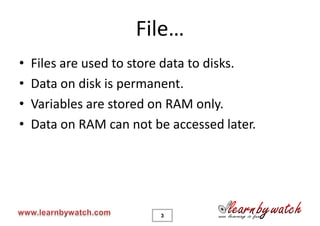
•   Files are used to store data to disks.
•   Data on disk is permanent.
•   Variables are stored on RAM only.
•   Data on RAM can not be accessed later.


                         3
File…
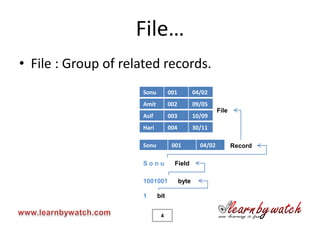
• File : Group of related records.
                     Sonu         001          04/02
                     Amit         002          09/05
                                                         File
                     Asif         003          10/09
                     Hari         004          30/11

                     Sonu          001           04/02          Record

                     Sonu           Field

                     1001001            byte

                     1      bit


                             4
Files in C
• A file is a sequence of bytes.
  – File ends with End Of File (EOF) marker.
• Streams are used to communicate with file.

                       stream


                            5
File
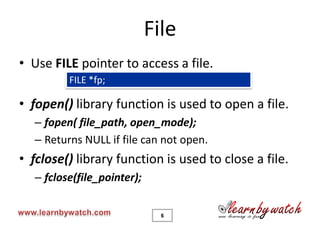
• Use FILE pointer to access a file.
          FILE *fp;

• fopen() library function is used to open a file.
   – fopen( file_path, open_mode);
   – Returns NULL if file can not open.
• fclose() library function is used to close a file.
   – fclose(file_pointer);


                               6
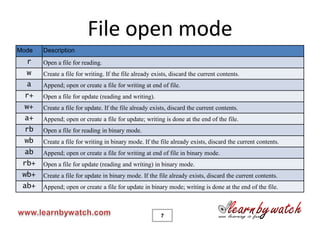
File open mode
Mode   Description
  r    Open a file for reading.
  w    Create a file for writing. If the file already exists, discard the current contents.
  a    Append; open or create a file for writing at end of file.
 r+    Open a file for update (reading and writing).
 w+    Create a file for update. If the file already exists, discard the current contents.
 a+    Append; open or create a file for update; writing is done at the end of the file.
 rb    Open a file for reading in binary mode.
 wb    Create a file for writing in binary mode. If the file already exists, discard the current contents.
 ab    Append; open or create a file for writing at end of file in binary mode.
 rb+   Open a file for update (reading and writing) in binary mode.
 wb+   Create a file for update in binary mode. If the file already exists, discard the current contents.
 ab+   Append; open or create a file for update in binary mode; writing is done at the end of the file.


                                                         7
Read / Write a file
•   fgetc() : reads one character from a file.
•   fputc() : write one character to a file.
•   fgets() : read a line (Srring) from a file.
•   fputs() : Write a line to a file.
•   fprintf() : used to print to a file.
•   fscanf() : used to read from a file.
•   feof() : return true if EOF find.
•   rewind() : set file position pointer to the start.
                            8
Problem
• Write a program to read a file and print it on
  monitor.
• Write a program to create a copy of a file.
• Modify first problem: stop printing if a ‘z’
  occurs in file.
• Write a program to create a file.


                        9
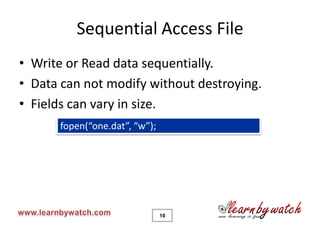
Sequential Access File
• Write or Read data sequentially.
• Data can not modify without destroying.
• Fields can vary in size.
      fopen(“one.dat”, “w”);


                               10
Random Access File
• Access any record without searching through
  other records.
• Data can be inserted without destroying other
  data.
• Implemented using fixed length records.
      fopen(“one.dat”, “wb”);

• Also known as binary file.

                                11
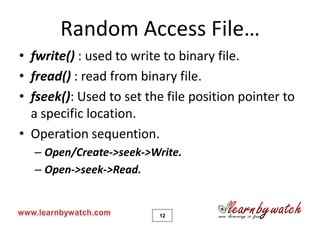
Random Access File…
• fwrite() : used to write to binary file.
• fread() : read from binary file.
• fseek(): Used to set the file position pointer to
  a specific location.
• Operation sequention.
  – Open/Create->seek->Write.
  – Open->seek->Read.


                         12
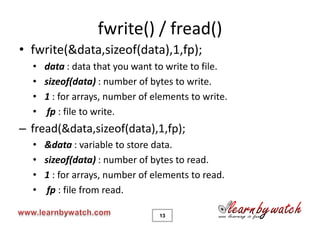
fwrite() / fread()
• fwrite(&data,sizeof(data),1,fp);
  •   data : data that you want to write to file.
  •   sizeof(data) : number of bytes to write.
  •   1 : for arrays, number of elements to write.
  •    fp : file to write.
– fread(&data,sizeof(data),1,fp);
  •   &data : variable to store data.
  •   sizeof(data) : number of bytes to read.
  •   1 : for arrays, number of elements to read.
  •    fp : file from read.

                                 13
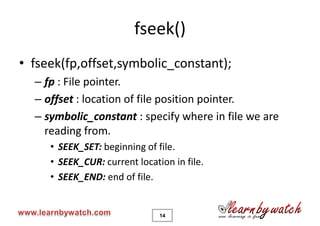
fseek()
• fseek(fp,offset,symbolic_constant);
  – fp : File pointer.
  – offset : location of file position pointer.
  – symbolic_constant : specify where in file we are
    reading from.
     • SEEK_SET: beginning of file.
     • SEEK_CUR: current location in file.
     • SEEK_END: end of file.


                               14
To get complete benefit of this tutorial solve all the quiz on
                   www.learnbywatch.com

          For any problem in this tutorial mail me at
                yogendra@learnbywatch.com
                    with the subject “C”

                 For Other information mail at
                   info@learnbywatch.com


                 Keep Watching Keep Learning
NOW YOU ARE READY TO LEARN C++ AND JAVA

File io

  • 1.
    C Programming Language By: Yogendra Pal yogendra@learnbywatch.com Dedicated to My mother and Father
  • 2.
    t y Keep your notebook with you. Write important point and questions that comes in your mind Solve Mind band exercise. C Rewind when not clear Ask Questions by call or SMS or by mail Keep Watching Keep Learning THIS IS FILE I/O 2
  • 3.
    File… • Files are used to store data to disks. • Data on disk is permanent. • Variables are stored on RAM only. • Data on RAM can not be accessed later. 3
  • 4.
    File… • File :Group of related records. Sonu 001 04/02 Amit 002 09/05 File Asif 003 10/09 Hari 004 30/11 Sonu 001 04/02 Record Sonu Field 1001001 byte 1 bit 4
  • 5.
    Files in C •A file is a sequence of bytes. – File ends with End Of File (EOF) marker. • Streams are used to communicate with file. stream 5
  • 6.
    File • Use FILEpointer to access a file. FILE *fp; • fopen() library function is used to open a file. – fopen( file_path, open_mode); – Returns NULL if file can not open. • fclose() library function is used to close a file. – fclose(file_pointer); 6
  • 7.
    File open mode Mode Description r Open a file for reading. w Create a file for writing. If the file already exists, discard the current contents. a Append; open or create a file for writing at end of file. r+ Open a file for update (reading and writing). w+ Create a file for update. If the file already exists, discard the current contents. a+ Append; open or create a file for update; writing is done at the end of the file. rb Open a file for reading in binary mode. wb Create a file for writing in binary mode. If the file already exists, discard the current contents. ab Append; open or create a file for writing at end of file in binary mode. rb+ Open a file for update (reading and writing) in binary mode. wb+ Create a file for update in binary mode. If the file already exists, discard the current contents. ab+ Append; open or create a file for update in binary mode; writing is done at the end of the file. 7
  • 8.
    Read / Writea file • fgetc() : reads one character from a file. • fputc() : write one character to a file. • fgets() : read a line (Srring) from a file. • fputs() : Write a line to a file. • fprintf() : used to print to a file. • fscanf() : used to read from a file. • feof() : return true if EOF find. • rewind() : set file position pointer to the start. 8
  • 9.
    Problem • Write aprogram to read a file and print it on monitor. • Write a program to create a copy of a file. • Modify first problem: stop printing if a ‘z’ occurs in file. • Write a program to create a file. 9
  • 10.
    Sequential Access File •Write or Read data sequentially. • Data can not modify without destroying. • Fields can vary in size. fopen(“one.dat”, “w”); 10
  • 11.
    Random Access File •Access any record without searching through other records. • Data can be inserted without destroying other data. • Implemented using fixed length records. fopen(“one.dat”, “wb”); • Also known as binary file. 11
  • 12.
    Random Access File… •fwrite() : used to write to binary file. • fread() : read from binary file. • fseek(): Used to set the file position pointer to a specific location. • Operation sequention. – Open/Create->seek->Write. – Open->seek->Read. 12
  • 13.
    fwrite() / fread() •fwrite(&data,sizeof(data),1,fp); • data : data that you want to write to file. • sizeof(data) : number of bytes to write. • 1 : for arrays, number of elements to write. • fp : file to write. – fread(&data,sizeof(data),1,fp); • &data : variable to store data. • sizeof(data) : number of bytes to read. • 1 : for arrays, number of elements to read. • fp : file from read. 13
  • 14.
    fseek() • fseek(fp,offset,symbolic_constant); – fp : File pointer. – offset : location of file position pointer. – symbolic_constant : specify where in file we are reading from. • SEEK_SET: beginning of file. • SEEK_CUR: current location in file. • SEEK_END: end of file. 14
  • 15.
    To get completebenefit of this tutorial solve all the quiz on www.learnbywatch.com For any problem in this tutorial mail me at yogendra@learnbywatch.com with the subject “C” For Other information mail at info@learnbywatch.com Keep Watching Keep Learning NOW YOU ARE READY TO LEARN C++ AND JAVA