#BURNINGKEYBOARDS
DENIS.RISTIC@PERPETUUM.HR
LAMP STACK
LAMP STACK
INTRO
‣ Simply exploding the acronym on a letter by letter
basis gives us the following elements:
‣ Linux
‣ Apache Web server
‣ MySQL database
‣ PHP
3
LAMP STACK
APACHE WEB SERVER
‣ The Apache HTTP Server Project is an effort to develop
and maintain an open-source HTTP server for modern
operating systems including UNIX and Windows.
‣ The goal of this project is to provide a secure, efficient
and extensible server that provides HTTP services in
sync with the current HTTP standards.
4
LAMP STACK
HOW DOES PHP WORK WITH THE WEB SERVER AND BROWSER?
‣ PHP is an interpreted language.
‣ This means that you will write code statements (lines of
code) and when a page is requested, the PHP
interpreter will load your PHP code, parse it and then
execute it.
‣ This is useful for web development in the fact that you
do not have to re-compile your source code for trivial
code changes and the changes have immediate effect
on all subsequent requests.
5
LAMP STACK
HOW DOES PHP WORK WITH THE WEB SERVER AND BROWSER?
‣ PHP is written as standard text files with the .php
extension.
‣ PHP files are often saved within a folder in a web server’s
public directory (or a web root directory).
‣ On most systems this will either be named public or
public_html.
‣ For example, if a file was saved as index.php in a web root
directory, a user could access it by typing http://
www.example.org or http://www.example.org/
index.php.
6
LAMP STACK
HOW DOES PHP WORK WITH THE WEB SERVER AND BROWSER?
‣ When Apache determines that the request is for a PHP
script rather than a static file, PHP sends the request to
PHP-FPM.
‣ PHP-FPM is the modern PHP FastCGI process manager
that is included with PHP. Each of your apps has its own
PHP process pool. Each process in the app's process
pool runs as the system user your app belongs to.
‣ Once PHP finishes processing the request, the
response goes back through Apache and then to the
browser.
7
LAMP STACK
APACHE VIRTUAL HOSTS
‣ Virtual hosts are the bread and butter of Apache.
‣ They allow you to run multiple websites off of one web
server as well as customize settings for each site.
8
LAMP STACK
.HTACCESS
‣ .htaccess files provide a way to make configuration
changes on a per-directory basis.
9
LAMP STACK
PHP-FPM
‣ PHP-FPM (FastCGI Process Manager) is an alternative
PHP FastCGI implementation with some additional
features useful for sites of any size, especially busier
sites.
10
LAMP STACK
SCALABILITY
‣ Basically there are two approaches to scalability:
‣ Vertical: basically buying the biggest machine you
can so you don't need more than one;
‣ Horizontal: doing things in a way that lends itself to
parallelism. Only needed on the most intensive of
applications.
11
LAMP STACK
SCALABILITY BOTLENECKS
‣ If your database is slowing things down either give it more resources
or use some form of in-memory caching to take the load off;
‣ If disk I/O is your problem then the same applies;
‣ If you're running out of memory to the point where it's causing too
many page faults and thus causing a disk I/O problem, add more
memory;
‣ Does your application and it's data lend itself to partitiioning across
servers? If so, that's one way of scaling horizontally;
‣ If bandwidth is an issue and you're delivering large files then
perhaps a CDN is the answer;
‣ And so on…
12
LAMP STACK
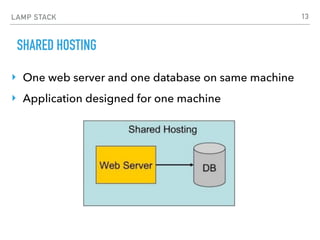
SHARED HOSTING
‣ One web server and one database on same machine
‣ Application designed for one machine
13
LAMP STACK
TWO SERVERS
‣ Web server and database on different machines
‣ Minimal changes to code
14
LAMP STACK
SCALING THE DATABASE
‣ Setup MySQL replication
‣ Minimal changes to code
15
LAMP STACK
SCALING THE DATABASE 2
‣ DB more suited for equal read/write applications
‣ Minimal changes to code
16
LAMP STACK
SCALING THE WEB SERVER
‣ Web server is made of “worker threads” that process
work as they come in
17
LAMP STACK
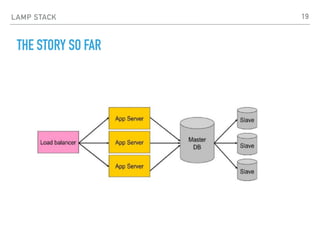
LOAD BALANCING
‣ Load balancing refers to efficiently distributing
incoming network traffic across a group of backend
servers, also known as a server farm or server pool.
18
LAMP STACK
THE STORY SO FAR
19
LAMP STACK
WHAT MORE CAN WE DO?
‣ Use MariaDB
‣ One of the most popular database servers. Made by the
original developers of MySQL. Guaranteed to stay open
source.
‣ Without the query cache enabled, MariaDB had 10% better
performance up to 20 concurrent connections, while MySQL
was 25% better at 220 connections at the same time.
‣ When query cache was enabled, MariaDB was a clean winner
on all connection numbers, having more than 50% better
performance than MySQL on 220 concurrent connections.
20
LAMP STACK
WHAT MORE CAN WE DO?
‣ Use Varnish Cache
‣ Varnish Cache is a web application accelerator also
known as a caching HTTP reverse proxy. You install it
in front of any server that speaks HTTP and configure
it to cache the contents. Varnish Cache is really, really
fast. It typically speeds up delivery with a factor of
300 - 1000x, depending on your architecture.
21
LAMP STACK
WHAT MORE CAN WE DO?
‣ Use nginx for serving static content
‣ Nginx is a web server, which can also be used as a
reverse proxy, load balancer and HTTP cache.
22
LAMP STACK
WHAT MORE CAN WE DO?
‣ Use Redis for object & session caching
‣ Redis is an open source, in-memory data structure store, used as a
database, cache and message broker. It supports data structures
such as strings, hashes, lists, sets, sorted sets with range queries,
bitmaps, hyperloglogs and geospatial indexes with radius queries.
‣ The session handler is responsible for storing and retrieving data
saved into sessions - by default, PHP uses files for that.
‣ An external session handler can be used for creating faster and
scalable PHP environments behind a load balancer, where all
application nodes will connect to a central server to share session
information.
23
LAMP STACK
WHAT MORE CAN WE DO?
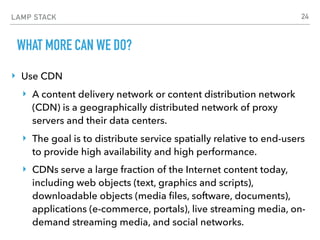
‣ Use CDN
‣ A content delivery network or content distribution network
(CDN) is a geographically distributed network of proxy
servers and their data centers.
‣ The goal is to distribute service spatially relative to end-users
to provide high availability and high performance.
‣ CDNs serve a large fraction of the Internet content today,
including web objects (text, graphics and scripts),
downloadable objects (media files, software, documents),
applications (e-commerce, portals), live streaming media, on-
demand streaming media, and social networks.
24
LAMP STACK
RESOURCE MANAGEMENT
‣ Balance how you use hardware
‣ Use memory to save CPU and/or IO
‣ Balance your resource use (CPU vs RAM vs IO)
‣ Check configurations and optimize them periodically
‣ Test and measure performance
25
LAMP STACK
INSTALLING LAMP ON CENTOS (EXAMPLE)
sudo hostnamectl set-hostname burningkeyboards.com
hostname
sudo timedatectl set-timezone 'Europe/Zagreb'
date
sudo yum update
sudo yum upgrade
26
LAMP STACK
INSTALLING LAMP ON CENTOS (EXAMPLE)
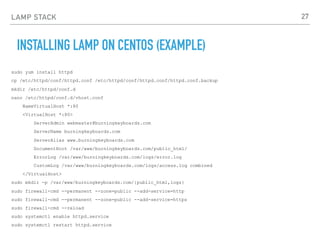
sudo yum install httpd
cp /etc/httpd/conf/httpd.conf /etc/httpd/conf/httpd.conf/httpd.conf.backup
mkdir /etc/httpd/conf.d
nano /etc/httpd/conf.d/vhost.conf
NameVirtualHost *:80
<VirtualHost *:80>
ServerAdmin webmaster@burningkeyboards.com
ServerName burningkeyboards.com
ServerAlias www.burningkeyboards.com
DocumentRoot /var/www/burningkeyboards.com/public_html/
ErrorLog /var/www/burningkeyboards.com/logs/error.log
CustomLog /var/www/burningkeyboards.com/logs/access.log combined
</VirtualHost>
sudo mkdir -p /var/www/burningkeyboards.com/{public_html,logs}
sudo firewall-cmd --permanent --zone=public --add-service=http
sudo firewall-cmd --permanent --zone=public --add-service=https
sudo firewall-cmd --reload
sudo systemctl enable httpd.service
sudo systemctl restart httpd.service
27
LAMP STACK
INSTALLING LAMP ON CENTOS (EXAMPLE)
sudo yum install mariadb-server
sudo systemctl enable mariadb.service
sudo systemctl start mariadb.service
sudo mysql_secure_installation
mysql -u root -p
create database burningkeyboards;
grant all on burningkeyboards.* to 'bkdbuser' identified by
'********';
quit
28
LAMP STACK
INSTALLING LAMP ON CENTOS (EXAMPLE)
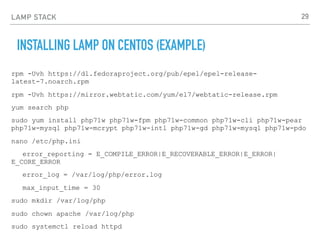
rpm -Uvh https://dl.fedoraproject.org/pub/epel/epel-release-
latest-7.noarch.rpm
rpm -Uvh https://mirror.webtatic.com/yum/el7/webtatic-release.rpm
yum search php
sudo yum install php71w php71w-fpm php71w-common php71w-cli php71w-pear
php71w-mysql php71w-mcrypt php71w-intl php71w-gd php71w-mysql php71w-pdo
nano /etc/php.ini
error_reporting = E_COMPILE_ERROR|E_RECOVERABLE_ERROR|E_ERROR|
E_CORE_ERROR
error_log = /var/log/php/error.log
max_input_time = 30
sudo mkdir /var/log/php
sudo chown apache /var/log/php
sudo systemctl reload httpd
29
LAMP STACK
INSTALLING LAMP ON CENTOS (EXAMPLE)
nano /var/www/burningkeyboards.com/index.php
<?php phpinfo(); ?>
30
LAMP STACK
LAMP RESOURCES
‣ Apache
‣ https://httpd.apache.org/
‣ nginx
‣ https://www.nginx.com/
‣ MariaDB
‣ https://mariadb.org/
‣ Varnish
‣ https://varnish-cache.org/
‣ Redis
‣ https://redis.io/
‣ HA Proxy
‣ http://www.haproxy.org/
31

23 LAMP Stack #burningkeyboards

  • 1.
  • 2.
  • 3.
    LAMP STACK INTRO ‣ Simplyexploding the acronym on a letter by letter basis gives us the following elements: ‣ Linux ‣ Apache Web server ‣ MySQL database ‣ PHP 3
  • 4.
    LAMP STACK APACHE WEBSERVER ‣ The Apache HTTP Server Project is an effort to develop and maintain an open-source HTTP server for modern operating systems including UNIX and Windows. ‣ The goal of this project is to provide a secure, efficient and extensible server that provides HTTP services in sync with the current HTTP standards. 4
  • 5.
    LAMP STACK HOW DOESPHP WORK WITH THE WEB SERVER AND BROWSER? ‣ PHP is an interpreted language. ‣ This means that you will write code statements (lines of code) and when a page is requested, the PHP interpreter will load your PHP code, parse it and then execute it. ‣ This is useful for web development in the fact that you do not have to re-compile your source code for trivial code changes and the changes have immediate effect on all subsequent requests. 5
  • 6.
    LAMP STACK HOW DOESPHP WORK WITH THE WEB SERVER AND BROWSER? ‣ PHP is written as standard text files with the .php extension. ‣ PHP files are often saved within a folder in a web server’s public directory (or a web root directory). ‣ On most systems this will either be named public or public_html. ‣ For example, if a file was saved as index.php in a web root directory, a user could access it by typing http:// www.example.org or http://www.example.org/ index.php. 6
  • 7.
    LAMP STACK HOW DOESPHP WORK WITH THE WEB SERVER AND BROWSER? ‣ When Apache determines that the request is for a PHP script rather than a static file, PHP sends the request to PHP-FPM. ‣ PHP-FPM is the modern PHP FastCGI process manager that is included with PHP. Each of your apps has its own PHP process pool. Each process in the app's process pool runs as the system user your app belongs to. ‣ Once PHP finishes processing the request, the response goes back through Apache and then to the browser. 7
  • 8.
    LAMP STACK APACHE VIRTUALHOSTS ‣ Virtual hosts are the bread and butter of Apache. ‣ They allow you to run multiple websites off of one web server as well as customize settings for each site. 8
  • 9.
    LAMP STACK .HTACCESS ‣ .htaccess filesprovide a way to make configuration changes on a per-directory basis. 9
  • 10.
    LAMP STACK PHP-FPM ‣ PHP-FPM(FastCGI Process Manager) is an alternative PHP FastCGI implementation with some additional features useful for sites of any size, especially busier sites. 10
  • 11.
    LAMP STACK SCALABILITY ‣ Basicallythere are two approaches to scalability: ‣ Vertical: basically buying the biggest machine you can so you don't need more than one; ‣ Horizontal: doing things in a way that lends itself to parallelism. Only needed on the most intensive of applications. 11
  • 12.
    LAMP STACK SCALABILITY BOTLENECKS ‣If your database is slowing things down either give it more resources or use some form of in-memory caching to take the load off; ‣ If disk I/O is your problem then the same applies; ‣ If you're running out of memory to the point where it's causing too many page faults and thus causing a disk I/O problem, add more memory; ‣ Does your application and it's data lend itself to partitiioning across servers? If so, that's one way of scaling horizontally; ‣ If bandwidth is an issue and you're delivering large files then perhaps a CDN is the answer; ‣ And so on… 12
  • 13.
    LAMP STACK SHARED HOSTING ‣One web server and one database on same machine ‣ Application designed for one machine 13
  • 14.
    LAMP STACK TWO SERVERS ‣Web server and database on different machines ‣ Minimal changes to code 14
  • 15.
    LAMP STACK SCALING THEDATABASE ‣ Setup MySQL replication ‣ Minimal changes to code 15
  • 16.
    LAMP STACK SCALING THEDATABASE 2 ‣ DB more suited for equal read/write applications ‣ Minimal changes to code 16
  • 17.
    LAMP STACK SCALING THEWEB SERVER ‣ Web server is made of “worker threads” that process work as they come in 17
  • 18.
    LAMP STACK LOAD BALANCING ‣Load balancing refers to efficiently distributing incoming network traffic across a group of backend servers, also known as a server farm or server pool. 18
  • 19.
  • 20.
    LAMP STACK WHAT MORECAN WE DO? ‣ Use MariaDB ‣ One of the most popular database servers. Made by the original developers of MySQL. Guaranteed to stay open source. ‣ Without the query cache enabled, MariaDB had 10% better performance up to 20 concurrent connections, while MySQL was 25% better at 220 connections at the same time. ‣ When query cache was enabled, MariaDB was a clean winner on all connection numbers, having more than 50% better performance than MySQL on 220 concurrent connections. 20
  • 21.
    LAMP STACK WHAT MORECAN WE DO? ‣ Use Varnish Cache ‣ Varnish Cache is a web application accelerator also known as a caching HTTP reverse proxy. You install it in front of any server that speaks HTTP and configure it to cache the contents. Varnish Cache is really, really fast. It typically speeds up delivery with a factor of 300 - 1000x, depending on your architecture. 21
  • 22.
    LAMP STACK WHAT MORECAN WE DO? ‣ Use nginx for serving static content ‣ Nginx is a web server, which can also be used as a reverse proxy, load balancer and HTTP cache. 22
  • 23.
    LAMP STACK WHAT MORECAN WE DO? ‣ Use Redis for object & session caching ‣ Redis is an open source, in-memory data structure store, used as a database, cache and message broker. It supports data structures such as strings, hashes, lists, sets, sorted sets with range queries, bitmaps, hyperloglogs and geospatial indexes with radius queries. ‣ The session handler is responsible for storing and retrieving data saved into sessions - by default, PHP uses files for that. ‣ An external session handler can be used for creating faster and scalable PHP environments behind a load balancer, where all application nodes will connect to a central server to share session information. 23
  • 24.
    LAMP STACK WHAT MORECAN WE DO? ‣ Use CDN ‣ A content delivery network or content distribution network (CDN) is a geographically distributed network of proxy servers and their data centers. ‣ The goal is to distribute service spatially relative to end-users to provide high availability and high performance. ‣ CDNs serve a large fraction of the Internet content today, including web objects (text, graphics and scripts), downloadable objects (media files, software, documents), applications (e-commerce, portals), live streaming media, on- demand streaming media, and social networks. 24
  • 25.
    LAMP STACK RESOURCE MANAGEMENT ‣Balance how you use hardware ‣ Use memory to save CPU and/or IO ‣ Balance your resource use (CPU vs RAM vs IO) ‣ Check configurations and optimize them periodically ‣ Test and measure performance 25
  • 26.
    LAMP STACK INSTALLING LAMPON CENTOS (EXAMPLE) sudo hostnamectl set-hostname burningkeyboards.com hostname sudo timedatectl set-timezone 'Europe/Zagreb' date sudo yum update sudo yum upgrade 26
  • 27.
    LAMP STACK INSTALLING LAMPON CENTOS (EXAMPLE) sudo yum install httpd cp /etc/httpd/conf/httpd.conf /etc/httpd/conf/httpd.conf/httpd.conf.backup mkdir /etc/httpd/conf.d nano /etc/httpd/conf.d/vhost.conf NameVirtualHost *:80 <VirtualHost *:80> ServerAdmin webmaster@burningkeyboards.com ServerName burningkeyboards.com ServerAlias www.burningkeyboards.com DocumentRoot /var/www/burningkeyboards.com/public_html/ ErrorLog /var/www/burningkeyboards.com/logs/error.log CustomLog /var/www/burningkeyboards.com/logs/access.log combined </VirtualHost> sudo mkdir -p /var/www/burningkeyboards.com/{public_html,logs} sudo firewall-cmd --permanent --zone=public --add-service=http sudo firewall-cmd --permanent --zone=public --add-service=https sudo firewall-cmd --reload sudo systemctl enable httpd.service sudo systemctl restart httpd.service 27
  • 28.
    LAMP STACK INSTALLING LAMPON CENTOS (EXAMPLE) sudo yum install mariadb-server sudo systemctl enable mariadb.service sudo systemctl start mariadb.service sudo mysql_secure_installation mysql -u root -p create database burningkeyboards; grant all on burningkeyboards.* to 'bkdbuser' identified by '********'; quit 28
  • 29.
    LAMP STACK INSTALLING LAMPON CENTOS (EXAMPLE) rpm -Uvh https://dl.fedoraproject.org/pub/epel/epel-release- latest-7.noarch.rpm rpm -Uvh https://mirror.webtatic.com/yum/el7/webtatic-release.rpm yum search php sudo yum install php71w php71w-fpm php71w-common php71w-cli php71w-pear php71w-mysql php71w-mcrypt php71w-intl php71w-gd php71w-mysql php71w-pdo nano /etc/php.ini error_reporting = E_COMPILE_ERROR|E_RECOVERABLE_ERROR|E_ERROR| E_CORE_ERROR error_log = /var/log/php/error.log max_input_time = 30 sudo mkdir /var/log/php sudo chown apache /var/log/php sudo systemctl reload httpd 29
  • 30.
    LAMP STACK INSTALLING LAMPON CENTOS (EXAMPLE) nano /var/www/burningkeyboards.com/index.php <?php phpinfo(); ?> 30
  • 31.
    LAMP STACK LAMP RESOURCES ‣Apache ‣ https://httpd.apache.org/ ‣ nginx ‣ https://www.nginx.com/ ‣ MariaDB ‣ https://mariadb.org/ ‣ Varnish ‣ https://varnish-cache.org/ ‣ Redis ‣ https://redis.io/ ‣ HA Proxy ‣ http://www.haproxy.org/ 31