AGENDA
 Introduction.
 Layers in LAMP
 Working.
 Securing LAMP.
 Advantages.
 Limitations.
 Conclusion.
INTRODUCTION
 LAMP is a Web application development and deployment
platform.
 LAMP is a software stack.
 LAMP refers to “Linux, Apache, MySQL, PHP”.
 Linux is an operating system.
 Apache is a web server.
 My SQL is a relational database.
 PHP is a general purpose scripting language.
 PHP is interchangeable with PERL or PYTHON
INTRODUCTION CONTD…
 LAMP platform consists of four components.
 The components are structured in a layered way.
 Linux operating system is the base layer.
 Apache, the web server resides on top of operating
system.
 MySQL database stores all the information served by the
Web server.
 PHP is used to manipulate and display the information.
 LAMP is an example of Free or Open Source Software
(FOSS).
LAYERS IN LAMP
LINUX
 Linux is a Unix like operating system.
 It is free and open source software.
 Runs on a number of hardware platforms.
 Provides the operating system in LAMP stack.
 Lowest-level layer in the LAMP stack.
 Runs each of the other components.
 Provides the complete LAMP setup through use of
packages.
 Linux-based servers are typically cheaper to set up and
maintain.
APACHE
 The second layer is Apache, the Web server.
 Apache is based on the NCSA web server.
 Developed and maintained by ASF.
 Most widely used web server software.
 Serves web pages over the Internet via the HTTP protocol.
 Provides everything from server side programming support
to authentication mechanism.
 Supports Virtual hosting.
MySQL
 MySQL provides the data-storage side of the LAMP system.
 MySQL is a relational database system.
 Stores data from a single character to a large graphical file.
 Handles large databases, in the area of 50,000,000+ records.
 Multiple storage engines.
 No memory leaks.
 A privilege and password system which is very flexible and
secure.
 Often coupled with PHP because they work together with
ease.
PHP
 PHP stands for Hypertext Pre-processor.
 It is a server side HTML embedded scripting language.
 Used in server side scripting, command line scripting
and writing desktop applications.
 PHP is simple, interpreted, fast, open source, platform
independent.
 Powerful tool for making dynamic and interactive Web
pages.
 Glue for all the other parts of the LAMP system.
 Has support for a wide range of databases.
WORKING
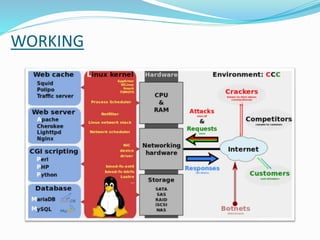
 Apache web server with Mod_PHP and MySQL server is
presumably present on a standard Linux machine.
 Web browser acts as client.
 Browser enables users to places the http request through
the valid URL.
 Apache API listens to the port 80 for http request.
 Apache API sends the request and receives the response
from the PHP component.
 The PHP component actually sits inside Apache.
 You use Apache and PHP together to create your dynamic
pages.
 Mod_PHP means PHP as an apache module.
 It allows Apache to interpret PHP files.
 Mod_PHP parses PHP scripts.
 SQL query statements interpreted are sent to the My SQL
server for execution and receives the result set as response
 My SQL utilizes a client server architecture.
 Mod_PHP returns the final html to Apache API.
 Finally the Apache API returns the generated html to the
user as response.
SECURING LAMP
Why LAMP Security:
 Being the number one deployed web server, LAMP is a popular
target of attacks.
 Result of attacks is highly visible.
 Sites can contain valuable information to attackers; especially
eCommerce websites.
 Many routes of attack through modularized operating
environment.
SECURING THE LINUX INSTALLATION
 Choosing a Linux Distribution( distro).
 Avoid distros which release major versions constantly.
 Common distros for LAMP servers are Ubuntu Server and
Red Hat Linux.
 Kernel Hardening
 Use gresecurity to sandbox processes to the kernel
role-based access control (RBAC) system.
 Mandatory Access Control (MAC)
 Restrict system processes to the appropriate users.
 Standard firewalling practices.
SECURING THE APACHE INSTALLATION
 Security of the web server component is arguably the most
important.
 Disable any unnecessary modules (mods) via the
configuration file( httpd.conf).
 Restrict access to the root directory.
 Restrict system level files contained in the “bin” and “conf”
directories.
 Disable the sending of Apache version information in
request headers.
 Keep and monitor access logs.
 Using Apache modules like Mod_Security and Mod_Evasive.
SECURING PHP AND MYSQL INSTALLATION
 Security relies on both the administrator and the
programmer.
 Administrators must secure and update extensions.
 Sandboxing remote resource access.
 Limit execution time.
 Restrict access to remote MySQL access by IP.
 Protect data, system, and log files under an administrator
user.
 Use a strong username and password .
ADVANTAGES OF LAMP
 The LAMP technology is open sourced and highly secure.
 LAMP stack is constantly updated.
 Can run on many platforms giving flexibility of use.
 Scalable, customizable and cost effective.
 Ready availability of open source libraries reducing coding
times (and costs).
 Seamless integration with Linux, Apache and MySQL.
 Maximizes Ecommerce revenues.
 Minimizes E-Business disruption caused by IT outages.
 Automated availability monitoring.
 Failover recovery, and failback of all LAMP application
and resources.
 Data can reside on shared SCSI, Fiber Channel, Network
Attached Storage devices.
 Intuitive web interface providing LAMP status and simple
administration .
 Easily adapted to sites running Oracle, DB2 and PostgreSQL.
LIMITATIONS
 Not well suited for applications that have a frequent need
for exchanging large amounts of transient data.
 Web servers like lighttpd or nginx perform better than
Apache in handling massive volumes of traffic.
CONCLUSION
 Open Source continues to play an important role in
driving web technologies.
 LAMP is the “the killer app” of the open source world.
 compatibility issues and price of development are major
factors in web design.
 LAMP is effective and capable for business applications
operations.
 LAMP is the best solution to compete with commercial
products.
THANK YOU

LAMP TECHNOLOGY

  • 2.
    AGENDA  Introduction.  Layersin LAMP  Working.  Securing LAMP.  Advantages.  Limitations.  Conclusion.
  • 3.
    INTRODUCTION  LAMP isa Web application development and deployment platform.  LAMP is a software stack.  LAMP refers to “Linux, Apache, MySQL, PHP”.  Linux is an operating system.  Apache is a web server.  My SQL is a relational database.  PHP is a general purpose scripting language.  PHP is interchangeable with PERL or PYTHON
  • 4.
    INTRODUCTION CONTD…  LAMPplatform consists of four components.  The components are structured in a layered way.  Linux operating system is the base layer.  Apache, the web server resides on top of operating system.  MySQL database stores all the information served by the Web server.  PHP is used to manipulate and display the information.  LAMP is an example of Free or Open Source Software (FOSS).
  • 5.
    LAYERS IN LAMP LINUX Linux is a Unix like operating system.  It is free and open source software.  Runs on a number of hardware platforms.  Provides the operating system in LAMP stack.  Lowest-level layer in the LAMP stack.  Runs each of the other components.  Provides the complete LAMP setup through use of packages.  Linux-based servers are typically cheaper to set up and maintain.
  • 6.
    APACHE  The secondlayer is Apache, the Web server.  Apache is based on the NCSA web server.  Developed and maintained by ASF.  Most widely used web server software.  Serves web pages over the Internet via the HTTP protocol.  Provides everything from server side programming support to authentication mechanism.  Supports Virtual hosting.
  • 7.
    MySQL  MySQL providesthe data-storage side of the LAMP system.  MySQL is a relational database system.  Stores data from a single character to a large graphical file.  Handles large databases, in the area of 50,000,000+ records.  Multiple storage engines.  No memory leaks.  A privilege and password system which is very flexible and secure.  Often coupled with PHP because they work together with ease.
  • 8.
    PHP  PHP standsfor Hypertext Pre-processor.  It is a server side HTML embedded scripting language.  Used in server side scripting, command line scripting and writing desktop applications.  PHP is simple, interpreted, fast, open source, platform independent.  Powerful tool for making dynamic and interactive Web pages.  Glue for all the other parts of the LAMP system.  Has support for a wide range of databases.
  • 9.
  • 10.
     Apache webserver with Mod_PHP and MySQL server is presumably present on a standard Linux machine.  Web browser acts as client.  Browser enables users to places the http request through the valid URL.  Apache API listens to the port 80 for http request.  Apache API sends the request and receives the response from the PHP component.  The PHP component actually sits inside Apache.  You use Apache and PHP together to create your dynamic pages.
  • 11.
     Mod_PHP meansPHP as an apache module.  It allows Apache to interpret PHP files.  Mod_PHP parses PHP scripts.  SQL query statements interpreted are sent to the My SQL server for execution and receives the result set as response  My SQL utilizes a client server architecture.  Mod_PHP returns the final html to Apache API.  Finally the Apache API returns the generated html to the user as response.
  • 12.
    SECURING LAMP Why LAMPSecurity:  Being the number one deployed web server, LAMP is a popular target of attacks.  Result of attacks is highly visible.  Sites can contain valuable information to attackers; especially eCommerce websites.  Many routes of attack through modularized operating environment.
  • 13.
    SECURING THE LINUXINSTALLATION  Choosing a Linux Distribution( distro).  Avoid distros which release major versions constantly.  Common distros for LAMP servers are Ubuntu Server and Red Hat Linux.  Kernel Hardening  Use gresecurity to sandbox processes to the kernel role-based access control (RBAC) system.  Mandatory Access Control (MAC)  Restrict system processes to the appropriate users.  Standard firewalling practices.
  • 14.
    SECURING THE APACHEINSTALLATION  Security of the web server component is arguably the most important.  Disable any unnecessary modules (mods) via the configuration file( httpd.conf).  Restrict access to the root directory.  Restrict system level files contained in the “bin” and “conf” directories.  Disable the sending of Apache version information in request headers.  Keep and monitor access logs.  Using Apache modules like Mod_Security and Mod_Evasive.
  • 15.
    SECURING PHP ANDMYSQL INSTALLATION  Security relies on both the administrator and the programmer.  Administrators must secure and update extensions.  Sandboxing remote resource access.  Limit execution time.  Restrict access to remote MySQL access by IP.  Protect data, system, and log files under an administrator user.  Use a strong username and password .
  • 16.
    ADVANTAGES OF LAMP The LAMP technology is open sourced and highly secure.  LAMP stack is constantly updated.  Can run on many platforms giving flexibility of use.  Scalable, customizable and cost effective.  Ready availability of open source libraries reducing coding times (and costs).  Seamless integration with Linux, Apache and MySQL.  Maximizes Ecommerce revenues.  Minimizes E-Business disruption caused by IT outages.
  • 17.
     Automated availabilitymonitoring.  Failover recovery, and failback of all LAMP application and resources.  Data can reside on shared SCSI, Fiber Channel, Network Attached Storage devices.  Intuitive web interface providing LAMP status and simple administration .  Easily adapted to sites running Oracle, DB2 and PostgreSQL.
  • 18.
    LIMITATIONS  Not wellsuited for applications that have a frequent need for exchanging large amounts of transient data.  Web servers like lighttpd or nginx perform better than Apache in handling massive volumes of traffic.
  • 19.
    CONCLUSION  Open Sourcecontinues to play an important role in driving web technologies.  LAMP is the “the killer app” of the open source world.  compatibility issues and price of development are major factors in web design.  LAMP is effective and capable for business applications operations.  LAMP is the best solution to compete with commercial products.
  • 20.