OS/400 SECURITY


Data Base Security

    Presented by
 Wayne O. Evans
OS/400 Security
DISCLAIMER
  The security recommendations and any program
  source are offered "AS IS" for your consideration.
  Wayne O Evans Consulting makes no warranties
  or representations as to the quality of the examples.
  ALL WARRANTIES OF MERCHANTABILITY AND
  FITNESS FOR A PARTICULAR PURPOSE, ARE
  SPECIFICALLY DISCLAIMED.
REPRODUCTION
 Permission is granted to make       Wayne O Evans
 a limited number of copies of      5677 W Circle Z St
 this material for non-commercial Tucson, AZ 85713
 purposes provided this page
 and the title page are included    Tel (520)-578-7785
 with all copies                   WOEvans@aol.com
 iSeries, AS/400 and OS/400 are
 registered trademarks of the IBM Corporation.
                                             2
DB Security Outline
 Logical Files
 Column Level Security
 DB Exit Programs


                          3
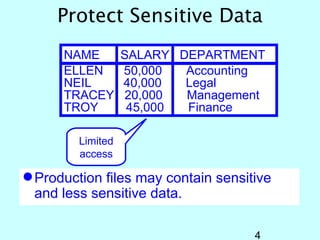
Protect Sensitive Data
      NAME         SALARY DEPARTMENT
      ELLEN        50,000  Accounting
      NEIL         40,000  Legal
      TRACEY       20,000  Management
      TROY          45,000 Finance

         Limited
         access

 Production files may contain sensitive
  and less sensitive data.

                                     4
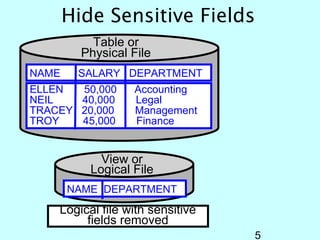
Hide Sensitive Fields
           Table or
         Physical File
NAME    SALARY DEPARTMENT
ELLEN  50,000     Accounting
NEIL   40,000     Legal
TRACEY 20,000     Management
TROY   45,000     Finance


            View or
          Logical File
       NAME DEPARTMENT
    Logical file with sensitive
         fields removed
                                  5
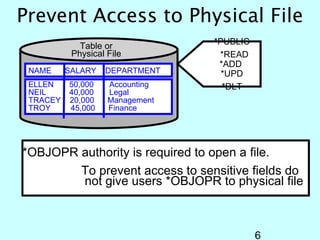
Prevent Access to Physical File
             Table or            *PUBLIC
           Physical File          *READ
                                  *ADD
 NAME     SALARY   DEPARTMENT      *UPD
 ELLEN    50,000    Accounting     *DLT
 NEIL     40,000    Legal
 TRACEY   20,000    Management
 TROY     45,000    Finance


*OBJOPR authority is required to open a file.
        To prevent access to sensitive fields do
        not give users *OBJOPR to physical file


                                           6
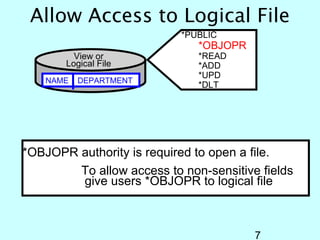
Allow Access to Logical File
                           *PUBLIC
                              *OBJOPR
         View or              *READ
       Logical File           *ADD
                              *UPD
    NAME   DEPARTMENT
                              *DLT


*OBJOPR authority is required to open a file.
        To allow access to non-sensitive fields
        give users *OBJOPR to logical file


                                        7
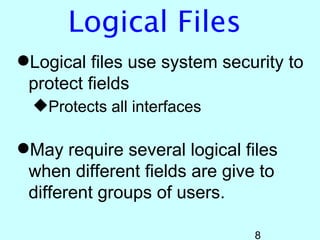
Logical Files
Logical files use system security to
 protect fields
  Protects all interfaces

May require several logical files
 when different fields are give to
 different groups of users.

                               8
DB Security Outline
Logical Files
Column Level Security
DB Exit Programs


                         9
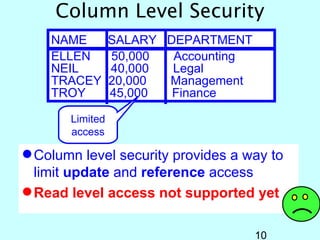
Column Level Security
    NAME         SALARY DEPARTMENT
    ELLEN        50,000  Accounting
    NEIL         40,000  Legal
    TRACEY       20,000 Management
    TROY         45,000  Finance

       Limited
       access

 Column level security provides a way to
  limit update and reference access
 Read level access not supported yet

                                      10
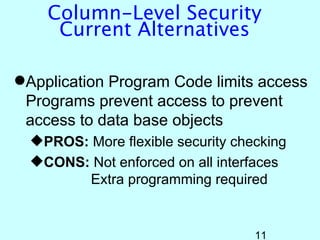
Column-Level Security
     Current Alternatives

Application Program Code limits access
 Programs prevent access to prevent
 access to data base objects
  PROS: More flexible security checking
  CONS: Not enforced on all interfaces
         Extra programming required


                                   11
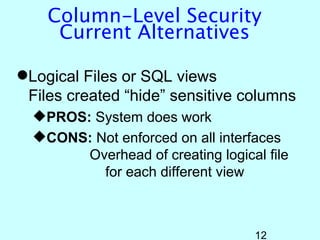
Column-Level Security
     Current Alternatives

Logical Files or SQL views
 Files created “hide” sensitive columns
  PROS: System does work
  CONS: Not enforced on all interfaces
        Overhead of creating logical file
          for each different view


                                   12
Column-Level Security
   Current Alternatives

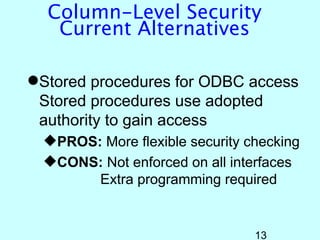
Stored procedures for ODBC access
 Stored procedures use adopted
 authority to gain access
  PROS: More flexible security checking
  CONS: Not enforced on all interfaces
        Extra programming required


                                 13
Column Level Security


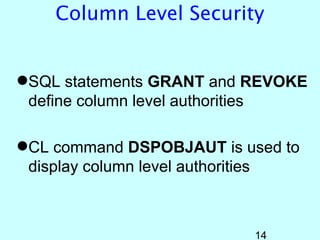
SQL statements GRANT and REVOKE
 define column level authorities

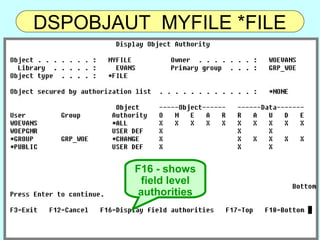
CL command DSPOBJAUT is used to
 display column level authorities


                           14
Column Level Security
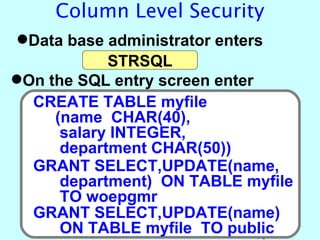
Data base administrator enters
            STRSQL
On the SQL entry screen enter
  CREATE TABLE myfile
     (name CHAR(40),
      salary INTEGER,
      department CHAR(50))
  GRANT SELECT,UPDATE(name,
      department) ON TABLE myfile
      TO woepgmr
  GRANT SELECT,UPDATE(name)
      ON TABLE myfile TO public15
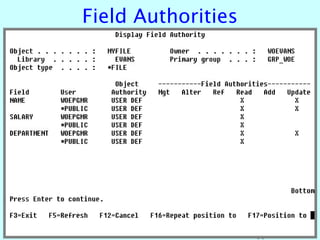
DSPOBJAUT MYFILE *FILE


        F16 - shows
         field level
         authorities


                       16
Field Authorities


                    17
Column Level Security
Column level authorities are stored with
 the file
  Restoring user profiles will not restore
   column level authority

Column level authority is enforced on
 the update operation
 (Update is rejected only when the
 column being restricted is modified)

                                       18
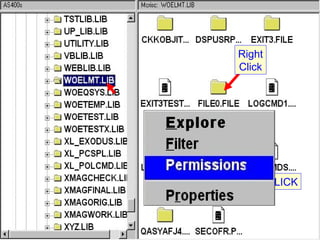
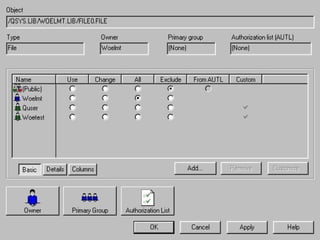
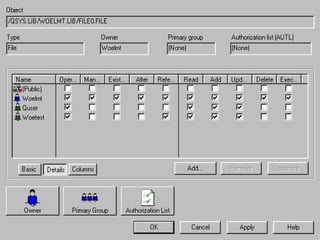
Objects Permissions


                      19
Right
        Click


CLICK


                CLICK


           20
21
22
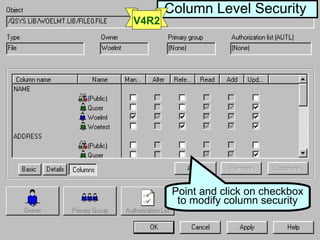
Column Level Security
V4R2


        Point and click on checkbox
         to modify column security


                         23
DB Security Outline
Logical Files
Column Level Security
DB Exit Programs
  Overview
  Sample Exit Programs
    iSeries Navigator
     (File Transfer and ODBC)
    FTP

                                24
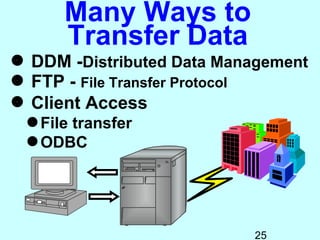
Many Ways to
      Transfer Data
 DDM -Distributed Data Management
 FTP - File Transfer Protocol
 Client Access
 File transfer
 ODBC


                           25
Need to Limit Users
        Access
 Users are authorized to data because of
  existing applications
 Need exists to prevent the user from
  using their access outside of applications
EXIT PROGRAMS provide a way to
 screen user actions


                                    26
Exit Program
 Overview
 Exit Programs

Registration Facility
                        27
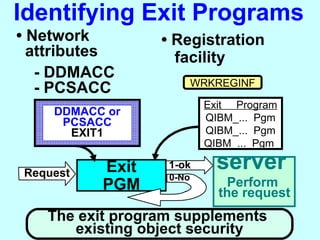
Identifying Exit Programs
• Network         • Registration
  attributes        facility
   - DDMACC
                          WRKREGINF
   - PCSACC
                           Exit Program
    DDMACC or
     PCSACC                QIBM_... Pgm
      EXIT1                QIBM_... Pgm
                           QIBM_... Pgm

Request   Exit     1-ok
                   0-No
                             server
          PGM                  Perform
                             the request
   The exit program supplements
      existing object security 28
EXIT PROGRAMS
Exit Programs Supplement
  Object Level Security
 Prevent specific operations
   file transfer
   remote commands
 Restrict access to specific
  libraries
 Monitor Use
  Record activity for usage
  analysis
                           29
EXIT PROGRAMS
Exit Programs Supplement
  Object Level Security
 Prevent specific operations
   file transfer
   remote commands
 Restrict access to specific
  libraries
 Monitor Use
  Record activity for usage
  analysis
                           30
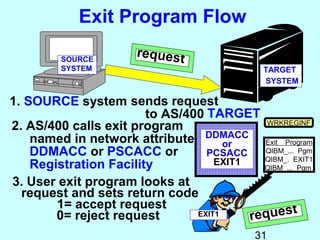
Exit Program Flow

         SOURCE
                       request
         SYSTEM                               TARGET
                                              SYSTEM

1. SOURCE system sends request
                        to AS/400 TARGET
2. AS/400 calls exit program                 WRKREGINF

    named in network attribute DDMACC Exit Program
                                      or
    DDMACC or PSCACC or           PCSACC    QIBM_... Pgm
                                            QIBM_. EXIT1
    Registration Facility           EXIT1
                                            QIBM_... Pgm

3. User exit program looks at
  request and sets return code
        1= accept request                           t
        0= reject request       EXIT1     reques
                                             31
Exit Program
 Overview
 Exit Programs

Registration Facility
                        32
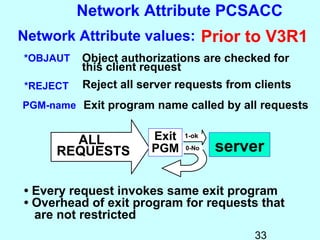
Network Attribute PCSACC
Network Attribute values: Prior to V3R1
*OBJAUT   Object authorizations are checked for
          this client request
*REJECT   Reject all server requests from clients
PGM-name Exit program name called by all requests


       ALL            Exit   1-ok

     REQUESTS         PGM    0-No   server

• Every request invokes same exit program
• Overhead of exit program for requests that
  are not restricted
                                          33
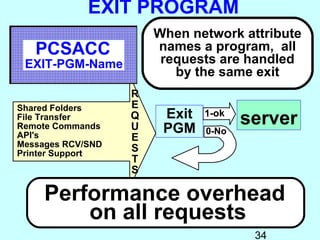
EXIT PROGRAM
                       When network attribute
   PCSACC              names a program, all
                        requests are handled
 EXIT-PGM-Name
                          by the same exit
                   R
Shared Folders     E
File Transfer      Q    Exit   1-ok
                                      server
Remote Commands
API's
                   U    PGM    0-No
                   E
Messages RCV/SND
Printer Support
                   S
                   T
                   S

     Performance overhead
         on all requests
                                       34
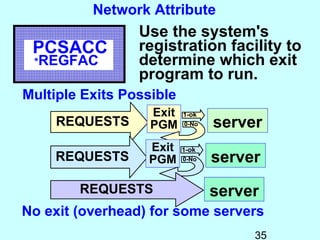
Network Attribute
                 Use the system's
 PCSACC          registration facility to
 *REGFAC         determine which exit
                 program to run.
Multiple Exits Possible
                   Exit   1-ok
     REQUESTS      PGM    0-No   server
                  Exit    1-ok
    REQUESTS      PGM     0-No   server
        REQUESTS                 server
No exit (overhead) for some servers
                                      35
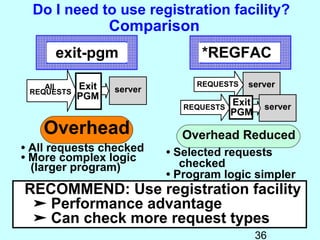
Do I need to use registration facility?
                   Comparison
      exit-pgm                    *REGFAC

    All     Exit                 REQUESTS    server
 REQUESTS          server
            PGM
                               REQUESTS
                                          Exit    server
                                          PGM
    Overhead                  Overhead Reduced
• All requests checked      • Selected requests
• More complex logic
  (larger program)             checked
                            • Program logic simpler
RECOMMEND: Use registration facility
 ➤ Performance advantage
 ➤ Can check more request types
                                                 36
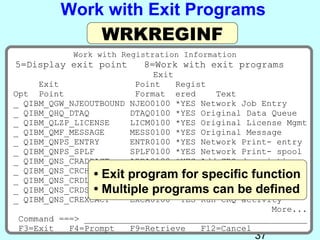
Work with Exit Programs
             WRKREGINF
           Work with Registration Information
5=Display exit point     8=Work with exit programs
                            Exit
     Exit               Point    Regist
Opt Point               Format ered      Text
_ QIBM_QGW_NJEOUTBOUND NJEO0100 *YES Network Job Entry
_ QIBM_QHQ_DTAQ        DTAQ0100 *YES Original Data Queue
_ QIBM_QLZP_LICENSE    LICM0100 *YES Original License Mgmt
_ QIBM_QMF_MESSAGE     MESS0100 *YES Original Message
_ QIBM_QNPS_ENTRY      ENTR0100 *YES Network Print- entry
_ QIBM_QNPS_SPLF       SPLF0100 *YES Network Print- spool
_ QIBM_QNS_CRADDACT    ADDA0100 *YES Add CRQ description
_ QIBM_QNS_CRCHGACT
                • Exit program for Change CRQfunction
                       CHGA0100 *YES
                                      specific desc CRQ
_ QIBM_QNS_CRDLTSBMCRQ DLTA0100 *YES Delete submitted
                • Multiple programs can be defined
_ QIBM_QNS_CRDSPACT    DSPA0100 *YES Display CRQ desc
_ QIBM_QNS_CREXCACT    EXCA0100 *YES Run CRQ activity
                                                   More...
 Command ===> ____________________________________________
 F3=Exit   F4=Prompt   F9=Retrieve    F12=Cancel
                                                37
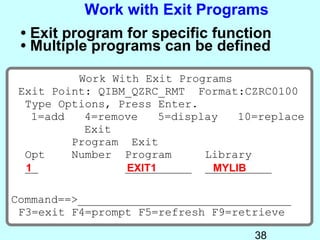
Work with Exit Programs
 • Exit program for specific function
 • Multiple programs can be defined

          Work With Exit Programs
 Exit Point: QIBM_QZRC_RMT Format:CZRC0100
  Type Options, Press Enter.
   1=add   4=remove    5=display   10=replace
           Exit
         Program Exit
  Opt    Number Program       Library
  __
  1              __________ __________
                 EXIT1         MYLIB

Command==>________________________________
 F3=exit F4=prompt F5=refresh F9=retrieve

                                     38
DB Security
         Outline
Logical Files
Column Level Security
DB Exit Programs
  Overview
  Sample Exit Programs
    iSeries Navigator
     (File Transfer and ODBC)
    FTP

                                39
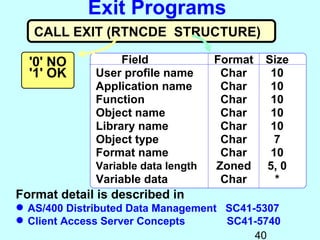
Exit Programs
   CALL EXIT (RTNCDE STRUCTURE)

  '0' NO          Field             Format   Size
  '1' OK     User profile name       Char     10
             Application name        Char     10
             Function                Char     10
             Object name             Char     10
             Library name            Char     10
             Object type             Char      7
             Format name             Char     10
             Variable data length   Zoned    5, 0
             Variable data           Char      *
Format detail is described in
 AS/400 Distributed Data Management SC41-5307
 Client Access Server Concepts      SC41-5740
                                          40
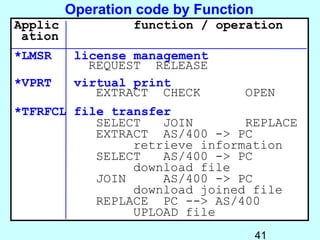
Operation code by Function
Applic            function / operation
 ation
*LMSR     license management
            REQUEST RELEASE
*VPRT     virtual print
             EXTRACT CHECK       OPEN
*TFRFCL file transfer
           SELECT   JOIN       REPLACE
           EXTRACT AS/400 -> PC
                retrieve information
           SELECT   AS/400 -> PC
                download file
           JOIN     AS/400 -> PC
                download joined file
           REPLACE PC --> AS/400
                UPLOAD file
                                      41

2010 db security

  • 1.
    OS/400 SECURITY Data BaseSecurity Presented by Wayne O. Evans
  • 2.
    OS/400 Security DISCLAIMER The security recommendations and any program source are offered "AS IS" for your consideration. Wayne O Evans Consulting makes no warranties or representations as to the quality of the examples. ALL WARRANTIES OF MERCHANTABILITY AND FITNESS FOR A PARTICULAR PURPOSE, ARE SPECIFICALLY DISCLAIMED. REPRODUCTION Permission is granted to make Wayne O Evans a limited number of copies of 5677 W Circle Z St this material for non-commercial Tucson, AZ 85713 purposes provided this page and the title page are included Tel (520)-578-7785 with all copies WOEvans@aol.com iSeries, AS/400 and OS/400 are registered trademarks of the IBM Corporation. 2
  • 3.
    DB Security Outline Logical Files Column Level Security DB Exit Programs 3
  • 4.
    Protect Sensitive Data NAME SALARY DEPARTMENT ELLEN 50,000 Accounting NEIL 40,000 Legal TRACEY 20,000 Management TROY 45,000 Finance Limited access  Production files may contain sensitive and less sensitive data. 4
  • 5.
    Hide Sensitive Fields Table or Physical File NAME SALARY DEPARTMENT ELLEN 50,000 Accounting NEIL 40,000 Legal TRACEY 20,000 Management TROY 45,000 Finance View or Logical File NAME DEPARTMENT Logical file with sensitive fields removed 5
  • 6.
    Prevent Access toPhysical File Table or *PUBLIC Physical File *READ *ADD NAME SALARY DEPARTMENT *UPD ELLEN 50,000 Accounting *DLT NEIL 40,000 Legal TRACEY 20,000 Management TROY 45,000 Finance *OBJOPR authority is required to open a file. To prevent access to sensitive fields do not give users *OBJOPR to physical file 6
  • 7.
    Allow Access toLogical File *PUBLIC *OBJOPR View or *READ Logical File *ADD *UPD NAME DEPARTMENT *DLT *OBJOPR authority is required to open a file. To allow access to non-sensitive fields give users *OBJOPR to logical file 7
  • 8.
    Logical Files Logical filesuse system security to protect fields Protects all interfaces May require several logical files when different fields are give to different groups of users. 8
  • 9.
    DB Security Outline LogicalFiles Column Level Security DB Exit Programs 9
  • 10.
    Column Level Security NAME SALARY DEPARTMENT ELLEN 50,000 Accounting NEIL 40,000 Legal TRACEY 20,000 Management TROY 45,000 Finance Limited access  Column level security provides a way to limit update and reference access  Read level access not supported yet 10
  • 11.
    Column-Level Security Current Alternatives Application Program Code limits access Programs prevent access to prevent access to data base objects PROS: More flexible security checking CONS: Not enforced on all interfaces Extra programming required 11
  • 12.
    Column-Level Security Current Alternatives Logical Files or SQL views Files created “hide” sensitive columns PROS: System does work CONS: Not enforced on all interfaces Overhead of creating logical file for each different view 12
  • 13.
    Column-Level Security Current Alternatives Stored procedures for ODBC access Stored procedures use adopted authority to gain access PROS: More flexible security checking CONS: Not enforced on all interfaces Extra programming required 13
  • 14.
    Column Level Security SQLstatements GRANT and REVOKE define column level authorities CL command DSPOBJAUT is used to display column level authorities 14
  • 15.
    Column Level Security Database administrator enters STRSQL On the SQL entry screen enter CREATE TABLE myfile (name CHAR(40), salary INTEGER, department CHAR(50)) GRANT SELECT,UPDATE(name, department) ON TABLE myfile TO woepgmr GRANT SELECT,UPDATE(name) ON TABLE myfile TO public15
  • 16.
    DSPOBJAUT MYFILE *FILE F16 - shows field level authorities 16
  • 17.
  • 18.
    Column Level Security Columnlevel authorities are stored with the file Restoring user profiles will not restore column level authority Column level authority is enforced on the update operation (Update is rejected only when the column being restricted is modified) 18
  • 19.
  • 20.
    Right Click CLICK CLICK 20
  • 21.
  • 22.
  • 23.
    Column Level Security V4R2 Point and click on checkbox to modify column security 23
  • 24.
    DB Security Outline LogicalFiles Column Level Security DB Exit Programs  Overview  Sample Exit Programs  iSeries Navigator (File Transfer and ODBC)  FTP 24
  • 25.
    Many Ways to Transfer Data  DDM -Distributed Data Management  FTP - File Transfer Protocol  Client Access File transfer ODBC 25
  • 26.
    Need to LimitUsers Access  Users are authorized to data because of existing applications  Need exists to prevent the user from using their access outside of applications EXIT PROGRAMS provide a way to screen user actions 26
  • 27.
    Exit Program Overview Exit Programs Registration Facility 27
  • 28.
    Identifying Exit Programs •Network • Registration attributes facility - DDMACC WRKREGINF - PCSACC Exit Program DDMACC or PCSACC QIBM_... Pgm EXIT1 QIBM_... Pgm QIBM_... Pgm Request Exit 1-ok 0-No server PGM Perform the request The exit program supplements existing object security 28
  • 29.
    EXIT PROGRAMS Exit ProgramsSupplement Object Level Security  Prevent specific operations  file transfer  remote commands  Restrict access to specific libraries  Monitor Use Record activity for usage analysis 29
  • 30.
    EXIT PROGRAMS Exit ProgramsSupplement Object Level Security  Prevent specific operations  file transfer  remote commands  Restrict access to specific libraries  Monitor Use Record activity for usage analysis 30
  • 31.
    Exit Program Flow SOURCE request SYSTEM TARGET SYSTEM 1. SOURCE system sends request to AS/400 TARGET 2. AS/400 calls exit program WRKREGINF named in network attribute DDMACC Exit Program or DDMACC or PSCACC or PCSACC QIBM_... Pgm QIBM_. EXIT1 Registration Facility EXIT1 QIBM_... Pgm 3. User exit program looks at request and sets return code 1= accept request t 0= reject request EXIT1 reques 31
  • 32.
    Exit Program Overview Exit Programs Registration Facility 32
  • 33.
    Network Attribute PCSACC NetworkAttribute values: Prior to V3R1 *OBJAUT Object authorizations are checked for this client request *REJECT Reject all server requests from clients PGM-name Exit program name called by all requests ALL Exit 1-ok REQUESTS PGM 0-No server • Every request invokes same exit program • Overhead of exit program for requests that are not restricted 33
  • 34.
    EXIT PROGRAM When network attribute PCSACC names a program, all requests are handled EXIT-PGM-Name by the same exit R Shared Folders E File Transfer Q Exit 1-ok server Remote Commands API's U PGM 0-No E Messages RCV/SND Printer Support S T S Performance overhead on all requests 34
  • 35.
    Network Attribute Use the system's PCSACC registration facility to *REGFAC determine which exit program to run. Multiple Exits Possible Exit 1-ok REQUESTS PGM 0-No server Exit 1-ok REQUESTS PGM 0-No server REQUESTS server No exit (overhead) for some servers 35
  • 36.
    Do I needto use registration facility? Comparison exit-pgm *REGFAC All Exit REQUESTS server REQUESTS server PGM REQUESTS Exit server PGM Overhead Overhead Reduced • All requests checked • Selected requests • More complex logic (larger program) checked • Program logic simpler RECOMMEND: Use registration facility ➤ Performance advantage ➤ Can check more request types 36
  • 37.
    Work with ExitPrograms WRKREGINF Work with Registration Information 5=Display exit point 8=Work with exit programs Exit Exit Point Regist Opt Point Format ered Text _ QIBM_QGW_NJEOUTBOUND NJEO0100 *YES Network Job Entry _ QIBM_QHQ_DTAQ DTAQ0100 *YES Original Data Queue _ QIBM_QLZP_LICENSE LICM0100 *YES Original License Mgmt _ QIBM_QMF_MESSAGE MESS0100 *YES Original Message _ QIBM_QNPS_ENTRY ENTR0100 *YES Network Print- entry _ QIBM_QNPS_SPLF SPLF0100 *YES Network Print- spool _ QIBM_QNS_CRADDACT ADDA0100 *YES Add CRQ description _ QIBM_QNS_CRCHGACT • Exit program for Change CRQfunction CHGA0100 *YES specific desc CRQ _ QIBM_QNS_CRDLTSBMCRQ DLTA0100 *YES Delete submitted • Multiple programs can be defined _ QIBM_QNS_CRDSPACT DSPA0100 *YES Display CRQ desc _ QIBM_QNS_CREXCACT EXCA0100 *YES Run CRQ activity More... Command ===> ____________________________________________ F3=Exit F4=Prompt F9=Retrieve F12=Cancel 37
  • 38.
    Work with ExitPrograms • Exit program for specific function • Multiple programs can be defined Work With Exit Programs Exit Point: QIBM_QZRC_RMT Format:CZRC0100 Type Options, Press Enter. 1=add 4=remove 5=display 10=replace Exit Program Exit Opt Number Program Library __ 1 __________ __________ EXIT1 MYLIB Command==>________________________________ F3=exit F4=prompt F5=refresh F9=retrieve 38
  • 39.
    DB Security Outline Logical Files Column Level Security DB Exit Programs  Overview  Sample Exit Programs  iSeries Navigator (File Transfer and ODBC)  FTP 39
  • 40.
    Exit Programs CALL EXIT (RTNCDE STRUCTURE) '0' NO Field Format Size '1' OK User profile name Char 10 Application name Char 10 Function Char 10 Object name Char 10 Library name Char 10 Object type Char 7 Format name Char 10 Variable data length Zoned 5, 0 Variable data Char * Format detail is described in  AS/400 Distributed Data Management SC41-5307  Client Access Server Concepts SC41-5740 40
  • 41.
    Operation code byFunction Applic function / operation ation *LMSR license management REQUEST RELEASE *VPRT virtual print EXTRACT CHECK OPEN *TFRFCL file transfer SELECT JOIN REPLACE EXTRACT AS/400 -> PC retrieve information SELECT AS/400 -> PC download file JOIN AS/400 -> PC download joined file REPLACE PC --> AS/400 UPLOAD file 41