Secure Web Gateway
Contenuto della sessione

       HTTPS inspection
       URL filtering
       Malware protection
       Intrusion prevention
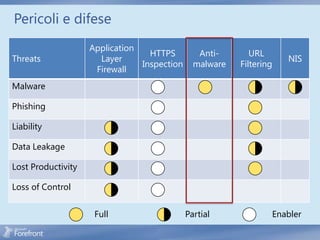
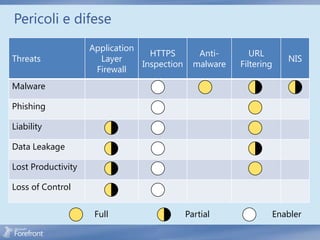
Pericoli e difese
                    Application
                                  HTTPS         Anti-       URL
Threats               Layer                                          NIS
                                Inspection     malware   Filtering
                     Firewall
Malware

Phishing

Liability

Data Leakage

Lost Productivity

Loss of Control


                     Full                    Partial             Enabler
HTTPS Inspection
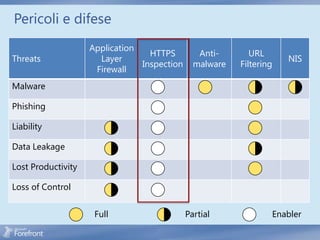
Pericoli e difese
                    Application
                                  HTTPS         Anti-       URL
Threats               Layer                                          NIS
                                Inspection     malware   Filtering
                     Firewall
Malware

Phishing

Liability

Data Leakage

Lost Productivity

Loss of Control


                     Full                    Partial             Enabler
Come funziona SSL
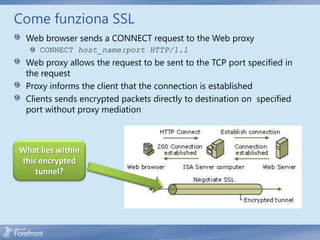
 Web browser sends a CONNECT request to the Web proxy
     CONNECT host_name:port HTTP/1.1
 Web proxy allows the request to be sent to the TCP port specified in
 the request
 Proxy informs the client that the connection is established
 Clients sends encrypted packets directly to destination on specified
 port without proxy mediation


What lies within
this encrypted
    tunnel?
SSL Threats
                                         Anonymous public proxy servers


 When HTTP proxies were first conceived, the need to allow direct connectivity between SSL-negotiating hosts
                                             was acknowledged


       conflict with the concurrent requirement of controlling the requests issued by the local proxy users


  A Web Proxy client creates an SSL session to a remote server -> the proxy is required to “go transparent” and
      thus ceases to evaluate the traffic . (It has to; it’s encrypted between the client and remote server .)


                                          The answer is HTTPS inspection


   TMG provides the ability to spoof the remote server’s certificate to the client, but not until TMG is satisfied
                          that the remote server is presenting an acceptable certificate


 TMG can separate the SSL session between the client and remote server into two distinct SSL session, and gains
           the ability to evaluate the unencrypted traffic sent between the client and remote server
Prima di Configurare HTTPS Inspection
            1. TMG creates cloned server certificates using the information gleaned from the
           certificate offered by the remote server . The organizations that own the service or
                             certificates may not take kindly to this behavior .


           2. HTTPS inspection allows TMG to include the entire URL in the Web Proxy logs .
          Many Web administrators believe that because they’re using SSL to protect the data
              exchanged between the user and server, they can include the user’s logon
                                            credentials


           3. HTTPS inspection may allow TMG to cache the content retrieved from the server


               4. Because TMG issues cloned certificates, all TMG array members must be
          recognized by the clients in the protected networks as trusted Certificate Authorities


            5. To prevent man-in-the-middle attacks, TMG is very strict about validating the
                           server certificate it receives from the Web server
Forefront TMG HTTPS Traffic Inspection


                                                        Network
                                      Malware
                URL Filtering                          Inspection
                                     Inspection
                                                         System


                                                                                             Internet


                                                                     SIGNED
                                                                       BY
                                SIGNED                              VERISIGN   Contoso.com


                                BY TMG
                                         Contoso.com


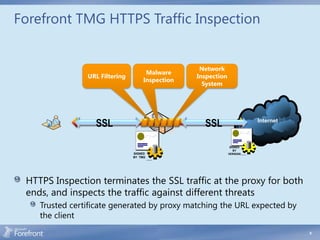
 HTTPS Inspection terminates the SSL traffic at the proxy for both
 ends, and inspects the traffic against different threats
    Trusted certificate generated by proxy matching the URL expected by
    the client
                                                                                                        9
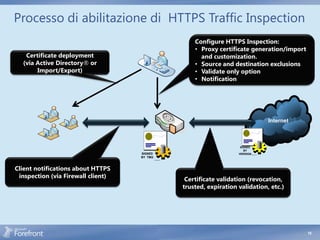
Processo di abilitazione di HTTPS Traffic Inspection
                                                               Configure HTTPS Inspection:
                                                               • Proxy certificate generation/import
   Certificate deployment                                        and customization.
  (via Active Directory® or                                    • Source and destination exclusions
       Import/Export)                                          • Validate only option
                                                               • Notification


                                                                                                        Internet


                                                                                SIGNED
                                                                                  BY
                                    SIGNED                                     VERISIGN   Contoso.com


                                    BY TMG
                                             Contoso.com


Client notifications about HTTPS
 inspection (via Firewall client)
                                                            Certificate validation (revocation,
                                                           trusted, expiration validation, etc.)


                                                                                                                   10
HTTPS Inspection Certificate
 The HTTPS inspection certificate can be either generated
 by Forefront TMG or issued by a trusted CA
    Administrators can customize the self generated certificate
    Commercial CAs will not typically issue HTTPS inspection
    certificates
 HTTPS inspection certificate stored in the configuration
 store
    Used by all array members
Distribuzione del HTTPS Inspection Certificate
 Two methods can be used to enable clients to trust the
 HTTPS Inspection Certificate
    Automatically through Active Directory (AD), will use AD trusted
    root store to configure trust for all clients in the AD forest
       Requires Forefront TMG to be deployed in a domain environment
       Will not work for browsers that do not use the Windows certificate
       store for trust
    Manually on each computer, using root certificate installation
    procedure required by the browser
HTTPS Inspection - Operazioni
                                                                   Enable HTTPS inspection
                                                                   Generate trusted root certificate

Install trusted root certificate
on clients
                                                                                        contoso.com

                     https://contoso.com                                 https://contoso.com


                                                                                           SIGNED
                                           SIGNED                                            BY
                                           BY TMG                                         VERISIGN   Contoso.com

                                                    Contoso.com


                     1.   Intercept HTTPS traffic
                     2.   Validate contoso.com server certificate
                     3.   Generate contoso.com server proxy certificate on TMG
                     4.   Copy data from the original server certificate to the proxy certificate
                     5.   Sign the new certificate with TMG trusted root certificate
                     6.   [TMG manages a certificate cache to avoid redundant duplications]
                     7.   Pretend to be contoso.com for client
                     8.   Bridge HTTPS traffic between client and server

                                                                                                                   13
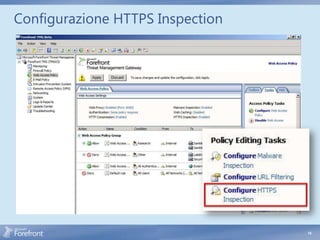
Configurazione HTTPS Inspection


                                  14
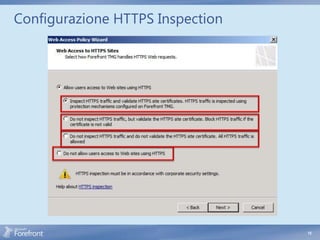
Configurazione HTTPS Inspection


                                  15
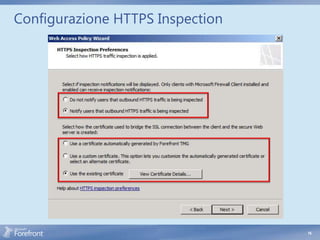
Configurazione HTTPS Inspection


                                  16
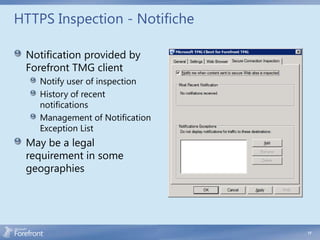
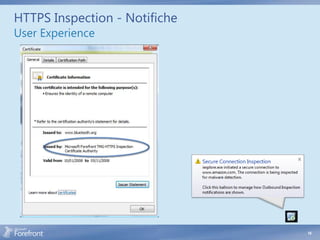
HTTPS Inspection - Notifiche

 Notification provided by
 Forefront TMG client
    Notify user of inspection
    History of recent
    notifications
    Management of Notification
    Exception List
 May be a legal
 requirement in some
 geographies


                                 17
HTTPS Inspection - Notifiche
User Experience


                               18
HTTPS Inspection – Errori Comuni

   HTTPS Inspection CA certificate errors

   • These are generally seen by the user as an “invalid certificate” message
     when the user attempts to reach a site that uses HTTPS

   Server Certificate errors

   • These errors will be seen as error pages generated by TMG due to
     specific server certificate validation failures . The user application will
     receive an HTTP 502 Bad Gateway response, with the error text
     providing the details of the failure, such as:
     • “The name on the SSL server certificate supplied by a destination
       server does not match the name of the host requested .”
       • “The SSL server certificate supplied by a destination server has
         expired .”
       • “The SSL server certificate supplied by a destination server has
         been revoked .”


                                                                                   19
URL Filtering
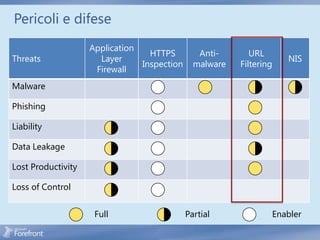
Pericoli e difese
                    Application
                                  HTTPS         Anti-       URL
Threats               Layer                                          NIS
                                Inspection     malware   Filtering
                     Firewall
Malware

Phishing

Liability

Data Leakage

Lost Productivity

Loss of Control


                     Full                    Partial             Enabler
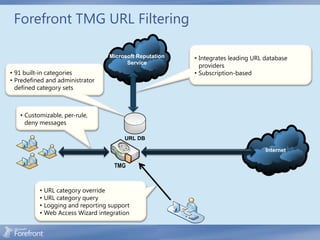
Forefront TMG URL Filtering

                                    Microsoft Reputation   • Integrates leading URL database
                                          Service
                                                             providers
• 91 built-in categories                                   • Subscription-based
• Predefined and administrator
  defined category sets


   • Customizable, per-rule,
     deny messages

                                         URL DB

                                                                                    Internet

                                     TMG


          •   URL category override
          •   URL category query
          •   Logging and reporting support
          •   Web Access Wizard integration
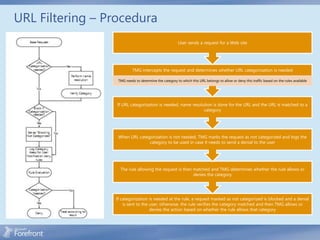
URL Filtering – Procedura
                                                        User sends a request for a Web site


                          TMG intercepts the request and determines whether URL categorization is needed

                  TMG needs to determine the category to which this URL belongs to allow or deny this traffic based on the rules available


                  If URL categorization is needed, name resolution is done for the URL and the URL is matched to a
                                                              category


                  When URL categorization is not needed, TMG marks the request as not categorized and logs the
                                category to be used in case it needs to send a denial to the user


                   The rule allowing the request is then matched and TMG determines whether the rule allows or
                                                         denies the category


                 If categorization is needed at the rule, a request marked as not categorized is blocked and a denial
                     is sent to the user; otherwise, the rule verifies the category matched and then TMG allows or
                                    denies the action based on whether the rule allows that category
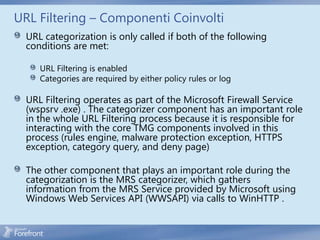
URL Filtering – Componenti Coinvolti
  URL categorization is only called if both of the following
  conditions are met:

     URL Filtering is enabled
     Categories are required by either policy rules or log

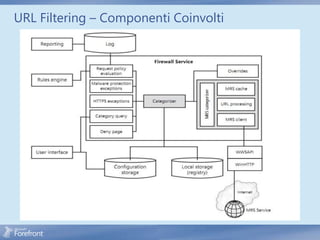
  URL Filtering operates as part of the Microsoft Firewall Service
  (wspsrv .exe) . The categorizer component has an important role
  in the whole URL Filtering process because it is responsible for
  interacting with the core TMG components involved in this
  process (rules engine, malware protection exception, HTTPS
  exception, category query, and deny page)

  The other component that plays an important role during the
  categorization is the MRS categorizer, which gathers
  information from the MRS Service provided by Microsoft using
  Windows Web Services API (WWSAPI) via calls to WinHTTP .
URL Filtering – Componenti Coinvolti
URL Filtering – Benefici
  Control user web access based on URL categories
  Protect users from known malicious sites
  Reduce liability risks
  Increase productivity
  Reduce bandwidth and Forefront TMG resource
  consumption
  Analyze Web usage
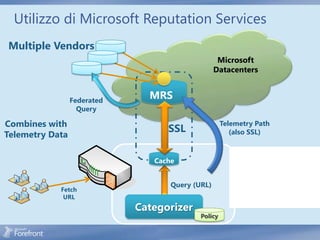
Utilizzo di Microsoft Reputation Services
Multiple Vendors


                 Federated
                               MRS
                   Query

Combines with                                        Telemetry Path
                                   SSL                  (also SSL)
Telemetry Data

                                Cache
                                                         • Feedbackcache
                                                           Cache:on
                                                           Fetch
                                                           • Persistent
                                                           mechanism on
                                                           miss
                                                         • Category overrides
                                                           • In-memory
                                                           SSL for auth &
                                    Query (URL)
            Fetch                                          • Weighted TTL
                                                           privacy
             URL                                         • No PII
                             Categorizer
                                            Policy
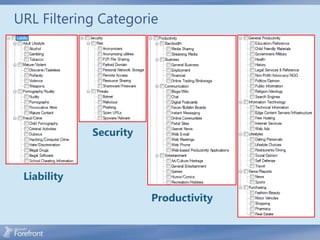
URL Filtering Categorie


             Security


 Liability

                        Productivity
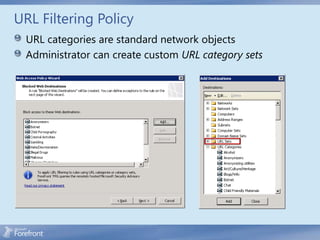
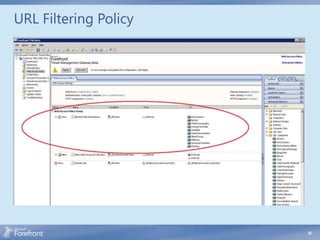
URL Filtering Policy
  URL categories are standard network objects
  Administrator can create custom URL category sets
URL Filtering Policy


                       30
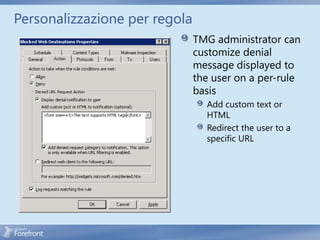
Personalizzazione per regola
                               TMG administrator can
                               customize denial
                               message displayed to
                               the user on a per-rule
                               basis
                                 Add custom text or
                                 HTML
                                 Redirect the user to a
                                 specific URL
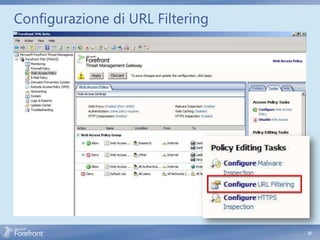
Configurazione di URL Filtering


                                  32
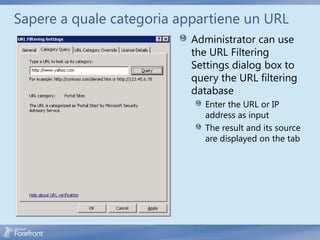
Sapere a quale categoria appartiene un URL
                           Administrator can use
                           the URL Filtering
                           Settings dialog box to
                           query the URL filtering
                           database
                              Enter the URL or IP
                              address as input
                              The result and its source
                              are displayed on the tab
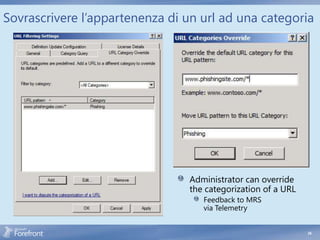
Sovrascrivere l’appartenenza di un url ad una categoria


                                Administrator can override
                                the categorization of a URL
                                   Feedback to MRS
                                   via Telemetry


                                                              34
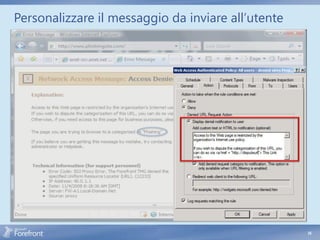
Personalizzare il messaggio da inviare all’utente


                                   HTML tags


                                                    35
                                                         35
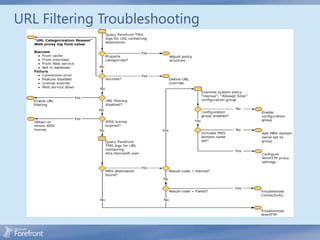
URL Filtering Troubleshooting
Malware Protection
Pericoli e difese
                    Application
                                  HTTPS         Anti-       URL
Threats               Layer                                          NIS
                                Inspection     malware   Filtering
                     Firewall
Malware

Phishing

Liability

Data Leakage

Lost Productivity

Loss of Control


                     Full                    Partial             Enabler
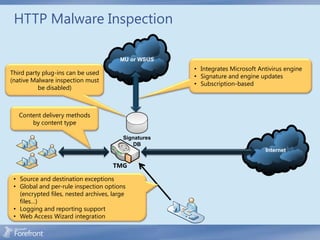
HTTP Malware Inspection

                                        MU or WSUS
                                                       • Integrates Microsoft Antivirus engine
Third party plug-ins can be used
                                                       • Signature and engine updates
(native Malware inspection must
                                                       • Subscription-based
          be disabled)


   Content delivery methods
       by content type

                                          Signatures
                                              DB
                                                                                Internet

                                      TMG

 • Source and destination exceptions
 • Global and per-rule inspection options
   (encrypted files, nested archives, large
   files…)
 • Logging and reporting support
 • Web Access Wizard integration
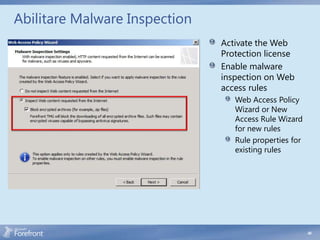
Abilitare Malware Inspection
                               Activate the Web
                               Protection license
                               Enable malware
                               inspection on Web
                               access rules
                                  Web Access Policy
                                  Wizard or New
                                  Access Rule Wizard
                                  for new rules
                                  Rule properties for
                                  existing rules


                                                        40
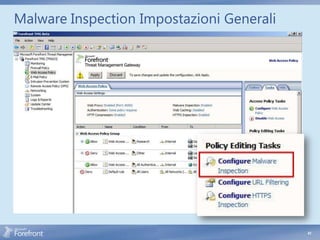
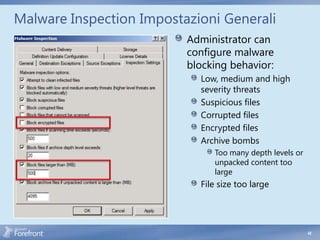
Malware Inspection Impostazioni Generali


                                           41
Malware Inspection Impostazioni Generali
                          Administrator can
                          configure malware
                          blocking behavior:
                            Low, medium and high
                            severity threats
                            Suspicious files
                            Corrupted files
                            Encrypted files
                            Archive bombs
                               Too many depth levels or
                               unpacked content too
                               large
                            File size too large


                                                          42
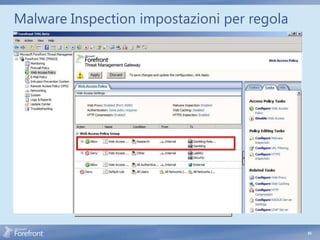
Malware Inspection impostazioni per regola


                                             43
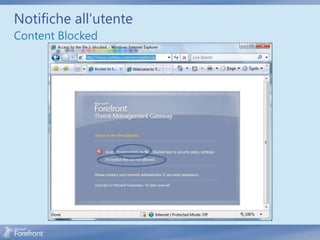
Notifiche all’utente
Content Blocked
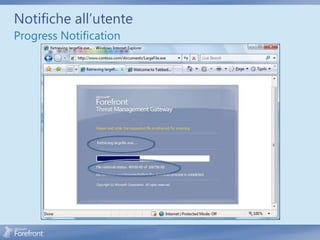
Notifiche all’utente
Progress Notification


                        45
Intrusion Prevention
Il problema in generale
 Un-patched vulnerabilities
    Average survival time of unpatched Windows® XP
    less than 20 minutes
    About two percent of Windows® machines are fully patched
 Vulnerability window
    Increasing number of zero days
    Attackers craft exploits faster than customers can deploy patches
 Encryption and protocol tunneling are a complicated
 problem for a defense technology (for example, HTTPS)


                                                                        47
Network Inspection System (NIS)
 Protocol decode-based traffic inspection system that uses
 signatures of known vulnerabilities
   Vulnerability-based signatures (vs. exploit-based signatures used
   by competing solutions)
   Detects and potentially block attacks on network resources
 NIS helps organizations reduce the vulnerability window
   Protect machines against known vulnerabilities until patch can be
   deployed
   Signatures can be released and deployed much faster than
   patches, concurrently with patch release, closing the vulnerability
   window
 Integrated into Forefront TMG
   Synergy with HTTPS Inspection


                                                                         48
NIS e Static Signatures
NIS differs from many protocol analysis technologies .
Although NIS is able to discover valid traffic based on static
signatures (conceptually similar to the HTTP Filter), NIS
expands on basic signature matching by evaluating three
aspects of the network traffic:

  Protocol state The expected condition of the protocol at
  any point in time
  Message structure The validation of a message according
  to the protocol definition
  Message context The validation of a message in the
  context of the protocol state

                                                                 49
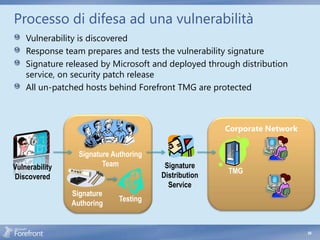
Processo di difesa ad una vulnerabilità
    Vulnerability is discovered
    Response team prepares and tests the vulnerability signature
    Signature released by Microsoft and deployed through distribution
    service, on security patch release
    All un-patched hosts behind Forefront TMG are protected


                                                       Corporate Network


                  Signature Authoring
Vulnerability            Team            Signature
                                                       TMG
Discovered                              Distribution
                                          Service
                Signature
                              Testing
                Authoring


                                                                           50
Altri meccanismi di protezione
 Common OS attack detection
 DNS attack filtering
 IP option filtering
 Flood mitigation


                                 51
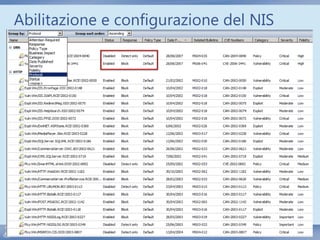
Abilitazione e configurazione del NIS
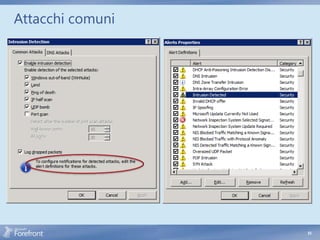
Attacchi comuni
                  Inspects traffic for the
                  following common attacks:
                     WinNuke
                     Land
                     Ping of Death
                     IP Half Scan
                     Port Scan
                     UDP Bomb
                  Offending packets are dropped
                  and an event generated
                  triggering an Intrusion
                  Detected alert


                                                  53
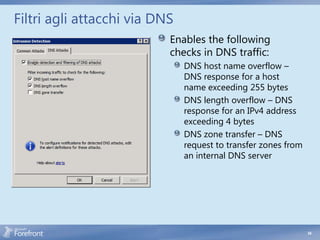
Filtri agli attacchi via DNS
                           Enables the following
                           checks in DNS traffic:
                               DNS host name overflow –
                               DNS response for a host
                               name exceeding 255 bytes
                               DNS length overflow – DNS
                               response for an IPv4 address
                               exceeding 4 bytes
                               DNS zone transfer – DNS
                               request to transfer zones from
                               an internal DNS server


                                                                54
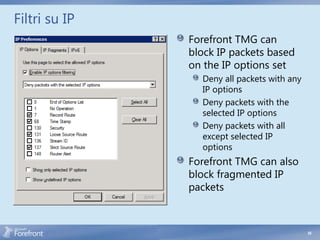
Filtri su IP
               Forefront TMG can
               block IP packets based
               on the IP options set
                 Deny all packets with any
                 IP options
                 Deny packets with the
                 selected IP options
                 Deny packets with all
                 except selected IP
                 options
               Forefront TMG can also
               block fragmented IP
               packets


                                             55
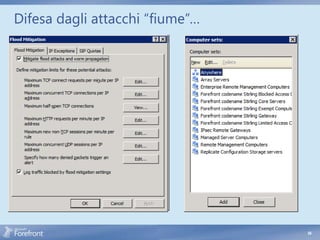
Difesa dagli attacchi “fiume”…
                             Forefront TMG flood
                             mitigation mechanism
                             uses: Custom
                              Limit     Limit
                                 Connection limits that
                              600 used to identify and
                                 are 6000
                              160        400
                                 block malicious traffic
                                80
                                 Logging of flood
                              600       6000
                                 mitigation events
                             1000Alerts that are triggered
                              160when a connection limit
                              600 exceeded
                                 is      400
                             TMG comes with
                             default configuration
                             settings
                                 Exceptions can be set
                                 per computer set


                                                             56

2. secure web gateway

  • 1.
  • 2.
    Contenuto della sessione HTTPS inspection URL filtering Malware protection Intrusion prevention
  • 3.
    Pericoli e difese Application HTTPS Anti- URL Threats Layer NIS Inspection malware Filtering Firewall Malware Phishing Liability Data Leakage Lost Productivity Loss of Control Full Partial Enabler
  • 4.
  • 5.
    Pericoli e difese Application HTTPS Anti- URL Threats Layer NIS Inspection malware Filtering Firewall Malware Phishing Liability Data Leakage Lost Productivity Loss of Control Full Partial Enabler
  • 6.
    Come funziona SSL Web browser sends a CONNECT request to the Web proxy CONNECT host_name:port HTTP/1.1 Web proxy allows the request to be sent to the TCP port specified in the request Proxy informs the client that the connection is established Clients sends encrypted packets directly to destination on specified port without proxy mediation What lies within this encrypted tunnel?
  • 7.
    SSL Threats Anonymous public proxy servers When HTTP proxies were first conceived, the need to allow direct connectivity between SSL-negotiating hosts was acknowledged conflict with the concurrent requirement of controlling the requests issued by the local proxy users A Web Proxy client creates an SSL session to a remote server -> the proxy is required to “go transparent” and thus ceases to evaluate the traffic . (It has to; it’s encrypted between the client and remote server .) The answer is HTTPS inspection TMG provides the ability to spoof the remote server’s certificate to the client, but not until TMG is satisfied that the remote server is presenting an acceptable certificate TMG can separate the SSL session between the client and remote server into two distinct SSL session, and gains the ability to evaluate the unencrypted traffic sent between the client and remote server
  • 8.
    Prima di ConfigurareHTTPS Inspection 1. TMG creates cloned server certificates using the information gleaned from the certificate offered by the remote server . The organizations that own the service or certificates may not take kindly to this behavior . 2. HTTPS inspection allows TMG to include the entire URL in the Web Proxy logs . Many Web administrators believe that because they’re using SSL to protect the data exchanged between the user and server, they can include the user’s logon credentials 3. HTTPS inspection may allow TMG to cache the content retrieved from the server 4. Because TMG issues cloned certificates, all TMG array members must be recognized by the clients in the protected networks as trusted Certificate Authorities 5. To prevent man-in-the-middle attacks, TMG is very strict about validating the server certificate it receives from the Web server
  • 9.
    Forefront TMG HTTPSTraffic Inspection Network Malware URL Filtering Inspection Inspection System Internet SIGNED BY SIGNED VERISIGN Contoso.com BY TMG Contoso.com HTTPS Inspection terminates the SSL traffic at the proxy for both ends, and inspects the traffic against different threats Trusted certificate generated by proxy matching the URL expected by the client 9
  • 10.
    Processo di abilitazionedi HTTPS Traffic Inspection Configure HTTPS Inspection: • Proxy certificate generation/import Certificate deployment and customization. (via Active Directory® or • Source and destination exclusions Import/Export) • Validate only option • Notification Internet SIGNED BY SIGNED VERISIGN Contoso.com BY TMG Contoso.com Client notifications about HTTPS inspection (via Firewall client) Certificate validation (revocation, trusted, expiration validation, etc.) 10
  • 11.
    HTTPS Inspection Certificate The HTTPS inspection certificate can be either generated by Forefront TMG or issued by a trusted CA Administrators can customize the self generated certificate Commercial CAs will not typically issue HTTPS inspection certificates HTTPS inspection certificate stored in the configuration store Used by all array members
  • 12.
    Distribuzione del HTTPSInspection Certificate Two methods can be used to enable clients to trust the HTTPS Inspection Certificate Automatically through Active Directory (AD), will use AD trusted root store to configure trust for all clients in the AD forest Requires Forefront TMG to be deployed in a domain environment Will not work for browsers that do not use the Windows certificate store for trust Manually on each computer, using root certificate installation procedure required by the browser
  • 13.
    HTTPS Inspection -Operazioni  Enable HTTPS inspection  Generate trusted root certificate Install trusted root certificate on clients contoso.com https://contoso.com https://contoso.com SIGNED SIGNED BY BY TMG VERISIGN Contoso.com Contoso.com 1. Intercept HTTPS traffic 2. Validate contoso.com server certificate 3. Generate contoso.com server proxy certificate on TMG 4. Copy data from the original server certificate to the proxy certificate 5. Sign the new certificate with TMG trusted root certificate 6. [TMG manages a certificate cache to avoid redundant duplications] 7. Pretend to be contoso.com for client 8. Bridge HTTPS traffic between client and server 13
  • 14.
  • 15.
  • 16.
  • 17.
    HTTPS Inspection -Notifiche Notification provided by Forefront TMG client Notify user of inspection History of recent notifications Management of Notification Exception List May be a legal requirement in some geographies 17
  • 18.
    HTTPS Inspection -Notifiche User Experience 18
  • 19.
    HTTPS Inspection –Errori Comuni HTTPS Inspection CA certificate errors • These are generally seen by the user as an “invalid certificate” message when the user attempts to reach a site that uses HTTPS Server Certificate errors • These errors will be seen as error pages generated by TMG due to specific server certificate validation failures . The user application will receive an HTTP 502 Bad Gateway response, with the error text providing the details of the failure, such as: • “The name on the SSL server certificate supplied by a destination server does not match the name of the host requested .” • “The SSL server certificate supplied by a destination server has expired .” • “The SSL server certificate supplied by a destination server has been revoked .” 19
  • 20.
  • 21.
    Pericoli e difese Application HTTPS Anti- URL Threats Layer NIS Inspection malware Filtering Firewall Malware Phishing Liability Data Leakage Lost Productivity Loss of Control Full Partial Enabler
  • 22.
    Forefront TMG URLFiltering Microsoft Reputation • Integrates leading URL database Service providers • 91 built-in categories • Subscription-based • Predefined and administrator defined category sets • Customizable, per-rule, deny messages URL DB Internet TMG • URL category override • URL category query • Logging and reporting support • Web Access Wizard integration
  • 23.
    URL Filtering –Procedura User sends a request for a Web site TMG intercepts the request and determines whether URL categorization is needed TMG needs to determine the category to which this URL belongs to allow or deny this traffic based on the rules available If URL categorization is needed, name resolution is done for the URL and the URL is matched to a category When URL categorization is not needed, TMG marks the request as not categorized and logs the category to be used in case it needs to send a denial to the user The rule allowing the request is then matched and TMG determines whether the rule allows or denies the category If categorization is needed at the rule, a request marked as not categorized is blocked and a denial is sent to the user; otherwise, the rule verifies the category matched and then TMG allows or denies the action based on whether the rule allows that category
  • 24.
    URL Filtering –Componenti Coinvolti URL categorization is only called if both of the following conditions are met: URL Filtering is enabled Categories are required by either policy rules or log URL Filtering operates as part of the Microsoft Firewall Service (wspsrv .exe) . The categorizer component has an important role in the whole URL Filtering process because it is responsible for interacting with the core TMG components involved in this process (rules engine, malware protection exception, HTTPS exception, category query, and deny page) The other component that plays an important role during the categorization is the MRS categorizer, which gathers information from the MRS Service provided by Microsoft using Windows Web Services API (WWSAPI) via calls to WinHTTP .
  • 25.
    URL Filtering –Componenti Coinvolti
  • 26.
    URL Filtering –Benefici Control user web access based on URL categories Protect users from known malicious sites Reduce liability risks Increase productivity Reduce bandwidth and Forefront TMG resource consumption Analyze Web usage
  • 27.
    Utilizzo di MicrosoftReputation Services Multiple Vendors Federated MRS Query Combines with Telemetry Path SSL (also SSL) Telemetry Data Cache • Feedbackcache Cache:on Fetch • Persistent mechanism on miss • Category overrides • In-memory SSL for auth & Query (URL) Fetch • Weighted TTL privacy URL • No PII Categorizer Policy
  • 28.
    URL Filtering Categorie Security Liability Productivity
  • 29.
    URL Filtering Policy URL categories are standard network objects Administrator can create custom URL category sets
  • 30.
  • 31.
    Personalizzazione per regola TMG administrator can customize denial message displayed to the user on a per-rule basis Add custom text or HTML Redirect the user to a specific URL
  • 32.
  • 33.
    Sapere a qualecategoria appartiene un URL Administrator can use the URL Filtering Settings dialog box to query the URL filtering database Enter the URL or IP address as input The result and its source are displayed on the tab
  • 34.
    Sovrascrivere l’appartenenza diun url ad una categoria Administrator can override the categorization of a URL Feedback to MRS via Telemetry 34
  • 35.
    Personalizzare il messaggioda inviare all’utente HTML tags 35 35
  • 36.
  • 37.
  • 38.
    Pericoli e difese Application HTTPS Anti- URL Threats Layer NIS Inspection malware Filtering Firewall Malware Phishing Liability Data Leakage Lost Productivity Loss of Control Full Partial Enabler
  • 39.
    HTTP Malware Inspection MU or WSUS • Integrates Microsoft Antivirus engine Third party plug-ins can be used • Signature and engine updates (native Malware inspection must • Subscription-based be disabled) Content delivery methods by content type Signatures DB Internet TMG • Source and destination exceptions • Global and per-rule inspection options (encrypted files, nested archives, large files…) • Logging and reporting support • Web Access Wizard integration
  • 40.
    Abilitare Malware Inspection Activate the Web Protection license Enable malware inspection on Web access rules Web Access Policy Wizard or New Access Rule Wizard for new rules Rule properties for existing rules 40
  • 41.
  • 42.
    Malware Inspection ImpostazioniGenerali Administrator can configure malware blocking behavior: Low, medium and high severity threats Suspicious files Corrupted files Encrypted files Archive bombs Too many depth levels or unpacked content too large File size too large 42
  • 43.
  • 44.
  • 45.
  • 46.
  • 47.
    Il problema ingenerale Un-patched vulnerabilities Average survival time of unpatched Windows® XP less than 20 minutes About two percent of Windows® machines are fully patched Vulnerability window Increasing number of zero days Attackers craft exploits faster than customers can deploy patches Encryption and protocol tunneling are a complicated problem for a defense technology (for example, HTTPS) 47
  • 48.
    Network Inspection System(NIS) Protocol decode-based traffic inspection system that uses signatures of known vulnerabilities Vulnerability-based signatures (vs. exploit-based signatures used by competing solutions) Detects and potentially block attacks on network resources NIS helps organizations reduce the vulnerability window Protect machines against known vulnerabilities until patch can be deployed Signatures can be released and deployed much faster than patches, concurrently with patch release, closing the vulnerability window Integrated into Forefront TMG Synergy with HTTPS Inspection 48
  • 49.
    NIS e StaticSignatures NIS differs from many protocol analysis technologies . Although NIS is able to discover valid traffic based on static signatures (conceptually similar to the HTTP Filter), NIS expands on basic signature matching by evaluating three aspects of the network traffic: Protocol state The expected condition of the protocol at any point in time Message structure The validation of a message according to the protocol definition Message context The validation of a message in the context of the protocol state 49
  • 50.
    Processo di difesaad una vulnerabilità Vulnerability is discovered Response team prepares and tests the vulnerability signature Signature released by Microsoft and deployed through distribution service, on security patch release All un-patched hosts behind Forefront TMG are protected Corporate Network Signature Authoring Vulnerability Team Signature TMG Discovered Distribution Service Signature Testing Authoring 50
  • 51.
    Altri meccanismi diprotezione Common OS attack detection DNS attack filtering IP option filtering Flood mitigation 51
  • 52.
  • 53.
    Attacchi comuni Inspects traffic for the following common attacks: WinNuke Land Ping of Death IP Half Scan Port Scan UDP Bomb Offending packets are dropped and an event generated triggering an Intrusion Detected alert 53
  • 54.
    Filtri agli attacchivia DNS Enables the following checks in DNS traffic: DNS host name overflow – DNS response for a host name exceeding 255 bytes DNS length overflow – DNS response for an IPv4 address exceeding 4 bytes DNS zone transfer – DNS request to transfer zones from an internal DNS server 54
  • 55.
    Filtri su IP Forefront TMG can block IP packets based on the IP options set Deny all packets with any IP options Deny packets with the selected IP options Deny packets with all except selected IP options Forefront TMG can also block fragmented IP packets 55
  • 56.
    Difesa dagli attacchi“fiume”… Forefront TMG flood mitigation mechanism uses: Custom Limit Limit Connection limits that 600 used to identify and are 6000 160 400 block malicious traffic 80 Logging of flood 600 6000 mitigation events 1000Alerts that are triggered 160when a connection limit 600 exceeded is 400 TMG comes with default configuration settings Exceptions can be set per computer set 56

Editor's Notes

  • #31 Policies use URL categories as standard network objects in the Web access policy.
  • #42 .