Threat Management Gateway 2010
Krzysztof Bińkowski
Agenda









Overview
URL filtering (URL-F)
Edge Malware Protection (EMP)
HTTPS Inspections
ISP Redundancy (ISP-R)
Network Inspection System (NIS)
TMG 2010 tools and virtualization

2
Threat Management Gateway 2010
Overview
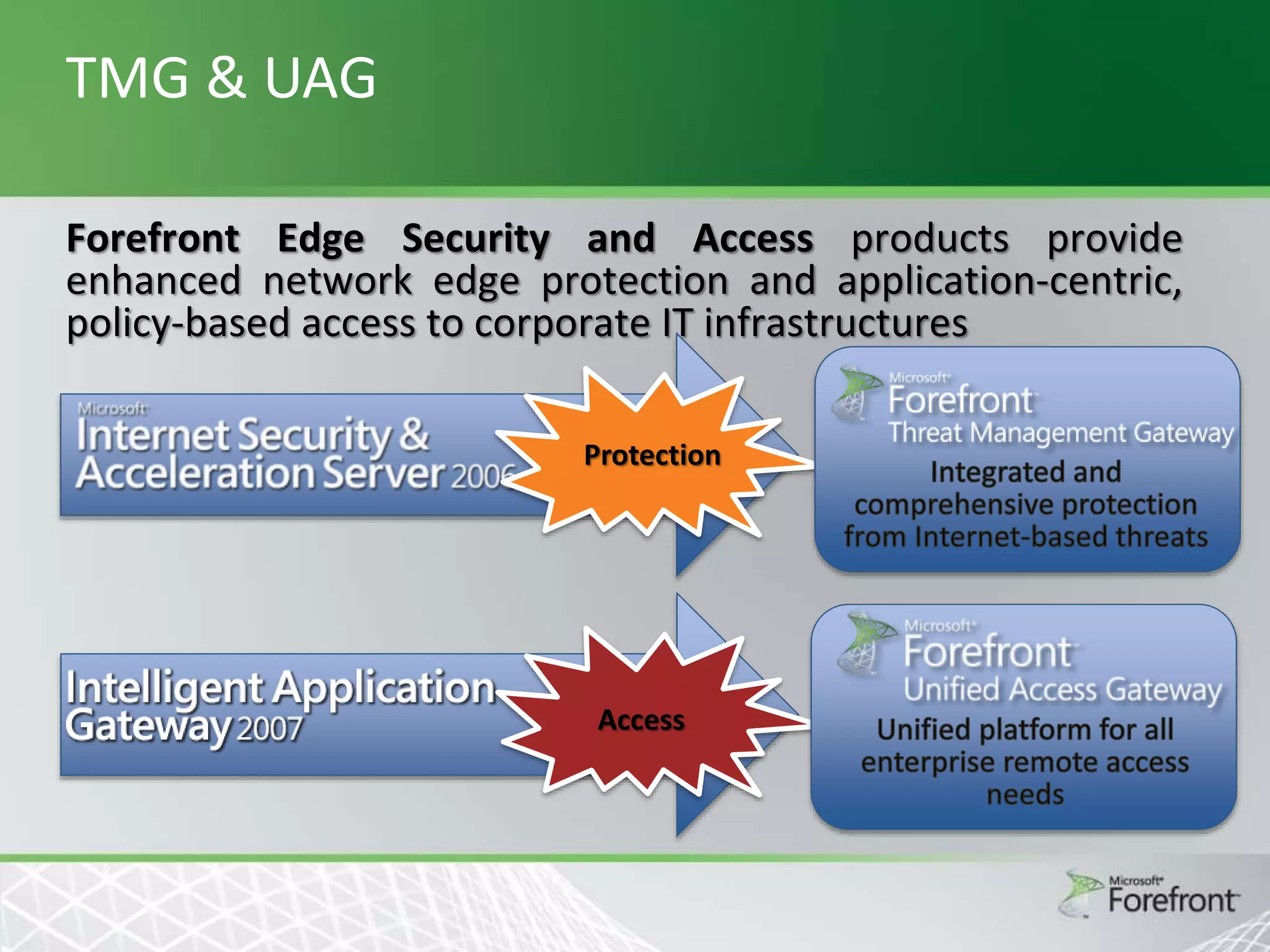
TMG & UAG
Forefront Edge Security and Access products provide
enhanced network edge protection and application-centric,
policy-based access to corporate IT infrastructures
Protection

Access
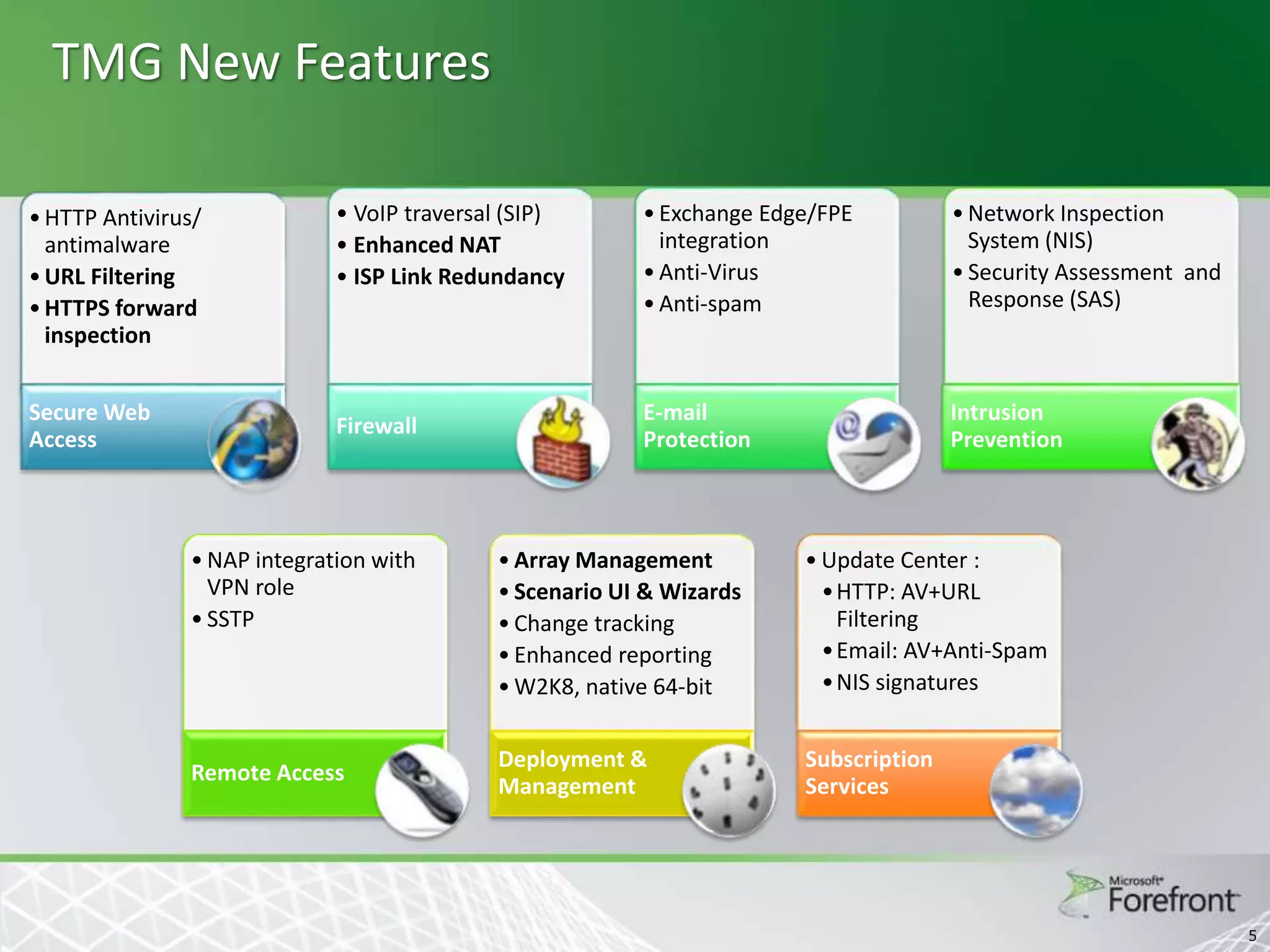
TMG New Features
• HTTP Antivirus/
antimalware
• URL Filtering
• HTTPS forward
inspection

Secure Web
Access

• VoIP traversal (SIP)
• Enhanced NAT
• ISP Link Redundancy

Firewall

• NAP integration with
VPN role
• SSTP

Remote Access

• Exchange Edge/FPE
integration
• Anti-Virus
• Anti-spam

• Network Inspection
System (NIS)
• Security Assessment and
Response (SAS)

E-mail
Protection

Intrusion
Prevention

• Array Management
• Scenario UI & Wizards
• Change tracking
• Enhanced reporting
• W2K8, native 64-bit

• Update Center :
•HTTP: AV+URL
Filtering
• Email: AV+Anti-Spam
• NIS signatures

Deployment &
Management

Subscription
Services

5
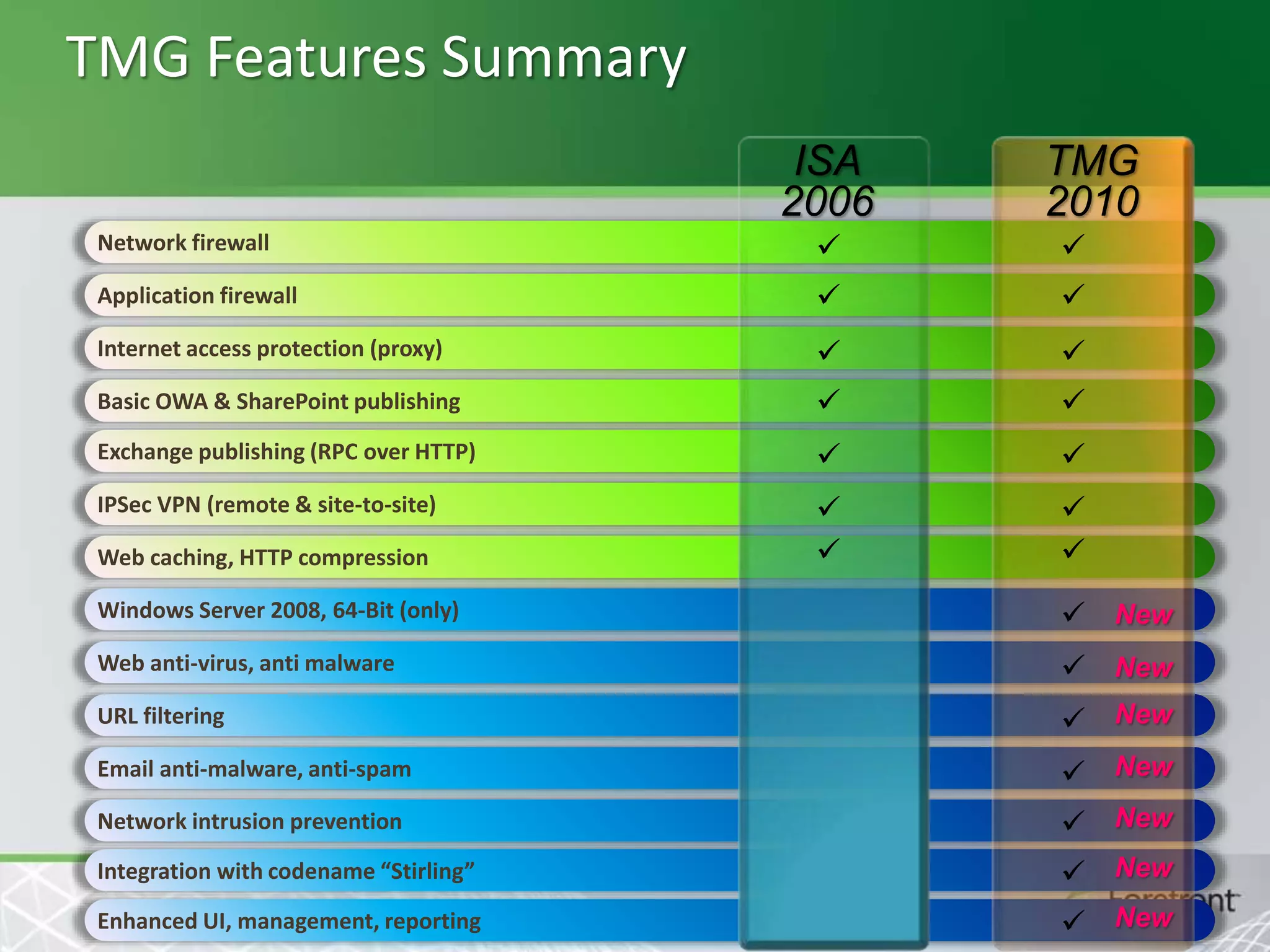
TMG Features Summary
ISA
2006

TMG
2010

Network firewall





Application firewall





Internet access protection (proxy)





Basic OWA & SharePoint publishing





Exchange publishing (RPC over HTTP)





IPSec VPN (remote & site-to-site)







Web caching, HTTP compression
Windows Server 2008, 64-Bit (only)

 New

Web anti-virus, anti malware

 New

URL filtering

 New

Email anti-malware, anti-spam

 New

Network intrusion prevention

 New

Integration with codename “Stirling”

 New

Enhanced UI, management, reporting

 New
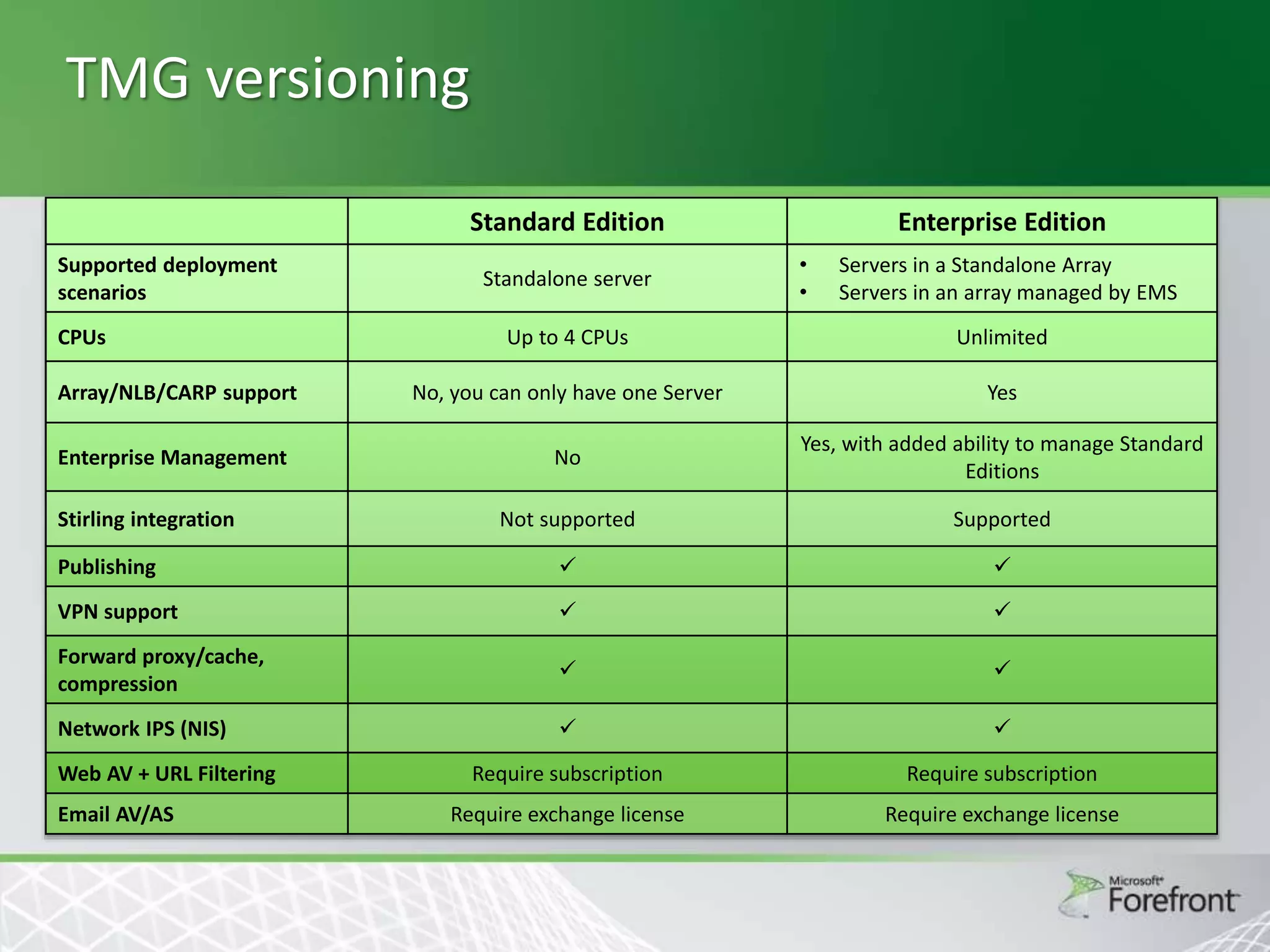
TMG versioning
Standard Edition
Supported deployment
scenarios
CPUs

Standalone server

Enterprise Edition
•
•

Servers in a Standalone Array
Servers in an array managed by EMS

Up to 4 CPUs

Unlimited

Array/NLB/CARP support

No, you can only have one Server

Yes

Enterprise Management

No

Yes, with added ability to manage Standard
Editions

Not supported

Supported

Publishing





VPN support





Forward proxy/cache,
compression





Network IPS (NIS)





Require subscription

Require subscription

Require exchange license

Require exchange license

Stirling integration

Web AV + URL Filtering
Email AV/AS
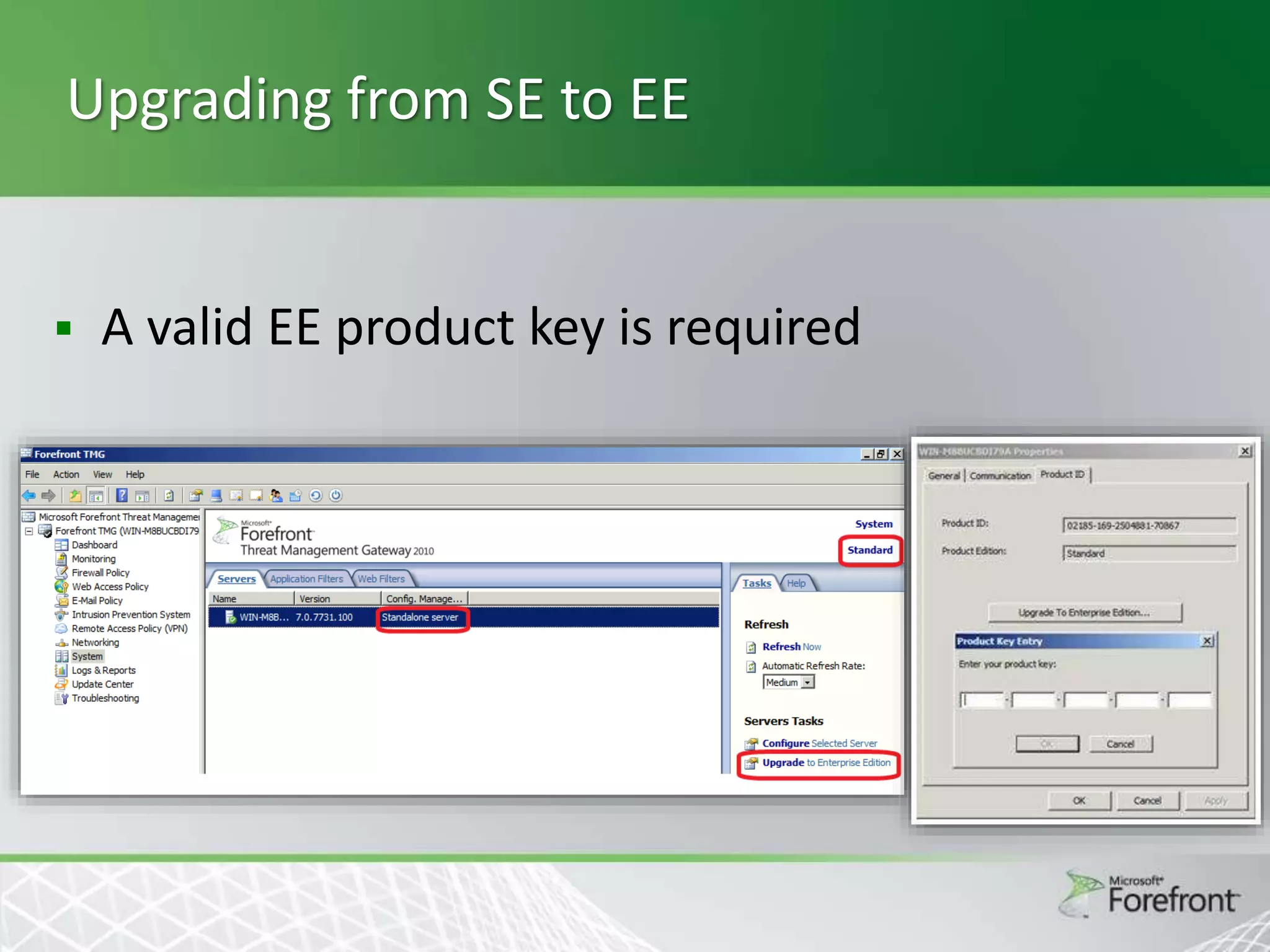
Upgrading from SE to EE



A valid EE product key is required
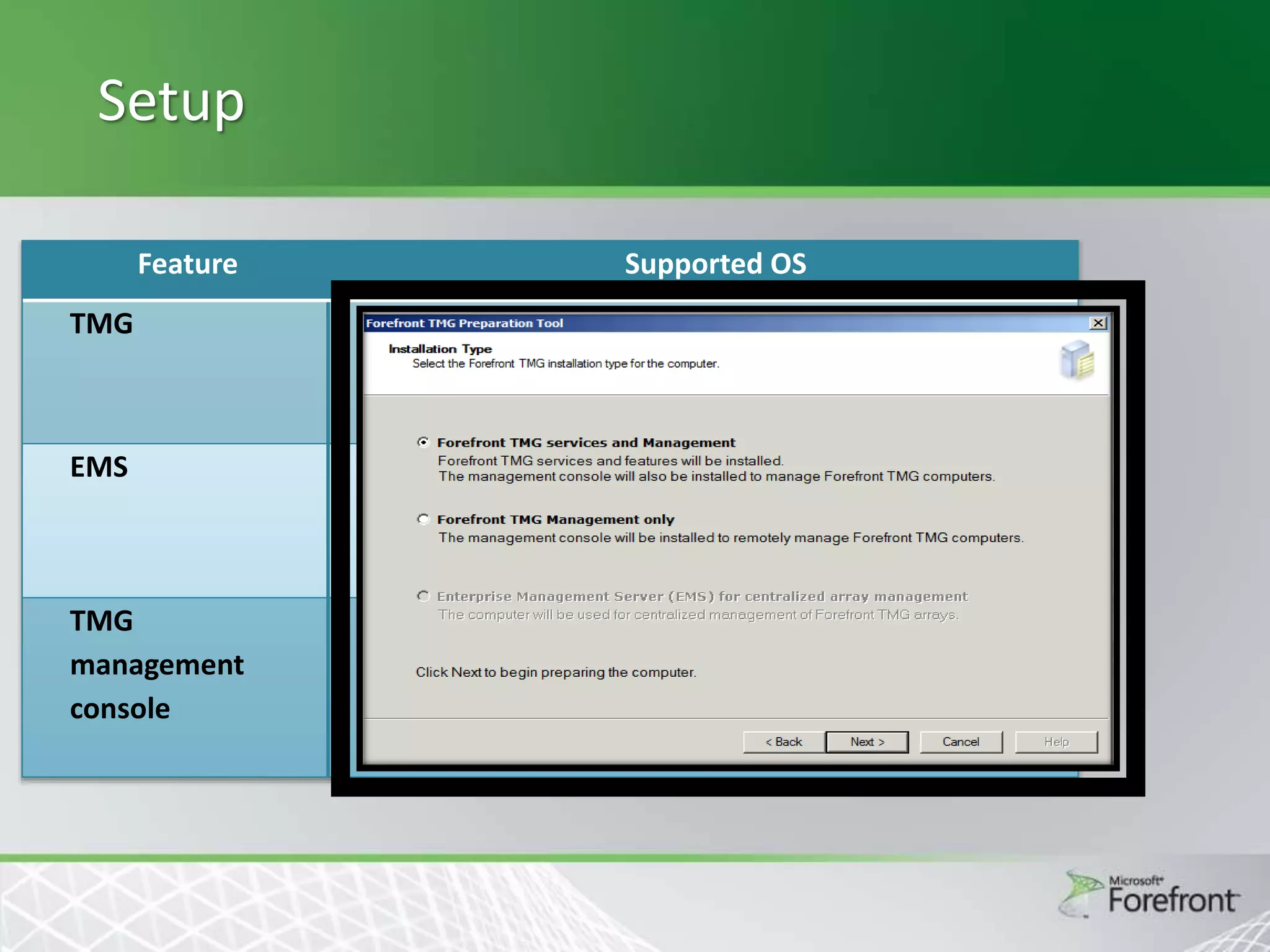
Setup
Feature
TMG

Supported OS
Windows Server 2008 SP2 x64
Windows Server 2008 R2 x64

EMS

Windows Server 2008 SP2 x64
Windows Server 2008 R2 x64

TMG
management
console

Windows Server 2008 R2-SP2 x32, x64

Windows Vista SP1 x32, x64
Windows 7 x32, x64
Threat Management Gateway 2010

URL Filtering
URL-F Introduction


URL Filtering allows controlling end-user access to Web
sites and protecting the organization by denying access
to known malicious sites and to sites displaying
inappropriate or pornographic materials, based on
predefined URL categories



The typical use case for this feature includes:





Enhancing your security.
Lowering liability risks.
Improving the productivity of your organization.
Saving network bandwidth.
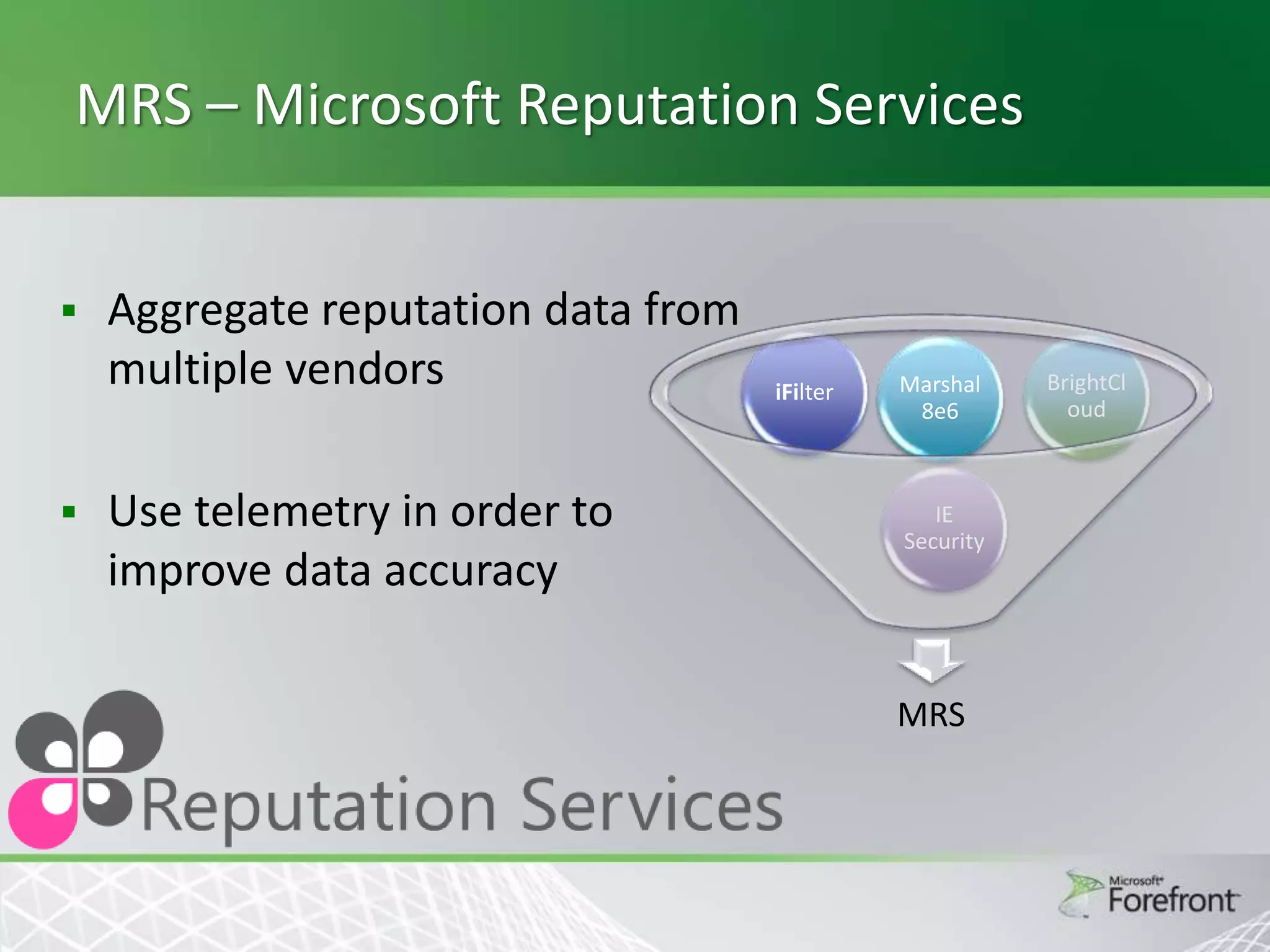
MRS – Microsoft Reputation Services




Aggregate reputation data from
multiple vendors
Use telemetry in order to
improve data accuracy

iFilter

Marshal
8e6

IE
Security

MRS

BrightCl
oud
URL Filtering


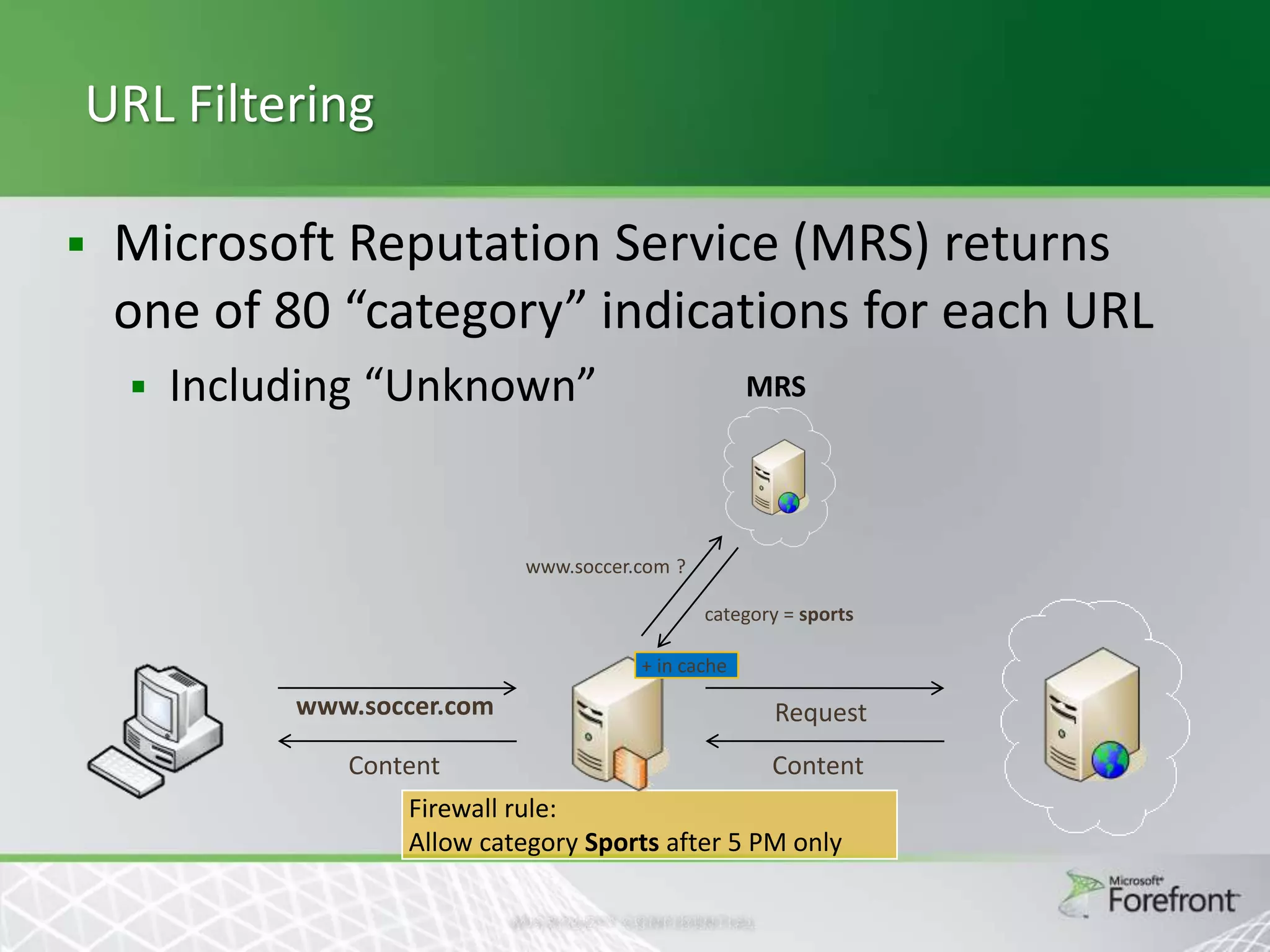
Microsoft Reputation Service (MRS) returns
one of 80 “category” indications for each URL


Including “Unknown”

MRS

www.soccer.com ?
category = sports
+ in cache

www.soccer.com

Request

Content

Content

Firewall rule:
Allow category Sports after 5 PM only
URL category usage


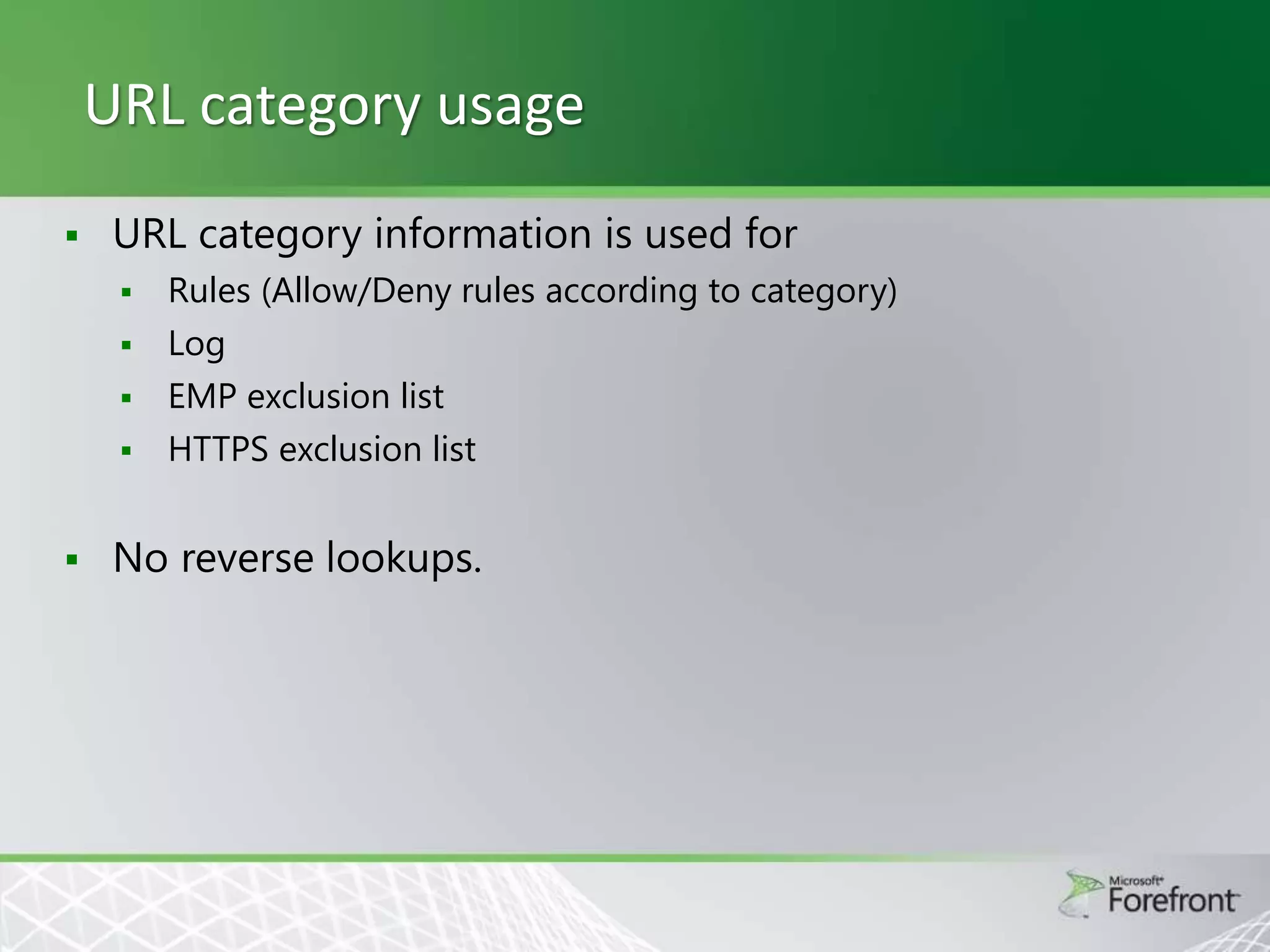
URL category information is used for







Rules (Allow/Deny rules according to category)
Log
EMP exclusion list
HTTPS exclusion list

No reverse lookups.
Administration


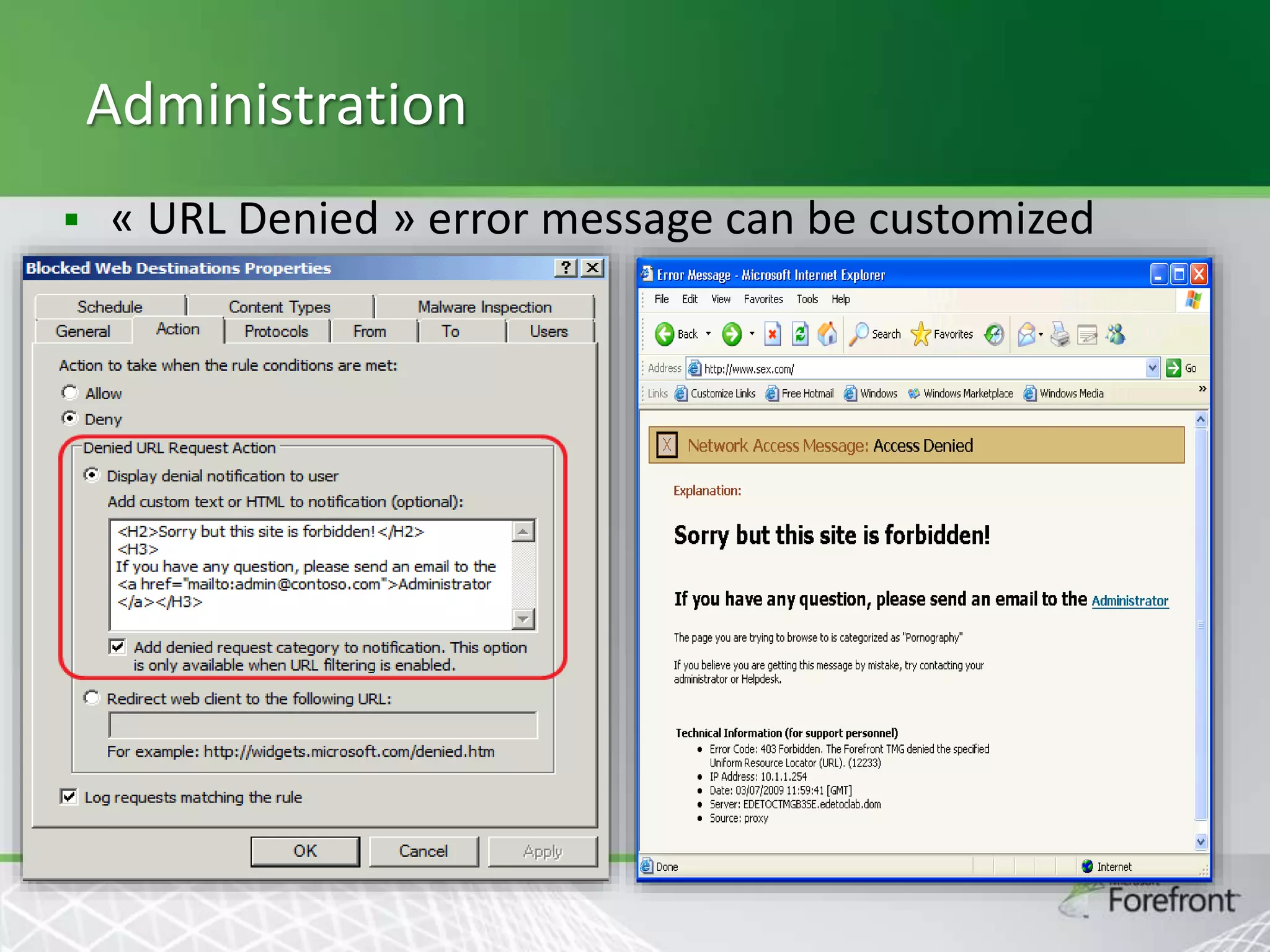
« URL Denied » error message can be customized
Category query tool


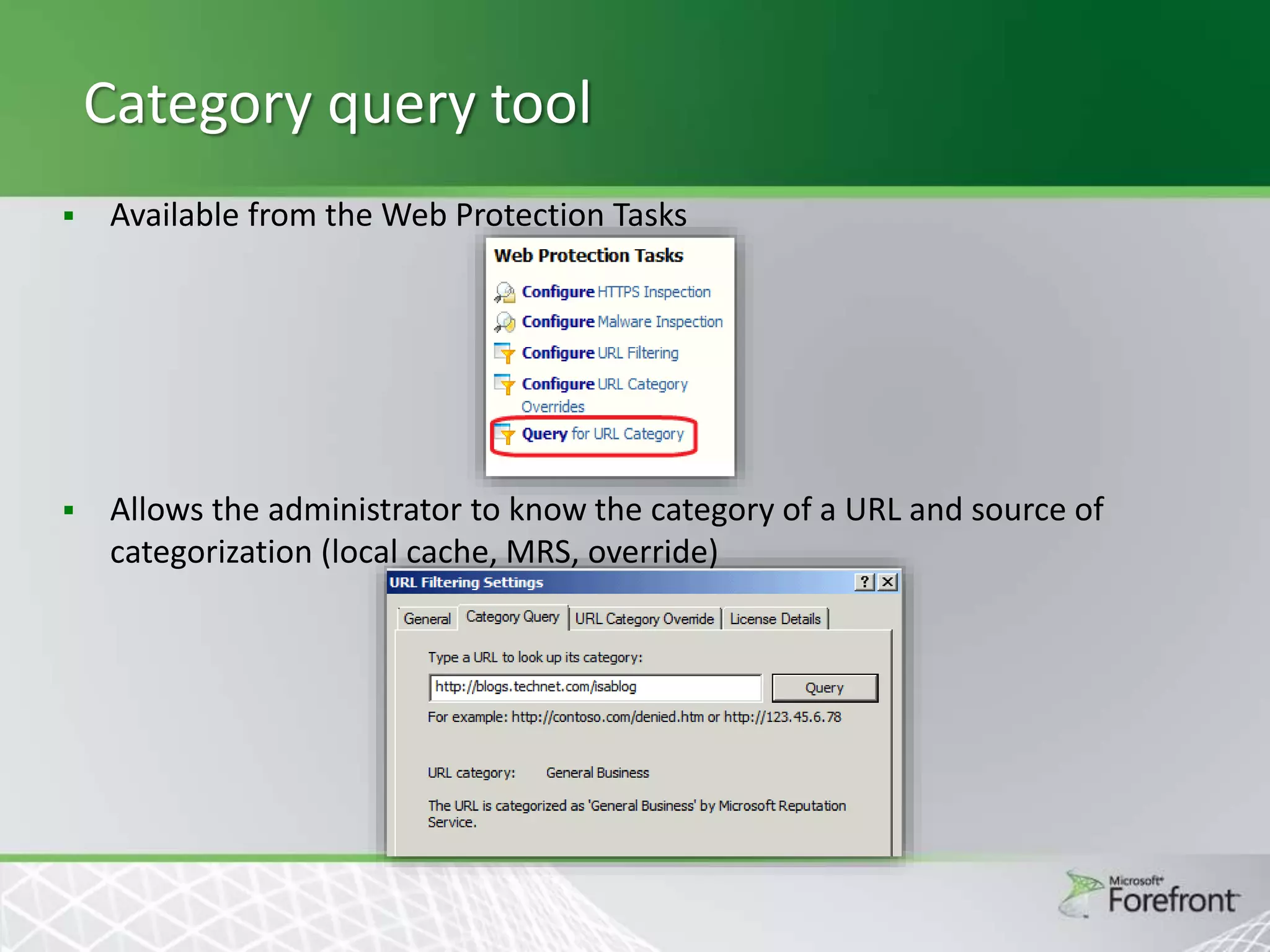
Available from the Web Protection Tasks



Allows the administrator to know the category of a URL and source of
categorization (local cache, MRS, override)
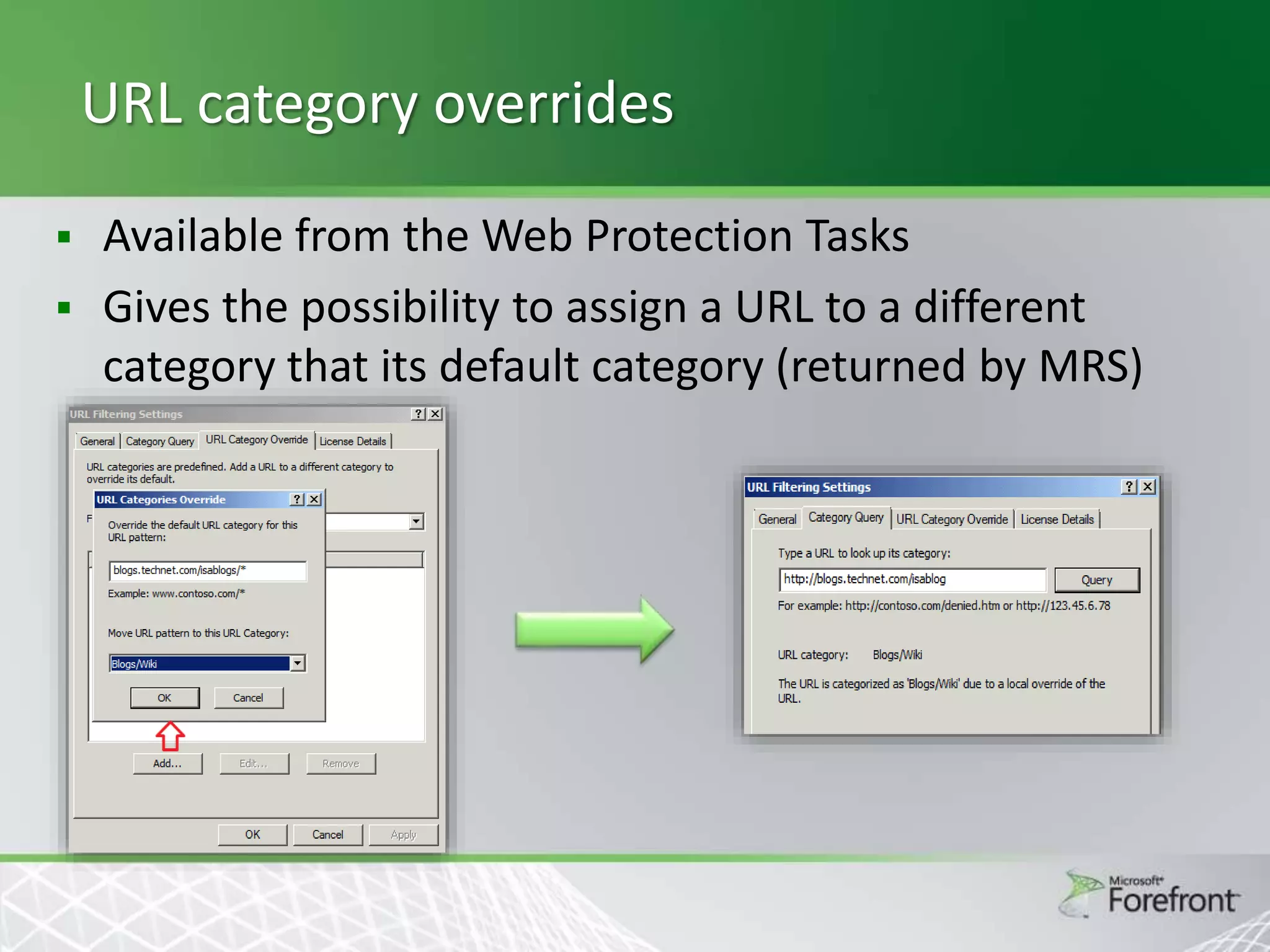
URL category overrides
Available from the Web Protection Tasks
 Gives the possibility to assign a URL to a different
category that its default category (returned by MRS)

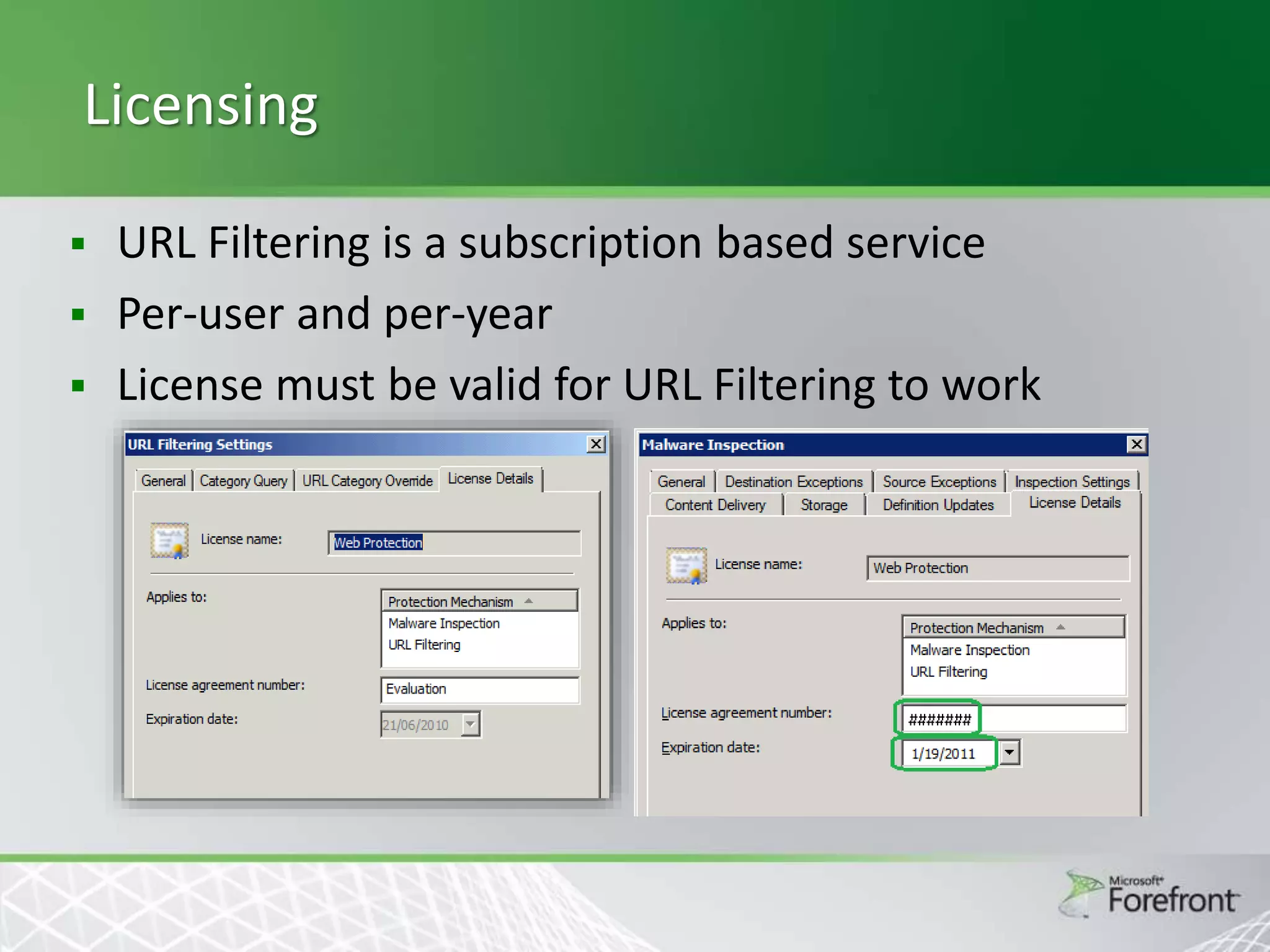
Licensing
URL Filtering is a subscription based service
 Per-user and per-year
 License must be valid for URL Filtering to work

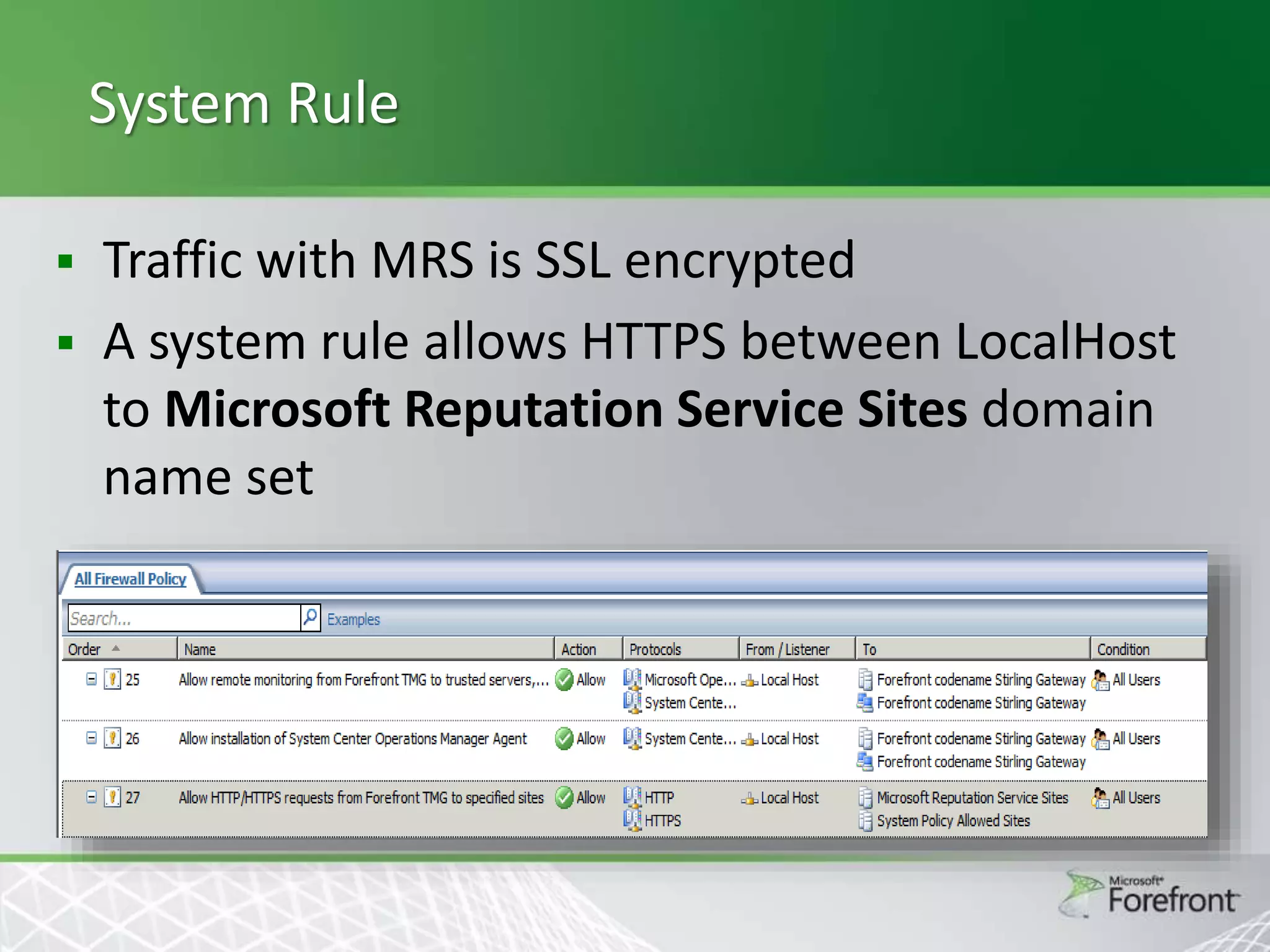
System Rule




Traffic with MRS is SSL encrypted
A system rule allows HTTPS between LocalHost
to Microsoft Reputation Service Sites domain
name set
URL Filtering
Threat Management Gateway 2010

Edge Malware Protection


Inspect web traffic on the edge to prevent any malware
from infecting machines inside the organization



Easier to keep the edge updated with malware signatures
rather then individual client machines



Unmanaged machines that might not have host AV up to
date are also protected



Malware activity detected on the edge can be easily
monitored thanks to logging and reporting
Scenario




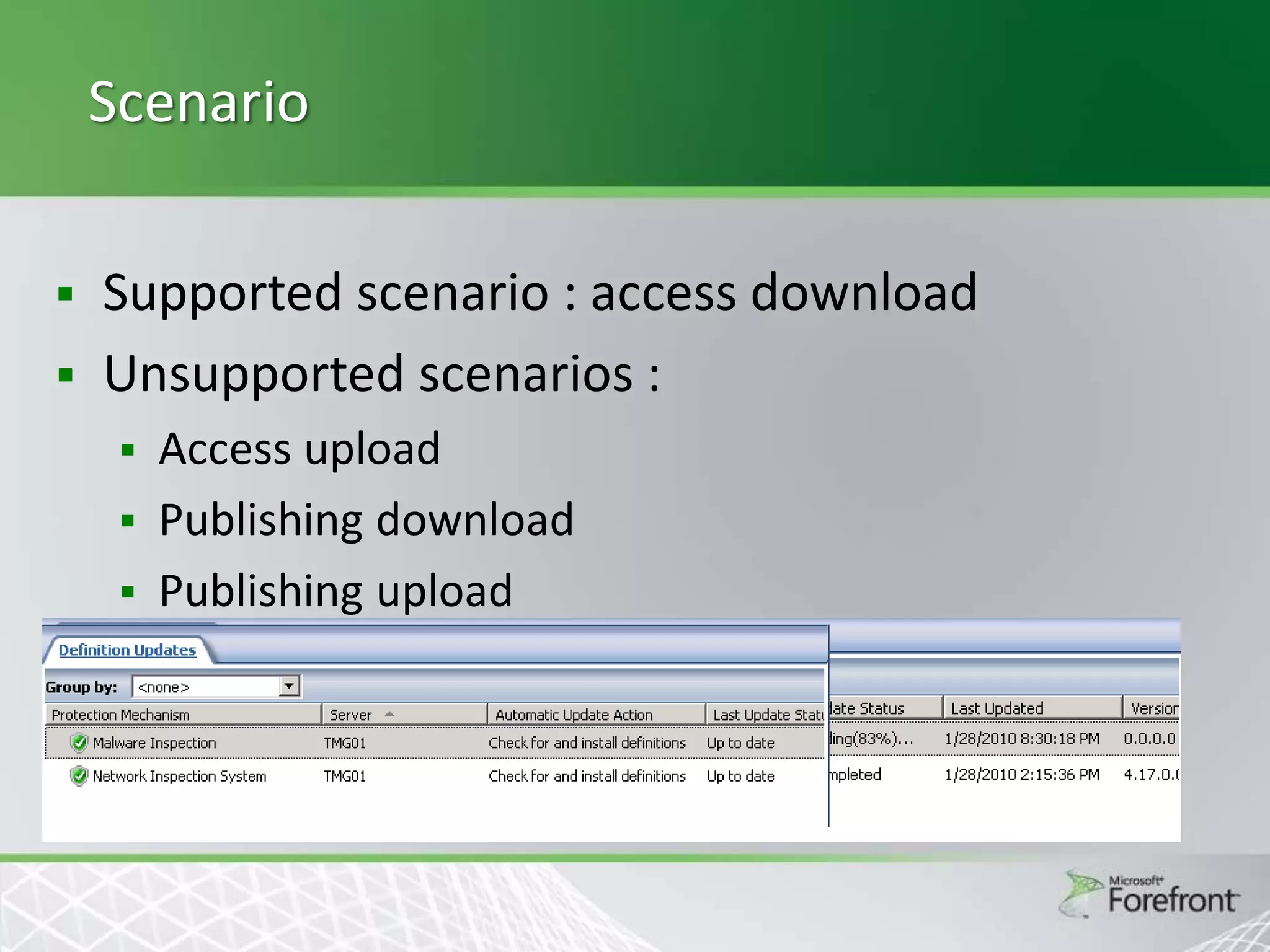
Supported scenario : access download
Unsupported scenarios :
Access upload
 Publishing download
 Publishing upload

Client Comforting







Accumulating an entire file and scanning it may take a significant amount of
time
During this period of time, the client doesn't receive any data and as a result
a software timeout can occur or the user can even cancel the download.
“Client comforting” defines a set of methods that guaranty a good user’s
experience while content is inspected on the Edge
Comforting methods:
 Delayed Download
 HTML Progress Page
 Trickling:
 Standard
 Fast
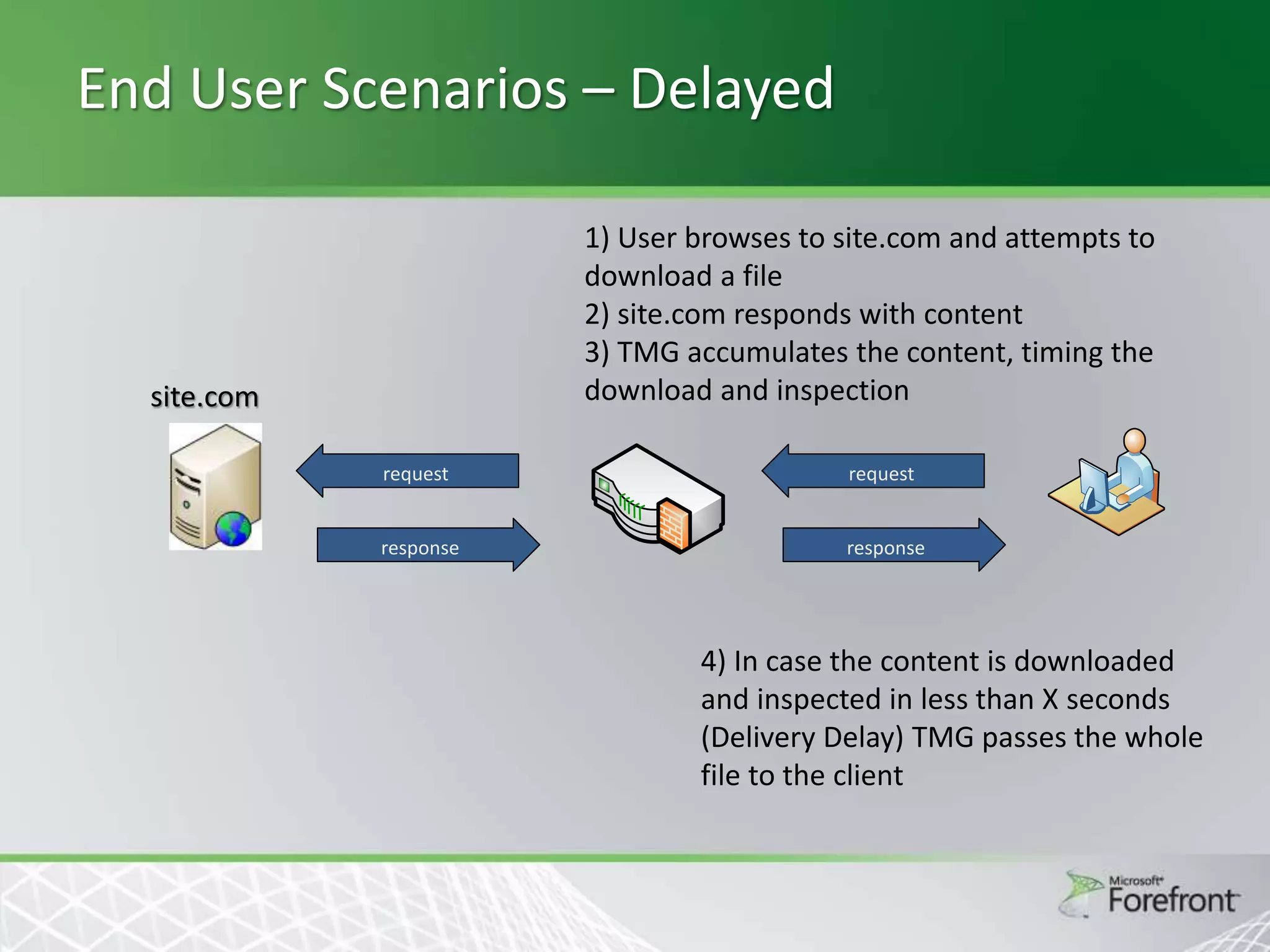
End User Scenarios – Delayed
1) User browses to site.com and attempts to
download a file
2) site.com responds with content
3) TMG accumulates the content, timing the
download and inspection

site.com
request

request

response

response

4) In case the content is downloaded
and inspected in less than X seconds
(Delivery Delay) TMG passes the whole
file to the client
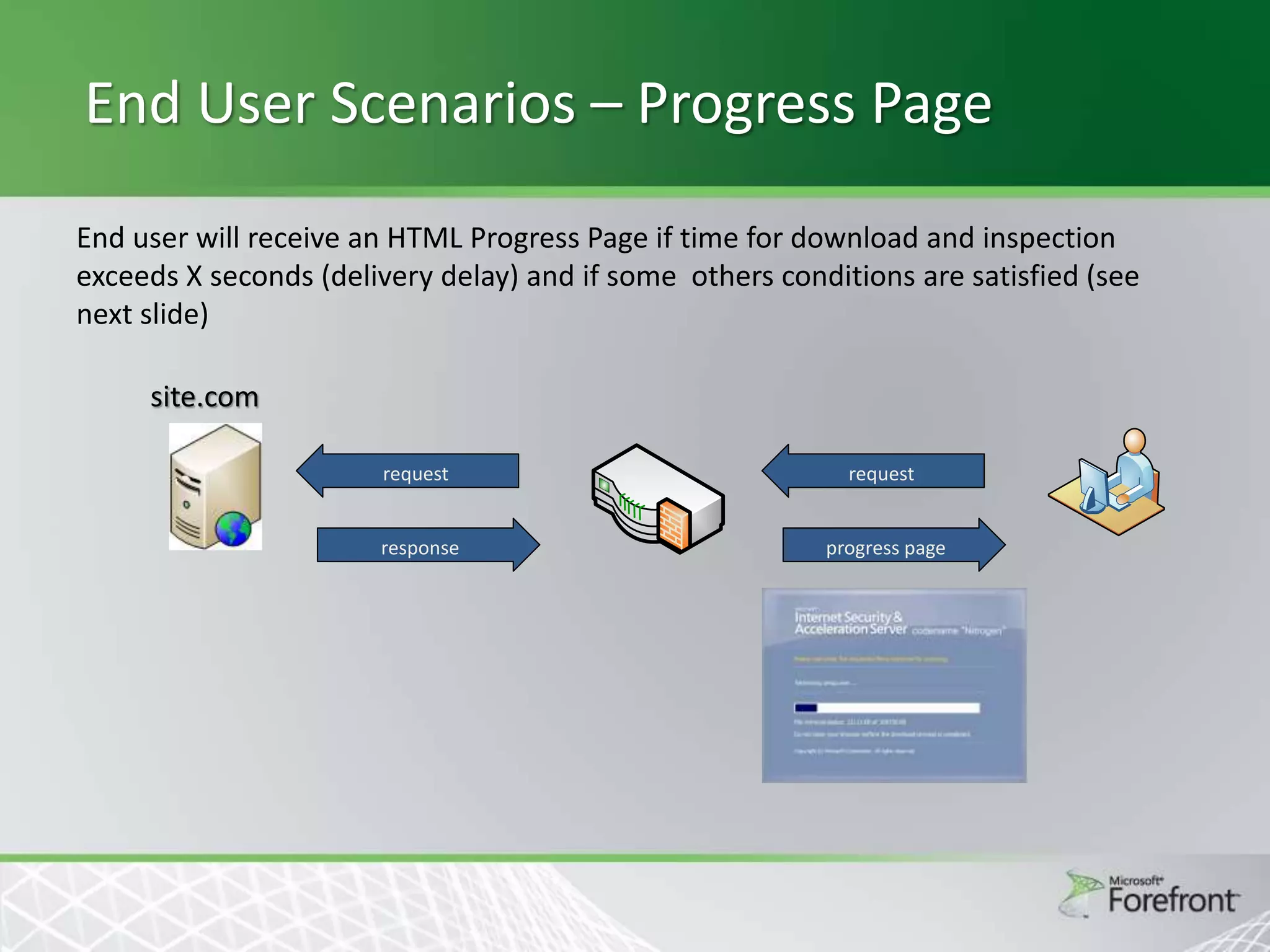
End User Scenarios – Progress Page
End user will receive an HTML Progress Page if time for download and inspection
exceeds X seconds (delivery delay) and if some others conditions are satisfied (see
next slide)
site.com
request

request

response

progress page
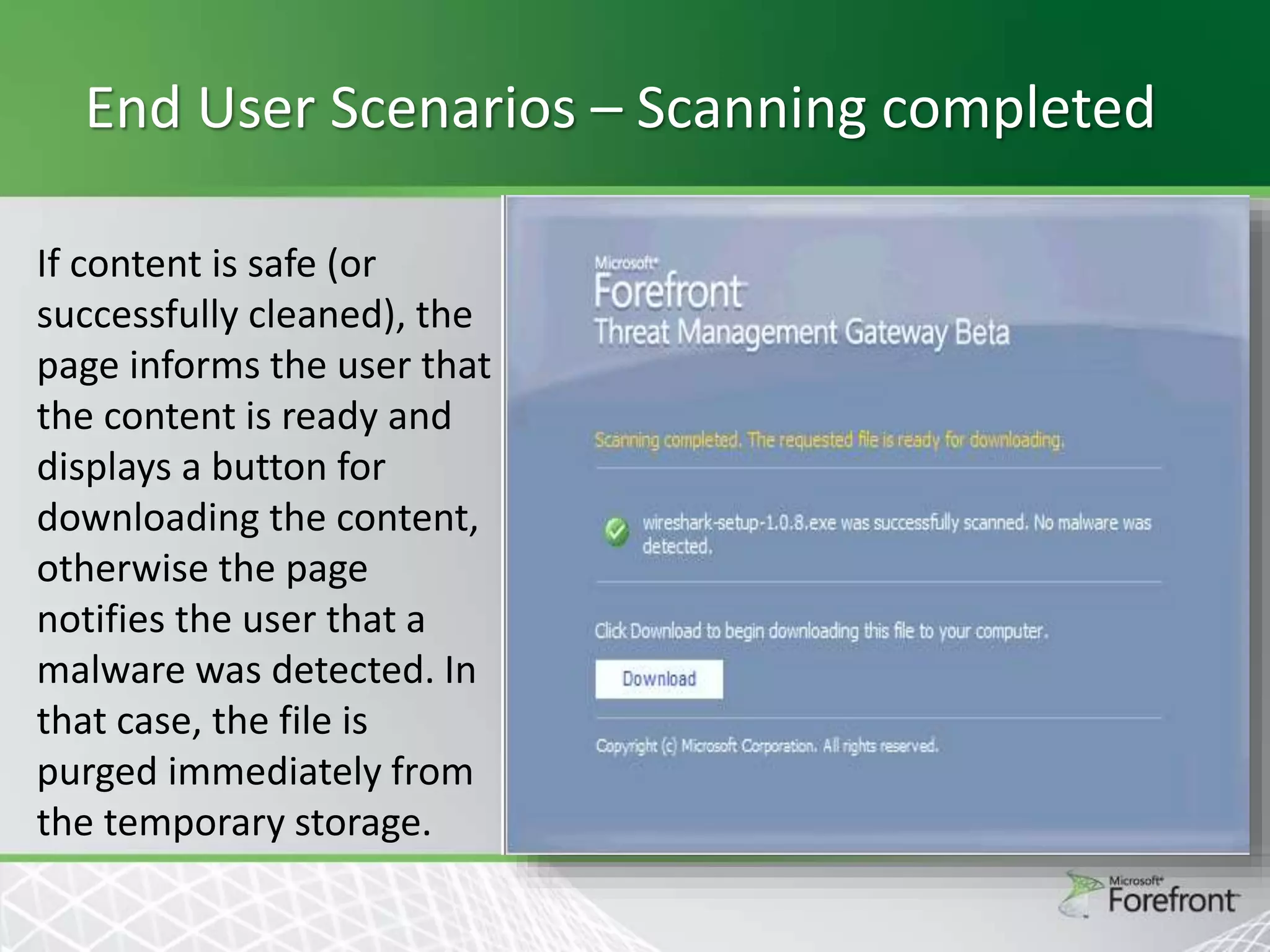
End User Scenarios – Scanning completed
If content is safe (or
successfully cleaned), the
page informs the user that
the content is ready and
displays a button for
downloading the content,
otherwise the page
notifies the user that a
malware was detected. In
that case, the file is
purged immediately from
the temporary storage.
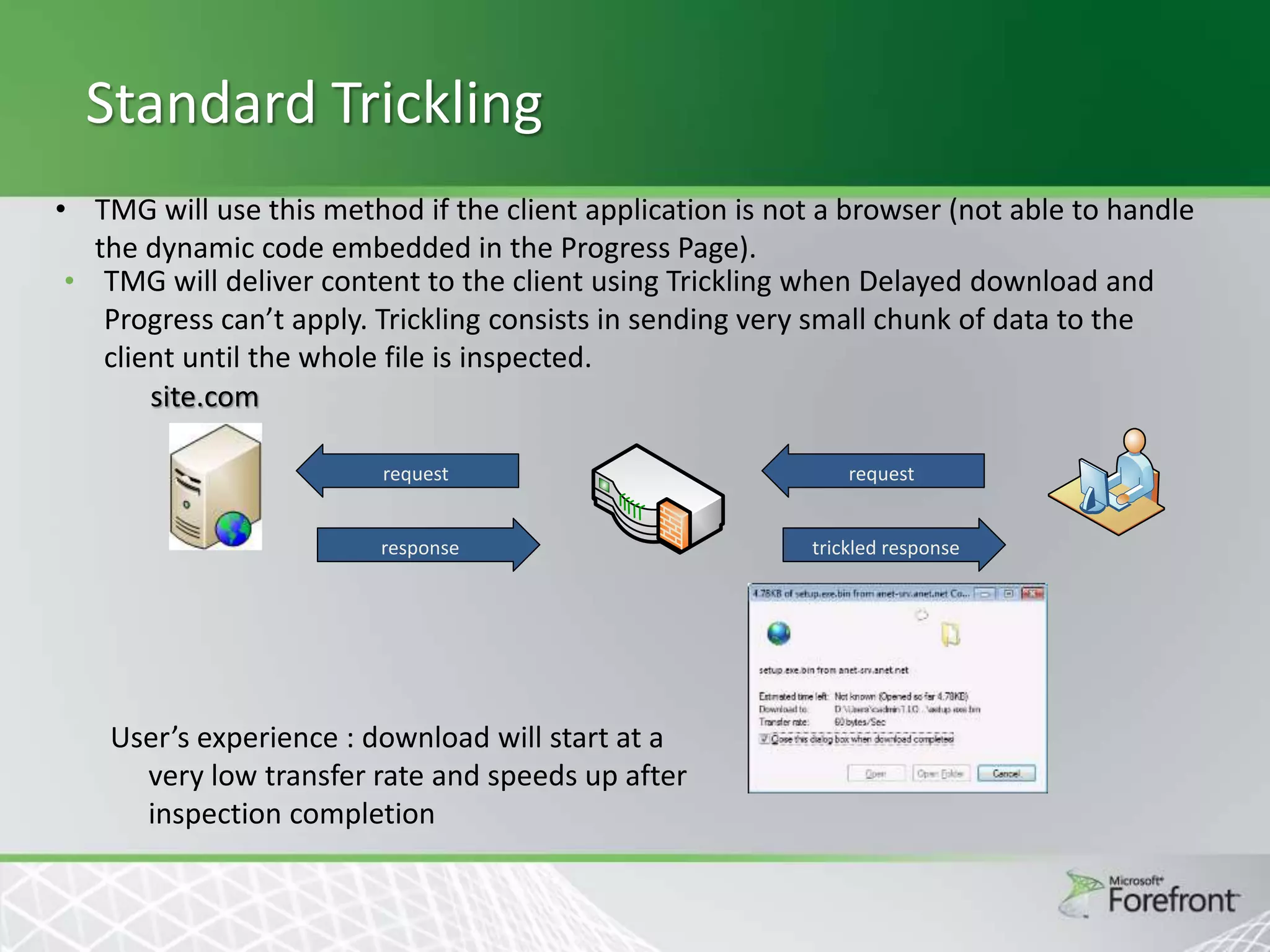
Standard Trickling
• TMG will use this method if the client application is not a browser (not able to handle
the dynamic code embedded in the Progress Page).
• TMG will deliver content to the client using Trickling when Delayed download and
Progress can’t apply. Trickling consists in sending very small chunk of data to the
client until the whole file is inspected.
site.com
request

request

response

trickled response

User’s experience : download will start at a
very low transfer rate and speeds up after
inspection completion
Fast Trickling
Similar to Standard Trickling
 Intended to be used for media files played by online
players (like YouTube)
 TMG delivers the data as fast as possible to the end
user to keep a good user experience.
 The tradeoff between user experience and inspection
performance is governed by the FastTricklingMode
COM setting




User experience degrades (but inspection performance
improves) when the EMP filter need more minimum bytes
to perform a partial inspection so increasing buffering on
TMG
Threat Management Gateway 2010

HTTPS Inspections
HTTPS Inspection
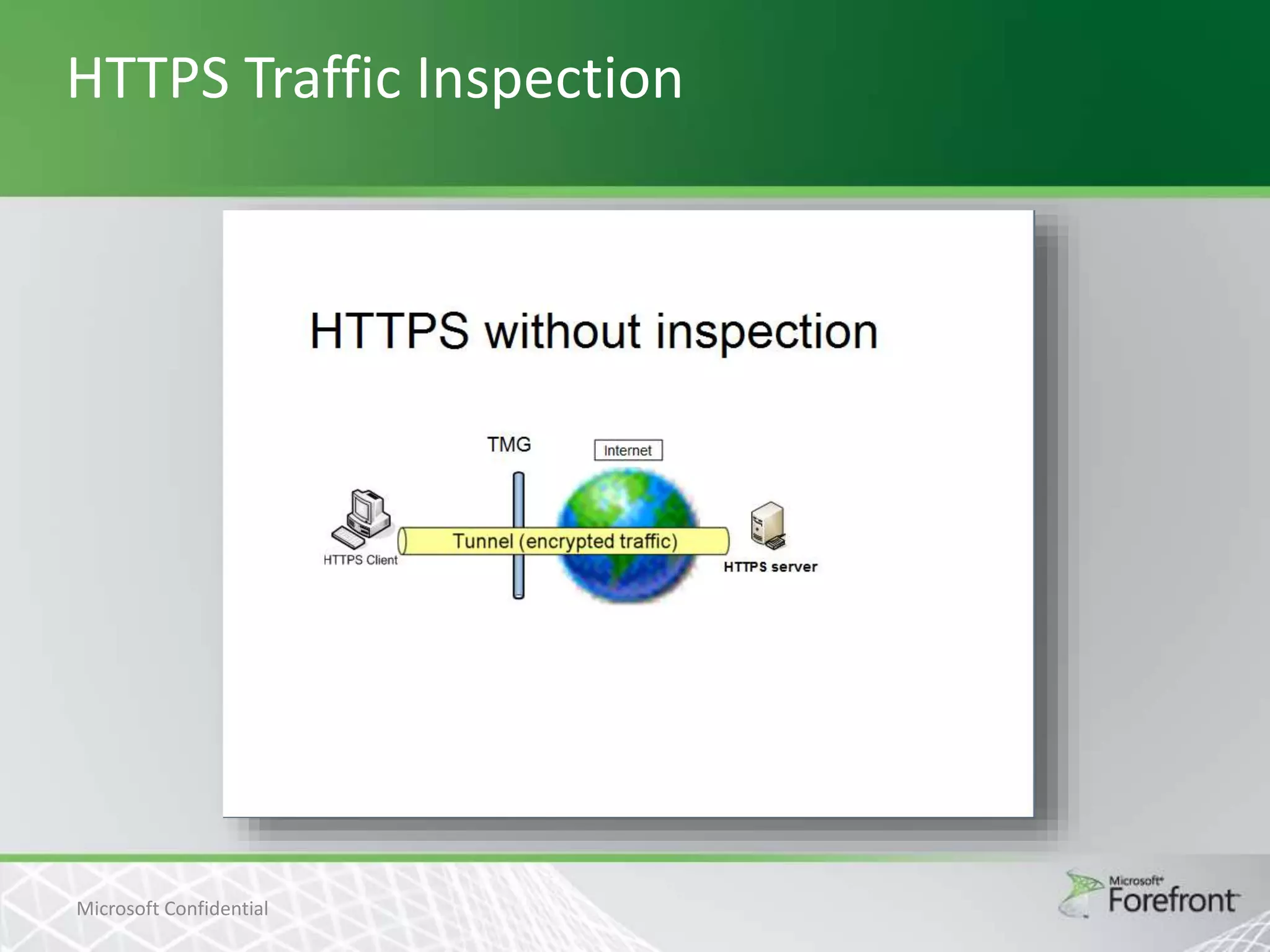
Today more and more web traffic is https. Some
of this traffic is legitimate; some isn’t and might
contain malicious traffic.
 We have lot of tools for http protection
(antimalware, NIS ..), but no for https protection
as this traffic is tunneled through the Proxy.
 This feature will enable the TMG administrator to
inspect outgoing https traffic on the edge and will
prevent the end user from downloading
malicious software (malware) that could infect
the entire organization.

HTTPS Traffic Inspection

Microsoft Confidential
Motivation


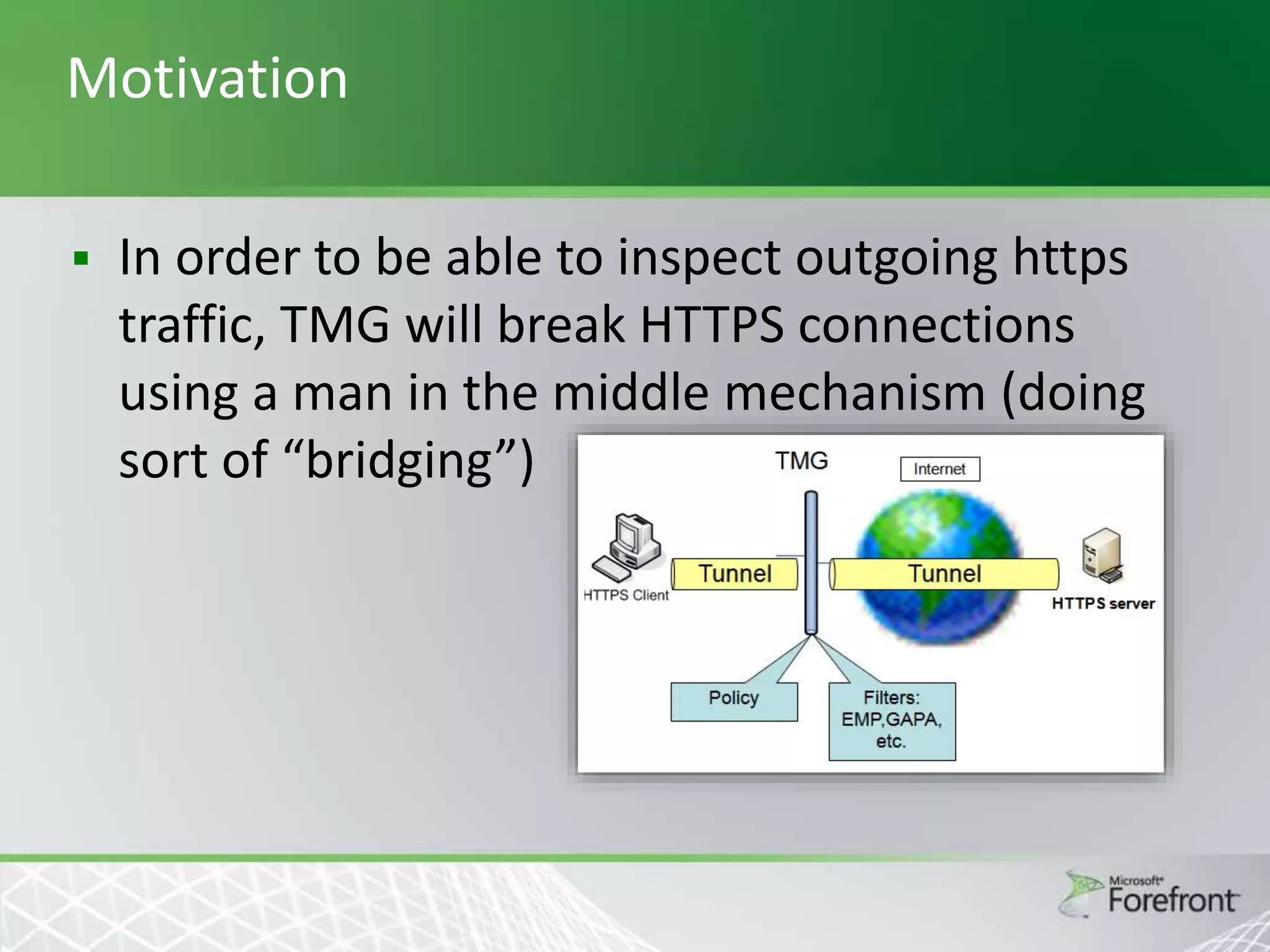
In order to be able to inspect outgoing https
traffic, TMG will break HTTPS connections
using a man in the middle mechanism (doing
sort of “bridging”)
HTTPS Inspection
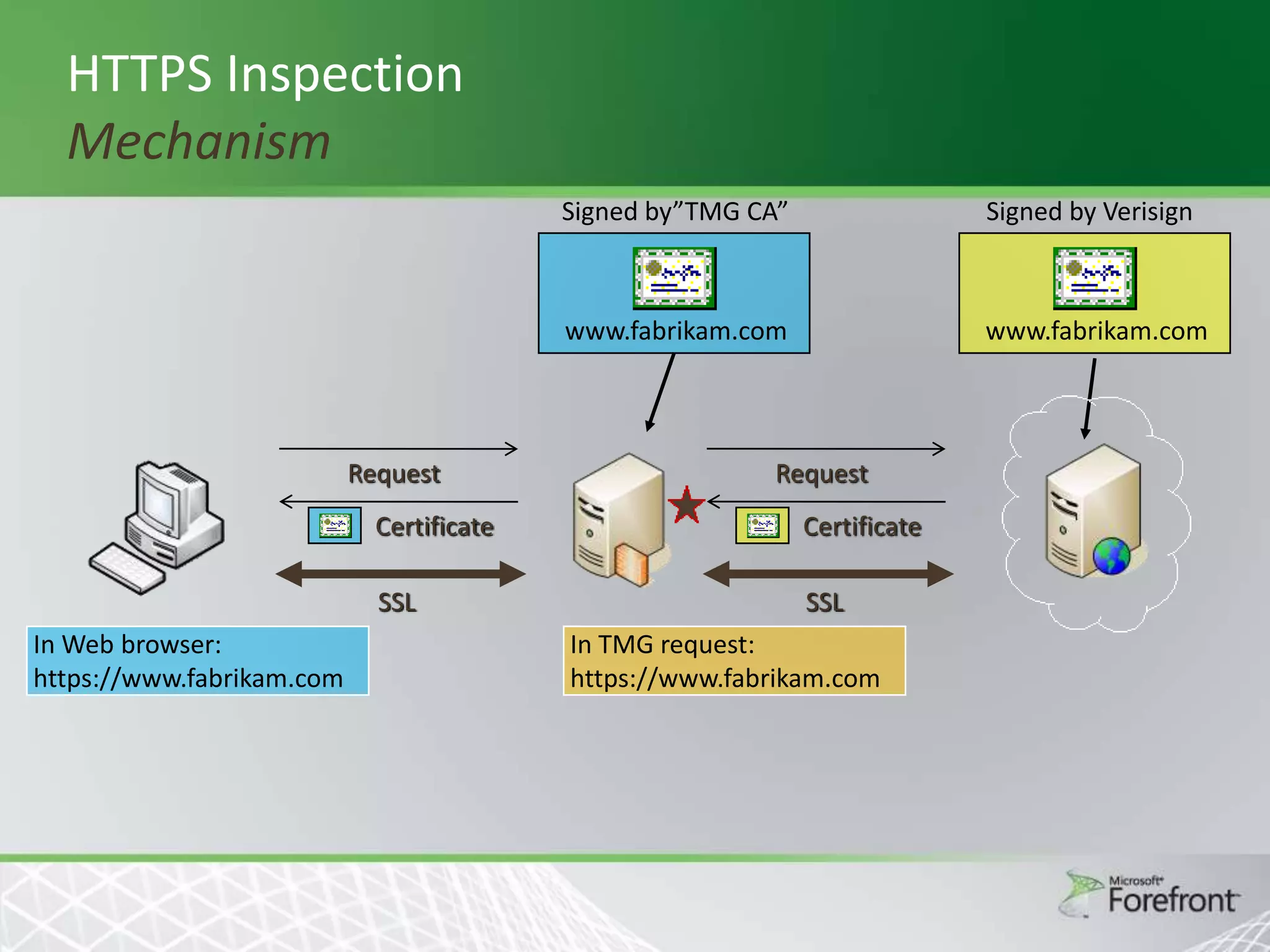
Mechanism
Signed by”TMG CA”

www.fabrikam.com

Request

Signed by Verisign

www.fabrikam.com

Request

Certificate

SSL
In Web browser:
https://www.fabrikam.com

Certificate

SSL
In TMG request:
https://www.fabrikam.com
TMG CA Certificate not installed on client
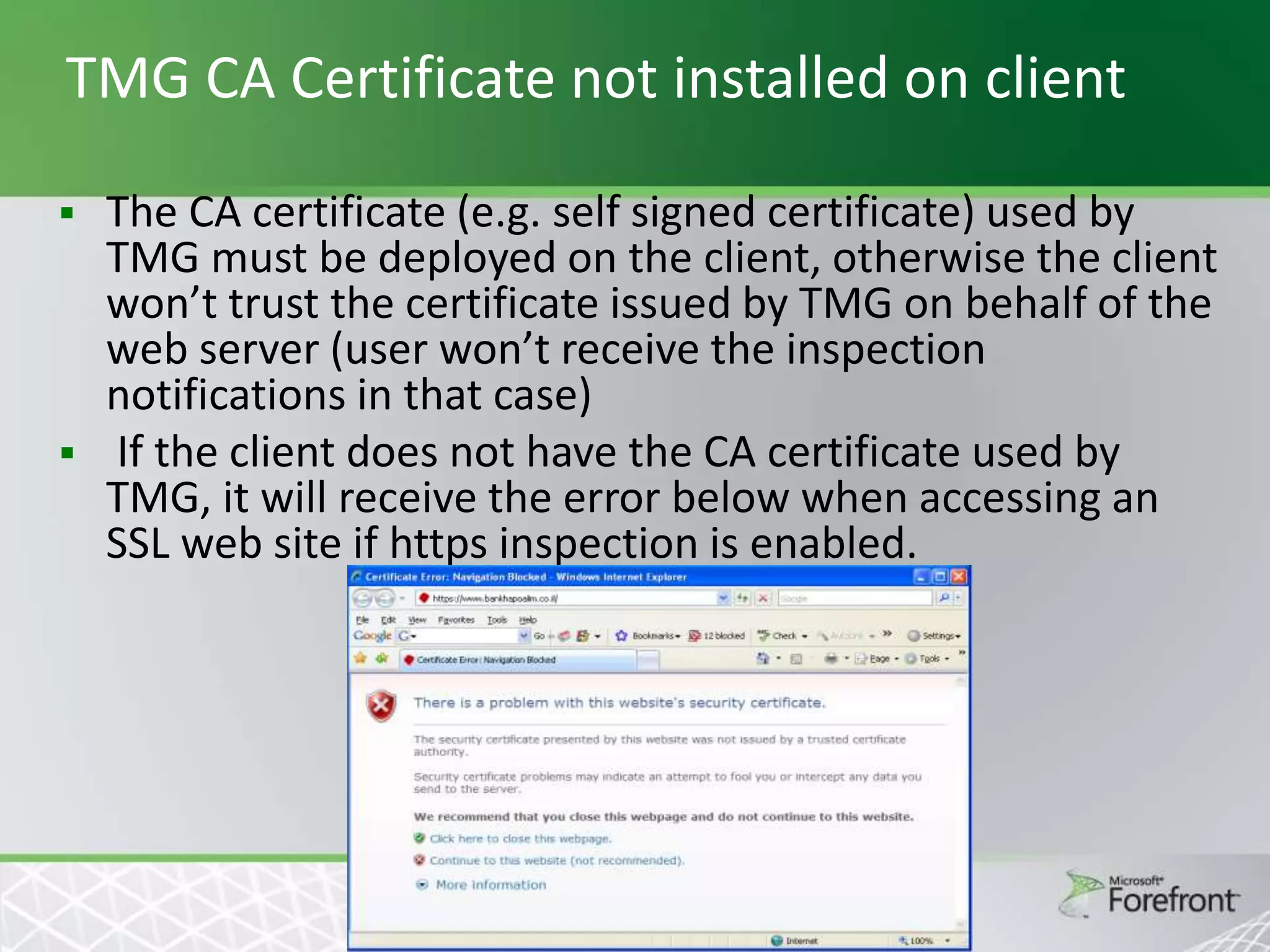
The CA certificate (e.g. self signed certificate) used by
TMG must be deployed on the client, otherwise the client
won’t trust the certificate issued by TMG on behalf of the
web server (user won’t receive the inspection
notifications in that case)
 If the client does not have the CA certificate used by
TMG, it will receive the error below when accessing an
SSL web site if https inspection is enabled.

CA Certificate generation and deployment


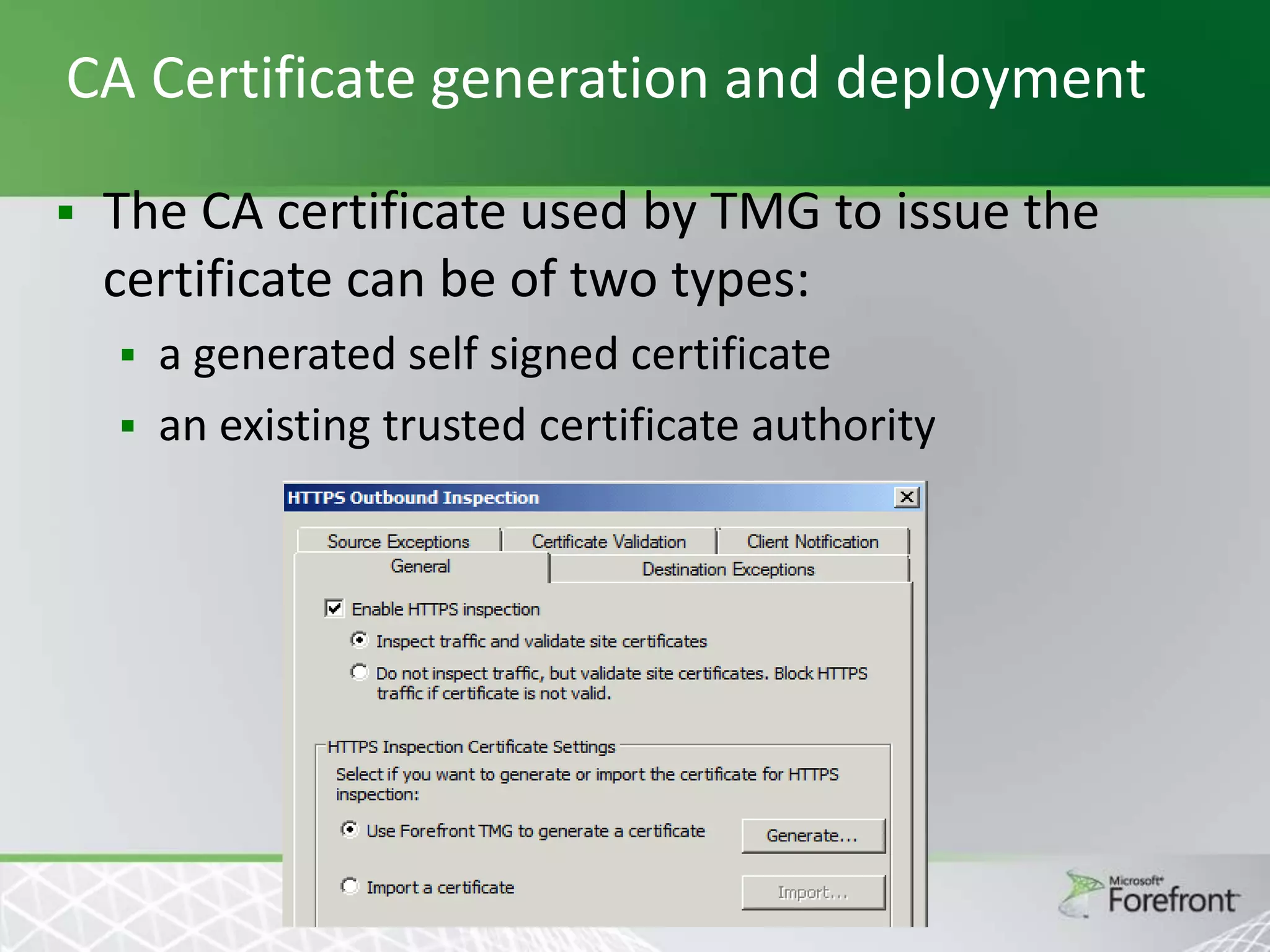
The CA certificate used by TMG to issue the
certificate can be of two types:
a generated self signed certificate
 an existing trusted certificate authority

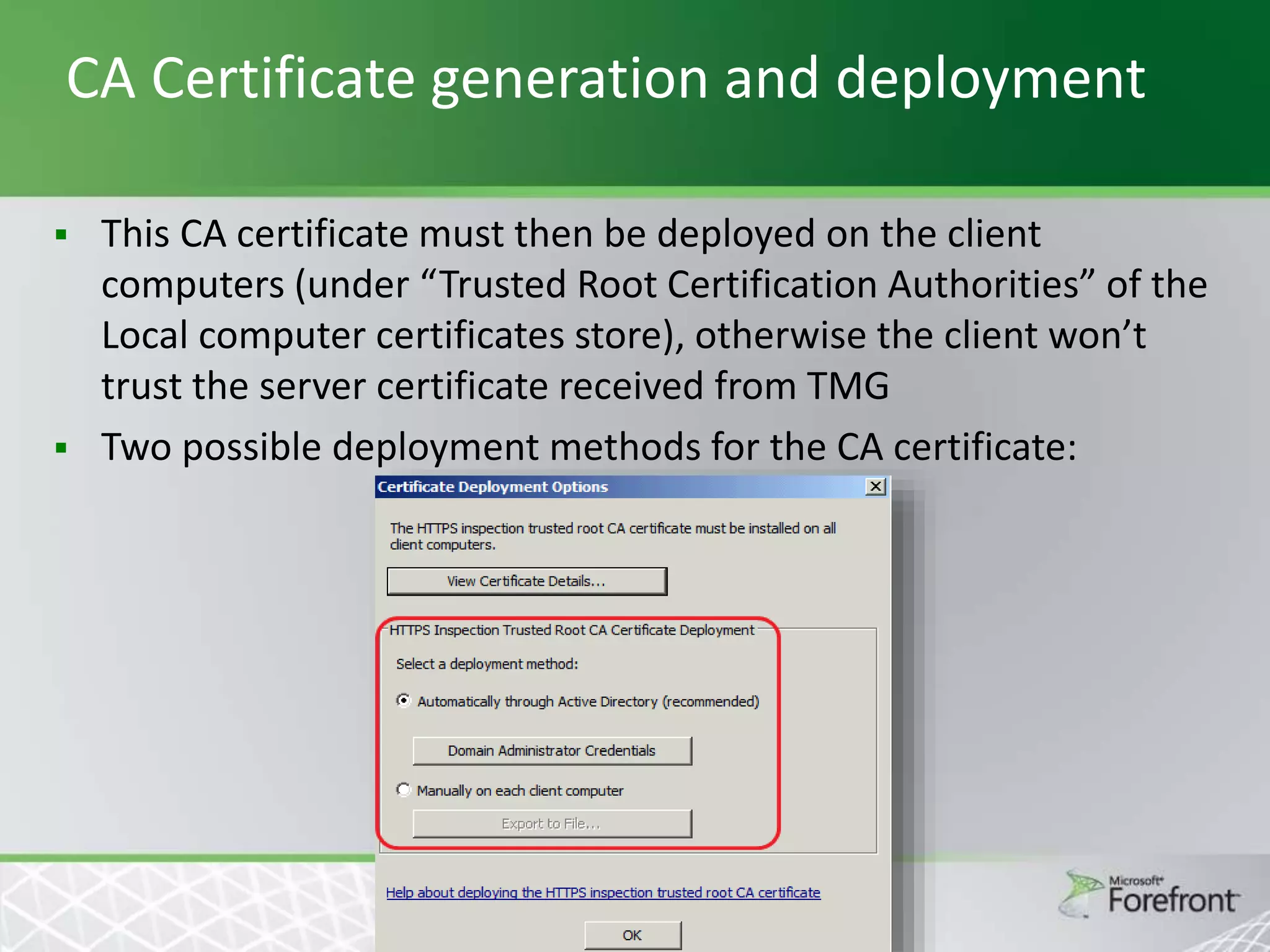
CA Certificate generation and deployment




This CA certificate must then be deployed on the client
computers (under “Trusted Root Certification Authorities” of the
Local computer certificates store), otherwise the client won’t
trust the server certificate received from TMG
Two possible deployment methods for the CA certificate:
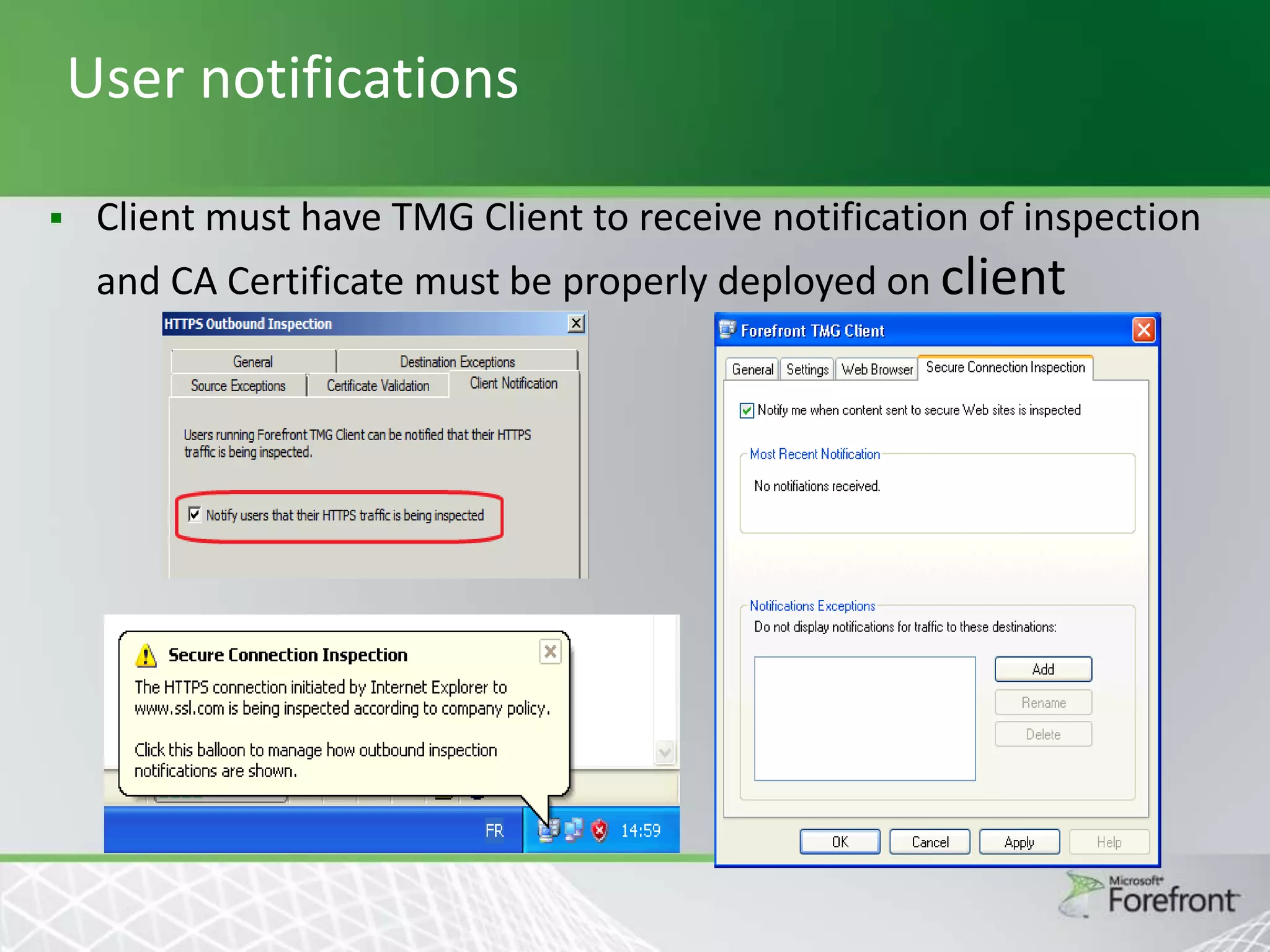
User notifications


Client must have TMG Client to receive notification of inspection

and CA Certificate must be properly deployed on client
HTTPS Inspections
Threat Management Gateway 2010

Network Inspection System (NIS)
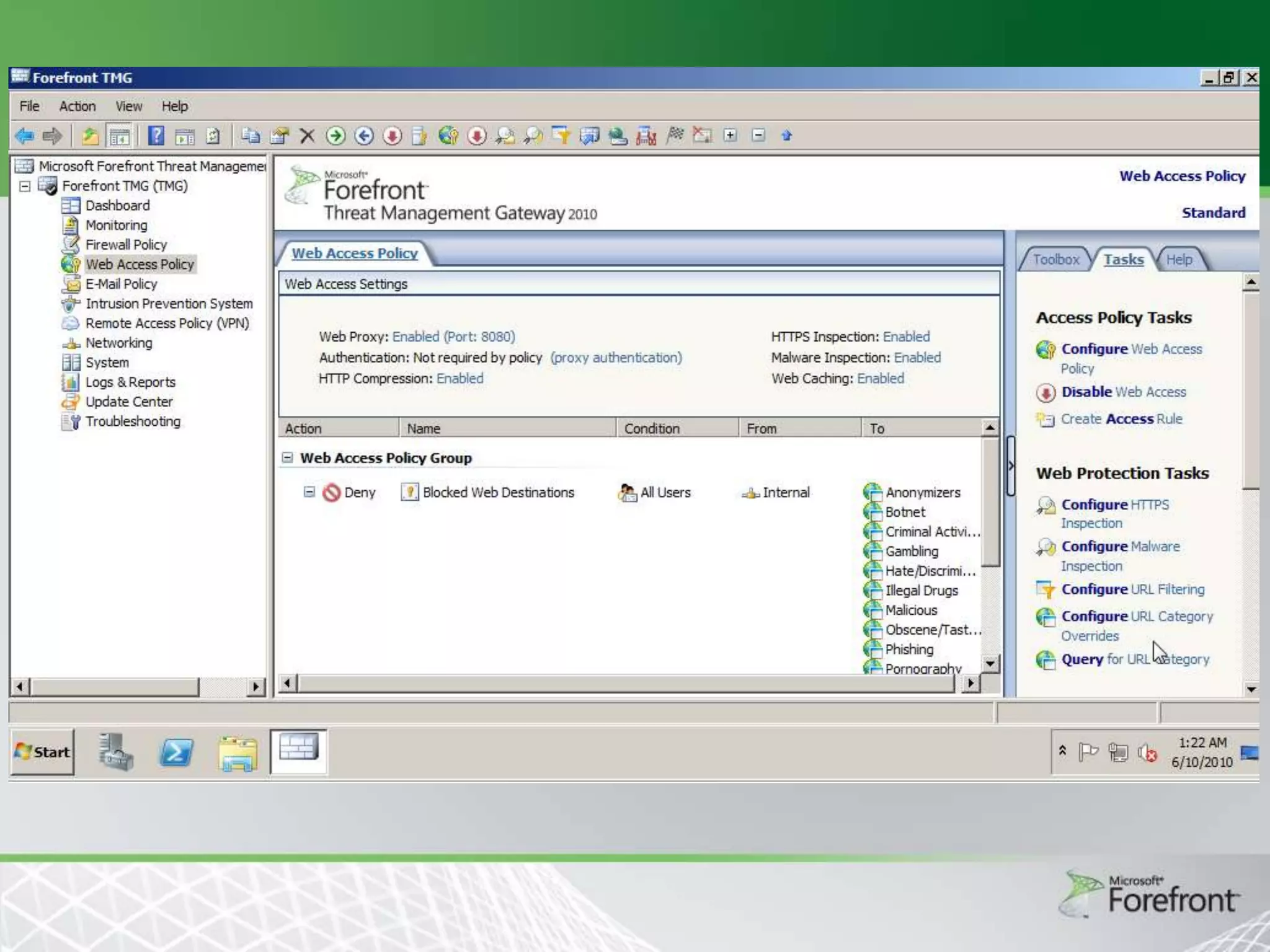
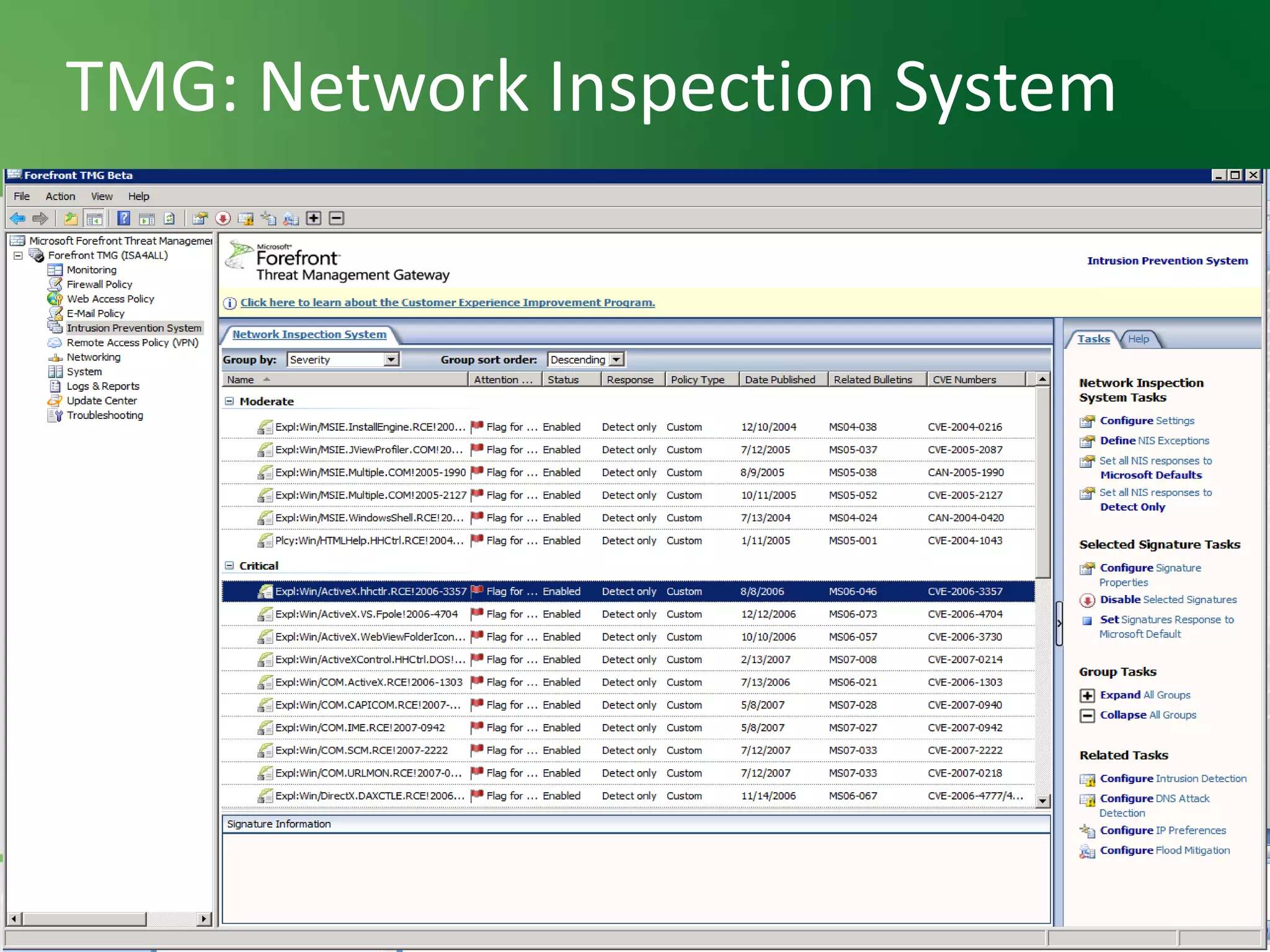
Intrusion Prevention System

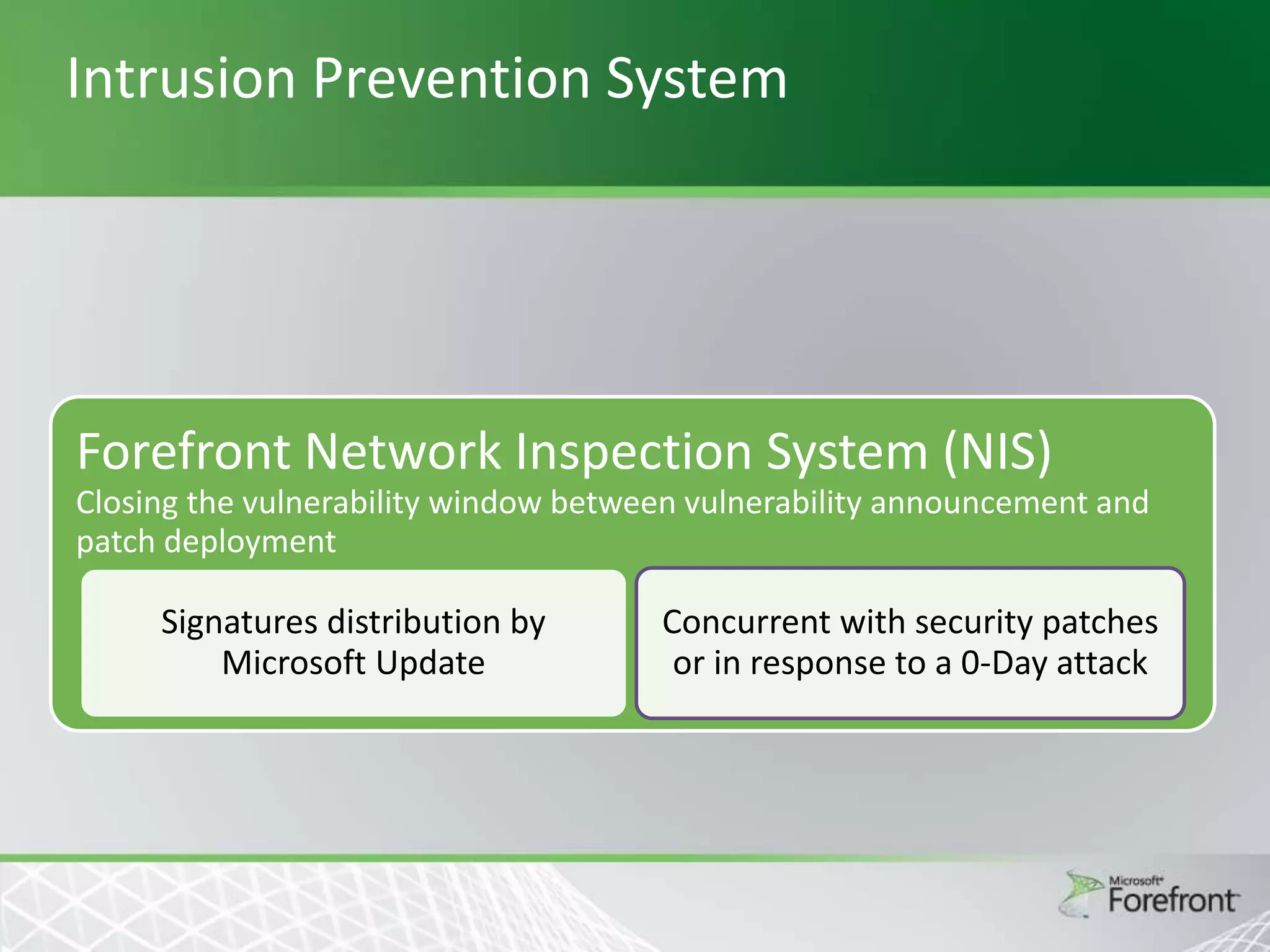
Forefront Network Inspection System (NIS)
Closing the vulnerability window between vulnerability announcement and
patch deployment

Signatures distribution by
Microsoft Update

Concurrent with security patches
or in response to a 0-Day attack
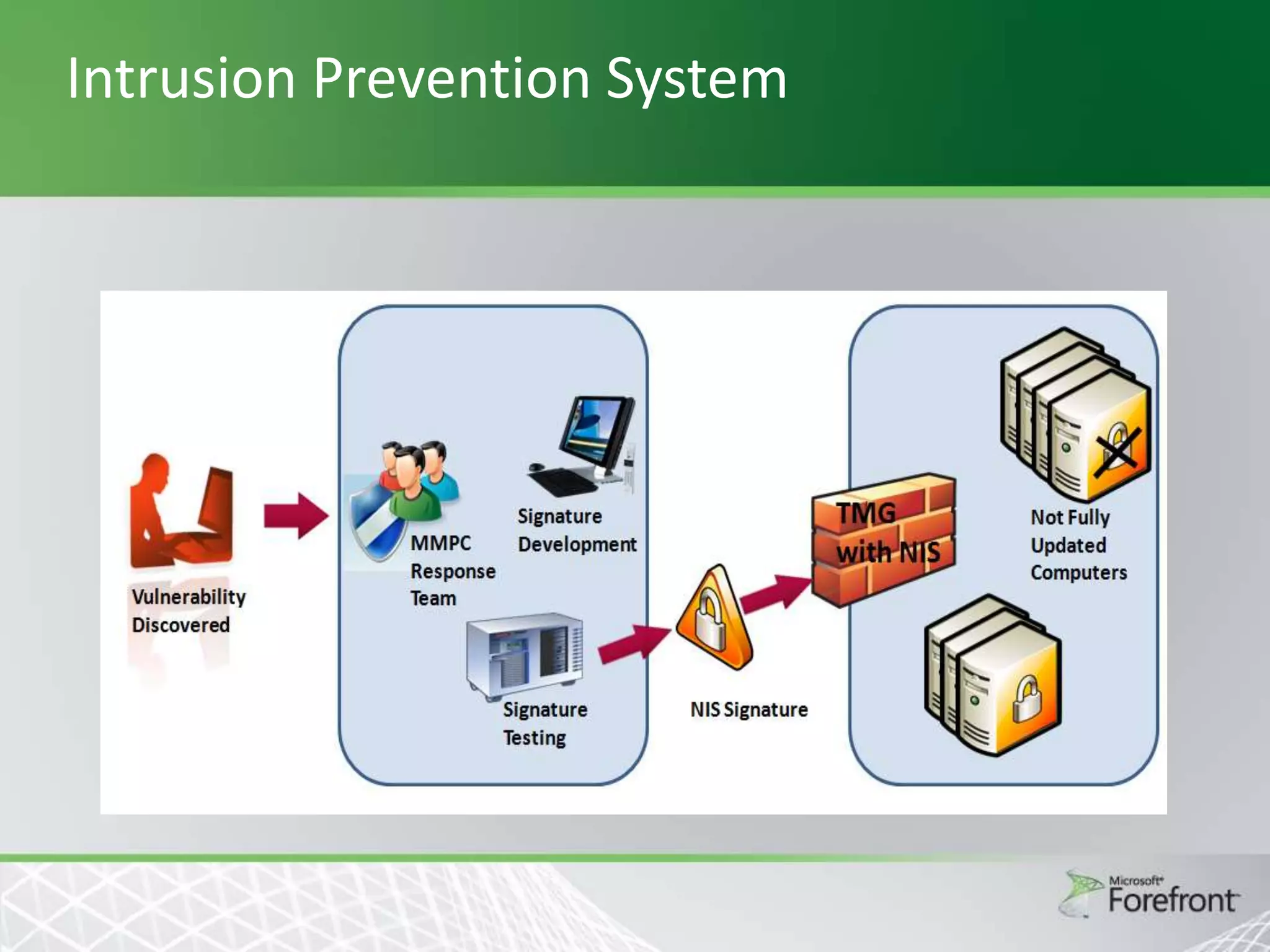
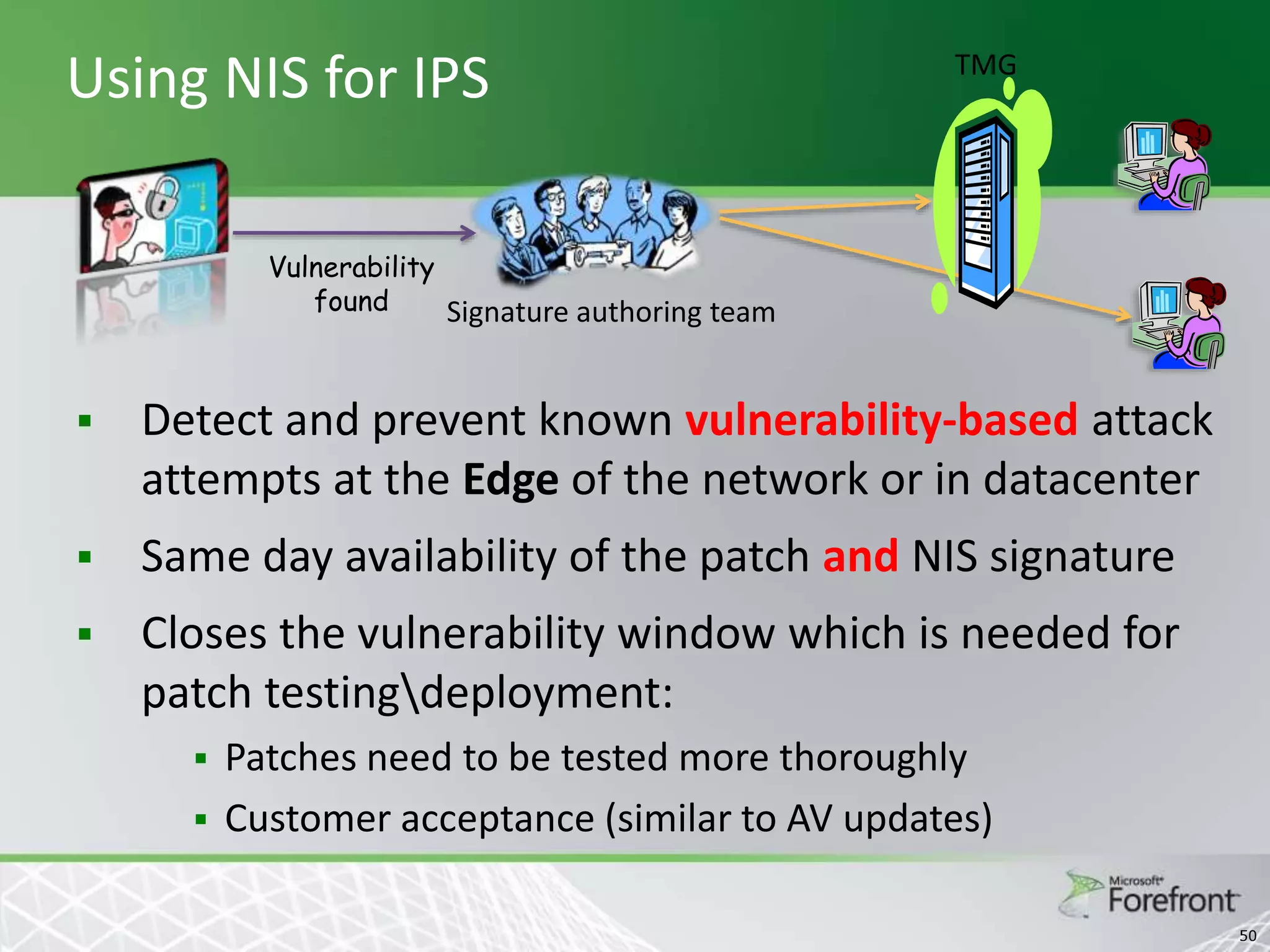
Using NIS for IPS

TMG

Vulnerability
found
Signature authoring team



Detect and prevent known vulnerability-based attack
attempts at the Edge of the network or in datacenter



Same day availability of the patch and NIS signature



Closes the vulnerability window which is needed for
patch testingdeployment:



Patches need to be tested more thoroughly
Customer acceptance (similar to AV updates)
50
TMG: Network Inspection System

51
NIS Demo
Threat Management Gateway 2010

ISP Redundancy
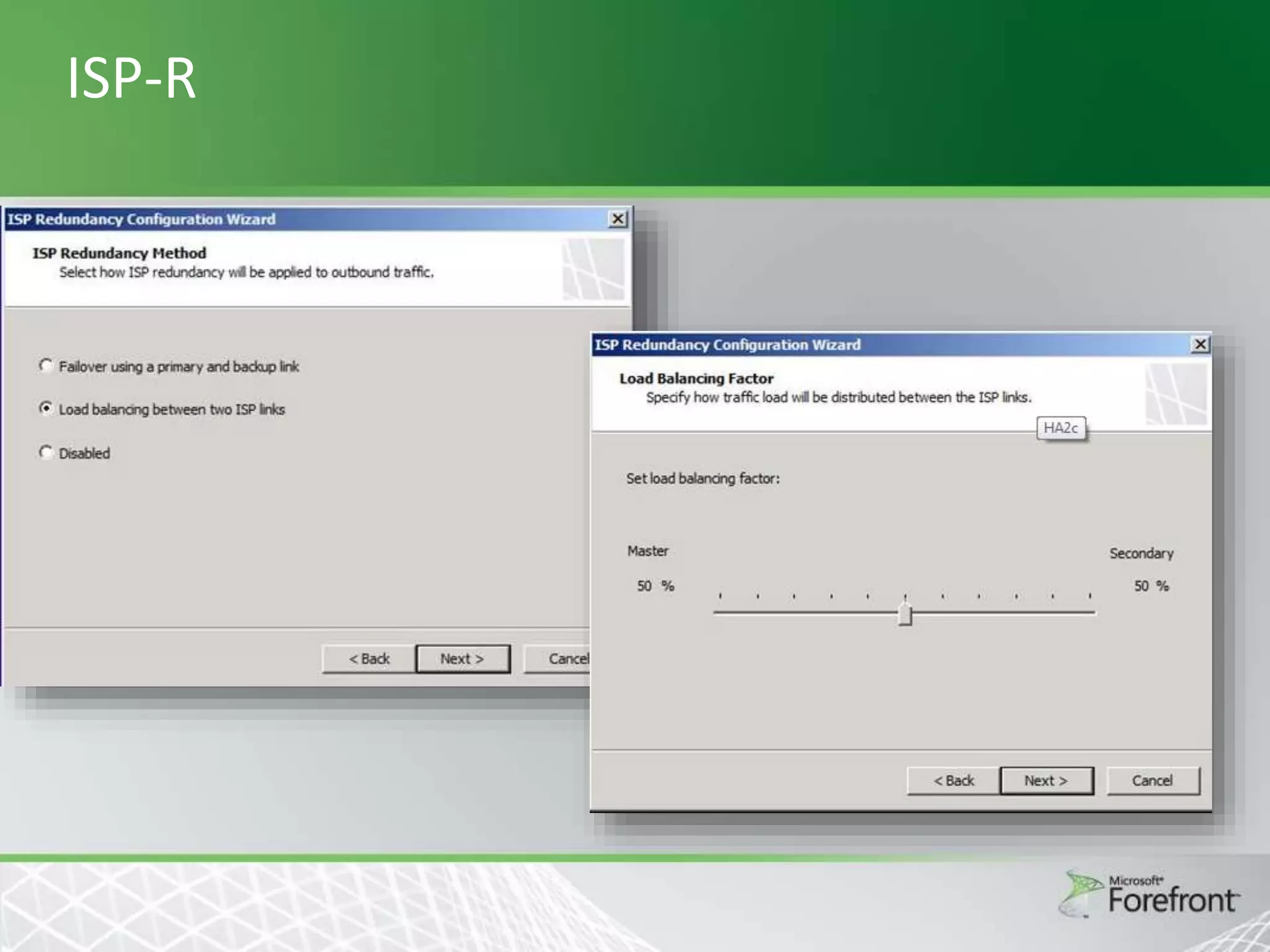
ISP-R – Introduction


New feature introduced in TMG that allows the
coexistence of 2 ISP connections



With this feature TMG ensures Internet
connectivity is not lost even when one Internet
service provider (ISP) is down
Feature Overview
Two different scenarios:
 High Availability of Internet connectivity




TMG will use a backup line in case the primary is
down (Failover)

Load balancing between ISP providers
/connections


TMG will use 2 concurrent ISP connections
Scenarios

2 network adapters’ scenario: TMG is configured with 2
NICs on the external network. Each NIC has a different
subnet and is connected to a different ISP.
 Single network adapter scenario: TMG is configured
with single NIC on the external network with 2
different subnets – one for each ISP.
 Note that Windows will display a warning when the
administrator defines more than one default gateway
on the system. In our case we can ignore this warning.

ISP-R
Threat Management Gateway 2010

TMG 2010 Virtualization / Tools
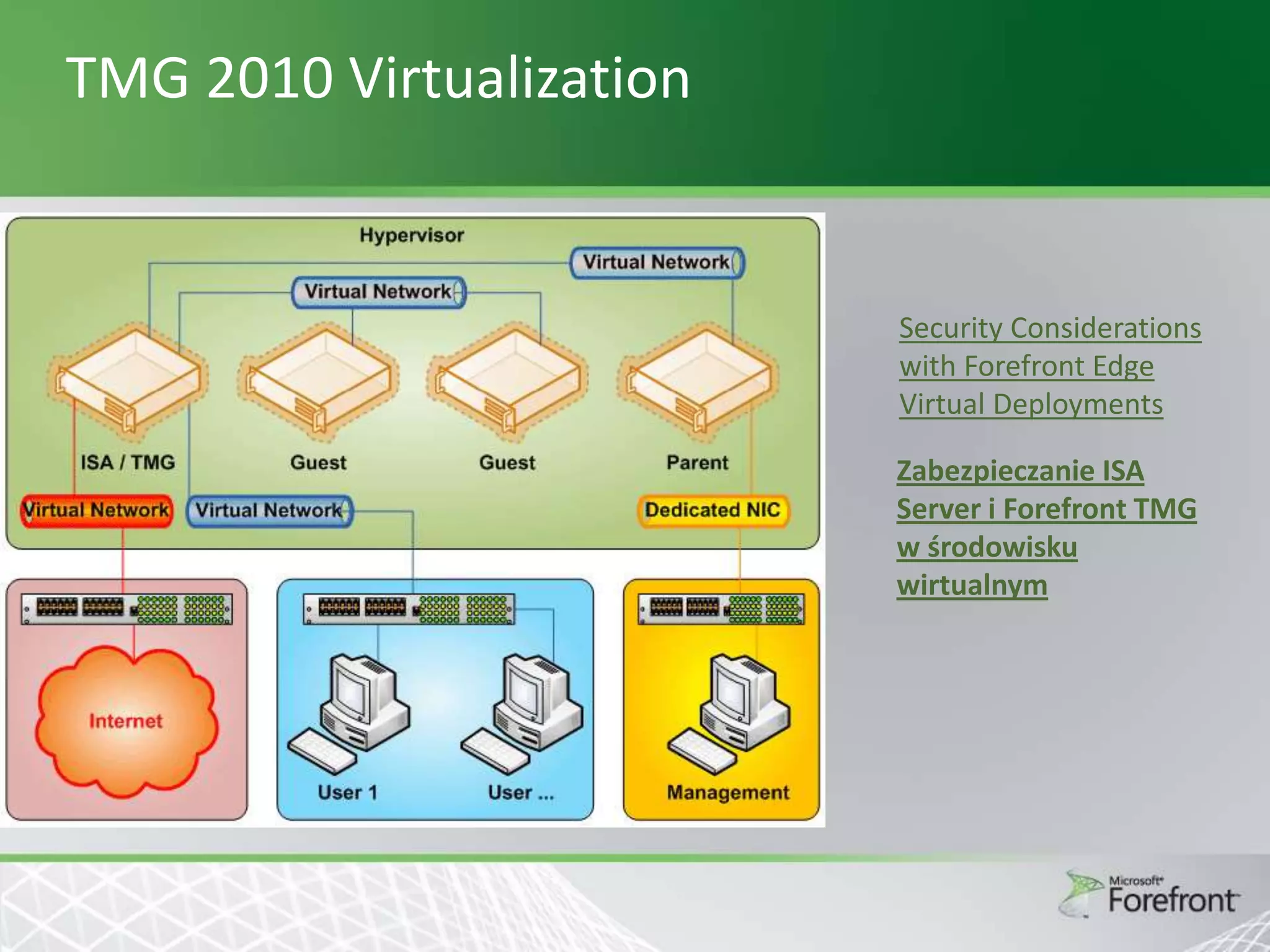
TMG 2010 Virtualization

Security Considerations
with Forefront Edge
Virtual Deployments
Zabezpieczanie ISA
Server i Forefront TMG
w środowisku
wirtualnym
TMG 2010 Tools




Microsoft Forefront Threat Management
Gateway Best Practices Analyzer Tool
Forefront Threat Management Gateway 2010
Capacity Planning Tool
Microsoft® Forefront Threat Management
Gateway (TMG) 2010 Tools & Software
Development Kit
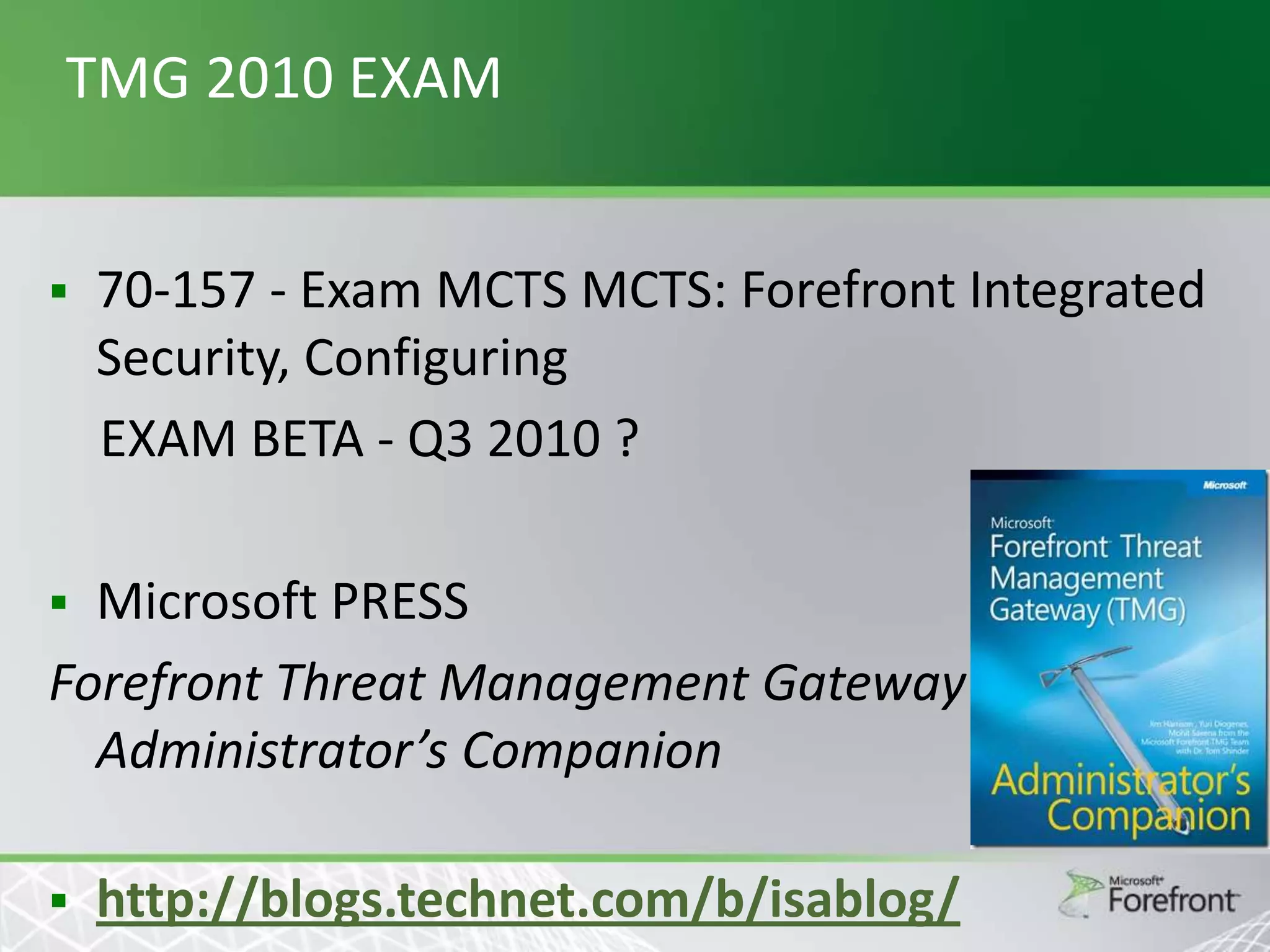
TMG 2010 EXAM


70-157 - Exam MCTS MCTS: Forefront Integrated
Security, Configuring
EXAM BETA - Q3 2010 ?

Microsoft PRESS
Forefront Threat Management Gateway
Administrator’s Companion




http://blogs.technet.com/b/isablog/
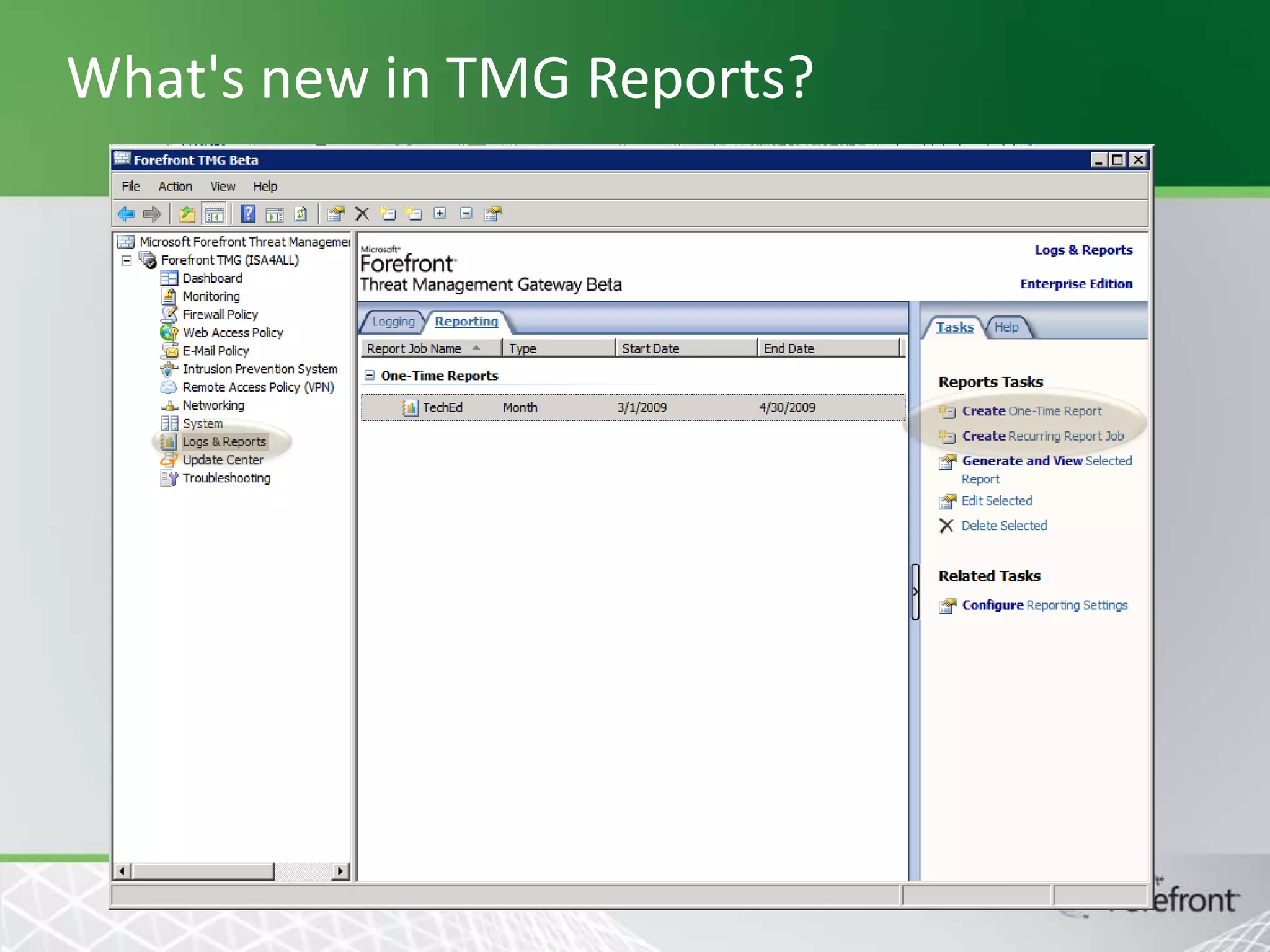
What's new in TMG Reports?
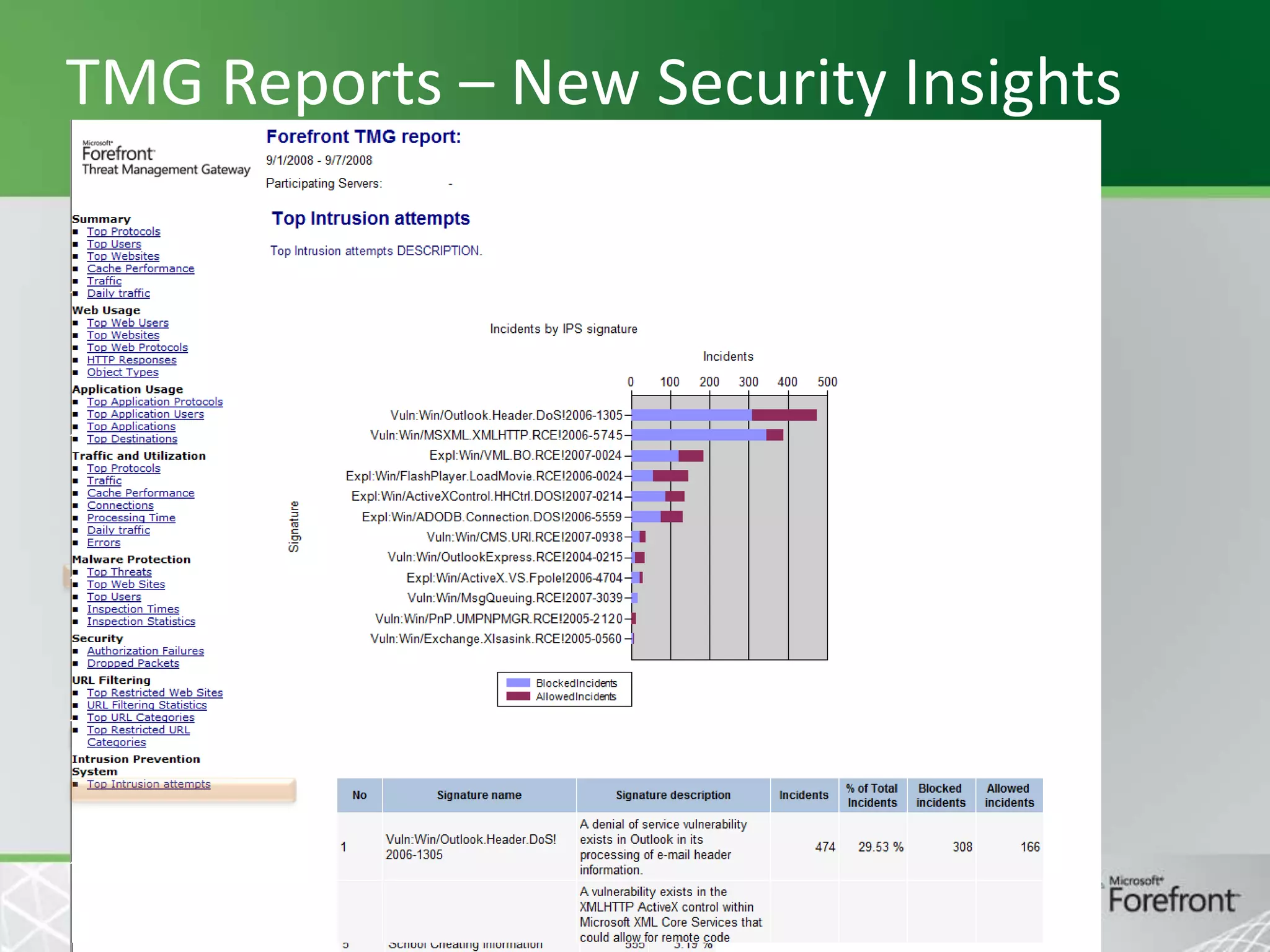
TMG Reports – New Security Insights
Dziękuję za uwagę

Security and Forensics Blog

http://security-forensics.spaces.live.com/

http://ms-groups.pl/mssug/
Krzysztof.Binkowski@gmail.com
© 2008 Microsoft Corporation. All rights reserved. Microsoft, Windows, Windows Vista and other product names are or may be registered trademarks and/or trademarks in the U.S. and/or other countries.
The information herein is for informational purposes only and represents the current view of Microsoft Corporation as of the date of this presentation. Because Microsoft must respond to changing market
conditions, it should not be interpreted to be a commitment on the part of Microsoft, and Microsoft cannot guarantee the accuracy of any information provided after the date of this presentation.
MICROSOFT MAKES NO WARRANTIES, EXPRESS, IMPLIED OR STATUTORY, AS TO THE INFORMATION IN THIS PRESENTATION.

Threat Management Gateway 2010 - Forefront Community launch 2010

  • 1.
    Threat Management Gateway2010 Krzysztof Bińkowski
  • 2.
    Agenda        Overview URL filtering (URL-F) EdgeMalware Protection (EMP) HTTPS Inspections ISP Redundancy (ISP-R) Network Inspection System (NIS) TMG 2010 tools and virtualization 2
  • 3.
  • 4.
    TMG & UAG ForefrontEdge Security and Access products provide enhanced network edge protection and application-centric, policy-based access to corporate IT infrastructures Protection Access
  • 5.
    TMG New Features •HTTP Antivirus/ antimalware • URL Filtering • HTTPS forward inspection Secure Web Access • VoIP traversal (SIP) • Enhanced NAT • ISP Link Redundancy Firewall • NAP integration with VPN role • SSTP Remote Access • Exchange Edge/FPE integration • Anti-Virus • Anti-spam • Network Inspection System (NIS) • Security Assessment and Response (SAS) E-mail Protection Intrusion Prevention • Array Management • Scenario UI & Wizards • Change tracking • Enhanced reporting • W2K8, native 64-bit • Update Center : •HTTP: AV+URL Filtering • Email: AV+Anti-Spam • NIS signatures Deployment & Management Subscription Services 5
  • 6.
    TMG Features Summary ISA 2006 TMG 2010 Networkfirewall   Application firewall   Internet access protection (proxy)   Basic OWA & SharePoint publishing   Exchange publishing (RPC over HTTP)   IPSec VPN (remote & site-to-site)     Web caching, HTTP compression Windows Server 2008, 64-Bit (only)  New Web anti-virus, anti malware  New URL filtering  New Email anti-malware, anti-spam  New Network intrusion prevention  New Integration with codename “Stirling”  New Enhanced UI, management, reporting  New
  • 7.
    TMG versioning Standard Edition Supporteddeployment scenarios CPUs Standalone server Enterprise Edition • • Servers in a Standalone Array Servers in an array managed by EMS Up to 4 CPUs Unlimited Array/NLB/CARP support No, you can only have one Server Yes Enterprise Management No Yes, with added ability to manage Standard Editions Not supported Supported Publishing   VPN support   Forward proxy/cache, compression   Network IPS (NIS)   Require subscription Require subscription Require exchange license Require exchange license Stirling integration Web AV + URL Filtering Email AV/AS
  • 8.
    Upgrading from SEto EE  A valid EE product key is required
  • 9.
    Setup Feature TMG Supported OS Windows Server2008 SP2 x64 Windows Server 2008 R2 x64 EMS Windows Server 2008 SP2 x64 Windows Server 2008 R2 x64 TMG management console Windows Server 2008 R2-SP2 x32, x64 Windows Vista SP1 x32, x64 Windows 7 x32, x64
  • 10.
    Threat Management Gateway2010 URL Filtering
  • 11.
    URL-F Introduction  URL Filteringallows controlling end-user access to Web sites and protecting the organization by denying access to known malicious sites and to sites displaying inappropriate or pornographic materials, based on predefined URL categories  The typical use case for this feature includes:     Enhancing your security. Lowering liability risks. Improving the productivity of your organization. Saving network bandwidth.
  • 12.
    MRS – MicrosoftReputation Services   Aggregate reputation data from multiple vendors Use telemetry in order to improve data accuracy iFilter Marshal 8e6 IE Security MRS BrightCl oud
  • 13.
    URL Filtering  Microsoft ReputationService (MRS) returns one of 80 “category” indications for each URL  Including “Unknown” MRS www.soccer.com ? category = sports + in cache www.soccer.com Request Content Content Firewall rule: Allow category Sports after 5 PM only
  • 14.
    URL category usage  URLcategory information is used for      Rules (Allow/Deny rules according to category) Log EMP exclusion list HTTPS exclusion list No reverse lookups.
  • 15.
    Administration  « URL Denied» error message can be customized
  • 16.
    Category query tool  Availablefrom the Web Protection Tasks  Allows the administrator to know the category of a URL and source of categorization (local cache, MRS, override)
  • 17.
    URL category overrides Availablefrom the Web Protection Tasks  Gives the possibility to assign a URL to a different category that its default category (returned by MRS) 
  • 18.
    Licensing URL Filtering isa subscription based service  Per-user and per-year  License must be valid for URL Filtering to work 
  • 19.
    System Rule   Traffic withMRS is SSL encrypted A system rule allows HTTPS between LocalHost to Microsoft Reputation Service Sites domain name set
  • 20.
  • 22.
    Threat Management Gateway2010 Edge Malware Protection
  • 23.
    Edge Malware Protection  Inspectweb traffic on the edge to prevent any malware from infecting machines inside the organization  Easier to keep the edge updated with malware signatures rather then individual client machines  Unmanaged machines that might not have host AV up to date are also protected  Malware activity detected on the edge can be easily monitored thanks to logging and reporting
  • 24.
    Scenario   Supported scenario :access download Unsupported scenarios : Access upload  Publishing download  Publishing upload 
  • 25.
    Client Comforting     Accumulating anentire file and scanning it may take a significant amount of time During this period of time, the client doesn't receive any data and as a result a software timeout can occur or the user can even cancel the download. “Client comforting” defines a set of methods that guaranty a good user’s experience while content is inspected on the Edge Comforting methods:  Delayed Download  HTML Progress Page  Trickling:  Standard  Fast
  • 26.
    End User Scenarios– Delayed 1) User browses to site.com and attempts to download a file 2) site.com responds with content 3) TMG accumulates the content, timing the download and inspection site.com request request response response 4) In case the content is downloaded and inspected in less than X seconds (Delivery Delay) TMG passes the whole file to the client
  • 27.
    End User Scenarios– Progress Page End user will receive an HTML Progress Page if time for download and inspection exceeds X seconds (delivery delay) and if some others conditions are satisfied (see next slide) site.com request request response progress page
  • 28.
    End User Scenarios– Scanning completed If content is safe (or successfully cleaned), the page informs the user that the content is ready and displays a button for downloading the content, otherwise the page notifies the user that a malware was detected. In that case, the file is purged immediately from the temporary storage.
  • 29.
    Standard Trickling • TMGwill use this method if the client application is not a browser (not able to handle the dynamic code embedded in the Progress Page). • TMG will deliver content to the client using Trickling when Delayed download and Progress can’t apply. Trickling consists in sending very small chunk of data to the client until the whole file is inspected. site.com request request response trickled response User’s experience : download will start at a very low transfer rate and speeds up after inspection completion
  • 30.
    Fast Trickling Similar toStandard Trickling  Intended to be used for media files played by online players (like YouTube)  TMG delivers the data as fast as possible to the end user to keep a good user experience.  The tradeoff between user experience and inspection performance is governed by the FastTricklingMode COM setting   User experience degrades (but inspection performance improves) when the EMP filter need more minimum bytes to perform a partial inspection so increasing buffering on TMG
  • 31.
    Threat Management Gateway2010 HTTPS Inspections
  • 32.
    HTTPS Inspection Today moreand more web traffic is https. Some of this traffic is legitimate; some isn’t and might contain malicious traffic.  We have lot of tools for http protection (antimalware, NIS ..), but no for https protection as this traffic is tunneled through the Proxy.  This feature will enable the TMG administrator to inspect outgoing https traffic on the edge and will prevent the end user from downloading malicious software (malware) that could infect the entire organization. 
  • 33.
  • 34.
    Motivation  In order tobe able to inspect outgoing https traffic, TMG will break HTTPS connections using a man in the middle mechanism (doing sort of “bridging”)
  • 35.
    HTTPS Inspection Mechanism Signed by”TMGCA” www.fabrikam.com Request Signed by Verisign www.fabrikam.com Request Certificate SSL In Web browser: https://www.fabrikam.com Certificate SSL In TMG request: https://www.fabrikam.com
  • 36.
    TMG CA Certificatenot installed on client The CA certificate (e.g. self signed certificate) used by TMG must be deployed on the client, otherwise the client won’t trust the certificate issued by TMG on behalf of the web server (user won’t receive the inspection notifications in that case)  If the client does not have the CA certificate used by TMG, it will receive the error below when accessing an SSL web site if https inspection is enabled. 
  • 37.
    CA Certificate generationand deployment  The CA certificate used by TMG to issue the certificate can be of two types: a generated self signed certificate  an existing trusted certificate authority 
  • 38.
    CA Certificate generationand deployment   This CA certificate must then be deployed on the client computers (under “Trusted Root Certification Authorities” of the Local computer certificates store), otherwise the client won’t trust the server certificate received from TMG Two possible deployment methods for the CA certificate:
  • 39.
    User notifications  Client musthave TMG Client to receive notification of inspection and CA Certificate must be properly deployed on client
  • 40.
  • 42.
    Threat Management Gateway2010 Network Inspection System (NIS)
  • 43.
  • 44.
    Intrusion Prevention System ForefrontNetwork Inspection System (NIS) Closing the vulnerability window between vulnerability announcement and patch deployment Signatures distribution by Microsoft Update Concurrent with security patches or in response to a 0-Day attack
  • 45.
    Using NIS forIPS TMG Vulnerability found Signature authoring team  Detect and prevent known vulnerability-based attack attempts at the Edge of the network or in datacenter  Same day availability of the patch and NIS signature  Closes the vulnerability window which is needed for patch testingdeployment:   Patches need to be tested more thoroughly Customer acceptance (similar to AV updates) 50
  • 46.
  • 47.
  • 49.
    Threat Management Gateway2010 ISP Redundancy
  • 50.
    ISP-R – Introduction  Newfeature introduced in TMG that allows the coexistence of 2 ISP connections  With this feature TMG ensures Internet connectivity is not lost even when one Internet service provider (ISP) is down
  • 51.
    Feature Overview Two differentscenarios:  High Availability of Internet connectivity   TMG will use a backup line in case the primary is down (Failover) Load balancing between ISP providers /connections  TMG will use 2 concurrent ISP connections
  • 52.
    Scenarios 2 network adapters’scenario: TMG is configured with 2 NICs on the external network. Each NIC has a different subnet and is connected to a different ISP.  Single network adapter scenario: TMG is configured with single NIC on the external network with 2 different subnets – one for each ISP.  Note that Windows will display a warning when the administrator defines more than one default gateway on the system. In our case we can ignore this warning. 
  • 53.
  • 54.
    Threat Management Gateway2010 TMG 2010 Virtualization / Tools
  • 55.
    TMG 2010 Virtualization SecurityConsiderations with Forefront Edge Virtual Deployments Zabezpieczanie ISA Server i Forefront TMG w środowisku wirtualnym
  • 56.
    TMG 2010 Tools    MicrosoftForefront Threat Management Gateway Best Practices Analyzer Tool Forefront Threat Management Gateway 2010 Capacity Planning Tool Microsoft® Forefront Threat Management Gateway (TMG) 2010 Tools & Software Development Kit
  • 57.
    TMG 2010 EXAM  70-157- Exam MCTS MCTS: Forefront Integrated Security, Configuring EXAM BETA - Q3 2010 ? Microsoft PRESS Forefront Threat Management Gateway Administrator’s Companion   http://blogs.technet.com/b/isablog/
  • 58.
    What's new inTMG Reports?
  • 59.
    TMG Reports –New Security Insights
  • 60.
    Dziękuję za uwagę Securityand Forensics Blog http://security-forensics.spaces.live.com/ http://ms-groups.pl/mssug/ Krzysztof.Binkowski@gmail.com
  • 61.
    © 2008 MicrosoftCorporation. All rights reserved. Microsoft, Windows, Windows Vista and other product names are or may be registered trademarks and/or trademarks in the U.S. and/or other countries. The information herein is for informational purposes only and represents the current view of Microsoft Corporation as of the date of this presentation. Because Microsoft must respond to changing market conditions, it should not be interpreted to be a commitment on the part of Microsoft, and Microsoft cannot guarantee the accuracy of any information provided after the date of this presentation. MICROSOFT MAKES NO WARRANTIES, EXPRESS, IMPLIED OR STATUTORY, AS TO THE INFORMATION IN THIS PRESENTATION.