Chapter 1: IntroductionChapter 1: Introduction
Mr. SUBHASIS DASH
SCHOLE OF COMPUTER ENGINEERING.
KIIT UNIVERSITY, BHUBANESWAR
subhasisbbsr@gmail.com
HistoryHistory
High Utilization
Professional computer operator
Reducing set up time
Mode of interactionMode of interaction
Automatic job sequencing
What is an Operating System?What is an Operating System?
A collection of system programs entrusted with effective
utilization of a computer.
A program that acts as an intermediary between a user of a
computer and the computer hardware.
Operating system goals:Operating system goals:
Execute user programs and make solving user problems
easier.
Make the computer system convenient to use.
Use the computer hardware in an efficient manner.
Computer System StructureComputer System Structure
Computer system can be divided into four components
Hardware – provides basic computing resources
CPU, memory, I/O devices
Operating system
Controls and coordinates use of hardware among various
applications and usersapplications and users
Application programs – define the ways in which the system
resources are used to solve the computing problems of the
users
Word processors, compilers, web browsers, database
systems, video games
Users
People, machines, other computers
Four Components of a Computer SystemFour Components of a Computer System
Operating System objectiveOperating System objective
System Configuration
User Requirement
Environment
S/W INFRASTRUCTURE ADD ON BARE H/W
Operating System DefinitionOperating System Definition
OS is a resource allocator
Manages all resources
Decides between conflicting requests for efficient and fair
resource use
OS is a control program
Controls execution of programs to prevent errors and improperControls execution of programs to prevent errors and improper
use of the computer
Operating System Definition (Cont.)Operating System Definition (Cont.)
No universally accepted definition
“Everything a vendor ships when you order an operating system”
is good approximation
But varies wildly
“The one program running at all times on the computer” is the
kernel. Everything else is either a system program (ships withkernel. Everything else is either a system program (ships with
the operating system) or an application program
Computer StartupComputer Startup
bootstrap program is loaded at power-up or reboot
Typically stored in ROM or EPROM, generally known as
firmware
Initializates all aspects of system
Loads operating system kernel and starts execution
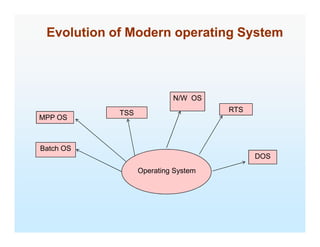
Evolution of Modern operating SystemEvolution of Modern operating System
TSS
N/W OS
RTS
MPP OS
Operating System
Batch OS
DOS
Operating System StructureOperating System Structure
Multiprogramming needed for efficiency
Single user cannot keep CPU and I/O devices busy at all times
Multiprogramming organizes jobs (code and data) so CPU always has
one to execute
A subset of total jobs in system is kept in memory
One job selected and run via job scheduling
When it has to wait (for I/O for example), OS switches to another job
Timesharing (multitasking)Timesharing (multitasking) is logical extension in which CPU switches jobs
so frequently that users can interact with each job while it is running,
creating interactive computing
Response time should be < 1 second
Each user has at least one program executing in memory process
If several jobs ready to run at the same time CPU scheduling
If processes don’t fit in memory, swapping moves them in and out to
run
Virtual memory allows execution of processes not completely in
memory
MSMS--DOS Layer StructureDOS Layer Structure
UNIX System StructureUNIX System Structure
Operating System ServicesOperating System Services
One set of operating-system services provides functions that are
helpful to the user:
User interface - Almost all operating systems have a user interface (UI)
Varies between Command-Line (CLI), Graphics User Interface
(GUI), Batch
Program execution - The system must be able to load a program into
memory and to run that program, end execution, either normally ormemory and to run that program, end execution, either normally or
abnormally (indicating error)
I/O operations - A running program may require I/O, which may involve
a file or an I/O device.
File-system manipulation - The file system is of particular interest.
Obviously, programs need to read and write files and directories, create
and delete them, search them, list file Information, permission
management.
Operating System Services (Cont.)Operating System Services (Cont.)
One set of operating-system services provides functions that are
helpful to the user (Cont):
Communications – Processes may exchange information, on the same
computer or between computers over a network
Communications may be via shared memory or through message
passing (packets moved by the OS)
Error detection – OS needs to be constantly aware of possible errorsError detection – OS needs to be constantly aware of possible errors
May occur in the CPU and memory hardware, in I/O devices, in user
program
For each type of error, OS should take the appropriate action to
ensure correct and consistent computing
Debugging facilities can greatly enhance the user’s and
programmer’s abilities to efficiently use the system
Operating System Services (Cont.)Operating System Services (Cont.)
Another set of OS functions exists for ensuring the efficient operation
of the system itself via resource sharing
Resource allocation - When multiple users or multiple jobs running
concurrently, resources must be allocated to each of them
Many types of resources - Some (such as CPU cycles, main memory,
and file storage) may have special allocation code, others (such as I/O
devices) may have general request and release code.
Accounting - To keep track of which users use how much and what kinds
of computer resources
Accounting - To keep track of which users use how much and what kinds
of computer resources
Protection and security - The owners of information stored in a multiuser
or networked computer system may want to control use of that information,
concurrent processes should not interfere with each other
Protection involves ensuring that all access to system resources is
controlled
Security of the system from outsiders requires user authentication,
extends to defending external I/O devices from invalid access attempts
If a system is to be protected and secure, precautions must be
instituted throughout it. A chain is only as strong as its weakest link.
End of Chapter 1End of Chapter 1

Ch1kiit [compatibility mode]

  • 1.
    Chapter 1: IntroductionChapter1: Introduction Mr. SUBHASIS DASH SCHOLE OF COMPUTER ENGINEERING. KIIT UNIVERSITY, BHUBANESWAR subhasisbbsr@gmail.com
  • 2.
    HistoryHistory High Utilization Professional computeroperator Reducing set up time Mode of interactionMode of interaction Automatic job sequencing
  • 3.
    What is anOperating System?What is an Operating System? A collection of system programs entrusted with effective utilization of a computer. A program that acts as an intermediary between a user of a computer and the computer hardware. Operating system goals:Operating system goals: Execute user programs and make solving user problems easier. Make the computer system convenient to use. Use the computer hardware in an efficient manner.
  • 4.
    Computer System StructureComputerSystem Structure Computer system can be divided into four components Hardware – provides basic computing resources CPU, memory, I/O devices Operating system Controls and coordinates use of hardware among various applications and usersapplications and users Application programs – define the ways in which the system resources are used to solve the computing problems of the users Word processors, compilers, web browsers, database systems, video games Users People, machines, other computers
  • 5.
    Four Components ofa Computer SystemFour Components of a Computer System
  • 6.
    Operating System objectiveOperatingSystem objective System Configuration User Requirement Environment S/W INFRASTRUCTURE ADD ON BARE H/W
  • 7.
    Operating System DefinitionOperatingSystem Definition OS is a resource allocator Manages all resources Decides between conflicting requests for efficient and fair resource use OS is a control program Controls execution of programs to prevent errors and improperControls execution of programs to prevent errors and improper use of the computer
  • 8.
    Operating System Definition(Cont.)Operating System Definition (Cont.) No universally accepted definition “Everything a vendor ships when you order an operating system” is good approximation But varies wildly “The one program running at all times on the computer” is the kernel. Everything else is either a system program (ships withkernel. Everything else is either a system program (ships with the operating system) or an application program
  • 9.
    Computer StartupComputer Startup bootstrapprogram is loaded at power-up or reboot Typically stored in ROM or EPROM, generally known as firmware Initializates all aspects of system Loads operating system kernel and starts execution
  • 10.
    Evolution of Modernoperating SystemEvolution of Modern operating System TSS N/W OS RTS MPP OS Operating System Batch OS DOS
  • 11.
    Operating System StructureOperatingSystem Structure Multiprogramming needed for efficiency Single user cannot keep CPU and I/O devices busy at all times Multiprogramming organizes jobs (code and data) so CPU always has one to execute A subset of total jobs in system is kept in memory One job selected and run via job scheduling When it has to wait (for I/O for example), OS switches to another job Timesharing (multitasking)Timesharing (multitasking) is logical extension in which CPU switches jobs so frequently that users can interact with each job while it is running, creating interactive computing Response time should be < 1 second Each user has at least one program executing in memory process If several jobs ready to run at the same time CPU scheduling If processes don’t fit in memory, swapping moves them in and out to run Virtual memory allows execution of processes not completely in memory
  • 12.
  • 13.
    UNIX System StructureUNIXSystem Structure
  • 14.
    Operating System ServicesOperatingSystem Services One set of operating-system services provides functions that are helpful to the user: User interface - Almost all operating systems have a user interface (UI) Varies between Command-Line (CLI), Graphics User Interface (GUI), Batch Program execution - The system must be able to load a program into memory and to run that program, end execution, either normally ormemory and to run that program, end execution, either normally or abnormally (indicating error) I/O operations - A running program may require I/O, which may involve a file or an I/O device. File-system manipulation - The file system is of particular interest. Obviously, programs need to read and write files and directories, create and delete them, search them, list file Information, permission management.
  • 15.
    Operating System Services(Cont.)Operating System Services (Cont.) One set of operating-system services provides functions that are helpful to the user (Cont): Communications – Processes may exchange information, on the same computer or between computers over a network Communications may be via shared memory or through message passing (packets moved by the OS) Error detection – OS needs to be constantly aware of possible errorsError detection – OS needs to be constantly aware of possible errors May occur in the CPU and memory hardware, in I/O devices, in user program For each type of error, OS should take the appropriate action to ensure correct and consistent computing Debugging facilities can greatly enhance the user’s and programmer’s abilities to efficiently use the system
  • 16.
    Operating System Services(Cont.)Operating System Services (Cont.) Another set of OS functions exists for ensuring the efficient operation of the system itself via resource sharing Resource allocation - When multiple users or multiple jobs running concurrently, resources must be allocated to each of them Many types of resources - Some (such as CPU cycles, main memory, and file storage) may have special allocation code, others (such as I/O devices) may have general request and release code. Accounting - To keep track of which users use how much and what kinds of computer resources Accounting - To keep track of which users use how much and what kinds of computer resources Protection and security - The owners of information stored in a multiuser or networked computer system may want to control use of that information, concurrent processes should not interfere with each other Protection involves ensuring that all access to system resources is controlled Security of the system from outsiders requires user authentication, extends to defending external I/O devices from invalid access attempts If a system is to be protected and secure, precautions must be instituted throughout it. A chain is only as strong as its weakest link.
  • 17.
    End of Chapter1End of Chapter 1