12 Years in
DNS Security
As a Defender
A. S. M. Shamim Reza
bdNOG 15
Dhaka
09-12 December, 2022
[~]$whoami|– 12+ years worked at ISP
– Chief Technology Officer, Pipeline Inc.
– Community Trainer, APNIC
@asmshamimreza on Linkedin
@shamimrezasohag on Twitter
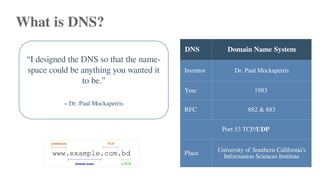
What is DNS?
DNS Domain Name System
Inventor Dr. Paul Mockapetris
Year 1983
RFC 882 & 883
Port 53 TCP/UDP
Place University of Southern California’s
Information Sciences Institute
“I designed the DNS so that the name-
space could be anything you wanted it
to be.”
– Dr. Paul Mockapetris
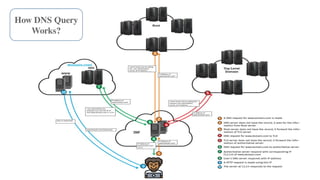
How DNS Query
Works?
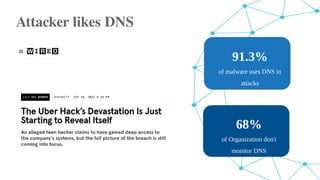
Attacker likes DNS
91.3%
of malware uses DNS in
attacks
68%
of Organization don't
monitor DNS
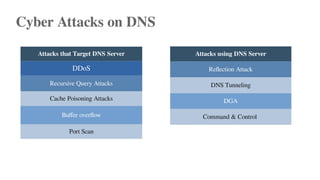
Cyber Attacks on DNS
Attacks using DNS Server
Reflection Attack
DNS Tunneling
DGA
Command & Control
Attacks that Target DNS Server
DDoS
Recursive Query Attacks
Cache Poisoning Attacks
Buffer overflow
Port Scan
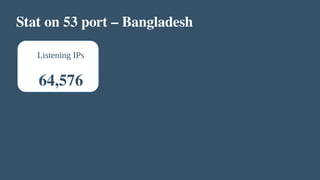
Stat on 53 port – Bangladesh
Listening IPs
64,576
Lets talk
about the
Journey
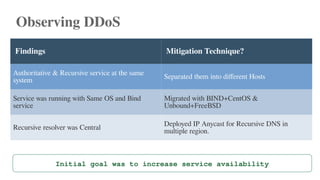
Observing DDoS
Findings Mitigation Technique?
Authoritative & Recursive service at the same
system Separated them into different Hosts
Service was running with Same OS and Bind
service
Migrated with BIND+CentOS &
Unbound+FreeBSD
Recursive resolver was Central
Deployed IP Anycast for Recursive DNS in
multiple region.
Initial goal was to increase service availability
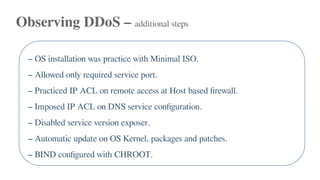
Observing DDoS – additional steps
– OS installation was practice with Minimal ISO.
– Allowed only required service port.
– Practiced IP ACL on remote access at Host based firewall.
– Imposed IP ACL on DNS service configuration.
– Disabled service version exposer.
– Automatic update on OS Kernel, packages and patches.
– BIND configured with CHROOT.
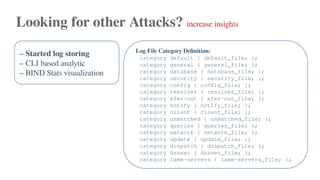
Looking for other Attacks? increase insights
– Started log storing
– CLI based analytic
– BIND Stats visualization
Log File Category Definition:
category default { default_file; };
category general { general_file; };
category database { database_file; };
category security { security_file; };
category config { config_file; };
category resolver { resolver_file; };
category xfer-out { xfer-out_file; };
category notify { notify_file; };
category client { client_file; };
category unmatched { unmatched_file; };
category queries { queries_file; };
category network { network_file; };
category update { update_file; };
category dispatch { dispatch_file; };
category dnssec { dnssec_file; };
category lame-servers { lame-servers_file; };
Looking for other Attacks? increase insights
– Started log storing
– CLI based analytic
– BIND Stats visualization
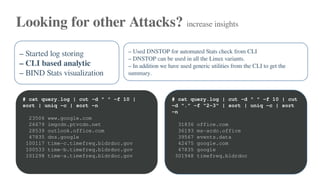
– Used DNSTOP for automated Stats check from CLI
– DNSTOP can be used in all the Linux variants.
– In addition we have used generic utilities from the CLI to get the
summary.
# cat query.log | cut -d " " -f 10 |
sort | uniq -c | sort -n
23506 www.google.com
26679 imgcdn.ptvcdn.net
28539 outlook.office.com
47835 dns.google
100117 time-c.timefreq.bldrdoc.gov
100533 time-b.timefreq.bldrdoc.gov
101298 time-a.timefreq.bldrdoc.gov
# cat query.log | cut -d " " -f 10 | cut
-d "." -f "2-3" | sort | uniq -c | sort
-n
31836 office.com
36193 ms-acdc.office
39567 events.data
42475 google.com
47835 google
301948 timefreq.bldrdoc
Looking for other Attacks? increase insights
– Started log storing
– CLI based analytic
– BIND Stats visualization
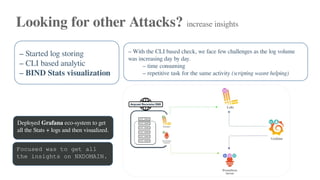
– With the CLI based check, we face few challenges as the log volume
was increasing day by day.
– time consuming
– repetitive task for the same activity (scripting wasnt helping)
Deployed Grafana eco-system to get
all the Stats + logs and then visualized.
Focused was to get all
the insights on NXDOMAIN.
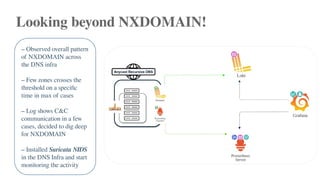
Looking beyond NXDOMAIN!
– Observed overall pattern
of NXDOMAIN across
the DNS infra
– Few zones crosses the
threshold on a specific
time in max of cases
– Log shows C&C
communication in a few
cases, decided to dig deep
for NXDOMAIN
– Installed Suricata NIDS
in the DNS Infra and start
monitoring the activity
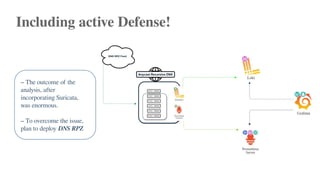
Including active Defense!
– The outcome of the
analysis, after
incorporating Suricata,
was enormous.
– To overcome the issue,
plan to deploy DNS RPZ
What Next? Network Traffic – NetFlow with NFSen
Roaming around in NetFlow
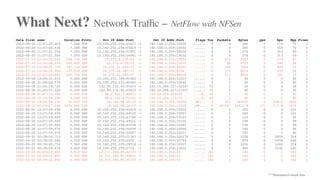
– Searched for IPs listening on 53 port to mitigate OpenResolver
– Setup threshold on traffic on 53 port both for TCP & UDP
– Looking for a specific region that uses the 53 port heavily.
– Looking for IPs that are sending 40<= bytes of PKT.
Date first seen Duration Proto Src IP Addr:Port Dst IP Addr:Port Flags Tos Packets Bytes pps bps Bpp Flows
2022-08-20 11:57:20.410 7.040 UDP 10.160.252.254:55427 -> 192.168.0.254:10032 ...... 0 4 280 0 318 70 1
2022-08-20 11:57:20.430 7.040 UDP 10.160.252.254:55429 -> 192.168.0.254:10032 ...... 0 4 280 0 318 70 1
2022-08-20 11:57:21.500 7.050 UDP 10.160.252.254:51601 -> 192.168.0.254:99032 ...... 0 4 276 0 313 69 1
2022-08-20 11:57:21.500 7.050 UDP 10.160.252.254:56961 -> 192.168.0.254:19032 ...... 0 4 276 0 313 69 1
2022-07-10 22:52:31.540 158.330 UDP 10.175.8.138:53 -> 192.168.0.254:19032 ...... 0 111 7509 0 379 67 1
2022-07-10 22:52:26.570 199.400 UDP 10.175.8.78:53 -> 192.168.0.254:20031 ...... 0 90 6123 0 245 68 1
2022-07-10 22:54:01.770 147.120 UDP 10.175.21.234:53 -> 192.168.0.254:60245 ...... 0 104 7526 0 409 72 1
2022-07-10 22:54:25.950 133.830 UDP 10.175.24.160:53 -> 192.168.0.254:8206 ...... 0 117 8018 0 479 68 1
2022-07-10 22:52:24.280 280.700 UDP 10.175.22.226:53 -> 192.168.0.254:94036 ...... 0 117 8836 0 251 75 1
2022-09-08 19:06:41.210 0.000 UDP 10.160.252.188:61902 -> 192.168.0.254:12023 ...... 0 1 45 0 0 45 1
2022-09-08 21:08:20.570 0.000 UDP 10.160.252.212:40960 -> 192.168.0.254:10046 ...... 0 1 45 0 0 45 1
2022-08-26 21:44:18.720 0.000 UDP 142.93.132.42:55433 -> 192.16.204.217:12067 ...... 72 1 28 0 0 28 1
2022-08-26 21:45:11.320 0.000 UDP 142.93.132.42:55433 -> 192.16.204.217:11057 ...... 72 1 40 0 0 40 1
2022-08-26 21:47:33.480 0.000 TCP 88.6.232.5:42671 -> 192.16.204.219:53 ....S. 40 1 40 0 0 40 1
2022-08-26 22:18:58.290 0.000 TCP 88.6.232.5:52561 -> 192.16.204.213:53 ....S. 40 1 40 0 0 40 1
2022-09-12 19:54:04.130 52.830 TCP 10.160.68.26:53 -> 192.168.0.254:55024 .AP... 0 319 349200 6 52879 1094 1
2022-09-12 20:04:27.090 1426.890 TCP 10.160.68.26:53 -> 192.168.0.254:10035 .AP... 0 245007 349.3 M 171 2.0 M 1425 1
2022-08-20 12:07:59.650 0.000 UDP 10.160.252.254:62415 -> 192.168.0.254:10014 ...... 0 2 202 0 0 101 1
2022-08-20 12:07:59.650 0.000 UDP 10.160.252.254:64165 -> 192.168.0.254:10053 ...... 0 2 202 0 0 101 1
2022-08-20 12:07:59.660 0.000 UDP 10.160.252.254:63760 -> 192.168.0.254:10123 ...... 0 2 116 0 0 58 1
2022-08-20 12:07:59.660 0.000 UDP 10.160.252.254:49521 -> 192.168.0.254:10135 ...... 0 2 198 0 0 99 1
2022-08-20 12:07:59.660 0.000 UDP 10.160.252.254:61534 -> 192.168.0.254:10145 ...... 0 2 198 0 0 99 1
2022-08-20 12:07:59.670 0.000 UDP 10.160.252.254:50694 -> 192.168.0.254:10068 ...... 0 2 192 0 0 96 1
2022-08-20 12:07:59.670 0.000 UDP 10.160.252.254:50557 -> 192.168.0.254:10037 ...... 0 2 192 0 0 96 1
2022-09-01 00:38:35.710 5.000 UDP 10.160.252.205:21343 -> 192.168.0.254:100379 ...... 0 4 1256 0 2009 314 1
2022-09-01 00:38:40.660 5.010 UDP 10.160.252.205:2500 -> 192.168.0.254:10790 ...... 0 4 976 0 1558 244 1
2022-09-01 00:38:45.710 7.960 UDP 10.160.252.205:29718 -> 192.168.0.254:10357 ...... 0 4 1256 0 1262 314 1
2022-09-01 00:38:50.670 6.440 UDP 10.160.252.205:5733 -> 192.168.0.254:23032 ...... 0 4 960 0 1192 240 1
2022-10-02 00:09:22.800 0.000 UDP 10.111.186.85:42531 -> 192.168.0.254:53 ...... 192 1 160 0 0 160 1
2022-10-02 00:09:22.800 0.000 UDP 10.111.186.85:49651 -> 192.168.0.254:53 ...... 192 1 160 0 0 160 1
2022-10-02 00:09:22.800 0.000 UDP 10.111.186.85:35340 -> 192.168.0.254:53 ...... 192 1 160 0 0 160 1
What Next? Network Traffic – NetFlow with NFSen
***Manipulated sample data
What Next? Network Traffic – span traffic with Zeek
Roaming around with Zeek
– Using existing script to find DNS activity
– Finding subdomains with random TLD and longer names.
– Finding subdomains with upper/lower/numbers
– DNS beaconing
What Next?
– With high-end Threat freed, 85%-93% of Cyber attack can be stopped with DNS
RPZ.
– Adversaries are evolving their attack tactics.
Incorporate ML/NLP to detect DGA in DNS Query log.
THANK YOU

12 Years in DNS Security As a Defender

  • 1.
    12 Years in DNSSecurity As a Defender A. S. M. Shamim Reza bdNOG 15 Dhaka 09-12 December, 2022
  • 2.
    [~]$whoami|– 12+ yearsworked at ISP – Chief Technology Officer, Pipeline Inc. – Community Trainer, APNIC @asmshamimreza on Linkedin @shamimrezasohag on Twitter
  • 3.
    What is DNS? DNSDomain Name System Inventor Dr. Paul Mockapetris Year 1983 RFC 882 & 883 Port 53 TCP/UDP Place University of Southern California’s Information Sciences Institute “I designed the DNS so that the name- space could be anything you wanted it to be.” – Dr. Paul Mockapetris
  • 4.
  • 5.
    Attacker likes DNS 91.3% ofmalware uses DNS in attacks 68% of Organization don't monitor DNS
  • 6.
    Cyber Attacks onDNS Attacks using DNS Server Reflection Attack DNS Tunneling DGA Command & Control Attacks that Target DNS Server DDoS Recursive Query Attacks Cache Poisoning Attacks Buffer overflow Port Scan
  • 7.
    Stat on 53port – Bangladesh Listening IPs 64,576
  • 8.
  • 9.
    Observing DDoS Findings MitigationTechnique? Authoritative & Recursive service at the same system Separated them into different Hosts Service was running with Same OS and Bind service Migrated with BIND+CentOS & Unbound+FreeBSD Recursive resolver was Central Deployed IP Anycast for Recursive DNS in multiple region. Initial goal was to increase service availability
  • 10.
    Observing DDoS –additional steps – OS installation was practice with Minimal ISO. – Allowed only required service port. – Practiced IP ACL on remote access at Host based firewall. – Imposed IP ACL on DNS service configuration. – Disabled service version exposer. – Automatic update on OS Kernel, packages and patches. – BIND configured with CHROOT.
  • 11.
    Looking for otherAttacks? increase insights – Started log storing – CLI based analytic – BIND Stats visualization Log File Category Definition: category default { default_file; }; category general { general_file; }; category database { database_file; }; category security { security_file; }; category config { config_file; }; category resolver { resolver_file; }; category xfer-out { xfer-out_file; }; category notify { notify_file; }; category client { client_file; }; category unmatched { unmatched_file; }; category queries { queries_file; }; category network { network_file; }; category update { update_file; }; category dispatch { dispatch_file; }; category dnssec { dnssec_file; }; category lame-servers { lame-servers_file; };
  • 12.
    Looking for otherAttacks? increase insights – Started log storing – CLI based analytic – BIND Stats visualization – Used DNSTOP for automated Stats check from CLI – DNSTOP can be used in all the Linux variants. – In addition we have used generic utilities from the CLI to get the summary. # cat query.log | cut -d " " -f 10 | sort | uniq -c | sort -n 23506 www.google.com 26679 imgcdn.ptvcdn.net 28539 outlook.office.com 47835 dns.google 100117 time-c.timefreq.bldrdoc.gov 100533 time-b.timefreq.bldrdoc.gov 101298 time-a.timefreq.bldrdoc.gov # cat query.log | cut -d " " -f 10 | cut -d "." -f "2-3" | sort | uniq -c | sort -n 31836 office.com 36193 ms-acdc.office 39567 events.data 42475 google.com 47835 google 301948 timefreq.bldrdoc
  • 13.
    Looking for otherAttacks? increase insights – Started log storing – CLI based analytic – BIND Stats visualization – With the CLI based check, we face few challenges as the log volume was increasing day by day. – time consuming – repetitive task for the same activity (scripting wasnt helping) Deployed Grafana eco-system to get all the Stats + logs and then visualized. Focused was to get all the insights on NXDOMAIN.
  • 14.
    Looking beyond NXDOMAIN! –Observed overall pattern of NXDOMAIN across the DNS infra – Few zones crosses the threshold on a specific time in max of cases – Log shows C&C communication in a few cases, decided to dig deep for NXDOMAIN – Installed Suricata NIDS in the DNS Infra and start monitoring the activity
  • 15.
    Including active Defense! –The outcome of the analysis, after incorporating Suricata, was enormous. – To overcome the issue, plan to deploy DNS RPZ
  • 17.
    What Next? NetworkTraffic – NetFlow with NFSen Roaming around in NetFlow – Searched for IPs listening on 53 port to mitigate OpenResolver – Setup threshold on traffic on 53 port both for TCP & UDP – Looking for a specific region that uses the 53 port heavily. – Looking for IPs that are sending 40<= bytes of PKT.
  • 18.
    Date first seenDuration Proto Src IP Addr:Port Dst IP Addr:Port Flags Tos Packets Bytes pps bps Bpp Flows 2022-08-20 11:57:20.410 7.040 UDP 10.160.252.254:55427 -> 192.168.0.254:10032 ...... 0 4 280 0 318 70 1 2022-08-20 11:57:20.430 7.040 UDP 10.160.252.254:55429 -> 192.168.0.254:10032 ...... 0 4 280 0 318 70 1 2022-08-20 11:57:21.500 7.050 UDP 10.160.252.254:51601 -> 192.168.0.254:99032 ...... 0 4 276 0 313 69 1 2022-08-20 11:57:21.500 7.050 UDP 10.160.252.254:56961 -> 192.168.0.254:19032 ...... 0 4 276 0 313 69 1 2022-07-10 22:52:31.540 158.330 UDP 10.175.8.138:53 -> 192.168.0.254:19032 ...... 0 111 7509 0 379 67 1 2022-07-10 22:52:26.570 199.400 UDP 10.175.8.78:53 -> 192.168.0.254:20031 ...... 0 90 6123 0 245 68 1 2022-07-10 22:54:01.770 147.120 UDP 10.175.21.234:53 -> 192.168.0.254:60245 ...... 0 104 7526 0 409 72 1 2022-07-10 22:54:25.950 133.830 UDP 10.175.24.160:53 -> 192.168.0.254:8206 ...... 0 117 8018 0 479 68 1 2022-07-10 22:52:24.280 280.700 UDP 10.175.22.226:53 -> 192.168.0.254:94036 ...... 0 117 8836 0 251 75 1 2022-09-08 19:06:41.210 0.000 UDP 10.160.252.188:61902 -> 192.168.0.254:12023 ...... 0 1 45 0 0 45 1 2022-09-08 21:08:20.570 0.000 UDP 10.160.252.212:40960 -> 192.168.0.254:10046 ...... 0 1 45 0 0 45 1 2022-08-26 21:44:18.720 0.000 UDP 142.93.132.42:55433 -> 192.16.204.217:12067 ...... 72 1 28 0 0 28 1 2022-08-26 21:45:11.320 0.000 UDP 142.93.132.42:55433 -> 192.16.204.217:11057 ...... 72 1 40 0 0 40 1 2022-08-26 21:47:33.480 0.000 TCP 88.6.232.5:42671 -> 192.16.204.219:53 ....S. 40 1 40 0 0 40 1 2022-08-26 22:18:58.290 0.000 TCP 88.6.232.5:52561 -> 192.16.204.213:53 ....S. 40 1 40 0 0 40 1 2022-09-12 19:54:04.130 52.830 TCP 10.160.68.26:53 -> 192.168.0.254:55024 .AP... 0 319 349200 6 52879 1094 1 2022-09-12 20:04:27.090 1426.890 TCP 10.160.68.26:53 -> 192.168.0.254:10035 .AP... 0 245007 349.3 M 171 2.0 M 1425 1 2022-08-20 12:07:59.650 0.000 UDP 10.160.252.254:62415 -> 192.168.0.254:10014 ...... 0 2 202 0 0 101 1 2022-08-20 12:07:59.650 0.000 UDP 10.160.252.254:64165 -> 192.168.0.254:10053 ...... 0 2 202 0 0 101 1 2022-08-20 12:07:59.660 0.000 UDP 10.160.252.254:63760 -> 192.168.0.254:10123 ...... 0 2 116 0 0 58 1 2022-08-20 12:07:59.660 0.000 UDP 10.160.252.254:49521 -> 192.168.0.254:10135 ...... 0 2 198 0 0 99 1 2022-08-20 12:07:59.660 0.000 UDP 10.160.252.254:61534 -> 192.168.0.254:10145 ...... 0 2 198 0 0 99 1 2022-08-20 12:07:59.670 0.000 UDP 10.160.252.254:50694 -> 192.168.0.254:10068 ...... 0 2 192 0 0 96 1 2022-08-20 12:07:59.670 0.000 UDP 10.160.252.254:50557 -> 192.168.0.254:10037 ...... 0 2 192 0 0 96 1 2022-09-01 00:38:35.710 5.000 UDP 10.160.252.205:21343 -> 192.168.0.254:100379 ...... 0 4 1256 0 2009 314 1 2022-09-01 00:38:40.660 5.010 UDP 10.160.252.205:2500 -> 192.168.0.254:10790 ...... 0 4 976 0 1558 244 1 2022-09-01 00:38:45.710 7.960 UDP 10.160.252.205:29718 -> 192.168.0.254:10357 ...... 0 4 1256 0 1262 314 1 2022-09-01 00:38:50.670 6.440 UDP 10.160.252.205:5733 -> 192.168.0.254:23032 ...... 0 4 960 0 1192 240 1 2022-10-02 00:09:22.800 0.000 UDP 10.111.186.85:42531 -> 192.168.0.254:53 ...... 192 1 160 0 0 160 1 2022-10-02 00:09:22.800 0.000 UDP 10.111.186.85:49651 -> 192.168.0.254:53 ...... 192 1 160 0 0 160 1 2022-10-02 00:09:22.800 0.000 UDP 10.111.186.85:35340 -> 192.168.0.254:53 ...... 192 1 160 0 0 160 1 What Next? Network Traffic – NetFlow with NFSen ***Manipulated sample data
  • 19.
    What Next? NetworkTraffic – span traffic with Zeek Roaming around with Zeek – Using existing script to find DNS activity – Finding subdomains with random TLD and longer names. – Finding subdomains with upper/lower/numbers – DNS beaconing
  • 20.
    What Next? – Withhigh-end Threat freed, 85%-93% of Cyber attack can be stopped with DNS RPZ. – Adversaries are evolving their attack tactics. Incorporate ML/NLP to detect DGA in DNS Query log.
  • 21.