Operating
Systems.
What they do and what they are for.
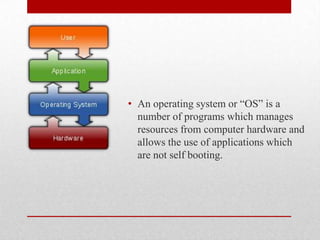
• An operating system or “OS” is a
  number of programs which manages
  resources from computer hardware and
  allows the use of applications which
  are not self booting.
• An operating system can be found in any device which
  contains a computer, such as a desk/lap top, mobile
  phones, video game consoles, web servers and many
  others.

• Popular operating systems include Linux, Android, iOS,
  Mac, OS X and Microsoft Windows.


Where can an OS be
found.
• GUI – Short for graphical user interface – This OS is image based and is
  commonly navigated by a mouse.
• Multi-User – A computer which allows different users to use the same
  computer at the same time or different times.
• Multi-Processing – A computer which is able to utilize more than one
  processor.
• Multi-Tasking - A processor which able to execute more than one
  program at a time, which could either be pre-emptive which divides the
  CPU and each program will take a slot or a co-operative which releys on
  each program giving the other time in a defined manner.
• Distributed - A system like this manages a group of computers, much
  like a server.
• Embedded - These systems are designed to work on smaller computing
  objects such as PDA's.


Types of OS’.
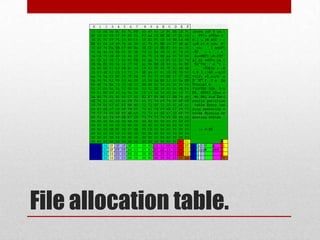
File allocation table.
• The File allocation table is a feature used by the operating
  system to locate files on a disk, even after fragmentation
  the table will keep track of all the files.
• Linux is a true multi-user pc as it allows multiple desktop
  instances to run simultaneously which can be accessed remotely.
  Meaning you’re physical presence is not required to use the
  computer.
• Windows may be able to run multiple desktop instances but only
  one may be accessed at once as the Windows operating system
  requires the physical presence of the person using the computer.
• Linux has a “root user” which enables software installation,
  access to all files and even total hard drive formatting. This root
  user is only used to tweak the system.
•
  The Windows alternative to this is an “Administrator” account
  which enables software installation and downloads and access to
  all files. The admin account can be used as a regular account
  without any real problem.


Windows Vs. Linux
• Linux is much more of a professional standard OS as
  most new users may encounter computers which other,
  more advanced user’s have already customised to their
  specifications.

• Compared to Windows Linux is much more of a flexible
  operating system as it has greater functionality and more
  of a professional state. Linux is an open source system
  which allows for the further customization of the
  interface and programming.


W v L Interface
• Memory management is the process which involes
  allocating amounts of RAM for the use of programs and
  then freeing it when it is no longer needed. Whilst the
  RAM is busy temporary storage may be created by
  allocation sections of the Hard Drive to be used to for
  program processing, this is a secondary form of RAM.


Memory Management.
• The user interface enables us to access the computer and
  use it. This is otherwise known as Human - Computer
  interaction.
• Without the user interface we would not be able to use,
  view or even access the computer.


User interface.
• The device manager is a program within the Windows
  operating system which allows the user to view all
  hardware connected to the computer.
• From here you can enable or disable, add drivers for each
  device or tell windows to simply ignore any faulty
  devices.


Device management.
• Processor management comes down to two tasks:
  Ensuring each program and application has enough
  recieves enough of the processor's time in order to be
  processed and using as many processor cycles as possible
  for real work.


Processor management.
• GUI or Graphical User Interface is how most computing
  devices work in modern age, it is simply the usage of
  images, text and icons to help navigate and use a device.

  For example: Accessing or opening a program can simply
  be done by clicking the icon which resembles that
  program.
  Windows XP - Windows 7, Linux and all other modern
  operating systems use a GUI.


HCI - GUI
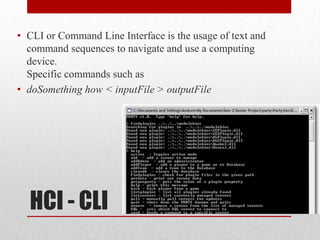
• CLI or Command Line Interface is the usage of text and
  command sequences to navigate and use a computing
  device.
  Specific commands such as
• doSomething how < inputFile > outputFile


  HCI - CLI

Operating systems

  • 1.
    Operating Systems. What they doand what they are for.
  • 2.
    • An operatingsystem or “OS” is a number of programs which manages resources from computer hardware and allows the use of applications which are not self booting.
  • 3.
    • An operatingsystem can be found in any device which contains a computer, such as a desk/lap top, mobile phones, video game consoles, web servers and many others. • Popular operating systems include Linux, Android, iOS, Mac, OS X and Microsoft Windows. Where can an OS be found.
  • 4.
    • GUI –Short for graphical user interface – This OS is image based and is commonly navigated by a mouse. • Multi-User – A computer which allows different users to use the same computer at the same time or different times. • Multi-Processing – A computer which is able to utilize more than one processor. • Multi-Tasking - A processor which able to execute more than one program at a time, which could either be pre-emptive which divides the CPU and each program will take a slot or a co-operative which releys on each program giving the other time in a defined manner. • Distributed - A system like this manages a group of computers, much like a server. • Embedded - These systems are designed to work on smaller computing objects such as PDA's. Types of OS’.
  • 5.
  • 6.
    • The Fileallocation table is a feature used by the operating system to locate files on a disk, even after fragmentation the table will keep track of all the files.
  • 7.
    • Linux isa true multi-user pc as it allows multiple desktop instances to run simultaneously which can be accessed remotely. Meaning you’re physical presence is not required to use the computer. • Windows may be able to run multiple desktop instances but only one may be accessed at once as the Windows operating system requires the physical presence of the person using the computer. • Linux has a “root user” which enables software installation, access to all files and even total hard drive formatting. This root user is only used to tweak the system. • The Windows alternative to this is an “Administrator” account which enables software installation and downloads and access to all files. The admin account can be used as a regular account without any real problem. Windows Vs. Linux
  • 8.
    • Linux ismuch more of a professional standard OS as most new users may encounter computers which other, more advanced user’s have already customised to their specifications. • Compared to Windows Linux is much more of a flexible operating system as it has greater functionality and more of a professional state. Linux is an open source system which allows for the further customization of the interface and programming. W v L Interface
  • 9.
    • Memory managementis the process which involes allocating amounts of RAM for the use of programs and then freeing it when it is no longer needed. Whilst the RAM is busy temporary storage may be created by allocation sections of the Hard Drive to be used to for program processing, this is a secondary form of RAM. Memory Management.
  • 10.
    • The userinterface enables us to access the computer and use it. This is otherwise known as Human - Computer interaction. • Without the user interface we would not be able to use, view or even access the computer. User interface.
  • 11.
    • The devicemanager is a program within the Windows operating system which allows the user to view all hardware connected to the computer. • From here you can enable or disable, add drivers for each device or tell windows to simply ignore any faulty devices. Device management.
  • 12.
    • Processor managementcomes down to two tasks: Ensuring each program and application has enough recieves enough of the processor's time in order to be processed and using as many processor cycles as possible for real work. Processor management.
  • 13.
    • GUI orGraphical User Interface is how most computing devices work in modern age, it is simply the usage of images, text and icons to help navigate and use a device. For example: Accessing or opening a program can simply be done by clicking the icon which resembles that program. Windows XP - Windows 7, Linux and all other modern operating systems use a GUI. HCI - GUI
  • 14.
    • CLI orCommand Line Interface is the usage of text and command sequences to navigate and use a computing device. Specific commands such as • doSomething how < inputFile > outputFile HCI - CLI