Windows Server 2008  新安全功能探討 呂政周 精誠恆逸教育訓練處 資深講師 http://edu.uuu.com.tw - -
課程大綱 前言 作業系統安全 存取控制安全 應用程式安全 程式執行安全 資料傳遞安全 資料儲存安全 - -
前言 雖然病毒及駭客占據了頭版頭條的位置 ,  但是安全管理仍然是企業組織電腦與資訊安全的核心內容 . SD3+C Secure by Design  Secure by Default Secure in Deployment and Communications Trustworthy Computing  - -
作業系統安全 - -
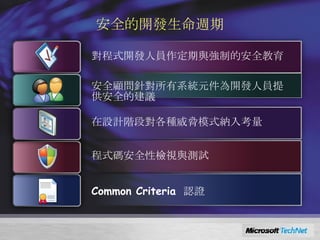
Windows Server 2008  安全的開發生命週期 對程式開發人員作定期與強制的安全教育 安全顧問針對所有系統元件為開發人員提供安全的建議 在設計階段對各種威脅模式納入考量 程式碼安全性檢視與測試 Common Criteria  認證
The bad guys are everywhere! They literally want to do you harm Threats exist in two interesting places— Online: system started and shows a login screen or a user is logged in Offline: system is powered down or in hibernation Policies must address both
Protect the OS When Running
The threats Trojan that replaces a system file to install a rootkit and take control of the computer (e.g. Fun Love or others that use root kits) Offline attack caused by booting an alternate operating system and attempting to corrupt or modify Windows operating system image files Third-party kernel drivers that are not secure Any action by an administrator that threatens the integrity of the operating system binary files Rogue administrator who changes an operating system binary to hide other acts - -
Code integrity Validates the integrity of each binary image Checks hashes for every page as it’s loaded Also checks any image loading to a protected process Implemented as a file system filter driver Hashes stored in system catalog or in X.509 certificate embedded in file Also validates the integrity of the boot process Checks the kernel, the HAL, boot-start drivers If validation fails, image won’t load - -
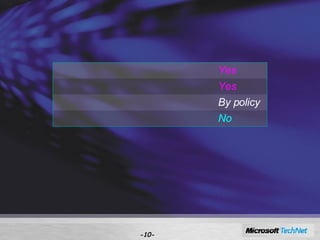
Hash validation scope - - Windows binaries Yes WHQL-certified third-party drivers Yes Unsigned drivers By policy Third-party application binaries No
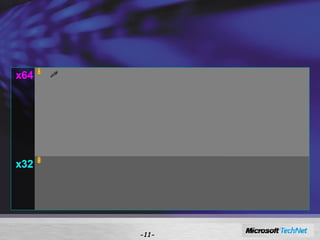
More on signatures Don’t confuse hash validation with signatures - - x64 All kernel mode code must be signed or it won’t load Third-party drivers must be WHQL-certified or contain a certificate from a Microsoft CA No exceptions, period User mode binaries need no signature unless they— Implement cryptographic functions Load into the software licensing service x32 Signing applies only to drivers shipped with Windows Can control by policy what to do with third-party Unsigned kernel mode code will load User mode binaries—same as x64
Recovering from CI failures Potential problems— OS won’t boot: kernel code or boot-time driver failed CI OS boots, a device won’t function: non-boot-time driver failed CI OS boots, system is “weird”: service failed CI OS boots and behaves, task malfunctions: OS component failed CI Solve boot-critical problems through standard system recovery tools Integrated Windows diagnostic infrastructure helps to repair critical files; non-critical files can be replaced through Microsoft Update - -
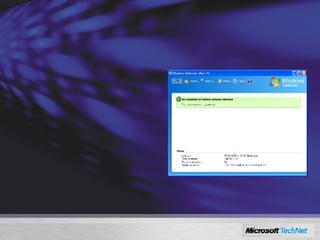
Integrated Windows Defender Integrated detection, cleaning, and real-time blocking of malware: Malware, rootkits, and spyware Targeted at consumers – enterprise manageability will be available as a separate product Integrated Microsoft Malicious Software Removal Tool (MSRT) will remove worst worms, bots, and trojans during an upgrade and on a monthly basis
Internet Explorer 7 In addition to building on UAC (see later), IE includes: Protected Mode  that only allows IE to browse with no other rights, even if the user has them, such as to install software “ Read-only” mode, except for Temporary Internet Files when browser is in the Internet Zone of security
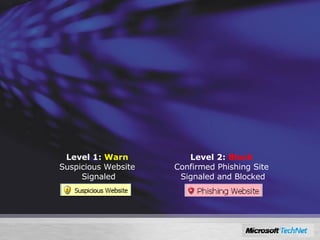
Phishing Filter in IE Dynamic Protection Against Fraudulent Websites 3 checks to protect users from phishing scams: Compares web site with local list of known legitimate sites Scans the web site for characteristics common to phishing sites  Double checks site with online Microsoft service of reported phishing sites updated several times every hour Two Levels of Warning and Protection in IE7 Security Status Bar Level 1:  Warn   Suspicious Website  Signaled Level 2:  Block   Confirmed Phishing Site  Signaled and Blocked
存取控制安全 - -
User Account Control Helps implement Least Privilege principle in two distinct ways: Every user is a standard user Older, legacy, or just greedy application’s attempts to change your system’s settings will be virtualised so they do not break anything Each genuine need to use administrative privileges will require: Selection of a user who has those permissions, or Confirmation of the intent to carry on with the operation
UAC: Fundamental Change to Windows Operation Fixes the system to work well as a standard user Registry and  f ile  v irtualization to provide compatibility Per-machine registry writes are redirected to per-user locations if the user does not have administrative privileges Effectively: standard accounts can run  “ admin-required” legacy applications safely! You can redirect the virtualization store
Control Over Device Installation Control over removable device installation via a policy Mainly to disable USB-device installation, as many corporations worry about intellectual property leak You can control them by device class or driver Approved drivers can be pre-populated into trusted Driver Store Driver Store Policies (group policies) govern driver packages that are not in the Driver Store: Non-corporate standard drivers Unsigned drivers
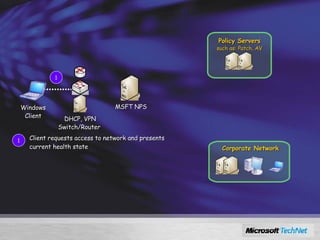
Using Network Access Protection 1 Windows Client Policy Servers such as: Patch, AV MSFT NPS  DHCP, VPN Switch/Router  Client requests access to network and presents current health state 1 Corporate Network
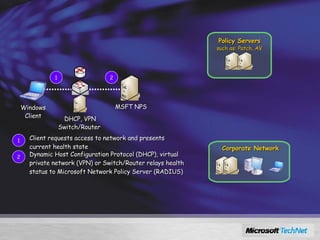
Using Network Access Protection 1 Windows Client 2 Policy Servers such as: Patch, AV MSFT NPS  DHCP, VPN Switch/Router  Client requests access to network and presents current health state 1 2 Dynamic Host Configuration Protocol (DHCP), virtual private network (VPN) or Switch/Router relays health status to Microsoft Network Policy Server (RADIUS) Corporate Network
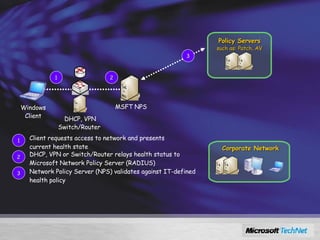
Using Network Access Protection 1 Windows Client 2 3 Policy Servers such as: Patch, AV MSFT NPS  DHCP, VPN Switch/Router  Client requests access to network and presents current health state 1 2 DHCP, VPN or Switch/Router relays health status to Microsoft Network Policy Server (RADIUS) 3 Network Policy Server (NPS) validates against IT-defined health policy Corporate Network
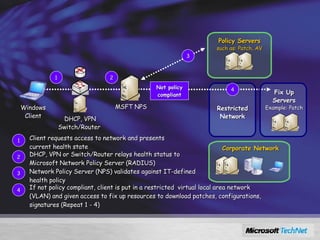
Using Network Access Protection 1 Windows Client 2 3 Policy Servers such as: Patch, AV Not policy compliant MSFT NPS  4 DHCP, VPN Switch/Router  Restricted Network Client requests access to network and presents current health state 1 2 DHCP, VPN or Switch/Router relays health status to Microsoft Network Policy Server (RADIUS) 3 Network Policy Server (NPS) validates against IT-defined health policy 4 If not policy compliant, client is put in a restricted  virtual local area network (VLAN) and given access to fix up resources to download patches, configurations, signatures (Repeat 1 - 4) Fix Up Servers Example: Patch Corporate Network
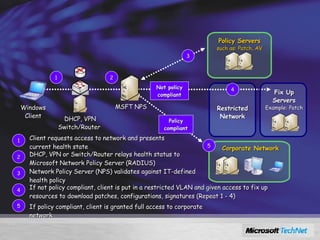
Using Network Access Protection 1 Windows Client 2 3 Policy Servers such as: Patch, AV Not policy compliant Policy compliant MSFT NPS  5 4 DHCP, VPN Switch/Router  Restricted Network Client requests access to network and presents current health state 1 2 DHCP, VPN or Switch/Router relays health status to Microsoft Network Policy Server (RADIUS) 3 Network Policy Server (NPS) validates against IT-defined health policy 4 If not policy compliant, client is put in a restricted VLAN and given access to fix up resources to download patches, configurations, signatures (Repeat 1 - 4) Fix Up Servers Example: Patch 5 If policy compliant, client is granted full access to corporate network Corporate Network
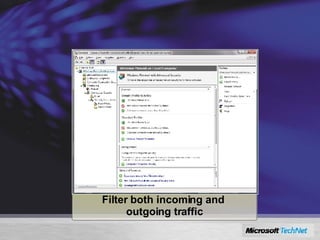
Windows Firewall Advanced Security  Filter both incoming and  outgoing traffic
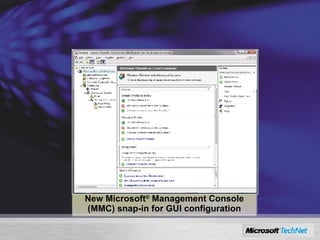
Windows Firewall Advanced Security  New Microsoft ®  Management Console (MMC) snap-in for GUI configuration
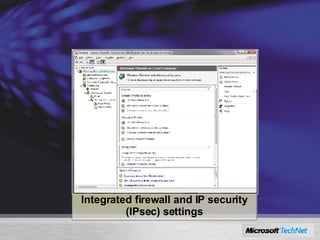
Windows Firewall Advanced Security  Integrated firewall and IP security (IPsec) settings
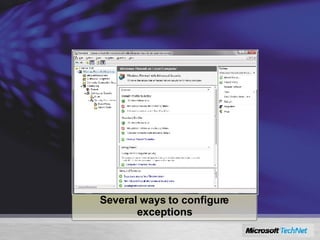
Windows Firewall Advanced Security  Several ways to configure exceptions
NG TCP/IP Next Generation TCP/IP in Vista and “Longhorn” A new, fully re-worked replacement of the old TCP/IP stack Dual-stack IPv6 implementation, with now obligatory IPSec IPv6 is more secure than IPv4 by design, esp.: Privacy, tracking, network port scanning, confidentiality and integrity Other network-level security enhancements for both IPv4 and IPv6 Strong Host model Windows Filtering Platform Improved stack-level  resistance to  all known  TCP/IP-based denial of service and other types of network attacks Routing Compartments Auto-configuration and no-restart reconfiguration
應用程式安全 與 程式執行安全 - -
The threats Remember Blaster? Took over RPCSS—made it write msblast.exe to file system and added run keys to the registry No software is perfect; someone still might find a vulnerability in a service Malware often looks to exploit such vulnerabilities Services are attractive Run without user interaction Many services often have free reign over the system—too much access Most services can communicate over any port - -
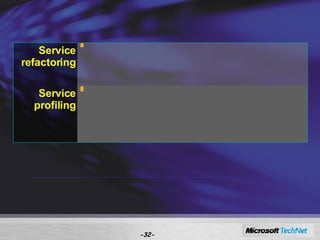
Service hardening - - It’s about the principle of least privilege— it’s good for people, and it’s good for services Service refactoring Move service from LocalSystem to something less privileged If necessary, split service so that only the part requiring LocalSystem receives that  Service profiling Enables service to restrict its behavior Resources can have ACLs that allow the service’s ID to access only what it needs Also includes rules for specifying required network behavior
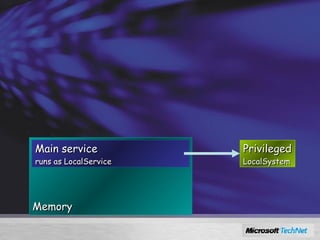
Refactoring Ideally, remove the service out of LocalSystem If it doesn’t perform privileged operations Make ACL changes to registry keys and driver objects Otherwise, split into two pieces The main service The bits that perform privileged operations Authenticate the call between them Memory Main service runs as LocalService Privileged LocalSystem
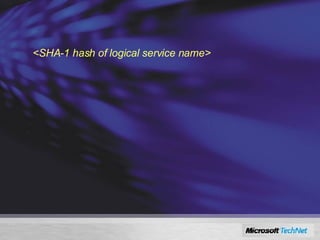
Profiling Every service has a unique service identifier called a “service SID” S-1-80- <SHA-1 hash of logical service name> A “service profile” is a set of ACLs that— Allow a service to use a resource Constrain the service to the resources it needs Define which network ports a service can use Block the service from using other ports Now, service can run as LocalService or NetworkService and still receive additional access when necessary
Restricting services SCM computes service SID SCM adds the SID to service process’s token SCM creates write-restricted token SCM removes unneeded privileges from process token Service places ACL on resource—only service can write to it
Restricting services: know this A restrictable service will set two properties (stored in the registry)— One to indicate that it can be restricted One to show which privileges it requires Note!  This is a voluntary process. The service is choosing to restrict itself. It’s good development practice because it reduces the likelihood of a service being abused by malware, but it isn’t a full-on system-wide restriction mechanism. Third-party services can still run wild and free…
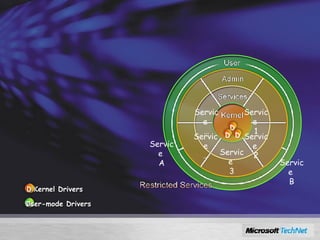
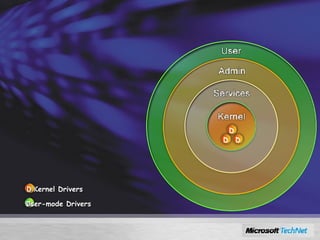
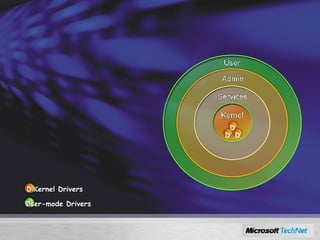
Windows Server 2008 Services Hardening Kernel Drivers User-mode Drivers D D D D D
Windows Server 2008 Services Hardening Kernel Drivers User-mode Drivers Reduce size of high-risk layers D D D D D
Windows Server 2008 Services Hardening Kernel Drivers User-mode Drivers Service  1 Service  2 Service  3 Service … Service  … Service  A Service  B Reduce size of high-risk layers Segment the services D D D D D
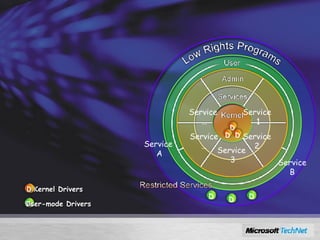
Windows Server 2008 Services Hardening Reduce size of high-risk layers Segment the services Increase number of layers Kernel Drivers User-mode Drivers Service  1 Service  2 Service  3 Service … Service  … Service  A Service  B D D D D D D D D
Granular Audit Policy
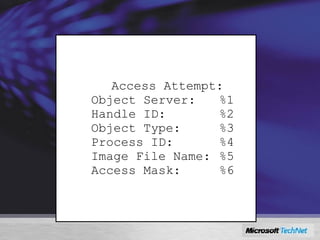
Object Access Auditing Object  Access Attempt: Object Server: %1 Handle ID: %2 Object Type: %3 Process ID: %4 Image File Name: %5 Access Mask: %6
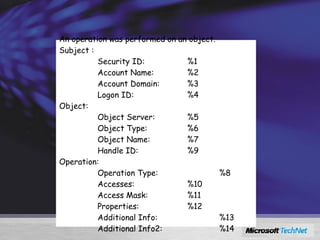
Object Access Auditing An operation was performed on an object. Subject :                                                                   Security ID: %1                  Account Name: %2                           Account Domain: %3                  Logon ID: %4           Object:                  Object Server: %5                  Object Type: %6                  Object Name: %7                  Handle ID: %9 Operation:                  Operation Type: %8                  Accesses: %10                  Access Mask: %11                  Properties: %12                  Additional Info: %13                  Additional Info2: %14
Added Auditing For Registry value change audit events (old+new values) AD change audit events (old+new values) Improved operation-based audit Audit events for UAC Improved IPSec audit events including support for AuthIP RPC Call audit events Share Access audit events Share Management events Cryptographic function audit events NAP audit events (server only) IAS (RADIUS) audit events (server only)
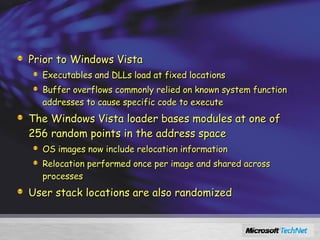
Address Space Load Randomization (ASLR) Prior to Windows Vista Executables and DLLs load at fixed locations Buffer overflows commonly relied on known system function addresses to cause specific code to execute The Windows Vista loader bases modules at one of 256 random points in the address space OS images now include relocation information Relocation performed once per image and shared across processes User stack locations are also randomized
資料傳遞安全 與 資料儲存安全 - -
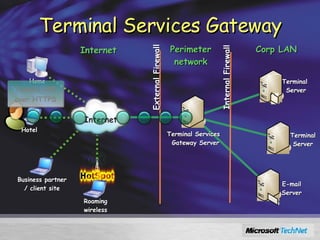
Terminal Services Gateway Perimeter network Internet Corp LAN External Firewall Internal Firewall Hotel Tunnels RDP over HTTPS Home Terminal  Server Internet Terminal Server Terminal Services Gateway Server E-mail Server Business partner / client site Roaming wireless
RMS, EFS, and BitLocker Three levels of protection: Rights Management Services Per-document enforcement of policy-based rights Encrypting File Systems Per file or folder encryption of data for confidentiality BitLocker™ Full Volume Encryption Per volume encryption (see earlier) Note: it is not necessary to use a TPM for RMS and EFS EFS  can use smartcards  and tokens in Vista RMS is based, at present, on a “lockbox.dll” technology, not a TPM
CNG:  Cryptography Next Generation CAPI 1.0 has been deprecated May be dropped altogether in future Windows releases CNG: Open Cryptographic Interface for Windows Ability to plug in kernel or user mode implementations for: Proprietary cryptographic algorithms Replacements for standard cryptographic algorithms Key Storage Providers (KSP) Enables cryptography configuration at enterprise and machine levels
Offline Files Encrypted Per User
Encrypted Pagefile
Regulatory Compliance Windows Vista cryptography will comply with: Common Criteria (CC) csrc.nist.gov/cc   Currently in version 3 FIPS requirements for strong isolation and auditing FIPS-140-2 on selected platforms and 140-1 on all US NSA (National Security Agency) CSS (Central Security Service) Suite B
Supports NSA Suite B www.nsa.gov/ia/industry/crypto_suite_b.cfm Required cryptographic algorithms for all US non-classified and classified (SECRET and TOP-SECRET) needs Higher special-security needs (e.g. nuclear security) – guided by Suite A (definition classified) Announced by NSA at RSA conference in Feb 2005 Encryption : AES FIPS 197 (with keys sizes of 128 and 256 bits) Digital Signature : Elliptic Curve Digital Signature Algorithm FIPS 186-2 (using the curves with 256 and 384-bit prime moduli) Key Exchange : Elliptic Curve Diffie-Hellman or Elliptic Curve MQV Draft NIST Special Publication 800-56 (using the curves with 256 and 384-bit prime moduli) Hashing : Secure Hash Algorithm FIPS 180-2 (using SHA-256 and SHA-384)
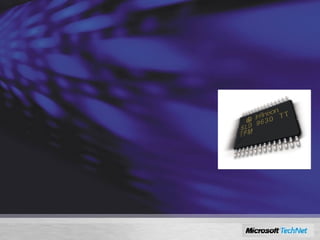
Trusted Platform Module TPM Chip Version 1.2 Hardware present in the computer, usually a chip on the motherboard Securely stores credentials, such as a private key of a machine certificate and is crypto-enabled Effectively, the essence of a smart smartcard TPM can be used to request encryption and digital signing of code and files and for mutual authentication of devices See www.trustedcomputinggroup.org
Code Integrity All DLLs and other OS executables have been digitally signed Signatures verified when components load into memory
BitLocker™ BitLocker strongly encrypts and signs the entire hard drive (full volume encryption) TPM chip provides key management Can use additional protection factors such as a USB dongle, PIN or password Any unauthorised off-line modification to your data or OS is discovered and no access is granted Prevents attacks which use utilities that access the hard drive while Windows is not running and enforces Windows boot process Protects data after laptop theft etc. Data recovery strategy must be planned carefully! Vista supports three modes: key escrow, recovery agent, backup
結論
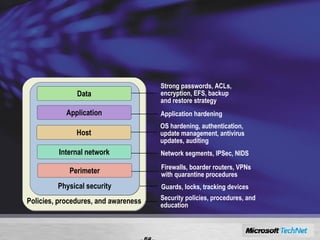
Defense-in-Depth - - Increases an attacker’s risk of detection  Reduces an attacker’s chance of success Security policies, procedures, and education Policies, procedures, and awareness Guards, locks, tracking devices Physical security Application hardening Application OS hardening, authentication,  update management, antivirus updates, auditing Host Network segments, IPSec, NIDS Internal network Firewalls, boarder routers, VPNs with quarantine procedures Perimeter Strong passwords, ACLs, encryption, EFS, backup and restore strategy Data
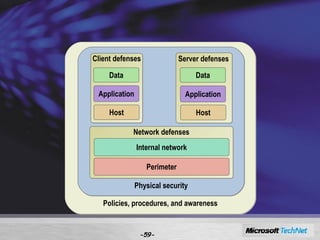
Defense-in-Depth ( 續 ) - - Policies, procedures, and awareness Physical security Perimeter Internal network Network defenses Host Application Data Client defenses Server defenses Host Application Data
- - © 2007 Microsoft Corporation. All rights reserved. This presentation is for informational purposes only. Microsoft makes no warranties, express or implied, in this summary.

0828 Windows Server 2008 新安全功能探討

  • 1.
    Windows Server 2008 新安全功能探討 呂政周 精誠恆逸教育訓練處 資深講師 http://edu.uuu.com.tw - -
  • 2.
    課程大綱 前言 作業系統安全存取控制安全 應用程式安全 程式執行安全 資料傳遞安全 資料儲存安全 - -
  • 3.
    前言 雖然病毒及駭客占據了頭版頭條的位置 , 但是安全管理仍然是企業組織電腦與資訊安全的核心內容 . SD3+C Secure by Design Secure by Default Secure in Deployment and Communications Trustworthy Computing - -
  • 4.
  • 5.
    Windows Server 2008 安全的開發生命週期 對程式開發人員作定期與強制的安全教育 安全顧問針對所有系統元件為開發人員提供安全的建議 在設計階段對各種威脅模式納入考量 程式碼安全性檢視與測試 Common Criteria 認證
  • 6.
    The bad guysare everywhere! They literally want to do you harm Threats exist in two interesting places— Online: system started and shows a login screen or a user is logged in Offline: system is powered down or in hibernation Policies must address both
  • 7.
    Protect the OSWhen Running
  • 8.
    The threats Trojanthat replaces a system file to install a rootkit and take control of the computer (e.g. Fun Love or others that use root kits) Offline attack caused by booting an alternate operating system and attempting to corrupt or modify Windows operating system image files Third-party kernel drivers that are not secure Any action by an administrator that threatens the integrity of the operating system binary files Rogue administrator who changes an operating system binary to hide other acts - -
  • 9.
    Code integrity Validatesthe integrity of each binary image Checks hashes for every page as it’s loaded Also checks any image loading to a protected process Implemented as a file system filter driver Hashes stored in system catalog or in X.509 certificate embedded in file Also validates the integrity of the boot process Checks the kernel, the HAL, boot-start drivers If validation fails, image won’t load - -
  • 10.
    Hash validation scope- - Windows binaries Yes WHQL-certified third-party drivers Yes Unsigned drivers By policy Third-party application binaries No
  • 11.
    More on signaturesDon’t confuse hash validation with signatures - - x64 All kernel mode code must be signed or it won’t load Third-party drivers must be WHQL-certified or contain a certificate from a Microsoft CA No exceptions, period User mode binaries need no signature unless they— Implement cryptographic functions Load into the software licensing service x32 Signing applies only to drivers shipped with Windows Can control by policy what to do with third-party Unsigned kernel mode code will load User mode binaries—same as x64
  • 12.
    Recovering from CIfailures Potential problems— OS won’t boot: kernel code or boot-time driver failed CI OS boots, a device won’t function: non-boot-time driver failed CI OS boots, system is “weird”: service failed CI OS boots and behaves, task malfunctions: OS component failed CI Solve boot-critical problems through standard system recovery tools Integrated Windows diagnostic infrastructure helps to repair critical files; non-critical files can be replaced through Microsoft Update - -
  • 13.
    Integrated Windows DefenderIntegrated detection, cleaning, and real-time blocking of malware: Malware, rootkits, and spyware Targeted at consumers – enterprise manageability will be available as a separate product Integrated Microsoft Malicious Software Removal Tool (MSRT) will remove worst worms, bots, and trojans during an upgrade and on a monthly basis
  • 14.
    Internet Explorer 7In addition to building on UAC (see later), IE includes: Protected Mode that only allows IE to browse with no other rights, even if the user has them, such as to install software “ Read-only” mode, except for Temporary Internet Files when browser is in the Internet Zone of security
  • 15.
    Phishing Filter inIE Dynamic Protection Against Fraudulent Websites 3 checks to protect users from phishing scams: Compares web site with local list of known legitimate sites Scans the web site for characteristics common to phishing sites Double checks site with online Microsoft service of reported phishing sites updated several times every hour Two Levels of Warning and Protection in IE7 Security Status Bar Level 1: Warn Suspicious Website Signaled Level 2: Block Confirmed Phishing Site Signaled and Blocked
  • 16.
  • 17.
    User Account ControlHelps implement Least Privilege principle in two distinct ways: Every user is a standard user Older, legacy, or just greedy application’s attempts to change your system’s settings will be virtualised so they do not break anything Each genuine need to use administrative privileges will require: Selection of a user who has those permissions, or Confirmation of the intent to carry on with the operation
  • 18.
    UAC: Fundamental Changeto Windows Operation Fixes the system to work well as a standard user Registry and f ile v irtualization to provide compatibility Per-machine registry writes are redirected to per-user locations if the user does not have administrative privileges Effectively: standard accounts can run “ admin-required” legacy applications safely! You can redirect the virtualization store
  • 19.
    Control Over DeviceInstallation Control over removable device installation via a policy Mainly to disable USB-device installation, as many corporations worry about intellectual property leak You can control them by device class or driver Approved drivers can be pre-populated into trusted Driver Store Driver Store Policies (group policies) govern driver packages that are not in the Driver Store: Non-corporate standard drivers Unsigned drivers
  • 20.
    Using Network AccessProtection 1 Windows Client Policy Servers such as: Patch, AV MSFT NPS DHCP, VPN Switch/Router Client requests access to network and presents current health state 1 Corporate Network
  • 21.
    Using Network AccessProtection 1 Windows Client 2 Policy Servers such as: Patch, AV MSFT NPS DHCP, VPN Switch/Router Client requests access to network and presents current health state 1 2 Dynamic Host Configuration Protocol (DHCP), virtual private network (VPN) or Switch/Router relays health status to Microsoft Network Policy Server (RADIUS) Corporate Network
  • 22.
    Using Network AccessProtection 1 Windows Client 2 3 Policy Servers such as: Patch, AV MSFT NPS DHCP, VPN Switch/Router Client requests access to network and presents current health state 1 2 DHCP, VPN or Switch/Router relays health status to Microsoft Network Policy Server (RADIUS) 3 Network Policy Server (NPS) validates against IT-defined health policy Corporate Network
  • 23.
    Using Network AccessProtection 1 Windows Client 2 3 Policy Servers such as: Patch, AV Not policy compliant MSFT NPS 4 DHCP, VPN Switch/Router Restricted Network Client requests access to network and presents current health state 1 2 DHCP, VPN or Switch/Router relays health status to Microsoft Network Policy Server (RADIUS) 3 Network Policy Server (NPS) validates against IT-defined health policy 4 If not policy compliant, client is put in a restricted virtual local area network (VLAN) and given access to fix up resources to download patches, configurations, signatures (Repeat 1 - 4) Fix Up Servers Example: Patch Corporate Network
  • 24.
    Using Network AccessProtection 1 Windows Client 2 3 Policy Servers such as: Patch, AV Not policy compliant Policy compliant MSFT NPS 5 4 DHCP, VPN Switch/Router Restricted Network Client requests access to network and presents current health state 1 2 DHCP, VPN or Switch/Router relays health status to Microsoft Network Policy Server (RADIUS) 3 Network Policy Server (NPS) validates against IT-defined health policy 4 If not policy compliant, client is put in a restricted VLAN and given access to fix up resources to download patches, configurations, signatures (Repeat 1 - 4) Fix Up Servers Example: Patch 5 If policy compliant, client is granted full access to corporate network Corporate Network
  • 25.
    Windows Firewall AdvancedSecurity Filter both incoming and outgoing traffic
  • 26.
    Windows Firewall AdvancedSecurity New Microsoft ® Management Console (MMC) snap-in for GUI configuration
  • 27.
    Windows Firewall AdvancedSecurity Integrated firewall and IP security (IPsec) settings
  • 28.
    Windows Firewall AdvancedSecurity Several ways to configure exceptions
  • 29.
    NG TCP/IP NextGeneration TCP/IP in Vista and “Longhorn” A new, fully re-worked replacement of the old TCP/IP stack Dual-stack IPv6 implementation, with now obligatory IPSec IPv6 is more secure than IPv4 by design, esp.: Privacy, tracking, network port scanning, confidentiality and integrity Other network-level security enhancements for both IPv4 and IPv6 Strong Host model Windows Filtering Platform Improved stack-level resistance to all known TCP/IP-based denial of service and other types of network attacks Routing Compartments Auto-configuration and no-restart reconfiguration
  • 30.
  • 31.
    The threats RememberBlaster? Took over RPCSS—made it write msblast.exe to file system and added run keys to the registry No software is perfect; someone still might find a vulnerability in a service Malware often looks to exploit such vulnerabilities Services are attractive Run without user interaction Many services often have free reign over the system—too much access Most services can communicate over any port - -
  • 32.
    Service hardening -- It’s about the principle of least privilege— it’s good for people, and it’s good for services Service refactoring Move service from LocalSystem to something less privileged If necessary, split service so that only the part requiring LocalSystem receives that Service profiling Enables service to restrict its behavior Resources can have ACLs that allow the service’s ID to access only what it needs Also includes rules for specifying required network behavior
  • 33.
    Refactoring Ideally, removethe service out of LocalSystem If it doesn’t perform privileged operations Make ACL changes to registry keys and driver objects Otherwise, split into two pieces The main service The bits that perform privileged operations Authenticate the call between them Memory Main service runs as LocalService Privileged LocalSystem
  • 34.
    Profiling Every servicehas a unique service identifier called a “service SID” S-1-80- <SHA-1 hash of logical service name> A “service profile” is a set of ACLs that— Allow a service to use a resource Constrain the service to the resources it needs Define which network ports a service can use Block the service from using other ports Now, service can run as LocalService or NetworkService and still receive additional access when necessary
  • 35.
    Restricting services SCMcomputes service SID SCM adds the SID to service process’s token SCM creates write-restricted token SCM removes unneeded privileges from process token Service places ACL on resource—only service can write to it
  • 36.
    Restricting services: knowthis A restrictable service will set two properties (stored in the registry)— One to indicate that it can be restricted One to show which privileges it requires Note! This is a voluntary process. The service is choosing to restrict itself. It’s good development practice because it reduces the likelihood of a service being abused by malware, but it isn’t a full-on system-wide restriction mechanism. Third-party services can still run wild and free…
  • 37.
    Windows Server 2008Services Hardening Kernel Drivers User-mode Drivers D D D D D
  • 38.
    Windows Server 2008Services Hardening Kernel Drivers User-mode Drivers Reduce size of high-risk layers D D D D D
  • 39.
    Windows Server 2008Services Hardening Kernel Drivers User-mode Drivers Service 1 Service 2 Service 3 Service … Service … Service A Service B Reduce size of high-risk layers Segment the services D D D D D
  • 40.
    Windows Server 2008Services Hardening Reduce size of high-risk layers Segment the services Increase number of layers Kernel Drivers User-mode Drivers Service 1 Service 2 Service 3 Service … Service … Service A Service B D D D D D D D D
  • 41.
  • 42.
    Object Access AuditingObject Access Attempt: Object Server: %1 Handle ID: %2 Object Type: %3 Process ID: %4 Image File Name: %5 Access Mask: %6
  • 43.
    Object Access AuditingAn operation was performed on an object. Subject :                                                                 Security ID: %1                 Account Name: %2                          Account Domain: %3                 Logon ID: %4          Object:                 Object Server: %5                 Object Type: %6                 Object Name: %7                 Handle ID: %9 Operation:                 Operation Type: %8                 Accesses: %10                 Access Mask: %11                 Properties: %12                 Additional Info: %13                 Additional Info2: %14
  • 44.
    Added Auditing ForRegistry value change audit events (old+new values) AD change audit events (old+new values) Improved operation-based audit Audit events for UAC Improved IPSec audit events including support for AuthIP RPC Call audit events Share Access audit events Share Management events Cryptographic function audit events NAP audit events (server only) IAS (RADIUS) audit events (server only)
  • 45.
    Address Space LoadRandomization (ASLR) Prior to Windows Vista Executables and DLLs load at fixed locations Buffer overflows commonly relied on known system function addresses to cause specific code to execute The Windows Vista loader bases modules at one of 256 random points in the address space OS images now include relocation information Relocation performed once per image and shared across processes User stack locations are also randomized
  • 46.
  • 47.
    Terminal Services GatewayPerimeter network Internet Corp LAN External Firewall Internal Firewall Hotel Tunnels RDP over HTTPS Home Terminal Server Internet Terminal Server Terminal Services Gateway Server E-mail Server Business partner / client site Roaming wireless
  • 48.
    RMS, EFS, andBitLocker Three levels of protection: Rights Management Services Per-document enforcement of policy-based rights Encrypting File Systems Per file or folder encryption of data for confidentiality BitLocker™ Full Volume Encryption Per volume encryption (see earlier) Note: it is not necessary to use a TPM for RMS and EFS EFS can use smartcards and tokens in Vista RMS is based, at present, on a “lockbox.dll” technology, not a TPM
  • 49.
    CNG: CryptographyNext Generation CAPI 1.0 has been deprecated May be dropped altogether in future Windows releases CNG: Open Cryptographic Interface for Windows Ability to plug in kernel or user mode implementations for: Proprietary cryptographic algorithms Replacements for standard cryptographic algorithms Key Storage Providers (KSP) Enables cryptography configuration at enterprise and machine levels
  • 50.
  • 51.
  • 52.
    Regulatory Compliance WindowsVista cryptography will comply with: Common Criteria (CC) csrc.nist.gov/cc Currently in version 3 FIPS requirements for strong isolation and auditing FIPS-140-2 on selected platforms and 140-1 on all US NSA (National Security Agency) CSS (Central Security Service) Suite B
  • 53.
    Supports NSA SuiteB www.nsa.gov/ia/industry/crypto_suite_b.cfm Required cryptographic algorithms for all US non-classified and classified (SECRET and TOP-SECRET) needs Higher special-security needs (e.g. nuclear security) – guided by Suite A (definition classified) Announced by NSA at RSA conference in Feb 2005 Encryption : AES FIPS 197 (with keys sizes of 128 and 256 bits) Digital Signature : Elliptic Curve Digital Signature Algorithm FIPS 186-2 (using the curves with 256 and 384-bit prime moduli) Key Exchange : Elliptic Curve Diffie-Hellman or Elliptic Curve MQV Draft NIST Special Publication 800-56 (using the curves with 256 and 384-bit prime moduli) Hashing : Secure Hash Algorithm FIPS 180-2 (using SHA-256 and SHA-384)
  • 54.
    Trusted Platform ModuleTPM Chip Version 1.2 Hardware present in the computer, usually a chip on the motherboard Securely stores credentials, such as a private key of a machine certificate and is crypto-enabled Effectively, the essence of a smart smartcard TPM can be used to request encryption and digital signing of code and files and for mutual authentication of devices See www.trustedcomputinggroup.org
  • 55.
    Code Integrity AllDLLs and other OS executables have been digitally signed Signatures verified when components load into memory
  • 56.
    BitLocker™ BitLocker stronglyencrypts and signs the entire hard drive (full volume encryption) TPM chip provides key management Can use additional protection factors such as a USB dongle, PIN or password Any unauthorised off-line modification to your data or OS is discovered and no access is granted Prevents attacks which use utilities that access the hard drive while Windows is not running and enforces Windows boot process Protects data after laptop theft etc. Data recovery strategy must be planned carefully! Vista supports three modes: key escrow, recovery agent, backup
  • 57.
  • 58.
    Defense-in-Depth - -Increases an attacker’s risk of detection Reduces an attacker’s chance of success Security policies, procedures, and education Policies, procedures, and awareness Guards, locks, tracking devices Physical security Application hardening Application OS hardening, authentication, update management, antivirus updates, auditing Host Network segments, IPSec, NIDS Internal network Firewalls, boarder routers, VPNs with quarantine procedures Perimeter Strong passwords, ACLs, encryption, EFS, backup and restore strategy Data
  • 59.
    Defense-in-Depth ( 續) - - Policies, procedures, and awareness Physical security Perimeter Internal network Network defenses Host Application Data Client defenses Server defenses Host Application Data
  • 60.
    - - ©2007 Microsoft Corporation. All rights reserved. This presentation is for informational purposes only. Microsoft makes no warranties, express or implied, in this summary.