You are in a workshop…Not a training…
Who are we - IntroductionsRanjana JainIT Pro Evangelist – Platform SecurityMicrosoft IndiaMCSE, MCT, RHCE, CISSP, CIW Security AnalystSrinivas LTechnology Specialist – Security Microsoft IndiaMCTS-Security, CCNA, CCNE, CNAGautam DuaSolution Specialist – Management and Security Microsoft IndiaMCSE, MCT
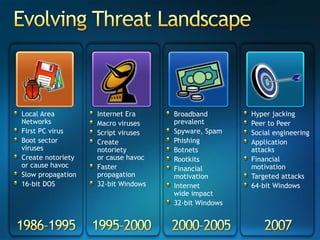
Evolving Threat LandscapeLocal Area NetworksFirst PC virusBoot sector virusesCreate notorietyor cause havocSlow propagation16-bit DOSInternet EraMacro virusesScript virusesCreate notorietyor cause havocFaster propagation32-bit WindowsHyper jackingPeer to PeerSocial engineeringApplication attacksFinancial motivationTargeted attacks64-bit WindowsBroadbandprevalentSpyware, SpamPhishingBotnetsRootkitsFinancial motivationInternet wide impact32-bit Windows1986–19951995–20002000–20052007
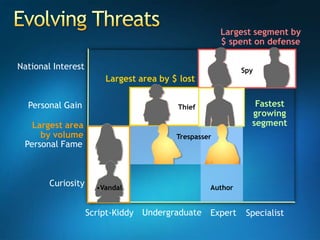
National InterestPersonal GainPersonal FameCuriosityLargest segment by $ spent on defenseSpyLargest area by $ lostFastest growing segmentThiefLargest area by volumeTrespasserAuthorVandalUndergraduateScript-KiddyExpertSpecialistEvolving Threats
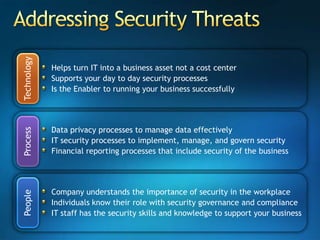
Addressing Security ThreatsHelps turn IT into a business asset not a cost center Supports your day to day security processes Is the Enabler to running your business successfullyTechnologyData privacy processes to manage data effectivelyIT security processes to implement, manage, and govern securityFinancial reporting processes that include security of the businessProcessCompany understands the importance of security in the workplaceIndividuals know their role with security governance and complianceIT staff has the security skills and knowledge to support your business People
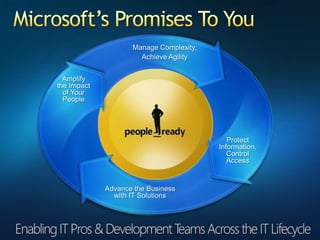
Microsoft’s Promises To YouManage Complexity,Achieve AgilityAmplifythe Impactof YourPeopleProtectInformation,ControlAccessAdvance the Businesswith IT Solutions
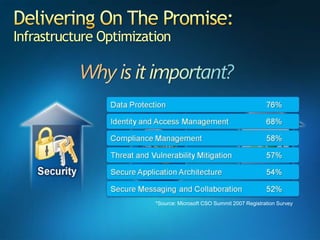
Delivering On The Promise:Infrastructure Optimization*Source: Microsoft CSO Summit 2007 Registration Survey
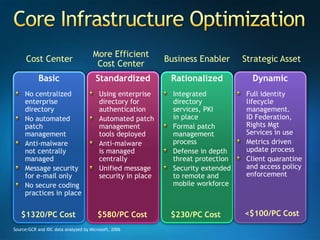
Core Infrastructure OptimizationMore Efficient Cost CenterCost Center Strategic AssetBusiness EnablerBasicNo centralized enterprise directoryNo automated patch managementAnti-malwarenot centrally managedMessage security for e-mail onlyNo secure coding practices in placeStandardizedUsing enterprise directory for authenticationAutomated patch management tools deployedAnti-malwareis managed centrallyUnified message security in placeRationalizedIntegrated directory services, PKIin placeFormal patch management processDefense in depth threat protectionSecurity extended to remote and mobile workforceDynamicFull identity lifecycle management.ID Federation,Rights Mgt Services in useMetrics driven update processClient quarantine and access policy enforcement<$100/PC Cost$1320/PC Cost$580/PC Cost$230/PC CostSource:GCR and IDC data analyzed by Microsoft, 2006
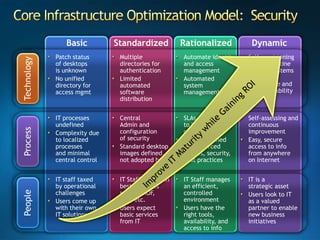
Core Infrastructure Optimization Model:  SecurityBasicStandardizedRationalizedDynamicTechnologySelf provisioning and quarantine capable systems ensure compliance and high availability Automate identity and access managementAutomatedsystem management Multiple directories for authenticationLimited automated software distributionPatch statusof desktopsis unknownNo unified directory for access mgmtSelf-assessing and continuous improvementEasy, secure access to info from anywhereon InternetSLAs are linkedto business objectivesClearly defined and enforced images, security, best practicesCentralAdmin and configurationof securityStandard desktop images defined,not adopted by allIT processes undefinedComplexity dueto localized processesand minimal central controlProcessImprove IT Maturity while Gaining ROIIT is astrategic assetUsers look to ITas a valued partner to enable new business initiativesIT Staff manages an efficient,controlled environmentUsers have the right tools,availability, and access to infoIT Staff trained in best practices such as MOF,ITIL, etc.Users expect basic services from ITIT staff taxed by operational challengesUsers come up with their ownIT solutionsPeople
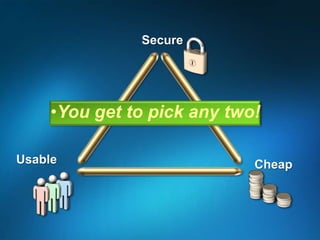
SecureYou get to pick any two!UsableCheap
Trustworthy Computing
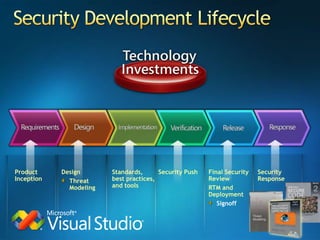
Security Development LifecycleDesignThreat ModelingStandards, best practices, and toolsSecurity PushFinal Security Review RTM and DeploymentSignoffSecurity ResponseProduct Inception
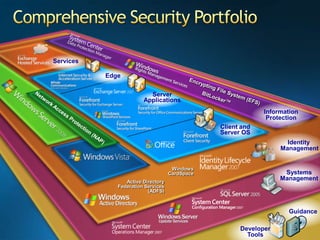
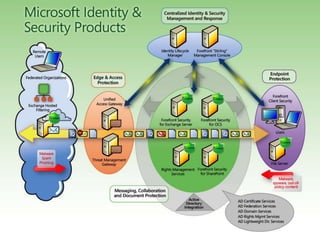
Comprehensive Security PortfolioServicesEdgeEncrypting File System (EFS)Server ApplicationsBitLocker™Information  ProtectionNetwork Access Protection (NAP)Client and Server OSIdentityManagementWindowsCardSpaceSystemsManagementActive Directory Federation Services (ADFS)GuidanceDeveloper Tools
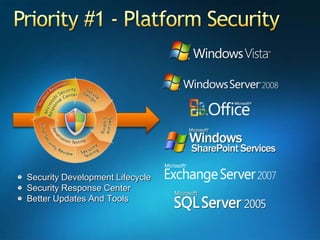
Priority #1 - Platform SecuritySecurity Development LifecycleSecurity Response CenterBetter Updates And Tools
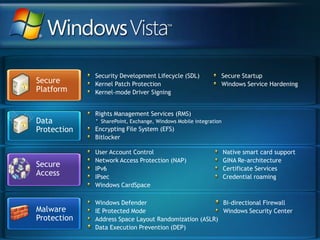
Security Development Lifecycle (SDL)Kernel Patch ProtectionKernel-mode Driver SigningSecure StartupWindows Service HardeningSecure PlatformRights Management Services (RMS) SharePoint, Exchange, Windows Mobile integrationEncrypting File System (EFS)BitlockerSecure AccessUser Account ControlNetwork Access Protection (NAP)IPv6IPsecWindows CardSpaceNative smart card supportGINA Re-architectureCertificate ServicesCredential roamingWindows DefenderIE Protected ModeAddress Space Layout Randomization (ASLR)Data Execution Prevention (DEP) Bi-directional FirewallWindows Security CenterData ProtectionMalwareProtection
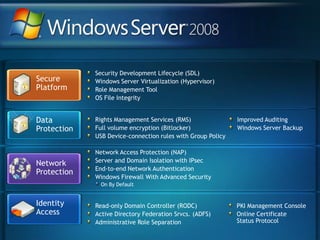
Security Development Lifecycle (SDL)Windows Server Virtualization (Hypervisor)Role Management ToolOS File IntegritySecure PlatformNetwork ProtectionNetwork Access Protection (NAP)Server and Domain Isolation with IPsecEnd-to-end Network AuthenticationWindows Firewall With Advanced Security On By DefaultIdentityAccessRights Management Services (RMS) Full volume encryption (Bitlocker)USB Device-connection rules with Group PolicyImproved AuditingWindows Server BackupData ProtectionRead-only Domain Controller (RODC)Active Directory Federation Srvcs. (ADFS)Administrative Role SeparationPKI Management ConsoleOnline CertificateStatus Protocol
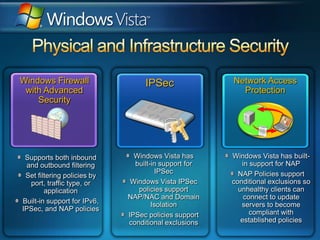
Physical and Infrastructure SecurityWindows Firewall with Advanced SecurityNetwork Access ProtectionIPSecSupports both inbound and outbound filteringSet filtering policies by port, traffic type, or applicationBuilt-in support for IPv6, IPSec, and NAP policiesWindows Vista has built-in support for NAPNAP Policies support conditional exclusions so unhealthy clients can connect to update servers to become compliant with established policiesWindows Vista has built-in support for IPSecWindows Vista IPSec policies support NAP/NAC and Domain IsolationIPSec policies support conditional exclusions
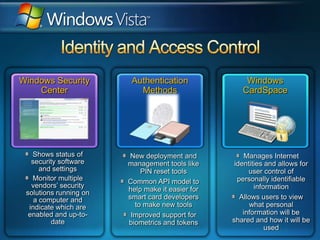
Identity and Access ControlWindows Security CenterAuthentication MethodsWindows CardSpaceShows status of security software and settingsMonitor multiple vendors’ security solutions running on a computer and indicate which are enabled and up-to-date New deployment and management tools like PIN reset toolsCommon API model to help make it easier for smart card developers to make new toolsImproved support for biometrics and tokensManages Internet identities and allows for user control of personally identifiable informationAllows users to view what personal information will be shared and how it will be used
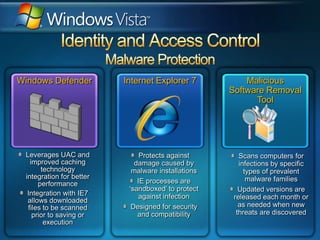
Identity and Access ControlMalware ProtectionWindows DefenderInternet Explorer 7Malicious Software Removal ToolProtects against damage caused by malware installationsIE processes are ‘sandboxed’ to protect against infectionDesigned for security and compatibilityLeverages UAC and improved caching technology integration for better performanceIntegration with IE7 allows downloaded files to be scanned prior to saving or executionScans computers for infections by specific types of prevalent malware familiesUpdated versions are released each month or as needed when new threats are discovered
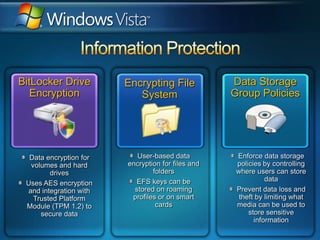
Information ProtectionBitLocker Drive EncryptionData Storage Group PoliciesEncrypting File SystemData encryption for volumes and hard drivesUses AES encryption and integration with Trusted Platform Module (TPM 1.2) to secure dataEnforce data storage policies by controlling where users can store dataPrevent data loss and theft by limiting what media can be used to store sensitive informationUser-based data encryption for files and foldersEFS keys can be stored on roaming profiles or on smart cards
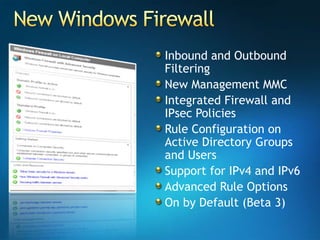
New Windows FirewallInbound and Outbound FilteringNew Management MMCIntegrated Firewall and IPsec PoliciesRule Configuration on Active Directory Groups and UsersSupport for IPv4 and IPv6Advanced Rule OptionsOn by Default (Beta 3)
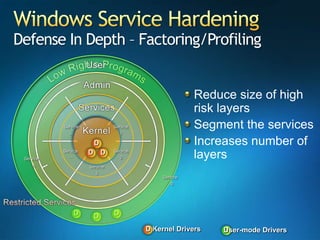
Windows Service HardeningDefense In Depth – Factoring/ProfilingDDDDDDDDReduce size of high risk layersSegment the servicesIncreases number of layersService 1Service …Service 2Service…Service     AService 3Service    BKernel DriversUser-mode Drivers
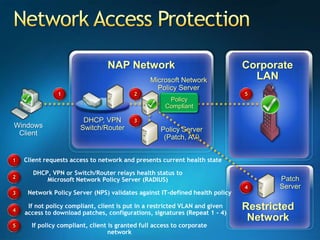
Network Access ProtectionCorporate LANNAP NetworkMicrosoft NetworkPolicy Server125Not PolicyCompliantPolicyCompliantDHCP, VPNSwitch/Router3WindowsClientPolicy Server(Patch, AV)1Client requests access to network and presents current health stateDHCP, VPN or Switch/Router relays health status to Microsoft Network Policy Server (RADIUS)2PatchServer43Network Policy Server (NPS) validates against IT-defined health policyRestrictedNetworkIf not policy compliant, client is put in a restricted VLAN and given access to download patches, configurations, signatures (Repeat 1 - 4)45If policy compliant, client is granted full access to corporate network
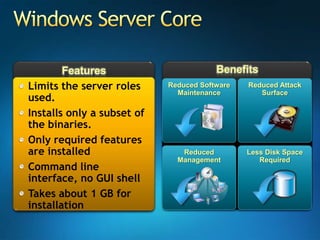
BenefitsFeaturesWindows Server CoreLimits the server roles used. Installs only a subset of the binaries. Only required features are installedCommand line interface, no GUI shellTakes about 1 GB for installationReduced Software MaintenanceReduced Attack SurfaceReduced ManagementLess Disk Space Required
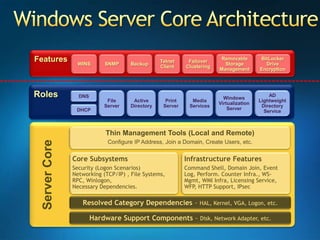
Windows Server Core ArchitectureFeaturesWINSSNMPBitLocker Drive EncryptionTelnet ClientFailover ClusteringRemovable Storage ManagementBackupRolesFileServerActive DirectoryAD Lightweight Directory ServicePrintServerMediaServicesWindows Virtualization ServerDNSDHCPServer CoreThin Management Tools (Local and Remote)Configure IP Address, Join a Domain, Create Users, etc.Core SubsystemsSecurity (Logon Scenarios) Networking (TCP/IP) , File Systems, RPC, Winlogon, Necessary Dependencies.Infrastructure FeaturesCommand Shell, Domain Join, Event Log, Perform. Counter Infra., WS-Mgmt, WMI Infra, Licensing Service, WFP, HTTP Support, IPsecResolved Category Dependencies – HAL, Kernel, VGA, Logon, etc.Hardware Support Components – Disk, Network Adapter, etc.
Microsoft Security …
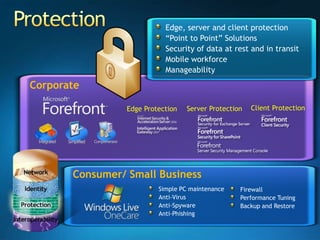
Edge, server and client protection“Point to Point” SolutionsSecurity of data at rest and in transitMobile workforceManageabilityCorporateClient ProtectionServer Protection Consumer/ Small BusinessSimple PC maintenanceAnti-Virus Anti-SpywareAnti-PhishingFirewallPerformance TuningBackup and RestoreEdge Protection Protection
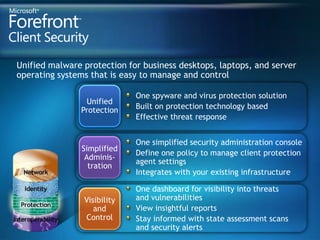
Unified malware protection for business desktops, laptops, and server operating systems that is easy to manage and control One spyware and virus protection solutionBuilt on protection technology based Effective threat responseUnifiedProtectionOne simplified security administration consoleDefine one policy to manage client protectionagent settings Integrates with your existing infrastructureSimplifiedAdminis-trationOne dashboard for visibility into threatsand vulnerabilitiesView insightful reportsStay informed with state assessment scansand security alertsVisibilityandControl
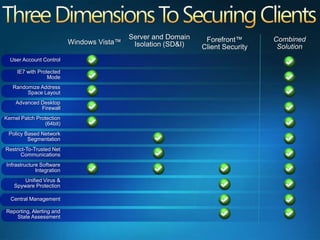
Server and Domain Isolation (SD&I)Combined SolutionForefront™ Client SecurityWindows Vista™User Account ControlIE7 with Protected ModeRandomize Address Space LayoutAdvanced Desktop FirewallKernel Patch Protection (64bit)Policy Based Network SegmentationRestrict-To-Trusted Net CommunicationsInfrastructure Software IntegrationUnified Virus & Spyware ProtectionCentral ManagementReporting, Alerting and State Assessment
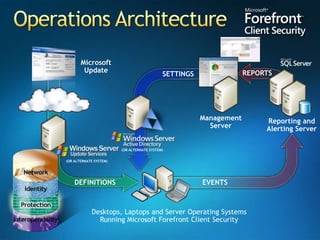
MicrosoftUpdateReporting andAlerting Server(OR ALTERNATE SYSTEM)(OR ALTERNATE SYSTEM)Desktops, Laptops and Server Operating SystemsRunning Microsoft Forefront Client SecurityREPORTSSETTINGSManagementServerDEFINITIONSEVENTSOperations Architecture
Forefront Client Securitydemo
Tea/Coffee Break
SecurityApplicationLayer
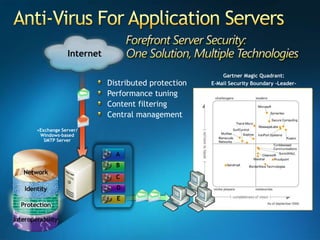
Anti-Virus For Application ServersGartner Magic Quadrant: E-Mail Security Boundary -Leader-Distributed protectionPerformance tuningContent filteringCentral managementExchange Server/ Windows-based SMTP ServerInternetABCDE
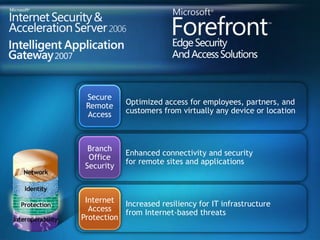
Optimized access for employees, partners, andcustomers from virtually any device or locationSecureRemoteAccessEnhanced connectivity and securityfor remote sites and applicationsBranchOfficeSecurityIncreased resiliency for IT infrastructurefrom Internet-based threatsInternetAccessProtection
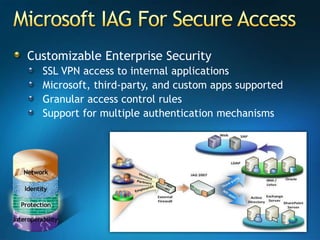
Microsoft IAG For Secure AccessCustomizable Enterprise Security SSL VPN access to internal applications Microsoft, third-party, and custom apps supported Granular access control rules Support for multiple authentication mechanisms
Intelligent Application Gatewaydemo
Lunch Break
Security and ManagementSystems ManagementSuite Enterprise
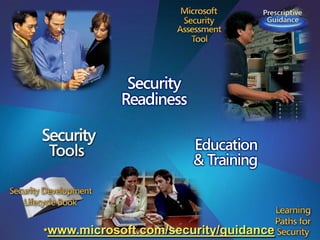
www.microsoft.com/security/guidance
Join Us…http://delhiitpro.groups.live.comMail me: ranjanaj@microsoft.comIT Pro Momentum Program Technet Plus SubscriptionQuaterly VTD: http://www.ConnectWithLife.com
આભારধন্যবাদநன்றிधन्यवादధన్యవాదాలుಧನ್ಯವಾದಗಳುଧନ୍ୟବାଦനിങ്ങള്‍‌ക്ക് നന്ദിਧੰਨਵਾਦ
© 2007 Microsoft Corporation. All rights reserved. Microsoft, Windows, Windows Vista and other product names are or may be registered trademarks and/or trademarks in the U.S. and/or other countries.The information herein is for informational purposes only and represents the current view of Microsoft Corporation as of the date of this presentation.  Because Microsoft must respond to changing market conditions, it should not be interpreted to be a commitment on the part of Microsoft, and Microsoft cannot guarantee the accuracy of any information provided after the date of this presentation.  MICROSOFT MAKES NO WARRANTIES, EXPRESS, IMPLIED OR STATUTORY, AS TO THE INFORMATION IN THIS PRESENTATION.
Microsoft Platform Security Briefing

  • 2.
    You are ina workshop…Not a training…
  • 4.
    Who are we- IntroductionsRanjana JainIT Pro Evangelist – Platform SecurityMicrosoft IndiaMCSE, MCT, RHCE, CISSP, CIW Security AnalystSrinivas LTechnology Specialist – Security Microsoft IndiaMCTS-Security, CCNA, CCNE, CNAGautam DuaSolution Specialist – Management and Security Microsoft IndiaMCSE, MCT
  • 6.
    Evolving Threat LandscapeLocalArea NetworksFirst PC virusBoot sector virusesCreate notorietyor cause havocSlow propagation16-bit DOSInternet EraMacro virusesScript virusesCreate notorietyor cause havocFaster propagation32-bit WindowsHyper jackingPeer to PeerSocial engineeringApplication attacksFinancial motivationTargeted attacks64-bit WindowsBroadbandprevalentSpyware, SpamPhishingBotnetsRootkitsFinancial motivationInternet wide impact32-bit Windows1986–19951995–20002000–20052007
  • 7.
    National InterestPersonal GainPersonalFameCuriosityLargest segment by $ spent on defenseSpyLargest area by $ lostFastest growing segmentThiefLargest area by volumeTrespasserAuthorVandalUndergraduateScript-KiddyExpertSpecialistEvolving Threats
  • 8.
    Addressing Security ThreatsHelpsturn IT into a business asset not a cost center Supports your day to day security processes Is the Enabler to running your business successfullyTechnologyData privacy processes to manage data effectivelyIT security processes to implement, manage, and govern securityFinancial reporting processes that include security of the businessProcessCompany understands the importance of security in the workplaceIndividuals know their role with security governance and complianceIT staff has the security skills and knowledge to support your business People
  • 9.
    Microsoft’s Promises ToYouManage Complexity,Achieve AgilityAmplifythe Impactof YourPeopleProtectInformation,ControlAccessAdvance the Businesswith IT Solutions
  • 10.
    Delivering On ThePromise:Infrastructure Optimization*Source: Microsoft CSO Summit 2007 Registration Survey
  • 11.
    Core Infrastructure OptimizationMoreEfficient Cost CenterCost Center Strategic AssetBusiness EnablerBasicNo centralized enterprise directoryNo automated patch managementAnti-malwarenot centrally managedMessage security for e-mail onlyNo secure coding practices in placeStandardizedUsing enterprise directory for authenticationAutomated patch management tools deployedAnti-malwareis managed centrallyUnified message security in placeRationalizedIntegrated directory services, PKIin placeFormal patch management processDefense in depth threat protectionSecurity extended to remote and mobile workforceDynamicFull identity lifecycle management.ID Federation,Rights Mgt Services in useMetrics driven update processClient quarantine and access policy enforcement<$100/PC Cost$1320/PC Cost$580/PC Cost$230/PC CostSource:GCR and IDC data analyzed by Microsoft, 2006
  • 12.
    Core Infrastructure OptimizationModel: SecurityBasicStandardizedRationalizedDynamicTechnologySelf provisioning and quarantine capable systems ensure compliance and high availability Automate identity and access managementAutomatedsystem management Multiple directories for authenticationLimited automated software distributionPatch statusof desktopsis unknownNo unified directory for access mgmtSelf-assessing and continuous improvementEasy, secure access to info from anywhereon InternetSLAs are linkedto business objectivesClearly defined and enforced images, security, best practicesCentralAdmin and configurationof securityStandard desktop images defined,not adopted by allIT processes undefinedComplexity dueto localized processesand minimal central controlProcessImprove IT Maturity while Gaining ROIIT is astrategic assetUsers look to ITas a valued partner to enable new business initiativesIT Staff manages an efficient,controlled environmentUsers have the right tools,availability, and access to infoIT Staff trained in best practices such as MOF,ITIL, etc.Users expect basic services from ITIT staff taxed by operational challengesUsers come up with their ownIT solutionsPeople
  • 14.
    SecureYou get topick any two!UsableCheap
  • 15.
  • 16.
    Security Development LifecycleDesignThreatModelingStandards, best practices, and toolsSecurity PushFinal Security Review RTM and DeploymentSignoffSecurity ResponseProduct Inception
  • 17.
    Comprehensive Security PortfolioServicesEdgeEncryptingFile System (EFS)Server ApplicationsBitLocker™Information ProtectionNetwork Access Protection (NAP)Client and Server OSIdentityManagementWindowsCardSpaceSystemsManagementActive Directory Federation Services (ADFS)GuidanceDeveloper Tools
  • 19.
    Priority #1 -Platform SecuritySecurity Development LifecycleSecurity Response CenterBetter Updates And Tools
  • 20.
    Security Development Lifecycle(SDL)Kernel Patch ProtectionKernel-mode Driver SigningSecure StartupWindows Service HardeningSecure PlatformRights Management Services (RMS) SharePoint, Exchange, Windows Mobile integrationEncrypting File System (EFS)BitlockerSecure AccessUser Account ControlNetwork Access Protection (NAP)IPv6IPsecWindows CardSpaceNative smart card supportGINA Re-architectureCertificate ServicesCredential roamingWindows DefenderIE Protected ModeAddress Space Layout Randomization (ASLR)Data Execution Prevention (DEP) Bi-directional FirewallWindows Security CenterData ProtectionMalwareProtection
  • 21.
    Security Development Lifecycle(SDL)Windows Server Virtualization (Hypervisor)Role Management ToolOS File IntegritySecure PlatformNetwork ProtectionNetwork Access Protection (NAP)Server and Domain Isolation with IPsecEnd-to-end Network AuthenticationWindows Firewall With Advanced Security On By DefaultIdentityAccessRights Management Services (RMS) Full volume encryption (Bitlocker)USB Device-connection rules with Group PolicyImproved AuditingWindows Server BackupData ProtectionRead-only Domain Controller (RODC)Active Directory Federation Srvcs. (ADFS)Administrative Role SeparationPKI Management ConsoleOnline CertificateStatus Protocol
  • 22.
    Physical and InfrastructureSecurityWindows Firewall with Advanced SecurityNetwork Access ProtectionIPSecSupports both inbound and outbound filteringSet filtering policies by port, traffic type, or applicationBuilt-in support for IPv6, IPSec, and NAP policiesWindows Vista has built-in support for NAPNAP Policies support conditional exclusions so unhealthy clients can connect to update servers to become compliant with established policiesWindows Vista has built-in support for IPSecWindows Vista IPSec policies support NAP/NAC and Domain IsolationIPSec policies support conditional exclusions
  • 23.
    Identity and AccessControlWindows Security CenterAuthentication MethodsWindows CardSpaceShows status of security software and settingsMonitor multiple vendors’ security solutions running on a computer and indicate which are enabled and up-to-date New deployment and management tools like PIN reset toolsCommon API model to help make it easier for smart card developers to make new toolsImproved support for biometrics and tokensManages Internet identities and allows for user control of personally identifiable informationAllows users to view what personal information will be shared and how it will be used
  • 24.
    Identity and AccessControlMalware ProtectionWindows DefenderInternet Explorer 7Malicious Software Removal ToolProtects against damage caused by malware installationsIE processes are ‘sandboxed’ to protect against infectionDesigned for security and compatibilityLeverages UAC and improved caching technology integration for better performanceIntegration with IE7 allows downloaded files to be scanned prior to saving or executionScans computers for infections by specific types of prevalent malware familiesUpdated versions are released each month or as needed when new threats are discovered
  • 25.
    Information ProtectionBitLocker DriveEncryptionData Storage Group PoliciesEncrypting File SystemData encryption for volumes and hard drivesUses AES encryption and integration with Trusted Platform Module (TPM 1.2) to secure dataEnforce data storage policies by controlling where users can store dataPrevent data loss and theft by limiting what media can be used to store sensitive informationUser-based data encryption for files and foldersEFS keys can be stored on roaming profiles or on smart cards
  • 26.
    New Windows FirewallInboundand Outbound FilteringNew Management MMCIntegrated Firewall and IPsec PoliciesRule Configuration on Active Directory Groups and UsersSupport for IPv4 and IPv6Advanced Rule OptionsOn by Default (Beta 3)
  • 27.
    Windows Service HardeningDefenseIn Depth – Factoring/ProfilingDDDDDDDDReduce size of high risk layersSegment the servicesIncreases number of layersService 1Service …Service 2Service…Service AService 3Service BKernel DriversUser-mode Drivers
  • 28.
    Network Access ProtectionCorporateLANNAP NetworkMicrosoft NetworkPolicy Server125Not PolicyCompliantPolicyCompliantDHCP, VPNSwitch/Router3WindowsClientPolicy Server(Patch, AV)1Client requests access to network and presents current health stateDHCP, VPN or Switch/Router relays health status to Microsoft Network Policy Server (RADIUS)2PatchServer43Network Policy Server (NPS) validates against IT-defined health policyRestrictedNetworkIf not policy compliant, client is put in a restricted VLAN and given access to download patches, configurations, signatures (Repeat 1 - 4)45If policy compliant, client is granted full access to corporate network
  • 29.
    BenefitsFeaturesWindows Server CoreLimitsthe server roles used. Installs only a subset of the binaries. Only required features are installedCommand line interface, no GUI shellTakes about 1 GB for installationReduced Software MaintenanceReduced Attack SurfaceReduced ManagementLess Disk Space Required
  • 30.
    Windows Server CoreArchitectureFeaturesWINSSNMPBitLocker Drive EncryptionTelnet ClientFailover ClusteringRemovable Storage ManagementBackupRolesFileServerActive DirectoryAD Lightweight Directory ServicePrintServerMediaServicesWindows Virtualization ServerDNSDHCPServer CoreThin Management Tools (Local and Remote)Configure IP Address, Join a Domain, Create Users, etc.Core SubsystemsSecurity (Logon Scenarios) Networking (TCP/IP) , File Systems, RPC, Winlogon, Necessary Dependencies.Infrastructure FeaturesCommand Shell, Domain Join, Event Log, Perform. Counter Infra., WS-Mgmt, WMI Infra, Licensing Service, WFP, HTTP Support, IPsecResolved Category Dependencies – HAL, Kernel, VGA, Logon, etc.Hardware Support Components – Disk, Network Adapter, etc.
  • 31.
  • 32.
    Edge, server andclient protection“Point to Point” SolutionsSecurity of data at rest and in transitMobile workforceManageabilityCorporateClient ProtectionServer Protection Consumer/ Small BusinessSimple PC maintenanceAnti-Virus Anti-SpywareAnti-PhishingFirewallPerformance TuningBackup and RestoreEdge Protection Protection
  • 33.
    Unified malware protectionfor business desktops, laptops, and server operating systems that is easy to manage and control One spyware and virus protection solutionBuilt on protection technology based Effective threat responseUnifiedProtectionOne simplified security administration consoleDefine one policy to manage client protectionagent settings Integrates with your existing infrastructureSimplifiedAdminis-trationOne dashboard for visibility into threatsand vulnerabilitiesView insightful reportsStay informed with state assessment scansand security alertsVisibilityandControl
  • 34.
    Server and DomainIsolation (SD&I)Combined SolutionForefront™ Client SecurityWindows Vista™User Account ControlIE7 with Protected ModeRandomize Address Space LayoutAdvanced Desktop FirewallKernel Patch Protection (64bit)Policy Based Network SegmentationRestrict-To-Trusted Net CommunicationsInfrastructure Software IntegrationUnified Virus & Spyware ProtectionCentral ManagementReporting, Alerting and State Assessment
  • 35.
    MicrosoftUpdateReporting andAlerting Server(ORALTERNATE SYSTEM)(OR ALTERNATE SYSTEM)Desktops, Laptops and Server Operating SystemsRunning Microsoft Forefront Client SecurityREPORTSSETTINGSManagementServerDEFINITIONSEVENTSOperations Architecture
  • 36.
  • 37.
  • 38.
  • 39.
    Anti-Virus For ApplicationServersGartner Magic Quadrant: E-Mail Security Boundary -Leader-Distributed protectionPerformance tuningContent filteringCentral managementExchange Server/ Windows-based SMTP ServerInternetABCDE
  • 40.
    Optimized access foremployees, partners, andcustomers from virtually any device or locationSecureRemoteAccessEnhanced connectivity and securityfor remote sites and applicationsBranchOfficeSecurityIncreased resiliency for IT infrastructurefrom Internet-based threatsInternetAccessProtection
  • 41.
    Microsoft IAG ForSecure AccessCustomizable Enterprise Security SSL VPN access to internal applications Microsoft, third-party, and custom apps supported Granular access control rules Support for multiple authentication mechanisms
  • 42.
  • 43.
  • 44.
    Security and ManagementSystemsManagementSuite Enterprise
  • 45.
  • 46.
    Join Us…http://delhiitpro.groups.live.comMail me:ranjanaj@microsoft.comIT Pro Momentum Program Technet Plus SubscriptionQuaterly VTD: http://www.ConnectWithLife.com
  • 47.
  • 48.
    © 2007 MicrosoftCorporation. All rights reserved. Microsoft, Windows, Windows Vista and other product names are or may be registered trademarks and/or trademarks in the U.S. and/or other countries.The information herein is for informational purposes only and represents the current view of Microsoft Corporation as of the date of this presentation. Because Microsoft must respond to changing market conditions, it should not be interpreted to be a commitment on the part of Microsoft, and Microsoft cannot guarantee the accuracy of any information provided after the date of this presentation. MICROSOFT MAKES NO WARRANTIES, EXPRESS, IMPLIED OR STATUTORY, AS TO THE INFORMATION IN THIS PRESENTATION.