1
Android Security - Permission
2
Agenda
• What is permission
• System prebuilt vs APK Custom
• Request a permission
• Grant permission
• Enforce Permission
• Runtime permission
3
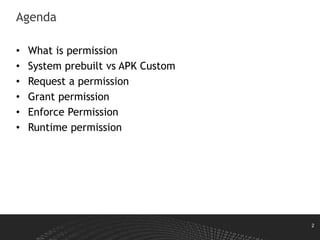
What is Permission
• Applications (UIDs) are assigned permissions
• Permissions are needed to control access to
System resources (logs, battery, etc.)
Sensitive data (SMS, contacts, e-mails, etc.)
System interfaces (Internet, send SMS, etc.)
• Application (developers) can also
define own permissions to
protect application interfaces
• A string
4
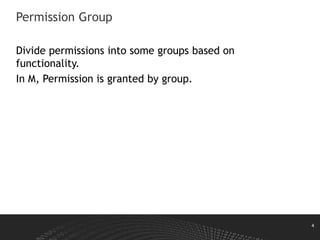
Permission Group
Divide permissions into some groups based on
functionality.
In M, Permission is granted by group.
5
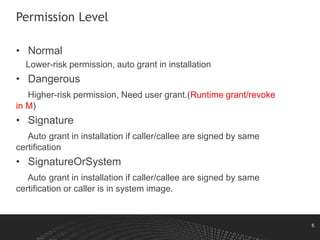
Permission Level
• Normal
Lower-risk permission, auto grant in installation
• Dangerous
Higher-risk permission, Need user grant.(Runtime grant/revoke
in M)
• Signature
Auto grant in installation if caller/callee are signed by same
certification
• SignatureOrSystem
Auto grant in installation if caller/callee are signed by same
certification or caller is in system image.
6
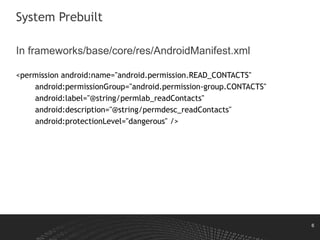
System Prebuilt
In frameworks/base/core/res/AndroidManifest.xml
<permission android:name="android.permission.READ_CONTACTS"
android:permissionGroup="android.permission-group.CONTACTS"
android:label="@string/permlab_readContacts"
android:description="@string/permdesc_readContacts"
android:protectionLevel="dangerous" />
7
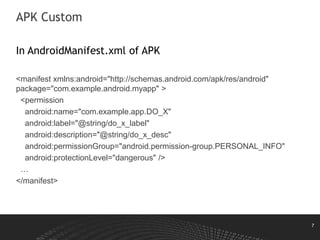
APK Custom
In AndroidManifest.xml of APK
<manifest xmlns:android="http://schemas.android.com/apk/res/android"
package="com.example.android.myapp" >
<permission
android:name="com.example.app.DO_X"
android:label="@string/do_x_label"
android:description="@string/do_x_desc"
android:permissionGroup="android.permission-group.PERSONAL_INFO"
android:protectionLevel="dangerous" />
…
</manifest>
8
Permission Conflict
Multiple applications may attempt to define the
same permission name
• "first definition wins" principle.
• Android 4.4.3+ gives precedence to system
applications
• Android 5.0+ blocks installation completely for
applications attempting to define an existing
permission if they are signed with a different key
than the first definer
9
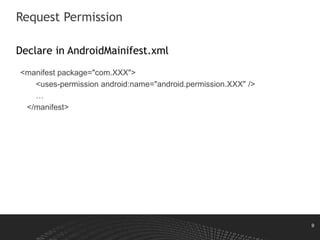
Request Permission
Declare in AndroidMainifest.xml
<manifest package="com.XXX">
<uses-permission android:name="android.permission.XXX" />
…
</manifest>
10
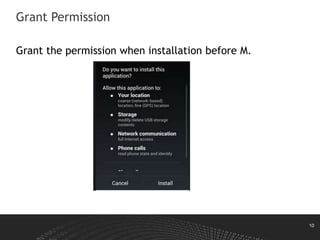
Grant Permission
Grant the permission when installation before M.
11
Grant Permission
• Android cannot grant permissions that don’t
exist yet
If an application requires a permission which is not existing in system,
the system will not grant the permission to the requesting application.
• An application who defines <permission> is
uninstalled, the permission records are
removed from the system’s known permissions
list.
Any applications currently holding that permission will still have the
permission granted to them until they are updated/reinstalled.
12
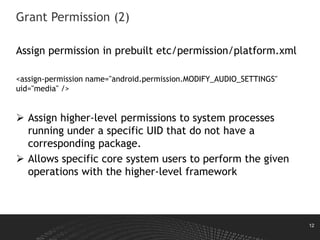
Grant Permission (2)
Assign permission in prebuilt etc/permission/platform.xml
<assign-permission name="android.permission.MODIFY_AUDIO_SETTINGS"
uid="media" />
 Assign higher-level permissions to system processes
running under a specific UID that do not have a
corresponding package.
 Allows specific core system users to perform the given
operations with the higher-level framework
13
Enforce Permission
• Kernel
• Java components
• Native daemons
14
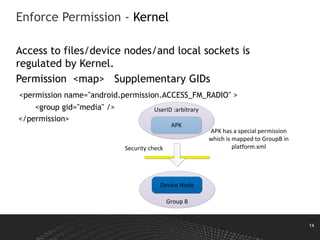
Enforce Permission - Kernel
Access to files/device nodes/and local sockets is
regulated by Kernel.
Permission <map> Supplementary GIDs
<permission name="android.permission.ACCESS_FM_RADIO" >
<group gid="media" />
</permission>
JNI
APK
Device Node
Security check
APK has a special permission
which is mapped to GroupB in
platform.xml
Group B
UserID :arbitrary
15
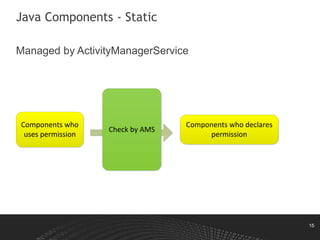
Java Components - Static
Managed by ActivityManagerService
Components who
uses permission
Components who declares
permission
Check by AMS
16
Java Components - Dynamic
Programmatically check
if (mContext.checkCallingOrSelfPermission(android.Manifest.permission.XX)
!= PackageManager.PERMISSION_GRANTED) {
throw new SecurityException("Requires XXX permission");
}
17
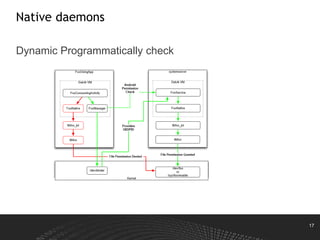
Native daemons
Dynamic Programmatically check
18
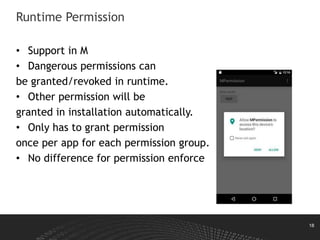
Runtime Permission
• Support in M
• Dangerous permissions can
be granted/revoked in runtime.
• Other permission will be
granted in installation automatically.
• Only has to grant permission
once per app for each permission group.
• No difference for permission enforce
19
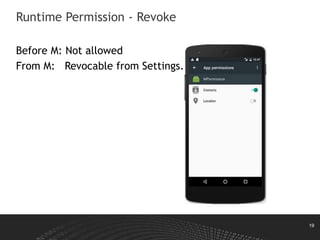
Runtime Permission - Revoke
Before M: Not allowed
From M: Revocable from Settings.
20
Runtime Permission - Caller
• Always Check for Permissions
• Handle Lack of Permissions Gracefully
if (checkSelfPermission(Manifest.permission.READ_CONTACTS)
!= PackageManager.PERMISSION_GRANTED) {
if (shouldShowRequestPermissionRationale(
Manifest.permission.READ_CONTACTS)) {
}
requestPermissions(new
String[]{Manifest.permission.READ_CONTACTS},
MY_PERMISSIONS_REQUEST_READ_CONTACTS);
return;
}

Android secuirty permission - upload

  • 1.
  • 2.
    2 Agenda • What ispermission • System prebuilt vs APK Custom • Request a permission • Grant permission • Enforce Permission • Runtime permission
  • 3.
    3 What is Permission •Applications (UIDs) are assigned permissions • Permissions are needed to control access to System resources (logs, battery, etc.) Sensitive data (SMS, contacts, e-mails, etc.) System interfaces (Internet, send SMS, etc.) • Application (developers) can also define own permissions to protect application interfaces • A string
  • 4.
    4 Permission Group Divide permissionsinto some groups based on functionality. In M, Permission is granted by group.
  • 5.
    5 Permission Level • Normal Lower-riskpermission, auto grant in installation • Dangerous Higher-risk permission, Need user grant.(Runtime grant/revoke in M) • Signature Auto grant in installation if caller/callee are signed by same certification • SignatureOrSystem Auto grant in installation if caller/callee are signed by same certification or caller is in system image.
  • 6.
    6 System Prebuilt In frameworks/base/core/res/AndroidManifest.xml <permissionandroid:name="android.permission.READ_CONTACTS" android:permissionGroup="android.permission-group.CONTACTS" android:label="@string/permlab_readContacts" android:description="@string/permdesc_readContacts" android:protectionLevel="dangerous" />
  • 7.
    7 APK Custom In AndroidManifest.xmlof APK <manifest xmlns:android="http://schemas.android.com/apk/res/android" package="com.example.android.myapp" > <permission android:name="com.example.app.DO_X" android:label="@string/do_x_label" android:description="@string/do_x_desc" android:permissionGroup="android.permission-group.PERSONAL_INFO" android:protectionLevel="dangerous" /> … </manifest>
  • 8.
    8 Permission Conflict Multiple applicationsmay attempt to define the same permission name • "first definition wins" principle. • Android 4.4.3+ gives precedence to system applications • Android 5.0+ blocks installation completely for applications attempting to define an existing permission if they are signed with a different key than the first definer
  • 9.
    9 Request Permission Declare inAndroidMainifest.xml <manifest package="com.XXX"> <uses-permission android:name="android.permission.XXX" /> … </manifest>
  • 10.
    10 Grant Permission Grant thepermission when installation before M.
  • 11.
    11 Grant Permission • Androidcannot grant permissions that don’t exist yet If an application requires a permission which is not existing in system, the system will not grant the permission to the requesting application. • An application who defines <permission> is uninstalled, the permission records are removed from the system’s known permissions list. Any applications currently holding that permission will still have the permission granted to them until they are updated/reinstalled.
  • 12.
    12 Grant Permission (2) Assignpermission in prebuilt etc/permission/platform.xml <assign-permission name="android.permission.MODIFY_AUDIO_SETTINGS" uid="media" />  Assign higher-level permissions to system processes running under a specific UID that do not have a corresponding package.  Allows specific core system users to perform the given operations with the higher-level framework
  • 13.
    13 Enforce Permission • Kernel •Java components • Native daemons
  • 14.
    14 Enforce Permission -Kernel Access to files/device nodes/and local sockets is regulated by Kernel. Permission <map> Supplementary GIDs <permission name="android.permission.ACCESS_FM_RADIO" > <group gid="media" /> </permission> JNI APK Device Node Security check APK has a special permission which is mapped to GroupB in platform.xml Group B UserID :arbitrary
  • 15.
    15 Java Components -Static Managed by ActivityManagerService Components who uses permission Components who declares permission Check by AMS
  • 16.
    16 Java Components -Dynamic Programmatically check if (mContext.checkCallingOrSelfPermission(android.Manifest.permission.XX) != PackageManager.PERMISSION_GRANTED) { throw new SecurityException("Requires XXX permission"); }
  • 17.
  • 18.
    18 Runtime Permission • Supportin M • Dangerous permissions can be granted/revoked in runtime. • Other permission will be granted in installation automatically. • Only has to grant permission once per app for each permission group. • No difference for permission enforce
  • 19.
    19 Runtime Permission -Revoke Before M: Not allowed From M: Revocable from Settings.
  • 20.
    20 Runtime Permission -Caller • Always Check for Permissions • Handle Lack of Permissions Gracefully if (checkSelfPermission(Manifest.permission.READ_CONTACTS) != PackageManager.PERMISSION_GRANTED) { if (shouldShowRequestPermissionRationale( Manifest.permission.READ_CONTACTS)) { } requestPermissions(new String[]{Manifest.permission.READ_CONTACTS}, MY_PERMISSIONS_REQUEST_READ_CONTACTS); return; }

Editor's Notes

  • #12 When the application given a pending intent triggers the actual intent, it does so with the same permissions and the identity as the application that created the pending intent