Module 1 Server Management in Windows Server 2008
Server Management Overview
Primary Management Tools Server Manager Console New MMC snap-in provides a consolidated view of the server, including server configuration, status of installed roles, and links for adding/removing roles and features Initial Configuration Tasks Guides you through the process of configuring a new server Benefits Easy, systematic, single interface for all management More secure and reliable Ensures service prerequisites are met
Alternative Management Tools Windows PowerShell ServerManagerCmd.exe Remote Management Windows Remote Manager (WS-Management) Windows Remote Shell (WinRS) Event Subscriptions Task Scheduling based on Events Microsoft System Center
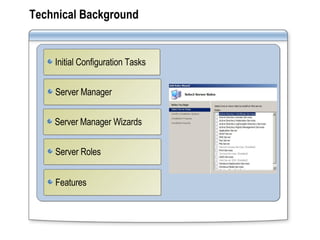
Technical Background Server Manager Server Manager Wizards Server Roles Initial Configuration Tasks Features
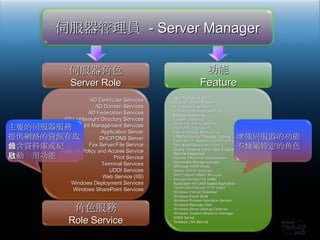
伺服器角色 Server Role 功能 Feature AD Certificate Services AD Domain Services AD Federation Services AD Lightweight Directory Services AD Right Management Services Application Server DHCP/DNS Server Fax Server/File Service Network Policy and Access Service Print Service Terminal Services UDDI Services Web Service (IIS) Windows Deployment Services Windows SharePoint Services 伺服器管理員  - Server Manager .NET Framework 3.0 BtLocker Drive Encryption BITS Server Extension Connection Manager Admin Kit Desktop Experience Failover Clustering Group Policy Management Internet Printing Client Internet Storage Name Server LPR Port Monitor/Message Queuing Multipath I/O, Network Load Balancing Peer Name Resolution Protocol Quality Windows Audio Video Experience Remote Assistance Remote Differential Compression Removable Storage manager RPC over HTTP Proxy Simple TCP/IP Services SMTP Server/SNMP Services Storage Manager for SANs Subsystem for UNIX-based Application Telnet Client/Server/TFTP Client Windows Internal Database Windows Power Shell Windows Process Activation Service Windows Recovery Disc Windows Server Backup Features Windows  System Resource Manager WINS Server Wireless LAN Service 角色服務 Role Service 主要的伺服器服務 提供網路的資源存取 包含資料庫或紀錄 自動啟用功能 增強伺服器的功能 不隸屬特定的角色
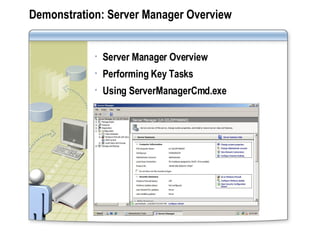
Demonstration: Server Manager Overview Server Manager Overview Performing Key Tasks Using ServerManagerCmd.exe
Implementation/Usage Scenarios Improved Security Improved Server Administration Improved New Server Deployment and Configuration
Recommendations To manage roles from a command prompt, use ServerManagerCmd.exe For multiple server administration, use Windows PowerShell For single server administration, use Server Manager For Remote Management, use Windows Remote Management (based on WS-Management Standard) Use Event Subscriptions to collect Event Viewer logs from multiple servers Use System Center for enterprise-wide management
Server Core
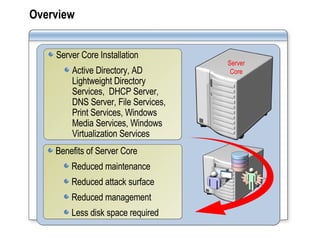
Overview Server Core Installation Active Directory, AD Lightweight Directory Services,  DHCP Server, DNS Server, File Services, Print Services, Windows Media Services, Windows Virtualization Services Benefits of Server Core Reduced maintenance Reduced attack surface Reduced management Less disk space required Server Core
Technical Background Deployment Server Roles Prerequisites Optional Features Managing a Server Core Installation
Demonstration:  Managing a Server Core Locally and remotely via the Command Prompt Remotely via MMC Server Core
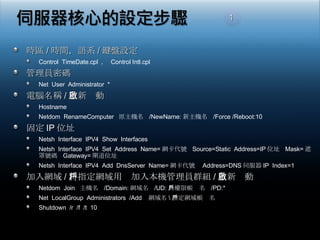
時區 / 時間,語系 / 鍵盤設定 Control  TimeDate.cpl  ,  Control Intl.cpl 管理員密碼 Net  User  Administrator  * 電腦名稱 / 重新啟動 Hostname Netdom  RenameComputer  原主機名  /NewName: 新主機名  /Force /Reboot:10 固定 IP 位址 Netsh  Interface  IPV4  Show  Interfaces Netsh  Interface  IPV4  Set  Address  Name= 網卡代號  Source=Static  Address=IP 位址  Mask= 遮罩號碼  Gateway= 閘道位址 Netsh  Interface  IPV4  Add  DnsServer  Name= 網卡代號  Address=DNS 伺服器 IP  Index=1  加入網域 / 將指定網域用戶加入本機管理員群組 / 重新啟動 Netdom  Join  主機名  /Domain: 網域名  /UD: 具權限帳戶名  /PD:* Net  LocalGroup  Administrators  /Add  網域名 \ 指定網域帳戶名 Shutdown  /r  /f  /t  10 1
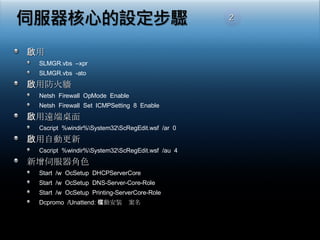
啟用 SLMGR.vbs  –xpr SLMGR.vbs  -ato 啟用防火牆 Netsh  Firewall  OpMode  Enable Netsh  Firewall  Set  ICMPSetting  8  Enable 啟用遠端桌面 Cscript  %windir%\System32\ScRegEdit.wsf  /ar  0 啟用自動更新 Cscript  %windir%\System32\ScRegEdit.wsf  /au  4 新增伺服器角色 Start  /w  OcSetup  DHCPServerCore Start  /w  OcSetup  DNS-Server-Core-Role Start  /w  OcSetup  Printing-ServerCore-Role Dcpromo  /Unattend: 自動安裝檔案名 2
Implementation/Usage Scenarios Reduced attack surface Reduced management Reduced maintenance Less disk space required
Recommendations Publish cmd.exe using Terminal Services RemoteApp to allow you to run cmd.exe in a window on your local machine rather than in a full terminal services client Implement Server Core whenever possible Minimize administrative access to the system Ensure physical security of the server Implement BitLocker Drive Encryption
Windows PowerShell
Overview What are cmdlets? What is PowerShell? Benefits What can I do with PowerShell? Prerequisites
Technical Background Cmdlets | New Scripting Language Native Support Important Concepts Administration PowerShell Pipeline Security Aliasing Navigation
Demonstration:  Using Windows PowerShell Getting Help Navigating Windows PowerShell Adding a User to Active Directory
Implementation/Usage Scenarios Server/Role Management Command-Line Services, Processes, Registry, and WMI Data Management Terminal Server IIS 7.0 AD Exchange 2007 MOM 2007
Recommendations Don’t throw away any existing scripts or batch files – they can still be used! Start using Windows PowerShell immediately! Don’t forget the power of the wildcard, such as “get-services*” Don’t deploy Windows PowerShell on any machine where it is not actually needed Centrally-Control Windows PowerShell security settings through GPOs – do it now!
Module 2 Centralized Application Access with Windows Server 2008
Terminal Services Core Functionality
Overview Who will be interested in the new capabilities of Terminal Services? What is Centralized Application Access? Benefits & Uses of Terminal Services Terminal Services Installation, Configuration & Management New Features: Experience Security Manageability & Scalability Client Connectivity Mobile Worker In Airport Branch Office Home Office Central Location
Support for 64-bit Architecture and Hardware Provides a significantly larger virtual address space for kernel data structures Accommodates more TS user sessions Runs 32-bit software without recompiling Runs 64-bit drivers/software specifically compiled for 64-bit environment Runs 32-bit applications at high performance 4 GB user VA for large memory-aware processes Runs 64 bit applications 8 TB virtual address space Reduces mapping and soft page faults Eases migration to 64-bit infrastructure
Installation and Configuration Terminal Services roles that can be installed: Terminal Server TS Licensing TS Session Broker TS Gateway TS Web Access Configuring Terminal Services Install programs on server Configure remote connection settings Configure clients to use Terminal Services
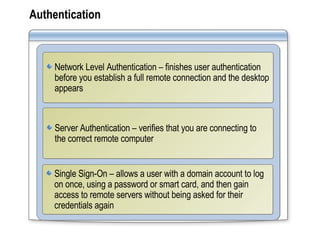
Authentication Network Level Authentication – finishes user authentication before you establish a full remote connection and the desktop appears Server Authentication – verifies that you are connecting to the correct remote computer Single Sign-On – allows a user with a domain account to log on once, using a password or smart card, and then gain access to remote servers without being asked for their credentials again
Terminal Services SSO  設定 Client  需為  Vista  或  Windows Server 2008 啟用 “允許預設認證被用於登入至指定的終端機服務” 電腦設定 ,  系統管理範本 ,  系統 ,  認證委派 ,  啟用「允許委派預設認證」 「顯示」 ,  新增 , “TermSrv /終端機服務伺服器名稱”  (FQDN, NetBIOS Name) Client  需為  Vista  或  Windows Server 2008 啟用 “允許預設認證被用於登入至指定的終端機服務” 電腦設定 ,  系統管理範本 ,  系統 ,  認證委派 ,  啟用「允許委派預設認證」 「顯示」 ,  新增 , “TermSrv /終端機服務伺服器名稱”  (FQDN, NetBIOS Name) Server  需為  Windows Server 2008 終端機服務設定 , RDP-TCP,  一般 ,  安全性階層為「交涉」或 「 SSL (TLS 1.0) 」 Domain  帳戶需在  Client / Server  皆可使用
Device Redirection Plug and Play Device Redirection Windows Portable Devices  Media players, based on Media Transfer Protocol (MTP) Digital cameras, based on Picture Transfer Protocol (PTP)  Windows Point of Service (POS) Device Redirection Implement POS for .NET 1.1 (downloadable) Configure .rdp file Connect device
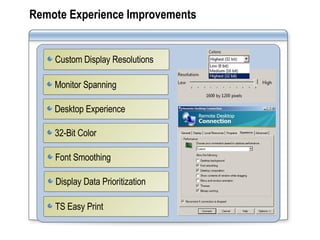
Remote Experience Improvements Monitor Spanning Desktop Experience Font Smoothing Custom Display Resolutions Display Data Prioritization 32-Bit Color TS Easy Print
Demonstration: User Experience Enhancements Plug & Play Redirection configuration Remote Desktop Connection Display configuration
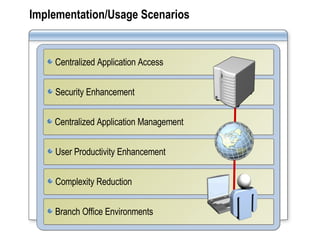
Implementation/Usage Scenarios Security Enhancement Centralized Application Management User Productivity Enhancement Complexity Reduction Centralized Application Access Branch Office Environments
Recommendations Configure client systems to use RDC 6.0 Implement new features to enhance user experience Use Single Sign-On Implement TS Gateway, TS RemoteApp and TS Web capabilities Upgrade existing Terminal Servers to Windows Server 2008 Use x64 hardware and WSRM
Terminal Services Gateway
Overview Benefits of a TS Gateway TS Gateway Management TS Gateway Prerequisites Hotel Home Business Partner/ Client Site TS Terminal Services Gateway Server NPS DC HTTPS / 443 TS Other RDP Hosts Strips off RPC/HTTPS Passes RDP/SSL traffic to TS
Benefits of TS Gateway Allows you to control access to specific resources Reduces management costs Facilitates consolidation of existing Terminal Servers Can be integrated with Network Policy Server, enabling centralized policy deployment and lower TCO Eliminates the need to configure VPN connections Allows monitoring on remote connections  Enables connections across firewalls and NATs
TS Gateway Management TS Gateway Management Snap-In: Provides a single, one-stop tool to configure policies to define conditions that must be met before users to connect. Provides a tool to monitor TS Gateway events. Allows you to review details about connections. No remote computers are directly exposed to the internet; all data remains within the corporate network.
Prerequisites for a TS Gateway A Network Policy Server (NPS) to centralize the storage, management and validation of TS Gateway policies A certificate for the TS Gateway server that meets these requirements: Computer certificate Intended purpose – server authentication Has a corresponding private key A server with Windows Server 2008 installed Administrator must be a member of the Administrators group on this machine
Technical Background Configuring a TS Gateway Server Connection Authorization Policies Resource Groups Resource Authorization Policies Client Configuration
TS Gateway Configuration Configuring the TS Gateway Server: Install the TS Gateway role services Configure IIS settings Obtain/Configure a server certificate Create a CAP for the TS Gateway Server Create resource groups  Create a RAP for the TS Gateway Server Configure the TS Gateway Client: RDC 6.0 Settings
遠端存取內部應用程式的資源 DMZ HTTPS / 443 Internet 內部網路 終端機 伺服器 出差在外 外部防火牆 內部防火牆 在家工作 商業夥伴  / 用戶端站台 網路原則 伺服器 AD 網域控制站 Internet RDP over HTTPS  通道 無線用戶 拆解  RDP/HTTPS 將  RDP/SSL  流量傳送至  TS 終端機服務閘道 伺服器
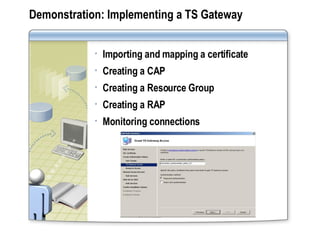
Demonstration: Implementing a TS Gateway Importing and mapping a certificate Creating a CAP Creating a Resource Group Creating a RAP Monitoring connections
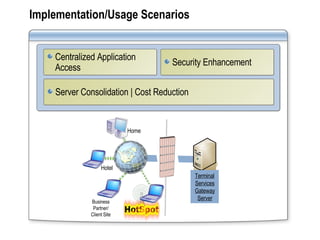
Implementation/Usage Scenarios Server Consolidation | Cost Reduction Centralized Application Access Security Enhancement Hotel Home Business Partner/ Client Site Terminal Services Gateway Server
Recommendations Configure Connection Access Policies, Resource Groups and Resource Access Policies Use TS Gateway management to monitor the status, health, and events on remote connections Use a TS Gateway instead of a VPN Do not use a self-signed SSL certificate in production Use in conjunction with an application layer firewall Don’t depend on device blocking for security
Terminal Services RemoteApp
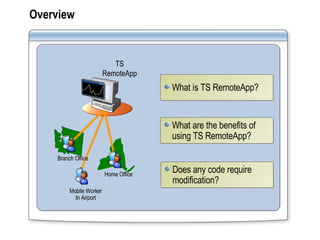
Overview What are the benefits of using TS RemoteApp? What is TS RemoteApp?  Does any code require modification? Mobile Worker In Airport Branch Office Home Office TS RemoteApp
Technical Background Configuring a TS RemoteApp Server What works differently?  How can users access RemoteApp programs?
Demonstration: Implementing TS RemoteApp Managing the Allow List Distributing an MSI package to users Connecting to a remote program from a client
Implementation/Usage Scenarios Branch Offices Roaming Users Line of Business Applications  Deployment
Recommendations Consider putting individual applications on separate servers when: The application has compatibility issues A single application and associated users may fill server capacity Create a load-balanced farm for single applications that exceed the capacity of one server Put common applications, such as MS Office, on the same TS RemoteApp Server Consider placing the TS RemoteApp server behind an ISA Server Use a trusted root-signed SSL certificate
Terminal Services Web Access
Overview What are the benefits of TS Web Access? What is Terminal Services Web Access? TS Web Access Server Requirements TS Web Access Client Requirements Mobile Worker In Airport Branch Office Home Office TS Web Access
Technical Background Using Active Directory as the Data Source Populating the TS RemoteApp Web Part Using a Single Terminal Server as the Data Source
Demonstration: Configuring TS Web Access Configuring a TS data source Configuring the TS Web Access Server Launching Applications
Implementation/Usage Scenarios New Version Deployment Centralized Application Access
Recommendations Use Active Directory mode for multi-server deployments when customers are used to Active Directory MSI deployment When customer has no Active Directory MSI experience, use custom ASP scripting solutions or third-party solutions Use  TS Web Access defaults for single server deployments

0505 Windows Server 2008 一日精華營 PartI

  • 1.
    Module 1 ServerManagement in Windows Server 2008
  • 2.
  • 3.
    Primary Management ToolsServer Manager Console New MMC snap-in provides a consolidated view of the server, including server configuration, status of installed roles, and links for adding/removing roles and features Initial Configuration Tasks Guides you through the process of configuring a new server Benefits Easy, systematic, single interface for all management More secure and reliable Ensures service prerequisites are met
  • 4.
    Alternative Management ToolsWindows PowerShell ServerManagerCmd.exe Remote Management Windows Remote Manager (WS-Management) Windows Remote Shell (WinRS) Event Subscriptions Task Scheduling based on Events Microsoft System Center
  • 5.
    Technical Background ServerManager Server Manager Wizards Server Roles Initial Configuration Tasks Features
  • 6.
    伺服器角色 Server Role功能 Feature AD Certificate Services AD Domain Services AD Federation Services AD Lightweight Directory Services AD Right Management Services Application Server DHCP/DNS Server Fax Server/File Service Network Policy and Access Service Print Service Terminal Services UDDI Services Web Service (IIS) Windows Deployment Services Windows SharePoint Services 伺服器管理員 - Server Manager .NET Framework 3.0 BtLocker Drive Encryption BITS Server Extension Connection Manager Admin Kit Desktop Experience Failover Clustering Group Policy Management Internet Printing Client Internet Storage Name Server LPR Port Monitor/Message Queuing Multipath I/O, Network Load Balancing Peer Name Resolution Protocol Quality Windows Audio Video Experience Remote Assistance Remote Differential Compression Removable Storage manager RPC over HTTP Proxy Simple TCP/IP Services SMTP Server/SNMP Services Storage Manager for SANs Subsystem for UNIX-based Application Telnet Client/Server/TFTP Client Windows Internal Database Windows Power Shell Windows Process Activation Service Windows Recovery Disc Windows Server Backup Features Windows System Resource Manager WINS Server Wireless LAN Service 角色服務 Role Service 主要的伺服器服務 提供網路的資源存取 包含資料庫或紀錄 自動啟用功能 增強伺服器的功能 不隸屬特定的角色
  • 7.
    Demonstration: Server ManagerOverview Server Manager Overview Performing Key Tasks Using ServerManagerCmd.exe
  • 8.
    Implementation/Usage Scenarios ImprovedSecurity Improved Server Administration Improved New Server Deployment and Configuration
  • 9.
    Recommendations To manageroles from a command prompt, use ServerManagerCmd.exe For multiple server administration, use Windows PowerShell For single server administration, use Server Manager For Remote Management, use Windows Remote Management (based on WS-Management Standard) Use Event Subscriptions to collect Event Viewer logs from multiple servers Use System Center for enterprise-wide management
  • 10.
  • 11.
    Overview Server CoreInstallation Active Directory, AD Lightweight Directory Services, DHCP Server, DNS Server, File Services, Print Services, Windows Media Services, Windows Virtualization Services Benefits of Server Core Reduced maintenance Reduced attack surface Reduced management Less disk space required Server Core
  • 12.
    Technical Background DeploymentServer Roles Prerequisites Optional Features Managing a Server Core Installation
  • 13.
    Demonstration: Managinga Server Core Locally and remotely via the Command Prompt Remotely via MMC Server Core
  • 14.
    時區 / 時間,語系/ 鍵盤設定 Control TimeDate.cpl , Control Intl.cpl 管理員密碼 Net User Administrator * 電腦名稱 / 重新啟動 Hostname Netdom RenameComputer 原主機名 /NewName: 新主機名 /Force /Reboot:10 固定 IP 位址 Netsh Interface IPV4 Show Interfaces Netsh Interface IPV4 Set Address Name= 網卡代號 Source=Static Address=IP 位址 Mask= 遮罩號碼 Gateway= 閘道位址 Netsh Interface IPV4 Add DnsServer Name= 網卡代號 Address=DNS 伺服器 IP Index=1 加入網域 / 將指定網域用戶加入本機管理員群組 / 重新啟動 Netdom Join 主機名 /Domain: 網域名 /UD: 具權限帳戶名 /PD:* Net LocalGroup Administrators /Add 網域名 \ 指定網域帳戶名 Shutdown /r /f /t 10 1
  • 15.
    啟用 SLMGR.vbs –xpr SLMGR.vbs -ato 啟用防火牆 Netsh Firewall OpMode Enable Netsh Firewall Set ICMPSetting 8 Enable 啟用遠端桌面 Cscript %windir%\System32\ScRegEdit.wsf /ar 0 啟用自動更新 Cscript %windir%\System32\ScRegEdit.wsf /au 4 新增伺服器角色 Start /w OcSetup DHCPServerCore Start /w OcSetup DNS-Server-Core-Role Start /w OcSetup Printing-ServerCore-Role Dcpromo /Unattend: 自動安裝檔案名 2
  • 16.
    Implementation/Usage Scenarios Reducedattack surface Reduced management Reduced maintenance Less disk space required
  • 17.
    Recommendations Publish cmd.exeusing Terminal Services RemoteApp to allow you to run cmd.exe in a window on your local machine rather than in a full terminal services client Implement Server Core whenever possible Minimize administrative access to the system Ensure physical security of the server Implement BitLocker Drive Encryption
  • 18.
  • 19.
    Overview What arecmdlets? What is PowerShell? Benefits What can I do with PowerShell? Prerequisites
  • 20.
    Technical Background Cmdlets| New Scripting Language Native Support Important Concepts Administration PowerShell Pipeline Security Aliasing Navigation
  • 21.
    Demonstration: UsingWindows PowerShell Getting Help Navigating Windows PowerShell Adding a User to Active Directory
  • 22.
    Implementation/Usage Scenarios Server/RoleManagement Command-Line Services, Processes, Registry, and WMI Data Management Terminal Server IIS 7.0 AD Exchange 2007 MOM 2007
  • 23.
    Recommendations Don’t throwaway any existing scripts or batch files – they can still be used! Start using Windows PowerShell immediately! Don’t forget the power of the wildcard, such as “get-services*” Don’t deploy Windows PowerShell on any machine where it is not actually needed Centrally-Control Windows PowerShell security settings through GPOs – do it now!
  • 24.
    Module 2 CentralizedApplication Access with Windows Server 2008
  • 25.
  • 26.
    Overview Who willbe interested in the new capabilities of Terminal Services? What is Centralized Application Access? Benefits & Uses of Terminal Services Terminal Services Installation, Configuration & Management New Features: Experience Security Manageability & Scalability Client Connectivity Mobile Worker In Airport Branch Office Home Office Central Location
  • 27.
    Support for 64-bitArchitecture and Hardware Provides a significantly larger virtual address space for kernel data structures Accommodates more TS user sessions Runs 32-bit software without recompiling Runs 64-bit drivers/software specifically compiled for 64-bit environment Runs 32-bit applications at high performance 4 GB user VA for large memory-aware processes Runs 64 bit applications 8 TB virtual address space Reduces mapping and soft page faults Eases migration to 64-bit infrastructure
  • 28.
    Installation and ConfigurationTerminal Services roles that can be installed: Terminal Server TS Licensing TS Session Broker TS Gateway TS Web Access Configuring Terminal Services Install programs on server Configure remote connection settings Configure clients to use Terminal Services
  • 29.
    Authentication Network LevelAuthentication – finishes user authentication before you establish a full remote connection and the desktop appears Server Authentication – verifies that you are connecting to the correct remote computer Single Sign-On – allows a user with a domain account to log on once, using a password or smart card, and then gain access to remote servers without being asked for their credentials again
  • 30.
    Terminal Services SSO 設定 Client 需為 Vista 或 Windows Server 2008 啟用 “允許預設認證被用於登入至指定的終端機服務” 電腦設定 , 系統管理範本 , 系統 , 認證委派 , 啟用「允許委派預設認證」 「顯示」 , 新增 , “TermSrv /終端機服務伺服器名稱” (FQDN, NetBIOS Name) Client 需為 Vista 或 Windows Server 2008 啟用 “允許預設認證被用於登入至指定的終端機服務” 電腦設定 , 系統管理範本 , 系統 , 認證委派 , 啟用「允許委派預設認證」 「顯示」 , 新增 , “TermSrv /終端機服務伺服器名稱” (FQDN, NetBIOS Name) Server 需為 Windows Server 2008 終端機服務設定 , RDP-TCP, 一般 , 安全性階層為「交涉」或 「 SSL (TLS 1.0) 」 Domain 帳戶需在 Client / Server 皆可使用
  • 31.
    Device Redirection Plugand Play Device Redirection Windows Portable Devices Media players, based on Media Transfer Protocol (MTP) Digital cameras, based on Picture Transfer Protocol (PTP) Windows Point of Service (POS) Device Redirection Implement POS for .NET 1.1 (downloadable) Configure .rdp file Connect device
  • 32.
    Remote Experience ImprovementsMonitor Spanning Desktop Experience Font Smoothing Custom Display Resolutions Display Data Prioritization 32-Bit Color TS Easy Print
  • 33.
    Demonstration: User ExperienceEnhancements Plug & Play Redirection configuration Remote Desktop Connection Display configuration
  • 34.
    Implementation/Usage Scenarios SecurityEnhancement Centralized Application Management User Productivity Enhancement Complexity Reduction Centralized Application Access Branch Office Environments
  • 35.
    Recommendations Configure clientsystems to use RDC 6.0 Implement new features to enhance user experience Use Single Sign-On Implement TS Gateway, TS RemoteApp and TS Web capabilities Upgrade existing Terminal Servers to Windows Server 2008 Use x64 hardware and WSRM
  • 36.
  • 37.
    Overview Benefits ofa TS Gateway TS Gateway Management TS Gateway Prerequisites Hotel Home Business Partner/ Client Site TS Terminal Services Gateway Server NPS DC HTTPS / 443 TS Other RDP Hosts Strips off RPC/HTTPS Passes RDP/SSL traffic to TS
  • 38.
    Benefits of TSGateway Allows you to control access to specific resources Reduces management costs Facilitates consolidation of existing Terminal Servers Can be integrated with Network Policy Server, enabling centralized policy deployment and lower TCO Eliminates the need to configure VPN connections Allows monitoring on remote connections Enables connections across firewalls and NATs
  • 39.
    TS Gateway ManagementTS Gateway Management Snap-In: Provides a single, one-stop tool to configure policies to define conditions that must be met before users to connect. Provides a tool to monitor TS Gateway events. Allows you to review details about connections. No remote computers are directly exposed to the internet; all data remains within the corporate network.
  • 40.
    Prerequisites for aTS Gateway A Network Policy Server (NPS) to centralize the storage, management and validation of TS Gateway policies A certificate for the TS Gateway server that meets these requirements: Computer certificate Intended purpose – server authentication Has a corresponding private key A server with Windows Server 2008 installed Administrator must be a member of the Administrators group on this machine
  • 41.
    Technical Background Configuringa TS Gateway Server Connection Authorization Policies Resource Groups Resource Authorization Policies Client Configuration
  • 42.
    TS Gateway ConfigurationConfiguring the TS Gateway Server: Install the TS Gateway role services Configure IIS settings Obtain/Configure a server certificate Create a CAP for the TS Gateway Server Create resource groups Create a RAP for the TS Gateway Server Configure the TS Gateway Client: RDC 6.0 Settings
  • 43.
    遠端存取內部應用程式的資源 DMZ HTTPS/ 443 Internet 內部網路 終端機 伺服器 出差在外 外部防火牆 內部防火牆 在家工作 商業夥伴 / 用戶端站台 網路原則 伺服器 AD 網域控制站 Internet RDP over HTTPS 通道 無線用戶 拆解 RDP/HTTPS 將 RDP/SSL 流量傳送至 TS 終端機服務閘道 伺服器
  • 44.
    Demonstration: Implementing aTS Gateway Importing and mapping a certificate Creating a CAP Creating a Resource Group Creating a RAP Monitoring connections
  • 45.
    Implementation/Usage Scenarios ServerConsolidation | Cost Reduction Centralized Application Access Security Enhancement Hotel Home Business Partner/ Client Site Terminal Services Gateway Server
  • 46.
    Recommendations Configure ConnectionAccess Policies, Resource Groups and Resource Access Policies Use TS Gateway management to monitor the status, health, and events on remote connections Use a TS Gateway instead of a VPN Do not use a self-signed SSL certificate in production Use in conjunction with an application layer firewall Don’t depend on device blocking for security
  • 47.
  • 48.
    Overview What arethe benefits of using TS RemoteApp? What is TS RemoteApp? Does any code require modification? Mobile Worker In Airport Branch Office Home Office TS RemoteApp
  • 49.
    Technical Background Configuringa TS RemoteApp Server What works differently? How can users access RemoteApp programs?
  • 50.
    Demonstration: Implementing TSRemoteApp Managing the Allow List Distributing an MSI package to users Connecting to a remote program from a client
  • 51.
    Implementation/Usage Scenarios BranchOffices Roaming Users Line of Business Applications Deployment
  • 52.
    Recommendations Consider puttingindividual applications on separate servers when: The application has compatibility issues A single application and associated users may fill server capacity Create a load-balanced farm for single applications that exceed the capacity of one server Put common applications, such as MS Office, on the same TS RemoteApp Server Consider placing the TS RemoteApp server behind an ISA Server Use a trusted root-signed SSL certificate
  • 53.
  • 54.
    Overview What arethe benefits of TS Web Access? What is Terminal Services Web Access? TS Web Access Server Requirements TS Web Access Client Requirements Mobile Worker In Airport Branch Office Home Office TS Web Access
  • 55.
    Technical Background UsingActive Directory as the Data Source Populating the TS RemoteApp Web Part Using a Single Terminal Server as the Data Source
  • 56.
    Demonstration: Configuring TSWeb Access Configuring a TS data source Configuring the TS Web Access Server Launching Applications
  • 57.
    Implementation/Usage Scenarios NewVersion Deployment Centralized Application Access
  • 58.
    Recommendations Use ActiveDirectory mode for multi-server deployments when customers are used to Active Directory MSI deployment When customer has no Active Directory MSI experience, use custom ASP scripting solutions or third-party solutions Use TS Web Access defaults for single server deployments