JQUERY
#burningkeyboards
@denis_ristic
JQUERY
INTRO
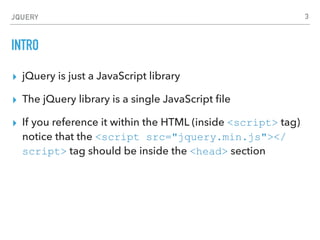
▸ jQuery is just a JavaScript library
▸ The jQuery library is a single JavaScript file
▸ If you reference it within the HTML (inside <script> tag)
notice that the <script src="jquery.min.js"></
script> tag should be inside the <head> section
2
JQUERY
EXAMPLE
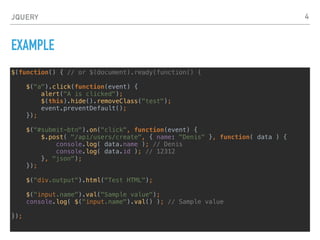
$(function() { // or $(document).ready(function() {
$("a").click(function(event) {
alert("A is clicked");
$(this).hide().removeClass("test");
event.preventDefault();
});
$("#submit-btn").on("click", function(event) {
$.post( "/api/users/create", { name: "Denis" }, function( data ) {
console.log( data.name ); // Denis
console.log( data.id ); // 12312
}, "json");
});
$("div.output").html("Test HTML");
$("input.name").val("Sample value");
console.log( $("input.name").val() ); // Sample value
});
3
JQUERY
SIMPLE PLUGIN
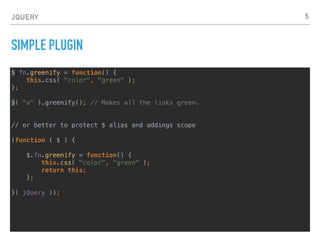
$.fn.greenify = function() {
this.css( "color", "green" );
};
$( "a" ).greenify(); // Makes all the links green.
// or better to protect $ alias and addings scope
(function ( $ ) {
$.fn.greenify = function() {
this.css( "color", "green" );
return this;
};
}( jQuery ));
4
JQUERY
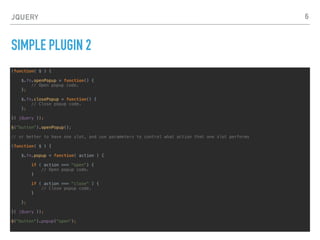
SIMPLE PLUGIN 2
(function( $ ) {
$.fn.openPopup = function() {
// Open popup code.
};
$.fn.closePopup = function() {
// Close popup code.
};
}( jQuery ));
$("button").openPopup();
// or better to have one slot, and use parameters to control what action that one slot performs
(function( $ ) {
$.fn.popup = function( action ) {
if ( action === "open") {
// Open popup code.
}
if ( action === "close" ) {
// Close popup code.
}
};
}( jQuery ));
$("button").popup("open");
5
JQUERY
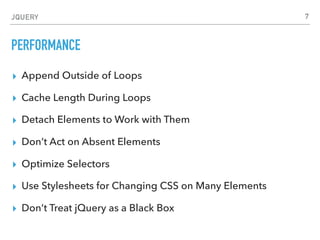
PERFORMANCE
▸ Append Outside of Loops
▸ Cache Length During Loops
▸ Detach Elements to Work with Them
▸ Don’t Act on Absent Elements
▸ Optimize Selectors
▸ Use Stylesheets for Changing CSS on Many Elements
▸ Don’t Treat jQuery as a Black Box
6
JQUERY
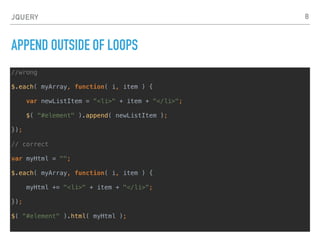
APPEND OUTSIDE OF LOOPS
//wrong
$.each( myArray, function( i, item ) {
var newListItem = "<li>" + item + "</li>";
$( "#element" ).append( newListItem );
});
// correct
var myHtml = "";
$.each( myArray, function( i, item ) {
myHtml += "<li>" + item + "</li>";
});
$( "#element" ).html( myHtml );
7
JQUERY
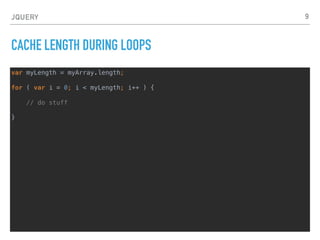
CACHE LENGTH DURING LOOPS
var myLength = myArray.length;
for ( var i = 0; i < myLength; i++ ) {
// do stuff
}
8
JQUERY
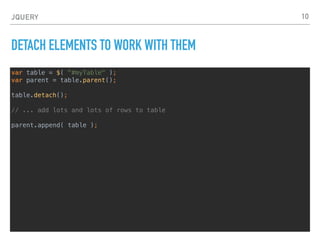
DETACH ELEMENTS TO WORK WITH THEM
var table = $( "#myTable" );
var parent = table.parent();
table.detach();
// ... add lots and lots of rows to table
parent.append( table );
9
JQUERY
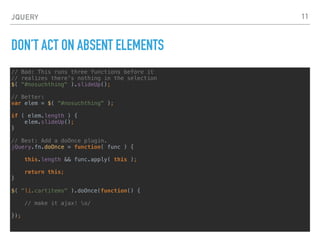
DON’T ACT ON ABSENT ELEMENTS
// Bad: This runs three functions before it
// realizes there's nothing in the selection
$( "#nosuchthing" ).slideUp();
// Better:
var elem = $( "#nosuchthing" );
if ( elem.length ) {
elem.slideUp();
}
// Best: Add a doOnce plugin.
jQuery.fn.doOnce = function( func ) {
this.length && func.apply( this );
return this;
}
$( "li.cartitems" ).doOnce(function() {
// make it ajax! o/

});
10
JQUERY
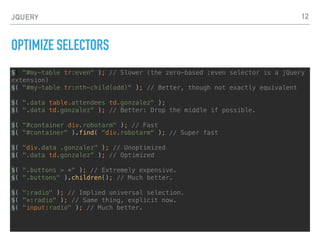
OPTIMIZE SELECTORS
$( "#my-table tr:even" ); // Slower (the zero-based :even selector is a jQuery
extension)
$( "#my-table tr:nth-child(odd)" ); // Better, though not exactly equivalent
$( ".data table.attendees td.gonzalez" );
$( ".data td.gonzalez" ); // Better: Drop the middle if possible.
$( "#container div.robotarm" ); // Fast
$( "#container" ).find( "div.robotarm" ); // Super fast
$( "div.data .gonzalez" ); // Unoptimized
$( ".data td.gonzalez" ); // Optimized
$( ".buttons > *" ); // Extremely expensive.
$( ".buttons" ).children(); // Much better.
$( ":radio" ); // Implied universal selection.
$( "*:radio" ); // Same thing, explicit now.
$( "input:radio" ); // Much better.
11
JQUERY
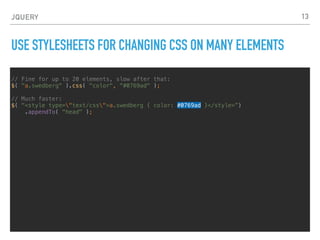
USE STYLESHEETS FOR CHANGING CSS ON MANY ELEMENTS
// Fine for up to 20 elements, slow after that:
$( "a.swedberg" ).css( "color", "#0769ad" );
// Much faster:
$( "<style type="text/css">a.swedberg { color: #0769ad }</style>”)
.appendTo( "head" );
12
JQUERY
DON’T TREAT JQUERY AS A BLACK BOX
Use the source as your documentation. Bookmark the source code and refer to it often.
13
JQUERY
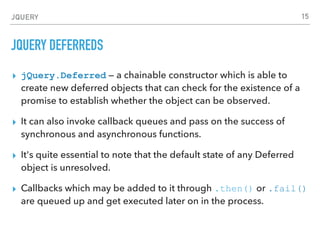
JQUERY DEFERREDS
▸ jQuery.Deferred — a chainable constructor which is able to
create new deferred objects that can check for the existence of a
promise to establish whether the object can be observed.
▸ It can also invoke callback queues and pass on the success of
synchronous and asynchronous functions.
▸ It's quite essential to note that the default state of any Deferred
object is unresolved.
▸ Callbacks which may be added to it through .then() or .fail()
are queued up and get executed later on in the process.
14
JQUERY
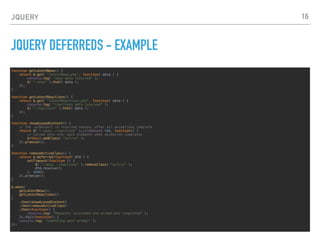
JQUERY DEFERREDS - EXAMPLE
function getLatestNews() {
return $.get( "latestNews.php", function( data ) {
console.log( "news data received" );
$( ".news" ).html( data );
});
}
function getLatestReactions() {
return $.get( "latestReactions.php", function( data ) {
console.log( "reactions data received" );
$( ".reactions" ).html( data );
});
}
function showAjaxedContent() {
// The .promise() is resolved *once*, after all animations complete
return $( ".news, .reactions" ).slideDown( 500, function() {
// Called once *for each element* when animation completes
$(this).addClass( "active" );
}).promise();
}
function removeActiveClass() {
return $.Deferred(function( dfd ) {
setTimeout(function () {
$( ".news, .reactions" ).removeClass( "active" );
dfd.resolve();
}, 4000);
}).promise();
}
$.when(
getLatestNews(),
getLatestReactions()
)
.then(showAjaxedContent)
.then(removeActiveClass)
.then(function() {
console.log( "Requests succeeded and animations completed" );
}).fail(function() {
console.log( "something went wrong!" );
});
15
JQUERY
JQUERY RESOURCES
▸ About jQuery
▸ https://learn.jquery.com/about-jquery/
▸ jQuery Style Guide
▸ http://learn.jquery.com/style-guide/
▸ jQuery API Documentation
▸ http://api.jquery.com/
▸ w3schools jQuery
▸ https://www.w3schools.com/jquery/default.asp
16

06 jQuery #burningkeyboards

  • 1.
  • 2.
    JQUERY INTRO ▸ jQuery isjust a JavaScript library ▸ The jQuery library is a single JavaScript file ▸ If you reference it within the HTML (inside <script> tag) notice that the <script src="jquery.min.js"></ script> tag should be inside the <head> section 2
  • 3.
    JQUERY EXAMPLE $(function() { //or $(document).ready(function() { $("a").click(function(event) { alert("A is clicked"); $(this).hide().removeClass("test"); event.preventDefault(); }); $("#submit-btn").on("click", function(event) { $.post( "/api/users/create", { name: "Denis" }, function( data ) { console.log( data.name ); // Denis console.log( data.id ); // 12312 }, "json"); }); $("div.output").html("Test HTML"); $("input.name").val("Sample value"); console.log( $("input.name").val() ); // Sample value }); 3
  • 4.
    JQUERY SIMPLE PLUGIN $.fn.greenify =function() { this.css( "color", "green" ); }; $( "a" ).greenify(); // Makes all the links green. // or better to protect $ alias and addings scope (function ( $ ) { $.fn.greenify = function() { this.css( "color", "green" ); return this; }; }( jQuery )); 4
  • 5.
    JQUERY SIMPLE PLUGIN 2 (function($ ) { $.fn.openPopup = function() { // Open popup code. }; $.fn.closePopup = function() { // Close popup code. }; }( jQuery )); $("button").openPopup(); // or better to have one slot, and use parameters to control what action that one slot performs (function( $ ) { $.fn.popup = function( action ) { if ( action === "open") { // Open popup code. } if ( action === "close" ) { // Close popup code. } }; }( jQuery )); $("button").popup("open"); 5
  • 6.
    JQUERY PERFORMANCE ▸ Append Outsideof Loops ▸ Cache Length During Loops ▸ Detach Elements to Work with Them ▸ Don’t Act on Absent Elements ▸ Optimize Selectors ▸ Use Stylesheets for Changing CSS on Many Elements ▸ Don’t Treat jQuery as a Black Box 6
  • 7.
    JQUERY APPEND OUTSIDE OFLOOPS //wrong $.each( myArray, function( i, item ) { var newListItem = "<li>" + item + "</li>"; $( "#element" ).append( newListItem ); }); // correct var myHtml = ""; $.each( myArray, function( i, item ) { myHtml += "<li>" + item + "</li>"; }); $( "#element" ).html( myHtml ); 7
  • 8.
    JQUERY CACHE LENGTH DURINGLOOPS var myLength = myArray.length; for ( var i = 0; i < myLength; i++ ) { // do stuff } 8
  • 9.
    JQUERY DETACH ELEMENTS TOWORK WITH THEM var table = $( "#myTable" ); var parent = table.parent(); table.detach(); // ... add lots and lots of rows to table parent.append( table ); 9
  • 10.
    JQUERY DON’T ACT ONABSENT ELEMENTS // Bad: This runs three functions before it // realizes there's nothing in the selection $( "#nosuchthing" ).slideUp(); // Better: var elem = $( "#nosuchthing" ); if ( elem.length ) { elem.slideUp(); } // Best: Add a doOnce plugin. jQuery.fn.doOnce = function( func ) { this.length && func.apply( this ); return this; } $( "li.cartitems" ).doOnce(function() { // make it ajax! o/
 }); 10
  • 11.
    JQUERY OPTIMIZE SELECTORS $( "#my-tabletr:even" ); // Slower (the zero-based :even selector is a jQuery extension) $( "#my-table tr:nth-child(odd)" ); // Better, though not exactly equivalent $( ".data table.attendees td.gonzalez" ); $( ".data td.gonzalez" ); // Better: Drop the middle if possible. $( "#container div.robotarm" ); // Fast $( "#container" ).find( "div.robotarm" ); // Super fast $( "div.data .gonzalez" ); // Unoptimized $( ".data td.gonzalez" ); // Optimized $( ".buttons > *" ); // Extremely expensive. $( ".buttons" ).children(); // Much better. $( ":radio" ); // Implied universal selection. $( "*:radio" ); // Same thing, explicit now. $( "input:radio" ); // Much better. 11
  • 12.
    JQUERY USE STYLESHEETS FORCHANGING CSS ON MANY ELEMENTS // Fine for up to 20 elements, slow after that: $( "a.swedberg" ).css( "color", "#0769ad" ); // Much faster: $( "<style type="text/css">a.swedberg { color: #0769ad }</style>”) .appendTo( "head" ); 12
  • 13.
    JQUERY DON’T TREAT JQUERYAS A BLACK BOX Use the source as your documentation. Bookmark the source code and refer to it often. 13
  • 14.
    JQUERY JQUERY DEFERREDS ▸ jQuery.Deferred— a chainable constructor which is able to create new deferred objects that can check for the existence of a promise to establish whether the object can be observed. ▸ It can also invoke callback queues and pass on the success of synchronous and asynchronous functions. ▸ It's quite essential to note that the default state of any Deferred object is unresolved. ▸ Callbacks which may be added to it through .then() or .fail() are queued up and get executed later on in the process. 14
  • 15.
    JQUERY JQUERY DEFERREDS -EXAMPLE function getLatestNews() { return $.get( "latestNews.php", function( data ) { console.log( "news data received" ); $( ".news" ).html( data ); }); } function getLatestReactions() { return $.get( "latestReactions.php", function( data ) { console.log( "reactions data received" ); $( ".reactions" ).html( data ); }); } function showAjaxedContent() { // The .promise() is resolved *once*, after all animations complete return $( ".news, .reactions" ).slideDown( 500, function() { // Called once *for each element* when animation completes $(this).addClass( "active" ); }).promise(); } function removeActiveClass() { return $.Deferred(function( dfd ) { setTimeout(function () { $( ".news, .reactions" ).removeClass( "active" ); dfd.resolve(); }, 4000); }).promise(); } $.when( getLatestNews(), getLatestReactions() ) .then(showAjaxedContent) .then(removeActiveClass) .then(function() { console.log( "Requests succeeded and animations completed" ); }).fail(function() { console.log( "something went wrong!" ); }); 15
  • 16.
    JQUERY JQUERY RESOURCES ▸ AboutjQuery ▸ https://learn.jquery.com/about-jquery/ ▸ jQuery Style Guide ▸ http://learn.jquery.com/style-guide/ ▸ jQuery API Documentation ▸ http://api.jquery.com/ ▸ w3schools jQuery ▸ https://www.w3schools.com/jquery/default.asp 16