





Agenda
 Introduction to JQuery
 Selectors
 Events
 Traversing
 Effects & Animations
 Ajax
 Introduction to JQuery UI
What is jQuery
Open-Source JavaScript library that simplifies cross-
browser client side scripting.
Animations
DOM manipulation
AJAX
Extensibility through plugins
Created by John Resig and released on Jan 2006
Most current release is 2.1.1 (May 1st
, 2014)
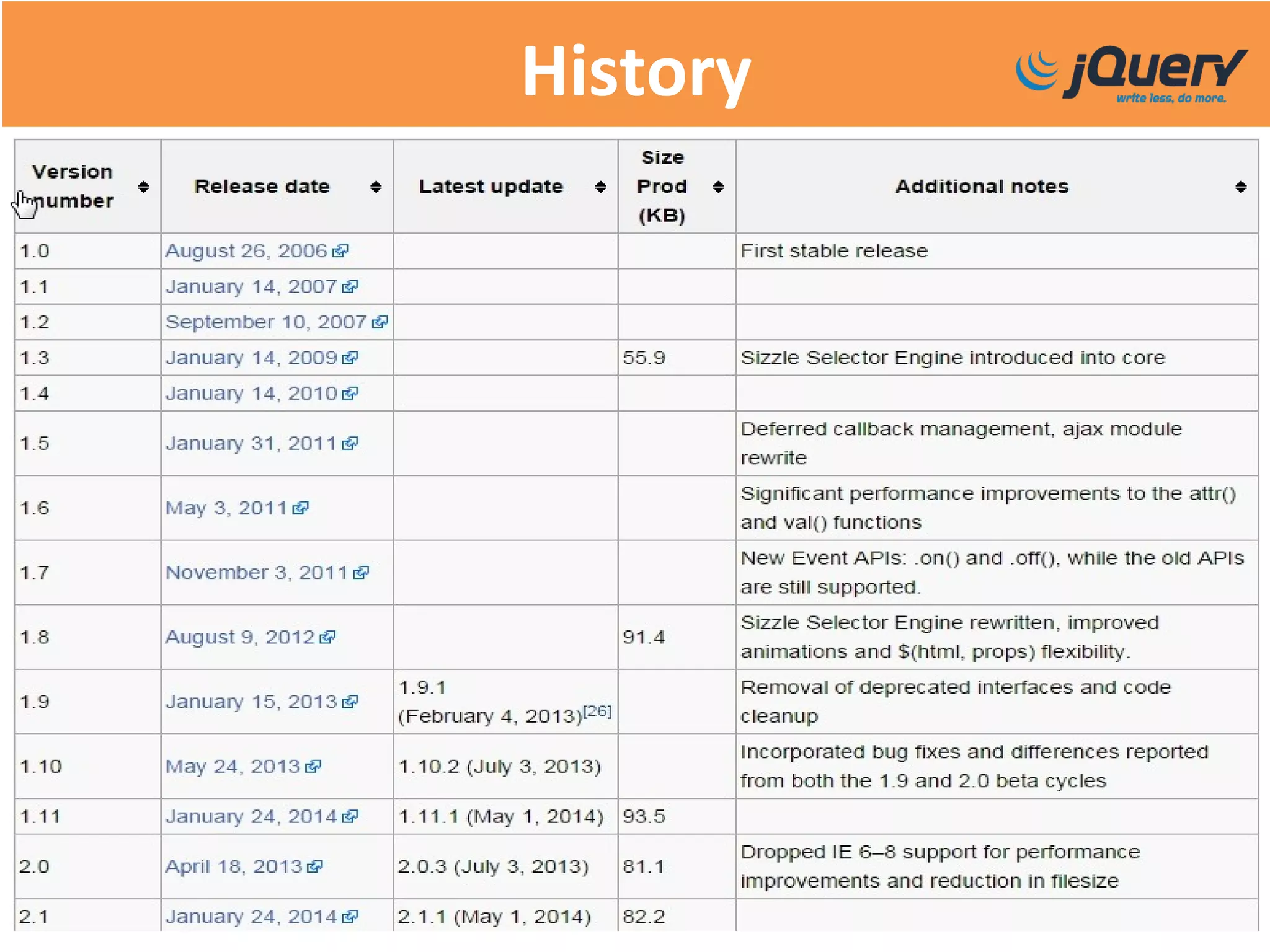
History
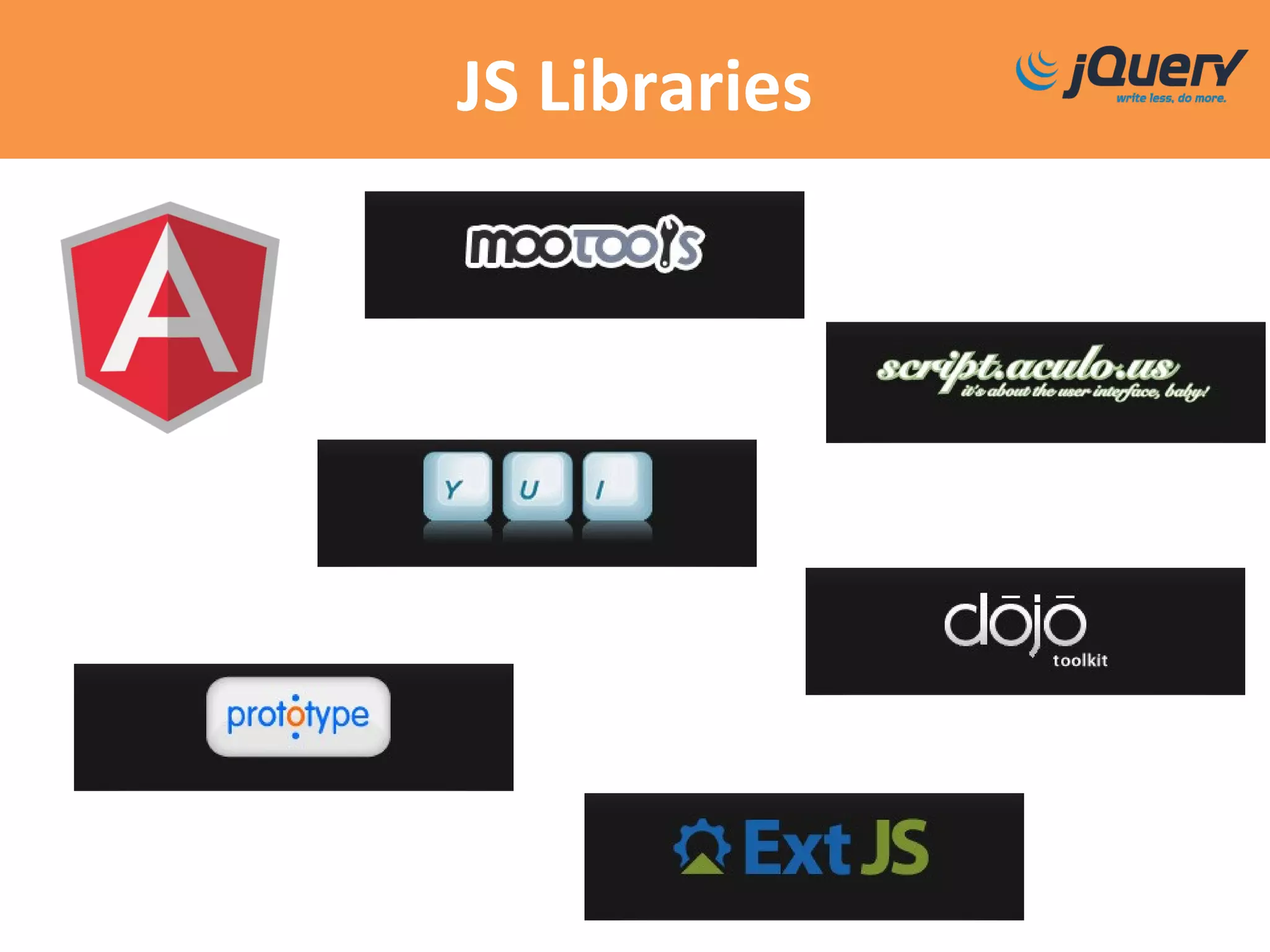
JS Libraries
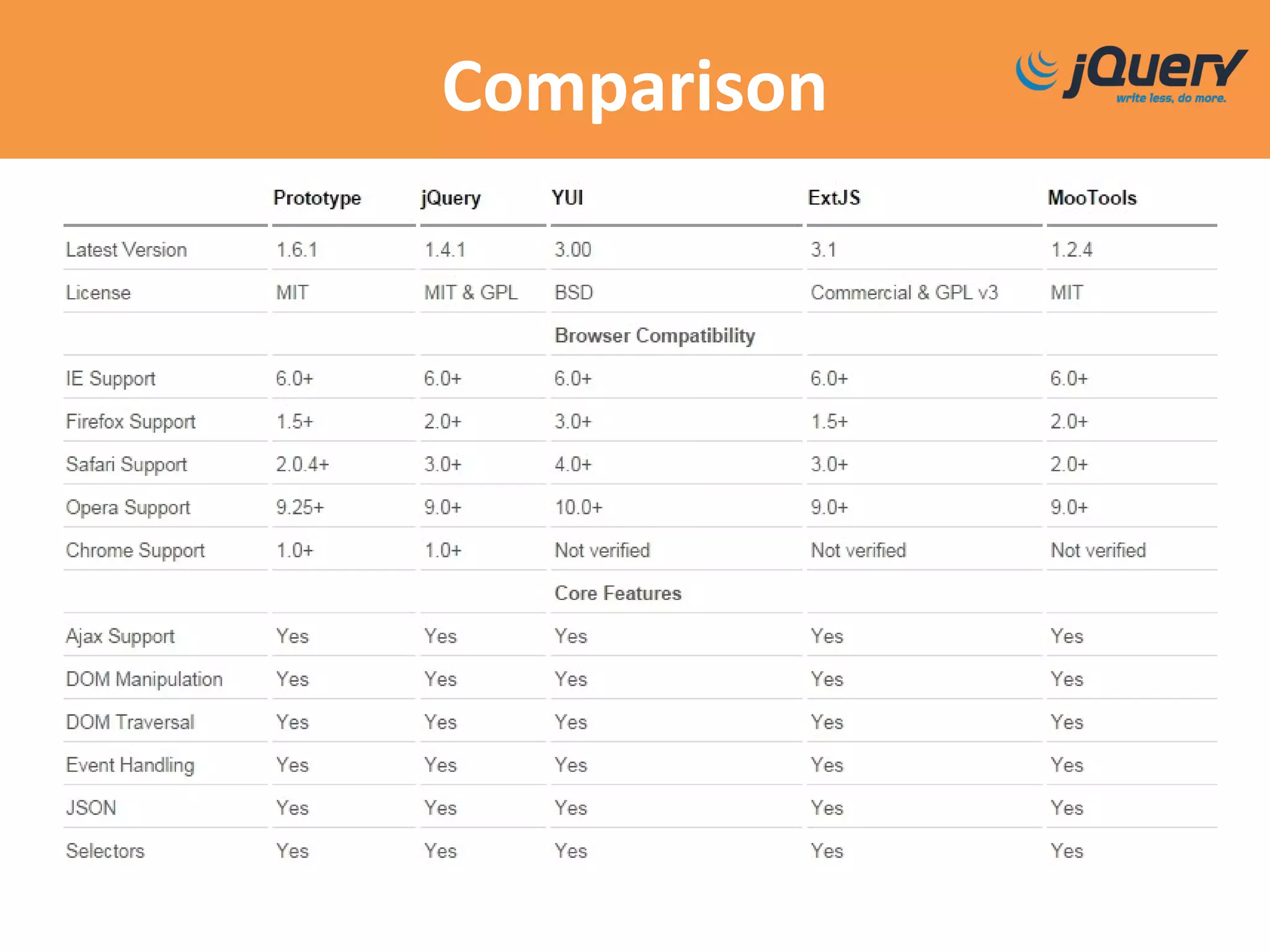
Comparison
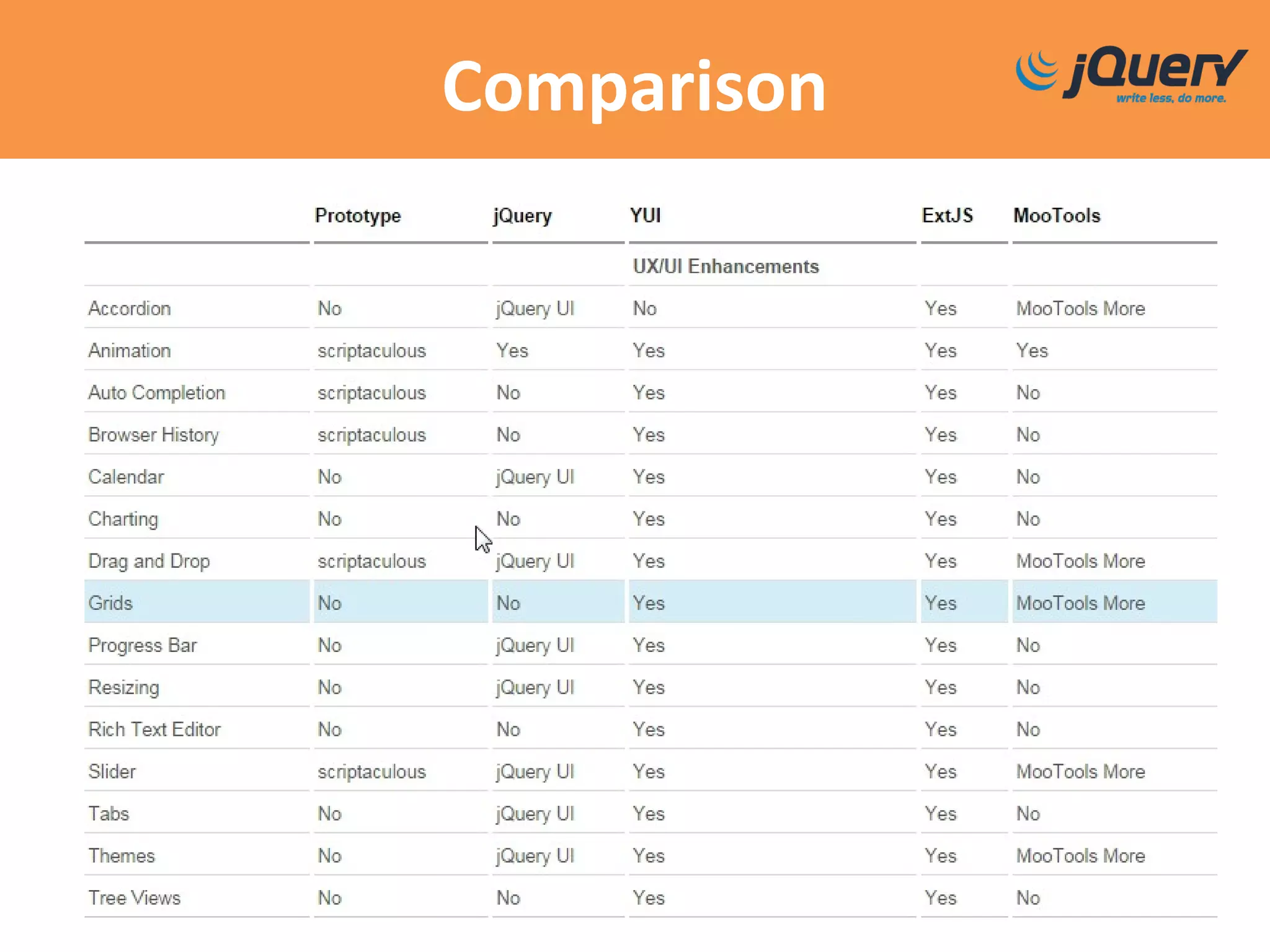
Comparison
Who uses jQuery?
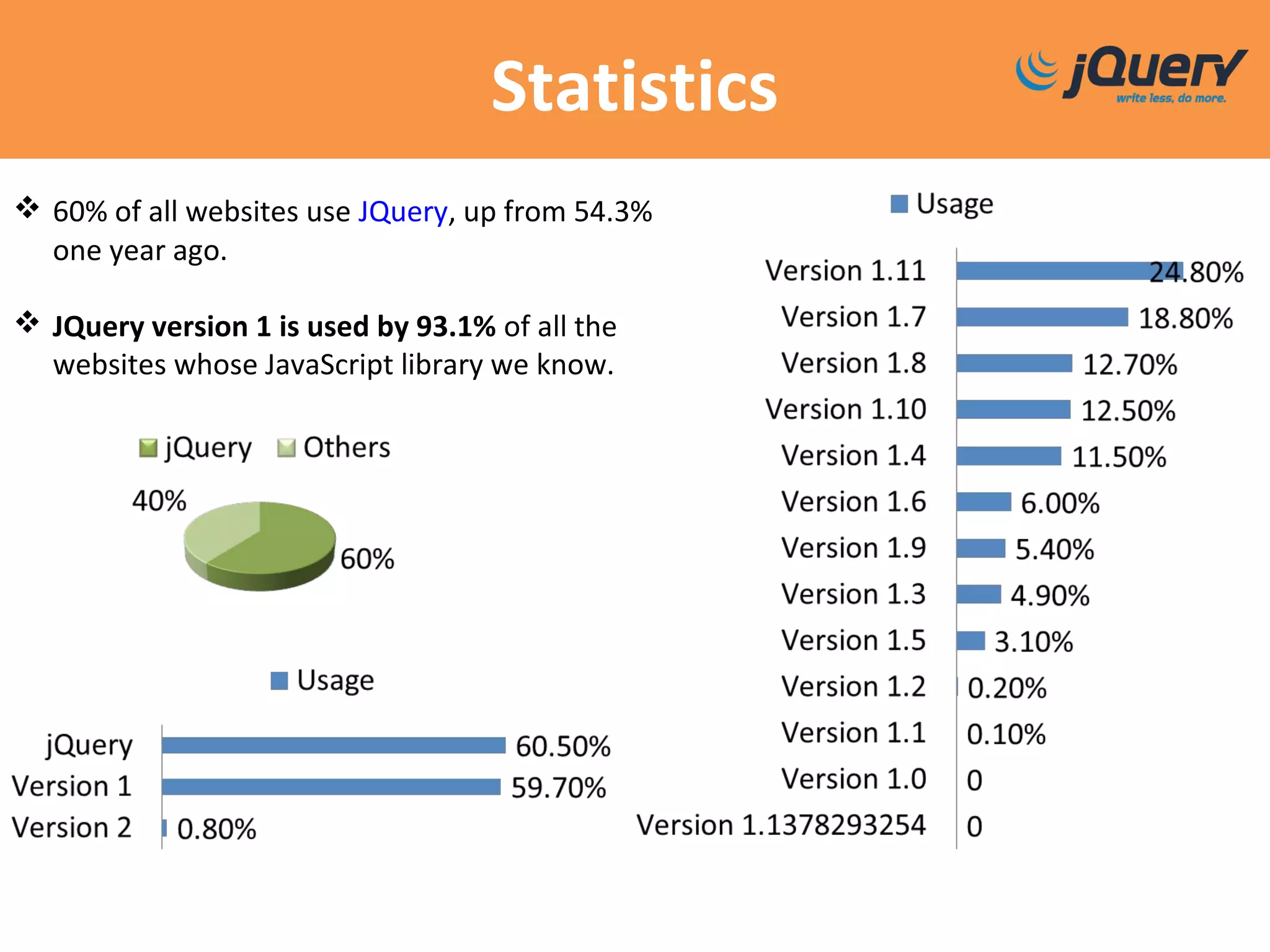
Statistics
 60% of all websites use JQuery, up from 54.3%
one year ago.
 JQuery version 1 is used by 93.1% of all the
websites whose JavaScript library we know.
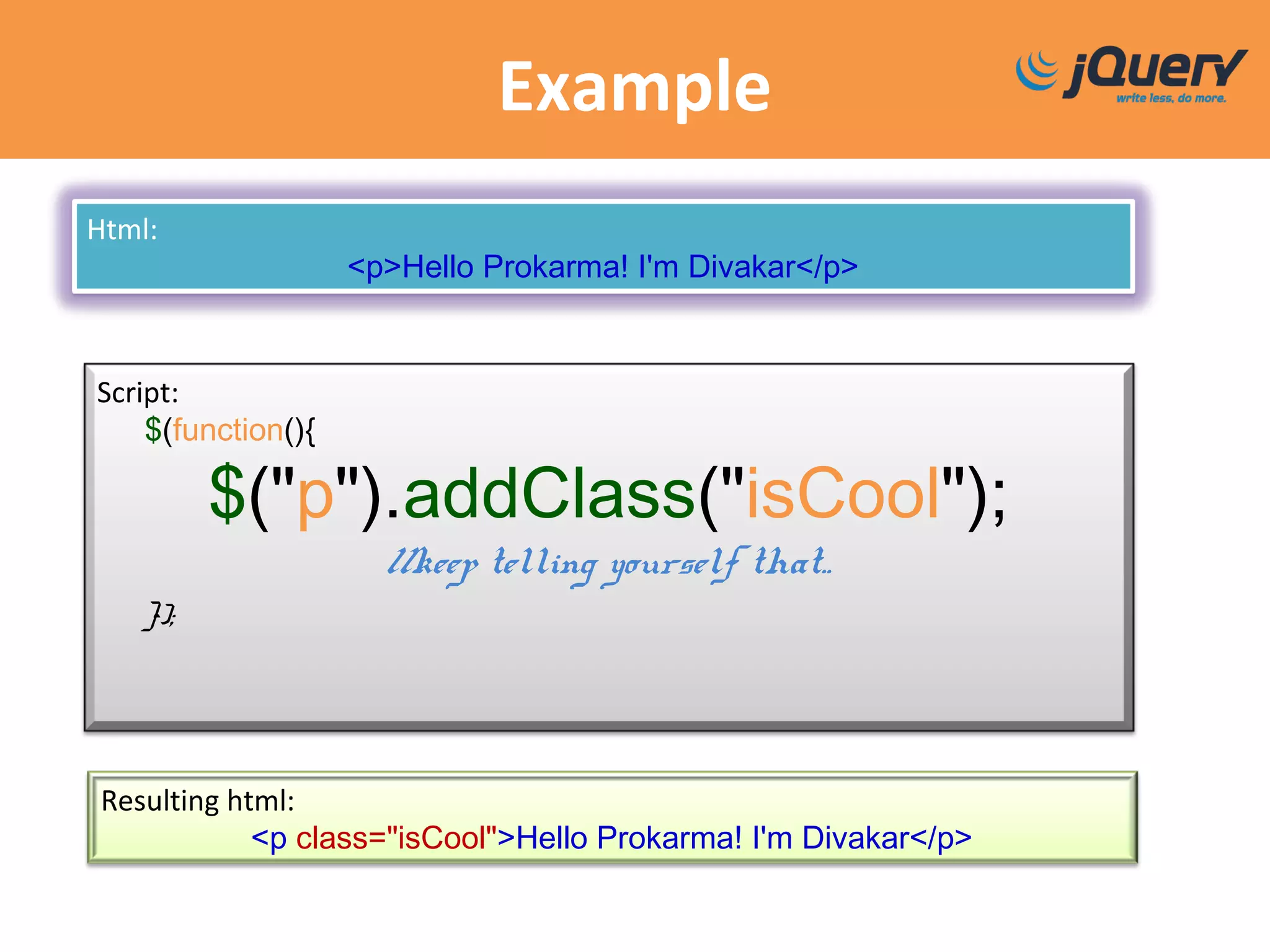
Example
Html:
<p>Hello Prokarma! I'm Divakar</p>
Script:
$(function(){
$("p").addClass("isCool");
//keep telling yourself that..
});
Resulting html:
<p class="isCool">Hello Prokarma! I'm Divakar</p>
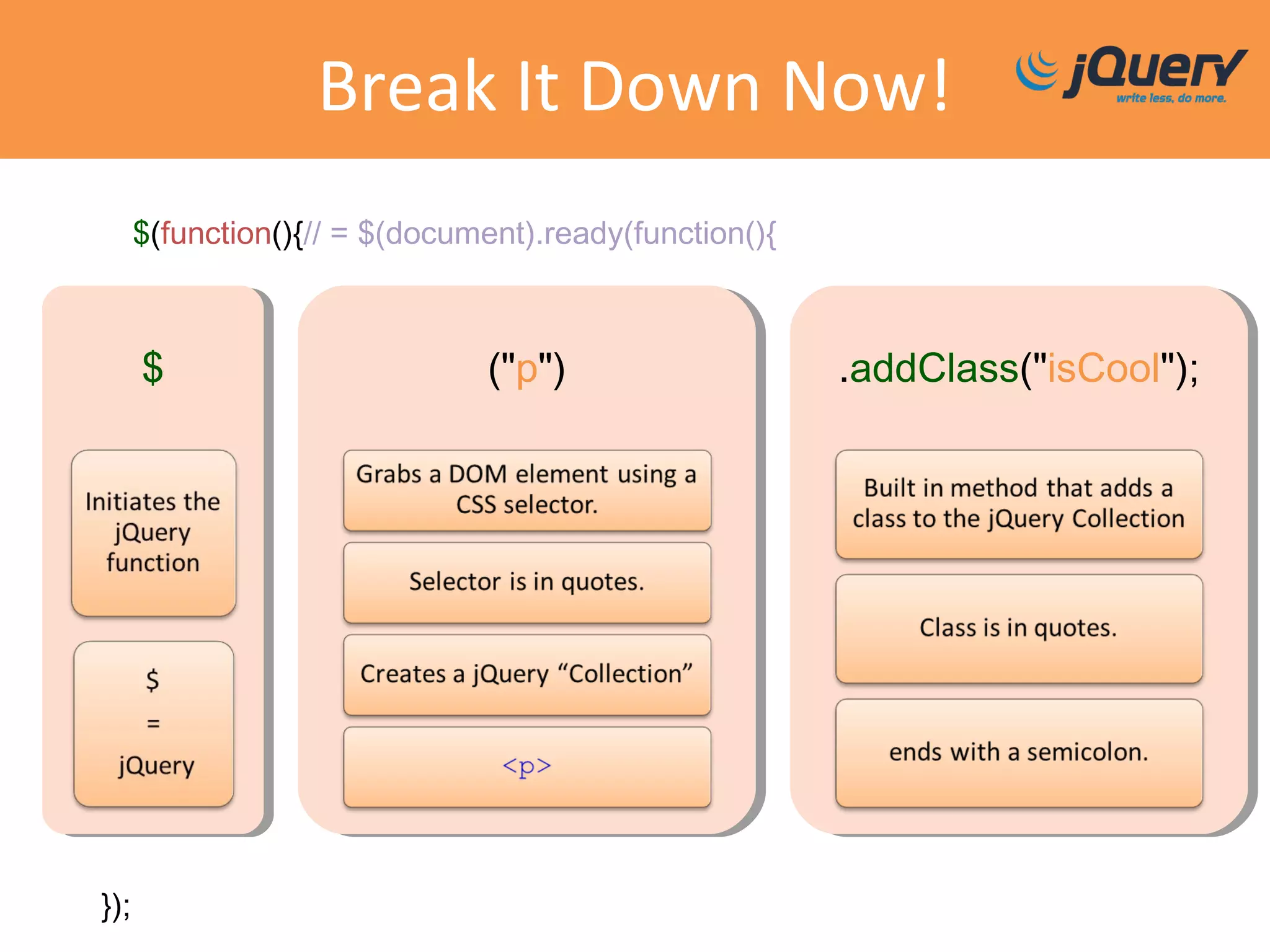
Break It Down Now!
$(function(){// = $(document).ready(function(){
$ ("p") .addClass("isCool");
});
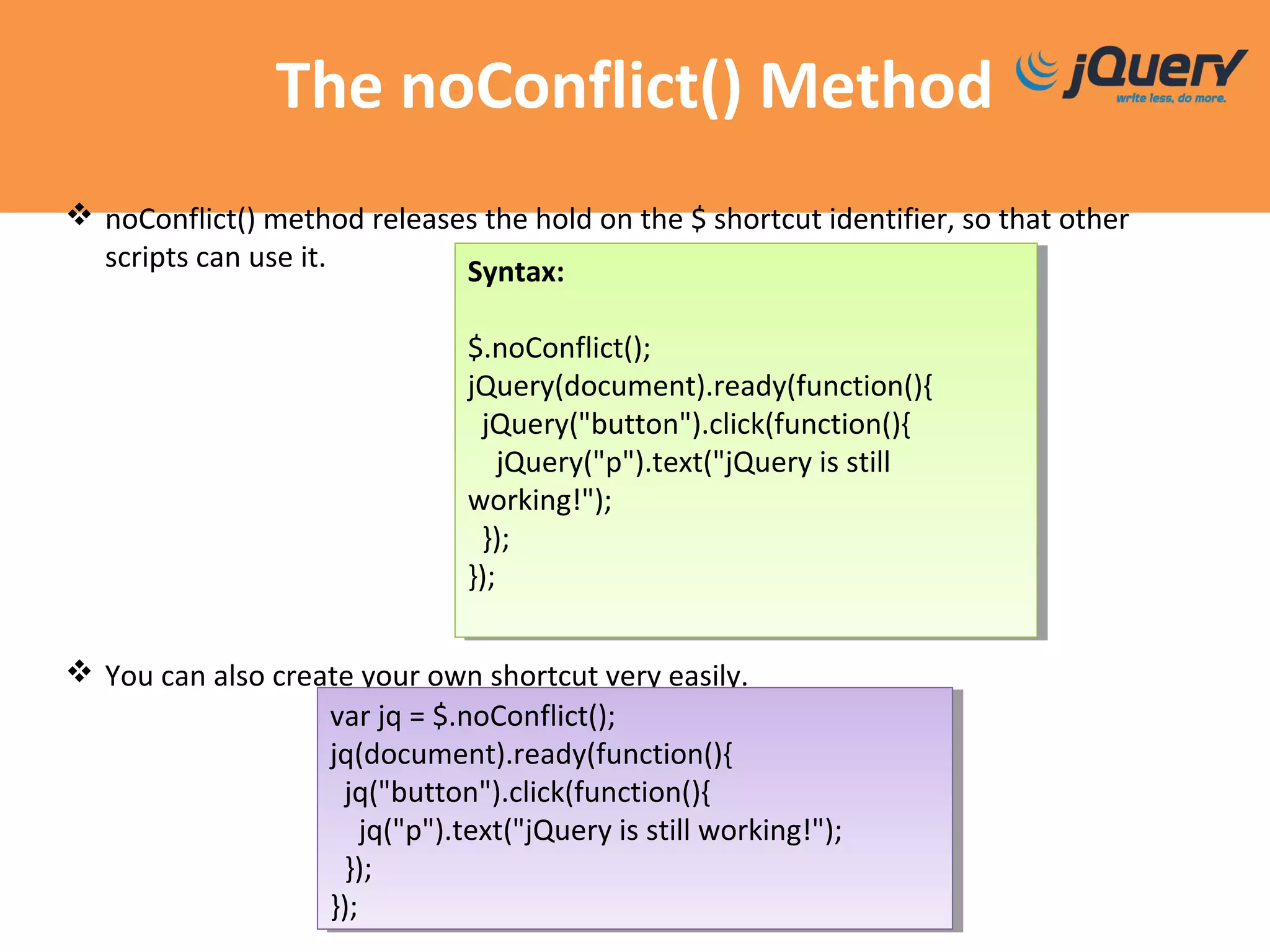
The noConflict() Method
 noConflict() method releases the hold on the $ shortcut identifier, so that other
scripts can use it.
 You can also create your own shortcut very easily.
Syntax:
$.noConflict();
jQuery(document).ready(function(){
jQuery("button").click(function(){
jQuery("p").text("jQuery is still
working!");
});
});
Syntax:
$.noConflict();
jQuery(document).ready(function(){
jQuery("button").click(function(){
jQuery("p").text("jQuery is still
working!");
});
});
var jq = $.noConflict();
jq(document).ready(function(){
jq("button").click(function(){
jq("p").text("jQuery is still working!");
});
});
var jq = $.noConflict();
jq(document).ready(function(){
jq("button").click(function(){
jq("p").text("jQuery is still working!");
});
});
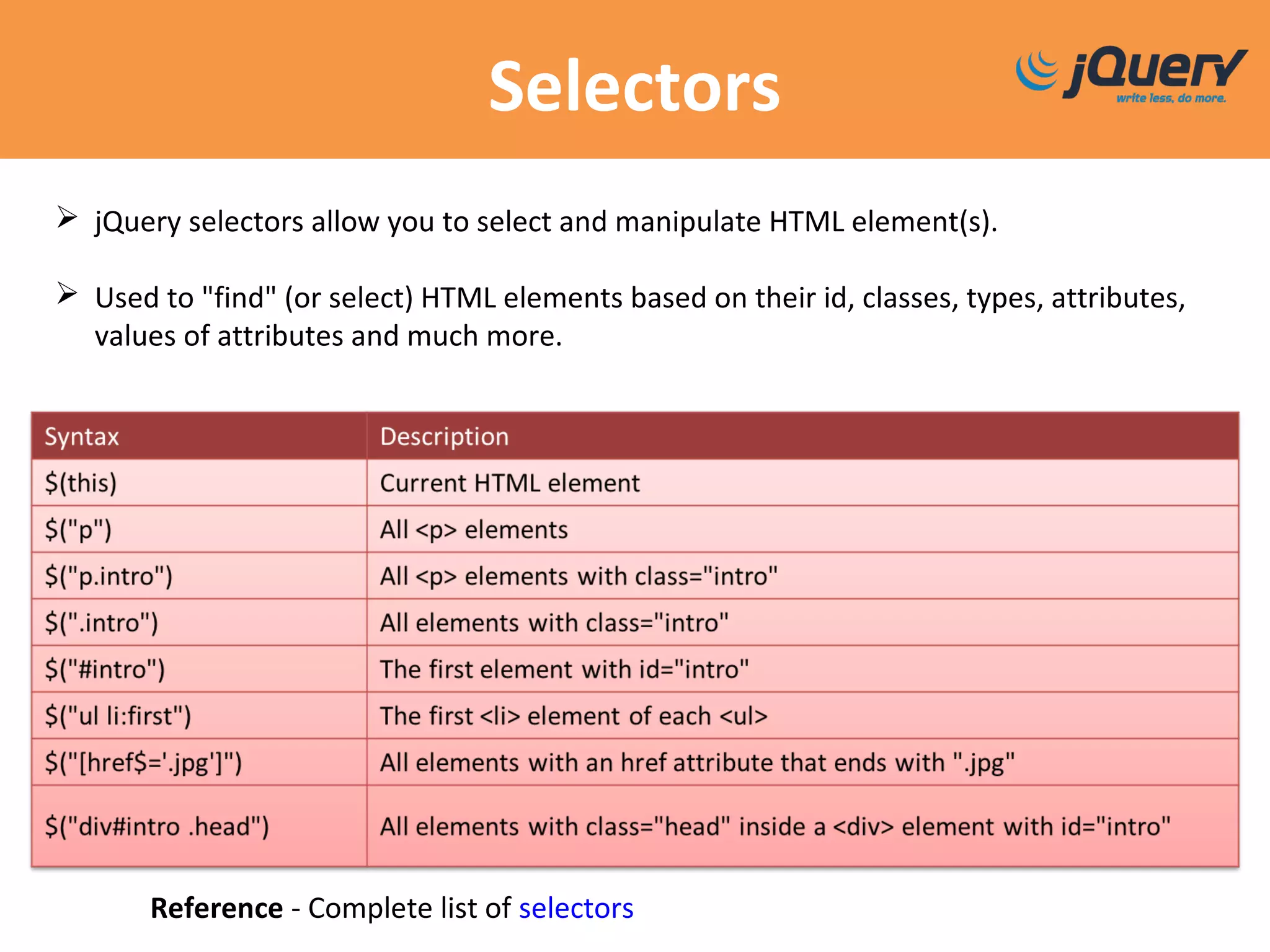
Selectors
Reference - Complete list of selectors
 jQuery selectors allow you to select and manipulate HTML element(s).
 Used to "find" (or select) HTML elements based on their id, classes, types, attributes,
values of attributes and much more.
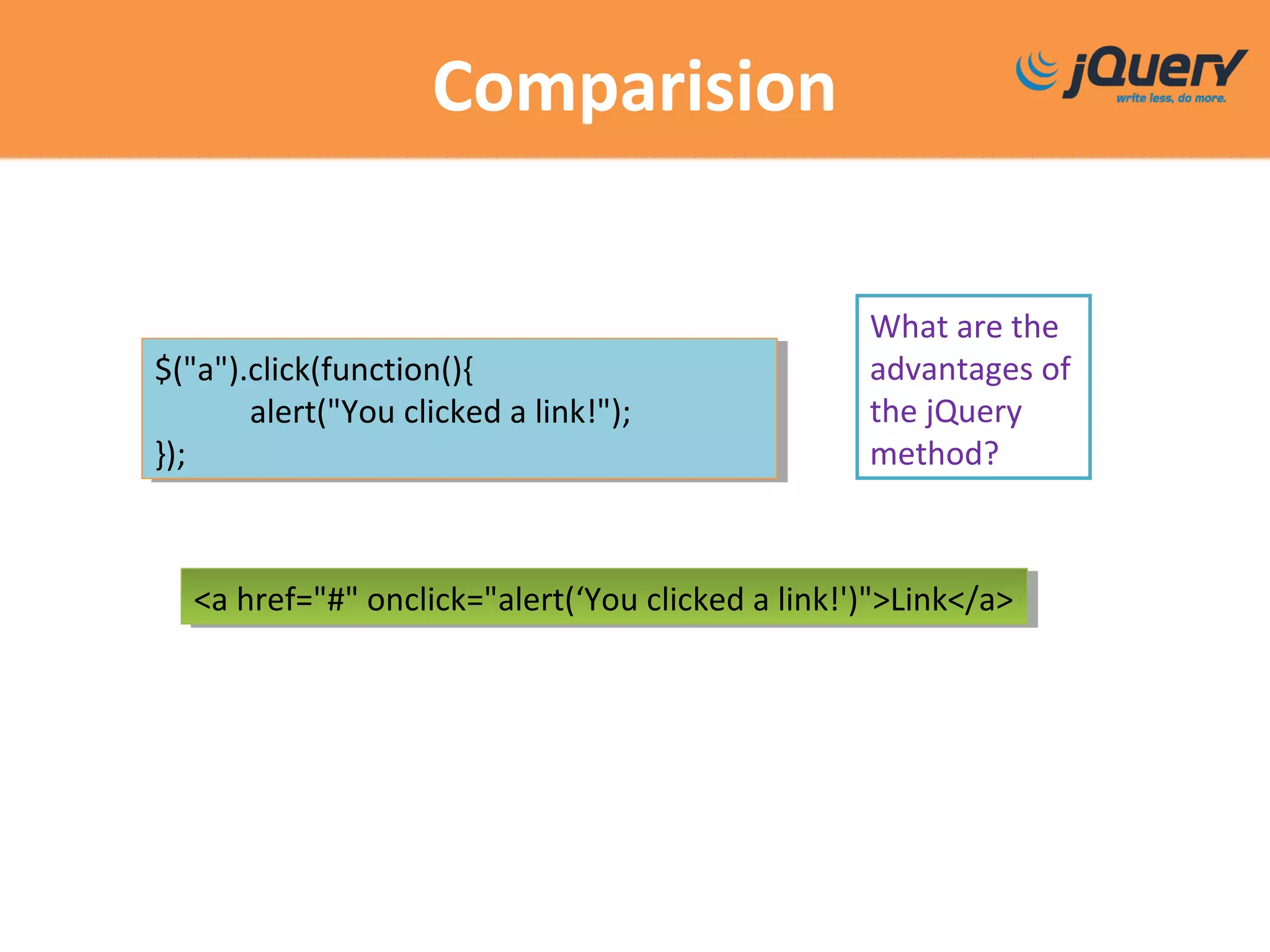
Comparision
What are the
advantages of
the jQuery
method?
$("a").click(function(){
alert("You clicked a link!");
});
$("a").click(function(){
alert("You clicked a link!");
});
<a href="#" onclick="alert(‘You clicked a link!')">Link</a><a href="#" onclick="alert(‘You clicked a link!')">Link</a>
Traversing
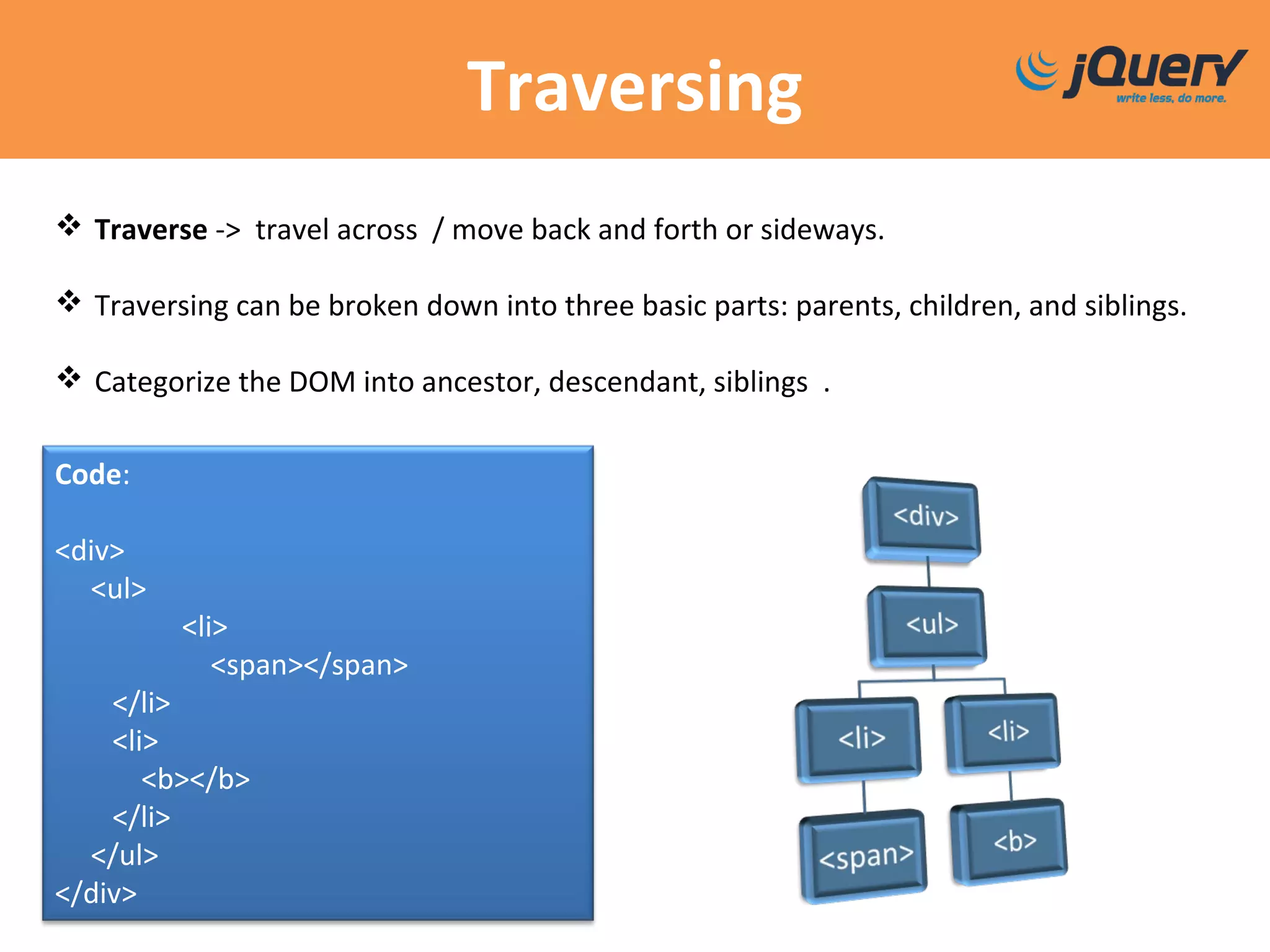
 Traverse -> travel across / move back and forth or sideways.
 Traversing can be broken down into three basic parts: parents, children, and siblings.
 Categorize the DOM into ancestor, descendant, siblings .
Code:
<div>
<ul>
<li>
<span></span>
</li>
<li>
<b></b>
</li>
</ul>
</div>
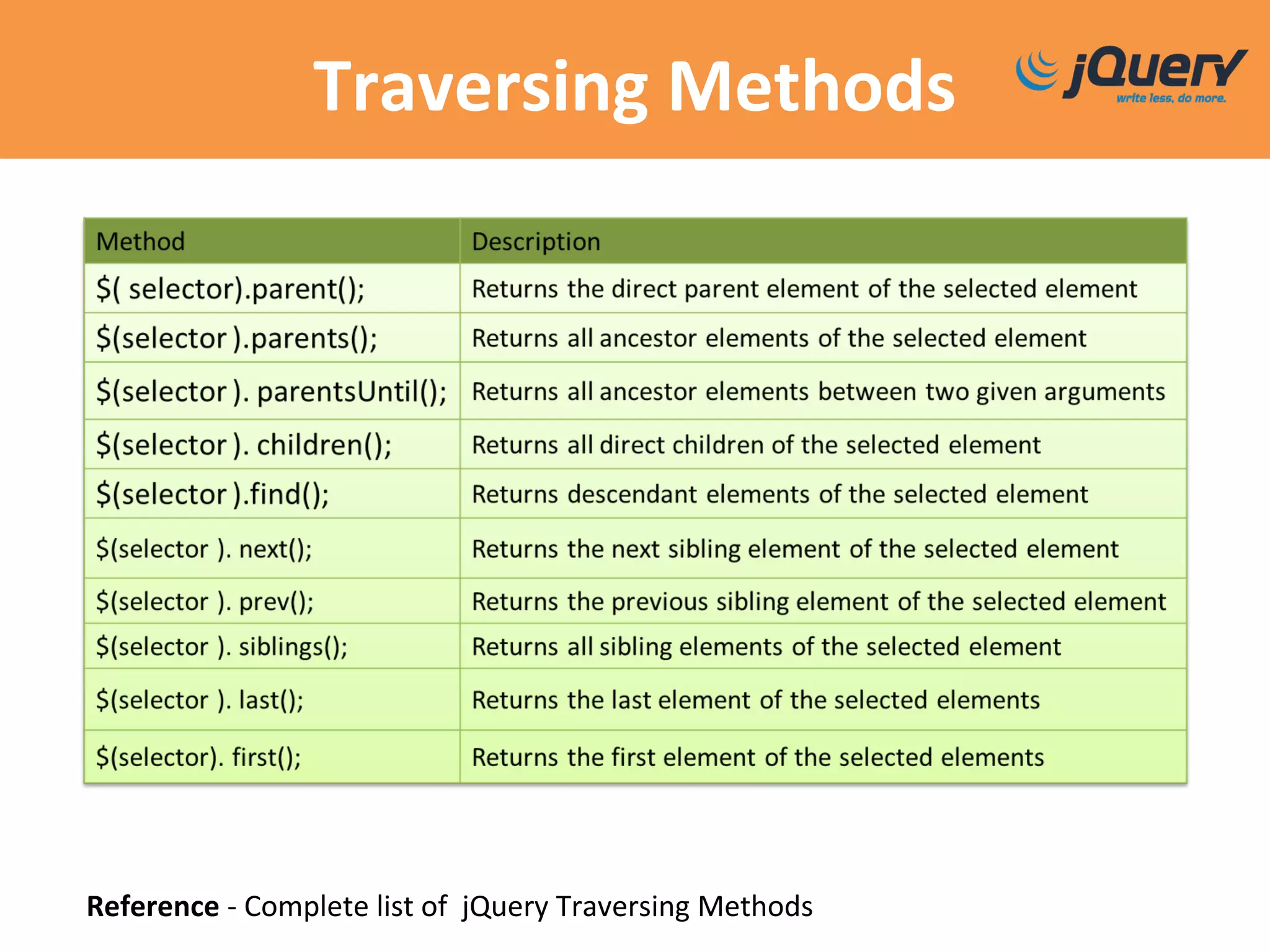
Traversing Methods
Reference - Complete list of jQuery Traversing Methods
Filters
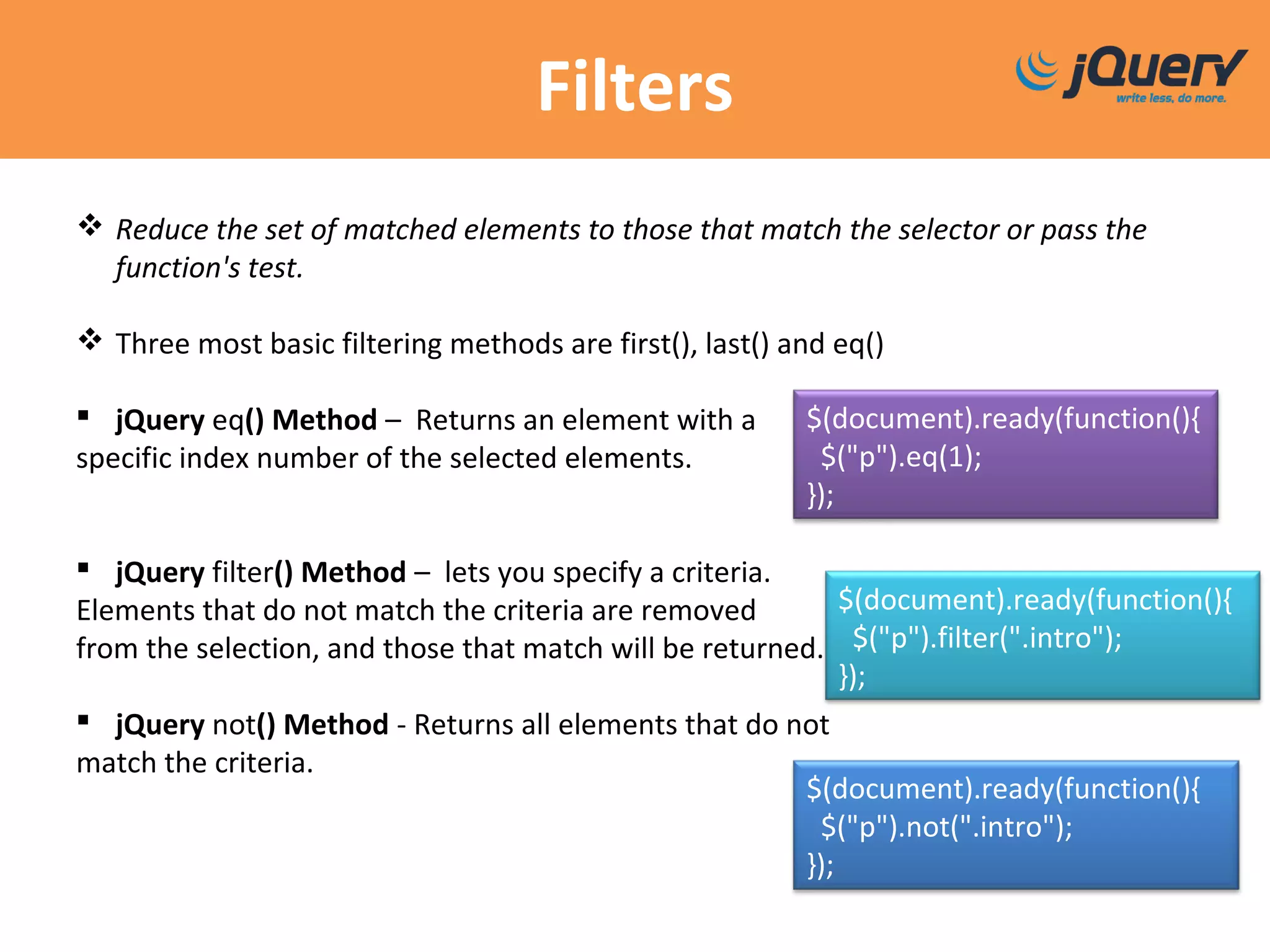
 Reduce the set of matched elements to those that match the selector or pass the
function's test.
 Three most basic filtering methods are first(), last() and eq()
 jQuery eq() Method – Returns an element with a
specific index number of the selected elements.
 jQuery filter() Method – lets you specify a criteria.
Elements that do not match the criteria are removed
from the selection, and those that match will be returned.
 jQuery not() Method - Returns all elements that do not
match the criteria.
$(document).ready(function(){
$("p").not(".intro");
});
$(document).ready(function(){
$("p").filter(".intro");
});
$(document).ready(function(){
$("p").eq(1);
});
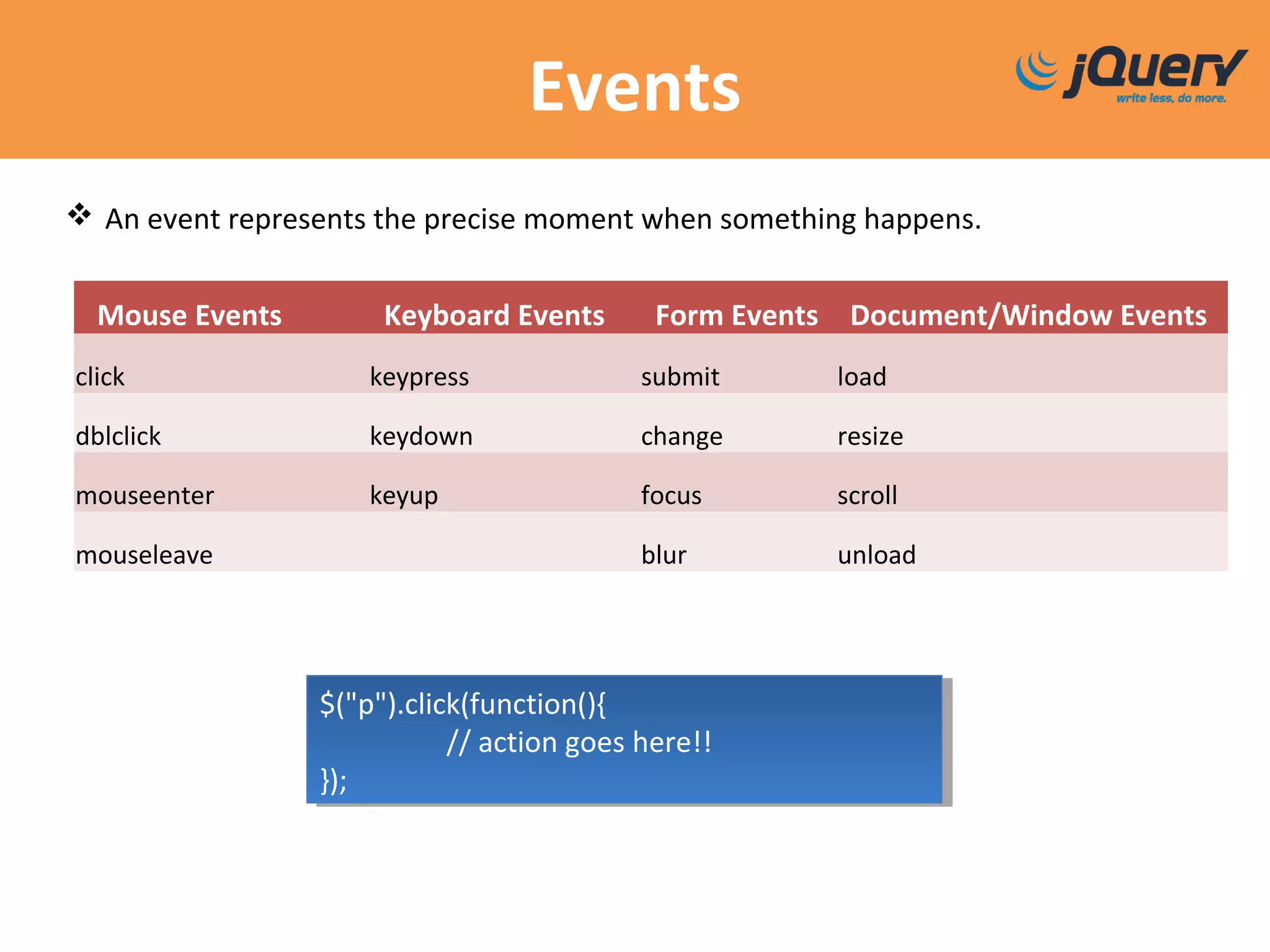
Events
Mouse Events Keyboard Events Form Events Document/Window Events
click keypress submit load
dblclick keydown change resize
mouseenter keyup focus scroll
mouseleave blur unload
 An event represents the precise moment when something happens.
$("p").click(function(){
// action goes here!!
});
$("p").click(function(){
// action goes here!!
});
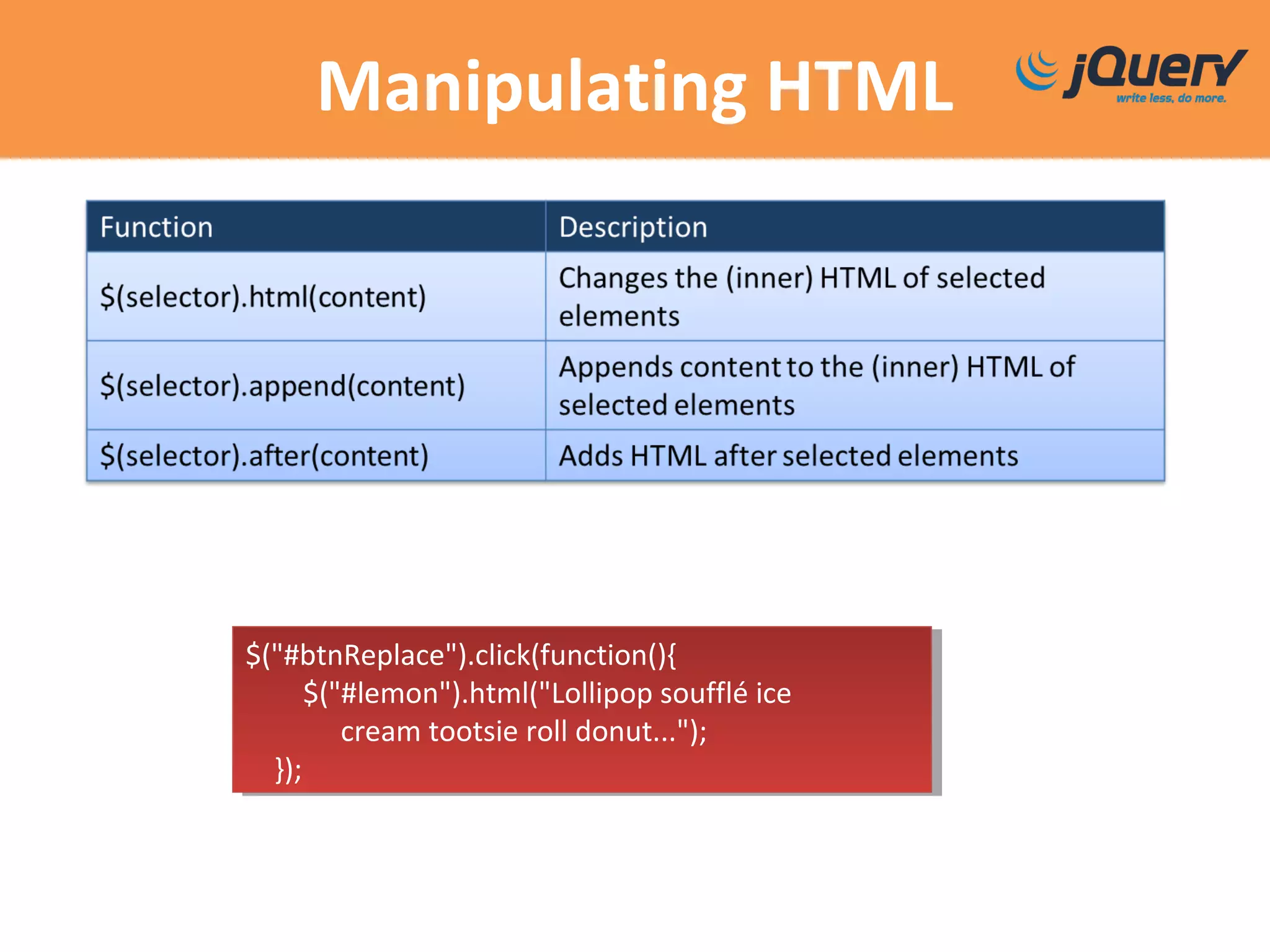
Manipulating HTML
$("#btnReplace").click(function(){
$("#lemon").html("Lollipop soufflé ice
cream tootsie roll donut...");
});
$("#btnReplace").click(function(){
$("#lemon").html("Lollipop soufflé ice
cream tootsie roll donut...");
});
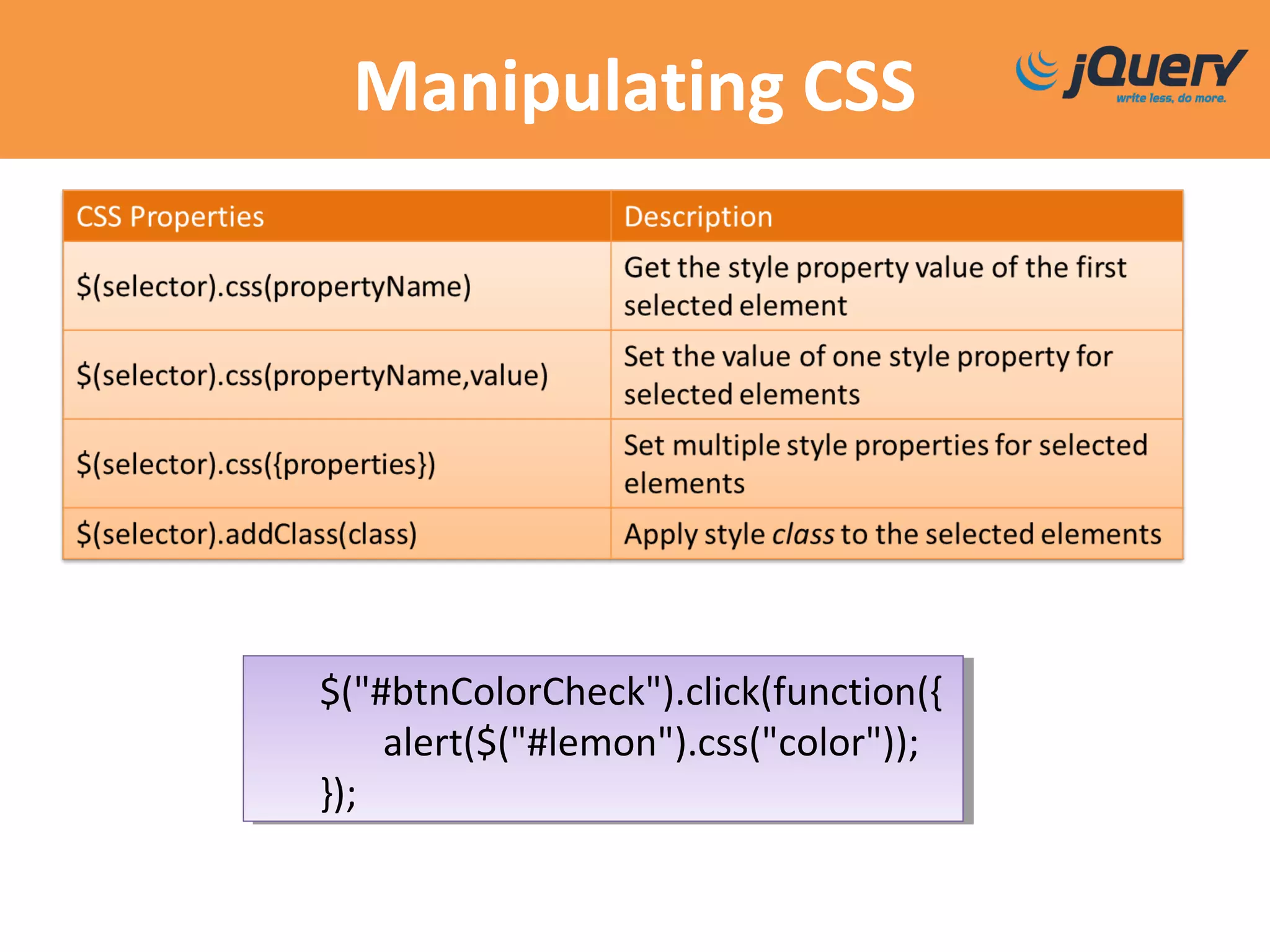
Manipulating CSS
$("#btnColorCheck").click(function({
alert($("#lemon").css("color"));
});
$("#btnColorCheck").click(function({
alert($("#lemon").css("color"));
});
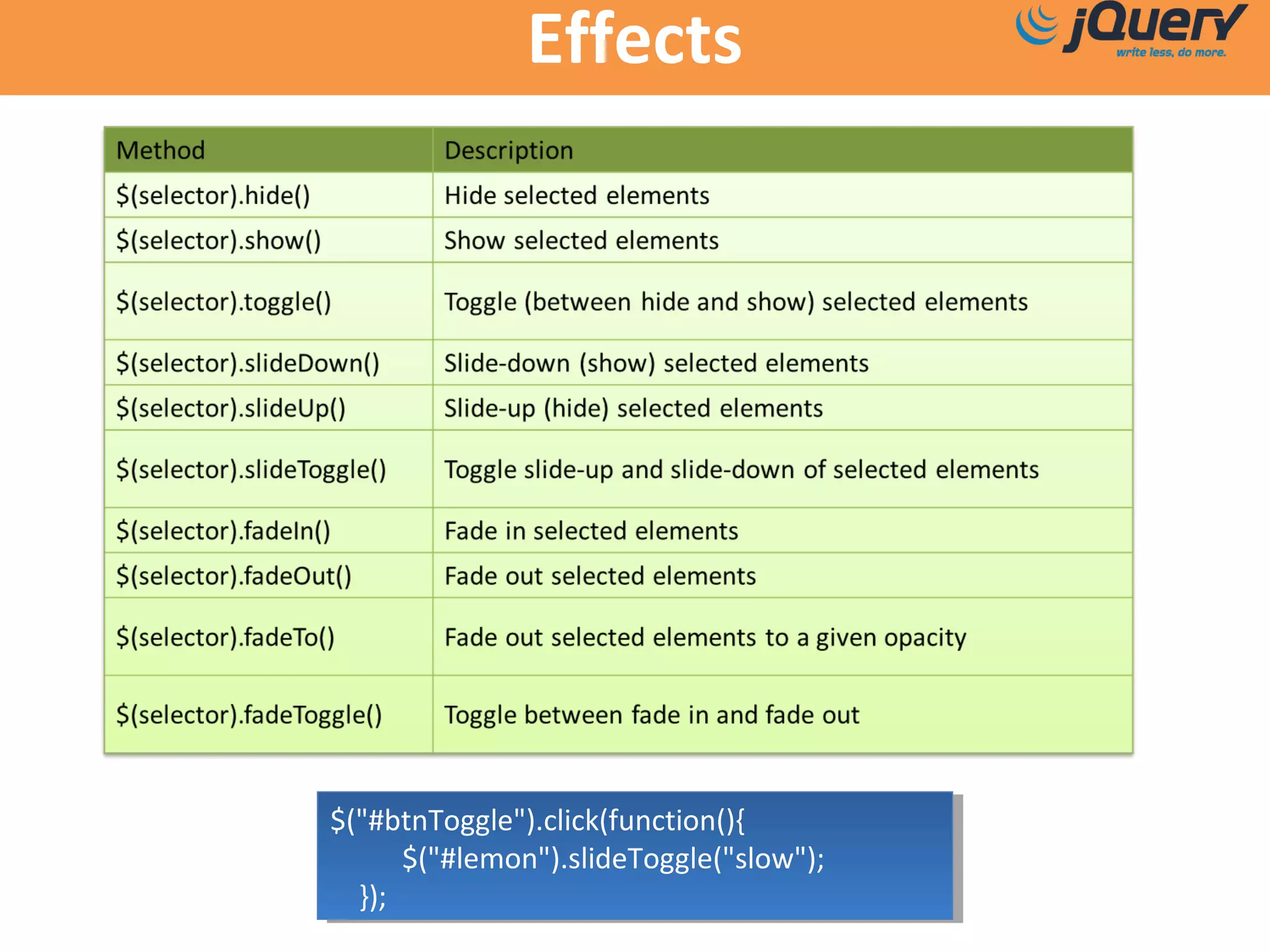
Effects
$("#btnToggle").click(function(){
$("#lemon").slideToggle("slow");
});
$("#btnToggle").click(function(){
$("#lemon").slideToggle("slow");
});
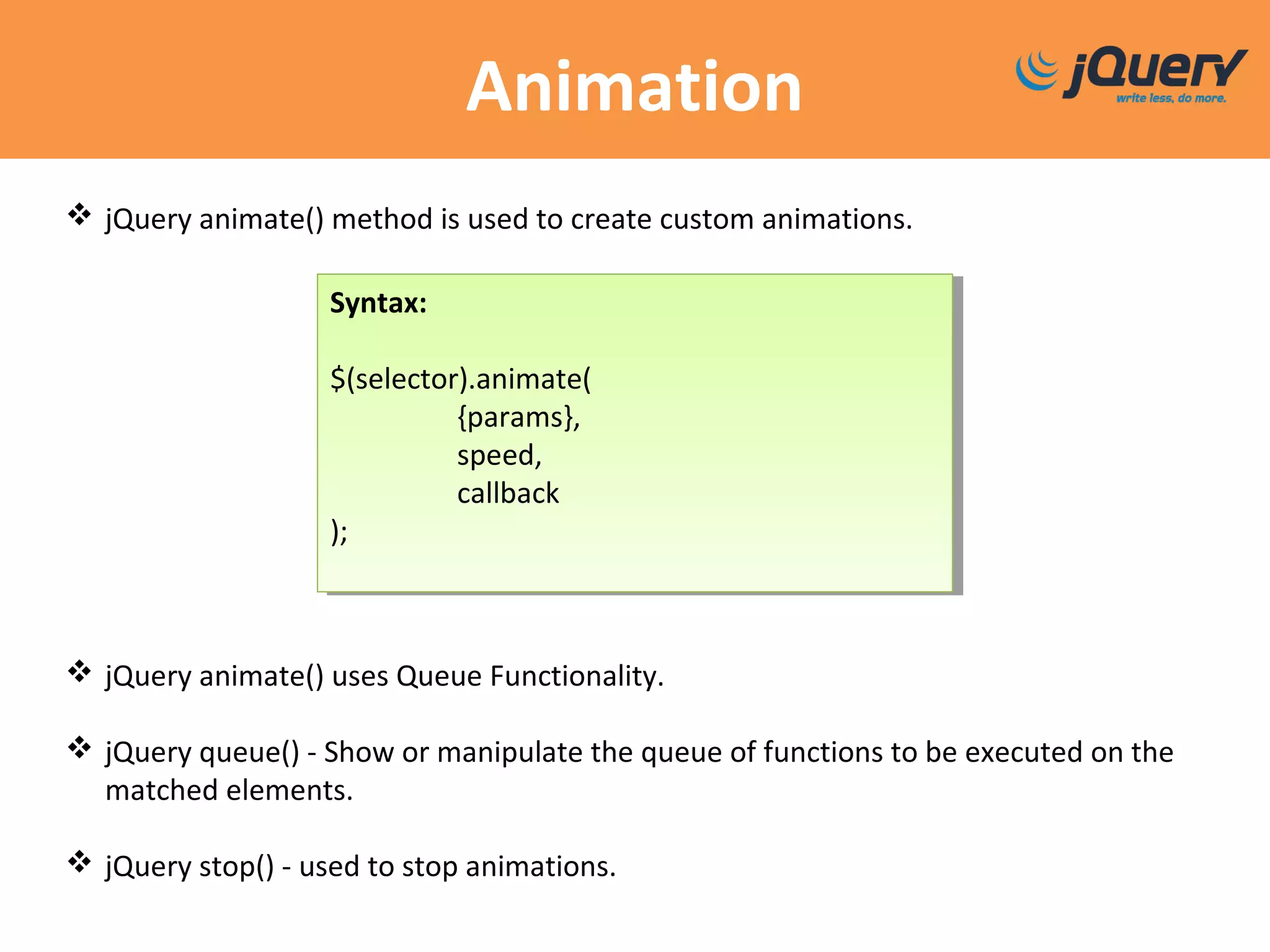
Animation
 jQuery animate() method is used to create custom animations.
 jQuery animate() uses Queue Functionality.
 jQuery queue() - Show or manipulate the queue of functions to be executed on the
matched elements.
 jQuery stop() - used to stop animations.
Syntax:
$(selector).animate(
{params},
speed,
callback
);
Syntax:
$(selector).animate(
{params},
speed,
callback
);
Ajax
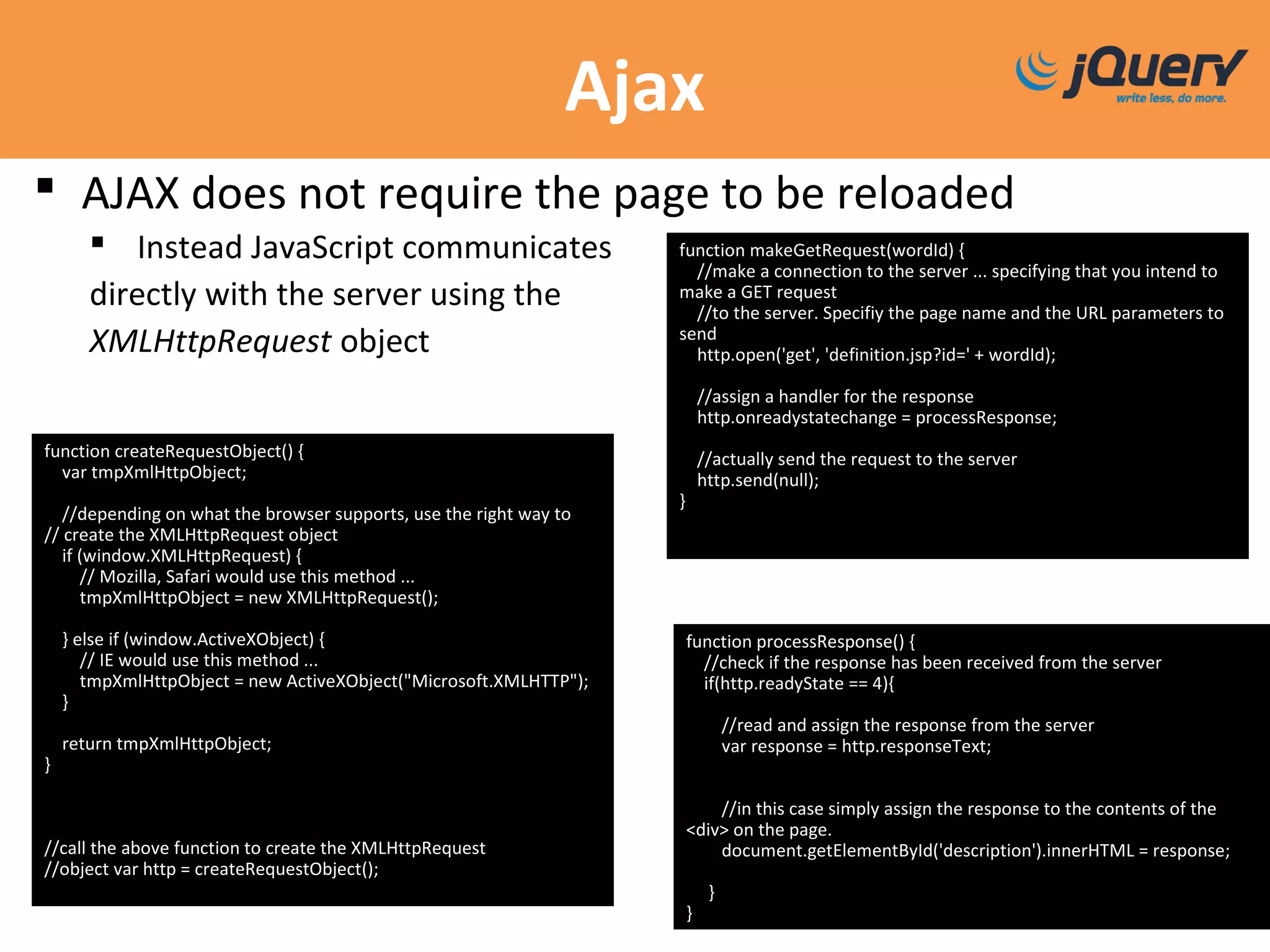
 AJAX does not require the page to be reloaded
 Instead JavaScript communicates
directly with the server using the
XMLHttpRequest object
function makeGetRequest(wordId) {
//make a connection to the server ... specifying that you intend to
make a GET request
//to the server. Specifiy the page name and the URL parameters to
send
http.open('get', 'definition.jsp?id=' + wordId);
//assign a handler for the response
http.onreadystatechange = processResponse;
//actually send the request to the server
http.send(null);
}
function createRequestObject() {
var tmpXmlHttpObject;
//depending on what the browser supports, use the right way to
// create the XMLHttpRequest object
if (window.XMLHttpRequest) {
// Mozilla, Safari would use this method ...
tmpXmlHttpObject = new XMLHttpRequest();
} else if (window.ActiveXObject) {
// IE would use this method ...
tmpXmlHttpObject = new ActiveXObject("Microsoft.XMLHTTP");
}
return tmpXmlHttpObject;
}
//call the above function to create the XMLHttpRequest
//object var http = createRequestObject();
function processResponse() {
//check if the response has been received from the server
if(http.readyState == 4){
//read and assign the response from the server
var response = http.responseText;
//in this case simply assign the response to the contents of the
<div> on the page.
document.getElementById('description').innerHTML = response;
}
}
JQuery Ajax
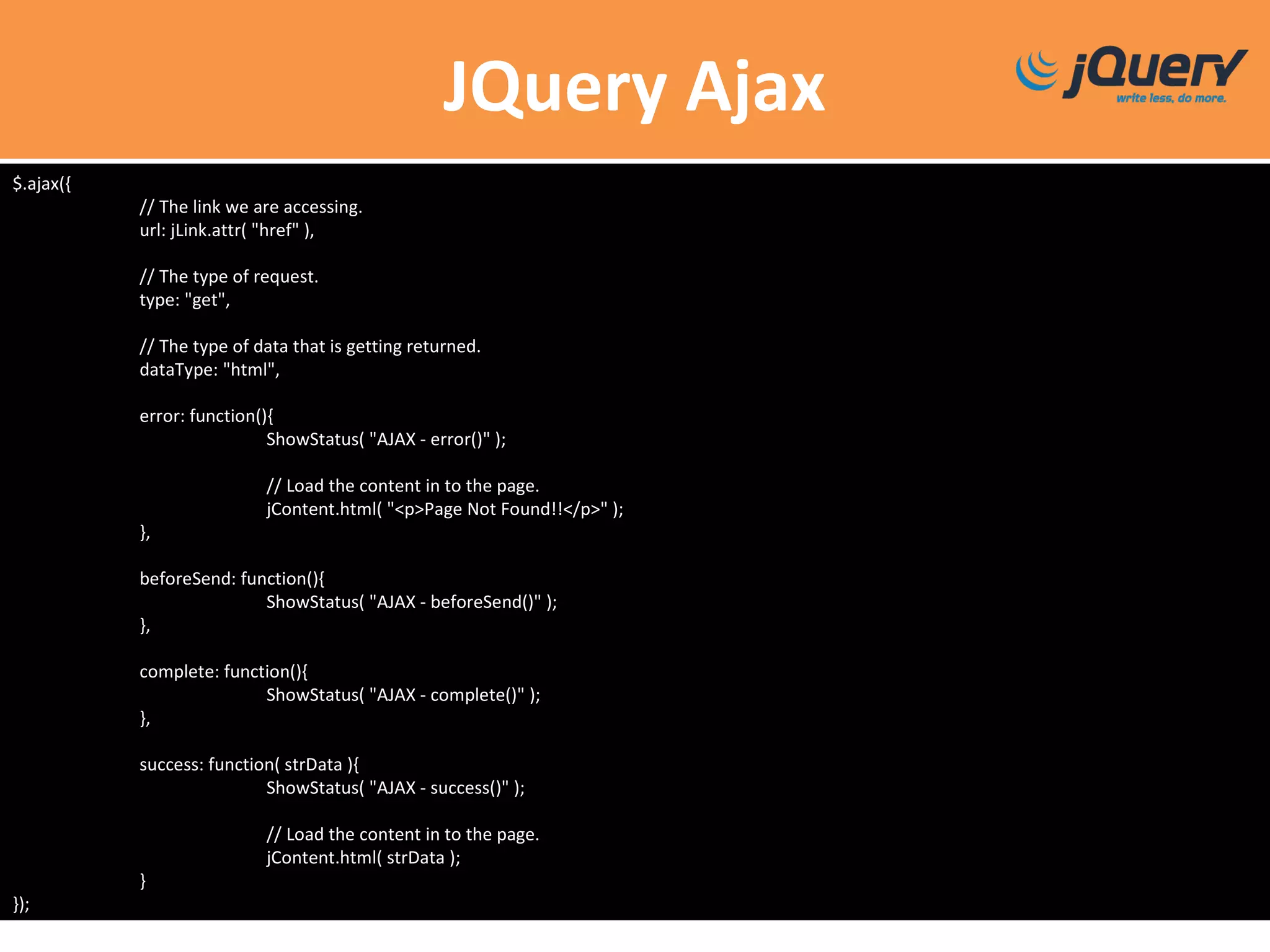
$.ajax({
// The link we are accessing.
url: jLink.attr( "href" ),
// The type of request.
type: "get",
// The type of data that is getting returned.
dataType: "html",
error: function(){
ShowStatus( "AJAX - error()" );
// Load the content in to the page.
jContent.html( "<p>Page Not Found!!</p>" );
},
beforeSend: function(){
ShowStatus( "AJAX - beforeSend()" );
},
complete: function(){
ShowStatus( "AJAX - complete()" );
},
success: function( strData ){
ShowStatus( "AJAX - success()" );
// Load the content in to the page.
jContent.html( strData );
}
});
JQuery Ajax Methods
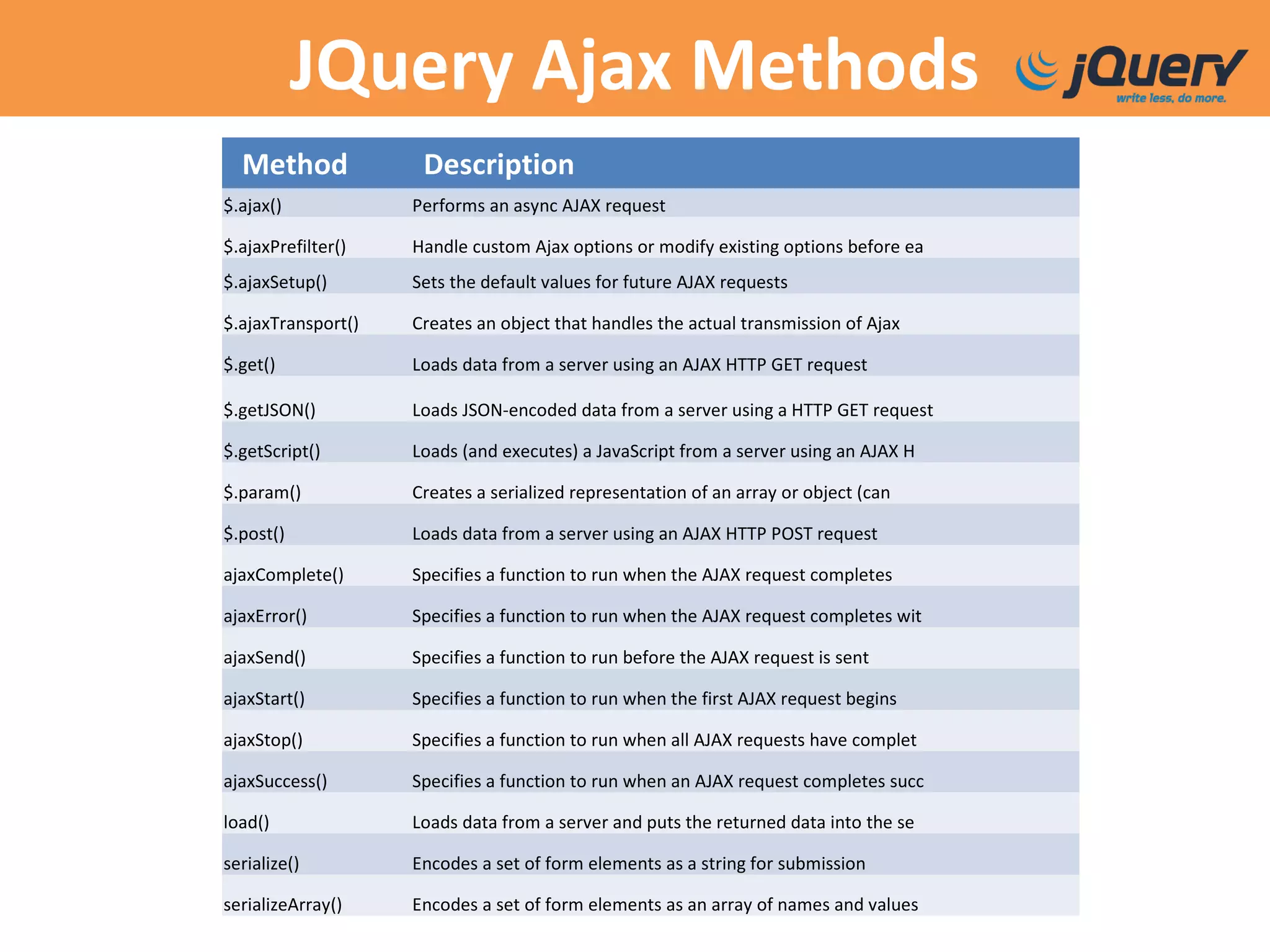
Method Description
$.ajax() Performs an async AJAX request
$.ajaxPrefilter() Handle custom Ajax options or modify existing options before ea
$.ajaxSetup() Sets the default values for future AJAX requests
$.ajaxTransport() Creates an object that handles the actual transmission of Ajax
$.get() Loads data from a server using an AJAX HTTP GET request
$.getJSON() Loads JSON-encoded data from a server using a HTTP GET request
$.getScript() Loads (and executes) a JavaScript from a server using an AJAX H
$.param() Creates a serialized representation of an array or object (can
$.post() Loads data from a server using an AJAX HTTP POST request
ajaxComplete() Specifies a function to run when the AJAX request completes
ajaxError() Specifies a function to run when the AJAX request completes wit
ajaxSend() Specifies a function to run before the AJAX request is sent
ajaxStart() Specifies a function to run when the first AJAX request begins
ajaxStop() Specifies a function to run when all AJAX requests have complet
ajaxSuccess() Specifies a function to run when an AJAX request completes succ
load() Loads data from a server and puts the returned data into the se
serialize() Encodes a set of form elements as a string for submission
serializeArray() Encodes a set of form elements as an array of names and values
JQuery UI
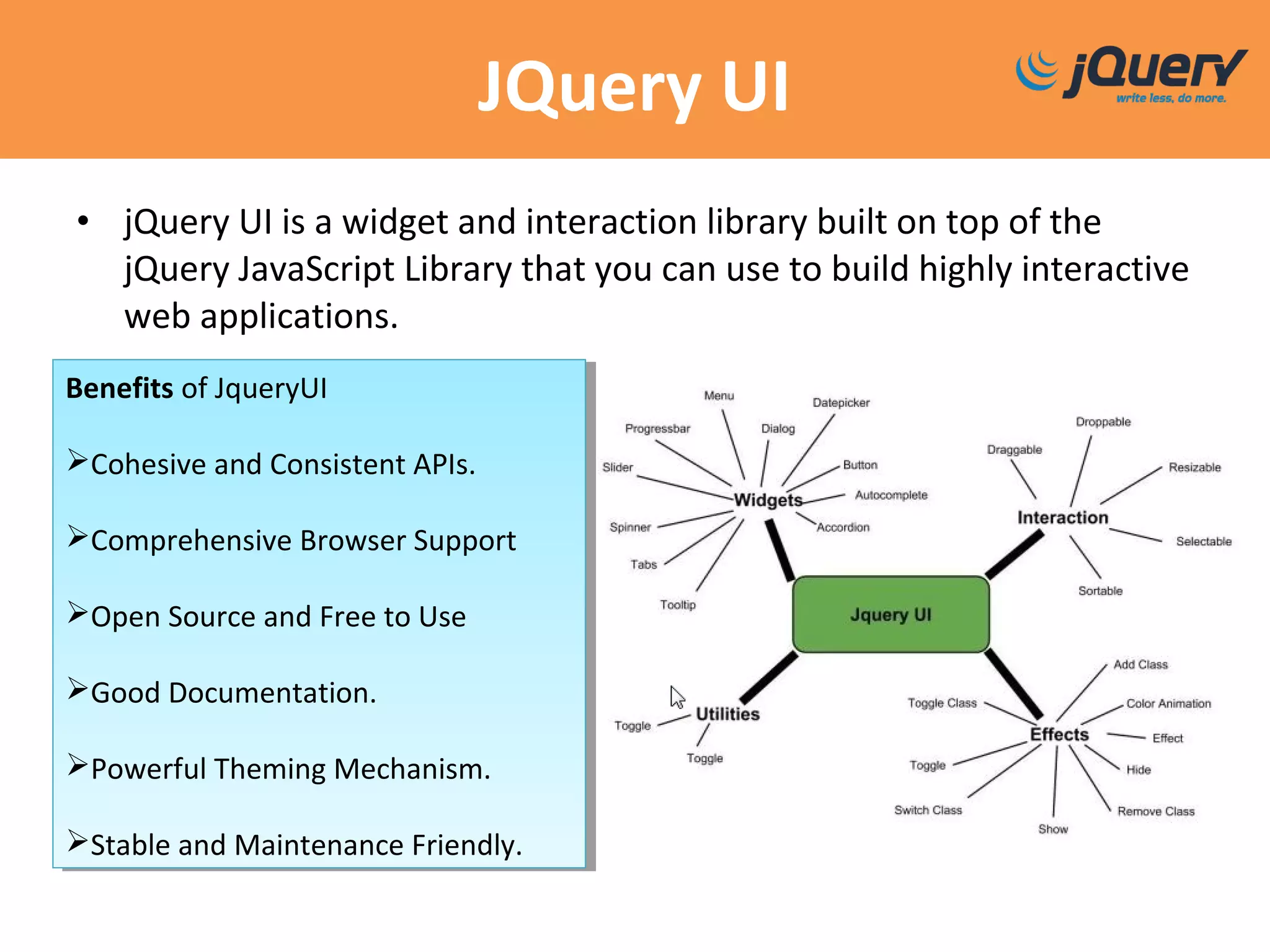
• jQuery UI is a widget and interaction library built on top of the
jQuery JavaScript Library that you can use to build highly interactive
web applications.
Benefits of JqueryUI
Cohesive and Consistent APIs.
Comprehensive Browser Support
Open Source and Free to Use
Good Documentation.
Powerful Theming Mechanism.
Stable and Maintenance Friendly.
Benefits of JqueryUI
Cohesive and Consistent APIs.
Comprehensive Browser Support
Open Source and Free to Use
Good Documentation.
Powerful Theming Mechanism.
Stable and Maintenance Friendly.
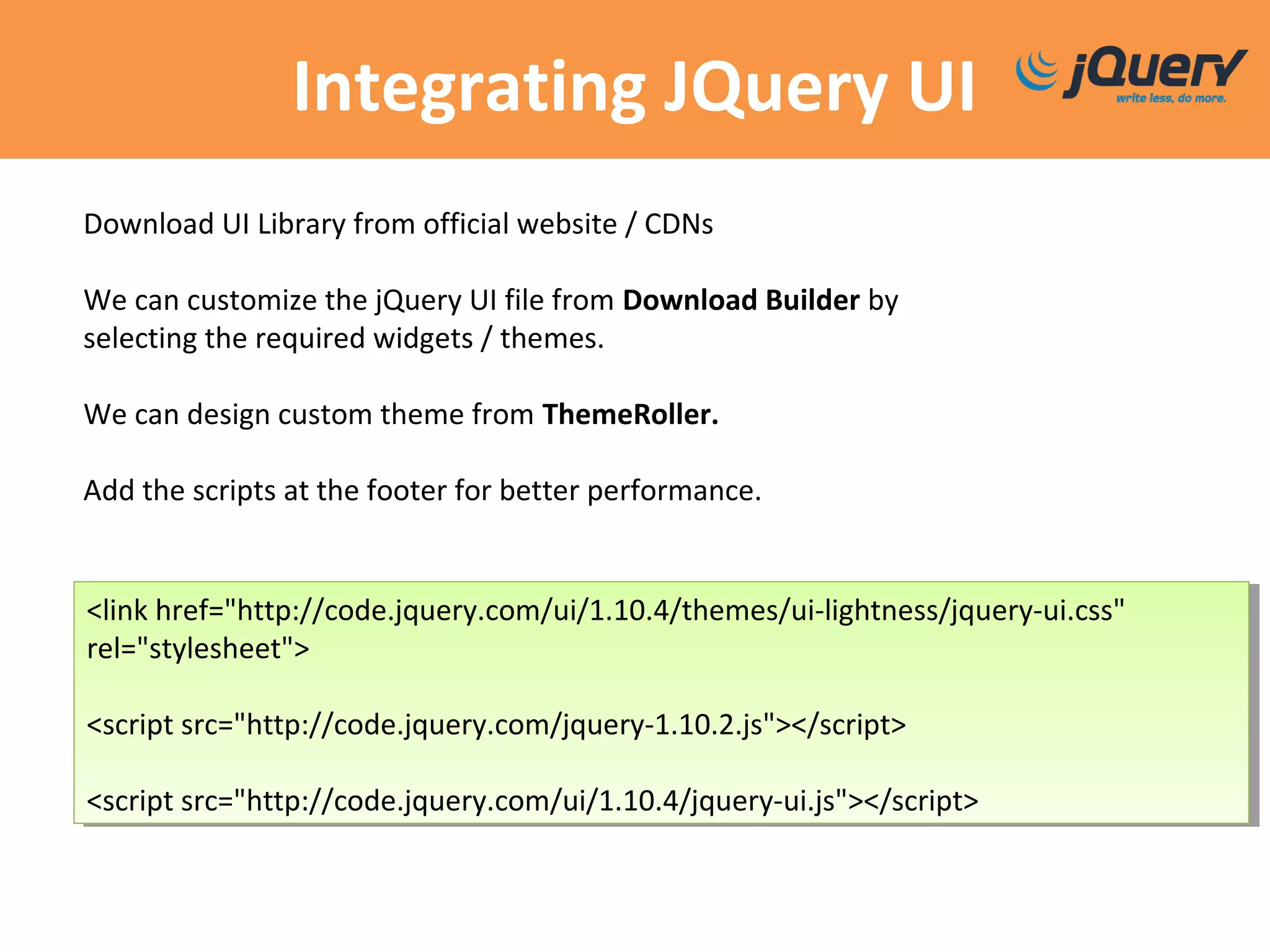
Integrating JQuery UI
<link href="http://code.jquery.com/ui/1.10.4/themes/ui-lightness/jquery-ui.css"
rel="stylesheet">
<script src="http://code.jquery.com/jquery-1.10.2.js"></script>
<script src="http://code.jquery.com/ui/1.10.4/jquery-ui.js"></script>
<link href="http://code.jquery.com/ui/1.10.4/themes/ui-lightness/jquery-ui.css"
rel="stylesheet">
<script src="http://code.jquery.com/jquery-1.10.2.js"></script>
<script src="http://code.jquery.com/ui/1.10.4/jquery-ui.js"></script>
Download UI Library from official website / CDNs
We can customize the jQuery UI file from Download Builder by
selecting the required widgets / themes.
We can design custom theme from ThemeRoller.
Add the scripts at the footer for better performance.
References
jQuery http://api.jquery.com/
Blog http://blog.jquery.com/
jQuery UI http://jqueryui.com/
jQuery for beginners

jQuery for beginners

  • 2.
    Agenda  Introduction toJQuery  Selectors  Events  Traversing  Effects & Animations  Ajax  Introduction to JQuery UI
  • 3.
    What is jQuery Open-SourceJavaScript library that simplifies cross- browser client side scripting. Animations DOM manipulation AJAX Extensibility through plugins Created by John Resig and released on Jan 2006 Most current release is 2.1.1 (May 1st , 2014)
  • 4.
  • 5.
  • 6.
  • 7.
  • 8.
  • 9.
    Statistics  60% ofall websites use JQuery, up from 54.3% one year ago.  JQuery version 1 is used by 93.1% of all the websites whose JavaScript library we know.
  • 10.
    Example Html: <p>Hello Prokarma! I'mDivakar</p> Script: $(function(){ $("p").addClass("isCool"); //keep telling yourself that.. }); Resulting html: <p class="isCool">Hello Prokarma! I'm Divakar</p>
  • 11.
    Break It DownNow! $(function(){// = $(document).ready(function(){ $ ("p") .addClass("isCool"); });
  • 12.
    The noConflict() Method noConflict() method releases the hold on the $ shortcut identifier, so that other scripts can use it.  You can also create your own shortcut very easily. Syntax: $.noConflict(); jQuery(document).ready(function(){ jQuery("button").click(function(){ jQuery("p").text("jQuery is still working!"); }); }); Syntax: $.noConflict(); jQuery(document).ready(function(){ jQuery("button").click(function(){ jQuery("p").text("jQuery is still working!"); }); }); var jq = $.noConflict(); jq(document).ready(function(){ jq("button").click(function(){ jq("p").text("jQuery is still working!"); }); }); var jq = $.noConflict(); jq(document).ready(function(){ jq("button").click(function(){ jq("p").text("jQuery is still working!"); }); });
  • 13.
    Selectors Reference - Completelist of selectors  jQuery selectors allow you to select and manipulate HTML element(s).  Used to "find" (or select) HTML elements based on their id, classes, types, attributes, values of attributes and much more.
  • 14.
    Comparision What are the advantagesof the jQuery method? $("a").click(function(){ alert("You clicked a link!"); }); $("a").click(function(){ alert("You clicked a link!"); }); <a href="#" onclick="alert(‘You clicked a link!')">Link</a><a href="#" onclick="alert(‘You clicked a link!')">Link</a>
  • 15.
    Traversing  Traverse ->travel across / move back and forth or sideways.  Traversing can be broken down into three basic parts: parents, children, and siblings.  Categorize the DOM into ancestor, descendant, siblings . Code: <div> <ul> <li> <span></span> </li> <li> <b></b> </li> </ul> </div>
  • 16.
    Traversing Methods Reference -Complete list of jQuery Traversing Methods
  • 18.
    Filters  Reduce theset of matched elements to those that match the selector or pass the function's test.  Three most basic filtering methods are first(), last() and eq()  jQuery eq() Method – Returns an element with a specific index number of the selected elements.  jQuery filter() Method – lets you specify a criteria. Elements that do not match the criteria are removed from the selection, and those that match will be returned.  jQuery not() Method - Returns all elements that do not match the criteria. $(document).ready(function(){ $("p").not(".intro"); }); $(document).ready(function(){ $("p").filter(".intro"); }); $(document).ready(function(){ $("p").eq(1); });
  • 19.
    Events Mouse Events KeyboardEvents Form Events Document/Window Events click keypress submit load dblclick keydown change resize mouseenter keyup focus scroll mouseleave blur unload  An event represents the precise moment when something happens. $("p").click(function(){ // action goes here!! }); $("p").click(function(){ // action goes here!! });
  • 20.
    Manipulating HTML $("#btnReplace").click(function(){ $("#lemon").html("Lollipop souffléice cream tootsie roll donut..."); }); $("#btnReplace").click(function(){ $("#lemon").html("Lollipop soufflé ice cream tootsie roll donut..."); });
  • 21.
  • 23.
  • 24.
    Animation  jQuery animate()method is used to create custom animations.  jQuery animate() uses Queue Functionality.  jQuery queue() - Show or manipulate the queue of functions to be executed on the matched elements.  jQuery stop() - used to stop animations. Syntax: $(selector).animate( {params}, speed, callback ); Syntax: $(selector).animate( {params}, speed, callback );
  • 25.
    Ajax  AJAX doesnot require the page to be reloaded  Instead JavaScript communicates directly with the server using the XMLHttpRequest object function makeGetRequest(wordId) { //make a connection to the server ... specifying that you intend to make a GET request //to the server. Specifiy the page name and the URL parameters to send http.open('get', 'definition.jsp?id=' + wordId); //assign a handler for the response http.onreadystatechange = processResponse; //actually send the request to the server http.send(null); } function createRequestObject() { var tmpXmlHttpObject; //depending on what the browser supports, use the right way to // create the XMLHttpRequest object if (window.XMLHttpRequest) { // Mozilla, Safari would use this method ... tmpXmlHttpObject = new XMLHttpRequest(); } else if (window.ActiveXObject) { // IE would use this method ... tmpXmlHttpObject = new ActiveXObject("Microsoft.XMLHTTP"); } return tmpXmlHttpObject; } //call the above function to create the XMLHttpRequest //object var http = createRequestObject(); function processResponse() { //check if the response has been received from the server if(http.readyState == 4){ //read and assign the response from the server var response = http.responseText; //in this case simply assign the response to the contents of the <div> on the page. document.getElementById('description').innerHTML = response; } }
  • 26.
    JQuery Ajax $.ajax({ // Thelink we are accessing. url: jLink.attr( "href" ), // The type of request. type: "get", // The type of data that is getting returned. dataType: "html", error: function(){ ShowStatus( "AJAX - error()" ); // Load the content in to the page. jContent.html( "<p>Page Not Found!!</p>" ); }, beforeSend: function(){ ShowStatus( "AJAX - beforeSend()" ); }, complete: function(){ ShowStatus( "AJAX - complete()" ); }, success: function( strData ){ ShowStatus( "AJAX - success()" ); // Load the content in to the page. jContent.html( strData ); } });
  • 27.
    JQuery Ajax Methods MethodDescription $.ajax() Performs an async AJAX request $.ajaxPrefilter() Handle custom Ajax options or modify existing options before ea $.ajaxSetup() Sets the default values for future AJAX requests $.ajaxTransport() Creates an object that handles the actual transmission of Ajax $.get() Loads data from a server using an AJAX HTTP GET request $.getJSON() Loads JSON-encoded data from a server using a HTTP GET request $.getScript() Loads (and executes) a JavaScript from a server using an AJAX H $.param() Creates a serialized representation of an array or object (can $.post() Loads data from a server using an AJAX HTTP POST request ajaxComplete() Specifies a function to run when the AJAX request completes ajaxError() Specifies a function to run when the AJAX request completes wit ajaxSend() Specifies a function to run before the AJAX request is sent ajaxStart() Specifies a function to run when the first AJAX request begins ajaxStop() Specifies a function to run when all AJAX requests have complet ajaxSuccess() Specifies a function to run when an AJAX request completes succ load() Loads data from a server and puts the returned data into the se serialize() Encodes a set of form elements as a string for submission serializeArray() Encodes a set of form elements as an array of names and values
  • 29.
    JQuery UI • jQueryUI is a widget and interaction library built on top of the jQuery JavaScript Library that you can use to build highly interactive web applications. Benefits of JqueryUI Cohesive and Consistent APIs. Comprehensive Browser Support Open Source and Free to Use Good Documentation. Powerful Theming Mechanism. Stable and Maintenance Friendly. Benefits of JqueryUI Cohesive and Consistent APIs. Comprehensive Browser Support Open Source and Free to Use Good Documentation. Powerful Theming Mechanism. Stable and Maintenance Friendly.
  • 30.
    Integrating JQuery UI <linkhref="http://code.jquery.com/ui/1.10.4/themes/ui-lightness/jquery-ui.css" rel="stylesheet"> <script src="http://code.jquery.com/jquery-1.10.2.js"></script> <script src="http://code.jquery.com/ui/1.10.4/jquery-ui.js"></script> <link href="http://code.jquery.com/ui/1.10.4/themes/ui-lightness/jquery-ui.css" rel="stylesheet"> <script src="http://code.jquery.com/jquery-1.10.2.js"></script> <script src="http://code.jquery.com/ui/1.10.4/jquery-ui.js"></script> Download UI Library from official website / CDNs We can customize the jQuery UI file from Download Builder by selecting the required widgets / themes. We can design custom theme from ThemeRoller. Add the scripts at the footer for better performance.
  • 31.