
EASING
INTO WEB
DEVELOPMENT
5.
5 HTTP
1   INTRODUCTION
    2   HTML
    3   TABLES
    4   FORMS
    5   HTTP
    6   CSS
    7   CSS FRAMEWORKS
    8   DIGITAL MEDIA
2   9   USABILITY
HTTP EXAMPLE 1
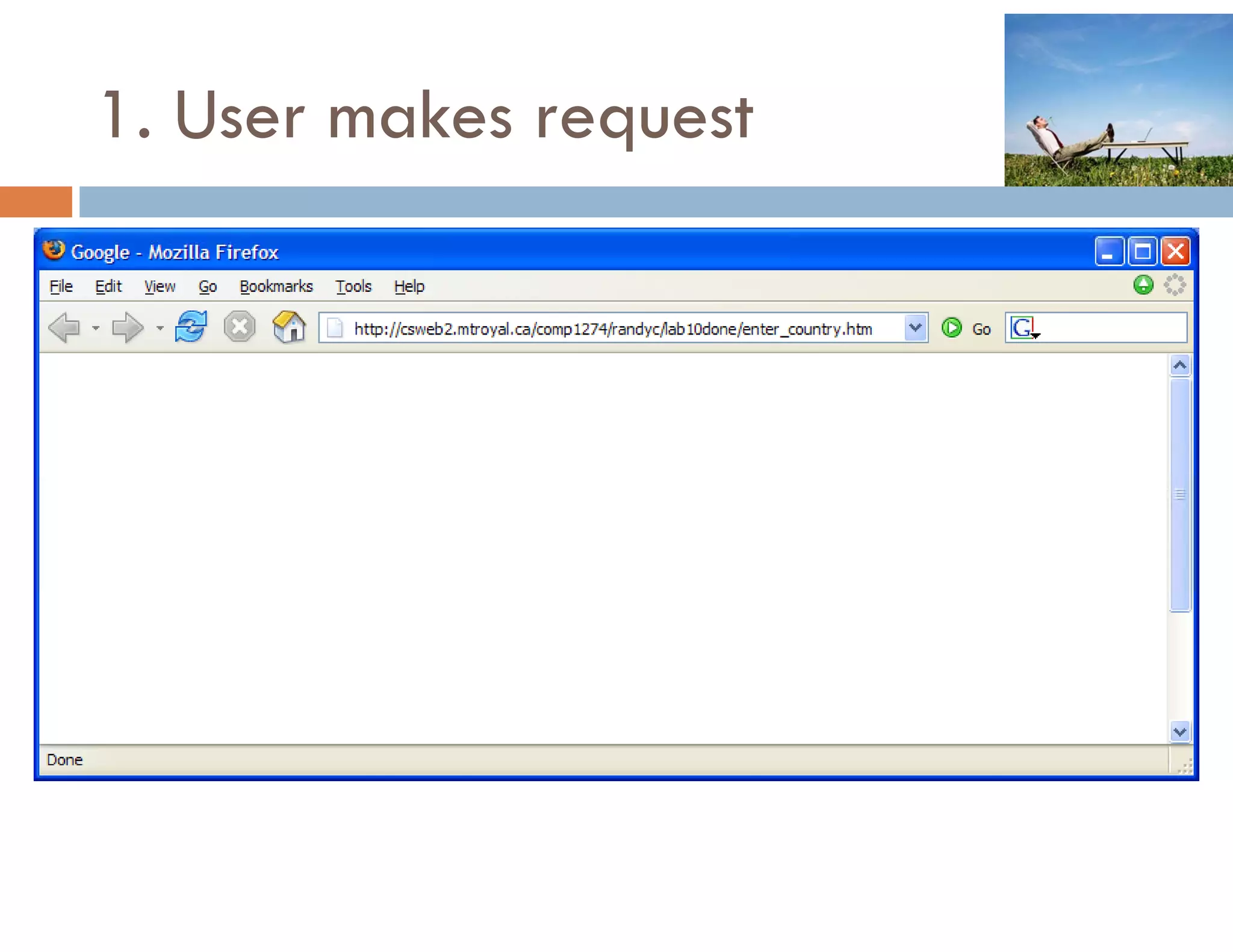
1. User makes request
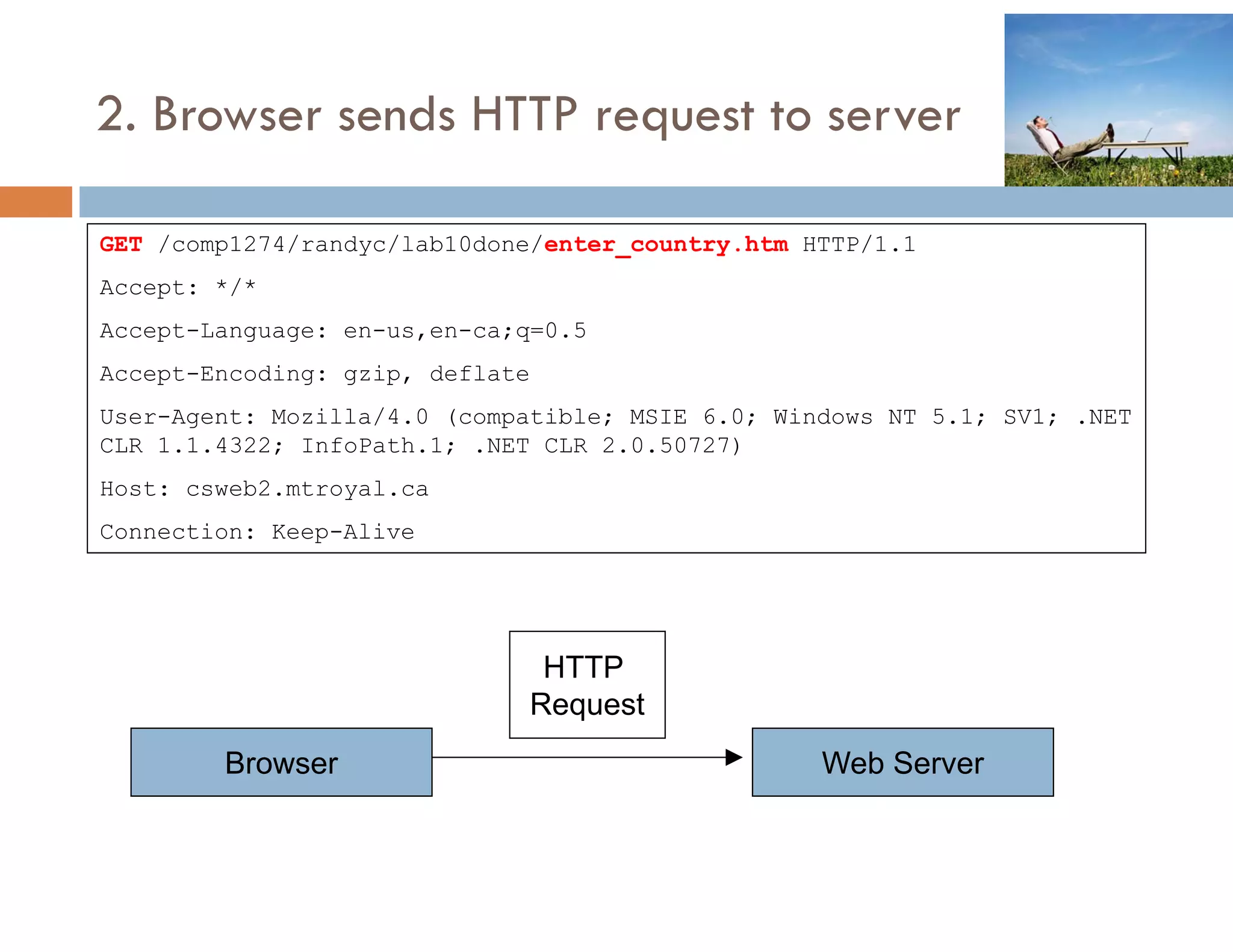
2. Browser sends HTTP request to server

GET /comp1274/randyc/lab10done/enter country htm HTTP/1 1
    /comp1274/randyc/lab10done/enter_country.htm HTTP/1.1
Accept: */*
Accept-Language: en-us,en-ca;q=0.5
Accept-Encoding: gzip, deflate
User-Agent: Mozilla/4.0 (compatible; MSIE 6.0; Windows NT 5.1; SV1; .NET
CLR 1.1.4322; InfoPath.1; .NET CLR 2.0.50727)
Host: csweb2.mtroyal.ca
Connection: Keep-Alive


                              HTTP
                             Request
        Browser                                   Web Server
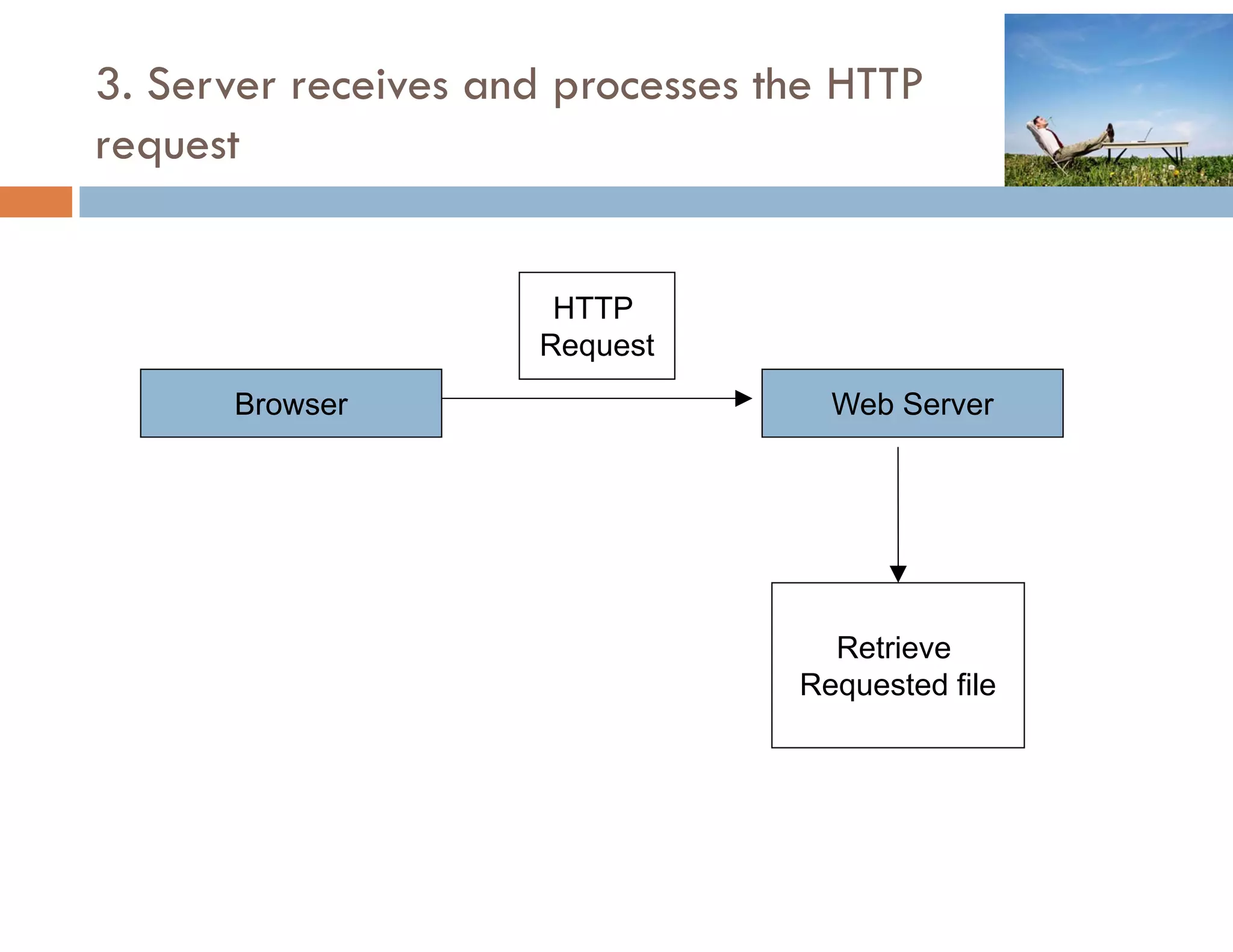
3. Server receives and processes the HTTP
request


                      HTTP
                     Request
                       q
      Browser                       Web Server


                                    Retrieve
                                  Requested file
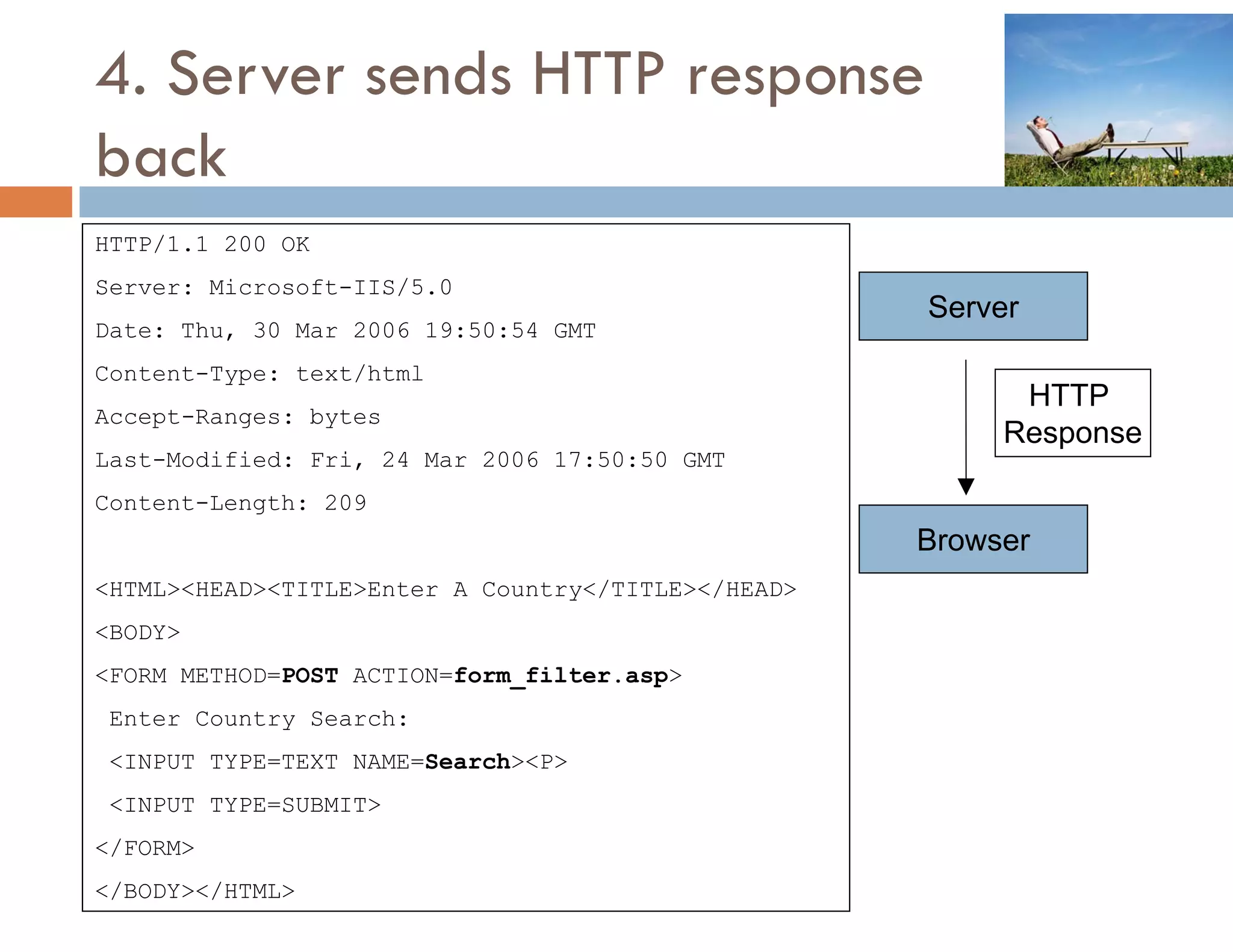
4. Server sends HTTP response
back
HTTP/1.1
HTTP/1 1 200 OK
Server: Microsoft-IIS/5.0
                                                    Server
Date: Thu, 30 Mar 2006 19:50:54 GMT
Content-Type: text/html
                                                          HTTP
Accept-Ranges: bytes
                                                         Response
Last-Modified: Fri, 24 Mar 2006 17:50:50 GMT
Content-Length: 209
                                                    Browser
<HTML><HEAD><TITLE>Enter A Country</TITLE></HEAD>
<BODY>
<FORM METHOD=POST ACTION=form_filter.asp>
 Enter Country Search:
 <INPUT TYPE=TEXT NAME=Search><P>
 <INPUT TYPE=SUBMIT>
</FORM>
</BODY></HTML>
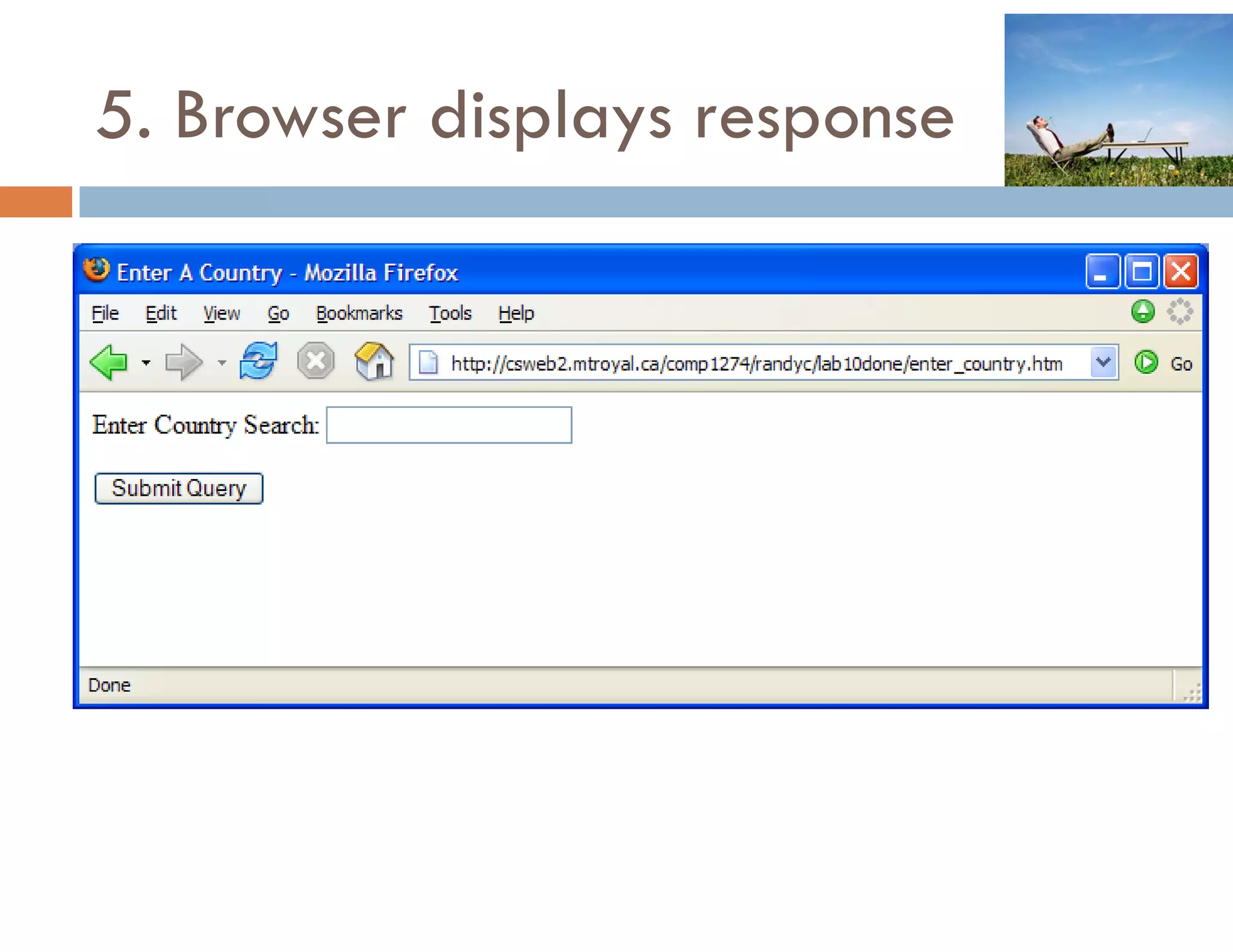
5. Browser displays response
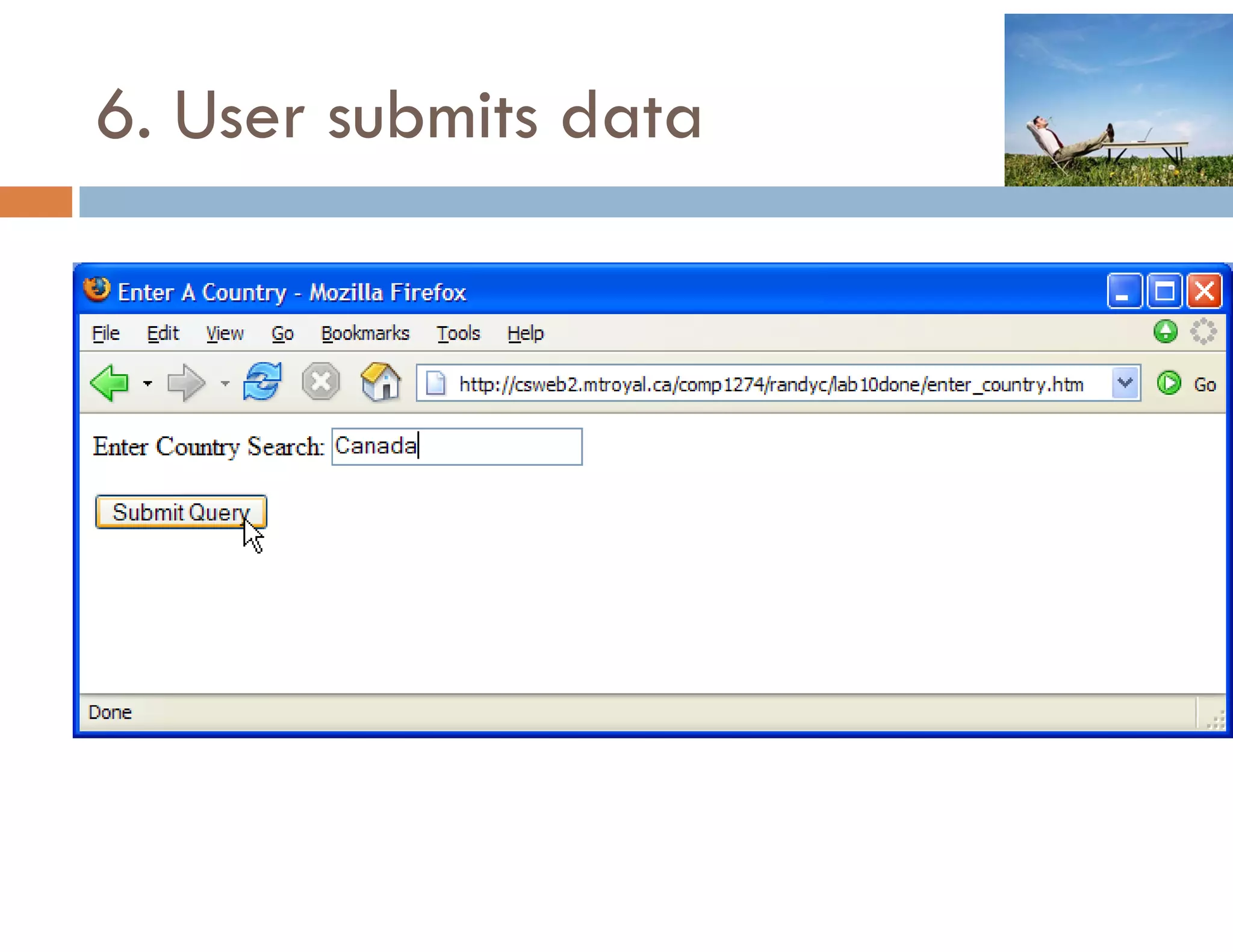
6. User submits data
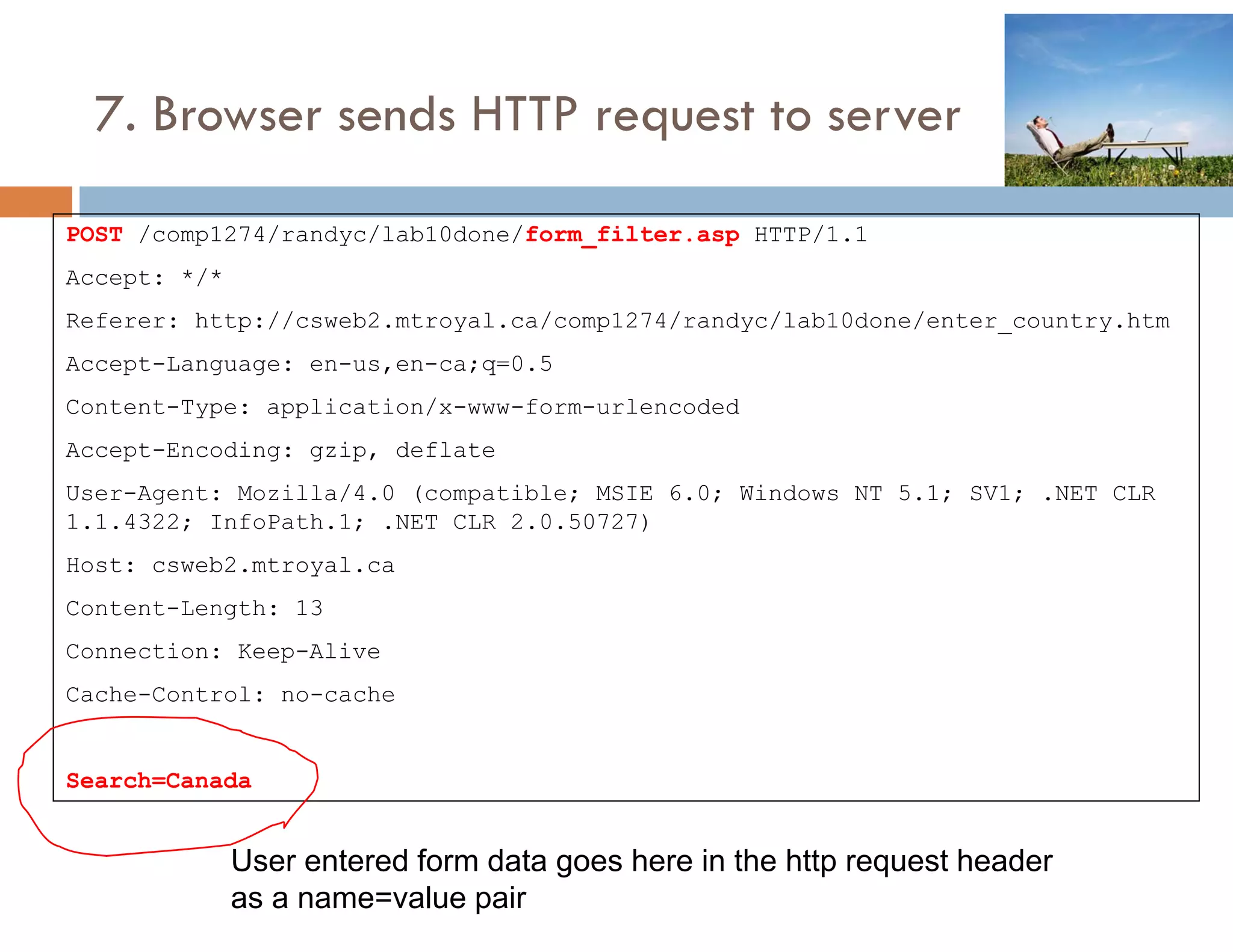
7. Browser sends HTTP request to server

POST /comp1274/randyc/lab10done/form_filter.asp HTTP/1.1
         p         y                          p
Accept: */*
Referer: http://csweb2.mtroyal.ca/comp1274/randyc/lab10done/enter_country.htm
Accept-Language: en-us,en-ca;q=0.5
Accept Lang age en s en ca q 0 5
Content-Type: application/x-www-form-urlencoded
Accept-Encoding: gzip, deflate
User-Agent: Mozilla/4.0 (compatible; MSIE 6.0; Windows NT 5.1; SV1; .NET CLR
1.1.4322; InfoPath.1; .NET CLR 2.0.50727)
Host: csweb2.mtroyal.ca
Content-Length: 13
Connection: Keep-Alive
Cache-Control: no-cache


Search=Canada


              User entered form data goes here in the http request header
              as a name=value pair
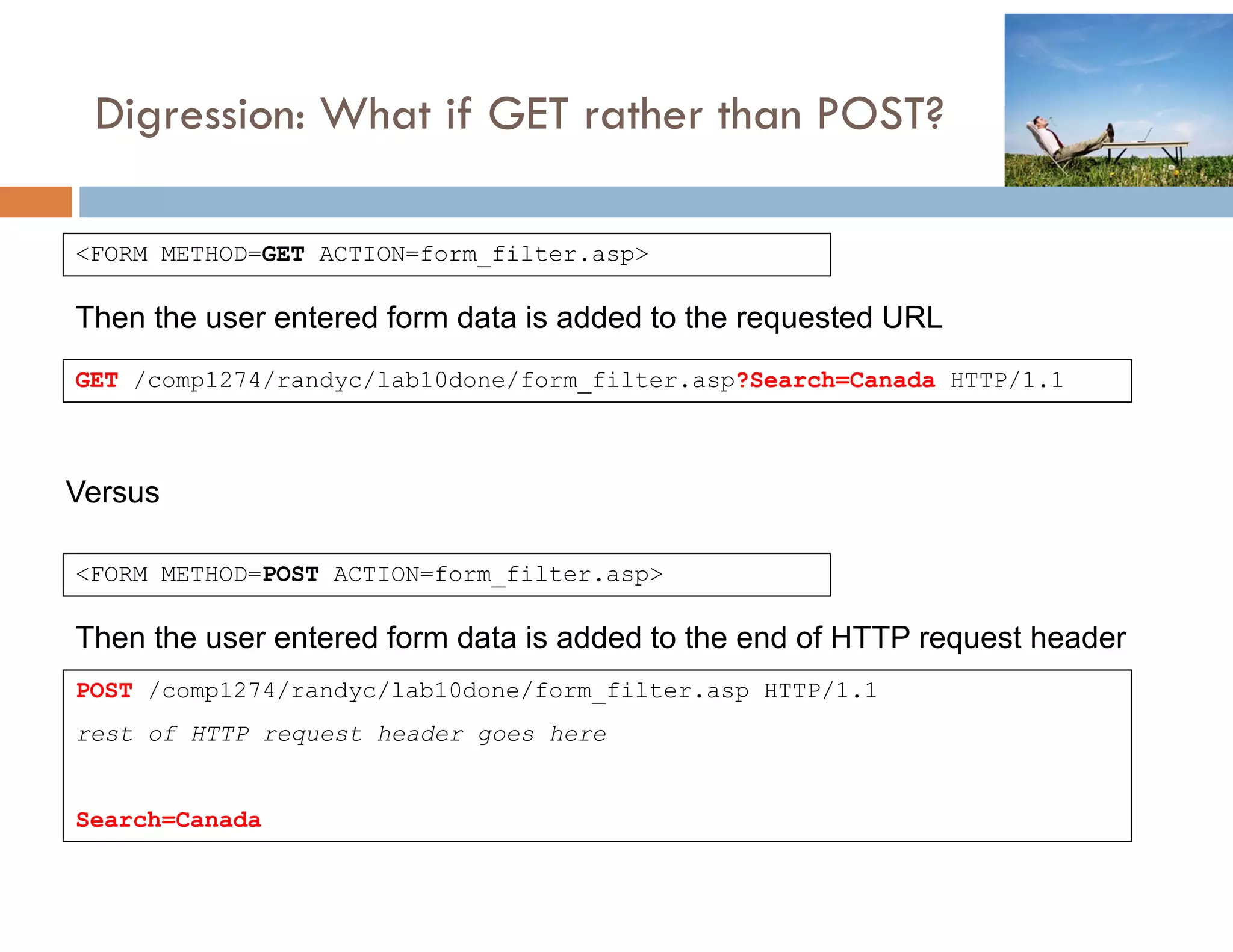
Digression: What if GET rather than POST?
   g         W       G                OS

<FORM METHOD=GET ACTION=form_filter.asp>

Then the user entered form data is added to the requested URL
GET /comp1274/randyc/lab10done/form_filter.asp?Search=Canada HTTP/1.1


Versus

<FORM METHOD=POST ACTION=form_filter.asp>

Then the user entered form data is added to the end of HTTP request header
POST /comp1274/randyc/lab10done/form_filter.asp HTTP/1.1
rest of HTTP request header goes here


Search=Canada
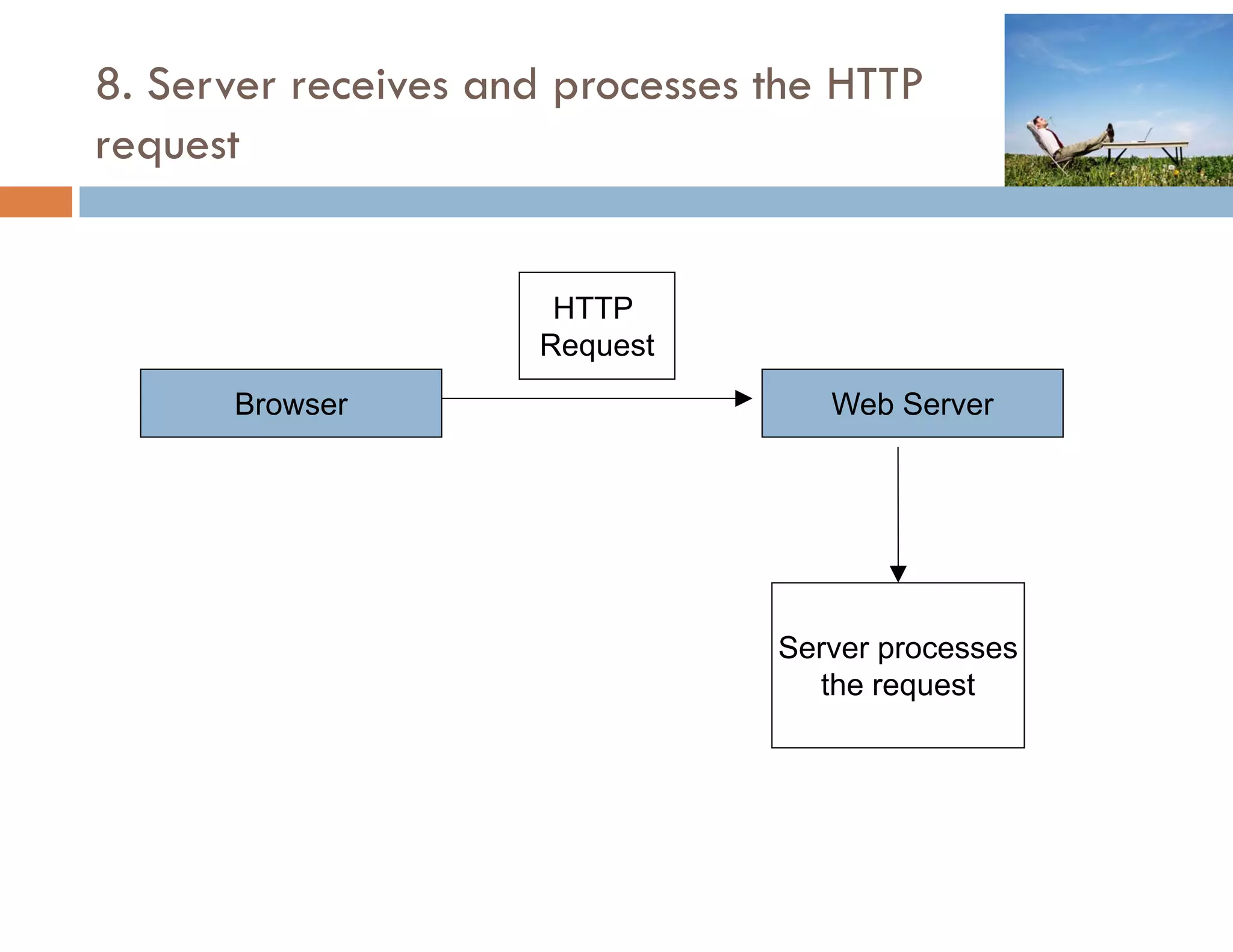
8. Server receives and processes the HTTP
request


                      HTTP
                     Request
                       q
      Browser                       Web Server


                                 Server processes
                                   the request
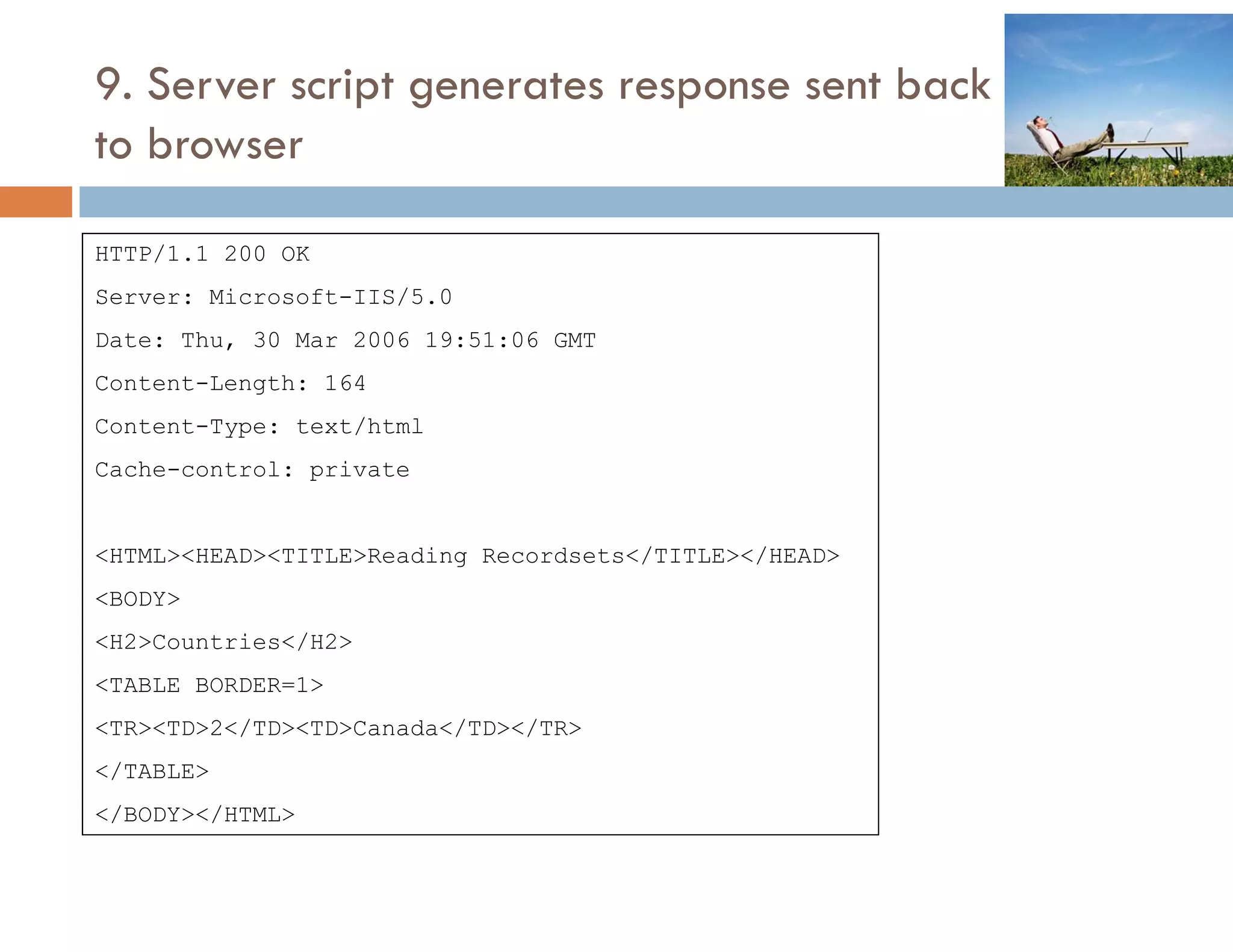
9. Server script generates response sent back
to b
   browser

HTTP/1.1 200 OK
    /
Server: Microsoft-IIS/5.0
Date: Thu, 30 Mar 2006 19:51:06 GMT
Content-Length: 164
Content-Type: text/html
Cache control:
Cache-control: private


<HTML><HEAD><TITLE>Reading Recordsets</TITLE></HEAD>
<BODY>
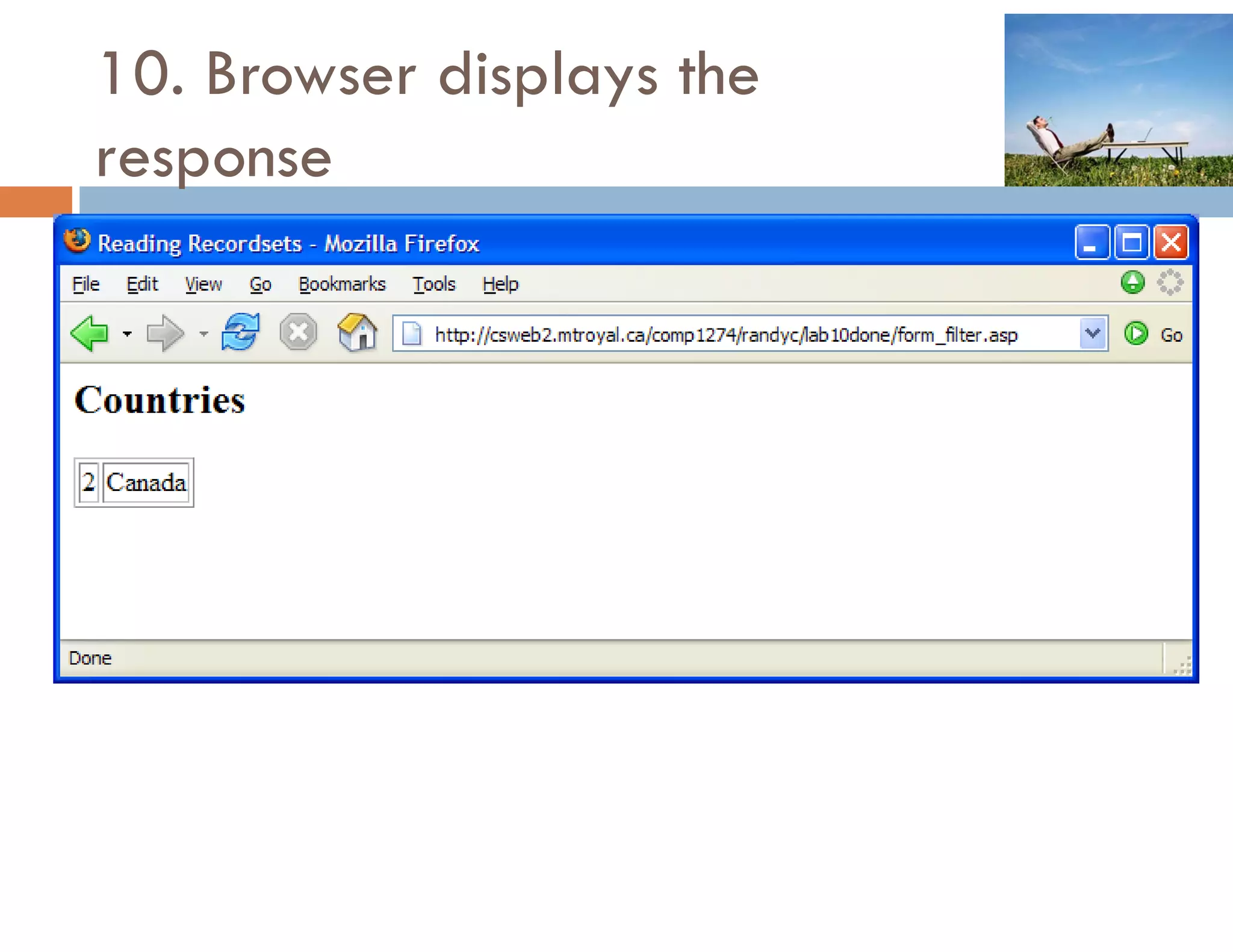
<H2>Countries</H2>
<TABLE BORDER=1>
<TR><TD>2</TD><TD>Canada</TD></TR>
</TABLE>
 /      /
</BODY></HTML>
10. Browser displays the
response
HTTP EXAMPLE 2
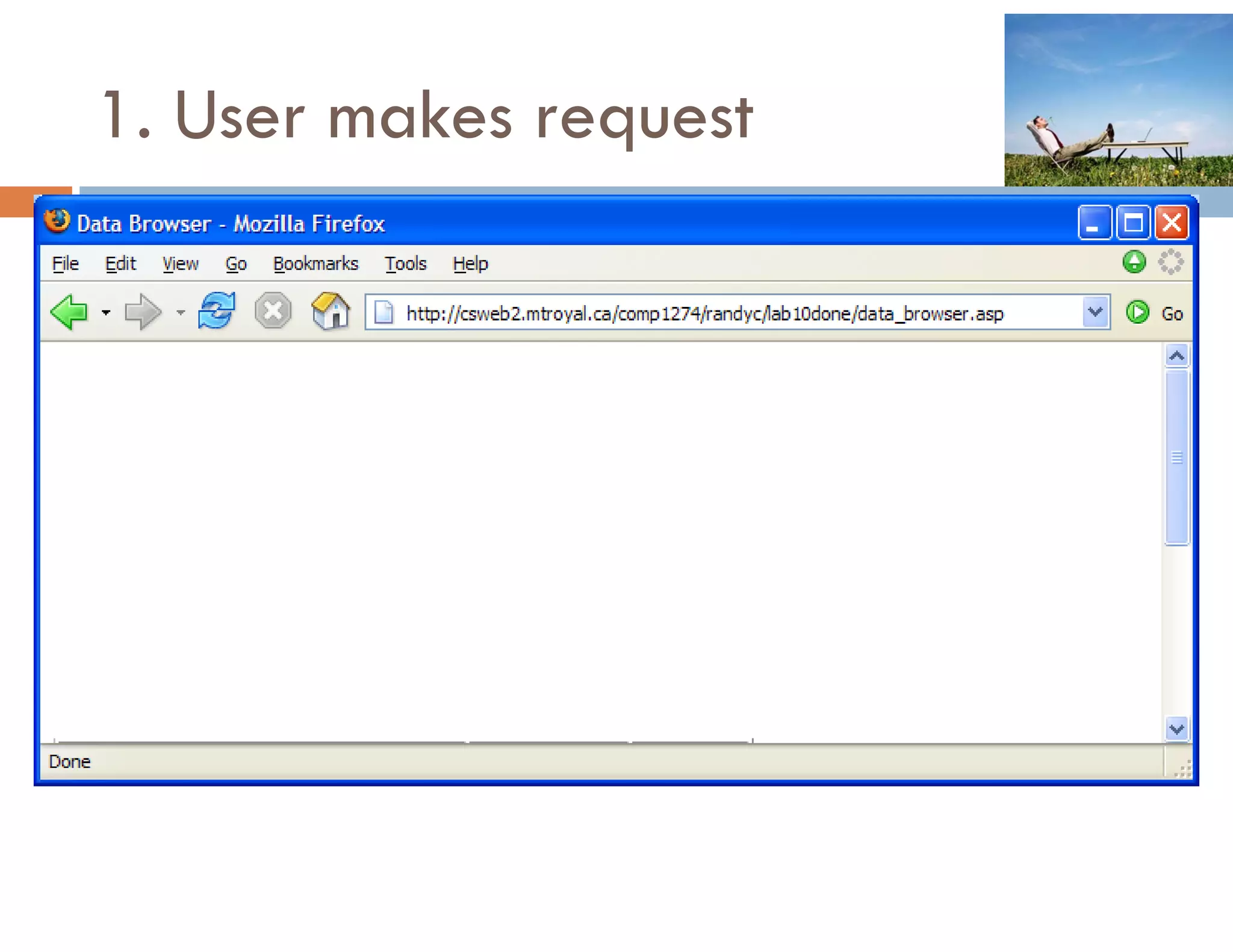
1. User makes request
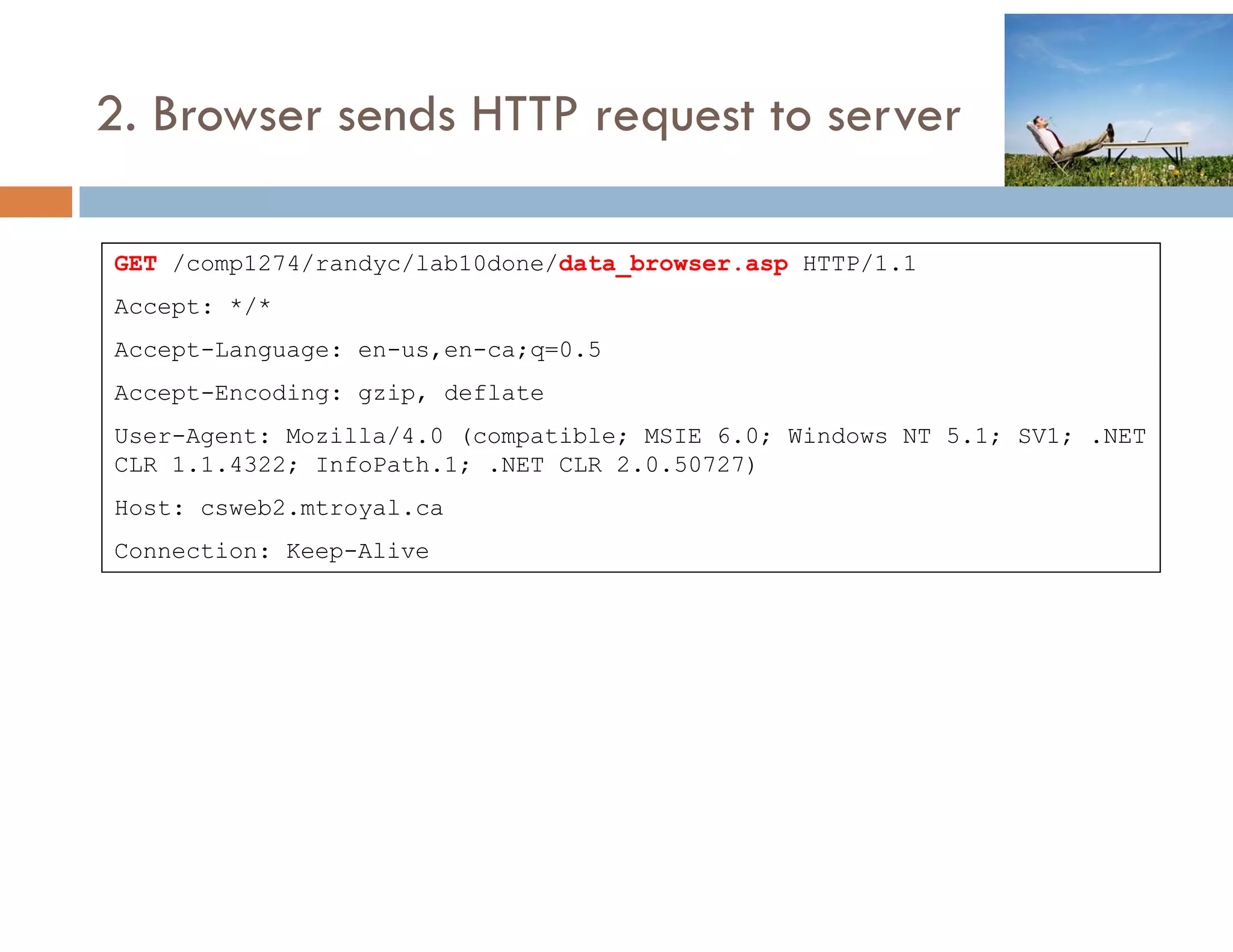
2. Browser sends HTTP request to server

GET /comp1274/randyc/lab10done/data_browser.asp HTTP/1.1
Accept: */*
Accept-Language: en-us,en-ca;q=0.5
    p     g g                q
Accept-Encoding: gzip, deflate
User-Agent: Mozilla/4.0 (compatible; MSIE 6.0; Windows NT 5.1; SV1; .NET
CLR 1.1.4322; InfoPath.1; .NET CLR 2.0.50727)
Host: csweb2.mtroyal.ca
Connection: Keep-Alive
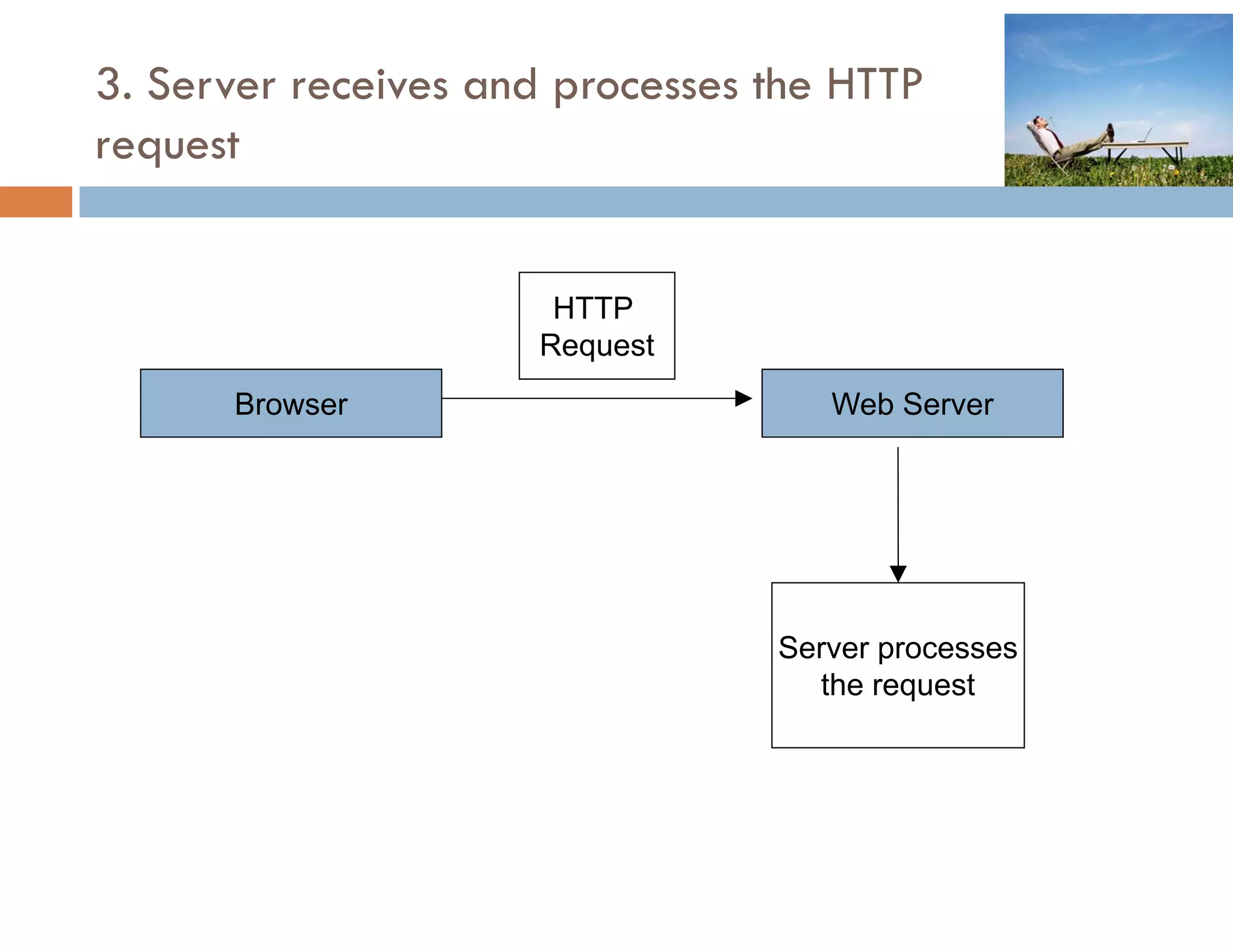
3. Server receives and processes the HTTP
request


                      HTTP
                     Request
                       q
      Browser                       Web Server


                                 Server processes
                                   the request
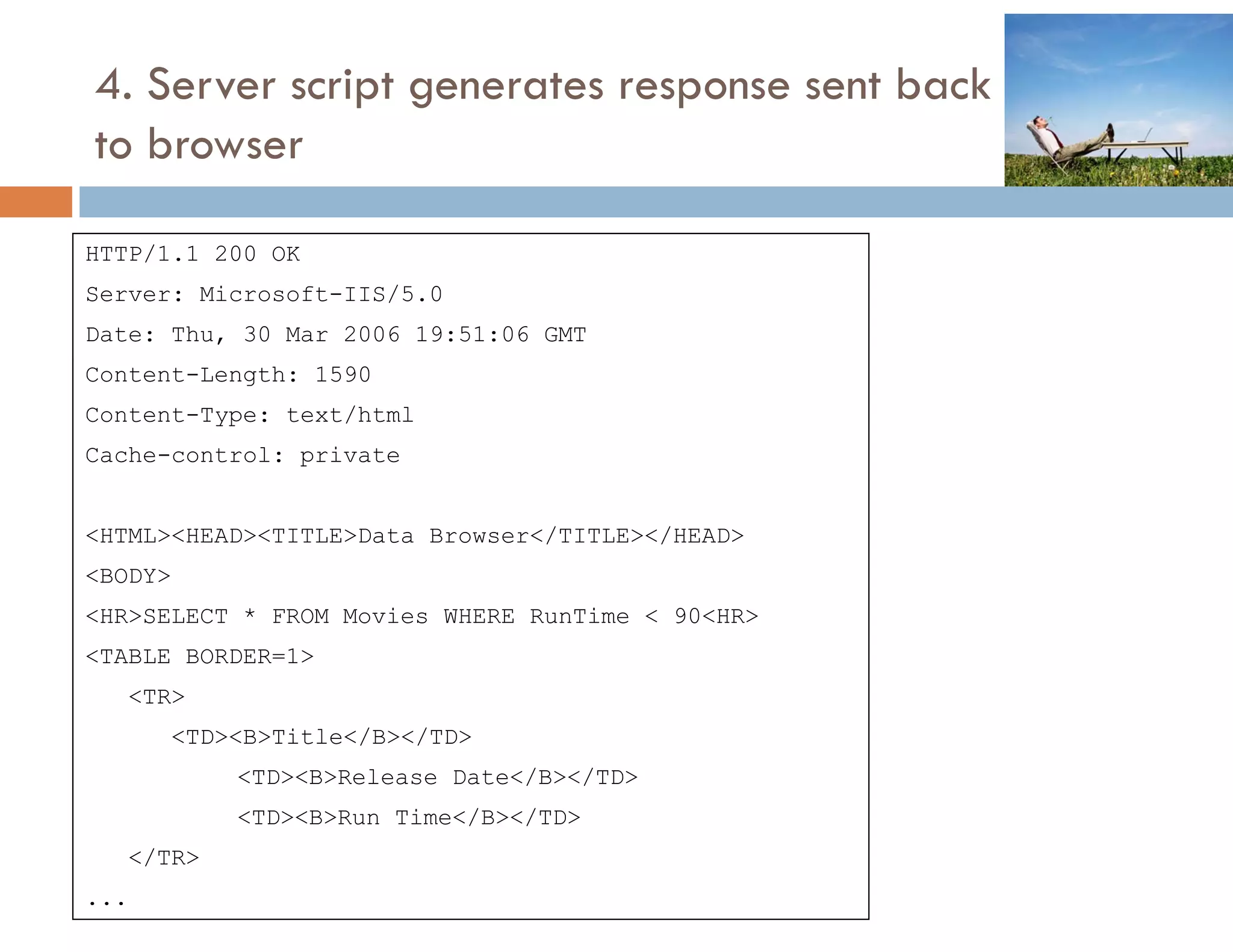
4. Server script generates response sent back
to b
   browser

HTTP/1.1 200 OK
    /
Server: Microsoft-IIS/5.0
Date: Thu, 30 Mar 2006 19:51:06 GMT
Content-Length: 1590
Content-Type: text/html
Cache-control: private


<HTML><HEAD><TITLE>Data Browser</TITLE></HEAD>
<BODY>
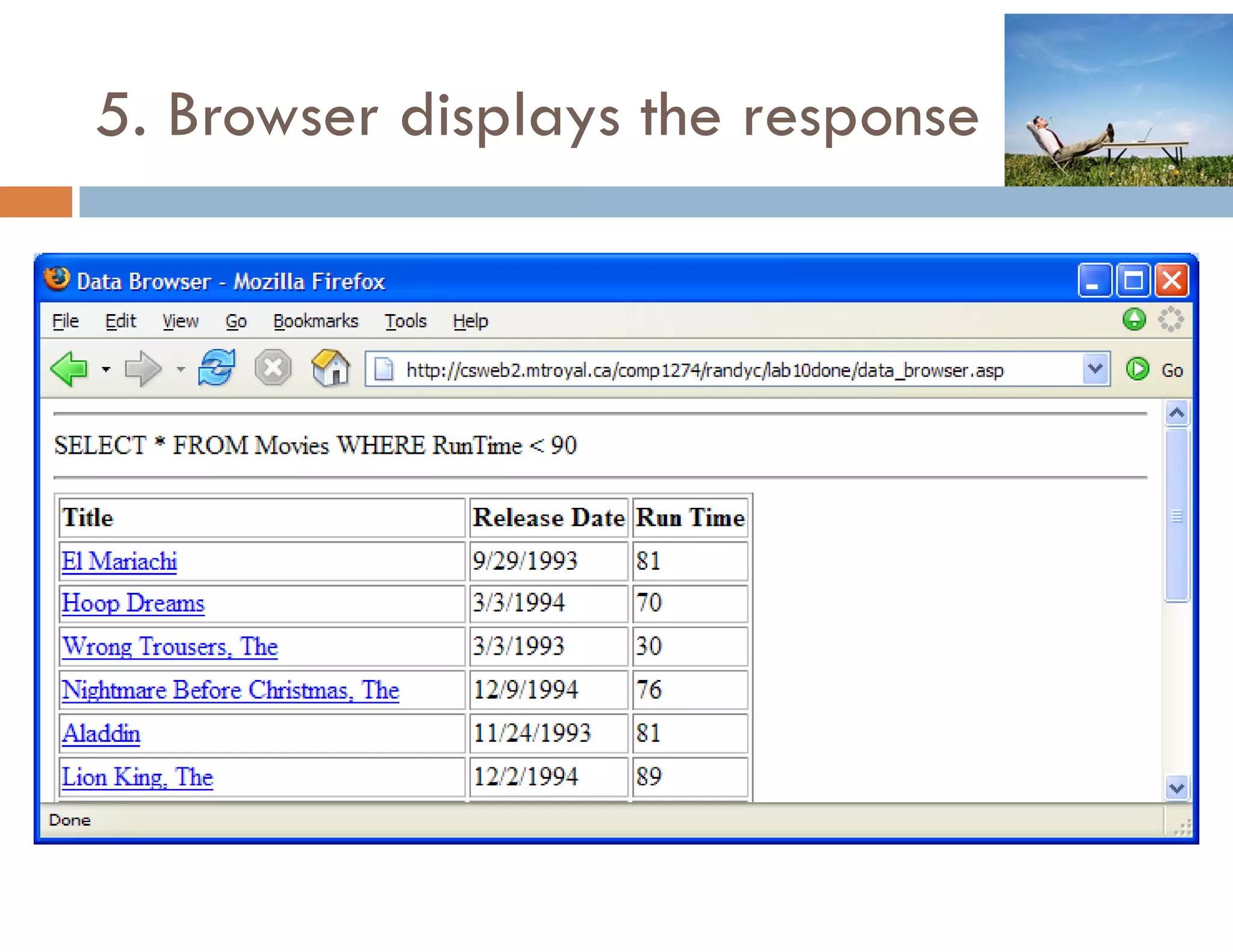
<HR>SELECT * FROM Movies WHERE RunTime < 90<HR>
<TABLE BORDER=1>
   <TR>
      <TD><B>Title</B></TD>
           <TD><B>Release Date</B></TD>
           <TD><B>Run Time</B></TD>
   </TR>
...
5. Browser displays the response
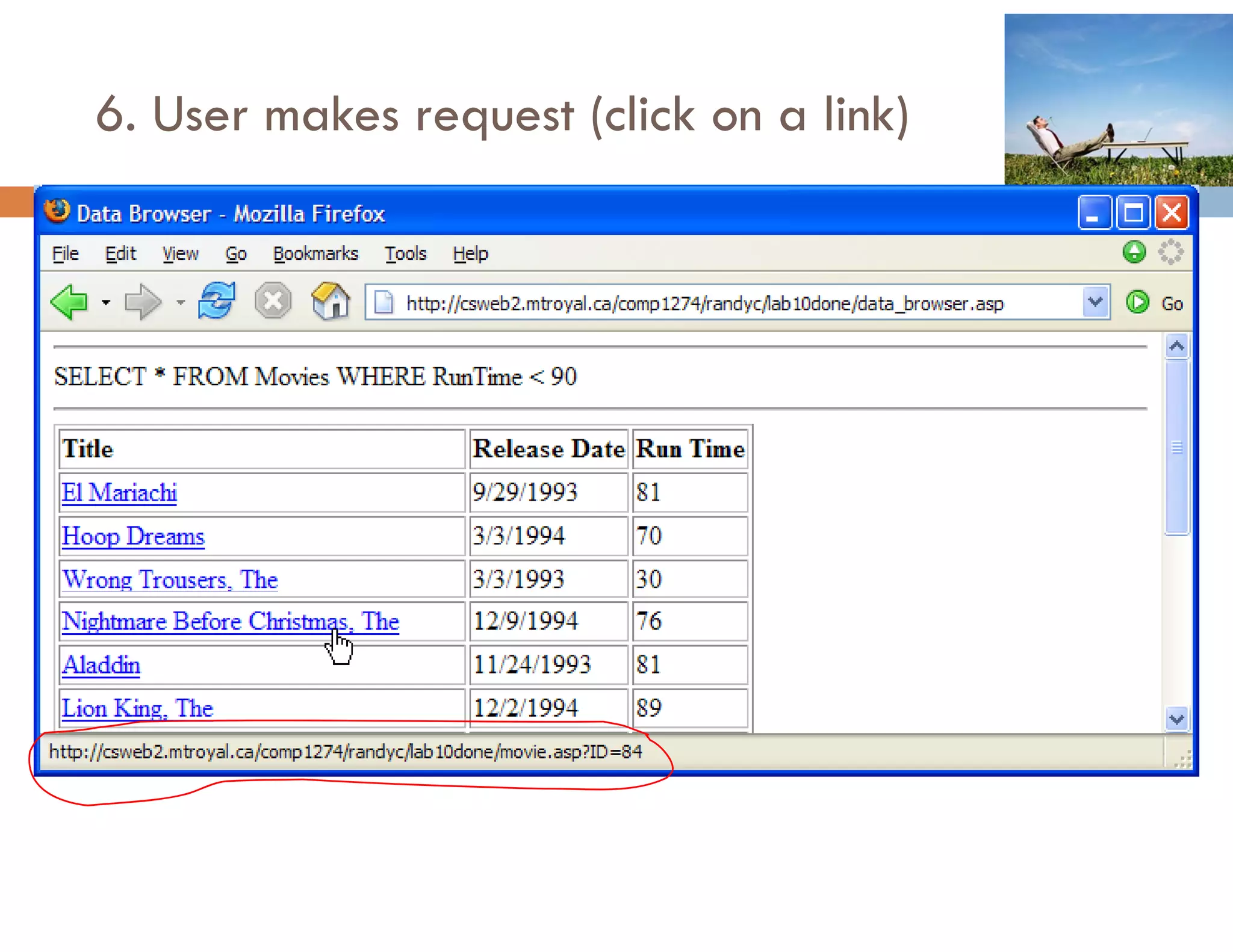
6. User makes request (click on a link)
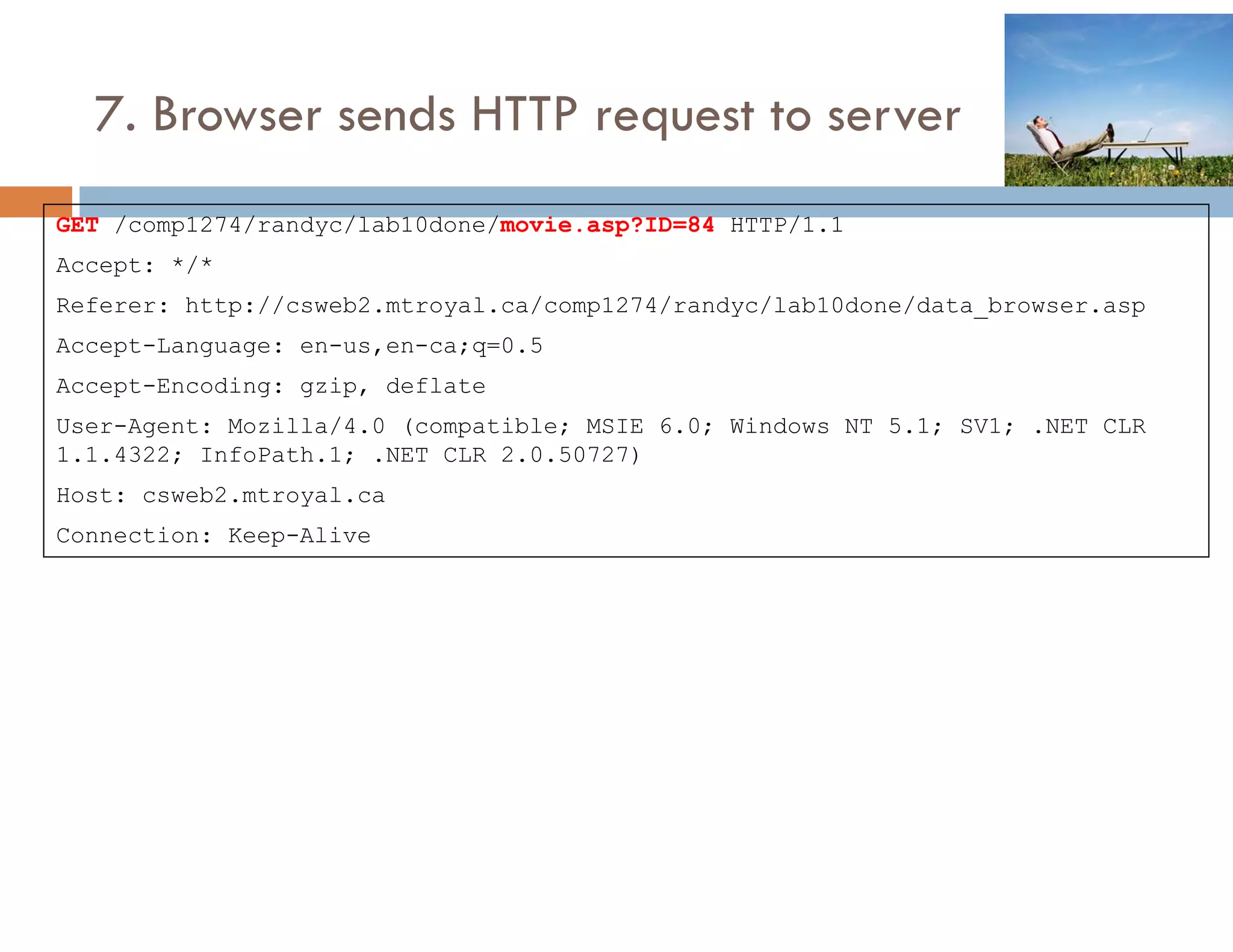
7. Browser sends HTTP request to server
GET /comp1274/randyc/lab10done/movie.asp?ID=84 HTTP/1.1
Accept: */*
Referer: http://csweb2.mtroyal.ca/comp1274/randyc/lab10done/data_browser.asp
Accept-Language: en-us,en-ca;q=0.5
Accept-Encoding: gzip, deflate
User-Agent: Mozilla/4.0 (compatible; MSIE 6.0; Windows NT 5.1; SV1; .NET CLR
1.1.4322; InfoPath.1; .NET CLR 2.0.50727)
Host: csweb2.mtroyal.ca
Connection: Keep-Alive
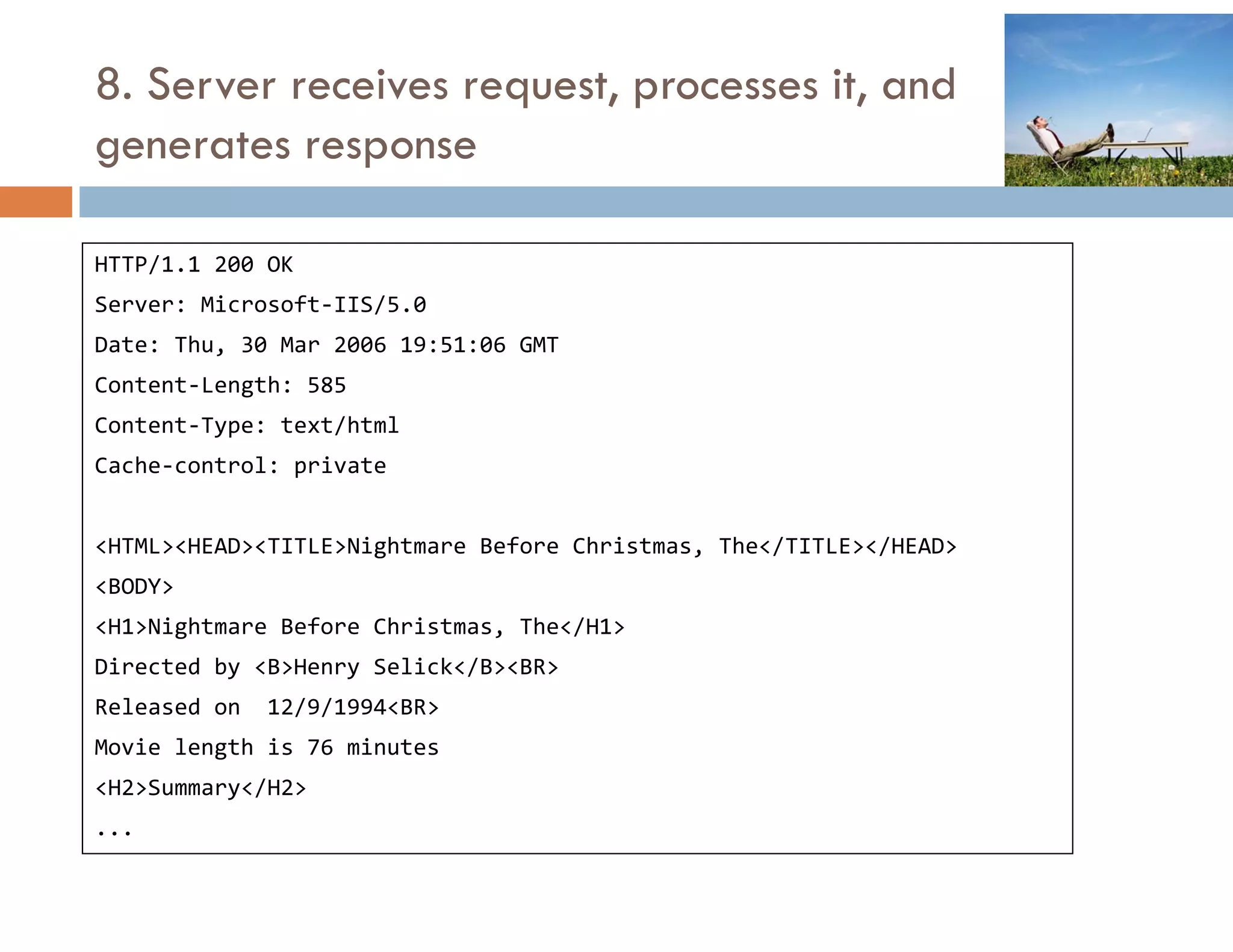
8. Server receives request, processes it, and
generates response

HTTP/1.1 200 OK
Server: Microsoft‐IIS/5.0
Date: Thu, 30 Mar 2006 19:51:06 GMT
Content‐Length: 585
Content‐Type: text/html
Cache‐control: private
               p


<HTML><HEAD><TITLE>Nightmare Before Christmas, The</TITLE></HEAD>
<BODY>
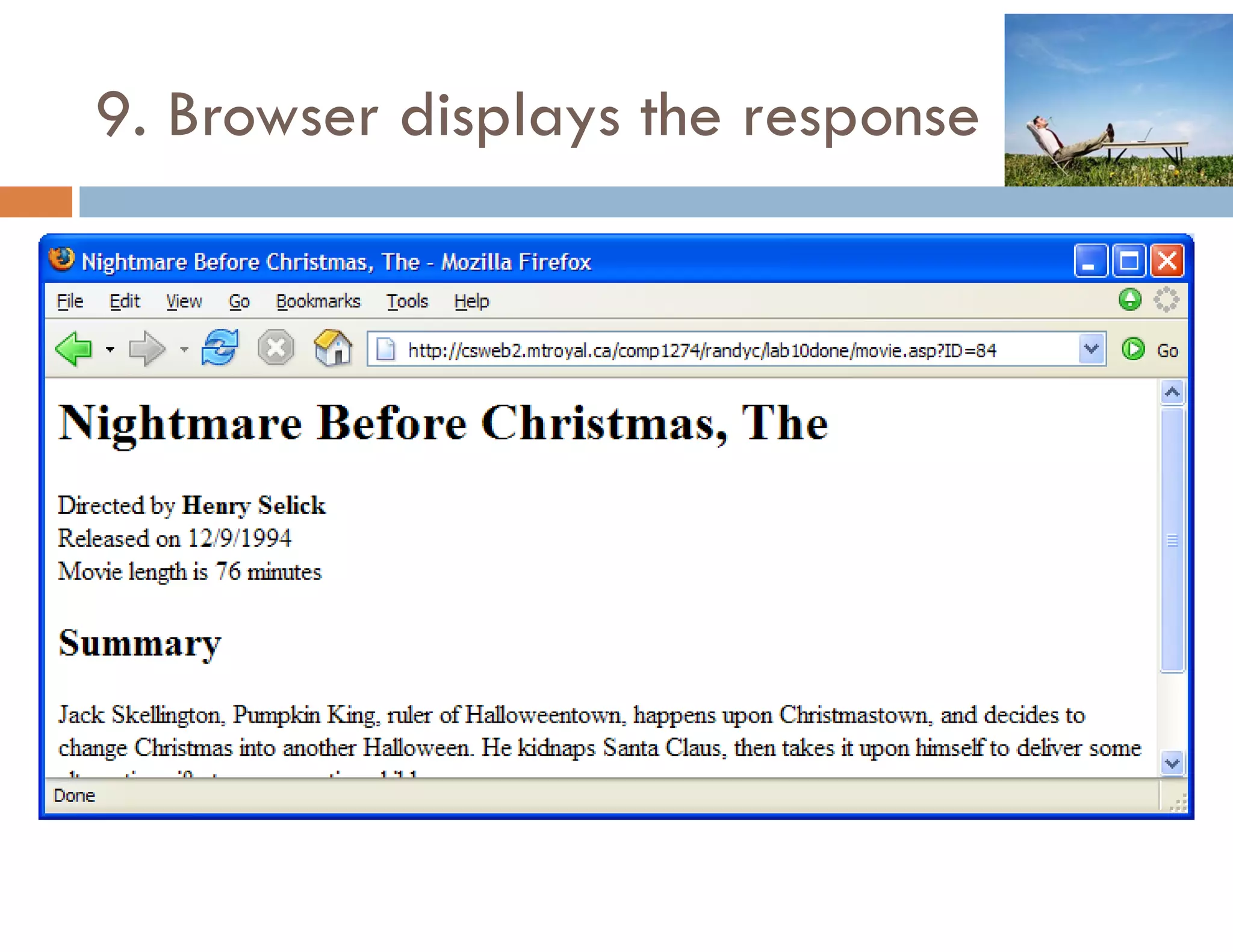
<H1>Nightmare Before Christmas, The</H1>
Directed by <B>Henry Selick</B><BR>
Released on  12/9/1994<BR>
Released on 12/9/1994<BR>
Movie length is 76 minutes
<H2>Summary</H2>
...
9. Browser displays the response
HTTP EXAMPLE 3
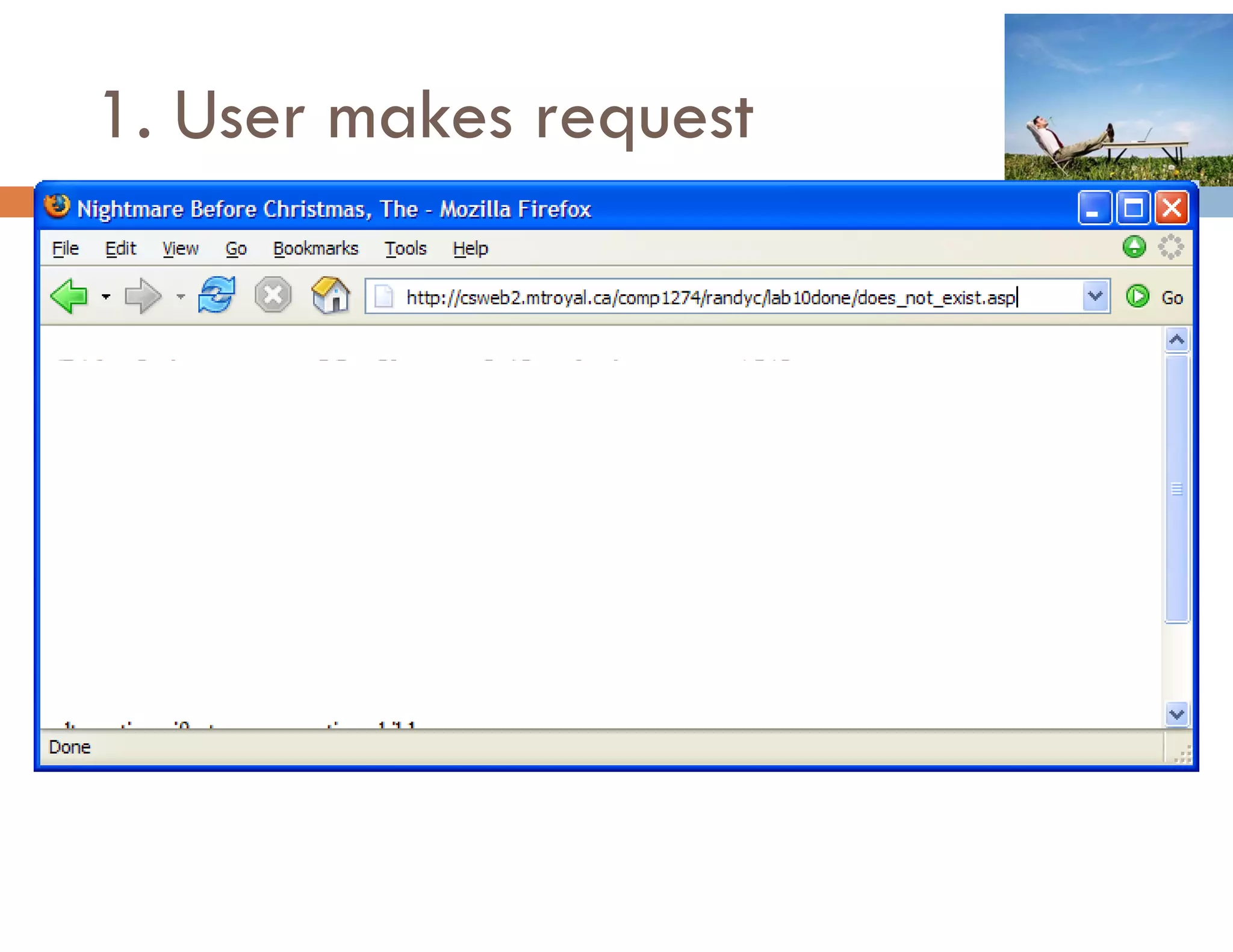
1. User makes request
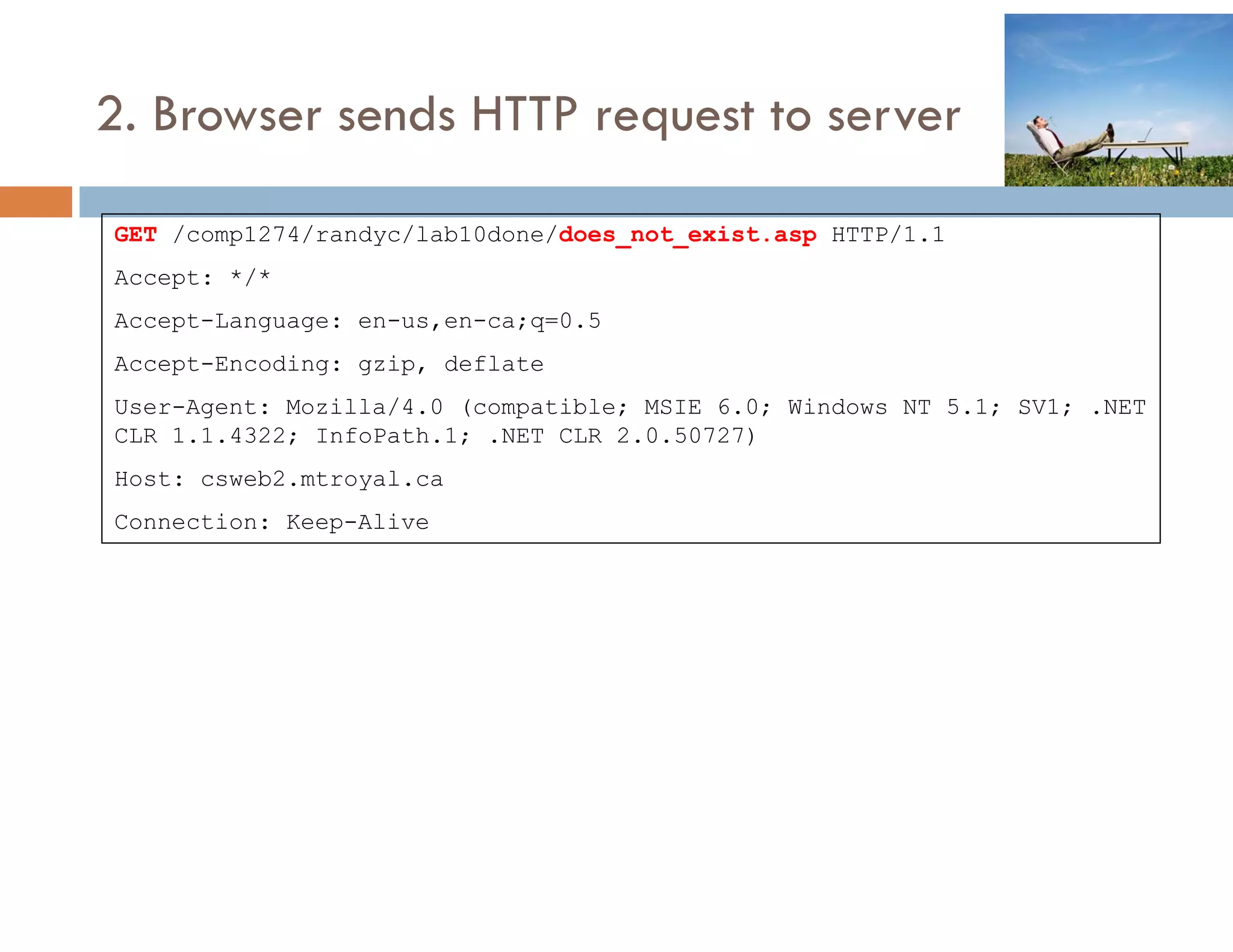
2. Browser sends HTTP request to server

GET /comp1274/randyc/lab10done/does_not_exist.asp HTTP/1.1
        p         y                             p
Accept: */*
Accept-Language: en-us,en-ca;q=0.5
Accept-Encoding: g ip
Accept Encoding gzip, deflate
User-Agent: Mozilla/4.0 (compatible; MSIE 6.0; Windows NT 5.1; SV1; .NET
CLR 1.1.4322; InfoPath.1; .NET CLR 2.0.50727)
Host: csweb2 mtroyal ca
      csweb2.mtroyal.ca
Connection: Keep-Alive
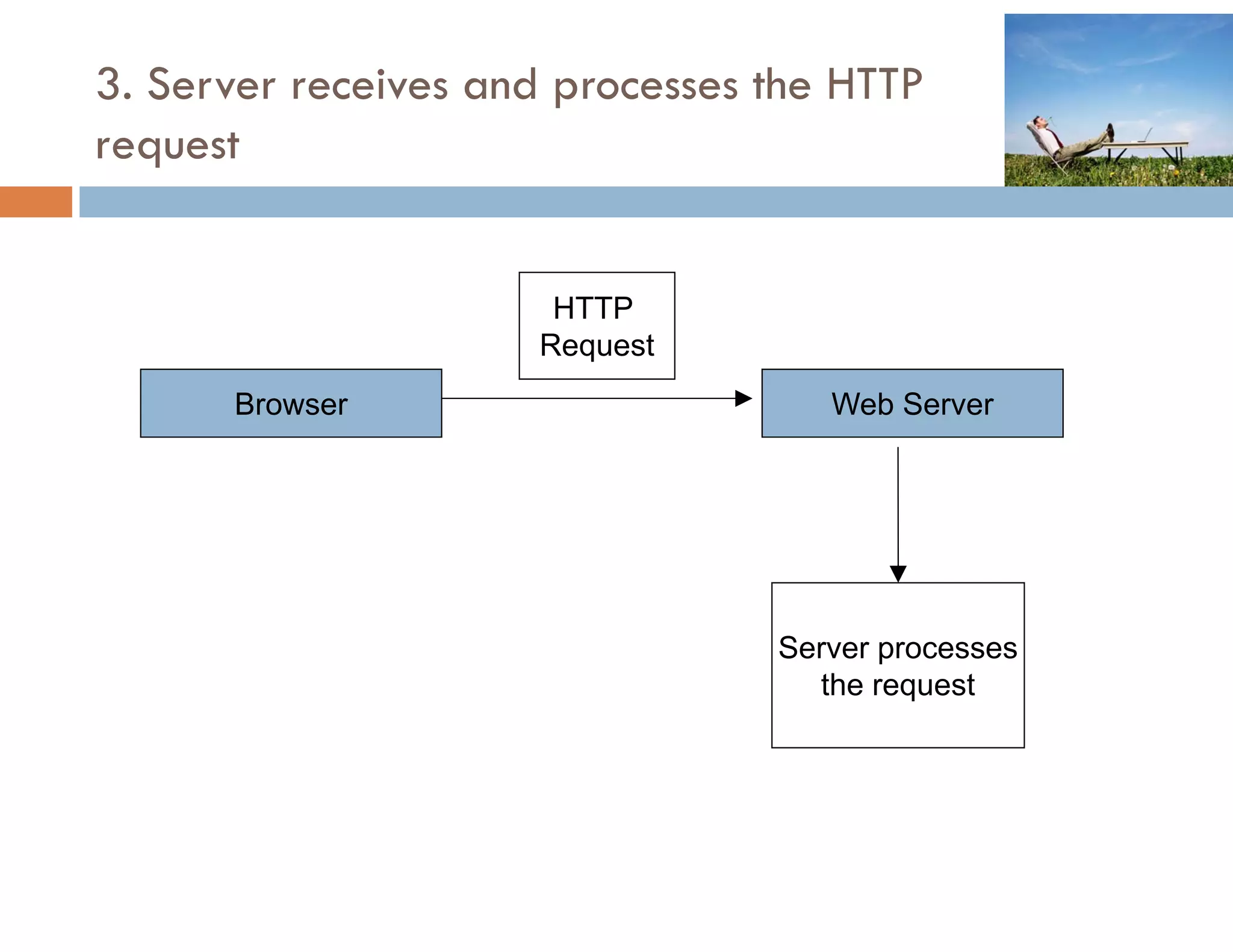
3. Server receives and processes the HTTP
request


                      HTTP
                     Request
                       q
      Browser                       Web Server


                                 Server processes
                                   the request
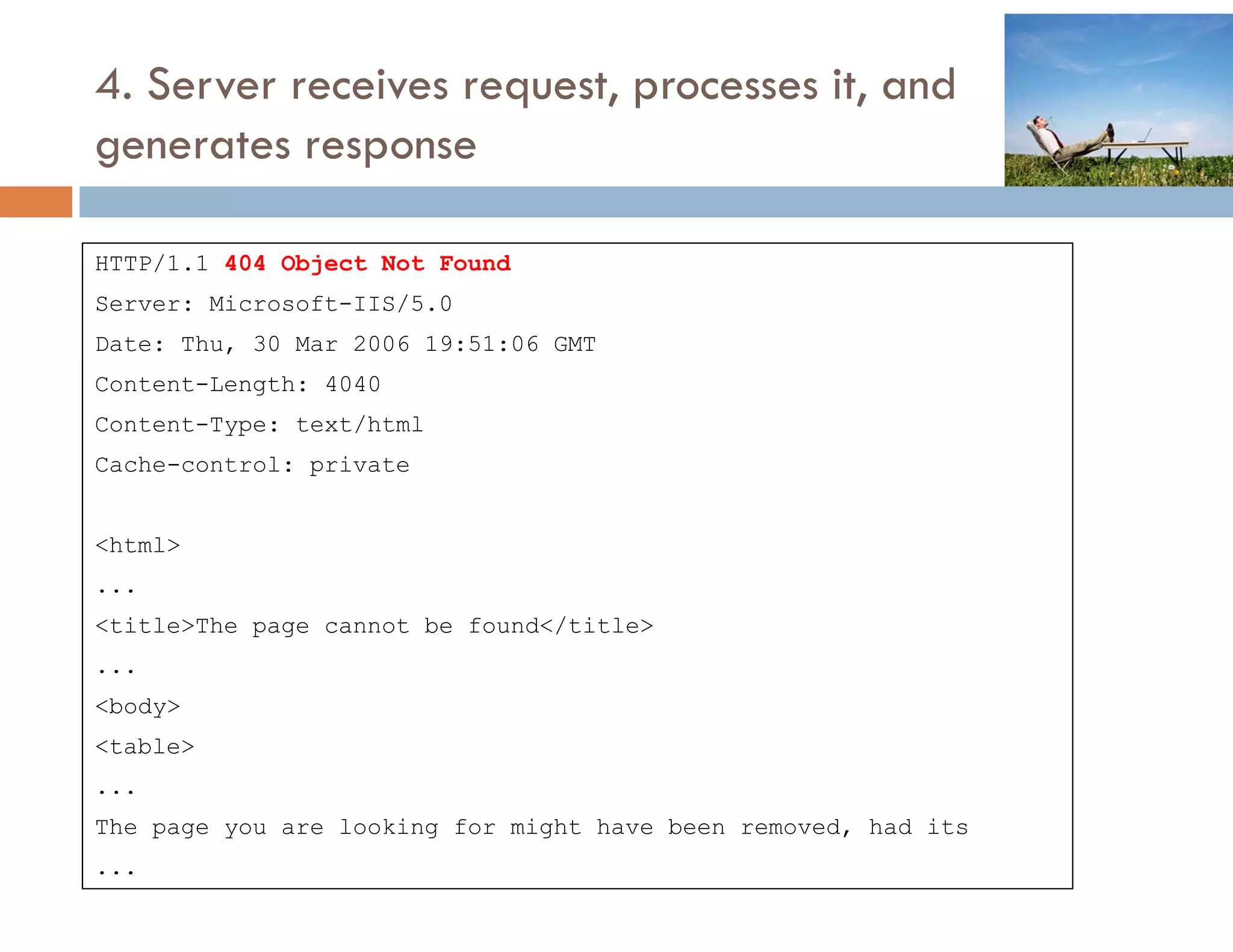
4. Server receives request, processes it, and
generates response

HTTP/1.1 404 Object Not Found
Server: Microsoft-IIS/5.0
Date: Thu, 30 Mar 2006 19:51:06 GMT
Content-Length: 4040
Content-Type: text/html
Cache-control: private
               p


<html>
...
<title>The page cannot be found</title>
...
<body>
<table>
...
The
Th page you are l ki
                looking f
                        for might h
                             i ht have b
                                       been removed, h d it
                                                  d had its
...
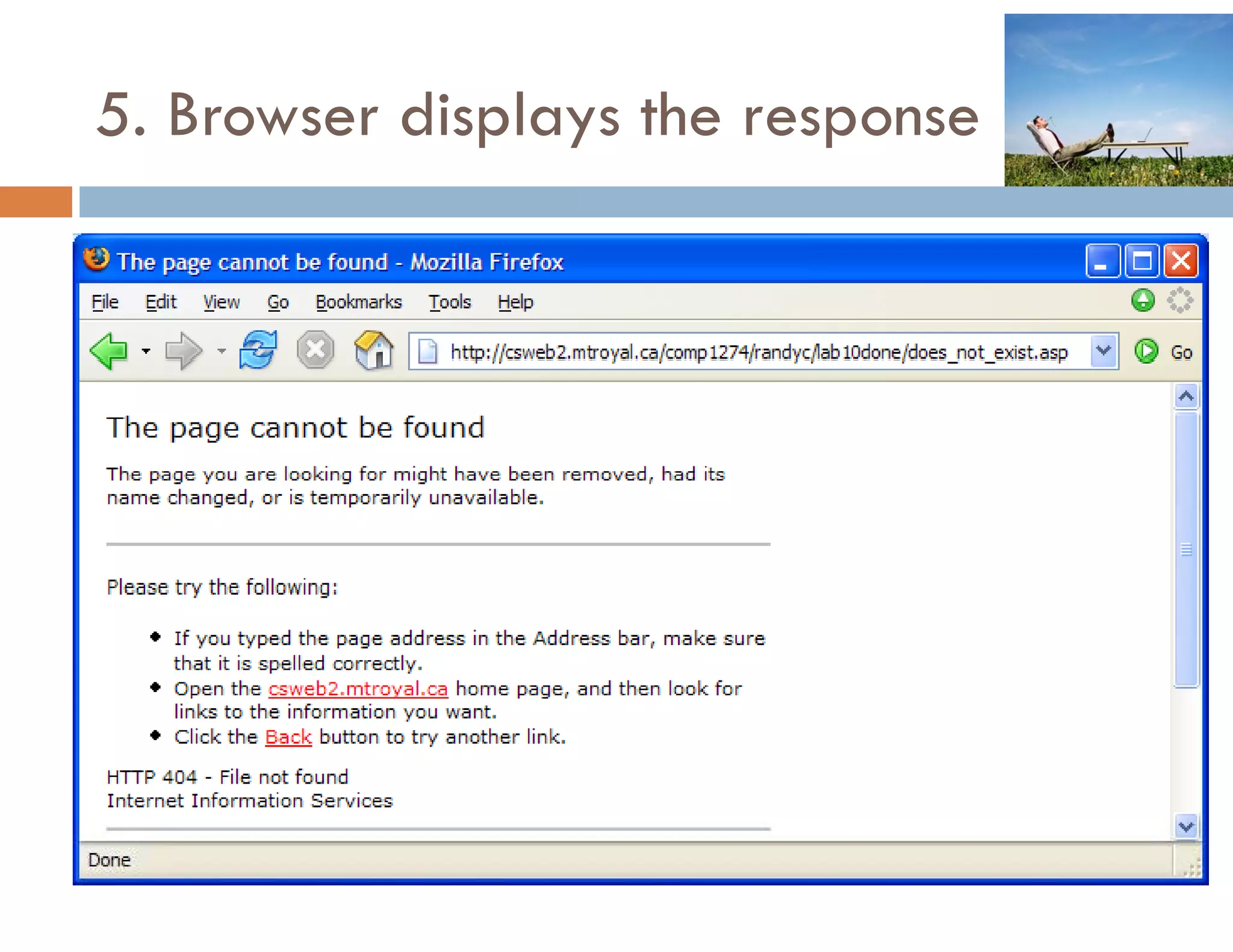
5. Browser displays the response

Web I - 05 - HTTP Protocol

  • 1.
  • 2.
    1 INTRODUCTION 2 HTML 3 TABLES 4 FORMS 5 HTTP 6 CSS 7 CSS FRAMEWORKS 8 DIGITAL MEDIA 2 9 USABILITY
  • 3.
  • 4.
  • 5.
    2. Browser sendsHTTP request to server GET /comp1274/randyc/lab10done/enter country htm HTTP/1 1 /comp1274/randyc/lab10done/enter_country.htm HTTP/1.1 Accept: */* Accept-Language: en-us,en-ca;q=0.5 Accept-Encoding: gzip, deflate User-Agent: Mozilla/4.0 (compatible; MSIE 6.0; Windows NT 5.1; SV1; .NET CLR 1.1.4322; InfoPath.1; .NET CLR 2.0.50727) Host: csweb2.mtroyal.ca Connection: Keep-Alive HTTP Request Browser Web Server
  • 6.
    3. Server receivesand processes the HTTP request HTTP Request q Browser Web Server Retrieve Requested file
  • 7.
    4. Server sendsHTTP response back HTTP/1.1 HTTP/1 1 200 OK Server: Microsoft-IIS/5.0 Server Date: Thu, 30 Mar 2006 19:50:54 GMT Content-Type: text/html HTTP Accept-Ranges: bytes Response Last-Modified: Fri, 24 Mar 2006 17:50:50 GMT Content-Length: 209 Browser <HTML><HEAD><TITLE>Enter A Country</TITLE></HEAD> <BODY> <FORM METHOD=POST ACTION=form_filter.asp> Enter Country Search: <INPUT TYPE=TEXT NAME=Search><P> <INPUT TYPE=SUBMIT> </FORM> </BODY></HTML>
  • 8.
  • 9.
  • 10.
    7. Browser sendsHTTP request to server POST /comp1274/randyc/lab10done/form_filter.asp HTTP/1.1 p y p Accept: */* Referer: http://csweb2.mtroyal.ca/comp1274/randyc/lab10done/enter_country.htm Accept-Language: en-us,en-ca;q=0.5 Accept Lang age en s en ca q 0 5 Content-Type: application/x-www-form-urlencoded Accept-Encoding: gzip, deflate User-Agent: Mozilla/4.0 (compatible; MSIE 6.0; Windows NT 5.1; SV1; .NET CLR 1.1.4322; InfoPath.1; .NET CLR 2.0.50727) Host: csweb2.mtroyal.ca Content-Length: 13 Connection: Keep-Alive Cache-Control: no-cache Search=Canada User entered form data goes here in the http request header as a name=value pair
  • 11.
    Digression: What ifGET rather than POST? g W G OS <FORM METHOD=GET ACTION=form_filter.asp> Then the user entered form data is added to the requested URL GET /comp1274/randyc/lab10done/form_filter.asp?Search=Canada HTTP/1.1 Versus <FORM METHOD=POST ACTION=form_filter.asp> Then the user entered form data is added to the end of HTTP request header POST /comp1274/randyc/lab10done/form_filter.asp HTTP/1.1 rest of HTTP request header goes here Search=Canada
  • 12.
    8. Server receivesand processes the HTTP request HTTP Request q Browser Web Server Server processes the request
  • 13.
    9. Server scriptgenerates response sent back to b browser HTTP/1.1 200 OK / Server: Microsoft-IIS/5.0 Date: Thu, 30 Mar 2006 19:51:06 GMT Content-Length: 164 Content-Type: text/html Cache control: Cache-control: private <HTML><HEAD><TITLE>Reading Recordsets</TITLE></HEAD> <BODY> <H2>Countries</H2> <TABLE BORDER=1> <TR><TD>2</TD><TD>Canada</TD></TR> </TABLE> / / </BODY></HTML>
  • 14.
  • 15.
  • 16.
  • 17.
    2. Browser sendsHTTP request to server GET /comp1274/randyc/lab10done/data_browser.asp HTTP/1.1 Accept: */* Accept-Language: en-us,en-ca;q=0.5 p g g q Accept-Encoding: gzip, deflate User-Agent: Mozilla/4.0 (compatible; MSIE 6.0; Windows NT 5.1; SV1; .NET CLR 1.1.4322; InfoPath.1; .NET CLR 2.0.50727) Host: csweb2.mtroyal.ca Connection: Keep-Alive
  • 18.
    3. Server receivesand processes the HTTP request HTTP Request q Browser Web Server Server processes the request
  • 19.
    4. Server scriptgenerates response sent back to b browser HTTP/1.1 200 OK / Server: Microsoft-IIS/5.0 Date: Thu, 30 Mar 2006 19:51:06 GMT Content-Length: 1590 Content-Type: text/html Cache-control: private <HTML><HEAD><TITLE>Data Browser</TITLE></HEAD> <BODY> <HR>SELECT * FROM Movies WHERE RunTime < 90<HR> <TABLE BORDER=1> <TR> <TD><B>Title</B></TD> <TD><B>Release Date</B></TD> <TD><B>Run Time</B></TD> </TR> ...
  • 20.
    5. Browser displaysthe response
  • 21.
    6. User makesrequest (click on a link)
  • 22.
    7. Browser sendsHTTP request to server GET /comp1274/randyc/lab10done/movie.asp?ID=84 HTTP/1.1 Accept: */* Referer: http://csweb2.mtroyal.ca/comp1274/randyc/lab10done/data_browser.asp Accept-Language: en-us,en-ca;q=0.5 Accept-Encoding: gzip, deflate User-Agent: Mozilla/4.0 (compatible; MSIE 6.0; Windows NT 5.1; SV1; .NET CLR 1.1.4322; InfoPath.1; .NET CLR 2.0.50727) Host: csweb2.mtroyal.ca Connection: Keep-Alive
  • 23.
    8. Server receivesrequest, processes it, and generates response HTTP/1.1 200 OK Server: Microsoft‐IIS/5.0 Date: Thu, 30 Mar 2006 19:51:06 GMT Content‐Length: 585 Content‐Type: text/html Cache‐control: private p <HTML><HEAD><TITLE>Nightmare Before Christmas, The</TITLE></HEAD> <BODY> <H1>Nightmare Before Christmas, The</H1> Directed by <B>Henry Selick</B><BR> Released on  12/9/1994<BR> Released on 12/9/1994<BR> Movie length is 76 minutes <H2>Summary</H2> ...
  • 24.
    9. Browser displaysthe response
  • 25.
  • 26.
  • 27.
    2. Browser sendsHTTP request to server GET /comp1274/randyc/lab10done/does_not_exist.asp HTTP/1.1 p y p Accept: */* Accept-Language: en-us,en-ca;q=0.5 Accept-Encoding: g ip Accept Encoding gzip, deflate User-Agent: Mozilla/4.0 (compatible; MSIE 6.0; Windows NT 5.1; SV1; .NET CLR 1.1.4322; InfoPath.1; .NET CLR 2.0.50727) Host: csweb2 mtroyal ca csweb2.mtroyal.ca Connection: Keep-Alive
  • 28.
    3. Server receivesand processes the HTTP request HTTP Request q Browser Web Server Server processes the request
  • 29.
    4. Server receivesrequest, processes it, and generates response HTTP/1.1 404 Object Not Found Server: Microsoft-IIS/5.0 Date: Thu, 30 Mar 2006 19:51:06 GMT Content-Length: 4040 Content-Type: text/html Cache-control: private p <html> ... <title>The page cannot be found</title> ... <body> <table> ... The Th page you are l ki looking f for might h i ht have b been removed, h d it d had its ...
  • 30.
    5. Browser displaysthe response