HTTP: The Definitive Guide
(ch.1 Overview of HTTP)
아키텍트를 꿈꾸는 사람들
Cecil
HTTP
(Hyper Text Transfer Protocol)
인터넷의 멀티미디어 배달부
신뢰성 있는 데이터 전송 프로토콜
웹 클라이언트 & 서버
foibles of the Internet.
Let’s look more closely at how HTTP transports the Web’s traffic.
Web Clients and Servers
Web content lives on web servers. Web servers speak the HTTP protocol, so they are
often called HTTP servers. These HTTP servers store the Internet’s data and provide
the data when it is requested by HTTP clients. The clients send HTTP requests to
servers, and servers return the requested data in HTTP responses, as sketched in
Figure 1-1. Together, HTTP clients and HTTP servers make up the basic compo-
nents of the World Wide Web.
You probably use HTTP clients every day. The most common client is a web
browser, such as Microsoft Internet Explorer or Netscape Navigator. Web browsers
request HTTP objects from servers and display the objects on your screen.
When you browse to a page, such as “http://www.oreilly.com/index.html,” your
browser sends an HTTP request to the server www.oreilly.com (see Figure 1-1). The
server tries to find the desired object (in this case, “/index.html”) and, if successful,
sends the object to the client in an HTTP response, along with the type of the object,
the length of the object, and other information.
Figure 1-1. Web clients and servers
HTTP request
“Get me the document called /index.html.”
Client Server
www.oreilly.com
HTTP response
“Okay,here it is,it’s in HTML format and is 3,150 characters long.”
웹 클라이언트: 서버에게 HTTP 객체를 요청(ex: 브라우저)
웹 서버: 리소스를 저장하고, 클라이언트가 요청한 데이터를 제공
리소스(resource)
the time of day. They can show you a live image from a camera, or let you trade
stocks, search real estate databases, or buy gifts from online stores (see Figure 1-2).
In summary, a resource is any kind of content source. A file containing your com-
pany’s sales forecast spreadsheet is a resource. A web gateway to scan your local
public library’s shelves is a resource. An Internet search engine is a resource.
Media Types
Figure 1-2. A web resource is anything that provides web content
Client Server
Internet
E-commerce
gateway
Realestatesearch
gateway
Stocktrading
gateway
Webcam
gateway
11000101101
Imagefile
Textfile
Filesystem Resources
웹 서버는 리소스를 관리
어떤 종류의 콘텐츠 소스라도
리소스가 될수 있음.
미디어 타입
다양한 리소스의 데이터 타입을 다루기 위한 방법
MIME(Multipurpose Internet Mail Extensions)
HTTP에서 멀티미디어 콘텐츠를 기술하기 위해 채택됨.
A MIME type is a textual label, represented as a primary object type and a specific
subtype, separated by a slash. For example:
• An HTML-formatted text document would be labeled with type text/html.
Figure 1-3. MIME types are sent back with the data content
Client Server
Content-type: image/jpeg
Content-length: 12984
MIMEtype
URI
(Uniform Resource identifier)
웹에서 각각의 리소스를 식별하기 위한 방법
URL: 특정 서버의 한 리소스에 대한 구체적인 위치를 기술
URN: 리소스의 위치에 영향을 받지 않는 유일무이한 이름을 사용
(ex: urn:ietf:rfc:2141)
Figure 1-4. URLs specify protocol, server, and local resource
Table 1-1. Example URLs
Client www.joes-hardware.com
Content-type: image/gif
Content-length: 8572
http://www.joes-hardware.com/specials/saw-blade.gif
UseHTTPprotocol Gotowww.joes-hardware.com Grabtheresourcecalled/specials/saw-blade.gif
1 2 3
URL: Examples
jdbc:oracle:thin:@hostname:port:SID
jdbc:Microsoft:sqlserver://localhost:1433;databasename=DB명
jdbc:mysql:replication://master,slave1,slave2,slave3/test
트랜잭션
URNs are still experimental and not yet widely adopted. To work effectively, URNs
need a supporting infrastructure to resolve resource locations; the lack of such an
infrastructure has also slowed their adoption. But URNs do hold some exciting
promise for the future. We’ll discuss URNs in a bit more detail in Chapter 2, but
most of the remainder of this book focuses almost exclusively on URLs.
Unless stated otherwise, we adopt the conventional terminology and use URI and
URL interchangeably for the remainder of this book.
Transactions
Let’s look in more detail how clients use HTTP to transact with web servers and
their resources. An HTTP transaction consists of a request command (sent from cli-
ent to server), and a response result (sent from the server back to the client). This
communication happens with formatted blocks of data called HTTP messages, as
illustrated in Figure 1-5.
Methods
HTTP supports several different request commands, called HTTP methods. Every
HTTP request message has a method. The method tells the server what action to per-
Figure 1-5. HTTP transactions consist of request and response messages
Internet
HTTPrequestmessagecontains
thecommandandtheURI
GET /specials/saw-blade.gif HTTP/1.0
Host: www.joes-hardware.com
Client www.joes-hardware.comHTTP/1.0 200 OK
Content-type: image/gif
Content-length: 8572 HTTPresponsemessagecontains
theresultofthetransaction
HTTP 트랜잭션: 요청 명령 + 요청 응답
요청과 응답은 HTTP 메시지로
메서드
서버에게 어떤 동작이 취해 져야 하는지를 전달
HTTP 메서드 설 명
GET 서버에서 클라이언트로 지정한 리소스를 보내라
PUT 클라이언트에서 서버로 보낸 데이터를 지정한 이름의 리소스로 저장해라
DELETE 지정한 리소스를 서버에서 삭제하라
POST 클라이언트 데이터를 서버 게이트웨이 애플리케이션으로 보내라
HEAD 지정한 리소스에 대한 응답에서, HTTP 헤더 부분만 보내라
상태 코드
클라이언트 요청에 대한 처리 결과
HTTP 상태 코드 설 명
1xx 정보 제공
2xx 성공
3xx 리다이렉션
4xx 클라이언트 요청 오류
5xx 서버에서 오류가 발생함
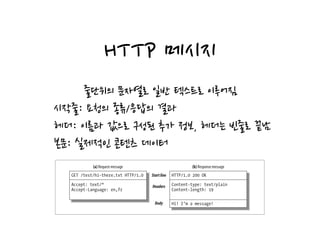
HTTP 메시지
줄단위의 문자열로 일반 텍스트로 이루어짐
시작줄: 요청의 종류/응답의 결과
헤더: 이름과 값으로 구성된 추가 정보, 헤더는 빈줄로 끝남
본문: 실제적인 콘텐츠 데이터
Messages
Now let’s take a quick look at the structure of HTTP request and response mes-
sages. We’ll study HTTP messages in exquisite detail in Chapter 3.
HTTP messages are simple, line-oriented sequences of characters. Because they are
plain text, not binary, they are easy for humans to read and write.* Figure 1-7 shows
the HTTP messages for a simple transaction.
HTTP messages sent from web clients to web servers are called request messages.
Figure 1-6. Composite web pages require separate HTTP transactions for each embedded resource
Figure 1-7. HTTP messages have a simple, line-oriented text structure
Client
Server 1
Server 2
Internet
GET /test/hi-there.txt HTTP/1.0
Accept: text/*
Accept-Language: en,fr
HTTP/1.0 200 OK
Content-type: text/plain
Content-length: 19
Hi! I’m a message!
Startline
Headers
Body
(a) Request message (b) Response message
TCP/IP
HTTP는 애플리케이션 계층 프로토콜
네트워크 전송은 신뢰성 있는 TCP/IP를 사용
. HTTP network protocol stack
HTTP Applicationlayer
TCP Transportlayer
IP Networklayer
Network-specific link interface Datalinklayer
Physical network hardware Physicallayer
HTTP 메시지를 전송하기 위해서는
클라이언트가 IP, Port를 사용하여 서버로
연결을 맺어야 함.
웹 브라우저의 메시지 트랜잭션
Here are the steps:
(a) The browser extracts the server’s hostname from the URL.
(b) The browser converts the server’s hostname into the server’s IP address.
(c) The browser extracts the port number (if any) from the URL.
(d) The browser establishes a TCP connection with the web server.
(e) The browser sends an HTTP request message to the server.
(f) The server sends an HTTP response back to the browser.
(g) The connection is closed, and the browser displays the document.
Figure 1-10. Basic browser connection process
Client Server
Internet
(d) Connect to 161.58.228.45 port 80
Client Server
Internet
(e) Send an HTTP GET request
Client Server
Internet
(f) Read HTTP response from server
Client Server
Internet
(g) Close the connection
Screen shot needed
User types in URL
http://www.joes-hardware.com:80/tools.html
(c) Get the port number (80)
www.joes-hardware.com
(a) Get the hostname
(b) DNS
Browsershowingpage
프로토콜 버전
•HTTP/0.9: 1991년의 HTTP 프로토타입, 심각한 결함을 가짐
•GET 메소드만 지원, 마임타입 지원 안함
•HTTP/1.0: 처음으로 널리 쓰이기 시작한 버전
•추가 메소드와 멀티미디어 객체 처리 추가됨
•HTTP/1.0+: 1.0의 확장판
•keep-alive 커넥션, 가상 호스팅, 프락시 연결 지원
•HTTP/1.1 - 현재의 HTTP 버전
•구조적 결함 교정, 성능 최적화, 잘못된 기능 제거
•HTTP/2.0 - 구글의 SPDY 프로토콜을 기반으로 한 성능 개선 버전
웹의 구성 요소
인터넷과 상호 작용할 수 있는 웹 애플리케이션
프락시, 캐시, 게이트웨이, 터널, 에이전트 …
프락시
Proxies
Let’s start by looking at HTTP proxy servers, important building blocks for web
security, application integration, and performance optimization.
As shown in Figure 1-11, a proxy sits between a client and a server, receiving all of
the client’s HTTP requests and relaying the requests to the server (perhaps after
modifying the requests). These applications act as a proxy for the user, accessing the
server on the user’s behalf.
Proxies are often used for security, acting as trusted intermediaries through which all
web traffic flows. Proxies can also filter requests and responses; for example, to
detect application viruses in corporate downloads or to filter adult content away
from elementary-school students. We’ll talk about proxies in detail in Chapter 6.
Caches
Figure 1-11. Proxies relay traffic between client and server
Client Server
Internet
Proxy
클라이언트의 모든 HTTP 요청을 받아 서버에 전달
주로 보안 목적으로 사용, 요청과 응답을 필터링
캐시
중간에서 사용한 문서를 저장하는 특별한 종류의 프락시
HTTP는 캐시를 효율적으로 동작하게 하는 많은 기능을 정의(7장)
Proxies are often used for security, acting as trusted intermediaries through which all
web traffic flows. Proxies can also filter requests and responses; for example, to
detect application viruses in corporate downloads or to filter adult content away
from elementary-school students. We’ll talk about proxies in detail in Chapter 6.
Caches
A web cache or caching proxy is a special type of HTTP proxy server that keeps cop-
ies of popular documents that pass through the proxy. The next client requesting the
same document can be served from the cache’s personal copy (see Figure 1-12).
Figure 1-11. Proxies relay traffic between client and server
Figure 1-12. Caching proxies keep local copies of popular documents to improve performance
Client Server
Internet
Proxy
Client Server
Internet
Proxy cache
Client
게이트웨이
다른 서버로의 중개자로 동작하는 특별한 서버
일반적으로 HTTP 트래픽을 다른 프로토콜로 변환하기 위해 사용
게이트웨이는 리소스를 갖고 있는 진짜 서버인 것처럼 요청을 다룸
A client may be able to download a document much more quickly from a nearby
cache than from a distant web server. HTTP defines many facilities to make caching
more effective and to regulate the freshness and privacy of cached content. We cover
caching technology in Chapter 7.
Gateways
Gateways are special servers that act as intermediaries for other servers. They are
often used to convert HTTP traffic to another protocol. A gateway always receives
requests as if it was the origin server for the resource. The client may not be aware it
is communicating with a gateway.
For example, an HTTP/FTP gateway receives requests for FTP URIs via HTTP
requests but fetches the documents using the FTP protocol (see Figure 1-13). The
resulting document is packed into an HTTP message and sent to the client. We dis-
cuss gateways in Chapter 8.
Tunnels
Tunnels are HTTP applications that, after setup, blindly relay raw data between two
connections. HTTP tunnels are often used to transport non-HTTP data over one or
Figure 1-13. HTTP/FTP gateway
HTTP client FTP serverHTTP/FTP
gateway
HTTP FTP
터널
두 연결 사이에서 raw 데이터를 열어보지 않고 그대로
전달해 주는 HTTP 애플리케이션
ex) SSL 트래픽을 HTTP 연결로 전송함으로써 웹 트래픽만 허용하는 사내 방화벽 통과
For example, there are machine-automated user agents that autonomously wander
the Web, issuing HTTP transactions and fetching content, without human supervi-
sion. These automated agents often have colorful names, such as “spiders” or “web
robots” (see Figure 1-15). Spiders wander the Web to build useful archives of web
Figure 1-14. Tunnels forward data across non-HTTP networks (HTTP/SSL tunnel shown)
Server
Client
SSL
Tunnelstart
SSLHTTP HTTP
connection SSLHTTP
SSL
Tunnelendpoint
Port80
SSL
connection SSL
Port443
에이전트
For example, there are machine-automated user agents that autonomously wander
the Web, issuing HTTP transactions and fetching content, without human supervi-
sion. These automated agents often have colorful names, such as “spiders” or “web
robots” (see Figure 1-15). Spiders wander the Web to build useful archives of web
content, such as a search engine’s database or a product catalog for a comparison-
shopping robot. See Chapter 9 for more information.
Figure 1-14. Tunnels forward data across non-HTTP networks (HTTP/SSL tunnel shown)
Figure 1-15. Automated search engine “spiders” are agents, fetching web pages around the world
Server
Client
SSL
Tunnelstart
SSLHTTP HTTP
connection SSLHTTP
SSL
Tunnelendpoint
Port80
SSL
connection SSL
Port443
Searchengine
“spider”
Web serverWeb serverWeb server
Search engine
database
HTTP 요청을 만드는 클라이언트 프로그램
ex) 브라우저, 웹 로봇 …
Q&A
References
• David Gourley, Brian Totty, Marjorie Sayer, Sailu Reddy,
Anshu Aggarwal. HTTP 완벽 가이드(이응준, 정상일 옮김). 서울시
마포구: 인사이트, 2014

HTTP 완벽가이드 1장.

  • 1.
    HTTP: The DefinitiveGuide (ch.1 Overview of HTTP) 아키텍트를 꿈꾸는 사람들 Cecil
  • 2.
    HTTP (Hyper Text TransferProtocol) 인터넷의 멀티미디어 배달부 신뢰성 있는 데이터 전송 프로토콜
  • 3.
    웹 클라이언트 &서버 foibles of the Internet. Let’s look more closely at how HTTP transports the Web’s traffic. Web Clients and Servers Web content lives on web servers. Web servers speak the HTTP protocol, so they are often called HTTP servers. These HTTP servers store the Internet’s data and provide the data when it is requested by HTTP clients. The clients send HTTP requests to servers, and servers return the requested data in HTTP responses, as sketched in Figure 1-1. Together, HTTP clients and HTTP servers make up the basic compo- nents of the World Wide Web. You probably use HTTP clients every day. The most common client is a web browser, such as Microsoft Internet Explorer or Netscape Navigator. Web browsers request HTTP objects from servers and display the objects on your screen. When you browse to a page, such as “http://www.oreilly.com/index.html,” your browser sends an HTTP request to the server www.oreilly.com (see Figure 1-1). The server tries to find the desired object (in this case, “/index.html”) and, if successful, sends the object to the client in an HTTP response, along with the type of the object, the length of the object, and other information. Figure 1-1. Web clients and servers HTTP request “Get me the document called /index.html.” Client Server www.oreilly.com HTTP response “Okay,here it is,it’s in HTML format and is 3,150 characters long.” 웹 클라이언트: 서버에게 HTTP 객체를 요청(ex: 브라우저) 웹 서버: 리소스를 저장하고, 클라이언트가 요청한 데이터를 제공
  • 4.
    리소스(resource) the time ofday. They can show you a live image from a camera, or let you trade stocks, search real estate databases, or buy gifts from online stores (see Figure 1-2). In summary, a resource is any kind of content source. A file containing your com- pany’s sales forecast spreadsheet is a resource. A web gateway to scan your local public library’s shelves is a resource. An Internet search engine is a resource. Media Types Figure 1-2. A web resource is anything that provides web content Client Server Internet E-commerce gateway Realestatesearch gateway Stocktrading gateway Webcam gateway 11000101101 Imagefile Textfile Filesystem Resources 웹 서버는 리소스를 관리 어떤 종류의 콘텐츠 소스라도 리소스가 될수 있음.
  • 5.
    미디어 타입 다양한 리소스의데이터 타입을 다루기 위한 방법 MIME(Multipurpose Internet Mail Extensions) HTTP에서 멀티미디어 콘텐츠를 기술하기 위해 채택됨. A MIME type is a textual label, represented as a primary object type and a specific subtype, separated by a slash. For example: • An HTML-formatted text document would be labeled with type text/html. Figure 1-3. MIME types are sent back with the data content Client Server Content-type: image/jpeg Content-length: 12984 MIMEtype
  • 6.
    URI (Uniform Resource identifier) 웹에서각각의 리소스를 식별하기 위한 방법 URL: 특정 서버의 한 리소스에 대한 구체적인 위치를 기술 URN: 리소스의 위치에 영향을 받지 않는 유일무이한 이름을 사용 (ex: urn:ietf:rfc:2141) Figure 1-4. URLs specify protocol, server, and local resource Table 1-1. Example URLs Client www.joes-hardware.com Content-type: image/gif Content-length: 8572 http://www.joes-hardware.com/specials/saw-blade.gif UseHTTPprotocol Gotowww.joes-hardware.com Grabtheresourcecalled/specials/saw-blade.gif 1 2 3
  • 7.
  • 8.
    트랜잭션 URNs are stillexperimental and not yet widely adopted. To work effectively, URNs need a supporting infrastructure to resolve resource locations; the lack of such an infrastructure has also slowed their adoption. But URNs do hold some exciting promise for the future. We’ll discuss URNs in a bit more detail in Chapter 2, but most of the remainder of this book focuses almost exclusively on URLs. Unless stated otherwise, we adopt the conventional terminology and use URI and URL interchangeably for the remainder of this book. Transactions Let’s look in more detail how clients use HTTP to transact with web servers and their resources. An HTTP transaction consists of a request command (sent from cli- ent to server), and a response result (sent from the server back to the client). This communication happens with formatted blocks of data called HTTP messages, as illustrated in Figure 1-5. Methods HTTP supports several different request commands, called HTTP methods. Every HTTP request message has a method. The method tells the server what action to per- Figure 1-5. HTTP transactions consist of request and response messages Internet HTTPrequestmessagecontains thecommandandtheURI GET /specials/saw-blade.gif HTTP/1.0 Host: www.joes-hardware.com Client www.joes-hardware.comHTTP/1.0 200 OK Content-type: image/gif Content-length: 8572 HTTPresponsemessagecontains theresultofthetransaction HTTP 트랜잭션: 요청 명령 + 요청 응답 요청과 응답은 HTTP 메시지로
  • 9.
    메서드 서버에게 어떤 동작이취해 져야 하는지를 전달 HTTP 메서드 설 명 GET 서버에서 클라이언트로 지정한 리소스를 보내라 PUT 클라이언트에서 서버로 보낸 데이터를 지정한 이름의 리소스로 저장해라 DELETE 지정한 리소스를 서버에서 삭제하라 POST 클라이언트 데이터를 서버 게이트웨이 애플리케이션으로 보내라 HEAD 지정한 리소스에 대한 응답에서, HTTP 헤더 부분만 보내라
  • 10.
    상태 코드 클라이언트 요청에대한 처리 결과 HTTP 상태 코드 설 명 1xx 정보 제공 2xx 성공 3xx 리다이렉션 4xx 클라이언트 요청 오류 5xx 서버에서 오류가 발생함
  • 11.
    HTTP 메시지 줄단위의 문자열로일반 텍스트로 이루어짐 시작줄: 요청의 종류/응답의 결과 헤더: 이름과 값으로 구성된 추가 정보, 헤더는 빈줄로 끝남 본문: 실제적인 콘텐츠 데이터 Messages Now let’s take a quick look at the structure of HTTP request and response mes- sages. We’ll study HTTP messages in exquisite detail in Chapter 3. HTTP messages are simple, line-oriented sequences of characters. Because they are plain text, not binary, they are easy for humans to read and write.* Figure 1-7 shows the HTTP messages for a simple transaction. HTTP messages sent from web clients to web servers are called request messages. Figure 1-6. Composite web pages require separate HTTP transactions for each embedded resource Figure 1-7. HTTP messages have a simple, line-oriented text structure Client Server 1 Server 2 Internet GET /test/hi-there.txt HTTP/1.0 Accept: text/* Accept-Language: en,fr HTTP/1.0 200 OK Content-type: text/plain Content-length: 19 Hi! I’m a message! Startline Headers Body (a) Request message (b) Response message
  • 12.
    TCP/IP HTTP는 애플리케이션 계층프로토콜 네트워크 전송은 신뢰성 있는 TCP/IP를 사용 . HTTP network protocol stack HTTP Applicationlayer TCP Transportlayer IP Networklayer Network-specific link interface Datalinklayer Physical network hardware Physicallayer HTTP 메시지를 전송하기 위해서는 클라이언트가 IP, Port를 사용하여 서버로 연결을 맺어야 함.
  • 13.
    웹 브라우저의 메시지트랜잭션 Here are the steps: (a) The browser extracts the server’s hostname from the URL. (b) The browser converts the server’s hostname into the server’s IP address. (c) The browser extracts the port number (if any) from the URL. (d) The browser establishes a TCP connection with the web server. (e) The browser sends an HTTP request message to the server. (f) The server sends an HTTP response back to the browser. (g) The connection is closed, and the browser displays the document. Figure 1-10. Basic browser connection process Client Server Internet (d) Connect to 161.58.228.45 port 80 Client Server Internet (e) Send an HTTP GET request Client Server Internet (f) Read HTTP response from server Client Server Internet (g) Close the connection Screen shot needed User types in URL http://www.joes-hardware.com:80/tools.html (c) Get the port number (80) www.joes-hardware.com (a) Get the hostname (b) DNS Browsershowingpage
  • 14.
    프로토콜 버전 •HTTP/0.9: 1991년의HTTP 프로토타입, 심각한 결함을 가짐 •GET 메소드만 지원, 마임타입 지원 안함 •HTTP/1.0: 처음으로 널리 쓰이기 시작한 버전 •추가 메소드와 멀티미디어 객체 처리 추가됨 •HTTP/1.0+: 1.0의 확장판 •keep-alive 커넥션, 가상 호스팅, 프락시 연결 지원 •HTTP/1.1 - 현재의 HTTP 버전 •구조적 결함 교정, 성능 최적화, 잘못된 기능 제거 •HTTP/2.0 - 구글의 SPDY 프로토콜을 기반으로 한 성능 개선 버전
  • 15.
    웹의 구성 요소 인터넷과상호 작용할 수 있는 웹 애플리케이션 프락시, 캐시, 게이트웨이, 터널, 에이전트 …
  • 16.
    프락시 Proxies Let’s start bylooking at HTTP proxy servers, important building blocks for web security, application integration, and performance optimization. As shown in Figure 1-11, a proxy sits between a client and a server, receiving all of the client’s HTTP requests and relaying the requests to the server (perhaps after modifying the requests). These applications act as a proxy for the user, accessing the server on the user’s behalf. Proxies are often used for security, acting as trusted intermediaries through which all web traffic flows. Proxies can also filter requests and responses; for example, to detect application viruses in corporate downloads or to filter adult content away from elementary-school students. We’ll talk about proxies in detail in Chapter 6. Caches Figure 1-11. Proxies relay traffic between client and server Client Server Internet Proxy 클라이언트의 모든 HTTP 요청을 받아 서버에 전달 주로 보안 목적으로 사용, 요청과 응답을 필터링
  • 17.
    캐시 중간에서 사용한 문서를저장하는 특별한 종류의 프락시 HTTP는 캐시를 효율적으로 동작하게 하는 많은 기능을 정의(7장) Proxies are often used for security, acting as trusted intermediaries through which all web traffic flows. Proxies can also filter requests and responses; for example, to detect application viruses in corporate downloads or to filter adult content away from elementary-school students. We’ll talk about proxies in detail in Chapter 6. Caches A web cache or caching proxy is a special type of HTTP proxy server that keeps cop- ies of popular documents that pass through the proxy. The next client requesting the same document can be served from the cache’s personal copy (see Figure 1-12). Figure 1-11. Proxies relay traffic between client and server Figure 1-12. Caching proxies keep local copies of popular documents to improve performance Client Server Internet Proxy Client Server Internet Proxy cache Client
  • 18.
    게이트웨이 다른 서버로의 중개자로동작하는 특별한 서버 일반적으로 HTTP 트래픽을 다른 프로토콜로 변환하기 위해 사용 게이트웨이는 리소스를 갖고 있는 진짜 서버인 것처럼 요청을 다룸 A client may be able to download a document much more quickly from a nearby cache than from a distant web server. HTTP defines many facilities to make caching more effective and to regulate the freshness and privacy of cached content. We cover caching technology in Chapter 7. Gateways Gateways are special servers that act as intermediaries for other servers. They are often used to convert HTTP traffic to another protocol. A gateway always receives requests as if it was the origin server for the resource. The client may not be aware it is communicating with a gateway. For example, an HTTP/FTP gateway receives requests for FTP URIs via HTTP requests but fetches the documents using the FTP protocol (see Figure 1-13). The resulting document is packed into an HTTP message and sent to the client. We dis- cuss gateways in Chapter 8. Tunnels Tunnels are HTTP applications that, after setup, blindly relay raw data between two connections. HTTP tunnels are often used to transport non-HTTP data over one or Figure 1-13. HTTP/FTP gateway HTTP client FTP serverHTTP/FTP gateway HTTP FTP
  • 19.
    터널 두 연결 사이에서raw 데이터를 열어보지 않고 그대로 전달해 주는 HTTP 애플리케이션 ex) SSL 트래픽을 HTTP 연결로 전송함으로써 웹 트래픽만 허용하는 사내 방화벽 통과 For example, there are machine-automated user agents that autonomously wander the Web, issuing HTTP transactions and fetching content, without human supervi- sion. These automated agents often have colorful names, such as “spiders” or “web robots” (see Figure 1-15). Spiders wander the Web to build useful archives of web Figure 1-14. Tunnels forward data across non-HTTP networks (HTTP/SSL tunnel shown) Server Client SSL Tunnelstart SSLHTTP HTTP connection SSLHTTP SSL Tunnelendpoint Port80 SSL connection SSL Port443
  • 20.
    에이전트 For example, thereare machine-automated user agents that autonomously wander the Web, issuing HTTP transactions and fetching content, without human supervi- sion. These automated agents often have colorful names, such as “spiders” or “web robots” (see Figure 1-15). Spiders wander the Web to build useful archives of web content, such as a search engine’s database or a product catalog for a comparison- shopping robot. See Chapter 9 for more information. Figure 1-14. Tunnels forward data across non-HTTP networks (HTTP/SSL tunnel shown) Figure 1-15. Automated search engine “spiders” are agents, fetching web pages around the world Server Client SSL Tunnelstart SSLHTTP HTTP connection SSLHTTP SSL Tunnelendpoint Port80 SSL connection SSL Port443 Searchengine “spider” Web serverWeb serverWeb server Search engine database HTTP 요청을 만드는 클라이언트 프로그램 ex) 브라우저, 웹 로봇 …
  • 21.
  • 22.
    References • David Gourley,Brian Totty, Marjorie Sayer, Sailu Reddy, Anshu Aggarwal. HTTP 완벽 가이드(이응준, 정상일 옮김). 서울시 마포구: 인사이트, 2014