Perl Programming
                 Course
                 Scalar data types


Krasimir Berov

I-can.eu
Contents
1. Perl variables/data types
2. Numeric operators
3. String operators
4. Scalar functions (summary)
5. Undefined quantities
6. Type-casting in Perl?
7. References
Perl variable/data types
Perl has three main variable types:
   –   scalars
   –   arrays
   –   hashes
... Plus two additional:
   –   typeglobs
   –   filehandles
See: perlintro, perldata
Variable names
●   Values are usually referred to by name, or through a
    named reference.
●   The first character tells you to what sort/type of data
    structure it refers ($,@,%).
●   The rest is the name of the particular value to which it
    refers.
●   Usually this name is a single identifier – a string
    beginning with a letter or underscore, and containing
    letters, underscores, and digits.
●   It may be also a chain of identifiers, separated by ::
    (see perlmod/Packages, perlref).
Perl Scalars
●   A scalar can contain a single string (of any size, limited
    only by the available memory), number, or a reference
    to something (see perlref).
●   There are also a number of "magic" scalars with
    names that look like punctuation or line noise ($_, $/,
    $] ...).
    my $animal = "camel";
    my $answer = 22;
    print "Me:    Hello $animal! How old are you?n";
    print "$animal: $answer.$/";
    print '-'x 20, $/;
    print 'Named reference: ',${animal},$/;
    $Other::animal = 'llama';
    print "From package 'Other': $Other::animaln";
    print 'Perl version: ',$], $/;
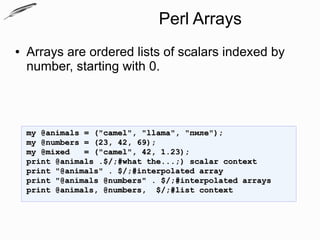
Perl Arrays
●   Arrays are ordered lists of scalars indexed by
    number, starting with 0.


    my @animals = ("camel", "llama", "пиле");
    my @numbers = (23, 42, 69);
    my @mixed   = ("camel", 42, 1.23);
    print @animals .$/;#what the...;) scalar context
    print "@animals" . $/;#interpolated array
    print "@animals @numbers" . $/;#interpolated arrays
    print @animals, @numbers, $/;#list context
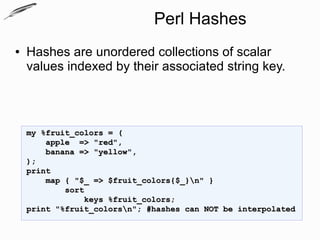
Perl Hashes
●   Hashes are unordered collections of scalar
    values indexed by their associated string key.


    my %fruit_colors = (
        apple => "red",
        banana => "yellow",
    );
    print
        map { "$_ => $fruit_colors{$_}n" }
            sort
                keys %fruit_colors;
    print "%fruit_colorsn"; #hashes can NOT be interpolated
Back to Scalars?!..
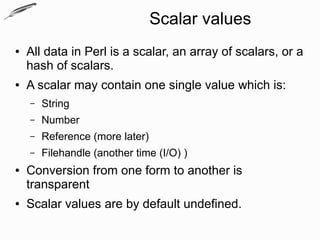
Scalar values
●   All data in Perl is a scalar, an array of scalars, or a
    hash of scalars.
●   A scalar may contain one single value which is:
    –   String
    –   Number
    –   Reference (more later)
    –   Filehandle (another time (I/O) )
●   Conversion from one form to another is
    transparent
●   Scalar values are by default undefined.
What are scalars (revisited)
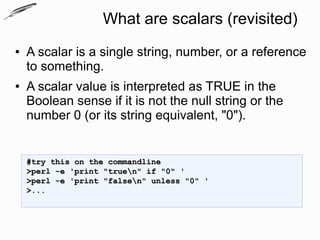
●   A scalar is a single string, number, or a reference
    to something.
●   A scalar value is interpreted as TRUE in the
    Boolean sense if it is not the null string or the
    number 0 (or its string equivalent, "0").


    #try this on the commandline
    >perl -e 'print "truen" if "0" '
    >perl -e 'print "falsen" unless "0" '
    >...
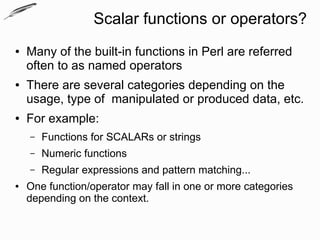
Scalar functions or operators?
●   Many of the built-in functions in Perl are referred
    often to as named operators
●   There are several categories depending on the
    usage, type of manipulated or produced data, etc.
●   For example:
    –   Functions for SCALARs or strings
    –   Numeric functions
    –   Regular expressions and pattern matching...
●   One function/operator may fall in one or more categories
    depending on the context.
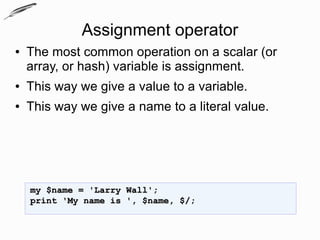
Assignment operator
●   The most common operation on a scalar (or
    array, or hash) variable is assignment.
●   This way we give a value to a variable.
●   This way we give a name to a literal value.


    my $name = 'Larry Wall';
    print 'My name is ', $name, $/;
Numeric operators
●   Named operators (functions) that act on numbers
    and produce numbers
    –   abs, hex, oct
Numeric operators
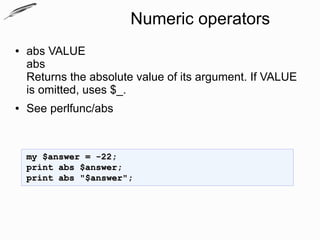
●   abs VALUE
    abs
    Returns the absolute value of its argument. If VALUE
    is omitted, uses $_.
●   See perlfunc/abs


    my $answer = -22;
    print abs $answer;
    print abs "$answer";
Numeric operators
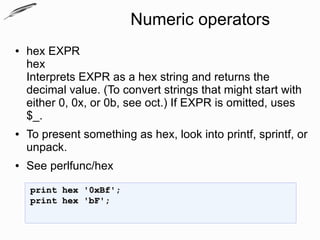
●   hex EXPR
    hex
    Interprets EXPR as a hex string and returns the
    decimal value. (To convert strings that might start with
    either 0, 0x, or 0b, see oct.) If EXPR is omitted, uses
    $_.
●   To present something as hex, look into printf, sprintf, or
    unpack.
●   See perlfunc/hex
    print hex '0xBf';
    print hex 'bF';
Numeric operators
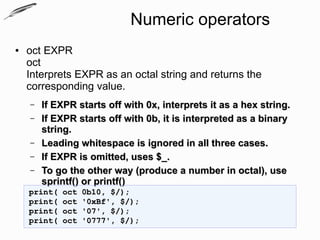
●   oct EXPR
    oct
    Interprets EXPR as an octal string and returns the
    corresponding value.
    –   If EXPR starts off with 0x, interprets it as a hex string.
    –   If EXPR starts off with 0b, it is interpreted as a binary
        string.
    –   Leading whitespace is ignored in all three cases.
    –   If EXPR is omitted, uses $_.
    –   To go the other way (produce a number in octal), use
        sprintf() or printf()
    print(   oct   0b10, $/);
    print(   oct   '0xBf', $/);
    print(   oct   '07', $/);
    print(   oct   '0777', $/);
String operators
●   Named operators (functions) for SCALARs or
    strings
    –   length, chop and chomp, uc/lc
String operators
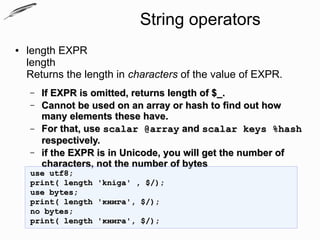
●   length EXPR
    length
    Returns the length in characters of the value of EXPR.
    –   If EXPR is omitted, returns length of $_.
    –   Cannot be used on an array or hash to find out how
        many elements these have.
    –   For that, use scalar @array and scalar keys %hash
        respectively.
    –   if the EXPR is in Unicode, you will get the number of
        characters, not the number of bytes
    use utf8;
    print( length   'kniga' , $/);
    use bytes;
    print( length   'книга', $/);
    no bytes;
    print( length   'книга', $/);
String operators
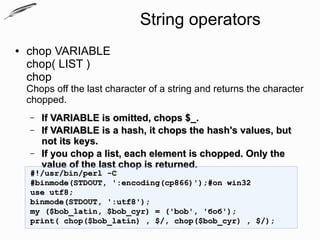
●   chop VARIABLE
    chop( LIST )
    chop
    Chops off the last character of a string and returns the character
    chopped.
    –   If VARIABLE is omitted, chops $_.
    –   If VARIABLE is a hash, it chops the hash's values, but
        not its keys.
    –   If you chop a list, each element is chopped. Only the
        value of the last chop is returned.
    #!/usr/bin/perl -C
    #binmode(STDOUT, ':encoding(cp866)');#on win32
    use utf8;
    binmode(STDOUT, ':utf8');
    my ($bob_latin, $bob_cyr) = ('bob', 'боб');
    print( chop($bob_latin) , $/, chop($bob_cyr) , $/);
String operators
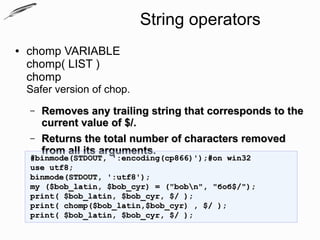
●   chomp VARIABLE
    chomp( LIST )
    chomp
    Safer version of chop.
    –   Removes any trailing string that corresponds to the
        current value of $/.
    –   Returns the total number of characters removed
        from all its arguments.
    #binmode(STDOUT, ':encoding(cp866)');#on win32
    use utf8;
    binmode(STDOUT, ':utf8');
    my ($bob_latin, $bob_cyr) = ("bobn", "боб$/");
    print( $bob_latin, $bob_cyr, $/ );
    print( chomp($bob_latin,$bob_cyr) , $/ );
    print( $bob_latin, $bob_cyr, $/ );
String operators
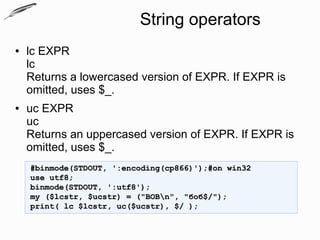
●   lc EXPR
    lc
    Returns a lowercased version of EXPR. If EXPR is
    omitted, uses $_.
●   uc EXPR
    uc
    Returns an uppercased version of EXPR. If EXPR is
    omitted, uses $_.
    #binmode(STDOUT, ':encoding(cp866)');#on win32
    use utf8;
    binmode(STDOUT, ':utf8');
    my ($lcstr, $ucstr) = ("BOBn", "боб$/");
    print( lc $lcstr, uc($ucstr), $/ );
Un/defined quantities
●   undef   => nothing, empty, void
●   defined => something not undef :)
Un/defined quantities
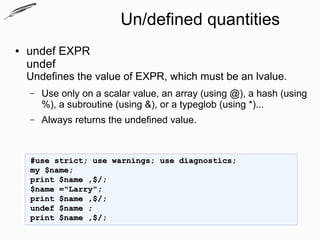
●   undef EXPR
    undef
    Undefines the value of EXPR, which must be an lvalue.
    –   Use only on a scalar value, an array (using @), a hash (using
        %), a subroutine (using &), or a typeglob (using *)...
    –   Always returns the undefined value.


    #use strict; use warnings; use diagnostics;
    my $name;
    print $name ,$/;
    $name ="Larry";
    print $name ,$/;
    undef $name ;
    print $name ,$/;
Un/defined quantities
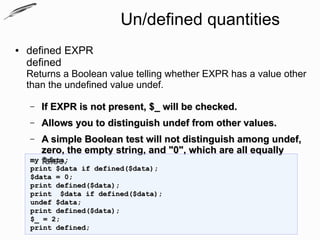
●   defined EXPR
    defined
    Returns a Boolean value telling whether EXPR has a value other
    than the undefined value undef.

    –   If EXPR is not present, $_ will be checked.
    –   Allows you to distinguish undef from other values.
    –  A simple Boolean test will not distinguish among undef,
       zero, the empty string, and "0", which are all equally
    my false.
       $data;
    print $data if defined($data);
    $data = 0;
    print defined($data);
    print $data if defined($data);
    undef $data;
    print defined($data);
    $_ = 2;
    print defined;
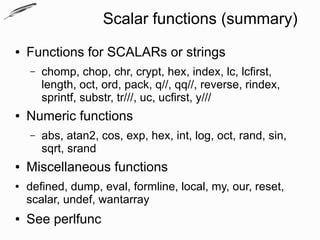
Scalar functions (summary)
●   Functions for SCALARs or strings
    –   chomp, chop, chr, crypt, hex, index, lc, lcfirst,
        length, oct, ord, pack, q//, qq//, reverse, rindex,
        sprintf, substr, tr///, uc, ucfirst, y///
●   Numeric functions
    –   abs, atan2, cos, exp, hex, int, log, oct, rand, sin,
        sqrt, srand
●   Miscellaneous functions
●   defined, dump, eval, formline, local, my, our, reset,
    scalar, undef, wantarray
●   See perlfunc
Type casting operations :X :(
●   C Operators Missing From Perl:
    –   Type-casting operator
    –   ...
●   From perlglossary:
    –   type casting: Converting data from one type to
        another. C permits this. Perl does not need it. Nor
        want it.
●   I hope you have in mind references :)...
References
●   A scallar can also contain a reference.
●   A reference is just a piece of data pointing to another piece of data
    (anonimous or named).
●   In Perl, a reference is always a scalar, although the data it refers to
    may not be
●   Languages like C and C++ have a feature that's similar to references,
    called pointers.
●   Pointers leave interpretation of what's there for the programmer
●   References only store memory locations for specific, clearly defined
    data structures – maybe not predefined, but defined nevertheless.
●   References allow you to leave the arrangement of computer memory to
    the computer itself.
References
●   ref EXPR
    ref
    Returns a non-empty string if EXPR is a reference, the
    empty string otherwise.
    –   If EXPR is not specified, $_ will be used.
    –   The value returned depends on the type of thing the
        reference is a reference to.
    –   Builtin types include:
        SCALAR, ARRAY, HASH, CODE, REF, GLOB, LVALUE,
        FORMAT, IO, Regexp
    –   If the referenced object has been blessed into a
        package, then that package name is returned instead.
    –   You can think of ref as a typeof operator.
References
●   Example
    use Data::Dumper;
    my %hash   = (me =>'you' );
    my @array = ('we',%hash,['them']);
    my $scalar = @array;
    print ref $scalar, $/;
    print $scalar,$/;
    print Dumper($scalar);

●   References will be discussed another time
Scalar data types


Questions?
Exercises
1. Write a program that converts a given hex digit to decimal
   and displays it on the screen.
2. Write a program which displays the absolute of a negative
   number.
3. Write a program which removes the last letter from a string
   (no matter what the string is) and displays the letter on the
   screen.
4. Write a program which converts a number to its
   corresponding character and displays the letter on the
   screen.
5. Write a program which prints the string 'Здрасти' 3 times on
   3 separate lines using only one print statement.

Scalar data types

  • 1.
    Perl Programming Course Scalar data types Krasimir Berov I-can.eu
  • 2.
    Contents 1. Perl variables/datatypes 2. Numeric operators 3. String operators 4. Scalar functions (summary) 5. Undefined quantities 6. Type-casting in Perl? 7. References
  • 3.
    Perl variable/data types Perlhas three main variable types: – scalars – arrays – hashes ... Plus two additional: – typeglobs – filehandles See: perlintro, perldata
  • 4.
    Variable names ● Values are usually referred to by name, or through a named reference. ● The first character tells you to what sort/type of data structure it refers ($,@,%). ● The rest is the name of the particular value to which it refers. ● Usually this name is a single identifier – a string beginning with a letter or underscore, and containing letters, underscores, and digits. ● It may be also a chain of identifiers, separated by :: (see perlmod/Packages, perlref).
  • 5.
    Perl Scalars ● A scalar can contain a single string (of any size, limited only by the available memory), number, or a reference to something (see perlref). ● There are also a number of "magic" scalars with names that look like punctuation or line noise ($_, $/, $] ...). my $animal = "camel"; my $answer = 22; print "Me: Hello $animal! How old are you?n"; print "$animal: $answer.$/"; print '-'x 20, $/; print 'Named reference: ',${animal},$/; $Other::animal = 'llama'; print "From package 'Other': $Other::animaln"; print 'Perl version: ',$], $/;
  • 6.
    Perl Arrays ● Arrays are ordered lists of scalars indexed by number, starting with 0. my @animals = ("camel", "llama", "пиле"); my @numbers = (23, 42, 69); my @mixed = ("camel", 42, 1.23); print @animals .$/;#what the...;) scalar context print "@animals" . $/;#interpolated array print "@animals @numbers" . $/;#interpolated arrays print @animals, @numbers, $/;#list context
  • 7.
    Perl Hashes ● Hashes are unordered collections of scalar values indexed by their associated string key. my %fruit_colors = ( apple => "red", banana => "yellow", ); print map { "$_ => $fruit_colors{$_}n" } sort keys %fruit_colors; print "%fruit_colorsn"; #hashes can NOT be interpolated
  • 8.
  • 9.
    Scalar values ● All data in Perl is a scalar, an array of scalars, or a hash of scalars. ● A scalar may contain one single value which is: – String – Number – Reference (more later) – Filehandle (another time (I/O) ) ● Conversion from one form to another is transparent ● Scalar values are by default undefined.
  • 10.
    What are scalars(revisited) ● A scalar is a single string, number, or a reference to something. ● A scalar value is interpreted as TRUE in the Boolean sense if it is not the null string or the number 0 (or its string equivalent, "0"). #try this on the commandline >perl -e 'print "truen" if "0" ' >perl -e 'print "falsen" unless "0" ' >...
  • 11.
    Scalar functions oroperators? ● Many of the built-in functions in Perl are referred often to as named operators ● There are several categories depending on the usage, type of manipulated or produced data, etc. ● For example: – Functions for SCALARs or strings – Numeric functions – Regular expressions and pattern matching... ● One function/operator may fall in one or more categories depending on the context.
  • 12.
    Assignment operator ● The most common operation on a scalar (or array, or hash) variable is assignment. ● This way we give a value to a variable. ● This way we give a name to a literal value. my $name = 'Larry Wall'; print 'My name is ', $name, $/;
  • 13.
    Numeric operators ● Named operators (functions) that act on numbers and produce numbers – abs, hex, oct
  • 14.
    Numeric operators ● abs VALUE abs Returns the absolute value of its argument. If VALUE is omitted, uses $_. ● See perlfunc/abs my $answer = -22; print abs $answer; print abs "$answer";
  • 15.
    Numeric operators ● hex EXPR hex Interprets EXPR as a hex string and returns the decimal value. (To convert strings that might start with either 0, 0x, or 0b, see oct.) If EXPR is omitted, uses $_. ● To present something as hex, look into printf, sprintf, or unpack. ● See perlfunc/hex print hex '0xBf'; print hex 'bF';
  • 16.
    Numeric operators ● oct EXPR oct Interprets EXPR as an octal string and returns the corresponding value. – If EXPR starts off with 0x, interprets it as a hex string. – If EXPR starts off with 0b, it is interpreted as a binary string. – Leading whitespace is ignored in all three cases. – If EXPR is omitted, uses $_. – To go the other way (produce a number in octal), use sprintf() or printf() print( oct 0b10, $/); print( oct '0xBf', $/); print( oct '07', $/); print( oct '0777', $/);
  • 17.
    String operators ● Named operators (functions) for SCALARs or strings – length, chop and chomp, uc/lc
  • 18.
    String operators ● length EXPR length Returns the length in characters of the value of EXPR. – If EXPR is omitted, returns length of $_. – Cannot be used on an array or hash to find out how many elements these have. – For that, use scalar @array and scalar keys %hash respectively. – if the EXPR is in Unicode, you will get the number of characters, not the number of bytes use utf8; print( length 'kniga' , $/); use bytes; print( length 'книга', $/); no bytes; print( length 'книга', $/);
  • 19.
    String operators ● chop VARIABLE chop( LIST ) chop Chops off the last character of a string and returns the character chopped. – If VARIABLE is omitted, chops $_. – If VARIABLE is a hash, it chops the hash's values, but not its keys. – If you chop a list, each element is chopped. Only the value of the last chop is returned. #!/usr/bin/perl -C #binmode(STDOUT, ':encoding(cp866)');#on win32 use utf8; binmode(STDOUT, ':utf8'); my ($bob_latin, $bob_cyr) = ('bob', 'боб'); print( chop($bob_latin) , $/, chop($bob_cyr) , $/);
  • 20.
    String operators ● chomp VARIABLE chomp( LIST ) chomp Safer version of chop. – Removes any trailing string that corresponds to the current value of $/. – Returns the total number of characters removed from all its arguments. #binmode(STDOUT, ':encoding(cp866)');#on win32 use utf8; binmode(STDOUT, ':utf8'); my ($bob_latin, $bob_cyr) = ("bobn", "боб$/"); print( $bob_latin, $bob_cyr, $/ ); print( chomp($bob_latin,$bob_cyr) , $/ ); print( $bob_latin, $bob_cyr, $/ );
  • 21.
    String operators ● lc EXPR lc Returns a lowercased version of EXPR. If EXPR is omitted, uses $_. ● uc EXPR uc Returns an uppercased version of EXPR. If EXPR is omitted, uses $_. #binmode(STDOUT, ':encoding(cp866)');#on win32 use utf8; binmode(STDOUT, ':utf8'); my ($lcstr, $ucstr) = ("BOBn", "боб$/"); print( lc $lcstr, uc($ucstr), $/ );
  • 22.
    Un/defined quantities ● undef => nothing, empty, void ● defined => something not undef :)
  • 23.
    Un/defined quantities ● undef EXPR undef Undefines the value of EXPR, which must be an lvalue. – Use only on a scalar value, an array (using @), a hash (using %), a subroutine (using &), or a typeglob (using *)... – Always returns the undefined value. #use strict; use warnings; use diagnostics; my $name; print $name ,$/; $name ="Larry"; print $name ,$/; undef $name ; print $name ,$/;
  • 24.
    Un/defined quantities ● defined EXPR defined Returns a Boolean value telling whether EXPR has a value other than the undefined value undef. – If EXPR is not present, $_ will be checked. – Allows you to distinguish undef from other values. – A simple Boolean test will not distinguish among undef, zero, the empty string, and "0", which are all equally my false. $data; print $data if defined($data); $data = 0; print defined($data); print $data if defined($data); undef $data; print defined($data); $_ = 2; print defined;
  • 25.
    Scalar functions (summary) ● Functions for SCALARs or strings – chomp, chop, chr, crypt, hex, index, lc, lcfirst, length, oct, ord, pack, q//, qq//, reverse, rindex, sprintf, substr, tr///, uc, ucfirst, y/// ● Numeric functions – abs, atan2, cos, exp, hex, int, log, oct, rand, sin, sqrt, srand ● Miscellaneous functions ● defined, dump, eval, formline, local, my, our, reset, scalar, undef, wantarray ● See perlfunc
  • 26.
    Type casting operations:X :( ● C Operators Missing From Perl: – Type-casting operator – ... ● From perlglossary: – type casting: Converting data from one type to another. C permits this. Perl does not need it. Nor want it. ● I hope you have in mind references :)...
  • 27.
    References ● A scallar can also contain a reference. ● A reference is just a piece of data pointing to another piece of data (anonimous or named). ● In Perl, a reference is always a scalar, although the data it refers to may not be ● Languages like C and C++ have a feature that's similar to references, called pointers. ● Pointers leave interpretation of what's there for the programmer ● References only store memory locations for specific, clearly defined data structures – maybe not predefined, but defined nevertheless. ● References allow you to leave the arrangement of computer memory to the computer itself.
  • 28.
    References ● ref EXPR ref Returns a non-empty string if EXPR is a reference, the empty string otherwise. – If EXPR is not specified, $_ will be used. – The value returned depends on the type of thing the reference is a reference to. – Builtin types include: SCALAR, ARRAY, HASH, CODE, REF, GLOB, LVALUE, FORMAT, IO, Regexp – If the referenced object has been blessed into a package, then that package name is returned instead. – You can think of ref as a typeof operator.
  • 29.
    References ● Example use Data::Dumper; my %hash = (me =>'you' ); my @array = ('we',%hash,['them']); my $scalar = @array; print ref $scalar, $/; print $scalar,$/; print Dumper($scalar); ● References will be discussed another time
  • 30.
  • 31.
    Exercises 1. Write aprogram that converts a given hex digit to decimal and displays it on the screen. 2. Write a program which displays the absolute of a negative number. 3. Write a program which removes the last letter from a string (no matter what the string is) and displays the letter on the screen. 4. Write a program which converts a number to its corresponding character and displays the letter on the screen. 5. Write a program which prints the string 'Здрасти' 3 times on 3 separate lines using only one print statement.