OTP Training  - Ganesh M C
Drivers and the kernel UNIX system has three layers: The hardware The operating system kernel The user-level programs Kernel Kernel hides the hardware, provides a abstract, high-level programming interface Process  Signal and semaphores Virtual memory The filesystem Interprocess communication   Kernel contains device drivers that manage its interaction with specific pieces of hardware.   Size of kernel
Why Configure the kernel Generic kernel Many device drivers Optional packages Tailor the kernel for your need Less memory Well-tuned configuration Add support for new types of device Some system is simple Some may need to several steps. Read this: Building the kernel is not difficult; its just difficult to fix when you break it. Get a good reference book for your OS
Kernel Source Repository http://kernel.org/ Is the place where you could get the kernel source  Compile it according to your need
Packages required to start compilation apt-get install build-essential apt-get install bin86 kernel-package apt-get install module-init-tools initrd-tools  apt-get install fakeroot  apt-get install libncurses5-dev
Kernel Compilation Decide where to build your kernel Good place is $HOME Deciding on a kernel version For any kernel version x.y.z, * x - This is the major revision number * y - This is the minor revision number, where: Even numbers indicate "stable" kernel releases Odd numbers indicate "development" or "beta" kernel releases which may be less stable. * z - This is the patch level of the kernel
Downloading the maintainer-specific patch. Unpacking the kernel source bash$ cd $HOME bash$ tar zxvf linux-x.y.z.tar.gz bash$ cd linux-x.y.z bash$ zcat ../patch-x.y.z-vrs1.gz | patch -p1 For Cross compilation linux/README  and   linux/Documentation/arm/README   before proceeding. Both these files provide further useful information which may be specific to your kernel version.
Configuration of the kernel build environment To use the default configuration present in kernel source bash$ make  <machinename>_defconfig  Copies the config of /linux-2.6-2.6.32/arch/x86/configs/i386_defconfig to .config In this case no need to run oldconfig To do manual configuration run the command $make menuconfig
Example for configuration Selecting necessary file systems File systems ---> Pseudo Filesystems ---> [*] /proc file system support [*] Virtual memory file system support (former shm fs) (Select one or more of the following options as needed by your system) Reiser, ext3, ext4, jfs, etc.,
Selecting PPPoE necessary drivers Device Drivers --->  Networking Support --->  <*> PPP (point-to-point protocol) support <*>  PPP support for async serial ports <*>  PPP support for sync tty ports
Activating SMP support Processor type and features  --->  [*] Symmetric multi-processing support Like that we can do for the following options Activating USB Support for Input Devices Enabling PCMCIA support
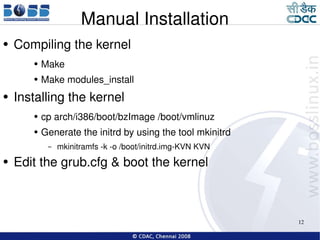
Manual Installation Compiling the kernel Make  Make modules_install Installing the kernel cp arch/i386/boot/bzImage /boot/vmlinuz Generate the initrd by using the tool mkinitrd mkinitramfs -k -o /boot/initrd.img-KVN KVN Edit the grub.cfg & boot the kernel
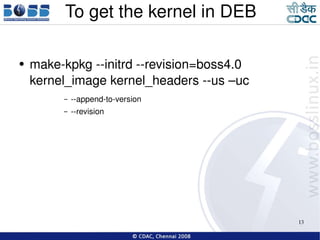
To get the kernel in DEB make-kpkg --initrd --revision=boss4.0 kernel_image kernel_headers --us –uc --append-to-version --revision
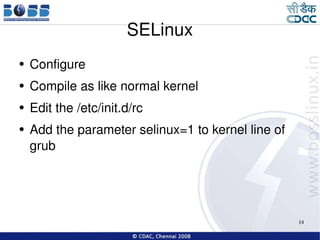
SELinux Configure Compile as like normal kernel Edit the /etc/init.d/rc Add the parameter selinux=1 to kernel line of grub

Kernel compilation

  • 1.
    OTP Training - Ganesh M C
  • 2.
    Drivers and thekernel UNIX system has three layers: The hardware The operating system kernel The user-level programs Kernel Kernel hides the hardware, provides a abstract, high-level programming interface Process Signal and semaphores Virtual memory The filesystem Interprocess communication   Kernel contains device drivers that manage its interaction with specific pieces of hardware. Size of kernel
  • 3.
    Why Configure thekernel Generic kernel Many device drivers Optional packages Tailor the kernel for your need Less memory Well-tuned configuration Add support for new types of device Some system is simple Some may need to several steps. Read this: Building the kernel is not difficult; its just difficult to fix when you break it. Get a good reference book for your OS
  • 4.
    Kernel Source Repositoryhttp://kernel.org/ Is the place where you could get the kernel source Compile it according to your need
  • 5.
    Packages required tostart compilation apt-get install build-essential apt-get install bin86 kernel-package apt-get install module-init-tools initrd-tools apt-get install fakeroot apt-get install libncurses5-dev
  • 6.
    Kernel Compilation Decidewhere to build your kernel Good place is $HOME Deciding on a kernel version For any kernel version x.y.z, * x - This is the major revision number * y - This is the minor revision number, where: Even numbers indicate &quot;stable&quot; kernel releases Odd numbers indicate &quot;development&quot; or &quot;beta&quot; kernel releases which may be less stable. * z - This is the patch level of the kernel
  • 7.
    Downloading the maintainer-specificpatch. Unpacking the kernel source bash$ cd $HOME bash$ tar zxvf linux-x.y.z.tar.gz bash$ cd linux-x.y.z bash$ zcat ../patch-x.y.z-vrs1.gz | patch -p1 For Cross compilation linux/README and linux/Documentation/arm/README before proceeding. Both these files provide further useful information which may be specific to your kernel version.
  • 8.
    Configuration of thekernel build environment To use the default configuration present in kernel source bash$ make <machinename>_defconfig Copies the config of /linux-2.6-2.6.32/arch/x86/configs/i386_defconfig to .config In this case no need to run oldconfig To do manual configuration run the command $make menuconfig
  • 9.
    Example for configurationSelecting necessary file systems File systems ---> Pseudo Filesystems ---> [*] /proc file system support [*] Virtual memory file system support (former shm fs) (Select one or more of the following options as needed by your system) Reiser, ext3, ext4, jfs, etc.,
  • 10.
    Selecting PPPoE necessarydrivers Device Drivers ---> Networking Support ---> <*> PPP (point-to-point protocol) support <*> PPP support for async serial ports <*> PPP support for sync tty ports
  • 11.
    Activating SMP supportProcessor type and features ---> [*] Symmetric multi-processing support Like that we can do for the following options Activating USB Support for Input Devices Enabling PCMCIA support
  • 12.
    Manual Installation Compilingthe kernel Make Make modules_install Installing the kernel cp arch/i386/boot/bzImage /boot/vmlinuz Generate the initrd by using the tool mkinitrd mkinitramfs -k -o /boot/initrd.img-KVN KVN Edit the grub.cfg & boot the kernel
  • 13.
    To get thekernel in DEB make-kpkg --initrd --revision=boss4.0 kernel_image kernel_headers --us –uc --append-to-version --revision
  • 14.
    SELinux Configure Compileas like normal kernel Edit the /etc/init.d/rc Add the parameter selinux=1 to kernel line of grub